

Automated email campaigns are pre-built email sequences that send based on a person’s behavior, timing, profile, or stage in the customer journey. They are not “set and forget” spam machines. Done well, they are structured systems that welcome new leads, educate buyers, recover lost sales, increase retention, and keep your brand useful between purchases.
The reason they work is simple: timing beats volume. A helpful email sent right after someone joins, browses, buys, abandons a cart, books a call, or goes quiet is more relevant than another generic newsletter blasted to everyone. That is why automated email campaigns matter for ecommerce brands, service businesses, creators, SaaS companies, agencies, and local businesses alike.
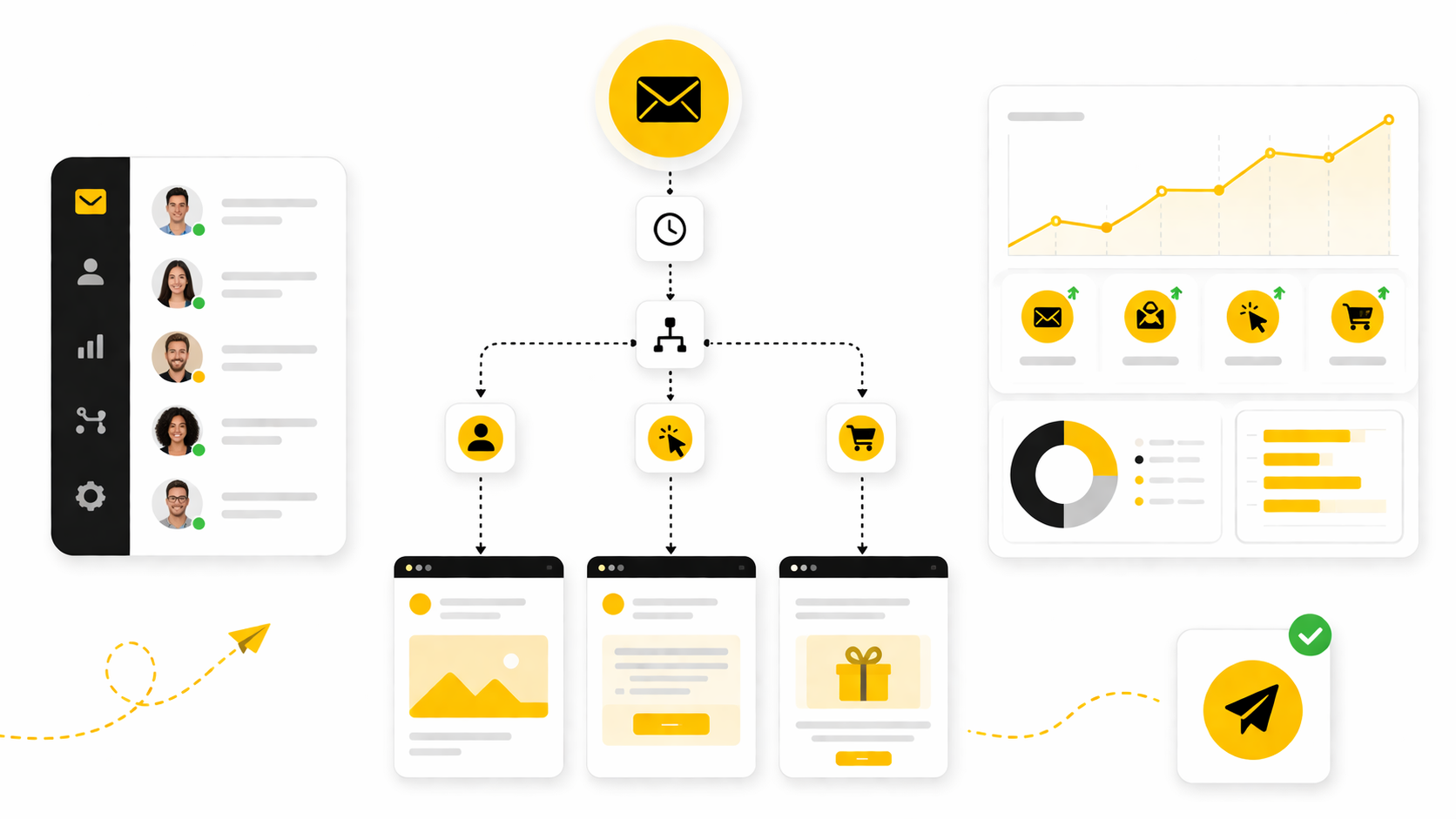
This article breaks the topic into six practical parts. The goal is not to make automation sound complicated. The goal is to show you how to build campaigns that feel human, protect deliverability, and create measurable business outcomes.
- Part 1: Automated Email Campaigns And Why They Matter
- Part 2: The Automated Email Campaign Framework
- Part 3: Core Components Of A High-Performing Automation System
- Part 4: Professional Implementation And Workflow Design
- Part 5: Optimization, Testing, And Deliverability
- Part 6: Tools, Use Cases, Measurement, And FAQ
Automated Email Campaigns And Why They Matter
Automated email campaigns matter because most buyers do not act the first time they hear from you. They need context, trust, proof, timing, and a clear next step. Automation gives you a way to deliver that without manually following up with every person on your list.
This is especially important because email is still one of the few channels where you own the relationship directly. Social reach can change overnight, ad costs can rise, and platform rules can shift. Your email list gives you a more stable asset, but only if your messages are relevant enough for people to keep opening them.
The strongest automated email campaigns are not built around random discounts. They are built around moments of intent. A new subscriber needs orientation, a cart abandoner needs reassurance, a past customer may need replenishment or education, and an inactive contact may need a reason to re-engage.
Framework Overview
A useful automation framework starts with the customer journey, not the software. Before choosing tools, tags, templates, or AI features, you need to understand the stages someone moves through before and after buying. Most campaigns fit into acquisition, activation, conversion, retention, reactivation, or referral.
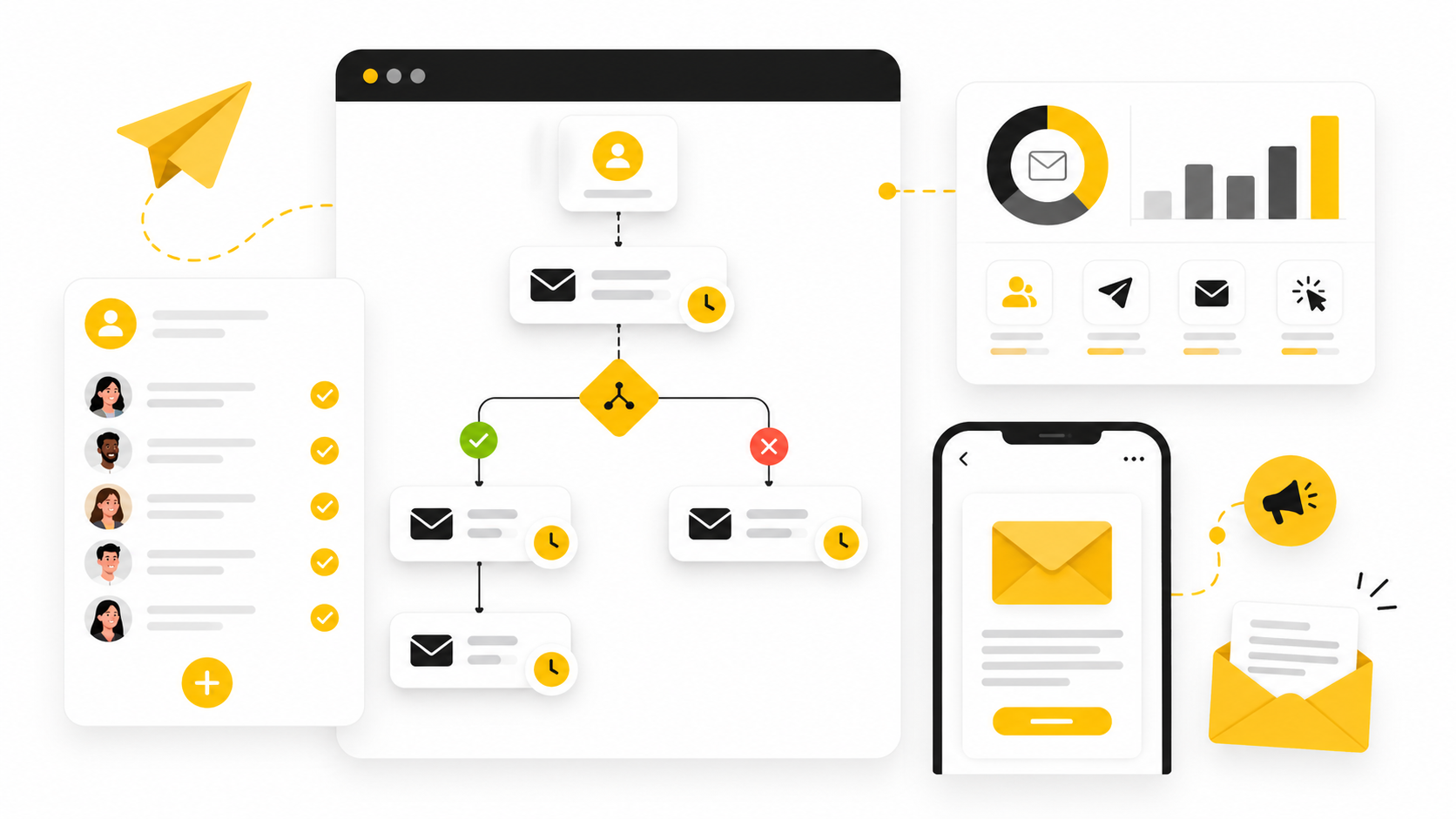
The framework is simple: trigger, segment, message, offer, measure, improve. The trigger tells the system when to send. The segment decides who should receive it. The message gives context. The offer creates momentum. Measurement shows what worked, and improvement keeps the system from going stale.
This is where tools can help, but the tool is not the strategy. Platforms like GoHighLevel, Brevo, Moosend, and Systeme.io can run the workflows, but the quality of the campaign still depends on your positioning, data, offer, and follow-up logic.
Core Components
Every automated email campaign needs a clear trigger. This could be a form submission, purchase, page visit, booking, abandoned checkout, lead score change, subscription renewal date, or inactivity window. Without a clear trigger, the campaign becomes a scheduled newsletter pretending to be automation.
The second component is segmentation. You should not talk to a first-time lead the same way you talk to a loyal customer. Segments can be based on behavior, lifecycle stage, purchase history, lead source, product interest, geography, engagement, or stated preference.
The third component is the message sequence itself. A good sequence has a job to do, and every email should move the reader one step closer to that job. That might mean getting a reply, booking a demo, completing checkout, using a product, upgrading, reviewing, referring, or coming back after a long silence.
Professional Implementation
Professional implementation starts with mapping the journey before writing emails. Sketch the path from first touch to conversion, then from conversion to repeat value. Once the journey is visible, it becomes much easier to decide which campaigns are essential and which ones are just noise.
For most businesses, the first campaigns to build are a welcome sequence, lead nurture sequence, abandoned cart or abandoned booking sequence, post-purchase sequence, reactivation sequence, and review or referral sequence. These cover the highest-leverage moments where timing and context make a real difference. After that, you can add more advanced flows based on scoring, product interest, customer value, and sales pipeline stage.
The big mistake is building too many automations before the basics work. Start with the flows closest to revenue and customer experience. Then tighten the copy, improve the segmentation, clean the data, and only then expand the system.
The Automated Email Campaign Framework
The best automated email campaigns start with one question: what should happen next for this person? Not what do you want to promote. Not what template looks nice. What should genuinely happen next based on what they just did, what they need, and how close they are to buying.
That shift matters because automation can either feel helpful or lazy. Helpful automation responds to intent. Lazy automation dumps every subscriber into the same sequence and hopes the volume makes up for weak relevance.
A practical framework keeps the system focused. It gives every campaign a clear role, every trigger a reason to exist, and every email a job that supports the customer journey.
Start With The Customer Journey
Before writing a single subject line, map the stages people move through. A simple version is enough: visitor, subscriber, engaged lead, buyer, repeat buyer, inactive contact, and advocate. You do not need a giant whiteboard full of arrows to make this useful.
Each stage has a different question in the customer’s mind. A new subscriber may be asking, “Can I trust this brand?” A warm lead may be asking, “Is this right for me?” A buyer may be asking, “Did I make a good decision?” Your automation should answer the question that belongs to the stage.
This is why automated email campaigns work best when they are built around lifecycle intent. A welcome sequence should not behave like a flash sale. A post-purchase sequence should not pretend the person is still deciding whether to buy.
Define The Trigger
A trigger is the event that starts the automation. It could be a form submission, product view, abandoned cart, completed checkout, booked call, missed appointment, tag change, lead score update, renewal date, or period of inactivity. The cleaner the trigger, the cleaner the campaign.
Weak triggers create messy campaigns. If “joined the list” is the only trigger you use, everyone receives the same message regardless of what they wanted. Strong triggers help you respond to behavior with context.
This is where you need discipline. Do not create triggers just because your platform allows it. Create them when the behavior tells you something useful about timing, intent, or customer need.
Segment Before You Send
Segmentation decides who should receive the campaign and who should not. This protects the customer experience. It also protects performance because irrelevant automation burns trust faster than almost anything else.
Useful segments usually come from behavior, purchase history, lead source, product interest, customer value, engagement level, or lifecycle stage. A person who downloaded a beginner checklist should not automatically receive the same sales sequence as someone who visited your pricing page three times. Those two people may both be leads, but they are not in the same mental state.
Keep segmentation practical in the beginning. Start with a few meaningful differences instead of building a complicated tagging system nobody can maintain. Simple segments used consistently beat clever segments that break after two weeks.
Match The Message To The Moment
The message should fit the trigger. If someone just subscribed, orient them. If someone abandoned checkout, reduce friction. If someone just purchased, confirm the decision and help them get value quickly.
This sounds obvious, but many businesses get it wrong. They use automation to push whatever campaign they already wanted to send. The result is a message that technically arrived at the right time but emotionally feels off.
A strong email sequence usually moves from context to value to action. First, acknowledge the situation. Then help the reader understand something useful. Then give them the next step.
Build Around One Primary Goal
Every automation needs one primary goal. A welcome campaign might aim to turn a new subscriber into an engaged lead. An abandoned cart campaign might aim to recover a purchase. A reactivation campaign might aim to identify who still wants to hear from you.
The goal decides the copy, timing, offer, and measurement. Without a goal, the campaign becomes a pile of emails. With a goal, every email earns its place.
Do not overload one sequence with five competing outcomes. If you want someone to book a call, do not also ask them to read three articles, follow you on social, download another lead magnet, and browse unrelated products. One campaign, one main job.
Choose The Right Automation Depth
Not every business needs advanced branching on day one. A small business with a simple offer may only need a clean welcome flow, follow-up flow, and reactivation flow. A larger ecommerce brand may need behavior-based flows tied to product categories, customer value, replenishment windows, and buying frequency.
The right level of automation depends on volume, data quality, offer complexity, and team capacity. If you cannot review and maintain the workflows, do not build a maze. Broken automation is worse than simple automation because it scales confusion.
A good rule is to build the shortest workflow that can do the job properly. Then improve it with data. Complexity should be earned, not assumed.
Connect Email With The Rest Of The Funnel
Automated email campaigns should not live in isolation. They should connect with landing pages, forms, checkout pages, calendars, CRM stages, sales follow-up, SMS, chat, and retargeting where relevant. The customer does not experience your business in separate tools, so your automation should not be designed that way either.
For example, a lead who books a call should stop receiving generic nurture emails and move into a booking confirmation or pre-call sequence. A buyer should leave the sales sequence and enter onboarding or post-purchase education. A contact who becomes inactive should not keep receiving increasingly aggressive promotions forever.
This is where all-in-one systems can be useful. A platform like GoHighLevel can connect email, CRM, forms, booking, pipelines, and follow-up in one place, which is especially helpful for agencies and service businesses. For simpler list-based campaigns, tools like Brevo or Moosend can be a cleaner fit.
Measure The Step That Matters
Open rates can help you diagnose attention, but they should not be the main scoreboard. The real question is whether the automation moved the person forward. That might mean a click, reply, checkout recovery, booked call, product activation, repeat order, review, referral, or retained subscriber.
The metric should match the campaign’s job. A post-purchase education sequence may not need a huge click rate if its purpose is to reduce confusion and improve customer success. A sales sequence, on the other hand, should be judged by qualified actions, not just engagement.
This is also why you should avoid comparing every campaign against one universal benchmark. A high-intent abandoned cart flow and a long-term nurture sequence do different jobs. Judge each automation by the business outcome it was built to create.
Core Components Of A High-Performing Automation System
Once the framework is clear, the next step is building the parts that make automated email campaigns actually run. This is where strategy turns into execution. You are no longer thinking only about stages and goals; you are deciding what data enters the system, what rules control the journey, and what messages move people forward.
A high-performing automation system does not need to be huge. It needs to be clear, reliable, and easy to improve. The best setup is usually the one your team can understand six months from now without guessing why a tag, delay, or branch was added.
Clean Entry Points
Every automation starts with an entry point. This might be a lead magnet form, checkout, booking page, webinar signup, quiz result, contact import, CRM stage change, or product purchase. The entry point matters because it sets the context for everything that follows.
If someone joins from a buyer-intent page, their first email should not sound like they casually found your newsletter. If someone joins from a beginner guide, they probably need education before a direct offer. Context is not a small detail here; it is the difference between relevance and noise.
The cleanest systems use specific entry points instead of vague ones. “Downloaded pricing guide” tells you more than “joined list.” “Booked strategy call” tells you more than “submitted form.” Better input creates better automation.
Reliable Data And Tags
Your automated email campaigns are only as smart as the data behind them. If tags are inconsistent, fields are outdated, and purchase data does not sync properly, the workflow will make bad decisions. Automation does not fix messy data; it multiplies it.
Start with a simple naming system. Use tags or fields for source, interest, lifecycle stage, purchase status, engagement level, and exclusion rules. Keep the structure readable so anyone can understand what a tag means without needing a private explanation.
This is also where integrations matter. If your checkout, CRM, forms, calendar, and email platform do not share the right data, you will end up with awkward customer experiences. Tools like GoHighLevel can reduce that friction for service businesses because the CRM, forms, calendars, pipelines, and follow-up tools can sit in the same ecosystem.
A Practical Workflow Map
Before building inside software, map the workflow in plain language. Write the trigger, the audience, the goal, the emails, the delays, the exits, and the success metric. This prevents the classic mistake of building a beautiful automation that nobody can explain.
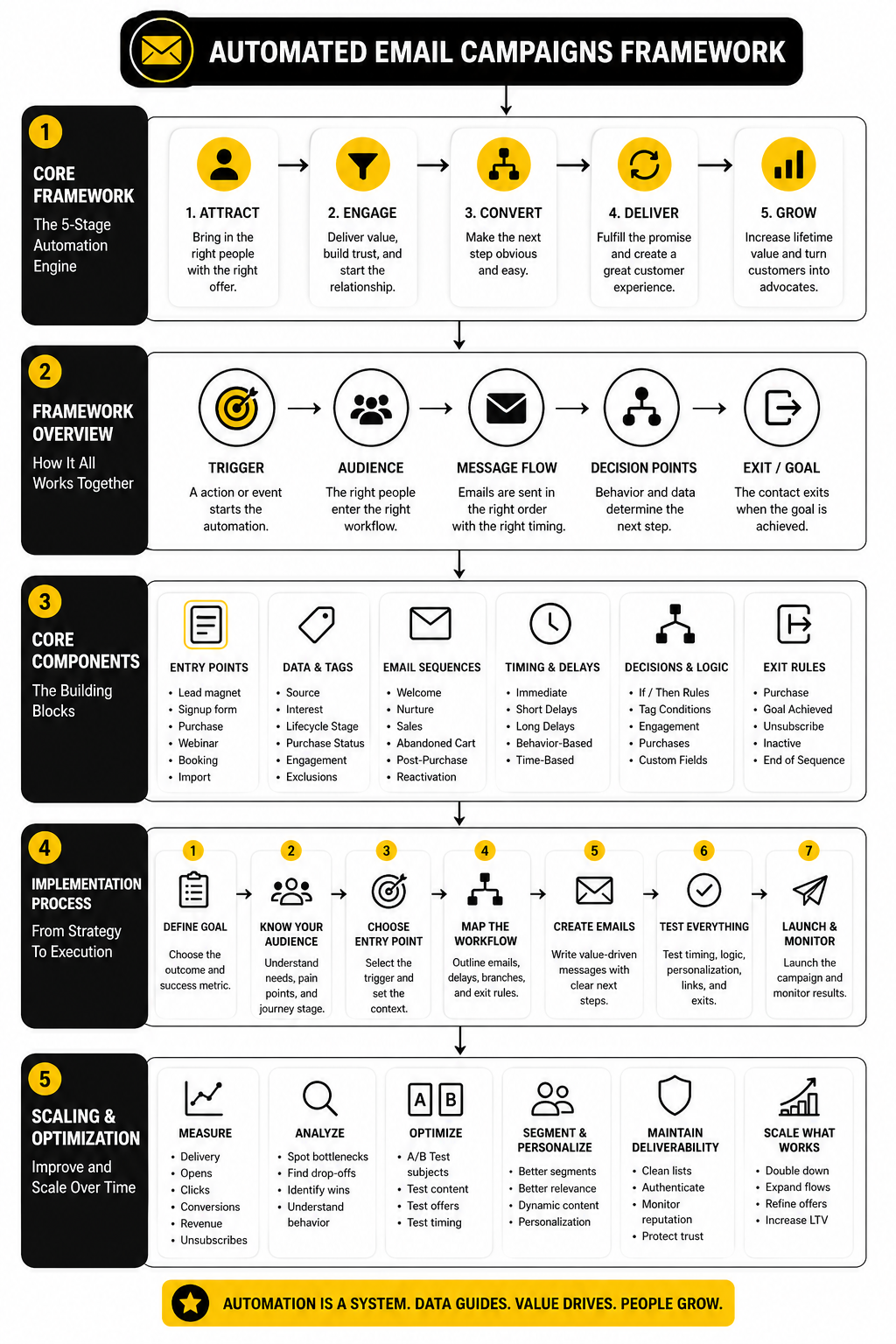
A useful workflow map does not need to be complicated. It can look like this:
- Contact submits the lead magnet form.
- System adds the source and interest tags.
- Email 1 delivers the promised resource immediately.
- Email 2 gives context and helps the reader avoid a common mistake.
- Email 3 introduces the next logical offer.
- Contact exits the sequence if they buy, book, unsubscribe, or become inactive.
- Results are reviewed by clicks, replies, conversions, and unsubscribes.
That sequence is simple, but it is already more professional than most random follow-up campaigns. It has a clear entry, a clear reason for each message, and a clear exit. That is what makes automation manageable.
Timing And Delay Logic
Timing is one of the most underrated parts of automated email campaigns. Send too quickly and you feel pushy. Wait too long and the intent cools down. The right timing depends on the action that triggered the sequence.
Immediate delivery works well when someone requested a resource, receipt, confirmation, or access. Short delays work well when someone needs a reminder, reassurance, or next step. Longer delays fit education, onboarding, replenishment, renewal, or reactivation.
Do not copy timing from another brand without thinking. A B2B consulting lead, a skincare buyer, and a course subscriber do not move at the same speed. Use the customer’s decision cycle as the guide.
Exit Rules And Suppression Logic
Exit rules decide when someone should leave a campaign. This is not optional. Without exit rules, people keep receiving messages that no longer make sense.
A lead should exit a sales nurture sequence when they buy or book. A buyer should exit an abandoned cart flow when the order is completed. An inactive contact should stop receiving reactivation emails once they click, reply, unsubscribe, or reach the end of the campaign.
Suppression logic is just as important. You may want to suppress recent buyers from heavy promotions, active sales conversations from generic newsletters, or unsubscribed contacts from all marketing messages. These rules keep the experience clean and prevent your automation from fighting itself.
Email Copy That Feels Human
Automation should not sound automated. The copy still needs a human reason to exist. Each message should acknowledge the reader’s situation, deliver value, and make the next step feel obvious.
Good automated email copy is usually direct. It avoids fake urgency, over-personalization, and robotic “just checking in” language. It sounds like a helpful person continuing a conversation, not a system firing templates.
The easiest way to improve the copy is to ask one question before writing each email: why would the reader be glad this arrived now? If you cannot answer that, the email probably does not belong in the sequence.
Testing Before Launch
Before any workflow goes live, test it like a customer. Submit the form, trigger the tag, place a test order, book the call, abandon the checkout, and click through every branch. Do not assume the automation works because the diagram looks right.
Check the timing, personalization fields, links, mobile formatting, unsubscribe link, sender name, reply address, and exit rules. Also check what happens when someone takes the desired action halfway through the sequence. That is where many campaigns break.
This step is boring until it saves you from embarrassing mistakes. A broken link in a welcome email, a buyer receiving a discount after paying full price, or a lead getting duplicate reminders can damage trust fast. Test first, then scale.
Statistics And Data
Measurement is where automated email campaigns become a business system instead of a content calendar. You are not tracking numbers to feel good about a dashboard. You are tracking signals that tell you whether the right people are receiving the right message at the right time.
Benchmarks can help, but they should never become the whole strategy. A campaign with a lower open rate can still make more money if it reaches higher-intent buyers. A campaign with a strong click rate can still be weak if the landing page, offer, or checkout process fails after the click.
The better question is not, “Are my numbers good?” The better question is, “What does this number tell me to fix next?”
The Metrics That Actually Matter
Open rate shows whether the subject line, sender name, timing, and audience match are getting attention. It is useful, but it is not perfect. Privacy changes and inbox behavior can make opens less reliable than they used to be, so treat open rate as a directional signal, not proof of success.
Click rate shows whether the email created enough interest for someone to take action. This is usually a stronger signal than opens because the person did something measurable. If opens are healthy but clicks are weak, the problem is usually message relevance, offer clarity, email structure, or call-to-action strength.
Conversion rate shows whether the campaign produced the intended outcome. That outcome might be a purchase, booked call, reply, product activation, upgrade, renewal, or referral. This is where automated email campaigns should ultimately be judged, because the job of automation is movement, not vanity engagement.
Benchmarks Need Context
A broad benchmark can give you a starting point, but it cannot tell you whether your campaign is strategically strong. Mailchimp’s benchmark data shows an all-user average open rate of 35.63% and average click rate of 2.62%, while ecommerce sits lower at 29.81% open rate and 1.74% click rate. That does not mean an ecommerce automation at 2% click rate is automatically weak, and it does not mean a service business at 4% is automatically strong.
MailerLite’s 2025 benchmark data reports an average open rate of 43.46% and click rate of 2.09%. Those numbers are useful, but they also show why comparing platforms blindly can mislead you. Different industries, list quality, send types, data collection methods, and user bases can produce very different averages.
Use benchmarks as a diagnostic range, not a verdict. If your open rate is far below similar brands, inspect deliverability, subject lines, sender reputation, and list quality. If your click rate is weak despite good opens, inspect the email body, offer, and audience match.
Automation Performance Is Different From Newsletter Performance
Automated email campaigns usually behave differently from scheduled campaigns because they are triggered by behavior. Someone who just abandoned a cart, requested a guide, booked a call, or viewed a product has stronger context than someone receiving a general newsletter. That context often makes the message more relevant.
Omnisend’s ecommerce research found that automated emails generated 37% of email sales from just 2% of email volume. That is the kind of number that matters because it explains the leverage of behavior-based messaging. The point is not to send less email for the sake of sending less email; the point is to build flows that meet people at moments of intent.
More recent Omnisend data also reported that automated emails had 52% higher open rates, 332% higher click rates, and far stronger conversion rates than regular scheduled campaigns. Do not read that as a promise that every automation will crush every broadcast. Read it as evidence that triggered relevance usually beats generic timing.
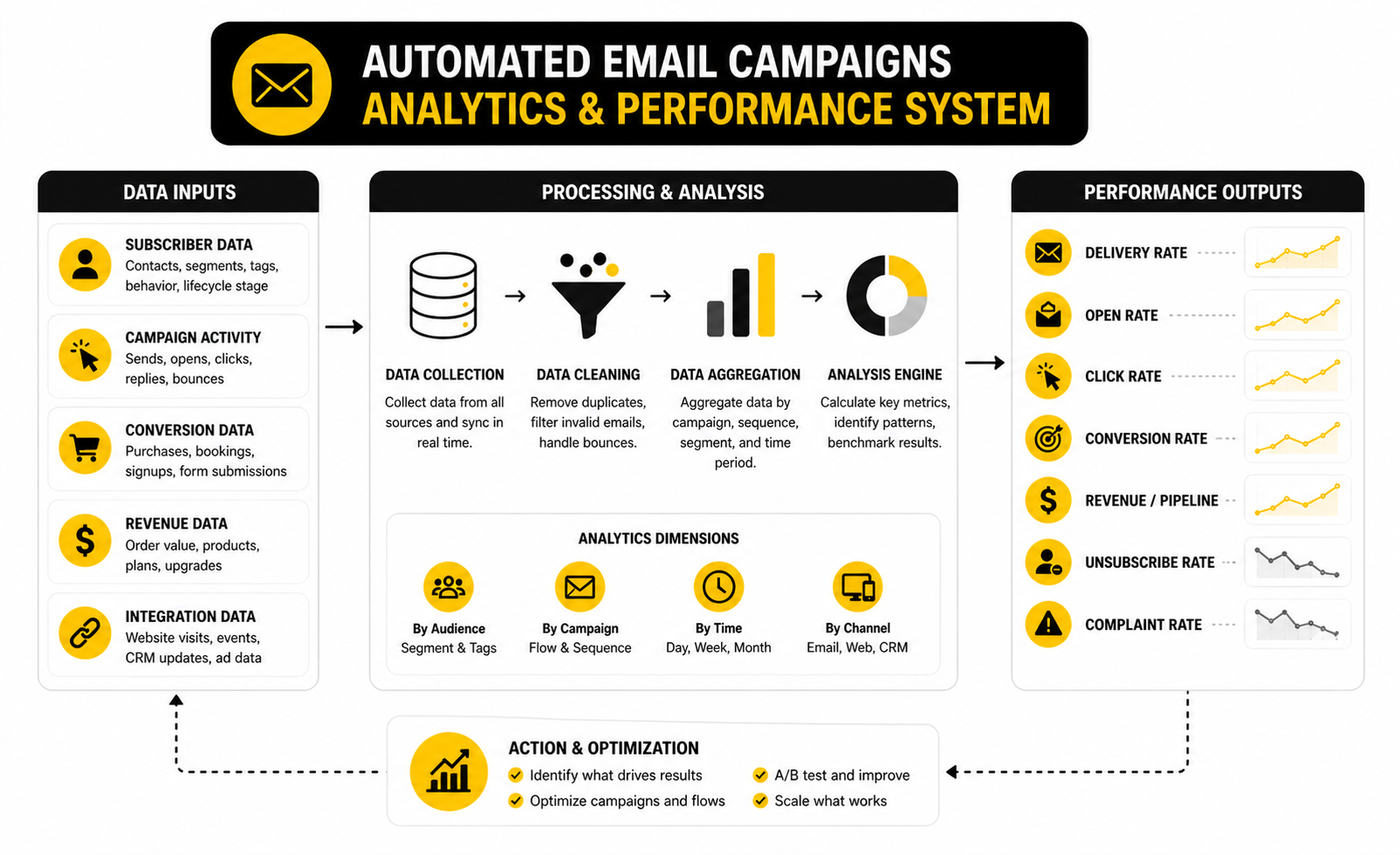
Build A Simple Analytics System
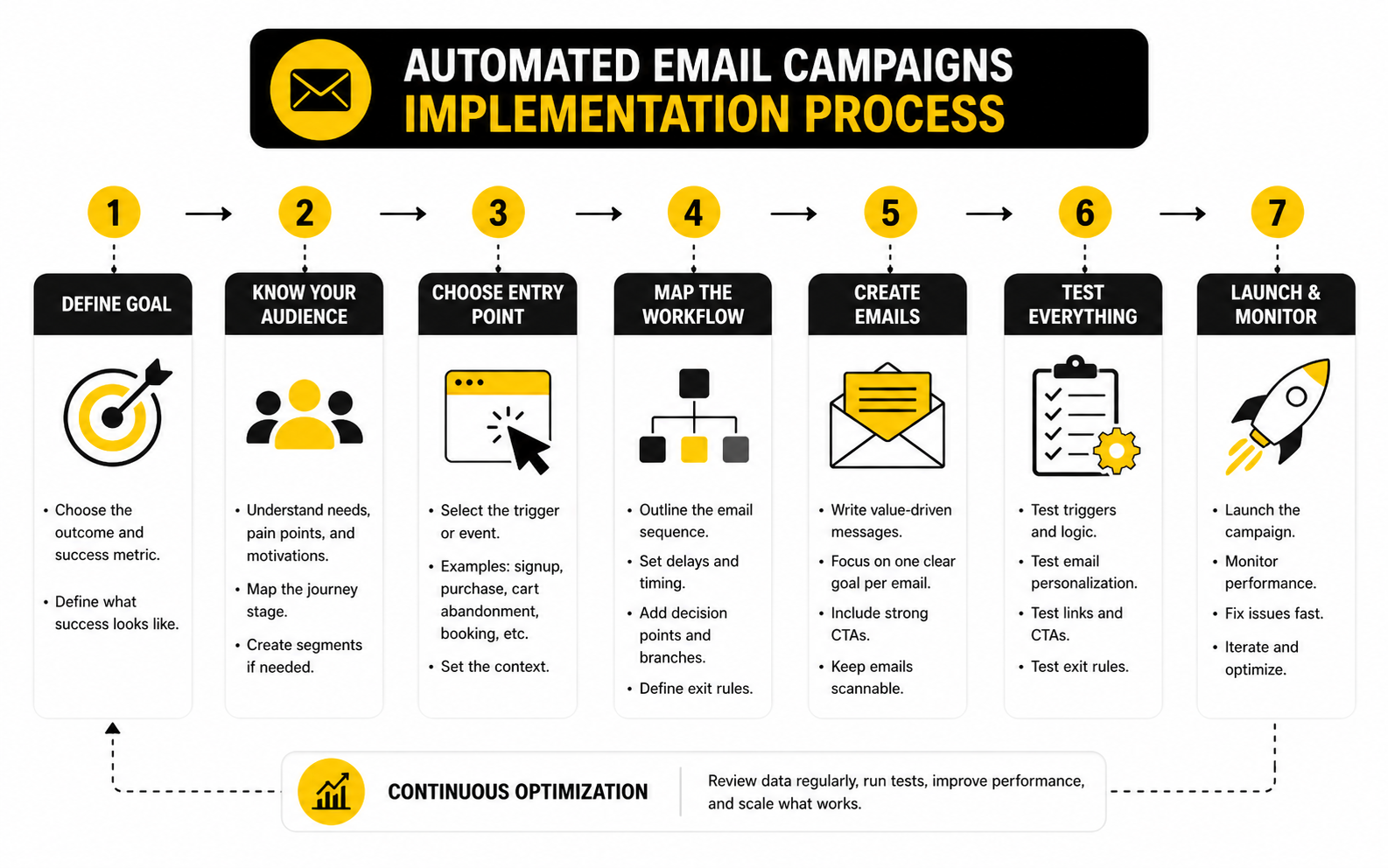
A practical analytics system should connect each campaign to one primary business outcome. You do not need twenty metrics for every workflow. You need the few numbers that explain whether the campaign is moving people forward or leaking attention.
For most automated email campaigns, track these in order:
- Delivery rate to confirm the email is reaching recipients.
- Open rate to diagnose attention and inbox fit.
- Click rate to measure interest and message strength.
- Conversion rate to measure the intended action.
- Revenue or pipeline value to connect the campaign to business impact.
- Unsubscribe and complaint rate to protect trust and deliverability.
The order matters. If delivery is poor, do not obsess over copy. If opens are poor, do not blame the landing page yet. If clicks are strong but conversions are weak, the problem likely happens after the email.
Read Performance Signals Like A Practitioner
Low opens usually point to weak subject lines, poor sender trust, bad timing, list fatigue, or deliverability issues. Before rewriting the whole sequence, check whether the right people are receiving it and whether the sender identity is recognizable. Many brands try to fix subject lines when the real issue is a cold or poorly sourced list.
Low clicks with strong opens usually means the email failed to create enough momentum. The offer may be unclear, the body may be too long, the call to action may be buried, or the reader may not believe the next step is worth it. This is a copy and positioning problem more often than a design problem.
Low conversions with strong clicks means the email did its first job, but the next step failed. Look at the landing page, checkout flow, booking page, pricing clarity, page speed, mobile experience, and offer alignment. Do not punish the email for a broken destination.
Measure Each Automation By Its Job
A welcome sequence should be measured by early engagement, clicks to key pages, replies, first purchases, booked calls, or product activation. An abandoned cart flow should be measured by recovered revenue, checkout completion rate, and margin impact. A post-purchase flow should be measured by repeat purchase, reduced support friction, review generation, onboarding completion, or retention.
This is why one dashboard cannot judge every campaign the same way. A reactivation sequence may have lower engagement than a welcome sequence and still be profitable if it brings back dormant buyers. A referral sequence may have modest clicks but meaningful value if a small group of loyal customers shares it.
The campaign’s purpose decides the scoreboard. Once you know the scoreboard, optimization becomes much easier. You stop asking vague questions and start making precise improvements.
Turn Data Into Action
Data only matters when it changes what you do next. If open rates are weak, test sender name, subject line angle, preview text, list segment, and send timing. If clicks are weak, tighten the message, improve the offer, reduce distractions, and make the call to action more obvious.
If conversions are weak, inspect the post-click experience before rewriting every email. A strong campaign can still underperform when the landing page creates friction. For funnel-heavy businesses, tools like ClickFunnels or Systeme.io can help keep the email-to-page journey cleaner when the offer depends on a structured conversion path.
The most important habit is regular review. Check automation performance monthly, not once a year. Automated email campaigns are living systems, and the brands that win keep improving the system instead of assuming the first version is final.
Optimization, Testing, And Deliverability
At this stage, the system is built, measured, and connected to real business outcomes. Now the work becomes sharper. Automated email campaigns improve when you make controlled changes, protect inbox placement, and scale only what is already working.
This is where beginners often get impatient. They see one weak metric and rewrite everything. Professionals isolate the problem, test one meaningful variable, and keep the rest of the system stable enough to learn from.
Test One Lever At A Time
Testing only works when you know what you are testing. If you change the subject line, offer, layout, timing, and audience at the same time, you may get a better result, but you will not know why. That makes the next decision harder.
Start with the lever closest to the problem. Low opens usually justify testing subject lines, sender names, preview text, or timing. Low clicks usually justify testing the email angle, call to action, layout, offer framing, or audience segment.
Give each test enough volume and time to matter. A tiny sample can lie to you. A one-day result can be noise. The goal is not to “win” a test quickly; the goal is to learn what reliably improves the campaign.
Protect Deliverability Before You Scale
Deliverability is not a technical side quest. It is the foundation of automated email campaigns because the best sequence in the world does nothing if it lands in spam. Before scaling volume, make sure your sending domain, authentication, list quality, and complaint rates are healthy.
Gmail and Yahoo have pushed senders toward stronger authentication and easier unsubscribes, including SPF, DKIM, DMARC, and one-click unsubscribe expectations for bulk senders. Yahoo also tells senders to make unsubscribing obvious and process requests quickly through its sender best practices. The practical takeaway is simple: make your emails wanted, authenticated, and easy to leave.
Microsoft has also emphasized authentication, bounce management, and list hygiene in its Outlook high-volume sender requirements. That is not just a compliance detail. Inbox providers are rewarding responsible sending behavior and filtering out lazy volume.
Use List Hygiene As A Growth Tool
List hygiene sounds negative because people think it means deleting potential customers. In reality, it protects the people who still want to hear from you. A smaller engaged list often beats a bigger tired list.
Create a simple inactivity policy. For example, if someone has not opened, clicked, purchased, replied, or visited from email for a defined period, move them into a reactivation path instead of continuing to send every campaign. If they still do not engage, reduce frequency or suppress them from most promotional sends.
Adobe’s deliverability guidance warns that old or abandoned addresses can become risky over time and recommends regular suppression of inactive users as part of good list hygiene through its email deliverability best practices. That is the hidden tradeoff: keeping every address may feel like growth, but it can quietly damage reach to your best subscribers.
Avoid Automation Overlap
As your system grows, overlapping workflows become one of the biggest risks. A lead might enter a nurture sequence, a booking reminder, a webinar follow-up, and a promotion at the same time. Technically, everything is working. Strategically, the customer experience is a mess.
Use priority rules to decide which messages matter most. Transactional and confirmation emails should usually take priority. Sales conversations, booked calls, onboarding, and post-purchase communication should override generic nurture whenever the context changes.
This is also why exclusion rules matter so much. A person should not receive a “still thinking it over?” email after they already bought. A client in onboarding should not get pushed into a lead-generation campaign. Automation should feel aware, not blind.
Scale With Segments, Not Noise
Scaling automated email campaigns does not mean adding more emails to every sequence. It usually means making the system more specific. Better segments, better triggers, better offers, and better timing scale cleaner than simply increasing frequency.
The tradeoff is complexity. More segments can improve relevance, but they also create more workflows to maintain. More personalization can improve performance, but it also increases the risk of broken fields, awkward copy, and data mistakes.
Scale only where the data supports it. If a product category has strong repeat purchase behavior, build a dedicated post-purchase flow. If one lead source converts differently from another, adjust the nurture path. If a segment is too small or too unstable, keep the campaign simpler.
Be Careful With AI Personalization
AI can help with subject line variations, segmentation ideas, content drafts, behavior analysis, and workflow planning. Used well, it speeds up the boring parts and gives your team more angles to test. Used badly, it fills inboxes with polished nonsense.
The risk is pretending that personalization equals relevance. Dropping a first name into a weak message is not personalization. Sending a useful email based on real behavior, preference, lifecycle stage, or purchase context is personalization.
Use AI to support judgment, not replace it. Keep human review on copy, offers, compliance, and sensitive customer segments. The more automated the system becomes, the more important it is to preserve trust.
Know When Not To Automate
Some moments should not be fully automated. High-value sales conversations, customer complaints, refund issues, complex onboarding problems, and sensitive relationship moments often need a real person. Automation can route, remind, and prepare, but it should not pretend to care when a human response is needed.
This is especially important for service businesses and agencies. A workflow can confirm a booking, send preparation notes, and follow up after a call. But the actual relationship still depends on listening, judgment, and timing.
The strongest systems combine automation with human touch. Let software handle consistency. Let people handle nuance. That balance is where automated email campaigns become more than a sequence of messages; they become a dependable customer journey.
Tools, Use Cases, Measurement, And FAQ
The final layer is the ecosystem around your automated email campaigns. You need the platform, the funnel, the data source, the content, the analytics, and the human review process to work together. When those pieces are connected, automation stops feeling like a stack of separate tools and starts behaving like one customer journey.
For service businesses and agencies, GoHighLevel is useful when CRM, pipelines, calendars, forms, email, SMS, and client follow-up need to live close together. For leaner email-first systems, Brevo and Moosend can fit teams that want practical automation without overbuilding. For creators, coaches, and funnel-heavy offers, Systeme.io and ClickFunnels make sense when the email sequence is tightly connected to landing pages, checkout, upsells, and offer delivery.
The right tool is the one that supports your workflow without forcing unnecessary complexity. A simple business can win with a simple system. A complex business needs stronger segmentation, cleaner attribution, and tighter operational control.
FAQ - Built For Complete Guide
What are automated email campaigns?
Automated email campaigns are email sequences that send based on timing, behavior, customer data, or lifecycle stage. They can welcome new subscribers, nurture leads, recover abandoned carts, onboard buyers, request reviews, or reactivate inactive contacts. The main advantage is that the message is triggered by context instead of being manually sent every time.
Why are automated email campaigns important?
They help businesses follow up consistently without relying on memory or manual work. They also make communication more relevant because the email can respond to what someone actually did. That relevance is what makes automation more powerful than generic batch-and-blast email.
What is the first automated email campaign I should build?
Start with the campaign closest to your biggest business leak. If new leads go cold, build a welcome or nurture sequence. If shoppers abandon checkout, build an abandoned cart flow. If customers buy once and disappear, build a post-purchase or retention sequence.
How many emails should an automated campaign include?
Most campaigns work best with three to seven emails, depending on the goal and buying cycle. A simple welcome flow may only need three strong messages. A higher-ticket offer may need more education, proof, objection handling, and follow-up.
How often should automated emails be sent?
The timing should match the customer’s intent. A resource delivery email should send immediately, while nurture emails may be spaced one to three days apart. Post-purchase and retention emails often need longer gaps because the customer needs time to use the product or service.
What metrics should I track?
Track delivery rate, open rate, click rate, conversion rate, revenue or pipeline value, unsubscribe rate, and complaint rate. Do not treat every metric equally. The campaign’s main goal should decide which metric matters most.
Are open rates still reliable?
Open rates are useful, but they are not perfect. Privacy features and inbox behavior can make opens less precise than clicks or conversions. Use open rate as a directional signal, then judge the campaign by stronger actions like clicks, replies, bookings, purchases, or renewals.
What is the difference between a newsletter and an automated campaign?
A newsletter is usually sent manually or on a schedule to a broad audience. An automated campaign sends when a specific trigger or condition is met. Newsletters are useful for ongoing communication, while automation is better for timely follow-up around specific moments.
Can AI write automated email campaigns?
AI can help draft ideas, subject lines, outlines, and variations. It should not replace strategy, customer understanding, or human review. The strongest campaigns still need real positioning, clear offers, accurate data, and copy that sounds like your brand.
What is the biggest mistake with automated email campaigns?
The biggest mistake is building too much before the basics work. Teams create complex branches, tags, and workflows before they have a strong offer, clean data, and clear message. Simple automation that performs is better than complicated automation nobody understands.
How do I avoid annoying subscribers?
Send based on relevance, not pressure. Use exclusion rules, frequency limits, clear unsubscribe options, and segments that reflect real customer behavior. If the email does not help the reader take a useful next step, it probably should not be sent.
When should I hire a professional?
Hire help when automation touches revenue, sales follow-up, deliverability, CRM structure, or multiple customer journeys. A professional can prevent messy data, broken workflows, weak attribution, and expensive deliverability mistakes. This is especially valuable when your list, ad spend, or sales pipeline is already large enough that small improvements create meaningful returns.
Work With Professionals
Explore 10K+ Remote Marketing Contracts on MarkeWork.com
Most marketers spend too much time chasing clients, competing on crowded platforms, and losing a percentage of every project to middlemen.
MarkeWork gives you a better way. Browse thousands of remote marketing contracts and connect directly with companies desperate to hire skilled marketers like you, without platform commissions and without unnecessary gatekeepers.
If you're serious about finding better opportunities and keeping 100% of what you earn, explore available contracts and create a profile for free at MarkeWork.com.