

AWeber email marketing is worth taking seriously for one simple reason: email still behaves like an owned asset when most digital channels feel rented. Litmus’s latest ROI snapshot shows many brands still report returns between 10:1 and 36:1, with a meaningful share climbing beyond that range. That does not mean every campaign prints money. It means businesses that build a clean list, send useful messages, and track real customer actions still have a major advantage.
AWeber sits in the part of the market where that advantage can actually be executed without a giant team. The platform is positioned as an email and automation solution for small businesses, and its current stack includes workflow automations, sign-up forms, integrations, and landing-page ecommerce through Stripe. For creators, consultants, local businesses, and lean ecommerce operators, that mix matters because the bottleneck is usually not strategy. It is getting the whole system live and working together.
The bigger shift is that modern email marketing is no longer just a copywriting game. Google’s sender guidelines changed the baseline for deliverability in 2024, and Litmus shows that more than half of email opens now happen on devices with Apple Mail Privacy Protection active. So the old playbook of blasting campaigns and celebrating inflated open rates is not enough anymore. AWeber email marketing works best when it is built around permission, segmentation, automation, and revenue-minded measurement.
If you already have other acquisition tools in place, AWeber can also sit inside a broader system instead of trying to do every job by itself. Some businesses pair email nurture with ManyChat for conversational lead capture, Fillout for cleaner form flows, or GoHighLevel when they want a heavier CRM and funnel layer. The right stack is the one that keeps subscriber data moving in one direction and makes follow-up easier, not more complicated.
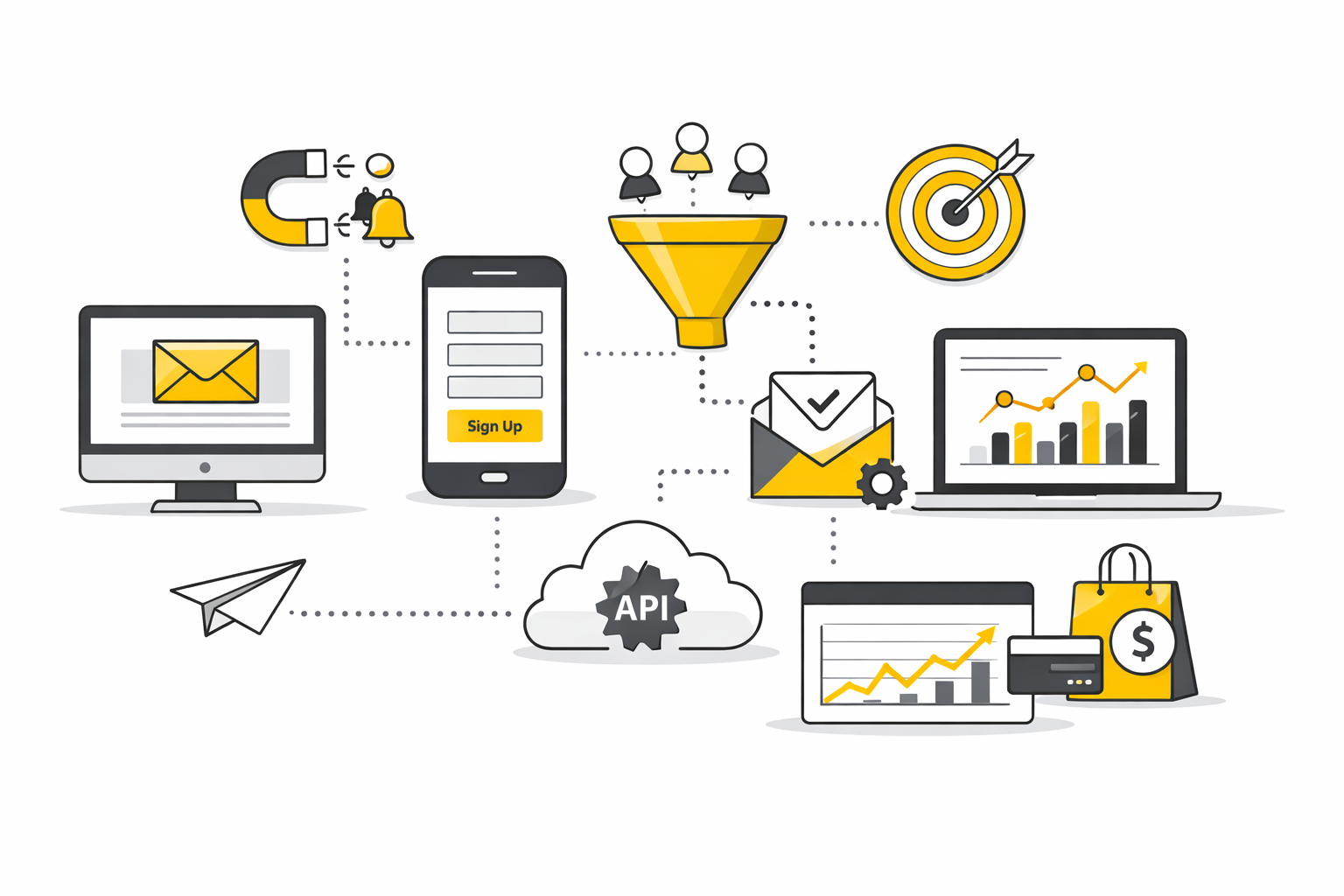
This article will continue in six parts:
- Why AWeber Email Marketing Still Matters
- The AWeber Growth Framework
- Core Components Inside AWeber
- How to Build a Professional AWeber Setup
- Metrics, Deliverability, and Optimization
- Advanced Tactics, Common Mistakes, and FAQ
Why AWeber Email Marketing Still Matters
AWeber matters because it solves the part of email marketing that breaks most small teams first: execution. Its own getting-started documentation frames the platform around subscribers, lists, workflows, forms, landing pages, emails, and analytics, which is exactly the operating core a business needs before it worries about fancy orchestration. A simple system you actually use will beat a more advanced system that never gets configured properly.
It also fits the way modern subscriber journeys really work. AWeber’s automation tools are built around triggers tied to subscriber actions, dates, or behaviors, while its tagging and segmentation model lets you group people with tags and save dynamic segments for future sends. That is enough to run the lifecycle sequences that move the needle for most businesses: welcome emails, lead-magnet follow-up, post-purchase education, interest-based broadcasts, and re-engagement.
The performance environment makes this structure more valuable than ever. MailerLite’s 2025 benchmark report put the average click rate at 2.09% and unsubscribe rate at 0.22%, while ActiveCampaign still treats anything below a 0.5% unsubscribe rate as healthy. Those numbers tell you something important: the inbox is competitive, unsubscribing is easier, and weak targeting gets punished fast. AWeber email marketing works when you use it to send more relevant messages to smaller, better-defined groups.
The AWeber Growth Framework
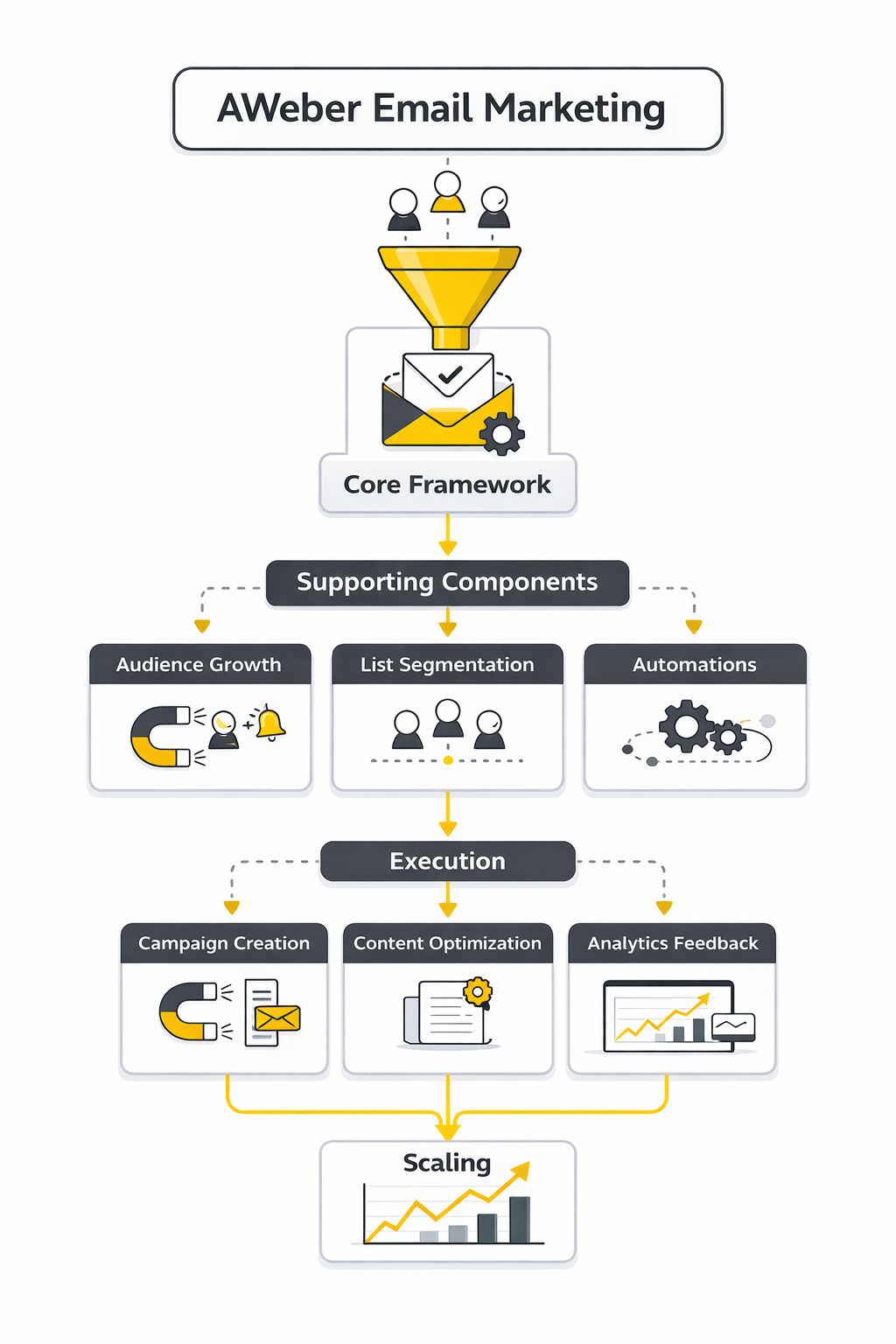
The cleanest way to think about AWeber is not as a newsletter tool but as a subscriber journey engine. The framework is simple: attract the right people, tag them by intent, move them through useful automations, and measure what they do after the click. That sounds basic, but it lines up directly with how AWeber structures forms and landing pages, workflows, tags and segments, and reporting.
- Capture permission-based subscribers AWeber’s form system is built to grow an email list across websites and social channels, and its landing-page tools can also support direct selling through built-in ecommerce elements. The real goal at this stage is not list size for vanity’s sake. It is getting the right people onto the list with a clear reason for joining.
- Tag intent as early as possible AWeber’s docs show that tags can be applied through forms, landing pages, imports, manual actions, and automations. That makes tags the practical bridge between acquisition and relevance. When someone joins from a webinar page, a product page, or a lead magnet, the tag should tell you what that person wants, not just where they came from.
- Automate the first meaningful journey AWeber workflows are designed to send timely emails based on subscriber behavior and other triggers. In practice, the first automation should do one job extremely well, whether that is onboarding, nurturing, or recovering interest after a quiet period. Businesses that need broader front-end orchestration sometimes connect this step to tools like Buffer for distribution or Cal.com for booking, but the email sequence itself still has to carry the relationship forward.
- Broadcast to segments, not to everyone Segments in AWeber are saved search criteria that update dynamically, which is a big deal for ongoing campaigns. It means you do not need a new list for every audience slice, and you do not need to guess who should receive what. Better broadcasts usually come from segment rules that reflect behavior, interests, recency, and customer stage.
- Judge success with business metrics AWeber’s reporting stack includes opens, clicks, unsubscribes, list growth, click tracking, sales tracking, and web analytics integration. Because Apple Mail Privacy Protection distorts a large share of opens and Google’s sender rules changed deliverability expectations, the smarter read is to treat opens as directional and clicks, conversions, revenue, spam complaints, and unsubscribes as the numbers that actually keep you honest. That shift is what turns AWeber email marketing from a sending habit into a measurable growth channel.
With the framework clear, the next layer is the set of core AWeber components that turn strategy into execution.
Core Components Inside AWeber
To turn the framework from Part 1 into something usable, you need to understand the moving parts inside the platform. AWeber’s own getting started guide breaks the system into subscribers, lists, workflows, forms, landing pages, emails, and analytics, and that is the right way to think about it. AWeber email marketing gets easier the moment you stop treating the platform like a single tool and start treating it like a connected system.
Sign-Up Forms and Landing Pages
The first job is capture, and AWeber gives you two direct ways to do it: sign-up forms and landing pages. Forms are usually the better choice when you already have a website, traffic, and clear places where people are ready to subscribe. Landing pages make more sense when you want one focused page with one focused action and no navigation clutter pulling attention away.
AWeber’s form builder is practical because it is designed for publishing flexibility, not just design polish. The platform recommends using its own sign-up form generator because it is easier to integrate, less error-prone, and easier for support to troubleshoot when something breaks. That matters more than most people think, because a form that looks good but drops leads is worse than a simpler form that reliably adds subscribers every day.
The landing page builder becomes more valuable when speed matters. AWeber’s documentation shows you can build pages directly inside the platform with drag-and-drop blocks and templates, which is enough for lead magnets, webinar registration, waitlists, and basic product offers. For a business that needs a more aggressive funnel structure, richer ecommerce page control, or heavier experimentation, it can make sense to keep AWeber as the email engine and use tools like Replo or ClickFunnels on the front end.
Lists, Tags, Segments, and Custom Fields
This is where most email setups either become smart or messy. AWeber still uses lists as a core organizing layer, but the real precision comes from tags, segments, and custom fields. If you ignore those layers, every message starts looking like a generic broadcast to a crowd.
Tags are the fastest way to describe intent. AWeber defines them as keywords or phrases you can use to group subscribers and assign specific content, and that sounds simple because it is simple. A subscriber who joined from a pricing page should not look identical to one who downloaded a beginner guide, and tags give you a lightweight way to preserve that difference from the first moment of signup.
Segments make those tags usable at send time. AWeber describes a segment as a dynamic collection of subscribers based on search criteria, which means you are not rebuilding audiences every time you want to send a targeted campaign. You save the logic once, and the segment updates as subscriber behavior changes.
Custom fields are the part many businesses underuse. AWeber lets you collect up to 25 custom fields beyond standard name and email, which is enough to capture things like business type, product interest, appointment status, service location, or customer stage. That does not mean you should ask for everything up front. It means you can collect the minimum information at signup and still design a data model that gets smarter over time.
Workflows, Broadcasts, and Message Personalization
Workflows are where AWeber starts behaving like a real lifecycle platform instead of a newsletter sender. The platform says workflows let you send the right message to the right person at the right time, and the available actions include Starter, Message, Wait, Tag, Check Feed, and Split Path. That is more than enough to build welcome series, lead nurturing, content follow-up, and simple branching journeys.
The important distinction is this: workflows handle timed journeys, while broadcasts handle one-time communication. AWeber’s own documentation shows you can use tags from workflows to create segments for targeted broadcasts, which is exactly how a clean account should work. Automation moves the relationship forward in the background, and broadcasts let you speak to the right slice of the list when something timely happens.
Personalization matters here, but not in the cheesy first-name subject line way that marketers still overdo. AWeber supports personalization variables and dynamic greeting options, which is useful when you have data worth using. The key is to personalize around relevance first and merge fields second. A message feels personal when it matches the subscriber’s situation, not just when it inserts their name.
Reporting, Web Analytics, and Integrations
AWeber email marketing becomes much more effective when you stop guessing what subscribers are doing after the click. The platform’s reporting layer covers click tracking, message metrics, and broader analytics, while subscriber profiles can also show visited pages and recorded sales when email web analytics is installed. That gives you a more complete view than opens alone ever could.
This is where strategy and infrastructure start touching each other. If a lead clicks a service page twice, visits a booking page, and still does not convert, that person should not receive the same follow-up as someone who only opened a newsletter once. The reporting is not there to impress you with dashboards. It is there to help you decide the next message, the next offer, and the next segment.
Integrations expand that logic beyond email. AWeber supports native connections in areas like Facebook Lead Ads and also offers an API for custom workflows. For simpler businesses, that is enough. For teams that want deeper CRM pipelines, lead routing, and multi-channel follow-up, AWeber often works best as the email layer inside a larger system such as GoHighLevel or a conversational acquisition flow built with ManyChat.
How to Build a Professional AWeber Setup
Knowing the components is one thing. Building them in the right order is what keeps the account clean, the data reliable, and the deliverability strong. A professional AWeber setup is usually less complicated than people expect, but it is more disciplined than beginners assume.
Start With a Domain-Based Sending Identity
This is the first thing to get right because everything downstream depends on it. AWeber’s setup guidance says you should register a custom domain, create a professional email address, and authenticate it for sending, and its sending-address docs make it clear that using a custom domain improves deliverability. That is no longer optional infrastructure for serious sending. It is baseline credibility.
The reason is simple. Google’s sender requirements and Yahoo’s sender best practices pushed authentication from a technical nice-to-have into a real inbox requirement, and AWeber now explicitly ties domain setup to DKIM and DMARC authentication. If you are still trying to run marketing email from a generic address, you are making the hardest part of email even harder for no good reason.
Keep Your List Structure Simple
AWeber can support multiple lists, and the platform even explains how to merge or combine lists without forcing reconfirmation. That does not mean you should create a new list every time you launch a lead magnet, product, or campaign. In most cases, a simpler structure with fewer lists and better tagging gives you more flexibility and less cleanup later.
The practical rule is this: use lists for truly separate audiences, and use tags, segments, and fields for everything else. That approach makes automation easier, reporting cleaner, and subscriber history easier to understand. It also reduces the classic problem where one person ends up duplicated across multiple lists and receives too many emails that do not match what they actually care about.
Build One High-Intent Automation First
A lot of businesses sabotage themselves by trying to automate the entire customer journey on day one. AWeber’s workflow builder is flexible enough to support multiple actions and repeat entries, but the smarter move is to start with one sequence that solves one important job. Usually that means a welcome flow, a lead-magnet nurture sequence, or a post-purchase follow-up.
This matters because the first automation sets the tone for everything else. If the first sequence is clear, timely, and connected to one specific subscriber intent, you will learn quickly where people click, where they ignore you, and where they convert. Once that works, you can expand into cross-sell, re-engagement, event reminders, or content-driven journeys without building on top of a shaky foundation.
Connect Acquisition and Conversion Points
The final layer of a professional setup is making sure leads do not fall into a dead end after signup. If you are using AWeber forms, landing pages, or Facebook Lead Ads integration, every entry point should apply the right tag, trigger the right workflow, and route people toward a clear next action. That next action might be a product page, a booking page, a reply prompt, or a sales conversation, but it needs to exist.
This is also where external tools can earn their place. AWeber is strong when you want straightforward list growth and email automation, but some businesses need extra layers like appointment handling with Cal.com, social distribution with Buffer, or a broader funnel system with Systeme.io. The point is not to add more software for the sake of it. The point is to make sure every opt-in can actually progress toward revenue.
There is one more professional move that gets overlooked: do not blast your full database the moment everything is configured. AWeber recommends that after setting up authentication, your first send should often go to 5 to 10 percent of your list, capped at 10,000 subscribers, with smaller engaged segments for newer domains. That is exactly the kind of boring discipline that protects long-term results.
The next step is measuring what this setup is actually doing in the inbox, in the click path, and in revenue. That is where metrics, deliverability, and optimization stop being background concerns and start becoming the difference between a decent AWeber account and a dangerous one.
The implementation phase is where AWeber email marketing either becomes a working revenue channel or stays a half-configured tool. At this stage, the goal is not to switch on every feature. It is to build one clean path from signup to first conversion, using the pieces AWeber already gives you in forms and landing pages, subscriber tagging, workflows, and tracking.
Build the entry points first
Before you touch automation, decide exactly where subscribers enter. AWeber lets you create sign up forms, landing pages, and even attach custom domains to landing pages, with a specific warning to use a subdomain if your main domain already hosts content so you do not overwrite your site. That sounds technical, but it is really an operating decision: one offer, one page, one form, one next step.
If you already have subscribers, migrate them with structure instead of dumping everyone into one bucket. AWeber’s import tool accepts CSV, XLS, XLSX, TSV, and TXT files, lets you map fields during import, and lets you apply tags during the import flow or add a Tag column to your file. That is the difference between “we imported a list” and “we imported a usable audience.”
Sketch the logic before you write the emails
The temptation is to open the editor and start drafting. AWeber’s own workflow setup tells you to prepare your messages first, then build the automation with actions like Starter, Message, Wait, Tag, Check Feed, and Split Path. That order matters because a workflow is not just a chain of messages. It is a decision tree.
Write the trigger logic in plain language before you build anything. A typical first setup is simple: a subscriber joins through one form, receives the promised asset, waits a day, gets a context email, then branches based on whether they clicked a key link. You can later add more complexity, but early clarity beats cleverness every time.
Launch the first workflow like an operator
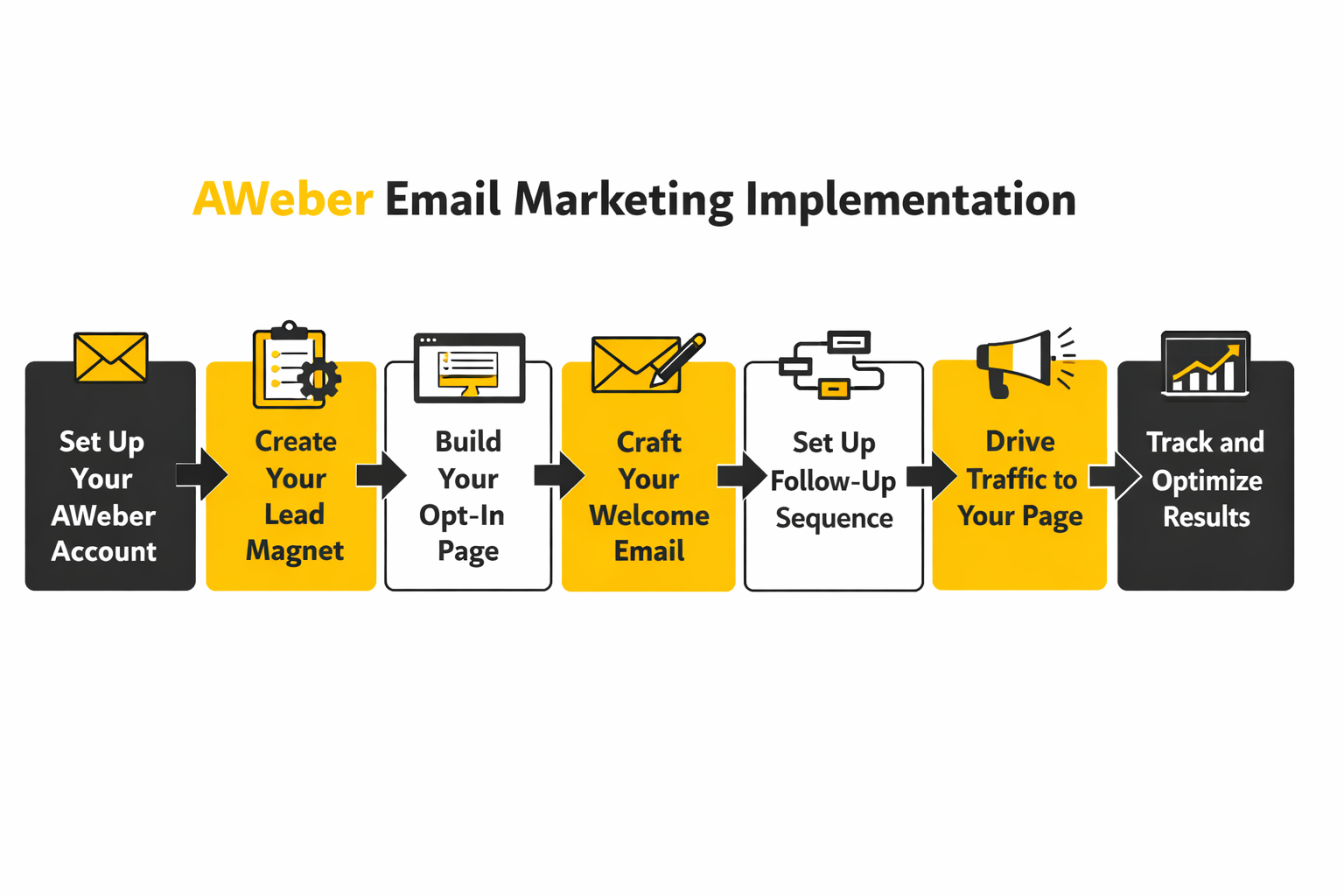
AWeber email marketing works best when the first automation is small enough to test and strong enough to teach you something useful. Keep the first sequence narrow, and make each step earn its place. A practical rollout looks like this:
- Create one list only if the audience is truly distinct, then use tags and segments for intent, stage, and behavior.
- Build one signup asset with either a form or a landing page, and make sure the thank-you step points somewhere intentional.
- Write the first messages in the Drag & Drop Editor, using only the personalization fields you are confident are present for most subscribers.
- Build the workflow around one starter and a few clear waits, remembering that wait intervals control when later messages actually send.
- Tag clicks and key actions so engaged subscribers can later receive broadcasts to a saved segment instead of generic blasts.
- Send tests to yourself from AWeber’s Preview & Test screen before you let real traffic hit the workflow.
The point of this process is not speed for its own sake. It is reducing silent failure. A workflow that tags correctly, sends on time, and points people to the right next action is far more valuable than a bigger automation that looks impressive and leaks intent at every step.
Write emails that match the stage, not your internal calendar
Most weak setups fail because the emails are organized around what the business wants to announce instead of what the subscriber needs next. AWeber gives you pre-written campaign templates and built-in personalization tools, which can save time, but the real discipline is message sequencing. The first email should fulfill the signup promise, the second should add context, the third should narrow attention, and the fourth should push toward one clear action.
That structure is why AWeber email marketing often works well for small businesses and creators. You do not need a giant content machine to make it effective. You need a welcome series that answers the subscriber’s immediate question, proves you understand the problem, and gives them a credible next move.
When the front end needs more muscle than a basic AWeber page can provide, it is reasonable to keep AWeber as the email layer and use a more specialized acquisition tool on the front end. That can mean a sharper storefront page in Replo, a more elaborate funnel in ClickFunnels, or a broader CRM handoff into GoHighLevel. The stack can change. The job of the emails does not.
Connect tracking before you judge performance
A lot of marketers build the form, build the workflow, and then act surprised when they cannot prove what the system is doing. AWeber’s click tracking rewrites message links into tracking URLs, while email web analytics and sales tracking let you tie activity to site visits and order-completion pages. That means you can measure more than opens and hope.
This is where implementation turns into management. If your sales page is the real destination, install tracking before the first serious send, not after a month of guesswork. If a confirmation page or thank-you page is the purchase signal, define that goal page URL properly so each visit counts as the event you actually care about.
For operators who want more visibility after the click, AWeber can also sit beside other tools rather than carrying the whole stack alone. A booking-led business might combine its nurture emails with Cal.com, while a multi-step lead flow might pair forms with Fillout or conversation capture from ManyChat. The more important point is consistency: every click should lead somewhere measurable.
Test the system before you scale it
This is the boring part, and it is the part that saves you. AWeber’s testing flow lets you use Preview & Test to inspect message appearance, send test copies, and check whether the personalization fields you used actually render the way you expect. That one step catches more avoidable embarrassment than most redesigns ever will.
A professional pre-launch check should cover four things. First, confirm that the form or landing page adds the subscriber to the right list or route. Second, confirm the correct tags are applied on entry and after the key click. Third, confirm the workflow timing behaves as expected, especially because later workflow messages will not send until the configured wait intervals are satisfied. Fourth, confirm your broader sending setup still follows current mailbox rules around consent, easy unsubscribe, and one-click unsubscribe for larger daily senders.
When that checklist is done, you finally have something worth scaling. Not a pile of templates. Not a pretty account. A working AWeber email marketing system that captures intent, sends on logic, and gives you real data to improve in the next stage of the article.
Statistics and Data That Actually Matter
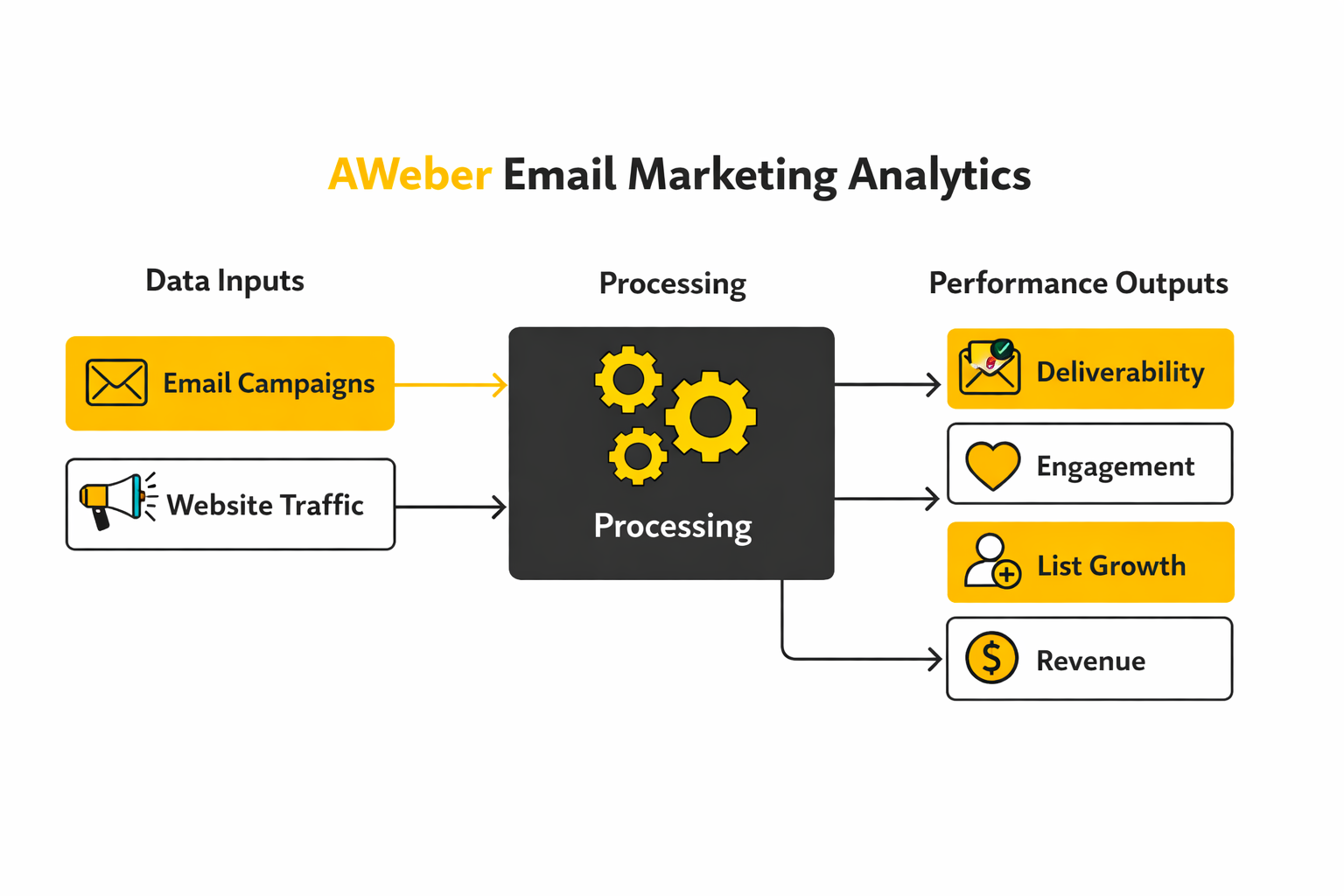
Once the implementation is live, the next question is brutally simple: is the system working, or are you just watching pretty numbers move around. AWeber email marketing gives you a useful reporting base because its reporting system already tracks core metrics like open rate, click-through rate, conversion rate, click tracking, and sales tracking, while subscriber activity can also show visited pages and collected sales when web analytics is installed. That matters because the job of analytics is not to decorate a dashboard. It is to tell you what to change next. docs.aweber.com+1
AWeber’s measurement stack is strongest when you understand which parts are automatic and which parts need setup. Click tracking is enabled by default, but email web analytics and sales tracking require additional setup and are not available on the Free plan. So if you are only looking at opens and clicks, you are seeing the top of the funnel, not the whole system. docs.aweber.com+2
Start with the analytics system, not the vanity metrics
The most useful way to read AWeber data is to think in layers. The first layer is inbox and attention, which shows up in delivery, opens, and early engagement. The second layer is action, which shows up in clicks, page visits, and conversions. The third layer is commercial value, which shows up in sales and downstream revenue. docs.aweber.com+2
That layered view changes how you react to a campaign. If opens are fine but clicks are weak, the problem is usually message relevance, offer clarity, or the call to action. If clicks are healthy but conversions are poor, the email may be doing its job while the page, booking flow, or sales step is doing a weak one. If unsubscribes or complaints jump, the issue is often expectation mismatch or frequency pressure, not clever copy. docs.aweber.com+2
Open rates still matter, but not the way they used to
Open rate is still useful, just not trustworthy enough to carry the whole analysis. Litmus says more than half of email opens now happen on a device with Apple Mail Privacy Protection enabled, which means opens can be inflated and timing data can be distorted. In practice, open rate is now better for spotting broad trends in subject line performance, sender recognition, and inbox visibility than for declaring a campaign successful. Litmus
The benchmark spread makes that even clearer. Recent provider benchmarks put average open rates at 31.22% in Brevo’s 2025 benchmark, 39.64% in GetResponse’s 2024 benchmark summary published in 2026, and 43.46% in MailerLite’s 2025 benchmark report. Those are not tiny differences. They are a warning that open rate is a rough directional signal shaped by audience mix, methodology, industry composition, and privacy filtering, not a universal score every AWeber account should chase. Brevo+2
That is why a sudden drop in opens matters more than a static number by itself. If your normal campaigns open around one level and then the next three sends fall sharply across multiple segments, that points to a real change in inbox placement, subject line appeal, or list fatigue. But if your open rate looks fantastic while clicks and conversions stay flat, the correct reaction is skepticism, not celebration. Litmus+1
Clicks tell you whether the message actually moved someone
AWeber defines click-through rate as the percentage of message recipients who clicked one or more links, while Brevo defines click-to-open rate as the share of opened emails that received at least one click. That distinction matters. CTR tells you how much traffic your email actually created, while CTOR tells you how persuasive the content was after the open happened. docs.aweber.com+1
The recent benchmark range here is much tighter than opens, which makes clicks more useful for operating decisions. MailerLite’s 2025 report puts average click rate at 2.09%, GetResponse’s benchmark summary puts average CTR at 3.25%, and Brevo’s 2025 benchmark shows an overall click rate of 3.64%. That does not mean your AWeber campaigns should magically hit the middle of that range tomorrow. It means that if you are consistently well below it, especially on engaged segments, the email probably is not creating enough action. mailerlite.com+2
AWeber itself gives a useful warning line here. Its guidance on weak engagement says that if your open rates are below 10% or your click rates are below 2%, your messages may already be landing in spam and you should suppress inactive contacts instead of continuing to send to them. That is one of the few places where a platform-level threshold is actually practical, because it tells you what action the number should trigger: list cleanup, segment tightening, and better permission discipline. docs.aweber.com
Conversion and revenue are where the real argument ends
AWeber’s reporting docs define conversion rate as the percentage of subscribers who completed a desired action after clicking through from your message, and its sales tracking setup lets you connect campaigns to a goal page and monetary value. Once that is configured, you can stop arguing about whether a campaign “felt” strong. You can see whether it produced actual commercial value. docs.aweber.com+1
This is where a lot of AWeber email marketing accounts become much smarter. A campaign with average opens and modest clicks can still be your best campaign if the traffic converts and the buyers are high intent. A prettier campaign with a stronger open rate can still be a weak one if it attracts curiosity but not commitment. The right habit is to review revenue per campaign, revenue per click, and conversion by segment, then scale the traffic sources, offers, and workflows that produce money instead of applause. docs.aweber.com+2
There is one technical nuance worth remembering. AWeber’s email web analytics and sales tracking depend on a cookie that starts when a subscriber first visits through an email link, so your revenue view is strongest when that tracking is installed before serious volume starts flowing. If your funnel includes calls, CRM stages, or assisted sales instead of a direct checkout page, native email revenue tracking may only show part of the picture, which is why some teams extend the stack with GoHighLevel or a CRM like Copper. docs.aweber.com+1
Unsubscribes, complaints, and bounces are not side notes
Unsubscribes are not automatically bad news. AWeber is direct about the fact that some amount of unsubscribes is normal, and that the biggest drivers are usually frequency and relevance. So the question is not whether unsubscribes exist. The question is whether they are telling you that the message promise, timing, or audience targeting is off. docs.aweber.com
The recent benchmark range helps here too. GetResponse reports an average unsubscribe rate of 0.15%, MailerLite reports 0.22%, and Brevo’s 2025 benchmark shows 0.4%. That is a useful reminder that normal churn is measured in fractions of a percent, not giant blocks of your list. If one campaign or one segment suddenly blows past your usual unsubscribe pattern, the right move is to adjust targeting, promise, and cadence before you send again. getresponse.com+2
Complaints are the more dangerous signal because mailbox providers care about them more than you do. AWeber says that when a subscriber complains, it automatically unsubscribes that person from the list, and Google’s sender guidance says senders should keep spam rates below 0.1% and prevent them from reaching 0.3% or higher. When complaint pressure rises, do not answer it with more volume. Freeze the segment, inspect the signup source, review expectation-setting on the form, and make sure the next send goes only to people who clearly still want it. docs.aweber.com+2
Bounce metrics sit in the same risk family, even though they are less emotional than complaints. Brevo’s benchmark documentation separates soft bounces from hard bounces, which is the right way to interpret them: soft bounces suggest temporary issues, while hard bounces point to list quality and invalid addresses. When hard bounces rise, the action is not to improve copy. It is to clean the list, tighten acquisition, and stop feeding bad data into the system. help.brevo.com
Use benchmarks as context, and trends as truth
Benchmarks are useful for orientation, not identity. They help you see whether your AWeber email marketing program is roughly in the healthy zone, but they do not know your business model, deal size, customer cycle, or how warm your list is. That is why a week-over-week and month-over-month trend line inside your own account is usually more valuable than someone else’s average. Brevo+2
The smartest weekly scorecard is usually smaller than people expect. Watch opens for directional inbox and subject-line health. Watch clicks for message relevance. Watch conversions and revenue to decide what to scale. Watch unsubscribes, complaints, and bounces to protect the channel before it punishes you. docs.aweber.com+2
That is the real meaning of the data. The numbers are not there to make you feel busy. They are there to tell you whether to keep sending, rewrite the offer, trim the audience, clean the list, or invest more behind the campaigns that are already proving themselves.
Strategic Tradeoffs as You Scale
The setup is live, the reporting works, and now a more serious question shows up: should AWeber remain the center of the system as the business grows, or should it become one layer in a bigger stack. That is the real scaling decision. AWeber is built to cover subscriber management, workflows, broadcasts, landing pages, ecommerce elements, and integrations, and its API exists for teams that need custom connections beyond the prebuilt options. docs.aweber.com+1
For many small businesses, creators, and service operators, AWeber stays viable longer than people assume because the actual bottleneck is rarely “email platform sophistication.” It is usually weak list quality, muddy segmentation, or an offer that does not convert after the click. If those problems are still unresolved, changing platforms will feel productive without fixing the thing that is actually dragging performance down. docs.aweber.com+2
Where the tradeoff becomes real is operational complexity. AWeber’s pricing and feature structure makes that visible: the Free plan is intentionally narrow, with up to 500 subscribers, 3,000 monthly sends, a single list profile, and a single workflow automation, while paid tiers expand sending limits and feature caps. That means AWeber email marketing is easy to start, but growth eventually forces discipline around list design, automation scope, and whether supporting systems should handle CRM, sales pipelines, booking, or multi-channel nurture. docs.aweber.com
Keep AWeber at the center when the journey is still mostly email-driven
AWeber is a strong center of gravity when your customer journey is still readable in a few steps. Someone opts in, gets tagged, enters a workflow, receives targeted broadcasts, clicks through, and either buys, books, or replies. In that kind of business, adding a heavier system too early often creates more admin than leverage. docs.aweber.com+2
This is especially true when the main scaling move is better segmentation rather than more software. AWeber’s tagging, dynamic segments, click automations, and split paths already let you branch follow-up based on engagement, intent, or customer status. If the real opportunity is sending more relevant messages to narrower groups, the platform already gives you the tools to do it. docs.aweber.com+2
Extend the stack when revenue depends on more than email
The smarter move is often extension, not replacement. AWeber’s API and integration layer are there for teams that need subscriber data, campaign activity, or analytics to move into custom systems, CRMs, or broader automation flows. That matters when deals are closed by a sales team, leads need routing rules, or email is only one part of the buying journey. docs.aweber.com
In practice, this is where complementary tools start making sense. A business that needs deeper pipeline and funnel management may pair AWeber with GoHighLevel. A business that captures leads through conversational flows may use ManyChat on the front end and pass qualified subscribers into AWeber for nurture. A business that wants to tighten list intake and qualification may prefer Fillout or a more conversion-focused page layer like Replo. The principle is simple: let AWeber do the email work cleanly, and let other tools handle jobs that are not really email jobs. docs.aweber.com
Scaling AWeber Email Marketing Without Breaking It
The dangerous phase in email is not the beginning. It is the moment the program starts working well enough that the team wants more volume, more automations, and faster growth. That is usually when deliverability, list quality, and account hygiene get stressed hardest. Google Podpora+1
Protect list quality harder than you protect top-of-funnel growth
AWeber lets you disable confirmed opt-in for form submissions, imports, and some integrations, but its own documentation still says confirmed opt-in is beneficial to list health and worth weighing carefully before you switch it off. Google’s sender guidance points in the same direction by recommending that senders make sure recipients opt in, confirm addresses, and periodically remove people who no longer engage. That combination tells you exactly what the strategic tradeoff is: lower friction can grow the list faster, but it can also lower list quality and raise risk later. docs.aweber.com+1
At scale, raw subscriber growth is a vanity win if the new names do not behave like willing recipients. The better move is to make each acquisition source prove itself. If one form, lead magnet, ad source, or integration produces subscribers who never click and complain more often, that source is not helping the program grow. It is contaminating it. docs.aweber.com+1
Keep automation architecture understandable
AWeber gives you enough flexibility to build surprisingly sophisticated logic. Workflows can start from new subscribers or tags, branch with split paths, apply new tags, and even allow multiple entries so people can repeat a campaign they have already completed. That power is useful, but it can also create a tangled account fast if every new campaign becomes another disconnected branch. docs.aweber.com+2
The expert move is not “build more automation.” It is to build reusable automation logic. One onboarding framework for new leads. One post-click framework for category interest. One re-engagement framework for quiet subscribers. One customer path that separates buyers from prospects. If the account starts needing detective work just to explain why someone received a message, the automation design is already too messy. docs.aweber.com+1
There is another operational trap here that catches growing teams: tag-triggered workflows only start when the tag is applied after the workflow is active. AWeber is explicit that tags added before activation do not retroactively enroll those subscribers. On a bigger account, that detail can quietly break launches, re-entry campaigns, and interest-based branches unless someone is checking the logic before traffic hits. docs.aweber.com+1
Watch costs the same way you watch engagement
Scaling is not just a deliverability problem. It is also a cost-discipline problem. AWeber’s pricing FAQ says accounts can be automatically upgraded when subscriber count or send frequency exceeds plan limits, and downgrades are not automatic when your count later falls. That means dead weight on the list is not only hurting engagement. It can literally keep you paying for capacity you no longer need. docs.aweber.com+1
This is why mature email teams treat list pruning like margin protection. Suppressing or removing dead subscribers improves click concentration, lowers complaint risk, and may also keep plan costs closer to reality. In other words, list hygiene is not cleanup work after the strategy. It is part of the strategy. Google Podpora+1
Do not solve every communication problem with email
AWeber’s own documentation on web push is useful here because it frames the channels honestly. Web push is faster, lighter, and lower-friction to opt into, while email supports richer content and stays discoverable in the inbox far longer. AWeber even describes the best practice as using both together, with push for immediate communication and email for deeper relationship-building. docs.aweber.com
That matters because many scaling teams overload email with jobs it is not best at. A flash reminder, same-day nudge, or time-sensitive prompt may perform better through web push, chat, or SMS-like channels, while email handles context, education, trust, and follow-through. If your business needs that kind of layered communication, pairing AWeber with tools like ManyChat or a broader operating stack like GoHighLevel can reduce pressure on the inbox instead of increasing it. docs.aweber.com+1
The Risks That Matter Most at Higher Volume
At low volume, teams can get away with sloppiness for a while. At higher volume, mailbox providers stop being polite about it. Google says bulk senders should keep spam rates below 0.1% and prevent them from reaching 0.3% or higher, and it requires one-click unsubscribe for marketing and promotional messages when a sender exceeds 5,000 messages per day. Those are not theoretical thresholds. They are operating constraints. Google Podpora+1
That changes what “good strategy” means. A good campaign is not just one that drives revenue. It is one that drives revenue without pushing complaint rates, fatigue, or unsubscribe pressure into dangerous territory. Once volume rises, every extra send has to justify itself twice: once commercially and once reputationally. Google Podpora+1
The strongest AWeber email marketing programs scale by becoming more selective, not louder. They tighten entry sources, simplify automation logic, preserve domain reputation, and only add new tools when those tools remove real friction. That is the difference between a system that grows with the business and one that slowly turns into a liability.
The last step is dealing with the tactical mistakes that still wreck otherwise solid setups and answering the practical questions people always run into once the account is live. That is where the close of the article needs to go.
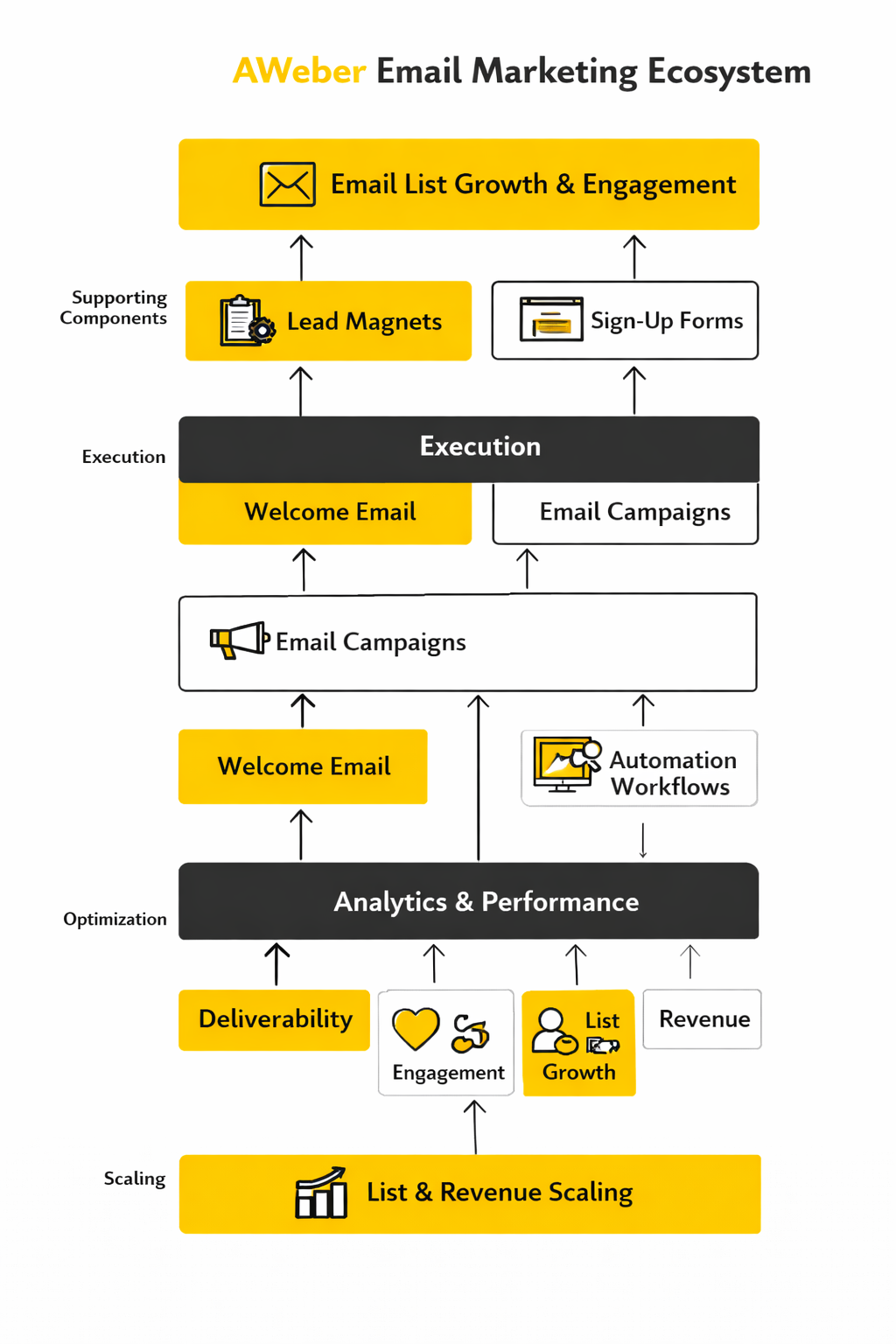
Where AWeber Fits in the Full Marketing Ecosystem
At the end of this guide, the clearest way to view AWeber email marketing is as the owned-audience layer in a broader system. It already gives you forms, landing pages, workflows, reporting, web push notifications, and an API for custom integrations, which is enough for many small businesses to run acquisition, nurture, and conversion from one core platform. That is exactly why AWeber can stay simple for smaller operators and still remain useful when the stack around it starts getting more specialized. docs.aweber.com+4
The smart scaling move is usually not replacing AWeber the moment growth shows up. It is deciding which jobs should stay inside the platform and which jobs should move to adjacent tools, whether that means conversational lead capture with ManyChat, funnel building with ClickFunnels, or a heavier CRM layer with GoHighLevel. AWeber works best when it remains responsible for permission-based audience growth, targeted email communication, and the reporting that tells you whether those messages are creating real action. docs.aweber.com+2
That is the final system view. AWeber does not need to do every marketing job to be valuable. It needs to handle the email job cleanly enough that the rest of the business can make better decisions around traffic, offers, sales, and retention. docs.aweber.com+2
Frequently Asked Questions About AWeber Email Marketing
By this point, most of the big strategic questions are answered. What usually remains are the practical questions people hit when the account is live, the list is growing, and the team wants to know what to do next. These are the answers that matter most when AWeber email marketing moves from theory into day-to-day use.
Is AWeber good for beginners or only for advanced marketers?
AWeber is still very approachable for beginners because its Free plan includes up to 500 subscribers, 3,000 monthly emails, a single list profile, and one workflow automation. At the same time, it is not limited to basic newsletters, because the platform also supports workflows, tags, landing pages, reporting, and custom integrations through its API. That makes it a solid fit for beginners who want a clean start and for operators who want a practical email engine without starting from enterprise-level complexity. docs.aweber.com+3
What is the difference between AWeber Free and a paid plan?
The Free plan is designed for getting started, not for running a more mature lifecycle program. AWeber’s pricing page says Free accounts are limited to 500 subscribers, 3,000 monthly sends, one list profile, and one workflow, while paid plans expand those limits and unlock broader account capability. In practice, the decision to upgrade usually happens when automation, segmentation scope, or list size starts pressing against those boundaries. docs.aweber.com
Do I really need a custom domain and authenticated sending address?
Yes, if you care about long-term deliverability. AWeber provides setup guidance for connecting a professional email address and authenticating your domain with DKIM and DMARC, and Google’s sender requirements explicitly push bulk senders toward authenticated mail and low spam rates. The practical takeaway is simple: a branded, authenticated sending domain is no longer a “nice upgrade,” it is the normal baseline for serious email marketing. docs.aweber.com+2
Should I organize subscribers with lists or with tags?
Most growing accounts work better when lists stay limited and tags do more of the organizational work. AWeber’s tag system is built to group subscribers and trigger automation logic, while segments let you create dynamic audiences based on search criteria and behavior. The result is a cleaner account structure, less duplication, and more control over who receives which message. docs.aweber.com+1
Can I disable confirmed opt-in in AWeber?
Yes, AWeber lets you disable confirmed opt-in for specific subscriber add methods in your list settings. The more important question is whether you should do it, because lower-friction signup can increase list growth while also increasing the chance of weaker engagement and lower list quality. For most businesses, the right answer is to judge opt-in settings by the quality of subscribers they produce, not by form conversion alone. docs.aweber.com+2
Can I import an existing email list into AWeber?
Yes, and AWeber supports imports from CSV, XLS, XLSX, TSV, and TXT files. It also lets you map fields during import, apply tags to all imported subscribers, or use a dedicated Tag column so imported records enter the account with better structure from the start. That means migration can be more than a transfer of email addresses if you prepare the file correctly before you upload it. docs.aweber.com+3
Why are my workflow messages not sending?
One of the most common reasons is timing or trigger logic, not a broken platform. AWeber explains that if a workflow starts when a specific tag is applied, that tag has to be applied after the workflow is active, and workflow messages also wait until the configured intervals are satisfied before they send. In other words, when a sequence looks “stuck,” the first thing to check is whether the trigger was registered at the right time and whether the waits are behaving exactly as configured. docs.aweber.com+1
Does AWeber support landing pages and direct selling?
Yes. AWeber’s landing page builder lets you create standalone signup pages, connect a custom landing-page domain, and even use an ecommerce element that sells through Stripe. That ecommerce element can be used for digital downloads, courses, physical products, services, webinars, and similar offers, which makes AWeber more commercially useful than a simple newsletter tool. docs.aweber.com+3
How should I measure success now that open rates are less reliable?
Open rates still help with trend spotting, but they are no longer strong enough to stand alone because Apple Mail Privacy Protection has inflated and distorted a large share of open data. The better operating stack is to watch clicks, conversion behavior, sales tracking, unsubscribes, complaints, and revenue, then use opens as a directional signal instead of a verdict. AWeber’s own reporting, click tracking, web analytics, and sales tracking support exactly that more grounded way of reading performance. docs.aweber.com+3
What numbers should make me worry about deliverability?
The most dangerous signals are usually complaints, sharp engagement decay, and list fatigue, not a single disappointing campaign. Google says senders should keep spam rates below 0.10% and avoid reaching 0.30% or higher, and AWeber warns that very low open rates or click rates can be a sign that messages are already landing in spam. When those signals show up, the right response is usually to suppress inactive contacts, tighten segmentation, review signup sources, and stop mailing weak audiences at full volume. Google Podpora+2
Does AWeber support web push notifications too?
Yes, and AWeber positions web push as a complementary channel rather than a replacement for email. Its documentation describes web push notifications as clickable messages that appear on subscribers’ devices even when they are not actively browsing your site, and it notes that the feature is supported across major desktop browsers while mobile push is not yet supported. That makes web push useful for quick alerts and timely nudges, while email remains the better channel for richer messaging and longer-term relationship building. docs.aweber.com+2
Can AWeber integrate with lead sources and custom systems?
Yes. AWeber supports native integrations such as Facebook Lead Ads, where the connection is tied to the lead form rather than an individual ad campaign, and it also provides an API for custom applications and deeper workflow connections. That gives businesses two options: use the faster native route when it covers the job, or use the API when the account needs something more specific. docs.aweber.com+2
When should I keep AWeber, and when should I add more tools around it?
Keep AWeber central when the journey is still mostly email-driven and the main opportunity is better segmentation, cleaner automation, and stronger follow-up. Add more tools when the business needs heavier CRM logic, richer front-end funnels, or more channels around the inbox, which is why some teams expand into tools like Replo, Buffer, or GoHighLevel while keeping AWeber as the email layer. The best decision is the one that reduces friction in the system you already know you need, not the one that simply adds more software. docs.aweber.com+2
Work With Professionals
Explore 10K+ Remote Marketing Contracts on MarkeWork.com
Most marketers spend too much time chasing clients, competing on crowded platforms, and losing a percentage of every project to middlemen. MarkeWork gives you a better way. Browse thousands of remote marketing contracts and connect directly with companies desperate to hire skilled marketers like you, without platform commissions and without unnecessary gatekeepers. Markework
If you're serious about finding better opportunities and keeping 100% of what you earn, explore available contracts and create a profile for free at MarkeWork.com. The platform presents itself around direct contracts, no project fees, and free account creation, which makes the pitch especially relevant for marketers who want more control over how they find work. Markework