

B2B email lists can either become a serious growth asset or a fast way to damage deliverability, annoy buyers, and waste budget. The difference is not the list itself. The difference is how the data is sourced, verified, segmented, permissioned, and used.
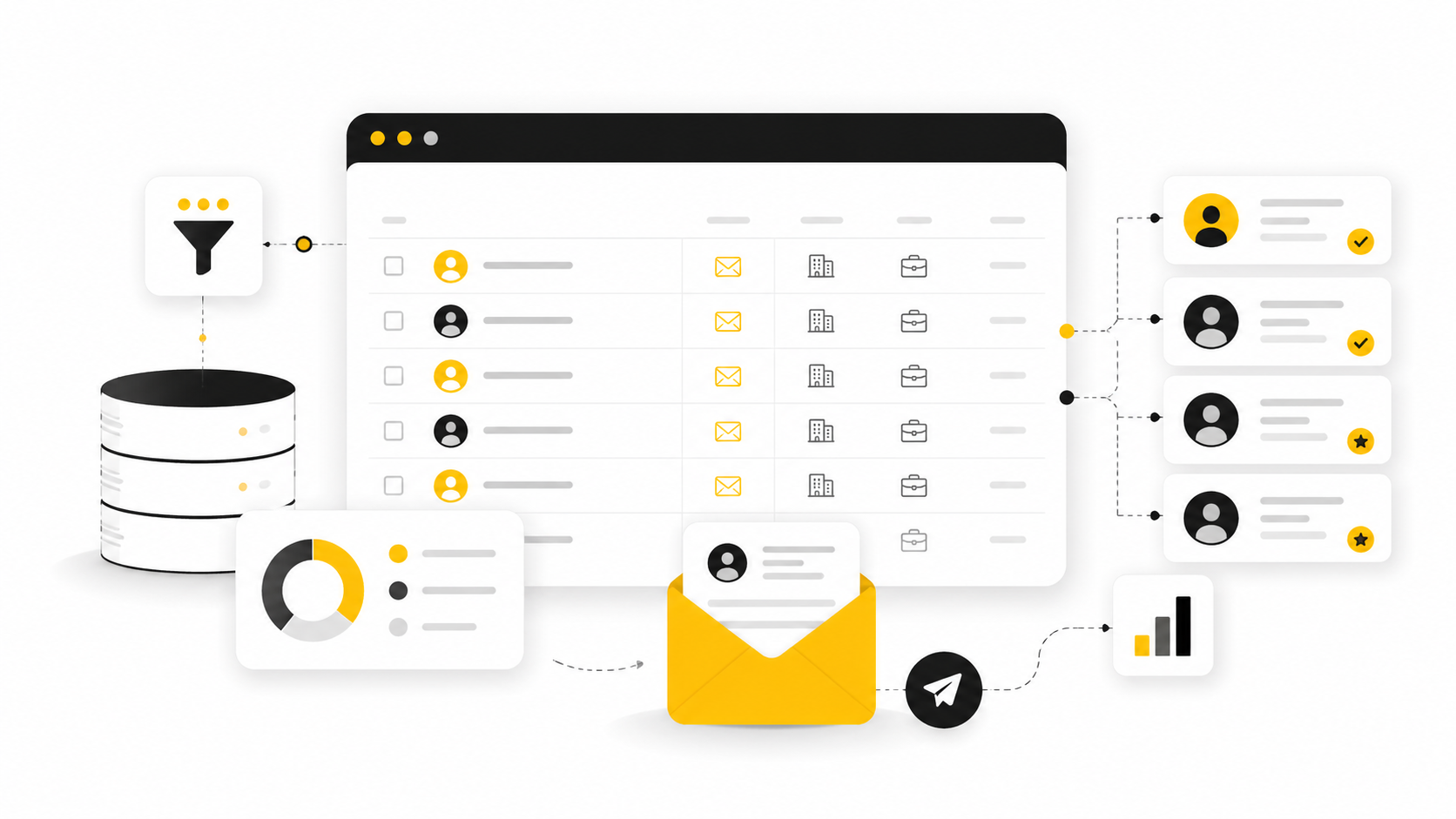
A strong list is not just a spreadsheet of names and emails. It is a focused market map that helps you reach the right companies, the right people, and the right buying moments with a message that feels relevant. That matters more now because modern B2B buyers are researching independently, using AI during purchases, and moving through more digital touchpoints before they speak to sales, with 45% of surveyed B2B buyers using AI during a recent purchase.
Article Outline
- Why B2B Email Lists Still Matter
- The B2B Email List Framework
- Core Components Of A High-Quality List
- How To Build A B2B Email List The Right Way
- How To Evaluate, Buy, And Clean B2B Email Lists
- Professional Implementation, Compliance, And FAQs
Why B2B Email Lists Still Matter
B2B email lists matter because email still gives companies a direct path to decision-makers without relying completely on ads, algorithms, or rented audiences. But that does not mean blasting a generic list works. The value comes from relevance, timing, and the quality of the relationship you can start from that first message.
The risk is that many teams treat b2b email lists like a shortcut. They buy a cheap file, upload it into a sending tool, and expect pipeline. Then bounce rates rise, spam complaints appear, and the domain reputation starts taking hits that are hard to reverse.
This is why list strategy has to sit between marketing, sales, operations, and compliance. The FTC’s CAN-SPAM guidance requires commercial email senders to avoid deceptive headers and subject lines, include a valid physical address, and honor opt-outs promptly through a clear unsubscribe process. The UK ICO also makes clear that B2B marketing can still involve personal data when named business contacts are used, which means privacy obligations do not disappear just because the recipient works at a company.
The B2B Email List Framework
A useful framework starts with one question: who has a business reason to hear from you right now? That question keeps you away from broad, lazy targeting and pushes you toward a list that reflects real fit. Company size, industry, role, location, technology stack, buying trigger, and pain intensity all matter more than raw volume.
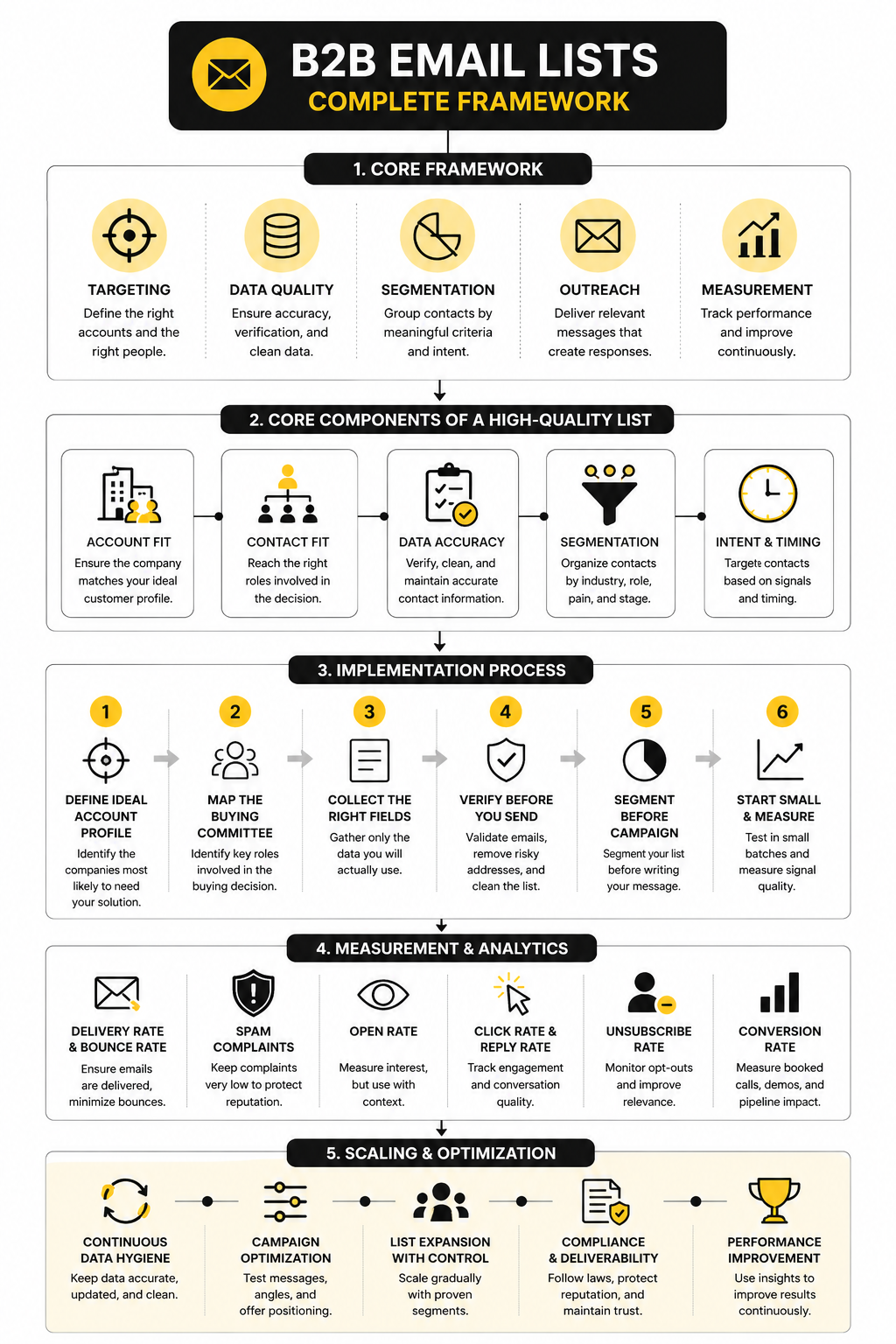
The framework has four layers: market definition, contact qualification, permission and compliance review, and campaign readiness. Market definition tells you which accounts belong on the list. Contact qualification tells you which people inside those accounts are likely to influence or own the problem.
Permission and compliance review protects your business before outreach starts. Campaign readiness checks whether the data is verified, segmented, enriched, and ready for a controlled sending process. This is where many teams fail, because they confuse “having emails” with “having a usable list.”
Core Components Of A High-Quality List
A high-quality B2B email list starts with account fit. Before you care about a contact’s email address, you need to know whether the company belongs in your market. That means defining firmographics like industry, company size, region, revenue band, hiring activity, funding stage, and business model.
The next layer is role fit. A list of CEOs might look attractive, but it is often too broad unless CEOs are actually involved in the buying decision for your offer. Better lists separate economic buyers, technical evaluators, daily users, and influencers so your message can match the person receiving it.
The third layer is contact accuracy. Bad data creates bounces, and bounces tell inbox providers that your sending operation is sloppy. Google’s sender guidelines now emphasize authentication, low spam rates, and easy unsubscribe handling for larger senders, which makes list hygiene a deliverability issue, not just an operations issue.
Account Fit
Account fit answers the question: should this company be on the list at all? This is where many campaigns go wrong because teams start with contacts instead of the market. If the account is wrong, even the perfect email address does not matter.
Strong account criteria usually include:
- Industry or vertical
- Employee count
- Location
- Revenue range
- Technology used
- Hiring signals
- Recent funding or expansion
- Compliance needs
- Operational pain that matches your offer
For example, a CRM agency offering implementation services should not simply target “small businesses.” It should define which businesses have enough sales complexity to need better pipelines, follow-up automation, and reporting. A platform like GoHighLevel fits naturally when the buyer needs CRM, automation, landing pages, and client communication in one system, but that only works when the target account actually has those needs.
Contact Fit
Contact fit is about reaching the person who can understand the pain, influence the decision, or approve the budget. In B2B, those are often different people. A VP of Sales may care about pipeline visibility, while a RevOps lead cares about workflow accuracy, and a founder cares about cash flow.
This is why b2b email lists should not be built around one generic job title. They should be mapped to the buying committee. The more complex the product, the more important this becomes.
A practical contact map might include:
- Decision-maker
- Budget owner
- Technical reviewer
- Department leader
- End user
- Executive sponsor
This gives you more than one path into an account. It also helps you avoid putting all pressure on a single cold email to one person who may not be responsible for the problem.
Data Accuracy
Data accuracy decides whether your list can actually be used. A list can look impressive on paper and still perform badly if emails are outdated, names are misspelled, companies have changed, or contacts have moved roles. That is especially common in fast-moving markets where employees change jobs often.
Every serious list should go through verification before sending. That includes checking whether emails are valid, whether domains accept mail, whether role-based addresses should be removed, and whether the contact still appears to work at the company. It is not glamorous work, but it protects your sender reputation.
You also need suppression logic. If someone unsubscribes, bounces, complains, or is already in your CRM as a customer or active opportunity, they should not keep receiving prospecting emails. This is basic respect, and it keeps your marketing stack cleaner.
Segmentation
Segmentation turns a raw list into a usable campaign asset. Without segmentation, every message becomes vague because it has to apply to everyone. That is how you end up with cold emails that sound like they were written for nobody.
Useful segmentation can be based on:
- Industry
- Role
- Company size
- Pain point
- Buying stage
- Region
- Technology stack
- Trigger event
- Existing relationship status
Segmentation also makes follow-up smarter. A CFO should not receive the same angle as a marketing manager. A company hiring ten sales reps has a different urgency than a company that just reduced headcount.
Intent And Timing
Intent is what separates a static database from a real prospecting system. A contact might match your ideal customer profile, but timing determines whether they are likely to care today. That timing can come from hiring, funding, new leadership, technology changes, product launches, regulation, or public expansion plans.
This does not mean you need to overcomplicate the process. Start with simple buying signals that are easy to verify. A company hiring outbound sales reps may need better prospecting workflows, while a business launching paid acquisition may need stronger landing pages through a tool like ClickFunnels.
Timing also changes the tone of your outreach. When a signal is fresh, your message can be specific and useful. When there is no visible signal, your message needs to be softer, more educational, and less assumptive.
How To Build A B2B Email List The Right Way
Building a B2B email list starts with a clear target market, not a tool. The tool only helps you collect, verify, and organize data. The strategy decides whether that data is worth anything.
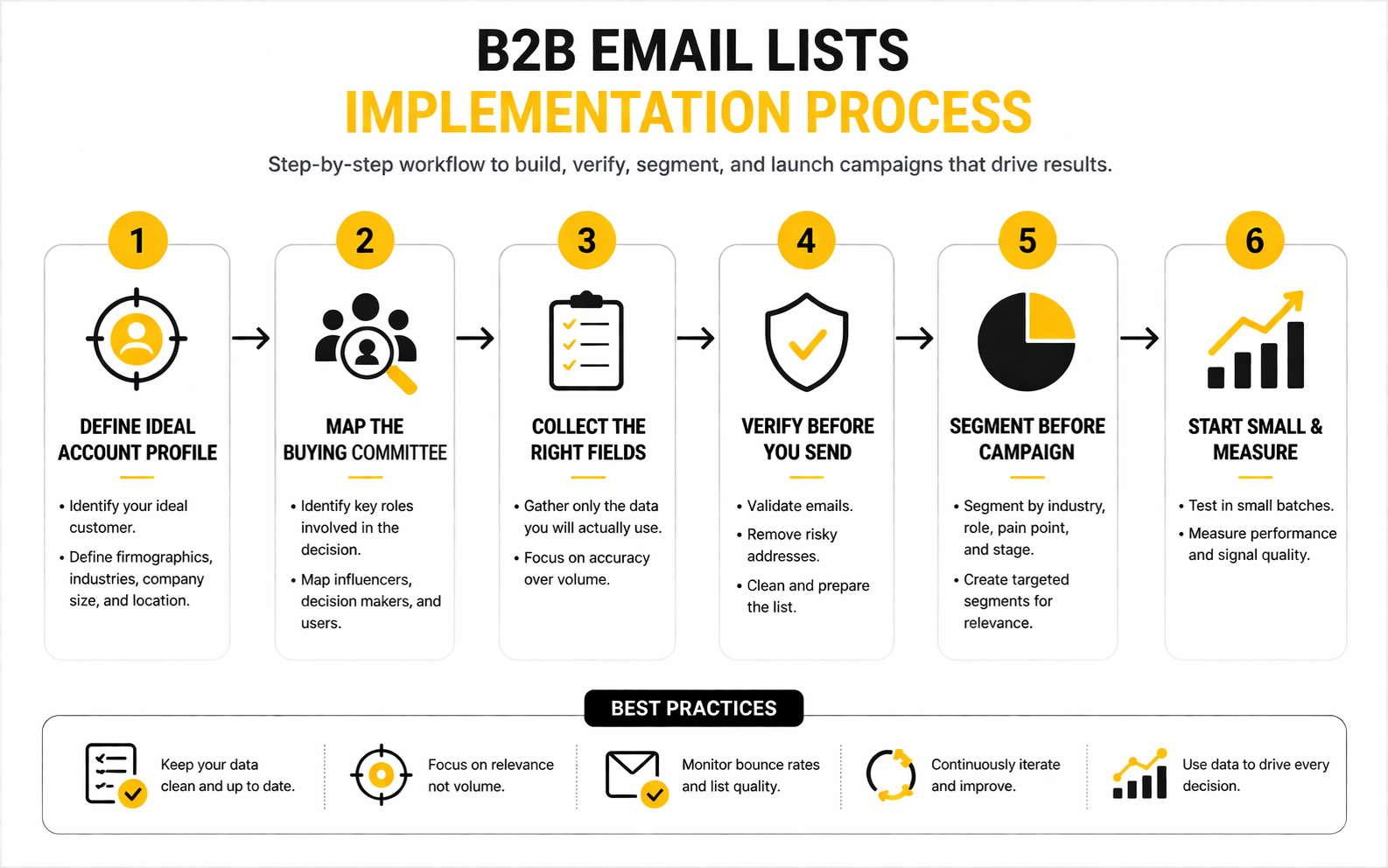
The right process is simple, but it has to be followed in order. First, define the accounts you want. Then identify the people inside those accounts. Then verify the data, segment it, document consent or legitimate interest where relevant, and only then start outreach.
Step 1: Define Your Ideal Account Profile
Your ideal account profile is the filter that keeps your list focused. It should describe the companies most likely to need your offer, afford it, implement it, and see a meaningful result from it. Without this filter, your list becomes a pile of possible contacts instead of a real sales asset.
Start with firmographic filters like industry, location, company size, and revenue range. Then add operational filters like hiring activity, recent expansion, funding, product category, or software stack. These signals help you move from “could buy” to “has a reason to care.”
This is also where you should be honest about who is not a fit. Bad-fit accounts create bad outreach, low reply quality, and poor sales conversations. A smaller list of qualified accounts usually beats a massive list filled with weak matches.
Step 2: Map The Buying Committee
Once the account list is clear, map the people involved in the decision. B2B buying rarely depends on one person, especially when the product affects sales, marketing, finance, operations, or compliance. Your list should reflect how decisions actually happen inside the company.
For each account, identify the likely decision-maker, influencer, technical reviewer, and daily user. A founder may approve the spend, but a sales manager may feel the pain first. A RevOps lead may evaluate the workflow, while finance may care about cost control and reporting.
This makes your outreach more precise. Instead of sending one generic pitch to everyone, you can speak to each role in a way that matches their priorities. That is how b2b email lists become useful for pipeline, not just prospecting volume.
Step 3: Collect Only The Fields You Will Actually Use
A bloated list is harder to manage. You do not need every possible data point if your team will never use it for segmentation, personalization, routing, or reporting. More data also means more responsibility, especially when the fields identify real people.
At minimum, collect the account name, website, industry, location, contact name, job title, business email, source, date added, and reason for fit. For stronger campaigns, add segment, trigger, CRM owner, lifecycle stage, verification status, and suppression status. Keep it practical.
This discipline also supports privacy. The UK ICO makes clear that business-to-business marketing can still involve personal data when you use named contacts, so data minimization is not just tidy operations. It is safer, cleaner, and easier to defend.
Step 4: Verify Before You Send
Verification has to happen before the first campaign goes out. Do not wait until bounce reports tell you the list is bad. By then, your sender reputation may already be taking damage.
Good verification checks whether the address is formatted correctly, whether the domain exists, whether the mailbox appears reachable, and whether risky addresses should be excluded. It should also remove duplicates, obvious personal emails, role-based inboxes, and contacts already on your suppression list. This step is boring, but boring is good when it protects revenue.
Google’s sender requirements now put more pressure on authentication, spam complaint control, and one-click unsubscribe for many senders. That means your list quality, sending setup, and unsubscribe handling are connected. Treat them as one system, not separate tasks.
Step 5: Segment Before Writing The Campaign
Segmentation should happen before copywriting. If you write the campaign first, you will usually write something broad. If you segment first, the message becomes sharper because you know exactly who you are talking to.
Useful segments might include SaaS founders hiring sales reps, agencies selling CRM services, manufacturers expanding into new regions, or B2B service firms running paid acquisition. Each segment has a different business problem. Each one deserves a different angle.
This is also where your tools matter. If you are building follow-up workflows, pipeline stages, and multi-step outreach, a system like GoHighLevel can keep the CRM, automation, and lead handling in one place. If the campaign sends traffic to a focused offer page, ClickFunnels can be useful for building a clear conversion path after the first reply or click.
Step 6: Start Small And Measure Signal Quality
Do not launch a new list at full volume. Start with a small, controlled batch and watch the signals. You want to know whether emails deliver, whether replies are relevant, whether objections are useful, and whether the segment is responding to the message.
Measure more than open rates. Opens are less reliable than they used to be because privacy features and automated scanning can distort the number. Replies, positive replies, booked calls, unsubscribe rate, bounce rate, and spam complaint risk tell you more about list quality.
The first campaign is not just a campaign. It is a test of your targeting assumptions. If the wrong people reply, the issue may be the list. If the right people reply with the wrong objection, the issue may be the offer or message.
Statistics And Data
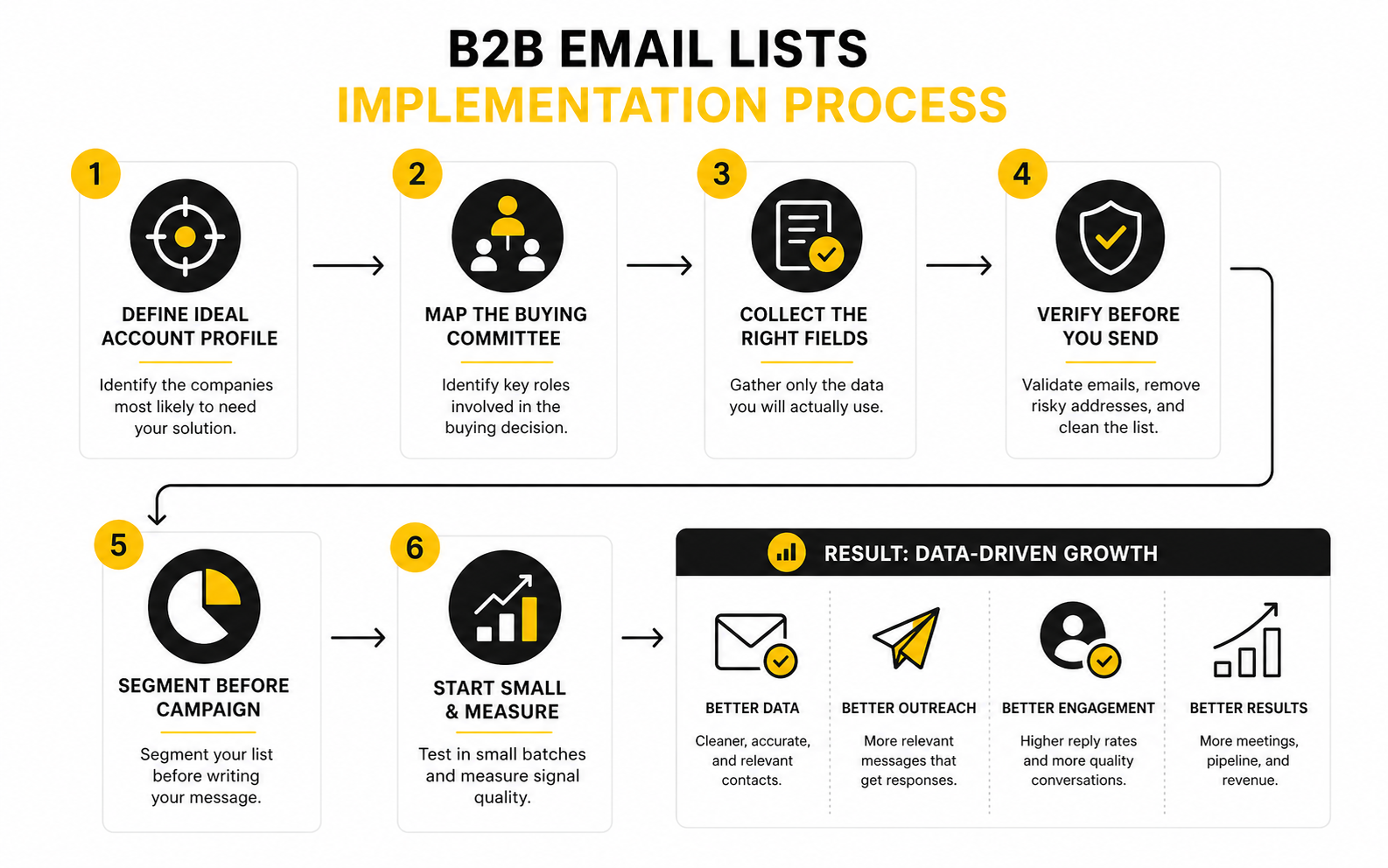
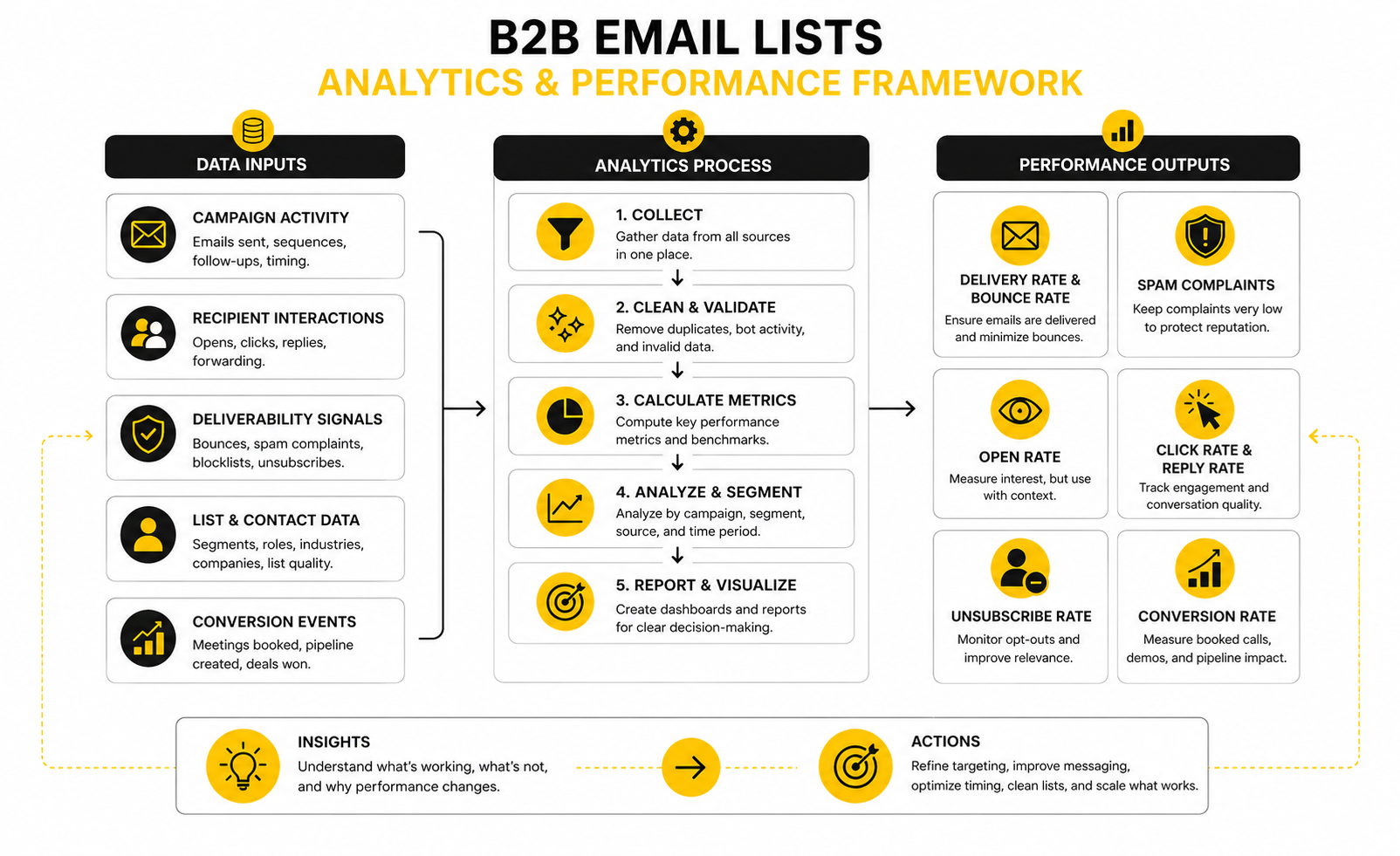
Measurement is where b2b email lists stop being theory. You can have a clean-looking spreadsheet, a sharp message, and a good offer, but the numbers will tell you whether the market actually agrees. The key is knowing which metrics reveal list quality, which reveal message quality, and which reveal offer quality.
Do not treat benchmarks like universal targets. A warm newsletter list, a cold outbound list, and a customer reactivation list will behave very differently. Use benchmarks as guardrails, then judge performance against your own segment, source, and campaign type.
Delivery Rate And Bounce Rate
Delivery rate tells you whether the email was accepted by the receiving server. It does not prove the email reached the inbox, and it definitely does not prove the contact cared. That distinction matters because a campaign can look “delivered” while still landing in spam or promotions.
Bounce rate is one of the clearest signals of list quality. A bounce rate below 1% usually points to a well-maintained list, while rates above 2% suggest the data needs cleaning before more volume is added. If your bounce rate climbs, stop scaling and fix the list first.
For b2b email lists, bounce problems often come from old job titles, scraped data, role-based addresses, catch-all domains, and unverified contacts. The action is simple: pause the bad segment, verify again, remove risky records, and check whether one source is creating most of the damage. Never protect volume at the expense of sender reputation.
Spam Complaints
Spam complaints are brutal because they tell inbox providers that people did not just ignore your email. They disliked it enough to report it. That is a different level of negative signal.
Google’s sender guidance says senders should keep spam rates below 0.1% and prevent them from ever reaching 0.3% or higher. That is why even a small number of complaints can matter when your sending volume grows. If 3 people complain out of 1,000 tracked messages, you are already touching the danger zone.
High complaint rates usually point to poor targeting, weak permission logic, misleading subject lines, or messaging that feels irrelevant. The fix is not to write a more aggressive subject line. The fix is to narrow the audience, improve the reason for contact, and make opt-out frictionless.
Open Rate
Open rate is useful, but it is not the truth by itself. Privacy features, image loading, inbox scanning, and bot activity can all distort opens. Treat it as a directional signal, not a final verdict.
The better question is what open rate means when compared with other metrics. If opens are low and bounces are high, the list or sender setup may be the problem. If opens are fine but replies are poor, the message or offer is probably weak.
For cold outreach, do not celebrate opens without replies. A person opening your email and doing nothing is not pipeline. Watch the relationship between opens, replies, unsubscribes, and positive outcomes instead of obsessing over one vanity metric.
Click Rate And Reply Rate
Click rate matters when the email asks people to visit a page, book a call, download a resource, or review an offer. Industry-wide email benchmarks often place average click rates in the low single digits, with MailerLite’s 2025 benchmark data showing a 2.09% average click rate across its measured campaigns. That gives you context, but your own list type still matters more.
Reply rate is often more useful for direct B2B prospecting. A reply shows the message created enough relevance for someone to respond, even if the answer is not immediately positive. Positive reply rate is even better because it separates real demand from objections, referrals, and unsubscribe requests.
Track replies by segment, not just campaign average. If one vertical produces thoughtful replies and another only produces silence, the list is telling you where the market is warmer. Shift effort toward the segment with better signal quality.
Unsubscribe Rate
Unsubscribes are not automatically bad. In many cases, they are cleaner than silence because they remove people who should not stay on the list. A healthy unsubscribe process protects your sender reputation and keeps future campaigns more focused.
The problem starts when unsubscribes spike in one segment, source, or message angle. That usually means the audience did not recognize the relevance of your email. It can also mean the promise in the subject line did not match the body.
Use unsubscribes as feedback. If a specific list source creates high unsubscribes and low positive replies, stop using it. If a specific message creates more opt-outs than conversations, rewrite it before sending more volume.
Conversion Rate
Conversion rate is the metric that connects the list to revenue. For some campaigns, conversion means a booked call. For others, it means a demo request, trial signup, quote request, webinar registration, or qualified reply.
This is where your follow-up system matters. If leads reply but nobody follows up properly, the list gets blamed for a process problem. A CRM and automation platform like GoHighLevel can help track stages, route replies, and keep follow-up from falling through the cracks.
For landing-page campaigns, conversion rate also depends on what happens after the click. If the email creates interest but the page is vague, slow, or overloaded, performance will drop. A focused funnel builder like ClickFunnels can help when the goal is to turn targeted traffic into a clear next action.
The Metrics That Actually Matter Together
No single metric can tell you whether your B2B email list is good. You need to read the pattern. Good delivery with bad replies usually means the email reached people who did not care. Bad delivery with decent replies means the market may be right, but the data or sending setup needs work.
A practical scorecard should track:
- Bounce rate by list source
- Spam complaint rate by campaign
- Unsubscribe rate by segment
- Positive reply rate by role
- Meeting rate by account type
- Conversion rate by offer
- Revenue or pipeline created by source
This is the part most teams skip, and it costs them money. They judge one campaign as a win or loss, then move on without learning anything. The better approach is to let the data tighten the list, sharpen the message, and reveal which buyers are worth pursuing harder.
How To Evaluate, Buy, And Clean B2B Email Lists
Buying b2b email lists is not automatically wrong, but buying blindly is. The problem is not that a third-party list exists. The problem is when you cannot explain where the data came from, why the contacts are relevant, whether they are current, and what legal basis supports your outreach.
A purchased list should be treated like raw material, not a finished campaign asset. You still need to filter it against your ideal account profile, remove poor-fit contacts, verify email addresses, suppress existing customers and opt-outs, and test performance in small batches. If a vendor sells volume but cannot explain freshness, source quality, and compliance process, walk away.
Build Versus Buy
Building your own list gives you more control. You choose the accounts, validate the context, document why each contact fits, and keep the list aligned with your offer. The tradeoff is speed because manual research, enrichment, and verification take time.
Buying a list gives you faster coverage, but the risk is lower transparency. You may receive contacts that are outdated, irrelevant, duplicated, or gathered in ways that do not match your compliance standards. Cheap data usually becomes expensive when it hurts deliverability or wastes sales time.
The strongest approach is often hybrid. Build the account list yourself, then use enrichment to find missing contacts and business emails. That keeps strategy in your hands while still saving time on research.
Vendor Questions That Actually Matter
A good list vendor should be able to answer practical questions without hiding behind vague claims. You are not looking for magic. You are looking for source clarity, freshness, verification logic, and a realistic view of risk.
Ask questions like:
- Where does the data come from?
- How often is it refreshed?
- What fields are included?
- How are emails verified?
- Are role-based addresses included or removed?
- Can the list be filtered by account and role criteria?
- How are opt-outs, suppression, and complaints handled?
- What regions does the data cover?
- What compliance documentation is available?
- What happens if bounce rates are unacceptable?
The answers matter because they tell you whether the vendor understands B2B data or just sells files. A serious provider will not promise perfect accuracy. They will explain the process, limits, and replacement policy clearly.
Compliance Is A Strategy Issue, Not A Footer
Compliance should not be reduced to adding an unsubscribe link at the bottom of an email. In the United States, the FTC’s CAN-SPAM guidance requires commercial emails to avoid deceptive headers and subject lines, identify the message properly, include a valid physical postal address, and honor opt-outs. In the UK, the ICO makes clear that B2B marketing can still involve personal data when you are using a named business contact.
For GDPR and UK GDPR environments, the key question is your lawful basis for processing personal data. Legitimate interest may be relevant for some B2B marketing, but it is not a free pass. You still need a real business reason, a balancing test, transparency, and an easy way for people to object.
This is where many teams get lazy. They assume “business email” means “no privacy issue.” That assumption is dangerous, especially when outreach crosses regions, includes sole traders, or uses named contacts in regulated markets.
Deliverability Risk When You Scale
Scaling is where weak lists expose themselves. A small send can look fine because the volume is too low to trigger obvious problems. Once you increase sending, bounce patterns, spam complaints, low engagement, and authentication issues become much harder to ignore.
Google’s sender guidance pushes senders to keep spam rates below 0.1% and prevent them from reaching 0.3%. That is a very small margin for sloppy targeting. If your campaign annoys the wrong segment, the damage can show up quickly.
Scale should happen only after the list proves itself. Increase volume gradually, watch complaints, monitor bounce sources, and keep removing weak segments. More sending is not the goal. More qualified conversations are the goal.
CRM Hygiene And Suppression
Your CRM should be the control center for list quality. If contacts are scattered across spreadsheets, email tools, enrichment platforms, and sales inboxes, mistakes will happen. People who opted out may get emailed again, active opportunities may receive cold sequences, and duplicates will distort reporting.
Clean CRM hygiene means every contact has a source, status, owner, lifecycle stage, and suppression logic. It also means your team knows which system is the source of truth. Without that, b2b email lists become messy fast.
This is one reason an all-in-one setup like GoHighLevel can make sense for agencies and service businesses that need CRM, automation, lead routing, and follow-up in one place. The tool is not the strategy, but the right system makes the strategy easier to enforce.
When A List Should Be Retired
Not every list deserves another campaign. Some lists are too old, too broad, too risky, or too far from your current offer. Keeping them alive because “we paid for them” is sunk-cost thinking.
Retire or quarantine a list when bounce rates stay high after cleaning, complaint risk rises, replies show poor fit, or the source cannot be trusted. You should also retire lists that no longer match your current positioning. A list built for one offer may perform badly when reused for a different market.
The best teams are ruthless here. They protect their domain, their brand, and their sales team’s time. A smaller active list with strong fit is worth more than a massive database nobody trusts.
Professional Implementation, Compliance, And FAQs
A mature B2B email system is not just a list, a sender, and a sequence. It is an ecosystem where targeting, data quality, compliance, messaging, tracking, and sales follow-up all support each other. When one part is weak, the whole system feels it.
The final goal is not to own the biggest database. The goal is to create a repeatable system that finds the right companies, reaches the right people, respects the rules, and turns qualified interest into real commercial conversations. That is what separates professional outbound from noisy spam.
FAQ - Built For Complete Guide
What Are B2B Email Lists?
B2B email lists are organized collections of business contacts used for sales, marketing, partnerships, recruiting, or account research. A useful list normally includes company details, contact names, job titles, business emails, source information, and segmentation fields. The best lists are not just large; they are accurate, relevant, permission-aware, and tied to a clear business objective.
Are B2B Email Lists Legal?
B2B email lists can be legal, but the rules depend on the country, recipient type, data source, and how the email is sent. In the United States, commercial email must follow requirements such as accurate sender information, truthful subject lines, a physical address, and opt-out handling. In the UK and EU, named business contacts can still count as personal data, so teams need a lawful basis, transparency, and a clear way for recipients to object.
Is It Better To Build Or Buy A B2B Email List?
Building is usually better when precision, compliance, and long-term quality matter most. Buying can be useful when you need faster market coverage, but only if the vendor is transparent about sources, freshness, verification, and suppression. The best approach is often hybrid: build the target account list yourself, then enrich missing contact details carefully.
What Makes A B2B Email List High Quality?
A high-quality list has strong account fit, accurate contact data, clear role relevance, verified business emails, and useful segmentation. It should also include source records, date added, lifecycle status, and suppression logic. If you cannot explain why a contact belongs on the list, that contact probably should not be there.
How Often Should B2B Email Lists Be Cleaned?
Clean active lists before every major campaign and review older records regularly. People change jobs, companies rebrand, domains change, and roles shift, so even good data decays over time. If a list has not been touched for months, verify it again before sending.
What Bounce Rate Is Acceptable?
Lower is better, but a bounce rate under 1% is a strong target for a well-maintained outreach list. Once bounce rates start moving above 2%, slow down and investigate the source, segment, and verification process. High bounces are not just a reporting problem; they can hurt deliverability.
Why Do Spam Complaints Matter So Much?
Spam complaints are one of the clearest negative signals a sender can create. Google’s sender guidance expects senders to keep spam rates very low, with 0.3% treated as a serious threshold for bulk senders. If complaints rise, reduce volume, tighten targeting, improve relevance, and make unsubscribing obvious.
Should Cold Emails Include An Unsubscribe Link?
Yes, commercial outreach should make opting out simple. Even when a law does not require prior opt-in for every B2B scenario, easy opt-out handling protects your brand and your sender reputation. It also shows recipients that you respect their inbox.
How Many Contacts Should Be In A B2B Email List?
There is no perfect number. A list of 500 highly relevant contacts can outperform 50,000 poorly matched records. Start with the smallest segment that lets you test a clear market hypothesis, then scale only when replies, meetings, and conversion quality justify it.
What Fields Should A B2B Email List Include?
At minimum, include company name, website, industry, location, contact name, job title, business email, source, date added, segment, and verification status. For more advanced teams, add trigger event, CRM owner, lifecycle stage, suppression status, and campaign history. Only collect fields you will actually use.
Can B2B Email Lists Be Used For Newsletters?
They can, but be careful. A cold prospecting list and an opted-in newsletter list are not the same thing. If someone did not subscribe to receive ongoing content, do not quietly move them into a newsletter database without a clear legal and relationship basis.
What Tools Help Manage B2B Email Lists?
You need tools for CRM, verification, segmentation, automation, tracking, and follow-up. For agencies and service businesses, GoHighLevel can support CRM, automation, pipeline management, and client communication in one place. For campaigns that send prospects to a focused offer page, ClickFunnels can help turn targeted attention into a clear next step.
Work With Professionals
Explore 10K+ Remote Marketing Contracts on MarkeWork.com
Most marketers spend too much time chasing clients, competing on crowded platforms, and losing a percentage of every project to middlemen.
MarkeWork gives you a better way. Browse thousands of remote marketing contracts and connect directly with companies desperate to hire skilled marketers like you, without platform commissions and without unnecessary gatekeepers.
If you're serious about finding better opportunities and keeping 100% of what you earn, explore available contracts and create a profile for free at MarkeWork.com.