

The best CRM with email marketing is not always the platform with the longest feature list. It is the one that connects contacts, conversations, campaigns, pipelines, and follow-up without forcing your team to duct-tape five tools together.
That matters because CRM is no longer just a sales database. The CRM market is projected to reach $87.96 billion in 2026, while email continues to produce strong returns, with many marketers reporting $10 to $36 back for every $1 spent on email marketing. That combination explains why more businesses now want one system that can manage leads, automate email follow-up, track deals, and show what is actually driving revenue through tools like GoHighLevel, Brevo, Systeme.io, and other CRM-focused marketing platforms.
But there is a catch. A CRM with email marketing can either simplify your business or quietly make it more complicated. The wrong choice creates messy contact records, weak segmentation, duplicate automations, poor deliverability, and reporting that looks impressive but does not help you make better decisions.
This guide is built to help you choose practically. Not based on hype. Not based on which platform has the loudest affiliate program. Based on how CRM, email marketing, automation, sales follow-up, and customer data should work together in a real business.
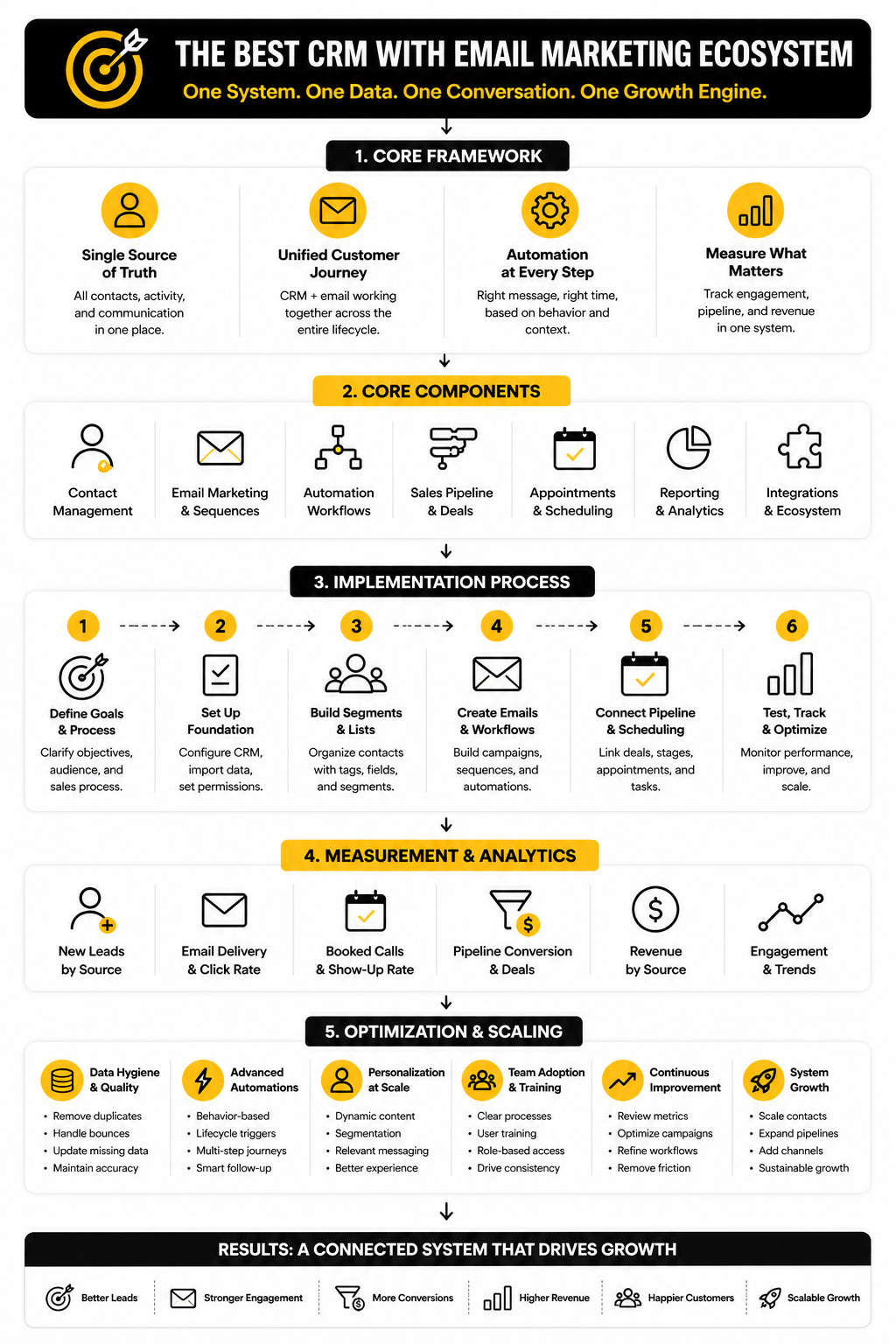
Article Outline
- Why CRM and Email Marketing Belong Together
- The Framework for Choosing the Best CRM With Email Marketing
- Core Components Every Strong CRM Email Platform Needs
- Best CRM With Email Marketing Platforms to Consider
- Professional Implementation: From Setup to Optimization
- Final Recommendations, Use Cases, and FAQ
Why CRM and Email Marketing Belong Together
Email marketing works best when it is connected to real customer context. A basic email tool can send campaigns, but it often cannot show the full picture of who the person is, what they asked for, which deal stage they are in, what they bought, or whether sales already followed up. That is where a CRM changes the game.
A good CRM with email marketing lets you send different messages to different people based on behavior, lifecycle stage, source, purchase history, and sales activity. That means a new lead from a webinar should not receive the same email path as a returning customer, a cold prospect, or someone who abandoned a booking form. The value is not just automation; it is relevant automation.
This is also why many businesses eventually outgrow disconnected tools. When CRM and email live separately, teams waste time exporting lists, syncing contacts, fixing tags, and guessing which campaign influenced which sale. When they work together properly, your marketing and sales process becomes easier to manage, easier to measure, and easier to scale.
The Framework for Choosing the Best CRM With Email Marketing
The smartest way to choose is to start with your business model, not the software category. A local agency, SaaS company, ecommerce brand, consultant, course creator, and B2B sales team do not need the same CRM setup. They may all need email marketing, but they need different pipelines, automations, permissions, reporting, and sales workflows.
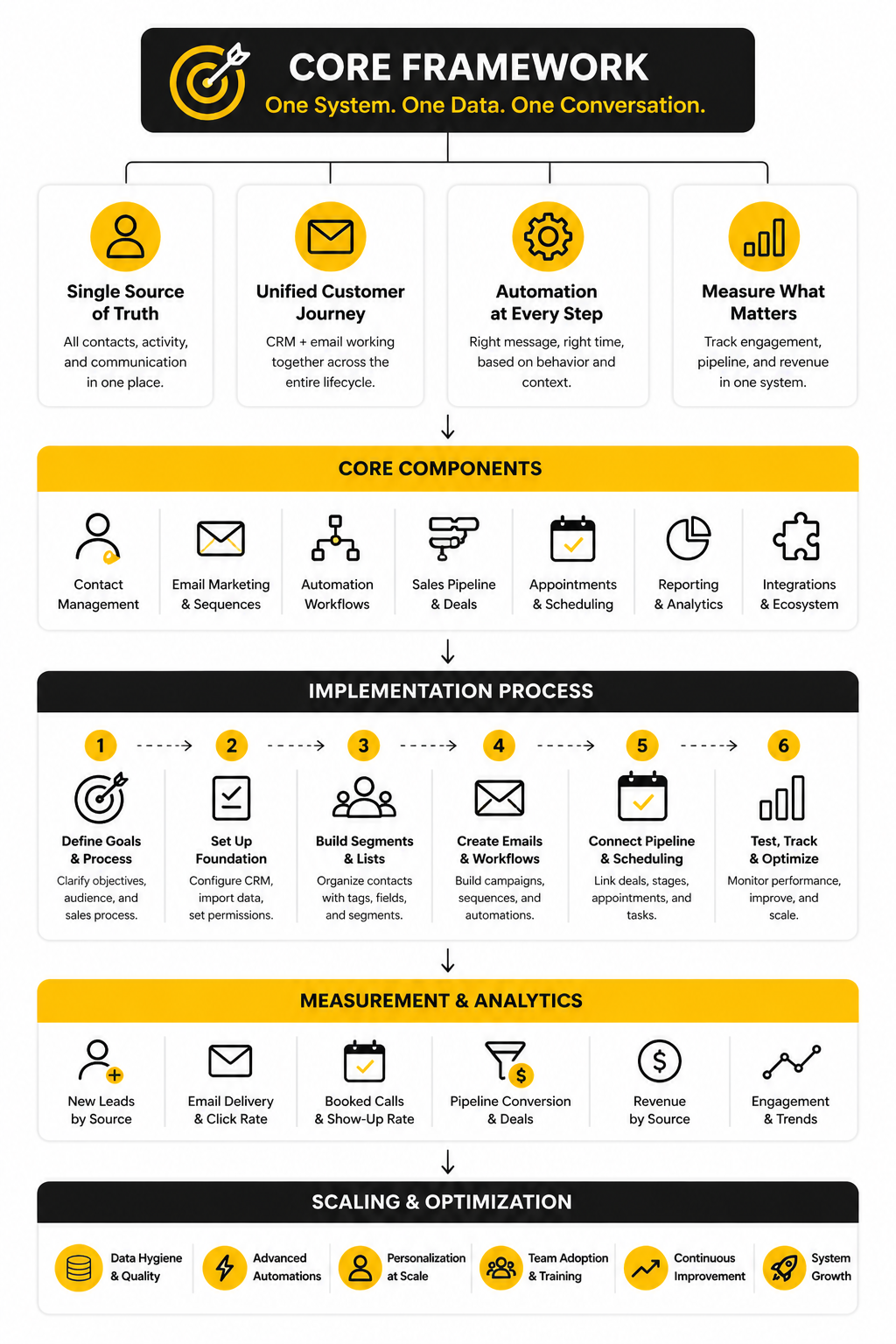
Use this framework before comparing platforms:
- Lead capture: How do contacts enter your system?
- Contact management: What data needs to be stored and kept clean?
- Segmentation: How will contacts be grouped by intent, behavior, and lifecycle stage?
- Email campaigns: Do you need newsletters, nurture sequences, broadcasts, or transactional-style updates?
- Automation: What should happen automatically after a form fill, booking, purchase, reply, or missed call?
- Sales pipeline: Does your team need deal stages, tasks, reminders, and follow-up tracking?
- Reporting: Can you see which campaigns, sources, and sequences create revenue?
- Scalability: Will the platform still make sense when your list, team, and offer suite grow?
The best CRM with email marketing should make these pieces feel connected. If the CRM is strong but the email builder is weak, you will feel friction. If the email marketing is strong but the CRM is shallow, your follow-up will eventually become messy. The right platform gives you enough depth on both sides without making daily work painful.
Core Components Every Strong CRM Email Platform Needs
Once you understand the framework, the next step is knowing what to look for inside the software. This is where many people get distracted. They compare templates, AI subject line tools, or dashboard screenshots before checking whether the platform can handle the daily work that actually creates revenue.
A strong CRM email platform should help you manage the full relationship, not just send campaigns. It should track where a contact came from, what they did, what they need next, and how your team should follow up. That is the difference between using email as a broadcast channel and using email as part of a proper sales and customer journey.
This matters even more as email marketing keeps getting more competitive. The email marketing market is projected to reach $13.72 billion in 2026, and consistent ROI is still one of the biggest reasons businesses keep investing in the channel. But more sending does not automatically mean better results; cleaner data, better timing, stronger segmentation, and tighter CRM context are what make email work.
Contact Management That Stays Clean
The first real test is contact management. Your CRM should make it easy to store names, emails, phone numbers, companies, lifecycle stages, deal status, source data, tags, custom fields, and communication history without turning every record into a mess. If your team cannot trust the contact record, every automation built on top of it becomes shaky.
Clean contact management is especially important when leads come from multiple places. A business might collect contacts through landing pages, booked calls, paid ads, referrals, webinars, chat widgets, and imported lists. If the CRM cannot merge duplicates, preserve source data, and show contact history clearly, your email marketing will eventually become noisy.
This is one reason platforms like GoHighLevel appeal to agencies and service businesses. The CRM, pipeline, email, SMS, calendars, forms, and automations are built to live in one operational environment. That does not make it the best fit for everyone, but it does solve a very real problem for teams that are tired of stitching together too many tools.
Segmentation Based on Behavior, Not Guesswork
Segmentation is where CRM-powered email starts to become useful. Basic email tools can segment by list or tag, but a better CRM lets you segment by behavior, sales stage, lead source, engagement, purchase history, booked appointments, form submissions, and pipeline activity. That gives you more control over who receives what and when.
This is important because broad campaigns are easy to send but hard to make relevant. A lead who downloaded a comparison guide needs different follow-up than someone who already had a sales call. A customer who purchased once needs a different message than someone who has gone cold for six months.
The best CRM with email marketing should let you build these segments without needing a developer. You should be able to create practical groups like “new leads who have not booked,” “customers who bought offer A but not offer B,” or “deals stuck in proposal stage for more than seven days.” If the segmentation tool feels powerful but your team never uses it, it is not really powerful.
Email Campaigns and Automations That Match the Buyer Journey
Good email marketing is not just newsletters. It includes welcome sequences, lead nurture, sales follow-up, onboarding, reactivation, post-purchase education, review requests, referral campaigns, event reminders, and customer retention flows. A CRM makes these more effective because the emails can react to what is happening in the relationship.
For example, a lead who books a call should not keep receiving emails pushing them to book a call. A prospect who replies should not be treated the same as someone who ignores every message. A customer who completes onboarding should move into a different communication path than someone who needs support.
This is where automation logic matters. You want triggers, conditions, delays, goals, suppression rules, and clear exit criteria. Without those, automations become traps: contacts keep receiving messages that no longer match their situation, and your brand starts to feel careless.
Deliverability and Compliance Controls
Email features mean very little if your messages do not reach the inbox. Your platform should support the basics: authenticated sending domains, unsubscribe management, bounce handling, suppression lists, consent tracking, and list hygiene. These are not glamorous features, but they protect your sender reputation.
Deliverability also depends on how responsibly the CRM handles engagement. If the system makes it easy to keep blasting inactive contacts, your results will usually decline over time. Better platforms help you identify disengaged segments, remove bad addresses, and avoid sending the same campaign to people who should be excluded.
Compliance matters too. Businesses operating across markets need to think about consent, opt-outs, data access, and privacy rules. You do not need to turn your CRM search into a legal project, but you do need a platform that gives you enough control to market responsibly.
Sales Pipeline Visibility
A CRM with email marketing should connect campaigns to pipeline movement. Otherwise, marketing can celebrate opens and clicks while sales still has no idea which leads are serious. The point is not to drown the team in metrics; the point is to see whether emails are creating conversations, appointments, opportunities, and customers.
Pipeline visibility becomes especially useful for service businesses, agencies, consultants, coaches, B2B teams, and high-ticket offers. In those models, the sale often happens after multiple touchpoints. Email supports the process, but the CRM needs to show where each contact stands.
This is where the best crm with email marketing becomes more than a marketing tool. It becomes the operating system for follow-up. When a lead clicks a pricing email, books a call, misses the appointment, replies with an objection, or moves into proposal stage, your team should be able to see it and act quickly.
Reporting That Connects Marketing to Revenue
Reporting should help you make decisions, not just admire charts. You need to know which campaigns generate replies, which automations create bookings, which sources produce customers, and which segments are worth more attention. If the platform only reports opens and clicks, you are missing the bigger picture.
Email benchmarks are useful, but they are not the final score. ActiveCampaign’s 2025 benchmark data puts average email click-through rates across industries around 2.62%, but your real goal depends on the business model. A SaaS company may care about trial activation, while an agency may care about booked calls and signed retainers.
The reporting layer should connect CRM data with email performance. That means campaign metrics, attribution, pipeline value, won revenue, and contact-level history should be close enough to review without exporting everything into spreadsheets every week. When reporting is practical, optimization becomes much easier.
Integrations Without Dependency Chaos
No CRM has to do everything, but it does need to integrate cleanly with the tools you rely on. That might include payment processors, calendars, forms, ad platforms, webinar software, help desks, ecommerce tools, analytics platforms, and landing page builders. The question is not “does it integrate with many tools?” The question is “does it integrate with the tools that actually matter in your workflow?”
This is where smaller businesses often overcomplicate the stack. They add one tool for forms, another for email, another for bookings, another for pipelines, another for landing pages, and another for reporting. Then they spend more time fixing the machine than using it.
A good CRM with email marketing should reduce that dependency where possible. For example, Systeme.io can make sense for creators and small online businesses that want funnels, email, products, and automation in one simpler environment. Brevo can make sense when email marketing, contact management, and practical automation are the priority without needing a heavy sales CRM.
Professional Implementation: From Setup to Optimization
Choosing the best CRM with email marketing is only half the job. The bigger win comes from implementing it in a way your team can actually use every day. A platform can have excellent automation, clean pipelines, strong reporting, and beautiful email templates, but none of that matters if the setup is rushed.
Implementation should be treated like a business process, not a software chore. You are not just connecting forms and importing contacts. You are deciding how leads move, how sales follows up, how customers are nurtured, how data stays clean, and how performance gets measured.
Poor setup is expensive because it hides inside daily operations. A 2025 CRM data management report found that 37% of CRM users reported losing revenue because of poor data quality, and 76% said less than half of their CRM data is accurate and complete. That is the real danger: the system still looks like it works, but the decisions coming from it are unreliable.
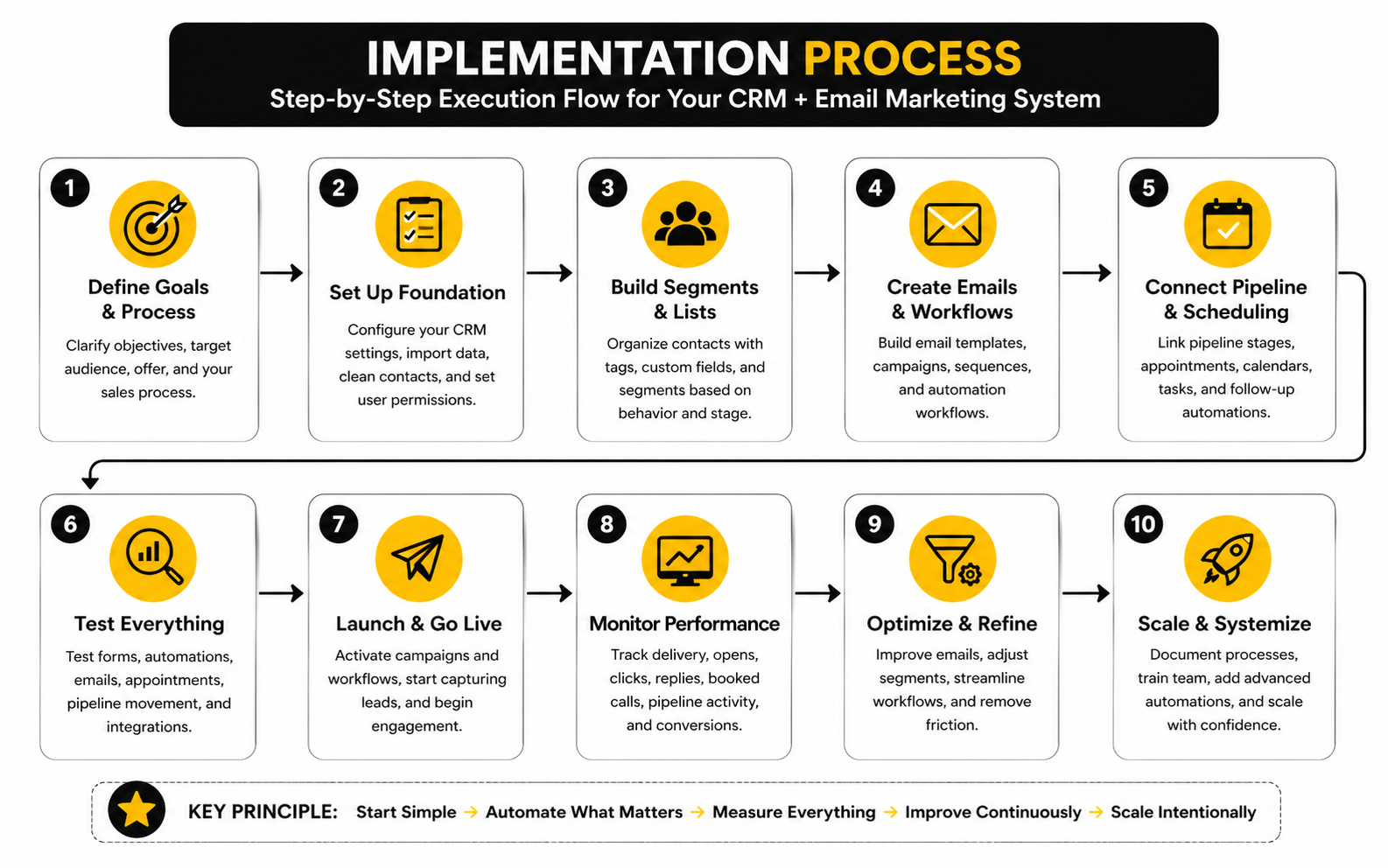
Step 1: Map the Customer Journey Before Building Anything
Start with the journey, not the tool. Write down how someone moves from stranger to lead, from lead to sales conversation, from sales conversation to customer, and from customer to repeat buyer or referral source. This gives the CRM a clear job instead of turning it into a random collection of tags, lists, and automations.
This map should include every important entry point. That might be a website form, landing page, paid ad, webinar signup, calendar booking, manual sales import, chatbot conversation, checkout page, or referral. Each entry point should have a clear next step, because vague entry points create vague follow-up.
Do not overbuild this stage. A simple journey map is better than a complicated diagram nobody uses. The goal is to define what should happen, when it should happen, and who is responsible when automation is not enough.
Step 2: Clean and Structure Your Contact Data
Before you import contacts into a new CRM, clean the data. Remove obvious duplicates, fix broken fields, separate customers from prospects, and decide which custom fields are truly necessary. This is boring work, but it prevents months of frustration later.
Your CRM should have a clear structure for lifecycle stage, lead source, owner, consent status, customer type, and key behavior. Tags can be useful, but they should not become a dumping ground for every random idea. If your team needs a spreadsheet to understand your tags, the system is already too complicated.
This is where discipline pays off. A clean contact record lets email marketing become more relevant, sales follow-up become more timely, and reporting become more trustworthy. Without clean data, even the best crm with email marketing turns into a prettier version of the same old mess.
Step 3: Set Up Email Deliverability Correctly
Deliverability should be handled before campaigns go live. Your sending domain needs the right authentication records, including SPF, DKIM, and DMARC where applicable. Google’s sender guidelines require authenticated mail for DMARC alignment, and Yahoo’s sender guidance also emphasizes authentication, low complaint rates, and responsible sending practices.
This is not technical trivia. If your domain is not authenticated, your emails are more likely to land in spam or get blocked. If your list quality is poor, your complaint and bounce rates can damage performance before your new CRM has a fair chance.
Set up unsubscribe handling, suppression lists, bounce management, and engagement cleanup from the beginning. Then warm up sending gradually if you are moving from another platform or sending to a large list. The goal is not to send as much as possible on day one; the goal is to build a sending reputation that lasts.
Step 4: Build the First Automations Around Revenue Moments
Do not start by automating everything. Start with the moments that directly affect revenue, follow-up speed, or customer experience. These are usually the points where leads get lost, sales forgets to follow up, customers need guidance, or prospects need reassurance before making a decision.
The first automations often include:
- New lead follow-up
- Booking confirmation and reminders
- Missed appointment recovery
- Sales pipeline stage follow-up
- Proposal follow-up
- New customer onboarding
- Review or testimonial request
- Re-engagement for inactive leads
Each automation should have a clear trigger, clear goal, and clear exit rule. For example, if someone books a call, they should exit the “book a call” nurture sequence. If someone becomes a customer, they should stop receiving prospect-only emails. Simple logic like this protects the customer experience.
Step 5: Connect Forms, Calendars, Pipelines, and Email
Once the core journey is clear, connect the operational pieces. Forms should create or update contact records. Calendars should update the right fields and trigger the right reminders. Pipelines should reflect real sales stages, not wishful thinking. Email should respond to what is happening in the CRM.
This is where tools like GoHighLevel can be strong for agencies, local businesses, and service providers because the CRM, forms, funnels, calendars, email, SMS, pipeline, and automation tools are designed to work together. For leaner online businesses, Systeme.io may be easier when the priority is funnels, email sequences, products, and simple automation. For teams focused more heavily on email campaigns and practical contact management, Brevo can fit well without forcing a full sales-heavy setup.
The important part is not choosing the most complex platform. The important part is choosing a platform where your critical workflows can run without constant workarounds. Every workaround becomes a maintenance cost later.
Step 6: Create a Simple Naming System
A CRM becomes hard to manage when assets are named casually. “New sequence,” “Test funnel,” “Lead form final,” and “Newsletter copy 2” might feel harmless at first. Six months later, nobody knows what is active, what is broken, or what can be deleted.
Create naming rules for forms, campaigns, automations, pipelines, tags, lists, custom fields, and landing pages. Keep them practical. A good naming system might include the audience, offer, funnel stage, and date or version number.
This is not about being neat for the sake of being neat. It is about making the system easier to audit, improve, and hand off. If another person joins the team and cannot understand the CRM structure in a reasonable amount of time, the setup is too fragile.
Step 7: Test the Full Journey Like a Real Lead
Before launch, test the system from the outside. Submit the form. Book the call. Click the confirmation email. Miss the appointment in a controlled test. Move the deal stage. Reply to an email. Become a customer. Then check whether the CRM behaves the way it should.
Testing should include both the customer-facing experience and the internal team experience. The customer should receive the right messages at the right time. The team should receive the right notifications, tasks, pipeline updates, and contact history.
This step catches the mistakes that dashboards do not show. Broken triggers, duplicate emails, missing unsubscribe links, wrong sender names, confusing calendar reminders, and bad pipeline updates are easier to fix before real leads enter the system. Launching without testing is gambling with your first impression.
Step 8: Review Performance and Improve Monthly
Implementation does not end when the CRM goes live. The first version is only the baseline. After that, you need a monthly review rhythm to see what is working, what is confusing, and what should be removed.
Review practical numbers: new leads, booked calls, show-up rate, reply rate, unsubscribe rate, pipeline conversion, won revenue, and automation performance. Do not obsess over vanity metrics while ignoring sales outcomes. Email opens can be useful directionally, but they should not be treated as the final measure of success.
Monthly optimization keeps the platform lean. Remove dead automations, simplify segments, improve weak emails, clean stale contacts, and adjust pipeline stages based on real behavior. This is how a CRM with email marketing becomes a long-term asset instead of another tool your team slowly avoids.
Statistics and Data That Actually Matter
Data is useful only when it changes what you do next. A CRM dashboard full of charts can look impressive, but if it does not help you improve lead quality, follow-up, email performance, pipeline movement, or revenue, it is just decoration. The best CRM with email marketing should turn activity into decisions.
This is where many businesses get it wrong. They track opens because opens are easy to see. They celebrate list growth because a bigger list feels like progress. They compare their click rate to a benchmark without asking whether the clicks came from the right people or created any commercial outcome.
The better approach is simple: measure the full path from lead source to customer value. Email is part of that path, but it should not be measured in isolation. Your CRM should help you understand which contacts are moving forward, which messages are helping, and where the journey breaks.
The Measurement System You Actually Need
A practical analytics system starts with four layers: acquisition, engagement, pipeline, and revenue. Acquisition shows where contacts come from. Engagement shows how they respond to emails and follow-up. Pipeline shows whether they become real opportunities. Revenue shows whether the system produces customers, repeat purchases, or retained accounts.
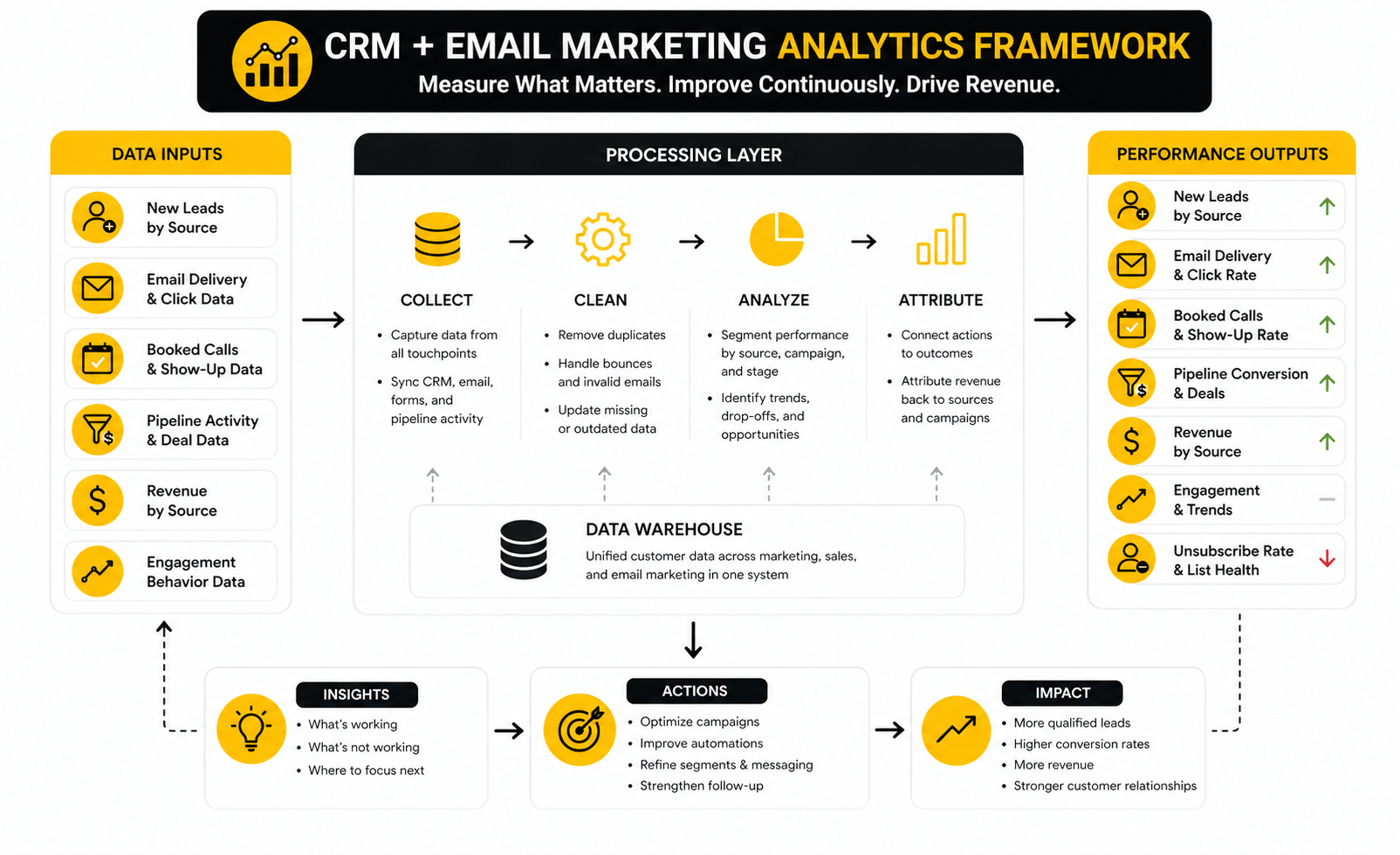
These layers need to connect. If a campaign gets strong clicks but creates no qualified conversations, the problem may be intent. If a lead source produces many form submissions but very few booked calls, the problem may be targeting or offer quality. If email engagement is healthy but pipeline movement is weak, the issue may be sales follow-up rather than email copy.
This is why a CRM with built-in email marketing is so useful. It can show more than campaign performance. It can show how email behavior relates to pipeline status, sales tasks, customer segments, and revenue events.
Email Benchmarks Are Directional, Not Absolute
Benchmarks help you spot obvious problems, but they should not become your strategy. The DMA’s 2025 email benchmarking report showed 98% delivery rates in 2024, 35.9% open rates, and 2.3% unique click rates, while MailerLite’s 2025 benchmark data reported an average 2.09% click rate and 0.22% unsubscribe rate. Those numbers are helpful reference points, but they do not tell you whether your specific CRM setup is working.
Open rates are especially tricky. Apple Mail Privacy Protection and inbox behavior have made opens less reliable as a direct measure of human attention. Opens can still show broad directional movement, but they should not be treated like proof that a lead is ready to buy.
Clicks, replies, bookings, purchases, and pipeline progression are stronger signals. If someone clicks a pricing page, replies to a nurture email, books a call, or moves from proposal to closed won, that tells you far more than an open. A good CRM should help you prioritize those stronger signals.
Revenue Attribution Should Stay Practical
Attribution does not need to be perfect to be useful. You do not need a complicated multi-touch model before you can make better decisions. You need enough visibility to understand which lead sources, campaigns, automations, and sales actions are helping revenue move forward.
In B2B and service businesses, the path to purchase often includes several touchpoints. A prospect might read a newsletter, click a case study, attend a webinar, book a call, receive proposal follow-up, and then become a customer. If your CRM only credits the last form submission, you may underestimate the role of email nurture.
The practical solution is to track source, first conversion, key campaign engagement, pipeline stage changes, and closed revenue together. This gives you a useful picture without pretending every sale can be explained perfectly. The goal is better decision-making, not mathematical theater.
The Metrics Worth Watching Weekly
Weekly reporting should be simple enough that someone actually does it. Look at the metrics that reveal movement, not just activity. If your report takes hours to prepare, it will eventually stop happening.
Useful weekly metrics include:
- New leads by source
- Email delivery and bounce rate
- Click rate on priority campaigns
- Reply rate where replies matter
- Booked calls or demo requests
- Show-up rate for appointments
- Pipeline stage conversion
- Deals created
- Deals won
- Revenue by source or campaign
- Unsubscribes and spam complaints
These numbers work together. A low click rate might be a copy problem, an offer problem, or a segmentation problem. A high click rate with low bookings might mean the landing page or calendar flow is weak. A strong booking rate with poor close rate might mean the CRM is doing its job, but sales qualification needs work.
The Metrics That Can Mislead You
Not every visible number deserves equal attention. List size is a classic example. A large list looks valuable, but if it contains cold contacts, invalid addresses, inactive subscribers, and people who never had buying intent, it can hurt deliverability and cloud your reporting.
Open rate can also mislead. It may rise because of better subject lines, but it may also be distorted by privacy features, inbox behavior, or changes in audience mix. Treat it as a weak signal, not a final verdict.
Automation volume is another dangerous vanity metric. Having 40 workflows does not mean your CRM is advanced. It may mean the system is bloated. A few clean automations tied to important revenue moments are usually more valuable than a maze of sequences nobody fully understands.
Data Quality Is a Revenue Issue
CRM data quality is not an admin problem. It is a revenue problem. Validity’s 2025 CRM data management research found that 37% of CRM users reported losing revenue because of poor data quality, while 76% said less than half of their CRM data is accurate and complete.
That should make every business pause. If lifecycle stages are wrong, lead sources are missing, duplicates are everywhere, and sales notes are inconsistent, your reports cannot be trusted. Worse, your email automation may send the wrong message to the wrong person at the wrong time.
This is why data hygiene needs to be part of the operating rhythm. Review duplicates, stale contacts, missing source fields, bounced emails, inactive segments, and broken automations regularly. Clean data makes segmentation sharper, reporting more useful, and follow-up more personal.
What Good Performance Looks Like
Good performance is not one magic benchmark. It looks different depending on your model. A newsletter-driven creator business may care about engagement and product purchases, while an agency may care more about booked calls, show-up rate, proposal conversion, and client lifetime value.
For a service business, a healthy CRM email system usually shows steady lead capture, fast follow-up, clear pipeline movement, and fewer prospects slipping through the cracks. For an ecommerce or digital product business, it may show stronger post-purchase flows, better repeat buying, and higher revenue from segmented campaigns. For a B2B team, it may show better lead scoring, cleaner handoff to sales, and more reliable attribution.
The key is to define success before judging the platform. GoHighLevel may be strong when pipeline, appointments, client communication, and automation need to sit together. Brevo may fit better when the main job is email marketing, contact segmentation, and campaign reporting. Systeme.io may be enough when a small business wants funnels, emails, products, and simple automation without a heavier sales CRM.
How to Turn Analytics Into Action
The whole point of measurement is improvement. If the data does not lead to action, stop collecting so much of it. Every analytics review should end with a decision: clean this segment, rewrite this email, simplify this workflow, improve this landing page, adjust this pipeline stage, or change how sales follows up.
A simple monthly review can work well:
- Identify the strongest lead source.
- Identify the weakest conversion point.
- Review the highest-value email automation.
- Find one segment that should be cleaned or suppressed.
- Improve one sales follow-up step.
- Remove or pause one workflow that no longer serves a clear purpose.
This keeps the CRM practical. You are not trying to optimize everything at once. You are using the data to remove friction, sharpen messaging, and make the next month better than the last.
Advanced Tradeoffs Before You Commit
By this point, the question is not whether a CRM with email marketing is useful. It is. The harder question is which tradeoffs you are willing to accept. Every platform gives you something and takes something away, so the smartest decision is not “which tool has the most features?” It is “which tool creates the least friction for the way we actually sell?”
This is where business owners need to be honest. A simple platform can feel limiting later, but an advanced platform can slow the team down from day one. A cheaper tool can look attractive until you need extra integrations, migration help, more contacts, better reporting, or higher sending limits.
The best crm with email marketing is the one that fits your current operation and your next stage of growth. Not your fantasy version of the business three years from now. Not the stack some influencer uses. Your actual lead flow, sales process, team capacity, offer model, and reporting needs.
All-In-One vs Best-In-Class Tools
All-in-one platforms reduce tool sprawl. They can bring forms, calendars, pipelines, email, automations, landing pages, SMS, and reporting into one environment. That usually means fewer integrations, fewer sync issues, and less confusion for small teams.
The downside is that all-in-one platforms may not be the strongest in every category. Their email builder may not be as refined as a dedicated email platform. Their CRM may not be as deep as an enterprise sales system. Their reporting may be practical but not as customizable as a specialist analytics setup.
Best-in-class stacks give you more control, but they also create more maintenance. You might use one tool for CRM, another for email, another for forms, another for scheduling, and another for dashboards. That can work beautifully when someone owns the system, but it becomes fragile when nobody does.
Automation Power vs Operational Simplicity
Automation is seductive. The moment you see what a CRM can do, it is tempting to build a workflow for every possible scenario. That is usually a mistake.
The more automation you add, the more governance you need. Someone has to know what each workflow does, when it triggers, who it affects, and what happens when a contact qualifies for multiple sequences at once. Without that control, automation becomes noise.
A better rule is to automate only what improves speed, consistency, personalization, or measurement. If an automation does not help the customer experience or the revenue process, question whether it should exist. Simple systems are easier to improve because everyone can understand them.
Built-In Email vs Dedicated Email Platforms
A CRM with built-in email marketing is convenient because customer data and campaigns live together. You can trigger emails from pipeline movement, contact behavior, bookings, purchases, or sales activity. For many businesses, that connection is more valuable than having the fanciest newsletter editor.
Dedicated email platforms can be stronger for design control, content-heavy newsletters, deliverability tools, advanced testing, and list growth workflows. They may also feel better for teams that think primarily in campaigns rather than sales pipelines. The tradeoff is that CRM context may need to come through integrations.
This is why platform fit matters. Brevo is worth considering when email campaigns, segmentation, and practical automation are central. GoHighLevel is more compelling when the CRM needs to sit close to appointments, pipelines, client communication, and service-business follow-up. Systeme.io can be the simpler route when funnels, email sequences, offers, and checkout need to stay lightweight.
Scaling Contact Volume Without Losing Control
Growth creates pressure on your CRM. More leads means more segments, more automations, more unsubscribe risk, more duplicate records, more sales handoffs, and more reporting complexity. What worked with 1,000 contacts may feel completely different at 50,000.
Before choosing a platform, check how pricing changes as your list grows. Some tools charge mainly by contacts, some by users, some by sending volume, and some by feature tier. The cheapest option at the start may become expensive once your database and sending needs increase.
Also check how the platform handles segmentation at scale. You need to filter, suppress, clean, and prioritize contacts without exporting everything manually. A growing list is only an asset when you can manage it responsibly.
AI Features Need Clean Data First
AI is now everywhere in CRM and email marketing. You will see AI subject lines, AI email copy, AI chatbots, AI lead scoring, AI summaries, AI sales assistants, and AI campaign recommendations. Some of it is useful. Some of it is just packaging.
The uncomfortable truth is simple: AI does not fix bad CRM hygiene. If your source fields are missing, lifecycle stages are wrong, contact records are duplicated, and sales activity is inconsistent, AI will simply make confident recommendations from weak inputs. That is not intelligence; that is faster confusion.
Use AI where it removes friction. Let it summarize conversations, draft first-pass emails, suggest segments, or speed up content production. But keep humans responsible for strategy, compliance, brand voice, offer positioning, and final decisions.
Migration Risk Is Real
Moving from one CRM or email platform to another is not just a file export. You may need to migrate contacts, tags, lists, custom fields, automations, forms, templates, landing pages, unsubscribe records, consent data, pipeline history, and reporting logic. Miss one critical piece and the new system may launch with hidden problems.
Before migrating, document what exists. Identify active automations, current segments, high-performing emails, important suppression lists, live forms, and sales pipeline rules. Then decide what should be rebuilt, archived, simplified, or deleted.
A migration is also a chance to clean house. Do not move every old tag, broken workflow, and outdated list just because it exists. The goal is not to recreate the old mess in a new platform. The goal is to build a cleaner operating system.
Team Adoption Beats Feature Depth
The strongest CRM is useless if the team avoids it. Salespeople will not update records if the workflow is painful. Marketers will not maintain segments if the logic is confusing. Owners will not trust reports if the data feels inconsistent.
Adoption improves when the CRM reflects real work. Pipeline stages should match actual sales conversations. Tasks should be useful, not busywork. Automations should reduce manual follow-up, not create strange edge cases the team has to untangle.
Training also matters, but training cannot rescue a bad setup. If the system is too complicated, people will create side spreadsheets, private notes, and unofficial workarounds. That is when CRM becomes theater instead of infrastructure.
When a Lightweight Platform Is the Better Choice
Not every business needs a heavy CRM. If you sell simple digital products, run a small newsletter, operate a basic funnel, or have a short sales cycle, a lighter platform may be the smarter move. Complexity should be earned.
A lightweight setup can still be professional. You can have clean forms, useful segments, strong welcome sequences, simple customer tagging, and clear campaign reporting without building a full sales machine. The goal is to match the platform to the revenue motion.
Choose lightweight when speed and simplicity matter more than deep pipeline control. Choose heavier CRM capability when lead ownership, sales stages, follow-up tasks, appointments, multiple users, and revenue attribution become central to the business.
When a More Advanced CRM Is Worth It
A more advanced CRM becomes worth it when follow-up complexity starts costing money. If leads are slipping through cracks, sales needs better visibility, multiple people touch the same account, or customer journeys depend on behavior across several channels, you need stronger structure. That is when the CRM stops being optional.
Advanced CRM capability also matters when reporting needs to connect marketing activity with sales outcomes. A founder or marketing lead should be able to see which campaigns create qualified opportunities, not just clicks. Sales should be able to see which contacts are engaged, not just who entered the database.
The key is to scale intentionally. Do not buy advanced software because it feels serious. Buy it because the business has reached a point where better structure will protect revenue, improve follow-up, and make growth easier to manage.
Final Recommendations and Use Cases
The best CRM with email marketing is the one that matches your revenue motion. If your business depends on booked calls, pipeline follow-up, appointment reminders, client communication, and multi-step sales workflows, you need a platform that treats CRM as the center of the system. If your business depends mainly on newsletters, segmented campaigns, ecommerce-style automations, and simpler contact management, you may not need the heaviest sales CRM.
For agencies, local service businesses, coaches, consultants, and appointment-driven teams, GoHighLevel is a strong fit because it combines CRM, email, automation, calendars, funnels, pipelines, and client communication in one place. For creators, solo operators, and small online businesses that want funnels, products, email sequences, and checkout without a complex setup, Systeme.io is easier to keep lean. For teams that care most about email campaigns, contact segmentation, and practical marketing automation, Brevo is a sensible option.
Do not choose based only on the platform’s homepage. Choose based on the workflow you need to run every week. The right CRM should make your follow-up faster, your segmentation cleaner, your reporting clearer, and your customer journey easier to manage.
FAQ - Built for Complete Guide
What is the best CRM with email marketing?
The best CRM with email marketing depends on your business model. GoHighLevel is often a strong choice for service businesses and agencies because CRM, pipelines, email, calendars, funnels, and automations are connected. Brevo is a better fit when email campaigns and contact segmentation are the main priority, while Systeme.io works well for smaller online businesses that want funnels and email in a simpler setup.
Why should CRM and email marketing be in the same platform?
CRM and email marketing work better together because customer context improves messaging. When your email system knows a contact’s lead source, lifecycle stage, purchase history, sales status, and engagement, your follow-up becomes more relevant. This helps you avoid generic campaigns and build email journeys that match what people actually need next.
Is an all-in-one CRM better than using separate tools?
An all-in-one CRM is better when simplicity, speed, and connected workflows matter more than specialized control. Separate tools can be powerful, but they require more integrations, more maintenance, and more technical ownership. If your team is small or your process depends on fast follow-up, an all-in-one setup is often easier to manage.
What features matter most in a CRM with email marketing?
The most important features are clean contact management, segmentation, email campaigns, automation, pipeline tracking, deliverability controls, reporting, and integrations. Fancy templates and AI tools are useful, but they should not distract from the basics. If the CRM cannot keep data clean and connect email activity to pipeline movement, it will eventually limit your growth.
How do I know if I need a full CRM or just an email marketing tool?
You need a full CRM when sales follow-up, pipeline stages, appointments, tasks, deal tracking, or multiple team members are part of your process. You may only need an email marketing tool if your business is mostly newsletter-driven or built around simple product purchases. The more human follow-up your sales process requires, the more important CRM functionality becomes.
What is the biggest mistake businesses make when choosing a CRM?
The biggest mistake is choosing software before mapping the customer journey. Businesses often buy a platform because it looks powerful, then force their process into the tool afterward. A better approach is to define how leads enter, how they are nurtured, how sales follows up, how customers are onboarded, and what metrics matter before committing.
How important is email deliverability in a CRM?
Email deliverability is critical because even the best campaigns fail if they do not reach the inbox. Your CRM should support proper domain authentication, unsubscribe handling, bounce management, suppression lists, and list hygiene. Deliverability is not a bonus feature; it is the foundation that makes email marketing usable.
Should I use AI inside my CRM email platform?
AI can be useful for drafting emails, summarizing conversations, suggesting segments, and speeding up repetitive tasks. But AI works only as well as the data behind it. If your CRM is full of duplicate contacts, missing source fields, outdated stages, and messy tags, AI will not fix the problem.
How often should I clean my CRM data?
You should review CRM data at least monthly. Look for duplicates, missing lead sources, bounced emails, inactive contacts, broken automations, outdated tags, and contacts in the wrong lifecycle stage. Clean data improves segmentation, reporting, automation accuracy, and sales follow-up.
What metrics should I track first?
Start with the numbers that connect marketing activity to revenue. Track new leads by source, email delivery, clicks, replies, booked calls, show-up rate, pipeline conversion, deals created, deals won, unsubscribe rate, and revenue by source. These metrics give you a clearer picture than open rate alone.
Is GoHighLevel the best CRM with email marketing?
GoHighLevel can be one of the best options for agencies, local businesses, coaches, consultants, and service providers that need CRM, automations, funnels, calendars, email, SMS, and pipelines in one system. It may be more than you need if your business only sends newsletters or has a very simple sales process. The best choice depends on how much follow-up and pipeline control your business actually needs.
Is Brevo a good CRM with email marketing?
Brevo is a good option when email marketing, segmentation, automation, and contact management are the core needs. It is especially practical for businesses that want strong campaign tools without building a heavy sales operation. If your process depends heavily on pipelines, appointments, and sales tasks, compare it carefully against more CRM-centered options.
Is Systeme.io enough for CRM and email marketing?
Systeme.io can be enough for creators, course sellers, small online businesses, and lean funnel-based offers. It gives you a simple way to manage funnels, products, email sequences, and automation without overbuilding the stack. It is not the best fit when you need advanced sales pipelines, complex account management, or deep CRM customization.
When should I switch CRM platforms?
You should consider switching when your current platform causes repeated operational friction. Common signs include poor reporting, messy contact data, weak automation logic, missing pipeline visibility, deliverability issues, expensive workarounds, or team members avoiding the system. Before switching, document your current workflows so you migrate intentionally instead of recreating the same problems somewhere else.
How do I choose the best CRM with email marketing for my team?
Choose by matching the platform to your sales process, team size, technical capacity, and growth stage. Test the exact workflow you need: capture a lead, send the follow-up, book the appointment, move the deal, trigger the right emails, and review the reporting. If that flow feels clean and repeatable, you are closer to the right choice.
Work With Professionals
Explore 10K+ Remote Marketing Contracts on MarkeWork.com
Most marketers spend too much time chasing clients, competing on crowded platforms, and losing a percentage of every project to middlemen.
MarkeWork gives you a better way. Browse thousands of remote marketing contracts and connect directly with companies desperate to hire skilled marketers like you, without platform commissions and without unnecessary gatekeepers.
If you are serious about finding better opportunities and keeping 100% of what you earn, explore available contracts and create a profile for free at MarkeWork.com.