

Finding the best email list service gets weirdly confusing because most comparison pages focus on feature piles instead of outcomes. What actually matters is simpler than that. You need a platform that helps you collect subscribers, segment them intelligently, automate follow-up, and protect deliverability as your list gets bigger.
That decision matters even more now because email is still massive, with 4.481 billion users in 2024 and a forecast of 4.97 billion by 2028. At the same time, inbox providers got stricter. Google’s sender rules now make authentication a baseline, and the bulk sender FAQ makes it clear that easy unsubscribe and low spam complaints are not optional if you want consistent inbox placement.
This is why the best email list service is not automatically the biggest brand or the cheapest monthly plan. A tool can look affordable right up until you need better segmentation, cleaner automations, stronger reporting, or a safer migration path. In practice, the platform you choose shapes how fast you grow, how much you pay to maintain that growth, and how often your emails actually get seen.
The good news is that the market is strong right now. You can find low-friction options, creator-focused tools, ecommerce-first platforms, and heavier systems built for agencies or multi-channel teams. If you already want a practical all-rounder, Brevo is one of the first platforms worth testing, and if you want a broader sales-and-marketing stack, HighLevel belongs on your shortlist early.
The other reason this decision deserves a real framework is performance. Litmus found that more than 90% of surveyed email marketers saw performance gains from segmentation, and the same report shows more than 80% saw improvement from several personalization tactics. That means the wrong tool does not just slow you down. It can quietly cap revenue because your list is getting bigger without getting smarter.
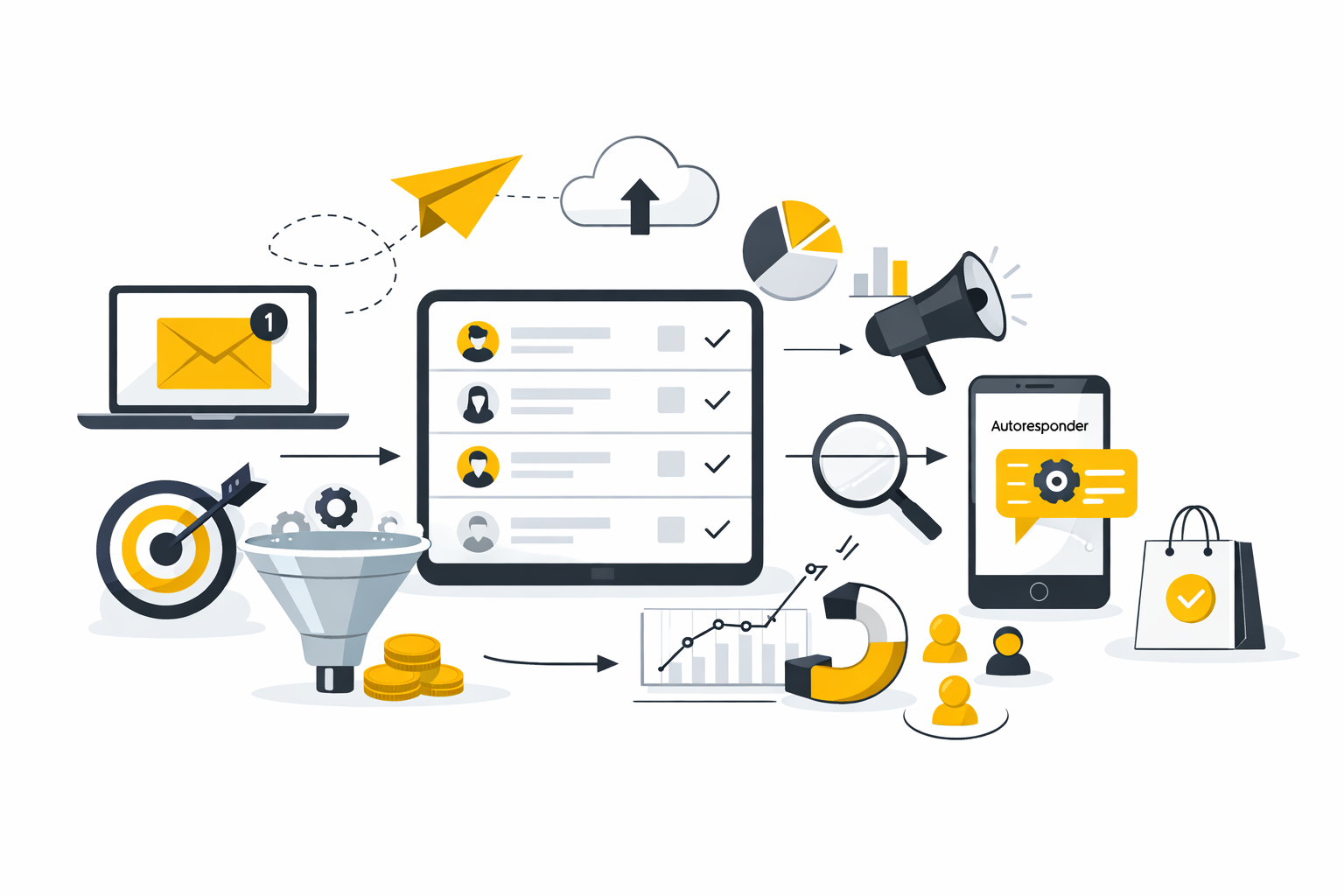
This article is built for people who do not want to replatform twice. We are going to separate beginner-friendly tools from serious long-term options, and we are going to look at pricing, automation depth, deliverability support, and business fit in the same decision model. That matters because a platform that works beautifully for a creator newsletter can be a bad choice for an ecommerce store, a local service business, or an agency managing multiple brands.
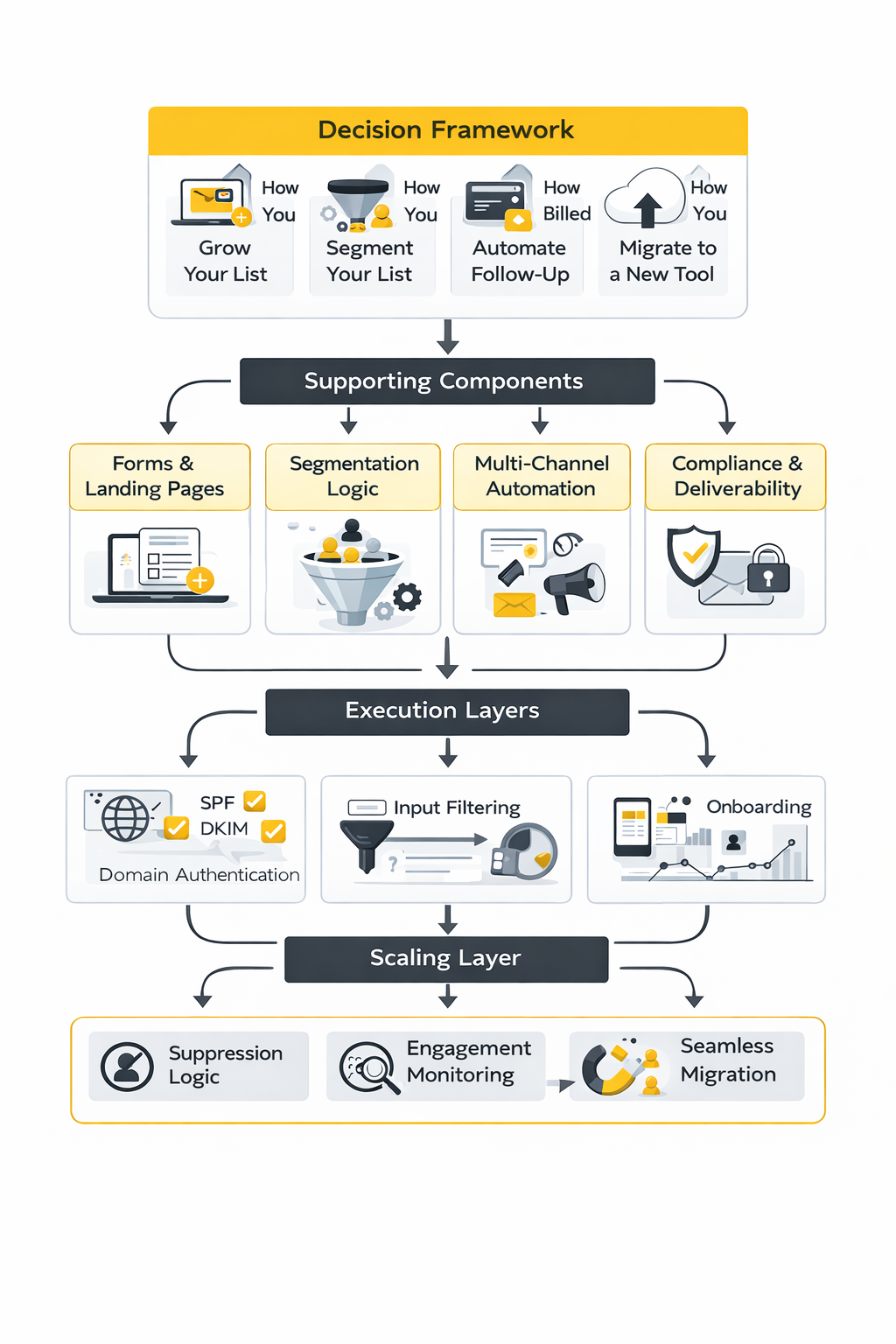
You will also see a simple selection framework throughout the rest of the article. The core filters are straightforward: how you grow your list, how you segment it, how advanced your automations need to be, how the vendor charges as you scale, and how risky the migration will be. If you want to compare while you read, Moosend is worth a look for straightforward email marketing, while Brevo and HighLevel make sense when you want broader automation or client-facing workflows.
Article Outline
The rest of this guide follows one path from strategy to execution so the article feels useful, not bloated. We will start with why the decision matters, then move into a practical framework, then break down the core features that separate a decent tool from one you will still be happy with a year from now. After that, we will match the strongest platforms to business type, walk through implementation, and finish with final recommendations and the FAQ.
- Why Choosing the Right Email List Service Matters
- The Decision Framework for Picking a Platform
- Core Features Every Serious Email List Service Needs
- The Best Email List Services by Business Type
- How to Implement a New Platform Without Hurting Deliverability
- Final Recommendations and Frequently Asked Questions
Why Choosing the Right Email List Service Matters
The platform now affects whether you reach the inbox
A few years ago, you could get away with treating your email platform like a simple sending tool. That is not really true anymore. Google now requires SPF or DKIM for all senders and SPF, DKIM, and DMARC for bulk senders, and it treats anyone sending around 5,000 messages or more to personal Gmail accounts in a 24-hour period as a bulk sender.
That changes the buying decision in a big way. Your email list service now has to help you handle authentication, subscription hygiene, and unsubscribe behavior without friction. Google also requires one-click unsubscribe for marketing and subscribed messages, and senders with a user-reported spam rate above 0.3% lose mitigation eligibility, which means a weak setup can turn into a delivery problem fast.
Yahoo is pushing in the same direction. Its sender guidance emphasizes authentication and easy unsubscribe, and its FAQ points to an enforcement threshold of 0.3% for complaint rates. So when you ask what the best email list service is, you are really asking which platform helps you stay compliant, keep complaints low, and preserve inbox placement as volume climbs.
Cheap plans can become expensive decisions
A lot of people choose a platform based on the entry price, then regret it once the list starts moving. That happens because pricing models are not standardized. Mailchimp’s own plan details show that its Standard plan scales by contact count and allows monthly sends up to 12 times your contact limit, while Brevo’s pricing is built around monthly email volume tiers such as 5,000 emails per month on Starter and 150,000 on Professional. Klaviyo adds another variation, with its free tier tied to active profiles and monthly email sends.
That sounds like a small billing detail until you hit real growth. A business with a large but lightly mailed list can get punished on contact-based pricing, while a business that sends frequently can outgrow volume-based pricing faster than expected. The best email list service for your business is often the one whose pricing logic matches the way you actually market, not the one with the prettiest homepage.
This is also why free plans are easy to overvalue. Mailchimp’s free plan includes up to 250 contacts and 500 sends per month, while Brevo’s free tier allows up to 300 emails per day. Those plans are fine for testing, but they do not tell you what your economics look like once your list is meaningful, your automations are live, and your campaigns are going out every week.
Smarter segmentation usually beats a bigger list
List size matters, but list quality matters more. Recent Litmus research found that more than 90% of surveyed email marketers said segmentation boosted performance, and more than 80% reported at least some improvement from subject line personalization, live content, and dynamic content personalization. That is a strong signal that the best email list service is not just the one that stores contacts. It is the one that helps you use those contacts intelligently.
This is where weak platforms quietly hold businesses back. If your service makes it hard to segment by engagement, geography, purchase history, or self-selected preferences, you end up blasting broader campaigns than you should. Litmus specifically highlights purchase history, geography and time zone, email engagement, devices, and self-selected preferences as practical segmentation paths, which tells you exactly what your platform should make easy.
That is why smart buyers stop obsessing over template libraries so early. Pretty emails do not rescue bad targeting. If you want a more flexible starting point for segmentation and multi-channel growth without jumping into a heavy enterprise stack, Brevo is worth testing here.
Compliance is not a side issue
Compliance becomes a platform issue the second you collect, import, or message subscribers at scale. In the United States, the FTC’s CAN-SPAM compliance guide makes clear that commercial email rules apply broadly, not just to giant blasts, and it notes penalties of up to $53,088 per violating email. In Europe, the rules are often tighter in practice, because direct marketing by email generally hinges on prior consent rules and a continuing right to object.
This becomes even more important when businesses start buying, borrowing, or importing lists from outside sources. The European Commission states that before using a third-party list for marketing, the organization must be able to show that the data was collected lawfully and may be used for advertising, including where consent covered sharing with other recipients. So the best email list service is not the one that makes imports easiest. It is the one that helps you document consent, manage unsubscribes cleanly, and avoid poisoning your sender reputation with bad data.
That point is easy to ignore when you are small. It becomes painfully obvious once deliverability drops, complaint rates rise, or you realize your database is full of people who never really wanted your emails in the first place. A serious platform should make compliance easier, not leave you cleaning up the mess manually.
The Decision Framework for Picking a Platform
1. Start with your business model, not the feature grid
Most people compare platforms backward. They open five pricing pages, skim feature tables, and try to pick a winner from a blur of checkmarks. A better move is to start with the kind of business you run and the kind of relationship you need email to support.
A local service business usually needs leads, reminders, nurture sequences, and follow-up tied to pipeline stages. An ecommerce brand usually needs behavior-based segmentation, revenue attribution, and flows built around browsing, cart, and repeat purchase behavior. A creator or newsletter business often cares more about landing pages, opt-ins, referral growth, sponsorship readiness, and monetization options than about deep sales CRM features.
That distinction matters because the best email list service for a newsletter creator is not automatically the best one for a med spa, agency, SaaS company, or online store. If your email list is tightly connected to appointments, forms, SMS, and sales follow-up, HighLevel makes more sense to trial early than trying to stretch a lightweight newsletter tool into a full operating system.
2. Price the next 12 months, not the first month
The only honest way to compare platforms is to model where your list will be in six to twelve months. Mailchimp, Brevo, Klaviyo, ActiveCampaign, and other major tools all scale differently, and those differences become obvious only when your contacts, sends, automations, and team access start stacking up. You can already see the contrast in the official pricing structures for Mailchimp, Brevo, Klaviyo, and ActiveCampaign.
Look beyond the headline monthly fee. Check whether pricing expands by contacts, sends, seats, automation depth, reporting, or channel access. ActiveCampaign’s pricing comparison pages show that even at the 1,000-contact level, plan tiers change not just cost but automation depth and advanced capabilities, while Brevo’s pricing highlights jumps tied to email volume, multichannel access, and added deliverability support.
This is where a lot of “cheap” tools stop being cheap. If your list is growing faster than your revenue per subscriber, your platform choice can squeeze margin without improving performance. For businesses that want a simpler pricing conversation and a faster path into automations, Brevo is a clean option to compare against the usual contact-priced tools.
3. Check automation depth before you care about templates
Almost every serious platform can build a nice-looking newsletter now. That is not the hard part anymore. The harder question is whether the tool can handle the automations you will actually need once your list grows beyond weekly broadcasts.
The differences show up fast when you read the plan details. Mailchimp’s pricing documentation notes that its Essentials plan supports automation flows with up to four steps, while Brevo’s Standard plan includes marketing automation, A/B testing, advanced reporting, and web and event tracking. ActiveCampaign positions even its entry tier around branching, multiple triggers, and strong automation foundations, and Kit emphasizes automated email sequences, forms, landing pages, and creator-focused growth tools.
That matters because automation depth becomes a compounding advantage. A welcome sequence is basic. A system that branches based on engagement, lead source, product interest, booking behavior, or inactivity is where serious results start showing up. If your tool cannot grow with that logic, you end up rebuilding from scratch later.
4. Inspect segmentation and data flexibility
Segmentation is not just a checkbox feature. It is the difference between sending “an email” and sending the right message to the right person at the right moment. Litmus found that segmentation was the only tactic in its survey that more than 90% of respondents said improved performance at least some, which is exactly why you should inspect segmentation depth before you get impressed by design polish.
In practice, you want to know what data the platform can actually use without creating a mess. Can it segment by engagement, purchase behavior, signup source, location, tags, custom fields, and declared preferences? Can it combine those conditions cleanly? Brevo’s plans explicitly include advanced segmentation, Klaviyo’s platform highlights basic customer segmentation and growth tracking even on its free plan, and Kit positions segmentation as part of its audience and personalization toolkit.
The right answer depends on your business, but the test is simple. If you cannot picture how the tool will support your top three segments within the first month, it is probably the wrong platform. That is especially true if your growth strategy depends on targeted offers instead of generic weekly sends.
5. Stress-test deliverability and compliance support
This is the part people skip until something breaks. Do not just ask whether a platform can send email. Ask whether it helps you authenticate domains, manage unsubscribes properly, suppress bad contacts, monitor spam complaints, and stay aligned with the current Gmail and Yahoo environment. Google’s official guidance is blunt about authentication, one-click unsubscribe, visible unsubscribe links, opt-in expectations, and spam-rate monitoring through Postmaster Tools.
You also want the platform to make list hygiene normal, not awkward. Google explicitly recommends sending to people who want your messages, confirming subscriptions, and even considering unsubscribing people who do not open or read your messages. That is not just a deliverability tactic. It is a signal that modern email performance depends on engagement quality, not just database size.
From a legal standpoint, the same standard applies. The FTC says commercial email must comply with CAN-SPAM, and EU guidance makes clear that direct marketing email normally requires consent or another valid legal basis, along with an ongoing right to object. A serious email list service should support that operationally, not force you to bolt it on later.
6. Buy for the next stage, not just today
The best platform choice is usually the one that fits your next stage of growth, not just your current comfort zone. If you are likely to add SMS, funnels, lead routing, appointment flows, or client accounts in the next year, buying a tiny newsletter tool because it feels easy today can cost you more tomorrow. On the other hand, buying a heavyweight system too early can slow execution if you only need forms, broadcasts, and a few simple automations.
This is where migration support matters more than most people think. Kit advertises free migration from another platform, and ActiveCampaign emphasizes free migration and onboarding support. That does not mean switching is painless, but it does mean some vendors take onboarding seriously enough to reduce the damage when you outgrow your current setup.
The decision is not really about finding a perfect tool. It is about finding the platform that lets you grow without creating unnecessary technical debt, billing pain, or deliverability risk. In the next section, we will break down the core features that separate a decent email platform from one that can genuinely support long-term growth.
Before we get into which platforms are strongest for different kinds of businesses, it helps to get very clear on measurement. A lot of people choose the best email list service based on templates, price, or brand familiarity, then realize later that the reporting is either too shallow or too noisy to guide real decisions. The smarter move is to know which numbers matter, which ones are getting distorted, and which signals should change your next action.
What the Data Actually Means
The first thing to understand is that benchmarks are a range, not a universal grade. The 2025 GDMA international benchmark, built from 521 billion emails across 54,000 companies and 20 ESPs in 63 countries, reported an average confirmed open rate of 32.40%, a click-to-open rate of 7.62%, and a click-through rate of 2.91%. Mailchimp’s benchmark page points to roughly 34.23% as a broad average open rate and 2.66% as a broad average CTR, while Klaviyo’s 2026 ecommerce benchmark puts campaign averages at 31% opens and 1.69% clicks. That spread is exactly why raw numbers without context can mislead you. Spotler+3
The better way to use benchmarks is to compare yourself against the right peer group and the right send type. GDMA’s data makes that point brutally clear: campaigns sent to fewer than 5,000 recipients averaged a 37.6% open rate, 10.2% click-to-open rate, and 4.4% click-through rate, while sends above 250,000 averaged 26.0%, 2.9%, and 0.8%. That does not automatically mean small lists are magic. It usually means tighter segmentation, better relevance, and less batch-and-blast behavior. DDMA
Build a measurement system you can actually use
A useful email reporting system has three layers. The first is inbox health, which covers authentication, delivery, bounces, complaints, and spam placement. The second is engagement, which covers opens, clicks, and click-to-open behavior. The third is business outcome, which covers conversions, placed orders, revenue per recipient, appointments booked, or leads moved further down the pipeline. Google’s Postmaster dashboards are built around this first layer with views for compliance status, spam rate, IP reputation, authentication, and delivery errors, while campaign analytics platforms give you the second and third layers through click, conversion, and revenue reporting. Google Podpora+3
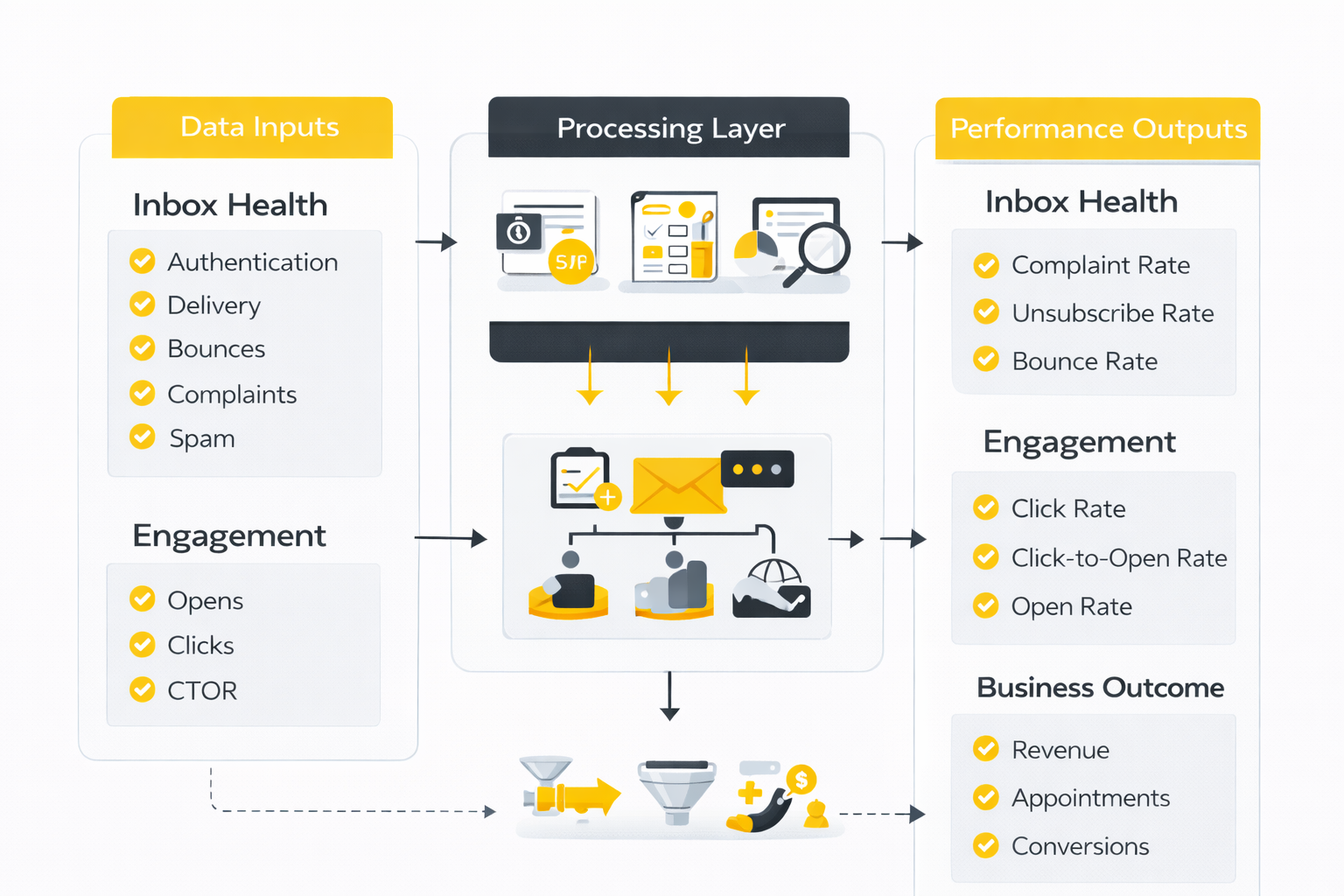
Once you look at email this way, the platform question becomes much easier. A dashboard that only shows opens and clicks is incomplete, and a dashboard that shows dozens of charts without tying them to revenue or retention is only slightly better. If you are comparing tools while you read, Brevo and HighLevel are both worth putting on the shortlist, but the right choice depends on whether you mainly need cleaner email reporting or broader lead-and-pipeline visibility.
Open rate is still useful, but it is no longer the truth
Open rate still tells you something, but it should not be treated like a final verdict. Apple says Mail Privacy Protection downloads remote content in the background regardless of whether the recipient actually engages with the email, and Mailchimp notes that this inflates open-based metrics while also weakening geolocation, device, and some open-related reporting. That means opens are now best used as a directional signal, especially for subject line testing and broad audience interest, not as the single score that defines campaign success. Apple+2
This changes the action you should take when numbers move. If open rates fall sharply across most segments at the same time, you should think about inbox placement, sender reputation, send frequency, or weaker top-of-email positioning. If open rates look stable but clicks and conversions soften, the problem is usually lower down the funnel, which means the body copy, CTA, offer, or landing page deserves attention first.
Clicks and click-to-open rate tell you whether the email earned attention
Click rate and click-to-open rate are much more useful once privacy protections distort opens. Campaign Monitor defines CTR as clicks divided by delivered emails and CTOR as clicks divided by opens, which makes CTOR especially helpful for judging whether the email itself was compelling after someone got past the subject line. Mailchimp’s benchmark page places a broad average CTR around 2.66%, and Campaign Monitor says a CTR in the 2% to 3% range is usually a healthy result for a standard campaign. Campaign Monitor+1
This is also where automation starts separating strong programs from average ones. Klaviyo’s 2026 benchmark shows campaign emails averaging a 1.69% click rate and a 0.16% placed order rate, while automated flows average a 5.58% click rate and a 2.11% placed order rate. GetResponse reports a similar pattern, with newsletters averaging a 3.84% CTR and triggered emails averaging 5.02%, and Litmus found that more than 85% of respondents saw performance improvements from action-triggered email and advanced performance analytics. The action those numbers should drive is simple: build and refine the flows that meet people at high-intent moments before you spend all your energy sending more broadcasts. Klaviyo+2
Negative signals deserve more respect than flattering ones
A lot of email teams stare at opens because they feel good. The problem is that inbox providers care much more about negative feedback. Google tells senders to keep spam rates in Postmaster Tools below 0.10% and avoid ever reaching 0.30% or higher, and Yahoo’s enforcement threshold is also 0.3%. Klaviyo’s current deliverability guidance treats healthy negative engagement as bounce rates below 1%, unsubscribe rates below 0.3%, and spam complaint rates below 0.01%, while Campaign Monitor puts average unsubscribe rate around 0.17%, which is a good reminder that some list churn is normal. Google Podpora+3
What those numbers mean in practice is more important than the numbers themselves. If complaints rise, the promise you made at signup and the emails you are now sending are probably out of sync. If bounces climb, your acquisition quality or list hygiene is slipping. If unsubscribes rise without complaint spikes, frequency, relevance, or audience segmentation is usually the first place to look. Good-looking opens do not cancel out those warnings.
Revenue and retention are where email proves its value
This is the layer many teams still under-measure. Litmus found that only 44% of marketers surveyed use lifecycle emails, and its lifecycle report shows a real KPI gap: revenue was the most popular company KPI at 46%, followed by customer retention at 34%, email or brand engagement at 32%, and subscriber-to-customer conversion at 30%. The same report argues that retention is harder to measure because it sits across teams and systems rather than neatly inside a single campaign dashboard. Litmus+2
That is exactly why revenue and lifecycle reporting matter so much when you are evaluating the best email list service. Klaviyo’s 2026 benchmark says flows generate nearly 41% of total email revenue from just 5.3% of sends, with revenue per recipient nearly 18 times higher than campaigns. So if your current platform cannot show you which welcome, browse, cart, onboarding, reactivation, or post-purchase sequences are producing actual business outcomes, it is under-reporting the value of email and making your optimization work harder than it needs to be. Klaviyo+1
Once you read the numbers this way, platform comparisons stop being vague. You are no longer asking which tool has the nicest dashboard. You are asking which one helps you improve inbox health, segment intelligently, build higher-performing automations, and connect email activity to revenue or retention. That is the lens that makes the next section much more useful, because now we can look at the strongest platforms by business type instead of pretending one tool is best for everyone.