

Choosing the best email sending service is not about finding the tool with the loudest homepage. It is about matching your business model, sending volume, automation needs, deliverability risk, and budget to a platform that can actually support the way you grow.
Some businesses need simple newsletters. Some need transactional emails for signups, receipts, and password resets. Others need CRM workflows, client accounts, cold outreach infrastructure, or full funnel automation. That is why a good email sending service decision starts with fit, not hype.
Article Outline
- What “Best Email Sending Service” Really Means
- Why the Right Email Sending Service Matters
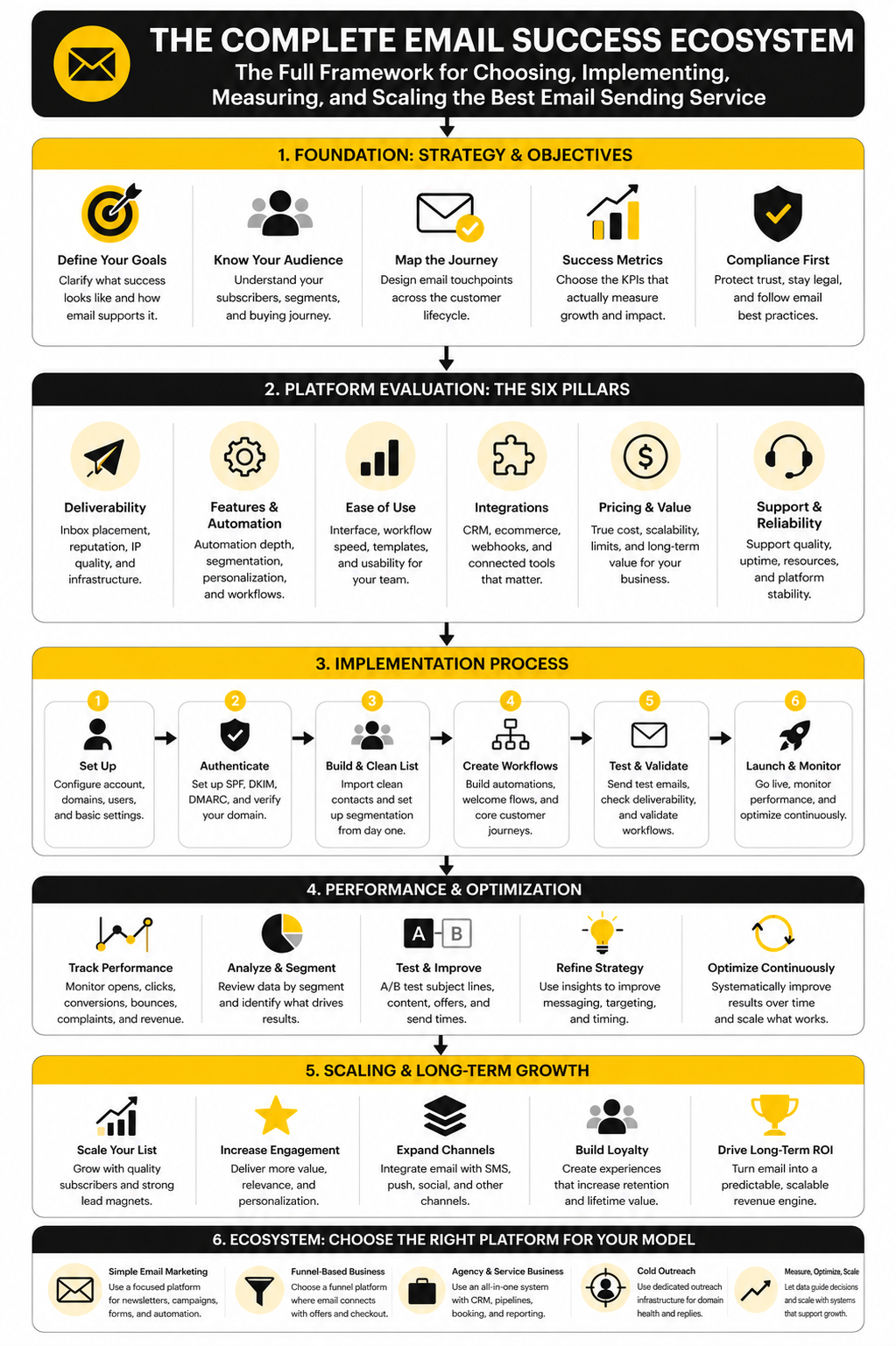
- The Selection Framework: Deliverability, Fit, Automation, and Cost
- Core Components to Compare Before You Choose
- Professional Implementation: Setup, Migration, and Optimization
- Best Email Sending Service FAQ and Final Recommendations
What “Best Email Sending Service” Really Means
The best email sending service is the platform that reliably sends the right emails to the right people at the right time. That sounds simple, but it covers a lot: marketing campaigns, transactional messages, automation flows, segmentation, compliance, reporting, and deliverability. A newsletter tool, a transactional API, and a cold email infrastructure platform can all “send email,” but they solve very different problems.
For example, a small business may be better served by Brevo or Moosend if it needs campaigns, forms, landing pages, and automation without enterprise complexity. An agency may care more about CRM pipelines, client sub-accounts, and workflow automation, which makes GoHighLevel a more natural fit. A cold outreach team may not need another campaign builder at all; it may need infrastructure and inbox management from something like ScaledMail.
Why the Right Email Sending Service Matters
Email is still one of the few channels you can own. Social reach can disappear overnight, ad costs can rise without warning, and search rankings can shift after one update. Your email list gives you a direct line to customers, leads, users, and buyers.
But bad sending habits are expensive. Poor authentication, weak list hygiene, spammy campaigns, and the wrong platform can damage sender reputation before a business even understands what went wrong. Once deliverability drops, every campaign becomes harder because fewer people see the emails you worked to create.
The right service helps prevent that. It gives you the tools to send cleanly, segment properly, automate responsibly, and measure what is actually happening. That is why this guide will not treat “best” as one universal winner.
The Selection Framework: Deliverability, Fit, Automation, and Cost
A practical comparison starts with four questions. First, can the platform help your emails reach the inbox consistently? Second, does it fit your use case: newsletters, ecommerce, SaaS, agency work, local business follow-up, transactional email, or cold outreach?
Third, does the automation match your customer journey? Basic autoresponders may be enough for a creator or local business, while agencies and service businesses often need pipelines, triggers, appointment reminders, and multi-step workflows. Fourth, does the pricing model still make sense when your list, send volume, and team grow?
This framework keeps the decision grounded. Instead of chasing feature lists, you evaluate whether the service supports the job you actually need done. In the next parts, we will use this structure to compare the strongest options and show where each one fits best.
Why the Right Email Sending Service Matters
Email looks simple from the outside. You write a message, press send, and expect people to receive it. In reality, mailbox providers are constantly judging your domain, your authentication, your list quality, your complaint rate, and the way people engage with your emails.
That matters because inbox access is not guaranteed. Gmail’s sender rules require proper authentication, easy unsubscribe, and low spam complaints for senders reaching Gmail users, while Yahoo also requires authentication, valid DNS, low complaint rates, and compliant unsubscribe handling. If your email sending service does not make those basics easy, you are building on weak ground.
This is why the best email sending service is not always the one with the most templates. A beautiful email that lands in spam is not an asset. A simpler platform with strong deliverability tools, clear compliance settings, and clean automation can outperform a flashier tool that makes sending risky.
Email also still earns its place in the marketing stack because it is measurable and direct. The 2025 Litmus email ROI data shows that many marketing leaders still see meaningful returns from email, but the same data also shows that some teams do not measure ROI properly. That is the real lesson: email works best when your sending platform gives you clean data, not just a send button.
The Selection Framework: Deliverability, Fit, Automation, and Cost
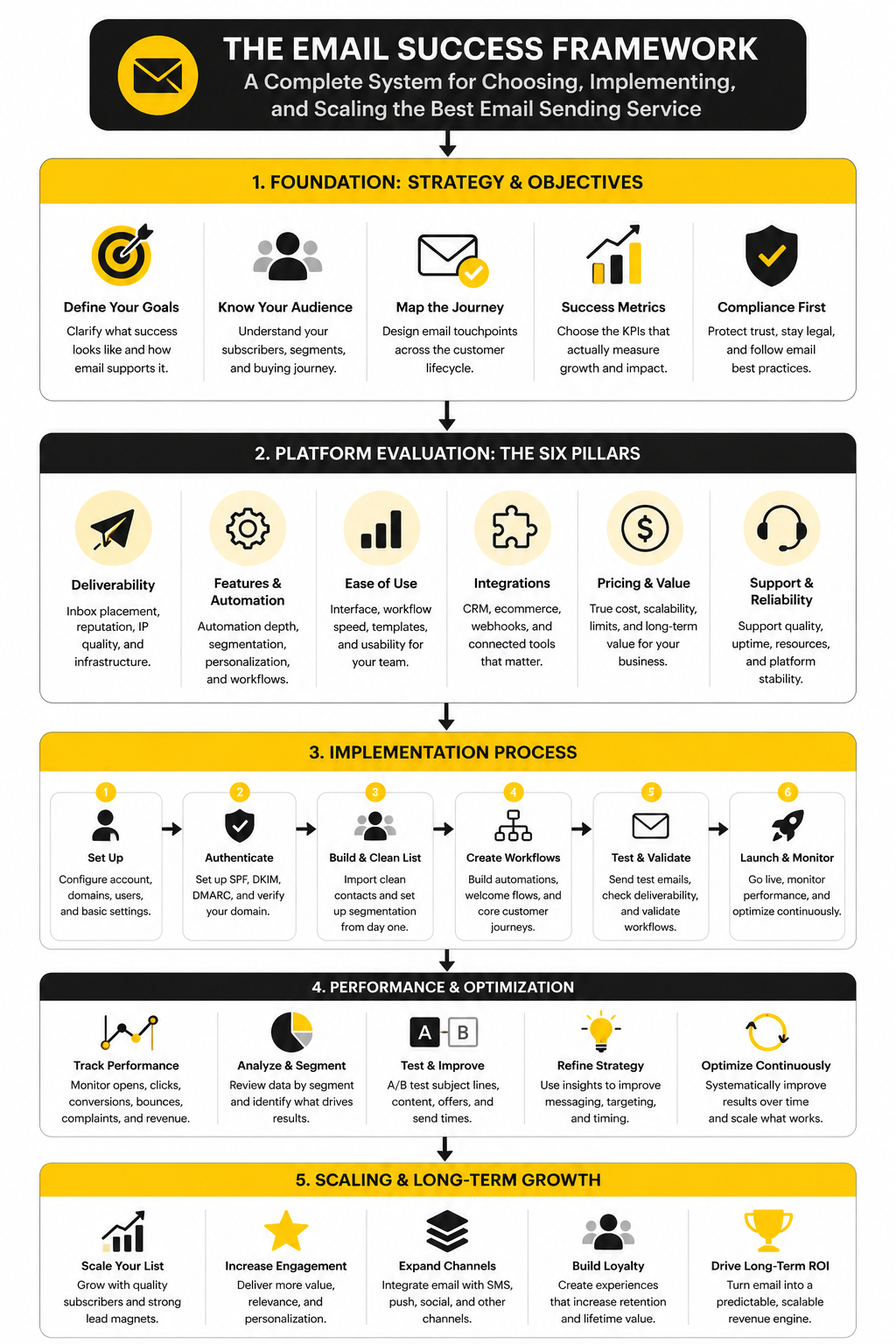
Choosing the best email sending service gets much easier when you stop comparing random feature lists. Most platforms look impressive when you scan their homepages. The real question is whether the platform fits your sending situation right now and still makes sense when your list, offers, and workflows grow.
Use four filters before you even look at pricing. Deliverability tells you whether the platform helps your emails reach the inbox. Fit tells you whether it was built for your real use case. Automation tells you whether it can move people through your customer journey without manual work. Cost tells you whether the pricing model stays reasonable as volume increases.
This framework prevents bad decisions. A creator does not need the same tool as a SaaS product sending transactional notifications. An agency does not need the same setup as an ecommerce store. A cold outreach operation should not treat a standard newsletter platform like dedicated outreach infrastructure.
Deliverability Comes First
Deliverability is the foundation. If your emails do not reach the inbox, everything else becomes decoration. Subject lines, templates, segmentation, and offers matter only after the message has a real chance of being seen.
At minimum, your platform should support SPF, DKIM, and DMARC setup clearly. It should also make unsubscribe handling easy, help you avoid spam-triggering behavior, and give you reporting that shows more than vanity numbers. Google’s bulk sender guidance specifically highlights authentication, low spam rates, and easy unsubscribe, which means these are no longer “advanced” concerns.
This is especially important when you send at scale. A small list can sometimes hide bad habits for a while. Once volume rises, weak authentication and poor engagement become much harder to ignore.
Fit Beats Feature Count
The wrong tool with many features is still the wrong tool. If you mainly send newsletters, you want a clean campaign builder, segmentation, forms, and simple automation. If you run an agency, you may need CRM pipelines, appointment reminders, client workspaces, and multi-channel follow-up, which is where GoHighLevel can make more sense.
For small businesses that want email campaigns, automation, and contact management without overcomplicating the stack, Brevo is often worth considering. For users who want a lighter email marketing platform with landing pages and automation, Moosend fits a different type of buyer. For funnel-first businesses, ClickFunnels or Systeme.io may be more attractive because email is connected to pages, offers, and sales flows.
That is the practical way to think about fit. Do not ask, “Which platform has the most features?” Ask, “Which platform removes the most friction from the way I actually sell?”
Automation Should Match the Customer Journey
Automation is where many businesses either save time or create chaos. A good email sending service should help you send welcome sequences, nurture campaigns, cart recovery emails, appointment reminders, reactivation campaigns, and customer follow-ups without making the workflow hard to manage. The goal is not to automate everything; the goal is to automate the moments where timing matters.
Simple automation is enough when your funnel is simple. A creator may only need a lead magnet delivery email, a short nurture sequence, and a weekly newsletter. A local service business may need missed-call texts, booking reminders, review requests, and follow-up emails, which pushes the decision toward broader systems like GoHighLevel.
Automation should also protect the subscriber experience. If someone buys, books, unsubscribes, or becomes inactive, your system should react properly. That is where the best email sending service starts to feel less like software and more like infrastructure.
Core Components to Compare Before You Choose
Once the framework is clear, the next step is turning it into a real evaluation process. This is where most people rush. They open five pricing pages, skim a few feature tables, and pick the tool that looks cheapest or most popular.
That is not how you choose the best email sending service. You need to compare the parts that affect daily work, inbox placement, customer experience, and long-term cost. A platform can look affordable at the start and become expensive once you add contacts, sends, automation limits, SMS, landing pages, extra users, or client accounts.
Start with the components below. They will tell you more than a generic “top 10 email platforms” list ever will.
Authentication and Sender Setup
A serious email platform should make domain authentication straightforward. You should be able to set up SPF, DKIM, and DMARC without guessing what belongs in your DNS records. This matters because Gmail requires SPF or DKIM for all senders and SPF, DKIM, and DMARC for bulk senders, while Yahoo also requires authentication and keeps senders accountable for low complaint rates.
Do not treat this as a technical afterthought. Authentication is part of your reputation. If a platform makes setup confusing, buries deliverability guidance, or gives you weak reporting, that is a warning sign.
Your setup process should include:
- Connect your sending domain.
- Add SPF, DKIM, and DMARC records.
- Verify tracking and return-path settings where available.
- Confirm that unsubscribe links work properly.
- Send test campaigns before moving real volume.
- Monitor bounces, complaints, opens, clicks, and replies after launch.
List Management and Segmentation
List quality is one of the biggest differences between healthy email growth and slow deliverability decay. A good platform should make it easy to import contacts cleanly, tag subscribers by source, segment based on behavior, and suppress people who should not receive certain campaigns. If you cannot control who receives what, you will eventually over-send.
This is where tools like Brevo and Moosend become useful for smaller teams because they combine campaigns, forms, segmentation, and automation in one place. For agencies or service businesses, GoHighLevel can be stronger when email needs to connect with pipelines, calendars, SMS, calls, and client accounts. The right choice depends on whether email is a standalone marketing channel or part of a larger sales operation.
Segmentation should also stay practical. You do not need 40 audience groups on day one. Start with source, lifecycle stage, buyer status, engagement, and interest, then add more only when it helps you send better messages.
Campaign Creation and Workflow Speed
The best email sending service should help you publish without slowing you down. You want clean templates, reusable blocks, mobile previews, test sends, link checks, and an editor that does not fight you every time you build a campaign. If sending a basic newsletter feels like a production project, the platform is too heavy for your current needs.
Workflow speed matters because consistency drives results. A team that can quickly create useful campaigns will usually outperform a team stuck inside a bloated system. This is especially true for creators, local businesses, consultants, ecommerce stores, and early-stage SaaS teams where speed matters more than complex enterprise approval flows.
Look closely at how the platform handles everyday tasks. Can you duplicate campaigns easily? Can you save templates? Can you preview personalization? Can you build a simple welcome sequence without needing a specialist? These small things decide whether the tool gets used properly.
Automation and Customer Journey Control
Automation should feel like a map of your customer journey. Someone subscribes, clicks, books, buys, ignores, cancels, or comes back. The system should help you respond to those moments without forcing you into messy manual follow-up.
For funnel-based businesses, ClickFunnels and Systeme.io can make sense because email sits close to pages, offers, checkout flows, and sales sequences. For agencies and local businesses, GoHighLevel is more attractive when the workflow includes lead capture, appointment booking, pipeline updates, reminders, and reputation follow-up. For straightforward email marketing, a dedicated platform may still be cleaner.
The key is to avoid automation theater. Fancy workflow builders look impressive, but they only matter if they reduce manual work and improve timing. Start with the few flows that directly affect revenue, onboarding, retention, or reactivation, then expand from there.
Reporting and Optimization
You cannot improve what you cannot see. A proper email sending service should show campaign performance, automation performance, list growth, unsubscribes, bounces, complaints, and engagement trends clearly. Opens are useful directionally, but clicks, replies, conversions, bookings, and revenue tell a stronger story.
Reporting should also help you make decisions. If a welcome email gets clicks but no conversions, the offer may be weak. If a segment stops engaging, the audience may need a different message or a pause. If bounce rates climb after an import, the list source needs to be questioned immediately.
Good reporting protects you from guessing. The platform does not need to overwhelm you with dashboards. It needs to show the numbers that help you send smarter next time.
Statistics and Data
Numbers are useful only when they change what you do next. Email analytics should not become a dashboard you check out of habit and then ignore. The point is to understand whether your email sending service is helping you reach the inbox, earn attention, and move people toward the next step.
This is also where many teams misread performance. A high open rate can look impressive, but privacy changes and image loading behavior make opens less reliable than they used to be. Clicks, replies, conversions, bookings, revenue, unsubscribes, bounces, and spam complaints usually tell you more about whether your email program is healthy.
So when you compare the best email sending service options, do not just ask which platform has analytics. Ask whether the analytics are clear enough to support better decisions. A platform that shows fewer numbers but makes the right signals obvious is often more useful than a platform with dozens of reports nobody acts on.
The Metrics That Actually Matter
Open rate still has value, but it should be treated as a directional signal. If opens collapse suddenly, something may be wrong with deliverability, subject lines, sender identity, or list quality. But if opens rise while clicks and revenue stay flat, the campaign may be getting attention without creating meaningful action.
Click rate is usually more practical because it shows whether people cared enough to take the next step. MailerLite’s 2025 benchmark data shows an average click rate of 2.09% across its benchmark sample, while the efficy 2025 benchmark report shows newsletter click rates around 3.77%. The exact number matters less than the pattern: if clicks are weak, your offer, segmentation, email structure, or call to action needs work.
Bounce rate tells you whether your list quality is clean enough to protect sender reputation. A rising hard bounce rate usually points to bad imports, old lists, scraped contacts, fake signups, or poor validation. That is not a copywriting problem; it is a list hygiene problem.
Spam complaint rate is the number you should treat with real respect. Google says bulk senders with a user-reported spam rate above 0.3% are ineligible for mitigation, and Yahoo’s sender guidance also tells senders to keep complaint rates below 0.3%. In plain English, if complaints climb, stop blaming the algorithm and fix your targeting, permission, frequency, and message quality.
How to Read Benchmarks Without Fooling Yourself
Benchmarks are useful, but they are not goals by themselves. A B2B software company, a local dental clinic, a creator newsletter, and an ecommerce brand can all have very different email behavior. Comparing them as if they should perform the same is lazy analysis.
Use benchmarks as guardrails, not as a scoreboard. If your click rate is far below similar senders, investigate your audience quality, offer clarity, mobile layout, and call to action. If your unsubscribe rate jumps after a specific campaign, the problem may be poor fit, too much frequency, or a promise mismatch from the opt-in source.
The strongest email teams look at trend lines. One campaign can be noisy. Ten campaigns reveal patterns. If the same segment keeps ignoring your emails, your best move may be suppression, a reactivation sequence, or a completely different message.
The Analytics System You Should Build
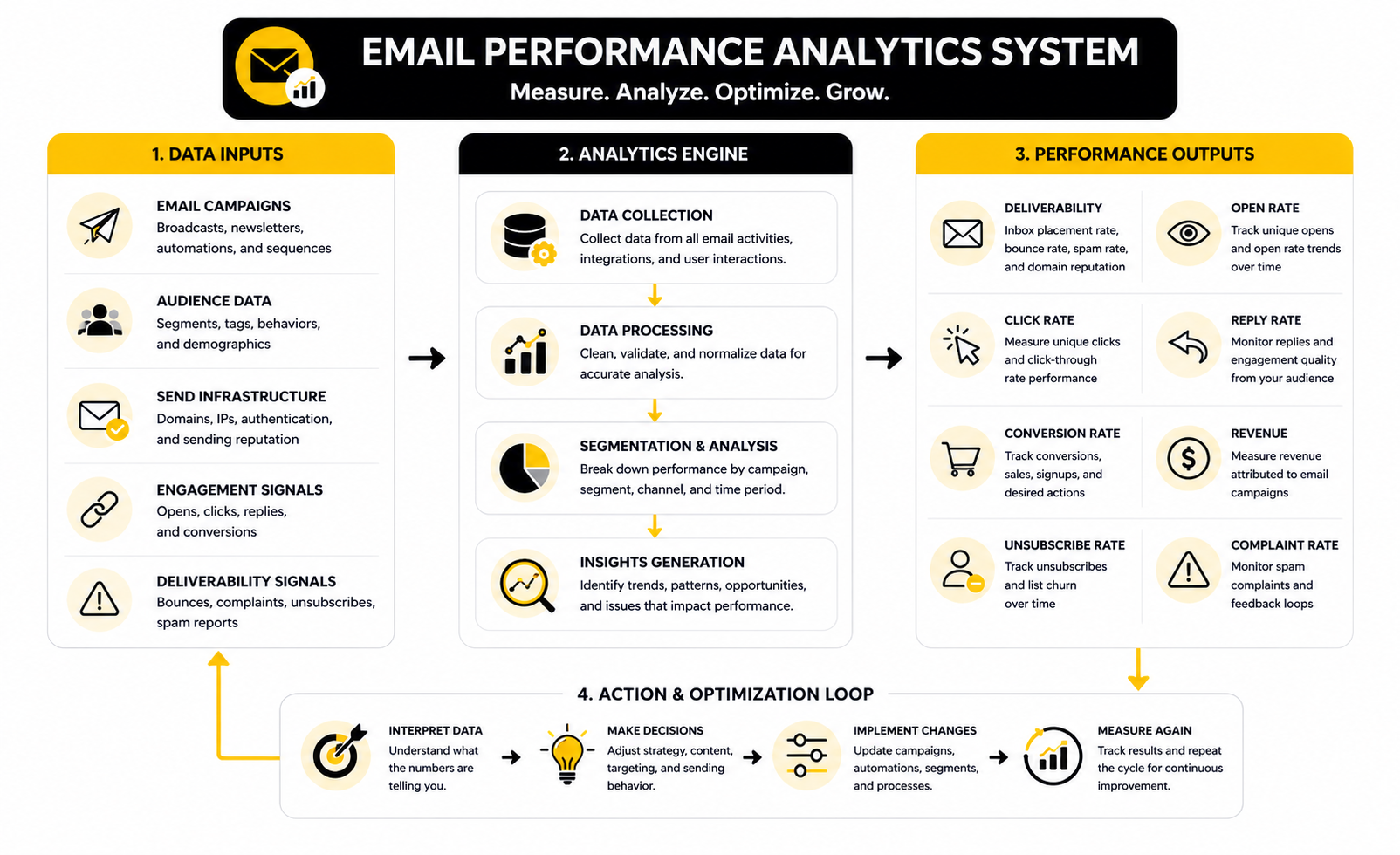
Your analytics system should be simple enough to use every week. Track deliverability health first, engagement second, and business outcomes third. That order matters because revenue data is meaningless if your emails are not reaching people in the first place.
A practical weekly review can look like this:
- Check bounces, complaints, unsubscribes, and delivery issues.
- Review campaign clicks, replies, and conversions.
- Compare performance by segment, not only by whole-list averages.
- Identify one weak point in the customer journey.
- Change one thing before the next send.
This is where the best email sending service should make your life easier. Brevo and Moosend are more useful when you want campaign and automation reporting without turning your setup into an enterprise project. GoHighLevel becomes more useful when email performance needs to connect with appointments, pipeline movement, client reporting, and follow-up workflows.
What the Data Should Make You Do
Good analytics should push action, not anxiety. If complaints rise, reduce frequency, tighten permission, and stop sending broad campaigns to weak segments. If clicks are low but opens are fine, improve the offer, shorten the email, make the call to action clearer, or segment the audience more tightly.
If unsubscribes rise after aggressive promotions, that may not always be bad. Some churn is healthy when you send clearer sales messages. But if unsubscribes rise while sales stay flat, the campaign is creating friction without enough upside.
If conversions are strong from a small segment, do not immediately blast the same message to everyone. Build a repeatable path for similar people instead. That is how email becomes a compounding asset: tighter segments, clearer offers, cleaner data, and fewer wasted sends.
Professional Implementation: Setup, Migration, and Optimization
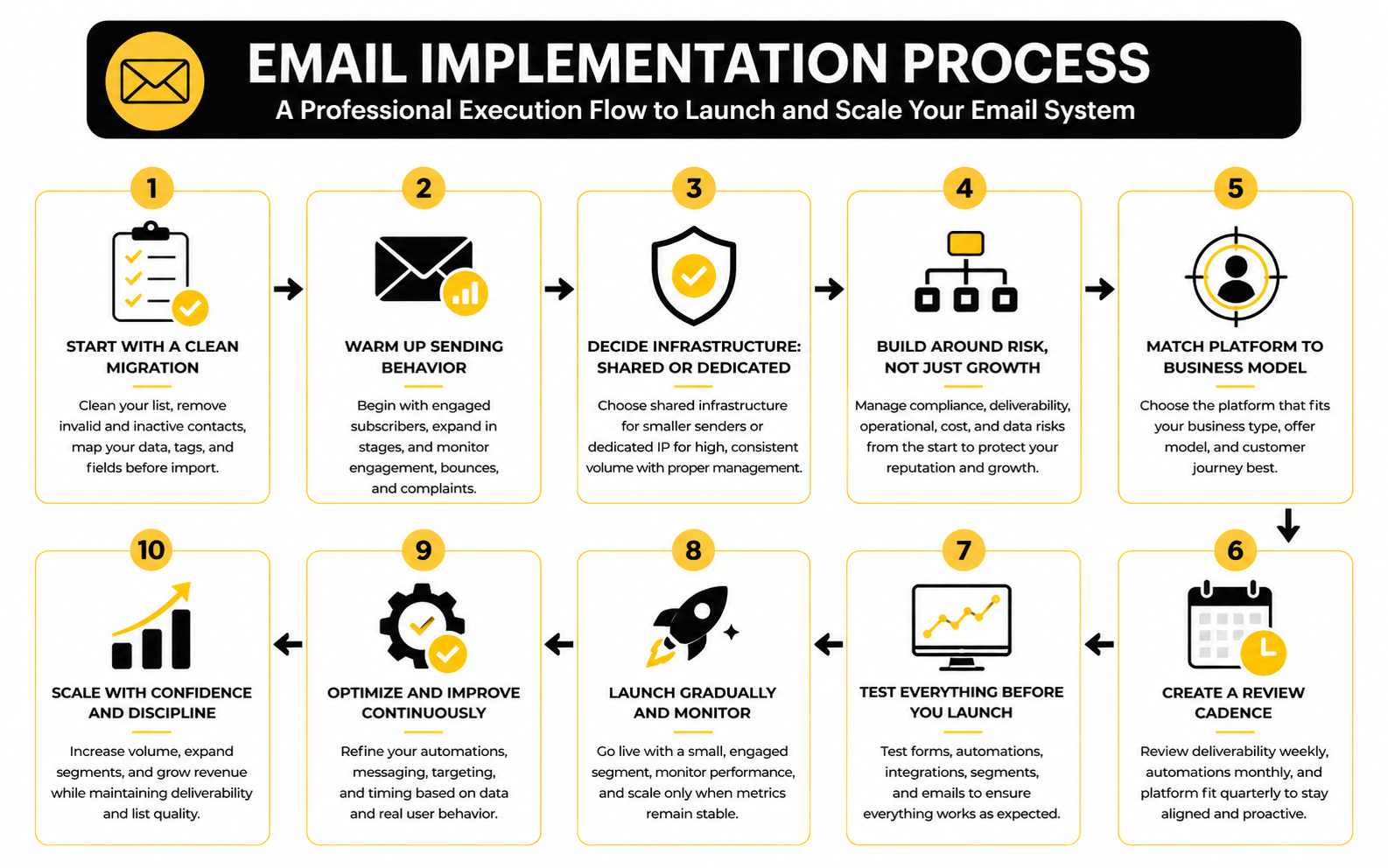
Choosing the platform is only half the job. The bigger mistake is switching tools without a proper rollout plan. A messy migration can damage deliverability, confuse subscribers, break automations, and create reporting gaps that make performance harder to understand.
Professional implementation starts with restraint. Do not import every old contact, rebuild every old workflow, and send a huge campaign on day one. Move cleanly, test carefully, and scale only after the system proves it can handle real sending behavior.
The best email sending service should support this process with clear setup guidance, list controls, automation testing, and reporting. If the platform makes implementation feel like guesswork, you will pay for that later in lost time, broken campaigns, or weaker inbox placement.
Start With a Clean Migration
Before moving into a new platform, clean the list. Remove obvious invalid addresses, role-based emails where they do not belong, long-term inactive subscribers, unsubscribed contacts, and anyone who did not give proper permission. This is not being cautious; it is protecting the domain you depend on.
You should also map your contacts before import. Decide which tags, custom fields, lifecycle stages, and suppression lists need to exist in the new system. If you dump everything into one audience and promise to organize it later, later usually becomes never.
For small business email marketing, Brevo and Moosend can keep this manageable because their core workflows are relatively direct. For agencies and service businesses, GoHighLevel usually requires more planning because email connects to CRM records, pipelines, calendars, forms, opportunities, and client accounts.
Warm Up Sending Behavior Gradually
A new sending setup needs a careful ramp. Even if your domain has history, a new platform, IP environment, tracking setup, or sending pattern can change how mailbox providers evaluate you. This is where impatient teams create problems for themselves.
Start with your most engaged subscribers first. These are people who recently opened, clicked, replied, bought, booked, or otherwise showed real interest. Positive engagement helps the new sending pattern look normal instead of sudden and aggressive.
Then expand in stages. Add less active segments only after bounce rates, complaints, and engagement look stable. If the numbers get worse, pause and diagnose before pushing more volume.
Decide Between Shared and Dedicated Infrastructure
Shared and dedicated sending infrastructure is not a status symbol. A dedicated IP can be useful when you send high, consistent volume and have the discipline to manage reputation properly. It can also hurt you if your volume is too low, too inconsistent, or poorly segmented.
Shared infrastructure can work well for smaller senders because the provider manages the larger reputation environment. The tradeoff is that you have less direct control. Dedicated infrastructure gives more control, but it also gives you more responsibility.
For cold outreach, the decision becomes even more sensitive because sending patterns, inbox rotation, domain setup, and reply behavior matter heavily. A tool like ScaledMail fits that world better than a standard newsletter tool because outreach infrastructure is a different problem from permission-based email marketing.
Build Around Risk, Not Just Growth
Scaling email is not just about sending more. It is about sending more without breaking trust, damaging reputation, or losing clarity in your data. That means risk management should be part of the platform decision from the beginning.
There are a few risks worth taking seriously:
- Compliance risk: weak consent records, missing unsubscribe options, unclear sender identity, or poor data handling.
- Deliverability risk: bad imports, inconsistent sending, high complaints, poor authentication, or weak engagement.
- Operational risk: automations firing incorrectly, duplicate contacts, broken tags, or disconnected sales workflows.
- Cost risk: pricing that looks cheap at 1,000 contacts but becomes painful at 25,000 contacts or higher send volume.
- Data risk: reporting that does not connect email behavior to revenue, bookings, pipeline movement, or customer retention.
This is why advanced teams do not pick the best email sending service based only on what they need today. They choose the tool that gives them room to scale without forcing a painful migration six months later.
Match the Platform to the Business Model
A creator, ecommerce store, agency, SaaS company, and local service business should not all choose the same email platform. Their sending needs are different. Their automation needs are different. Their revenue paths are different.
A funnel-first business may prefer ClickFunnels or Systeme.io because the email system sits close to offers, pages, and checkout flows. A client-service agency may lean toward GoHighLevel because email is only one part of lead follow-up, appointment booking, pipeline management, and reporting. A lean newsletter or small business operation may stay better served by a simpler email platform that does fewer things but does them cleanly.
That is the expert-level tradeoff. More features can help when they replace disconnected tools. More features can also slow you down when they add complexity you do not need.
Create a Review Cadence Before You Scale
The best time to create your review process is before sending volume grows. Once campaigns are moving, automations are live, and revenue depends on email, it becomes harder to slow down and clean things up. Build the habit early.
Review deliverability signals weekly, automation performance monthly, and platform fit quarterly. Ask whether your current service still supports the way you sell, follow up, segment, and measure. If the answer is no, fix the process before blaming the platform.
This is where strong operators separate themselves. They do not constantly switch tools. They choose carefully, implement cleanly, measure consistently, and only change platforms when the business model has outgrown the current system.
Best Email Sending Service FAQ and Final Recommendations
The best email sending service is the one that matches your sending model, protects your deliverability, and gives you enough automation without creating unnecessary complexity. That is the final filter. Do not buy software for a version of the business you might never operate.
If you need simple campaigns, newsletters, forms, and automation, start with a focused email marketing platform. If you need funnels and offers connected to email, consider a funnel-first tool like ClickFunnels or Systeme.io. If you run an agency or service business where follow-up, booking, CRM, SMS, pipeline tracking, and client reporting matter, GoHighLevel is usually the more complete system.
The mistake is thinking one platform wins for everyone. It does not. The winner is the platform that helps you send cleaner emails, follow up faster, measure better, and scale without creating a mess.
FAQ - Built for Complete Guide
What is the best email sending service overall?
There is no single best email sending service for every business. The right choice depends on whether you need newsletters, marketing automation, transactional email, funnels, CRM workflows, or cold outreach infrastructure. A small newsletter brand may be happy with a dedicated email marketing tool, while an agency may need a broader system like GoHighLevel.
The best way to choose is to define your use case first. List your sending volume, automation needs, team size, compliance requirements, and reporting goals. Then compare platforms based on those needs instead of chasing the longest feature list.
What is the best email sending service for small businesses?
For many small businesses, the best email sending service is one that keeps campaigns, forms, segmentation, and automation simple. Brevo and Moosend are practical options when you want email marketing without building an overly complex tech stack.
Small businesses should prioritize ease of use, deliverability support, and clean reporting. A tool that your team actually uses every week is better than a powerful system nobody maintains. Start simple, then upgrade only when your workflows demand it.
What is the best email sending service for agencies?
Agencies usually need more than email broadcasts. They need lead capture, CRM pipelines, appointment reminders, multi-channel follow-up, client accounts, reporting, and repeatable workflows. That is why GoHighLevel often fits agencies better than a standalone newsletter platform.
The tradeoff is setup complexity. Agencies should map pipelines, client permissions, automation triggers, and reporting views before migrating. When implemented properly, the platform can replace several disconnected tools and make client delivery cleaner.
What is the best email sending service for funnels?
For funnel-based businesses, the best email sending service is often the one closest to the offer and checkout experience. ClickFunnels and Systeme.io make sense when pages, forms, payments, upsells, and follow-up emails need to work together.
This matters because funnel speed is operational leverage. If every landing page, form, automation, and checkout step lives in separate tools, the system becomes harder to manage. A funnel-first platform can reduce friction when your business depends on launching and testing offers quickly.
What is the best email sending service for cold outreach?
Cold outreach is different from permission-based email marketing. It needs careful domain setup, inbox rotation, volume control, reply tracking, and strict attention to reputation. A traditional newsletter tool is usually not the right fit for that job.
For outreach infrastructure, ScaledMail is more aligned with the cold email use case. Still, no platform can save poor targeting or bad messaging. Outreach works best when the list is relevant, the offer is specific, and the sending behavior stays controlled.
How important is deliverability when choosing an email platform?
Deliverability is critical because it decides whether your emails get a real chance to be seen. Gmail asks senders to keep spam rates below 0.1% and avoid reaching 0.3%, while Yahoo tells senders to keep spam complaints below 0.3%. Those numbers make one thing obvious: permission, relevance, and list hygiene are not optional anymore.
A strong platform should help with authentication, unsubscribe handling, bounce management, segmentation, and reporting. But deliverability is also your responsibility. Even the best platform cannot protect you from purchased lists, vague consent, poor targeting, or aggressive sending.
Should I use one all-in-one platform or separate email tools?
Use one all-in-one platform when the connected workflow matters more than having the deepest specialist feature in every category. Agencies, local service businesses, and funnel-first companies often benefit from having email connected to CRM, bookings, payments, pages, and reporting. That is why tools like GoHighLevel, ClickFunnels, and Systeme.io can be attractive.
Use separate tools when your needs are specialized. A SaaS company may want a dedicated transactional email provider, a separate lifecycle email platform, and product analytics. The right answer depends on whether integration simplicity or specialist depth matters more for your business.
How do I know when I have outgrown my current email sending service?
You have probably outgrown your platform when workarounds become normal. If you are exporting lists manually, duplicating automations, struggling to segment, losing reporting clarity, or paying for extra tools to cover basic gaps, the platform may no longer match the business. Cost is not the only signal; operational friction matters too.
Before switching, audit the current setup. Sometimes the tool is fine and the problem is poor implementation. But if the platform cannot support your customer journey, reporting needs, or sending volume, it is time to move.
What metrics should I monitor every week?
Monitor bounces, spam complaints, unsubscribes, clicks, replies, conversions, and revenue-related actions. Opens can still show directional movement, but privacy changes make them less dependable as a primary success metric. Clicks and conversions usually tell you more about whether the email actually worked.
The goal is not to stare at numbers. The goal is to make better decisions. If complaints rise, tighten targeting. If clicks drop, improve the offer or segmentation. If conversions rise from one segment, build more around that segment instead of blasting everyone.
Is a cheaper email sending service a bad idea?
Not automatically. A cheaper platform can be the best choice when it handles your current needs cleanly. Paying more does not guarantee better strategy, better copy, or better list quality.
The danger is choosing cheap software that becomes expensive through limits, add-ons, manual work, or a painful migration later. Look at contact limits, send limits, automation limits, user seats, landing pages, SMS costs, and reporting depth before deciding. Cheap is good only when it stays practical as you grow.
How should I migrate to a new email sending service?
Start by cleaning the list and mapping your data. Do not import inactive contacts, old unsubscribes, duplicate records, or contacts without clear permission. Then rebuild only the workflows you actually need instead of recreating years of clutter.
After setup, warm up sending gradually. Begin with engaged contacts, watch bounces and complaints, then expand in stages. A careful migration may feel slower at first, but it protects the reputation that makes email valuable.
What is the safest final recommendation?
For simple email marketing, choose a focused tool that makes campaigns, segmentation, and automation easy. For funnels, use a system that connects pages, offers, checkout, and follow-up. For agencies and service businesses, prioritize CRM-connected automation and client reporting.
The safest final recommendation is this: choose the simplest platform that fully supports your current revenue process and gives you enough room to scale. That is how you avoid both underpowered tools and expensive complexity.
Work With Professionals
Explore 10K+ Remote Marketing Contracts on MarkeWork.com
Most marketers spend too much time chasing clients, competing on crowded platforms, and losing a percentage of every project to middlemen.
MarkeWork gives you a better way. Browse thousands of remote marketing contracts and connect directly with companies desperate to hire skilled marketers like you, without platform commissions and without unnecessary gatekeepers.
If you're serious about finding better opportunities and keeping 100% of what you earn, explore available contracts and create a profile for free at MarkeWork.com.