

Finding the best free bulk email sender sounds simple until you realize “free” can mean three very different things: a real free plan, a limited trial, or a platform that lets you send emails cheaply but leaves the hard parts to you.
That matters because bulk email is not just about pushing messages to a list. Google’s sender guidelines now emphasize authentication with SPF, DKIM, and DMARC for better delivery, and commercial email must also follow rules like clear identification, unsubscribe handling, and accurate sender information under the CAN-SPAM Act. A free tool is only useful if it helps you send responsibly.
This guide is built for small businesses, creators, agencies, and operators who want a practical answer. The best free bulk email sender is not always the one with the biggest monthly allowance. It is the one that gives you enough sending volume, clean list management, compliance tools, automation, and room to grow without turning your email program into a mess.
Article Outline
- Why Choosing The Right Free Bulk Email Sender Matters
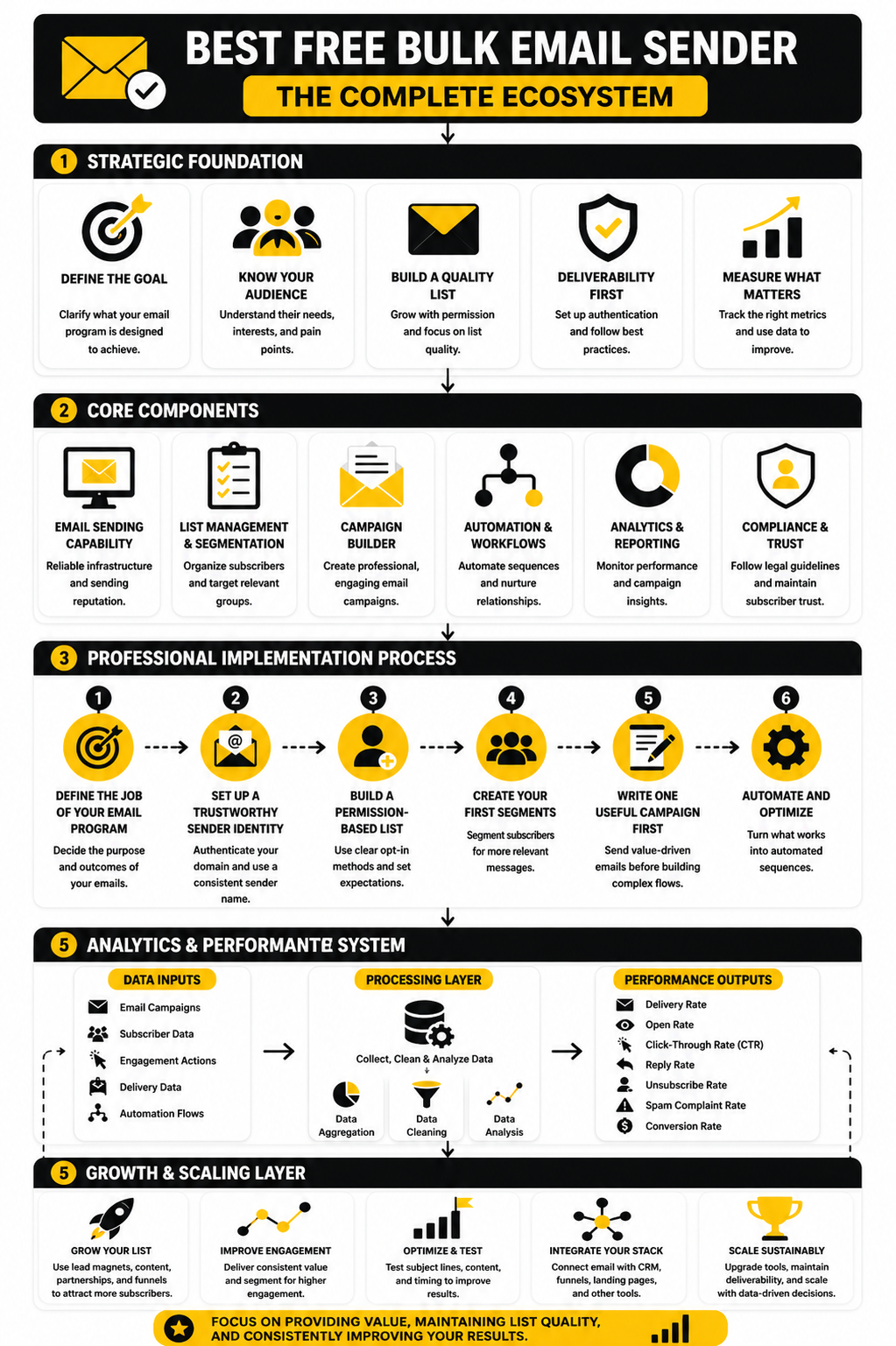
- The Bulk Email Sender Framework
- Core Features Every Free Bulk Email Tool Needs
- Best Free Bulk Email Sender Options Compared
- Professional Implementation: Setup, Deliverability, And Scaling
- FAQ And Final Recommendation
Why Choosing The Right Free Bulk Email Sender Matters
Bulk email has a bad reputation because many people associate it with spam, scraped lists, and low-quality blasts. That is not what this guide is about. A good bulk email sender helps you communicate with people who asked to hear from you, whether that means newsletters, product updates, onboarding emails, promotions, event reminders, or customer education.
The stakes are higher than most beginners realize. If your emails land in spam, your “free” sender is costing you revenue, trust, and sender reputation. If your unsubscribe process is weak, your list gets colder and complaints increase. If your reporting is too limited, you have no idea whether your subject lines, offers, or segments are working.
That is why the best free bulk email sender should be judged by business usefulness, not just by the number of emails it lets you send. A platform like Brevo can make sense for teams that want email marketing with a generous free sending model, while Moosend may fit users who care more about campaign building and automation. The right choice depends on what you need to send, how often you send, and how soon you expect to grow.
The Bulk Email Sender Framework
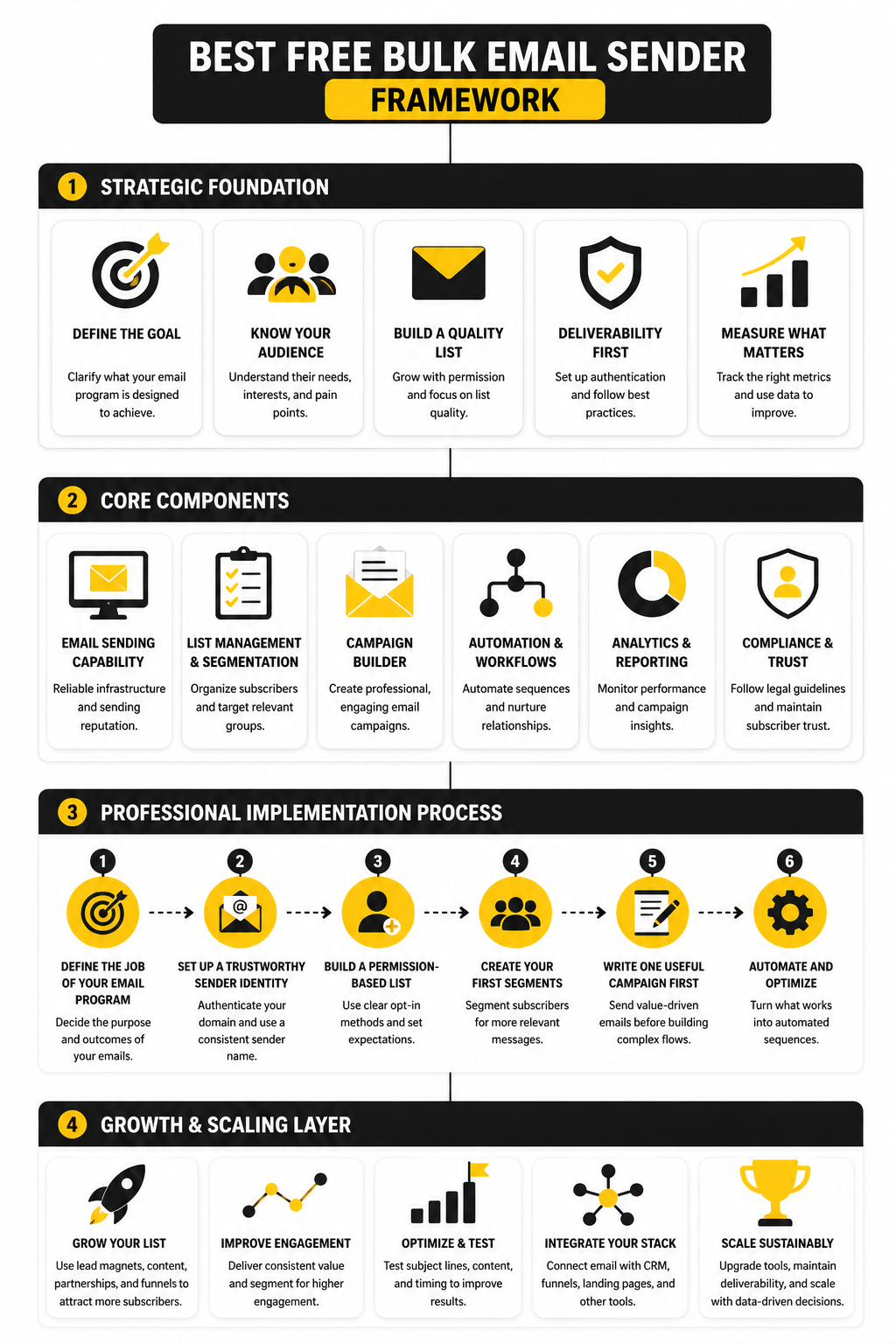
A bulk email tool should be evaluated through four lenses: sending limits, deliverability support, list control, and monetization fit. Sending limits tell you how far the free plan can take you. Deliverability support tells you whether the platform helps you build trust with inbox providers. List control determines whether you can segment, clean, and personalize your audience. Monetization fit decides whether the tool supports the business model behind your emails.
This framework keeps you from choosing based on surface-level claims. A free plan with 10,000 monthly emails may look better than one with 300 daily emails, but it may be weaker if it lacks automation, branded-domain sending, useful reporting, or easy unsubscribe management. On the other hand, a smaller free plan can be perfect if you are validating a newsletter, testing a lead magnet, or building your first customer nurture sequence.
The practical question is not “Which tool is free?” The better question is “Which tool lets me send the right emails, to the right people, without damaging future deliverability?” Once you use that lens, the best free bulk email sender becomes much easier to identify.
Core Features Every Free Bulk Email Tool Needs
The next step is knowing what actually matters inside the platform. A clean editor is nice, but it is not the foundation. The foundation is whether the tool can help you send permission-based email consistently, protect your sender reputation, and give you enough feedback to improve.
A free bulk email sender should give you the basics without forcing awkward workarounds. You need contact imports, segmentation, unsubscribe handling, templates, reporting, and sender authentication support. You also need clear limits, because vague “free” plans often become frustrating once you try to send a real campaign.
The best free bulk email sender for a beginner should feel simple on day one, but it should not trap you on day thirty. That balance is important. You want something easy enough to launch quickly, but serious enough to support better targeting, better timing, and cleaner list management as your audience grows.
Sending Limits That Match Real Campaigns
Free sending limits are not all built the same. Some platforms limit daily sends, some limit monthly sends, and some limit contacts instead of emails. That difference changes how useful the platform is in real life.
For example, Brevo is attractive because its free plan is not time-limited and allows 300 email sends per day. That can work well for small newsletters, lead nurture sequences, and early-stage campaigns. But it is less ideal if you need to email 3,000 people at once, because the daily cap forces you to spread the send across multiple days.
A contact-based free trial works differently. Moosend is better viewed as a testing window rather than a forever-free sender, because its free access is positioned around a trial experience. That can still be valuable if you want to build campaigns, test automations, and decide whether the platform fits before paying.
Deliverability Support
Deliverability is where many beginners get burned. They think the email tool is responsible for everything, but your domain, list quality, sending behavior, and content all matter. A good platform should guide you through authentication instead of leaving you to guess.
At minimum, your sender setup should support SPF, DKIM, and DMARC. Google’s sender requirements make this especially important for anyone sending bulk mail into Gmail inboxes, because authentication is now part of the basic standard for trustworthy commercial sending. This is not a technical luxury anymore. It is the price of showing inbox providers that your mail is legitimate.
That is why the best free bulk email sender should not only let you design emails. It should also make domain setup understandable, explain what records to add, and help you avoid sending from a weak or unverified identity. If a tool makes authentication confusing, you may save money upfront but lose performance later.
List Management And Segmentation
A bulk email list is not one audience. It is a collection of people with different intent levels, purchase histories, interests, and timing. Treating everyone the same usually leads to lower engagement and more unsubscribes.
Even on a free plan, you should look for basic segmentation. You want to separate new leads from customers, active subscribers from cold subscribers, and buyers from people who only downloaded a free resource. This lets you send more relevant emails instead of blasting the same message to everyone.
Simple segmentation also helps you protect deliverability. If a group has not opened or clicked in months, you can slow down, re-engage carefully, or stop sending to them. That is much better than repeatedly emailing people who are no longer interested.
Automation That Saves Time Without Losing Control
Automation is useful when it supports a real customer journey. A welcome sequence, abandoned inquiry follow-up, booking reminder, or post-purchase education flow can all create value without requiring manual sending every day. The key is to keep automation simple enough that you can monitor it.
For creators and small businesses, this is where tool choice starts to matter. If you mainly need newsletters, a lightweight sender can be enough. If you want email tied to funnels, forms, booking, CRM, and follow-up, a broader system like GoHighLevel may become more relevant once you outgrow free email-only tools.
Do not automate everything too early. Start with one clear flow that solves one clear problem. Then improve it based on replies, clicks, conversions, and unsubscribes instead of guessing.
Reporting You Can Actually Use
Reports should help you make decisions, not just make you feel busy. Opens are useful directionally, but they are less reliable than they used to be because privacy features can affect tracking. Clicks, replies, conversions, unsubscribes, and spam complaints tell you more about whether your emails are actually working.
A good free bulk email sender should show campaign performance clearly. You should be able to see which links get clicked, which emails perform better, and which segments respond. Without that feedback, you are basically sending blind.
The best reports are simple enough to act on. If a subject line gets attention but nobody clicks, the email body or offer may be weak. If people click but do not buy, the landing page or offer needs work. If unsubscribes spike, the targeting, frequency, or promise may be off.
Professional Implementation: Setup, Deliverability, And Scaling
Once you understand the core features, the next move is implementation. This is where most people either build a clean email system or accidentally create a fragile setup that becomes painful later. The tool matters, but the process matters more.
A smart setup starts before the first campaign goes out. You want your sender identity, list source, signup promise, segmentation, and tracking structure in place from the beginning. That sounds like extra work, but it prevents the classic beginner problem: sending too many broad emails from a weak domain to a mixed-quality list.
The best free bulk email sender should make this process easier, not more confusing. A platform can give you the editor, templates, and reporting, but you still need to build the system in the right order. Think of the tool as the engine. Your setup is the steering, brakes, and dashboard.
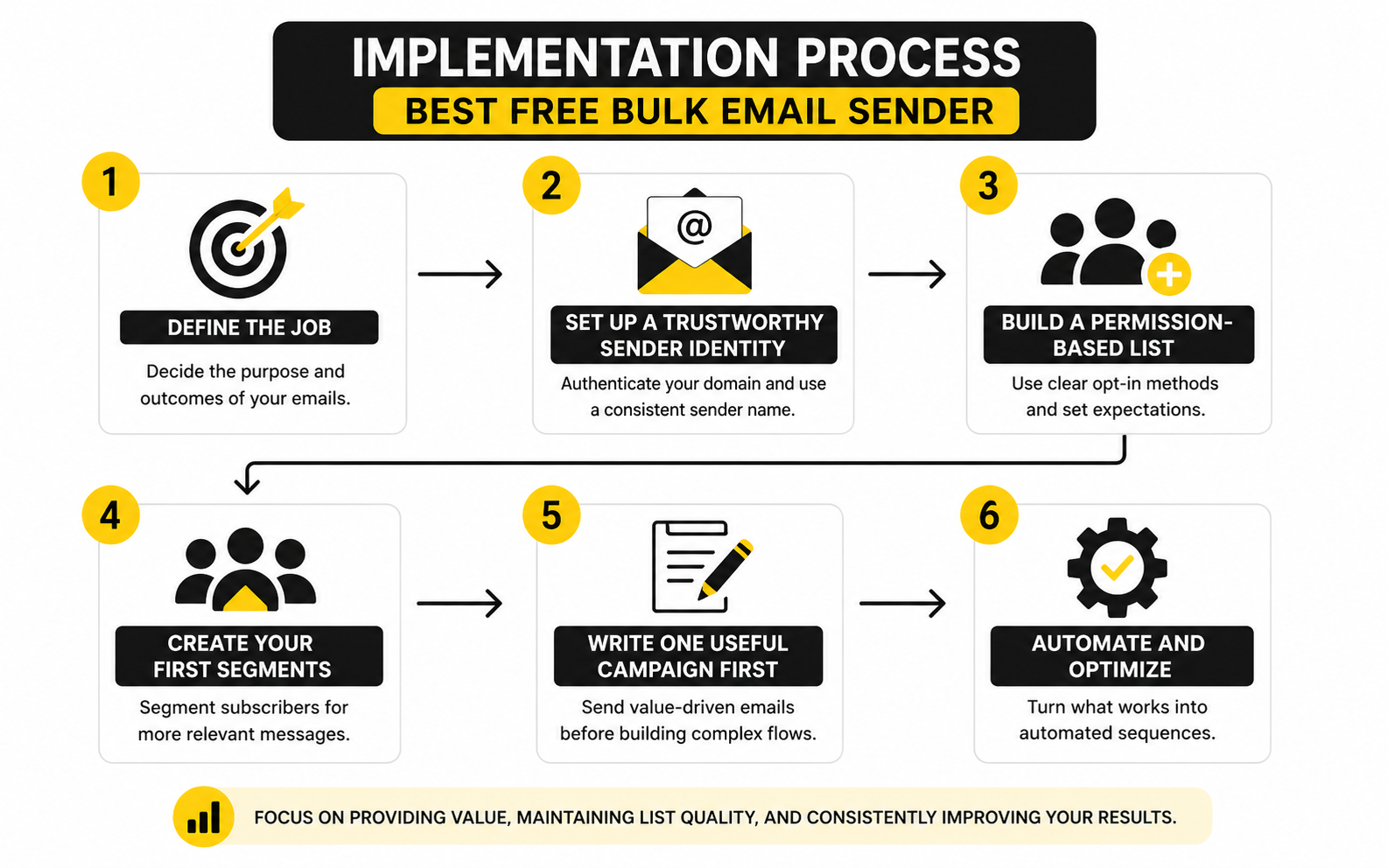
Step 1: Define The Job Of Your Email Program
Before choosing a platform, decide what your email program is supposed to do. A newsletter has different needs than a sales funnel, a booking reminder sequence, or a customer onboarding flow. If you skip this step, every tool looks either too limited or unnecessarily complicated.
For a simple newsletter, your first priority is clean list management and reliable campaign sending. For lead generation, you need forms, tags, automations, and a basic follow-up sequence. For agencies or local service businesses, a CRM-connected option like GoHighLevel may become useful because email is only one part of the larger follow-up system.
Do not start by asking which platform has the most features. Start by asking what needs to happen after someone subscribes. That single question will make the best free bulk email sender much easier to choose.
Step 2: Set Up A Trustworthy Sender Identity
Use a real business domain, not a random free mailbox, for serious email marketing. Inbox providers look at sender behavior, authentication, and user engagement, so your sending identity needs to be stable and credible. Google’s sender guidance recommends setting up SPF, DKIM, and DMARC for sending domains, which makes authentication a baseline requirement rather than a technical bonus.
This step is not glamorous, but it is essential. If your domain records are missing or misconfigured, your campaigns can struggle even when your content is good. A free plan that helps you understand authentication is often better than a higher-volume plan that leaves you guessing.
You should also keep the “from” name consistent. People open emails from senders they recognize, and sudden changes can reduce trust. If you are building around a personal brand, use your name. If the relationship is with the company, use the company name. Keep it boring and recognizable.
Step 3: Build A Permission-Based List
The fastest way to damage a new email program is to import contacts who did not clearly ask to receive your emails. Bought lists, scraped contacts, and vague permission create low engagement and high complaint risk. They also make it harder to understand whether your actual offer is working.
A better approach is slower but much stronger. Use opt-in forms, checkout consent, webinar registration, lead magnets, waitlists, or customer signup flows. Make the promise clear at the point of signup, because the email relationship starts before the first message arrives.
If you are using funnels, ClickFunnels or Systeme.io can help connect landing pages with email capture. If you want the email tool itself to handle forms and campaigns, Brevo is a practical place to start because its free plan supports 300 email sends per day and keeps the entry barrier low.
Step 4: Create Your First Segments
Segmentation does not need to be complex at the beginning. Start with a few simple groups that change what people receive. New subscribers, active readers, customers, leads who clicked a sales link, and cold contacts are enough for most early-stage programs.
The point is to avoid treating a fresh subscriber the same as someone who has ignored ten emails. A new subscriber needs orientation and trust. A customer may need education, onboarding, or cross-sell content. A cold subscriber may need a re-engagement email or a quiet exit from regular campaigns.
This is where the best free bulk email sender starts to prove itself. If the tool makes basic tagging and filtering difficult, your email strategy will stay blunt. You do not need enterprise-level personalization yet, but you do need enough control to send relevant messages.
Step 5: Write One Useful Campaign Before Building Ten Automations
Many people overbuild before they have proof. They create five automations, twenty tags, and complicated branching logic before sending a single useful campaign. That usually creates confusion, not leverage.
Start with one campaign that solves a real reader problem. It could announce a useful resource, explain a common mistake, invite people to an offer, or guide them to the next step. The goal is to learn what your audience responds to before locking yourself into a complex system.
After that, turn what works into automation. A strong welcome email can become a welcome sequence. A high-click campaign can become part of a nurture flow. A common reply can become a support or sales follow-up. Build from evidence, not from template addiction.
Statistics And Data
Data should make your email program sharper, not noisier. The problem is that many people using a free bulk email sender stare at open rates, feel good or bad for five seconds, and then move on without changing anything. That is not measurement. That is scoreboard watching.
A better approach is to connect each metric to a decision. Open rate helps you judge subject line relevance and sender trust, but it is not a perfect truth source because privacy features can inflate or distort opens. Click rate is usually more useful because it shows whether people cared enough to act. Unsubscribes, bounces, and spam complaints show whether your list quality, targeting, and frequency are healthy.
This is why the best free bulk email sender should give you enough reporting to see patterns, not just isolated numbers. One weak campaign does not mean your list is dead. One strong open rate does not mean your offer is working. You need a simple analytics loop that turns campaign data into better decisions.
The Metrics That Actually Matter
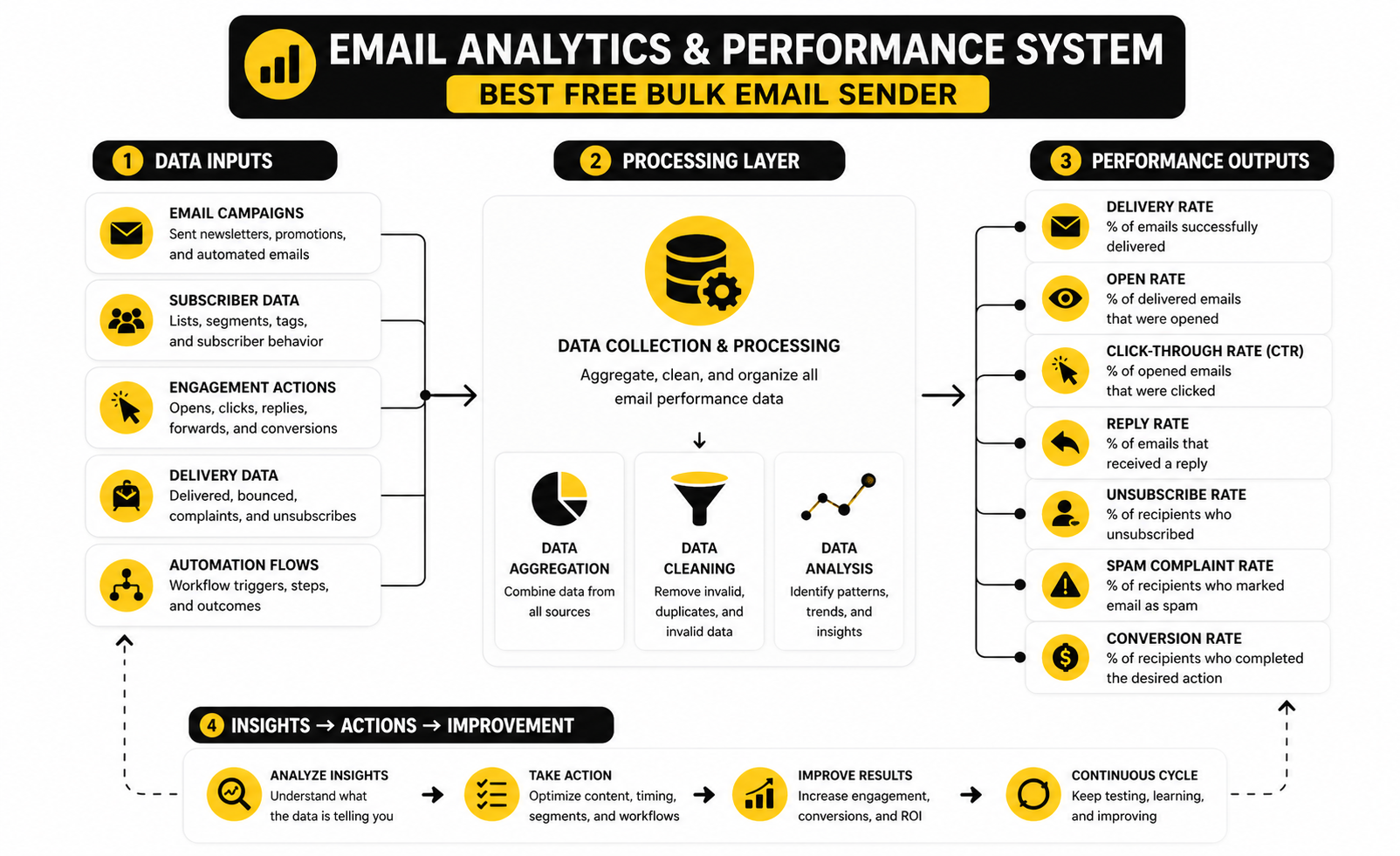
Start with delivery rate, but do not stop there. Delivery rate only tells you that receiving servers accepted the email. It does not prove the message reached the primary inbox, got read, or produced business value.
Inbox placement is more meaningful, but many free tools do not show it directly. That means you need to watch proxy signals: falling opens across several campaigns, rising bounces, low clicks, and increasing complaints. Google’s bulk sender guidance makes complaint control especially important, because bulk senders are expected to keep spam rates below 0.10% and avoid reaching 0.30% or higher.
For daily campaign decisions, focus on this sequence:
- Delivery health: Are emails accepted, or are bounces rising?
- Inbox trust: Are engagement signals stable over time?
- Message relevance: Are people opening and clicking?
- Business action: Are clicks turning into replies, bookings, trials, purchases, or another meaningful next step?
- List resistance: Are unsubscribes and complaints staying low?
How To Interpret Open Rates
Open rates are useful, but they are not the finish line. Industry benchmark reports often show average open rates landing somewhere in the broad 30% to 40% range depending on the audience, industry, and methodology, with benchmark data from MailerLite’s 2025 email marketing report and HubSpot’s benchmark roundup showing how much performance varies by sector. That range is helpful for context, but it should not become your obsession.
A low open rate can mean your subject line is weak. It can also mean your sender name is unfamiliar, your list is cold, your audience never wanted that topic, or your emails are landing outside the inbox. This is why you should never diagnose one metric in isolation.
The practical move is to compare campaigns against your own baseline. If your last five useful emails averaged 34% opens and a new one gets 18%, something changed. Look at the audience, subject line, send time, topic, and deliverability signals before blaming the platform.
How To Interpret Click Rates
Click rate is where your email starts proving its value. A campaign can have a strong open rate and still fail if the content does not move people to the next step. That is especially important when choosing the best free bulk email sender, because reporting depth affects how quickly you can improve.
Most small teams should track total clicks, unique clicks, and click-to-open rate. Total clicks show overall activity. Unique clicks show how many people acted. Click-to-open rate helps separate subject line performance from body performance.
If opens are strong but clicks are weak, your subject line created curiosity but the email did not deliver enough motivation. If clicks are strong but conversions are weak, the issue may be the landing page, offer, pricing, form, or booking flow. That is where tools outside the email sender can matter, especially if you are connecting campaigns to funnels through ClickFunnels, Systeme.io, or a broader follow-up system like GoHighLevel.
How To Read Unsubscribes And Complaints
Unsubscribes are not automatically bad. A small number of unsubscribes can mean your list is self-cleaning, which is healthier than keeping people who never wanted your emails in the first place. What matters is the trend and the context.
A sudden unsubscribe spike usually points to a mismatch. You may have changed the topic, sent too often, made the email too promotional, or attracted subscribers with a promise that does not match your actual content. When that happens, do not panic. Look at the campaign, the segment, and the original signup source.
Spam complaints are more serious. They signal that people felt the email did not belong in their inbox, and inbox providers treat that feedback heavily. If complaints rise, reduce volume, stop sending to cold contacts, tighten your segments, and make the unsubscribe option easy to find. Hiding the exit is not clever. It is how you train people to hit the spam button.
The Benchmark Trap
Benchmarks are useful for orientation, but dangerous when used as excuses. If your industry average click rate is low, that does not mean you should accept weak emails. If your open rate beats a benchmark, that does not mean your campaign is profitable.
The best way to use benchmarks is to find obvious problems. If your bounce rate is unusually high, your list source or hygiene process needs attention. If your open rate drops across several sends, you may have a deliverability or relevance issue. If clicks are consistently low, your content and call to action need work.
Your real benchmark is your own trendline. A free tool is enough if it helps you see that trendline clearly and act on it. Once you need deeper attribution, revenue tracking, or multi-channel reporting, it may be time to connect email with a CRM, funnel builder, or analytics stack instead of expecting one free sender to do everything.
Advanced Tradeoffs Before You Scale
The free stage is useful, but it should not become your strategy forever. A free bulk email sender is usually best for validation, early growth, and controlled sending. Once email becomes a serious revenue channel, the hidden tradeoffs start to matter more than the monthly price.
The biggest mistake is optimizing only for cost. Free tools can help you launch, but they may limit automation depth, support, testing, branding control, landing pages, advanced reporting, or sending flexibility. Those limits are not always a problem, but you need to know when they start holding back the business.
The best free bulk email sender is the one that gives you a clean start and a realistic upgrade path. If the free plan helps you build good habits, collect clean data, and prove that your audience wants your emails, it has done its job. The next question is whether staying free still makes sense once your list, offer, and revenue model mature.
Free Plan Limits Can Shape Your Strategy
Daily send caps affect more than volume. If a platform lets you send 300 emails per day, that may be perfect for a small active list, but it changes how you handle launches, time-sensitive promotions, and larger newsletters. A campaign that should land on Tuesday morning may end up spread across several days, which can weaken urgency.
Monthly caps create a different pressure. They may let you send a bigger campaign at once, but they force you to ration emails across newsletters, automations, and transactional-style updates. That becomes tricky if your welcome sequence, sales campaign, and customer education emails all pull from the same allowance.
This is why you should calculate sending needs before committing. Estimate your active subscribers, campaign frequency, automation volume, and growth rate. If your “free” setup is already tight before you launch, it will feel restrictive almost immediately.
Deliverability Gets Harder As Volume Grows
Small lists are more forgiving because mistakes are smaller. As volume grows, weak list hygiene, inconsistent sending, and poor segmentation become more visible. Inbox providers react to patterns, and higher volume gives them more signals to judge.
Authentication is only the baseline. You also need consistent sending behavior, low complaints, clean suppression management, and content people actually want. Google’s guidance around keeping spam rates below 0.10% and avoiding 0.30% or higher makes complaint discipline a serious operating metric, not a vanity detail.
Scaling should be gradual. Warm up new domains carefully, avoid sudden jumps in volume, and send first to your most engaged subscribers. If your best readers keep opening, clicking, and replying, that positive engagement gives your broader campaigns a stronger foundation.
The Cheapest Tool Is Not Always The Lowest-Cost Tool
A free platform can become expensive if it creates manual work. If you spend hours exporting contacts, cleaning lists, rebuilding automations, or stitching together reports, the real cost is no longer zero. Time is still a cost, especially if email is tied to sales.
The same applies to disconnected systems. If your email sender, funnel builder, CRM, booking tool, and payment stack do not talk to each other, you create gaps in the customer journey. That can mean missed follow-ups, duplicate emails, messy tags, and reporting that never tells the full story.
This is where a broader platform can make sense. GoHighLevel is not positioned like a simple free newsletter sender, but it can be useful when email needs to connect with CRM, pipeline, automation, forms, bookings, and client follow-up. For a solo creator, that may be too much. For an agency or service business, it can be the difference between sending emails and running a follow-up system.
When To Upgrade From A Free Bulk Email Sender
You do not need to upgrade because a dashboard tells you to. Upgrade when the free plan is blocking a specific business outcome. That is the cleanest way to avoid paying too early or staying free too long.
Good upgrade signals include hitting send limits regularly, needing better automation, wanting to remove platform branding, requiring stronger support, or needing better segmentation and reporting. Another clear signal is revenue attribution. If email is driving sales but you cannot see which campaigns, sequences, or segments are producing results, better tooling can pay for itself.
For ecommerce, SaaS, agencies, and service businesses, the upgrade point usually arrives when follow-up becomes too important to manage manually. At that stage, the best free bulk email sender may still be part of the journey, but it is no longer the whole system. You are not just choosing a sender anymore. You are choosing infrastructure.
Risk Management For Bulk Sending
Bulk email risk is mostly boring until it becomes painful. A messy import, unclear consent, broken unsubscribe link, or sudden volume spike can create problems fast. The safer approach is to treat email like an asset with rules, not a button you press whenever you want traffic.
Keep a suppression list and respect it. Remove hard bounces. Stop hammering cold contacts. Make unsubscribe easy. Keep records of how people joined your list. These habits are not just compliance hygiene; they protect your ability to keep reaching the people who actually want to hear from you.
You should also separate promotional pressure from audience trust. Sending more emails can increase short-term clicks, but it can also train people to ignore you if every message feels like a pitch. The better long-term strategy is simple: send useful emails consistently, sell clearly when there is a real reason, and let uninterested people leave without friction.
The Strategic Choice: Newsletter Tool, Funnel Tool, Or CRM System
Not every business needs the same email setup. A newsletter-first creator may only need a clean campaign builder, simple signup forms, and readable analytics. A course creator may need landing pages, checkout flows, and timed sequences. A local agency may need pipeline automation, SMS, appointment booking, and sales follow-up.
That is why there is no universal winner for the best free bulk email sender. Brevo can be a strong practical starting point for free daily sending. Moosend can fit users who want to test a polished email marketing workflow before committing. Systeme.io and ClickFunnels make more sense when email is tied directly to funnel building.
The right decision comes down to the business model behind the list. If email is mainly communication, choose the simplest reliable sender. If email is part of a sales machine, choose the system that connects the full path from opt-in to conversion. Free is great when it helps you move faster. It is not great when it forces you to build around limitations that your business has already outgrown.
Final Recommendation
The best free bulk email sender is the one that matches your current stage without creating bad habits. If you are just starting, prioritize clean signup forms, simple campaigns, authentication support, unsubscribe handling, and reporting you can actually understand. You do not need the most advanced platform on day one. You need a reliable system that helps you send useful emails consistently.
For most beginners, Brevo is one of the strongest practical starting points because its free plan gives you 300 email sends per day and lets you build gradually. If you want to test a polished campaign and automation workflow before paying, Moosend is worth considering during its trial window. If email is only one part of a larger funnel, CRM, or client follow-up system, GoHighLevel, Systeme.io, or ClickFunnels may fit the bigger picture better.
The main thing is simple: do not choose based on “free” alone. Choose based on whether the tool helps you build a list people trust, send emails people want, and measure performance clearly enough to improve. That is what separates a cheap email setup from a real email marketing asset.
FAQ - Built For Complete Guide
What is the best free bulk email sender?
The best free bulk email sender for most small businesses is usually the one that gives you a real free plan, clear sending limits, list management, unsubscribe handling, and basic reporting. Brevo is a strong option because it offers 300 email sends per day on its free plan. The best choice still depends on your list size, sending frequency, automation needs, and whether email is connected to funnels or a CRM.
Can I send bulk emails for free?
Yes, you can send bulk emails for free if your volume is modest and your needs are simple. Free plans usually come with limits, such as daily sends, monthly sends, platform branding, fewer automation features, or limited support. That is fine for testing, newsletters, and early-stage lead nurturing, but you should expect to upgrade once email becomes a serious revenue channel.
Is a free bulk email sender safe to use?
A free bulk email sender is safe when you use it for permission-based email and follow basic deliverability practices. That means using opt-in contacts, authenticating your domain, honoring unsubscribes, removing hard bounces, and avoiding spammy sending behavior. The risk usually comes from poor list practices, not from the free plan itself.
Should I use Gmail or Outlook to send bulk marketing emails?
Gmail and Outlook are not built for serious bulk marketing campaigns. They are better for personal and business communication, not list-based marketing with segmentation, unsubscribe management, compliance tools, and campaign analytics. A dedicated bulk email sender is usually the better choice because it gives you tools designed for marketing email rather than manual mass sending.
How many emails can I send on a free plan?
It depends on the platform. Some tools limit daily sends, some limit monthly sends, and others limit contacts or trial duration. Brevo’s free plan is based on 300 email sends per day, which can work well for small lists but may be restrictive for larger one-time campaigns.
What matters more: email sending limits or contact limits?
Sending limits matter more if you already know how often you plan to email your list. Contact limits matter more if your list is growing fast but you do not email everyone frequently. The best free bulk email sender for you should fit both your audience size and your campaign schedule, not just look generous on paper.
Do I need email automation on a free plan?
You do not always need automation right away, but it helps if you are capturing leads, onboarding customers, or following up after a specific action. A simple welcome sequence can do more for your business than random one-off campaigns. Start small with one useful flow, then expand after you have real engagement data.
What is the biggest mistake beginners make with bulk email?
The biggest mistake is importing a low-quality list and sending too broadly too soon. That creates weak engagement, higher complaints, and poor deliverability signals. A smaller permission-based list will usually outperform a larger list of people who barely remember you or never asked to hear from you.
How do I improve deliverability with a free bulk email sender?
Start with domain authentication, clean list sources, consistent sending, and relevant content. Send first to engaged subscribers, remove hard bounces, and avoid sudden spikes in volume. Make unsubscribing easy, because people who cannot find the unsubscribe link may use the spam button instead.
When should I upgrade from a free bulk email sender?
Upgrade when the free plan blocks a real business need. That could mean you keep hitting sending limits, need stronger automation, want better analytics, need more support, or want to remove platform branding. Do not upgrade just because more features exist. Upgrade when the extra capability helps you earn more, save time, or protect deliverability.
Is Brevo better than Moosend for free bulk email?
Brevo is usually better if you want an ongoing free sending option because its free plan allows 300 email sends per day. Moosend is better viewed as a trial-based option for testing campaign building, automation, and the overall workflow before deciding whether to pay. Both can be useful, but they solve slightly different problems.
Do funnel builders replace email marketing tools?
Not always. Funnel builders help you capture leads, present offers, and guide people through a conversion path, while email tools help you communicate with the list over time. Platforms like ClickFunnels and Systeme.io make sense when your email strategy is tied closely to landing pages, offers, and sales funnels.
What should I track after sending a bulk email campaign?
Track delivery health, opens, clicks, unsubscribes, spam complaints, replies, and the business result you wanted from the email. That business result could be bookings, purchases, form submissions, demo requests, or content views. The metric only matters if it helps you decide what to improve next.
Work With Professionals
Explore 10K+ Remote Marketing Contracts on MarkeWork.com
Most marketers spend too much time chasing clients, competing on crowded platforms, and losing a percentage of every project to middlemen.
MarkeWork gives you a better way. Browse thousands of remote marketing contracts and connect directly with companies desperate to hire skilled marketers like you, without platform commissions and without unnecessary gatekeepers.
If you're serious about finding better opportunities and keeping 100% of what you earn, explore available contracts and create a profile for free at MarkeWork.com.