

Choosing the best free email marketing tools is not about grabbing the platform with the biggest “free” badge. It is about finding a tool that lets you build a list, send consistently, automate the basics, and grow without hitting a wall too early.
Free plans can be genuinely useful, especially for creators, small businesses, agencies, coaches, ecommerce stores, and early-stage SaaS teams. But the catch is simple: every free email tool limits something. That might be contacts, monthly sends, automation, branding, support, templates, landing pages, segmentation, or reporting.
Article Outline
This guide is structured as one complete article split into six parts. Each part builds on the previous one, moving from strategy to tool comparison to implementation. The goal is to help you choose confidently instead of jumping between random software lists.
- Part 1: Why Free Email Marketing Tools Matter
- Part 2: The Free Email Marketing Tool Selection Framework
- Part 3: Core Features To Compare Before You Choose
- Part 4: Best Free Email Marketing Tools By Use Case
- Part 5: Professional Implementation And Migration Tips
- Part 6: Final Recommendations And FAQ
Why Free Email Marketing Tools Matter
Email is still one of the few marketing channels you can own. Social platforms can change reach overnight, paid ads can get expensive fast, and search traffic can swing after updates. A good email list gives you a direct line to people who asked to hear from you.
That is why free email marketing tools matter so much. They let you start building that owned audience before you have a big budget, a full marketing team, or a polished funnel. For many businesses, the first useful setup is not complicated: a signup form, a welcome email, a newsletter, and a simple way to track clicks.
The mistake is treating “free” as the main decision. A free plan is only valuable if it supports the way you actually plan to grow. A newsletter creator, ecommerce store, local service business, and agency all need different things from email software.
Framework Overview
The best way to compare tools is to look at the constraint that will matter first. Some platforms are generous with contacts but strict with daily sending. Others give you automation but limit subscribers quickly. Some are better for newsletters, while others make more sense when email is part of a bigger CRM or sales system.
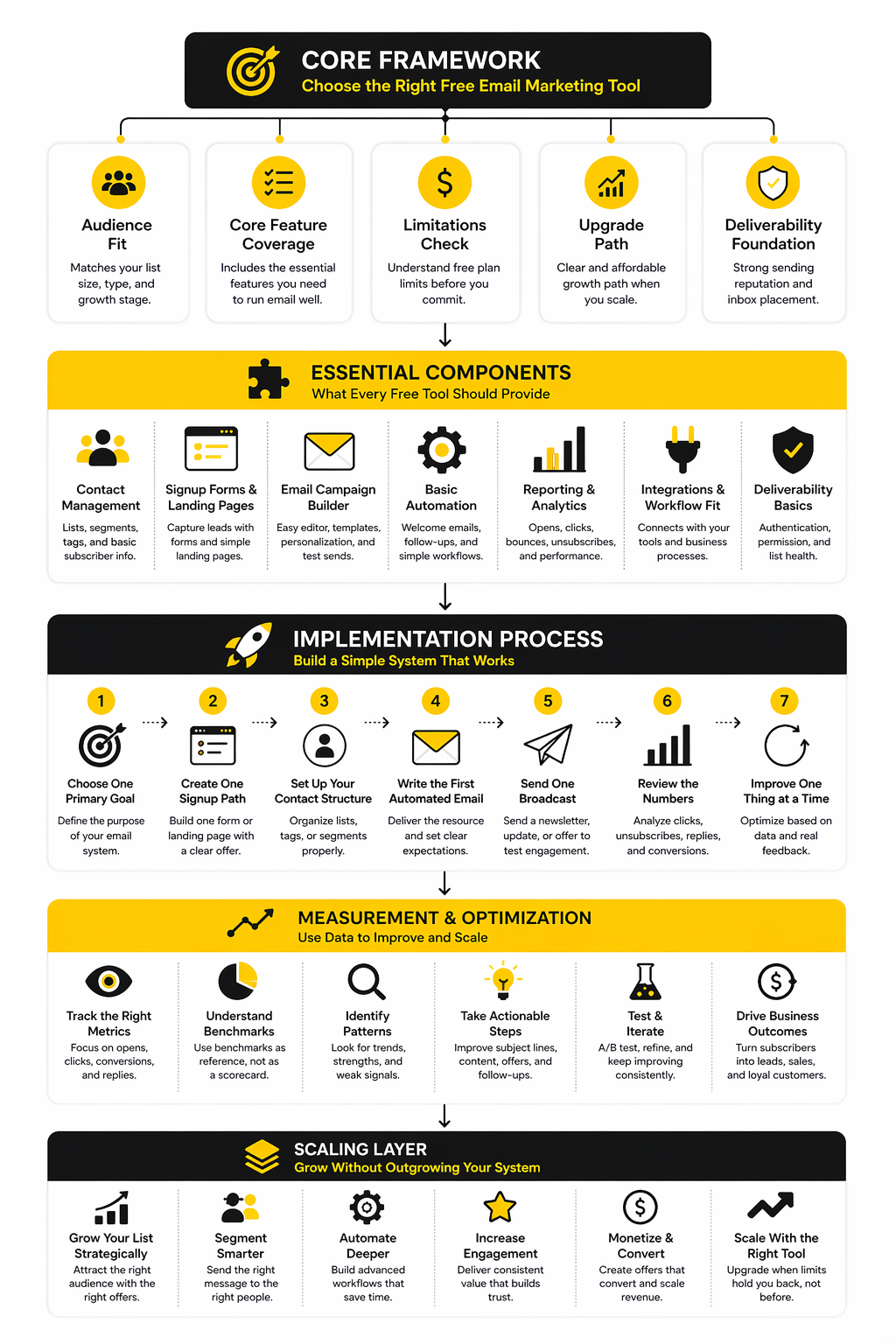
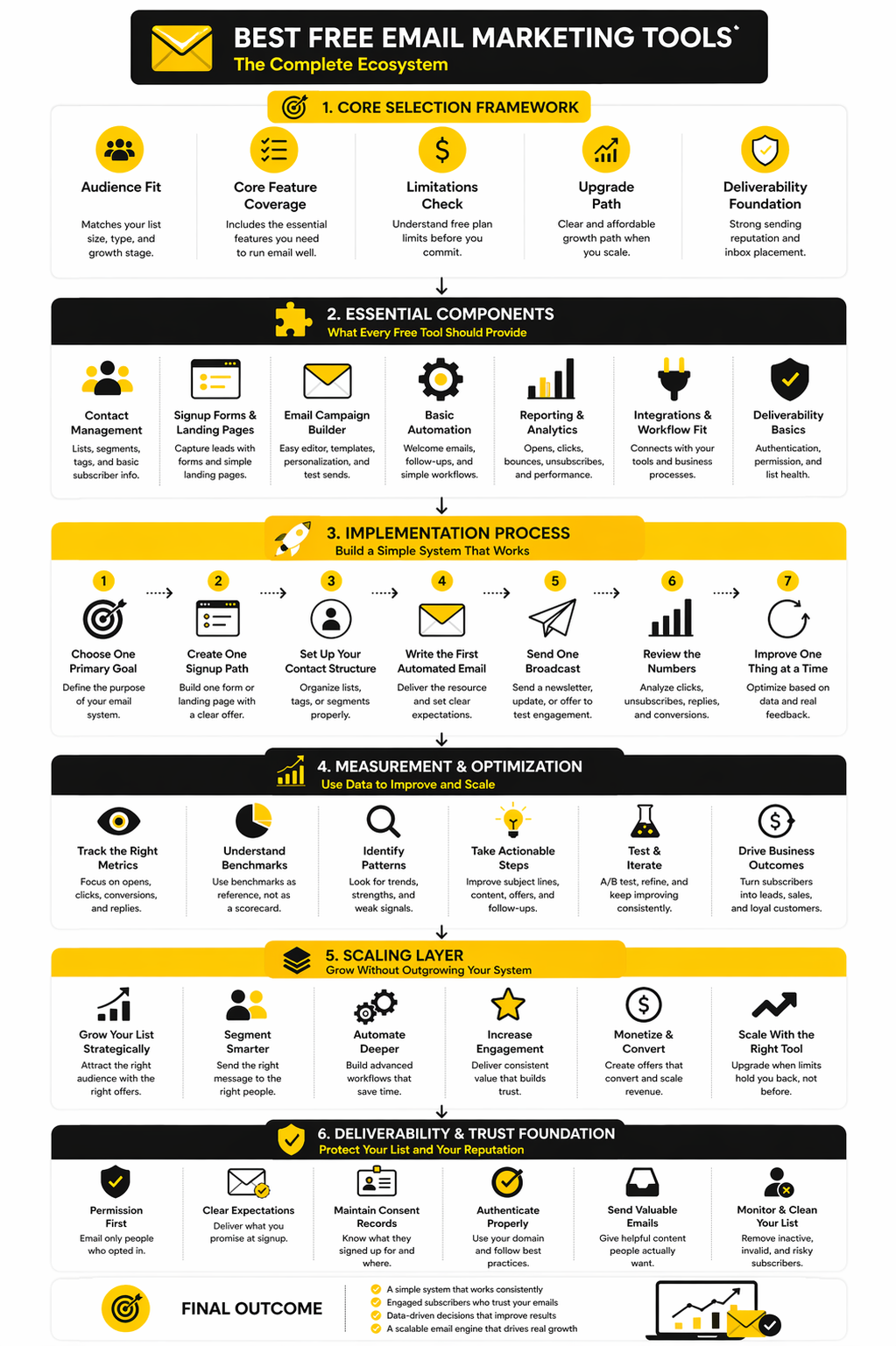
Use this framework before picking a platform:
- Audience size: How many subscribers can you store for free?
- Send volume: How many emails can you send per day or month?
- Automation: Can you build welcome sequences and basic workflows?
- Forms and landing pages: Can you collect leads without extra tools?
- Branding: Does the free plan add platform branding to your emails?
- Reporting: Can you see opens, clicks, unsubscribes, and campaign results?
- Upgrade path: Will pricing still make sense when your list grows?
For example, Brevo can make sense when you care more about contact flexibility and multi-channel messaging. Moosend can be worth considering when you want a more campaign-focused email marketing setup. Systeme.io fits better when email is part of a simple funnel, course, or digital product system.
What This Guide Will Help You Decide
By the end of the full article, you should know which free tool fits your current stage and which one you should avoid. That matters because switching email platforms later is annoying. You have to move contacts, rebuild forms, recreate automations, check deliverability, and reconnect integrations.
The practical question is not “What is the best free email marketing tool for everyone?” The better question is “Which free email marketing tool gives me enough room to execute my next 90 days?” That is the lens this guide will use from here on.
Part 2 will turn that lens into a clear selection framework, so you can compare free plans without getting distracted by feature lists that look impressive but do not help your actual business.
The Free Email Marketing Tool Selection Framework
The easiest way to choose badly is to compare free plans feature by feature without knowing what you actually need. A long feature list feels comforting, but it does not mean the platform will help you send better campaigns, collect better leads, or build a stronger customer relationship. The best free email marketing tools are the ones that fit your business model, your list size, and your next realistic stage of growth.
Start with the job the tool needs to do. A creator who sends one weekly newsletter does not need the same setup as an ecommerce brand recovering abandoned carts. A local service business that wants lead follow-up does not need the same workflow as a SaaS company onboarding trial users.
This is where the framework matters. Instead of asking which tool is “best,” ask which limitation you can live with. Free email marketing software is always a tradeoff, so your job is to pick the tradeoff that hurts the least.
Step 1: Decide What Your Email List Is For
Your list should have a clear purpose before you choose software. Are you trying to publish a newsletter, generate sales calls, recover ecommerce revenue, onboard users, promote digital products, or nurture leads over time? Each goal points you toward a different kind of platform.
For a simple newsletter, you mainly need clean signup forms, reliable broadcasts, basic segmentation, and readable reporting. For a funnel, you need landing pages, forms, tags, automations, and ideally payment or checkout connections. For a service business, CRM features matter more because leads need context, follow-up, and a clear next action.
This is why tools like Systeme.io can be attractive for digital products and simple funnels, while Brevo can fit businesses that want email plus contact management. The right choice depends less on which platform has more buttons and more on whether those buttons support the way you actually sell.
Step 2: Find The First Limit You Will Hit
Every free plan has a ceiling. Some ceilings are obvious, like subscriber caps or monthly send limits. Others are less obvious, like missing automations, platform branding, limited support, weak templates, or reporting that is too shallow once you start optimizing.
This is the part most beginners skip, and it costs them later. A tool can look generous on day one and become frustrating after your first real campaign. If you plan to send four newsletters per month to 1,000 people, a plan with a low monthly send cap will fail before the list even becomes valuable.
Look at the limit that connects directly to your use case. If you publish often, send volume matters. If you collect leads slowly but want deep follow-up, automation matters. If you sell products, ecommerce integrations and behavioral triggers matter more than a pretty email editor.
Step 3: Check The Upgrade Path Before You Commit
A free plan is not just a free plan. It is the entry point into a paid ecosystem. That means you should check what happens when your list grows, your sending increases, or you need features that are currently locked.
This is especially important because migration is not painless. You can export contacts, but you still have to rebuild forms, recreate automations, reconnect integrations, warm up sending reputation, and test everything again. That is busywork you do not want when the business is finally gaining traction.
So before you choose, look one or two pricing tiers ahead. A platform that feels slightly less generous today may be the smarter choice if its paid path is predictable. A tool that looks amazing for free may be a trap if the next step is too expensive or removes the flexibility you need.
Step 4: Match The Tool To Your Marketing System
Email rarely works alone. It usually connects to your website, checkout, CRM, booking tool, chatbot, webinar, lead magnet, or sales pipeline. That means the best free email marketing tools are not always pure email tools.
For example, a business that runs consultations may need forms, calendar booking, and lead follow-up more than newsletter templates. A creator selling a course may need landing pages and checkout more than advanced reporting. An agency may care more about client management, pipelines, and automation than having the most generous free newsletter plan.
This is where all-in-one tools can make sense. GoHighLevel is not usually the first pick for someone who only wants a free newsletter tool, but it becomes more relevant when email sits inside a broader agency or local business system. ClickFunnels is similar: it is not just about sending emails, but about connecting email to funnels, pages, offers, and follow-up.
Step 5: Separate Nice-To-Have Features From Revenue Features
Free plans often distract you with features that sound useful but do not move the business forward yet. Templates, AI copy helpers, stock images, color themes, and minor editor options can be nice. They are not the core decision.
Revenue features are different. Signup forms that convert, automations that send at the right time, segments that separate buyers from leads, and reports that show what people clicked are much more important. These features help you improve the system instead of just making emails look better.
Be strict here. If a feature does not help you collect leads, send better messages, personalize follow-up, sell more effectively, or understand performance, it should not drive your decision. Free software should reduce friction, not give you more things to fiddle with.
Step 6: Choose For The Next 90 Days
You do not need a platform that can handle every future possibility. You need one that supports the next 90 days without creating avoidable problems. That time frame is long enough to test campaigns, build habits, and see what your audience actually responds to.
For most beginners, the best 90-day setup is simple. Create one lead magnet or signup reason, build one form, write one welcome email, and send consistently. Once that works, add segmentation, automation, and more advanced campaigns.
This keeps the decision practical. You are not marrying the software forever. You are choosing the tool that gives you the cleanest path from “I should build an email list” to “I am actually sending useful emails people engage with.”
Core Features To Compare Before You Choose
Once the selection framework is clear, the next step is implementation. This is where the decision becomes real. The best free email marketing tools should not only look good on a pricing page; they should help you build a simple working system without forcing you into messy workarounds.
Think about implementation in layers. First, you need a way to capture subscribers. Then you need a way to send the right message. After that, you need enough tracking to understand whether people are responding.
If a platform cannot support that basic flow, it does not matter how many extra features it promotes. A clean email system beats a complicated dashboard every time.
Contact Management
Contact management is the foundation. You need to know who joined your list, where they came from, what they signed up for, and whether they have taken meaningful actions. Without that, every campaign becomes a broad blast.
Good free tools usually give you basic lists, segments, tags, or attributes. That is enough to separate newsletter subscribers from buyers, leads from customers, and active readers from people who have gone quiet. You do not need enterprise-level customer data on day one, but you do need enough structure to avoid treating everyone the same.
This matters because email performance improves when messages match intent. Someone who downloaded a checklist should not automatically receive the same follow-up as someone who requested a quote. Even basic segmentation gives you a more professional system.
Signup Forms And Landing Pages
Your email platform should make subscriber capture easy. At minimum, you want embedded forms, hosted signup pages, and a simple way to connect the form to the right list or tag. If this part is clunky, your growth slows before email marketing even begins.
Landing pages become more important when you promote lead magnets, webinars, waitlists, or offers. A tool like Systeme.io is useful when you want forms, funnels, and email in one place. Brevo can work well when you want a contact-first email system with broader communication features.
Do not overcomplicate the first version. One clear signup promise and one clean form are enough to start. The goal is not to build the prettiest page; the goal is to make joining your list obvious and frictionless.
Email Campaign Builder
The campaign builder should help you create emails quickly without turning every send into a design project. A drag-and-drop editor is useful for visual newsletters, product announcements, and branded campaigns. A simpler text-based editor can be better for personal newsletters, coaching emails, and direct sales follow-up.
The key is speed. If it takes too long to write, preview, test, and send a campaign, you will send less often. Consistency matters more than perfect formatting.
Look for reusable sections, mobile previews, personalization fields, and easy test sends. These small details save time every week. They also reduce mistakes, which matters when your email list starts becoming a real business asset.
Basic Automation
Automation is where email marketing starts to compound. Even a simple welcome sequence can make your list feel more intentional. Someone subscribes, receives the promised resource, gets a helpful follow-up, and understands what to expect from you next.
Free plans vary a lot here. Some include basic automation, some restrict workflow depth, and some keep automation mostly behind paid plans. That is why you should check what you can actually build before committing.
Start with one automation before building anything advanced. A welcome sequence, lead magnet delivery, or post-purchase follow-up is enough. Once that works, you can add behavior-based segments, sales sequences, re-engagement emails, and more specific customer journeys.
Reporting And Optimization
Reporting does not need to be fancy, but it needs to be useful. You should be able to see opens, clicks, unsubscribes, bounces, and campaign-level performance. More importantly, you should be able to understand which emails move people to act.
Modern open rates are useful but imperfect because privacy features can distort tracking. Clicks, replies, conversions, and form submissions usually tell you more about real interest. That is why a practical email setup should focus on what readers do, not just whether an open pixel fired.
This is where free tools can feel limited. Basic reporting is fine for early newsletters, but growing businesses eventually need better segmentation, attribution, and automation reporting. Keep that in mind before you build a large system inside a plan that cannot show you what is working.
The Simple Implementation Process
The implementation process should be boring in the best possible way. You do not need ten automations, five lead magnets, and a complex tagging system to start. You need one clean path from visitor to subscriber to engaged reader.
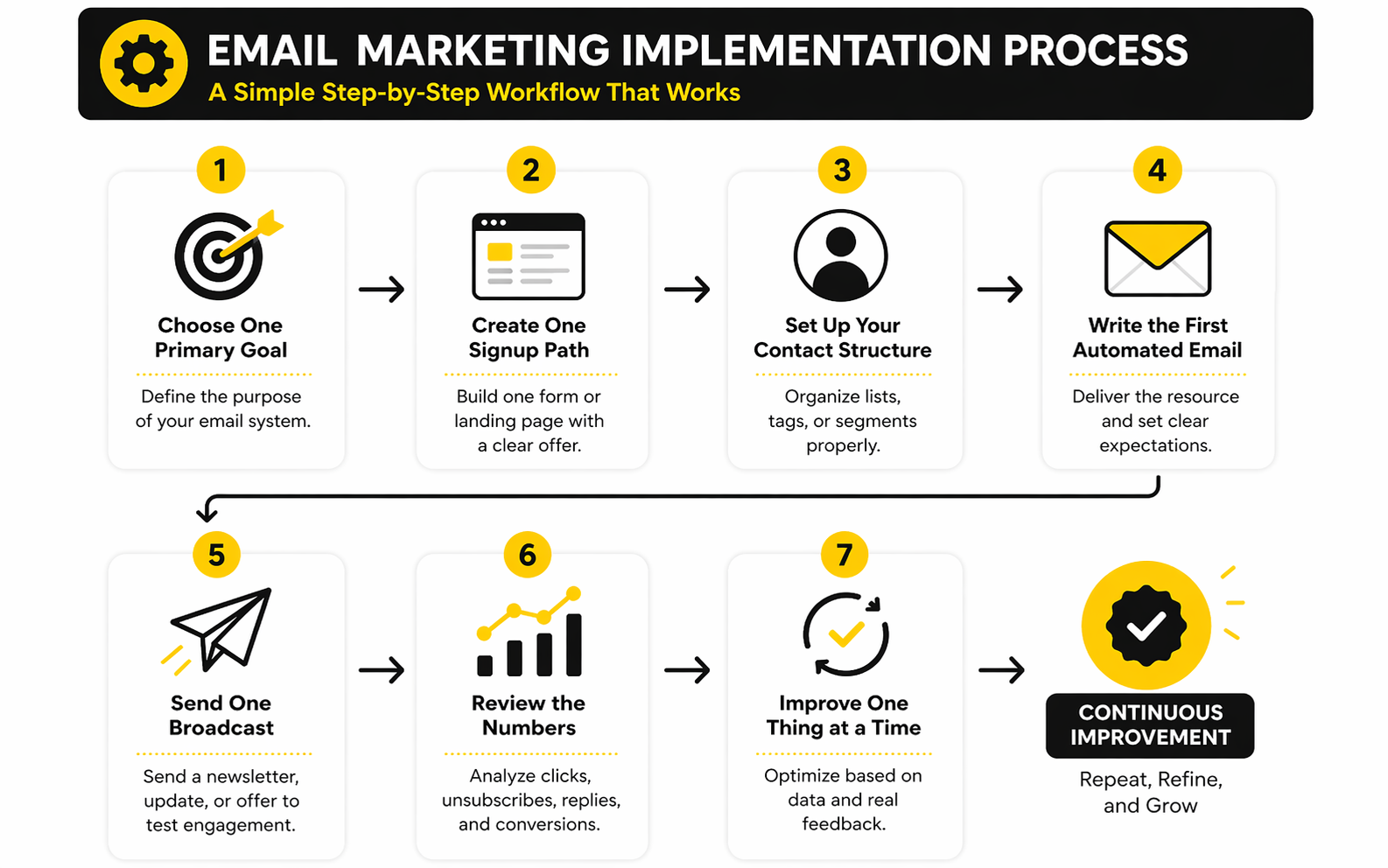
Use this practical setup order:
- Choose one primary goal. Decide whether your first email system is for newsletters, lead generation, sales follow-up, ecommerce, onboarding, or digital product promotion.
- Create one signup path. Build one form or landing page with a clear reason to subscribe.
- Set up your contact structure. Add the list, tag, or segment that identifies where each subscriber came from.
- Write the first automated email. Deliver the promised resource, set expectations, and point readers toward the next useful action.
- Send one broadcast. Use a newsletter, update, offer, or educational email to test real audience engagement.
- Review the numbers. Look at clicks, unsubscribes, replies, and conversions before changing the system.
- Improve one thing at a time. Adjust the signup promise, subject line, call to action, or follow-up sequence based on real behavior.
This process works because it keeps momentum high. You are not trying to build a perfect machine before anyone joins the list. You are creating a simple system, sending real emails, and improving from actual feedback.
Deliverability Basics
Deliverability is not just a technical issue. It is the difference between emails reaching inboxes and disappearing into spam or promotions folders. Even the best free email marketing tools cannot save a bad sending strategy.
Start with permission. Only email people who opted in, and make the unsubscribe option easy to find. Sending to scraped, purchased, or stale contacts is one of the fastest ways to damage your reputation.
Then handle the basics properly. Use a real business domain, authenticate sending when the platform asks you to, avoid misleading subject lines, and send content people actually expect. This is not glamorous, but it is critical.
Integrations And Workflow Fit
Your email tool should fit the rest of your workflow. If you collect leads through forms, book calls, sell products, run webinars, or manage customers in a CRM, email needs to connect to those actions. Otherwise, you end up copying data manually or missing follow-up opportunities.
For a simple creator setup, native forms and landing pages may be enough. For a service business, a CRM-connected platform can reduce manual work. For an agency or local business system, GoHighLevel becomes relevant because email can sit alongside pipelines, calendars, messaging, and client follow-up.
The best implementation is the one you will actually maintain. If your setup depends on too many disconnected tools, it gets fragile. If it is simple enough to run every week, it has a much better chance of producing results.
Statistics And Data
Data only helps when it changes your next move. That is especially true when comparing the best free email marketing tools, because free plans often give you just enough reporting to see basic performance but not enough context to interpret it well. A dashboard full of numbers can still lead you in the wrong direction if you do not know which signals matter.
The goal is not to chase perfect benchmarks. Your audience, offer, list source, sending frequency, industry, and email type all affect performance. Benchmarks are useful as reference points, not as a replacement for your own testing.
A practical email measurement system should answer three questions. Are people receiving the emails? Are the right people engaging? Is the email program creating business outcomes?
The Numbers Worth Watching
Open rate gets the most attention, but it is not the strongest metric on its own. Privacy changes can inflate or distort opens, and a high open rate does not automatically mean your emails are producing leads, sales, bookings, or replies. Treat open rate as a directional signal for subject lines, sender trust, and list health.
Click rate is usually more useful because it shows active intent. Recent benchmark data puts average click rates around 2.09% in 2025, while DMA’s 2025 benchmark reported unique click rates rising to 2.3%. That does not mean every campaign below that is bad, but it does mean you should pay close attention when clicks are consistently weak.
Unsubscribe rate tells you whether your content and expectations are aligned. A few unsubscribes are normal, especially when your list grows or you promote an offer. But if unsubscribes spike after specific email types, the message, frequency, or audience targeting needs work.
What Benchmarks Actually Mean
Benchmarks are averages across thousands or millions of emails, so they hide a lot of context. A welcome email, product launch, discount campaign, cold reactivation email, and weekly newsletter should not be judged by the same standard. The same number can be good or bad depending on the campaign’s job.
For example, a low click rate on a pure relationship-building email may be fine if the goal is trust and replies. A low click rate on a sales email is more serious because the call to action is the point. This is why you should compare similar email types against each other instead of comparing everything to a broad industry average.
Use benchmarks as a smoke alarm, not a scoreboard. If your numbers are far below typical ranges for several sends in a row, investigate. If they are close to average but revenue is improving, do not panic just because another report shows a prettier number.
The Analytics System That Keeps You Honest
The most useful analytics setup is simple. Track the path from signup to email engagement to the next business action. That action might be a booked call, a product purchase, a webinar registration, a reply, a form submission, or a checkout visit.
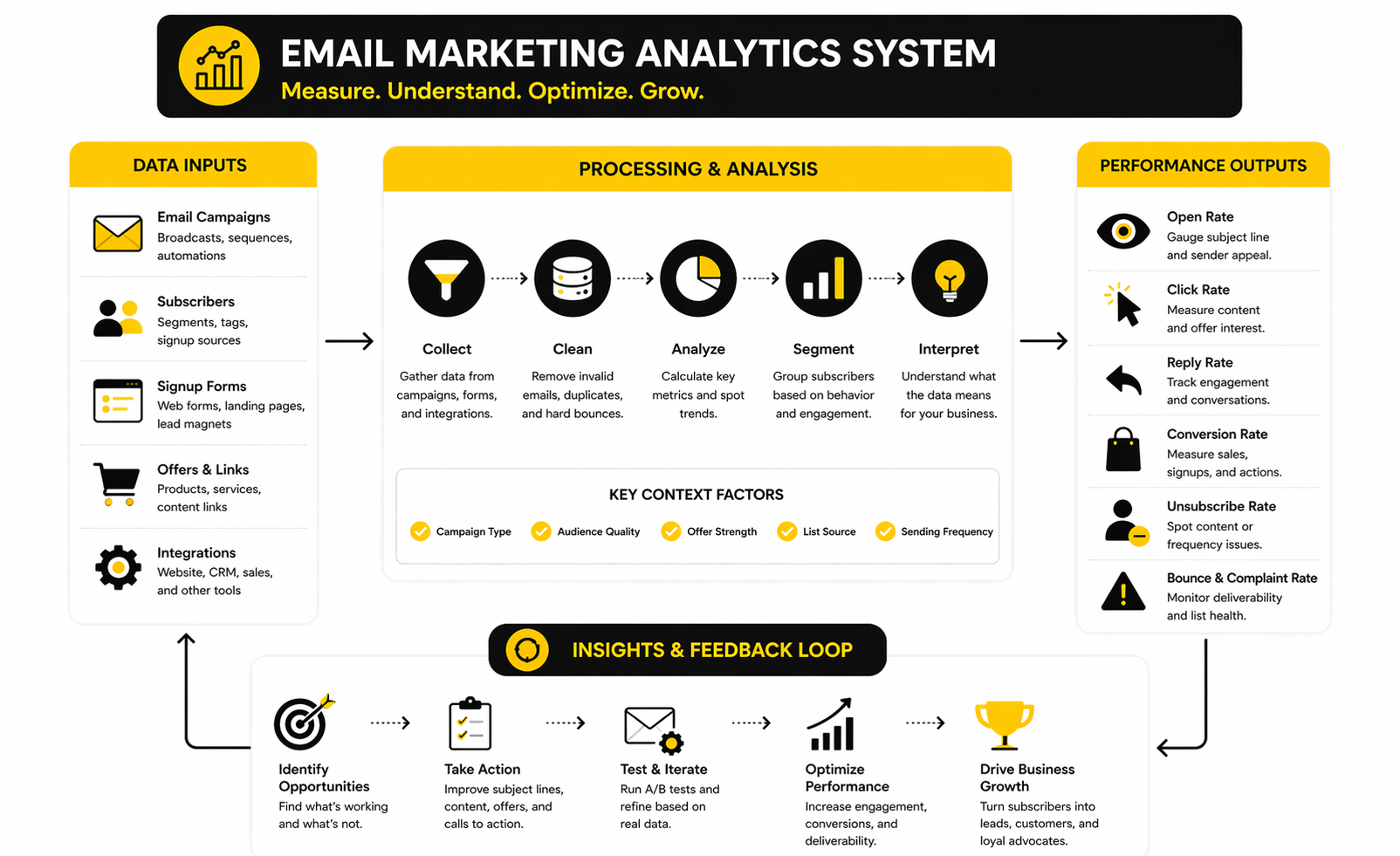
A clean measurement system looks like this:
- Signup source: Where did the subscriber come from?
- Permission event: What did they ask to receive?
- First email engagement: Did they open, click, reply, or ignore?
- Follow-up behavior: Did they engage again within the next few emails?
- Business action: Did they book, buy, register, request, or return?
- List health signal: Did they unsubscribe, bounce, complain, or go inactive?
This sequence matters because it stops you from obsessing over isolated campaign metrics. You are not just asking whether an email performed well. You are asking whether the email moved the subscriber one step closer to a useful outcome.
How Free Plan Reporting Changes Your Decisions
Free email tools often give you basic reporting, and that can be enough at the beginning. You can usually see opens, clicks, bounces, unsubscribes, and campaign activity. That is enough to spot obvious problems and improve your first campaigns.
The limitation appears when you need deeper answers. You may want to know which signup source produces buyers, which lead magnet attracts the best subscribers, or which segment responds to a specific offer. Some free plans make that difficult because advanced reporting, attribution, or automation analytics may sit behind paid tiers.
This is why tool choice affects more than sending. If you expect to run serious campaigns, reporting depth becomes part of the buying decision. A free plan that hides the data you need can slow down decisions even if the sending limits look generous.
Performance Signals That Deserve Action
Not every number needs a reaction. One weak email is not a crisis. Three or four weak campaigns with the same pattern is a signal.
If open rates are weak but clicks from openers are strong, your content may be fine and your subject lines or sender recognition may need work. If opens are healthy but clicks are poor, your email body, offer, audience match, or call to action probably needs attention. If unsubscribes rise after promotional sends, you may need better segmentation or clearer expectations at signup.
Bounces and spam complaints deserve faster action. They point to list quality, permission problems, deliverability issues, or poor audience fit. Even free tools can usually show enough of this data to warn you before the damage gets worse.
The Metrics To Ignore At First
Do not over-focus on vanity metrics when your list is small. A 50-person list can swing wildly because a few people click or ignore one email. Early data is useful, but it is not statistically stable.
Also avoid comparing your brand-new list to mature programs with years of audience trust. Bigger brands may have stronger recognition, better segmentation, and more historical data. Your job is to build your own baseline, not copy someone else’s dashboard.
For the first 90 days, track simple trends. Are more people subscribing? Are they clicking at least sometimes? Are unsubscribes reasonable? Are emails helping create conversations, visits, bookings, or sales? That is the data that actually matters.
Turning Data Into Better Campaigns
Measurement is only valuable when it creates a better next email. If subject lines are weak, test clearer angles. If clicks are weak, tighten the call to action. If subscribers join but never engage, improve the signup promise and welcome email.
The strongest email marketers do not treat analytics as a report card. They treat it as a feedback loop. Send, measure, learn, adjust, and send again.
That is how free tools become useful instead of limiting. Even basic analytics can help you improve when you know what each number means and what decision it should drive.
Professional Implementation And Migration Tips
At this stage, the question is no longer whether free email software can work. It can. The better question is how to set it up in a way that does not create problems when your list, offers, and campaigns become more serious.
This is where many people get sloppy. They pick one of the best free email marketing tools, import contacts, send a few campaigns, and only later realize their tagging, forms, consent records, and automations are a mess. That mess is fixable, but it is much easier to avoid from the start.
A professional setup does not mean complicated. It means clean, intentional, and easy to maintain.
Build Your List Architecture Before You Build Campaigns
Your list structure should be simple enough to understand six months from now. Do not create a new list for every lead magnet, campaign, source, or offer unless the platform clearly requires it. In most cases, one main audience with tags or segments is cleaner.
Use tags to describe meaningful context. A subscriber might be tagged by signup source, interest, customer status, lead magnet, or lifecycle stage. That gives you flexibility without turning the account into a maze.
The key is consistency. If one form uses “ebook lead,” another uses “Ebook,” and another uses “downloaded-guide,” your data becomes harder to use. Decide on a naming pattern early and stick with it.
Treat Consent Like A Business Asset
Permission is not just a compliance checkbox. It protects deliverability, trust, and long-term list value. When someone joins your list, you should know what they signed up for, where they signed up, and what type of communication they expected.
This becomes more important as you grow. If you later migrate tools, clean inactive subscribers, or investigate deliverability issues, consent records help you understand the quality of your list. They also reduce the temptation to email people who never clearly asked for marketing messages.
Keep the signup promise honest. If the form says someone will receive a checklist, do not immediately drop them into aggressive daily sales emails without setting expectations. That is how you burn trust fast.
Know When Free Stops Being Smart
Free is useful at the beginning, but it should not be treated as a badge of honor forever. A free plan becomes expensive when it slows execution, hides important data, limits automation, adds branding that hurts credibility, or forces manual work every week. That cost does not show up on an invoice, but it shows up in lost momentum.
Watch for practical upgrade signals. If you need more sends, better automations, cleaner branding, stronger reporting, more users, or deeper integrations, it may be time to move beyond free. This is not a failure. It usually means the channel is becoming important enough to invest in.
For example, Brevo can be a strong fit when you want generous contact storage and can work around daily sending limits early on. Moosend can make sense when campaign building and automation depth matter more. Systeme.io is worth considering when the email list is tied directly to funnels, courses, or simple digital product sales.
Avoid Platform Lock-In Where It Hurts Most
Some lock-in is normal. Every email tool has its own automation builder, template system, and contact model. The risk is not that switching becomes slightly annoying. The risk is building your entire marketing operation around features that are difficult to recreate elsewhere.
Protect yourself by keeping your core assets portable. Maintain a clean export of contacts, tags, consent source, and customer status. Keep copies of important email sequences in a separate document. Store lead magnet files, landing page copy, and offer messaging outside the platform too.
This matters when a free plan changes, a pricing tier becomes too expensive, or your business needs outgrow the tool. You do not want your audience trapped inside software choices you made when the list was tiny.
Plan The Migration Before You Need It
A good migration starts before the old tool becomes painful. If you wait until you are already blocked by send limits, broken automations, or deliverability issues, you will rush the move and make mistakes. Plan the migration while things are still calm.
The basic migration process is straightforward:
- Export your contacts with useful fields. Include email address, name, tags, signup source, customer status, and consent details where available.
- Clean the list before importing. Remove obvious junk, duplicates, hard bounces, and people who should not receive marketing emails.
- Rebuild forms first. Make sure new subscribers flow into the new platform correctly before moving campaign activity.
- Recreate essential automations. Start with welcome emails, lead magnet delivery, and sales follow-up before rebuilding advanced workflows.
- Test every path manually. Subscribe through each form, click each link, and confirm the right tags or segments apply.
- Warm up sending carefully. Do not blast the full list immediately after moving platforms.
- Monitor early engagement. Watch bounces, unsubscribes, clicks, replies, and complaints after the first few sends.
This is not glamorous work, but it prevents expensive chaos. Migration is where hidden mess becomes visible. Clean structure makes the move much easier.
Be Careful With All-In-One Platforms
All-in-one platforms can be excellent when the business model fits. If you need funnels, CRM, calendars, pipelines, SMS, and email in one place, a broader system can reduce tool sprawl. That is why GoHighLevel is often more relevant for agencies, local businesses, and service-based sales systems than for someone who only wants a basic newsletter.
The tradeoff is complexity. A bigger platform can solve more problems, but it also gives you more settings, more moving parts, and more ways to overbuild. If your current need is simply to send a weekly newsletter, an all-in-one system may be more than you need right now.
Be honest about the workflow. Choose a larger platform when email is part of a bigger revenue system. Choose a lighter email tool when the priority is publishing, list growth, and simple automation.
Think About Revenue Per Subscriber
As your list grows, the decision should shift from “Which tool is free?” to “Which tool helps each subscriber become more valuable?” That is the mature way to compare platforms. A cheaper tool is not automatically better if it limits segmentation, follow-up, or conversion tracking.
Revenue per subscriber does not need to be complicated. Look at how many subscribers become leads, buyers, repeat customers, booked calls, or engaged readers. Then compare that value against the cost and capability of the tool.
This reframes the whole decision. Paying for software is easy to justify when it helps you create more revenue, save time, or improve retention. Staying free is smart only while the free plan supports the business system you are building.
The Expert Rule: Keep The System Smaller Than Your Discipline
Most email systems fail because people build more than they can maintain. They create too many tags, too many sequences, too many segments, and too many campaigns. Then they stop sending because the system feels heavy.
Your setup should be smaller than your discipline. If you can reliably send one useful email per week, build around that. If you can maintain one welcome sequence, one newsletter, and one sales follow-up, start there.
That is how you scale without losing control. The best free email marketing tools give you a starting point, but your system only works when it matches your actual operating rhythm.
Final Recommendations
The best free email marketing tools are not chosen by popularity. They are chosen by fit. If the platform matches your list size, sending rhythm, automation needs, reporting expectations, and upgrade path, it is a good choice.
For simple newsletters, choose a tool that makes writing and sending easy. For funnels and digital products, choose a system that connects forms, pages, email, and offers without adding unnecessary complexity. For service businesses and agencies, think beyond email and look at how follow-up, CRM, booking, and pipeline management work together.
The final decision should feel practical, not exciting. Pick the tool that helps you start clean, send consistently, measure honestly, and scale without rebuilding everything too soon.
FAQ - Built For Complete Guide
What are the best free email marketing tools for beginners?
The best free email marketing tools for beginners are the ones that make list building, email creation, and basic reporting simple. Beginners usually need forms, broadcasts, contact management, and a welcome email before they need advanced automation. A simple tool used consistently will beat a powerful tool that feels too complicated to maintain.
Is free email marketing software enough for a small business?
Free email marketing software can be enough when your list is small and your campaigns are simple. It works well for newsletters, lead magnets, early follow-up, and basic audience nurturing. Once you need deeper automation, stronger analytics, branding removal, or higher send limits, a paid plan usually becomes more practical.
What is the biggest limitation of free email marketing tools?
The biggest limitation is usually not one single feature. It is the combination of send limits, subscriber caps, automation restrictions, platform branding, and limited reporting. The problem appears when your marketing becomes serious but the free plan still forces beginner-level workflows.
Should I choose a tool with more contacts or more monthly sends?
Choose based on your sending style. If you collect many leads but email occasionally, contact capacity matters more. If you send newsletters, promotions, or updates frequently, monthly send volume becomes more important.
Are open rates still useful?
Open rates are useful as a rough signal, but they should not be treated as the main performance metric. Privacy changes can distort opens, so clicks, replies, conversions, bookings, and purchases usually tell you more about real engagement. Use open rates to spot broad trends, not to judge the entire campaign.
What click rate should I expect from email marketing?
Broad 2025 benchmark data puts average click rates around 2.09% to 2.3%, depending on the dataset and methodology. That does not mean every email below that range is bad. Campaign type, audience quality, offer strength, list source, and sending frequency all change what a good number looks like.
Which free email marketing tool is best for funnels?
For simple funnels, Systeme.io is worth considering because it connects email with pages, funnels, and digital product workflows. That makes it useful when you do not want to stitch several tools together. It is especially relevant for creators, coaches, and small digital product businesses.
Which free email marketing tool is best for contact management?
Brevo is often a strong option when contact management matters because its free plan is built around stored contacts and daily sending limits. The tradeoff is that daily sending caps can become restrictive as campaigns grow. That makes it better for businesses that value contact flexibility more than high-volume broadcasting at the free stage.
When should I upgrade from a free email marketing plan?
Upgrade when the free plan starts slowing down revenue, execution, or credibility. Common signs include hitting send limits, needing better automation, wanting to remove platform branding, requiring stronger reporting, or spending too much time on manual work. The right time to upgrade is when the paid features help you earn more, save time, or protect list quality.
Can I migrate from one email marketing tool to another later?
Yes, but migration takes planning. You need to export contacts, preserve tags or segments, rebuild forms, recreate automations, test signup paths, and monitor deliverability after the move. Migration is much easier when your original setup is clean and your important copy, lead magnets, and campaign assets are stored outside the platform.
Should I use an all-in-one platform instead of a dedicated email tool?
Use an all-in-one platform when email is part of a bigger sales or client-management system. GoHighLevel can make sense for agencies, local businesses, and service providers that need CRM, pipelines, booking, messaging, and follow-up in one place. A dedicated email tool is usually better when your main goal is simply publishing newsletters or sending straightforward campaigns.
What should I set up first after choosing a free email tool?
Set up one signup form, one clear subscriber promise, one contact structure, and one welcome email. Then send one useful broadcast and review the response. That basic system gives you real feedback faster than spending weeks building complex automations nobody has entered yet.
Work With Professionals
Explore 10K+ Remote Marketing Contracts on MarkeWork.com
Most marketers spend too much time chasing clients, competing on crowded platforms, and losing a percentage of every project to middlemen.
MarkeWork gives you a better way. Browse thousands of remote marketing contracts and connect directly with companies desperate to hire skilled marketers like you, without platform commissions and without unnecessary gatekeepers.
If you're serious about finding better opportunities and keeping 100% of what you earn, explore available contracts and create a profile for free at MarkeWork.com.