

Mailchimp is still a familiar name, but “familiar” is not the same as “best fit.” The real question is not whether a tool is better than Mailchimp in general. The better question is whether it is better for your business model, list size, automation needs, sales process, and budget.
A creator selling courses needs a different setup than a local agency, an ecommerce store, or a service business with booked calls. That is why this guide will not treat every alternative like a generic email tool. We will use a practical decision framework so you can compare platforms based on what actually affects growth.
- Part 1: Why Looking For Something Better Than Mailchimp Makes Sense
- Part 2: The Decision Framework For Choosing A Mailchimp Alternative
- Part 3: Best Mailchimp Alternatives By Business Type
- Part 4: Core Features That Matter More Than Brand Recognition
- Part 5: How To Migrate Without Breaking Your Marketing
- Part 6: Final Recommendations, Buying Checklist, And FAQ
Why Looking For Something Better Than Mailchimp Makes Sense
Mailchimp can work well when you only need simple newsletters, basic signup forms, and a recognizable interface. The problem starts when your marketing becomes more connected: email, SMS, funnels, CRM, booking, pipelines, segmentation, and automation all need to work together. At that point, many businesses start looking for something better than Mailchimp because the real cost is no longer just the monthly subscription.
A better platform should reduce friction, not add more tabs to your workflow. For example, a service business may get more value from GoHighLevel because CRM, pipelines, forms, calendars, automations, and follow-up can live in one place. A lean creator or solopreneur may prefer Systeme.io because funnels, email, courses, and selling tools are bundled together without needing a complicated stack.
The Practical Framework For Choosing A Mailchimp Alternative
The best way to compare tools is to start with the job you need the platform to do. Do you mainly send newsletters, recover abandoned carts, book appointments, sell digital products, nurture leads, or run client campaigns? Once that is clear, the right option becomes much easier to spot.
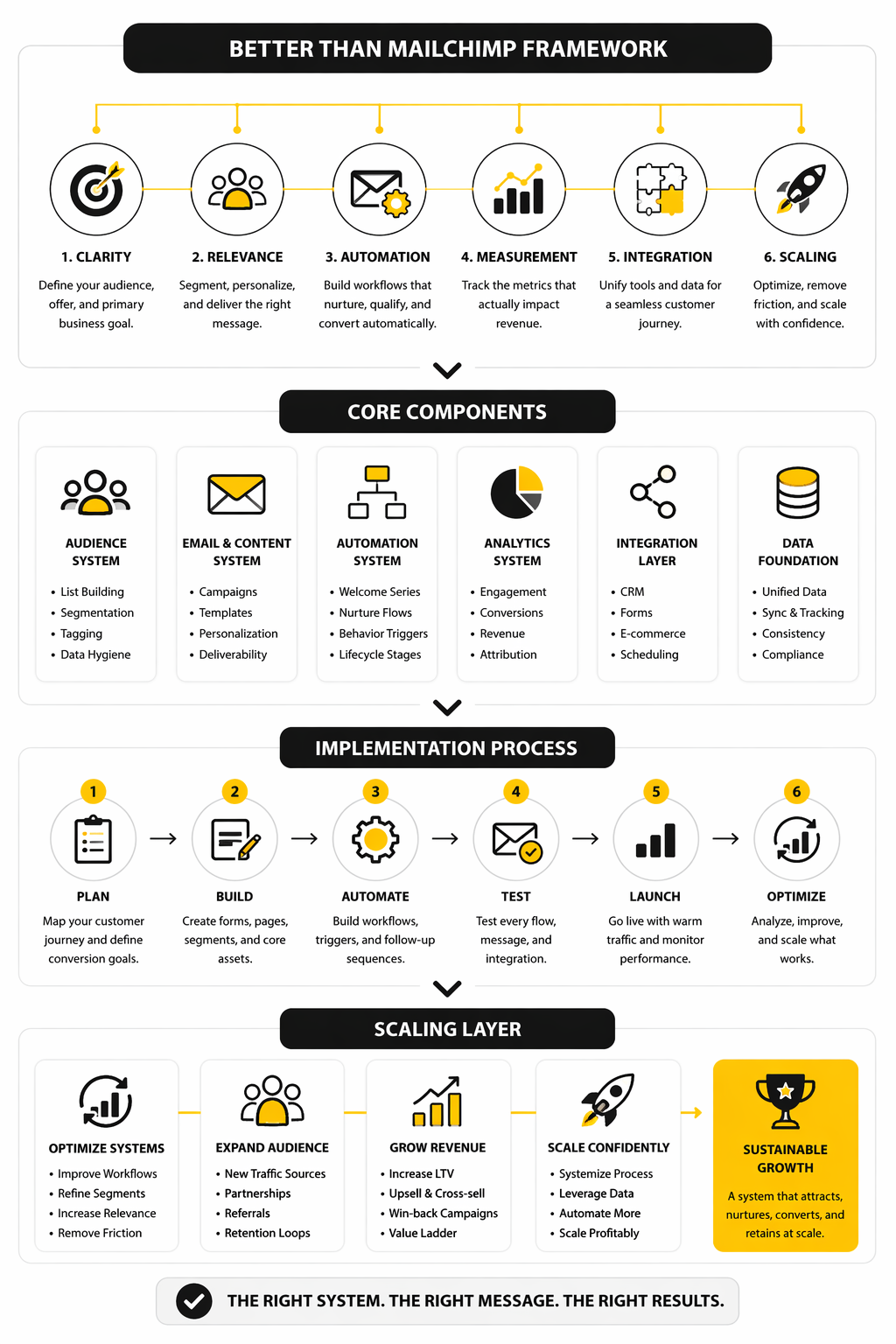
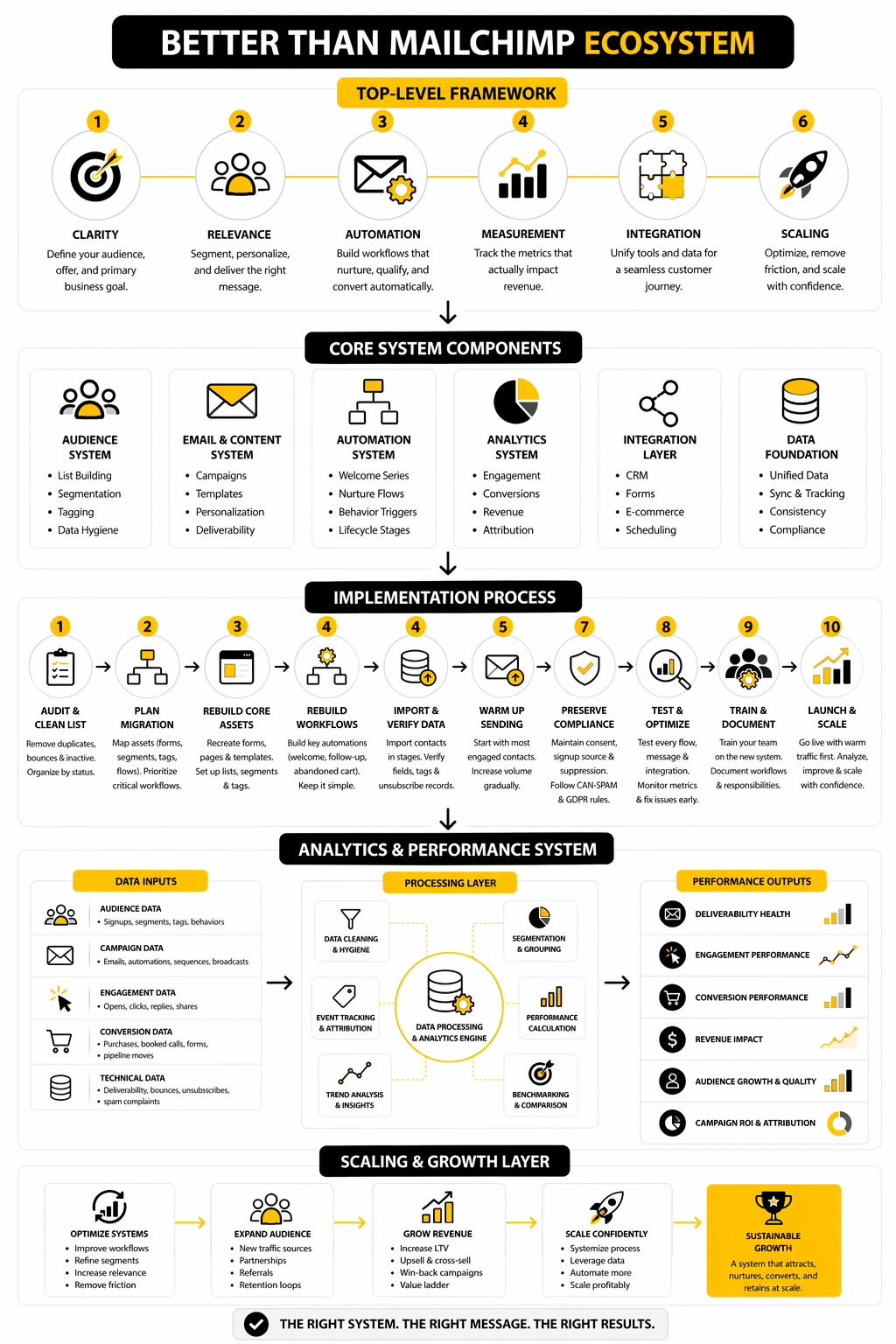
Think in four layers: audience capture, email delivery, automation depth, and revenue workflow. Audience capture covers forms, landing pages, lead magnets, and integrations. Revenue workflow covers what happens after someone clicks, replies, books, buys, or becomes a sales opportunity.
Core Components Of A Better Email Marketing Stack
A better email platform should give you clean contact management, reliable sending, useful segmentation, visual automation, and reporting you can actually act on. It should also fit your next step, not just your current list size. Cheap software becomes expensive when you outgrow it too quickly or need three extra tools to make it useful.
For budget-conscious email marketing, Brevo and Moosend are worth comparing because they focus strongly on email, automation, and accessible pricing. For businesses that need sales funnels or client follow-up systems, ClickFunnels and GoHighLevel usually make more sense than a newsletter-first tool. The right choice depends on whether email is the whole system or just one part of a bigger sales machine.
The Decision Framework For Choosing A Mailchimp Alternative
The wrong way to choose software is to ask, “Which tool has the most features?” That usually leads to bloated subscriptions, messy workflows, and a team that only uses 20% of what it pays for. The better way is to ask what job your email platform must do inside your business.
Mailchimp’s own pricing now starts its free marketing plan at 250 contacts and 500 monthly sends, while paid tiers scale by contacts, sends, and access to more advanced features like automation and support. That does not make Mailchimp bad. It just means you should compare it against the outcome you need, not against the brand name.
Email still deserves serious attention because the channel keeps producing measurable returns when it is run properly. Recent email research shows many companies see returns in the range of $10 to $36 for every $1 spent, but that only matters if your platform helps you segment, track, test, and convert. A tool that sends newsletters but does not support your actual sales motion is not really better than Mailchimp. It is just different.
Start With Your Business Model
A creator, an ecommerce store, a local service business, and an agency should not choose the same platform by default. The creator may need landing pages, checkout, email sequences, and a simple course area. The local business may care more about missed-call follow-up, appointment reminders, review requests, pipelines, and SMS.
This is where “better than Mailchimp” becomes specific. If email is only one piece of your revenue system, an all-in-one platform like GoHighLevel can make more sense because it connects lead capture, CRM, automations, calendars, funnels, and follow-up. If you want a leaner funnel-and-email setup for digital products, Systeme.io may be the more practical option.
The key is to map the full customer journey before comparing pricing tables. Where does a lead come from? What happens after they subscribe? How do they book, buy, reply, get tagged, receive follow-up, and move toward revenue? Once you answer that, the right platform becomes much easier to see.
Compare Total Workflow Cost, Not Just Monthly Price
A cheaper email tool is not cheaper if you need extra software for forms, landing pages, checkout, CRM, booking, SMS, and reporting. That is the trap many small businesses fall into. They pick the lowest monthly email plan, then slowly build a fragile stack held together by integrations.
This is why total workflow cost matters more than the sticker price. A newsletter-first business may be perfectly fine with a focused email platform like Brevo or Moosend. A funnel-heavy business may get more leverage from ClickFunnels, especially when the main goal is turning traffic into leads and buyers.
Do not compare tools only by contact limits. Compare the number of tools you can remove, the number of manual steps you can eliminate, and the number of revenue leaks you can close. That is where the real savings usually show up.
Prioritize Automation Depth Over Pretty Templates
Templates are useful, but they are not the main reason to switch platforms. A beautiful campaign that goes to the wrong person at the wrong time will still underperform. Strong automation is what turns email from a broadcast channel into a revenue system.
At minimum, your platform should support behavioral triggers, tags or segments, conditional paths, purchase-based follow-up, abandoned lead recovery, and re-engagement campaigns. This matters because personalization and segmentation are no longer advanced tactics. They are basic requirements for making email feel relevant.
When comparing any tool better than Mailchimp, look closely at what automation features are actually available on the plan you would buy. Some platforms show impressive automation features on their website, but reserve the most useful parts for higher tiers. That difference matters a lot once your list starts growing.
Make Reporting Non-Negotiable
You cannot improve what you cannot see. Open rates and click rates are helpful, but they are not enough on their own. You need to understand which emails create leads, appointments, purchases, replies, upgrades, and repeat customers.
This is where many businesses discover that their email platform is not connected deeply enough to the rest of their funnel. If sales happen somewhere else, reporting becomes fragmented. If appointments happen in another tool, attribution gets fuzzy. If customer data lives in a separate CRM, segmentation becomes harder than it should be.
A strong alternative should help you connect activity to outcomes. That does not mean every small business needs enterprise analytics. It means your platform should make it obvious which campaigns are working, which contacts are engaged, and where people are dropping off before they convert.
Best Mailchimp Alternatives By Business Type
Once the framework is clear, the comparison becomes much more practical. You are not looking for a tool that is universally better than Mailchimp. You are looking for the platform that removes the most friction from your specific marketing process.
This is where most comparison articles get lazy. They list ten tools, repeat the same feature bullets, and leave you with more tabs open than answers. A better approach is to match the platform to the business model first, then judge features inside that context.
For Local Service Businesses And Agencies
Local businesses usually need more than email campaigns. They need fast lead response, missed-call text-back, appointment booking, pipeline visibility, review requests, and follow-up that does not depend on someone remembering to send a manual message. In that situation, a newsletter-first platform can feel too narrow.
GoHighLevel is often the stronger fit because it combines CRM, funnels, calendars, workflows, SMS, email, reputation management, and pipeline tools in one system. That matters when every lead has a commercial value and speed-to-lead directly affects conversion. It is not just about sending better emails; it is about building a full follow-up machine around every inquiry.
The implementation process should start with the pipeline, not the campaign editor. Define the stages a lead moves through, then build automations around those stages. That keeps the system tied to revenue instead of becoming another place where contacts sit quietly.
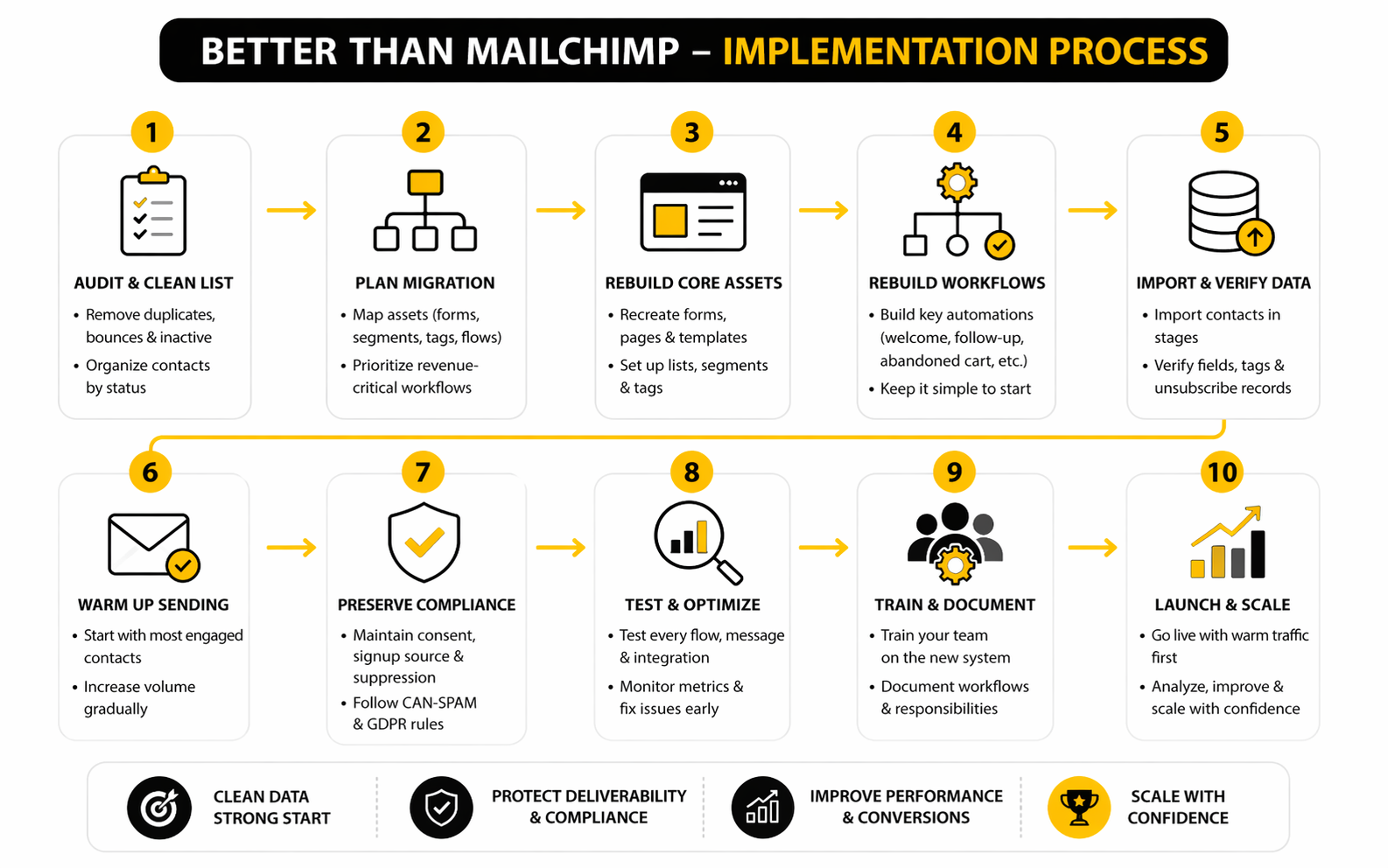
- Map the lead journey from first opt-in to booked appointment or sale.
- Create the pipeline stages that match how your business actually sells.
- Build forms, calendars, and landing pages around one clear conversion goal.
- Add follow-up workflows for new leads, missed calls, no-shows, and inactive opportunities.
- Test every message, trigger, and handoff before moving real traffic.
- Review pipeline reports weekly and adjust the weak points first.
For Creators, Coaches, And Digital Product Sellers
Creators usually need a simpler path from attention to purchase. The common workflow is lead magnet, nurture sequence, offer page, checkout, product delivery, and follow-up. If you need five separate tools to do that, the tech stack starts eating the business.
Systeme.io is a practical option when you want email, funnels, checkout, courses, and automation under one roof. It is especially useful when the offer is straightforward and you do not need a heavy CRM. For many solo operators, that simplicity is the advantage.
This is also where ClickFunnels can make sense. If your business depends on sales pages, upsells, webinars, lead magnets, and campaign-specific funnels, the funnel builder becomes central rather than optional. In that case, choosing something better than Mailchimp means choosing a platform built around conversion paths, not just email broadcasts.
For Newsletter-First Brands
Some businesses really do need email to stay focused on publishing. They are not trying to run complex sales pipelines or multi-step funnels. They want clean campaigns, solid deliverability, audience segments, simple automations, and pricing that does not punish early growth too aggressively.
For that use case, Brevo and Moosend are worth comparing closely. They keep the focus on email marketing, automation, and contact communication without forcing a full business operating system on you. That can be the smarter move when your main job is audience communication.
The mistake is assuming every business should move to the biggest all-in-one tool. Bigger is not automatically better. If your workflow is simple, a focused platform can be faster to launch, easier to manage, and cleaner for the team.
For Ecommerce And Product-Led Businesses
Ecommerce brands need email that reacts to behavior. Browse activity, cart abandonment, purchase history, product interest, replenishment cycles, and customer lifetime value all matter. A basic newsletter setup will not be enough once your store depends on repeat purchases and segmented campaigns.
The platform you choose should make product-based segmentation and revenue tracking easy. You want flows for abandoned carts, post-purchase education, cross-sells, win-back campaigns, and VIP customers. You also want reporting that shows which campaigns create sales, not just clicks.
This is one area where the best answer may depend heavily on your store platform and integration needs. Do not choose a tool because it looks good in a comparison chart. Choose it because it connects cleanly to your store, reads customer behavior accurately, and lets you act on that data without messy workarounds.
For Businesses That Need More Than Email
Some companies outgrow Mailchimp because email becomes only one channel in a broader customer journey. They need forms, chat, booking, SMS, CRM, landing pages, AI support, and handoffs between marketing and sales. When that happens, the email tool is no longer the center of the stack.
A broader setup can include tools like ManyChat for conversational automation, Fillout for forms, Cal.com for scheduling, and Chatbase for AI chat experiences. These tools are not direct Mailchimp replacements. They are supporting pieces when the customer journey needs more than email.
This is why implementation matters more than tool collecting. Every platform should have a clear job. If a tool does not capture leads, convert buyers, improve follow-up, reduce manual work, or improve reporting, it probably does not belong in the stack.
Statistics And Data That Actually Matter
Data should make your decision clearer, not noisier. When you are comparing tools that claim to be better than Mailchimp, the goal is not to chase the highest benchmark you can find online. The goal is to understand which numbers reveal whether your email system is healthy, profitable, and worth scaling.
The big picture still supports email as a serious channel. Recent Litmus research found that many companies see email returns between $10 and $36 for every $1 spent, while the DMA’s 2025 benchmark report showed delivery rates reaching 98% and unique click rates reaching 2.3%. Those numbers are useful, but only if you interpret them correctly.
A strong benchmark tells you where to look next. It does not tell you whether your offer is strong, your list is clean, your automation is relevant, or your platform is the right fit. That part still requires judgment.
Open Rate Is A Signal, Not The Scoreboard
Open rate is easy to understand, which is why people obsess over it. But it is also one of the easiest metrics to misread. Privacy changes, inbox behavior, image loading, and bot activity can all distort what an “open” really means.
That does not make open rate useless. It means you should treat it as a directional signal, not a revenue metric. If your open rate drops suddenly, check subject lines, sender reputation, list quality, send frequency, and whether your audience still expects the content.
The better action is simple: use open rate to diagnose attention. Do not use it to declare victory. A campaign with fewer opens but more booked calls, purchases, or replies can be far more valuable than a campaign with a pretty open rate and no business result.
Clicks Tell You Whether The Message Created Intent
Clicks are usually more meaningful than opens because they show active interest. Someone did not just glance at the subject line. They chose to move forward.
That is why click rate deserves more attention when choosing a platform better than Mailchimp. You want reporting that makes it easy to see which links, segments, offers, and automations produce action. If the platform buries click data or makes segmentation hard, optimization becomes slower than it needs to be.
MailerLite’s 2025 benchmark data reported an average click rate of 2.09%, while the DMA reported a similar unique click benchmark of 2.3%. Treat those as reference points, not commandments. A warm buyer list, a cold newsletter list, and a post-purchase audience should not be judged by the same expectation.
Revenue And Pipeline Metrics Matter Most
The most important question is not “Did people click?” It is “Did the right people take the next step?” That next step might be a purchase, a booked call, a reply, a trial start, a consultation request, or a repeat order.
This is where all-in-one platforms can have an advantage. With GoHighLevel, the email is closer to the CRM, calendar, pipeline, and follow-up workflow. With ClickFunnels, the email can sit closer to the funnel, checkout, upsell, and campaign path.
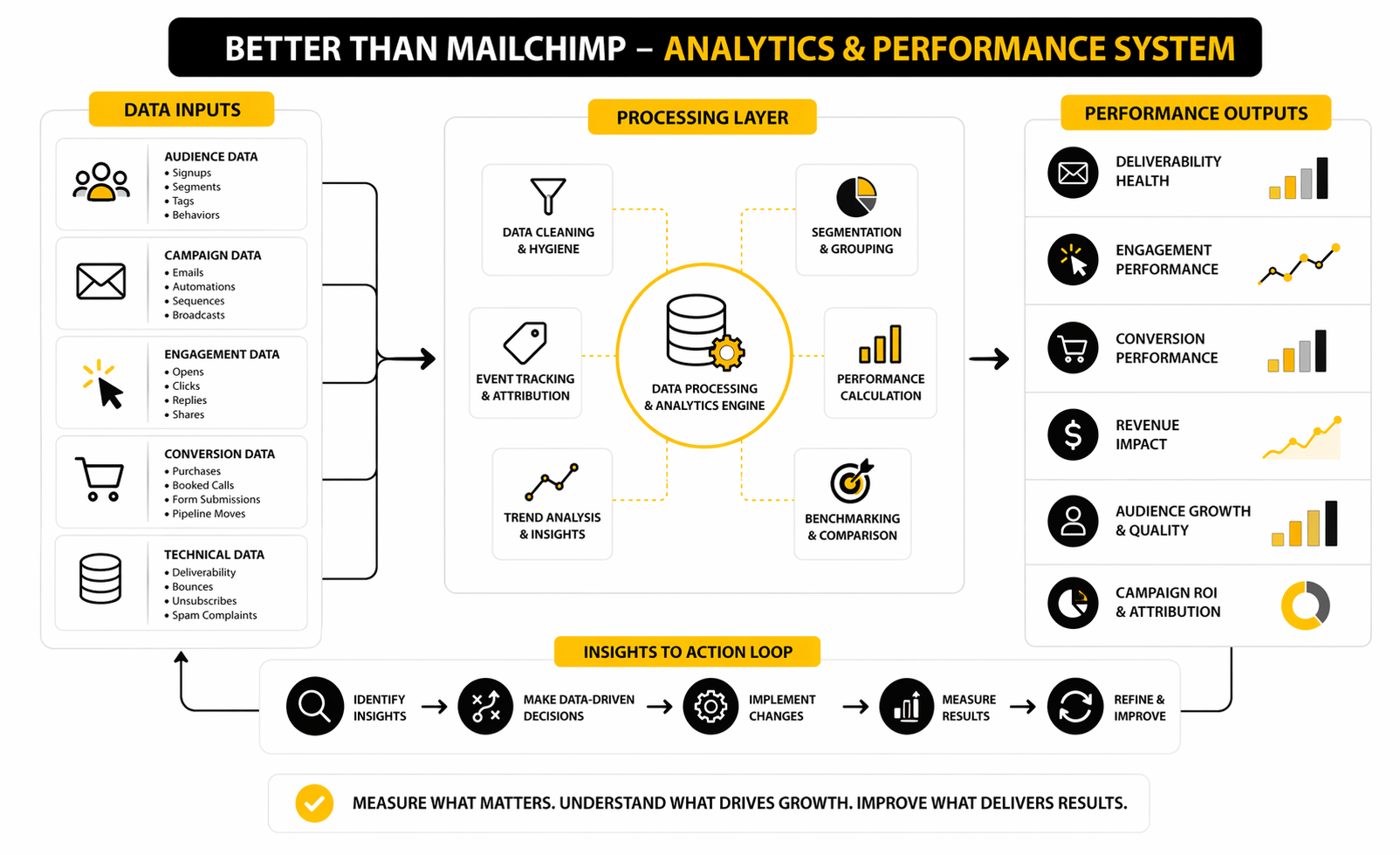
A useful analytics system should connect four layers: delivery, engagement, conversion, and retention. Delivery shows whether people can receive your emails. Engagement shows whether the message earns attention. Conversion shows whether that attention turns into action. Retention shows whether subscribers become customers again, stay active, or quietly disappear.
Deliverability Is The Hidden Multiplier
Deliverability is not glamorous, but it affects everything. If your emails do not reach the inbox, your copy, design, segmentation, and offer cannot do their job. That is why inbox placement, bounce rate, spam complaints, authentication, and list hygiene should be part of your tool decision.
Validity’s 2025 deliverability benchmark report highlights how inbox placement has become harder as mailbox providers tighten requirements and customer behavior changes. That matters because poor deliverability quietly reduces every other metric. You may think your offer is weak when the real problem is that enough people never saw it.
Your action here is straightforward. Use a platform that supports proper domain authentication, clear unsubscribe handling, clean segmentation, and suppression management. Then keep the list healthy instead of blasting everyone just because the software lets you.
What To Measure Before You Switch Platforms
Before moving away from Mailchimp, take a snapshot of your current performance. This gives you a baseline, so the switch can be judged by real improvement instead of vibes. Without a baseline, you will not know whether the new platform is actually better than Mailchimp or just newer.
Track these numbers before migration:
- Deliverability signals: bounces, spam complaints, unsubscribes, and inactive contacts
- Engagement signals: opens, clicks, replies, and click-to-open rate
- Conversion signals: purchases, booked calls, lead form submissions, checkout starts, and trial starts
- Revenue signals: email-attributed revenue, average order value, customer lifetime value, and pipeline value
- Workflow signals: manual tasks removed, tools replaced, time saved, and follow-up speed improved
The final category matters more than most people think. A platform can improve profitability by reducing manual work, not just by increasing campaign performance. If your new setup saves hours every week and prevents leads from falling through the cracks, that is a real return.
How To Migrate Without Breaking Your Marketing
Switching platforms sounds simple until you realize how many small pieces are connected to your email system. Contacts, tags, segments, forms, landing pages, automations, templates, unsubscribe records, purchase data, tracking links, and domain settings all need attention. This is where a tool that looks better than Mailchimp on paper can become painful if the migration is rushed.
The goal is not to move everything at once. The goal is to move the right assets in the right order, protect deliverability, and avoid interrupting revenue-producing campaigns. Treat migration like a controlled rollout, not a weekend copy-paste job.
Start With A Contact Audit
Before importing contacts into a new platform, clean the list. Remove obvious duplicates, suppressed contacts, hard bounces, role-based emails, and subscribers who have shown no engagement for a long time. A cleaner list makes the new platform easier to manage and gives mailbox providers better early engagement signals.
This step matters because reputation does not magically reset when you switch tools. If you bring a weak list into a new platform and immediately send to everyone, you can damage deliverability before the system even has a chance to prove itself. Google’s sender guidelines recommend keeping spam rates below 0.1% and avoiding anything near 0.3%, so list quality is not optional.
Keep your original export files organized and clearly labeled. You should know which contacts are active subscribers, customers, leads, unsubscribed users, and suppressed records. That makes the import cleaner and reduces the risk of accidentally emailing people who opted out.
Rebuild The Revenue Paths First
Do not migrate random newsletters first. Start with the flows that protect revenue and customer experience. That usually means lead magnets, welcome sequences, checkout follow-up, booked-call reminders, abandoned cart emails, post-purchase emails, and sales pipeline notifications.
If you are moving into GoHighLevel, rebuild the CRM stages, forms, calendars, and core workflows before sending new traffic there. If you are moving into Systeme.io, focus on the offer path first: opt-in page, email sequence, sales page, checkout, and product delivery. If you are using ClickFunnels, rebuild the funnel steps and follow-up logic around the campaign that matters most.
The rule is simple: migrate what makes money before what looks nice. Templates can wait. A broken lead follow-up or checkout sequence cannot.
Warm Up Sending Carefully
Deliverability is one of the biggest risks when changing platforms. Even if your domain is established, a new sending setup can change how mailbox providers evaluate your messages. Microsoft’s email marketing guidance describes domain warming as gradually increasing volume over days or weeks so mailbox providers can recognize healthy sending behavior.
Start with your most engaged contacts first. These are the people who recently opened, clicked, replied, purchased, booked, or visited. Their engagement gives your new sending setup a stronger early signal than blasting the entire list.
Increase volume gradually and watch the warning signs. Rising bounces, falling clicks, higher unsubscribes, or spam complaints are not just reporting details. They are signals that your list, message, frequency, or targeting needs adjustment before you scale.
Preserve Consent And Compliance
Compliance is not exciting, but it is where sloppy migrations create real risk. You need to preserve unsubscribe records, consent status, signup source, and any fields that prove why someone is allowed to receive marketing from you. Do not treat suppressed contacts as disposable data.
For US commercial email, the FTC’s CAN-SPAM guidance requires accurate header information, non-deceptive subject lines, a physical postal address, and a clear way to opt out. For European audiences, GDPR rules require a lawful basis for processing personal data, and consent must be specific, informed, and freely given when consent is the basis used. That means your new platform needs clean fields and processes, not just a big imported list.
This is also why form setup matters. Every new opt-in form should clearly explain what the person is signing up for. A better email platform should make that easy to manage, but the responsibility still sits with you.
Avoid Over-Automating Too Early
A new platform is tempting because it gives you fresh features. Suddenly you can add branches, tags, triggers, scores, conditions, AI responses, SMS, webhooks, and pipeline moves. That does not mean you should build a monster workflow on day one.
Start with a simple version that works. Then add complexity only when you can explain why it improves the customer journey or saves real manual work. Over-automation creates hidden problems because nobody remembers why a tag exists, why a branch fires, or why a contact got three messages in one day.
This is especially important when you are combining multiple tools. A form from Fillout, scheduling through Cal.com, and follow-up inside another platform can work beautifully. But only if each handoff is documented, tested, and owned.
Know The Tradeoff Between All-In-One And Best-In-Class
All-in-one tools reduce friction because fewer systems need to talk to each other. That is a serious advantage for small teams, agencies, local businesses, and creators who want speed. The tradeoff is that one part of the platform may not be the absolute best tool in its category.
Best-in-class stacks give you more control. You can choose a dedicated form tool, dedicated CRM, dedicated email platform, dedicated analytics tool, and dedicated landing page builder. The tradeoff is integration complexity, higher maintenance, and more places where data can break.
Neither route is automatically smarter. Choose all-in-one when speed, simplicity, and operational control matter most. Choose best-in-class when your team has the skill, time, and volume to justify a more specialized stack.
Final Recommendations And Buying Checklist
At this point, the decision should be much clearer. The best platform is not the one with the loudest brand name or the longest feature list. It is the one that fits your customer journey, protects deliverability, supports your revenue model, and gives you enough room to scale without turning your marketing stack into a mess.
If you mainly need newsletters and simple automations, a focused email platform can be enough. If you sell through funnels, book calls, manage leads, or run client campaigns, you will probably need a broader system. That is the real dividing line when deciding what is better than Mailchimp for your business.
The Practical Buying Checklist
Use this checklist before committing to a platform. It will save you from paying for a tool that looks good in a demo but becomes frustrating after the first month. Be honest about what your business actually needs right now and what it will need over the next 12 months.
- Does the platform match your business model?
- Can it handle your most important customer journey without too many extra tools?
- Does it support proper segmentation, tagging, and behavior-based automation?
- Can you measure revenue, booked calls, pipeline value, or purchases from campaigns?
- Does it make list cleaning, suppression, and unsubscribe management easy?
- Can your team use it without constant technical support?
- Does pricing still make sense after your list grows?
- Can you migrate contacts, forms, templates, and automations cleanly?
- Does it integrate with your checkout, CRM, booking tool, ecommerce store, or funnel builder?
- Will it reduce manual work instead of adding more admin?
For many local businesses and agencies, GoHighLevel is the strongest all-in-one choice because it connects email to CRM, calendars, pipelines, SMS, forms, and follow-up. For creators and lean digital product businesses, Systeme.io is often the cleaner option because it keeps funnels, email, checkout, and courses simple. For funnel-driven campaigns, ClickFunnels can be the better fit when conversion paths matter more than newsletter management.
FAQ - Built For Complete Guide
What is the best platform better than Mailchimp?
The best platform depends on what you need email to do. If you need CRM, pipelines, booking, SMS, and follow-up, GoHighLevel is often a better fit than Mailchimp. If you need simple funnels, email, checkout, and courses, Systeme.io may be the better choice.
Is Mailchimp still good for beginners?
Yes, Mailchimp can still work for beginners who only need simple campaigns and basic list building. The issue is that beginners often grow into needs Mailchimp may not handle as cleanly without higher-tier plans or extra tools. Once you need stronger automation, CRM features, or funnel-based selling, it makes sense to compare alternatives.
Why do people look for something better than Mailchimp?
Most people start looking because their workflow becomes more complex. They need more automation, better pricing at scale, stronger CRM features, ecommerce flows, landing pages, SMS, booking, or clearer revenue tracking. Mailchimp can send campaigns, but not every business wants email to live separately from the rest of the sales process.
Is GoHighLevel better than Mailchimp?
GoHighLevel is better than Mailchimp for businesses that need a full sales and marketing system. It is especially useful for agencies, local service businesses, appointment-based companies, and teams that need CRM plus follow-up automation. Mailchimp is more focused on email marketing, while GoHighLevel is built around the broader lead-to-sale workflow.
Is Systeme.io better than Mailchimp?
Systeme.io can be better than Mailchimp for creators, coaches, course sellers, and small digital businesses that want funnels, email, checkout, and product delivery in one place. It is not just an email tool. It is more useful when your main goal is turning subscribers into buyers without building a complicated tech stack.
Is ClickFunnels better than Mailchimp?
ClickFunnels is better than Mailchimp when funnels are the center of your marketing. If your business depends on landing pages, upsells, checkout flows, webinars, lead magnets, and campaign-specific conversion paths, ClickFunnels is built for that job. If you only need newsletters, it may be more than you need.
What should I measure before switching from Mailchimp?
Measure your current open rates, click rates, unsubscribe rates, bounce rates, spam complaints, conversion rates, revenue from email, and manual time spent managing campaigns. You should also document your automations, forms, segments, tags, and unsubscribe records. Without that baseline, you cannot fairly judge whether the new platform is actually better.
What is the biggest migration mistake?
The biggest mistake is moving the list before cleaning it and rebuilding the revenue-critical workflows. A messy import can hurt deliverability and create compliance problems. A broken workflow can stop leads, bookings, or purchases from being followed up properly.
Do I need an all-in-one platform?
You need an all-in-one platform when simplicity, speed, and connected data matter more than using the most specialized tool in every category. Small teams often benefit from fewer moving parts. Larger teams may prefer a best-in-class stack if they have the technical skill to manage integrations properly.
Which Mailchimp alternative is best for agencies?
GoHighLevel is usually the strongest option for agencies because it supports client accounts, CRM workflows, funnels, calendars, automation, SMS, and pipeline management. Agencies need more than email campaigns. They need systems that help clients capture leads, follow up, book appointments, and track opportunities.
Which Mailchimp alternative is best for creators?
Systeme.io is a strong choice for creators who want email marketing, funnels, checkout, courses, and automation without managing multiple tools. It works well when the business model is simple and speed matters. Creators who rely heavily on advanced funnels may also compare ClickFunnels.
Which Mailchimp alternative is best for newsletter-first businesses?
A newsletter-first business may not need a heavy all-in-one platform. Brevo and Moosend are worth comparing when the main job is email communication, audience segmentation, and automation. The best choice is the one that keeps publishing simple while still giving you room to improve performance.
How do I know when Mailchimp is no longer enough?
Mailchimp may no longer be enough when you need stronger automation, better sales tracking, CRM visibility, appointment booking, SMS, funnels, or deeper customer journey reporting. Another clear sign is when your team uses too many extra tools to make Mailchimp do what the business actually needs. At that point, switching is not about chasing software trends; it is about removing friction.
Work With Professionals
Explore 10K+ Remote Marketing Contracts on MarkeWork.com
Most marketers spend too much time chasing clients, competing on crowded platforms, and losing a percentage of every project to middlemen.
MarkeWork gives you a better way. Browse thousands of remote marketing contracts and connect directly with companies desperate to hire skilled marketers like you, without platform commissions and without unnecessary gatekeepers.
If you are serious about finding better opportunities and keeping 100% of what you earn, explore available contracts and create a profile for free at MarkeWork.com.