

Looking for something cheaper than Mailchimp usually starts as a pricing question. But it becomes a strategy question pretty quickly. The cheapest tool is not always the one with the lowest monthly plan; it is the one that lets you grow without punishing you for every contact, send, workflow, landing page, or extra feature.
Mailchimp can still make sense for some teams. But if you are a founder, creator, agency, ecommerce operator, or small business owner, you need to compare the full stack: email sends, automation, forms, funnels, CRM, deliverability, support, and upgrade paths. That is where alternatives like Brevo, Moosend, and systeme.io become interesting.
This guide is built for practical decision-making, not software shopping for its own sake. We will look at what actually drives email marketing cost, where cheaper platforms save money, where they can create tradeoffs, and how to choose a setup you will not outgrow too quickly.
Article Outline
This article is split into six connected parts so the comparison stays clean. Part 1 sets up the decision framework instead of jumping straight into a random list of tools. The remaining parts build from cost diagnosis to platform selection, migration, and final recommendations.
- Why “Cheaper Than Mailchimp” Is Really a Strategy Question
- The Cost Framework: Contacts, Sends, Automation, and Growth
- Cheaper Mailchimp Alternatives Worth Comparing
- How to Match Each Tool to Your Business Model
- Professional Implementation: Migration, Deliverability, and Automation
- Final Decision, Recommended Stack, and FAQ
Why “Cheaper Than Mailchimp” Is Really a Strategy Question
Most people search for cheaper than Mailchimp after they hit a pricing wall. Maybe the list grew, maybe automations moved behind a higher tier, or maybe the business now needs funnels, forms, CRM, SMS, or transactional email on top of newsletters. That moment matters because switching tools only helps if you understand what made the old setup expensive.
A better question is not “Which platform costs less today?” The better question is “Which platform keeps total marketing cost predictable as my business grows?” That includes subscriber billing, email volume, automation depth, landing pages, integrations, support, and the time your team spends duct-taping tools together.
This is why the best cheaper option depends on your business model. A newsletter business has different needs than an ecommerce store, an agency, a course creator, or a local service business. The right choice is the one that matches your growth pattern, not the one with the loudest pricing page.
Framework Overview
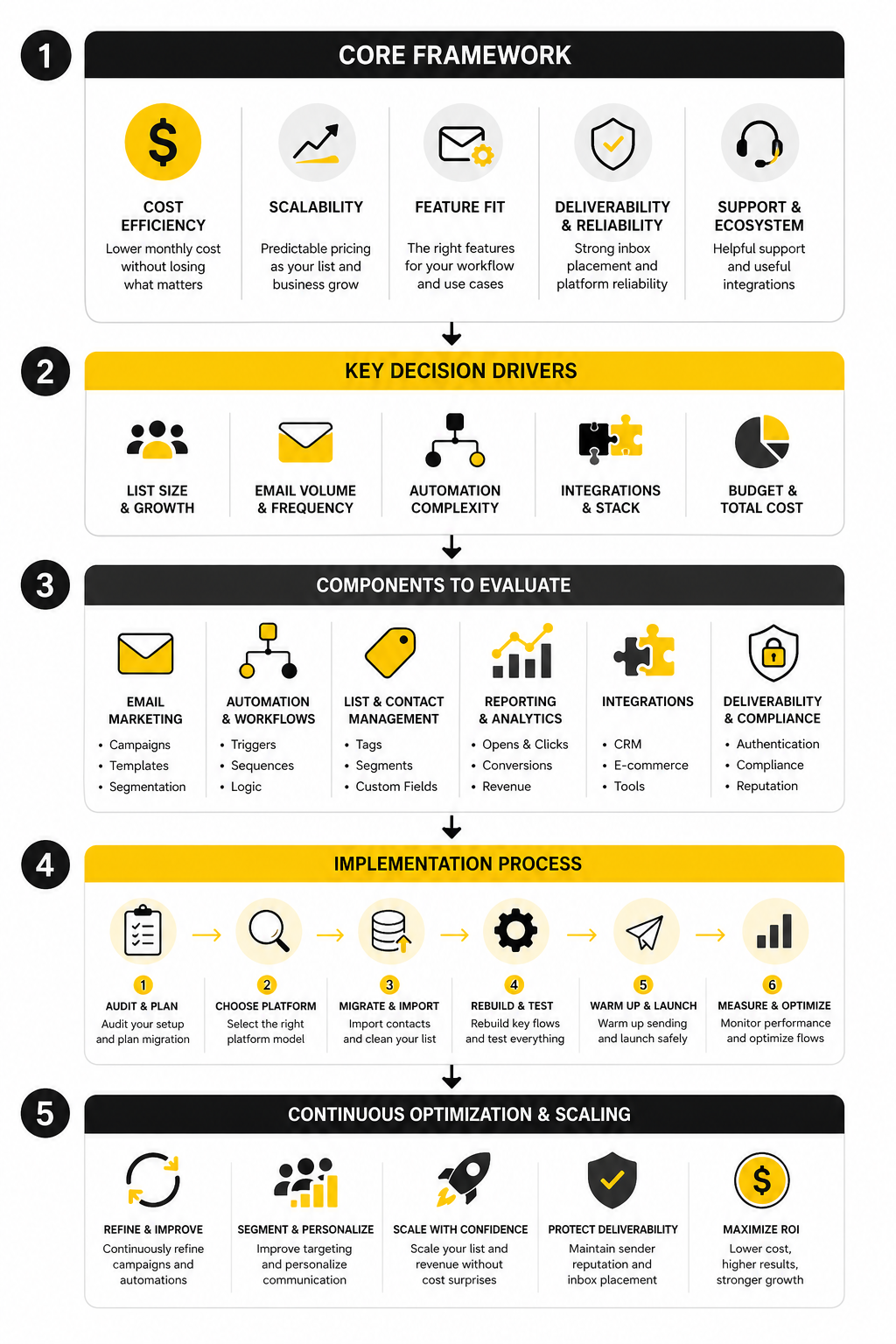
A simple comparison framework makes the decision much easier. Start with the cost driver, then match it to the platform model. Some tools charge mainly by contacts, some by email volume, and some bundle email with funnels, courses, automation, or CRM.
For example, Brevo can be attractive when you have a larger contact list but do not email everyone constantly, because its model is more send-volume oriented. Moosend is worth comparing when you want straightforward email marketing and automation without overcomplicating the stack. Systeme.io becomes interesting when email is only one part of a funnel, course, or digital product business.
The framework for the rest of this article is simple: first identify what you are really paying for, then remove what you do not need, then choose the cheapest tool that still protects growth. That last part is important. Saving $20 per month is pointless if the platform creates migration pain, weak automation, or a messy customer journey later.
The Cost Framework: Contacts, Sends, Automation, and Growth
The easiest mistake is comparing email platforms by the first number on the pricing page. That number is rarely the real cost. When you are looking for a tool cheaper than Mailchimp, you need to understand what the platform charges for as your business grows.
There are four cost drivers that matter most: contacts, email sends, automation, and the surrounding growth tools. A platform can look cheap at 500 subscribers and become painful at 10,000. Another platform can look slightly more expensive at first but save money because it replaces landing pages, funnels, CRM, or basic automation tools.
Contact-Based Pricing
Contact-based pricing is simple on the surface. You pay more as your audience grows. That works fine when every contact is valuable, active, and likely to buy.
The problem is that real lists are messy. You will have cold leads, old customers, unengaged subscribers, freebie seekers, buyers, trial users, and people who only need occasional updates. If all of them push you into a higher pricing tier, your bill can grow faster than your revenue.
This is why list hygiene matters so much. A cheaper than Mailchimp setup is not just about switching platforms; it is about not paying forever for contacts that no longer move the business forward. Before migrating, clean your list, remove dead segments, and separate buyers from casual subscribers.
Send-Based Pricing
Send-based pricing works differently. Instead of charging mainly for how many people are stored in your account, the platform cares more about how many emails you send. That can be a big advantage if you have a large database but only email specific segments.
This is where Brevo becomes worth studying closely. Its model is especially interesting for businesses that want email marketing, transactional email, SMS, WhatsApp, and CRM features without treating every stored contact as the main billing trigger.
But send-based pricing has its own trap. If you email your full list several times per week, your send volume can climb quickly. So the question is not whether send-based pricing is cheaper in general; the question is whether it fits your actual sending rhythm.
Automation-Based Pricing
Automation is where many “cheap” plans stop being cheap. Basic newsletters are usually easy to find at a low price. The real cost appears when you need behavior-based flows, lead scoring, abandoned cart emails, advanced segmentation, or multi-step customer journeys.
If your business depends on automation, do not choose purely by the entry plan. Look at the plan where the automation you actually need becomes available. That is the plan you are really buying.
For a straightforward email marketing business, Moosend is often worth comparing because it keeps the focus on email campaigns, automation, landing pages, forms, and segmentation. That makes the decision cleaner if you do not need a full sales funnel platform or agency CRM around your email tool.
Growth Tool Pricing
Email rarely works alone anymore. A lead might enter through a landing page, download a free resource, receive a welcome sequence, book a call, buy a course, join a community, and later get retargeted through another channel. If each step needs a separate tool, your “cheap” email platform may not be cheap at all.
This is why systeme.io deserves attention for creators, coaches, course sellers, and simple funnel businesses. Its pricing is not just about email; it also includes funnels, courses, blogs, automations, and affiliate program features. When one platform replaces several small subscriptions, the total cost can drop even if the email feature set is not the most advanced in every category.
The same logic applies in the opposite direction. If you only need newsletters and simple automations, do not overbuy an all-in-one platform just because it has more features. Extra features are only valuable when they replace something you already need.
The Real Comparison Formula
A serious comparison should include more than the monthly software fee. You want to calculate the monthly cost of the whole marketing system. That means email platform, form builder, landing page builder, CRM, automation tool, SMS tool, scheduling tool, funnel builder, and any integration glue.
Use this basic decision formula:
- Count your active contacts, not just total contacts.
- Estimate your monthly email sends.
- List the automations you actually use.
- Identify the tools your email platform could replace.
- Compare the plan you will need in 6 to 12 months, not just today.
- Add switching costs, migration time, and deliverability risk.
That final point is easy to ignore, but it matters. A platform that saves money on paper can cost more if the migration breaks forms, automations, tagging, or sales follow-up. The right cheaper than Mailchimp alternative should reduce cost without creating operational chaos.
Cheaper Mailchimp Alternatives Worth Comparing
Once you understand the cost drivers, the next step is to compare tools by use case. This is where the search for something cheaper than Mailchimp becomes much more practical. You are not looking for the longest feature list; you are looking for the cleanest fit.
A good alternative should solve the reason you are leaving. If Mailchimp feels expensive because your list is growing, look at how each tool bills contacts. If it feels limiting because you need funnels or sales workflows, look beyond email-only platforms. If the real problem is automation, compare the plan where usable automation actually starts.
Step 1: Audit What You Have Before You Move
Before choosing a new platform, document your current setup. This sounds boring, but it prevents the classic migration problem: moving the list and forgetting the system around it. Your email tool is usually connected to forms, landing pages, tags, automations, checkout pages, calendars, lead magnets, CRM fields, and analytics.
Start with the essentials. Export your contacts, identify your active segments, list every live form, and screenshot your automations. Then separate what you still use from what is just sitting there because nobody cleaned it up.
This process often reveals savings before you even switch. If a large part of your list is inactive, archiving or removing cold contacts may reduce your cost immediately. If several automations no longer match your offer, rebuilding them in a cheaper platform becomes simpler and safer.
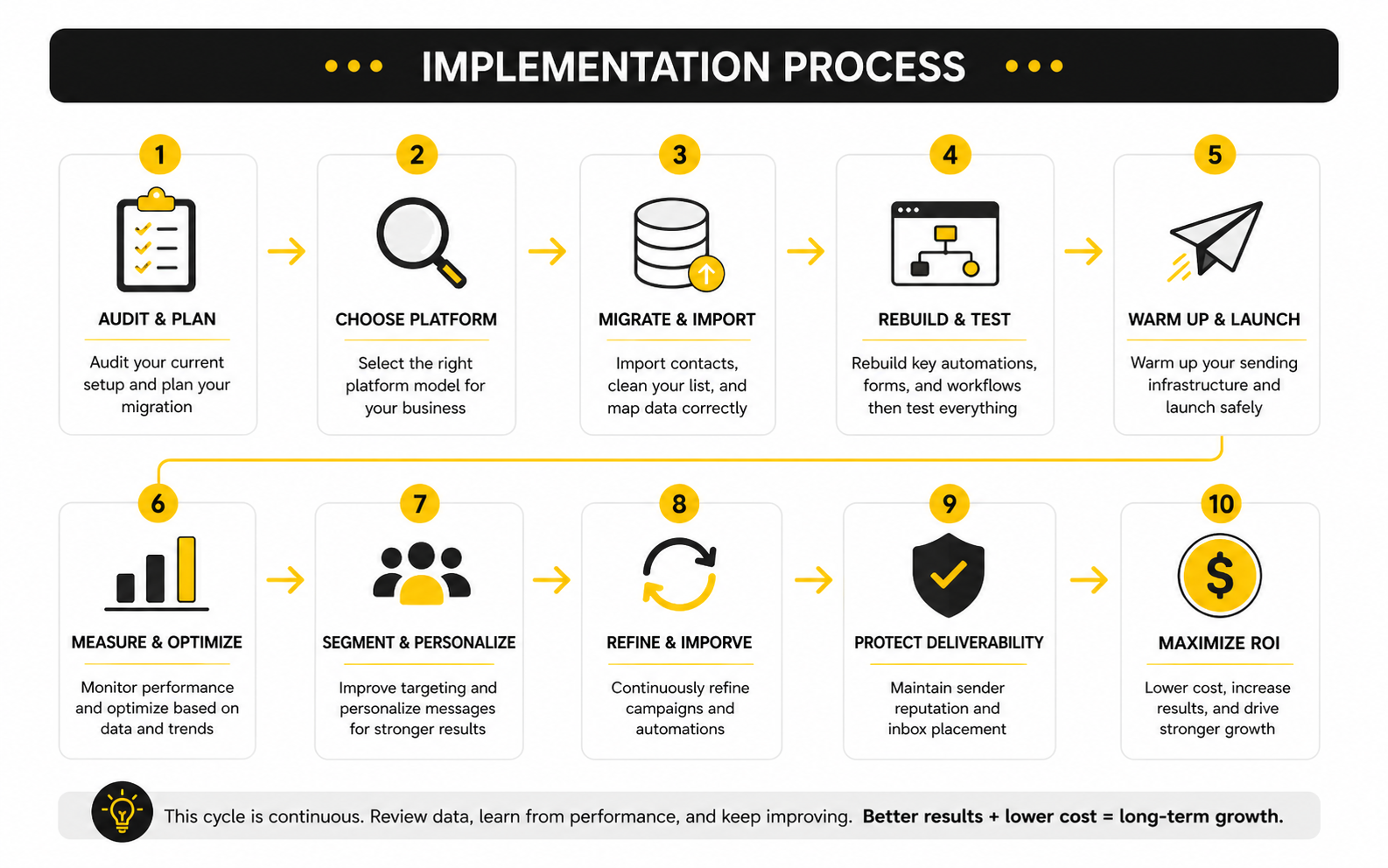
Step 2: Choose the Platform Model
Now pick the model that matches how your business actually grows. This is the part where people usually rush, and it costs them later. A platform that is perfect for a newsletter can feel restrictive for funnels, while an all-in-one funnel builder can feel excessive for simple email broadcasts.
If you have a large list but moderate send volume, Brevo is a strong candidate because its pricing centers more on email volume than subscriber count. Its free plan includes 300 emails per day, which makes it useful for testing the workflow before committing to a paid plan. That does not automatically make it the cheapest option for everyone, but it is a serious option when contact-based pricing is the pain.
If you want a focused email marketing platform with campaigns, automation, landing pages, and segmentation, Moosend belongs on the shortlist. It is a cleaner fit when you do not need a full funnel suite, course platform, or agency CRM. That simplicity can be a real advantage because fewer moving parts usually means fewer things to fix.
If email is part of a wider creator or funnel business, systeme.io may reduce the total stack cost more than an email-only tool. Its plans combine email marketing with funnels, courses, automations, websites, and affiliate program features. For creators and small digital businesses, that can matter more than comparing email pricing in isolation.
Step 3: Rebuild Only What Still Matters
A migration is not a copy-paste job. It is a chance to rebuild the system around what still makes money. If you simply recreate every old tag, segment, and workflow, you drag old clutter into the new platform.
Start with your revenue-critical flows first. That usually means welcome sequence, lead magnet delivery, purchase confirmation, abandoned checkout if relevant, onboarding, reactivation, and sales follow-up. Everything else can wait until the core customer journey is stable.
Keep the first version lean. A cheaper than Mailchimp alternative should help you simplify operations, not create a maze of automations nobody understands. When in doubt, build fewer workflows with clearer logic.
Step 4: Test Deliverability Before Fully Switching
Do not move everything in one dramatic cutover unless the old setup is broken beyond repair. Email reputation is sensitive, and a rushed migration can hurt open rates, clicks, and revenue. Warm up sending gradually, verify authentication, and test with engaged segments first.
At minimum, confirm your domain authentication, sender identity, unsubscribe links, form connections, and automation triggers. Send internal tests, then send to a small active segment, then expand. This is slower than flipping a switch, but it is much safer.
Also watch early engagement signals carefully. If opens, clicks, spam complaints, or bounces look unusual, pause and fix the issue before sending to everyone. The goal is not just to find a cheaper platform; the goal is to keep the list healthy while lowering cost.
Step 5: Measure the New Stack Against the Old One
After the first few campaigns, compare the new platform against your old baseline. Look at monthly software cost, active list size, send volume, campaign engagement, automation performance, and time spent managing the system. A cheaper tool only wins if it protects the outcomes that matter.
This is where the decision becomes grounded. If the new platform saves money but makes segmentation harder, that tradeoff may or may not be worth it. If it replaces two or three other tools, the savings may be bigger than the email bill suggests.
The cleanest outcome is a stack that is cheaper, easier to manage, and still flexible enough for the next stage of growth. That is the standard. Anything less is just switching platforms for the sake of switching.
What the Numbers Actually Tell You
Data matters because a cheaper than Mailchimp alternative is only a win if performance stays healthy. A lower monthly bill does not help if your emails land in spam, your clicks drop, or your automations stop converting. The goal is not just cheaper software; the goal is a more efficient marketing system.
The most useful numbers are not vanity metrics. Opens can help spot broad engagement trends, but privacy changes and inbox behavior make them less reliable than they used to be. Clicks, conversions, unsubscribes, bounce rates, complaint rates, and revenue per send give you a clearer picture of whether the new platform is actually working.
This is why you should compare your old and new stack over a realistic period. One campaign is not enough. Look at several campaigns, a few automation flows, and at least one full sales cycle before deciding whether the move worked.
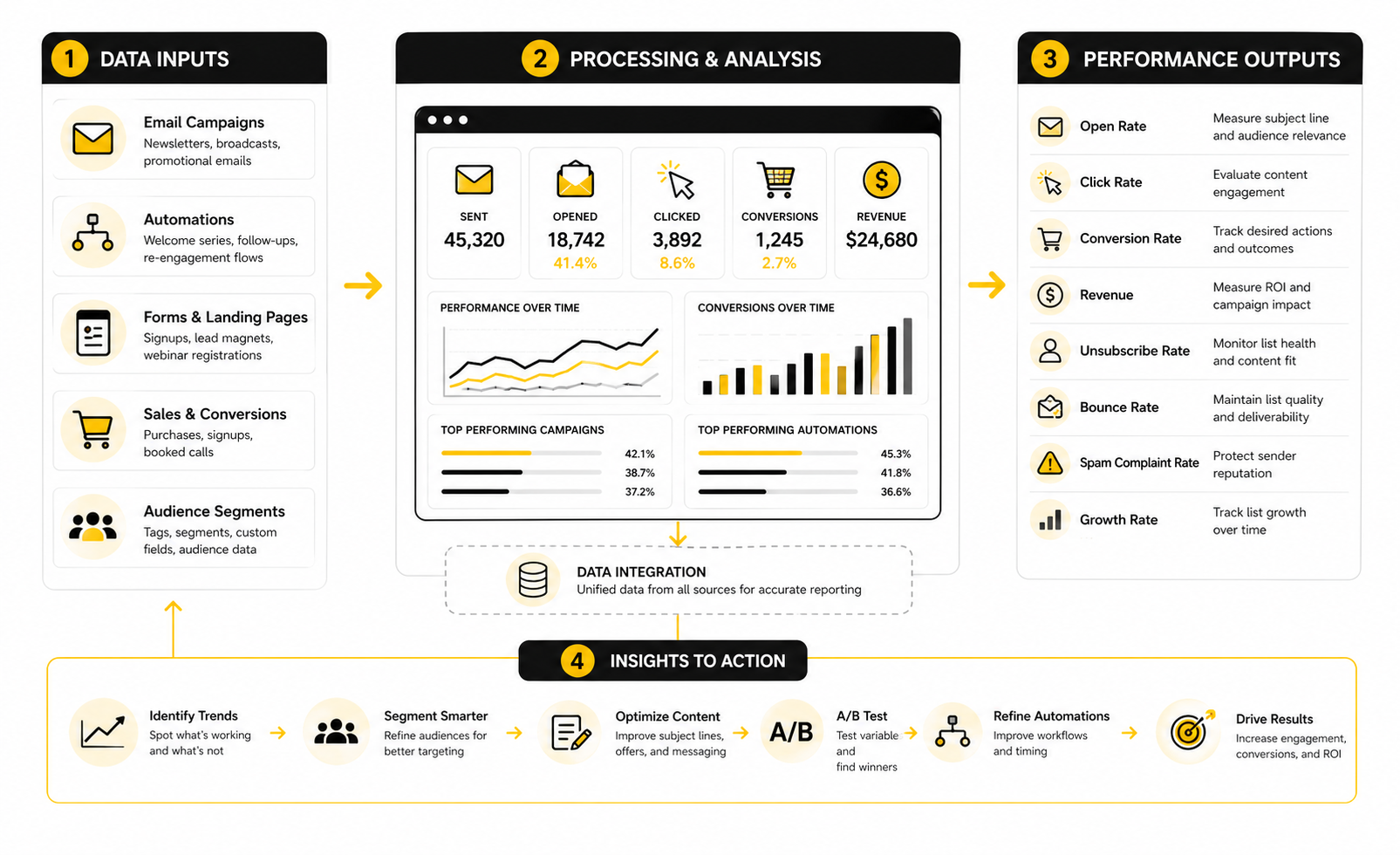
The Metrics That Matter Most
Start with deliverability signals. If bounce rates rise, spam complaints increase, or open rates fall sharply after migration, the problem may not be the platform itself. It could be list quality, sender authentication, a cold audience, poor segmentation, or a rushed sending ramp.
Then look at engagement quality. Click rate usually tells you more than open rate because it shows whether people cared enough to take action. If clicks are stable but opens move around, do not panic too quickly. If clicks fall across multiple campaigns, your targeting, message, offer, or deliverability needs attention.
Finally, measure revenue and pipeline impact. For ecommerce, that might mean revenue per campaign, abandoned cart recovery, and repeat purchase rate. For creators or service businesses, it might mean booked calls, checkout starts, course sales, replies, or qualified leads.
Benchmarks Are Useful, But Only as Guardrails
Industry benchmarks can help you understand whether your numbers are in a normal range, but they should never become the whole strategy. A broad email benchmark report may combine industries, list types, regions, and campaign goals that look nothing like your business. That makes benchmarks useful for context, not for judgment.
For example, MailerLite’s 2025 benchmark report analyzed millions of campaigns across approved accounts and industries. That kind of data is helpful because it gives you a reference point for opens, clicks, unsubscribes, and regional patterns. But your own trend line matters more than a general average.
The practical move is simple: use benchmarks to spot obvious problems, then use your own baseline to make decisions. If your clicks were steady before switching and collapse after switching, investigate. If your numbers remain stable while your software cost drops, that is a strong sign the cheaper platform is doing its job.
Cost Per Useful Outcome
The cleanest measurement is cost per useful outcome. Instead of asking whether a tool is cheaper than Mailchimp in general, ask what it costs to generate a subscriber, a click, a lead, a sale, or a booked call. That turns software pricing into business math.
For example, if Brevo lowers your monthly email bill while keeping clicks and conversions steady, the switch is probably working. If Moosend gives you the automations you need without extra tools, the real saving is bigger than the plan price. If systeme.io replaces your email platform, funnel builder, and course tool, the total stack cost may be the better comparison.
Track this monthly:
- Total software cost
- Active contacts
- Emails sent
- Clicks generated
- Leads generated
- Sales or booked calls
- Revenue influenced by email
- Time spent managing the system
These numbers make the decision much less emotional. You are not guessing whether the tool “feels better.” You are measuring whether the new stack produces the same or better outcomes for less money.
Warning Signs After Switching
Some performance drops are normal during a migration, especially if you are changing sender infrastructure, rebuilding automations, or cleaning your list. But certain signals deserve fast attention. If bounce rates increase, check imports, old addresses, and list source quality immediately.
If spam complaints rise, slow down and review audience expectations. People should recognize who you are, why they are receiving the email, and what value they are getting. A cheaper platform cannot fix a weak relationship with the list.
If clicks drop while opens stay stable, the issue is probably message-market fit. Your subject line may be doing its job, but the email body, offer, or call to action is not creating enough momentum. That is a content and positioning problem, not necessarily a platform problem.
What Good Looks Like
A good switch does not always produce a dramatic performance jump. In many cases, the best result is boring in the right way: similar engagement, similar revenue, cleaner workflows, and lower monthly cost. That is a win.
A great switch goes further. It reduces tool overlap, makes segmentation easier, improves automation clarity, and gives you better visibility into what is working. When that happens, you are not just using something cheaper than Mailchimp; you are running a sharper marketing system.
The final test is whether the platform helps you make better decisions faster. If you can see which campaigns drive clicks, which automations produce revenue, and which segments deserve more attention, the tool is doing its job. Price matters, but measurement is what proves the decision.
Professional Implementation: Risks, Tradeoffs, and Scaling Choices
By this point, the decision should be clearer: cheaper than Mailchimp does not mean “pick the lowest plan and hope.” It means building a stack that can handle your next stage without creating unnecessary cost, complexity, or migration risk. That is where the expert-level tradeoffs start to matter.
Most teams do not regret switching because the new platform is bad. They regret switching because they chose based on price alone, skipped technical setup, or underestimated how much their email system was connected to the rest of the business. A good implementation protects revenue first and reduces cost second.
Deliverability Is Not Optional
Deliverability is the first serious risk. Google’s sender guidance recommends proper SPF, DKIM, and DMARC authentication for sending domains, and the Gmail and Yahoo requirements that began rolling out in 2024 made authentication, easy unsubscribes, and spam complaint monitoring even more important. That means a cheaper tool still needs a professional sending setup.
Before you scale sending in a new platform, verify the basics. Your sending domain should be authenticated, your unsubscribe process should be clear, your list should be permission-based, and your earliest sends should go to engaged subscribers first. This is boring technical work, but it protects the entire channel.
Do not judge a platform too quickly if performance dips during the first few sends. A new sender setup, list cleanup, and segmentation changes can all affect results. The smart move is to watch bounce rates, complaints, clicks, and conversions before making a final call.
Cheap Becomes Expensive When the Stack Gets Messy
A low monthly email bill can hide a messy stack. If you need one tool for emails, another for landing pages, another for checkout, another for courses, another for scheduling, and another for reporting, the real cost is not just subscriptions. It is also maintenance, broken integrations, duplicate data, and time lost fixing small things.
This is where all-in-one tools can make sense. For a course seller, coach, or simple funnel business, systeme.io can be attractive because email is bundled with funnels, courses, automations, and affiliate features. The value is not that it beats every specialist tool feature by feature; the value is that it may remove several tools from the stack.
But all-in-one is not always better. If your business needs advanced ecommerce segmentation, complex attribution, or deep CRM workflows, a focused tool or more specialized stack may be worth the higher cost. Cheap is only good when it preserves the workflow that actually drives revenue.
Watch the Upgrade Path Before You Commit
The entry plan gets attention, but the upgrade path is where the real decision lives. A platform can look perfect at the beginning and then become awkward when you need advanced automation, better reporting, more users, transactional email, landing pages, or higher send limits. Always compare the plan you will probably need later.
For a larger list with moderate sending needs, Brevo can stay attractive because its model is not built around charging more for every stored contact in the same way as many list-based tools. For a business that wants simple email marketing with automation and landing pages, Moosend may be easier to manage. For a business where email sits inside a sales funnel, course, or affiliate system, systeme.io may reduce stack cost more dramatically.
The practical question is simple: what happens when your list doubles, your team grows, or your automation gets more advanced? If the answer is “we immediately need to migrate again,” that tool is not cheap. It is temporary.
Keep Ownership of Your Data
Your email platform should never become a black box. You need clean exports, clear tagging, consistent fields, and a simple naming system. This matters because every future decision depends on data you can trust.
Use naming conventions for forms, campaigns, tags, automations, and segments. Keep buyer data separate from free subscriber data. Avoid creating random tags for every tiny campaign unless they support a real reporting or automation purpose.
This also makes future switching easier. If you eventually outgrow the cheaper platform, clean data gives you leverage. Messy data makes every migration slower, riskier, and more expensive.
Do Not Over-Automate Too Early
Automation is powerful, but too much automation too early creates confusion. Small teams often build complicated workflows before they have enough traffic, sales data, or customer feedback to justify them. Then nobody knows which automation is helping and which one is just adding noise.
Start with a few core flows: welcome, lead magnet delivery, purchase or onboarding, abandoned checkout if relevant, and reactivation. Improve those before building advanced branches. A simple automation that gets read and clicked is better than a beautiful maze that nobody understands.
This is especially important when switching to something cheaper than Mailchimp. The migration should simplify the business. If the new platform becomes a place where every old mistake gets rebuilt, the switch missed the point.
The Best Stack Is the One You Can Actually Operate
The best platform is not always the most powerful one. It is the one your team can run consistently without breaking things. A founder-led business needs different tooling than an agency, and a creator with one offer needs a different stack than an ecommerce brand with dozens of segments.
Choose the tool that matches your real operating capacity. If you do not have a technical marketer, avoid a setup that requires constant integration work. If you send simple campaigns twice a month, do not buy an enterprise-style automation machine. If email is tied directly to sales calls, make sure lead routing and follow-up are easy.
The sharpest decision is usually the least dramatic one: use the simplest platform that supports your current revenue engine and your next realistic stage of growth. That is how you get cheaper without becoming fragile.
Final Decision: Build the Email System Around the Business
The best cheaper than Mailchimp choice depends on what your business is actually trying to do. If you only compare monthly prices, you will miss the bigger picture. The smarter move is to choose the platform model that supports your list size, sending rhythm, automation needs, sales process, and operating capacity.
For a larger contact database with moderate sending needs, Brevo is often the most logical first comparison. For focused email marketing with campaigns, automations, forms, and landing pages, Moosend deserves a close look. For creators, coaches, and simple funnel businesses, systeme.io can reduce total stack cost because it combines email with funnels, courses, websites, automations, and affiliate features.
The cleanest decision is usually this: pick the cheapest platform that protects your revenue workflow. Not the cheapest landing page. Not the flashiest automation builder. The platform that lets you send, segment, sell, measure, and scale without turning your marketing system into a mess.
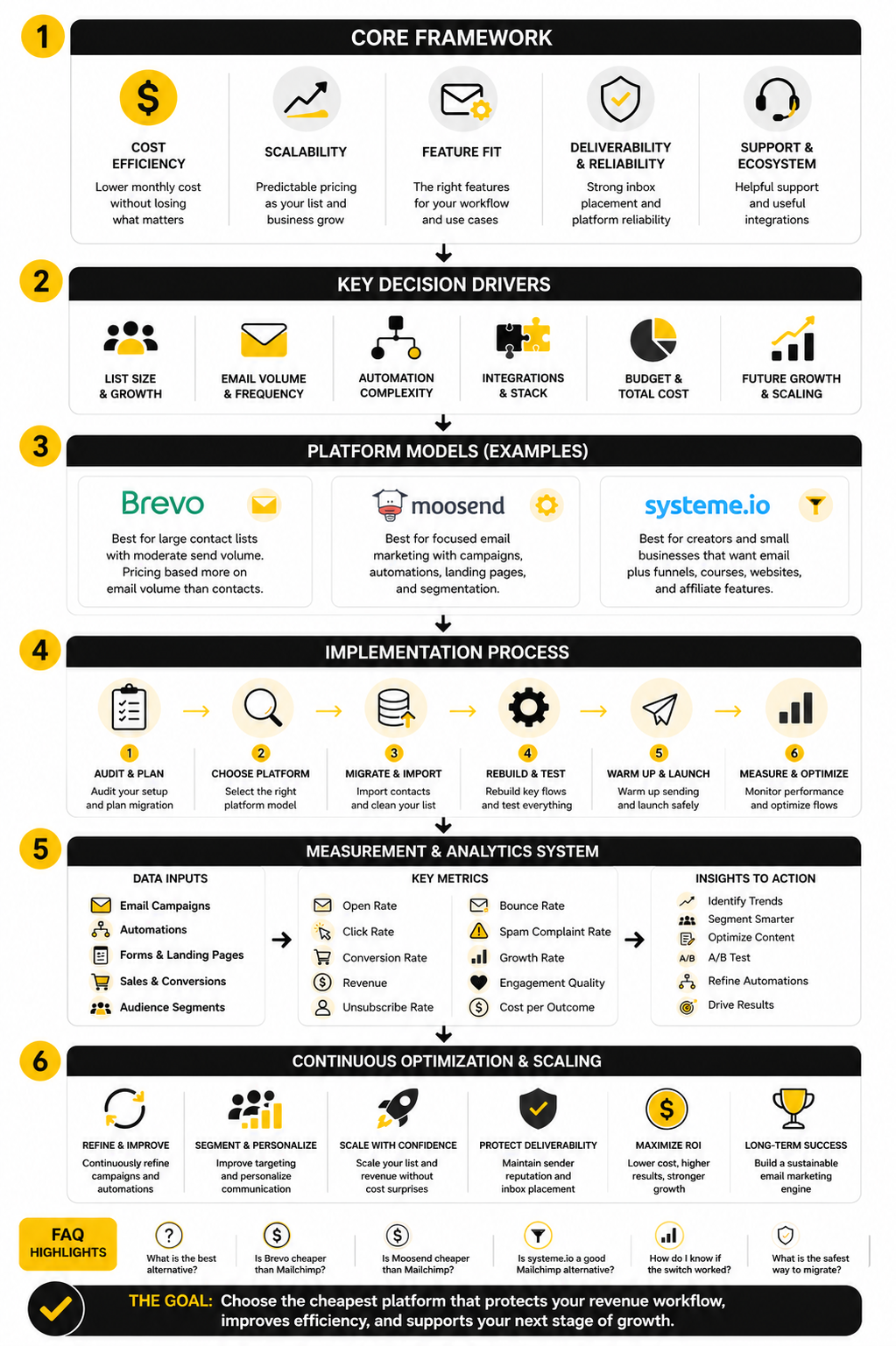
FAQ - Built for Complete Guide
What is the best cheaper than Mailchimp alternative?
The best cheaper than Mailchimp alternative depends on why Mailchimp feels expensive. If contact-based billing is the issue, Brevo is worth comparing because its pricing is more tied to email volume. If you want a focused email marketing tool, Moosend is a strong option, and if you want email bundled with funnels and courses, systeme.io may be the better fit.
Is Brevo cheaper than Mailchimp?
Brevo can be cheaper when you have many contacts but do not send high volumes of email to everyone. Its pricing model is different, so the real comparison depends on your contact count, monthly sends, and needed features. Always compare the paid plan you will actually use, not just the free plan.
Is Moosend cheaper than Mailchimp?
Moosend can be cheaper for businesses that want straightforward campaigns, automation, landing pages, and forms without paying for a broader all-in-one platform. It is especially worth considering when your email needs are focused and you do not need a complex CRM or funnel builder. The main thing is to compare your future contact tier, not only the entry price.
Is systeme.io a good Mailchimp alternative?
Systeme.io can be a good Mailchimp alternative if email is part of a larger funnel, course, or digital product system. It may not be the right fit for every advanced email marketing use case, but it can reduce the number of tools you need. That makes it attractive when total stack cost matters more than email-only feature depth.
Should I switch from Mailchimp just to save money?
Not automatically. Saving money is useful only if deliverability, automation, reporting, and customer journeys stay healthy. If switching breaks your forms, tags, automations, or sales follow-up, the cheaper tool may become more expensive in practice.
What should I check before moving away from Mailchimp?
Check your active contacts, monthly email volume, key automations, forms, segments, integrations, and deliverability setup. Export your data and document your current workflows before rebuilding anything. This prevents missed triggers, broken lead magnets, and messy subscriber data.
What is the biggest hidden cost in email marketing?
The biggest hidden cost is usually complexity. Multiple tools, broken integrations, duplicate contacts, messy tags, and unclear reporting can cost more than the email platform itself. A cheaper than Mailchimp setup should make the system easier to manage, not harder.
Are free email marketing plans enough?
Free plans are useful for testing, small lists, and early-stage projects. They are not always enough once you need serious automation, higher send limits, better support, or more advanced reporting. Treat the free plan as a starting point, not the whole decision.
Which platform is best for creators?
Creators should look closely at systeme.io if they need email, funnels, courses, websites, and affiliate features in one place. A focused email platform can still be better if the creator already has separate tools for checkout and course delivery. The best choice depends on whether consolidation or specialization matters more.
Which platform is best for service businesses?
Service businesses should prioritize lead capture, segmentation, follow-up automation, and booked calls. If the email platform connects cleanly with the sales process, it is a better choice than a cheaper tool that only sends newsletters. The right system should help turn subscribers into qualified conversations.
How do I know if the switch worked?
Compare your old and new systems using cost, clicks, leads, sales, booked calls, unsubscribe rate, bounce rate, and time spent managing campaigns. If cost drops while engagement and revenue stay stable or improve, the switch worked. If performance falls and the system becomes harder to run, the cheaper tool is not really cheaper.
What is the safest way to migrate?
Move in stages. Clean the list, authenticate the sending domain, rebuild only essential automations, test forms, send to engaged segments first, and monitor performance before sending to everyone. This protects deliverability and gives you time to catch problems early.
Work With Professionals
Explore 10K+ Remote Marketing Contracts on MarkeWork.com
Most marketers spend too much time chasing clients, competing on crowded platforms, and losing a percentage of every project to middlemen.
MarkeWork gives you a better way. Browse thousands of remote marketing contracts and connect directly with companies desperate to hire skilled marketers like you, without platform commissions and without unnecessary gatekeepers.
If you're serious about finding better opportunities and keeping 100% of what you earn, explore available contracts and create a profile for free at MarkeWork.com.