

Mailchimp is still a familiar starting point for email marketing, but it is no longer the obvious default for every business. Once you need stronger automation, better CRM visibility, ecommerce segmentation, SMS, landing pages, or agency-ready client management, the search for companies like Mailchimp becomes much more practical than theoretical.
The real question is not “Which tool is the most popular?” The better question is “Which platform fits the way this business actually sells, follows up, and grows?” A creator, ecommerce store, local service business, SaaS company, and agency all need different things from email software.
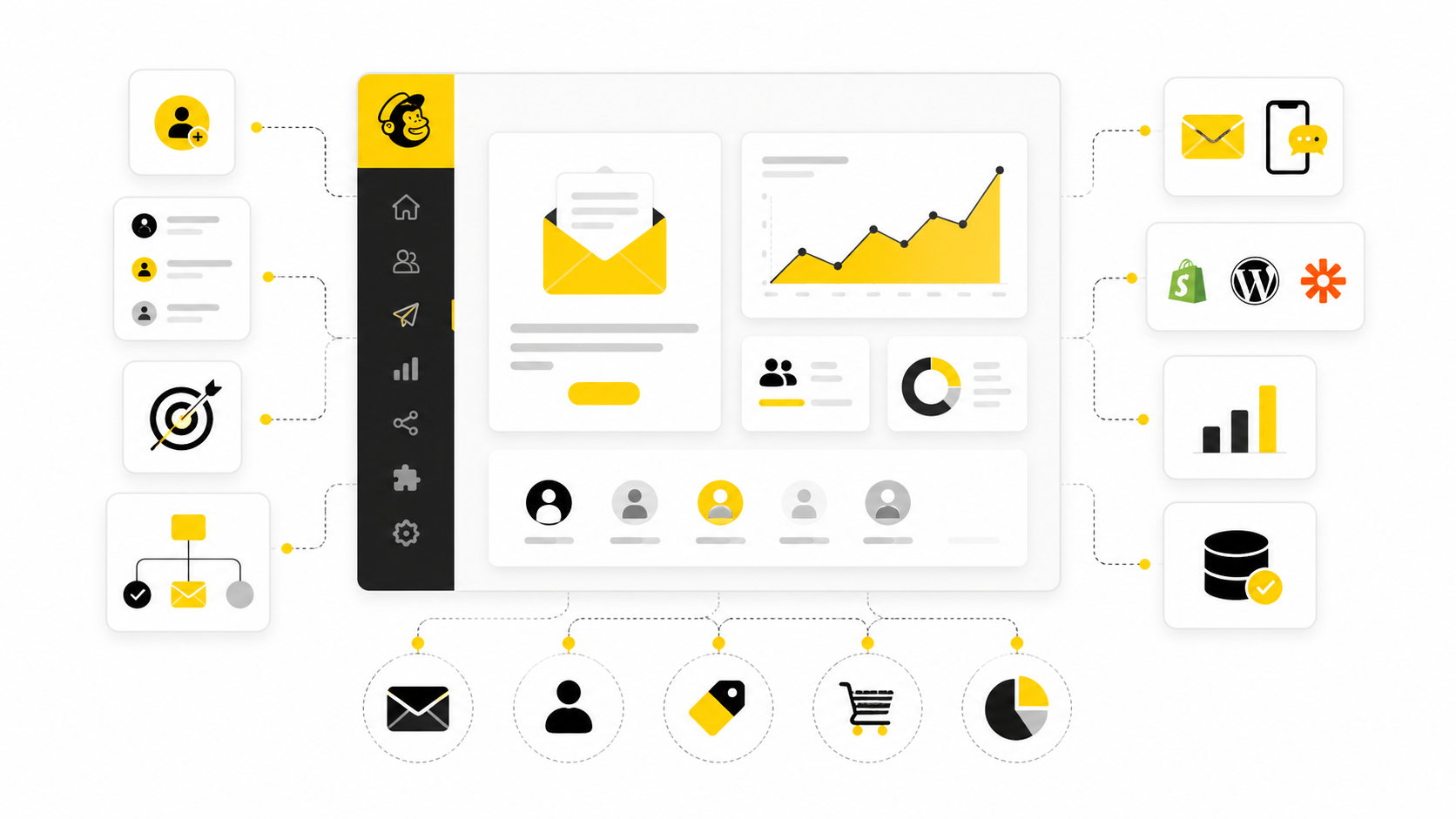
This guide will compare the main types of Mailchimp alternatives by use case, not just feature lists. Some tools are better for simple newsletters, some are better for automation, and some are better when email needs to connect with funnels, CRM, SMS, forms, chat, and sales pipelines. For example, Brevo, Moosend, GoHighLevel, ManyChat, and ClickFunnels all solve different parts of the same growth problem.
Article Outline
- Why Businesses Look for Companies Like Mailchimp
- The Mailchimp Alternative Framework
- Best Companies Like Mailchimp by Business Type
- Core Features to Compare Before Switching
- Professional Implementation and Migration Strategy
- Final Recommendations and FAQ
Why Businesses Look for Companies Like Mailchimp
Most businesses do not leave Mailchimp because email stopped working. They leave because the job around email got bigger. A newsletter tool is fine when you only need to send updates, but it can feel limited when you need behavior-based automation, cleaner customer data, stronger sales follow-up, and better reporting across channels.
That is why the best companies like Mailchimp are not always direct clones. Some are email-first platforms, some are CRM-first platforms, and some are full funnel systems. The right choice depends on whether your bottleneck is sending campaigns, converting leads, recovering carts, booking calls, managing clients, or proving ROI.
This matters because switching email platforms is not just a software decision. It affects your forms, automations, tags, landing pages, opt-ins, sales handoffs, and customer journeys. Choose casually, and you create another messy tool stack. Choose carefully, and email becomes part of a cleaner growth system.
The Mailchimp Alternative Framework
A smart comparison starts with the role email plays in your business. If email is mainly for newsletters, you need simplicity, templates, deliverability tools, and fair pricing. If email drives revenue, you need segmentation, automation logic, attribution, CRM sync, and reliable handoffs to sales or ecommerce workflows.
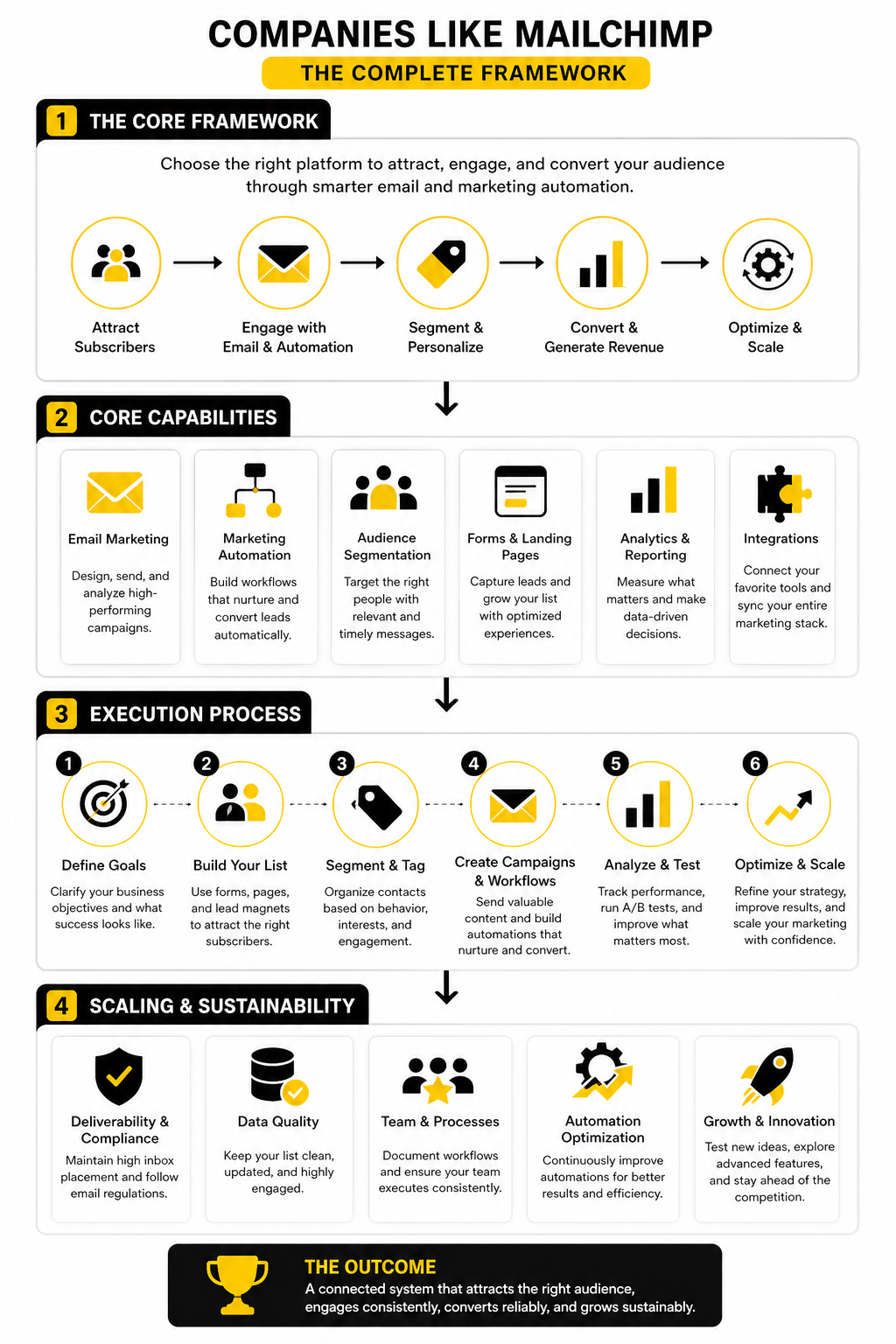
The easiest way to evaluate companies like Mailchimp is to separate them into four groups. There are newsletter platforms for simple campaigns, automation platforms for customer journeys, ecommerce platforms for purchase behavior, and all-in-one platforms for funnels, CRM, SMS, and pipeline management. This prevents the common mistake of comparing tools that were built for completely different jobs.
For example, a local agency may care more about client accounts, pipelines, SMS, and appointment follow-up, which makes GoHighLevel relevant. A small business that wants affordable email and basic automation may lean toward Brevo or Moosend. A funnel-heavy business may care more about checkout flows, opt-in pages, and offers, which is where ClickFunnels can enter the conversation.
Best Companies Like Mailchimp by Business Type
The best companies like Mailchimp are not all trying to win the same customer. That is why generic “top 10” lists usually waste your time. A better approach is to match the platform to the business model first, then compare features second.
Best for Small Businesses That Want Simple Email and SMS
Brevo is one of the most practical Mailchimp alternatives for small businesses that want email, SMS, basic automation, and contact management without building a complicated tech stack. Its biggest advantage is that it feels more like a multi-channel marketing hub than a pure newsletter tool. That matters when your follow-up needs to happen across more than one channel.
This is a strong fit for service businesses, consultants, local companies, and lean teams that want to send campaigns, manage contacts, and trigger simple automations from one place. It is also useful when you care more about email volume than paying only based on list size. That pricing style can make a real difference for businesses with large contact lists but moderate sending needs.
Brevo is not the best choice if you need deeply advanced ecommerce logic or a full agency operating system. But for many small businesses comparing companies like Mailchimp, it hits the sweet spot: approachable, flexible, and not overloaded with features most teams will never use.
Best for Affordable Email Automation
Moosend is worth considering when you want email automation, landing pages, forms, templates, reporting, and transactional email support without moving into heavy enterprise software. It is especially attractive for smaller teams that want automation workflows but do not want a platform that feels like it needs a full-time operator. That is a real advantage if you are building your first proper email system.
The main appeal is simplicity with enough depth. You can create signup forms, segment subscribers, send campaigns, and build automations without getting buried in unnecessary complexity. That makes Moosend a sensible option for creators, small ecommerce stores, bloggers, coaches, and startups that want more than basic newsletters.
The trade-off is that Moosend is still primarily an email marketing and automation platform. If your business needs built-in CRM pipelines, two-way texting, appointment booking, client sub-accounts, or full funnel management, it may not go far enough. But if your priority is affordable email automation, it belongs on the shortlist.
Best for Agencies and Local Service Businesses
GoHighLevel is not just another email tool. It is built more like a sales and marketing operating system for agencies, consultants, and local businesses that need CRM, pipelines, automation, SMS, forms, calendars, funnels, reputation tools, and client management in one place. That makes it very different from traditional companies like Mailchimp.
This is the kind of platform that makes sense when email is only one part of your follow-up machine. A lead might fill out a form, receive an email, get an SMS reminder, book a call, enter a pipeline, and trigger internal tasks for the sales team. If that is how your business actually works, a basic email platform can feel too narrow very quickly.
GoHighLevel is strongest when the business has repeatable lead capture and follow-up processes. Agencies can also use it to manage multiple client accounts, which is a major reason it gets compared differently than newsletter-first tools. It is probably overkill for someone who only wants to send a monthly newsletter, but for service businesses that live or die by lead response speed, it can be a serious upgrade.
Best for Funnel-Driven Businesses
ClickFunnels fits businesses where email is connected directly to offers, landing pages, checkout flows, upsells, webinars, and sales funnels. This is not the same use case as a newsletter platform. It is for businesses that want the page, offer, and follow-up sequence to work together.
That makes ClickFunnels relevant for coaches, course sellers, consultants, creators, and direct-response businesses that think in campaigns and offers. If the main goal is to turn traffic into leads and leads into buyers, the funnel layer matters as much as the email layer. In that situation, choosing a simple email platform first can create extra work later.
The downside is that ClickFunnels may feel too funnel-focused if your needs are mainly audience updates, editorial newsletters, or simple announcements. But when revenue depends on structured customer journeys, it gives you tools that many traditional email platforms do not prioritize. For the right business, that difference is not small.
Best for Budget-Conscious All-in-One Marketing
Systeme.io is a strong option for entrepreneurs who want email marketing, funnels, landing pages, products, automations, and basic online business tools without stitching together several subscriptions. It is especially useful when you are launching quickly and need a simple system that covers the essentials. That makes it a practical alternative for solo operators and lean teams.
The appeal is not that it beats every specialist tool feature-for-feature. The appeal is that it removes friction. You can build a list, publish pages, sell digital products, and run automated follow-up without needing a separate funnel builder, email platform, and course tool on day one.
That said, fast-moving businesses should still think carefully about future complexity. If you already have a mature CRM, advanced ecommerce setup, or agency workflow, Systeme.io may feel too lightweight. But for many people searching for companies like Mailchimp because they want more business-building tools in one place, it is a very reasonable direction.
Core Features to Compare Before Switching
Once you have a shortlist, the next step is not signing up for free trials everywhere. That sounds productive, but it usually creates more confusion. The smarter move is to compare companies like Mailchimp against the actual system you need to run.
Start with the journey your subscriber takes from first opt-in to purchase, booking, repeat order, referral, or reactivation. Then work backward. The best platform is the one that supports that journey with the least friction, not the one with the longest feature page.
Contact Management and Segmentation
Good email marketing starts with clean contact data. If your tags, lists, custom fields, and consent records are messy, every platform will feel harder than it should. Before switching, check whether the new tool can import your existing audiences without breaking your segmentation logic.
Segmentation is where many businesses outgrow basic email tools. You may need to separate leads by source, product interest, purchase history, booking stage, engagement level, location, or lifecycle stage. A platform like Brevo can make sense when you want email, SMS, and contact management in one place without turning your setup into a monster.
Do not treat segmentation as a “nice to have.” It controls who gets what message, when they get it, and what they should never receive again. That directly affects revenue, unsubscribes, deliverability, and the overall quality of your customer experience.
Automation Workflows
Automation is one of the biggest reasons people search for companies like Mailchimp. The issue is not whether a tool has automation. The issue is whether the automation builder matches the way your business thinks.
For a simple newsletter business, you may only need welcome emails, lead magnet delivery, and occasional re-engagement campaigns. For a service business, you may need form follow-up, missed-call workflows, appointment reminders, pipeline updates, and sales notifications. For that second case, GoHighLevel is a more natural fit because email sits inside a broader CRM and follow-up system.
When comparing automation, look for triggers, conditions, delays, goals, branching logic, exit rules, and reporting. Pretty workflow diagrams are not enough. You need to know whether the platform can handle the exact moments where leads usually fall through the cracks.
Landing Pages, Forms, and Funnels
Email does not work in isolation. People join your list through forms, landing pages, checkout pages, webinars, quizzes, bookings, and lead magnets. If those entry points are weak, even the best email platform will be stuck following up with too few qualified leads.
This is where funnel-focused tools become relevant. ClickFunnels is useful when the page, offer, checkout, upsell, and follow-up sequence need to operate as one conversion system. Systeme.io can also work well when you want a budget-conscious all-in-one setup for pages, email, products, and automations.
The key is to avoid building a tool stack that fights itself. If your form tool, page builder, checkout, CRM, and email platform all need manual patching through integrations, your system becomes fragile. Sometimes one slightly less specialized platform is better than five “best-in-class” tools that do not work cleanly together.
Deliverability and Domain Setup
Deliverability is not glamorous, but it is non-negotiable. Gmail requires senders to use SPF or DKIM, while bulk senders need SPF, DKIM, and DMARC, so a platform that makes authentication clear is not optional anymore. Yahoo also pushes senders toward proper DMARC, strong authentication, and responsible sending practices.
This is where implementation discipline matters more than brand preference. Before moving from Mailchimp to another platform, confirm that you can authenticate your sending domain, manage unsubscribe links properly, monitor complaints, and avoid blasting cold or inactive contacts. A cheaper tool becomes expensive fast if your emails stop reaching inboxes.
Deliverability also depends on your behavior. Importing every old contact, sending aggressively on day one, and ignoring engagement data is a bad plan on any platform. The better approach is to migrate cleanly, warm up carefully, and rebuild sending reputation with your most engaged subscribers first.
The Switching Process That Actually Works
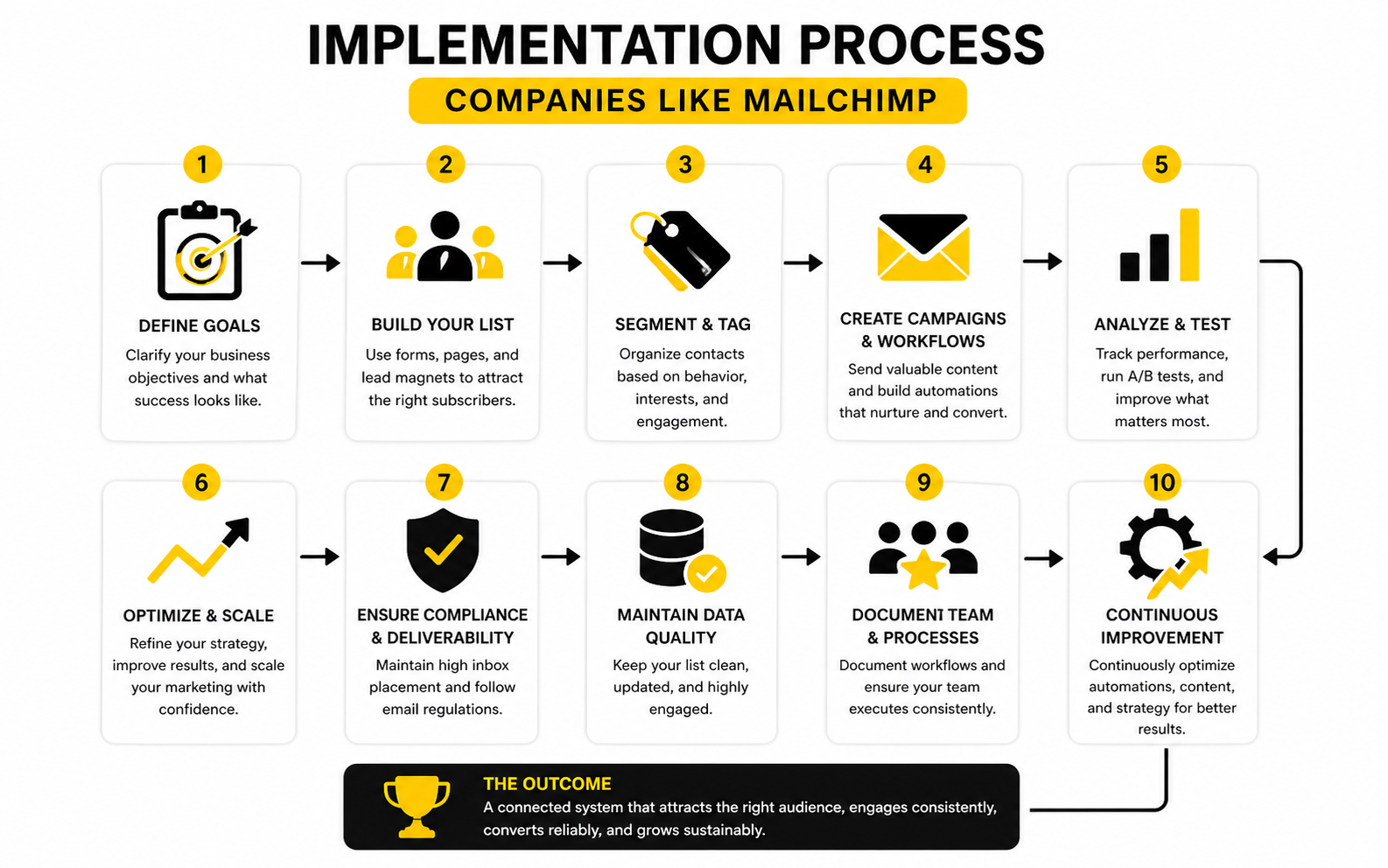
Changing email platforms should be treated like a controlled migration, not a Friday afternoon copy-paste job. You are moving customer data, consent records, automations, forms, templates, reporting, and sometimes revenue-critical follow-up. Slow is smooth here, and smooth is fast.
Use this process before switching to any companies like Mailchimp:
- Audit your current setup. List every audience, tag, segment, signup form, automation, landing page, integration, and recurring campaign.
- Clean your contact data. Remove duplicates, suppress unsubscribed contacts, separate inactive subscribers, and preserve consent data.
- Map your customer journey. Identify what happens after opt-in, purchase, booking, no-show, cart abandon, consultation, or inactivity.
- Choose the platform by workflow. Match your real journey to the tool, not the other way around.
- Rebuild core automations first. Start with welcome flows, lead delivery, sales follow-up, abandoned cart or booking reminders, and reactivation.
- Authenticate your sending domain. Set up SPF, DKIM, and DMARC before sending from the new platform.
- Test forms and triggers. Submit test leads, check tags, confirm emails arrive, and verify handoffs to CRM or sales.
- Migrate engaged contacts first. Start with recent openers, clickers, buyers, booked leads, or active subscribers.
- Monitor early performance. Watch bounces, complaints, unsubscribes, opens, clicks, conversions, and replies.
- Retire the old system carefully. Keep access long enough to confirm historical exports, reporting, and compliance records are safe.
This process protects you from the most common migration mistake: moving the mess instead of fixing the system. A platform switch is a perfect moment to simplify your tags, remove dead automations, and rebuild around what actually drives revenue. Do that, and the new software has a real chance to perform.
Statistics and Data
Data should help you choose better companies like Mailchimp, not decorate the article with impressive-looking numbers. The mistake is comparing platforms by open rate promises, template counts, or vague “AI-powered” claims. Those numbers are only useful when they connect to decisions: which platform to choose, which workflow to build, which contacts to suppress, and which campaigns deserve more attention.
Email still earns its place in the stack because it can be measured more directly than many channels. The problem is that many businesses track surface metrics and ignore the numbers that actually explain revenue. Open rates, click rates, conversion rates, bounce rates, unsubscribe rates, spam complaints, and list growth all tell a different part of the story.
Benchmarks Are Starting Points, Not Targets
Industry benchmarks are useful, but they are not a scoreboard you blindly chase. Mailchimp’s own benchmark data puts average open rates around the low-to-mid 30% range across many industries, while other benchmark reports show higher averages depending on list quality, region, and methodology. That gap matters because one platform’s benchmark may include very different senders, audiences, and campaign types than another.
A business with a small, engaged buyer list can outperform a huge media list with weak intent. A local service business sending appointment follow-up will behave differently from an ecommerce store sending sale campaigns. So when you compare companies like Mailchimp, treat benchmarks as context, not destiny.
The practical move is simple: benchmark against yourself first. Track your last 90 days in Mailchimp, then compare the first 90 days after migration using the same audience segments and campaign types. That tells you whether the new platform is improving the system or just giving you a cleaner dashboard.
The Metrics That Actually Matter
Open rate is useful, but it has become less reliable because privacy features can inflate opens. That does not make it useless. It just means you should use it as an early signal, not a final verdict.
Click rate tells you whether people found the message relevant enough to act. Click-to-open rate shows whether the content worked after the subject line did its job. Conversion rate tells you whether the email helped create the outcome the business actually cares about.
For most businesses, the core measurement stack should look like this:
- Deliverability: inbox placement, bounces, spam complaints, and authentication status.
- Engagement: opens, clicks, replies, click-to-open rate, and unsubscribes.
- Revenue: purchases, booked calls, pipeline value, customer lifetime value, and repeat orders.
- List quality: new subscribers, source quality, inactive contacts, suppression rate, and segment growth.
- Workflow performance: automation completion, drop-off points, delayed follow-up, and handoff failures.
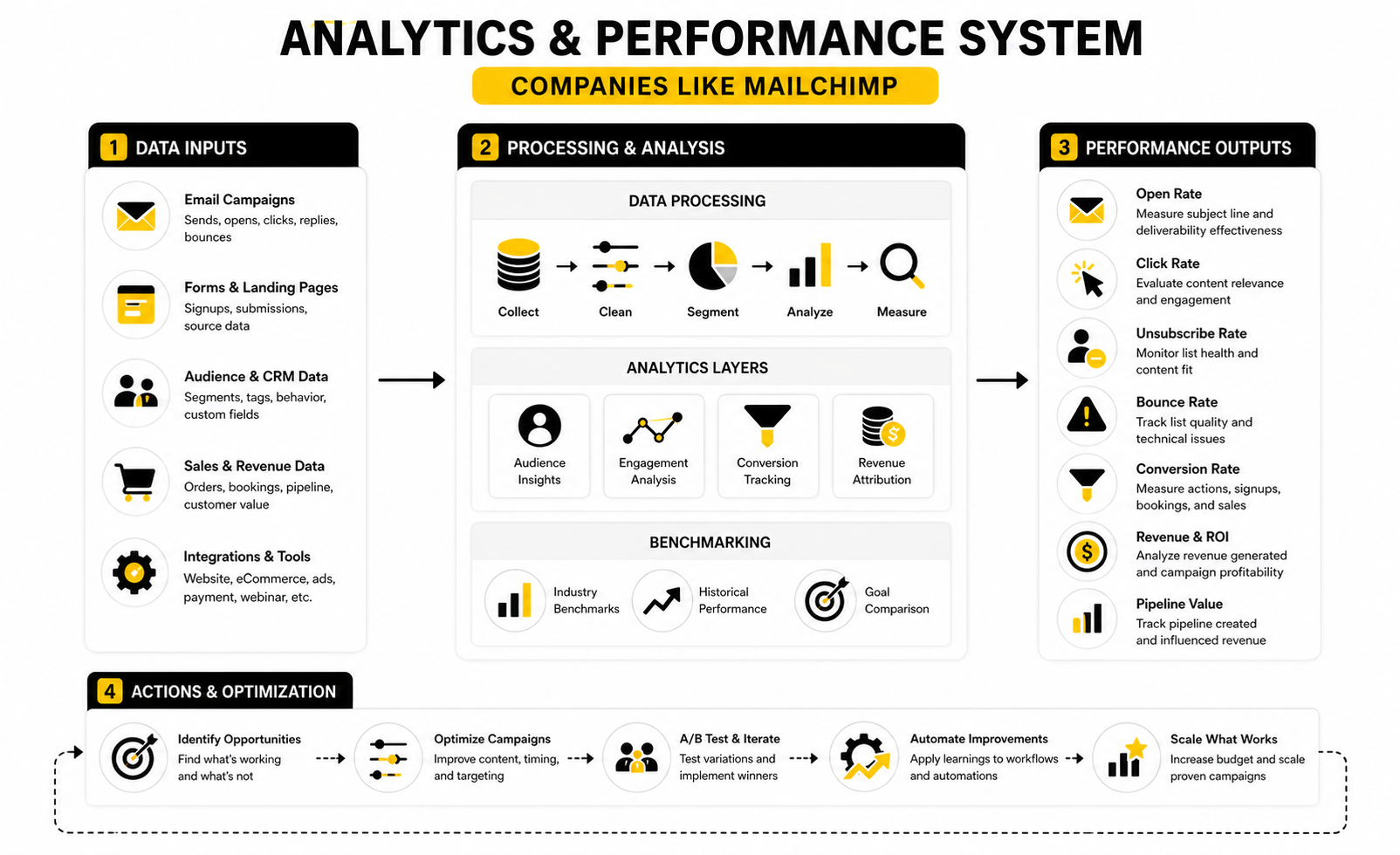
This is where all-in-one platforms can become useful. If email, forms, CRM, SMS, calendars, and pipeline activity live together inside GoHighLevel, measurement can become more connected. If the business is mostly running campaigns and broadcasts, a cleaner email-focused tool like Brevo or Moosend may be easier to evaluate.
What Strong Performance Looks Like
Strong performance does not always mean higher open rates. Sometimes the best improvement is a smaller list with better clicks, fewer complaints, and more sales. That is especially true after migration, when many businesses finally remove old contacts that were dragging down deliverability.
Email ROI remains strong, with Litmus reporting that many marketing leaders see returns between $10 and $36 for every $1 spent, while a smaller group reports even higher returns. But that number only matters if you can attribute revenue properly. If your platform cannot connect campaigns to purchases, bookings, or pipeline movement, you are guessing.
For ecommerce, revenue per recipient and revenue per campaign matter more than vanity engagement. For service businesses, booked calls, show-up rate, speed to lead, and closed pipeline matter more than newsletter clicks. For creators, course sellers, and funnel businesses, the important numbers are opt-in rate, sales page conversion, cart completion, upsell take rate, and follow-up revenue.
How to Read Bad Numbers Without Panicking
A low open rate does not automatically mean the platform is bad. It may mean the subject line is weak, the list is cold, the sender reputation is damaged, or the audience does not recognize the brand. A low click rate may mean the offer is unclear, the email has too many calls to action, or the segment is too broad.
Unsubscribes are not always bad either. If you change positioning, clean your list, or send a stronger sales message, some people should leave. The real danger is high spam complaints, because that tells mailbox providers your email may not be wanted.
The action should match the signal. If opens are weak, test sender name, subject line, timing, and deliverability. If clicks are weak, improve the offer and message. If conversions are weak, fix the landing page, checkout, booking flow, or sales handoff before blaming the email platform.
Use Data to Choose the Right Alternative
When comparing companies like Mailchimp, ask what each platform helps you measure without extra work. A newsletter tool should make campaign engagement easy to understand. A funnel platform should connect opt-ins, pages, checkouts, and follow-up. A CRM-first platform should show what happens after the lead enters the pipeline.
For a funnel-heavy business, ClickFunnels makes sense when the analytics need to follow the offer journey from landing page to sale. For a lean online business, Systeme.io can be attractive because email, funnels, and products are closer together. For agencies and service businesses, the value of GoHighLevel is often in seeing lead source, follow-up, pipeline stage, and booked appointments in one operational view.
The real benchmark is not whether a platform looks better than Mailchimp on paper. The benchmark is whether it helps you make better decisions faster. If the data shows where leads come from, where they drop off, and which follow-up creates revenue, you are choosing based on reality instead of software hype.
Professional Implementation and Migration Strategy
At this stage, choosing between companies like Mailchimp becomes less about features and more about operating discipline. Most platforms can send campaigns, build automations, and report basic engagement. The real difference appears when the business grows, the list gets larger, the automations get more complex, and more people depend on the system every day.
This is where a cheap tool can become expensive and a powerful tool can become dangerous. If the setup is messy, stronger software only gives you a bigger mess at higher speed. The goal is to build a platform decision that still makes sense six months from now, not just one that feels good during onboarding.
The Hidden Cost of Switching
The price on the pricing page is only one part of the cost. You also need to count migration time, implementation work, training, broken integrations, temporary performance dips, and the opportunity cost of rebuilding workflows. If email drives real revenue, even a small mistake in migration can affect sales, bookings, or customer retention.
This is why switching from Mailchimp should not be treated like changing a logo color. You are moving customer data, consent history, tags, journeys, forms, reports, and sometimes revenue-critical automations. If you do not document the old system before rebuilding the new one, you will forget why certain tags, segments, or exclusions existed in the first place.
The right move is to create a migration brief before you touch anything. It should include your current audiences, key automations, active forms, sending domains, lead sources, compliance requirements, and revenue workflows. That brief becomes the map that prevents the new platform from turning into guesswork.
When an All-in-One Platform Makes Sense
All-in-one platforms are attractive because they reduce tool sprawl. Instead of paying for separate software for email, funnels, CRM, SMS, forms, calendars, and pipeline tracking, you can run more of the customer journey in one place. For agencies and service businesses, GoHighLevel is often appealing for exactly that reason.
But all-in-one does not automatically mean better. It means more parts of the business depend on one system. That can simplify reporting and execution, but it can also increase lock-in if your data, workflows, and client accounts become hard to move later.
Choose an all-in-one platform when the operational advantage is obvious. If your leads come through forms, need instant follow-up, require appointment reminders, move through a sales pipeline, and get contacted by email and SMS, one connected system can be powerful. If you mainly publish newsletters and occasional promotions, a focused email platform may be cleaner.
When a Specialist Tool Is the Better Choice
Specialist platforms usually win when one function matters more than everything else. If email campaigns, segmentation, deliverability, and list management are the core job, a dedicated email platform can be easier to operate than a broad marketing suite. That is why tools like Brevo and Moosend remain practical options.
The risk with specialist tools is that the rest of the customer journey may live somewhere else. Your forms may be in one tool, checkout in another, CRM in another, and reporting in a spreadsheet. That can work, but only if your integrations are reliable and someone owns the system.
A specialist tool is the better choice when the business has a stable stack already. If your CRM, ecommerce platform, analytics setup, and checkout flow are working well, you may not need a platform that tries to replace everything. You may just need a better email and automation layer.
Scaling Without Breaking the System
Scaling email is not just sending more. It means more segments, more triggers, more campaigns, more exclusions, more testing, and more pressure on reporting. The system that worked with 2,000 subscribers may not work with 200,000 contacts.
As your list grows, governance becomes important. You need naming conventions for tags and automations, clear rules for who can edit workflows, documented suppression logic, and a review process before campaigns go live. Without this, even good companies like Mailchimp alternatives can become chaotic.
Use simple operating rules early:
- Name every automation by purpose, audience, and lifecycle stage.
- Keep one source of truth for contact fields and tags.
- Review inactive contacts before major sends.
- Document every form and where it sends new leads.
- Test every revenue-critical workflow after major platform changes.
- Separate experiments from evergreen automations.
- Assign one owner for deliverability and list health.
These habits sound boring until they save you from a broken launch. When the list is small, mistakes are annoying. When the list is large, mistakes are expensive.
Compliance and Consent Are Not Optional
Email compliance is not a side task anymore. Gmail and Yahoo now expect proper authentication, easy unsubscribe, low spam complaints, and responsible sending behavior from bulk senders. Google’s sender guidelines require DMARC alignment through SPF or DKIM, and Yahoo’s sender guidance also emphasizes SPF, DKIM, DMARC, and easy unsubscribe.
That means your platform should make compliance easier, not harder. Before choosing any Mailchimp alternative, check how it handles unsubscribe links, suppression lists, consent records, sender authentication, and contact exports. If these basics are buried, confusing, or weak, that is a warning sign.
This is especially important if you work across markets with different privacy rules. Consent, retention, opt-out handling, and data access requests should be simple enough that your team can follow them under pressure. A platform that looks powerful but makes compliance messy is not a smart long-term bet.
AI Features Should Improve Workflows, Not Distract You
Almost every marketing platform now talks about AI. Some of it is useful. Some of it is just a shiny button on top of normal software.
AI can help with subject line drafts, segmentation ideas, content variations, chatbot flows, lead routing, and campaign summaries. GoHighLevel’s AI tools, for example, may appeal to businesses that want AI closer to CRM and follow-up workflows. ManyChat can also be relevant when conversational automation matters alongside email.
But do not choose a platform because the AI demo looks impressive. Choose it because the underlying workflow is strong. AI on top of weak segmentation, poor deliverability, messy CRM data, or unclear offers will not fix the business.
The Decision Rule for Advanced Buyers
The best advanced decision rule is simple: choose the platform that removes the most operational friction without hiding the most business-critical data. That is the balance. You want fewer manual steps, but you still need control over contacts, automations, attribution, exports, and compliance.
If you sell through funnels, ClickFunnels may reduce friction around offers, pages, and checkout journeys. If you want a lean all-in-one setup, Systeme.io may be enough. If you need agency-ready CRM, automation, and follow-up infrastructure, GoHighLevel deserves a closer look.
Do not overbuy, but do not underbuy either. Underbuying means you will rebuild the stack again once the business gets more complex. Overbuying means the team will ignore 80% of the system and still pay for it. The right choice is the one your business can actually implement, measure, and improve.
Final Recommendations
The best companies like Mailchimp are not the ones with the loudest feature lists. They are the ones that fit your business model, your customer journey, and your team’s ability to execute. A simple newsletter business needs a different platform than an agency, funnel seller, ecommerce brand, or local service company.
If you want practical email and SMS for a small business, start with Brevo. If you want affordable automation without unnecessary complexity, look at Moosend. If you need funnels, offers, and checkout flows, ClickFunnels or Systeme.io may make more sense.
For agencies and service businesses, GoHighLevel deserves serious attention because email is only one part of the follow-up system. Leads, calls, SMS, appointments, CRM stages, and reputation workflows often matter just as much as newsletters. That is where a broader platform can beat a traditional email tool.
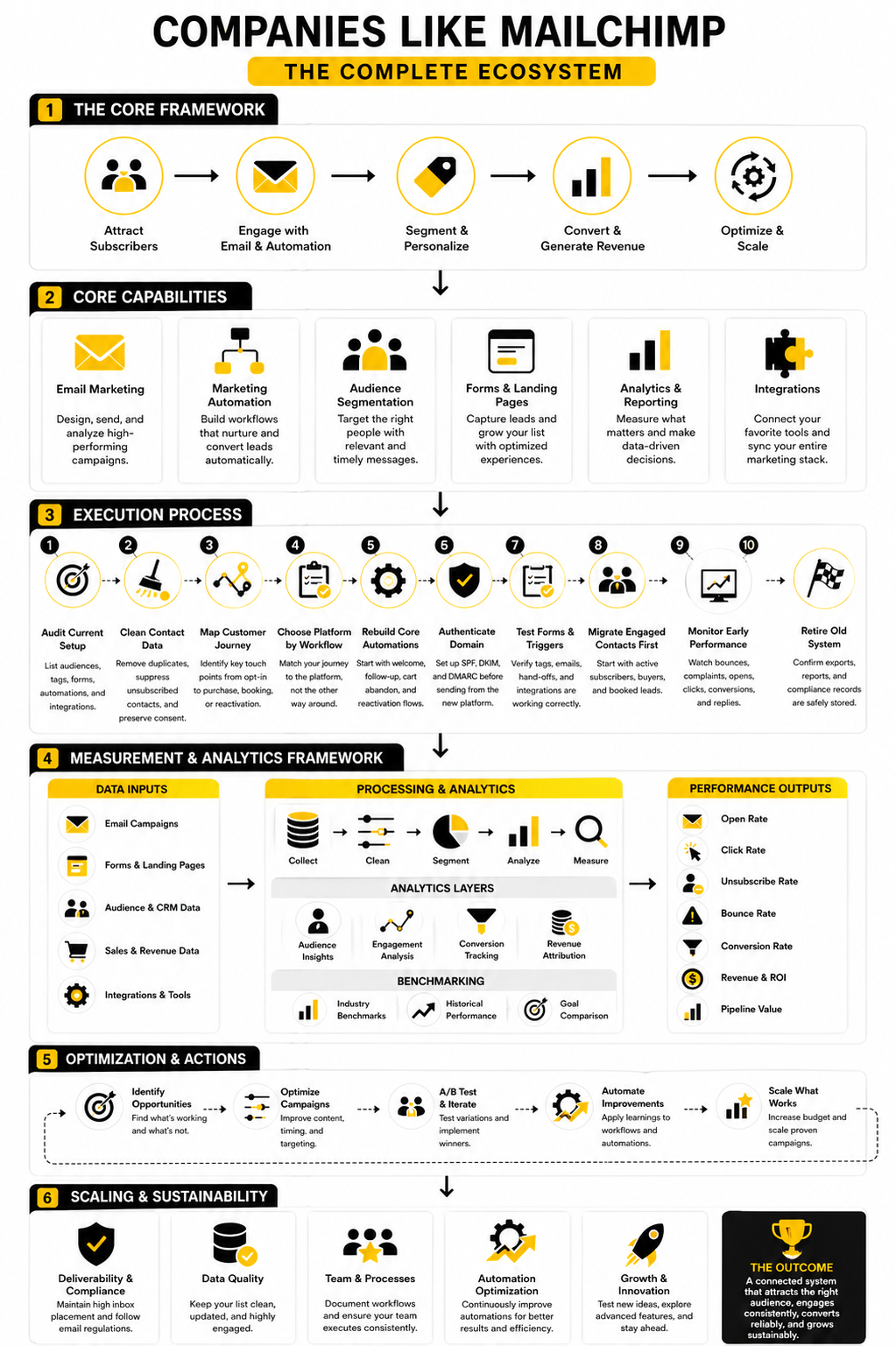
The final decision should be based on fit, not hype. Pick the platform that helps you capture leads cleanly, follow up quickly, segment intelligently, measure revenue, and stay compliant as you scale. That is the real win.
FAQ - Built for Complete Guide
What are the best companies like Mailchimp?
The best companies like Mailchimp depend on what you need. Brevo is strong for small business email and SMS, Moosend is good for affordable automation, and GoHighLevel is better for agencies and service businesses. For funnel-heavy businesses, ClickFunnels and Systeme.io are more relevant.
Why do businesses switch from Mailchimp?
Businesses usually switch when their needs grow beyond basic email campaigns. They may need stronger automation, better CRM visibility, SMS, sales pipelines, landing pages, funnels, or more flexible pricing. The switch is rarely about email alone; it is about the whole customer journey.
Is Mailchimp still a good option?
Mailchimp can still be a good option for simple newsletters, basic campaigns, and teams that like its interface. The issue is that it may not be the best fit once you need deeper automation, more connected sales workflows, or a broader marketing system. The right answer depends on how your business captures, nurtures, and converts leads.
What is the best Mailchimp alternative for small businesses?
For many small businesses, Brevo is a practical place to start because it combines email, SMS, automation, and contact management. Moosend is also worth considering if affordable email automation is the main priority. Choose based on the workflows you actually need, not the longest feature list.
What is the best Mailchimp alternative for agencies?
GoHighLevel is one of the strongest options for agencies because it combines CRM, automations, funnels, SMS, calendars, pipelines, and client management. That makes it more useful than a simple email tool when an agency needs to manage multiple clients and lead follow-up systems. It is not just a newsletter platform, and that is the point.
What is the best Mailchimp alternative for funnels?
ClickFunnels is a strong fit when funnels, landing pages, offers, checkouts, and upsells are central to the business. Systeme.io can also work well for entrepreneurs who want a lower-cost all-in-one system. The better choice depends on how advanced your funnel strategy is.
Should I choose an all-in-one platform or a dedicated email tool?
Choose an all-in-one platform when your email needs to connect closely with CRM, SMS, funnels, booking, and sales follow-up. Choose a dedicated email tool when campaigns, segmentation, and automation are the main job. Neither approach is automatically better; the right choice depends on your operating model.
What should I check before switching from Mailchimp?
Before switching, audit your audiences, tags, segments, forms, automations, templates, integrations, unsubscribe records, and sending domains. Then decide what should be migrated, cleaned, rebuilt, or removed. Do not move a messy system into new software and expect better results.
Will switching platforms improve deliverability?
Switching platforms can help, but it does not automatically fix deliverability. Your sending domain, authentication, list quality, complaint rate, inactive contacts, and sending behavior matter a lot. Set up SPF, DKIM, and DMARC properly before sending from the new system.
What metrics matter most after switching?
The most useful metrics are bounce rate, spam complaints, unsubscribe rate, click rate, conversion rate, booked calls, sales, pipeline value, and revenue per campaign. Open rate can still help, but it should not be treated as the only performance signal. The goal is not more opens; the goal is better business outcomes.
Can I use more than one platform?
Yes, but only when each platform has a clear job. For example, you might use one tool for funnels, another for email, and another for CRM if the integrations are reliable. But if the tools create duplicated data, broken tracking, or manual work, the stack is too complicated.
What is the safest way to migrate?
The safest way is to migrate in phases. Start with your cleanest, most engaged contacts, rebuild essential automations first, authenticate your sending domain, and test every form and workflow before sending at scale. Keep the old account active until you confirm that data, reporting, and compliance records are safely preserved.
Work With Professionals
Explore 10K+ Remote Marketing Contracts on MarkeWork.com
Most marketers spend too much time chasing clients, competing on crowded platforms, and losing a percentage of every project to middlemen.
MarkeWork gives you a better way. Browse thousands of remote marketing contracts and connect directly with companies desperate to hire skilled marketers like you, without platform commissions and without unnecessary gatekeepers.
If you're serious about finding better opportunities and keeping 100% of what you earn, explore available contracts and create a profile for free at MarkeWork.com.