

A Constant Contact free trial sounds simple on the surface. You sign up, explore the dashboard, build a few emails, and decide whether the platform feels right for your business. In practice, the trial matters because it is your only low-risk window to test whether Constant Contact matches the way you actually market, not just the way the sales page describes it.
That matters even more now because email tools have become broader, not simpler. You are no longer judging one editor and a send button. You are judging automation, signup forms, segmentation, reporting, integrations, social tools, landing pages, and how quickly you can get from blank screen to live campaign without wasting a week.
Current trial terms are one reason this topic keeps getting searched. Constant Contact is still offering a 30-day free trial with no credit card required, which gives buyers enough room to test the product seriously instead of making a rushed decision after one afternoon inside the app.

Article Outline
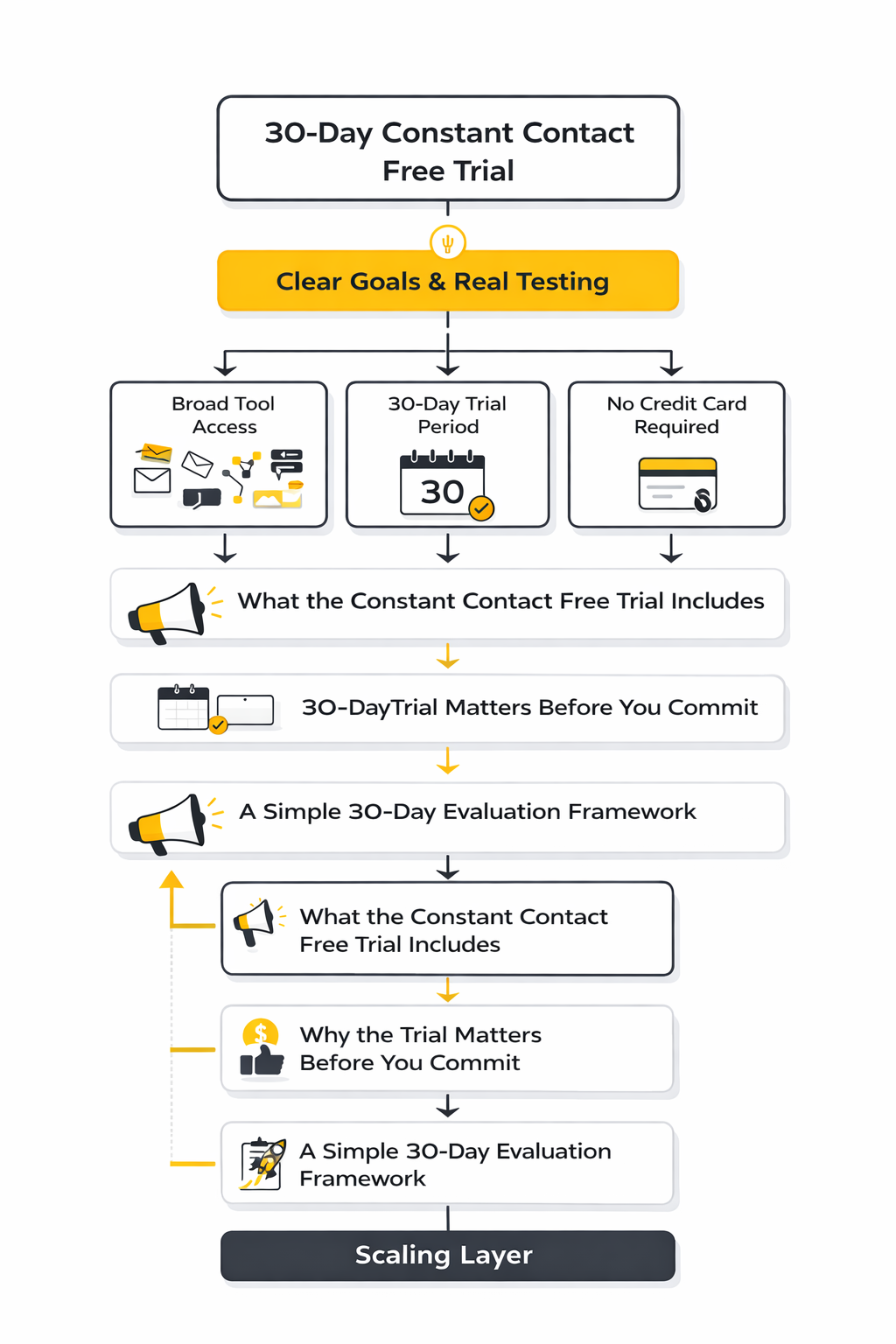
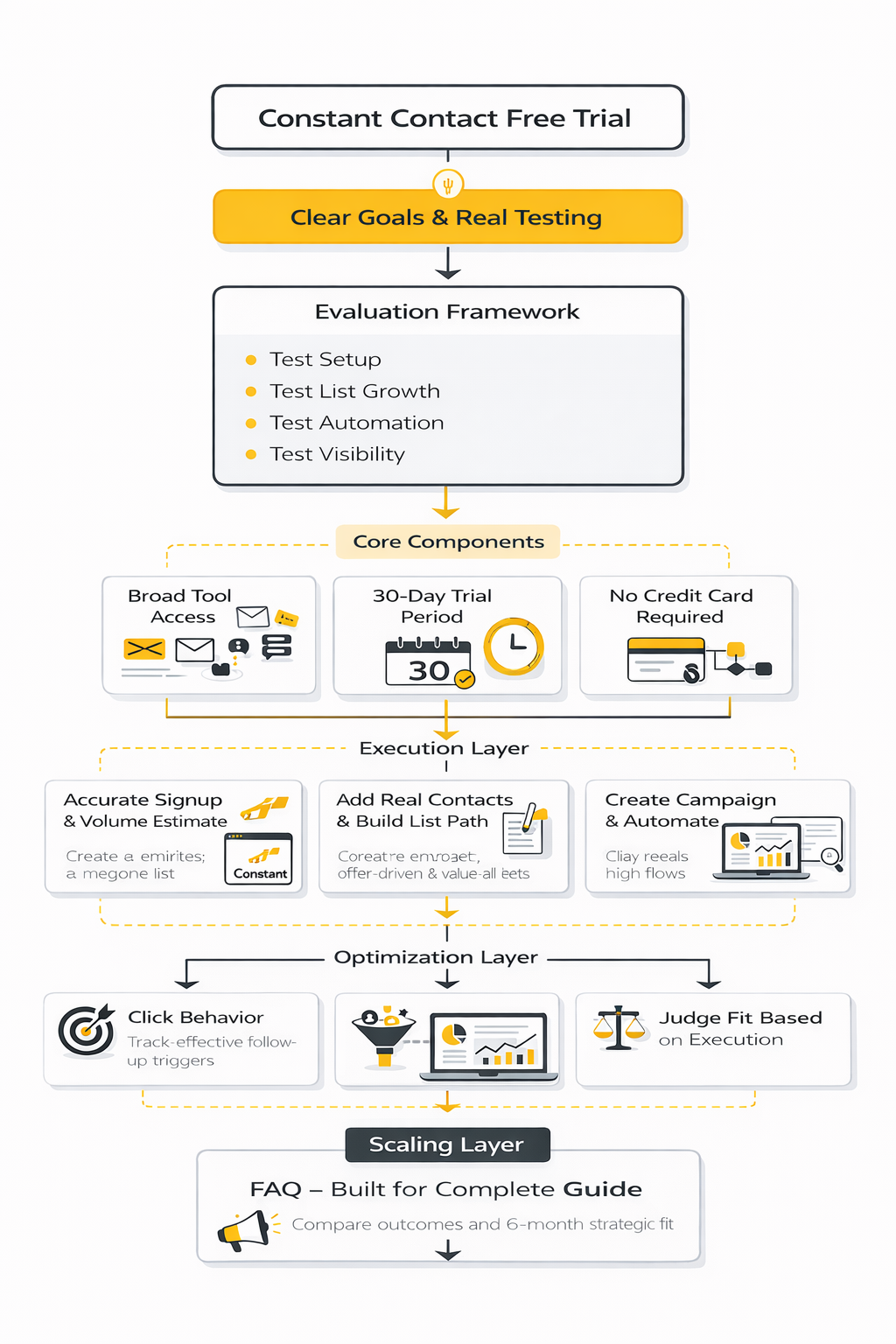
- What the Constant Contact Free Trial Includes
- Why the Trial Matters Before You Commit
- A Simple 30-Day Evaluation Framework
- The Core Features Worth Testing First
- How Constant Contact Stacks Up Against Other Options
- When Upgrading Makes Sense After the Trial
Why the Trial Matters Before You Commit
The biggest mistake people make with a Constant Contact free trial is treating it like a demo. A demo shows you where buttons are. A real trial should tell you whether your list-building, campaign creation, automation setup, and reporting workflow actually feel manageable when you are doing the work yourself.
This is especially important for small businesses, nonprofits, local brands, and service companies that do not have extra time to rebuild their email stack twice. If the platform feels smooth during the first few days but becomes clunky when you start importing contacts, segmenting audiences, or creating follow-up sequences, that is not a small issue. That is the signal the trial was supposed to reveal.
The smarter way to use the trial is to treat it like a buying test, not a curiosity click. You want to know what is included, what is easy, what is limited, and what becomes more powerful only after you pay. The rest of this article will walk through that process in a practical order so you can decide faster and with fewer surprises.
What the Constant Contact Free Trial Includes
The practical value of a Constant Contact free trial is that it is not limited to a stripped-down email sandbox. Constant Contact’s current trial period is 30 days, does not require a credit card, and is positioned as a chance to explore the platform’s broader toolset rather than just build one test newsletter. The company’s own help documentation also says the trial is meant for trying campaign types and features across email, social tools, landing pages, and more, which is exactly what serious buyers need before deciding whether the paid version is worth it.
That broader access matters because email software is rarely judged on email alone anymore. Constant Contact now presents itself as a digital marketing platform that combines email with social posting, SMS-related workflows, landing pages, signup forms, integrations, and automation, so a proper trial should be used to test how those pieces fit together in one workflow. If your business needs a simple newsletter tool, that may sound like extra complexity, but for many small businesses the real question is whether one platform can replace several disconnected tools.
One useful detail many people miss is that Constant Contact says the assets you build during the trial stay available if you become a customer. That changes how you should approach the trial. Instead of creating throwaway test campaigns, you can use the period to build real forms, real welcome flows, and real campaign drafts that may still matter after you upgrade.
What You Should Test During the Trial
Start with the basics, but do not stop there. Build at least one real email campaign, import a sample of your contact list, create a signup form, and check whether the editor feels fast or frustrating when you are working under normal conditions. That sounds obvious, yet it is where many buyers learn whether a platform is actually intuitive or just well marketed.
After that, move straight into automation. Constant Contact highlights a ready-to-customize signup landing page and welcome automation for new accounts, and its newer Automation Path Builder is designed around triggers, actions, tagging, field updates, and list-based movement. For a trial user, this is one of the most important parts to test because automation is often the line between “nice email tool” and “system that actually saves you time every week.”
You should also test visibility, not just creation. The campaign calendar is built to show emails, social posts, ads, landing pages, SMS, surveys, and other campaign activity in one place, which makes it a useful checkpoint for anyone trying to manage marketing without juggling five tabs and two separate planning docs. If the calendar and reporting views help you think more clearly about timing, the trial is doing its job. If they feel cosmetic, that is also useful information before you pay.
What the Trial Does Not Solve on Its Own
A Constant Contact free trial can show you product fit, but it cannot fix strategy. If your list is weak, your offer is unclear, or your audience is barely segmented, the trial will not magically produce great results. What it can do is reveal whether the software helps you execute a better process once you already know who you are trying to reach and what action you want them to take.
This is where many small teams make the wrong call. They sign up hoping the platform itself will create momentum, then they blame the tool when the real problem was poor messaging, weak lead capture, or no follow-up structure at all. The smarter approach is to use the trial to test both the software and your operating discipline at the same time.
That makes the next step straightforward. Once you know what is included and what is worth testing, you need a tighter framework for using those 30 days well. That is where the evaluation process becomes more important than the free access itself.
A Simple 30-Day Evaluation Framework
The best way to use a Constant Contact free trial is to divide it into clear stages instead of clicking around randomly for a week and then forgetting what you learned. Constant Contact’s current setup supports that approach well because new accounts start with a 30-day free trial, no credit card required, and the platform is built to let you test more than email alone.
A strong framework keeps you focused on one question: can this platform help you run marketing more consistently without adding friction? That means you are not judging the tool on design polish alone. You are judging speed, clarity, automation depth, list growth options, and whether the whole system feels manageable once real work starts.
The simplest way to do that is to break the trial into four checkpoints. First, test setup and usability. Second, test list growth and campaign creation. Third, test automation and segmentation. Fourth, review whether the reporting and calendar views make your marketing process easier to run week after week.
A 30-Day Trial Process That Actually Tells You Something
Week one should be about setup, not performance. Import a small but real contact sample, connect the integrations you actually use, and build one email that looks close to something you would really send. Constant Contact positions the platform around templates, drag-and-drop editing, integrations, and multi-channel campaign management, so your first job is to see whether those basics feel fast enough for your team.
Week two should be about list growth and entry points. Create a sign-up landing page, review the default welcome automation that new accounts receive, and test the path from form submission to follow-up message. This is where the trial becomes useful because Constant Contact says new accounts are created with a sign-up landing page and welcome automation ready to customize, which gives you a practical starting point instead of a blank canvas.
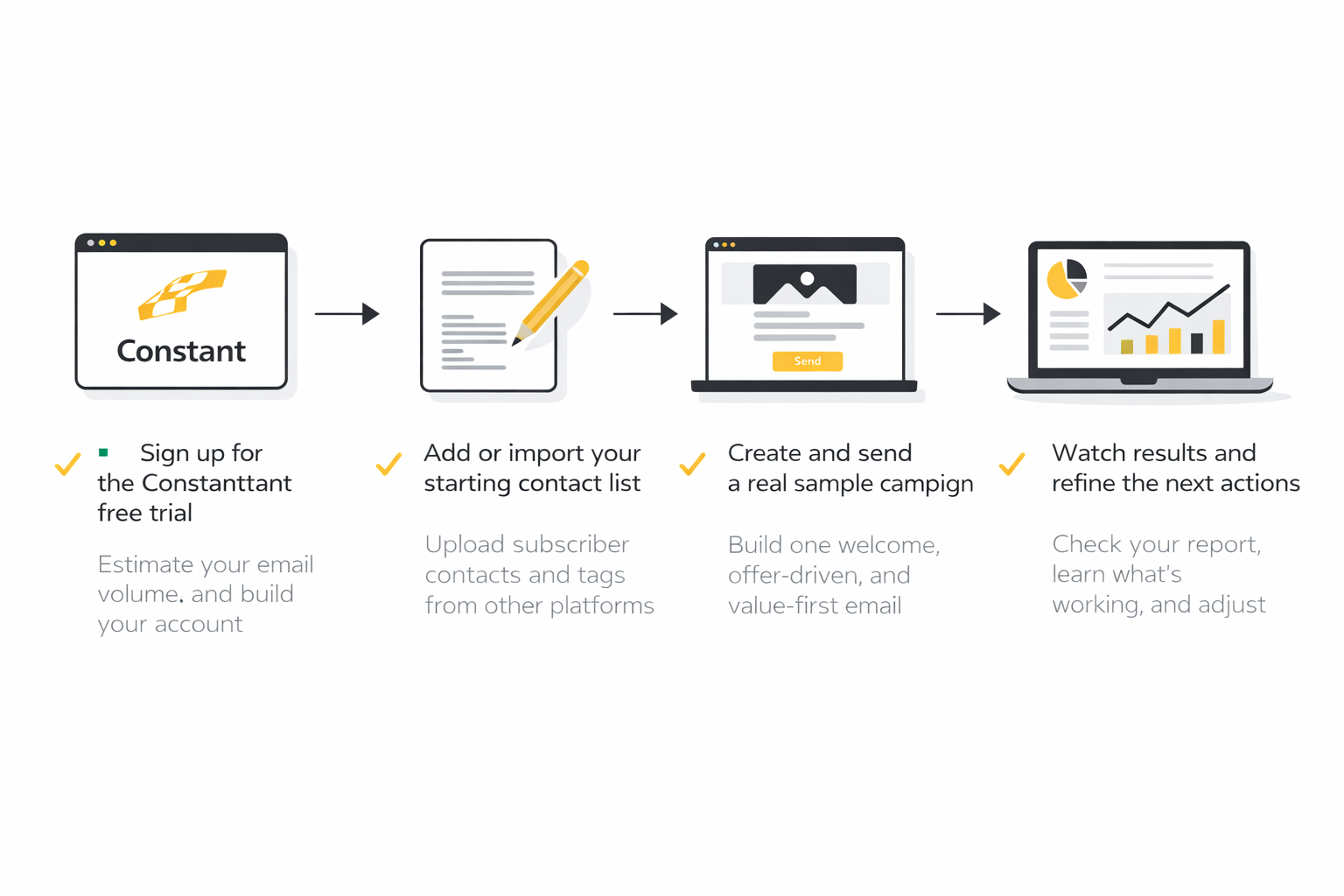
Week three is where you pressure-test the system. Open the Automation Path Builder, create one basic flow, and decide whether the logic makes sense when you are adding triggers, actions, tags, or follow-up steps. If you reach this point and the builder still feels understandable, that is a strong sign the platform can support more than one-off blasts.
Week four should be about visibility and decision-making. Move into the campaign calendar, review what you built, and ask whether you can see your next month of marketing clearly from one place. Constant Contact’s calendar is designed to show emails, social posts, ads, events, surveys, landing pages, SMS, and other campaign activity in a single view, so this is the moment to decide whether the platform helps you operate with more discipline or just gives you more screens to manage.
How to Judge the Trial Like a Buyer, Not a Browser
Do not measure the trial by whether you liked the interface in the first ten minutes. Measure it by whether you can complete the core jobs that matter to your business without getting stuck, duplicating work, or needing too many workarounds. That means your notes should focus on execution: how long it took to launch a campaign, how easy it was to build a form, how clearly automation steps behaved, and whether reporting views answered the questions you actually had.
It is also smart to separate “nice feature” from “real operational value.” A feature can look impressive during a trial and still do very little for your business if it does not fit your workflow. What matters is whether the platform helps you create repeatable marketing systems, because that is what justifies paying after the free period ends.
By the end of the 30 days, you should be able to answer a few blunt questions with confidence. Can you create campaigns quickly, collect leads cleanly, automate at least one important follow-up path, and see your activity in a way that helps you stay organized? If the answer is yes, the Constant Contact free trial has done its job, and the next step is to look closely at which features are actually worth testing first at a deeper level.
What the Numbers Should Tell You
A Constant Contact free trial is not just about building emails. It is about learning whether your numbers tell a coherent story once campaigns start going out. If the platform gives you enough visibility to understand what happened, why it happened, and what to do next, that is a real product advantage. Brevo’s 2025 benchmark report puts the average email open rate at 21% and average click-through rate at 3.96%, but the more important point is how widely results vary by industry and audience quality.
That variation is exactly why random benchmark-chasing is a bad way to judge a trial. The same Brevo dataset shows some sectors opening far above the average while click performance still tells a very different story, which means a healthy-looking open rate does not automatically mean your campaign is persuasive. During a trial, you want to use benchmarks as a rough frame, not as proof that your setup is working.
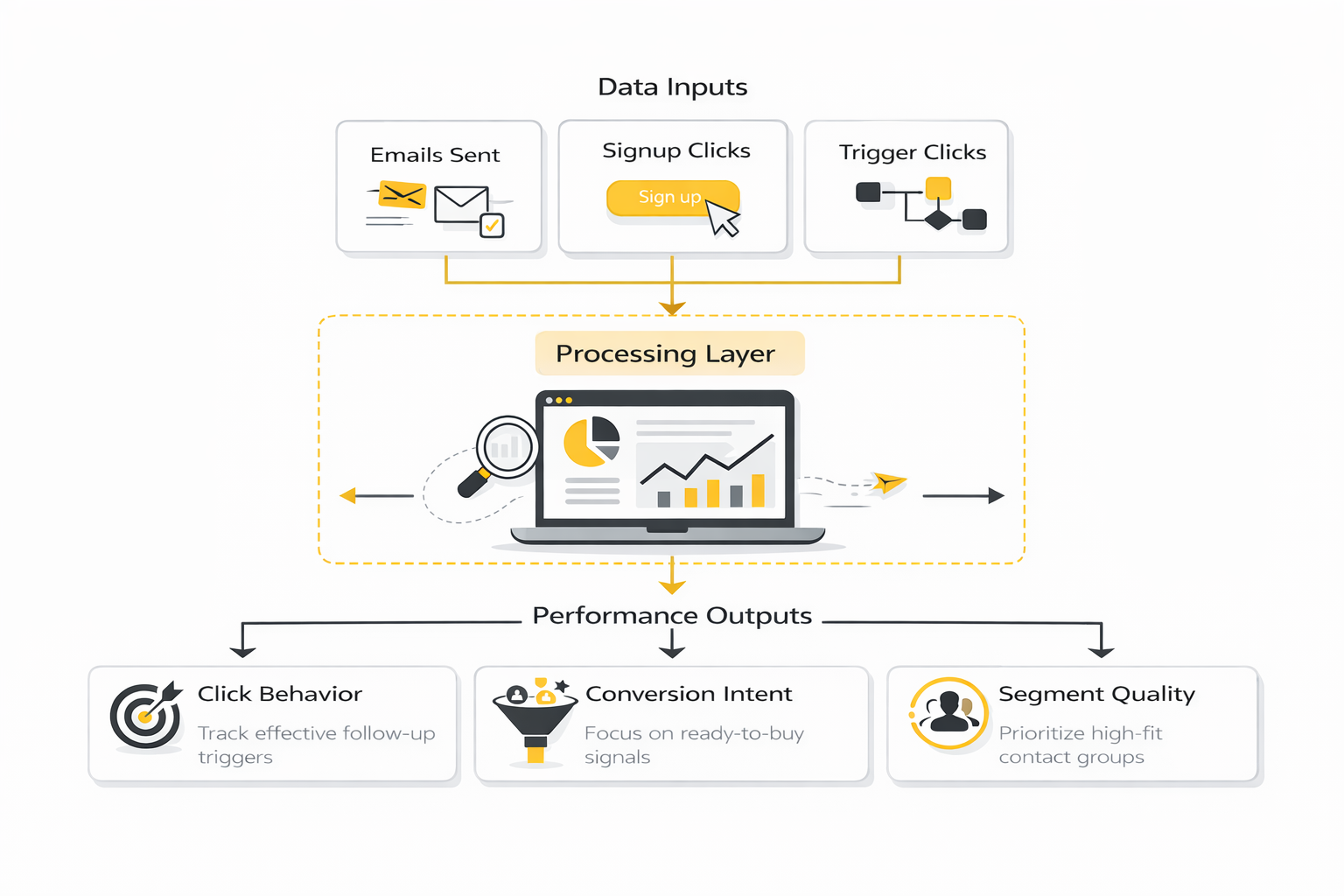
The action this should drive is simple. Look at your numbers in layers. Start with whether emails are being delivered cleanly, then whether people open, then whether they click, and finally whether those clicks reflect real interest instead of technical noise.
The Metrics That Actually Matter During the Trial
Open rate is still useful, but it is no longer strong enough to stand on its own. Constant Contact defines open rate as unique opens divided by delivered emails, while other platforms now warn that privacy protections and automated systems can inflate that number, especially after Apple Mail Privacy Protection changed how opens are recorded. The practical takeaway is that an open rate is best treated as a subject-line and sender-trust signal, not a final verdict on campaign success.
Click rate matters more because it moves closer to visible intent. Constant Contact’s own reporting help explains click rate as unique clicks divided by delivered emails, which makes it a better reality check when you want to know whether the content and call to action were strong enough to create movement. If opens are decent but clicks stay weak, the problem is usually not awareness. It is usually message-to-offer alignment.
Click-through rate and click-to-open style thinking matter because they separate curiosity from action. If people open but do not click, your subject line may be doing more work than the body of the email. That should push you to tighten the offer, simplify the design, reduce competing links, and make the primary next step impossible to miss.
How to Interpret Trial Results Without Fooling Yourself
One campaign is not a pattern. If you use the Constant Contact free trial to send a single email and then overreact to the result, you are not really evaluating the platform. You are mostly measuring timing, audience mood, and whether that one message happened to match what subscribers cared about that day.
A more useful read comes from comparing a few sends with different purposes. Test one welcome-style message, one promotional or offer-driven email, and one value-first newsletter or update. When the reporting starts to show where engagement consistently rises or falls, the data becomes operational instead of decorative.
This is also where list quality shows up fast. High bounce rates, weak clicks, or unstable engagement across similar sends often point to list hygiene and targeting issues rather than software limitations. If the numbers improve when you tighten the segment or simplify the audience, that tells you the platform is probably not the bottleneck. Your targeting is.
The Reporting Traps to Watch For
The biggest trap is treating inflated signals as proof of traction. Brevo now explicitly notes the impact of Apple MPP and detected system opens, and Constant Contact added bot click filtering because non-human interactions can distort click data too. That means unusually high activity is not always a win. Sometimes it is just machine noise wearing a human mask.
The second trap is obsessing over opens while ignoring conversion intent. A campaign with a lower open rate but stronger click behavior can be healthier than one with flashy opens and no action. In other words, the trial should teach you whether Constant Contact helps you spot meaningful momentum, not whether it can generate pretty percentages.
The right action after reviewing the data is not to panic and switch platforms immediately. It is to make one deliberate change at a time. Improve the subject line, simplify the body, sharpen the call to action, or segment the audience more carefully, then compare what happens next. If the reporting makes those decisions easier, the trial is giving you real value. If it does not, that becomes a serious strike against upgrading.
How Constant Contact Stacks Up Against Other Options
By this point in the Constant Contact free trial, the question is no longer whether the platform works. The real question is whether it is the right level of tool for the way you plan to grow. That is a different decision, and it matters because the best email platform for a local business is not always the best one for a fast-scaling brand, an agency, or a team that wants deeper automation across multiple channels.
Constant Contact tends to make the most sense when ease of use, campaign speed, and a manageable learning curve matter more than building a highly customized growth machine. That is a legitimate advantage, not a weakness. Plenty of businesses do not need a giant system with endless branching logic if what they really need is to create emails, capture leads, organize campaigns, and stay consistent.
The tradeoff is that simplicity can become a ceiling. Once your team wants deeper CRM behavior, broader pipeline management, heavier automation logic, or a more unified sales-and-marketing operating system, comparison shopping becomes necessary. That is where the trial should shift from “do I like this?” to “will this still fit six months from now?”
Where Simpler Tools Win
There is a reason lightweight and midweight email platforms remain popular. Smaller teams usually do better with a system they will actually use than with a more advanced platform they never fully implement. Friction kills follow-through faster than missing features do.
This is also where cost structure matters. Platforms like Brevo’s pricing lineup emphasize lower entry pricing and multi-channel basics, while Moosend’s pricing page leans into affordable automation, landing pages, forms, and unlimited email sends in its core positioning. If your main goal is efficient email execution without a giant operational rebuild, those comparisons are worth making because they expose what you are really paying for.
That does not automatically make Constant Contact the wrong choice. It just means you should be honest about what kind of buyer you are. If you value clarity, fast setup, and a business-friendly interface over squeezing every advanced workflow into one platform, Constant Contact may still be the better fit even if another tool looks stronger on a feature checklist.
Where More Advanced Systems Pull Ahead
The moment your business starts demanding more than campaign management, the comparison changes. Once lead capture, nurture, booking, CRM movement, internal workflows, and sales follow-up all need to live in one place, an all-in-one system starts becoming more attractive. That is why platforms like GoHighLevel’s pricing and trial setup appeal to agencies and service businesses that want unlimited contacts, broader workflow control, and more operational depth from the start.
This is not just about having more features. It is about what happens when the marketing stack starts spreading across too many tools. If email lives in one system, forms in another, automations in a third, and lead handling in a CRM somewhere else, the hidden cost becomes coordination, not software subscription price.
That is the risk advanced teams need to think about before upgrading from a Constant Contact free trial. A platform can feel great in the email layer and still create drag once the business needs tighter cross-functional control. If your future roadmap clearly points toward heavier automation and service workflow orchestration, that should carry more weight than whether the email editor felt nice on day three.
The Risks Buyers Miss Until It Is Too Late
One of the most common mistakes is buying for the present and ignoring the next stage of complexity. A business with a small list and simple promotions may not feel any constraint today, but that can change quickly once segmentation deepens, offers multiply, or multiple team members need structured access to the same operating system. The trial period is the safest time to spot that mismatch.
Another risk is confusing feature access with practical execution. Many platforms can technically do a task, but that does not mean the task is easy to maintain at scale. During your trial review, pay attention to how many steps it takes to build and edit a workflow, how clearly subscriber movement is visible, and whether non-technical team members could realistically manage the system without turning every change into a project.
There is also a strategic risk on the opposite side. Some buyers overcorrect, choose a platform that is far more complex than they need, and then lose momentum because nobody actually uses the advanced system properly. That is why the best decision is not the most powerful platform. It is the platform your business can run consistently with the people, time, and discipline you actually have.
Expert-Level Questions to Ask Before You Upgrade
At this stage, the smartest move is to stop asking whether the Constant Contact free trial felt “good” and start asking whether it fits your business model. Can your current and future lead sources plug into it cleanly? Can your team build repeatable campaigns without outside help? Can you see a credible path from your current volume to your next stage of growth without rebuilding everything?
You should also think about channel strategy, not just email strategy. If your business increasingly depends on sales funnels, appointment booking, text follow-up, CRM movement, and tighter lifecycle automation, tools such as GoHighLevel’s trial path, Brevo’s multi-channel positioning, or Moosend’s automation-first approach deserve a hard look. Not because they are automatically better, but because they serve different growth models.
That is the right lens for closing out the trial. You are not choosing the nicest dashboard. You are choosing the system that best matches your next year of execution. From there, the final step is straightforward: decide exactly when upgrading makes sense, and when walking away is the smarter move.
When Upgrading Makes Sense After the Trial
The Constant Contact free trial has done its job when you can answer one hard question without hesitation: does this platform make your marketing easier to run every single week? If the answer is yes, upgrading makes sense because you are not paying for access anymore. You are paying to keep the system you already proved you can use.
That usually means a few things are already true. You have built at least one real campaign, tested lead capture, explored automation, and reviewed reporting without feeling lost. The official trial page and free trial help article make it clear that the current trial is 30 days, requires no credit card, and lets you create assets you can keep when you become a customer, so the upgrade decision should be based on traction, not guesswork.
Upgrading also makes sense when your team values speed over complexity. If you can see that Constant Contact will help you send consistently, build your list, and keep campaigns organized, there is no prize for forcing yourself into a more advanced stack too early. Sometimes the best strategic choice is the tool that removes friction, not the one with the biggest feature page.
Walking away is also a valid outcome. If the trial showed that you need deeper CRM logic, heavier automation, or broader operational control, that is a useful conclusion, not a failure. The smartest buyers use a trial to eliminate bad fits quickly, and the official plans and pricing page plus Constant Contact’s March 2026 update on Lite, Standard, and Premium plans make it easier to judge whether the next step is upgrade, comparison shopping, or a clean exit.
FAQ
Does Constant Contact have a free trial right now?
Yes. Constant Contact is currently offering a 30-day free trial with no credit card required, based on its official signup page and help documentation. That makes it a real trial, not a billing trap disguised as one.
Do I need a credit card to start the Constant Contact free trial?
No. The current official trial flow says no credit card is required, which lowers the risk and makes it easier to test the platform seriously before making a payment decision. That matters because a free trial should help you evaluate fit, not pressure you into an accidental subscription.
How long does the Constant Contact free trial last?
The current trial length is 30 days. That is enough time to test campaign creation, forms, automations, and reporting if you use the time intentionally instead of waiting until the last week to explore the product.
Is there a forever-free plan after the trial ends?
Constant Contact promotes a free trial, not a permanent free plan, on its current public pages. That means you should assume the goal is to either upgrade to a paid plan or move on once the trial window closes. If you need an indefinitely free product, this is the wrong buying category to compare it against.
What can I actually use during the trial?
Constant Contact says the trial is your time to explore campaign types and features across the platform, not just the email editor, and its help article specifically mentions tools like social features and landing pages. In plain English, you should use the trial to test how the platform works as a system, not as a one-email toy.
Will the things I build during the trial disappear?
No, not if you upgrade. Constant Contact’s trial help page says that anything you create during the trial will be available when you become a customer. That is useful because it means your test work can become real production work instead of getting thrown away.
What should I test first during the trial?
Start with one real campaign, one signup path, and one simple automation. That combination tells you far more than endlessly clicking through menus because it shows whether the platform helps you create, capture, and follow up in a way that feels natural. After that, review the calendar and reporting views to decide whether the workflow still looks clean once multiple activities are in motion.
Is open rate enough to judge whether the trial is working?
No. Open rate is still a directional signal, but it is not strong enough by itself because privacy protections and machine-generated activity can distort what looks like engagement. During your Constant Contact free trial, click behavior, conversion intent, and the quality of the audience segment matter more than chasing a pretty open-rate number.
How do I know whether Constant Contact is the right long-term fit?
You know it is a fit when the platform feels sustainable, not just impressive. If your team can build campaigns quickly, manage contacts cleanly, understand the automation logic, and make decisions from the reporting without heavy confusion, that is a strong sign. If you keep running into structural limitations during basic use, the trial is telling you to keep looking.
Is Constant Contact better for beginners or advanced teams?
It generally makes more sense for businesses that want a practical, approachable marketing platform rather than a deeply technical growth operating system. That is not an insult. For many small businesses, the right tool is the one they will actually use well every week.
When should I upgrade after the free trial?
Upgrade when you have proof, not hope. If the trial helped you build real assets, clarified your workflow, and showed that the platform removes friction instead of adding it, paying makes sense. If you are still unsure what the system is helping you do better, keep your money and reassess.
What is the biggest mistake people make with a Constant Contact free trial?
They treat it like a tour instead of a decision window. Browsing features can make almost any tool look decent for a day. The smarter move is to use the trial to run a few real workflows, measure what happened, and decide whether the platform improves execution enough to earn a permanent place in your stack.
Work With Professionals
Explore 10K+ Remote Marketing Contracts on MarkeWork.com
Most marketers spend too much time chasing clients, competing on crowded platforms, and losing a percentage of every project to middlemen.
MarkeWork gives you a better way. Browse thousands of remote marketing contracts and connect directly with companies desperate to hire skilled marketers like you, without platform commissions and without unnecessary gatekeepers.
If you're serious about finding better opportunities and keeping 100% of what you earn, explore available contracts and create a profile for free at MarkeWork.com.