

A lot of people search for constant contact free expecting a forever-free email marketing plan. That is not what Constant Contact is offering right now. On its current official pages, the company positions the offer as a 30-day trial, not a permanent free tier, and its help documentation says the trial is capped at 100 total email sends even though you can upload contacts and create segments.
That distinction matters more than it sounds. A real free plan lets you build habits, test forms, and learn the platform over time without a deadline, while a short trial is better for a focused evaluation with a clear go or no-go decision. If you go in thinking you are getting a forever-free account, you can waste the trial on setup work and never properly test the parts that actually influence results.
This article is built to help you make that decision fast and cleanly. We are not going to treat “free” as a marketing slogan. We are going to look at what the offer really gives you, where it is useful, where it feels tight, and when a platform with a real free tier or a different trial structure would be a better fit.
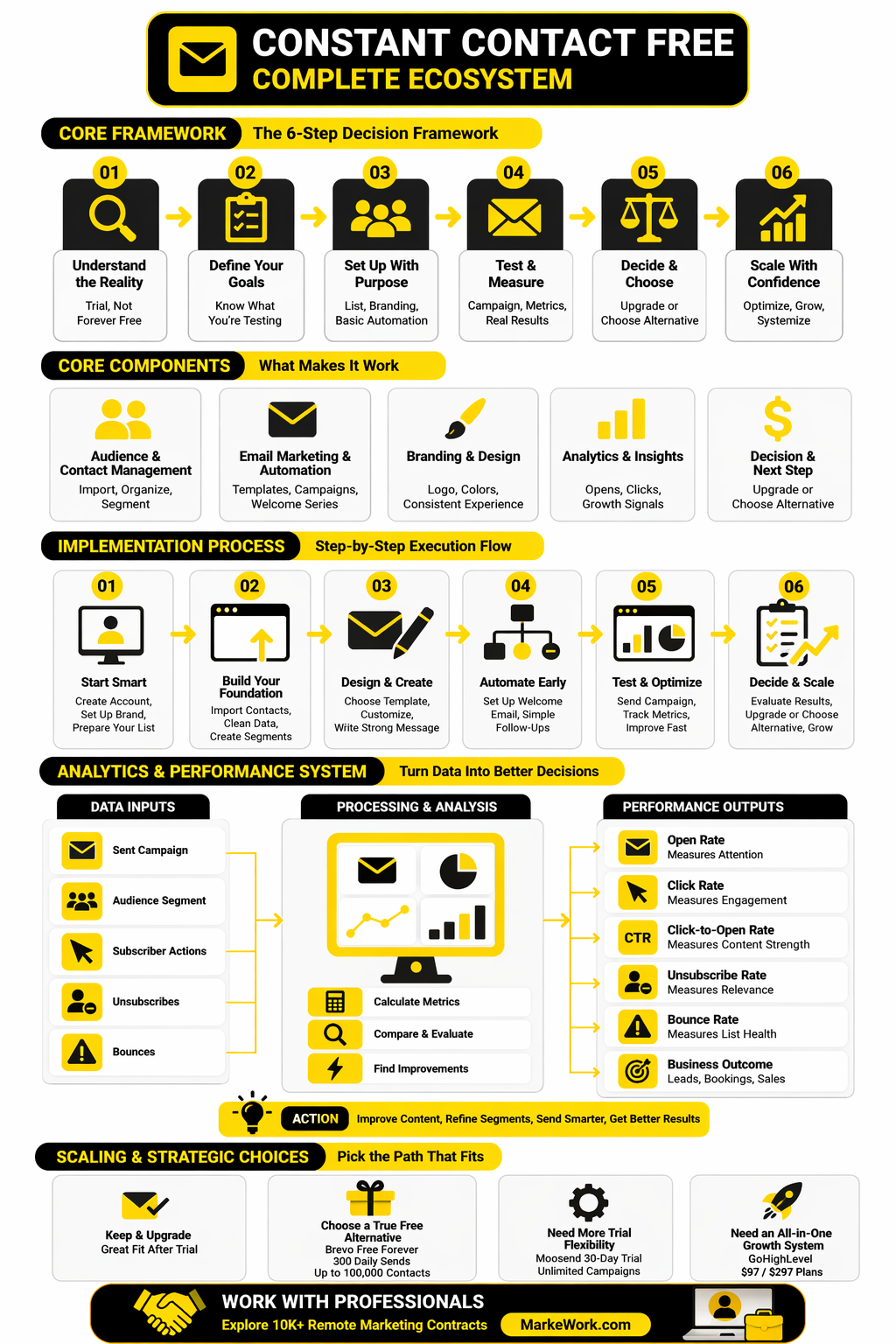
Article Outline
- What Constant Contact Free Actually Means
- Why This Offer Matters Before You Commit
- A Simple Framework for Evaluating the Trial
- The Core Features You Can Test
- How to Implement Constant Contact Professionally
- When a True Free Alternative Makes More Sense
Why This Offer Matters Before You Commit
Email is still attractive because the economics can be very strong when the channel is used well. Constant Contact itself highlights a $36 return for every $1 spent on email marketing, and Litmus publishes the same headline benchmark in its ROI resource center. That does not mean every small business will hit those numbers, but it does explain why so many founders and marketers keep hunting for a low-risk way to test email software before paying monthly.
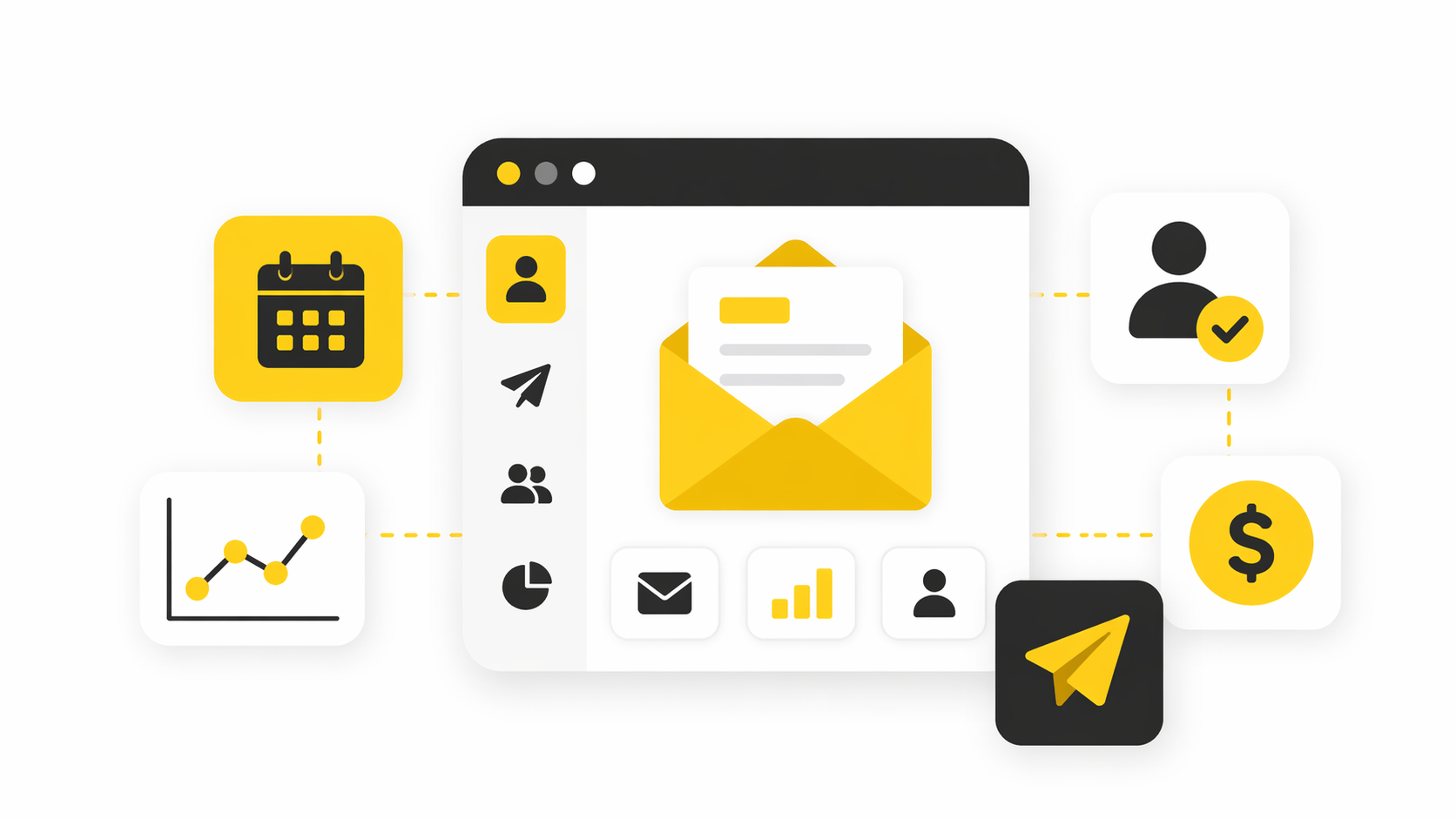
The problem is that “free” can hide two very different buying experiences. One is a sandbox that lets you learn slowly and keep operating at a basic level for months. The other is a short evaluation window, and that is much closer to what Constant Contact is offering today. Its own help documentation says the free trial allows only 100 email sends total, which is enough for setup tests and a very small live send, but not enough for a long, casual rollout.
That makes the keyword constant contact free more about intent than price. Some people want the cheapest path into a polished email platform with support, templates, and a familiar interface. Others want a true no-cost starting point, and those are not the same thing. If you are in the second camp, platforms with an actual free tier, such as Brevo, may line up better with your goal, while trial-based tools like Moosend are closer to Constant Contact’s model.
There is another practical reason this matters before signup. Constant Contact’s current pricing structure starts with a Lite plan at $12 per month, but the company also notes that pricing depends on contacts and email sends, and its knowledge base explains that overage fees can apply when you go past your monthly allowance. So the real question is not just whether you can start free. It is whether the platform stays economically reasonable once your list grows past the trial stage.
A Simple Framework for Evaluating the Trial
The cleanest way to judge constant contact free is to stop asking whether it exists and start asking what job you need it to do. For most buyers, there are only four useful tests: can you build fast, can you send with confidence, can you automate the basics, and can you justify the upgrade once the trial ends. That framework is better than obsessing over the word “free,” because a short trial can still be valuable if it answers those four questions decisively.
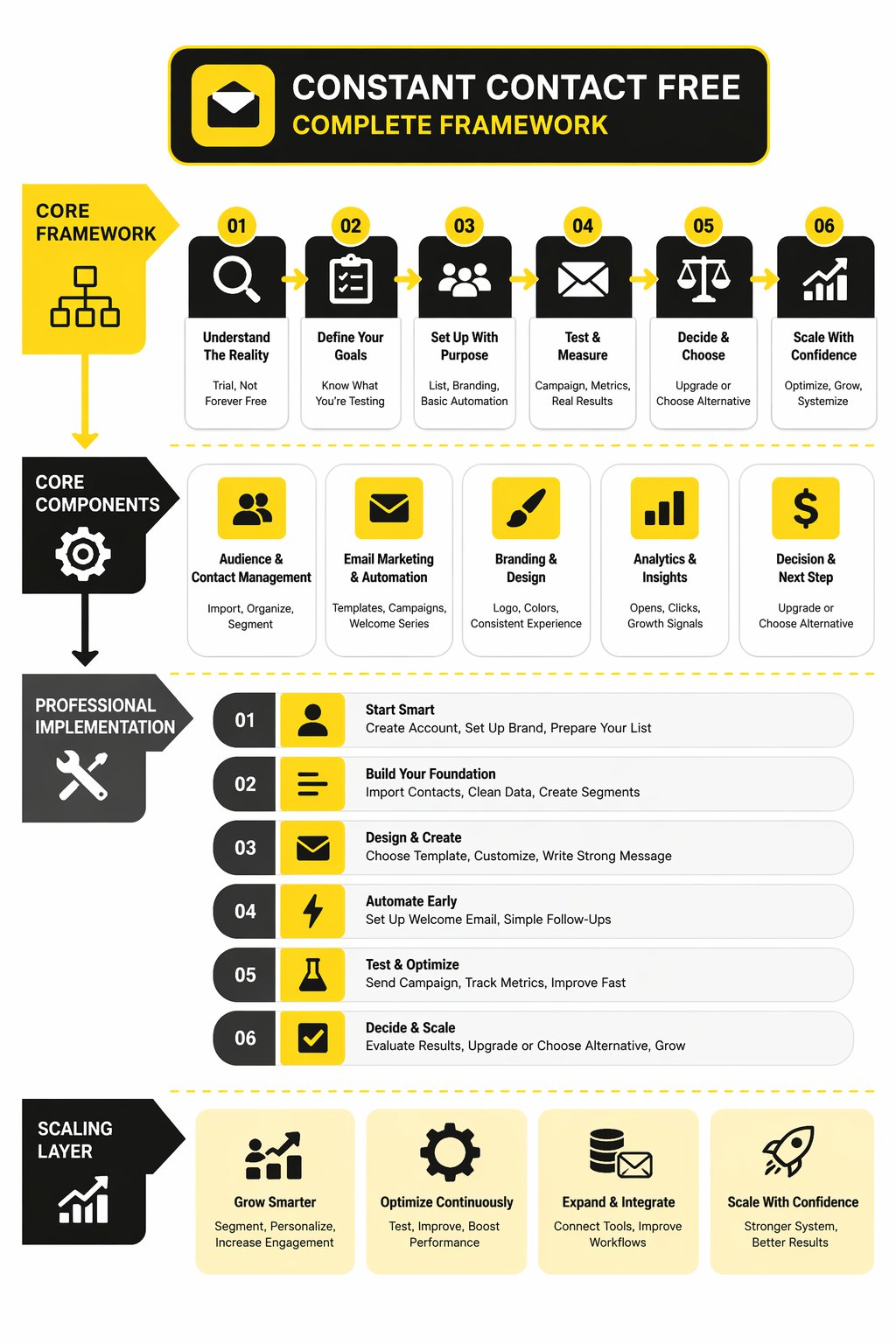
First, look at speed to first campaign. Constant Contact’s product pages emphasize drag-and-drop email creation, templates, social posting, AI writing help, and a ready-to-go welcome series on the entry plan. If your business needs to get something live quickly without a steep learning curve, that matters more than having a forever-free badge on the pricing page.
Second, look at testing room. A trial with 100 total sends is enough to check imports, segmentation, rendering, branding, and maybe one tightly controlled live send, but it is not enough for weeks of experimentation across multiple audiences. That means you should enter the trial with a checklist, not a vague plan, or you risk spending the entire window on setup and learning very little about performance.
Third, look at what happens after the trial. Constant Contact currently frames its paid lineup around Lite, Standard, and Premium, with more automation and advanced growth tools as you move up. If you already know you will need deeper reporting, more complex journeys, or broader acquisition features, the trial should be used to validate those upgrade paths, not to pretend the free stage will last.
Finally, look at fit versus alternatives. If your real bottleneck is email and CRM simplicity, Constant Contact may still be worth testing even with a limited trial. If you mainly need a genuinely free entry point, then Brevo’s free plan or even adjacent low-cost tools for audience building and publishing, such as Buffer, may deserve a place in the comparison before you commit to a paid email stack.
The Core Features You Can Test
Once you stop treating constant contact free like a forever-free plan, the next useful question is simple: what can you realistically validate during the trial window. The answer is more practical than exciting. You are not trying to build a complete long-term marketing system in 30 days with a tight send cap. You are trying to pressure-test the parts that will either save you time every week or make you regret the upgrade later.
That means the trial is best used as a feature validation sprint. You want to see whether the editor feels fast, whether contact management is clean enough for your list, whether basic automation works without friction, and whether the reporting is useful enough to guide actual decisions. If those pieces feel strong, Constant Contact becomes a serious paid contender. If one of them feels cramped or awkward, the word “free” stops mattering very quickly.
Email Creation and Template Workflow
The first thing most people should test is the actual campaign-building experience. Constant Contact has leaned hard into ease of use for years, and that matters because a polished interface is not just a nice extra. It changes whether your team will actually send consistently or keep postponing campaigns because every newsletter feels like a chore.
This is where the trial can be surprisingly useful even with limited sends. You can build drafts, test layout options, check brand consistency, and see whether the editor helps you move faster than your current workflow. If your business sends newsletters, promos, announcements, or event updates on a regular basis, this part of the product matters more than advanced bells and whistles because it is the layer you will touch constantly.
You should also pay attention to how much cleanup the platform creates. Some email tools look fine in a demo and then become annoying when you need to swap sections, reuse blocks, tweak spacing, or adapt one campaign into three versions. A good trial outcome here is not “I sent one email.” It is “I can build repeatable campaigns without fighting the software.”
Contact Uploads, Segments, and List Organization
The second thing to test is how the platform handles your audience data. Constant Contact’s trial lets you upload contacts and create segments, which is important because a clean list structure usually matters more than a flashy first send. If you cannot organize people properly, your email marketing gets sloppy fast and your results usually follow.
This is the point where many buyers learn whether a platform is actually built for their business or just looks beginner-friendly on the surface. A local service company might only need a few clean lists and basic follow-up logic. A store, publisher, nonprofit, or multi-offer business usually needs better segmentation discipline, because sending the same thing to everybody is one of the fastest ways to burn attention and train subscribers to ignore you.
The smart move during the trial is to import a realistic sample of your audience, not a fake mini-list that tells you nothing. Test tags, segments, naming conventions, and the logic you would actually use after paying. If that feels clunky, the platform will not magically become easier once your list is bigger.
Basic Automation Is the Real Make-or-Break Test
Automation is where the evaluation gets serious. Constant Contact positions automation as a core growth feature, and that is exactly where a short trial can still reveal a lot. You do not need months to see whether the logic feels intuitive, whether the templates are usable, and whether the path from trigger to message makes sense.
For most small businesses, the important automation tests are not exotic. They are welcome emails, simple nurture flows, basic follow-ups, and the kind of sequence that keeps new subscribers from going cold immediately after signup. If a platform makes those workflows easy to launch and easy to edit, that is real value. If it makes them feel hidden, rigid, or oddly complicated, that becomes a long-term tax on your team.
This is also the point where you should be honest about your ambition. If you just want a dependable email system with light automation, Constant Contact may be enough. If you already know you want deeper multi-step sales flows, broader CRM logic, or a more aggressive all-in-one setup, something like GoHighLevel may be closer to your end state, while Brevo can be a better fit if you want more breathing room before committing to paid email software.
Reporting Should Help You Decide, Not Just Decorate a Dashboard
A lot of people under-test reporting during a free trial, and that is a mistake. You do not need a huge send volume to judge whether the reporting interface is useful. What you need to know is whether performance data is clear enough to guide subject lines, segments, timing, and follow-up decisions without turning every campaign review into detective work.
The most practical reporting test is not about advanced analytics at first. It is about whether you can open the dashboard, understand what happened, and decide what to do next. If the answers are obvious, that is a strong signal. If the dashboard looks polished but leaves you guessing, it will keep costing you time after the trial ends.
This matters even more for lean teams. A founder, solo marketer, or small in-house team usually does not need enterprise-level reporting complexity. They need signal, not noise. The right platform is the one that makes better next actions obvious, not the one that simply produces more charts.
The Hidden Test Is Whether the Product Matches Your Actual Operating Style
There is one more feature test that people often miss because it does not sit neatly on a pricing table. It is the question of operating style. Some tools are technically capable but still wrong for the way you work, and that mismatch only becomes obvious when you try to build real campaigns, segment real contacts, and sketch real automation inside the platform.
Constant Contact tends to make the strongest case when a business wants straightforward execution without a giant setup burden. That can be a very good thing. Not every company needs a stack that looks sophisticated on paper and turns into a maintenance project in practice. Sometimes the better choice is the tool your team will actually use consistently.
That is why the trial should be judged against your weekly rhythm, not just your wishlist. Can you imagine building next month’s campaigns here without friction. Can another team member step in without a long handoff. Can you keep the system clean as your list grows. Those questions matter more than the label on the signup button.
How to Get the Most Out of the Trial Without Wasting It
A short trial becomes much more valuable when you enter with a plan. The wrong way to test constant contact free is to sign up, click around for a week, import a few contacts, and hope clarity appears on its own. The right way is to treat the trial like a controlled buying process with a fixed checklist and a specific outcome.
Start with one real campaign goal. That could be a welcome email, a newsletter, an event announcement, or a simple promotional send. Then import a realistic segment, build the campaign, review the editor, map one basic automation, and inspect the reporting flow you would use after launch. That gives you a far better answer than trying to sample every feature just because it exists.
You should also define your upgrade threshold before the trial ends. Ask yourself what would make the paid plan worth it immediately. Maybe that is a smoother editor than your current tool. Maybe it is easier segmentation. Maybe it is dependable automation without technical overhead. If you cannot name that threshold clearly, you are probably browsing features instead of making a decision.
In the next section, the article moves from testing features to using the platform well in a real business setting. That is where the conversation shifts from “can this work” to “how do you implement it professionally so the trial turns into actual marketing momentum.”
How to Implement Constant Contact Professionally
A professional setup starts with discipline, not design. When people search for constant contact free, they often focus on whether they can get in without paying, but the more important question is whether they can build a clean system before the trial clock runs out. Constant Contact’s current setup makes that especially important because the offer is a time-limited trial, and its paid plans separate lighter email use from more advanced automation and reporting.
The right implementation mindset is simple: use the trial to build one solid email engine, not five half-finished experiments. That means a clean list, one clear signup path, one welcome sequence, one repeatable campaign format, and one reporting routine your team can actually keep using. If you can make those pieces work together, you learn far more than you would by bouncing around every feature tab in the account.
Start With a Tight Audience and a Single Goal
The first professional move is narrowing the scope. Importing every contact you have and trying to market to all of them at once is usually the fastest route to confusion, and it is a bad way to judge a short trial. Constant Contact supports multiple contact import methods and segmentation workflows, so the better play is to bring in one realistic audience slice first and build around a single campaign objective.
That objective should be specific enough to guide setup decisions. A welcome flow for new leads, a monthly newsletter for existing subscribers, or a limited promotional sequence for a known segment all work well because they force you to define audience, message, timing, and success criteria. A vague goal like “test email marketing” sounds harmless, but in practice it creates messy lists, generic emails, and bad conclusions.
This is also where professionalism starts showing up in the small details. You need naming conventions for lists and segments, a reason for every field you import, and a clear rule for who belongs where. Those decisions feel minor on day one, but they are exactly what keep the system usable once your audience grows.
Build Your Signup and Consent Flow Before You Build More Emails
Most weak implementations start in the wrong place. People open the email editor first because it feels productive, but the real foundation is the signup path and the consent standard behind it. If the entry point is sloppy, everything downstream gets harder, from segmentation to deliverability to automation performance.
Constant Contact’s automation tools are built to react to new subscribers and list growth actions, which means your form flow is not a side detail. It is the trigger layer for the entire system. The platform’s current automation documentation centers welcome paths around subscribers who join through list growth tools, not around random bulk imports, which is exactly why the signup experience deserves attention before you start drafting campaigns.
If you need a more flexible form layer than your email platform alone provides, this is where an external capture tool can help. A builder like Fillout can make lead capture cleaner, while a conversational entry point like ManyChat can make sense if your audience is already engaging through chat-first channels. The point is not to bolt on more tools for the sake of it. The point is to make sure the people entering your list are entering cleanly, intentionally, and in a way that sets up the right automation from the start.
Create the Minimum Viable Email System
Once the audience and signup logic are clear, you can build the minimum viable system. This is where the implementation becomes tangible. Instead of thinking in terms of “campaigns,” think in terms of a small operating model that someone else on your team could understand in one glance.
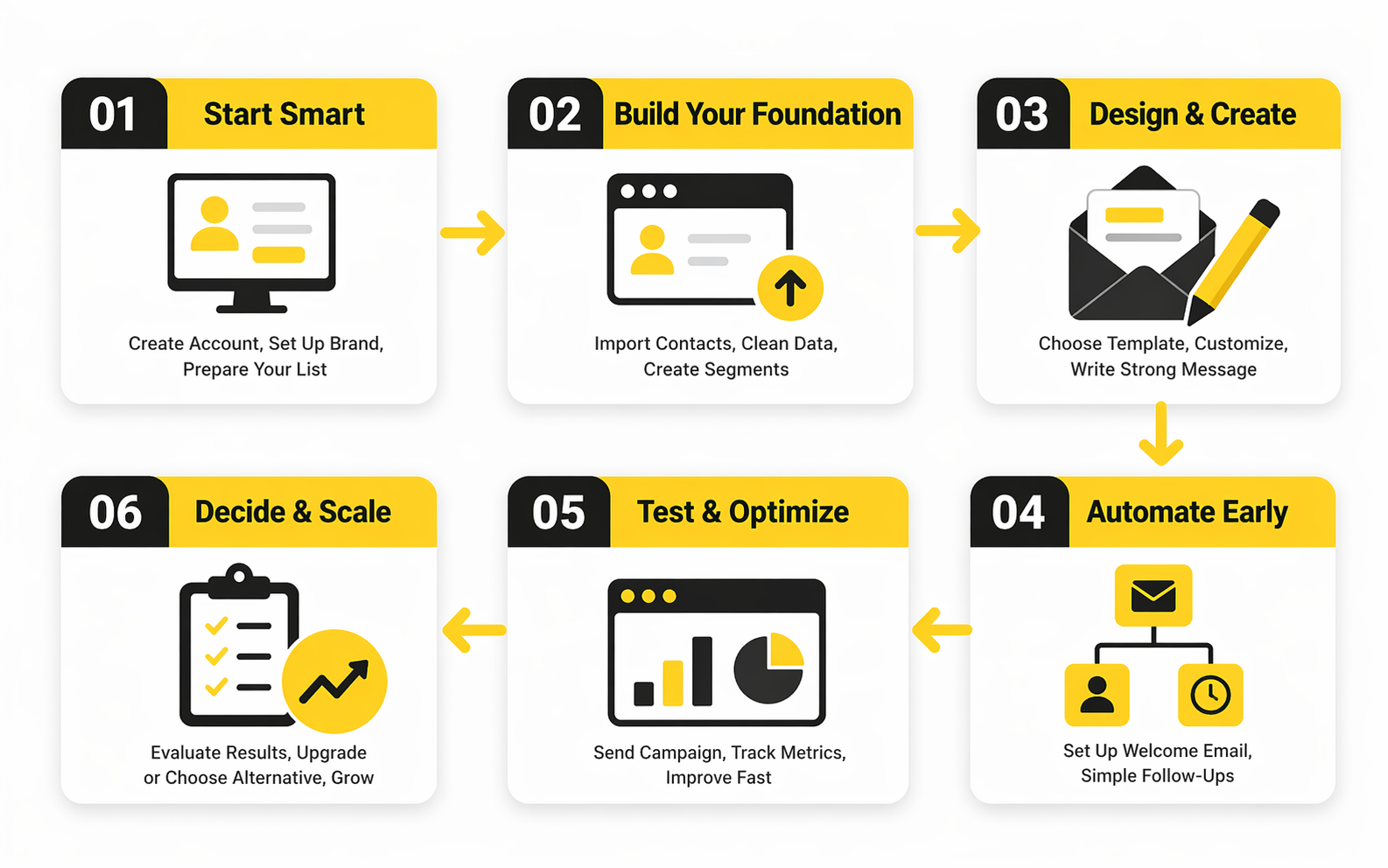
A good trial implementation usually follows this sequence:
- Import one clean audience segment.
- Create one list or segment structure with obvious naming.
- Build one signup form or connected lead source.
- Create one welcome email or welcome path.
- Draft one repeatable newsletter or promotional template.
- Send a controlled test.
- Review results and adjust the system before adding complexity.
That sequence works because it matches how email programs actually mature. You establish intake first, then response, then recurring communication, then optimization. Constant Contact’s current product structure supports that progression with list growth tools, welcome automation, campaign creation, and reporting layers that expand as you move up the plans.
What matters here is restraint. You do not need multiple automations, endless segments, or a library of templates to know whether the platform fits your business. You need one compact system that feels stable, understandable, and repeatable.
Use Automation to Remove Manual Work First
A lot of marketers misuse automation during trials because they chase sophistication too early. They want branching logic, layered conditions, and edge-case flows before they have even proved the basics. That is backward. The first job of automation is to remove manual work you should not have to do twice.
For most small businesses, the highest-value starting point is still the welcome sequence. Constant Contact’s current automation documentation puts that front and center for a reason: it creates an immediate response to subscriber intent, and it does it without requiring a huge operational lift. A proper welcome path also lets you test timing, branding, messaging, and subscriber experience in one contained workflow.
There is a second advantage here that people miss. A welcome path reveals whether the platform’s automation model feels natural to your team. If building and editing that sequence feels obvious, you have a solid base. If even the simplest automation feels buried or awkward, you have learned something valuable before paying for months of access.
Protect Deliverability From Day One
Professional implementation is not just about what you send. It is also about what you refuse to send. List hygiene, permission quality, and audience relevance have an outsized effect on results, and they matter even more when you are testing a new email platform because poor early data can distort your view of the product.
That is why imported contacts need scrutiny. Old addresses, weak consent, and inactive contacts can create bounce and engagement problems that have nothing to do with Constant Contact itself. Broader deliverability guidance continues to point toward permission-based collection, clean lists, and careful onboarding as the safest foundation for sustained email performance.
This is not glamorous work, but it is the difference between a system that scales and a system that slowly poisons itself. If your list is messy, fix that before you judge subject lines, templates, or automations. Otherwise you are asking the platform to compensate for a data problem it did not create.
Build Reporting Into the Weekly Process
A professional implementation is incomplete if reporting only happens when someone remembers to check it. The whole point of the initial system is to create a weekly rhythm that can survive beyond the trial. That means every send should roll into a short review loop: what went out, who received it, what happened, and what changes next time.
Constant Contact positions advanced reporting as one of the distinctions between plan levels, and that is useful because it forces a clear question during implementation: do you need better operational visibility badly enough to pay for it. If the answer is yes, the trial has done its job. If the answer is no, you have probably learned that a simpler or cheaper setup may suit you better.
The key is consistency, not complexity. A short reporting review after each send is usually enough to spot whether list quality is weak, whether the message is off, or whether one segment deserves more attention. When that loop becomes routine, email stops feeling like isolated campaigns and starts acting like a reliable growth channel.
Know When to Keep the Stack Simple and When to Expand It
Not every business needs a broader marketing stack on day one. Sometimes Constant Contact works best when it stays focused on email, signup capture, and a few core automations. That simplicity is part of the appeal, especially for teams that want steady execution more than technical depth.
But there are cases where a wider stack makes sense. If you want heavier CRM logic, more aggressive automation, or a more unified sales-and-marketing workflow, GoHighLevel may be the cleaner long-term fit. If you want a lighter free-entry path or more room to experiment before paying, Brevo remains one of the more relevant comparisons for buyers who care less about trial polish and more about ongoing cost flexibility.
That is the professional way to use constant contact free as a decision point. You are not trying to squeeze endless value out of a short no-cost window. You are using that window to build one clean system, validate one real workflow, and decide whether this platform deserves a permanent place in your stack.
The next section moves into that decision directly. Once implementation is clear, the final useful question is whether a true free alternative would serve your business better than upgrading inside Constant Contact.
What the Numbers Actually Tell You
By the time you reach this point, the question is no longer whether constant contact free exists in the way people hope it does. The real question is whether the trial gives you enough signal to judge the platform intelligently. That is where measurement matters, because a short trial can still be useful if you know which numbers deserve attention and which ones can mislead you.
The trap is treating every metric as equal. They are not. Open rates, click rates, unsubscribe rates, bounces, and downstream conversions each answer a different question, and mixing them together creates bad decisions. A clean analytics approach tells you where the problem lives, whether that is the list, the subject line, the message, or the offer itself.
Benchmarks Are Context, Not a Scorecard
Industry benchmarks are useful, but only when you use them as orientation rather than ego fuel. Mailchimp’s current benchmark page puts the overall average open rate at 35.63%, the overall average click rate at 2.62%, and the overall average unsubscribe rate at 0.22%, while the ranges shift meaningfully by industry. That matters because it keeps you from panicking when a campaign is normal for ecommerce but weak for nonprofits, or celebrating a high open rate when the click rate says the message itself did not land. (Mailchimp email benchmarks)
Campaign Monitor frames the same idea from a slightly different angle. Its guidance says a good open rate often falls between 17% and 28% depending on industry, and its broader email metric resources keep pointing people back to the relationship between opens, clicks, and click-to-open rate rather than one vanity number in isolation. That wider range is helpful because it reminds you that benchmark systems differ by dataset, methodology, and audience mix, so one benchmark source should never act like the final truth. (Campaign Monitor open-rate guidance)
The action this should drive is simple. Use benchmarks to ask better questions, not to grade yourself emotionally. If your numbers are outside normal ranges, that is not automatically failure. It is a clue about where to investigate next.
The First Metric Tells You About Reach, Not Persuasion
Open rate still has value, but it is a blunt tool. It mainly helps you judge subject line appeal, sender recognition, and whether the audience is interested enough to give you a first look. It does not prove the email itself worked, and that is where many trial users draw the wrong conclusion too early.
That matters when evaluating a short Constant Contact trial because one decent open rate can create false confidence. If people open but do not click, the problem is probably not visibility. It is usually the relevance of the message, the clarity of the call to action, or the match between audience and offer. Mailchimp’s benchmark structure and Campaign Monitor’s metric guides both reinforce that you need at least one more layer of measurement before calling a campaign healthy. (Mailchimp reporting metrics)
A strong implementation decision here is to use open rate as a top-of-funnel check, not a final performance verdict. Good opens tell you the email earned attention. They do not tell you whether that attention turned into action.
Click Rate Is Where the Trial Starts Getting Honest
Click rate is usually the first metric that forces realism into the conversation. Mailchimp’s overall benchmark puts the average click rate at 2.62%, while Campaign Monitor’s more recent guidance says a 2% to 3% CTR is often a healthy target range. Those numbers matter because they measure whether the email moved people beyond curiosity and into behavior. (Mailchimp email benchmarks) (Campaign Monitor metrics guide)
For a short trial, click rate is often more useful than open rate because it shows whether your email system is doing something commercially meaningful. A high open rate with a weak click rate usually means your subject line outperformed your content. A low open rate with a decent click rate sometimes means the people who did open were the right people, but your reach layer needs work. Those are very different problems, and they demand different fixes.
This is where the interpretation becomes actionable. If clicks are weak, the right next move is usually to tighten the message, reduce competing links, clarify the offer, or segment harder. It is almost never to keep admiring the open rate and hope the clicks somehow catch up later.
Click-to-Open Rate Shows Whether the Content Did Its Job
Click-to-open rate is one of the most practical metrics in this whole process because it isolates what happened after the open. Campaign Monitor defines CTOR as unique clicks divided by unique opens, and its guidance suggests an average CTOR often falls in the 6% to 17% range depending on industry. That is useful because it separates subject-line performance from content performance in a way plain CTR cannot. (Campaign Monitor best practices guide)
This matters for anyone testing constant contact free during a short window. You may only have enough send volume to run a handful of meaningful comparisons, so you need metrics that reveal the real bottleneck fast. CTOR does exactly that. If opens are fine and CTOR is poor, the audience was willing to look but not convinced enough to act.
The action from that number is more surgical than people expect. You do not automatically rewrite everything. You look at offer clarity, message hierarchy, CTA placement, and whether the email actually delivered on the subject line’s promise. CTOR is one of the fastest ways to see whether the body of the email is carrying its weight.
Unsubscribes and Bounces Tell You Whether the System Is Healthy
Not every important number is glamorous. Unsubscribe rate and bounce rate are often treated like background housekeeping metrics, but they are some of the best early warnings in a new email setup. Mailchimp’s overall benchmark places average unsubscribe rate at 0.22%, and its unsubscribe guidance notes that acceptable levels vary widely by industry, with some categories running much higher than others. (Mailchimp email benchmarks) (Mailchimp unsubscribe rate guide)
That matters because these metrics reveal whether your list quality and audience expectations are aligned with what you are sending. Rising unsubscribes can signal weak targeting, poor frequency control, or a mismatch between signup promise and actual email content. Bounces usually point to list quality problems, aging data, or permission issues that were already present before the platform ever touched the campaign.
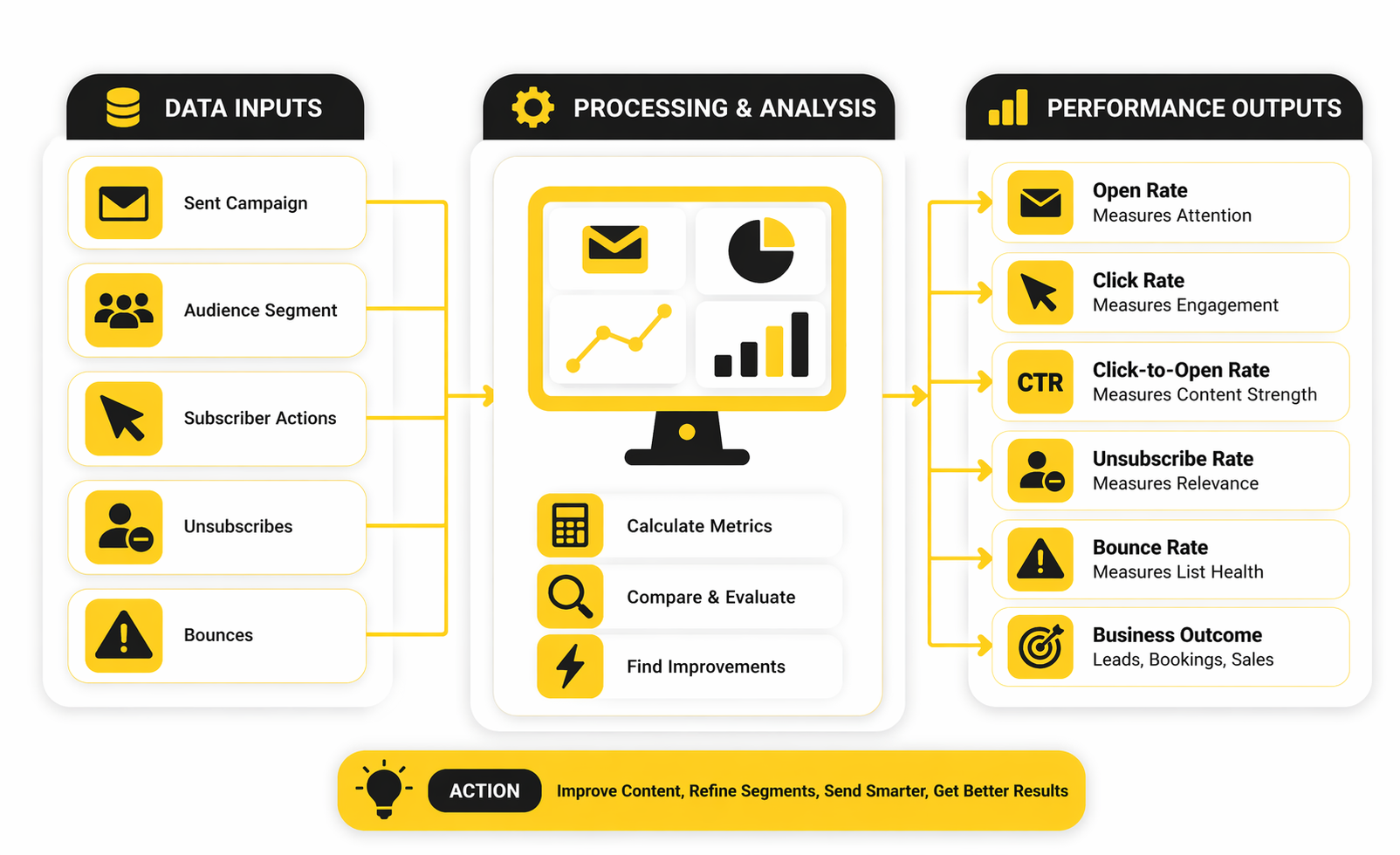
The smart move is to treat these numbers as system health metrics, not just campaign outcomes. If they spike, do not immediately blame the platform or the design. Check the source of the contacts, the age of the data, and whether the segment should have received that email at all.
Conversion and ROI Put the Trial in Business Terms
The biggest mistake in trial evaluation is stopping at email-native metrics. Opens and clicks are useful, but businesses do not buy software just to generate dashboard activity. They buy it to create revenue, leads, bookings, attendance, replies, or some other measurable business result.
Constant Contact continues to use the familiar claim that email marketing returns about $36 for every $1 spent, and that same figure shows up across its pricing and educational content. HubSpot also still references the same $36 for every $1 ROI figure in current marketing materials, while its 2026 marketing statistics page highlights email conversion rates of 2.8% for B2C and 2.4% for B2B. (Constant Contact email marketing page) (HubSpot marketing statistics)
Those figures matter, but they should be read as directional, not promised outcomes. They tell you email is still economically serious. They do not tell you that every short trial will generate obvious profit in a matter of days. The real action here is to define one conversion event before you start measuring at all. That might be a purchase, a booked call, a form completion, or a click into a sales page. Without that definition, even a good campaign can feel vague.
What Good Data Should Make You Do Next
Good measurement always leads to a decision. If open rates are weak, your next move is probably testing sender identity, subject lines, or audience selection. If opens are solid but CTR and CTOR are weak, the content or offer needs work. If unsubscribes and bounces climb, the list and consent flow need immediate cleanup before you trust any other conclusion.
This is why the analytics layer matters so much in a limited trial. You are not collecting numbers for decoration. You are trying to find the one constraint that matters most right now. Campaign Monitor’s guidance on analytics features and performance review keeps pushing toward that same logic: track the signals that show whether campaigns are improving over time, not just whether one send looked nice in isolation. (Campaign Monitor small-business email guide)
That is the right way to read performance during a Constant Contact evaluation. The numbers are not there to flatter you. They are there to tell you whether the platform, the audience, and the message are working together well enough to justify the next step.
The next section turns that into a buying decision. Once the implementation and measurement are clear, the real issue becomes whether upgrading inside Constant Contact makes sense or whether a true free alternative gives you a better starting point.
When a True Free Alternative Makes More Sense
This is the point where the article stops being about curiosity and starts being about fit. By now, you already know that constant contact free is really a trial conversation, not a forever-free one. That means the final decision is not whether the platform is usable. It is whether the economics, limits, and scaling path make sense for the kind of business you are actually running.
For some teams, Constant Contact will still be a perfectly sensible choice after the trial. If you value a familiar interface, straightforward campaign building, and a lighter operational setup, paying after a short evaluation can be completely reasonable. But if your main buying criterion is staying live at no cost for as long as possible, a platform built around an actual free tier changes the whole decision from the start.
A Trial Is Best for Evaluation, Not Long-Term Breathing Room
A limited trial is useful when you already have intent. You know you want an email platform, you have a real audience, and you are trying to answer a focused question about usability, workflow, or upgrade readiness. In that scenario, Constant Contact’s model can work because you are using the trial as a fast buying filter rather than as the operating model itself.
That same structure becomes weaker when your business is still in the experimentation phase. If you are building your first list, testing messaging slowly, or trying to create a marketing rhythm before committing budget, a true free plan gives you more room to learn without forcing an early subscription decision. Brevo’s current pricing explicitly positions the offer as free forever, and its plan details include 300 daily email sends and storage for up to 100,000 contacts, which is a very different buyer experience from a short trial.
The strategic implication is obvious once you say it plainly. A trial pushes you toward a quick decision. A real free tier gives you time to improve your list, your offer, and your email discipline before the software bill becomes part of the pressure.
The Cost Question Gets Sharper as Your Sending Frequency Increases
One of the most important tradeoffs is not list size alone. It is the combination of list size and send frequency. Constant Contact’s pricing page says plan price is based on number of contacts and email sends, and its own overage documentation says extra charges can apply when you go past the allowance. That means a business sending one calm newsletter per month may experience the platform very differently from a business sending weekly campaigns, reminder emails, and event pushes.
This is where many buyers misread “entry-level” pricing. A platform can look affordable at the starting point and still become inefficient once your operating rhythm becomes more active. The more frequently you send, the more important send allowances, add-on rules, and plan transitions become. That is why the real cost comparison should be built around your expected monthly behavior, not just the first number you see on a pricing grid.
If you already know you will send often, a true free plan or a cheaper entry plan with more room can be strategically smarter. Moosend’s current pricing page frames its offer as a 30-day free trial and emphasizes unlimited email campaigns, which makes it a more natural comparison for buyers who want trial access with more testing room than Constant Contact’s tighter structure.
The Right Platform Depends on What You Need to Scale Next
Scaling is not just about more subscribers. It is about what kind of complexity arrives with that growth. Some businesses scale mostly through newsletters and promos. Others need stronger CRM coordination, more aggressive automation, more detailed sales follow-up, or tighter integration between lead capture and nurture. Those are very different scaling paths, and they do not all point toward the same tool.
If your growth path is mostly email-first and you want a no-cost runway, Brevo is often the more obvious comparison because the free tier lets you keep operating while the business is still proving itself. If your path is trial-based but you want more room for automation and sending volume early, Moosend sits closer to that middle ground. And if your scaling problem is broader than email entirely, GoHighLevel becomes relevant because its pricing is built around a much more expansive CRM and agency-style operating model, starting at $97 per month for Agency Starter and $297 per month for Agency Unlimited.
That difference matters because software costs are never just subscription costs. They also include the complexity you take on. A cheaper tool that cannot support your next stage can become expensive through workarounds. A more powerful tool that you barely use can become expensive through waste. The best choice is the one that matches your next real bottleneck, not your most ambitious hypothetical one.
There Is Also a Risk Cost in Choosing the Wrong “Free” Path
The risk is not only financial. It is operational. A founder or small team can lose weeks inside the wrong platform by building assets, forms, automations, and habits that need to be migrated later. That is why the difference between a trial and a real free plan matters more than it first appears. The wrong structure can push you into either a rushed purchase or a delayed reset.
A true free tier reduces one kind of risk because it lets you keep working while you learn. But it can introduce another risk if the free plan is so constrained that you build around limitations you eventually outgrow. A short trial does the opposite. It reduces the risk of drifting for months without making a decision, but it increases the pressure to choose quickly and use your test window well.
That is why the best expert-level move is to define the risk you care about most. If you fear locking into the wrong paid tool too early, start where the free runway is longer. If you fear wasting months in low-stakes experimentation without building anything real, a short, disciplined trial can actually be healthier.
What an Experienced Buyer Usually Chooses
Experienced buyers tend to make this choice based on operating reality, not marketing language. They ask whether they need evaluation speed, cost flexibility, or broader system depth. Then they pick the platform whose constraints they can live with, because every tool has constraints somewhere.
That usually leads to a cleaner decision tree than most comparison articles give you. Choose Constant Contact when you want a polished trial-driven evaluation and you are comfortable paying once the workflow proves itself. Choose Brevo when the real priority is a genuine free entry point with time to grow into the system. Choose Moosend when you still like the trial model but want a more generous testing environment. Choose GoHighLevel when email is only one piece of a much larger sales and marketing machine.
That is the strategic close to this whole keyword. The search for constant contact free sounds like a price question, but it is really a business-model question. You are choosing not just a tool, but the kind of pressure you want your software to place on your growth process.
The final part will bring that together in a direct closing judgment and a practical FAQ for people deciding what to do next.
Final Decision: Is Constant Contact Worth It If You Want Free?
At the end of all this, the answer is pretty straightforward. If you are searching constant contact free because you want a permanent no-cost email platform, Constant Contact is probably not the right match. If you are searching because you want a polished tool to evaluate quickly before paying, then the trial can still be useful, but only if you go in with a clear plan and realistic expectations.
That is the real divide. Constant Contact makes the most sense for businesses that already have an audience, already intend to invest in email, and want to test usability, automation basics, and reporting before committing. It makes less sense for founders, creators, or small teams who need months of low-pressure experimentation before software costs become part of the equation.
The smartest move is to choose based on your next constraint. If your next problem is validation speed, Constant Contact can do the job. If your next problem is preserving budget while you learn, a true free-tier alternative will usually give you a better runway and a calmer decision process.
FAQ - Built for Complete Guide
Does Constant Contact have a free plan?
Constant Contact does not currently position itself as a forever-free email marketing platform. What it offers is a limited trial, which is very different from a free plan you can keep using indefinitely. That difference matters because it changes how you should approach setup, testing, and the timing of your buying decision.
How long is the Constant Contact free trial?
Constant Contact currently markets a 30-day trial experience. That gives you enough time to evaluate the editor, contact management, and basic automation if you move with purpose. It does not give you unlimited time to slowly build an email strategy from scratch.
Is the trial enough to test the platform properly?
Yes, but only if you treat it like a focused evaluation window. A short trial is enough to test one real audience segment, one signup flow, one welcome automation, and one repeatable campaign format. It is not enough for endless experimentation, which is why structure matters so much during setup.
Who is Constant Contact best for?
It is usually best for small businesses, service brands, nonprofits, and teams that want a relatively straightforward email platform with a familiar workflow. It tends to fit buyers who value ease of use and fast execution more than deep technical complexity. It is less attractive for people who mainly want a long-term free runway.
Who should skip Constant Contact and look elsewhere?
You should probably look elsewhere if your main priority is staying live without paying for as long as possible. The same is true if you already know you need heavier CRM logic, broader sales automation, or a larger all-in-one system from day one. In those situations, the trial may still teach you something, but it is less likely to be the final answer.
Is Constant Contact good for beginners?
Yes, in the sense that the platform is built to feel accessible rather than intimidating. That can make it a solid choice for someone launching their first serious email workflow. The catch is that beginner-friendly does not automatically mean budget-friendly over time, especially if what you really needed was a permanent free tier.
What should I test first during the trial?
Start with the pieces that will matter every week after the trial ends. That usually means your contact import process, segmentation structure, one signup path, one welcome automation, and one real campaign template. If those elements feel clean and repeatable, you will know far more than you would from casually clicking around the dashboard.
Are open rates enough to judge whether the trial went well?
No, and this is one of the most common mistakes people make. Open rates tell you whether the email earned attention, but they do not tell you whether the content persuaded anyone to act. You need to look at clicks, click-to-open performance, unsubscribes, bounces, and at least one business outcome such as leads, bookings, or sales.
What is the biggest risk when using the Constant Contact trial?
The biggest risk is wasting the trial on unstructured setup work and ending the month without a real conclusion. That usually happens when people import messy lists, build random drafts, and never define what success looks like. A trial only becomes useful when you decide in advance what you are trying to prove.
Can Constant Contact scale with a growing business?
It can, but the better question is whether it scales in the direction your business is actually heading. If your growth path is mostly about sending solid email campaigns, improving segmentation, and adding practical automation, it may scale just fine. If your next stage involves more complex CRM workflows, aggressive multi-channel automation, or larger operational demands, the fit can become less obvious.
Is a true free alternative better than Constant Contact?
Sometimes yes, sometimes no. A true free alternative is better when your main goal is learning slowly, protecting cash flow, and building consistent email habits before committing to a paid platform. Constant Contact is better when you already expect to pay for email software and want to make that decision quickly with a more polished trial experience.
What is the best way to decide between Constant Contact and another platform?
Base the decision on constraints, not branding. Ask whether you care most about free runway, ease of use, sending flexibility, automation depth, or broader system integration. Once you know which of those matters most right now, the comparison becomes much easier and much less emotional.
Work With Professionals
Explore 10K+ Remote Marketing Contracts on MarkeWork.com
Most marketers spend too much time chasing clients, competing on crowded platforms, and losing a percentage of every project to middlemen. MarkeWork gives you a better way. Browse thousands of remote marketing contracts and connect directly with companies desperate to hire skilled marketers like you, without platform commissions and without unnecessary gatekeepers.
If you're serious about finding better opportunities and keeping 100% of what you earn, explore available contracts and create a profile for free at MarkeWork.com.