

The cost of Constant Contact looks simple at first: pick a plan, add your contacts, and start sending emails. The real decision is a little more practical than that. Your actual monthly cost depends on list size, email volume, automation needs, SMS usage, users, discounts, and whether you need a simpler email tool or a broader marketing system.
That matters because email marketing is still one of the highest-leverage channels for small businesses. Constant Contact’s own pricing page highlights that businesses can earn $36 for every $1 spent on email marketing, but that return only works when the tool fits the business model. Paying for features you do not use is waste; choosing a plan that limits your growth is also waste.
This guide breaks down the cost of Constant Contact in a practical way. Not just “what does it cost,” but what changes the bill, what each plan is really for, and when another platform like Brevo or Moosend may be a better fit for the same budget.
Article Outline
- Why the Cost of Constant Contact Deserves a Real Budget Conversation
- How Constant Contact Pricing Works
- Core Cost Drivers That Change Your Monthly Bill
- Constant Contact Plans, Features, and Tradeoffs
- Professional Implementation: Budgeting, Migration, and Tool Fit
- Final Decision Framework and FAQ
Why The Cost Of Constant Contact Deserves A Real Budget Conversation
Constant Contact is not priced like a one-time software purchase. It is a recurring marketing cost that grows as your contact list grows, which means a small difference in plan choice can become more noticeable over time. That is why the right question is not only “Can I afford it this month?” but “Will this still make sense when my list doubles?”
The platform currently promotes Lite, Standard, and Premium-style pricing, with costs tied heavily to contact count and feature access. Published pricing coverage also shows that SMS can become an add-on cost, while annual prepayment and nonprofit discounts can reduce the bill. Those details matter because two businesses with the same starting plan can end up with very different real costs.
The biggest mistake is comparing tools only by the lowest advertised monthly price. A cheaper plan can become expensive if it blocks automation, segmentation, reporting, or the send volume you actually need. A more expensive plan can be worth it if it saves staff time, improves campaign performance, or replaces separate tools.
Framework Overview
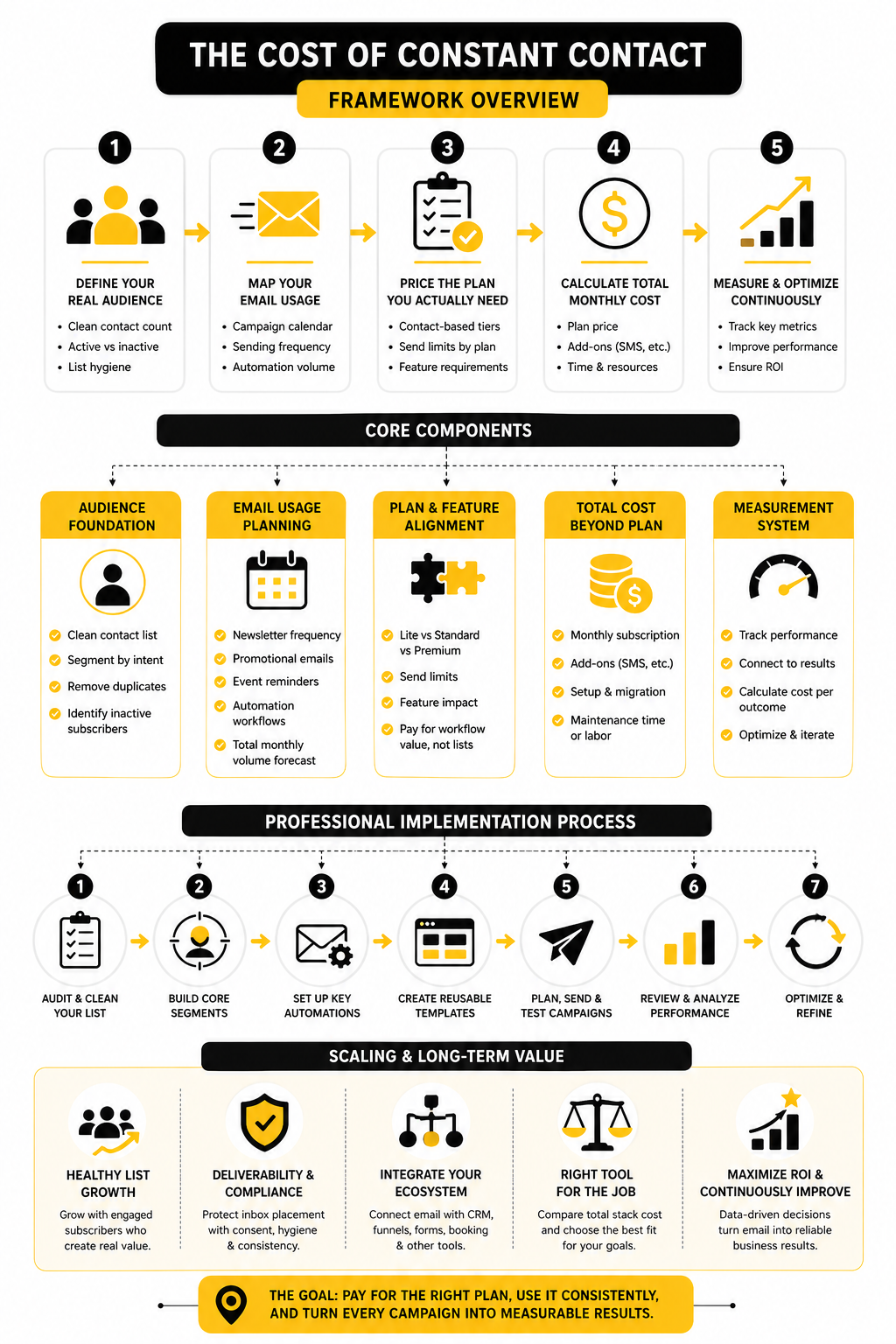
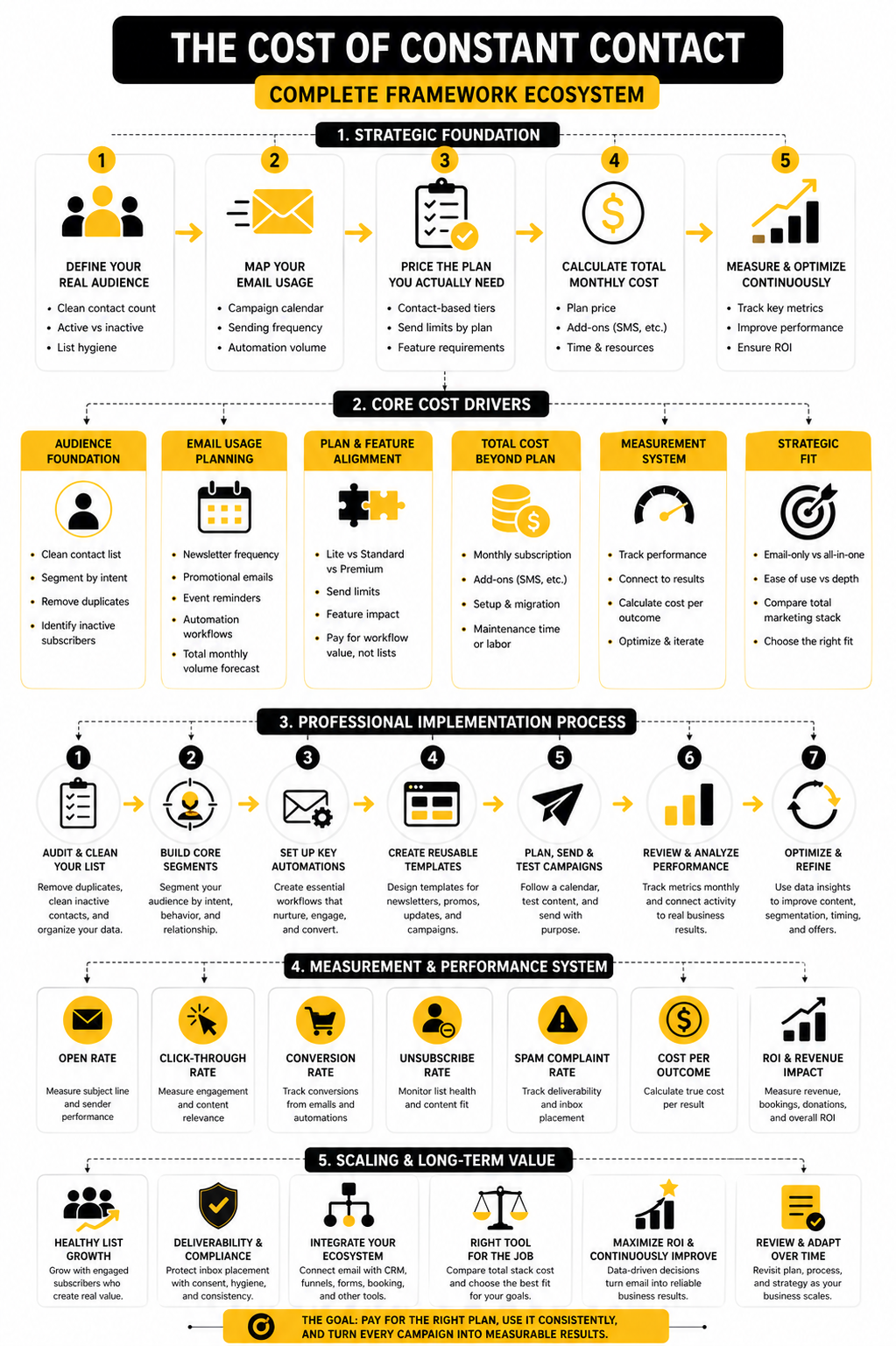
The cleanest way to evaluate the cost of Constant Contact is to separate the decision into four layers. First, look at your contact count because that is the foundation of the bill. Second, look at your sending frequency because email volume limits can matter once campaigns become more active.
Third, compare the features you actually need against the plan that includes them. Automation, A/B testing, segmentation, SMS, reporting, and multi-user access are not equally important for every business. Fourth, compare the platform against alternatives only after you understand your real use case, not before.
This framework keeps the decision grounded. A local service business sending one newsletter a month should not evaluate pricing the same way an ecommerce store does. A nonprofit, agency, creator, and B2B sales team will all experience the cost of Constant Contact differently, even if they start with the same contact list size.
How Constant Contact Pricing Works
The cost of Constant Contact is built around two simple variables: your plan level and your number of contacts. At the lowest contact tier, Constant Contact lists Lite from $12 per month, Standard from $35 per month, and Premium from $80 per month on its current pricing page. Those prices are only the starting point, because the monthly bill rises as your list grows.
That contact-based model is normal in email marketing, but it rewards clean list management. If you keep inactive subscribers, duplicate contacts, old leads, and unengaged addresses on your list, you may end up paying for people who no longer create business value. Before judging whether the cost of Constant Contact is high or fair, look at how many contacts are actually worth emailing.
The plan level matters because Constant Contact does not sell every feature in every package. Lite is built for basic email and simple social posting. Standard adds more serious growth features, while Premium is aimed at teams that need deeper automation, more send capacity, richer reporting, and included SMS credits.
The Base Monthly Price Is Only The Starting Point
The advertised monthly price gives you a baseline, not the full budget. Constant Contact’s pricing also changes based on prepayment, contact tier, add-ons, and whether you qualify for a nonprofit discount. That is why two businesses can both say they “use Constant Contact” while paying completely different monthly amounts.
The send allowance is one detail worth catching early. Constant Contact’s own help center explains that monthly email sends depend on the plan: Lite allows up to 10 times the highest number of contacts in your pricing tier, Standard allows 12 times, and Premium allows 24 times. That means a business with 5,000 contacts does not just need to ask whether it can store 5,000 contacts; it also needs to ask whether its campaign rhythm fits the plan’s send allowance.
This becomes especially important for newsletters, promotions, event reminders, abandoned-cart campaigns, donor updates, and seasonal sales pushes. A business sending one monthly newsletter may be fine on a lower plan. A brand sending weekly campaigns plus targeted follow-ups may need a higher plan before the contact count itself feels like the issue.
Annual Prepayment Can Lower The Effective Cost
Constant Contact promotes savings when customers prepay for 12 months, with its pricing page stating that annual prepayment can save up to 15%. That discount can make sense when you are confident the platform fits your workflow and you are not still testing basic deliverability, templates, integrations, or automation needs. It is not a small detail, because recurring marketing tools quietly add up over a year.
Nonprofits get a separate prepayment advantage. Constant Contact’s nonprofit discount information states that eligible nonprofit organizations can receive 20% off with six-month prepayment or 30% off with twelve-month prepayment. There is no nonprofit discount on monthly billing, so nonprofit teams need to compare cash flow against total annual savings.
The practical takeaway is simple: do not compare monthly and annual pricing as if they are the same commitment. Monthly billing buys flexibility. Annual billing buys savings. The better choice depends on whether you are still evaluating the tool or already know it is central to your marketing system.
SMS And Add-Ons Can Change The Real Bill
SMS is one of the easiest places to underestimate the real cost of Constant Contact. The Premium plan includes 500 SMS messages, while Lite and Standard customers can add SMS messages starting at $10 per month for 1 to 500 messages on Constant Contact’s pricing page. That may be perfectly reasonable for a business sending appointment reminders or limited promotional texts, but it should still be budgeted separately.
Add-ons matter because they move the decision away from “email software” and toward “marketing operations software.” If you only need newsletters, you may not care. If you need SMS, advanced reporting, SEO tools, social ads, or extra advisory services, the final bill can move beyond the base plan quickly.
This is where alternatives become relevant, but only after you define the job. If your main need is lower-cost email and automation, Brevo or Moosend may deserve a comparison. If your business needs email, funnels, CRM, booking, automation, and pipeline management in one place, GoHighLevel may be the more natural benchmark.
Core Cost Drivers That Change Your Monthly Bill
The cost of Constant Contact becomes much easier to judge when you stop looking at the plan name first. Start with the work the platform has to do for your business. A small list with simple newsletters is one cost profile; a growing list with weekly campaigns, automation, SMS, ecommerce follow-ups, and multiple team members is a completely different one.
The most important cost drivers are not hidden, but they are easy to miss when you only look at the entry price. Contact count affects the plan tier. Email send volume affects whether the plan gives you enough room. Feature depth affects whether Lite, Standard, or Premium is realistic.
Start With A Clean Contact Count
Your contact count is the foundation of the bill, so this is the first place to clean things up. Constant Contact pricing scales by contact tier, which means inactive subscribers can quietly push you into a more expensive bracket. That does not mean you should delete every cold lead immediately, but it does mean you should know which contacts are active, recently engaged, unsubscribed, duplicated, or no longer useful.
A practical audit is simple. Export your list, segment contacts by recent engagement, remove duplicates, and separate buyers, leads, customers, donors, members, and cold subscribers. Once you know your real active audience, the cost of Constant Contact becomes much more honest because you are no longer pricing a messy database.
This also improves performance. Email platforms depend heavily on engagement signals, and sending every campaign to everyone is rarely the smartest move. A smaller, healthier list can be cheaper to maintain and easier to monetize than a large list full of people who stopped caring months ago.
Match Your Sending Frequency To The Plan
The next cost driver is how often you send. Constant Contact’s help center says monthly email allowances are based on the highest number of contacts in your pricing tier, with Lite allowing 10 times that number, Standard allowing 12 times, and Premium allowing 24 times. That sounds abstract until you map it against your actual campaign calendar.
A business with 2,500 contacts sending one newsletter per month has a very different usage pattern from a business sending weekly newsletters, event reminders, product announcements, and automated welcome emails. The second business may need more sending room even before it needs advanced features. This is where a cheap plan can become limiting fast.
Build a basic sending forecast before choosing a plan:
- Count your main newsletters per month.
- Add promotional campaigns.
- Add event reminders, seasonal updates, and product launches.
- Add automated messages like welcome emails, birthday emails, and abandoned-cart emails.
- Multiply that activity by your expected audience size.
That simple exercise turns pricing from guesswork into a decision. You do not need a perfect model. You just need enough clarity to avoid choosing a plan that looks affordable but does not match how you actually market.
Price The Features You Will Actually Use
Feature creep is where marketing software budgets get messy. It is tempting to buy the bigger plan because it feels safer, but every feature should earn its place. If your team will not use automation, segmentation, dynamic content, SMS, surveys, event tools, or advanced reporting in the next few months, those features may not justify the upgrade yet.
At the same time, underbuying can be just as expensive. If Standard saves your team hours every month through better automation or testing, the higher monthly cost may be easy to defend. If Premium gives you the reporting and send capacity needed for a serious campaign calendar, the plan may be cheaper than stitching together separate tools.
Use this rule: pay for workflow impact, not feature lists. A feature is valuable when it changes what your team can execute, measure, or improve. If it only looks impressive on a comparison table, it is not a real reason to increase the budget.
Include The Cost Of Setup And Maintenance
Software cost is not the whole cost. Someone has to import contacts, clean lists, build templates, connect forms, test automations, write campaigns, check reports, and improve performance over time. If that person is you, the cost is time; if it is a team member or contractor, the cost is direct labor.
This is especially important when moving from another platform. Migration can include exporting contacts, preserving tags, rebuilding forms, recreating automations, updating signup pages, and checking compliance settings. A low monthly subscription can still feel expensive if the setup process is chaotic.
For businesses that need more than newsletters, it may be worth comparing Constant Contact against broader systems. If you also need funnels, CRM, pipeline tracking, appointment booking, and automation, GoHighLevel may reduce the number of separate tools you manage. If your priority is email with budget-friendly automation, Brevo or Moosend may be worth checking before committing.
Statistics And Data That Make The Pricing Decision Clearer
The cost of Constant Contact should not be judged in isolation. A $35 monthly plan can be expensive if it produces no measurable business outcome, and an $80 monthly plan can be cheap if it supports campaigns that consistently generate revenue, bookings, donations, or repeat purchases. The data only matters when it helps you decide what to keep, what to improve, and what to stop paying for.
Email marketing still has strong commercial leverage, but the average return is not automatic. Recent email ROI research from Litmus found that 35% of companies see $10 to $36 back for every $1 spent, while broader benchmark summaries often cite email as one of the strongest owned marketing channels. That does not mean every Constant Contact account will hit that range; it means the channel can justify the spend when the list, offer, message, and follow-up system are working together.
This is the part many businesses skip. They look at the subscription price, then look at open rates, and stop there. That is not enough. You need a measurement system that connects platform cost to business value.
The Metrics That Actually Matter
Open rate is useful, but it is not the finish line. Apple Mail Privacy Protection and other privacy changes have made opens less reliable as a hard performance metric, so treat them as directional rather than absolute. If open rates rise, your subject line and sender trust may be improving; if revenue does not move, the campaign still needs work.
Click-through rate is usually more actionable. It shows whether the email created enough interest for someone to take the next step. HubSpot’s email benchmark roundup shows many industries operating in low single-digit click-through ranges, which is why even small improvements in targeting, offer clarity, and call-to-action placement can matter.
Conversion rate is where the cost of Constant Contact becomes real. A campaign that gets clicks but no purchases, bookings, replies, donations, or signups may have a landing page issue, an offer issue, or a follow-up issue. This is also where tools outside email can matter, because your email platform may get the click, but your form, calendar, checkout, CRM, or sales pipeline has to finish the job.
Build A Simple Analytics System Before You Upgrade
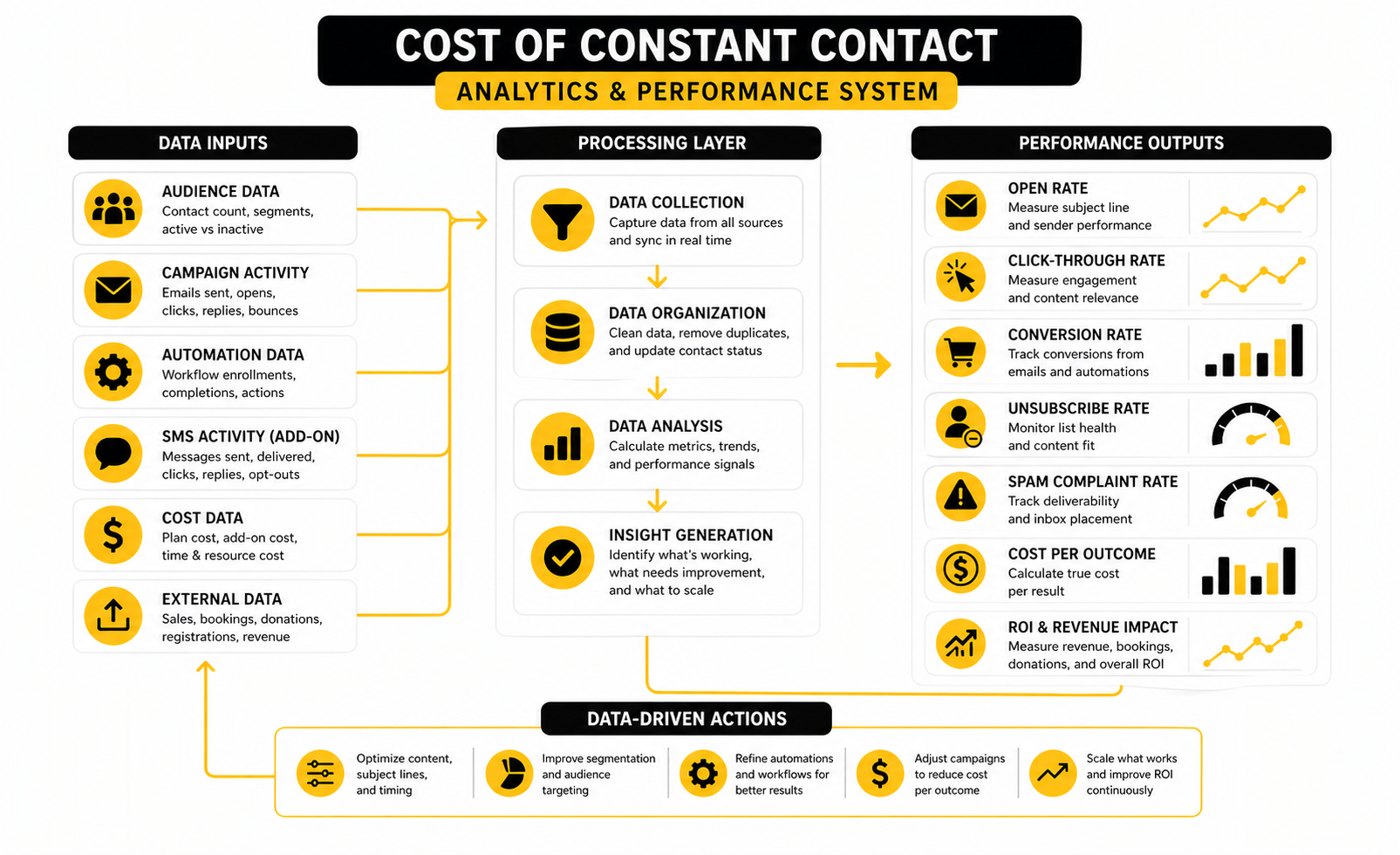
Before moving from Lite to Standard or Standard to Premium, build a basic reporting rhythm. You do not need a complex dashboard. You need a repeatable way to see whether each campaign is earning attention, creating action, and supporting revenue.
Track these numbers every month:
- Total Constant Contact spend
- Active contacts
- Emails sent
- Open rate
- Click-through rate
- Conversions
- Revenue, booked calls, donations, registrations, or qualified leads
- Unsubscribes
- Spam complaints
- List growth
- Cost per meaningful outcome
This turns pricing into a performance conversation. If your monthly spend rises because your list is growing, but revenue or leads are growing faster, the higher bill may be healthy. If spend rises while engagement falls, you probably do not have a pricing problem first; you have a list quality, content, or offer problem.
Benchmarks Are Useful, But Your Trend Is More Important
Benchmarks help you see whether your numbers are wildly out of range. MailerLite’s benchmark data shows large differences by industry, with some sectors seeing open rates above 40% and others performing lower depending on audience type and campaign style. That range is important because a restaurant, nonprofit, ecommerce store, and B2B service firm should not all expect the same email behavior.
Still, your own trend matters more than someone else’s average. If your open rate improves from 28% to 35%, your click rate improves from 1.5% to 2.4%, and your unsubscribe rate stays controlled, your system is getting healthier. If your metrics move the opposite way after list growth, your new contacts may be lower quality or your campaigns may be too broad.
This is why segmentation can justify a higher plan. Sending one generic email to every contact is easier, but it often hides what is really happening. Segmenting customers, prospects, donors, event attendees, and inactive subscribers gives you cleaner data and better decisions.
Use Data To Decide Whether Constant Contact Is Enough
Measurement should also tell you whether Constant Contact is the right level of tool. If email campaigns are the main thing you need, the platform may be enough. If your reporting shows that leads are clicking but not converting because follow-up is slow, your problem may sit in CRM, automation, calendar booking, or sales pipeline management.
That is where broader systems can become relevant. A business that needs email plus CRM, funnels, automations, booking, and pipeline tracking may want to compare the total stack cost against GoHighLevel. A business that mainly wants cost-efficient email automation may compare Constant Contact against Brevo or Moosend.
The point is not to chase tools. The point is to let the data show where the bottleneck is. If the bottleneck is email design and list management, Constant Contact may be a strong fit. If the bottleneck is the whole customer journey after the click, the true cost is not just the monthly subscription; it is the revenue lost between interest and action.
Professional Implementation: Budgeting, Migration, And Tool Fit
At this stage, the cost of Constant Contact is no longer just a pricing-page question. It becomes an implementation question. The plan you choose has to fit your marketing process, your team’s available time, your sales cycle, and the way you turn subscribers into customers, clients, donors, attendees, or booked calls.
This is where professional judgment matters. A business can overpay by choosing a plan with features it never uses, but it can also lose money by choosing a cheaper plan that slows down execution. The best setup is the one your team can actually run every month without turning email marketing into another abandoned project.
Build The Budget Around Use Cases, Not Software Tiers
The cleanest way to budget is to list the campaigns you plan to run before choosing the plan. A local business may only need a monthly newsletter, seasonal promotions, and a welcome email. A nonprofit may need donor updates, event invitations, volunteer coordination, and annual fundraising campaigns. An ecommerce business may need product launches, abandoned-cart reminders, post-purchase follow-ups, and customer reactivation campaigns.
Once those use cases are clear, the plan decision becomes more obvious. If your campaigns are mostly broadcast emails, the lower tier may be enough at the beginning. If your strategy depends on automation, segmentation, and more frequent sending, the higher plan may be the realistic starting point rather than an upgrade later.
This also protects you from tool comparison chaos. You are not asking which platform has the longest feature list. You are asking which platform supports the campaigns that create the most business value for the least operational friction.
Watch The Scaling Curve Before It Surprises You
Contact-based pricing is manageable when the list is small, but it can feel different once the database grows. This is not a reason to avoid list growth. It is a reason to make sure your list growth is tied to revenue, bookings, donations, or another measurable outcome.
The danger is low-quality growth. If you run giveaways, broad lead magnets, or paid campaigns that attract people with weak buying intent, your contact count can grow faster than your results. That makes the cost of Constant Contact feel heavier because the bill rises while the business value stays flat.
The fix is not to stop collecting leads. The fix is to qualify them better. Use clearer forms, stronger segmentation, better lead sources, and regular list hygiene so your database grows with people who have a real reason to hear from you.
Factor In Deliverability And Compliance Risk
Email marketing has a technical side that directly affects cost. If your emails do not reach inboxes, the platform is not producing full value. If your list includes outdated addresses, purchased contacts, or people who did not clearly opt in, you risk poor engagement, spam complaints, and long-term deliverability issues.
This matters even more as your sending volume grows. Stronger list hygiene, clear consent, unsubscribe management, and consistent sending patterns are not optional admin tasks. They protect the money you are spending on the platform.
Compliance also affects how you evaluate SMS. Text messaging can be powerful, but it requires clear permission, careful frequency, and disciplined messaging. If you add SMS because it looks like a quick revenue lever but do not have the consent process or offer strategy in place, the add-on cost is the smallest problem.
Decide When Constant Contact Is The Right Tool
Constant Contact makes the most sense when you want a practical email marketing platform with approachable templates, contact management, reporting, and support for small-business-style campaigns. It can be especially reasonable when the team values ease of use more than having the most advanced automation system on the market. For many businesses, that simplicity is not a weakness; it is the reason the work actually gets done.
It becomes less obvious when email is only one part of a more complex revenue system. If you need funnels, CRM, calendar booking, pipeline automation, and lead follow-up in one place, compare the full stack against GoHighLevel instead of comparing only email prices. If you need sales funnels and checkout flows around offers, ClickFunnels may belong in the decision.
If your priority is lean email marketing with automation at a lower entry point, Brevo and Moosend are worth comparing. If you need a simpler all-in-one route for funnels, email, and digital products, Systeme.io may also fit the conversation. The right move is not the cheapest tool; it is the tool that removes the most friction from your actual growth process.
Avoid The Most Expensive Implementation Mistakes
Most businesses do not waste money on Constant Contact because the monthly plan is impossible to understand. They waste money because they start without a clear operating rhythm. No campaign calendar, no segmentation plan, no reporting review, no cleanup process, and no owner responsible for improving results.
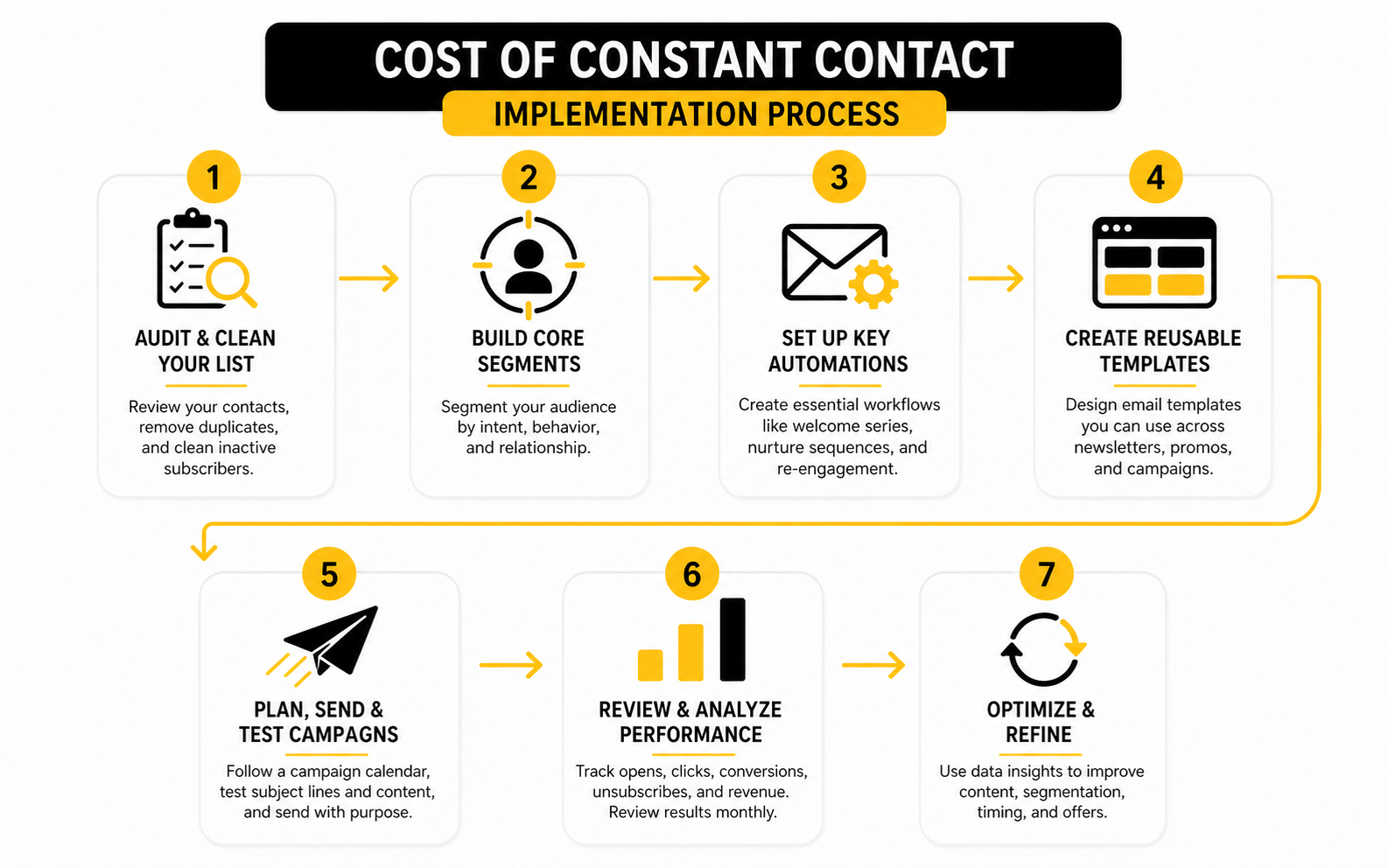
A better implementation rhythm is straightforward:
- Choose the plan based on the campaigns you will actually run.
- Clean the list before importing or upgrading.
- Build core segments around audience intent.
- Create reusable templates for the most common campaigns.
- Set up the automations that save the most manual time first.
- Review performance monthly before adding more tools.
- Revisit the plan whenever list size, send volume, or workflow complexity changes.
That process keeps the software tied to execution. And that is the real point. The cost of Constant Contact only makes sense when the platform is part of a disciplined marketing system, not when it sits there as another subscription you hope will eventually pay for itself.
Final Decision Framework
The cost of Constant Contact is easiest to justify when it supports a clear marketing system. You need a clean list, a realistic campaign calendar, the right plan level, and a simple way to connect email activity to business outcomes. Without that system, even a low monthly price can feel like wasted money.
Before making the final call, compare the platform against the full workflow you need to run. Constant Contact may be the right fit if your priority is approachable email marketing, practical templates, simple automation, list management, and reporting. If you need a broader revenue system with CRM, funnels, bookings, automation, and pipeline tracking, GoHighLevel may be a better comparison point than another email-only tool.
The smartest decision is not always the cheapest one. It is the platform that gives your team enough capability without adding unnecessary complexity. Choose the plan you can operate consistently, measure clearly, and grow into without paying for features that sit unused.
The Simple Buying Checklist
Use this checklist before you commit, upgrade, or switch. It keeps the decision grounded in execution instead of software hype. If you cannot answer these questions clearly, the next step is not a bigger plan; it is a cleaner strategy.
- How many active contacts do you really have?
- How many emails will you send in a normal month?
- Which campaigns will directly support revenue, bookings, donations, registrations, or qualified leads?
- Which features will your team actually use in the next 90 days?
- Do you need SMS now, or can it wait?
- Do you need email only, or do you need CRM and funnel infrastructure too?
- Who owns the campaign calendar?
- Who reviews performance every month?
- What result would make the monthly cost obviously worth it?
- What result would tell you the tool is not the problem?
If the answer points to simple email marketing, Constant Contact can be a practical choice. If the answer points to a bigger customer journey, compare the total stack cost before deciding. That is how you avoid paying twice: once for the software, and again for the gaps it does not solve.
FAQ - Built For Complete Guide
How much does Constant Contact cost?
Constant Contact pricing starts with plan level and contact count. Its public pricing page currently lists Lite from $12 per month, Standard from $35 per month, and Premium from $80 per month for the lowest contact tier. The real monthly cost increases as your list grows, so the starting price should be treated as a baseline, not the full long-term budget.
Is Constant Contact priced by contacts or emails sent?
Constant Contact mainly uses contact-based pricing, but email send limits also matter. Its help center explains that monthly send allowances depend on the plan, with Lite, Standard, and Premium allowing different multiples of the highest number of contacts in your pricing tier. That means both list size and campaign frequency should be part of the decision.
Does Constant Contact have a free plan?
Constant Contact does not position its current core product around a permanent free plan. The platform commonly promotes a free trial instead, which is useful for testing templates, list import, forms, and basic workflow before committing. A trial is helpful, but it is not the same as long-term free usage.
Why does the cost of Constant Contact increase over time?
The cost rises when your contact list grows, when you move into a higher plan, or when you add services such as SMS. Growth is not bad if the list is producing revenue, leads, bookings, or donations. The problem is paying for contacts who do not engage and do not support the business.
Which Constant Contact plan is best for small businesses?
Lite can work for very simple newsletter needs. Standard is usually more realistic for businesses that need stronger segmentation, automation, and campaign growth features. Premium makes more sense when higher send capacity, deeper reporting, more advanced automation, or team usage matters.
Is Constant Contact worth it for nonprofits?
Constant Contact can be worth it for nonprofits that regularly send donor updates, fundraising campaigns, event invitations, and volunteer communications. The value depends on whether the organization uses the platform consistently and qualifies for nonprofit prepayment discounts. If a nonprofit only sends occasional updates, it should compare the annual cost against actual fundraising and engagement outcomes.
What hidden costs should I watch for?
The most common extra costs are list growth, SMS add-ons, annual commitment decisions, migration work, and the time needed to build and manage campaigns. These are not always “hidden” in a dishonest sense, but they are often missed during budgeting. The safest move is to price the full operating system, not only the subscription.
How do I know if I am overpaying for Constant Contact?
You may be overpaying if you are on a higher plan but rarely use the features that justify it. You may also be overpaying if your list includes too many inactive contacts that push you into a higher pricing tier. Review active contacts, campaign performance, and feature usage before blaming the platform itself.
What should I measure before upgrading?
Measure active contacts, monthly sends, click-through rate, conversions, unsubscribe rate, spam complaints, and cost per meaningful outcome. A higher plan is easier to justify when it improves execution or saves time. If your campaigns are not converting, upgrading may not fix the real issue.
Is Constant Contact better than Brevo or Moosend?
It depends on the job. Constant Contact is strong for approachable small-business email marketing, while Brevo and Moosend may be better fits for teams focused on cost-efficient automation. The right choice depends on your list size, campaign volume, reporting needs, and workflow.
Should I use Constant Contact or GoHighLevel?
Use Constant Contact if your main need is email marketing with simple campaign management. Consider GoHighLevel if you need email, CRM, funnels, automations, appointments, pipeline tracking, and client follow-up in one system. The fairest comparison is not email plan versus email plan; it is total marketing stack versus total marketing stack.
Can I reduce the cost of Constant Contact?
Yes, but start with list hygiene rather than coupon hunting. Remove duplicates, segment inactive contacts, clean up old leads, and avoid paying for subscribers who no longer create value. You can also evaluate prepayment discounts, nonprofit eligibility, and whether your current plan matches your actual usage.
When should I switch away from Constant Contact?
Consider switching when your workflow has outgrown what the platform handles comfortably. If you need deeper CRM logic, advanced funnel infrastructure, sales pipeline automation, or a more integrated revenue system, staying with an email-only setup may create extra work. If your needs are still simple and the campaigns perform, switching may only create unnecessary disruption.
Work With Professionals
Explore 10K+ Remote Marketing Contracts On MarkeWork.com
Most marketers spend too much time chasing clients, competing on crowded platforms, and losing a percentage of every project to middlemen.
MarkeWork gives you a better way. Browse thousands of remote marketing contracts and connect directly with companies desperate to hire skilled marketers like you, without platform commissions and without unnecessary gatekeepers.
If you are serious about finding better opportunities and keeping 100% of what you earn, explore available contracts and create a profile for free at MarkeWork.com.