

Datorama Salesforce is now best understood as Salesforce Marketing Cloud Intelligence, the marketing analytics platform Salesforce acquired in 2018 and later folded into its broader Marketing Cloud ecosystem. Salesforce still acknowledges Datorama as the legacy product name, but the job is the same: connect marketing data, harmonize it, visualize performance, and help teams act faster across channels.
That matters because marketing reporting is still messy. Teams have ad data in one place, CRM data in another, web analytics somewhere else, and campaign performance scattered across platforms. Salesforce’s own research found that only 31% of marketers are fully satisfied with their ability to unify customer data sources, which explains why a platform like Marketing Cloud Intelligence exists in the first place.
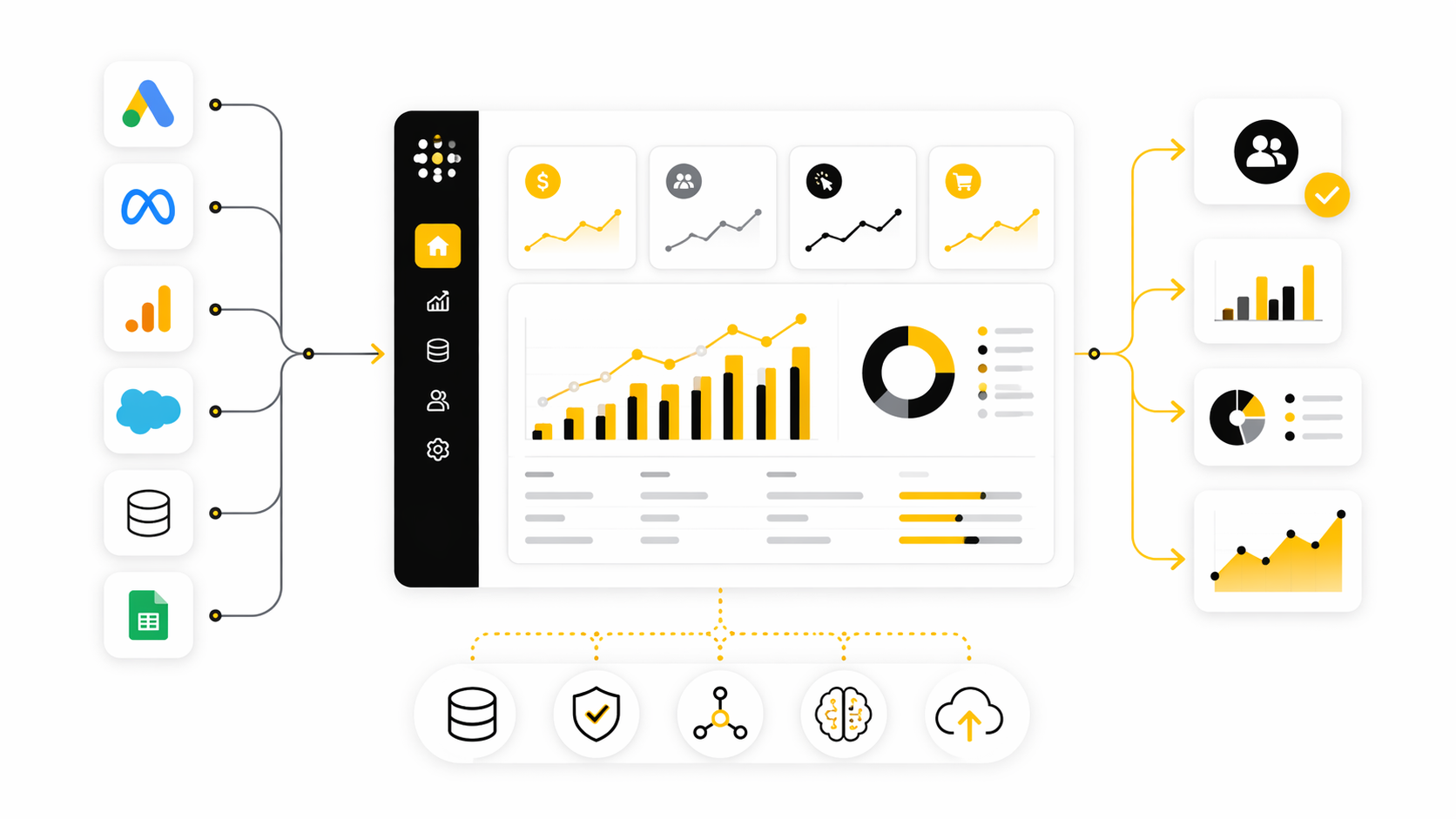
This article breaks down Datorama Salesforce from a practical operator’s point of view. Not as a buzzword. Not as another dashboard tool. But as a system for making marketing data usable when reporting, budget allocation, client reporting, and campaign optimization all depend on trusted numbers.
Article Outline
- Why Datorama Salesforce Matters
- The Framework Behind Marketing Cloud Intelligence
- Core Components Of Datorama Salesforce
- How Professional Teams Implement It
- Use Cases, Integrations, And Common Mistakes
- Final Checklist And FAQ
Why Datorama Salesforce Matters
The real problem Datorama Salesforce solves is not “making dashboards.” Dashboards are the visible layer. The deeper value is that it helps marketing teams turn fragmented performance data into a shared operating system for decisions.
Salesforce describes Marketing Cloud Intelligence as a way to connect, harmonize, visualize, and act on marketing data, which is exactly the sequence most teams struggle to manage manually. Without that sequence, reporting becomes a recurring spreadsheet project instead of a reliable business process. That is where delays, attribution fights, and budget waste usually start.
This is also why the old Datorama name still comes up in searches, vendor conversations, and implementation plans. Many teams bought it, learned it, or inherited it under the Datorama brand. Salesforce now positions it as Marketing Cloud Intelligence, but the practical question remains the same: can your team trust marketing performance data quickly enough to act on it?
The Framework Behind Marketing Cloud Intelligence
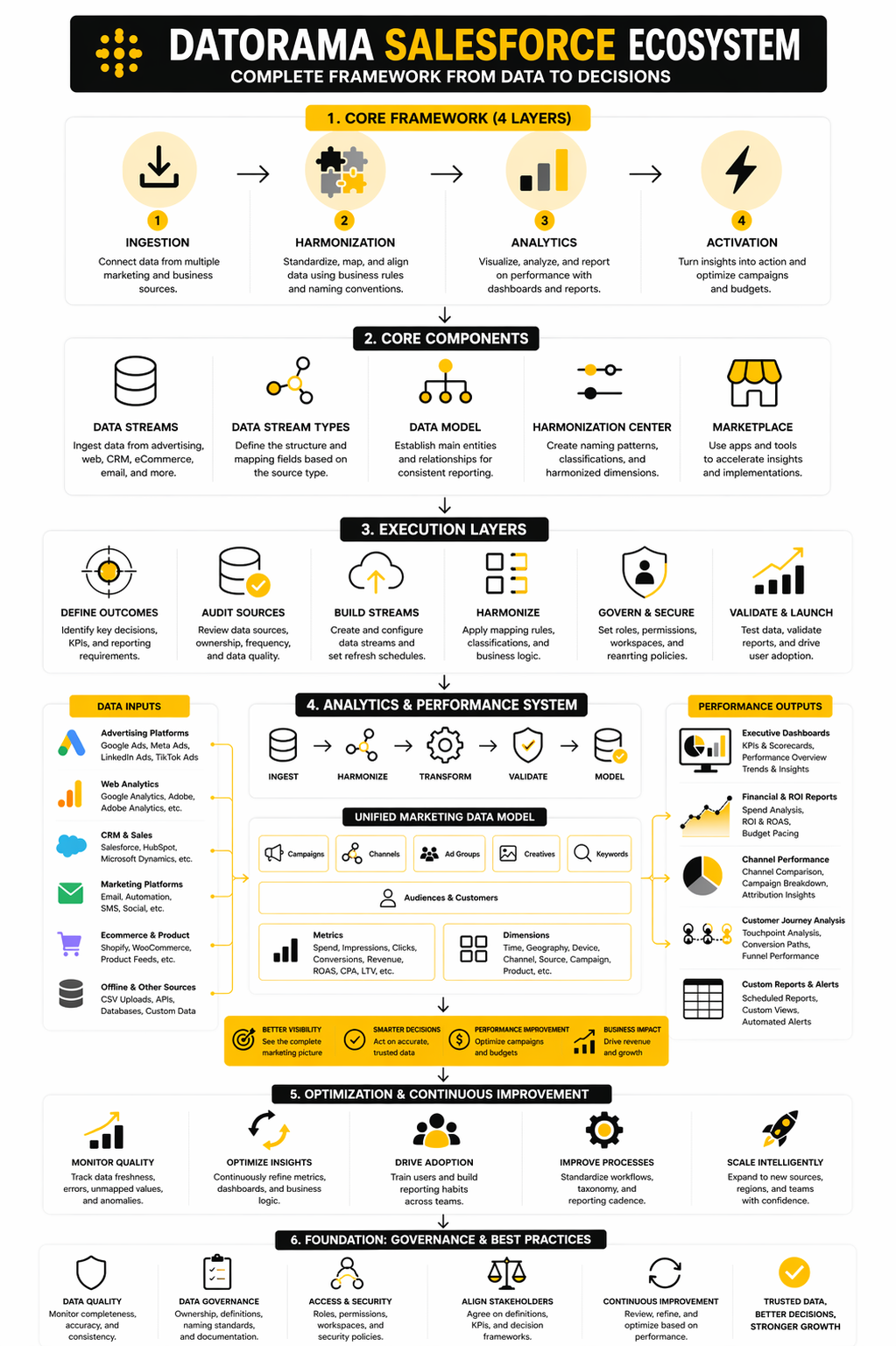
A useful way to understand Datorama Salesforce is to think in four layers: data ingestion, data harmonization, analytics, and activation. Each layer depends on the one before it. If the data comes in messy, the dashboard will only make the mess look prettier.
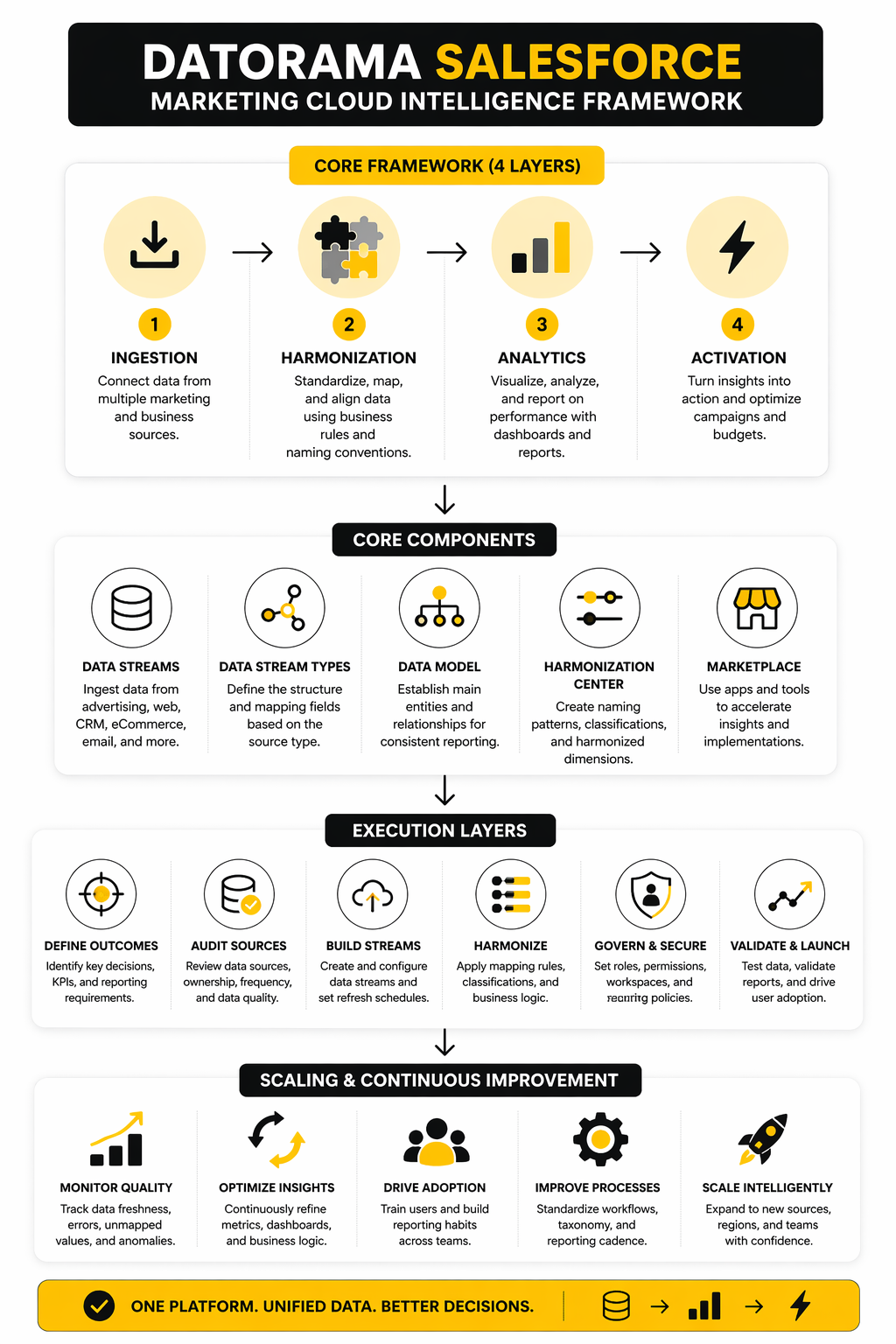
The first layer is ingestion, where Marketing Cloud Intelligence connects data from advertising platforms, web analytics tools, CRM systems, ecommerce platforms, and other marketing sources. Salesforce’s getting-started documentation says the platform can integrate data from marketing and advertising platforms, web analytics, CRM, ecommerce, and more. That breadth is important because modern marketing performance rarely lives in one system.
The second layer is harmonization. This is where fields, naming conventions, campaign structures, currencies, dates, and business logic need to line up. If one platform calls something “spend,” another calls it “cost,” and a third exports it with tax included, the team needs a governed model before anyone should trust the report.
The third layer is analytics. This is where dashboards, pivot tables, scheduled reports, and performance views become useful. Salesforce’s Intelligence Reports for Engagement are built for teams that need to generate, view, and share campaign-level analysis, especially across email, push, and journey data.
The fourth layer is activation. This is where insight becomes action: reallocating budget, fixing campaign tracking, improving audience suppression, reducing manual reporting, or pushing a team toward clearer KPIs. That is the part many implementations underbuild, and it is usually the difference between a reporting project and an actual intelligence system.
Core Components Of Datorama Salesforce
Datorama Salesforce works because it separates marketing intelligence into practical building blocks. You are not just importing a spreadsheet and building a chart. You are creating a repeatable system where data sources, mapping rules, business logic, dashboards, and workflows all support the same reporting truth.
Data Streams
Data streams are the entry point. Salesforce explains that whenever data is uploaded, data streams are created and can be referenced across Marketing Cloud Intelligence. In plain English, this is how campaign, media, ecommerce, CRM, email, and analytics data starts becoming usable inside the platform.
The key is not just connecting more sources. The key is connecting the right sources with a clear reason behind each one. If a data stream does not support a decision, report, KPI, or optimization workflow, it becomes clutter.
Data Stream Types
Data stream types define what fields are available for mapping based on the source you are working with. Salesforce’s documentation says a data stream type controls the Marketing Cloud Intelligence fields available for mapping. This matters because paid media data, ecommerce data, CRM data, and web analytics data do not behave the same way.
A clean implementation starts by choosing the right data stream type before anyone touches a dashboard. That sounds basic, but it is where many messy setups begin. If the structure is wrong early, teams usually compensate later with manual fixes, calculated fields, and fragile reporting workarounds.
The Data Model
The data model is where Datorama Salesforce becomes more than a connector library. Salesforce describes the Marketing Cloud Intelligence data model as a structure where each data type has a main entity that other entities relate to inside the platform. That structure is what lets teams compare performance across channels without rebuilding the logic every time.
This is where you define what “campaign,” “creative,” “media buy,” “account,” “conversion,” and “revenue” actually mean for your business. Not theoretically. Operationally. If those definitions are unclear, the platform will still produce reports, but the reports will not settle arguments.
Harmonization Center
Harmonization is the part that makes the whole system trustworthy. Salesforce says the Harmonization Center is used to create and manage naming convention patterns, classifications, and harmonized dimensions. That is a big deal because most marketing data enters the system with inconsistent names, formats, and platform-specific logic.
A good harmonization setup turns messy campaign naming into usable business dimensions. It can separate region, product, funnel stage, audience, offer, or channel from the same campaign name when the naming convention is consistent enough. That gives marketers better reporting without forcing analysts to clean the same data every week.
Marketplace Apps And Tools
The Marketplace gives teams reusable building blocks instead of forcing every implementation to start from zero. Salesforce describes the Marketing Cloud Intelligence Marketplace as a repository of tools and apps for building marketing intelligence solutions. That can speed up implementation when the app fits the reporting need.
But this is where discipline matters. Marketplace assets are useful accelerators, not strategy. Install too much without a clear model, and you create another layer of complexity that nobody wants to maintain. Use them when they support the data architecture, not because they look impressive in a demo.
How Professional Teams Implement It
A strong Datorama Salesforce implementation starts before anyone connects a data source. The first step is deciding what the system must prove, who will use it, and which decisions it should improve. If the goal is vague, the implementation becomes a dashboard collection instead of a business tool.
The best teams begin with the reporting questions that actually matter. Which channels are driving qualified pipeline? Which campaigns deserve more budget? Which customer journeys need better measurement? Those questions shape the data model, the dashboard design, and the permission structure.
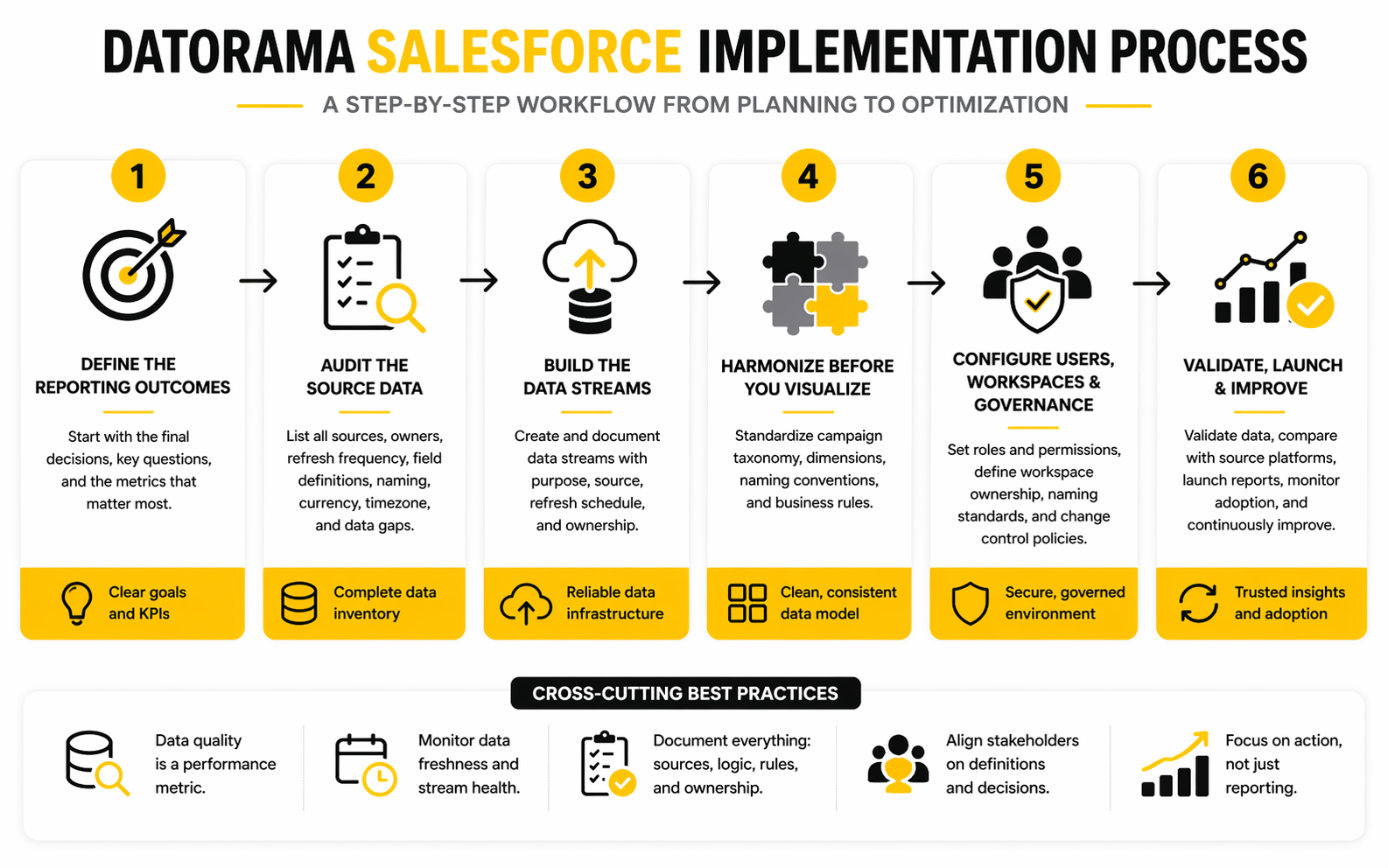
Step 1: Define The Reporting Outcomes
Start with the final decisions, not the platform features. A paid media team may need spend pacing, ROAS, creative performance, and campaign naming compliance. A lifecycle team may need email engagement, journey performance, customer segments, and revenue influence.
This is where teams should be ruthless. If a metric does not help someone make a decision, it probably does not deserve prime dashboard space. Datorama Salesforce can handle complex reporting, but complexity should serve the operator, not impress the room.
Step 2: Audit The Source Data
Before building anything, list every source that needs to feed the platform. Salesforce says Marketing Cloud Intelligence can integrate data from marketing platforms, advertising platforms, web analytics, CRM, ecommerce, and more. That sounds broad, but the practical work is deciding which sources are reliable enough to become part of the reporting truth.
This audit should include owners, refresh frequency, field definitions, naming conventions, currency rules, timezone rules, and known data gaps. Do not skip this. Most reporting problems that look like “dashboard issues” are really source-data issues wearing a nicer outfit.
Step 3: Build The Data Streams
Once the audit is clear, the team can create the data streams that bring information into Marketing Cloud Intelligence. Salesforce notes that uploaded data creates data streams that can be referenced throughout the platform. That means every stream should be treated like infrastructure, not a casual import.
A professional setup documents what each stream is for, where it comes from, how often it refreshes, and who owns it. This makes future troubleshooting much easier. It also prevents the classic problem where nobody knows whether a number is wrong, delayed, duplicated, or simply misunderstood.
Step 4: Harmonize Before You Visualize
This is the step that separates serious implementations from rushed ones. Salesforce describes harmonization as the process of using multiple tools to merge data from various sources into a usable structure inside Marketing Cloud Intelligence. In practice, that means campaign names, dimensions, classifications, and business rules need to be cleaned before dashboards become the focus.
Do the boring work here. Define campaign taxonomy. Standardize channel names. Align naming conventions. Decide how conversions, spend, revenue, accounts, regions, and products should be grouped. The dashboard will only be as trustworthy as the logic underneath it.
Step 5: Configure Users, Workspaces, And Governance
Implementation is not finished when the data appears. People need the right level of access, and Salesforce separates Marketing Cloud Intelligence users into roles such as viewer, power user, and admin through its role and permission structure. That structure protects the system from accidental changes while still giving operators the visibility they need.
Governance should also cover workspace ownership, naming standards, dashboard approval, and change control. This does not need to be bureaucratic. It just needs to be clear enough that the platform does not slowly become another messy reporting folder.
Step 6: Validate, Launch, And Improve
Before launch, compare Datorama Salesforce numbers against source platforms and existing trusted reports. Small differences can be normal when attribution windows, timezone settings, or currency handling differ. Big differences need investigation before users are asked to trust the system.
After launch, the work shifts from setup to adoption. Review which dashboards are used, which reports still happen manually, and which metrics cause confusion. A good implementation keeps improving because the business keeps changing.
Statistics And Data
Measurement is where Datorama Salesforce either earns trust or exposes weak thinking. A dashboard is not valuable because it has charts. It is valuable because it helps a team understand what changed, why it changed, and what they should do next.
That matters more now because marketing budgets are under pressure. Gartner’s 2024 CMO Spend Survey found that average marketing budgets fell to 7.7% of company revenue, down from 9.1% in 2023. When money gets tighter, reporting cannot stay fuzzy. Teams need measurement that helps them defend spend, cut waste, and move budget toward what is actually working.
What The Numbers Should Tell You
Good marketing analytics should answer three questions before anything else: are we growing, are we efficient, and are we learning fast enough? Datorama Salesforce can bring those signals into one system, but the team still has to decide which numbers matter. Impressions, clicks, opens, and sessions are useful context, not the whole story.
The stronger signals are usually closer to business impact. Pipeline, qualified leads, revenue, customer acquisition cost, retention, conversion rate, return on ad spend, and payback period tell a sharper story. Salesforce’s marketing statistics show that 88% of marketers use analytics or measurement tools, which means the competitive edge is no longer having analytics. The edge is interpreting analytics better.
How To Read Performance Signals
A number by itself is rarely enough. A 20% drop in cost per lead could be good, or it could mean lead quality collapsed. A higher conversion rate could mean the offer improved, or it could mean the campaign reached a narrower and easier audience.
That is why Datorama Salesforce should be configured around relationships between metrics, not isolated KPIs. Cost needs to be read beside volume. Revenue needs to be read beside margin and cycle length. Engagement needs to be read beside downstream behavior, especially when campaigns influence a journey instead of producing an immediate purchase.
The Analytics Layer That Actually Helps
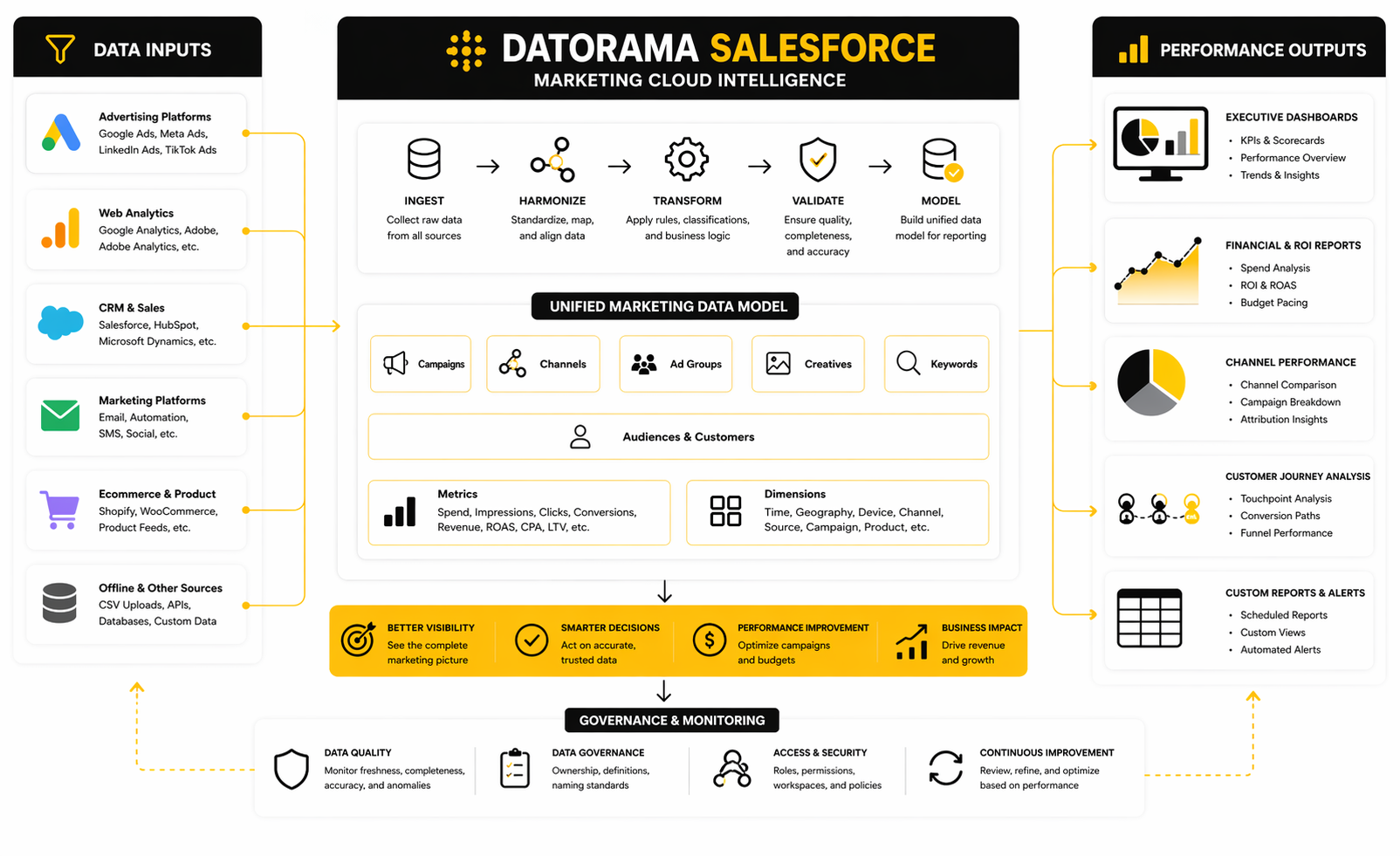
The analytics layer should separate monitoring, diagnosis, and decision-making. Monitoring tells you what is happening right now. Diagnosis helps you understand why it is happening. Decision-making tells the team what action is worth taking.
This is where many teams overbuild dashboards and underbuild logic. A useful Datorama Salesforce workspace should show pacing, performance variance, source quality, campaign taxonomy health, attribution signals, and data freshness. Those views help operators catch problems early instead of waiting for a monthly report to reveal that spend was misallocated for weeks.
Benchmarks Need Context
Benchmarks are useful, but they are dangerous when treated like universal truth. Your conversion rate, cost per acquisition, email engagement, or ROAS depends on category, offer, market, funnel stage, audience quality, and sales cycle. Comparing a complex B2B pipeline campaign to a simple ecommerce promotion is lazy analysis.
The better move is to create internal benchmarks inside Datorama Salesforce. Compare campaigns against similar campaigns, not against generic internet averages. Over time, your own historical data becomes more useful than broad industry numbers because it reflects your market, your constraints, and your actual customer behavior.
Data Quality Is A Performance Metric
Data quality should be measured directly, not treated as an invisible technical issue. Salesforce highlights that only 31% of marketers are fully satisfied with their ability to unify customer data sources, which is a practical warning for every team building a marketing intelligence system. If data sources are incomplete, inconsistent, or delayed, the analytics layer becomes fragile.
Track missing values, unmapped campaigns, duplicate rows, broken naming conventions, delayed refreshes, and unexplained metric gaps. These are not minor admin details. They are performance risks because bad data leads to bad budget decisions.
The Action Loop
The real test of Datorama Salesforce is whether the data changes behavior. If the dashboard shows rising acquisition costs, the team should know whether to adjust bids, change creative, narrow targeting, improve landing pages, or pause spend. If lifecycle engagement drops, the team should know whether the problem is audience quality, message timing, offer relevance, or deliverability.
That action loop should be built into the operating rhythm. Weekly performance reviews should focus on decisions made, tests launched, budget moved, and problems resolved. Otherwise, analytics becomes theater: everyone looks at the numbers, nobody changes the outcome.
Use Cases, Integrations, And Common Mistakes
Once the measurement layer is working, the next challenge is scale. Datorama Salesforce can support serious marketing operations, but only when the team treats it as a living system. The more sources, users, regions, agencies, and reporting views you add, the more discipline the setup needs.
This is where strategic tradeoffs become unavoidable. You can build for flexibility, but too much flexibility creates inconsistent reporting. You can lock everything down, but too much control slows the people who need to move fast. The goal is not perfection. The goal is a system that stays reliable while the business keeps changing.
Advanced Use Cases
The strongest use cases go beyond weekly dashboard reviews. Teams can use Datorama Salesforce for cross-channel budget pacing, campaign taxonomy monitoring, executive scorecards, client reporting, regional performance comparisons, and lifecycle marketing analysis. These are practical workflows where unified data saves time and reduces arguments.
For teams that also manage funnels, landing pages, and lead capture outside Salesforce, it may make sense to connect the intelligence layer with execution tools. A growth team running offers through ClickFunnels, lifecycle campaigns through Brevo, or agency operations through GoHighLevel still needs the same thing: clean source data, clear attribution logic, and reporting that connects campaign activity to business outcomes.
The expert move is to define where each platform ends and where Datorama Salesforce begins. Execution tools should run campaigns. Source platforms should store their native performance data. Marketing Cloud Intelligence should unify, standardize, and interpret that data so the team can make better decisions.
Integration Tradeoffs
Integrations create leverage, but they also create dependencies. Salesforce positions Marketing Cloud Intelligence around automated reporting, unified performance data, and cross-channel insights through its marketing analytics platform. That is powerful, but every connected source adds potential issues with field changes, API limits, refresh timing, permission changes, and historical data gaps.
This is why the source audit from implementation never really ends. When a platform changes its export fields or an ad account is reorganized, your reporting can quietly break. A professional team builds monitoring around freshness, unmapped dimensions, missing spend, duplicate campaigns, and sudden metric drops.
There is also a human tradeoff. Marketing teams want fast access to reports, while data teams want controlled definitions. Both are right. Datorama Salesforce works best when business users can explore approved data without being allowed to rewrite the foundation every time a stakeholder asks for a new view.
Scaling Across Teams And Regions
Scaling creates a naming problem before it creates a technology problem. One region calls a campaign “retargeting,” another calls it “remarketing,” and a third abbreviates everything differently. Multiply that across channels, languages, brands, markets, and agencies, and the analytics layer starts bending under inconsistent inputs.
This is why governance has to be practical, not theoretical. Use naming conventions people can actually follow. Create required fields for the dimensions that matter. Review exceptions regularly. Salesforce’s workspace documentation notes that teams can manage workspace settings and monitor row usage inside Marketing Cloud Intelligence, which matters when a growing setup starts producing more data than the original model expected.
Permissions matter more at scale too. Salesforce lists standard Marketing Intelligence permission sets such as Admin, Data Specialist, and Marketing Manager in its role guidance. That structure gives teams a cleaner way to separate system control from everyday reporting access.
Common Mistakes To Avoid
The first mistake is building dashboards before the data model is ready. It feels productive because stakeholders can see something quickly. But fast dashboards built on weak logic usually create more rework later.
The second mistake is treating Datorama Salesforce like a storage dump. More data is not automatically better data. If a stream has no owner, no business purpose, and no validation process, it should not be treated as part of the trusted reporting layer.
The third mistake is ignoring security until after launch. Salesforce states that users must have a registered MFA method to access Marketing Cloud Intelligence directly in its security documentation. That should be part of the rollout plan from the start, especially when agencies, contractors, regional teams, or external partners need access.
When Datorama Salesforce Is The Right Fit
Datorama Salesforce is usually a strong fit when the business has multiple marketing channels, complex reporting needs, several stakeholder groups, and enough data volume to justify a governed intelligence layer. It makes sense when manual reporting is slowing decisions or when teams argue over which platform has the right number. It is especially useful when marketing performance needs to be connected to CRM, revenue, pipeline, or customer journey data.
It may be too much when the business only needs simple channel reporting from one or two platforms. In that case, a lighter reporting stack can be faster and cheaper. The decision should be based on complexity, not brand recognition.
The clearest signal is this: if your team cannot confidently explain what happened last week, why it happened, and what action should happen next, the reporting system is not mature enough. Datorama Salesforce can help fix that, but only when the implementation is built around decisions instead of dashboards.
Final Checklist Before You Commit
Before choosing Datorama Salesforce, make sure the business case is bigger than “we need better dashboards.” The platform makes the most sense when marketing data is spread across many systems, reporting takes too much manual effort, and teams need a governed way to connect performance with business outcomes. If the pain is only cosmetic reporting, the fix may be smaller than a full marketing intelligence build.
A serious team should be able to answer these questions before implementation begins:
- Which decisions will this system improve?
- Which data sources are required for those decisions?
- Who owns each source, dashboard, and business definition?
- Which metrics need strict governance?
- Which users need viewer access, power-user access, or admin access?
- How will data freshness, naming quality, and mapping errors be monitored?
- What reports should disappear once the platform is live?
The point is simple. Datorama Salesforce works best when the team treats it as a decision engine, not a prettier reporting layer. Build the foundation well, and the dashboards become useful because the data underneath them is clean, governed, and tied to action.
FAQ - Built For Complete Guide
What is Datorama Salesforce?
Datorama Salesforce is the former name people still use for Salesforce Marketing Cloud Intelligence. It is a marketing analytics platform built to connect, harmonize, visualize, and activate marketing data across different sources. The practical value is that it helps teams reduce manual reporting and make better performance decisions from one governed system.
Is Datorama the same as Marketing Cloud Intelligence?
Yes, in everyday usage, Datorama and Marketing Cloud Intelligence usually refer to the same Salesforce product family. Salesforce states that Datorama is now Marketing Cloud Intelligence. The older name still appears because many customers, consultants, and job descriptions used Datorama before the rebrand.
What is Datorama Salesforce used for?
Datorama Salesforce is used for marketing data integration, campaign reporting, dashboarding, data harmonization, performance measurement, and cross-channel analytics. It helps teams combine data from ad platforms, CRM systems, ecommerce tools, web analytics, and marketing platforms. The goal is to turn fragmented marketing data into reporting that people can trust.
Who should use Datorama Salesforce?
It is best suited for teams with complex marketing operations, multiple channels, multiple stakeholders, and serious reporting needs. Agencies, enterprise marketing teams, regional marketing departments, and revenue teams can all benefit when they need consistent campaign performance visibility. Smaller teams with only one or two simple data sources may not need this level of infrastructure.
Does Datorama Salesforce replace CRM reporting?
No, it should not be treated as a direct replacement for CRM reporting. CRM reporting is usually focused on sales activity, pipeline, accounts, opportunities, and customer records. Datorama Salesforce is stronger when it unifies marketing performance data and connects it with CRM context so teams can understand how campaigns influence revenue outcomes.
What data sources can Datorama Salesforce connect to?
Marketing Cloud Intelligence can work with marketing platforms, advertising platforms, web analytics, CRM, ecommerce, and other data sources through connectors, uploads, APIs, and configured data streams. Salesforce describes the platform as a way to integrate marketing, advertising, web analytics, CRM, ecommerce, and more. The real question is not just what it can connect to, but whether each connection supports a business decision.
What is data harmonization in Datorama Salesforce?
Data harmonization is the process of making data from different sources speak the same language. Salesforce explains that Marketing Cloud Intelligence provides tools for harmonizing data from various sources. In practice, this means standardizing campaign names, channels, dimensions, classifications, and metrics so reporting is consistent.
Is Datorama Salesforce hard to implement?
It can be complex if the team has messy source data, unclear KPIs, inconsistent naming conventions, or too many stakeholders with different definitions. The platform itself is powerful, but the hard part is usually the operating model around it. Clean implementation depends on good planning, source audits, governance, validation, and user adoption.
What makes a good Datorama Salesforce dashboard?
A good dashboard helps someone make a decision. It should show the right metrics, explain performance movement, reveal data quality issues, and guide the next action. If a dashboard only looks impressive but does not change what the team does, it is not doing its job.
What are the biggest mistakes teams make with Datorama Salesforce?
The biggest mistakes are building dashboards before the data model is ready, connecting sources without clear ownership, ignoring naming conventions, and treating data quality as a technical afterthought. Another common mistake is giving too many users too much control too early. That usually creates inconsistent logic and damages trust in the platform.
How does Datorama Salesforce support marketing ROI?
It supports marketing ROI by giving teams a unified view of spend, campaign performance, conversion signals, and business outcomes. Salesforce positions Marketing Cloud Intelligence around automated reporting, unified performance data, and spend optimization. The platform does not create ROI by itself, but it gives teams the visibility needed to move budget, fix weak campaigns, and prove what is working.
Is Datorama Salesforce still relevant with AI and Data Cloud?
Yes, but the role is evolving. Marketing intelligence is becoming more connected to AI, customer data platforms, and broader Salesforce data architecture. That makes the foundation even more important because AI-powered insights are only useful when the underlying data is accurate, governed, and meaningful.
Work With Professionals
Explore 10K+ Remote Marketing Contracts on MarkeWork.com
Most marketers spend too much time chasing clients, competing on crowded platforms, and losing a percentage of every project to middlemen.
MarkeWork gives you a better way. Browse thousands of remote marketing contracts and connect directly with companies desperate to hire skilled marketers like you, without platform commissions and without unnecessary gatekeepers.
If you're serious about finding better opportunities and keeping 100% of what you earn, explore available contracts and create a profile for free at MarkeWork.com.