

Email campaign companies used to be judged mostly by templates, list size, and price. That is not enough anymore. The better question now is whether a platform can help you send relevant campaigns, protect deliverability, automate follow-up, and connect email to revenue.
This matters because inbox rules have become stricter. Gmail’s bulk sender rules now require stronger authentication, low spam complaints, and easier unsubscribes for senders reaching 5,000 or more Gmail addresses per day through commercial email programs under its sender guidelines. That means your email tool is no longer just a campaign builder; it is part of your reputation system.
The right choice depends on your business model. A creator selling digital products may care about simple sequences and landing pages, while an agency may need CRM, pipelines, client accounts, and automation through a platform like GoHighLevel. An ecommerce brand may need segmentation, abandoned cart flows, and reliable deliverability before anything else.
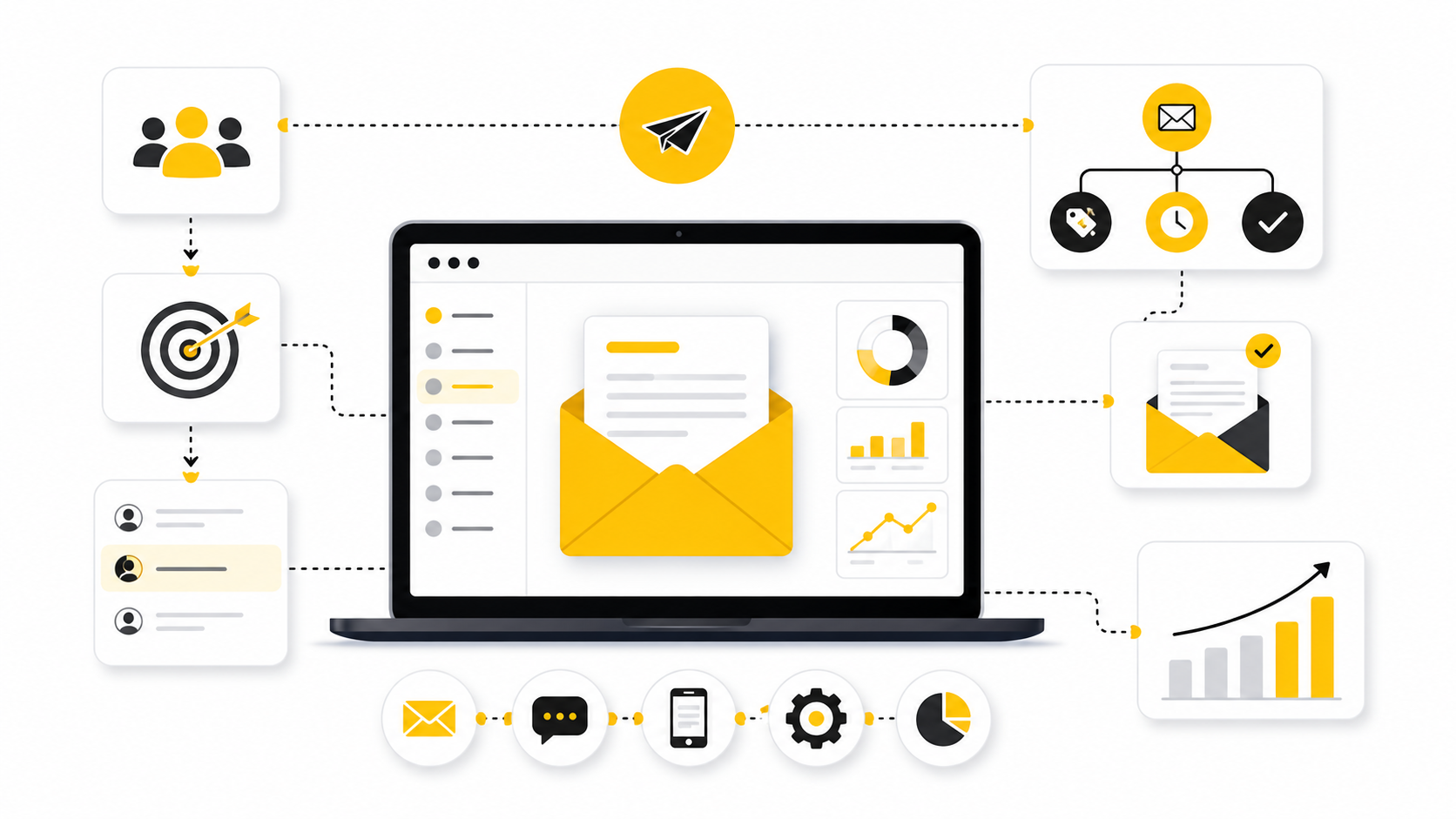
Why Choosing Email Campaign Companies Matters Now
Email still has one huge advantage: it is an owned channel. You are not renting attention from an algorithm every time you want to reach buyers. But that advantage only works when your emails are wanted, technically compliant, and tied to a clear customer journey.
Modern email campaign companies now compete on automation, AI assistance, segmentation, deliverability, CRM depth, and multichannel workflows. Tools like Brevo, Moosend, and ManyChat are not solving the exact same problem, even though they may all touch customer messaging. That is why comparing platforms only by monthly price usually leads to a bad decision.
Compliance is also part of the buying decision now. The FTC’s CAN-SPAM guidance makes clear that commercial email must avoid deceptive headers and subject lines, include a valid postal address, and give recipients a clear way to opt out under U.S. business guidance. A serious email platform should make those basics easier, not leave you duct-taping compliance together manually.
Framework Overview
The simplest way to evaluate email campaign companies is to separate the platform from the campaign strategy. A strong platform gives you the infrastructure: sending, automation, segmentation, reporting, and integrations. A strong strategy decides who gets what message, when they get it, and what business outcome the campaign is supposed to produce.
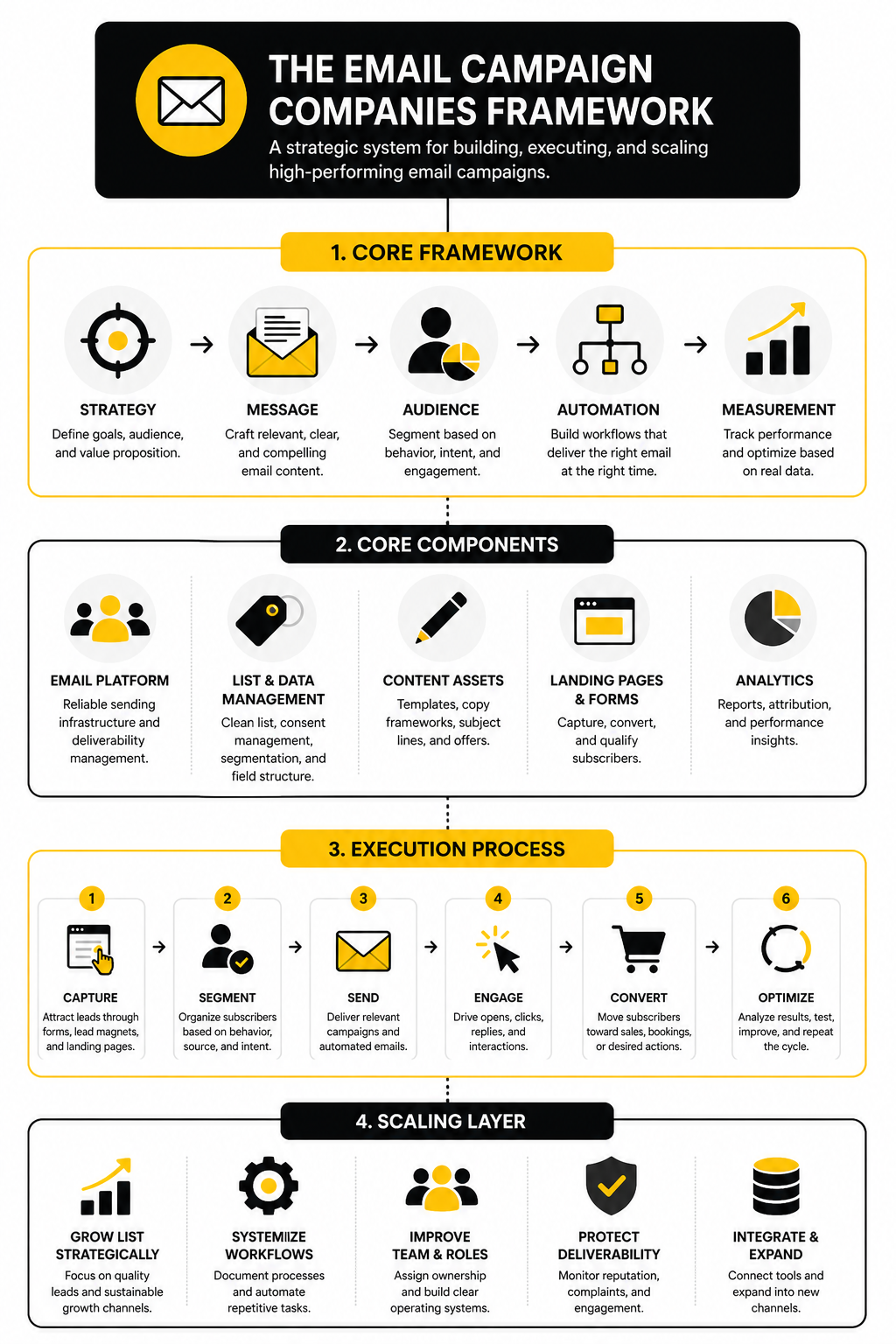
This article uses a practical framework: audience, offer, workflow, deliverability, analytics, and scale. Those six pieces keep the comparison grounded in real business use instead of feature-list noise. They also make it easier to decide whether you need a lightweight newsletter tool, a full CRM automation system, or a funnel-first platform like ClickFunnels.
The framework is intentionally simple because most teams overcomplicate this decision. You do not need the platform with the longest feature page. You need the one that fits your list, sales process, technical comfort level, and growth plan.
Article Outline
This full guide is split into six connected parts. Each part builds on the previous one so you can move from high-level understanding to a confident shortlist. The goal is not to crown one universal winner; it is to help you choose the right email campaign company for your actual business.
- Part 1: Why Email Campaign Companies Matter and the Selection Framework
- Part 2: The Core Components Every Email Campaign Platform Should Have
- Part 3: Comparing Email Campaign Companies by Business Type
- Part 4: Deliverability, Compliance, Automation, and Reporting
- Part 5: Professional Implementation and Common Mistakes
- Part 6: Final Recommendations, Buying Checklist, and FAQ
The Core Components Every Email Campaign Platform Should Have
A good platform should make campaign creation easier, but that is only the surface layer. The real value comes from how well it handles audience data, automation, deliverability, tracking, and the handoff between marketing and sales. When comparing email campaign companies, those are the pieces that separate a useful system from another tool your team slowly stops using.
The mistake is buying based on the prettiest editor or the cheapest monthly plan. Those things matter, but they do not matter as much as whether the platform can support your actual customer journey. If your tool cannot segment, trigger follow-up, and show what is working, you are not running email marketing properly; you are just sending messages.
Audience Management
Audience management is the foundation. Your email platform should let you organize contacts by source, behavior, purchase history, lead stage, interest, and engagement level. Without that, every campaign becomes too broad, and broad campaigns usually become ignored campaigns.
This is where many basic tools start to feel limiting. A newsletter tool may be enough when you have one list and one offer, but it becomes messy when you need separate journeys for leads, buyers, inactive subscribers, and high-intent prospects. Platforms like Brevo and Moosend can make sense for businesses that want practical segmentation without jumping straight into a heavy CRM setup.
Clean audience data also protects performance. If you keep emailing people who never engage, your list may look bigger, but your results get weaker. The better email campaign companies help you identify cold contacts, suppress risky segments, and focus more energy on people who are actually likely to respond.
Campaign Creation
Campaign creation should be fast, but not sloppy. You need templates, responsive layouts, reusable blocks, personalization fields, preview tools, and a simple workflow for drafting, testing, and sending. The best platforms reduce production friction without encouraging lazy, generic emails.
This matters because speed changes consistency. If every campaign takes too long to build, your team will send less often or cut corners. A platform that makes it easy to create clean, focused campaigns gives you more chances to test offers, angles, subject lines, and timing.
But the editor should never become the main reason you choose a platform. A beautiful builder is useless if the emails do not reach inboxes or connect to revenue. Treat campaign design as one important component, not the whole buying decision.
Automation Workflows
Automation is where email starts becoming a business system. A good platform should let you build welcome sequences, nurture campaigns, reactivation flows, lead follow-up, abandoned cart reminders, onboarding emails, renewal reminders, and post-purchase journeys. These workflows should be based on behavior, not just time delays.
For agencies, coaches, local businesses, and service companies, this is where GoHighLevel often enters the conversation. It connects email with CRM pipelines, forms, calendars, SMS, and sales follow-up, which can be more useful than a standalone sender when the business needs a complete client acquisition system. For creators and funnel-focused sellers, ClickFunnels or Systeme.io may fit better because the email sits close to the landing pages, offers, and checkout flow.
The key is not having automation for the sake of automation. The key is building workflows that match buyer intent. A new lead, a repeat buyer, and a stalled sales opportunity should not all receive the same message.
Deliverability Tools
Deliverability is not glamorous, but it is critical. If your emails land in spam, nothing else matters. Strong email campaign companies help with domain authentication, unsubscribe handling, bounce management, suppression lists, sender reputation, and basic compliance workflows.
This has become more important because mailbox providers now expect stronger sending practices. Serious senders need proper authentication, low complaint rates, and clear unsubscribe options, especially when sending at scale. A platform cannot fix a bad strategy, but it should make the technical requirements easier to manage.
You should also look for practical deliverability visibility. That includes bounce reports, spam complaint tracking, engagement trends, and warnings when list quality starts hurting performance. If a company treats deliverability like a hidden backend issue, be careful.
Analytics and Revenue Tracking
Basic metrics are not enough. Opens and clicks help you understand engagement, but they do not tell the full story. You need to know which campaigns generate leads, sales calls, purchases, repeat orders, subscriptions, or pipeline movement.
This is why reporting should connect to your business model. An ecommerce brand may care about revenue per recipient, cart recovery, and customer lifetime value. A service business may care about booked calls, qualified replies, and lead-to-client conversion.
The best email campaign companies make reporting useful instead of overwhelming. You should be able to see what happened, understand why it happened, and decide what to change next. If the dashboard looks impressive but does not help you make decisions, it is decoration.
Integrations and Data Flow
Your email platform should not live alone. It needs to connect with your website, forms, CRM, checkout, booking tools, payment processor, analytics, and support stack. The smoother the data flow, the easier it becomes to send relevant campaigns.
For example, a lead who fills out a form should enter the right segment automatically. A buyer should stop receiving beginner lead nurture emails and start receiving onboarding or upsell content. A booked call should trigger a different follow-up path than someone who only clicked a link.
This is where tools like Fillout, Cal.com, and Copper can support the wider system around email. They are not replacements for email campaign companies, but they can make the customer journey cleaner when connected properly.
Ease of Use for the Team
A powerful platform is only useful if your team can actually use it. Complicated tools create dependency, slow execution, and make simple changes feel risky. That usually leads to half-built automations and campaigns that never launch.
Ease of use does not mean the platform has to be basic. It means the interface, workflow, permissions, templates, and reporting should match the people operating it. A solo founder needs speed, while an agency or larger team may need controls, client accounts, approval flows, and deeper customization.
Before choosing, ask who will build campaigns every week. Not who could use the tool in theory. Who will actually log in, write the emails, segment the audience, check the reports, and improve the next campaign? That answer should heavily influence your shortlist.
Comparing Email Campaign Companies by Business Type
The right platform depends on what your business actually sells. That sounds obvious, but it is where many comparisons go wrong. Email campaign companies are often reviewed as if every user has the same audience, the same funnel, the same budget, and the same team, which is not how real businesses operate.
A local service business needs different workflows from an ecommerce store. A creator selling templates needs a different setup from an agency managing clients. Before choosing software, define the buying journey you need to support, then match the platform to that journey.
For Service Businesses
Service businesses usually need speed, follow-up, and pipeline visibility. The main problem is not just sending newsletters; it is turning leads into booked calls, consultations, estimates, or signed clients. That makes CRM connection more important than having the fanciest campaign editor.
For this kind of business, GoHighLevel is often a practical fit because email can sit alongside forms, calendars, pipelines, SMS, and automation. A new inquiry can trigger confirmation messages, reminders, missed-call follow-up, review requests, and reactivation campaigns without needing five disconnected tools. That matters because the real money is usually in the follow-up, not the first message.
The process should stay simple. Capture the lead, tag the source, assign the pipeline stage, send the right follow-up, and notify the right person. If a platform makes that sequence hard to build, it is probably not the best choice for a service business.
For Ecommerce Brands
Ecommerce brands need email campaign companies that understand behavior. Browse activity, cart abandonment, purchase history, product interest, order frequency, and customer value all affect what message someone should receive. A generic monthly newsletter is not enough once the store has real traffic and repeat buyers.
The core workflows usually include welcome offers, abandoned cart sequences, post-purchase education, product recommendations, win-back campaigns, and VIP customer messages. These flows work best when the email platform can sync with the store and update segments automatically. Without that connection, the team ends up manually guessing what customers need next.
Deliverability also becomes a serious issue as ecommerce volume grows. A promotional calendar with frequent sends can perform well, but only when list hygiene, authentication, unsubscribe handling, and engagement-based targeting are kept under control. More sending is not automatically better; better targeting usually wins.
For Creators and Digital Product Sellers
Creators need simplicity, speed, and a clean path from audience to offer. Their email system should help them collect subscribers, nurture trust, launch products, and sell without forcing them into a heavy enterprise workflow. This is why funnel-connected platforms can be attractive.
If the main business model is selling courses, memberships, templates, workshops, or digital downloads, tools like Systeme.io or ClickFunnels can make sense. The email campaign does not sit in isolation; it connects to opt-in pages, sales pages, checkout, upsells, and delivery. That reduces friction because the creator can build the full path in one place instead of stitching everything together.
The danger is overbuilding. A creator does not need twenty automations on day one. They need a strong lead magnet, a useful welcome sequence, a clear offer, and a follow-up path for people who click but do not buy.
For Agencies
Agencies have a different problem: they need repeatable systems across multiple clients. The platform has to support client accounts, templates, reporting, permissions, and workflows that can be reused without rebuilding from scratch every time. That is where the operational side matters as much as the marketing side.
An agency choosing between email campaign companies should look at how easy it is to manage multiple brands, duplicate campaigns, monitor performance, and hand off work to clients or team members. If every account becomes a custom mess, margins suffer. If the platform supports repeatable implementation, the agency can deliver faster and protect quality.
This is also where white-label or SaaS-style options may become relevant. A platform like GoHighLevel can be useful when the agency wants to package CRM, automation, and messaging into a client-facing service. That only works if the agency has a clear onboarding process and does not try to sell software before it has a working delivery system.
Turning Platform Choice Into an Implementation Process
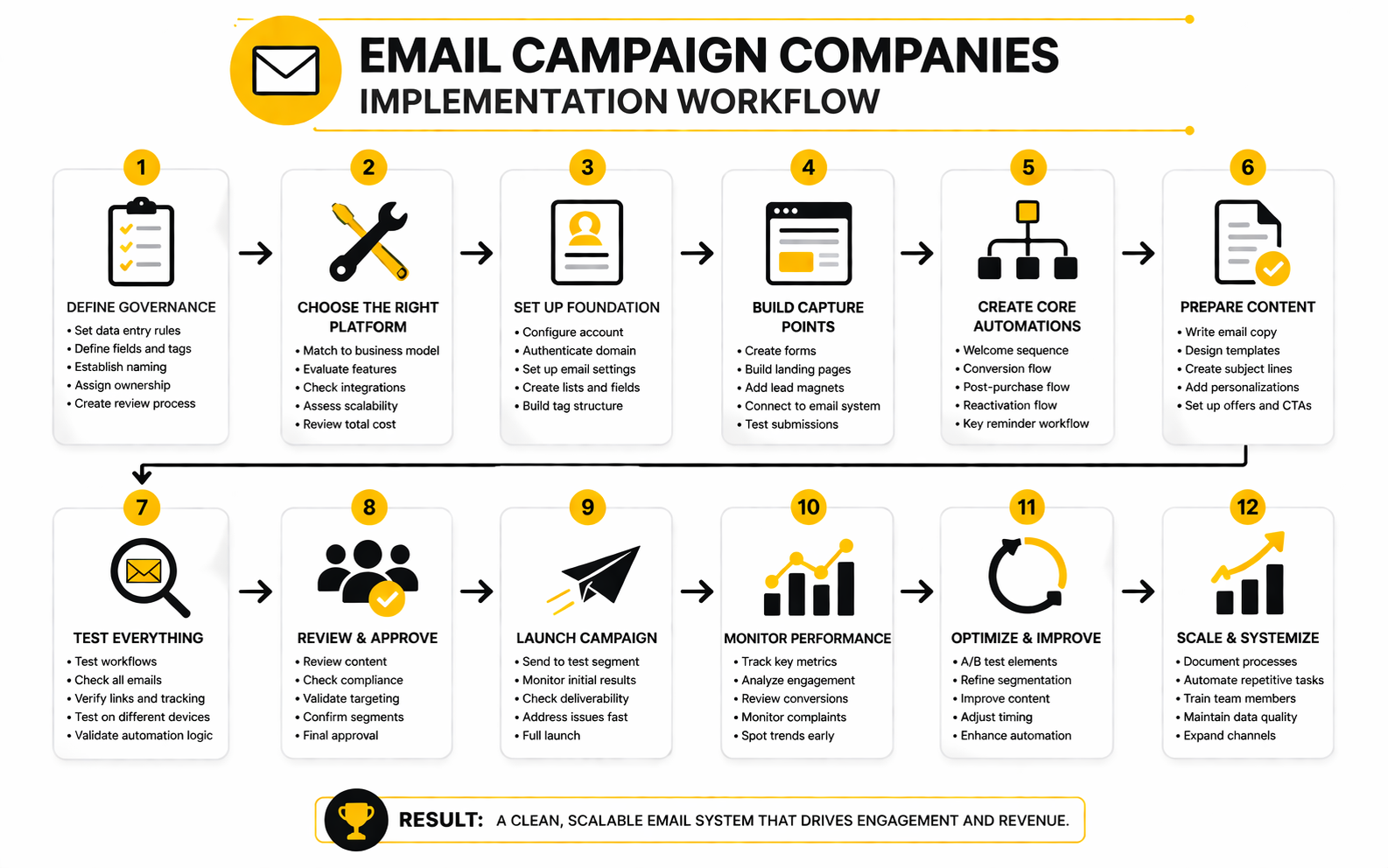
Once you understand the business type, the next step is implementation. This is where the decision becomes tangible. You are no longer asking which tool looks best; you are asking how the platform will actually support list growth, segmentation, campaigns, automations, and measurement.
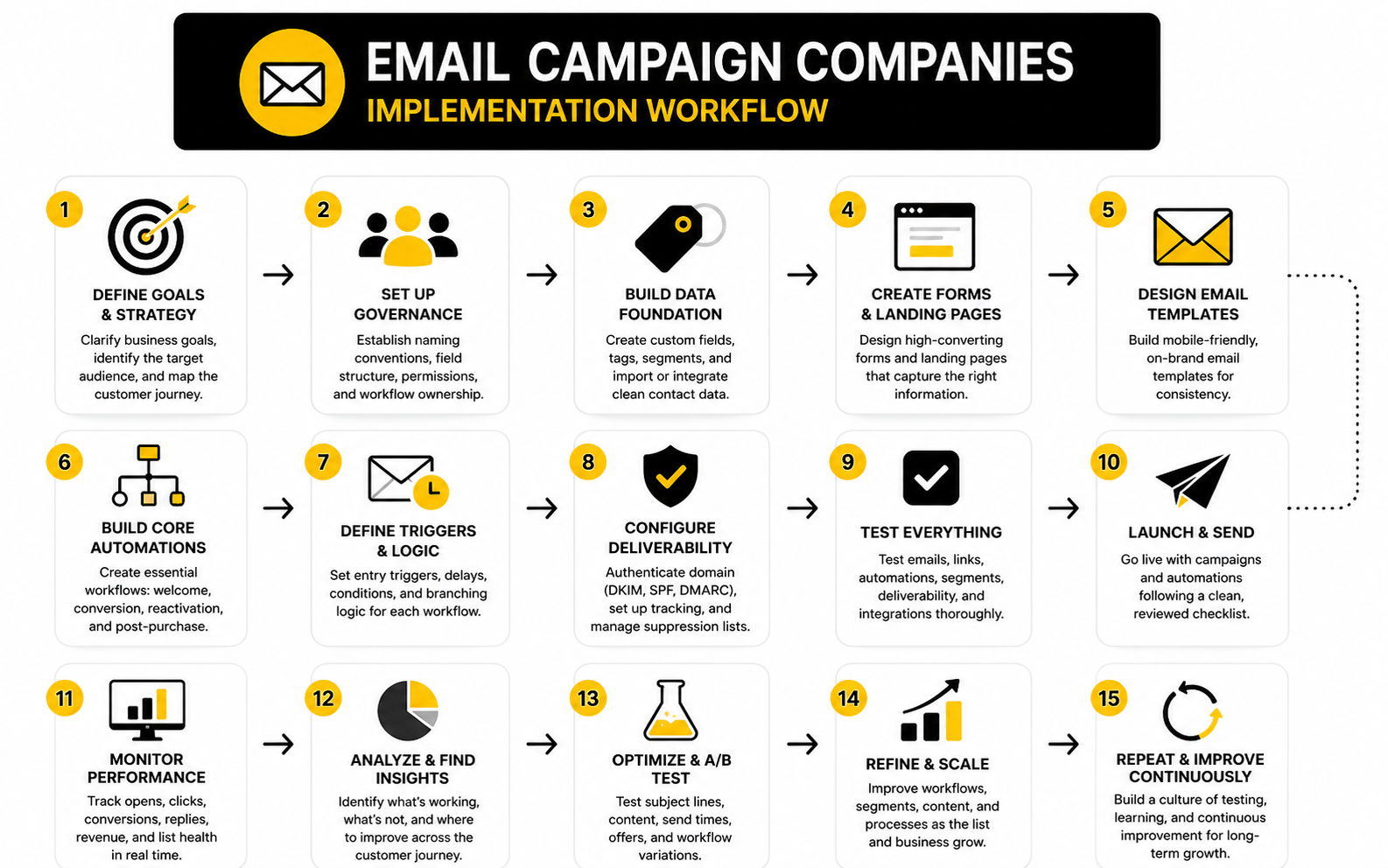
A clean implementation process prevents the classic mess: imported contacts with no structure, random tags, half-built automations, unclear ownership, and reports nobody checks. That mess is not a software problem. It is a setup problem.
Step 1: Define the Primary Conversion Goal
Start with one main conversion goal. It could be a booked call, a product purchase, a demo request, a quote request, a checkout completion, or a reply. Pick the action that actually moves the business forward.
This keeps your email setup focused. If you do not define the goal, every automation becomes vague and every metric feels important. Clear goals make platform decisions easier because you can immediately see which features matter and which ones are noise.
For example, a booked-call business needs forms, calendar integration, reminders, and pipeline tracking. A digital product business needs landing pages, checkout, launch emails, and buyer segmentation. Different goal, different system.
Step 2: Map the Customer Journey
Next, map the journey from first contact to conversion. Keep it practical. Write down how someone discovers you, how they join your list, what they need to believe before buying, what objections usually block them, and what follow-up should happen after they act.
This map should guide the campaign structure. A new subscriber should not receive the same message as a repeat buyer. A lead who clicked a pricing page should not be treated the same as someone who only downloaded a free checklist.
Good email campaign companies make this journey easier to automate. But the tool cannot invent the journey for you. You need the logic first, then the software.
Step 3: Clean and Segment the List
Before sending anything serious, clean the list. Remove obvious junk, suppress contacts that should not be emailed, and separate people by source, lifecycle stage, and intent. This step is boring, but it protects everything that comes after it.
Segmentation should begin simple. Use groups like new leads, active prospects, buyers, inactive subscribers, and high-intent contacts. You can add more detail later once the basics are working.
Do not turn segmentation into a spreadsheet hobby. The point is to send better emails, not create 80 tags nobody understands. Every segment should have a clear reason to exist.
Step 4: Build the First Three Workflows
Most businesses should start with three workflows. Build a welcome sequence, a conversion sequence, and a reactivation sequence. That gives you a practical foundation without overcomplicating the account.
The welcome sequence builds trust and sets expectations. The conversion sequence moves interested people toward the next action. The reactivation sequence gives quiet contacts a reason to engage again or be suppressed.
This is enough to create momentum. Once these workflows are live and measured, you can add more advanced automations around upsells, referrals, reviews, renewals, abandoned carts, or sales handoffs. Build in layers, not chaos.
Step 5: Connect Tracking Before Scaling
Tracking should be connected before volume increases. You need to know which forms, campaigns, workflows, and offers are creating results. Otherwise, scaling just makes the confusion bigger.
At minimum, track subscriber source, campaign clicks, conversions, unsubscribes, bounces, and revenue or pipeline movement where possible. A platform like Brevo can be enough for many small teams, while more complex sales operations may need deeper CRM reporting through GoHighLevel or a connected CRM such as Copper.
This is also where many businesses discover whether they chose correctly. If the platform cannot show the metrics that matter to your sales process, you will eventually feel the gap. Better to find that out during setup than after months of sending.
Step 6: Review, Improve, and Remove
Implementation is not finished when the first campaigns go live. The review cycle is part of the system. Every month, look at what performed, what stalled, what confused subscribers, and what should be removed.
Improvement does not always mean adding more emails. Sometimes it means cutting weak steps, tightening the offer, improving the landing page, or suppressing disengaged contacts. A lean email system usually beats a bloated one.
This is the discipline that makes email work long term. Choose the platform, build the core journeys, measure what matters, then improve with intent. That is how email campaign companies become revenue infrastructure instead of another monthly subscription.
Statistics and Data
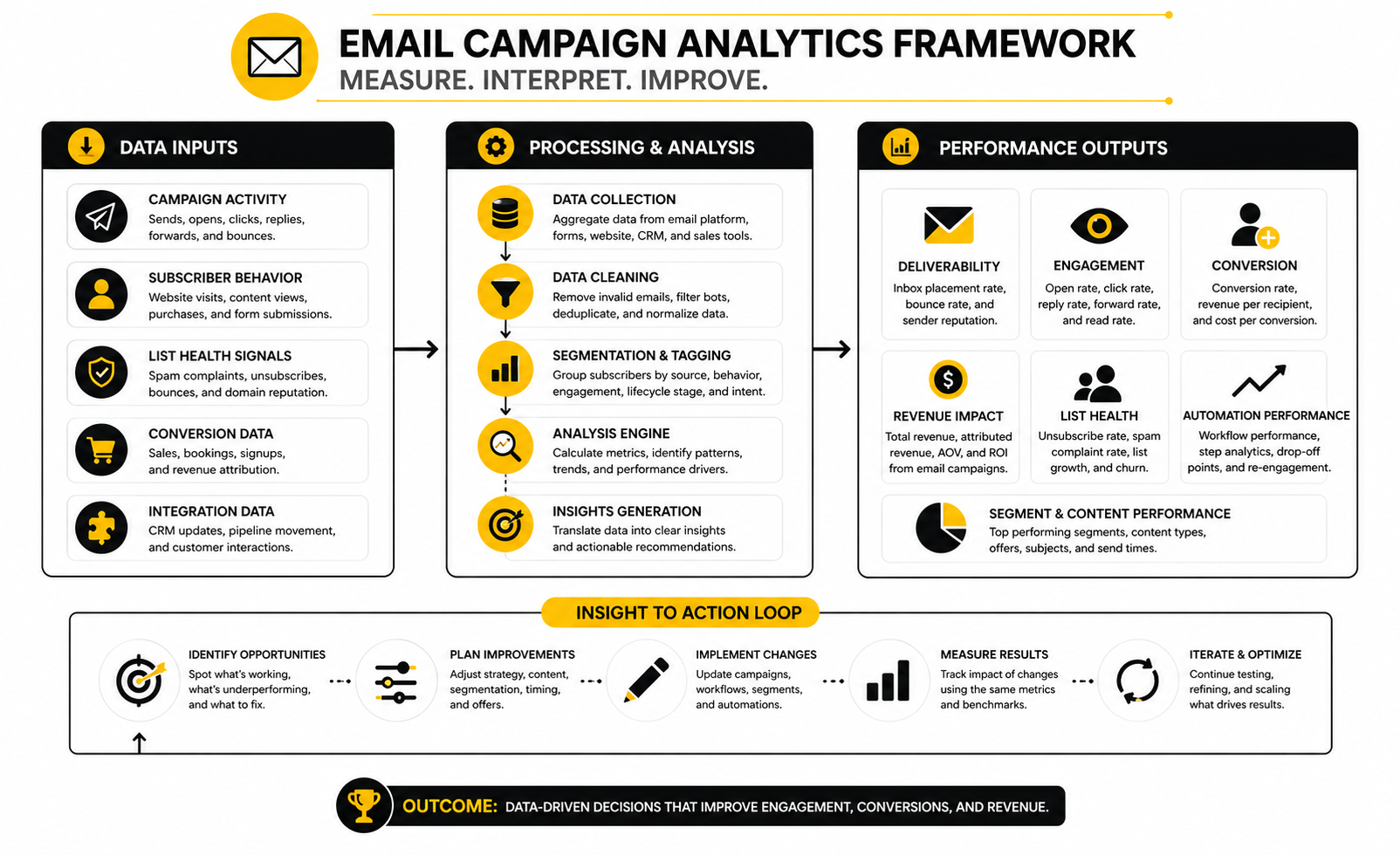
Data should make your email system sharper, not noisier. The point is not to collect every metric your platform can show you. The point is to understand which signals explain audience quality, campaign relevance, deliverability health, and revenue movement.
This is where many teams misread email campaign companies. They compare dashboards instead of asking whether the numbers lead to better decisions. A useful platform does not just show opens, clicks, bounces, unsubscribes, and conversions; it helps you understand what to change next.
Benchmarks Are Starting Points, Not Targets
Benchmarks are useful because they give you context. If your click rate is far below your industry range, something may be wrong with the offer, segmentation, email copy, or audience quality. But benchmarks should never become the only goal.
MailerLite’s 2025 benchmark data reviewed more than 3.6 million campaigns from 181,000 approved accounts, which makes it useful for broad directional comparison across industries and regions in its email benchmark report. The important lesson is not that every business should chase one universal open rate. The lesson is that performance varies heavily by industry, region, audience relationship, and campaign type.
That means your real benchmark is your own trendline. If your welcome sequence improves from month to month, your list is getting healthier or your message is becoming sharper. If your numbers decline while send volume increases, your platform may be helping you send more email without helping you send better email.
The Metrics That Actually Matter
Open rate can still be useful, but it is not as reliable as it used to be. Privacy features, image loading behavior, and inbox differences can distort open tracking. Treat opens as a directional signal, not a final truth.
Click rate is usually more meaningful because it shows active interest. If people click, they are doing something. If they do not click, the message may be too vague, the offer may be weak, or the segment may be wrong.
Conversion rate is the metric that connects email to the business. For ecommerce, that may mean purchases or revenue per recipient. For service businesses, it may mean booked calls, replies, quote requests, or qualified pipeline movement.
Build an Analytics System, Not a Reporting Habit
The best email campaign companies help you connect performance across the full journey. That means you can see where a contact came from, which campaign they received, what they clicked, what action they took, and whether that action created revenue or pipeline. Without that connection, your analytics stay trapped inside the email tool.
A simple analytics system should answer four questions. Who received the email? What did they do? What business outcome happened next? What should change because of it?
This is why standalone email metrics can be misleading. A campaign with a lower open rate but higher revenue may be better than a campaign with a high open rate and weak buyer intent. A reactivation email with many unsubscribes may still be successful if it cleans the list and improves future deliverability.
Deliverability Signals Need Serious Attention
Deliverability metrics are not just technical details. They tell you whether inbox providers and subscribers still trust your sending behavior. If bounces, spam complaints, and disengagement rise, your future campaigns become harder to deliver.
Google’s sender guidance is clear that bulk senders should keep user-reported spam rates below 0.1% and avoid reaching 0.3% or higher in Gmail’s sender FAQ. That is a small margin. It means even a tiny number of frustrated recipients can create real risk when volume is high.
This is why list quality matters more than list size. A smaller engaged list usually beats a large list full of cold, uninterested, or poorly sourced contacts. Good email campaign companies make it easier to suppress disengaged contacts, manage unsubscribes, and monitor reputation before problems become expensive.
What Good Performance Looks Like
Good performance is not one magic number. It is a healthy pattern across multiple signals. You want stable deliverability, engaged segments, clear clicks, low complaint rates, manageable unsubscribes, and measurable movement toward revenue.
A strong campaign might look like this:
- The right segment receives a relevant message
- The subject line earns enough opens to test the idea
- The body copy creates clicks or replies
- The landing page or sales process converts a meaningful share of that intent
- The unsubscribe and complaint rates stay controlled
- The results show what to improve next
That last point matters. If your campaign performs well but teaches you nothing, you got a result but not a system. If your campaign performs poorly and teaches you exactly what to fix, it still has value.
How to Interpret Weak Numbers
Weak numbers are not automatically bad news. They are diagnostic signals. The mistake is reacting emotionally instead of isolating the problem.
If open rates are weak, look at sender reputation, subject lines, list quality, timing, and audience expectations. If clicks are weak, look at the offer, message clarity, call to action, and segment relevance. If conversions are weak, look beyond the email and inspect the landing page, checkout, booking flow, pricing, and sales follow-up.
This is where platform choice matters. If the tool only shows campaign-level email stats, you may struggle to find the real bottleneck. If the system connects email with CRM, forms, checkout, or booking activity through tools like GoHighLevel, ClickFunnels, Systeme.io, or Brevo, it becomes much easier to see where the journey breaks.
What the Data Should Make You Do
Data should drive action. If a segment clicks often but does not convert, improve the offer or sales page. If a sequence gets replies but few bookings, simplify the call to action or connect a better scheduling flow with Cal.com.
If subscribers open but rarely click, rewrite the email around one clear promise instead of three competing ideas. If inactive contacts drag down performance, create a reactivation sequence, then suppress people who still do not engage. If complaints rise, stop sending broader campaigns and tighten consent, targeting, and expectations immediately.
This is the practical mindset. Do not stare at reports. Use the numbers to decide the next move.
Professional Implementation and Common Mistakes
At this stage, the choice is less about which email campaign companies have the longest feature list and more about which system you can run cleanly. A weak implementation can make a strong platform feel broken. A clean implementation can make even a simpler tool perform surprisingly well.
This is where discipline matters. You need rules for contacts, naming, ownership, testing, compliance, and reporting before the account becomes messy. Once a platform has months of random tags, duplicate workflows, unclear segments, and inconsistent reporting, fixing it takes far more effort than setting it up correctly in the first place.
Start With Governance Before Growth
Governance sounds boring, but it is what keeps the system usable. Decide how contacts enter the database, which fields matter, how tags are named, who can create automations, and what must be reviewed before a campaign is sent. This avoids the classic problem where everyone adds their own structure until nobody understands the account anymore.
A practical naming system is enough for most businesses. Use clear labels for lifecycle stage, source, intent, product interest, and customer status. Do not create a new tag every time you have a new idea.
This matters more as the team grows. One person can remember messy logic for a while, but a team cannot scale on memory. If your email platform needs tribal knowledge to operate, the system is already fragile.
Balance Simplicity and Power
More powerful email campaign companies often come with more setup decisions. That is not bad, but it means you need to be honest about your operating capacity. A full CRM automation platform can be a huge advantage if someone owns it properly, but it can become expensive clutter if nobody maintains the workflows.
For example, GoHighLevel can be strong for businesses that need CRM, pipeline, email, SMS, calendars, and follow-up in one place. But that power only pays off when the business has a clear sales process. If the customer journey is still vague, the tool will not magically make it clear.
On the other side, a simpler tool like Moosend or Brevo may be the smarter move for teams that mainly need campaigns, segmentation, and practical automation. The goal is not to buy the most advanced system. The goal is to buy the system you can execute consistently.
Watch the Hidden Cost of Switching
Switching platforms is rarely just a login change. You may need to migrate contacts, rebuild forms, recreate automations, reconnect domains, update landing pages, rework tracking, clean data, and retrain the team. That hidden cost should be part of the decision from day one.
This is why the cheapest platform is not always cheaper. If it forces workarounds, manual exports, weak reporting, or poor integration with your sales process, it can cost more through wasted time. A higher-priced platform may be better if it removes operational drag and supports revenue more directly.
Before switching, audit what must move. List every form, sequence, segment, tag, custom field, integration, template, suppression list, and reporting workflow. If you cannot document the current system, you are not ready to migrate it cleanly.
Avoid Over-Automation
Automation should remove repetitive work, not remove judgment. One of the biggest mistakes is building too many workflows too early. The account looks impressive, but nobody knows which emails matter or why certain contacts receive certain messages.
Start with the automations that directly support revenue or customer experience. A welcome sequence, sales follow-up, post-purchase sequence, reactivation flow, and key reminder workflow are usually more valuable than a giant map of tiny edge cases. Once those work, expand carefully.
Every automation should have an owner, a purpose, and a review cycle. If you cannot explain why a workflow exists in one sentence, pause before building it. Complexity is easy to create and hard to maintain.
Protect Consent and Expectations
Consent is not just a legal checkbox. It shapes the relationship with the subscriber. If someone signs up for a checklist and suddenly receives aggressive daily sales emails, the problem is not only compliance; it is broken trust.
The better approach is to make expectations clear at signup. Tell people what they will receive, send what you promised, and give them an easy way to leave. Gmail’s bulk sender guidance puts real pressure on complaint rates, with senders encouraged to stay below 0.1% and avoid reaching 0.3% or higher, so trust directly affects deliverability.
This is another reason list source matters. Bought lists, scraped contacts, and vague consent are risky. They may create short-term volume, but they usually damage the sender reputation that future campaigns depend on.
Use AI Carefully
AI can help with subject lines, drafts, summaries, segmentation ideas, and workflow planning. Many email campaign companies are adding AI features because teams want speed and lower production friction. Used well, AI can help you get from blank page to useful draft faster.
But AI should not define your strategy without human review. It does not know your positioning, customer objections, offer economics, compliance constraints, or brand voice unless you guide it carefully. A generic AI-generated campaign may be polished and still completely wrong for your audience.
A practical workflow is simple. Use AI to draft options, then edit for specificity, proof, clarity, and intent. The final email should sound like your business, not like every other automated campaign in the inbox.
Build for Scale Before You Need It
Scaling does not mean sending more emails tomorrow. It means building a system that will not collapse when the list, team, offers, and customer journeys grow. That requires clean data, clear ownership, consistent naming, and reporting that can survive more complexity.
If you plan to add sales reps, client accounts, products, regions, or multiple brands, choose a platform that can support that structure. A creator may outgrow a simple funnel tool once they add multiple product lines and customer segments. An agency may outgrow a basic email sender once client reporting and account separation become serious.
This is where expert-level selection becomes practical. Do not only ask, “Can this platform handle today?” Ask, “Will this platform still make sense after the next 12 months of growth?” That question will save you from painful migrations later.
Know When to Use Supporting Tools
Email rarely works alone. Forms, calendars, landing pages, CRM records, support tools, payment systems, and analytics all influence the customer journey. The platform you choose should either include those pieces or connect to them cleanly.
For example, Fillout can support better lead capture, Cal.com can make booking flows cleaner, and Copper can help teams that need CRM visibility around relationship-driven sales. If your landing pages are the bottleneck, a builder like Replo may matter more than changing the email platform.
This is the real strategic tradeoff. Sometimes the email tool is not the problem. The problem is the page, the offer, the CRM handoff, the calendar flow, or the follow-up process after the click.
Make the Final Decision With a Scorecard
A scorecard keeps the buying decision honest. Without one, it is too easy to choose based on brand familiarity, a demo, or one impressive feature. A simple scorecard forces you to compare email campaign companies against your actual needs.
Use categories like:
- Fit for your business model
- Ease of campaign creation
- Segmentation depth
- Automation flexibility
- Deliverability support
- CRM or ecommerce integration
- Reporting quality
- Team usability
- Migration effort
- Total cost over 12 months
Score each category from 1 to 5, then discuss the tradeoffs. The winner may not be the tool with the highest raw score. It may be the one with the fewest serious weaknesses for your specific business.
Prepare the Team Before Launch
A launch is not just technical. The team needs to know what the platform is for, how campaigns are requested, who approves sends, how performance is reviewed, and what should not be changed without discussion. This prevents accidental damage after setup.
Create a short operating document. Include naming rules, campaign checklist, automation map, reporting cadence, and ownership. Keep it simple enough that people actually use it.
This is the difference between buying software and building a system. The best email campaign companies can support growth, but they cannot replace internal clarity. That part is on you.
Final Recommendations and Buying Checklist
By now, the decision should be clearer. Email campaign companies are not interchangeable, and the best choice depends on your business model, workflow, list quality, sales process, and ability to maintain the system. The right platform should make your marketing easier to run, easier to measure, and easier to improve.
Do not choose based on hype. Choose based on fit. If a platform supports the way your customers actually move from awareness to purchase, it is worth serious consideration.
Best Fit by Use Case
For service businesses and agencies that need CRM, pipeline tracking, calendars, automation, and follow-up in one place, GoHighLevel is usually the most complete option. It makes the most sense when email is part of a wider client acquisition or sales follow-up system. The main requirement is discipline: you need a clean setup and someone responsible for maintaining it.
For creators, course sellers, and simple digital product funnels, Systeme.io and ClickFunnels are easier to justify. They keep landing pages, offers, checkout, and email close together, which helps when speed matters more than deep CRM complexity. If the customer journey is simple, that simplicity is a strength.
For small teams that mainly need campaigns, segmentation, and practical automation, Brevo and Moosend are worth comparing. They can support strong email execution without forcing the business into a heavier system. The key is making sure the reporting and integrations match your actual goals.
The Buying Checklist
Use this checklist before committing to any platform. It will keep the decision practical and stop you from getting distracted by features that sound impressive but will not change your results.
- Does the platform support your main conversion goal?
- Can you segment contacts by source, behavior, lifecycle stage, and intent?
- Can you build the first three workflows without technical friction?
- Does it support domain authentication, unsubscribe management, bounces, and suppression lists?
- Can you connect forms, landing pages, checkout, CRM, or calendars without messy workarounds?
- Can you track the metrics that actually affect revenue?
- Will the team responsible for campaigns be able to use it every week?
- Is the migration effort realistic?
- Does the pricing still make sense after list growth, extra users, and add-ons?
- Will the platform still fit the business 12 months from now?
The final question is the most important. You are not just buying software for today. You are choosing infrastructure for the way your email program will grow.
FAQ - Built for Complete Guide
What are email campaign companies?
Email campaign companies provide software that helps businesses send, automate, manage, and measure marketing emails. Some focus mainly on newsletters and campaigns, while others include CRM, landing pages, funnels, SMS, forms, and sales automation. The right choice depends on whether you need a simple sender or a full customer journey system.
How do I choose the best email campaign company?
Start with your business model and conversion goal. A service business may need CRM and booked-call follow-up, while an ecommerce brand may need behavior-based segmentation and purchase flows. Once you know the journey, compare tools by segmentation, automation, deliverability, integrations, analytics, usability, and total cost.
Are open rates still important?
Open rates are useful, but they should not be treated as perfect truth. Privacy features and email client behavior can distort open tracking, so opens are better used as a directional signal. Clicks, conversions, replies, revenue, booked calls, complaints, and unsubscribe trends usually tell you more about real performance.
What is the most important email metric?
The most important metric is the one tied to your business outcome. For ecommerce, that may be revenue per recipient or purchases from automated flows. For service businesses, it may be booked calls, replies, qualified leads, or pipeline movement.
Why does deliverability matter so much?
Deliverability decides whether your emails reach the inbox in the first place. Gmail’s sender FAQ says senders should keep spam rates below 0.1% and avoid reaching 0.3% or higher, which shows how small the margin can be for bulk senders under Gmail’s sender guidance. If your sender reputation declines, even good campaigns can struggle.
Should small businesses use an all-in-one platform?
Small businesses should use an all-in-one platform when it reduces complexity and supports the full journey. If you need CRM, forms, calendars, email, SMS, and follow-up together, GoHighLevel can make sense. If you only need straightforward campaigns and basic automation, a lighter email tool may be better.
Are funnel platforms good for email campaigns?
Funnel platforms can be very useful when email is connected to opt-in pages, sales pages, checkout, upsells, and digital product delivery. ClickFunnels and Systeme.io fit this use case well. They are less ideal when you need deep CRM reporting or complex sales operations.
How many automations should I build first?
Start with three core workflows: welcome, conversion, and reactivation. Those cover the most important early journeys without turning the account into a mess. Once they are working and measured, add more advanced flows only when there is a clear reason.
Is a bigger email list always better?
No. A smaller engaged list is usually more valuable than a large list full of cold, inactive, or poorly sourced contacts. List quality affects clicks, conversions, complaints, and deliverability, so growth should never come at the cost of consent and relevance.
How often should I review email performance?
Review campaign performance after every major send, and review the overall email system monthly. Campaign reviews help you improve subject lines, offers, segmentation, and calls to action. Monthly reviews help you spot bigger issues like list decay, weak automation steps, poor deliverability signals, or broken tracking.
When should I switch email platforms?
Switch when the current platform blocks growth, creates manual work, lacks critical integrations, weakens reporting, or cannot support your customer journey. Do not switch just because another tool has a better-looking feature page. Migration takes real effort, so the reason should be tied to better execution or better business results.
What should I avoid when comparing email campaign companies?
Avoid comparing only by price, templates, or feature count. Those details matter, but they are not enough. The bigger question is whether the platform can support your audience structure, workflows, deliverability, analytics, team process, and growth plan.
Work With Professionals
Explore 10K+ Remote Marketing Contracts on MarkeWork.com
Most marketers spend too much time chasing clients, competing on crowded platforms, and losing a percentage of every project to middlemen.
MarkeWork gives you a better way. Browse thousands of remote marketing contracts and connect directly with companies desperate to hire skilled marketers like you, without platform commissions and without unnecessary gatekeepers.
If you are serious about finding better opportunities and keeping 100% of what you earn, explore available contracts and create a profile for free at MarkeWork.com.