

Email marketing for small business is not about blasting discounts until people unsubscribe. It is about building a simple owned channel that helps strangers become leads, leads become customers, and customers come back without you relying only on ads or algorithms.
That matters because small businesses usually do not have unlimited time, staff, or budget. In Constant Contact’s 2025 small business research, only 18% of SMBs felt very confident in their marketing effectiveness, yet 44% said email was their most effective marketing channel. That is the gap this guide is built to close.
Article Outline
This article is split into six parts so the strategy builds in the right order. We will start with the big picture, then move into the practical pieces that make email marketing work for a small business. By the end, you should have a clear system you can actually implement instead of another vague marketing checklist.
- Why Email Marketing Still Matters For Small Businesses
- The Small Business Email Marketing Framework
- Building A List People Actually Want To Join
- Writing Emails That Build Trust And Drive Action
- Automation, Segmentation, And Professional Implementation
- Measurement, Optimization, Tools, And FAQ
Why Email Marketing Still Matters For Small Businesses
Email is still valuable because it gives you a direct line to people who already showed interest. Social platforms can reduce reach, ad costs can climb, and search traffic can shift, but your email list remains an asset you can keep nurturing. That is especially important for small businesses that need repeatable revenue instead of random spikes.
It also works because email fits the full customer journey. You can welcome a new subscriber, educate them before a purchase, follow up after a quote, recover abandoned interest, announce a seasonal offer, or bring back past customers. Recent ROI research from Litmus found many companies report returns between $10 and $36 for every $1 spent on email, which explains why the channel keeps surviving every “email is dead” prediction.
The real advantage is not the tool itself. The advantage is having a system that sends the right message to the right person at the right moment. Omnisend’s ecommerce research showed automated emails made up only 2% of email volume but drove 37% of email-driven sales, which is exactly why small businesses should think beyond newsletters.
The Small Business Email Marketing Framework
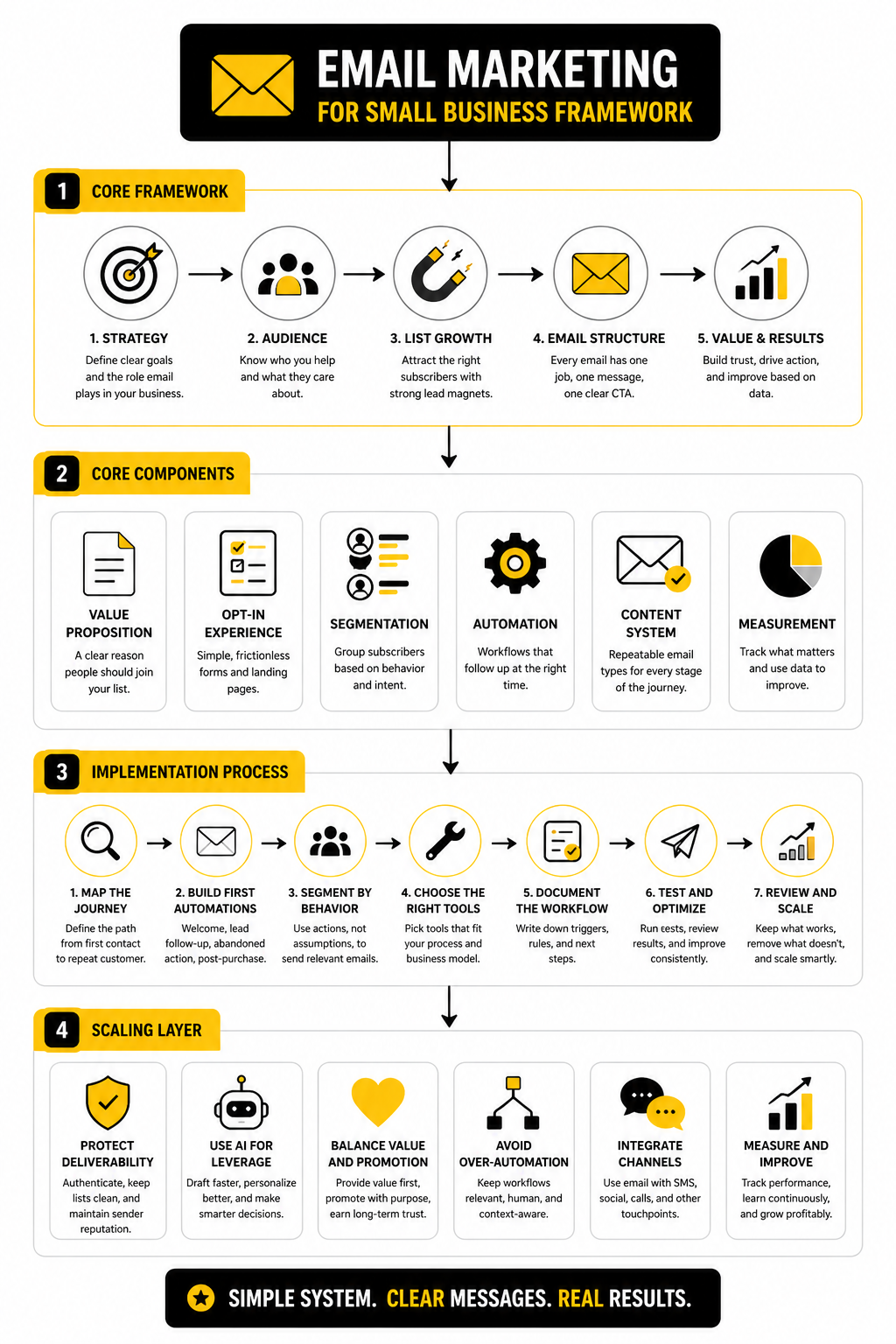
A strong email marketing system has four moving parts: audience, offer, message, and follow-up. Audience means you attract the right people onto your list instead of collecting random contacts. Offer means there is a clear reason for them to subscribe, buy, book, reply, or return.
Message is where most small businesses overcomplicate things. You do not need clever copy if the email is useful, timely, and easy to act on. You need a clear subject line, a relevant body, one main call to action, and enough personality that the email feels like it came from a real business.
Follow-up is where the money usually is. A welcome sequence, quote follow-up, abandoned cart email, review request, and reactivation campaign can quietly do work every day. Tools like Brevo or Moosend can handle the basics, while broader systems like GoHighLevel make more sense when you want email, CRM, forms, funnels, SMS, and pipeline follow-up in one place.
Building A List People Actually Want To Join
The next step in email marketing for small business is list building, but not the lazy version where you slap “join our newsletter” at the bottom of a website and hope people care. People subscribe when the value is obvious. That value can be a discount, a useful checklist, early access, a quote request, a booking reminder, a local guide, a product finder, or a practical resource that helps them make a decision faster.
The goal is not to collect the biggest list possible. The goal is to collect the right contacts with enough context to send better emails later. A small list of people who want your offers will beat a huge cold list that ignores you, reports spam, or only joined because the incentive had nothing to do with your business.
This is where consent matters. Email is an owned channel, but it is not a free pass to annoy people. Make the signup promise clear, send what you promised, and let people unsubscribe easily because trust is part of deliverability.
Start With One Clear Signup Reason
Every list needs a reason to exist. A restaurant might offer weekly specials and birthday rewards. A consultant might offer a diagnostic checklist. A local service business might offer a seasonal maintenance reminder or a fast quote form.
Do not overthink the first offer. Pick something that matches what customers already ask about before buying. If people always ask about pricing, timelines, preparation, comparisons, or what happens next, that is usually a strong clue for your lead magnet or signup promise.
The best signup reason also tells you something useful about the subscriber. Someone who downloads a buyer checklist is in a different mindset than someone who enters a giveaway. That difference matters later when you decide what to send and how direct your offer should be.
Put Signup Forms Where Intent Already Exists
Your signup form should not hide in one lonely footer. Put it near moments where the visitor is already showing interest, such as product pages, service pages, blog posts, booking pages, checkout flows, quote forms, and contact pages. The more naturally the form fits the page, the less it feels like an interruption.
For service businesses, a simple form connected to a CRM can be more valuable than a fancy popup. You want the inquiry, source, service interest, and follow-up status captured cleanly. Platforms like GoHighLevel are useful when you want forms, pipelines, email follow-up, and appointment reminders in one place instead of duct-taping five tools together.
For ecommerce and simple campaigns, a lightweight email platform is often enough. Brevo and Moosend both fit small business use cases where the priority is capturing subscribers, sending campaigns, and setting up basic automations without turning the whole operation into a software project.
Collect Only The Data You Will Use
Small businesses often make forms too complicated because they want perfect information upfront. That usually lowers conversions and creates friction. Ask for the email address first, then collect more details when the person books, buys, replies, clicks, or fills out a more specific form.
A good starting point is email address plus one useful preference. That preference might be product category, location, business type, service interest, or purchase timeline. If you are not going to use a field to personalize or segment follow-up, leave it out.
This keeps your list cleaner and your emails more relevant. It also makes the subscriber feel like the questions have a purpose. Nobody wants to fill out a mini tax return just to get a discount code.
Writing Emails That Build Trust And Drive Action
Once someone joins your list, the job changes. You are no longer trying to capture attention from scratch. You are trying to prove that staying subscribed was a good decision.
That means every email needs a job. Some emails educate, some sell, some remind, some reassure, and some move the subscriber to the next step. When you know the job, the writing gets much easier.
The mistake is trying to make every email do everything. One email should not introduce your brand, explain your philosophy, promote five offers, ask for a review, and push a booking link. Pick one main action and make the rest of the email support it.
Write Like A Helpful Expert, Not A Brochure
Small business emails work best when they sound like a real person with useful judgment. You can still be polished, but you should not sound like a corporate flyer. Clear beats clever almost every time.
Start with the reader’s situation, then connect it to the point of the email. If they are comparing options, help them compare. If they just bought, help them get the best result. If they have not booked yet, remove the obvious friction.
This is also where trust compounds. A useful email today makes tomorrow’s offer easier to click. A pushy email today makes every future email work harder.
Make The Call To Action Obvious
Every email should make the next step easy to understand. That might be “book a call,” “claim the offer,” “reply with your question,” “view the guide,” “finish checkout,” or “choose your appointment time.” The call to action should match the subscriber’s stage, not your impatience.
For small businesses that rely on appointments, the best CTA is often a scheduling link. Tools like Cal.com can make that smoother because people can choose a time without the back-and-forth. For quote-based businesses, a short form through Fillout can turn vague interest into usable sales context.
Keep the email focused around that one action. If you include too many links, you are not giving people options; you are giving them homework. A clear next step respects the reader’s time and improves your chances of getting the response you want.
Automation, Segmentation, And Professional Implementation
This is where email marketing for small business becomes a real operating system instead of a random send button. You already have a reason for people to join your list, and you already know each email needs one clear job. Now the focus is execution: what gets sent, when it gets sent, who receives it, and what happens next.
The point is not to automate everything. The point is to automate the moments that are too important to leave to memory. Welcome emails, booking reminders, quote follow-ups, abandoned checkout messages, post-purchase education, review requests, and reactivation emails are all repeatable touchpoints that can quietly protect revenue.
Start With The Customer Journey
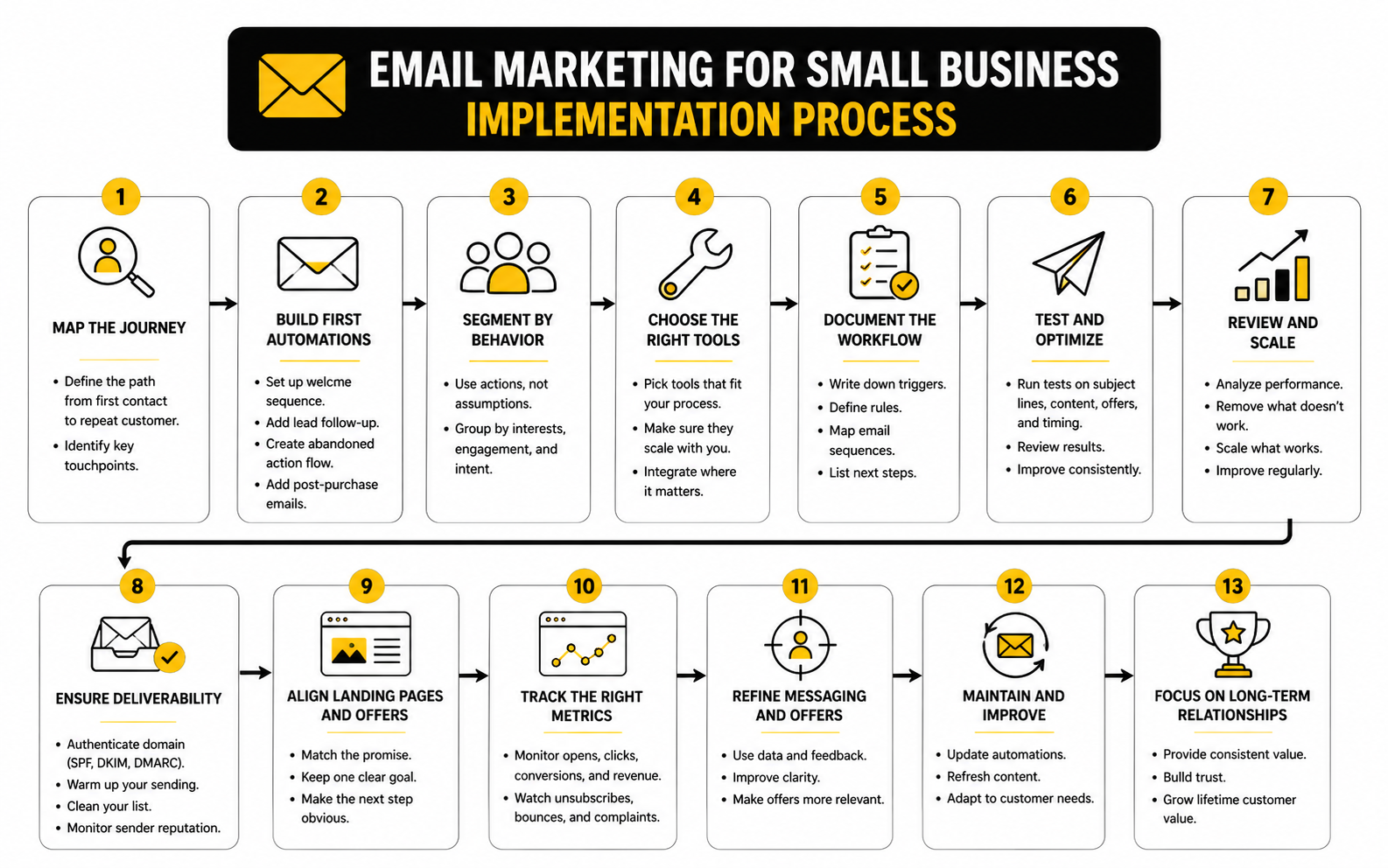
Before choosing software or writing templates, map the path someone takes from first contact to repeat customer. Keep it simple. Most small businesses only need a few stages: new subscriber, interested lead, active opportunity, first-time customer, repeat customer, and inactive customer.
Each stage should have one main question attached to it. What does this person need to know right now? What doubt might stop them from moving forward? What is the next obvious action they should take?
That journey map prevents scattered campaigns. Instead of sending whatever you feel like sending this week, you build emails around real business moments. That is what makes implementation feel clean, not chaotic.
Build The First Four Automations
Do not start with twenty workflows. Start with four that cover the most common revenue leaks. A simple system that actually runs is better than a complex map nobody maintains.
- Welcome sequence: Send a short first email immediately after signup, then follow with one or two useful emails that explain what you do, who you help, and what the subscriber should do next.
- Lead follow-up: When someone fills out a quote form, books a call, or asks a question, trigger a quick confirmation and a practical next-step email.
- Abandoned action: If someone starts but does not finish a checkout, booking, or form, remind them while the intent is still fresh.
- Post-purchase sequence: After a sale, send helpful usage tips, support information, review requests, and a reason to come back.
These four automations cover the moments where small businesses most often lose people. They also create a foundation you can improve later with segmentation, personalization, and better offers. Automated messages can punch above their weight because they match timing and intent better than one-size-fits-all campaigns.
Segment Based On Behavior, Not Vanity Data
Segmentation does not need to be complicated. You do not need fifty audience groups or a giant spreadsheet of tags. Start with behavior because behavior is usually more useful than assumptions.
Useful segments include people who clicked a product link, requested a quote, booked a consultation, bought once, bought multiple times, ignored recent emails, or showed interest in a specific service. That tells you what they might care about next. It also stops you from sending the same message to people at completely different stages.
This matters because personalization is still underused in a meaningful way. MoEngage’s 2025 email benchmark research found that 87% of analyzed emails were only minimally personalized, which means many brands are still stopping at basic name fields. Small businesses can stand out by personalizing around intent, timing, and context instead.
Choose Tools Around Your Process
Software should support the workflow, not become the strategy. If you mainly need newsletters, basic automations, and clean subscriber management, a dedicated email platform is usually enough. If your business depends on calls, quotes, pipeline stages, and follow-up tasks, you probably need a CRM-driven setup.
For a lean email setup, Brevo or Moosend can make sense because they keep the email side focused. For a broader sales and marketing system, GoHighLevel is more useful when email needs to connect with forms, landing pages, calendars, SMS, pipelines, and client follow-up. If your main need is a quick funnel around one offer, ClickFunnels or Systeme.io can help you package the signup and sales flow faster.
The practical test is simple: can you clearly see what happens after someone opts in, clicks, books, buys, or goes quiet? If the answer is no, the tool is not the problem yet. The process needs to be clarified first.
Document The Workflow Before You Scale It
Once the first workflows are live, write down the rules. What triggers each email? What does each message say? When does a person stop receiving the sequence? What tag, list, or pipeline stage changes after each action?
This documentation does not need to be fancy. A simple checklist or spreadsheet is enough. The point is to avoid building a system that only one person understands.
Professional implementation is mostly about consistency. Clear triggers, clean segments, readable templates, tested links, and realistic reporting will beat a messy “advanced” setup every time. Start small, make it reliable, then improve the parts that are already producing signals.
Statistics And Data
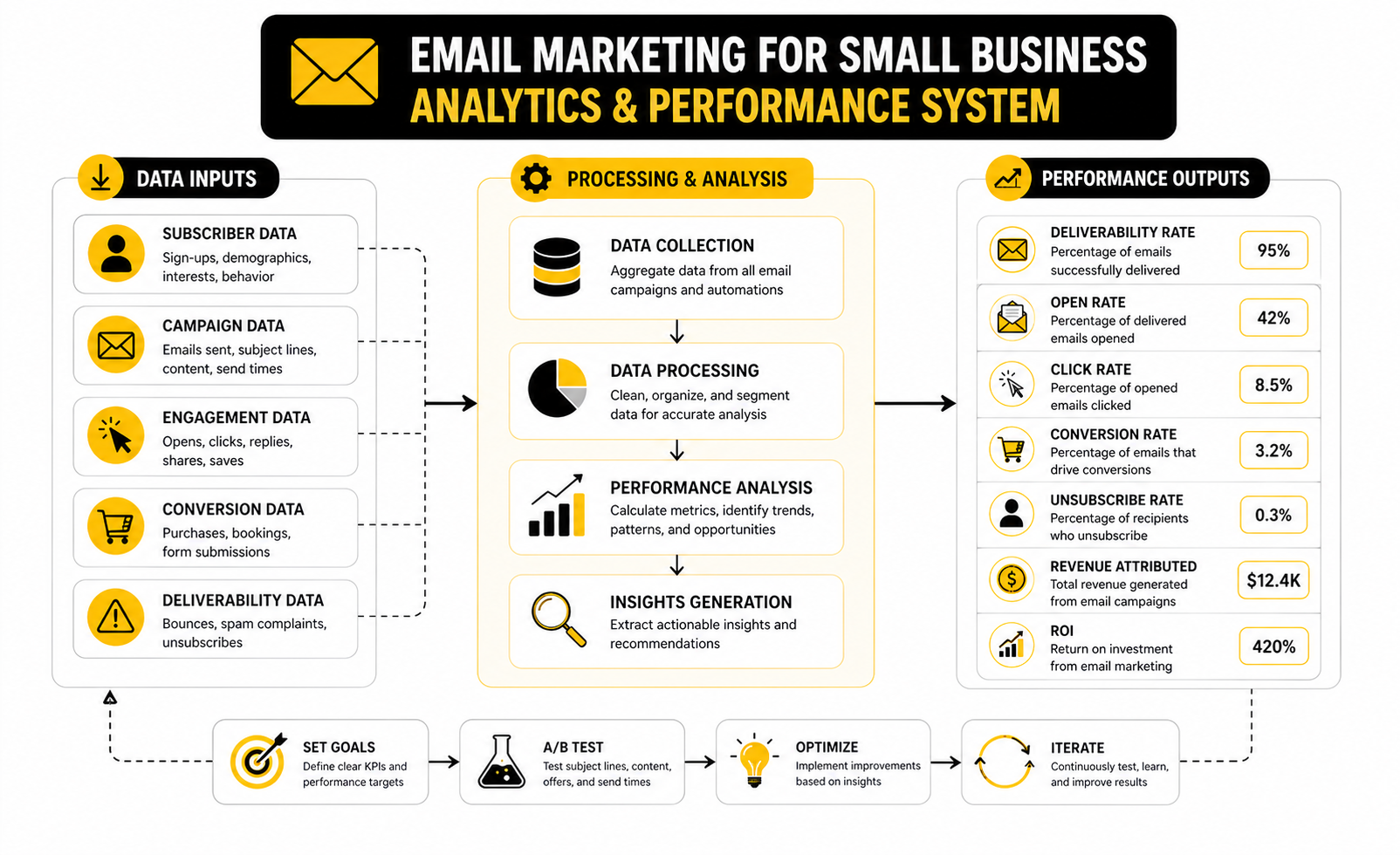
Measurement is where email marketing for small business becomes honest. It tells you whether people are paying attention, whether the offer is clear, whether the timing is right, and whether the email is actually moving the business forward. Without data, you are just guessing with better formatting.
The mistake is treating every metric like it matters equally. It does not. Open rate, click rate, conversion rate, unsubscribe rate, bounce rate, revenue, bookings, replies, and list growth all tell different parts of the story. The job is to understand what each number means, then decide what action it should trigger.
A good reporting system should answer five practical questions:
- Are people receiving the emails?
- Are the right people opening them?
- Are subscribers clicking or replying?
- Are those actions turning into revenue, bookings, quotes, or repeat purchases?
- Is the list becoming healthier or weaker over time?
Open Rate Shows Attention, But Not The Whole Truth
Open rate is useful, but it is not the final judge of performance. Privacy tools, image caching, security scanners, and inbox behavior can distort opens, so you should treat open rate as a directional signal rather than a perfect measurement. If opens rise or fall sharply, pay attention, but do not build your whole strategy around that one number.
For small businesses, open rate is most useful when comparing your own emails against your own past performance. A welcome email should usually open higher than a general newsletter because the subscriber just asked to hear from you. A reactivation email may open lower because the audience is colder.
The action is simple. If open rates are weak across multiple sends, improve the sender name, subject line, preview text, list quality, and send timing. If open rates are strong but clicks are weak, the problem is probably not the subject line; it is the offer, email body, or call to action.
Click Rate Shows Real Engagement
Click rate is usually a stronger signal because it requires the reader to take action. They saw something relevant enough to move from passive attention to active interest. That makes click rate one of the most important metrics in email marketing for small business.
Benchmarks vary by industry, list quality, and email type, but recent benchmark roundups consistently show that average click rates are much lower than open rates, often sitting in the low single digits across many industries. That is not automatically bad. It simply means every click is valuable, and your email should make the next step obvious.
If clicks are low, look at the email from the reader’s point of view. Is the offer specific? Is the link easy to find? Is there one main action, or are you splitting attention across too many options? Fix clarity before you blame the audience.
Conversion Rate Connects Email To Revenue
Conversion rate is where marketing stops being cosmetic. A conversion might be a purchase, booked call, quote request, consultation, demo, review, renewal, or reply. The exact action depends on the business model, but the principle stays the same: did the email create a business result?
This is why ecommerce brands often obsess over automated flows. Omnisend’s 2025 ecommerce research found that automated emails represented only 2% of email sends but generated 37% of email-driven sales. That number matters because it proves timing and intent can beat volume.
For a small business, the lesson is direct. Do not only measure newsletters. Measure the emails tied to high-intent moments: welcome, abandoned checkout, appointment reminders, quote follow-ups, post-purchase education, and win-back campaigns.
Unsubscribes And Spam Complaints Protect The List
Unsubscribes are not always bad. Some people leave because they were never a fit, and that can actually improve list quality. The bigger issue is a sudden spike in unsubscribes or complaints after a specific email.
That usually means the message did not match the expectation. Maybe the signup promise was unclear. Maybe the email was too aggressive. Maybe the audience segment was wrong.
Your action should be calm but immediate. Review the source of those subscribers, the subject line, the offer, and whether the email was sent to the right segment. A smaller healthy list is better than a larger list that slowly damages deliverability.
Bounce Rate Shows List Quality And Deliverability Risk
Bounce rate tells you whether your emails are reaching valid inboxes. A hard bounce means the address is invalid or unreachable. Too many bounces can hurt sender reputation, which makes future emails harder to deliver.
For small businesses, bounce problems often come from old lists, imported contacts, typo-heavy forms, scraped addresses, or giveaways that attract fake signups. This is why permission-based list building matters. It is not just a compliance issue; it is a performance issue.
Clean your list regularly and avoid sending to contacts who have not engaged in a long time without a reactivation plan. If a segment has gone cold, send a respectful win-back email, then suppress people who still ignore you. Deliverability is easier to protect than repair.
Revenue Per Subscriber Is The Metric Owners Understand
At some point, the owner does not care that a campaign had a pretty open rate. They care whether the email channel creates money, appointments, retention, or pipeline. Revenue per subscriber helps connect the list to the business.
You can keep this simple. Track monthly email revenue or booked value, then divide it by the number of active subscribers. If the number rises, your list is becoming more valuable. If the list grows but revenue per subscriber falls, you may be attracting the wrong people or sending weak follow-up.
This metric also helps you make better budget decisions. If each active subscriber is worth more over time, investing in better lead magnets, forms, landing pages, and automation makes sense. If the number is flat, improve the offer and follow-up before buying more traffic.
Benchmarks Are A Starting Point, Not A Strategy
Benchmarks are helpful for context, but they should not become the goal. A local service business, ecommerce store, restaurant, consultant, and B2B agency will not have identical email behavior. Audience intent, offer type, purchase cycle, and list source all change the numbers.
MailerLite’s benchmark research uses data from over 3.6 million campaigns sent by 181,000 approved accounts, which makes it useful for broad comparison. But your best benchmark is still your own trend over time. Are the right metrics improving for the right campaigns?
Use external benchmarks to spot obvious problems. Use internal benchmarks to make decisions. That is the difference between looking informed and actually improving performance.
Turn The Data Into Weekly Decisions
A simple weekly review is enough for most small businesses. Look at deliverability signals first, engagement second, and business outcomes third. That order keeps you from celebrating clicks that never turn into anything.
Review these numbers weekly:
- List growth from quality sources
- Open rate trends by campaign type
- Click rate and top clicked links
- Conversion actions such as bookings, purchases, replies, or quote requests
- Unsubscribes, spam complaints, and bounce rate
- Revenue, pipeline value, or repeat purchases connected to email
The point is not to create a giant dashboard nobody reads. The point is to make one or two improvements every week. Change a subject line pattern, simplify a CTA, tighten a segment, rewrite a weak automation email, clean inactive contacts, or test a stronger offer. That is how the numbers start working for you.
Scaling Email Without Breaking Trust
Once the basics are working, the next challenge is scale. More subscribers, more automations, more offers, and more campaigns can create more revenue, but they can also create more noise. This is where many businesses damage the channel they worked so hard to build.
Scaling email marketing for small business should not mean sending more emails to everyone. It should mean sending more relevant emails to the right people. That is a very different strategy, and it protects trust while still giving you room to grow.
The practical rule is simple: increase precision before you increase volume. If your list is segmented, your automations are clean, your deliverability is healthy, and your offers match the audience, then sending more can make sense. If those basics are weak, more email usually just exposes the cracks faster.
Protect Deliverability Before You Push Harder
Deliverability is not glamorous, but it controls everything. If emails do not reach the inbox, your copy, offer, design, and automation logic do not matter. Gmail and Yahoo started enforcing stronger sender requirements in 2024, and Microsoft added similar enforcement in 2025, which means authentication is now a serious operating requirement, not a technical nice-to-have.
At minimum, your sending domain should be properly authenticated with SPF, DKIM, and DMARC. Mailgun’s deliverability research notes that bulk senders must use SPF and DKIM to comply with Gmail and Yahoo requirements, and using all three authentication methods is the smarter long-term setup. If that sounds technical, fine. Get help once and set it up properly.
Deliverability also depends on behavior. Do not buy lists, do not keep blasting inactive contacts, and do not bait people into subscribing for something unrelated to your actual business. A smaller engaged list will usually outperform a bloated list that teaches inbox providers people do not want your emails.
Use AI For Leverage, Not Lazy Messaging
AI can help email marketing, but it should not replace judgment. It is useful for drafting subject line variations, summarizing customer research, turning offers into email angles, cleaning up structure, and creating first drafts faster. It is not useful when it makes every brand sound the same.
The better use is not “write me an email.” The better use is “help me create three versions of this email for three audience segments based on what they clicked, bought, or asked about.” That keeps the strategy human while using AI to speed up execution.
This matters because many teams still use AI at the surface level. Litmus’ 2025 email research highlighted challenges around ROI, engagement, personalization, and AI, with marketers needing smarter campaigns rather than just more sends. For a small business, the win is not producing more generic emails; the win is making useful emails easier to create consistently.
Balance Promotions With Relationship Emails
If every email asks for money, subscribers eventually tune out. Promotions matter, but they work better when the relationship has already been built. That relationship comes from useful advice, reminders, behind-the-scenes context, product education, customer support, and timely answers to common questions.
A healthy email calendar usually mixes direct offers with value-driven messages. The exact ratio depends on the business. A retail brand can promote more often than a high-ticket consultant because the buying cycle and customer expectations are different.
The real test is whether each email earns its place in the inbox. If a subscriber opened the email and did not buy, did they still get something useful? If the answer is yes, you are building long-term equity. If the answer is no, you are training people to ignore you until there is a discount.
Avoid Over-Automation
Automation should make the customer experience smoother, not colder. Too many workflows can create weird overlaps, repeated messages, conflicting offers, and follow-ups that feel tone-deaf. That is when a business starts sounding like software instead of a person.
Set suppression rules so people do not receive irrelevant sequences after they buy, book, reply, or move to a different stage. Review automations after major offer changes, pricing changes, seasonal campaigns, and product updates. Old emails can quietly create confusion if nobody owns them.
This is especially important when you connect email with CRM, funnels, forms, calendars, and SMS. A system like GoHighLevel can be powerful because it brings those pieces together, but power needs discipline. Map the journey first, then automate it.
Know When To Add More Channels
Email is strong, but it should not carry the whole customer journey alone. Some moments are better handled by SMS, chat, retargeting, sales calls, direct mail, or human follow-up. The goal is not to worship email; the goal is to move the customer forward in the most natural way.
For example, appointment reminders may work better with email plus SMS. Quick lead qualification may work better through a form and a follow-up call. Social follow-up can support email campaigns when the audience needs more touchpoints before deciding.
Tools like ManyChat can support conversational follow-up on social channels, while Buffer can help keep social content consistent around campaigns. Just do not add channels because they are trendy. Add them when they solve a real follow-up problem.
Build A Simple Testing System
Testing is where small improvements compound. You do not need a lab-coat approach or endless experiments. You need a simple habit of changing one meaningful thing at a time and watching the result.
Good test ideas include subject line angle, offer framing, email length, CTA wording, send day, audience segment, landing page promise, and follow-up timing. Bad testing is changing five things at once, declaring victory after one small send, or optimizing for opens when the real goal is bookings or sales.
Run tests where the outcome matters. A welcome sequence, quote follow-up, abandoned checkout email, or reactivation campaign is usually more valuable to improve than a one-off newsletter. That is where a small lift can keep paying you for months.
Make Email Part Of The Business Rhythm
Email should not live in a marketing corner disconnected from the rest of the business. Sales conversations, support questions, reviews, objections, seasonal demand, and product feedback should all influence what you send. Your customers are already telling you what your emails should address.
Create a monthly rhythm for reviewing what people asked, what they clicked, what they bought, what they ignored, and what your team heard in real conversations. Then turn those insights into campaigns, automations, and better follow-up. This keeps your email program grounded in reality instead of content guesses.
That is the expert move. Not more templates. Not more hacks. A clean feedback loop between customer behavior, business goals, and email execution.
Tool Stack And Final System
The final version of email marketing for small business is not just a newsletter tool. It is an ecosystem. Your website captures demand, your forms collect context, your CRM stores the relationship, your automations handle timing, your campaigns create movement, and your reporting tells you what to improve next.
That does not mean you need expensive software from day one. It means every tool should have a clear job. If a platform does not help you capture leads, follow up faster, send better emails, book more calls, close more sales, or understand performance, it probably does not belong in the system yet.
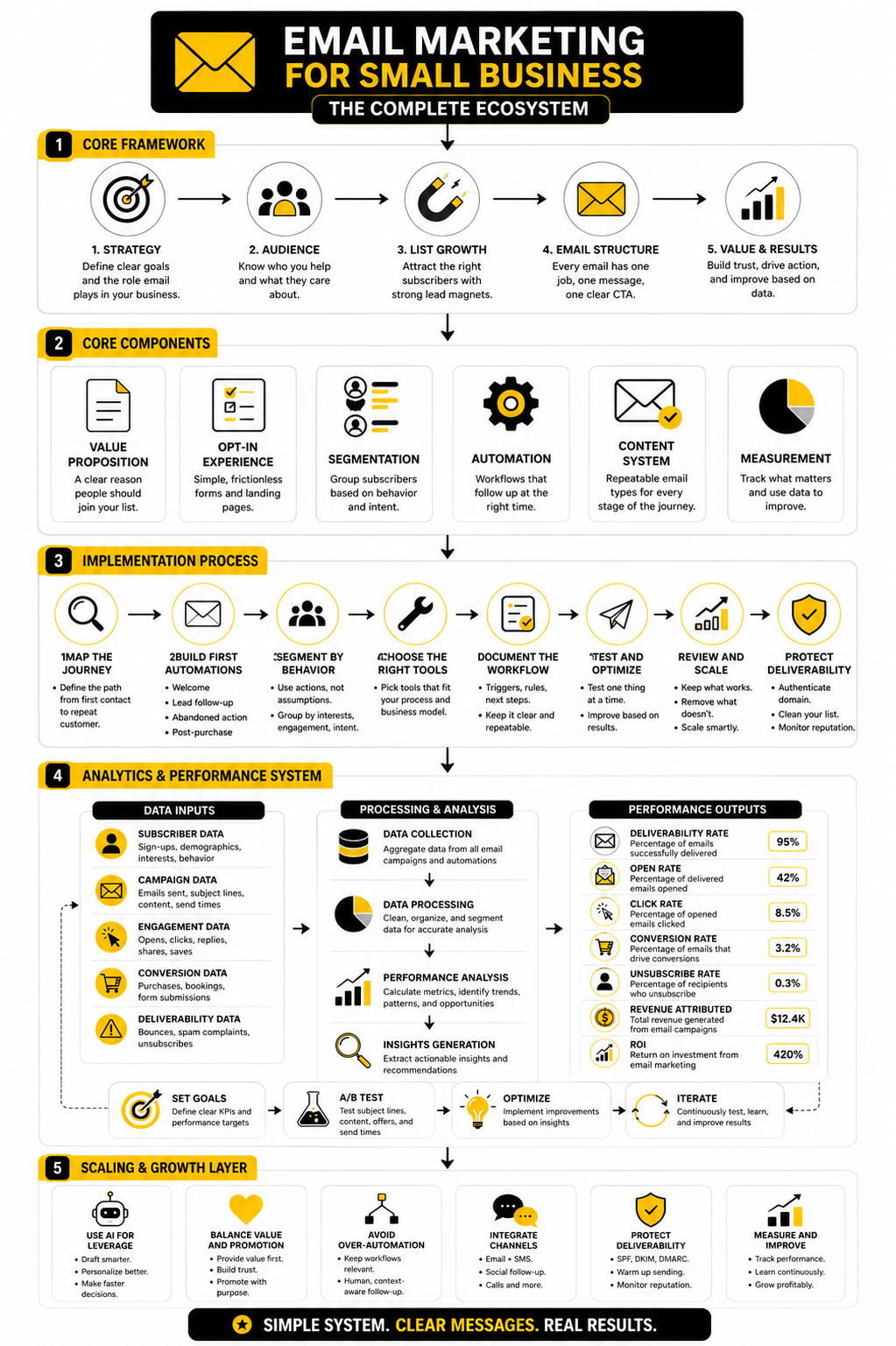
For a simple setup, start with an email platform, a form, and basic tracking. For a service business, add a CRM and calendar so leads do not disappear after the first inquiry. For a business with funnels, multiple offers, or sales follow-up, connect the landing page, email automation, pipeline, and reporting into one workflow.
A practical stack might look like this:
- Email campaigns and automations through Brevo or Moosend
- CRM, pipelines, forms, calendars, and multi-channel follow-up through GoHighLevel
- Sales pages and offer funnels through ClickFunnels or Systeme.io
- Booking flows through Cal.com
- Lead forms and surveys through Fillout
- Social scheduling around campaigns through Buffer
The exact stack matters less than the handoff between tools. A subscriber should not fall into a gap between your form, email list, sales process, and reporting. When the system is connected, every action has a next step.
FAQ - Built For Complete Guide
What is email marketing for small business?
Email marketing for small business is the process of using email to build relationships, follow up with leads, promote offers, educate customers, and drive repeat sales. It is not just sending newsletters. The best small business email systems combine list building, segmentation, automation, clear copy, and performance tracking.
Is email marketing still worth it for small businesses?
Yes, email is still worth it when it is tied to a clear business goal. Constant Contact’s 2025 small business research found that 44% of SMBs named email as their most effective marketing channel. The key is not sending more emails; it is sending more relevant emails to people who actually asked to hear from you.
How often should a small business send marketing emails?
Most small businesses can start with one useful campaign per week or every two weeks, plus automated emails triggered by behavior. A retail brand may send more often, while a consultant or local service business may need fewer but more intentional emails. Frequency should depend on audience expectations, offer type, and engagement signals.
What should my first email automation be?
Start with a welcome sequence. It is the easiest automation to justify because the subscriber just joined your list and is most likely to pay attention. The first email should confirm what they signed up for, deliver the promised value, introduce your business briefly, and give them one clear next step.
What metrics should I track first?
Track deliverability, open rate trends, click rate, conversions, unsubscribes, bounces, and revenue or booked value from email. Do not obsess over one number in isolation. A strong email program is measured by whether people receive the emails, engage with them, and take actions that matter to the business.
What is a good open rate for small business email marketing?
There is no universal “good” open rate because industry, list source, email type, and audience intent change the number. MailerLite’s benchmark data shows wide variation by sector, with many industries sitting around the 30% to 50% range for opens in recent benchmark reporting. Use industry benchmarks for context, but use your own historical performance to make decisions.
Why are people not clicking my emails?
Low clicks usually mean the email is not clear enough, the offer is not compelling enough, or the audience segment is wrong. It can also happen when the email has too many links and no obvious next step. Fix the message before assuming the list is bad.
Should I buy an email list?
No. Buying a list is one of the fastest ways to hurt deliverability, trust, and performance. You want subscribers who opted in because they care about your offer, not people who never asked to hear from you. Permission-based list building is slower at first, but it creates a healthier and more profitable channel.
How do I make emails feel less salesy?
Make the email useful even when the reader does not buy. Explain a common problem, answer a real question, show how to choose, remove confusion, or help them take the next step with confidence. Sales emails work better when they feel like guidance, not pressure.
Do small businesses need segmentation?
Yes, but segmentation should start simple. Segment by behavior first: new subscriber, clicked a product, requested a quote, booked a call, bought once, bought multiple times, or inactive. That is more useful than creating dozens of complicated segments nobody maintains.
What is the best email marketing tool for a small business?
The best tool depends on the business model. For simple campaigns and automations, Brevo or Moosend can be enough. For businesses that need CRM, pipelines, calendars, forms, and follow-up automation in one system, GoHighLevel is often a better fit.
How long should marketing emails be?
They should be as long as needed to move one clear action forward, and no longer. A reminder email can be short. A launch email, educational email, or high-ticket service email may need more explanation. The real issue is not length; it is focus.
How can AI help with email marketing?
AI can help draft subject lines, outline campaigns, summarize customer objections, create segment-specific versions, and speed up testing. It should not replace the strategy, offer, or human judgment behind the emails. Use AI for leverage, not generic content.
When should I clean my email list?
Clean your list when contacts stop engaging for a meaningful period, bounce repeatedly, or show no interest after a reactivation attempt. A cold list can hurt deliverability and make performance look worse than it really is. Keeping inactive contacts forever is not a growth strategy.
What is the biggest mistake small businesses make with email?
The biggest mistake is treating email like a broadcast channel instead of a relationship system. Random newsletters, unclear CTAs, weak follow-up, and poor tracking usually produce weak results. The fix is a simple system: attract the right people, send useful emails, automate key moments, measure outcomes, and improve consistently.
Work With Professionals
Explore 10K+ Remote Marketing Contracts on MarkeWork.com
Most marketers spend too much time chasing clients, competing on crowded platforms, and losing a percentage of every project to middlemen.
MarkeWork gives you a better way. Browse thousands of remote marketing contracts and connect directly with companies desperate to hire skilled marketers like you, without platform commissions and without unnecessary gatekeepers.
If you're serious about finding better opportunities and keeping 100% of what you earn, explore available contracts and create a profile for free at MarkeWork.com.