

Email marketing packages sound simple until you start comparing what is actually inside them. One option is mostly software, another is software plus automation, and another is a service retainer wrapped around campaign production, reporting, and lifecycle strategy. Even the pricing logic changes from provider to provider, with some plans tied closely to send volume and others to contact counts, feature tiers, or broader data services. Brevo+4
The stakes are higher now because inbox providers and regulators have raised the baseline for legitimate marketing email. Gmail requires bulk senders to authenticate outgoing mail, avoid unsolicited email, and make unsubscribing easy, while Yahoo has enforced stronger standards around authentication, DMARC, and one-click unsubscribe. On top of that, FTC guidance still requires accurate headers, honest subject lines, a valid postal address, and a working opt-out, and the ICO’s guidance makes clear that electronic direct marketing has legal compliance requirements of its own. Google Podpora+3
That extra complexity is still worth dealing with because email remains one of the strongest channels in the mix. Independent industry sources still cluster the average email ROI around roughly $36 to $40 for every $1 spent, and HubSpot’s latest channel data keeps email near the top tier of ROI-driving channels for B2B marketers. So the real question is not whether email works, but whether the package you buy is built for performance instead of busywork. Constant Contact+3
This article follows a practical path so you can compare email marketing packages without getting lost in feature lists, vague retainers, or cheap plans that become expensive later.
- Why Email Marketing Packages Matter
- A Practical Framework for Choosing the Right Package
- The Core Components Inside a High-Performing Package
- How Professionals Scope, Build, and Price Email Marketing Packages
- How to Match a Package to Your Business Model and Growth Stage
- How to Compare Providers and Make the Final Call
Why Email Marketing Packages Matter
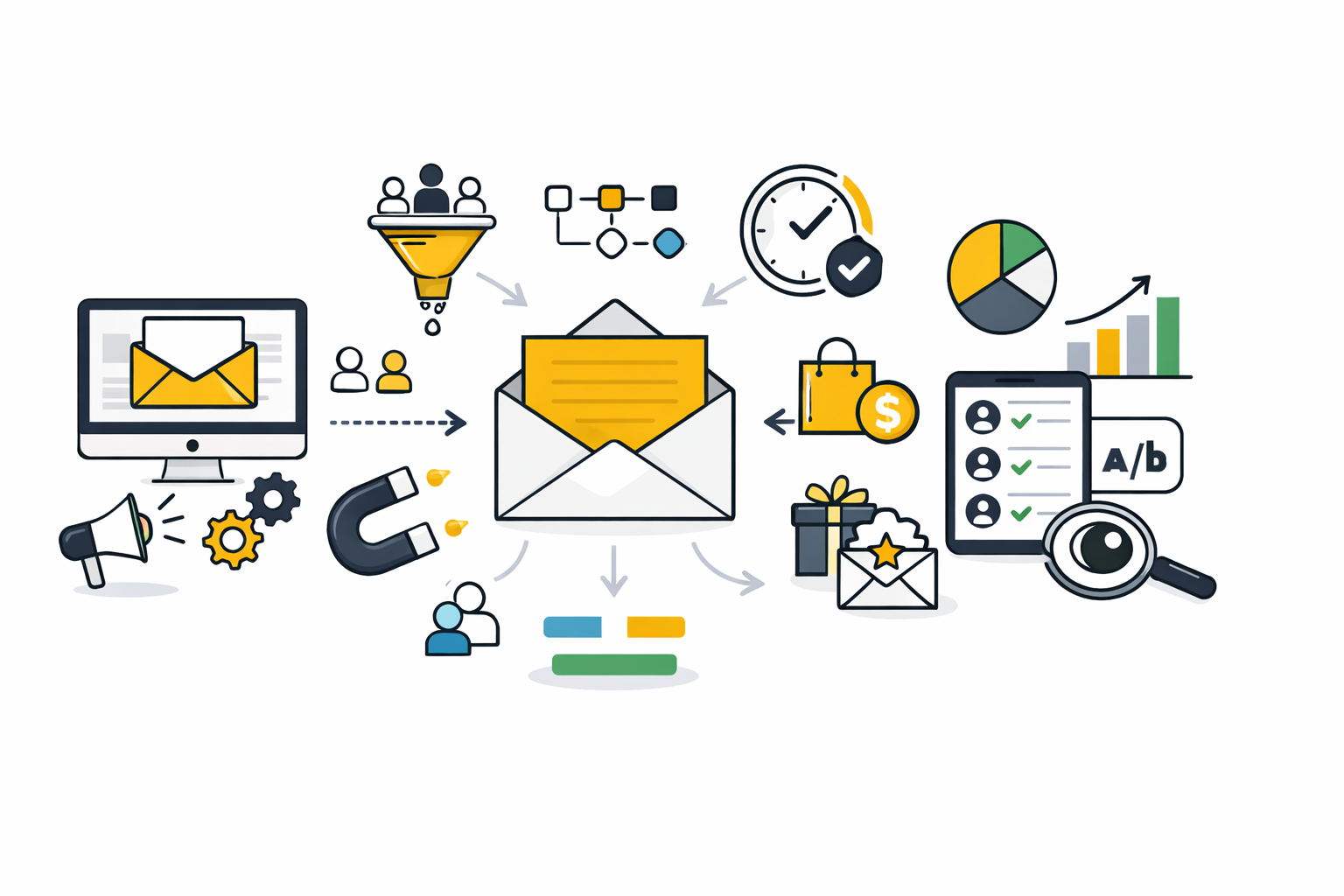
A strong email marketing package does more than give you a tool to send campaigns. It combines the parts that actually move results: list management, segmentation, automation, reporting, and the technical foundations that protect deliverability. That matters because mailbox providers are explicitly tying inbox performance to authentication, unsubscribe handling, and sender behavior, while deliverability specialists are warning that inbox placement got tougher in 2024. Google Podpora+2
The market gets confusing because the word package hides very different realities. Brevo frames its Starter offer around monthly send volume and bundles segmentation, forms, and basic reporting, Mailchimp structures smaller-business entry around limited basic plans and contact thresholds, Omnisend lets free users access all features but caps email volume and contacts, and ActiveCampaign and Klaviyo position their plans around broader automation and customer data capabilities. Two offers can share a similar monthly price and still give you completely different operating capacity. Brevo+4
Service pricing adds a second layer of confusion. Marketplace and agency pricing guides show that packages can start in the low hundreds per month and quickly climb into the thousands once strategy, automation architecture, integration work, deliverability support, and ongoing optimization are included. That is why price-shopping without understanding scope is one of the fastest ways to buy the wrong package. clutch.co+2
A Practical Framework for Choosing the Right Package
The cleanest way to choose a package is to work backward from the job email needs to do in your business. A company sending one newsletter a week does not need the same setup as a store running welcome, cart recovery, post-purchase, win-back, and VIP flows. And a B2B team nurturing leads over a long sales cycle needs different reporting, automation, and handoff logic than a brand focused on daily sales and repeat purchases. Omnisend+1
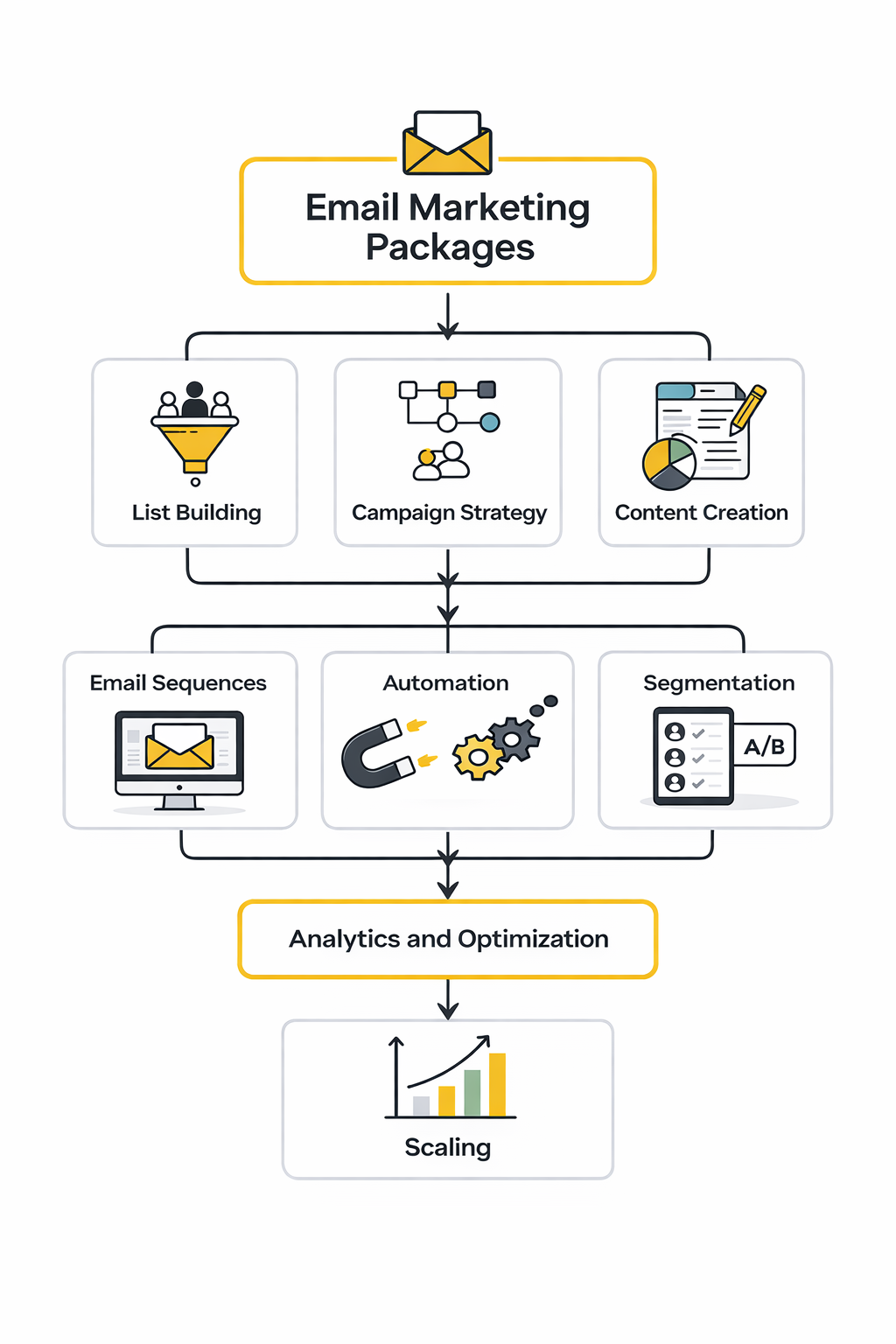
Use this four-part filter before you compare quotes. First, define the commercial job: are you trying to publish content, generate leads, recover carts, retain customers, or build a full lifecycle channel. Second, define the operational load: how large is the list, how many segments matter, how many automations are needed, and how many systems need to connect. Third, define ownership: does your team need a partner for strategy and execution, or just a platform and occasional support. Fourth, define risk: if compliance, unsubscribe handling, and sender reputation are weak, how much revenue can you afford to lose to spam placement or legal mistakes. Google Podpora+2
Before you lock in a service package, it is smart to compare the software layer underneath it. Looking at tools like Brevo, Moosend, and HighLevel helps you see whether you are buying a lightweight sending setup, a more automation-first environment, or a broader marketing operating system. The point is not to choose by logo. The point is to understand what the provider or agency can realistically build, maintain, and report on every month.
That framework prevents the classic mistakes. It stops you from paying enterprise money for newsletter needs, from buying a “cheap” package that ignores compliance, and from outsourcing strategy when you only needed production support. Once that filter is in place, the next step is to break down the core components that separate a serious email marketing package from a dressed-up sending plan.
The Core Components Inside a High-Performing Package
The easiest way to judge email marketing packages is to stop looking at the headline price for a minute and look at the machinery underneath. A serious package is not just a sender plus a template library. It is a working system for audience capture, consent, data management, automation, creative production, deliverability, and reporting that helps you make better decisions next month than you did this month.
That is also why weak packages disappoint so fast. They look fine on a sales page because “campaigns sent” is easy to promise, but revenue usually comes from the parts that are harder to build and maintain. When Google, Microsoft, the FTC, and the ICO are all raising the bar around authentication, unsubscribe handling, and lawful marketing practices, the package has to be operationally sound, not just visually attractive.
List Growth and Permission Management
Every strong package starts with how contacts get into the database and what happens to them the moment they do. That means signup forms, source tracking, field mapping, preference capture, suppression rules, and unsubscribe processing all need to be part of the package, not left as an afterthought for someone to patch together later. Google’s bulk-sender guidance expects one-click unsubscribe requests to be honored within 48 hours, while the FTC’s CAN-SPAM guide and the ICO’s electronic mail guidance make it clear that commercial email is not a free-for-all.
This is where a lot of cheap email marketing packages quietly fail. They help you collect emails, but they do not define what counts as valid consent, how opt-outs sync across systems, or how lead-source data gets preserved for segmentation later. If your acquisition mix includes social, creator, or chat-based traffic, using tools like Manychat and Fillout can make list growth easier, but the package still needs clean routing, integrations, and subscriber management to be worth paying for.
Segmentation Built on Real Customer Data
Segmentation only works when the package has enough data structure to support it. The basic version is demographic or source-based filtering, but the useful version tracks behavior, purchase history, funnel stage, product interest, and engagement patterns so messages actually change when customer context changes. HubSpot’s marketing automation guide frames the whole system around trigger-based workflows and personalized actions, which is a good reminder that segmentation is not a static list exercise but the foundation for relevant automation.
This is also where platform choice starts to shape the package itself. Klaviyo’s pricing structure now sits much closer to a data-and-analytics model than a simple send-only tool, while Brevo, Moosend, and HighLevel each package contact management, automation, and reporting in very different ways on their official plan pages. If a package cannot reliably pull in form data, product data, lifecycle status, and key custom fields, the segmentation will look sophisticated on paper and still behave like batch-and-blast in practice.
Automation That Does the Heavy Lifting
Automation is where the best packages stop being convenient and start being profitable. In Omnisend’s 2025 ecommerce report, automated emails drove 37% of sales from just 2% of email volume, and abandoned cart, welcome, and browse abandonment messages accounted for 87% of automated orders. Mailchimp’s own pricing documentation points in the same direction, saying paid users of its automation flows generated 9x revenue and 8x orders versus bulk emails over its measured period.
That does not mean every business needs the same automations. An ecommerce brand usually needs welcome, browse, cart, post-purchase, replenishment, review, and win-back logic, while a lead-gen or service business needs inquiry follow-up, nurture, qualification, booking, no-show recovery, and handoff flows built around the buyer journey. The practical test is simple: if the package only includes one generic welcome sequence, it is not really an automation package yet.
Production Systems, Templates, and Landing-Page Continuity
Creative production matters, but not in the way most packages pitch it. The goal is not just to make a few attractive emails. The goal is to build a repeatable production system with modular templates, clear brand rules, accessible design, reusable blocks, approval workflows, and testing discipline so the channel can scale without turning into a monthly scramble.
Testing needs to be built into that system from the start. Salesforce’s guide to email A/B testing covers the basics well: subject lines, body copy, offers, images, send timing, and dynamic content all become more valuable when they are tested consistently instead of occasionally. And if the email is meant to drive traffic to a conversion page, the package should account for landing-page continuity too, which is exactly why ecommerce teams often pair email with tools like Replo when they need tightly matched campaign pages instead of generic destination URLs.
Accessibility belongs in this layer too, not as a nice extra. Litmus points marketers back to WCAG as the working standard for accessible digital experiences in email, and its current accessibility guidance treats inclusive rendering as part of the core email experience rather than optional polish. If a package includes design work but ignores readability, hierarchy, alt text, contrast, and mobile rendering, it is underbuilt.
Deliverability and Compliance as Built-In Work
Deliverability is not a separate emergency service you buy only after performance drops. Litmus draws a clean line between delivery and deliverability: delivery tells you whether the message was accepted by the mail server, while deliverability tells you whether it actually reached a place where a subscriber is likely to see it. That distinction matters because a package can show “sent successfully” and still waste money if authentication, reputation, and list hygiene are weak.
The technical baseline is no longer negotiable. Google requires SPF or DKIM for all senders and SPF, DKIM, and DMARC for bulk senders, and Microsoft now applies similar requirements to domains sending more than 5,000 messages a day to Outlook consumer domains, alongside visible unsubscribe links, list hygiene, and transparent mailing practices in its high-volume sender requirements. Add the FTC and ICO on top, and it becomes obvious that compliance and deliverability have to be scoped inside the package from day one.
Reporting That Leads to Decisions
A package without useful reporting turns into opinion fast. Omnisend’s current guide to email marketing metrics pushes the right categories: delivery, engagement, conversions, revenue, unsubscribe rate, and list growth, with different businesses needing different priorities. That is the right mindset because open rate alone does not tell you whether the package is creating business value, protecting list health, or improving the customer journey.
The better reporting question is not “what happened in the last campaign” but “what changed in the system.” Litmus highlights ROI measurement, low engagement, data quality, and personalization as ongoing email challenges, which is exactly why reporting should connect campaign performance to flow performance, segment performance, conversion rate, revenue per recipient, unsubscribe trends, and deliverability risk. When email marketing packages include that level of reporting, you can finally see what deserves more budget, what needs fixing, and what should be cut.
Once these core components are clear, pricing gets much easier to read. You can tell whether you are paying for software access, for execution capacity, or for an actual operating system that someone is going to maintain properly. That is the line the next section will tackle, because professional packaging is really about scope, process, and who owns the hard parts.
How Professionals Scope, Build, and Price Email Marketing Packages
Professionals do not scope email marketing packages by asking how many newsletters you want each month and calling it done. They start by figuring out what the channel needs to do commercially, what customer data already exists, how much automation is realistic, and who will own strategy, production, QA, and reporting after launch. You can see that split clearly in the market already, where platform vendors sell software access and onboarding in one layer while partner directories and agencies sell everything from template design to full campaign management in another layer through Mailchimp’s expert network, the Klaviyo partner directory, and workflow-heavy guidance from Litmus.
Scope the Package Around Revenue, Not Activity
The first professional move is to tie the package to the job email has to do inside the business. For an ecommerce brand, that usually means revenue from lifecycle flows, campaign promotions, and retention, while a service business is more likely to care about lead capture, nurture, booking, and pipeline progression. That distinction matters because automated programs routinely outperform manual sends in commercial impact, with Omnisend’s 2025 data showing automated emails driving 37% of sales from just 2% of email volume.
This is why good package scoping starts with business model, offer structure, and conversion path instead of design preferences. A founder selling high-ticket services may need intake forms, qualification logic, appointment reminders, and CRM handoff more than a large campaign calendar, while a store may need browse abandonment, cart recovery, post-purchase, and replenishment flows before it needs more promotional volume. If you are comparing broader all-in-one stacks during that discovery phase, something like HighLevel’s trial is useful to benchmark against simpler sending tools because it shows how much of the package is really automation and CRM work rather than email alone.
Audit the List, Data, and Tech Stack Before Anyone Builds
The second step is the audit, and skipping it is where weak email marketing packages usually go wrong. Before anyone designs templates or writes copy, the provider should check list sources, consent quality, suppression logic, custom fields, current automations, integrations, historical engagement, and whether the domain is set up correctly for modern sender requirements. Mailchimp’s migration checklist makes the permission point very directly by telling teams to confirm contacts actually opted in before moving them, and Google’s sender guidelines leave little room for sloppy setup once you are sending at scale.
This is also where package fit becomes obvious. If your business runs on forms, chat flows, and qualification before the sale, the implementation may need pieces like Fillout for cleaner data capture, Manychat for conversational acquisition, and a scheduling layer such as Cal.com so email automations are tied to real booking events rather than guesses. On the other hand, if the data model is thin and the website does not pass useful behavioral events back into the platform, no package will magically create sophisticated personalization just because the proposal says “advanced segmentation.”
Build the Implementation in Phases, Not in One Giant Sprint
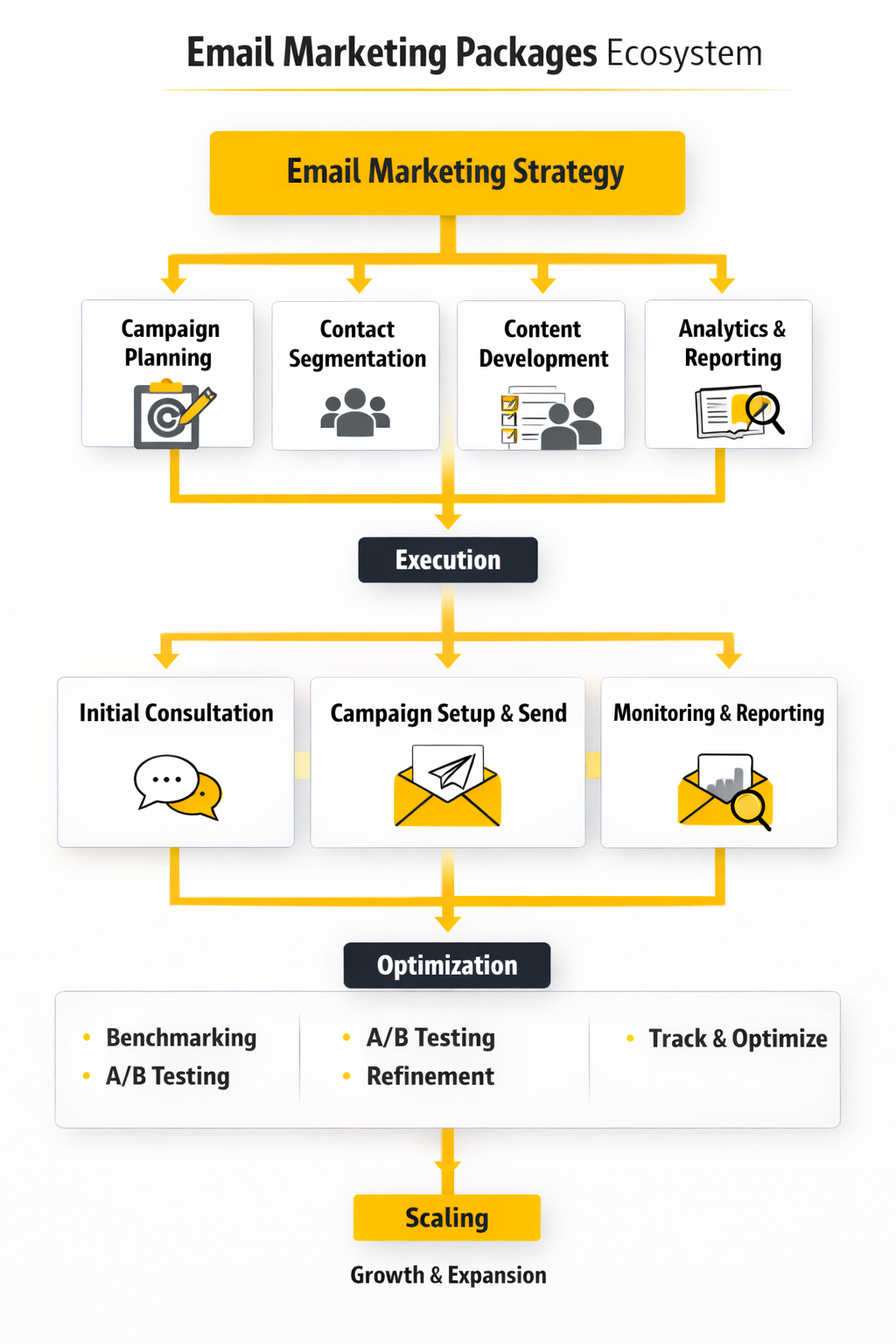
Once the audit is done, the work becomes much more concrete. Good teams do not try to migrate data, design everything, build flows, authenticate domains, and launch all at once, because that is exactly how logic breaks, unsubscribe handling gets missed, and reporting ends up useless. The cleaner model looks a lot like the workflow discipline described by Litmus, plus the step-based workflow setup shown in HubSpot’s automation documentation.
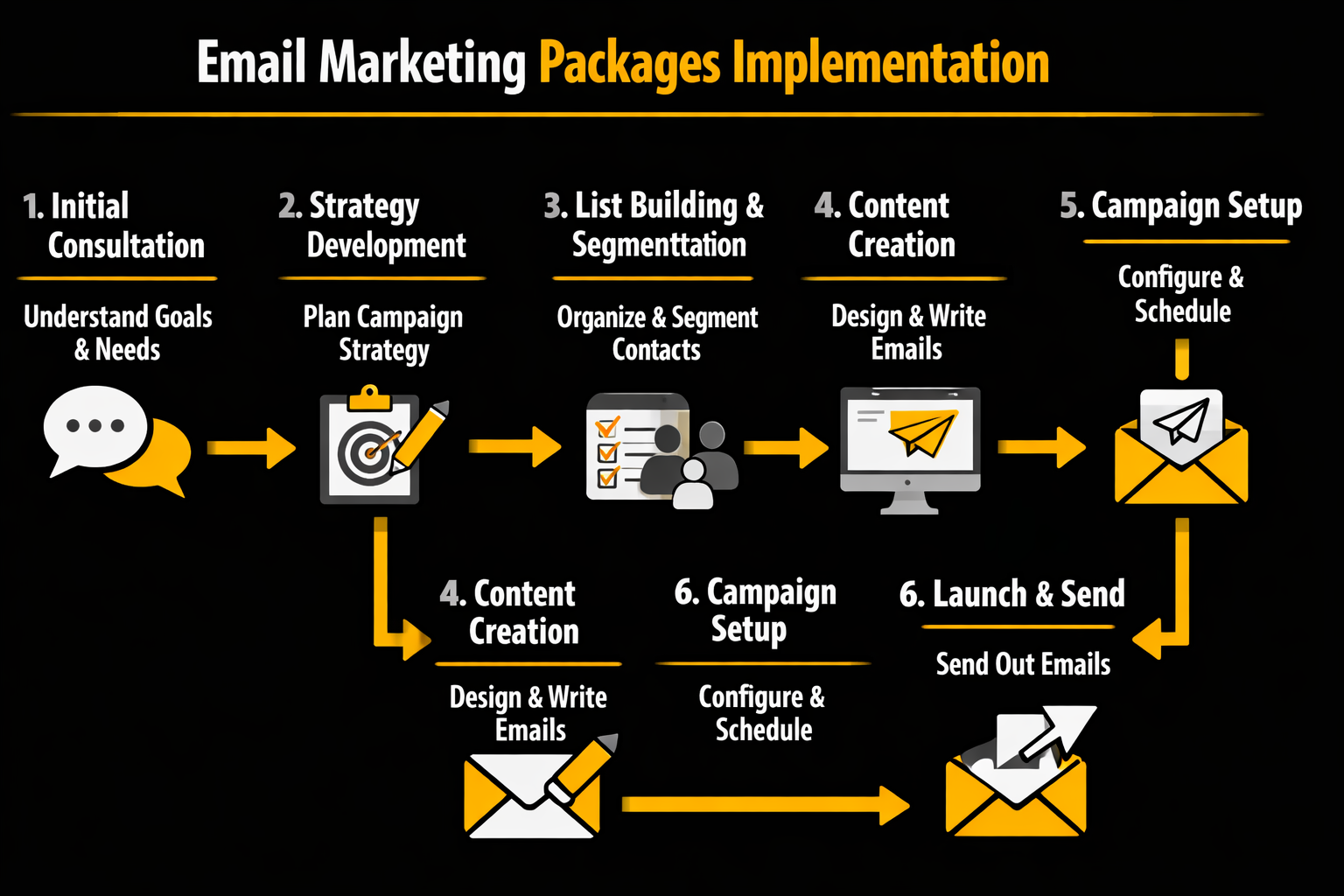
A practical rollout usually looks like this:
- Discovery and KPI alignment. The provider defines the business goal, the primary conversion events, the reporting cadence, and what success should look like after 30, 60, and 90 days. This is the point where vague promises get replaced with specific deliverables.
- Data cleanup and migration planning. Subscriber sources are checked, consent is reviewed, fields are mapped, duplicate logic is cleaned up, and suppression lists are protected. That mirrors the migration discipline in Mailchimp’s switching guidance and keeps bad data from poisoning the whole build.
- Technical setup and authentication. Sending domains, SPF, DKIM, and for bulk senders DMARC are configured before scale sends begin, with unsubscribe mechanics handled correctly from the start under Google’s sender rules and Outlook’s high-volume sender requirements.
- Template system and modular production. Instead of one-off email files, professionals create reusable components for headers, product blocks, social proof, legal footer content, and mobile-safe layouts. That makes future campaigns faster and supports the kind of repeated testing and QA Litmus pushes in its email testing guidance.
- Flow buildout and branching logic. The team prioritizes the few automations that matter most commercially, then layers conditions, delays, exclusions, and audience splits so subscribers are not hit with conflicting messages. This is where a package starts behaving like a lifecycle program instead of a send tool.
- QA, seed testing, and phased launch. Emails are tested for rendering, links, merge fields, accessibility, unsubscribe behavior, spam signals, and reporting integrity before traffic is scaled. Litmus’s QA checklist and the latest WCAG guidance from W3C are useful anchors here because visual polish is not enough if the experience breaks in the inbox or excludes users.
The reason this phased approach works is simple. It gives the team a chance to catch logic errors early, protect sender reputation, and get a few high-value flows live before the full package expands. It also keeps the package grounded in business outcomes, which is exactly where most “full service” retainers start to drift if nobody is controlling scope.
Protect Launch Quality With QA, Compliance, and Governance
The launch process is where professional implementation either looks expensive or proves its value. A proper package includes sign-off rules, version control, test sends, seed-list checks, approval deadlines, and fallback plans for broken personalization or unexpected sending issues. Litmus’s QA framework treats all of that as normal operational work, not optional extra effort, and that is the right mindset.
Compliance and sender governance sit inside this same layer. Google still expects bulk senders to keep spam rates below 0.1% and never reach 0.3%, Outlook has its own authentication and hygiene requirements for domains sending more than 5,000 emails a day, and the FTC plus the ICO make it clear that commercial email needs accurate identification, lawful marketing practices, and working opt-out handling. In plain English, if a package does not clearly include compliance and deliverability work, it is incomplete.
How Pricing Usually Works in the Real World
Pricing gets easier to understand once you separate software from services. Platform costs vary because vendors meter value differently, with Brevo leaning heavily on send volume, Klaviyo combining contact and channel logic, and Mailchimp splitting plans by feature access, onboarding, and list scale. That means two businesses with the same contact count can still face very different software costs depending on automation depth, reporting needs, and channel mix.
Service pricing sits on top of that layer, and it usually shows up as a one-time setup fee, an ongoing monthly retainer, hourly specialist work, or a blended model. The broad market view from Clutch’s email marketing pricing guide still places many agency rates in the $100 to $149 hourly range, which helps explain why migration, integration, copy, design, and QA work can quickly outweigh the platform subscription itself. This is the part many buyers miss: a cheap app does not automatically create a cheap package once real implementation labor enters the picture.
That is also why serious proposals should break out exactly what is included. If the quote does not distinguish between platform management, campaign production, automation maintenance, deliverability monitoring, reporting, and strategy, you are not really buying a package yet. You are buying ambiguity, and ambiguity is how retainers grow while performance stays flat.
A better buying question is not “what is your monthly price?” but “what does this package actually own from audit to launch to optimization?” Once you ask that, weak offers start sounding very weak very fast. The next part is where this becomes even more practical, because the right package depends heavily on your business model, growth stage, and how much complexity you genuinely need right now.
What the Numbers in Your Email Package Are Really Saying
The difference between average and excellent email marketing packages shows up after launch, not during the sales call. Anyone can promise campaigns, automations, and reporting, but the stronger package gives you a measurement system that answers three harder questions: are your emails reaching inboxes, are people engaging, and is that engagement turning into revenue or pipeline. That is the same lens used in HubSpot’s 2026 email reporting guide and Litmus’ current guidance on the metrics that matter. HubSpot Blog+1
Benchmark Data Only Helps When You Know the Context
This is where a lot of buyers misread the data. In Omnisend’s 2025 ecommerce report, campaign open rates reached 26.6% and click rates landed at 1.22%, while Klaviyo’s 2026 benchmarks put average campaign open rate at 31% and average campaign click rate at 1.69%, and Mailchimp’s benchmark dataset says many users should aim around a 34.23% open rate. That spread does not mean the numbers are useless. It means benchmark data is only helpful when you know the audience, the industry mix, the platform methodology, and whether you are looking at campaigns or automations. Omnisend+2
Build a Four-Layer Reporting System
A good package should report performance in layers, because one flat dashboard hides too much. HubSpot’s reporting framework separates deliverability, engagement, and revenue attribution, and Litmus makes the same broader point: the right metric depends on the business outcome you are trying to move. In practice, the cleanest way to read email performance is to track acquisition quality, inbox health, engagement quality, and business impact side by side. HubSpot Blog+1
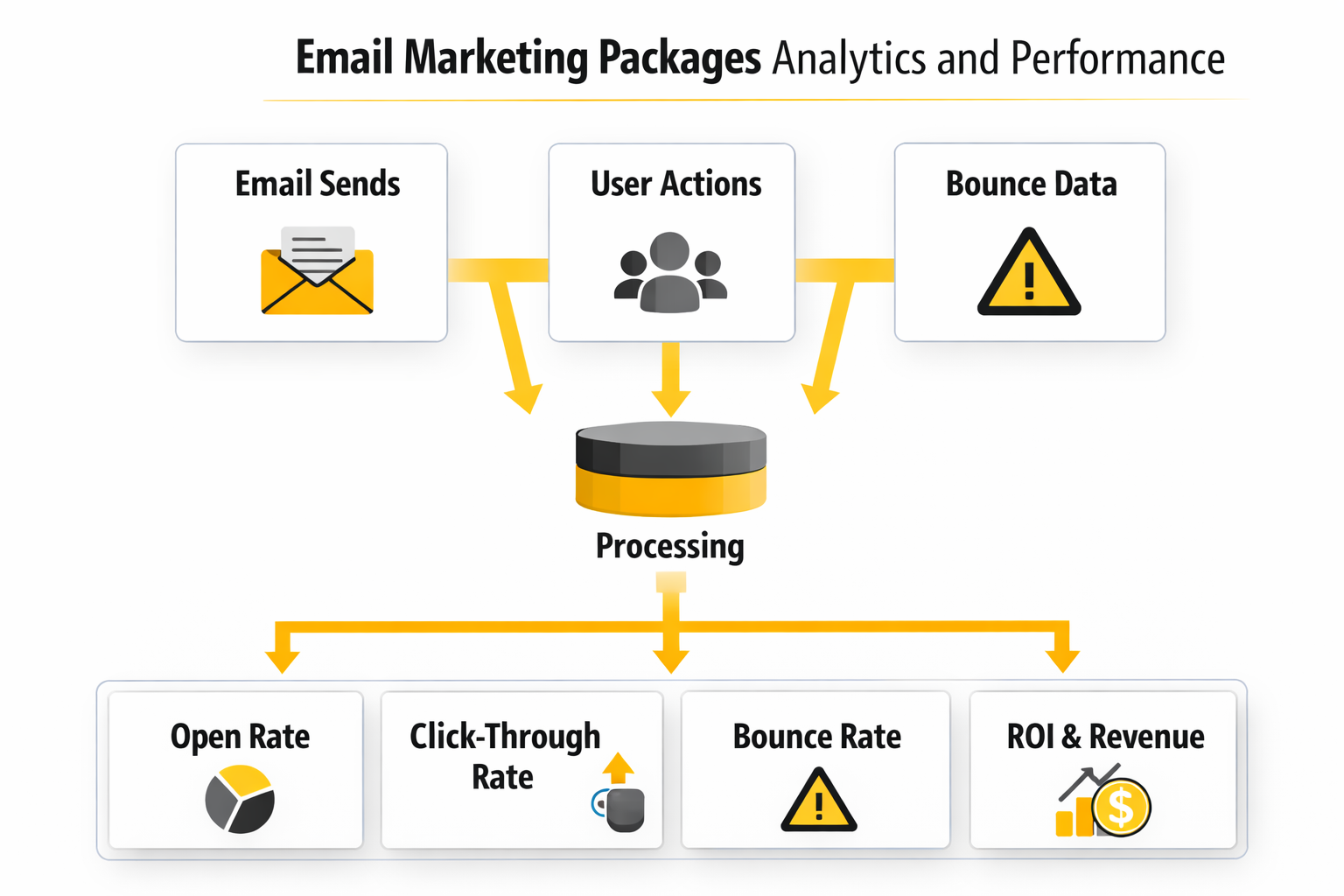
- Acquisition quality: where subscribers came from, how fast the list is growing, and whether those new contacts match the promise made at signup.
- Inbox health: delivery rate, bounce behavior, spam complaints, authentication status, and early warning signs that inbox placement is getting weaker.
- Engagement quality: opens as a directional signal, unique clicks, click maps, segment-level response, and how different audiences react to different offers.
- Business impact: conversion rate, revenue per recipient, placed order rate for ecommerce, or pipeline sourced and influenced for B2B teams.
If your package cannot show those layers clearly, it is underbuilt. This is one of the practical reasons to compare platforms such as HighLevel or Brevo on reporting depth as much as price, because cheaper sending is not very useful if the dashboard cannot tell you what to fix next. HubSpot Blog
Treat Open Rate as a Directional Signal, Not a Verdict
Open rate still matters, but not in the old simplistic way. Litmus’ email analytics guide is blunt about it: Apple Mail Privacy Protection made open rate much harder to trust on its own, and Klaviyo’s 2026 benchmark guide says the same thing directly when it warns that Apple can register an “open” whether or not a person actually looked at the message. So open rate is still useful for comparing subject lines, preview text, send times, and segment trends inside your own program, but it is a poor standalone scorecard for judging the quality of email marketing packages. Litmus+1
Put More Weight on Clicks, Conversions, and Revenue Efficiency
Clicks are where interest becomes behavior, and that is why they deserve more weight than vanity metrics. Klaviyo’s benchmark data shows email flows generating nearly 41% of revenue from just 5.3% of sends, with click rates more than 3 times higher than campaigns, while Omnisend’s 2025 report shows automated emails driving 37% of sales from only 2% of email volume and converting one in three clickers versus one in 18 for scheduled sends. The action this should drive is obvious: if a package performs well in automation but only average in broadcast campaigns, you do not need more newsletters first. You need more high-intent flows, better triggers, and tighter segmentation. Klaviyo+2
Match the Revenue Metric to the Business Model
The right revenue metric depends on what the business actually sells. For ecommerce, Klaviyo’s 2026 benchmarks make metrics like placed order rate and revenue per recipient especially useful because they show how efficiently each email produces transactions, while Mailchimp’s reporting guide frames conversion rate as the share of delivered recipients who complete the desired action after the click. For B2B or service businesses, a package should go further and measure pipeline sourced, pipeline influenced, and deal velocity, which is exactly how HubSpot’s current B2B email framework treats email when it is managed as a revenue channel instead of just a communication tool. Klaviyo+2
Watch the Health Metrics Before Revenue Falls
The health metrics usually tell you something is wrong before revenue numbers make it obvious. Google says bulk senders should keep user-reported spam rate below 0.1% and avoid reaching 0.3% or higher, and Microsoft recommends removing inactive or invalid addresses monthly or quarterly to lower bounce rates, reduce costs, and cut spam complaints. Unsubscribe benchmarks are messier than people think, which is why trend direction matters more than one magic number: Klaviyo’s help center calls less than 0.2% great, while Mailchimp notes that many industries can average closer to 1% to 2%, so the real signal is not whether your brand matches somebody else’s number exactly but whether complaints, opt-outs, or bounce behavior are suddenly rising. Google Podpora+3
Turn the Data Into Decisions
Data only becomes valuable when it changes what you do next. This is the part many email marketing packages get wrong, because they stop at charts instead of helping you interpret the pattern. The package becomes much more useful when every signal has a clear next move attached to it. HubSpot Blog+1
- High opens, weak clicks: the subject line worked, but the offer, message structure, or call to action did not.
- Healthy clicks, weak conversions: the problem is probably after the inbox, usually on the landing page, form, checkout, or booking flow.
- Strong flows, weak campaigns: automation is carrying the channel, so more effort should go into lifecycle coverage before adding more send volume.
- Rising unsubscribes or complaints: frequency, targeting, list quality, or signup expectations are out of alignment and need attention immediately.
- Good engagement but weak revenue: the content may be interesting without being commercially decisive, which usually means the package needs stronger offer strategy and better conversion tracking.
Read the numbers this way and the reporting stops being decorative. It becomes a decision tool, which is exactly what you need before choosing between email marketing packages for different business models, team sizes, and stages of growth.
How to Match a Package to Your Business Model and Growth Stage
The right email marketing packages look very different depending on what you sell, how fast you are growing, and how much operational complexity your team can actually handle. This is where buyers get themselves into trouble, because they compare plans as if every business needs the same stack. It is much smarter to buy for the next stage of growth you can realistically manage, not the fantasy version of the business you hope to have someday.
If You Are Early Stage, Buy Simplicity and Speed
A smaller business usually does not need a giant package with deep branching logic, multiple approval layers, advanced attribution, and a maze of integrations. What it usually needs is clean list capture, one or two strong automations, reliable campaign sending, and reporting that is simple enough to act on every week. Tools like Brevo, Moosend, and in some cases Systeme.io can make more sense at this stage than buying a bigger system you will not fully use.
The real risk at this stage is overbuying. A package with ten advanced features you never implement is not sophisticated. It is just expensive clutter, and it often slows down execution because every send turns into a mini project.
If You Run Ecommerce, Pay for Lifecycle Depth
Ecommerce brands should judge email marketing packages very differently because the money is usually in lifecycle automation, not just campaign volume. Klaviyo’s 2026 benchmarks and Omnisend’s 2025 ecommerce report both point in the same direction: automated flows massively outperform scheduled campaigns on revenue efficiency. That means the package should be judged on how well it handles product data, purchase behavior, browse events, customer segments, and post-purchase logic.
This is also where “newsletter package” thinking breaks down. An ecommerce program usually needs welcome flows, cart recovery, browse abandonment, post-purchase education, replenishment, cross-sell, win-back, and VIP targeting long before it needs more send volume. If the package also depends on dedicated conversion pages, tools like Replo can strengthen the handoff from inbox to purchase in a way generic destination pages usually do not.
If You Sell Services or B2B, Prioritize CRM, Nurture, and Handoff
Service businesses and B2B teams should care less about promo calendars and more about lead quality, qualification, follow-up speed, and pipeline visibility. HubSpot’s current B2B email framework treats email as a revenue channel tied to pipeline sourced, pipeline influenced, and deal velocity, which is the right lens here. A package for this kind of business needs forms, segmentation, nurture flows, appointment logic, CRM updates, and clear handoff rules between marketing and sales.
This is where broader systems often earn their keep. A stack built around HighLevel, supported by Fillout for cleaner intake and Cal.com for booking, often makes more sense than a send-only platform if the real job is moving leads toward calls, demos, and closed business. The package should reflect that reality instead of pretending a few polished newsletters will solve a pipeline problem.
As You Scale, Operational Risks Start to Matter More Than Features
A package that works at 5,000 contacts can start breaking at 50,000 if nobody has thought about ownership, documentation, and sender governance. Litmus’ workflow guidance is useful here because scaling email is not just about sending more. It is about reducing errors, controlling approvals, keeping automations from colliding, and making sure the team can still move quickly without damaging performance.
List quality becomes much more important at this stage too. Mailchimp’s current list guidance and deliverability resources keep coming back to the same point: stale contacts, poor consent practices, and weak hygiene distort your metrics and hurt inbox placement. At higher volume, the package needs rules for suppression, re-engagement, sunset policies, and regular cleanup, otherwise growth creates more drag than leverage.
Watch for Automation Sprawl Before It Becomes a Revenue Leak
More automation is not automatically better. Once a business starts layering welcome flows, promo logic, customer journeys, service reminders, and audience branching, it becomes very easy to create conflicts where subscribers get too many messages, get the wrong message, or fall into outdated paths nobody remembered to update. This is one of the hidden reasons sophisticated email marketing packages need naming conventions, audits, documentation, and regular pruning.
The danger is not theoretical. Google’s sender rules and spam-rate guidance make it very clear that bad sending behavior eventually becomes a deliverability issue, and Microsoft’s Outlook rules for high-volume senders push in the same direction. In plain terms, messy automation is no longer just a workflow annoyance. It can become a visibility and revenue problem.
The Cheapest Package Is Often Not the Lowest-Cost Option
This is one of the most important strategic tradeoffs in the whole buying process. A low monthly platform fee can look attractive until you add migration work, extra seats, template production, deliverability fixes, landing pages, CRM syncing, analytics cleanup, and the labor required to actually keep the channel running. A more expensive package can easily become the better deal if it removes those hidden costs and reduces tool sprawl.
That is why consolidation sometimes wins. If your business needs email, forms, landing pages, light CRM, automations, and pipeline follow-up, platforms such as HighLevel, ClickFunnels, or Systeme.io can change the economics completely. But if the business needs deep ecommerce segmentation and product-triggered automations, a more specialized stack may still outperform an all-in-one system even if it looks less convenient on paper.
The Real Expert Move Is Buying the Next Good System, Not the Final Perfect One
Most businesses do not need the ultimate package. They need the next package that removes the current bottleneck without creating three new ones. That might mean upgrading from a simple campaign tool into a lifecycle-focused platform, moving from a freelancer setup into documented agency support, or consolidating disconnected tools into one system your team can actually manage.
That is the mindset that keeps email marketing packages from becoming bloated, fragile, or strangely expensive. Buy for fit, governance, and measurable commercial value, and the channel usually gets stronger as you scale. Buy for logos, feature envy, or aggressive sales demos, and you often end up rebuilding the whole setup later.
The final step is comparing providers and proposals with a much sharper eye, because once you understand the tradeoffs, it becomes much easier to tell which package is genuinely built for your business and which one just sounds polished.
How to Compare Providers and Make the Final Call
At this stage, the smartest way to compare email marketing packages is to normalize the billing model before you compare the features. Brevo’s plan structure leans heavily on monthly sends and contact storage, Mailchimp’s pricing and additional-charge rules tie costs to contact and send limits with overages possible, Klaviyo’s pricing centers on active profiles and channel use, and Omnisend’s pricing scales around ecommerce contact counts and email credits. If you skip that step, one package can look cheaper on a landing page and become more expensive the moment your list grows or your send calendar gets aggressive.
Then compare the full operating system, not just the email editor. A real package should show who owns signup capture, consent handling, automations, landing-page continuity, reporting, and expert support, and the existence of the Mailchimp Expert directory and the Klaviyo Service Partner Directory is a good reminder that many teams eventually buy execution on top of software. If you want to pressure-test your options yourself, it is worth opening Brevo, Moosend, and HighLevel side by side, because the differences in complexity, ownership, and growth fit become obvious fast.
The final call should come down to bottleneck removal and downside risk. If sender setup is shaky, Google’s sender guidelines, the one-click unsubscribe rules for bulk senders, and the FTC’s CAN-SPAM guide matter more than another template library; if conversion is the weak point, a stronger page and form stack like Replo or Fillout may do more for performance than one extra automation badge. The best package is the one your team can run cleanly in the next 90 days without creating reporting blind spots, billing surprises, or deliverability headaches.
FAQ for Choosing Email Marketing Packages
Most buyers still have the same questions right before they commit, and that is a good thing. This is the point where small details like overages, authentication, migration work, and reporting quality decide whether a package feels efficient or painfully expensive six months later. Use these answers as a final filter before you sign anything.
What is usually included in email marketing packages?
The software layer usually includes an email builder, list management, segmentation, automation, forms, and reporting, which you can see across Brevo’s pricing and features, Klaviyo’s free-plan overview, and Moosend’s pricing page. The service layer is different because it may add migration, copywriting, design, QA, reporting interpretation, and ongoing management, which is exactly why the Mailchimp Expert directory and Klaviyo’s partner ecosystem exist. The practical move is to ask every provider to separate software access, setup work, and monthly execution into distinct line items.
How much should a small business expect to pay?
At the software level, entry points can still be relatively low, with Brevo Starter beginning at $9 per month, Omnisend Standard starting at $16 per month, and HighLevel Starter listed at $97 per month. The real package cost climbs when you add migration, automations, landing pages, deliverability work, and retained execution, so a cheap app does not automatically mean a cheap program. The cleanest budgeting rule is to separate platform cost from implementation cost before you decide what is affordable.
Are email marketing packages priced by contacts or by send volume?
They are priced in different ways, which is exactly why apples-to-apples comparisons are harder than they look. Brevo’s plan help article shows a send-volume-heavy model with contact storage tiers, Mailchimp’s pricing and pricing-plan explanation tie billing to contact and send limits, Klaviyo focuses on active profiles, and Omnisend ties plan scale to contacts and credits. The right model depends on whether your business grows through a bigger list, heavier send frequency, or both.
Is the cheapest package usually the best deal?
Usually not, because the cheapest sticker price can hide the most expensive operating reality. Mailchimp’s additional-charge policy makes it clear that overages can appear when contact or send limits are exceeded, and its pricing-plan guidance says audience growth can trigger extra billing unless you move to a higher tier. A package becomes a good deal when it fits your actual send behavior, reporting needs, and implementation load, not when it wins the cheapest-first comparison.
Which package type is best for ecommerce?
Ecommerce usually wins with lifecycle-heavy packages, not newsletter-heavy ones. Omnisend’s 2025 ecommerce report shows automated emails driving a disproportionate share of sales relative to their send volume, and Klaviyo’s benchmark data points in the same direction with flows outperforming campaigns on revenue efficiency. That means the right package should prioritize event tracking, product data, customer segments, post-purchase flows, and revenue reporting before it prioritizes more broadcast capacity.
What should B2B and service businesses prioritize?
B2B and service businesses should usually care more about lead quality, nurture logic, CRM syncing, booking flow, and pipeline visibility than they do about flashy campaign volume. HubSpot’s current B2B email guide frames email as a revenue channel tied to pipeline sourced, pipeline influenced, and deal velocity, which is a much better lens than just looking at opens. If the business runs on forms, qualification, and calls, a broader operating stack such as HighLevel paired with something like Fillout often makes more sense than a package built mainly for product-triggered ecommerce sends.
Do I really need authentication and one-click unsubscribe?
Yes, and this is no longer optional cleanup work you can push to later. Google’s sender guidelines require authentication standards such as SPF or DKIM for all senders and DMARC plus one-click unsubscribe for bulk senders, while the sender FAQ explains the unsubscribe handling requirements in more detail. The FTC’s CAN-SPAM guide also requires honest identification and a working opt-out, so any package that treats these pieces as optional is incomplete.
Is open rate still reliable enough to guide decisions?
Open rate still has directional value, but it is no longer a trustworthy verdict on its own. Apple’s Mail Privacy Protection documentation states that it prevents senders from seeing whether an email was opened, and Mailchimp’s reporting help plus its bot-filtering guidance explain that non-human activity can also inflate open and click metrics. Use opens for relative testing and trend spotting, but make bigger decisions with clicks, conversions, complaints, and revenue data.
When is it time to switch platforms?
It is time to switch when the billing model punishes growth, the automation logic feels cramped, the data model cannot support segmentation, or the reporting is too weak to guide action. Mailchimp’s switching best-practices guide and its migration checklist both make the same point in different ways: changing platforms is real operational work, not a casual export-import task. Switch when the gain in fit, efficiency, or control is large enough to justify that migration effort.
Should I hire an agency or keep email in-house?
If your team can own calendar planning, data quality, testing, approvals, and reporting, keeping strategy close to the business often works well. Outside help becomes much more valuable when you are dealing with migrations, complex automations, deliverability issues, or capacity gaps, which is why both Mailchimp and Klaviyo maintain active service-partner ecosystems. The strongest setup is often hybrid: internal ownership of goals and offers, with external specialists brought in for the hard technical or production-heavy parts.
What red flags should I watch for in a package proposal?
Watch for vague deliverables, no mention of authentication or compliance, no migration plan, weak reporting definitions, and no line separating setup fees from monthly management. Mailchimp’s pricing-plan explanation and additional-charge article are useful reminders that billing details matter a lot more than they seem during the sales conversation. If the proposal sounds polished but leaves ownership fuzzy, you should expect surprises later.
Can an all-in-one platform replace several separate tools?
Sometimes yes, and that is why all-in-one systems are attractive in the first place. HighLevel’s pricing page positions it as a broader CRM and automation environment with unlimited contacts and users on its plans, while Brevo, Moosend, and Omnisend can be simpler fits when email is still the main operational need. Consolidation is smart when it reduces handoffs and admin work, not when it simply gives you a busier dashboard.
What is the smartest final decision rule?
Choose the package that removes the next real bottleneck without creating compliance, reporting, or staffing problems somewhere else. If the proposal improves data quality, automation coverage, and measurement in a way your team can actually run, it is probably the right next system, especially when it aligns with current sender requirements from Google and the legal baseline in the FTC guide. If it mainly adds features your team will not implement in the next quarter, walk away.
Work With Professionals
The market for email talent is broader than most marketers think. MarkeWork presents itself as a platform with 10K+ remote marketing contracts and 300+ new listings per day, which makes it relevant for marketers who want to turn email skills into direct client work. That matters because understanding email marketing packages is not only useful when you are buying them for your company, but also when you are building, managing, or selling them professionally.
Explore 10K+ Remote Marketing Contracts on MarkeWork.com
Most marketers spend too much time chasing clients, competing on crowded platforms, and losing a percentage of every project to middlemen.
MarkeWork gives you a better way. Browse thousands of remote marketing contracts and connect directly with companies desperate to hire skilled marketers like you, without platform commissions and without unnecessary gatekeepers.
If you're serious about finding better opportunities and keeping 100% of what you earn, explore available contracts and create a profile for free at MarkeWork.com.