

Email marketing systems are not just newsletters, templates, or automation tools. They are the operating system behind how a business captures demand, nurtures trust, follows up, sells, retains customers, and learns from every interaction.
The mistake most teams make is treating email as a campaign channel instead of a system. A campaign ends. A system keeps working, improving, and creating revenue long after the first message is sent.
Article Outline
This guide is structured as one complete article split into six parts. Each part builds on the previous one, so the strategy, tools, workflows, and optimization process stay connected. The goal is not to collect more software; it is to build an email marketing system that is clear, measurable, and useful in daily work.
- Part 1: Why Email Marketing Systems Matter
- Part 2: Audience Data, Segmentation, And List Growth
- Part 3: Automation, Customer Journeys, And Lifecycle Messaging
- Part 4: Deliverability, Compliance, Testing, And Performance Tracking
- Part 5: Professional Implementation And Tool Stack Decisions
- Part 6: Optimization, Scaling, And Frequently Asked Questions
Why Email Marketing Systems Matter
A strong email marketing system gives your business something paid ads and social platforms cannot fully provide: a direct relationship with people who have already shown interest. That matters because algorithms change, ad costs move, and attention gets scattered across channels. Email gives you a controlled way to follow up, educate, segment, and convert without starting from zero every time.
This is also where many businesses quietly leak revenue. They get leads from ads, forms, webinars, lead magnets, checkout pages, or consultations, but then the follow-up is slow, generic, or completely manual. A proper system turns those scattered touchpoints into a repeatable process.
The real value is not just sending more emails. It is sending the right email to the right person based on what they did, what they need, and where they are in the customer journey. That is the difference between “email marketing” as a task and email marketing systems as a business asset.
Framework Overview
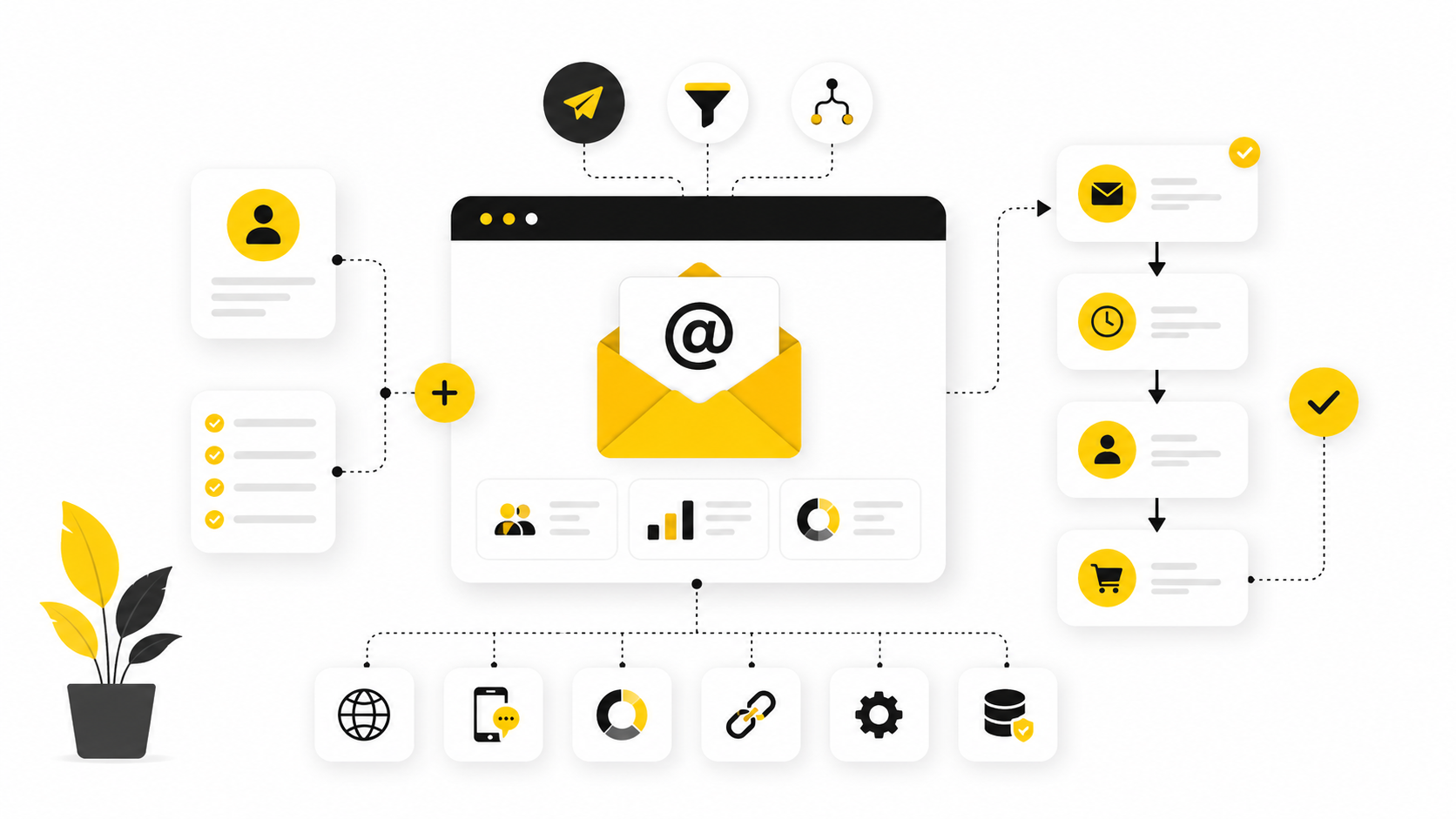
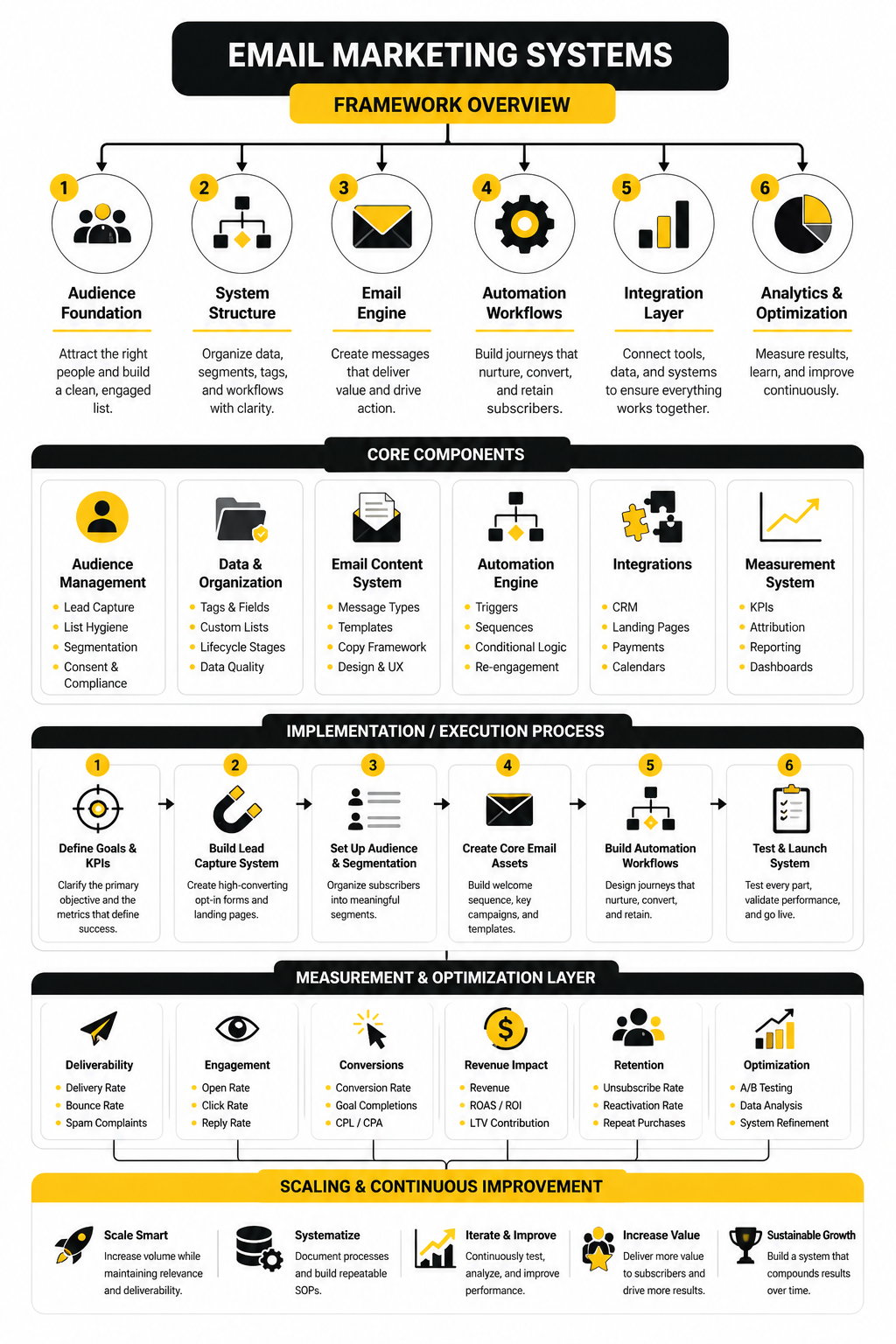
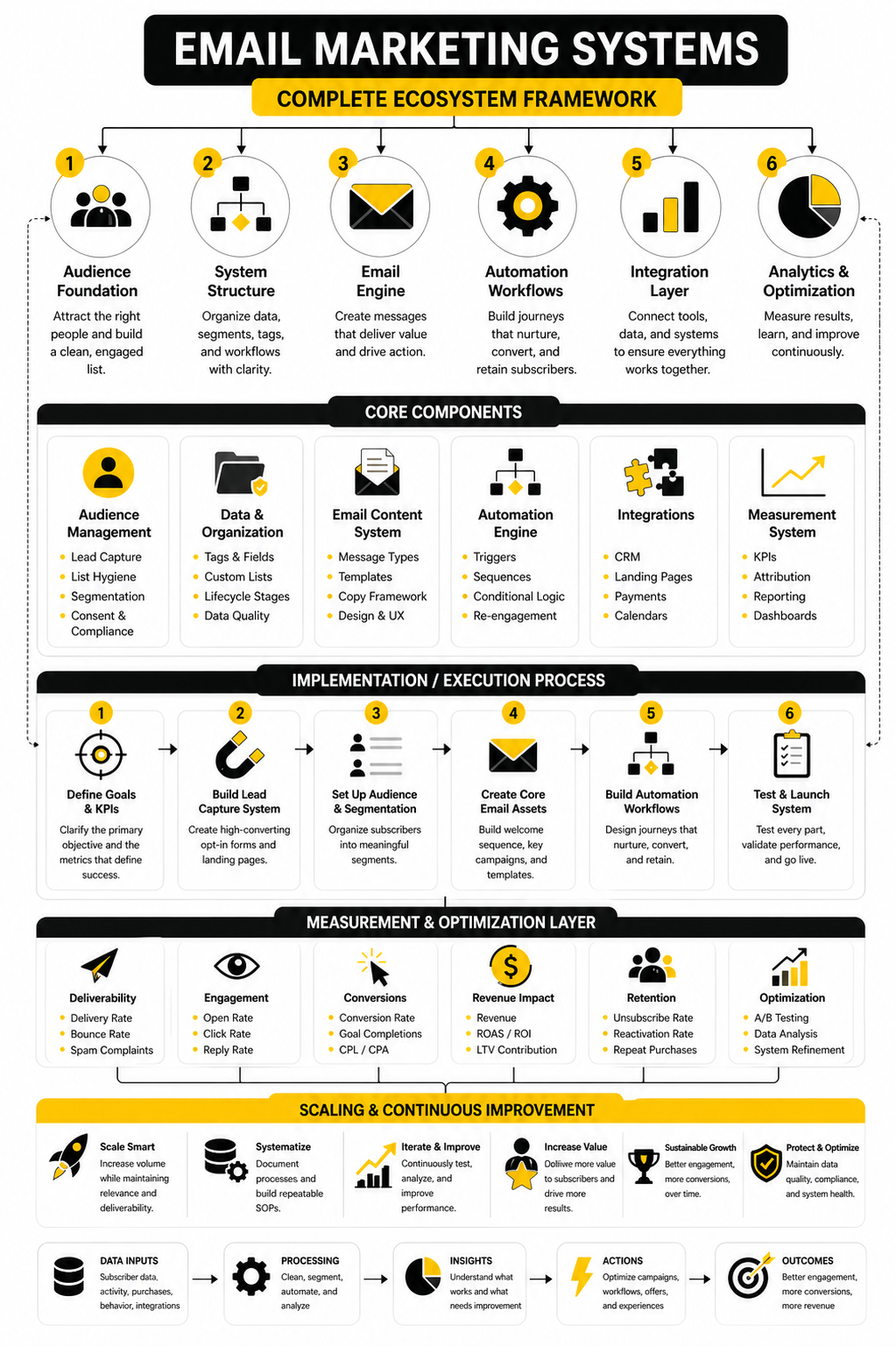
A practical email marketing system has four layers: capture, organize, communicate, and improve. Capture brings people into the system through forms, landing pages, checkout flows, quizzes, bookings, or CRM entries. Organize turns those contacts into useful segments based on source, intent, behavior, lifecycle stage, and customer value.
Communicate is where campaigns, automations, newsletters, sales sequences, onboarding flows, reactivation emails, and retention messages live. Improve is the feedback loop: reporting, testing, deliverability checks, conversion tracking, and cleanup. Without that final layer, the system slowly becomes messy, inaccurate, and less profitable.
Core Components Of An Email Marketing System
The first component is the contact database. This is where names, emails, consent status, tags, custom fields, purchase history, lead source, and engagement data need to stay clean enough to be useful. If the data is poor, every automation built on top of it becomes weaker.
The second component is the messaging engine. This might be a dedicated email platform like Brevo, Moosend, or a broader CRM and automation platform like GoHighLevel, depending on the business model. The best choice depends less on popularity and more on how your sales process actually works.
The third component is the conversion path. Email rarely works alone; it usually points people toward a booking page, checkout, landing page, funnel, form, product page, webinar, or sales conversation. For funnel-heavy businesses, tools like ClickFunnels can fit naturally into the system when the email strategy is already clear.
Professional Implementation Starts With Clarity
Professional implementation does not start with software. It starts with knowing what the system must accomplish. Are you trying to convert new leads, recover abandoned carts, book consultations, onboard customers, sell repeat purchases, revive inactive subscribers, or support a sales team?
Once the goal is clear, the system can be designed around real behavior instead of random broadcasts. A subscriber who downloaded a checklist should not receive the same follow-up as someone who booked a demo, abandoned checkout, or bought three times before. The system should recognize those differences and respond accordingly.
That is why the rest of this article moves in order. First we define the audience and data foundation, then we build automations, then we protect deliverability, then we choose the right stack, and finally we optimize the system over time.
Audience Data, Segmentation, And List Growth
The next layer of email marketing systems is the audience foundation. This is where most businesses either become sharper or create chaos for themselves. If the list is messy, the automations will be messy, the reporting will be misleading, and the sales team will stop trusting the data.
Good email marketing starts with knowing who is on the list, why they joined, what they want, and what action should happen next. That sounds basic, but it is where the system starts to become useful. A lead from a webinar, a returning customer, a cold subscriber, and a booked consultation should not be treated like the same person.
Modern email performance is also under more pressure because inboxes are crowded and automation is everywhere. Recent reporting on email marketing found that many businesses still struggle to track ROI reliably, while teams that measure performance and use deeper segmentation tend to get more value from the channel. That is the point: better data does not make the system more complicated; it makes the system more precise.
Build The List Around Intent
List growth is not just about collecting as many emails as possible. A bigger list with weak intent can create higher costs, lower engagement, and worse deliverability. A smaller list of people who clearly understand why they joined is usually easier to monetize and easier to manage.
The best entry points are tied to a clear next step. That could be a product waitlist, quote request, lead magnet, challenge, webinar, quiz, checkout, booking form, consultation page, or newsletter signup. Tools like Fillout can help when the system needs flexible forms, while Cal.com makes sense when the conversion path involves booked calls.
The important thing is to capture context at the moment of signup. Where did the person come from? What did they request? What problem are they trying to solve? If your email marketing systems collect that information early, the follow-up becomes easier, more relevant, and less dependent on guesswork.
Segment Before You Personalize
Segmentation and personalization are related, but they are not the same thing. Segmentation decides who should receive a message. Personalization changes what that person sees inside the message based on what you know about them.
Start with simple segments before trying to build advanced logic. New subscribers, warm leads, booked calls, first-time buyers, repeat buyers, inactive subscribers, and high-intent prospects are enough for many businesses at the beginning. You can always add more detail later, but a simple structure that your team actually uses is better than an impressive setup nobody understands.
This matters because relevance drives action. Industry benchmark discussions continue to point toward the same practical reality: engagement, deliverability, data quality, and personalization are connected. If the system sends broadly to everyone all the time, it trains subscribers to ignore you.
Use First-Party Data Carefully
First-party data is information people give you directly or create through their behavior with your business. That includes form answers, email clicks, purchase history, booking activity, product interests, account status, and support interactions. It is powerful because it comes from your own relationship with the customer rather than rented attention from another platform.
But more data is not automatically better. Collect only what you can use, explain why you need it when the context requires it, and keep the fields clean. Ten random tags are worse than three reliable fields that drive useful decisions.
For most email marketing systems, the strongest first-party data points are practical ones:
- Lead source
- Signup offer
- Main interest
- Lifecycle stage
- Purchase status
- Last engagement
- Last conversion action
- Sales owner or account owner
- Consent status
- Suppression status
These fields help the system decide what happens next. They also protect the team from sending awkward, irrelevant, or poorly timed emails.
Design Lead Capture For The Next Message
Every lead capture point should answer one question: what should this person receive next? If the answer is unclear, the form or landing page is not specific enough. This is where many funnels break because the opt-in gets attention, but the follow-up does not match the promise.
A good signup path creates momentum. Someone who downloads a buyer’s guide should receive education that helps them make a decision. Someone who starts checkout but does not finish needs a different message than someone who joined a general newsletter. Someone who books a consultation may need reminders, qualification questions, proof, and preparation content before the call.
This is why landing pages, forms, and email tools should be planned together. A page builder or funnel tool like ClickFunnels can capture demand, but the value comes from connecting that demand to the right follow-up. The form is not the finish line; it is the handoff into the system.
Keep The Database Clean From The Start
A clean database makes every other part of the system easier. It improves targeting, reporting, deliverability decisions, sales visibility, and customer experience. It also reduces the risk of sending campaigns to people who should not receive them.
The basics are not glamorous, but they matter. Use consistent naming for tags and fields. Decide what counts as an active lead. Remove duplicates when possible. Suppress unsubscribed, bounced, invalid, or unengaged contacts based on a clear policy.
Do not wait until the list becomes painful to manage. Cleanup is much harder after thousands of contacts have been tagged inconsistently. Build the rules early, document them, and keep the system simple enough that a real person can understand it without needing a spreadsheet decoder.
Match The Platform To The Data Model
Different tools think about contacts differently, so the platform choice affects how the system behaves. Some tools are built mainly for newsletters and campaigns. Others are built around CRM pipelines, sales follow-up, SMS, booking, reputation management, and client accounts.
For straightforward email campaigns and automations, tools like Brevo or Moosend may be enough. For agencies, local businesses, service providers, and teams that need CRM plus automation, GoHighLevel can make more sense because the email system sits closer to the sales process.
The best platform is the one that matches how your business actually works. If your growth depends on booked appointments, pipeline movement, missed-call follow-up, and sales conversations, choose a system that supports that flow. If your growth depends on content, ecommerce, product education, or newsletters, choose a platform that makes segmentation and campaigns easy to manage.
Turn List Growth Into A Repeatable Process
List growth should not depend on random bursts of promotion. It should be built into the business. Every useful touchpoint should have a clear way for the right person to enter the system with the right expectation.
That can include website forms, social bio links, lead magnets, checkout opt-ins, post-purchase offers, webinar registrations, referral pages, community signups, support follow-ups, and booking flows. The key is not to place forms everywhere blindly. The key is to match the offer to the moment.
This is where email marketing systems become stronger than isolated campaigns. Instead of asking, “What email should we send this week?” the better question is, “Where are people entering the business, and what should the system do with them next?” Once that is clear, automation can finally do its job.
Automation, Customer Journeys, And Lifecycle Messaging
Once the audience data is clean enough to use, the next job is turning that data into movement. This is where email marketing systems become more than a list, a form, or a campaign calendar. The system starts reacting to behavior, timing, intent, and lifecycle stage.
Automation is not there to make the brand sound robotic. It is there to make follow-up consistent, useful, and impossible to forget. When someone signs up, books, buys, abandons, clicks, ignores, replies, or becomes inactive, the system should know what that action means and what should happen next.
That is why lifecycle messaging matters. A new lead needs clarity. A warm prospect needs trust. A buyer needs confidence. A repeat customer needs a reason to stay engaged. A quiet subscriber may need a reset, not another generic promotion.
Map The Customer Journey Before Building Automations
Do not start by opening the automation builder. Start by mapping the actual journey someone takes from first contact to conversion and beyond. If the journey is unclear on paper, it will become a confusing mess inside the platform.
A simple journey map should show the major stages: visitor, subscriber, lead, qualified lead, opportunity, customer, repeat customer, inactive contact, and advocate. Not every business needs the same labels, but every business needs a shared way to understand where people are. Without that shared language, marketing writes one thing, sales expects another, and the customer receives mixed messages.
The map should also show the key triggers that move someone forward. A form submission, checkout visit, demo request, consultation booking, product purchase, email click, missed appointment, or long period of inactivity can all change what the system should do. This is the practical bridge between segmentation and automation.
Build Around Triggers, Conditions, And Outcomes
Every automation should have a reason to exist. The cleanest structure is trigger, condition, message, action, and outcome. That keeps the workflow focused instead of turning it into a giant maze.
The trigger starts the automation. The condition decides who should continue. The message gives the person the next useful step. The action updates the system, alerts the team, creates a task, changes a tag, moves a pipeline stage, or sends data somewhere else.
The outcome is the part too many teams skip. Before building a workflow, define what success looks like. It might be a booked call, completed purchase, watched training, replied email, paid invoice, completed onboarding step, or reactivated subscriber.
Use A Simple Implementation Process
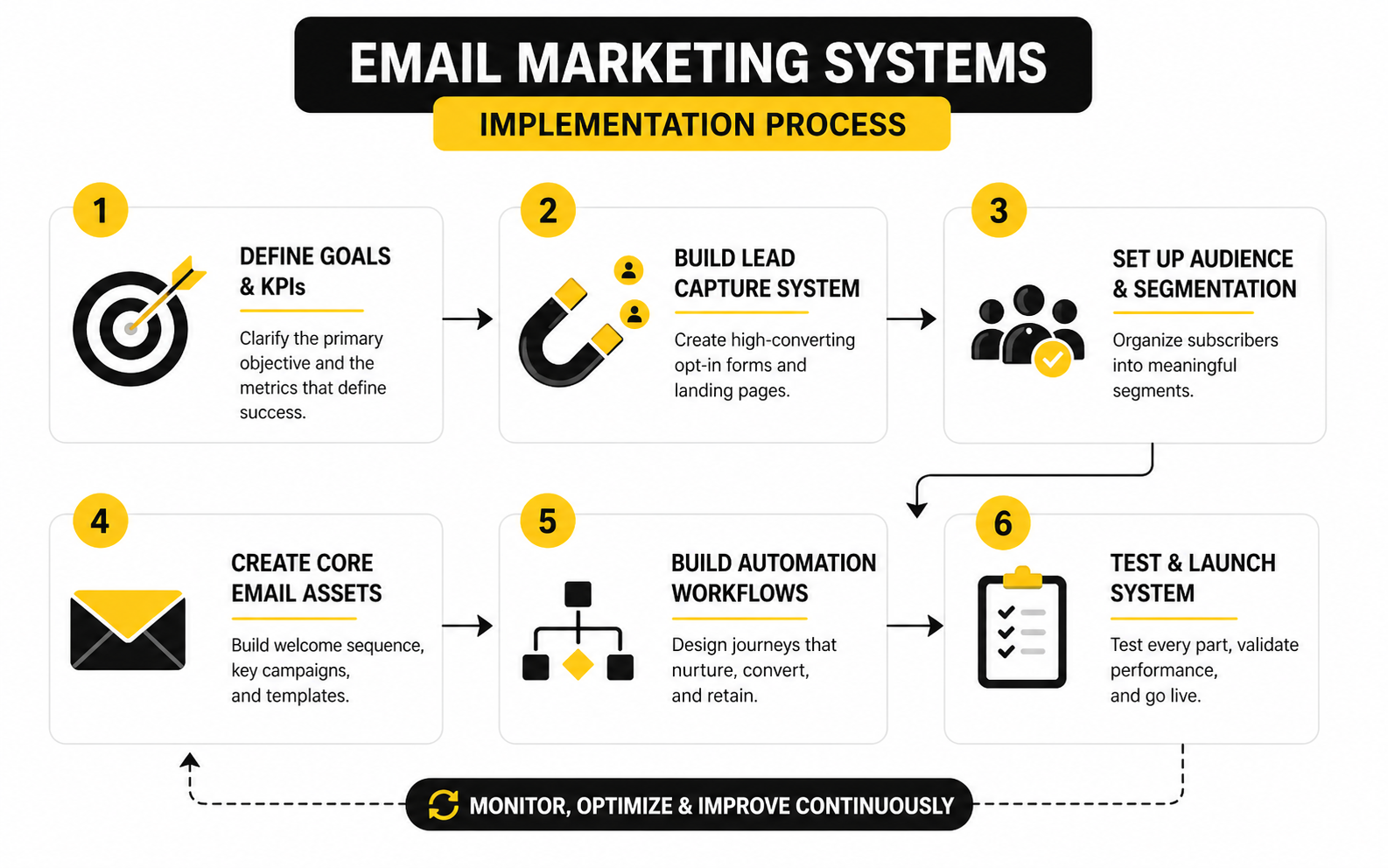
A professional build does not need to be complicated, but it does need order. If you build random automations whenever a new idea appears, the system becomes fragile fast. A better process keeps the work focused and testable.
- Define the business goal for the workflow.
- Choose the exact audience that should enter it.
- Pick the trigger that starts the workflow.
- Add conditions that prevent the wrong people from entering.
- Write the core messages around the user’s next decision.
- Add internal actions for sales, support, tagging, or reporting.
- Test the workflow with sample contacts before launch.
- Monitor performance and clean up weak steps.
This process keeps automation tied to real behavior. It also makes the system easier to improve because every workflow has a clear purpose. When something underperforms, you can inspect the trigger, audience, message, timing, or offer instead of guessing.
Start With The Automations That Protect Revenue
Not every automation deserves the same priority. Start with the flows closest to revenue and customer experience before building fancy nurture sequences. This usually means welcome, lead follow-up, abandoned checkout, booking reminders, onboarding, post-purchase, review requests, renewal, and reactivation.
The welcome flow sets expectations and helps the subscriber understand what happens next. The lead follow-up flow keeps interest warm when someone raises their hand. The abandoned checkout or abandoned application flow gives people a clean path back when they hesitate.
For service businesses, reminders and missed-call follow-up can be more valuable than another newsletter. For ecommerce or digital products, post-purchase education and repeat-purchase prompts often matter more. The point is simple: build the workflows that reduce leakage first.
Write Lifecycle Emails Like A Real Conversation
Automation fails when every message sounds like a template. A lifecycle email should feel like the next natural thing a helpful person would say. That means the message has to match the subscriber’s context.
A new subscriber does not need ten reasons to buy immediately. They need orientation, trust, and a clear next step. A high-intent prospect who clicked a pricing link or booked a call needs confidence, proof, preparation, and fewer distractions.
The best lifecycle emails are direct. They explain why the person is receiving the message, what matters now, and what to do next. You can still use persuasive copy, but the copy should serve the journey instead of forcing a hard sell too early.
Connect Email With The Rest Of The System
Email should not operate in isolation. It should work with landing pages, booking pages, CRM records, sales tasks, checkout flows, support history, and reporting. When those pieces stay disconnected, the customer experience feels broken.
For example, if someone books a call through Cal.com, the email system should know that the person booked. If someone completes a form through Fillout, the answers should feed the right segment or sales process. If a lead enters a broader CRM workflow inside GoHighLevel, the messages, tasks, and pipeline stages should support each other.
This is where email marketing systems become operationally useful. The goal is not just to send messages. The goal is to help the business respond faster, follow up better, and make smarter decisions from the same customer data.
Avoid Over-Automation
Automation should remove friction, not remove judgment. Some contacts need a sales call. Some need support. Some need to be suppressed. Some need a simple human reply instead of another sequence.
A good rule is to automate repeatable moments and keep human attention for high-value decisions. If a lead requests pricing, asks a specific question, or reaches a serious buying signal, the system should alert the right person rather than burying that lead in a generic nurture flow. Speed matters, but relevance matters more.
This is also why workflow reviews are important. Automations that made sense six months ago may become outdated when offers, pricing, positioning, or sales processes change. Review the system regularly so it stays aligned with the way the business actually sells and serves customers.
Make Reporting Part Of The Workflow
Automation without reporting is just activity. Every important workflow should have a few basic metrics attached to it, such as entry volume, completion rate, conversion rate, unsubscribe rate, reply rate, and revenue or pipeline influence where possible. You do not need a complicated dashboard to start, but you do need visibility.
Recent lifecycle marketing research continues to point toward reporting, attribution, and disconnected stacks as common blockers for teams trying to improve performance. That makes sense because the workflow itself is only half the job. The other half is knowing whether it moved the person closer to the right outcome.
Keep the reporting tied to the workflow’s purpose. A welcome sequence should not be judged the same way as an abandoned checkout flow. A reactivation campaign should not be judged the same way as a sales consultation reminder. Each automation needs its own definition of success, or the numbers will look useful while telling you almost nothing.
Deliverability, Compliance, Testing, And Performance Tracking
Measurement is where email marketing systems stop being based on opinion. You can like a subject line, prefer a design, or feel confident about an offer, but the system needs evidence. The numbers show whether people are receiving, opening, clicking, replying, buying, unsubscribing, ignoring, or getting stuck.
The mistake is treating analytics like a scoreboard instead of a decision tool. A report that says “open rate went up” is not enough. You need to know why it moved, whether that movement matters, and what action should happen next.
This part is not about dumping random benchmarks. Benchmarks are useful only when they help you diagnose the system. Your real goal is to understand the health of the list, the strength of the message, the quality of the offer, and the reliability of the revenue path.
Statistics And Data
Email metrics should be read in layers. The first layer tells you whether the message reached the inbox. The second layer tells you whether the audience noticed it. The third layer tells you whether the message created action. The fourth layer tells you whether that action produced business value.
That is why a single number rarely tells the whole truth. A high open rate with weak clicks may mean the subject line created curiosity but the message did not deliver enough reason to act. A low open rate with strong revenue may mean the audience was smaller but more qualified. A campaign with average clicks but high unsubscribes may have attracted attention while damaging long-term list trust.
For email marketing systems, the useful data points are connected:
- Delivery rate shows whether emails were accepted by receiving servers.
- Bounce rate shows whether the list contains bad, inactive, or risky addresses.
- Open rate gives a directional signal for subject lines, sender trust, and inbox visibility.
- Click rate shows whether the message created enough interest to take the next step.
- Click-to-open rate helps compare message quality after someone opened.
- Conversion rate shows whether the landing page, offer, or sales step worked.
- Unsubscribe rate shows whether expectations and message frequency are aligned.
- Complaint rate shows whether the audience feels misled, annoyed, or unsafe.
- Revenue per recipient shows how much commercial value the email created.
- Reply rate shows whether the message created real conversation, especially in service businesses.
The point is not to chase perfect numbers. The point is to know which part of the system needs attention. A deliverability issue needs a different fix than a weak offer, and a weak offer needs a different fix than poor segmentation.
What Benchmarks Actually Mean
Benchmarks are useful for context, not for judgment. If your open rate is below a public benchmark, that does not automatically mean your system is broken. Your industry, audience type, list age, sending frequency, offer strength, sender reputation, and customer lifecycle stage all affect performance.
Use benchmarks as a diagnostic starting point. If your click rate is far below typical ranges for your market, inspect message relevance, call-to-action clarity, segmentation, and landing page alignment. If unsubscribes spike, inspect whether the email matched the promise people signed up for.
The best comparison is usually your own trend line. Are welcome emails improving over time? Are sales sequences producing more replies? Are inactive contacts becoming harder to re-engage? Those internal patterns tell you more than a generic industry average.
Build A Measurement System, Not A Dashboard Graveyard
A dashboard is only useful if someone uses it to make decisions. Many teams collect too many numbers and then ignore all of them. That creates the illusion of control without changing anything.
A better approach is to assign each metric a job. Deliverability metrics protect access to the inbox. Engagement metrics show whether the audience still cares. Conversion metrics show whether the journey creates action. Revenue metrics show whether the system is worth scaling.
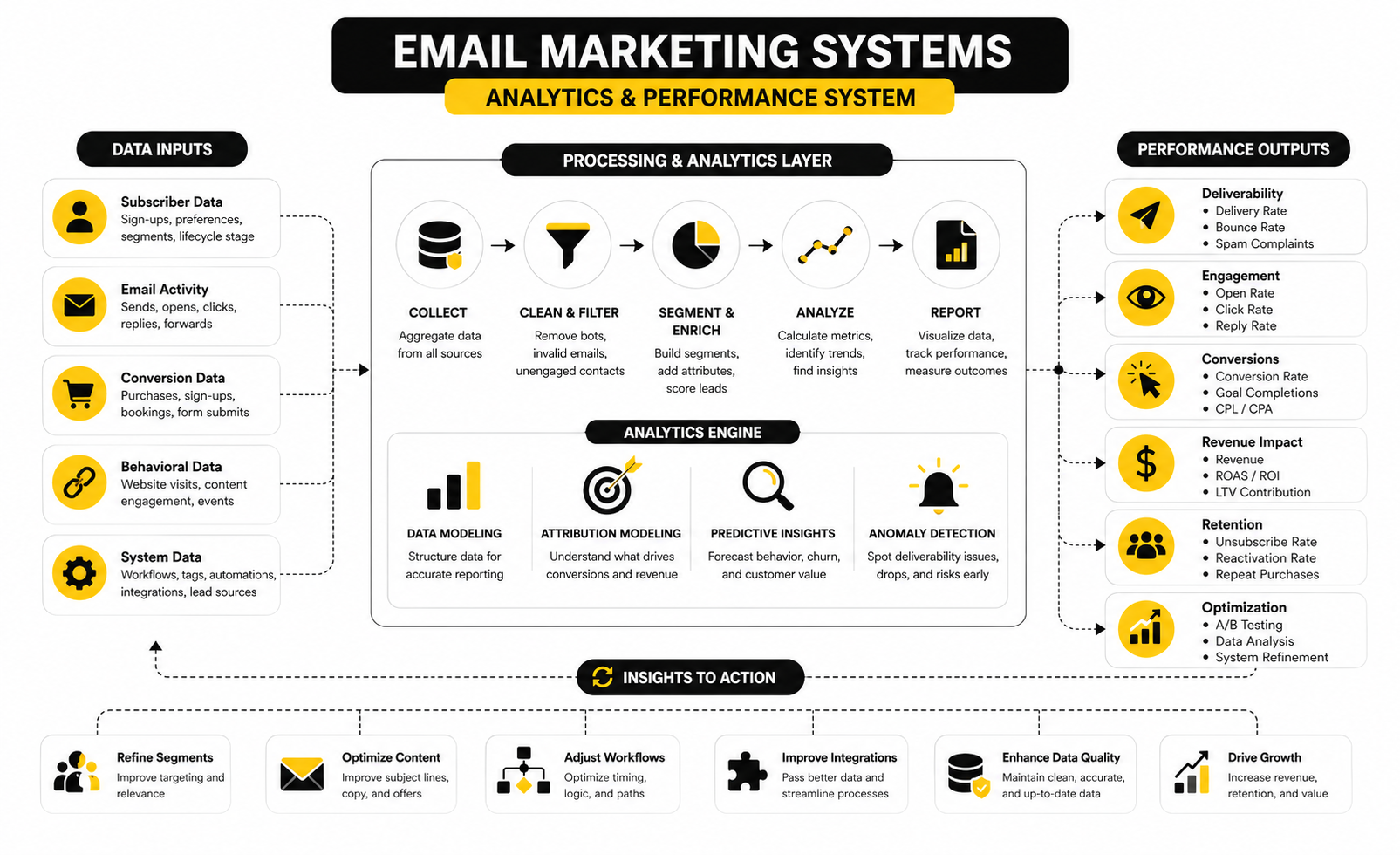
A practical measurement setup should answer five questions:
- Are emails reaching the inbox?
- Are the right people engaging?
- Are the messages moving people to the next step?
- Are those next steps turning into revenue or qualified pipeline?
- What should be changed this week?
That last question matters most. If the data does not lead to a decision, the system is not being managed. It is just being watched.
Read Opens Carefully
Open rates are still useful, but they are not as clean as they used to be. Privacy features, image loading behavior, inbox filtering, and device differences can all affect how opens are recorded. That does not make open rate worthless, but it does mean you should avoid making big decisions from opens alone.
Use open rate mainly as a directional signal. If one segment consistently opens more than another, that tells you something about audience interest or sender trust. If open rates suddenly drop across everything, that may point to deliverability, sender reputation, or list fatigue.
Do not treat opens as proof of buying intent. Someone can open because they are interested, curious, confused, or simply checking their inbox. Strong email marketing systems use opens as one signal among several, not as the main trigger for aggressive sales follow-up.
Clicks Tell You More Than Opens
Clicks are stronger than opens because they show action. When someone clicks, they made a small commitment. They moved from passive attention to active interest.
But even clicks need interpretation. A high click rate can come from a strong offer, a clear call to action, a curious link, or a segment that was already close to buying. A weak click rate can come from poor copy, unclear design, weak targeting, or a mismatch between the email promise and the audience’s current need.
Look at what people clicked, not just whether they clicked. Pricing page clicks, booking page clicks, product clicks, resource clicks, and support clicks all mean different things. Your system should use those signals to update segments, trigger follow-up, or alert the right person.
Conversion Tracking Is Where The Truth Shows Up
Clicks are not the finish line. A click only proves the email created enough interest to move someone elsewhere. The real question is what happened after the click.
Conversion tracking connects email to the outcome that matters. That might be a purchase, booked call, completed form, quote request, trial signup, webinar registration, paid invoice, or sales opportunity. Without that connection, you may optimize for engagement while missing revenue.
This is especially important when email is part of a bigger funnel. If email gets the click but the landing page fails, the email is not necessarily the problem. If the booking page gets traffic but few appointments, the issue may be friction, timing, trust, or offer clarity.
Measure Automations Separately From Campaigns
Campaigns and automations behave differently. A campaign is usually sent at a specific time to a selected audience. An automation runs continuously when people meet certain conditions.
That means they should not be judged the same way. A newsletter may be measured by engagement, traffic, and long-term relationship value. An abandoned checkout flow should be measured by recovered revenue. A consultation reminder should be measured by show-up rate. A reactivation flow should be measured by meaningful engagement and list cleanup.
This is where email marketing systems need workflow-level reporting. Each automation should have its own purpose, audience, trigger, and success metric. If everything gets blended into one report, you lose the ability to improve the specific part that is underperforming.
Watch Deliverability Before It Becomes A Crisis
Deliverability problems usually do not appear out of nowhere. They build slowly through weak engagement, poor list hygiene, authentication gaps, spam complaints, high bounce rates, inconsistent sending, or risky acquisition sources. By the time revenue drops, the system may already have been unhealthy for weeks.
Your deliverability watchlist should include bounce rate, spam complaints, unsubscribe trends, sudden open-rate drops, engagement by domain, and performance differences between major inbox providers. If Gmail engagement drops while other domains stay stable, that is a different problem than a broad audience issue. If bounces rise after a new lead source, the source quality needs attention.
Authentication also matters. SPF, DKIM, and DMARC are no longer technical extras for serious senders. They are basic infrastructure. If you are using a platform like GoHighLevel, Brevo, or Moosend, the domain setup should be completed before serious sending begins.
Test One Meaningful Variable At A Time
Testing is not guessing with extra steps. A useful test starts with a clear question. Will a direct subject line beat a curiosity subject line? Will a shorter sales email create more clicks? Will sending to recent engagers improve conversion and reduce complaints?
Change one meaningful variable at a time when possible. If you change the subject line, offer, design, segment, and send time all at once, you will not know what caused the result. That makes the test harder to learn from.
The most valuable tests usually focus on the parts closest to behavior. Test the offer, audience, call to action, opening angle, proof point, timing, and landing page match. Button color is rarely the real problem.
Turn Performance Signals Into Actions
Data should create action. If engagement is strong but conversions are weak, inspect the offer and landing page. If opens are stable but clicks are falling, inspect message relevance and call-to-action clarity. If unsubscribes rise after a new sequence, inspect expectation setting and frequency.
Here is the practical way to read performance signals:
- Low delivery and high bounces usually point to list quality or technical setup.
- Normal delivery and low opens usually point to sender trust, subject line, timing, or audience fit.
- Strong opens and low clicks usually point to weak message relevance or unclear next steps.
- Strong clicks and low conversions usually point to the landing page, offer, price, form, or sales process.
- High conversions and high unsubscribes may mean the offer works but the audience targeting is too broad.
- Low engagement across old subscribers usually points to list fatigue or poor reactivation strategy.
This is the habit that separates professional systems from random email activity. You do not panic when a number moves. You diagnose the layer, make the smallest useful change, and measure again.
Professional Implementation And Tool Stack Decisions
By this point, the system has a clear audience foundation, practical automations, and a measurement layer. Now the question becomes more strategic: how should the whole thing be implemented so it can scale without becoming fragile? This is where tool choices, ownership, governance, integrations, and risk management start to matter.
Many businesses choose platforms too early. They compare features, watch demos, and chase whatever looks most powerful. That is backwards. Email marketing systems should be built around the business model first, then the stack should support that model.
The right setup for a local service business is not always the right setup for a SaaS company, ecommerce brand, creator business, agency, or coaching offer. A business that depends on appointments needs different workflows than a business that depends on abandoned cart recovery. A team with a sales pipeline needs different visibility than a solo operator sending a weekly newsletter.
Choose The Stack Based On The Revenue Motion
Your revenue motion is how money actually moves through the business. If people discover you, download something, book a call, speak with sales, and then buy, your system needs strong CRM and pipeline logic. If people discover a product, browse, abandon checkout, and buy later, the system needs stronger ecommerce and behavioral triggers.
This is why there is no universal best platform. A simple newsletter-led business may only need clean campaigns, forms, segmentation, and automation. A sales-led business may need pipeline stages, task creation, call tracking, missed-call follow-up, appointment reminders, and multi-channel messaging.
For service businesses, agencies, consultants, and local operators, GoHighLevel can make sense because the CRM, automation, funnels, calendars, and client management can live closer together. For lean digital funnels, ClickFunnels or Systeme.io may fit when the main job is capturing leads and moving them through a focused offer path. For email-first teams that mainly need campaigns and automation, Brevo or Moosend can be enough.
Avoid Tool Sprawl
Tool sprawl happens when every problem gets solved by adding another app. At first, it feels productive. Later, nobody knows which system is the source of truth, reporting becomes messy, and automations break because one integration changed quietly in the background.
The danger is not just cost. The bigger risk is operational confusion. If lead status lives in one tool, appointment data in another, email engagement in another, and revenue in another, the business can easily make decisions from incomplete data.
A tighter stack is usually better than a flashy stack. Use fewer tools when they can handle the job cleanly. Add specialized tools only when the gain is obvious, the integration is stable, and someone owns the process.
Decide What The Source Of Truth Is
Every serious email system needs one source of truth for contact and customer status. That does not mean every piece of data must live in one platform. It means the business must know which system wins when platforms disagree.
For a sales-led business, the CRM is usually the source of truth. For ecommerce, the commerce platform often holds the final purchase reality. For a content-led business, the email platform may be enough until the sales process becomes more complex.
This decision matters because automations depend on accurate status. If a person buys but the email system still sees them as a prospect, they may keep receiving sales emails for something they already purchased. That feels sloppy, and it weakens trust.
Build Governance Before Complexity
Governance sounds boring, but it protects the system. It means having rules for naming, tagging, permissions, workflow changes, suppression, testing, and documentation. Without governance, the system slowly becomes a junk drawer.
Start with simple standards. Use consistent names for lists, segments, tags, campaigns, automations, forms, and fields. Decide who can publish campaigns, edit automations, export contacts, change suppression rules, and connect integrations.
This matters more as the team grows. One person can keep a system in their head for a while. A team cannot. Documentation turns the system from personal knowledge into business infrastructure.
Treat AI As An Assistant, Not The Strategy
AI can help email marketing systems move faster, but it should not become the brain of the system without supervision. It can draft subject lines, summarize customer responses, suggest segments, generate variants, clean copy, or help analyze patterns. That is useful.
The risk is using AI to create more noise. If it simply produces more generic emails, the system may become faster and worse at the same time. Inbox competition is already heavy, and automated content that lacks judgment will only make subscribers more selective.
Use AI where it improves clarity, speed, and decision-making. Do not use it to avoid strategy. The system still needs a sharp offer, clean data, relevant segmentation, and a real reason for people to care.
Plan For Compliance And Consent Early
Compliance is not something to bolt on after the system is live. Consent, unsubscribe handling, sender identity, data storage, and privacy expectations should be part of the build from the beginning. This is especially important if the business operates across regions with different privacy and marketing rules.
At minimum, the system should record how someone joined, what they agreed to receive, and how they can opt out. Unsubscribe links should be clear, suppression should be respected, and reactivation campaigns should not become a loophole for bothering people who already disengaged. For commercial sending, Gmail’s sender guidance emphasizes authentication, low spam rates, and easy unsubscribe handling as core requirements for reliable delivery.
This is not just legal hygiene. It is brand protection. People who trust your emails are more likely to stay engaged, click, reply, and buy.
Design For Failure Points
Professional systems assume things can break. Forms can stop passing hidden fields. Integrations can fail. Tags can be applied incorrectly. Payment events can be delayed. Salespeople can forget to update stages. A workflow can send the wrong message if the logic is too broad.
That is why safeguards matter. Use exclusion rules, suppression lists, test contacts, internal alerts, naming standards, and periodic audits. For high-value workflows, build checks that prevent customers, unsubscribed contacts, or active opportunities from receiving the wrong sequence.
The goal is not paranoia. The goal is resilience. A good system does not collapse because one tag is missing or one tool changes a setting.
Scale By Simplifying The Core
Scaling does not always mean adding more sequences. Often, it means simplifying the core so more volume can move through the system without chaos. The bigger the list, the more expensive bad segmentation becomes.
Before adding advanced personalization, make sure the basic journeys are clean. New leads should be routed correctly. Buyers should be removed from prospecting flows. Inactive contacts should be handled carefully. Sales-ready contacts should be visible to the right people.
Then scale in layers. Add new segments, offers, channels, and automations only when the existing system is stable. Complexity is fine when it creates leverage. Complexity is expensive when it only creates maintenance.
Know When To Rebuild Instead Of Patch
At some point, patching old email marketing systems becomes more painful than rebuilding them. This usually happens when naming is inconsistent, workflows overlap, reporting cannot be trusted, and nobody wants to touch the automations because one change might break five other things. That is the wall.
A rebuild does not always mean changing platforms. Sometimes it means cleaning the database, retiring old workflows, standardizing fields, rebuilding core lifecycle automations, and documenting the new structure. Other times, the platform truly no longer fits the business and migration is the cleaner move.
The decision should be based on risk and future use. If the current setup prevents clear reporting, reliable follow-up, and confident scaling, it is not saving money. It is quietly taxing every campaign, every launch, and every sales conversation.
Optimization, Scaling, And Long-Term System Health
At this stage, the system should have a clear structure: clean audience data, relevant journeys, reliable measurement, a sensible tool stack, and rules that protect quality. The final job is keeping it alive. Email marketing systems are not something you build once and forget.
The market changes, offers change, inbox rules change, customer expectations change, and your own business model changes. A system that worked last year may still be useful, but it probably needs sharper segmentation, cleaner reporting, better deliverability controls, or simpler workflows. Optimization is not a one-time cleanup. It is the operating rhythm that keeps the system profitable.
The best systems become easier to manage as they mature. They do not turn into a jungle of tags, half-used lists, abandoned workflows, and mystery automations. They become clearer, more predictable, and more valuable because every part has a job.
Create A Review Rhythm
A strong system needs regular reviews. Weekly reviews should focus on active campaigns, obvious delivery problems, and urgent conversion issues. Monthly reviews should look at workflow performance, list quality, revenue signals, and segment behavior.
Quarterly reviews should go deeper. This is where you inspect whether the system still matches the business model, offer structure, customer journey, and sales process. If your company has changed but the automations have not, the system is already drifting.
The review rhythm should be simple enough to maintain. Look at what is working, what is declining, what is unclear, and what should be removed. Deleting dead automations can be just as valuable as creating new ones.
Optimize The Whole Ecosystem
Email does not create results by itself. It works inside a wider ecosystem of lead capture, CRM, landing pages, sales conversations, checkout flows, customer support, retargeting, content, and analytics. That is why optimizing only the email copy is often too narrow.
If an email gets strong clicks but weak conversions, the landing page may be the problem. If leads book calls but do not show up, reminders, qualification, and expectation-setting may need work. If buyers do not purchase again, post-purchase education or offer sequencing may be weak.
The mature approach is to optimize the entire path. Email is one powerful part of the machine, but the machine includes every step before and after the message.
Scale Without Losing Relevance
Scaling email is not the same as sending more. Sending more can help, but only when the audience, message, offer, and timing justify it. If you scale weak relevance, you scale fatigue.
The safer path is to scale by segment. Send more specific messages to people who have shown clearer intent. Build stronger flows for the highest-value lifecycle moments. Add channels only when they support the customer journey, not because another tool looks exciting.
This is also where suppression becomes a growth tool. Removing the wrong people from the wrong messages protects engagement, improves reporting, and keeps the system focused. A healthy list is not always the biggest list. It is the list that still wants to hear from you.
Use The Final System As A Business Asset
The finished system should help the business make better decisions. It should show which lead sources create real customers, which offers create movement, which segments deserve more attention, and which workflows protect revenue. That makes it more than a marketing tool.
For founders, it creates visibility. For marketers, it creates leverage. For sales teams, it creates cleaner follow-up. For customers, it creates a smoother experience.
That is the dream outcome of email marketing systems: not more noise, not more software, and not more random campaigns. A system that knows what to send, when to send it, who should receive it, and what business result it is supposed to create.
FAQ - Built For Complete Guide
What are email marketing systems?
Email marketing systems are the connected tools, data, workflows, messages, and measurement processes used to manage email as a revenue channel. They include list capture, segmentation, automation, deliverability, campaign sending, reporting, and customer lifecycle communication. The goal is not just to send emails, but to create a repeatable system that supports sales, retention, and customer experience.
How are email marketing systems different from email marketing software?
Email marketing software is the tool. An email marketing system is the full process around the tool. The system includes strategy, audience data, automations, consent, reporting, sales handoffs, landing pages, testing, and cleanup rules.
What should a beginner build first?
Start with a clean signup path, a welcome sequence, basic segmentation, and one clear conversion goal. Do not begin with complicated branching workflows. A simple system that captures leads properly and follows up consistently is already a huge upgrade for most businesses.
What is the most important metric to track?
There is no single best metric for every business. Delivery, engagement, conversion, revenue, unsubscribe rate, complaint rate, and reply rate all matter in different ways. The most important metric is the one tied to the purpose of that specific workflow or campaign.
How often should businesses email their list?
The right frequency depends on the audience, offer, and relationship. A daily content brand can email more often than a high-ticket service business with a colder list. The better question is whether each email has a clear reason to exist and whether engagement stays healthy over time.
Should every business use automation?
Yes, but automation should be used carefully. Every business can benefit from consistent welcome emails, lead follow-up, reminders, post-purchase communication, and reactivation. The mistake is automating everything before the strategy and data are clear.
What is the biggest mistake in email automation?
The biggest mistake is building workflows without a clear outcome. If the system does not know what success means, it becomes a sequence of messages instead of a guided journey. Every automation should have a specific trigger, audience, message purpose, and measurable goal.
How important is deliverability?
Deliverability is critical because even great emails are useless if they do not reach the inbox. Authentication, list quality, engagement, complaint rates, unsubscribe handling, and sending consistency all affect performance. Serious email marketing systems treat deliverability as infrastructure, not an afterthought.
When should a business change platforms?
A platform change makes sense when the current setup blocks reporting, automation, integration, deliverability, team collaboration, or customer experience. Do not migrate just because another tool looks more exciting. Migrate when the current system no longer supports the way the business sells and serves customers.
Can AI improve email marketing systems?
AI can help with drafting, research, segmentation ideas, subject line testing, workflow planning, and performance analysis. It should support strategy, not replace it. If the offer, data, and customer journey are weak, AI will only help you create weak emails faster.
What tools are best for email marketing systems?
The best tool depends on the business model. GoHighLevel can fit service businesses and agencies that need CRM, automation, funnels, and pipeline management together. Brevo, Moosend, Systeme.io, and ClickFunnels can all make sense in different situations.
How do you know if an email system is healthy?
A healthy system has clean data, clear segments, working automations, reliable deliverability, useful reporting, and consistent revenue or pipeline contribution. It is also easy enough for the team to understand and maintain. If nobody trusts the data or wants to edit the workflows, the system is not healthy.
Work With Professionals
Explore 10K+ Remote Marketing Contracts on MarkeWork.com
Most marketers spend too much time chasing clients, competing on crowded platforms, and losing a percentage of every project to middlemen.
MarkeWork gives you a better way. Browse thousands of remote marketing contracts and connect directly with companies desperate to hire skilled marketers like you, without platform commissions and without unnecessary gatekeepers.
If you are serious about finding better opportunities and keeping 100% of what you earn, explore available contracts and create a profile for free at MarkeWork.com.