

Small businesses that want to grow sales and strengthen customer relationships can’t afford to ignore email marketing. Email remains one of the most cost‑effective channels available — delivering an average return of about $36 for every $1 spent, far outpacing many advertising alternatives and making it a cornerstone of any lean marketing stack.
EMAIL MARKETING TOOLS HELP YOU:
- Build and manage subscriber lists with ease.
- Send newsletters, promotions, and automated sequences.
- Track opens, clicks, and conversions to improve performance.
- Save time with automation that runs while you focus on running your business.
Below you’ll find a clear, practical roadmap to choosing the right tools for your small business’s email efforts — from simple solutions for beginners to more advanced platforms that scale with growth.
Article Structure
- Why Email Marketing Matters for Small Business
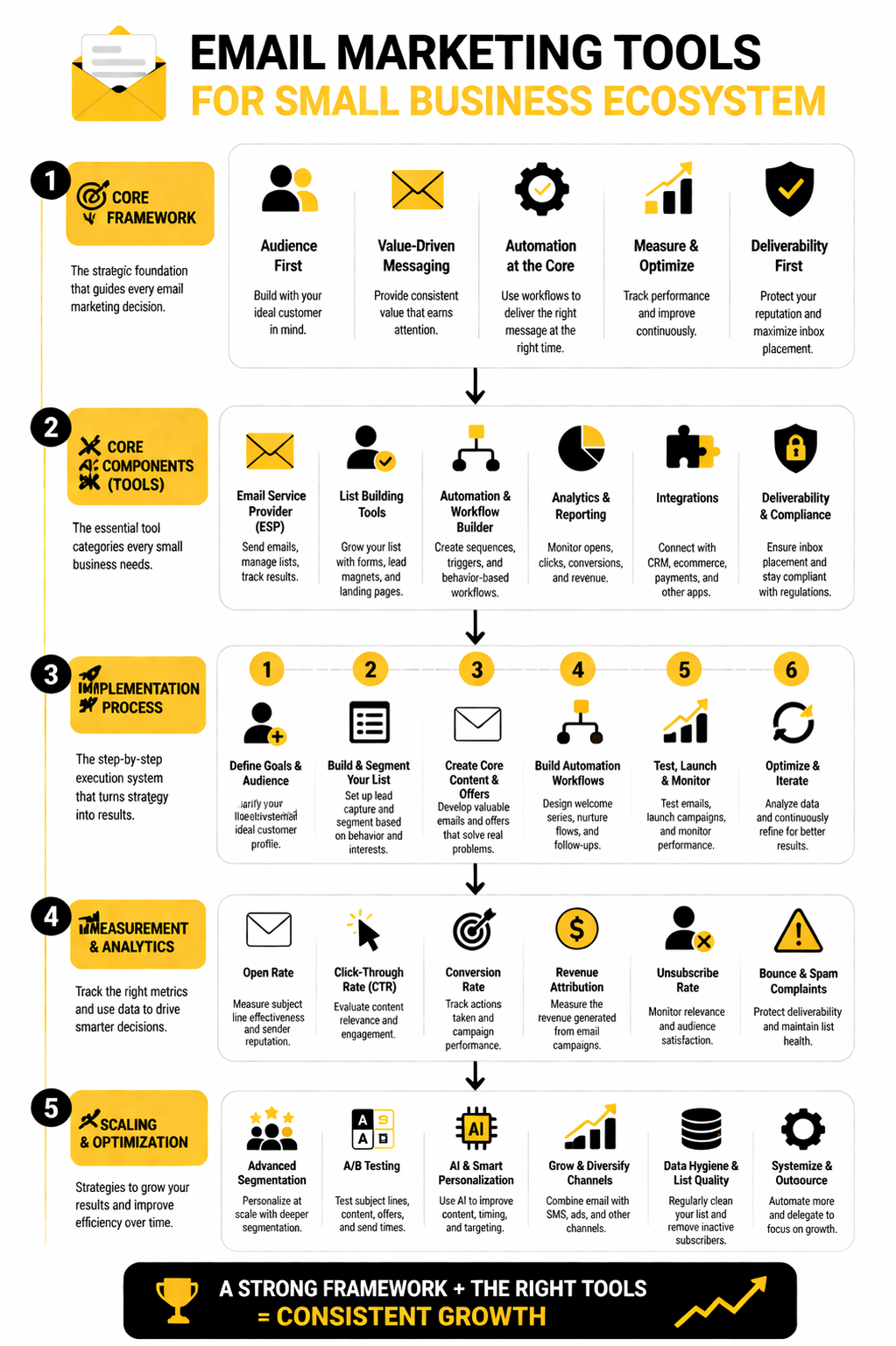
- Overview Framework for Choosing Tools
- Core Features to Look For
- Top Email Marketing Tools for Small Businesses
- How to Evaluate and Compare Your Options
- Next Steps: Implementation Tips
Why Email Marketing Matters for Small Business
Email is far from outdated — it’s where your audience owns their connection to your brand. Unlike social channels, which can throttle reach or disappear behind algorithm changes, your email list is an asset you control.
- High ROI — Every dollar invested often yields many times that in revenue.
- Direct Audience Access — Emails land where people check them, without algorithm barriers.
- Automation Saves Time — Set it up once and let welcome sequences, reminders, and promotions run on autopilot.
Most small businesses that commit to consistent email marketing see better retention, more repeat sales, and stronger customer engagement over time.
Overview Framework for Choosing Tools
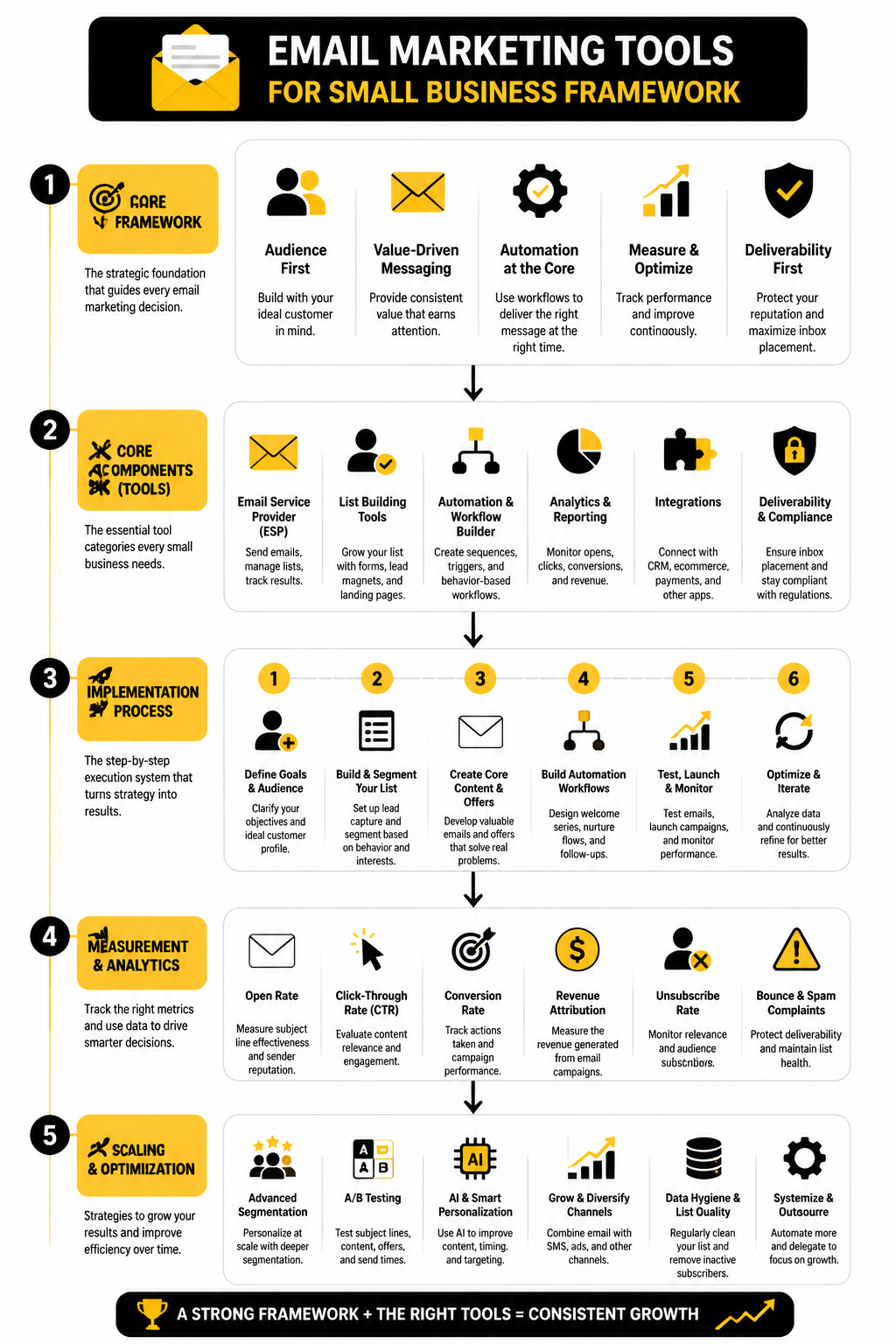
Choosing the right email marketing tool isn’t about picking the most expensive or the one with the fanciest dashboard. It’s about matching a platform to your business’s needs and priorities:
- Ease of use — Can you get your first campaign out quickly without training?
- Pricing — Does the plan scale reasonably as your list grows?
- Automation — Can you set up triggers like welcome emails and follow‑ups?
- Templates & Design — Does it make professional email creation simple?
- Analytics — Do you get meaningful insights on opens, clicks, and conversions?
This framework will help you evaluate tools from beginner‑friendly systems to platforms built for growing enterprises.
Core Features to Look For
No matter the tool you choose, these functions are essential for small business success:
- Drag‑and‑drop email builder — Makes design intuitive without coding.
- Subscriber segmentation — Target messages to specific customer groups.
- Automation workflows — Set up multi‑step sequences for onboarding and follow‑ups.
- Analytics dashboards — Understand what’s working and what needs tweaking.
- Integrations — Connect your email tool with your website, CRM, or e‑commerce store.
These features ensure your campaigns look good, reach the right people, and drive measurable results.
Top Email Marketing Tools for Small Businesses
Here’s a snapshot of widely recommended tools that suit small business needs, with free options where available and affordable paid plans as you scale:
MailerLite — Excellent value with generous free tier and powerful automation builder, making it a strong all‑around choice for most small businesses.
Mailchimp — One of the most recognized platforms, ideal for beginners thanks to its intuitive editor and strong integration ecosystem.
Brevo (formerly Sendinblue) — Affordable free plan and unique pricing by email volume rather than contact count, plus CRM and SMS features.
Moosend — Budget‑friendly tool with solid automation and analytics, great for small lists and straightforward campaigns.
GetResponse — A more comprehensive platform that integrates email with landing pages and webinars for scalable marketing.
Constant Contact — Simple and dependable platform with event and survey integrations that work well for businesses running frequent promotions.
Each of these tools has strengths for specific use cases — from simple newsletters to advanced automated sequences — and the best fit depends on your budget, list size, and automation needs.
How to Evaluate and Compare Your Options
Once you’ve identified tools that look promising:
- Sign up for free plans or trials — Most platforms let you test drive without commitment.
- Build a test workflow — Create a welcome series and schedule a sample campaign.
- Check deliverability metrics — Some tools help optimize inbox placement.
- Compare scalability — What happens to price and features as your list grows?
- Assess support and resources — Look for strong documentation and responsive support channels.
Choosing a tool you enjoy using matters just as much as features — because consistency drives results.
Next Steps: Implementation Tips
Once you’ve chosen your tool:
- Import your contacts cleanly — Use tags or segments to organize them effectively.
- Set up automation first — A welcome series and transactional emails are high‑impact starters.
- Schedule regular newsletters — Weekly or biweekly keeps your brand top of mind.
- Track performance monthly — Adjust subject lines, send times, and CTAs based on data.
- Grow your list — Embed signup forms on your site and promote lead magnets.
Starting your email marketing with a thoughtful tool and clear strategy will pay off quickly — both in revenue and customer loyalty.
Continue to Part 2 for deep dives into specific tools, pricing models, and real user scenarios tailored for small business success.
Deep Dive: How to Evaluate and Compare Email Marketing Tools
Picking the right email marketing tools for small business isn’t just about features on paper — it’s about how well a platform actually fits your specific workflows, budget, and goals. Here’s how to evaluate your shortlist so you make a confident choice rather than guesswork.
1. Start With Free Trials and Plans
Most reputable platforms offer a free tier or trial you can use to test key features before you commit. For example, tools like MailerLite and Brevo let you start for free and send campaigns right away, making it easy to evaluate the dashboard, editor, and segmentation options without risk.
- Track how intuitive the interface feels within your first 30–60 minutes.
- Make sure importing contacts and creating a list is straightforward.
If you hit friction early — clunky menus, confusing workflows — that’s a sign it might slow you down long‑term.
2. Build a Sample Workflow
A simple way to test a tool’s practical value is to set up a real sequence you would use in your business. For most small businesses, that might include:
- Welcome email automation — sent when someone joins your list.
- Follow‑up reminder sequence — for engagement or abandoned carts.
- Newsletter format test — scheduled and sent to a segment.
A good tool will let you visualize automation, tweak timing and actions, and preview emails easily. Many platforms like MailerLite and Moosend offer visual builders even on lower plans.
3. Compare Deliverability and Reporting
Getting emails into the inbox matters far more than having a pretty editor. While exact deliverability data isn’t always transparent, third‑party reviews note relative differences:
- Moosend is reported to have strong deliverability practices and robust analytics even on smaller plans.
- Brevo includes detailed engagement metrics and built‑in CRM data you can use to judge how campaigns perform across channels.
Good reporting should show you opens, clicks, bounces, and unsubscribes, but also segment performance, helping you refine messaging over time.
4. Pricing That Scales
Small business needs evolve — from a few hundred subscribers to several thousand — and pricing should scale predictably. There are two common pricing models:
- Per subscriber pricing – Common with many tools, where cost climbs as your list grows.
- Email volume pricing – Brevo’s model charges based on emails sent, not contacts stored, which can save money if you send irregular newsletters.
Make sure you understand not just the entry price, but how costs change as you expand your list and automation needs.
5. Support and Resources
A strong support ecosystem is crucial, especially when you’re managing email yourself. Look for:
- Live chat or email support.
- Knowledge bases and tutorials.
- Community forums where other small business users share tips.
Support quality varies by platform and plan — some tools reserve priority help for paid tiers — so test support responsiveness during your trial.
Decision Checklist: Practical Comparison
Before you decide, answer these questions:
- Can you set up your first campaign in under an hour?
- Does the automation builder match your workflow complexity?
- Are analytics easy to interpret and action?
- Is the pricing predictable as your list grows?
- Does support feel reliable and helpful?
Taking the time to answer these from real hands‑on tests will keep you from picking a tool that looks good in theory but underperforms where it counts.
Choosing Based on Your Business Stage
- Just starting: A platform with a generous free tier and simple editor (like MailerLite or Brevo) helps you launch fast.
- Scaling automation: Look for deeper workflow builders and segmentation tools — platforms that handle multi‑step sequences without complexity.
- Multi‑channel communication: If email isn’t enough and you want SMS or CRM features built‑in, Brevo’s broader stack can be worth it.
Smart evaluation pays off. When you match the tool to how you work — and not just feature checklists — your email marketing tools for small business will become engines of growth rather than burdens to manage.
Implementation: How to Launch Your First Email Marketing Campaign
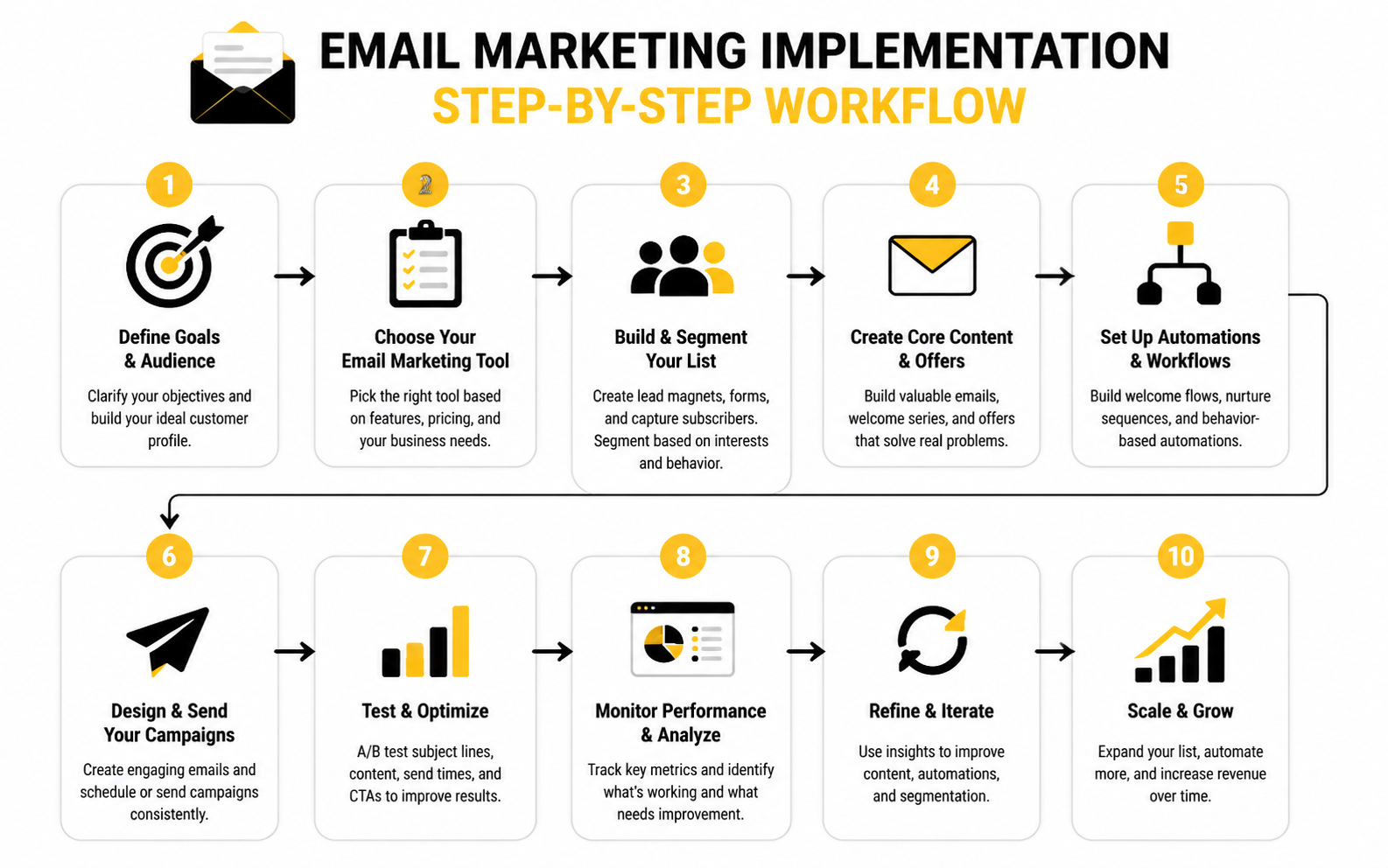
Setting up email marketing tools for small business is one thing — executing your first campaign is where the work turns into real results. This section walks you through a practical, step‑by‑step process so you can launch with confidence and avoid common pitfalls.
Step 1: Clarify Your Campaign Goal
Before you dive into tool setup or email writing, define what success looks like for your campaign. Do you want to:
- Welcome new subscribers and introduce your brand?
- Drive people to a sale or special offer?
- Re‑engage inactive customers?
Clear objectives help you tailor messaging, segment lists appropriately, and measure performance properly — whether that’s open rates, clicks, or conversions.
Step 2: Build and Segment Your Audience
Your email marketing campaign succeeds or fails based on your audience list quality. Make sure you:
- Collect opt‑ins legally with clear consent — this protects deliverability and trust.
- Segment subscribers based on behavior, interests, or purchase history so messages feel relevant.
- Avoid blasting every email to your entire list when a targeted subset will perform better.
Thoughtful segmentation increases engagement and reduces unsubscribe rates, which improves inbox placement over time.
Step 3: Craft the Right Email Sequence
Rather than sending a single message and hoping for results, set up an automated sequence that nurtures subscribers over time. One of the most impactful flows to start with is a welcome sequence — a series of automated messages new subscribers receive after joining your list.
Here’s a simple example of how a welcome sequence might work:
- Email 1 — Immediate: Thank them and deliver any promised lead magnet or resource.
- Email 2 — Day 2: Provide value — a quick tip or useful insight related to your offer.
- Email 3 — Day 4: Share your brand’s story and what makes you different.
- Email 4 — Day 6: Introduce your core product or service as a solution — without a hard sell.
- Email 5 — Day 8: Invite feedback or a direct engagement action.
Most effective welcome sequences contain 3–5 emails over about a week or two, establishing trust and guiding subscribers toward a first meaningful action.
Step 4: Use Your Tool’s Automation Builder
Once you’ve decided on the sequence structure:
- Choose your trigger — most systems let you trigger sequences when someone signs up or takes a specific action.
- Add timing between messages — spacing matters to avoid overwhelming new subscribers while keeping your brand top of mind.
- Personalize where possible — use names and any preferences you collected to make each email feel one‑to‑one.
Experienced practitioners recommend sending the first welcome email immediately after subscription, while interest is highest.
Step 5: Write Effective Content
Each email should have:
- A clear purpose — one idea and one call‑to‑action per email.
- Compelling subject lines that set expectations without sounding spammy.
- Mobile‑friendly content — more than half of opens happen on phones.
Draft your messages in a conversational, helpful tone. Avoid overly salesy language — early emails should build trust before pushing hard for sales.
Step 6: Test Before Launch
Before you activate your automation:
- Send test emails to yourself and teammates.
- Check how messages display on desktop and mobile.
- Verify links, personalization fields, and assets like images load correctly.
Testing prevents avoidable mistakes that hurt credibility and engagement once your emails go live.
Step 7: Launch and Monitor Performance
Once your automation is live:
- Monitor engagement metrics such as opens, clicks, and unsubscribes.
- Adjust timing, subject lines, or sequencing based on early data in the first week.
- Keep refining content and segmentation over time.
Regular review — especially in the first few campaigns — turns raw performance data into insights that make your subsequent campaigns even more effective.
Getting your first email campaign out the door doesn’t need to be overwhelming. Follow a structured implementation plan, focus on delivering value, and let automation do the heavy lifting so your email marketing tools for small business work for you consistently and efficiently.
Interpreting Your Email Marketing Performance
When you’re using email marketing tools for small business, the real value comes not just from sending campaigns but from understanding what the data actually means. Benchmarks and analytics help you measure performance, spot opportunities, and make decisions that directly impact revenue and engagement.
Why Metrics Matter Beyond the Surface
Numbers are only useful when you know what they measure and why they’re important:
- A high open rate can feel good — but because tools like Apple Mail Privacy Protection inflate open counts, it’s no longer a reliable standalone engagement signal. That’s why savvy marketers focus more on clicks and conversions.
- Click‑through metrics show intent. If people are clicking, they’re engaging with your content and offers — that’s where real value is generated.
- Bounce and unsubscribe rates tell you whether your list is clean and whether your messages are relevant. High bounce rates could mean outdated contacts, while rising unsubscribe rates suggest your audience isn’t finding value.
Tracking the right numbers helps you optimize campaigns not based on vanity stats, but on signals that correlate with business outcomes.
Key Benchmarks to Know and Watch
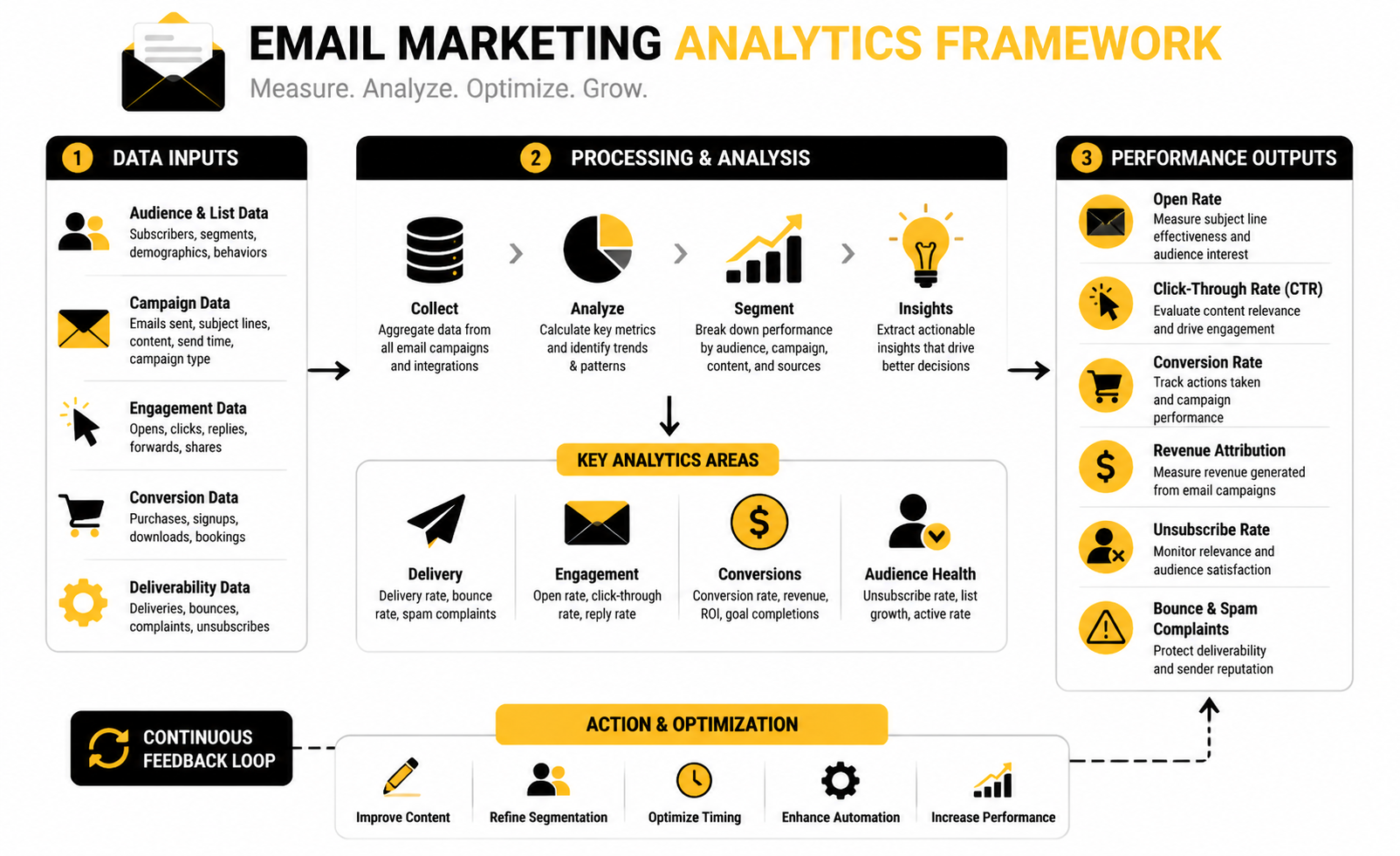
Understanding typical performance ranges gives you context for interpreting your own results. Keep in mind that benchmarks vary by industry, list size, and email type, but these figures offer useful reference points:
- Open rate: Healthy campaigns often see ~36–40% on average, though this can be inflated by privacy tools.
- Click‑through rate (CTR): A common benchmark range is ~2.5–3.5%; solid engagement usually lands here or above.
- Click‑to‑open rate (CTOR): This measures quality of content by comparing clicks to opens; healthy CTOR typically falls in the mid‑single digits or higher.
- Unsubscribe rate: A low unsubscribe rate (below 0.3%) signals that your content resonates with subscribers.
- Bounce rate: Tight list hygiene and proper authentication keep bounce rates well under 1%, which supports deliverability.
These ranges aren’t targets to chase blindly; they’re directional guides that help you interpret how a campaign compares to typical performance.
What Each Metric Should Drive You to Do
Open rate:
- Use it as a directional signal about interest in your subject lines and timing.
- If open rates are unusually low, test subject line variations and send times.
- If they’re high but CTR is low, your content inside might need improvement.
Click‑through rate (CTR):
- CTR directly ties to engagement and usually matters more than open rates.
- A low CTR suggests your offer isn’t compelling, content isn't resonating, or your call to action isn’t clear.
Click‑to‑open rate (CTOR):
- CTOR isolates what happens after people open your emails.
- A strong CTOR means your email content delivers value and motivates action; a weak CTOR means you need to tighten copy and design elements.
Unsubscribe and bounce rates:
- Rising unsubscribe rates could signal frequency issues or misaligned expectations.
- High bounce rates may require list cleanup and stricter opt‑in verification.
Benchmarks Inform Action, Not Just Comparison
Benchmarks help you understand where you stand, but they should never replace your own trend data. For example:
- If your open rate trails industry norms, improve subject lines and send timing.
- If your CTR lags even with good open rates, refine segmenting and content relevance.
- If bounce rates are high, audit and clean your list regularly.
Metrics should be seen as signals about your audience and the quality of your campaigns, not as arbitrary goals. By combining benchmark context with your own analytics trends, you can diagnose issues faster and iterate toward stronger engagement and higher ROI.
Advanced Email Marketing Performance and Strategic Considerations
As your use of email marketing tools for small business matures, the way you think about metrics, optimization, and strategic tradeoffs should evolve beyond simple benchmarks. At this stage, you’re not just checking boxes — you’re interpreting data, mitigating risks, and making decisions that influence long‑term audience engagement and revenue.
Focus on Strategic Metrics That Drive Business Outcomes
In 2026, common industry practice has shifted due to privacy changes and inbox behavior. Open rates are increasingly unreliable because of privacy tools like Apple Mail Privacy Protection, which can inflate opening statistics without reflecting true human engagement. That’s why modern marketers prioritize metrics that more accurately reflect intentional subscriber behavior: click‑through rates (CTR) and conversion outcomes. (turn0search0)
- Click‑through rate (CTR): Often the most meaningful engagement metric, indicating that recipients aren’t just opening but interacting with your content. A benchmark range of roughly 2.5–3.5% is typical for general campaigns, with variations by industry and email type. (turn0search0)
- Click‑to‑open rate (CTOR): Measures content relevance — how compelling your email is after someone opens it. A solid CTOR often lands in the mid‑single digits. (turn0search0)
- Conversion metrics: These tie your campaigns to revenue, form submissions, bookings, or other business goals. While harder to track, they’re far more actionable than surface engagement.
Shifting attention from opens toward metrics that reflect intentional actions helps you make smarter choices about content, segmentation, and the value of individual campaigns.
Interpreting Benchmarks in Context
Benchmarks provide a comparative frame, not a universal goal. What’s “good” for one business may be average for another based on list size, industry, email type, and audience behavior. For example:
- Retail and ecommerce lists often see lower open rates than education or nonprofit audiences because subscribers expect frequent promotional sends. (turn0search0)
- Automated flows — like welcome series or cart abandonment emails — consistently outperform one‑off broadcast campaigns in CTR and revenue generation because they deliver more relevant content at critical moments. (turn0search4)
Benchmarks are best used to contextualize your performance rather than as rigid targets. Review them with nuance: match against list type, campaign purpose, and the business stage rather than generic averages.
Tradeoffs Between Engagement and Scale
As you scale email marketing efforts, you’ll encounter strategic tradeoffs that influence performance:
- List size vs. engagement: Larger lists can dilute engagement rates if they include inactive subscribers. Regular list hygiene — like pruning inactive contacts — typically boosts engagement metrics and improves inbox placement. (turn0search7)
- Email frequency vs. relevance: Sending frequently can maintain brand presence, but too many blasts without segmentation can elevate unsubscribe rates and reduce CTR. Strategic segmentation often yields better long‑term engagement than volume alone.
- Automation complexity vs. manageability: Advanced automation workflows — for segmentation, dynamic content, or behavioral triggers — can greatly boost conversions but require operational discipline, monitoring, and occasional refinement.
Understanding these tradeoffs leads to smarter decisions that balance reach with relevance.
Mitigating Risks in Email Performance
Growing email programs face risks that can quietly erode performance if ignored:
- Deliverability challenges: Even with a clean list and strong authentication (SPF, DKIM, DMARC), domain reputation can decay over time, reducing inbox placement and skewing engagement data. Proactive list hygiene and engagement segmentation help protect deliverability.
- Vanity metrics: Focusing on opens alone can mislead optimization efforts. Modern email strategy emphasizes behavioral and revenue‑linked metrics as primary indicators of success.
- Privacy and tracking shifts: As inbox providers and privacy standards evolve, some traditional tracking signals become less reliable. Marketers who adapt by emphasizing intentional engagement (clicks, conversions) stay ahead.
The best email marketing tools for small business today provide not just basic dashboards, but actionable insights and integration with broader business metrics — like revenue per subscriber or automation performance — so you’re not just looking at numbers, you’re interpreting business impacts.
Expert‑Level Optimization Mindset
Advanced practitioners think in terms of signals versus noise:
- Segment performance over global averages: Comparing a targeted segment’s CTR over time tells you more than overall list averages.
- Campaign role in lifecycle: Evaluate how each email contributes to lifecycle stages — from onboarding to retention to re‑engagement — and optimize accordingly.
- Cross‑channel interplay: Email rarely exists in isolation. Integrations with CRM, SMS, and ad retargeting amplify your communication strategy, aligning email metrics with wider business funnels.
By moving beyond surface metrics and focusing on performance signals that correlate with business outcomes, you squeeze more value from your email strategy and make your chosen email marketing tools work smarter, not harder.
This advanced understanding — paired with disciplined measurement and strategic refinement — prepares you not just to run campaigns, but to drive predictable growth with email.
FAQ — Complete Guide to Email Marketing Tools for Small Business
What is email marketing software and why is it essential?
Email marketing software helps small businesses design, send, and track email campaigns. These tools manage subscriber lists, automate sequences (like welcome messages), and provide analytics so you can measure engagement and refine messaging.
How do I choose the best email marketing tools for small business?
Start by defining your goals (e.g., newsletters, automation, ecommerce integration), then compare ease of use, pricing, automation capabilities, analytics depth, and how well the tool works with your existing systems like your CRM or ecommerce platform. Real hands‑on testing with free tiers reveals a lot about usability.
What’s a healthy email open rate for small businesses?
Open rate benchmarks vary, but 20–40% is generally respectable depending on industry, list quality, and campaign type. Because privacy protections can inflate opens, focus on click‑through and conversion metrics for deeper insight.
What’s a good click‑through rate (CTR)?
A healthy CTR for marketing campaigns is often around 2–4%, though highly targeted sequences (like onboarding or automated flows) can earn significantly higher engagement.
Why do unsubscribe and bounce rates matter?
Unsubscribe and bounce rates reflect list quality and relevance. Low unsubscribe rates (<0.3–0.5%) suggest your content resonates, while high bounce rates signal outdated or invalid contacts that hurt deliverability and sender reputation.
How often should small businesses send emails?
There’s no one‑size‑fits‑all frequency, but consistent value is key. Weekly or biweekly newsletters, combined with behavior‑triggered automations, balance visibility without overwhelming your audience.
Can email marketing software integrate with other business tools?
Yes — most modern platforms integrate with CRMs, ecommerce systems (like Shopify), and analytics platforms. Integrations streamline workflows and allow richer segmentation and automation based on customer behavior.
Is automation important for small business email marketing?
Absolutely. Automation lets you send timely, relevant messages (like welcome sequences or abandoned cart reminders) without manual effort. These sequences often outperform one‑off campaigns in engagement and revenue.
Do all tools charge based on the number of contacts?
Not all. Some platforms price by email volume — how many messages you send — instead of contact count. This can be more cost effective for businesses with large lists but infrequent sends.
What’s the difference between a broadcast and an automated campaign?
Broadcasts are one‑time sends (like a newsletter), while automated campaigns are sequences triggered by user actions, such as signing up or making a purchase. Automation often delivers better engagement because it’s timely and relevant.
Can small businesses start with email marketing on a tight budget?
Yes. Many reputable tools offer free tiers that let you start building lists, designing campaigns, and automating basic sequences without upfront costs. As your business grows, you can upgrade for more advanced features.
How long does it take to see results from email marketing?
You can start measuring engagement within days of a campaign launch. More strategic outcomes — like repeat purchases or lead nurturing — generally show with consistent campaigns over weeks or months.
Work With Professionals
Explore 10K+ Remote Marketing Contracts on MarkeWork.com
Most marketers spend too much time chasing clients, competing on crowded platforms, and losing a percentage of every project to middlemen. MarkeWork gives you a better way. Browse thousands of remote marketing contracts and connect directly with companies desperate to hire skilled marketers like you, without platform commissions and without unnecessary gatekeepers.
If you're serious about finding better opportunities and keeping 100% of what you earn, invite readers to explore available contracts and create a profile for free at MarkeWork.com.