

Choosing an email newsletter platform sounds simple until you actually start comparing tools. At first, every platform promises beautiful templates, automation, segmentation, analytics, and better deliverability. Then you realize the real decision is not “Which tool sends emails?” but “Which system can support how this business grows?”
A strong email newsletter platform is more than a place to write and send campaigns. It becomes the operating layer for your audience: how people join your list, what they receive, how they are segmented, when they hear from you, and how newsletter activity connects to sales, content, community, or customer retention. That matters because email is still one of the few marketing channels where you are not fully dependent on an algorithm deciding whether your audience sees you.
The mistake most people make is picking the platform before defining the newsletter model. A creator newsletter, ecommerce newsletter, SaaS lifecycle program, agency client system, and local business follow-up engine all need different things. The right platform should match the way you capture attention, build trust, and convert that trust into measurable business value.
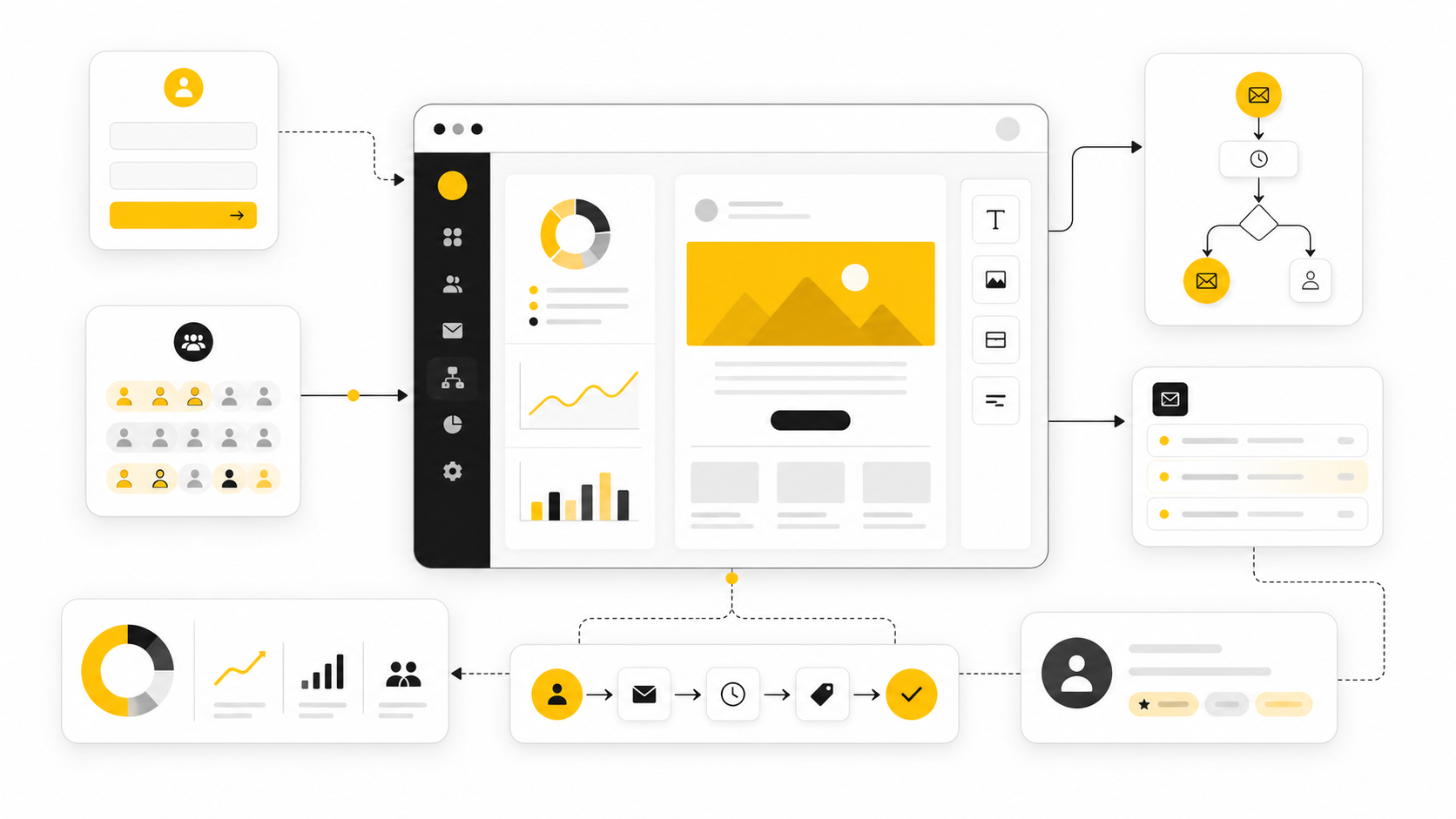
Article Outline
This guide is split into six parts so each decision gets enough room. The goal is not to throw a massive list of tools at you and call it strategy. The goal is to build a clear decision framework you can actually use before you commit to a platform, migrate a list, or rebuild your email system.
- Part 1: Why an Email Newsletter Platform Matters and How to Think About the Decision
- Part 2: Core Features Every Serious Email Newsletter Platform Should Have
- Part 3: Matching the Platform to Your Business Model
- Part 4: Comparing Popular Email Newsletter Platforms Without Getting Distracted
- Part 5: Professional Implementation, Migration, and Optimization
- Part 6: Final Recommendations, Common Mistakes, and FAQ
Why an Email Newsletter Platform Matters
An email newsletter platform matters because your list is not just a list. It is a living asset made of people at different stages of trust, awareness, urgency, and buying intent. If the platform treats every subscriber the same, you end up sending generic emails to a mixed audience and wondering why engagement slowly drops.
The platform also shapes your workflow. Some tools are built for creators who want fast publishing and simple monetization. Others are built for ecommerce segmentation, sales pipelines, advanced automation, CRM follow-up, or agency-level client management, which is why platforms like GoHighLevel, Brevo, and Moosend should not be judged by the same checklist. The right question is not which one has the longest feature page; it is which one supports the business motion you are actually building.
This is where the decision becomes practical. A newsletter platform should help you publish consistently, learn from subscriber behavior, automate the obvious follow-ups, and keep your database clean enough to protect performance. If it cannot do those things without turning every campaign into a technical project, it will slow you down.
The Decision Framework
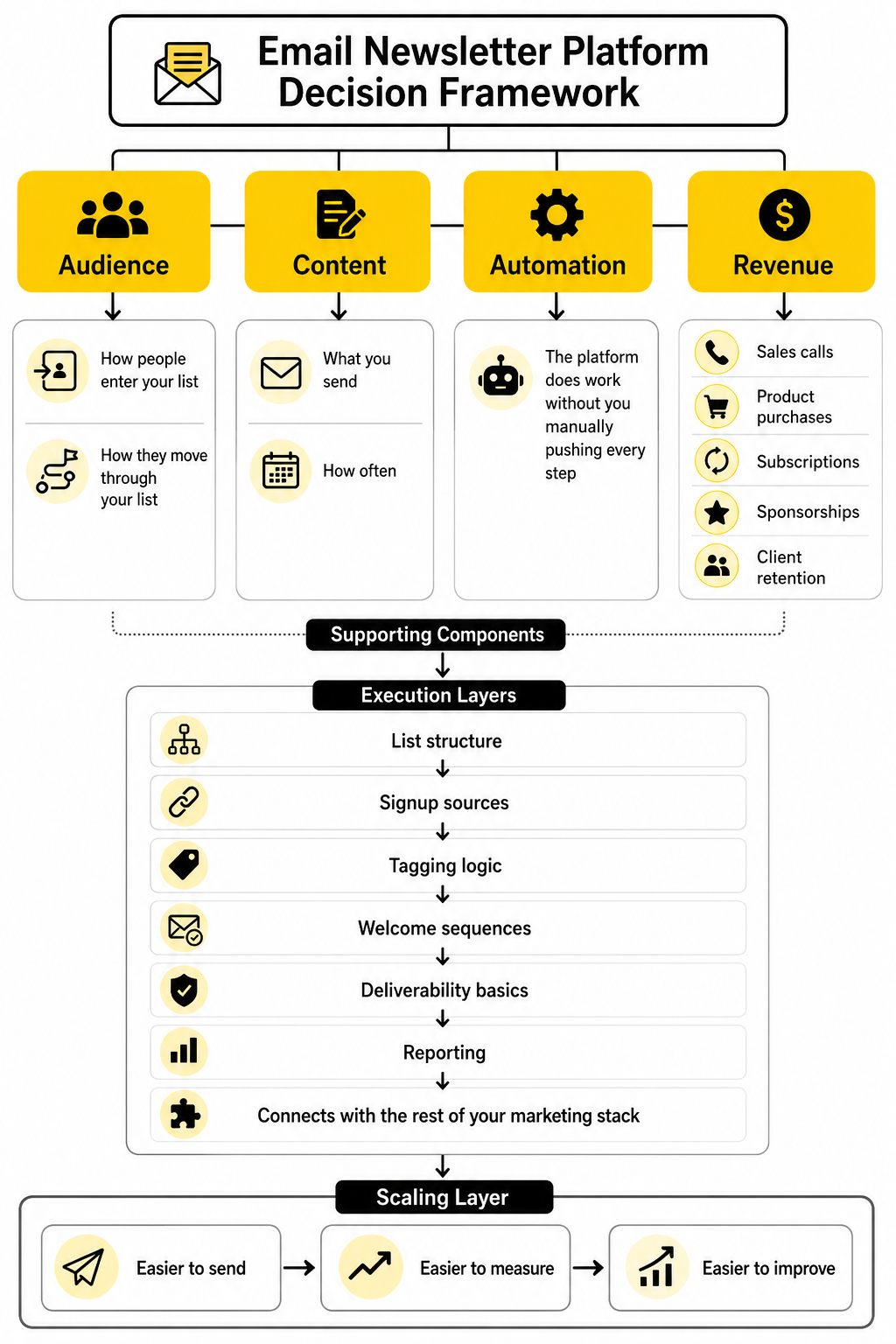
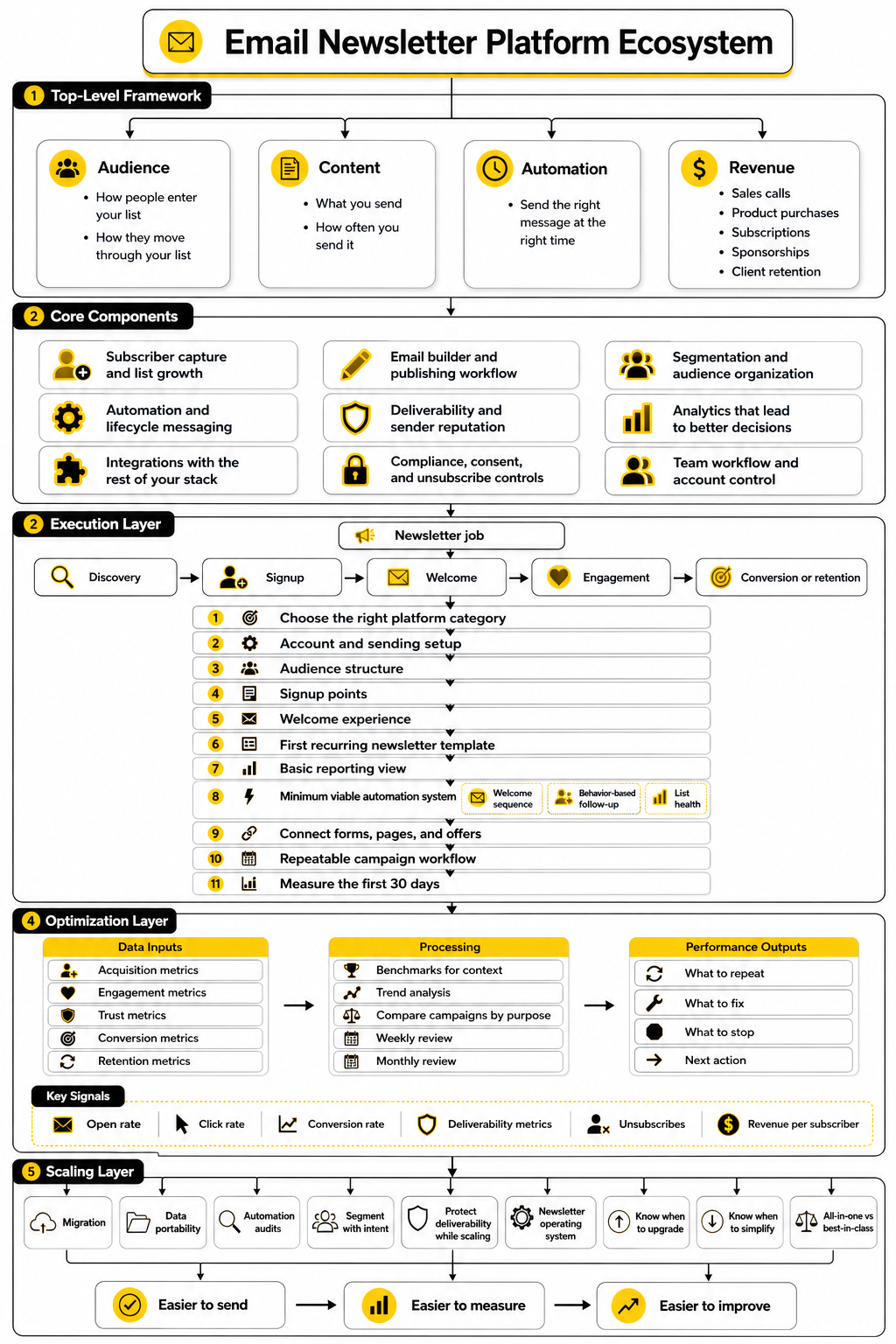
The best way to choose an email newsletter platform is to separate the decision into four layers: audience, content, automation, and revenue. Audience is about how people enter and move through your list. Content is about what you send and how often you send it.
Automation is where the platform starts doing work without you manually pushing every step. Revenue is where newsletter activity connects to sales calls, product purchases, subscriptions, sponsorships, client retention, or another business outcome. When these four layers are clear, the platform decision becomes much easier because you are choosing for a system, not for a random feature list.
A simple creator newsletter may only need strong publishing, landing pages, clean forms, and basic segmentation. A service business may need newsletter sending plus CRM, appointment reminders, pipeline follow-up, and SMS. An ecommerce brand may care more about behavioral segmentation, abandoned cart flows, product recommendations, and revenue attribution.
What This Guide Will Help You Decide
By the end of the full article, you should know what type of email newsletter platform fits your situation. You should also know which features are essential, which ones are nice but not urgent, and which ones are usually distractions. That distinction matters because buying too much platform too early creates complexity, while buying too little creates migration pain later.
This guide will also help you think through implementation before you switch tools. That includes list structure, signup sources, tagging logic, welcome sequences, deliverability basics, reporting, and how the platform connects with the rest of your marketing stack. A good platform choice is not just about sending the next newsletter; it is about making every future newsletter easier to send, measure, and improve.
Most importantly, this guide is written for real-world use. You do not need the most expensive email newsletter platform to build a serious newsletter program. You need the platform that fits your audience, your offer, your publishing rhythm, and the way your business turns attention into trust.
Core Features Every Serious Email Newsletter Platform Should Have
The second part of the decision is where most people get overwhelmed. Every email newsletter platform has a feature list, and most of those lists look almost identical from a distance. The difference shows up when you ask how those features behave under real pressure: when your list grows, when you segment subscribers, when you launch offers, when deliverability dips, or when multiple people need to work inside the same account.
A serious platform should help you do four things well. It should capture subscribers cleanly, send reliable campaigns, automate important moments, and show you what is actually working. If it cannot do those basics without forcing you into messy workarounds, the platform will become a bottleneck.
Subscriber Capture and List Growth
Subscriber capture is the front door of your newsletter system. A good email newsletter platform should give you forms, landing pages, popups, embeds, and integrations that make it easy for people to join from the places where they already interact with your brand. The smoother this entry point is, the easier it becomes to grow your list without relying on manual imports or scattered spreadsheets.
The best setup is not always the most aggressive one. A newsletter signup should match the intent of the page, the promise of the content, and the next step you want the reader to take. A blog reader may respond to a simple content upgrade, while a product visitor may need a discount, demo, checklist, comparison guide, or waitlist offer.
This is also where your platform needs to protect data quality. If every form drops people into one generic list with no source tracking, tags, or context, you lose the ability to personalize later. Good subscriber capture should record where someone came from, what they asked for, and what that tells you about their intent.
Email Builder and Publishing Workflow
The email builder matters because consistency beats complexity. You need a platform that makes it easy to draft, format, preview, test, approve, and send without turning every issue into a design problem. If the editor feels slow, fragile, or overly complicated, your publishing rhythm will suffer.
A strong email builder should support both simple newsletters and structured campaigns. Some teams need polished templates with brand controls, saved blocks, product sections, and repeatable layouts. Others need a clean writing experience that keeps the focus on the message instead of decoration.
Do not judge the builder only by how pretty the templates look. Judge it by how fast you can produce a real email your audience would actually read. The best email newsletter platform is the one that helps you ship good messages consistently, not the one that gives you 200 templates you never use.
Segmentation and Audience Organization
Segmentation is where your newsletter stops being one broadcast to everyone. It lets you group subscribers by behavior, source, interest, lifecycle stage, purchase history, location, or engagement. This matters because a person who joined yesterday should not always receive the same message as someone who has clicked five offers, attended a webinar, or bought from you twice.
A useful platform should make segmentation understandable. You should be able to create segments without needing a developer every time you want to send a more relevant campaign. Tags, custom fields, lists, events, and engagement filters should work together in a way that feels logical.
This is also where many cheap setups become expensive later. If your email newsletter platform cannot keep audience data organized, you eventually pay for it through lower engagement, confusing automations, duplicate contacts, and messy migrations. Clean segmentation is not a luxury feature; it is the foundation for relevance.
Automation and Lifecycle Messaging
Automation is not about making your brand sound robotic. It is about sending the right message at the right time when the timing actually matters. Welcome sequences, lead nurture flows, product education, renewal reminders, abandoned checkout emails, reactivation campaigns, and post-purchase follow-ups are all examples of automation doing useful work.
A good platform should let you build these flows visually and logically. You should be able to trigger emails based on form submissions, purchases, link clicks, tags, page visits, dates, pipeline stages, or lack of engagement. More advanced systems like GoHighLevel are especially relevant when email needs to connect with CRM activity, SMS, calls, appointments, and sales follow-up.
The key is to automate moments, not spam people. A welcome sequence should help someone understand your value. A sales follow-up should remove friction. A reactivation flow should give inactive subscribers a clear reason to stay, not punish them with desperate emails.
Deliverability and Sender Reputation
Deliverability is the part nobody wants to think about until emails stop landing in the inbox. Your platform can have beautiful templates and powerful automations, but none of that matters if subscribers never see the emails. This is why deliverability support, authentication guidance, bounce handling, suppression lists, and engagement monitoring are essential.
A serious email newsletter platform should help you set up the technical basics correctly. That includes domain authentication, sender identity, unsubscribe handling, bounce management, spam complaint tracking, and list hygiene tools. You do not need to become a deliverability engineer, but you do need a platform that makes the important steps visible and manageable.
This is also why importing old lists without a plan is risky. A cold, unverified, or poorly permissioned list can damage your sender reputation fast. The better approach is to warm up sending gradually, remove risky contacts, and focus on engagement quality before trying to scale volume.
Analytics That Lead to Better Decisions
Analytics should tell you what to do next. Opens, clicks, unsubscribes, bounces, conversions, revenue, replies, and list growth all matter, but they matter for different reasons. A platform that shows numbers without context can make you feel informed while still leaving you unsure what to improve.
The most useful analytics connect email performance to subscriber behavior and business outcomes. For a creator, that might mean tracking which topics get replies and paid conversions. For an ecommerce brand, it might mean revenue per campaign, flow performance, and customer segments. For a service business, it might mean booked calls, pipeline movement, and follow-up effectiveness.
This is where platforms with broader marketing systems can be useful. Tools like Brevo and Moosend can make sense when you want email campaigns, automation, and reporting in one accessible environment. The point is not to collect more dashboards; the point is to make better decisions faster.
Integrations With the Rest of Your Stack
Your email newsletter platform should not live in isolation. It needs to connect with your website, forms, checkout pages, CRM, calendar, analytics, community, webinar tool, landing page builder, or customer support system. The more important email is to your business, the more important those integrations become.
For funnel-heavy businesses, a platform like ClickFunnels may fit when newsletter growth is tied directly to landing pages, opt-ins, offers, and sales flows. For simpler digital businesses, Systeme.io can be useful when you want email, funnels, and basic automation in a leaner setup. The right choice depends on whether email is one channel in your stack or the central hub of the whole customer journey.
The danger is building a stack where every tool technically connects but nothing feels reliable. If subscriber data breaks between tools, your automations become inaccurate. If purchase data does not sync, your segments become misleading. If your form tool and email platform disagree, your reporting becomes noise.
Compliance, Consent, and Unsubscribe Controls
Email is permission-based, so consent management is not optional. Your platform should make it easy to collect permission clearly, store subscriber preferences, handle unsubscribes, and respect regional requirements. This is not just about legal risk; it is about trust.
A strong email newsletter platform should give subscribers control over what they receive. Preference centers, unsubscribe options, list-level consent, and clear footer information all help reduce frustration. When people can choose fewer emails instead of leaving completely, you preserve the relationship.
Compliance also affects how you structure growth campaigns. Buying lists, scraping contacts, or forcing people into unrelated newsletters may look like a shortcut, but it usually creates worse engagement and higher complaint risk. A healthier system grows through clear promises, relevant content, and subscribers who actually want to hear from you.
Team Workflow and Account Control
If more than one person touches email, workflow matters. You may need roles, permissions, approval steps, brand templates, reusable assets, and campaign calendars. A platform that works for one founder may become messy when a team, agency, contractor, or client gets involved.
This is especially important for agencies and service providers managing newsletters for multiple brands. You need account separation, repeatable templates, reporting views, and processes that reduce mistakes. Sending the wrong campaign to the wrong list is not a small error; it can damage trust quickly.
The platform should make good habits easier. That means test sends before publishing, preview tools across devices, version control where possible, and clear visibility into scheduled campaigns. Professional workflow is not about bureaucracy. It is about reducing preventable mistakes while keeping the team fast.
What to Prioritize First
The first priority is not the fanciest automation builder. It is a clean foundation: subscriber capture, list organization, reliable sending, basic automation, and useful reporting. Once those pieces work, advanced features become much easier to evaluate.
For most businesses, the smart order is simple. Start with the list structure, then build the signup paths, then create the welcome experience, then send consistent newsletters, then improve segmentation and automation based on real behavior. That sequence keeps the system grounded in how subscribers actually interact with you.
The best email newsletter platform is the one that supports this progression without forcing you to rebuild everything every few months. It should be simple enough to use today and flexible enough to grow tomorrow. That balance is what separates a tool you merely pay for from a platform that becomes part of the business.
Matching the Platform to Your Business Model
Once the core features are clear, the next question is fit. The right email newsletter platform for one business can be completely wrong for another, even if both businesses send weekly emails. A creator, agency, ecommerce store, SaaS company, coach, consultant, local service business, and media brand all use newsletters differently.
This is why implementation should start with the business model, not the software demo. You need to know what the newsletter is supposed to do before you choose how to build it. Is it meant to sell products, book calls, nurture leads, retain customers, monetize attention, support a community, or move people through a longer buying journey?
Start With the Newsletter’s Job
Every newsletter needs a job. If the job is unclear, the platform setup becomes bloated because every feature feels equally important. A clean strategy starts by naming the main outcome the newsletter should support.
For a creator, the newsletter may exist to build trust, drive sponsorship value, sell digital products, or convert free readers into paid subscribers. For a service business, it may exist to turn leads into consultations, educate prospects before a sales call, and stay top-of-mind with people who are not ready yet. For ecommerce, the job is often more transactional: repeat purchases, product launches, seasonal campaigns, abandoned cart recovery, and customer lifetime value.
Once you define the job, the platform requirements become sharper. A creator may prioritize writing flow and audience growth tools. A sales-led business may need CRM visibility and appointment follow-up. An ecommerce brand may need deep store integration, behavioral triggers, product blocks, and revenue attribution.
Map the Subscriber Journey Before Building
Before you build forms, tags, lists, or automations, map the subscriber journey in plain language. This does not need to be complicated. You only need to understand where people come from, what they expect, what they need next, and what action matters most.
A practical journey map usually has five stages:
- Discovery: The person finds you through content, search, social, referrals, ads, a landing page, or a partner.
- Signup: They subscribe because the promise is clear enough to trade their email for it.
- Welcome: They receive a first set of emails that confirms the value and sets expectations.
- Engagement: They keep opening, clicking, replying, reading, buying, booking, or learning.
- Conversion or retention: They take the next meaningful step, then continue receiving relevant communication.
This is where your email newsletter platform becomes tangible. You are no longer thinking in abstract features. You are deciding what data gets captured at signup, what tags are applied, what sequence starts, what content is sent, and what counts as success.
Build the First Implementation Around One Clear Path
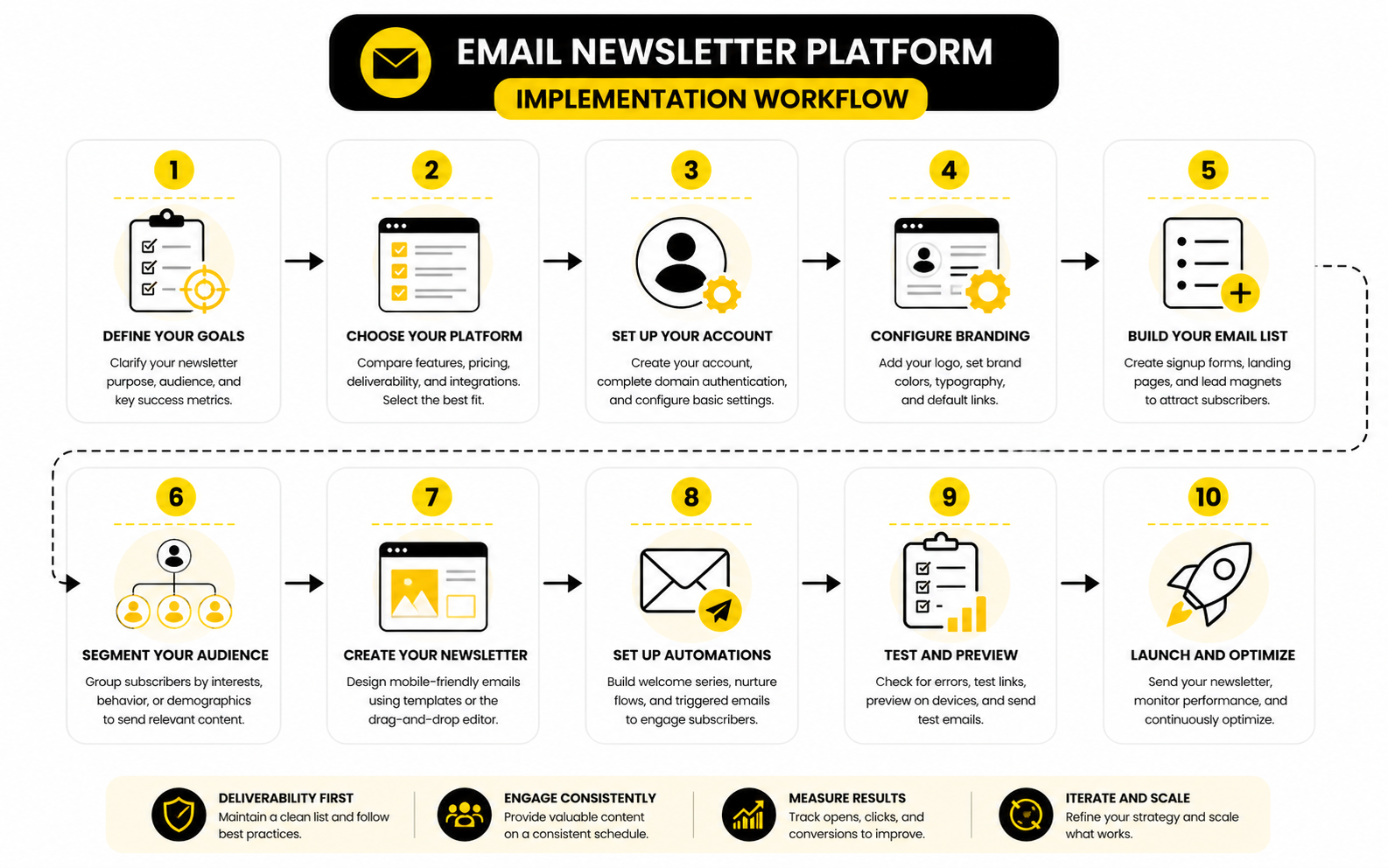
The fastest way to make implementation messy is trying to build every possible path on day one. Start with one clear path instead. Pick the most important subscriber type and build the experience from signup to next action.
For example, if the newsletter supports a service business, the first path might be: visitor reads a guide, joins the list, receives a practical welcome sequence, clicks a case-relevant offer, and books a call. If it supports a digital product business, the path might be: subscriber downloads a resource, receives education, sees proof, gets a launch offer, and buys. If it supports a media newsletter, the path might be: reader subscribes, receives the best archive content, builds a habit, then sees a sponsorship, referral, or paid subscription offer.
This approach keeps the platform clean. You can add more segments, offers, and workflows later, but the first version should prove that the newsletter can move one audience through one valuable journey. That is far better than having ten unfinished automations that nobody trusts.
Choose the Right Platform Category
Different categories of platforms solve different problems. A lightweight publishing-first platform works well when the main goal is writing, sending, and growing a reader base. A marketing automation platform fits better when behavior, segmentation, and multi-step campaigns matter more than pure publishing speed.
A CRM-centered platform is often a better fit when email connects directly to sales follow-up. That is where a tool like GoHighLevel can make sense for agencies, consultants, local businesses, and service providers that want email tied to pipelines, calls, SMS, calendars, and client communication. The platform choice should reflect the actual revenue motion, not just the newsletter format.
For funnel-led businesses, the platform may need to connect tightly with landing pages and checkout flows. In that case, ClickFunnels can fit when opt-ins, offers, order pages, and upsells are central to the marketing system. For leaner operators who want funnels, email, and simple automation in one place without stacking too many tools, Systeme.io is worth considering.
Set Up the Foundation in the Right Order
Implementation works best when you build in order. Do not start with advanced automations before the basics are stable. The foundation should make the account usable, measurable, and safe to scale.
Start with the account and sending setup. Configure sender identity, domain authentication, unsubscribe settings, default footer information, and permission language before you send real campaigns. Gmail’s current sender guidelines require proper authentication and clear unsubscribe handling for senders reaching personal Gmail accounts, so this is no longer a “later” task for serious newsletter programs: Google’s email sender guidelines.
Then structure your audience. Decide which fields, tags, segments, and lists you actually need. Keep the model simple enough that someone else on the team can understand it without needing a private explanation from the person who built it.
After that, build the main signup points, the welcome experience, the first recurring newsletter template, and the basic reporting view. Only then should you expand into deeper segmentation, lead scoring, win-back flows, product-specific campaigns, or complex branching automation.
Use a Minimum Viable Automation System
A minimum viable automation system is not basic in a lazy way. It is focused. It covers the moments where automation is clearly better than manual sending.
The first automation is usually the welcome sequence. It should confirm the subscriber made a good decision, explain what they will receive, deliver any promised resource, and guide them toward the next useful step. This is not the place to dump everything you sell into five emails.
The second useful automation is behavior-based follow-up. If someone clicks a high-intent link, downloads a buyer-focused resource, starts checkout, books a call, or visits an important page, the platform should help you respond with context. That response might be an email, a CRM task, a pipeline update, or a reminder, depending on the business model.
The third automation is list health. Inactive subscribers should not stay in your active sending pool forever without review. Re-engagement and suppression workflows protect deliverability because inbox placement depends heavily on trust, authentication, and recipient engagement, not just whether a platform technically “sent” the email.
Connect Forms, Pages, and Offers Without Losing Context
The platform should preserve context from the first click. When someone subscribes through a specific page, campaign, form, or offer, that information should follow them into the email system. Without that context, personalization becomes guesswork.
This is especially important when newsletters are connected to landing pages. A landing page built for a webinar, checklist, product waitlist, or consultation should not send every subscriber into the same generic flow. The signup source tells you what the person cares about right now.
Tools like Fillout can be useful when you need more flexible forms and cleaner intake data before contacts reach the email platform. For ecommerce or landing-page-heavy brands, Replo can support richer page experiences that feed more intentional newsletter growth. The important part is not the tool itself; it is making sure the entry point and email follow-up are aligned.
Create a Repeatable Campaign Workflow
A newsletter system needs a publishing rhythm. Without one, the platform turns into a place where unfinished drafts go to die. A repeatable campaign workflow helps you move from idea to sent email without reinventing the process every week.
A practical workflow usually includes topic selection, draft writing, editing, formatting, link checks, segmentation, test sends, approval, scheduling, and post-send review. Each step sounds small, but missing one can create problems. Broken links, wrong segments, outdated offers, and sloppy previews are avoidable mistakes.
This is also where team ownership matters. One person should own the final send decision. Someone should be responsible for the list and segmentation logic. Someone should check reporting after each send and turn the results into next actions. When ownership is vague, the newsletter becomes inconsistent fast.
Measure the First 30 Days Differently
The first 30 days are not about proving that every metric is perfect. They are about validating the setup. You want to know whether subscribers are joining correctly, receiving the right emails, engaging with the welcome flow, and moving toward the intended next step.
Look at delivery issues, bounce patterns, unsubscribes, spam complaints, clicks, replies, conversions, and whether the platform data looks trustworthy. Do not obsess over one campaign’s open rate. Privacy changes and inbox behavior have made single-metric decision-making weaker, so the better approach is to read performance through multiple signals.
The first month should produce implementation lessons, not panic. Maybe the signup promise needs to be clearer. Maybe the welcome sequence is too sales-heavy. Maybe the audience needs two segments instead of one. Maybe the call-to-action is buried. A good email newsletter platform makes those lessons visible enough that you can improve the system instead of guessing.
Statistics and Data
Measurement is where an email newsletter platform stops being a sending tool and becomes a decision system. The point is not to collect every metric available. The point is to understand what the numbers are telling you about attention, trust, timing, offer fit, list quality, and revenue.
This is where a lot of newsletter operators get it wrong. They celebrate a high open rate without checking clicks, conversions, replies, unsubscribes, or list growth quality. Or they panic over one weak campaign without looking at trends across multiple sends, segments, and subscriber sources.
The better approach is simple: use benchmarks for context, use your own historical data for decisions, and use business outcomes as the final judge.
Benchmarks Are Useful, But They Are Not the Goal
Benchmarks help you understand whether your performance is unusually strong, weak, or normal for your category. They should not become the target by themselves. A newsletter with a lower open rate but higher sales, replies, and booked calls may be far healthier than one with great surface-level engagement and no business impact.
Recent benchmark data shows why context matters. MailerLite’s 2025 benchmark report uses data from more than 3.6 million campaigns across 181,000 approved accounts and breaks performance down by industry, region, open rate, click rate, click-to-open rate, and unsubscribe rate. That kind of data is useful because it shows that “good performance” depends heavily on the audience and category.
The same idea shows up in broader benchmark resources. Mailchimp’s benchmark guidance frames benchmarks as a way to compare performance against industry averages and identify strengths or weaknesses. That is the right mindset. Benchmarks are a compass, not a scoreboard.
Open Rate Is a Signal, Not the Truth
Open rate still matters, but it needs to be interpreted carefully. Privacy changes, image loading behavior, inbox filtering, and automated opens can distort the number. A rising open rate can suggest stronger subject lines or better audience relevance, but it does not prove that people cared enough to act.
Use open rate to evaluate attention. If open rates fall across several campaigns, look at sender reputation, subject lines, send frequency, audience fatigue, and whether your content promise still matches what people subscribed for. If one campaign underperforms, do not overreact before checking whether the topic, timing, segment, or send conditions were unusual.
The most practical use of open rate is trend analysis. Compare similar emails to similar segments over time. A weekly editorial newsletter should not be judged the same way as a promotional flash sale, a product onboarding email, or a reactivation campaign.
Click Rate Shows Intent More Clearly
Click rate is usually a stronger action signal than open rate. When someone clicks, they are showing active interest in a topic, offer, product, resource, or next step. That makes click behavior one of the most important inputs your email newsletter platform can use for segmentation and automation.
A low click rate does not always mean the email was bad. It may mean the call-to-action was weak, the offer was not relevant, the email had too many competing links, or the reader got enough value from the email itself without needing to click. You need to read the metric in context.
Click-to-open rate can also be helpful because it shows how persuasive the email was after someone opened it. If open rate is healthy but clicks are weak, the subject line may be doing its job while the content, offer, or call-to-action is not. That tells you where to improve next.
Conversion Rate Is Where the Business Case Lives
Conversion rate is the metric that connects newsletter activity to the outcome you actually care about. That outcome might be purchases, booked calls, demo requests, paid subscriptions, webinar registrations, trial starts, form submissions, replies, renewals, or referrals. The platform should make this trackable as directly as possible.
This is why a basic email report is not enough for many businesses. You need to know which campaigns and automations produce meaningful action, not just which ones get engagement. If your email newsletter platform cannot connect email behavior to revenue or pipeline movement, you may need stronger integrations with your checkout, CRM, analytics, or booking system.
For service businesses, this can mean tracking emails that lead to calls. For ecommerce, it can mean campaign revenue and flow revenue. For creators, it can mean paid conversions, sponsorship clicks, referral growth, or product sales. The specific conversion matters less than whether the metric reflects the newsletter’s real job.
The Analytics System Should Follow the Subscriber Journey
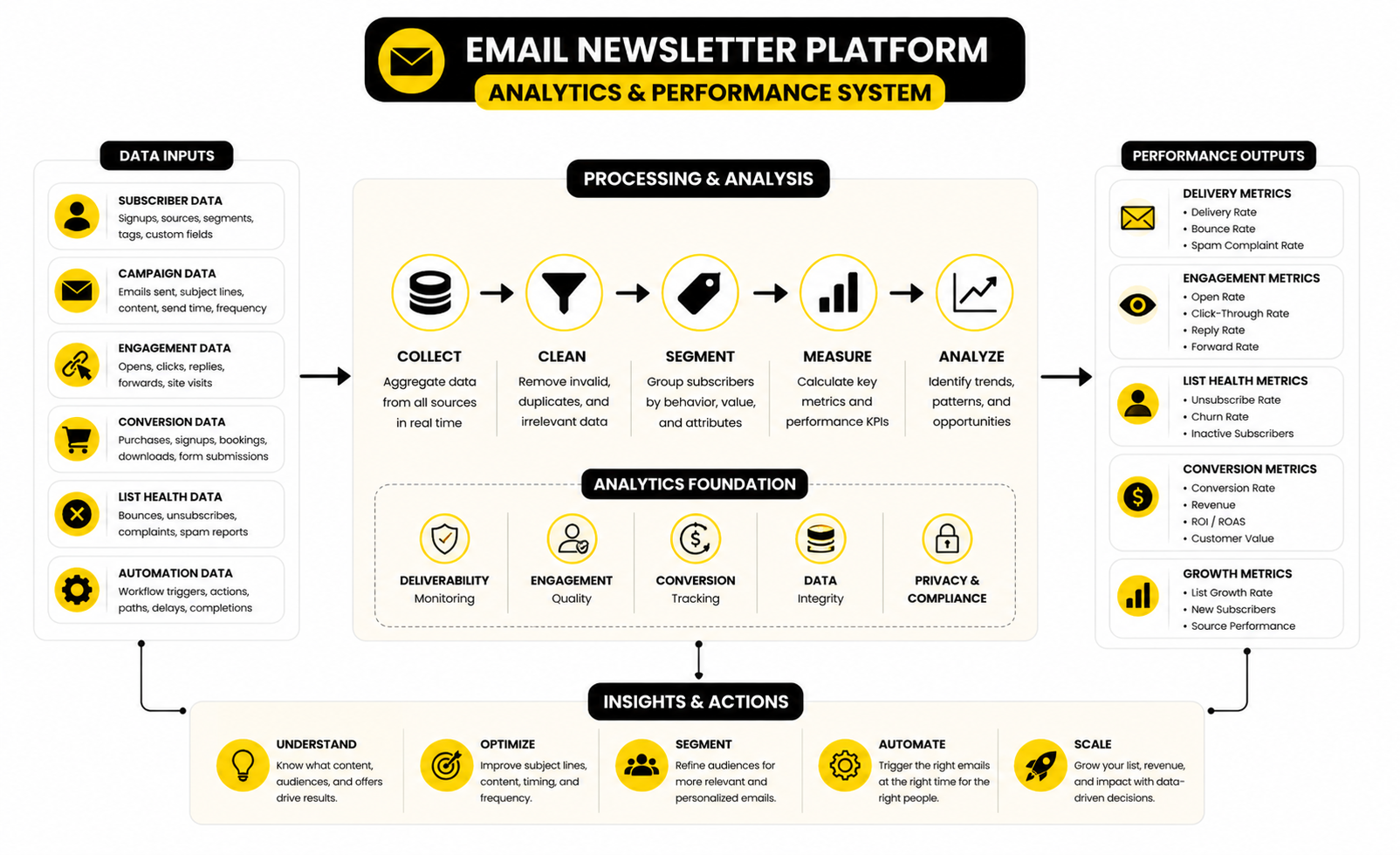
A clean analytics system follows the same journey the subscriber takes. You do not need a complicated dashboard at the start. You need a practical view of how people enter, engage, convert, and stay active.
A useful measurement structure looks like this:
- Acquisition metrics: signup source, form conversion rate, landing page conversion rate, cost per subscriber, and subscriber quality by channel.
- Engagement metrics: opens, clicks, replies, forwards, saves, read behavior where available, and engagement by segment.
- Trust metrics: unsubscribes, spam complaints, bounces, inactive subscribers, and deliverability warnings.
- Conversion metrics: purchases, booked calls, demos, paid upgrades, trials, referrals, or other business outcomes.
- Retention metrics: repeat purchases, renewal behavior, paid subscriber retention, customer reactivation, and long-term engagement.
This structure keeps measurement grounded. You are not just asking, “Did this email perform?” You are asking, “Where is the system improving, and where is it leaking?” That is a much better question.
Deliverability Metrics Protect the Whole System
Deliverability is a performance metric, not just a technical setup task. If emails do not reach the inbox, every other metric becomes weaker. You may think the subject line failed when the real issue was authentication, sender reputation, spam complaints, or low engagement.
Gmail’s bulk sender requirements make this especially important. Since February 2024, senders reaching 5,000 or more Gmail accounts per day have needed to authenticate outgoing email, avoid unwanted mail, and make unsubscribing easy through Google’s sender requirements. Even if you are below that volume, these rules reflect the direction inbox providers are moving.
Track bounce rate, spam complaint rate, unsubscribe rate, and engagement decay. These are warning lights. If they move in the wrong direction, slow down and fix the list, content, permission source, or sending pattern before scaling volume.
Unsubscribes Are Not Always Bad
An unsubscribe is not automatically a failure. Sometimes it is a healthy signal that the wrong person is leaving the list. A clean list with engaged subscribers is usually more valuable than a large list full of people who ignore every email.
The problem starts when unsubscribes spike without a clear reason. That can point to mismatched expectations, too much promotional content, poor segmentation, aggressive frequency, or a signup promise that does not match the emails people receive. In that case, the unsubscribe rate is not just a metric; it is feedback.
Use unsubscribes to refine your promise and frequency. If people joined for weekly practical advice and suddenly receive daily sales emails, the data will tell you. Believe it.
Revenue Per Subscriber Is More Useful Than List Size
List size is easy to brag about and easy to misunderstand. A list of 10,000 disengaged subscribers can be weaker than a list of 1,500 people who regularly click, reply, buy, and refer. Revenue per subscriber gives you a better view of whether the audience is actually valuable.
This metric is especially useful when comparing growth sources. One channel may produce cheaper subscribers but weaker buyers. Another may produce slower list growth but stronger long-term revenue. Without revenue per subscriber or a similar quality metric, you may accidentally scale the wrong acquisition source.
For businesses using platforms like GoHighLevel, this can be measured through pipeline movement, booked appointments, and closed deals. For funnel-focused setups using ClickFunnels, it may show up through opt-in performance, order page conversion, upsells, and campaign revenue. The metric should match the business model.
Compare Campaigns by Purpose, Not Just Performance
Not every email should be judged by the same metric. A newsletter issue designed to build trust may not produce immediate sales. A launch email should be judged more heavily on conversions. A reactivation campaign may have lower engagement but still succeed if it cleans the list and protects deliverability.
Group emails by purpose before comparing performance. Editorial newsletters, promotional campaigns, onboarding sequences, abandoned checkout flows, event reminders, and customer education emails all behave differently. Mixing them into one average hides the truth.
This also helps you avoid bad decisions. If you compare a warm launch email against a general education email, the launch email may look “better” because buying intent was already higher. That does not mean every email should become a hard sales email.
What to Review Weekly
Weekly review should be fast and practical. You are looking for patterns, not writing a research paper. The goal is to catch issues early and decide what to improve before the next send.
Review these items every week:
- List growth by source
- Campaign opens and clicks by segment
- Top clicked links
- Unsubscribes and spam complaints
- Bounce issues
- Replies or qualitative feedback
- Conversion actions tied to the email
- Performance of active automations
This review should lead to action. If one topic gets unusually strong clicks, plan a deeper follow-up. If a segment stops engaging, adjust the content or suppress inactive contacts. If a signup source produces weak engagement, revisit the promise or targeting.
What to Review Monthly
Monthly review is where strategy improves. Weekly reviews help you manage campaigns. Monthly reviews help you understand whether the email newsletter platform is supporting the business.
Look at subscriber growth, engagement trends, revenue or pipeline contribution, automation performance, deliverability health, and list quality. Compare performance by subscriber source, segment, offer, and content category. This is where you can see whether the system is getting stronger or just staying busy.
A monthly review should answer three questions. What is working well enough to repeat? What is underperforming and needs a fix? What should we stop doing because the data does not support it? Those three questions keep the newsletter program honest.
The Data Should Change What You Do Next
Data is only useful if it changes behavior. If you collect metrics but keep sending the same emails to the same people in the same way, you are not doing analytics. You are decorating the dashboard.
Good data should help you adjust topics, subject lines, offers, segments, frequency, automations, signup sources, and calls-to-action. It should also help you decide when to clean the list, when to build a new segment, and when to simplify the system. The point is not to prove that every send was perfect. The point is to make the next send smarter.
That is the real measurement standard for an email newsletter platform. It should make performance clear enough that you know what to do next. Not eventually. Not after exporting five spreadsheets. Right inside the workflow where the next decision happens.
Professional Implementation, Migration, and Optimization
At this stage, the email newsletter platform decision becomes less about features and more about operating discipline. The platform can give you forms, automations, segments, reporting, and integrations, but it cannot rescue a messy strategy. Scaling a newsletter program means making the system easier to trust as the audience, team, content, and revenue pressure increase.
This is where professional implementation matters. A casual setup can work when the list is small and one person controls everything. Once the newsletter affects sales, customer communication, launches, partnerships, or client work, small mistakes get expensive fast.
Migration Is a Strategy Project, Not a Copy-Paste Job
Moving from one email newsletter platform to another should never be treated like a simple export and import. You are not just moving contacts. You are moving consent history, segments, tags, automations, templates, suppression rules, forms, landing pages, tracking logic, and reporting assumptions.
Before migrating, clean the account you are leaving. Remove dead automations, document active segments, export suppression lists, identify high-value subscriber groups, and review which forms still matter. If you migrate a disorganized system into a better platform, you usually end up with a more expensive version of the same mess.
The smartest migration plan protects continuity. Subscribers should not suddenly receive duplicate welcome emails, outdated offers, or irrelevant campaigns because old tags were mapped badly. A good migration keeps the subscriber experience stable while giving the business a cleaner backend to build from.
Watch the Hidden Cost of Platform Switching
The monthly software price is only one part of the cost. The real cost includes setup time, team retraining, migration risk, lost reporting continuity, integration work, template rebuilding, and the opportunity cost of pausing campaigns while the system changes. A cheaper platform can become expensive if it creates weeks of cleanup.
This does not mean you should stay with the wrong tool forever. It means switching should be justified by a real operational advantage. Better deliverability support, stronger automation, CRM connection, ecommerce tracking, client management, or simpler publishing can all be valid reasons to move.
The decision should come down to whether the new platform removes friction that is already costing you growth. If the current system blocks segmentation, makes reporting unreliable, breaks integrations, or slows every campaign, switching may be worth it. If the frustration is mostly cosmetic, fix the process before blaming the platform.
Build for Data Portability From the Start
A serious newsletter system should never trap your business inside one tool. You should be able to export contacts, tags, custom fields, campaign history, suppression lists, and key performance data without panic. Portability is not pessimistic; it is responsible.
This starts with naming conventions. Tags, lists, forms, automations, and campaigns should be named clearly enough that someone new can understand what they mean. A tag called “lead-guide-2026-pricing” is useful. A tag called “new2” is a future headache.
Data portability also affects integrations. If your email newsletter platform syncs with a CRM, checkout, form tool, or analytics platform, decide which system is the source of truth for each type of data. Without that decision, you get duplicate fields, conflicting statuses, and segments that look accurate but are not.
Avoid Automation Sprawl
Automation sprawl happens when every idea becomes a workflow. At first, this feels productive. Over time, the account fills with overlapping sequences, forgotten triggers, outdated offers, and branching logic nobody wants to touch.
The fix is to treat automations like assets that need maintenance. Every automation should have a clear purpose, owner, trigger, exit condition, and success metric. If you cannot explain why a workflow exists, it probably should be paused, merged, or deleted.
This matters because automation mistakes are quieter than campaign mistakes. A campaign error is usually visible right away. A broken automation can quietly send the wrong message for months. That is why advanced newsletter systems need regular audits, not just more flows.
Segment With Intent, Not Ego
Segmentation is powerful, but too many segments can make the system harder to use. The point is not to prove how advanced your email newsletter platform is. The point is to make messages more relevant and decisions easier.
A useful segment should change what you send, when you send it, or how you measure it. If a segment does not affect any of those decisions, it may not need to exist yet. Extra segmentation feels smart until it slows down every campaign and creates confusion across the team.
Start with segments that reflect real differences in intent or value. New subscribers, engaged readers, buyers, inactive subscribers, high-intent leads, customers, and event registrants are often more useful than dozens of tiny interest groups. You can always get more granular once the basic segmentation model is working.
Think Carefully Before Combining CRM and Newsletter Workflows
Some businesses benefit from keeping CRM and newsletter activity in the same environment. Others are better off with separate tools connected through clean integrations. The right answer depends on how closely email supports the sales process.
If your newsletter regularly drives calls, consultations, pipeline movement, missed-call follow-up, SMS reminders, or client reactivation, a CRM-centered platform like GoHighLevel can simplify the system. The benefit is that marketing activity and sales follow-up can live closer together instead of being scattered across disconnected tools.
If your newsletter is mainly editorial, media-driven, or content-led, a lighter publishing workflow may be more comfortable. You may still need a CRM, but it does not necessarily need to control the whole newsletter operation. The tradeoff is control versus simplicity, and you should choose based on how the business actually sells.
Match Funnel Tools to the Offer Structure
Funnels matter when the newsletter is tied to specific offers. Lead magnets, webinars, product launches, order bumps, upsells, challenge funnels, and application funnels all need a smooth path from signup to conversion. If that path is central to the business, the email platform needs to support it directly or integrate cleanly with the funnel tool.
For offer-led businesses, ClickFunnels can make sense when landing pages, checkout flows, upsells, and campaign paths are the core system. For leaner operators who want funnels and email in a simpler all-in-one setup, Systeme.io may be easier to manage.
The key is not to bolt a newsletter onto a funnel after the fact. The email follow-up should be planned with the offer path from the beginning. Otherwise, the subscriber joins for one reason, receives emails written for another reason, and drops out before the business outcome happens.
Protect Deliverability While Scaling Volume
Scaling email volume is not just sending more often. It changes how inbox providers, subscribers, and your own reporting behave. More volume means more chances for unsubscribes, complaints, inactive contacts, and deliverability problems.
A scaling plan should increase volume gradually and watch engagement closely. Send more to the people most likely to engage first, then expand carefully. If performance weakens, do not simply push harder. Fix the audience quality, content relevance, list hygiene, or sending pattern.
This is especially important during launches and seasonal campaigns. The temptation is to blast the entire list because the campaign matters. A smarter approach is to send based on engagement, intent, and relevance so the most valuable campaign does not damage the long-term health of the list.
Use AI Carefully Inside the Newsletter Workflow
AI can help with ideation, first drafts, subject line variations, summaries, segmentation ideas, and campaign planning. Used well, it speeds up the workflow. Used badly, it makes every email sound like it was assembled from the same generic template.
The risk is not that AI exists inside the email newsletter platform. The risk is letting AI replace judgment. Your audience can feel when a newsletter has no point of view, no specific insight, and no real reason to exist.
Use AI for leverage, not laziness. Let it help you structure ideas, test angles, repurpose content, and speed up repetitive work. Keep the positioning, offer logic, examples, and final voice human. That is where trust is built.
Create a Newsletter Operating System
A newsletter operating system is the documented way the business runs email. It does not need to be a giant manual. It just needs to make the process repeatable.
At minimum, document these items:
- The main audience segments
- The subscriber sources and signup promises
- The active automations and their purpose
- The standard campaign workflow
- The approval process
- The reporting cadence
- The deliverability checklist
- The rules for offers and promotions
- The owner of each major part of the system
This documentation becomes more valuable as the team grows. It helps contractors, agencies, writers, operators, and founders work from the same assumptions. It also makes future platform changes easier because the system is not trapped in one person’s head.
Know When to Upgrade
You do not need the most advanced platform on day one. In fact, starting with too much software can slow you down. But there are clear signs that your current setup is becoming too small.
Upgrade when the platform blocks work that is already proven to matter. That might mean you need stronger automation, cleaner CRM integration, better reporting, more flexible forms, better deliverability controls, multi-client management, or deeper ecommerce behavior tracking. The upgrade should solve a real constraint, not just satisfy curiosity.
A good rule is simple. If the platform limitation is causing missed revenue, poor subscriber experience, unreliable data, or too much manual work, it is time to evaluate alternatives. If the limitation is only annoying once in a while, optimize the current system first.
Know When to Simplify
Advanced does not always mean more complex. Sometimes the most professional move is deleting unused workflows, merging confusing segments, reducing send frequency, or removing tools that create more maintenance than value. A cleaner system often performs better because the team can actually use it.
Simplification is especially useful after a period of experimentation. You may test new signup offers, launch sequences, content formats, or segmentation ideas. That is good. But after the test, decide what stays.
The email newsletter platform should feel like a control center, not a junk drawer. If every campaign requires checking five automations, three lists, two spreadsheets, and one person’s memory, the system is too fragile. Simplify until the next decision is obvious.
The Strategic Tradeoff: All-in-One vs Best-in-Class
One of the biggest decisions is whether to use an all-in-one platform or a best-in-class stack. All-in-one platforms reduce tool switching, simplify ownership, and can make implementation faster. Best-in-class stacks can offer stronger specialized tools, but they require better integration and more operational discipline.
An all-in-one setup works well when the business values speed, simplicity, and centralized workflows. This is common for agencies, local businesses, consultants, coaches, and lean teams that do not want to stitch together too many systems. A focused tool stack works better when the business has specialized needs and the team can manage the complexity.
Neither option is automatically better. The wrong all-in-one platform can feel limiting. The wrong best-in-class stack can feel chaotic. The right choice is the one your team can operate consistently while still supporting the business model.
The Real Scaling Question
The real scaling question is not “Can this platform handle more subscribers?” Most serious platforms can handle a bigger list. The better question is “Can this platform help us stay relevant as the list gets more diverse?”
As the audience grows, subscribers enter from more sources, care about different topics, and sit at different stages of trust. The platform needs to help you manage that complexity without making every send feel like a technical project. That is the balance.
A mature email newsletter platform setup does not just send more email. It sends clearer email, to better-defined groups, with stronger timing, cleaner data, and more useful feedback. That is what scaling should look like.
Final Recommendations and Common Mistakes
The best email newsletter platform is the one that fits your business model, subscriber journey, team capacity, and growth plan. That sounds obvious, but it is where most bad decisions start. People compare platforms in isolation instead of asking how the tool will support the actual work they need to do every week.
If you are building a creator newsletter, prioritize publishing speed, reader growth, simple segmentation, and monetization paths. If you are building a service-business newsletter, prioritize CRM connection, lead follow-up, booking workflows, and sales visibility. If you are building an ecommerce or funnel-driven system, prioritize behavioral triggers, product or offer tracking, landing pages, and revenue attribution.
The final decision should feel practical, not emotional. Choose the email newsletter platform that makes the right actions easier: capturing quality subscribers, sending consistently, segmenting with purpose, automating important moments, protecting deliverability, and measuring outcomes clearly.
How to Make the Final Choice
Start by writing down what the platform must do in the next 90 days. Not someday. Not when the business is three times bigger. The next 90 days.
If you need a connected sales and marketing system, GoHighLevel is worth reviewing because it can combine email, CRM, pipeline, appointments, SMS, and automation in one place. If your newsletter is closely tied to funnels, offer pages, checkout flows, and upsells, ClickFunnels can fit that motion. If you want a leaner all-in-one setup for email, funnels, and simple automation, Systeme.io may be enough.
For businesses that want approachable email campaigns and automation without building a heavy CRM-led system, Brevo and Moosend are sensible options to compare. If forms and data collection are the weak link before contacts enter the platform, Fillout can help create cleaner intake paths. If landing pages are central to list growth, Replo can support stronger page experiences before the email follow-up begins.
The point is not to buy every tool. The point is to understand which part of the system needs the most support. A platform should remove friction from the business, not create a new operating burden.
Mistakes That Make Good Platforms Perform Badly
A strong platform can still produce weak results if the setup is careless. The most common mistake is importing a list without cleaning it first. Old, cold, or poorly permissioned contacts can hurt engagement and deliverability before your new system gets a fair chance.
Another mistake is creating too many automations too early. A simple welcome sequence, one clear conversion path, and basic list-health workflow will usually outperform a complicated maze nobody maintains. Build what you can manage, then expand when the data proves the next layer is needed.
The third mistake is treating analytics like a report card instead of a feedback loop. Benchmarks can help you understand the market, but your own trend data matters more. If clicks are strong but conversions are weak, fix the offer or landing page. If opens are falling across multiple sends, review subject lines, promise fit, frequency, and sender reputation. If unsubscribes spike, look at expectation mismatch before blaming the audience.
FAQ - Built for Complete Guide
What is an email newsletter platform?
An email newsletter platform is software used to collect subscribers, manage audience data, send email campaigns, build automations, and measure performance. A basic platform helps you write and send newsletters. A stronger platform also supports segmentation, forms, landing pages, deliverability controls, integrations, and revenue tracking.
The right platform depends on what your newsletter is supposed to do. A creator may need publishing speed and audience growth. A service business may need CRM follow-up. An ecommerce brand may need product-based automation and revenue attribution.
What is the best email newsletter platform?
There is no universal best email newsletter platform. The best option is the one that matches your business model, technical comfort, budget, and growth plan. A platform that is perfect for a solo creator may be too limited for an agency or ecommerce brand.
For sales-led and agency-style businesses, GoHighLevel can be a strong fit because it connects email with CRM and follow-up workflows. For funnel-driven businesses, ClickFunnels can make sense when landing pages and offers are central. For leaner setups, Systeme.io, Brevo, and Moosend are worth comparing.
How do I choose an email newsletter platform?
Start with the job of the newsletter. Decide whether it needs to drive content engagement, product sales, booked calls, renewals, paid subscriptions, community activity, or long-term lead nurturing. Then choose the platform that supports that job with the least operational friction.
Look at subscriber capture, segmentation, automation, deliverability, analytics, integrations, pricing, and team workflow. Do not choose based only on templates or a feature checklist. Choose based on the full subscriber journey from signup to business outcome.
What features should an email newsletter platform include?
A serious platform should include signup forms, list management, segmentation, email templates, campaign sending, automations, unsubscribe handling, analytics, and deliverability support. It should also integrate with the tools that matter to your business, such as your website, CRM, checkout, booking tool, or landing page builder.
More advanced setups may need lead scoring, multi-step workflows, revenue attribution, dynamic content, A/B testing, and team permissions. Those features are useful only when the underlying strategy is clear. Advanced tools do not fix unclear messaging or a weak offer.
How important is deliverability?
Deliverability is critical because every other metric depends on whether your emails reach the inbox. If deliverability is weak, your open rates, clicks, replies, and conversions all become harder to interpret. You may think the content failed when the real issue is authentication, sender reputation, or list quality.
Modern senders need to pay attention to domain authentication, unsubscribe handling, complaint rates, bounce rates, and engagement. Gmail’s sender requirements for bulk senders make authentication, low spam complaints, and easy unsubscribe handling especially important through Google’s sender guidance. Even smaller senders should treat those practices as the standard.
Should I use one all-in-one platform or multiple specialized tools?
Use an all-in-one platform when simplicity, speed, and centralized workflows matter most. This often fits agencies, consultants, local businesses, coaches, and lean teams that want fewer tools to manage. An all-in-one setup can reduce integration problems and make ownership clearer.
Use specialized tools when your needs are more advanced and your team can manage the stack. This can make sense for ecommerce, larger SaaS teams, media businesses, or companies with strong technical operations. The tradeoff is that specialized stacks often need better documentation and tighter integration management.
How often should I send a newsletter?
Send as often as you can be genuinely useful. Weekly is a common rhythm because it creates consistency without overwhelming most teams. Some businesses can send more often during launches, events, ecommerce promotions, or high-value editorial cycles.
Frequency should be guided by relevance and engagement. If people keep opening, clicking, replying, and converting, the rhythm may be working. If engagement drops and unsubscribes rise, the issue may be frequency, content quality, expectation mismatch, or audience fit.
What metrics should I track first?
Start with list growth by source, open trends, click rate, unsubscribe rate, bounce rate, spam complaints, and the main conversion action. The conversion action depends on the business. It could be sales, booked calls, paid subscriptions, demo requests, trial starts, replies, referrals, or renewals.
Do not over-focus on one metric. Open rates are useful, but privacy changes and automated behavior can make them imperfect. Clicks, replies, conversions, list health, and revenue signals usually give a more complete picture.
When should I migrate to a new email newsletter platform?
Migrate when your current platform is blocking important work. Common reasons include weak automation, poor segmentation, unreliable reporting, limited integrations, deliverability issues, team workflow problems, or a lack of CRM or revenue tracking. Migration should solve a real business constraint.
Do not migrate just because another tool looks more exciting. Switching platforms takes planning, cleanup, testing, and training. If your strategy is unclear, a new platform will not magically fix the system.
How do I avoid hurting deliverability during migration?
Clean the list before moving. Remove obvious inactive, invalid, duplicated, or risky contacts. Export suppression lists and make sure unsubscribed contacts do not accidentally become active again in the new platform.
After migration, warm up sending carefully. Start with engaged subscribers, monitor bounce and complaint patterns, and avoid sending aggressive campaigns to the entire database immediately. The goal is to prove trust with inbox providers before increasing volume.
Do I need automation from the beginning?
You need simple automation from the beginning, not complex automation. A welcome sequence is usually the first workflow because it confirms the signup, delivers the promised value, and sets expectations. A basic list-health workflow is also useful once the list starts growing.
Advanced automation should come later. Build it when you have enough subscriber behavior to justify it. If you automate too much too early, you may create workflows based on assumptions instead of real data.
Can AI help with newsletter marketing?
AI can help with planning, subject line ideas, draft structure, segmentation concepts, summaries, and repurposing content. It can make the workflow faster, especially when the team already has a clear point of view and quality standards. Used well, it supports the human strategy.
The risk is letting AI make every email sound generic. Newsletter trust comes from relevance, judgment, specificity, and consistency. AI can speed up production, but the final message still needs a human reason to exist.
What is the biggest mistake beginners make?
The biggest mistake is choosing the platform before defining the newsletter strategy. That usually leads to either overbuying software or building a system that does not match the business model. The result is confusion, unused features, weak segmentation, and campaigns that feel disconnected from the subscriber journey.
Start with the audience, offer, content rhythm, and desired business outcome. Then choose the email newsletter platform that supports that system. That order saves time, money, and a lot of rebuilding later.
How much should I spend on an email newsletter platform?
Spend enough to support the work that matters now, but not so much that the platform becomes a burden. A small list with a simple newsletter does not need enterprise-level complexity. A sales-led or ecommerce business may justify a higher-cost platform if it improves follow-up, automation, tracking, or revenue.
Think in terms of return and operational fit, not just subscription price. A cheaper tool that creates manual work, messy data, or missed conversions can cost more than it saves. A more expensive platform is only worth it if your team can use the added power consistently.
Work With Professionals
Explore 10K+ Remote Marketing Contracts on MarkeWork.com
Most marketers spend too much time chasing clients, competing on crowded platforms, and losing a percentage of every project to middlemen.
MarkeWork gives you a better way. Browse thousands of remote marketing contracts and connect directly with companies desperate to hire skilled marketers like you, without platform commissions and without unnecessary gatekeepers.
If you're serious about finding better opportunities and keeping 100% of what you earn, explore available contracts and create a profile for free at MarkeWork.com.