

An email platform is no longer just the tool you use to send newsletters. It is the system that stores audience data, triggers automated messages, protects deliverability, measures revenue, and connects email with the rest of your customer journey.
That matters because email is still one of the few channels where you are not fully renting attention from an algorithm. Recent benchmark research from MailerLite’s 2025 email marketing benchmarks analyzed over 3.6 million campaigns, while HubSpot’s marketing statistics still ranks email marketing among the highest-ROI channels for B2C brands. The real advantage, though, does not come from “sending more emails.” It comes from building a platform setup that can segment, automate, personalize, and prove what is working.
Article Outline
- Why An Email Platform Matters
- The Email Platform Framework
- Core Components Of A Strong Email Platform
- How To Choose The Right Email Platform
- Professional Implementation And Scaling
- Email Platform FAQs And Final Recommendations
Why An Email Platform Matters
A good email platform gives your business a direct line to customers, leads, subscribers, and past buyers. That direct line becomes valuable when it is connected to behavior, purchase history, forms, landing pages, CRM data, and lifecycle stages. Without that connection, email becomes a broadcast tool instead of a growth system.
The mistake many businesses make is choosing an email platform based only on price or template design. Those things matter, but they are not the whole decision. The better question is whether the platform can support the way your business actually sells, follows up, segments, and measures revenue.
For a simple newsletter, a lightweight platform may be enough. For an agency, ecommerce brand, course business, local service company, or SaaS business, the email platform often needs automation, tagging, pipeline visibility, landing pages, forms, integrations, and reporting. That is why tools like Brevo, Moosend, Systeme.io, and GoHighLevel fit different types of businesses instead of competing in one simple category.
The Email Platform Framework
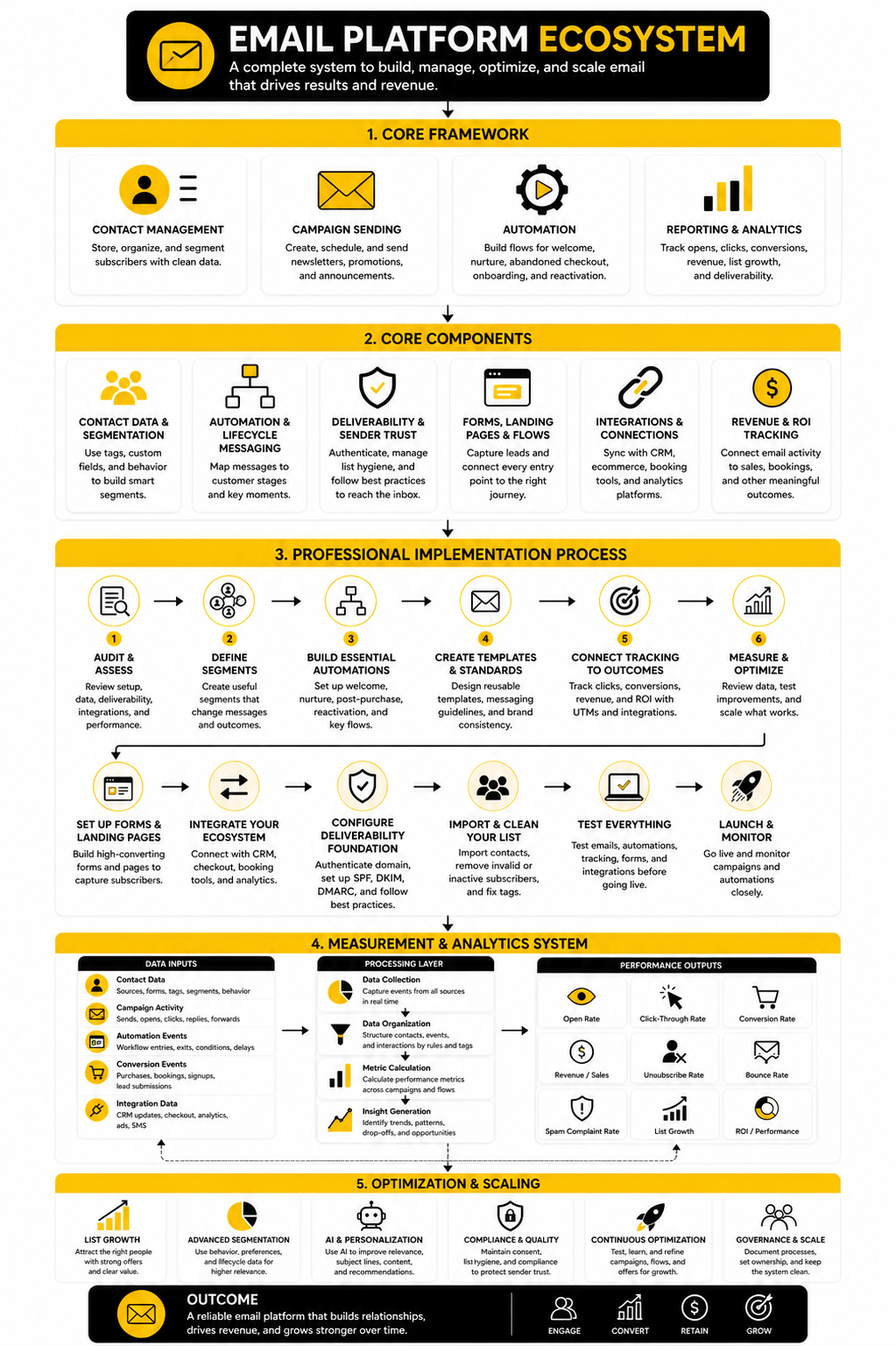
An email platform should be evaluated as a system, not a feature list. The practical framework is simple: collect the right contacts, understand who they are, send the right message, automate the next step, and measure the business result. If one part is weak, the whole system becomes harder to trust.
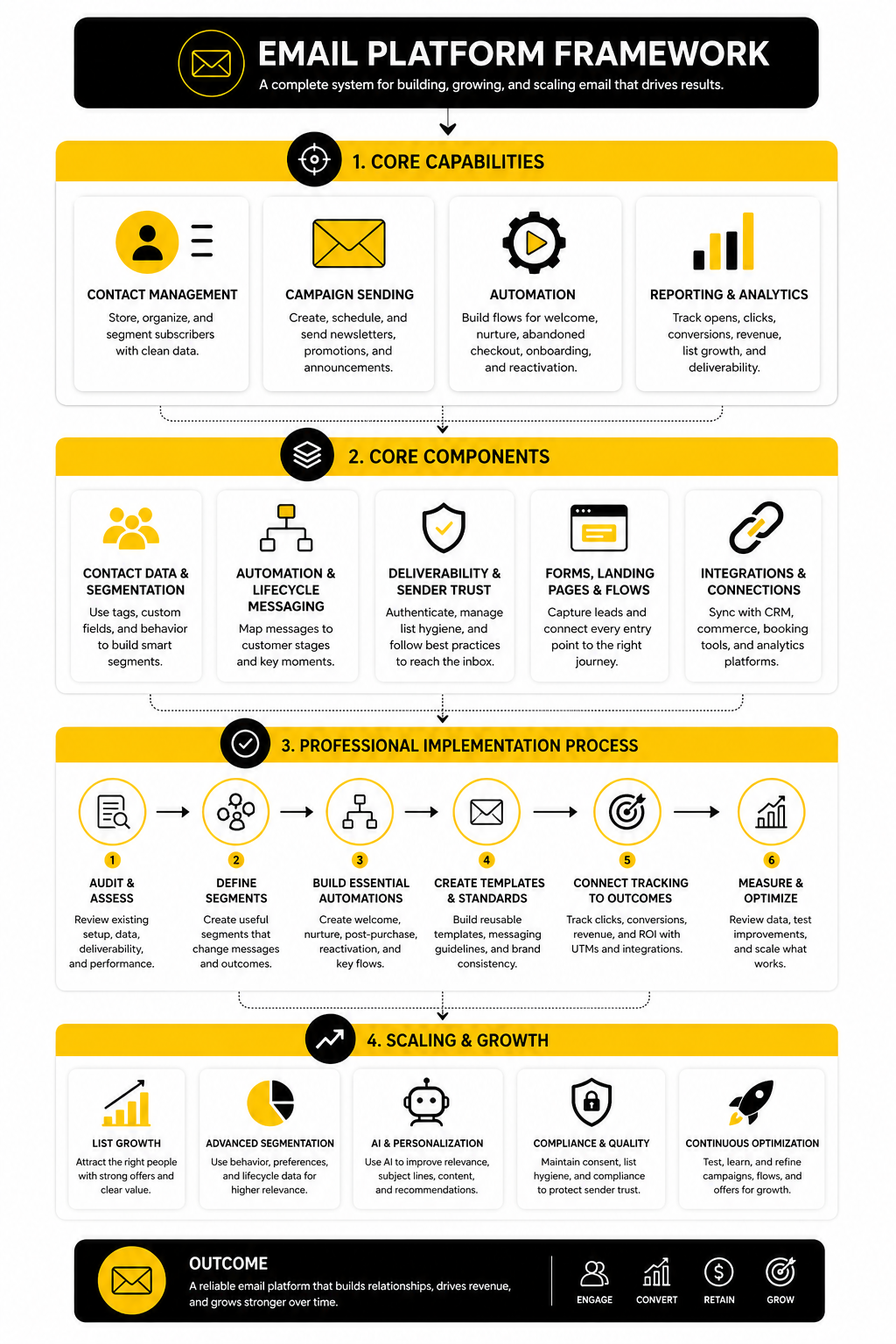
The first layer is acquisition. This includes landing pages, embedded forms, checkout opt-ins, lead magnets, webinars, quizzes, and CRM imports. A platform that makes list growth easy will usually create more useful data from the beginning.
The second layer is segmentation and automation. This is where the email platform stops treating every subscriber the same. Tags, custom fields, behavioral triggers, abandoned cart flows, onboarding sequences, reactivation campaigns, and sales follow-ups all sit inside this layer.
The third layer is performance. This includes deliverability, testing, attribution, revenue tracking, unsubscribe patterns, spam complaint monitoring, and list hygiene. This part is not glamorous, but it is where serious email programs separate themselves from casual senders.
Core Components Of A Strong Email Platform
A strong email platform should help you do four things well: manage contacts, send campaigns, automate follow-up, and understand performance. That sounds basic, but this is where most messy email systems break. The problem is usually not that the business has no tool; the problem is that the tool is not organized around a clear customer journey.
Contact management is the foundation. Your platform should let you store more than an email address and a first name. You need tags, custom fields, consent status, source tracking, purchase history, engagement history, and lifecycle stage, because those details decide what someone should receive next.
Campaign sending is the visible part, but it is not the whole machine. Newsletters, product launches, promotions, announcements, and educational emails all need clean templates, reliable scheduling, list controls, and testing options. If your platform makes every campaign feel like a manual rebuild, it will slow down the entire marketing rhythm.
Automation is where the platform starts doing real work. Welcome sequences, abandoned checkout emails, appointment reminders, lead nurture flows, reactivation campaigns, and post-purchase follow-ups should run without someone rebuilding them every week. This is especially important because recent email research shows that many brands still struggle to connect email activity to revenue, even though businesses that measure email ROI often report strong returns.
Reporting is the final piece, and it needs to go beyond open rates. Open rates are useful, but privacy changes and inbox behavior make them incomplete on their own. A serious email platform should help you track clicks, conversions, revenue, unsubscribes, spam complaints, list growth, deliverability, and performance by segment.
Contact Data And Segmentation
Segmentation is what keeps email from becoming noise. A subscriber who joined from a lead magnet should not always receive the same messages as a paying customer, a booked sales call, or a cold lead from last year. The platform needs to make those differences easy to capture and easy to act on.
Good segmentation can be simple at first. You can separate leads from customers, active subscribers from inactive subscribers, and high-intent visitors from casual readers. Over time, you can layer in product interest, purchase frequency, content preferences, deal stage, location, and engagement level.
The important part is not creating dozens of segments for the sake of looking advanced. The important part is making each segment useful. If a segment does not change the message, offer, timing, or follow-up, it probably does not need to exist yet.
Automation And Lifecycle Messaging
Automation should match the natural stages of your customer relationship. Someone who just joined your list needs orientation. Someone who clicked a pricing page needs a different next step. Someone who bought yesterday needs reassurance, onboarding, and a reason to come back later.
This is where an email platform becomes more valuable than a basic newsletter sender. You are no longer relying on one-off campaigns to do all the work. You are building repeatable flows that handle the moments your business sees every day.
For example, a service business may need lead capture, missed-call follow-up, appointment reminders, review requests, and long-term nurture in one place. That is why an all-in-one platform like GoHighLevel can make sense for agencies and local businesses that want CRM, automation, funnels, and client communication under one roof. A creator or small digital product business may prefer something leaner, where Systeme.io can cover email, funnels, courses, and basic automation without a heavy setup.
Deliverability And Sender Trust
Deliverability is not optional anymore. If your emails do not reach the inbox, the rest of your strategy is just theory. The platform should support proper authentication, clean unsubscribe handling, list hygiene, bounce management, and basic compliance workflows.
This became even more important after Gmail and Yahoo tightened sender requirements for bulk senders. Google’s sender guidelines require authentication practices such as SPF, DKIM, and DMARC for many senders, along with clear unsubscribe support and low spam complaint rates through Gmail’s official sender requirements. That means your email platform needs to help you stay technically credible, not just visually polished.
Deliverability is also about behavior. Sending to people who never engage, hiding unsubscribe links, buying lists, or blasting irrelevant promotions will damage sender reputation over time. The right platform gives you tools to avoid that, but the discipline still has to come from your strategy.
Forms, Landing Pages, And Conversion Paths
An email platform becomes much more useful when it connects directly to the places where leads enter your world. Forms, landing pages, popups, quizzes, checkout pages, and webinar registrations should feed clean data into the right list or automation. When that connection is weak, the business ends up with exports, imports, duplicate contacts, and broken follow-up.
Some platforms keep this simple with built-in landing pages and embedded forms. Others work better when connected to a dedicated funnel or page builder. For example, ClickFunnels can be a better fit when the email platform is part of a broader funnel with opt-ins, offers, upsells, and checkout flows.
The key is to avoid treating lead capture as separate from email. Every form should have a destination, every destination should trigger a relevant next step, and every next step should be measurable. That is how an email platform turns traffic into a relationship instead of a spreadsheet.
Professional Implementation And Scaling
Once the core components are clear, implementation becomes much easier. The goal is not to build a complicated email platform on day one. The goal is to create a clean, reliable system that captures the right data, sends the right messages, and gives you enough visibility to improve without guessing.
Most businesses should start with the customer journey instead of the software menu. Map the moments where someone joins your list, shows intent, buys, gets stuck, comes back, or goes quiet. Then build the email platform around those moments, because that is where automation actually creates leverage.
This is also where discipline matters. A messy setup can make even a powerful platform feel broken. Before you build more campaigns, you need a clean structure for lists, tags, naming conventions, automations, templates, reporting, and ownership.
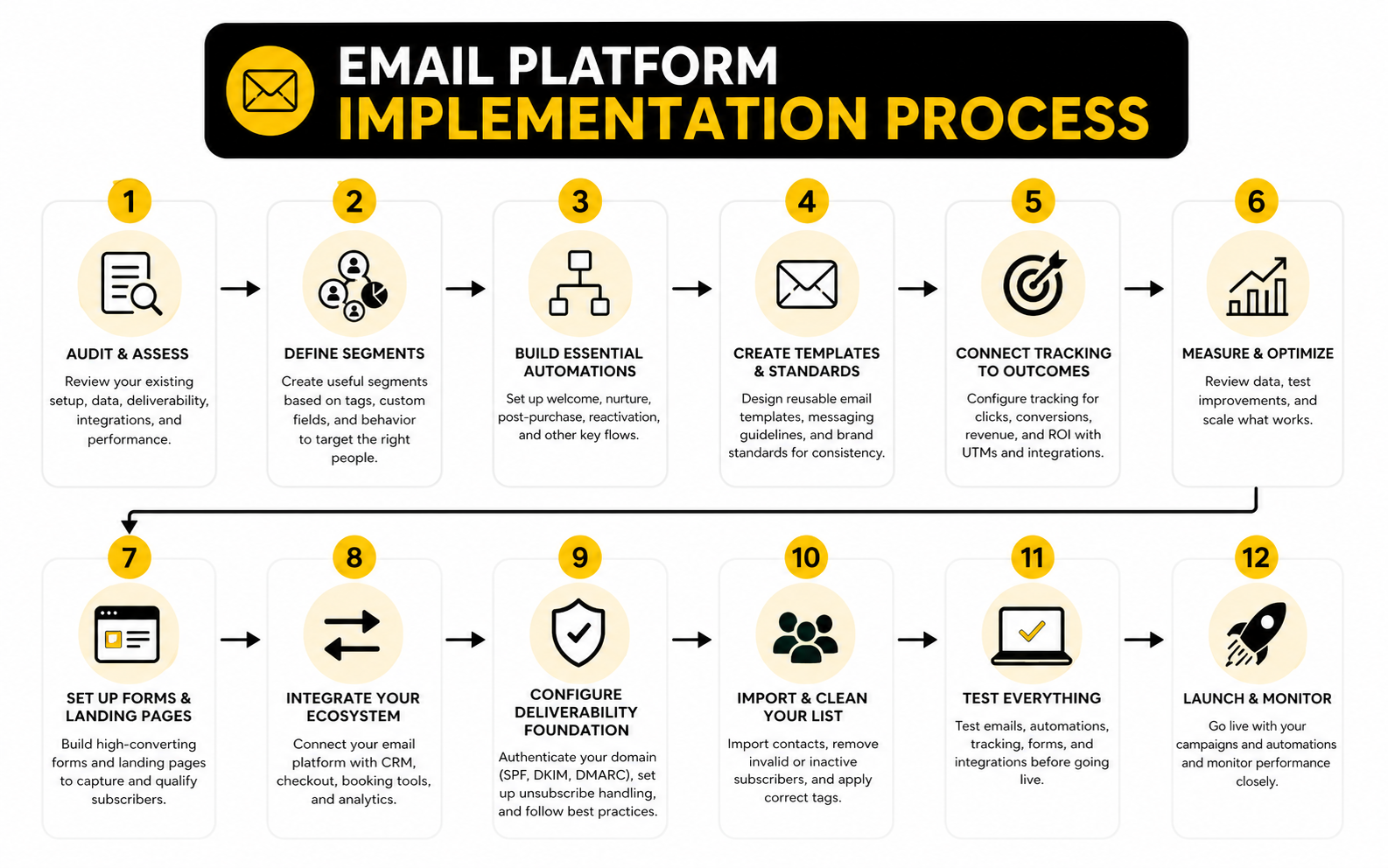
Step 1: Audit The Current Email Setup
Start by reviewing what already exists. Look at your lists, tags, forms, automations, templates, sender domains, unsubscribe process, and reporting dashboards. The goal is to identify what is working, what is duplicated, what is outdated, and what creates risk.
This audit should include deliverability basics too. Google’s sender requirements make SPF, DKIM, DMARC, one-click unsubscribe, and low spam complaint rates part of the operating standard for serious senders through Gmail’s official sender guidelines. If the technical setup is weak, fix that before scaling volume.
Do not skip this step because it feels boring. An email platform with bad data, broken forms, or unclear automation rules will create problems faster as your audience grows. Cleaning the foundation is what makes every future campaign more dependable.
Step 2: Define The Segments That Actually Matter
After the audit, define the segments your business truly needs. This usually starts with leads, customers, active subscribers, inactive subscribers, high-intent prospects, and people tied to specific products or services. Keep the first version simple enough that the team can actually maintain it.
Each segment should have a reason to exist. A segment is useful when it changes the message, offer, timing, or follow-up path. If it does not change any of those things, it is probably just clutter inside the platform.
This is where many teams overbuild. They create dozens of tags and custom fields, then nobody knows what anything means six months later. A smaller segmentation system that drives clear action will beat a complex one that nobody trusts.
Step 3: Build The Essential Automations First
The first automations should support the most important customer moments. A welcome sequence helps new subscribers understand who you are and what to do next. A lead nurture sequence builds trust before a sales conversation. A post-purchase sequence reduces confusion and helps customers get value faster.
For ecommerce and digital product businesses, checkout and funnel behavior often matters most. A platform connected to ClickFunnels can support opt-ins, sales pages, order forms, upsells, and follow-up paths in one conversion flow. For businesses that want email, funnels, payments, and courses in a leaner setup, Systeme.io can be a practical starting point.
For agencies and local service businesses, the essential automations often look different. They may need missed-call text follow-up, appointment reminders, review requests, pipeline updates, and reactivation campaigns. In that case, GoHighLevel is usually worth considering because the email platform sits closer to CRM and client communication.
Step 4: Create Templates And Message Standards
Templates are not just a design shortcut. They make your email platform easier to operate because every campaign starts from a consistent structure. You can create templates for newsletters, product launches, onboarding emails, sales follow-ups, event reminders, and reactivation campaigns.
The standards should cover subject lines, preview text, sender names, formatting, calls to action, footer compliance, and link tracking. This keeps the brand consistent even when different people write or schedule emails. It also makes testing easier because you are not changing every variable at once.
Keep templates flexible. A rigid template can make every email feel the same, but a good template gives structure without removing personality. The best system helps you send faster while still sounding human.
Step 5: Connect Tracking To Real Business Outcomes
An email platform should not only tell you whether someone opened or clicked. It should help you understand whether the email moved the business forward. That means connecting campaign activity to sales, bookings, form submissions, trial starts, demos, repeat purchases, or other meaningful outcomes.
This matters because many businesses still send email without reliable ROI tracking. Recent reporting on email performance found that less than half of companies can reliably track email ROI, while businesses that do measure it often see meaningful returns through current email ROI research. That gap is exactly why implementation cannot stop at “the emails are sending.”
Set up tracking before you scale. Use UTM conventions, conversion events, CRM stages, ecommerce revenue tracking, and campaign naming rules that are easy to understand later. You do not need a perfect attribution model, but you do need a system that shows what is helping and what is just making noise.
Statistics And Data
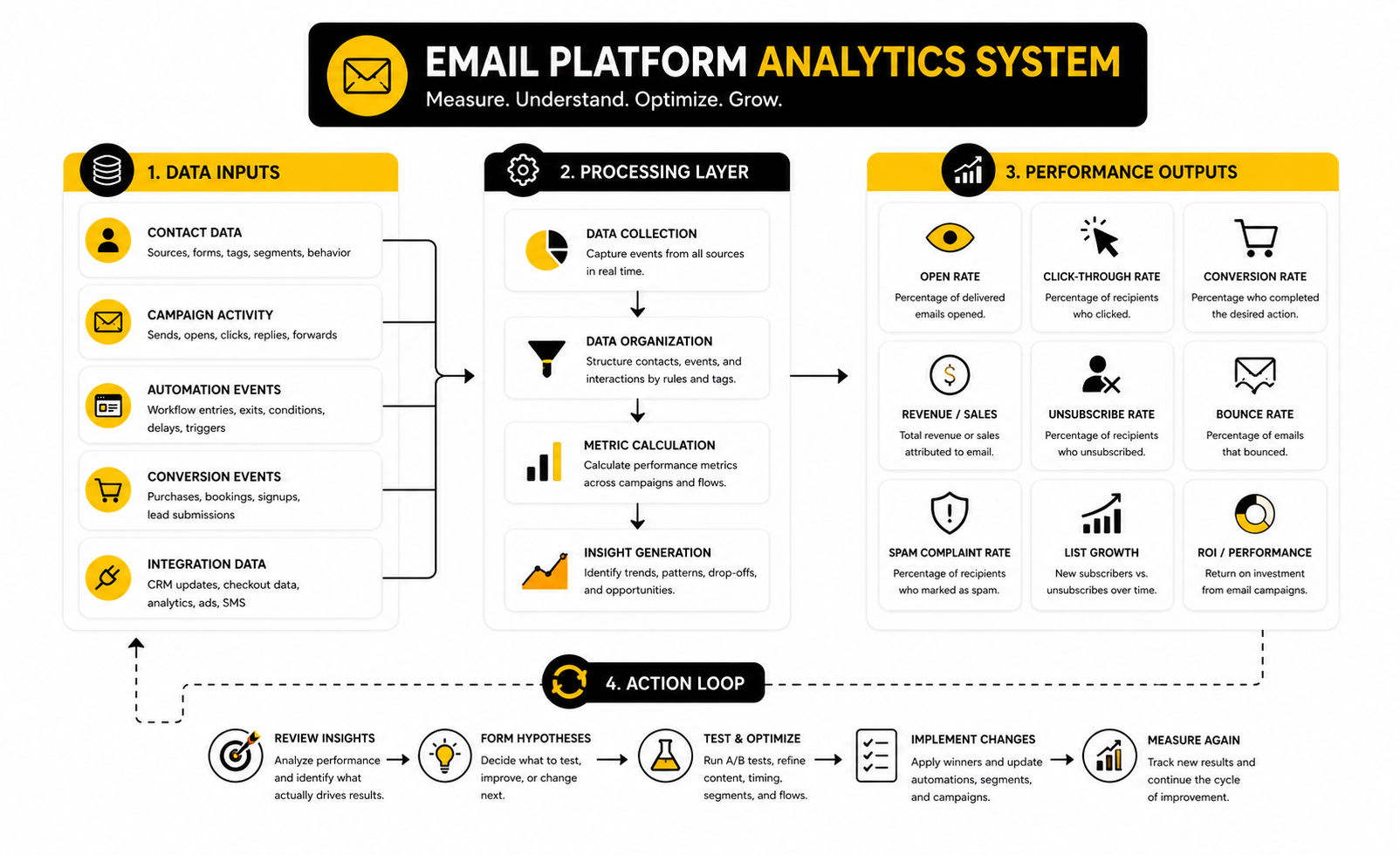
Measurement is where an email platform proves whether it is actually helping the business. Opens, clicks, unsubscribes, bounces, conversions, and revenue all tell part of the story, but none of them should be interpreted alone. A high open rate with weak clicks can mean the subject line worked but the offer, message, or audience match did not.
Benchmarks are useful because they give you a reference point, not because they define success. The MailerLite 2025 benchmark study covers more than 3.6 million campaigns from 181,000 approved accounts, which makes it useful for comparing broad performance patterns across industries and regions. Still, your own trend line matters more than a generic average, because your list quality, offer, price point, buying cycle, and sender reputation all shape the result.
The best way to read email data is to connect each metric to a decision. If opens are weak, test sender name, subject line, timing, and list engagement. If clicks are weak, improve the offer, call to action, email structure, and segment match. If conversions are weak after strong clicks, the issue may be the landing page, checkout, sales page, booking flow, or offer itself.
The Metrics That Actually Matter
Open rate is still helpful, but it is not the final truth. Privacy changes, inbox previews, and automated image loading can make opens less precise than they used to be. Treat open rate as a directional signal for subject line relevance, sender trust, and list engagement.
Click-through rate is usually more useful because it shows active intent. Someone clicked because the message created enough interest to take the next step. If your email platform shows clicks by link, segment, device, and campaign type, you can quickly see what people actually care about.
Conversion rate is where the conversation gets serious. A campaign that drives fewer clicks but more booked calls, purchases, replies, or qualified leads can be more valuable than a campaign with flashy engagement. This is why your email platform should connect with landing pages, CRM records, ecommerce data, and analytics tools instead of stopping at campaign-level vanity metrics.
Reading Benchmarks Without Getting Misled
Benchmarks should help you ask better questions. They should not make you panic because your campaign is below one number or overcelebrate because one send beat an average. Different industries have different audience expectations, and a weekly media newsletter is not measured the same way as a sales follow-up sequence for a high-ticket service.
The same metric can mean different things depending on context. A low unsubscribe rate may look good, but it can also mean disengaged people are ignoring you instead of leaving. A slightly higher unsubscribe rate after a sharper campaign may be healthy if the remaining audience is more qualified and more likely to buy.
This is why you need cohort thinking. Compare new subscribers against older subscribers, buyers against non-buyers, engaged contacts against inactive contacts, and different acquisition sources against each other. A modern email platform should make those comparisons easy enough that you can act on them monthly, not once a year.
Deliverability Signals You Cannot Ignore
Deliverability data is the quiet part of analytics, but it can make or break the entire email program. Bounce rate, spam complaints, unsubscribes, engagement decay, domain authentication, and inbox placement all affect whether future emails get seen. You can have great copy and a strong offer, but if sender trust is weak, performance will still fall.
Mailbox providers have become stricter about sender behavior. Gmail’s sender rules require proper authentication, low spam complaint rates, and easy unsubscribe flows for many bulk senders through Gmail’s official sender guidelines. That means deliverability is not just a technical setup task; it is an ongoing measurement habit.
Watch complaint rates especially closely. If people mark your emails as spam, the problem is usually relevance, consent, frequency, or expectation mismatch. Your email platform should help you identify which campaigns, segments, or sources create risk before they damage the whole sender reputation.
Revenue And ROI Tracking
Revenue tracking is where many email programs are still underbuilt. Recent reporting on Sinch Mailgun’s 2026 Email Impact Report found that fewer than half of organizations can reliably track email ROI, even though 60% of those that do measure it report returns above $10 for every $1 spent through current email ROI research. That gap is not a small reporting issue. It means many businesses are investing in email without knowing which campaigns actually create money.
The fix is to define revenue events clearly. For ecommerce, that may be purchases, repeat purchases, average order value, and cart recovery. For service businesses, it may be booked calls, qualified opportunities, show-up rate, closed deals, and customer lifetime value.
Do not rely on one dashboard to explain everything perfectly. Use campaign UTMs, CRM stages, checkout data, booking data, and platform reporting together. The goal is not perfect attribution; the goal is enough clarity to make better decisions about what to send, who to send it to, and what to improve next.
Turning Data Into Action
Email analytics only matters when it changes behavior. If the data says inactive subscribers are dragging down engagement, create a reactivation sequence and remove people who never respond. If one acquisition source produces lots of subscribers but weak revenue, adjust the lead magnet, form promise, or follow-up path.
Build a simple review rhythm. Weekly, check deliverability warnings, campaign performance, and automation errors. Monthly, review segment performance, revenue contribution, list growth, unsubscribes, and conversion paths. Quarterly, decide which automations need rewriting, which segments need cleanup, and which offers deserve more traffic.
This is where a good email platform becomes a management system instead of just a sending tool. It shows what people do, where they get stuck, and which messages move them forward. Once you can see that clearly, improving email becomes a practical process instead of a guessing game.
Advanced Tradeoffs Before You Scale
Scaling an email platform is not just about sending more campaigns. It is about making better decisions with more data, more automation, and more responsibility. The bigger the system gets, the more every weakness gets amplified.
At a small scale, messy tags are annoying. At a larger scale, messy tags create wrong messages, broken journeys, unreliable reports, and poor customer experiences. This is why the advanced work is less about finding one magic feature and more about building a platform that can stay clean under pressure.
The right tradeoff depends on your business model. A creator with a simple offer may need speed and low complexity. An agency may need client sub-accounts, CRM pipelines, and multi-channel automation through GoHighLevel. An ecommerce or funnel-led business may need tighter checkout and landing page flow through ClickFunnels, while a lean digital product business may prefer the simpler all-in-one structure of Systeme.io.
All-In-One Platform Or Specialized Stack
The first strategic decision is whether your email platform should be part of an all-in-one system or one tool inside a larger stack. An all-in-one setup is usually faster to launch because forms, funnels, CRM, email, payments, and automations can live closer together. That can reduce integration headaches and make the system easier for a small team to manage.
A specialized stack gives you more control. You can choose the best tool for each job, connect them through integrations, and replace individual pieces later. The tradeoff is that ownership becomes more important, because every connection between tools can become a point of failure.
The practical answer is simple: choose the setup your team can operate well. A powerful stack that nobody maintains is worse than a simpler platform that gets used properly every week. Operational fit beats feature depth when the team is small, busy, or still proving the offer.
Personalization Without Overcomplication
Personalization is valuable, but only when it improves relevance. Using someone’s first name is not strategy. A better email platform uses behavior, preferences, lifecycle stage, and purchase context to send a message that feels naturally timed.
The pressure to personalize is growing because inboxes are getting more crowded and automated. Recent reporting on global email traffic found that only 13% of emails studied were human-written, which is a strong reminder that generic automation is becoming easier to ignore through current email automation research. The answer is not to make every email artificially complex; the answer is to make each automated message more useful.
Start with meaningful personalization before clever personalization. Send different follow-ups to leads, buyers, inactive subscribers, and high-intent prospects. Then add more advanced rules only when the data shows the extra complexity will change behavior.
AI In The Email Platform
AI can help an email platform move faster, but it should not replace strategy. It can draft subject lines, summarize customer data, suggest segments, generate campaign variations, and help with testing. Used well, it reduces production friction and helps teams learn faster.
The risk is that AI makes it too easy to publish average messages at higher volume. If the positioning is weak, the offer is unclear, or the list is poorly segmented, AI will only scale the problem. More output does not equal better performance.
A smart workflow keeps humans in charge of the important decisions. Use AI for drafts, options, analysis, and workflow speed. Keep human judgment on audience insight, offer framing, brand voice, compliance, and final campaign approval.
Compliance, Consent, And List Quality
Email compliance should be treated as part of the platform design, not an afterthought. Consent source, unsubscribe handling, suppression lists, privacy requests, and data retention all need clear rules. If those rules are unclear, the system becomes risky as the list grows.
Sender requirements have also become stricter. Gmail’s official guidance recommends SPF, DKIM, and DMARC setup, and bulk senders are expected to meet authentication and unsubscribe standards through Google’s sender guidelines. That means platform choice should include deliverability support, not just automation features.
List quality is the practical side of compliance. Do not buy lists, do not hide unsubscribes, and do not keep blasting people who never engage. A smaller clean list will usually beat a larger weak list because it protects sender reputation and gives you clearer data.
Migration And Platform Switching Risk
Switching email platforms can be worth it, but it is never just a login change. You have to move contacts, tags, forms, templates, automations, unsubscribe data, suppression lists, historical reports, integrations, and tracking rules. If the migration is rushed, you can lose context that took years to build.
Before switching, document the current system. Export lists, map tags, screenshot automations, record sender settings, review active forms, and identify the campaigns that actually drive revenue. Then rebuild in phases instead of trying to move everything at once.
The biggest mistake is migrating clutter. A platform switch is the perfect time to remove dead segments, simplify naming, rewrite outdated sequences, and clean inactive contacts. Do not pay for a new email platform just to recreate the same mess in a prettier interface.
Governance As The System Grows
Governance sounds corporate, but it is just clarity. Who can create tags? Who approves automations? Who owns deliverability? Who reviews inactive subscribers? Who checks whether campaigns are connected to revenue?
Without governance, the email platform slowly becomes unreliable. Someone creates a duplicate tag, another person edits a flow without documenting it, and a third person launches a campaign to the wrong segment. None of these mistakes feel dramatic in the moment, but together they damage trust in the system.
Keep governance lightweight. Use naming conventions, campaign calendars, approval rules, quarterly cleanup, and a simple owner for each major automation. That gives the platform enough structure to scale without turning marketing into bureaucracy.
Email Platform FAQs And Final Recommendations
The best email platform is the one that fits your business model, your team, your customer journey, and your growth stage. Do not choose based only on the longest feature list. Choose based on what you can launch, maintain, measure, and improve.
At this point, the system should be clear. You need a reliable way to capture contacts, organize data, automate lifecycle messages, protect deliverability, track meaningful outcomes, and keep the setup clean as the business grows. When those parts work together, email becomes less of a task and more of a compounding asset.
FAQ - Built For Complete Guide
What is an email platform?
An email platform is software that helps a business collect contacts, manage subscriber data, send email campaigns, build automations, and measure performance. A basic platform may focus mostly on newsletters, while a more advanced platform may include CRM, segmentation, funnels, forms, landing pages, SMS, and revenue tracking. The right choice depends on whether you need simple communication or a complete customer journey system.
What is the best email platform for beginners?
The best email platform for beginners is usually the one that keeps setup simple while still giving you room to grow. For creators, small businesses, and lean digital product sellers, Systeme.io can be practical because it combines email, funnels, payments, and courses. For businesses that want a dedicated email marketing tool with approachable campaign features, Brevo and Moosend are also worth comparing.
What is the best email platform for agencies?
Agencies usually need more than newsletters. They often need CRM pipelines, client accounts, forms, automations, appointment reminders, reputation workflows, and reporting across multiple businesses. That is where GoHighLevel can make sense because it combines email with broader client management and marketing automation.
How do I choose the right email platform?
Start with your customer journey, not the software feature page. Write down how people join your list, what they need before buying, what happens after they buy, and how you want to reactivate them later. Then choose the email platform that can support those steps with the least operational friction.
What features should every email platform have?
Every serious email platform should support contact management, segmentation, campaign sending, automation, templates, unsubscribe handling, reporting, and deliverability basics. It should also make it easy to connect forms, landing pages, checkout flows, CRM data, or analytics tools. If a platform cannot show who received what, what they did next, and what business outcome followed, it is probably too limited for serious growth.
Why does deliverability matter so much?
Deliverability decides whether your emails actually reach the inbox. Google’s sender guidance recommends SPF, DKIM, and DMARC, and bulk senders are expected to meet authentication and unsubscribe standards through Gmail’s official sender guidelines. If your email platform does not help you manage sender trust, your campaigns can underperform even when the copy and offer are strong.
Are open rates still useful?
Open rates are useful, but they should not be treated as perfect truth. Privacy changes and email client behavior can make opens less precise than clicks, replies, purchases, bookings, or qualified leads. Use open rates as a directional signal, then make decisions based on deeper engagement and conversion data.
What email metrics should I track first?
Start with deliverability, open rate, click-through rate, conversion rate, unsubscribe rate, bounce rate, spam complaints, and revenue or lead outcomes. The MailerLite 2025 benchmark report is useful for broad comparison because it analyzes millions of campaigns, but your own trend line matters more. Track whether your email platform is improving the business, not just whether one campaign beat an average.
How much automation do I need?
You need enough automation to handle repeatable customer moments without making the system hard to manage. Start with a welcome sequence, lead nurture, post-purchase follow-up, reactivation flow, and any booking or checkout-related reminders that matter to your business. Add advanced branching later when your data proves it will improve relevance or revenue.
Should I use an all-in-one platform or separate tools?
Use an all-in-one platform when speed, simplicity, and fewer integrations matter most. Use separate tools when you need more control, deeper specialization, or a stack built around specific workflows. The best answer is the one your team can maintain consistently, because an elegant stack that nobody operates properly will still fail.
How often should I clean my email list?
Review inactive subscribers at least quarterly. You do not always need to delete people immediately, but you should identify contacts who never open, click, reply, buy, or engage. A cleaner list protects sender reputation, improves reporting quality, and makes your email platform easier to trust.
Can AI improve email marketing?
AI can help with drafting, subject line ideas, testing variations, segmentation suggestions, and performance analysis. It should not replace customer insight, offer strategy, compliance judgment, or brand voice. The strongest use of AI inside an email platform is not more volume; it is better relevance, faster testing, and clearer decision-making.
What is the biggest mistake businesses make with email platforms?
The biggest mistake is treating the email platform like a sending tool instead of a business system. They send campaigns, but they do not clean data, document automations, track revenue, or improve customer journeys. That is how email becomes busywork instead of an asset.
When should I switch email platforms?
Switch when your current platform blocks growth, creates too much manual work, lacks essential reporting, cannot support your automation needs, or makes deliverability harder to manage. Do not switch just because another tool looks newer. A migration is worth it only when the new platform solves a real operational or revenue problem.
Work With Professionals
Explore 10K+ Remote Marketing Contracts on MarkeWork.com
Most marketers spend too much time chasing clients, competing on crowded platforms, and losing a percentage of every project to middlemen.
MarkeWork gives you a better way. Browse thousands of remote marketing contracts and connect directly with companies desperate to hire skilled marketers like you, without platform commissions and without unnecessary gatekeepers.
If you're serious about finding better opportunities and keeping 100% of what you earn, explore available contracts and create a profile for free at MarkeWork.com.