

If you are searching for email services like Mailchimp, you are usually not looking for “another newsletter tool.” You are trying to solve a more expensive problem: how to send better campaigns, automate follow-up, keep deliverability healthy, and avoid rebuilding your stack six months from now. That is exactly why this topic matters so much in 2026, especially now that Google, Yahoo, and Microsoft have all tightened sender requirements around authentication, spam complaints, and bulk email practices. Google’s sender guidelines, Yahoo’s sender best practices, and Microsoft’s 2025 high-volume sender rules all point in the same direction: the platform you choose now affects not just convenience, but whether your emails reliably reach the inbox at all.
Mailchimp is still one of the default names in this category for a reason. It has broad brand recognition, accessible campaign building, and a mature automation layer that Mailchimp now labels as Marketing Automation Flows, built around customer journeys and behavior-based paths. But the market around it has become far more specialized, with tools like ActiveCampaign, Kit, Klaviyo, and Brevo each pushing harder into their own strengths instead of trying to be everything for everyone.
Article Outline
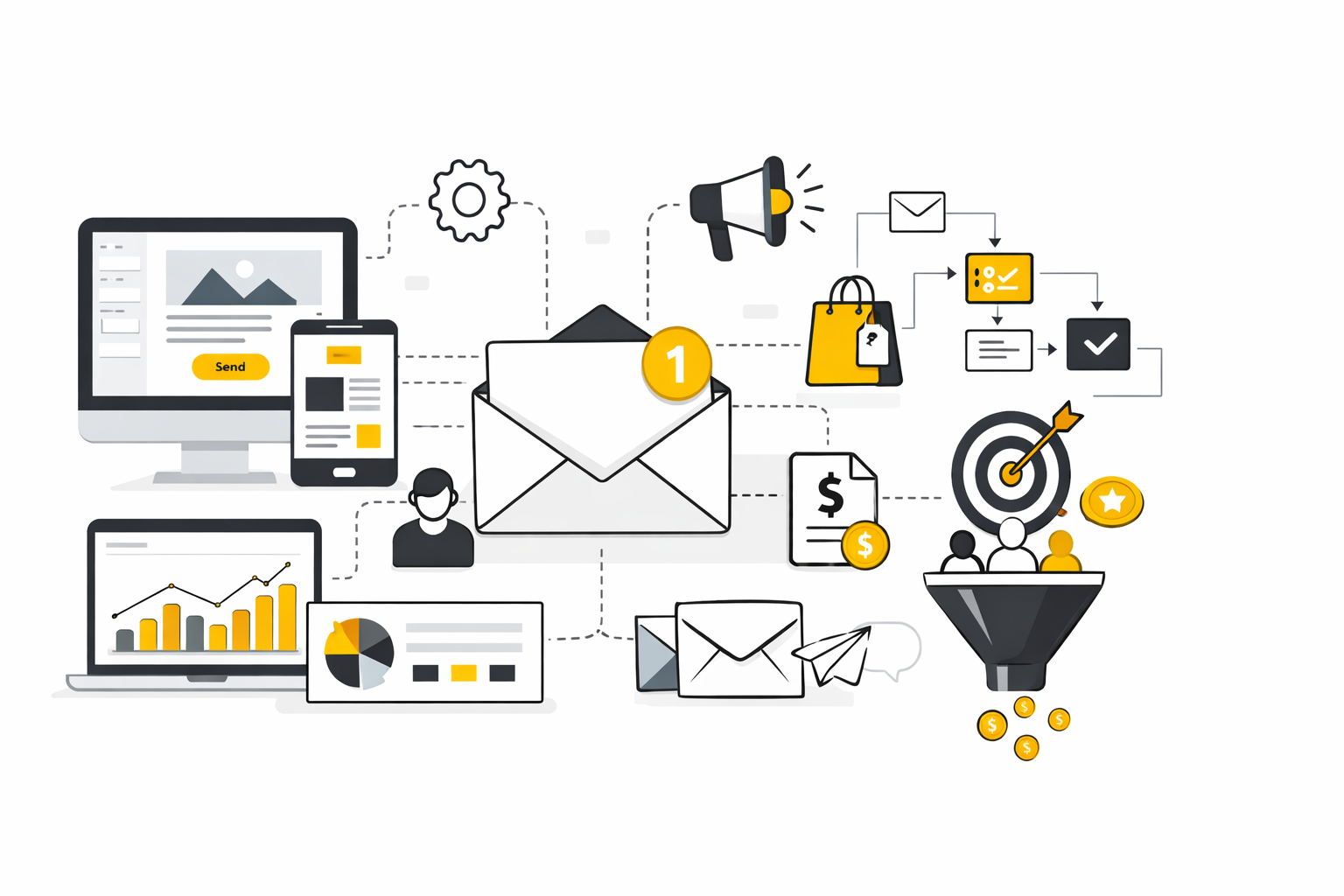
This article is structured to help you compare email services like Mailchimp the way a smart operator would, not the way a generic comparison page does. We are going to move from market context to evaluation criteria, then into side-by-side platform logic, business-fit decisions, and rollout execution. That way, by the end of the full piece, you will know which platform deserves a shortlist and which one will quietly create friction.
- Why Email Services Like Mailchimp Still Matter
- The Platform Framework That Makes Comparison Easier
- The Core Components That Actually Drive Results
- How the Top Alternatives Compare in Practice
- How to Match the Right Service to Your Business Model
- Professional Implementation Without a Messy Migration
The section names above are the exact structure the rest of the article will keep using, so each later part builds on the same decision path instead of restarting from scratch.
Why Email Services Like Mailchimp Still Matter
Email is still one of the few channels you actually control. Algorithms do not decide whether a subscriber follows you, ad costs do not spike because an auction changed overnight, and your historical data stays useful because it is tied to real audience behavior inside your own system. That is one reason email continues to hold up so well in modern benchmark reports, with the DMA’s 2025 benchmarking data showing 98% delivery rates, 35.9% opens, and 2.3% unique click rates, while Litmus’s latest innovation research still describes email as the most effective marketing channel.
What has changed is the standard for doing email well. It is no longer enough to pick a platform with nice templates and a cheap starting plan, because inbox providers now care much more about authentication, complaint rates, list quality, and unsubscribe handling than they did a few years ago. Google requires bulk senders to use SPF, DKIM, and DMARC, Yahoo explicitly tells senders to keep spam complaints below 0.3%, and Microsoft has now aligned with the same broader move toward stricter trust signals for high-volume senders.
That is why people searching for email services like Mailchimp are usually asking a deeper question than they realize. They are not just comparing editors or monthly fees. They are comparing whether the platform supports the kind of segmentation, automation, reporting, and sender discipline needed to grow without wrecking deliverability or forcing an ugly migration later. Mailchimp’s own product positioning now leans heavily into this, with its customer journey tooling built for dynamic paths and its marketing plan comparison page emphasizing feature differences by workflow depth rather than just send volume. Mailchimp’s customer journey overview and plan comparison page make that shift pretty clear.
The Platform Framework That Makes Comparison Easier
Most people compare email platforms the wrong way. They look at homepage promises, maybe glance at starting prices, then assume the cheapest familiar option is “good enough.” That approach misses the real question, which is whether the platform fits your business model, your data complexity, and the kind of customer journey you actually need to build.
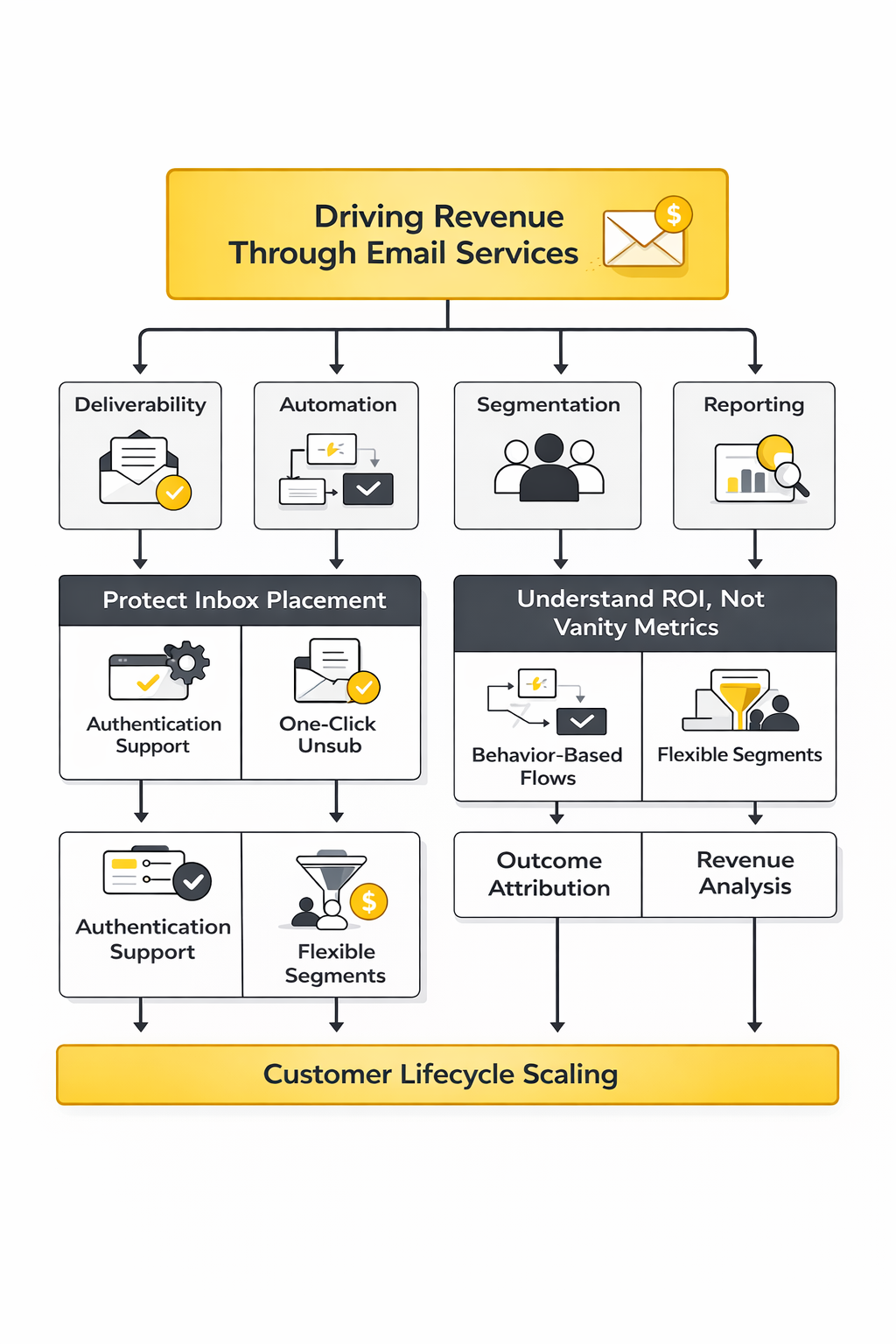
A better way to evaluate email services like Mailchimp is through four lenses: audience model, automation depth, channel mix, and pricing logic. Audience model means whether the platform is built more for broad SMB marketing, creator newsletters, ecommerce retention, or CRM-led lifecycle work. Automation depth tells you whether you are getting basic sequences or true branching logic with conditional paths, which matters a lot once you move beyond welcome emails and simple broadcasts. Channel mix matters because some tools stay mostly email-first, while others are now built around email plus SMS, push, CRM, or sales workflows. Pricing logic matters because some platforms scale mainly by contacts, others by sends, and others by feature tier or channel bundle. Official product pages make these differences pretty obvious once you stop reading the copy as marketing and start reading it as architecture. Mailchimp focuses on journeys and automation flows, ActiveCampaign highlights automation plus segmentation and CRM depth, Kit stays centered on creator automations, Klaviyo leans into behavior-driven flows across email, SMS, and push, and Brevo positions itself as a multi-channel customer engagement stack.
That framework is the backbone for the rest of this article. In the next part, we will break those lenses into concrete buying criteria, so you can judge whether a platform is genuinely a better fit than Mailchimp or just a different interface with the same limitations. That is where this topic becomes practical, because the wrong choice usually does not fail on day one; it fails when your list grows, your automation gets more complicated, or your team finally needs reporting that connects campaigns to revenue.
The Core Components That Actually Drive Results
Once you stop comparing email services like Mailchimp by homepage polish, the real evaluation gets much simpler. The best platform is usually the one that helps you protect inbox placement, build relevant automation, segment intelligently, and understand whether your emails are driving revenue or just generating vanity metrics. Everything else is secondary.
This is also where a lot of teams make the wrong call. They buy based on entry-level pricing or familiar branding, then discover later that the real bottleneck is weak reporting, shallow workflow logic, or limited control over customer data. A platform does not become expensive only when the monthly bill goes up. It becomes expensive when it forces workarounds.
Deliverability Is the First Filter
If a platform cannot support strong sending practices, nothing else matters. Google requires bulk senders to meet authentication and unsubscribe standards, and Microsoft has pushed the same direction for high-volume senders targeting Outlook properties, which means platform choice now directly affects whether your program is compliant enough to stay out of junk folders. Google’s sender requirements and Microsoft’s 2025 high-volume sender update make that very clear.
This is why smart buyers look beyond “can this tool send emails?” and ask harder questions. Does it make domain authentication easy to configure? Does it support one-click unsubscribe properly? Does it help you manage bounce handling, suppression, consent, and sender reputation without forcing your team into manual cleanup every week? Those details are not technical trivia anymore. They are the floor.
A surprising number of businesses still confuse delivery with deliverability. Litmus draws the distinction well: delivery means the receiving server accepted the message, while deliverability is whether the message actually reaches the inbox instead of promotions, spam, or another low-visibility destination. Litmus’s deliverability guide is worth reading because it explains why a platform with better workflow control and list hygiene support often outperforms a platform with nicer templates.
Automation Depth Separates Basic Tools From Growth Tools
This is where most comparisons between email services like Mailchimp get serious. Plenty of platforms can handle broadcasts, welcome emails, and a few basic autoresponders. Far fewer can support branching logic based on behavior, purchase history, lead status, product interest, or inactivity without turning the workflow builder into a maze.
Mailchimp has improved its journey-based automation, and for many smaller businesses that is enough. But once your lifecycle gets more complex, the question changes from “does this have automation?” to “how much strategy can this automation actually express?” That is why platforms like ActiveCampaign, Kit, Brevo, and Moosend end up on shortlists so often. They are not just selling sends. They are selling control.
You want automations that can react, not just run. That means being able to split paths by engagement, purchase timing, customer stage, product category, or lead score. It also means being able to stop irrelevant messages before they go out, which is just as important as sending the right ones.
Segmentation Decides Whether Your Emails Feel Relevant
Segmentation is still one of the clearest dividing lines between average and high-performing email programs. The point is not to create dozens of tiny audiences for the sake of complexity. The point is to make sure people receive messages that match where they are, what they have done, and what they are likely to do next.
That sounds obvious, but weak platforms make it harder than it should be. If your segmentation can only rely on static fields or a few simple tags, your campaigns start to feel blunt very quickly. Better platforms let you build audiences around actions, recency, product behavior, source attribution, engagement thresholds, and purchase patterns, which is what makes lifecycle marketing actually work.
This matters because engagement quality is now tied tightly to inbox trust. When mailbox providers see low engagement and high complaints, they do not care that your design looked polished. They care that recipients did not want the email. That is why platform flexibility around segmentation is not a “nice to have.” It is part of deliverability strategy.
Reporting Has to Connect Activity to Business Outcomes
A lot of email dashboards still look better than they think. They show sends, opens, clicks, and unsubscribes, then leave you to guess whether the program is improving customer value or just staying busy. That was already a weak setup before privacy changes. It is an even weaker setup now.
Open rates still have directional value, but they are no longer enough on their own. The stronger question is whether the platform helps you connect campaigns and flows to downstream outcomes like purchases, revenue per recipient, lead progression, booked calls, or repeat order behavior. Benchmark reports from Klaviyo and broader market summaries from Litmus both reinforce the same idea: teams are under pressure to prove ROI, not just produce email activity.
When you compare email services like Mailchimp, this is one of the most practical tests you can run. Ask what the platform can tell you without exporting data into three other tools. If attribution is weak, revenue visibility is shallow, or reporting breaks the moment you want cohort-level analysis, that weakness will surface fast once management starts asking tougher questions.
Pricing Only Matters When You Understand the Real Cost Structure
Entry pricing is where most comparison articles lose the plot. A tool can look cheap at 500 contacts and become painful at 25,000, especially if important automation, testing, or support features sit behind higher tiers. Mailchimp’s own pricing structure makes this visible, and so do the official plans from Kit, Brevo, and ActiveCampaign. The monthly number by itself tells you almost nothing.
The real cost structure includes four things. First, how the platform charges as your list grows. Second, which features are locked behind higher plans. Third, whether you are paying separately for SMS, CRM, landing pages, forms, or sales automation. Fourth, how much internal labor the tool creates because something important is awkward or missing.
That last point gets ignored far too often. A platform that saves you $80 a month but costs your team hours in exports, tagging workarounds, and broken attribution is not cheaper. It is just cheaper on the invoice.
Channel Breadth Can Be an Advantage or a Distraction
Some businesses genuinely need more than email. If you are operating with SMS, lead forms, landing pages, CRM pipelines, and appointment flows, a broader system may make more sense than a pure-play newsletter platform. That is one reason some teams look beyond Mailchimp and consider tools like GoHighLevel, Brevo, or even a more funnel-driven stack built around Systeme.io.
But more channels are not automatically better. They only help if they reduce fragmentation and support a cleaner customer journey. If the extra breadth turns the platform into a cluttered control panel full of half-used features, it becomes a distraction instead of a strength.
That is why channel mix should always be evaluated through use case, not ambition. Buy the wider platform when you already know you need the wider platform. Do not buy it because it sounds more advanced.
How the Top Alternatives Compare in Practice
Now that the decision criteria are clear, the next step is practical comparison. Not every Mailchimp alternative is trying to solve the same problem, which is exactly why so many side-by-side lists feel confusing. The tools are being judged as if they all belong in one bucket when they really do not.
The better way to compare them is by primary fit. Some are strongest for creator-led publishing, some for ecommerce retention, some for lifecycle automation, and some for all-in-one operational marketing. In the next part, that is the lens we will use so the shortlist starts to make sense quickly instead of becoming one long feature dump.
How the Top Alternatives Compare in Practice
At this point, the comparison gets much easier because the tools stop looking interchangeable. When people search for email services like Mailchimp, they often assume they are browsing one crowded category with tiny differences. In reality, the biggest platforms have moved into distinct lanes, and that is exactly how you should judge them.
Mailchimp still makes sense for businesses that want a familiar interface, a broad set of campaign features, and a mainstream platform that does not require a steep learning curve on day one. Its current plan structure still centers on progressive access to automation, reporting, and support as you move up tiers, which is fine for smaller teams but can become less comfortable once deeper lifecycle work enters the picture. Mailchimp’s plan comparison and pricing overview show that its value proposition is broad usability first, then more advanced capability as you pay more.
ActiveCampaign Fits Businesses That Need Serious Automation
ActiveCampaign is usually the better fit when the real problem is workflow sophistication, not just campaign sending. Its official pricing and platform materials lean heavily into multi-step automation, cross-channel marketing, segmentation, and deeper lifecycle control, which is why it tends to appeal to teams that already know they need more than newsletters and one-off promotions. ActiveCampaign’s pricing page and automation overview make that positioning hard to miss.
The trade-off is that you are buying a more operational system. That is great when you have a clear customer journey, a CRM-minded team, or multiple conversion stages to manage. It is less ideal when your business mainly needs clean broadcasts, simple sequences, and a tool that new team members can pick up in an afternoon.
In practice, ActiveCampaign is rarely the cheapest long-term answer for casual senders. It becomes attractive when better automation can replace manual work, tighten follow-up, and create revenue opportunities that a lighter platform would miss. That is a very different buying logic from “I just want something like Mailchimp.”
Kit Is Strongest for Creator-Led and Audience-Led Businesses
Kit stays focused on creators, publishers, educators, and knowledge-driven businesses that care more about subscriber relationships than classic ecommerce orchestration. Its product and pricing pages emphasize newsletters, visual automations, forms, recommendations, and selling without overwhelming the user with enterprise-style complexity. Kit’s homepage and pricing page reflect that creator-first architecture clearly.
That focus matters because creator businesses usually have a different type of marketing engine. They are not trying to stitch together abandoned cart flows, catalog logic, and loyalty programs at the same depth as a retail brand. They need simple monetization, strong audience capture, reliable sequences, and a system that does not punish them for publishing consistently.
So if your business model depends on content, community, or expertise, Kit often feels more natural than Mailchimp. If your model depends on product behavior, aggressive segmentation, and commerce-triggered automations, it often feels too narrow.
Klaviyo Is Built for Revenue-Centric Ecommerce Teams
Klaviyo has pushed far beyond being “an email tool for stores.” Its product positioning now describes it as a B2C CRM that unifies customer data, automation, analytics, and messaging across channels, with email, SMS, push, and other engagement paths working from the same behavioral layer. Klaviyo’s homepage and pricing page show that it is selling a commerce growth system, not just a campaign builder.
That matters because ecommerce businesses behave differently from most local businesses, agencies, or creators. They need triggers based on browsing, cart activity, product interactions, repeat purchase timing, and customer value tiers. Klaviyo’s own resources keep returning to that point, with its benchmark content explicitly framing segmentation and automation as the biggest levers for ecommerce performance. Its ecommerce benchmark resource and 2025 benchmark hub both reinforce that operating model.
This does not mean every store should default to Klaviyo. It does mean that once email becomes tightly tied to retention revenue, it starts to make more sense than more general tools. Mailchimp can support ecommerce, but Klaviyo is built around it.
Brevo Is One of the Most Practical Budget-Conscious Alternatives
Brevo keeps showing up in conversations about email services like Mailchimp because its pricing logic is different in a way that many growing businesses appreciate. Instead of leaning as heavily on contact-based pricing, it has long positioned itself around send-based economics and a broader all-in-one engagement stack that includes email, SMS, CRM, automation, chat, and transactional messaging. Brevo’s pricing page, platform homepage, and its own comparison pages all lean into that advantage.
That makes Brevo especially relevant for businesses with larger databases that do not email every segment aggressively all the time. In that setup, paying primarily for stored contacts can feel wasteful, while paying more in line with actual sending activity can feel much cleaner. The difference is not philosophical. It hits the invoice.
Brevo is also appealing when you want a broader communication stack without jumping straight into a heavier system. It is not the deepest automation engine in this field, but it is often one of the most practical value plays for teams that want more than basic email without overcommitting too early.
Moosend and Similar Mid-Market Tools Win on Simplicity and Value
Moosend keeps attracting attention because it stays close to a sweet spot many businesses want but many reviews overlook. It offers automation, landing pages, forms, reporting, and straightforward email execution without trying to turn itself into an everything platform. Moosend’s homepage and pricing page make that value-oriented middle ground clear.
That positioning works well for businesses that have outgrown entry-level newsletter tools but do not need a full CRM-plus-sales-automation environment. It also works for teams that care more about running a lean, competent email program than building a giant martech stack. In other words, it is often a good fit for businesses that want competence without complexity.
The broader lesson here is important. The best Mailchimp alternatives usually win because they are more opinionated, not because they have more features on a comparison grid. They know exactly who they are for.
How to Match the Right Service to Your Business Model
Once you understand the lanes, the next move is not to compare every tool against every other tool forever. It is to match your operating model to the right category, then narrow the shortlist. This is where a lot of businesses save themselves from a bad migration.
A creator business, a local service business, a SaaS company, and an ecommerce brand should not be buying from the same playbook. Their data, their campaigns, and their revenue paths are different. That means the right alternative to Mailchimp will also be different.
If You Run Ecommerce, Prioritize Behavioral Data and Revenue Attribution
Ecommerce is where shallow comparisons break fastest. If your revenue depends on browse abandonment, cart recovery, replenishment timing, win-back logic, and customer value segmentation, then your platform has to understand product-level behavior and downstream purchase performance. That is why ecommerce teams are often better served by tools like Klaviyo than by general-purpose platforms that treat automation as a feature instead of a core operating layer. Klaviyo’s product positioning and benchmark resources make that difference explicit.
This does not mean Mailchimp cannot work for a store. It means the cost of staying in a generalist platform rises as your retention program matures. Once your email calendar depends on customer actions more than campaign scheduling, ecommerce-native depth becomes more valuable than simplicity.
If You Sell Expertise, Content, or Community, Prioritize Ease of Publishing and Audience Growth
Creator-led businesses usually do not need the same infrastructure as ecommerce brands. Their leverage comes from publishing cadence, trust, lead magnets, recommendations, launches, and simple evergreen automations that nurture attention over time. That is exactly why Kit has carved out such a durable place in the market. Kit’s core positioning and pricing structure are built around those needs.
In this model, overbuying is a real risk. A platform can be powerful on paper and still be the wrong fit if it adds friction to publishing, list growth, and everyday audience management. That is why creators often do better with a cleaner tool they will actually use consistently.
If You Need a Wider Sales and Marketing Stack, Look Beyond Pure Email Tools
Some businesses are not really looking for a Mailchimp replacement. They are looking for fewer disconnected systems. If your operation already spans forms, nurture sequences, sales pipelines, calendars, lead routing, and messaging across several touchpoints, a broader platform can be more efficient than adding another standalone email product to the pile.
That is where platforms like GoHighLevel, Brevo, or even a funnel-oriented option like Systeme.io start to make more sense. The value is not just in email capability. It is in reducing operational sprawl.
That said, broader is only better when you will actually use the breadth. If those extra modules stay idle, then the “all-in-one” promise becomes clutter. The right system is the one that simplifies your workflow, not the one that wins the feature arms race.
A Practical Shortlist Process Before You Migrate
The smartest way to choose between email services like Mailchimp is to make the shortlist brutally practical. You do not need fifteen tabs open for three days. You need a process that forces the real constraints to the surface.
Start by writing down the customer journeys you already run or clearly need next. That usually includes things like newsletter sends, welcome flows, lead nurturing, cart recovery, win-back, reactivation, booked-call follow-up, or post-purchase education. If the platform makes those journeys easier, it belongs on the list. If it makes them awkward, it does not.
Then pressure-test the shortlist with these five questions:
- Does the platform match my business model, or am I forcing a creator tool into ecommerce work or an ecommerce tool into a local business setup?
- Can it support the segmentation and automation depth I will need twelve months from now, not just this month?
- Is the pricing logic aligned with how I actually send, store contacts, and add channels?
- Can I measure outcomes that matter, not just email activity?
- Will my team realistically use it well without needing constant workarounds?
These questions sound simple, but they eliminate a lot of noise fast. They also stop you from choosing based on brand familiarity alone, which is how many migrations become regrets.
A Simple Decision Path That Usually Works
If you want a clean decision path, use this one. It is not flashy, but it is reliable because it keeps the evaluation tied to execution instead of marketing promises.
- Define the primary use case first.
Decide whether you are mainly solving for ecommerce retention, creator publishing, lifecycle automation, or all-in-one sales and marketing operations. Until that is clear, every platform demo looks persuasive.
- Pick three platforms maximum.
One should be the obvious category leader for your use case, one should be the practical value option, and one should be the broad alternative if your workflow crosses channels. More than three usually creates fake complexity.
- Map one real automation in each tool.
Do not compare abstract features. Compare how each platform would handle an actual welcome flow, lead qualification path, or post-purchase sequence that matters to your business.
- Compare the first-year cost, not just the entry plan.
Use realistic contact growth, sending volume, and feature requirements. This is where “cheap” platforms often stop looking cheap.
- Check implementation friction before you buy.
Look at migration help, template setup, forms, domain authentication, integrations, and reporting. A tool with slightly worse marketing but smoother implementation often wins in real life.
That process is not complicated, and that is the point. Most businesses do not fail because the software was impossible to choose. They fail because they evaluated tools like shoppers instead of operators.
The next part is where this becomes even more practical. Choosing the platform is only half the job. Rolling it out cleanly, without damaging deliverability, data quality, or existing automations, is where the real professional implementation starts.
Reading the Numbers Without Fooling Yourself
Once you start comparing email services like Mailchimp seriously, analytics becomes more than a reporting tab. It becomes the way you tell whether the platform is helping you grow, or just helping you send more volume. That distinction matters because a lot of email dashboards still reward activity before they reward outcomes.
The smart move is to separate signal from noise. A useful metric tells you what action to take next. A noisy metric looks impressive in a screenshot but does not help you improve segmentation, creative, deliverability, or revenue.
That is why this part matters. The goal is not to throw random stats at you. It is to show which numbers are worth watching, what they actually mean in 2026, and how they should influence your platform decision.
Why Benchmarks Matter, but Only in Context
Benchmarks are useful because they give you a reality check. If your campaigns are dramatically behind the wider market, you probably have a targeting, deliverability, or offer problem. If you are ahead on opens but weak on clicks or revenue, you may have a curiosity problem rather than a conversion system.
Recent benchmark reports still show that email remains a very strong owned channel. The DMA Email Benchmarking Report 2025 puts average delivery at 98%, average open rates at 35.9%, and unique click rates at 2.3%, while Mailchimp’s current benchmark page shows all-user averages around 35.63% opens, 2.62% click rates, and 0.22% unsubscribe rates. Those numbers are directionally useful because they tell you where the market roughly sits.
But rough averages are not decision-making truth. An ecommerce brand, a newsletter business, and a B2B lifecycle program do not behave the same way, so they should not be judged by one flat number. That is exactly why industry-specific benchmark systems such as Klaviyo’s ecommerce benchmark resources are more useful when your business model is specialized.
Open Rate Is Still Useful, Just Not the Way People Think
Open rate still matters, but not as a clean measure of reader interest. Privacy changes broke that. Apple Mail Privacy Protection and similar proxy behavior mean opens can be inflated even when human attention did not really happen, which is why newer guidance keeps treating opens as an imperfect indicator instead of a final answer. HubSpot’s 2025 benchmark explainer and broader industry commentary around MPP make this point very clearly.
So what should you do with open rate now? Use it as a diagnostic surface metric. If it collapses suddenly, you may have a deliverability, subject line, timing, or audience quality problem. If it rises while clicks and conversions stay flat, your subject lines may be overperforming relative to the actual email experience.
That is a much better interpretation than the old habit of treating open rate like a victory lap. In a modern program, open rate is the start of the investigation, not the end of it.
Clicks Are a Better Signal of Real Engagement
Clicks are harder to fake and more tightly connected to user intent. That makes them one of the most practical ways to compare email services like Mailchimp, especially when you want to know whether a platform can help you create relevant journeys and not just attractive templates. The DMA 2025 benchmark report showing unique clicks at 2.3% matters because clicks have held value even as open data became messier.
Even better is click-to-open rate, because it tells you what happened after the email was opened or at least registered as opened. MailerLite’s 2025 benchmark summary put average click-to-open rate at 6.81% for 2025, which gives you a useful directional baseline for how well email content converts attention into action. It is not perfect, but it is usually more revealing than open rate alone.
This is where platform choice starts to show up in the data. Better segmentation and stronger automation logic tend to improve clicks because the right people receive more relevant messages. That is why weak click performance is often a targeting problem disguised as a creative problem.
Deliverability Metrics Need More Respect Than Most Teams Give Them
A lot of businesses still act like deliverability is something you worry about only when things go badly wrong. That is backwards. Deliverability should be monitored while things still look normal, because by the time a sender reputation issue becomes obvious in revenue, the problem has usually been building for weeks.
The pressure is real. Validity’s 2025 deliverability benchmark report shows that inbox placement remains uneven across mailbox providers, and Google’s sender guidelines explicitly tell bulk senders to keep spam rates below 0.10% and avoid ever reaching 0.30% or higher. Yahoo’s sender best practices use the same 0.3% complaint ceiling. That means complaint rate is no longer a minor hygiene metric. It is a platform survival metric.
So if you are evaluating email services like Mailchimp, pay close attention to the reporting available around:
- complaint rate
- bounce rate
- unsubscribe rate
- suppression handling
- domain authentication status
- inbox placement monitoring if available
These are not back-office metrics. They tell you whether your growth engine is staying trusted enough to keep working.
The Measurement Stack That Actually Helps You Improve
A good analytics system for email does not start with twenty KPIs. It starts with a small stack of numbers that each answer a different question. When you put them together, the picture becomes much clearer.
Use this structure:
- Delivery rate tells you whether messages are technically reaching receiving servers.
- Open rate gives you a loose read on inbox visibility and subject line pull.
- Click rate tells you whether the content created meaningful action.
- Click-to-open rate tells you how compelling the email was after attention was won.
- Unsubscribe rate tells you whether relevance or frequency is breaking trust.
- Complaint rate tells you whether you are entering dangerous territory with mailbox providers.
- Conversion rate tells you whether the traffic is completing the intended goal.
- Revenue per recipient tells you whether the email is economically strong, not just operationally active.
That final metric matters more than many teams realize. In ecommerce especially, benchmark systems increasingly point toward revenue-based interpretation rather than click-based interpretation alone. Klaviyo’s ecommerce benchmarks show how different automated flows perform in revenue per recipient terms, including stronger outcomes from abandoned cart and welcome flows than from broader campaign sends. That is exactly the kind of number that changes budget decisions.
What Good Performance Should Push You to Do Next
A metric is only useful if it leads to action. Otherwise it is decoration. That is why the same number can mean very different things depending on what sits next to it.
If open rate is healthy but click rate is weak, the likely action is to improve offer clarity, creative hierarchy, CTA structure, or audience-message fit. If click rate is healthy but conversions are weak, the likely problem is on the landing page, checkout flow, or sales process, not in the email itself. If unsubscribes rise while clicks stay flat, relevance and sending frequency need attention fast.
This is also where a better platform earns its keep. Stronger tools make it easier to isolate segments, test journeys, attribute results, and stop bad patterns before they become expensive. Weak tools often show you the problem after the damage is already visible.
Numbers That Matter More for Ecommerce Than for Other Models
Ecommerce businesses should read email data through a revenue lens first. That does not mean ignoring clicks or unsubscribes. It means understanding that the real question is whether flows and campaigns are generating profitable repeatable outcomes.
That is why revenue per recipient is so valuable. In Klaviyo’s benchmark data, abandoned cart flows and welcome series consistently outperform ordinary broadcasts on a per-recipient basis, which tells you where the compounding value lives. This should influence both platform choice and implementation priority.
For a store, the practical takeaway is simple. If your platform makes revenue attribution shallow or makes behavioral automation awkward, you are not just buying a weaker dashboard. You are buying weaker decision-making.
Numbers That Matter More for Creators, Publishers, and B2B Brands
Not every business should obsess over ecommerce revenue metrics. Creator-led businesses, media brands, educators, and many B2B companies need a slightly different measurement stack. They usually care more about list growth quality, click intent, replies, lead progression, booked meetings, and long-cycle conversion behavior than about immediate order value.
That is where email services like Mailchimp can start to separate in a different way. The question becomes whether the platform gives you enough visibility into subscriber quality and downstream pipeline movement, not whether it only tracks surface engagement. Broader lifecycle tools often win here because they make it easier to connect email behavior to CRM stages, appointments, and sales outcomes.
The important thing is not to borrow someone else’s KPI set blindly. A healthy benchmark is one that matches the economics of your business.
A Few Benchmarks Worth Keeping in Your Head
You do not need to memorize dozens of averages, but a few ranges are worth remembering because they help you spot trouble early. Recent benchmark sources suggest broad reference points around:
- roughly 35% to 36% opens in wider market reports such as DMA 2025 and Mailchimp benchmarks
- around 2% to 2.6% click rates in those same broader datasets
- about 0.22% unsubscribe rate in Mailchimp’s current benchmark summary
- around 6.81% click-to-open rate in MailerLite’s 2025 benchmark analysis
- complaint rates that should stay well below 0.1%, with 0.3% as a dangerous line in Google’s sender requirements and Yahoo’s standards
These are not targets you chase blindly. They are guardrails. The real value is in knowing when you are outside the normal range and whether the gap is caused by audience quality, deliverability, message relevance, or offer strength.
What the Data Should Change About Your Platform Decision
This is the part many people skip. They read the benchmarks, nod, and then go back to comparing pricing pages. But the data should change how you choose the platform in the first place.
If your business depends on sophisticated lifecycle flows, then automation analytics and revenue attribution should carry more weight in your decision. If your list health is fragile or your complaint rate is creeping up, deliverability tooling and list-quality controls should matter more than extra design templates. If you publish frequently and sell through trust, then audience growth quality and click intent may matter more than a giant set of ecommerce triggers.
That is why measurement is not a side topic. It is one of the clearest ways to see whether a tool fits your model. The best email platform is not the one with the loudest feature list. It is the one that helps you read the right signals early enough to make better decisions.
The next part is where all of this comes together in operational terms. Once you know what to measure and what kind of platform fits your model, the real question becomes how to implement it professionally without breaking your existing list, your automations, or your reporting baseline.
Professional Implementation Without a Messy Migration
Choosing between email services like Mailchimp is the visible part of the decision. The harder part is moving without damaging your sender reputation, breaking your automations, or corrupting the data structure you rely on later. This is where teams either make the new platform feel like an upgrade or accidentally turn it into a six-month cleanup project.
A professional implementation starts with one mindset shift. You are not “moving a list.” You are rebuilding a sending system that has to preserve consent, maintain trust with mailbox providers, and keep enough historical context to make segmentation and reporting useful from day one. That means the migration plan matters almost as much as the platform itself.
Do Not Migrate Bad Data Into a Better Tool
This is the mistake that keeps repeating. A business gets frustrated with its current platform, decides to switch, and exports everything without cleaning anything first. Then the new platform inherits the same unengaged contacts, messy tags, duplicate records, stale automations, and inconsistent consent logic that caused problems in the first place.
That approach is dangerous now because mailbox providers are stricter, not looser. Google’s bulk sender guidance still pushes authentication, spam-rate control, and strong unsubscribe handling, while Yahoo explicitly expects one-click unsubscribe and responsible list practices for bulk senders. Google’s sender guidelines and Yahoo’s sender standards are really saying the same thing: if your audience is not engaged and your sending behavior is sloppy, the platform will not save you.
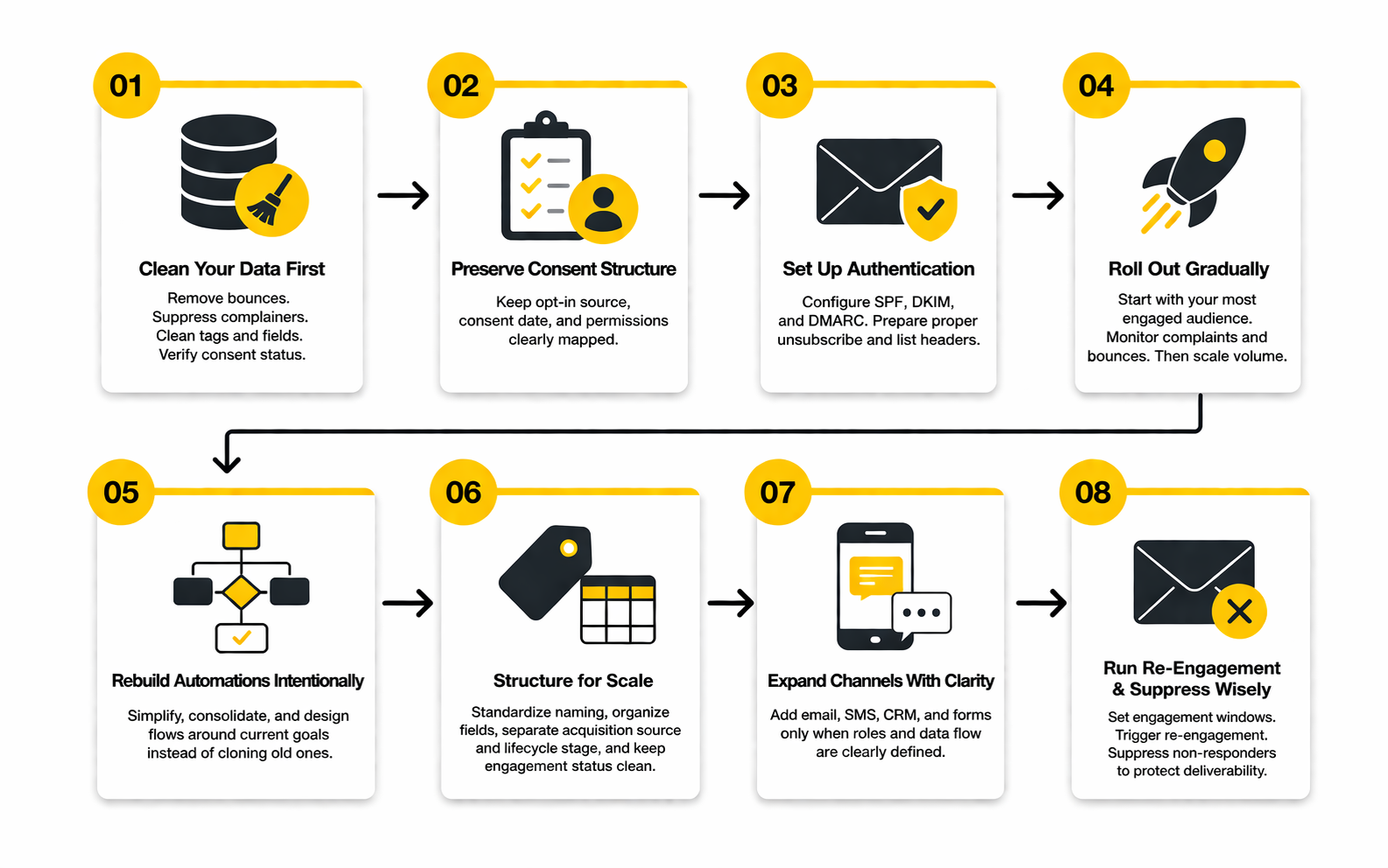
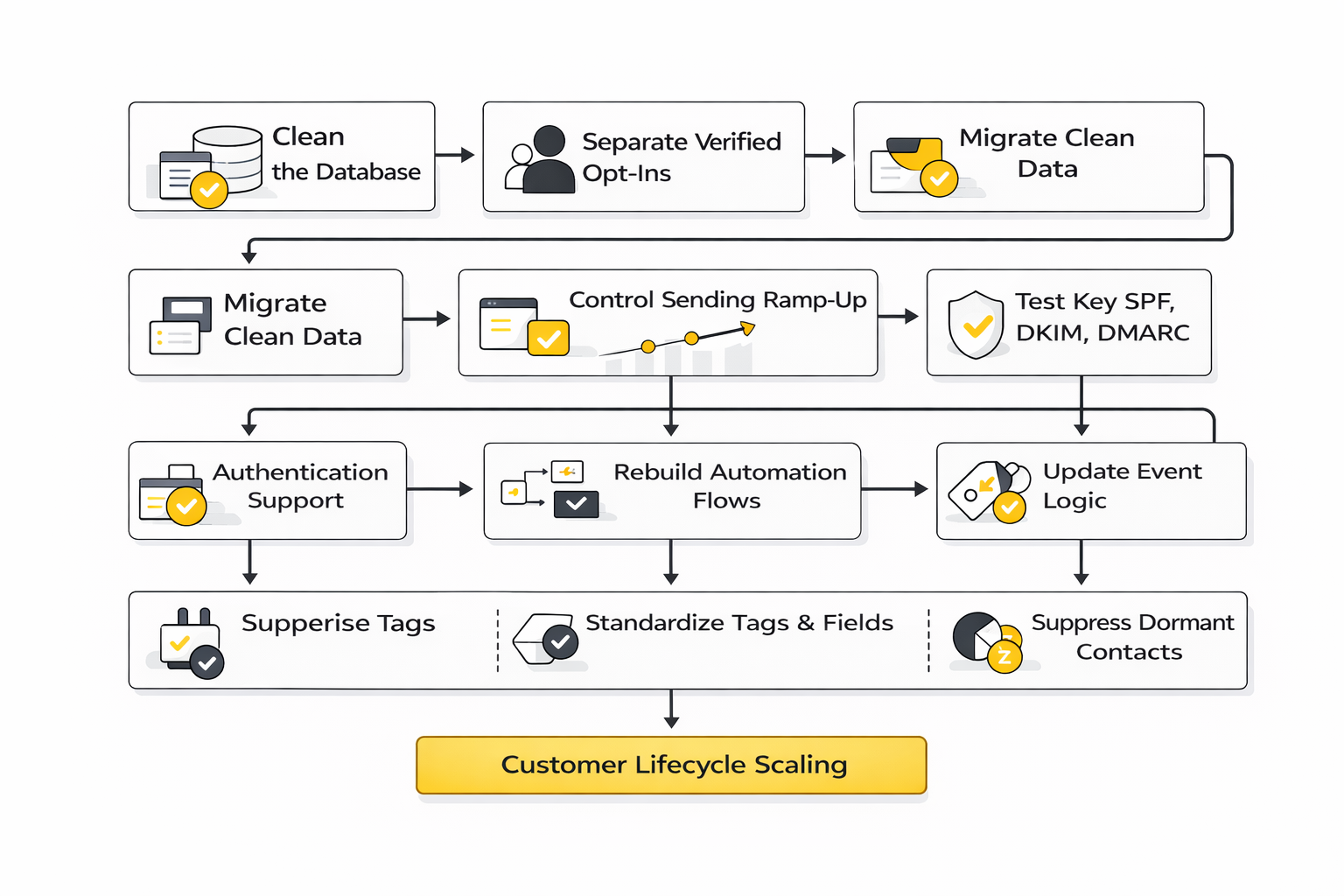
So before moving anything, clean the database aggressively. Remove hard bounces, suppress complainers, isolate dormant segments, normalize tags and custom fields, and separate contacts by verified consent status. This is not admin work for its own sake. It is the difference between starting strong and importing your old problems into a new dashboard.
Consent Structure Has to Survive the Move
A lot of email teams talk about list size as if volume is the asset. It is not. Permission is the asset. If you lose clarity around who opted in, when they opted in, what they opted in to, and which messages they should still receive, you weaken both compliance and deliverability.
That matters more as your stack gets more sophisticated. Once you are running promotional campaigns, lifecycle flows, transactional messages, and maybe SMS or CRM-led outreach alongside email, the cost of bad consent mapping goes up fast. A good migration preserves subscription source, consent date, channel permissions, and suppression logic in a way the new platform can actually use.
This is one reason some migrations fail even when the software itself is better. The team moved contacts, but not the logic behind the contacts. Without that context, segmentation gets fuzzier, flows get blunter, and trust erodes quietly.
Authentication and Sending Reputation Need a Controlled Ramp
Moving platforms can create the false feeling that you get a fresh start. You do not. Your brand reputation still follows your domain, and mailbox providers still judge what your recipients do with your messages. Microsoft’s 2025 guidance for high-volume senders, like Google’s earlier rules, keeps reinforcing authentication and healthy sending behavior as baseline requirements, not optional polish. Microsoft’s high-volume sender announcement makes that direction clear.
That is why rollout should be gradual. Start with your most engaged audience first, monitor complaint and bounce behavior closely, confirm SPF, DKIM, and DMARC are all correct, and only then increase volume. Google’s FAQ around sender requirements also makes clear that one-click unsubscribe and proper list-unsubscribe headers matter operationally, not just cosmetically. The sender FAQ is worth reviewing before launch.
A rushed migration often fails because the team assumes the platform setup is enough. It is not. The first sends after migration are part of the implementation, and they influence how quickly the new environment earns trust.
Automation Design Should Be Rebuilt, Not Blindly Cloned
Not every old workflow deserves to survive. This is one of the few moments when you get permission to rethink what the system is doing, and smart teams use that window properly. They do not just recreate every sequence. They simplify, consolidate, and prioritize the flows that actually influence conversion, retention, or customer experience.
This matters because most mature accounts accumulate automation debris. Old lead magnets, duplicate reminders, outdated nurture tracks, overlapping campaigns, abandoned experiments, and workarounds added by three different people over two years all start stacking up. Moving that mess into a new platform only makes the mess more expensive.
The better move is to rebuild the automation architecture around current business priorities. That usually means defining which flows are essential, which can be retired, which need stronger branching logic, and which should be redesigned around more meaningful triggers. If you want a platform that feels better six months later, this is one of the highest-leverage steps.
Scaling Problems Usually Start With Data Structure, Not Email Volume
A lot of teams think they have “outgrown” a platform because the subscriber count increased. Sometimes that is true. More often, they have outgrown the way the account was organized. Weak field naming, inconsistent tagging, mixed audience definitions, and unclear event tracking create friction long before raw scale does.
This is one reason the best email services like Mailchimp often feel dramatically different in practice even when their feature lists overlap. The platform may support strong segmentation and automation on paper, but if your data model is chaotic, the experience still feels limited. Bad structure makes good software look worse than it is.
That means scaling well is less about chasing bigger tools and more about building cleaner foundations. Define naming conventions. Standardize event logic. Separate acquisition source from lifecycle stage. Keep suppression and engagement states clean. When those pieces are tight, growth feels more manageable and platform limits become easier to evaluate honestly.
The Hidden Cost of Multi-Channel Expansion
A lot of teams graduate from email-first to multi-channel without realizing they are taking on a different operating model. Adding SMS, CRM, chat, landing pages, forms, or sales pipelines can absolutely increase leverage, and this is where broader platforms such as Brevo, GoHighLevel, or Systeme.io can start to look attractive.
But there is a tradeoff. Every added channel increases coordination demands, measurement complexity, compliance exposure, and data-dependency across the stack. If your team is not ready for that, “all in one” can become “all tangled together.”
The right time to broaden the stack is when you already know what role each channel should play. Email drives nurture. SMS supports urgency and reminders. CRM stages reflect real sales movement. Forms collect the exact data the flows need. When those roles are clear, a broader platform can reduce tool sprawl. When they are not, it can magnify confusion.
Re-Engagement and Suppression Are Scaling Tools, Not Cleanup Tools
One of the clearest signs of a mature email operation is that it knows when not to send. That sounds counterintuitive, especially for teams used to treating list size as momentum. But repeated sending to unengaged subscribers is one of the fastest ways to drag down performance and increase deliverability risk.
This is why sunset policies matter. Klaviyo’s guidance on sunset flows and list hygiene keeps returning to the same operational principle: if people stop engaging for long enough, continuing to mail them aggressively can do more harm than good. That is not just a cleanup tactic. It is a scaling tactic.
The expert move is to define engagement windows, trigger re-engagement intentionally, and suppress non-responders when the signal is clear. Teams that do this well usually outperform teams with larger but dirtier databases, because the healthy audience keeps their sender reputation stronger and their metrics more trustworthy.
Vendor Lock-In Is Real, So Think About Exit Costs Early
This is a more advanced consideration, but it matters. Some platforms are easy to start with and harder to leave once your templates, automations, forms, reporting structure, and custom integrations become deeply embedded. That does not make them bad choices. It just means you should evaluate exit friction before you commit, not after.
Ask practical questions. How portable is your contact data? Can you export engagement history in a useful way? Are automations documented clearly enough to rebuild elsewhere if needed? Do forms, landing pages, and embedded assets make the system sticky in a good way or sticky in a dangerous way?
A strong platform should earn loyalty through performance, not through escape difficulty. When you assess alternatives with that in mind, you make a sharper decision.
The Best Platform Choice Usually Looks Boring at First
This is probably the least glamorous truth in the whole article. The right platform often does not look the most exciting in a demo. It usually looks like the tool that fits your business model, keeps your team disciplined, supports clean data, and gives you enough room to scale without forcing complexity too early.
That can mean sticking with a mainstream option. It can mean moving to a creator-first tool. It can mean upgrading to an automation-heavy platform or consolidating into a broader communications stack. But the best choice usually feels operationally sensible more than emotionally impressive.
That is a good sign, not a weak one. Stable systems often look boring before they start compounding.
What an Expert Buyer Does Differently
An expert buyer does not ask which platform has the most features. They ask which platform makes the important work easier while keeping the risky work under control. That is a very different standard.
They care about:
- how consent survives migration
- how authentication is handled
- how segmentation stays usable at scale
- how reporting connects to actual business outcomes
- how easy it will be to clean, suppress, and re-engage the database over time
- how expensive complexity becomes once more channels and automations are added
That is also why the search for email services like Mailchimp usually ends better when it starts with business model fit rather than feature envy. The market has enough strong tools now that the winning decision is rarely about finding the single “best” platform. It is about finding the platform that creates the fewest costly compromises for the way you actually grow.
The final part will tie this together with a clear conclusion and the FAQ that most buyers still need answered before they commit.
Bringing the Whole System Together
By this point, the real takeaway should be clear. Choosing between email services like Mailchimp is not really about picking the prettiest editor or the cheapest starter plan. It is about choosing the system that best matches your business model, gives you usable analytics, supports healthy sender practices, and stays manageable as your automation gets more sophisticated.
That is why the strongest decision usually comes from working backward. Start with the journeys you need, the metrics that matter, the channels you will actually use, and the level of operational complexity your team can handle. Then choose the platform that supports that reality instead of the one with the most exciting demo.
The market has matured enough that there is no single winner for everyone. Mailchimp still makes sense for a broad range of businesses, especially those that want a familiar and established platform with layered plans and mainstream usability. But tools like Brevo, Moosend, Systeme.io, and GoHighLevel can be smarter fits when pricing logic, channel breadth, or workflow structure matters more than brand familiarity.
The other thing that should be obvious now is this: implementation discipline matters as much as software selection. Google still requires bulk senders to meet authentication and unsubscribe standards, Yahoo still expects strong bulk-sender hygiene, and Microsoft has moved Outlook.com in the same direction with high-volume sender requirements. If your migration is sloppy, your list is dirty, or your consent structure is weak, the new tool will not magically fix it. Google’s sender guidelines, Yahoo’s sender best practices, and Microsoft’s Outlook.com requirements all point to the same operational standard.
So the best final advice is simple. Choose the platform that makes your next year of growth cleaner, not just your next month of sending easier. That is the difference between buying software and building a durable email system.
FAQ - Built for Complete Guide
What are the best email services like Mailchimp right now?
The best alternatives depend on what kind of business you are running, not just on feature count. Mailchimp remains a strong mainstream option, while Brevo is often attractive for flexible pricing, Moosend for lean mid-market execution, and GoHighLevel for broader sales-and-marketing operations. The smarter question is not “which one is best,” but “which one fits my business model with the fewest painful compromises.”
Is Mailchimp still worth using in 2026?
Yes, for the right type of business it still is. Its official plan structure still supports a wide range of use cases, and Mailchimp continues to position its Marketing Automation Flows and reporting as part of a broader SMB-friendly system rather than a niche specialist tool. Mailchimp’s pricing and plan comparison pages show that it is still very much an active, evolving platform.
Which Mailchimp alternative is usually the cheapest?
That depends on how the platform charges as you grow. Some tools feel cheap at the start and get expensive once your contact count rises or you need better automation, while others are more forgiving if your send volume is lower relative to your stored database. That is one reason Brevo and Moosend keep coming up in budget-focused comparisons.
Which platform is better for creators and newsletter businesses?
Creator-led businesses usually benefit from platforms that make publishing, audience growth, and simple monetization easier instead of forcing enterprise-style complexity too early. That is why Kit tends to be the cleaner fit for creators, educators, and media-style businesses, while more general tools often make the workflow feel heavier than it needs to be. The right choice is usually the one that reduces friction around publishing consistency.
Which platform is better for ecommerce than Mailchimp?
If your store depends heavily on behavioral triggers, customer-value segmentation, browse activity, cart recovery, and revenue attribution, ecommerce-specialized tooling usually has an advantage. That is why so many stores move toward Klaviyo once retention marketing becomes a real growth lever instead of a side channel. Ecommerce teams need revenue-aware automation, not just broadcast capability.
Are free plans enough for serious email marketing?
Usually not for long. Free plans can be useful for testing setup, learning the interface, and validating simple campaign motion, but they often restrict automation depth, support, sending volume, or reporting. Once your program starts affecting revenue or lead flow, the real issue is not whether the plan is free, but whether the limitations are now costing you more than the upgrade would.
What metrics should I care about most when comparing platforms?
The important metrics are the ones that actually help you make better decisions. Delivery rate, click rate, complaint rate, unsubscribe rate, conversion rate, and revenue per recipient tell you far more than vanity dashboard activity alone. Broad benchmark pages such as Mailchimp’s benchmark resource are useful for context, but the best platform is the one that helps you interpret your own data clearly.
Do open rates still matter after privacy changes?
Yes, but they should be treated carefully. Open rates still help you spot deliverability or subject-line issues, but privacy protections have made them less reliable as a clean measure of human attention. That means you should read opens alongside clicks, unsubscribes, complaints, and conversions instead of treating them as the headline metric.
How hard is it to migrate from Mailchimp to another platform?
Technically, it is usually manageable. Operationally, it can become messy if you move bad data, weak consent records, broken tags, or outdated automations without cleaning them first. The migration itself is rarely the real problem. The real problem is carrying old account chaos into a new system and expecting a different outcome.
Can changing email platforms hurt deliverability?
Yes, it can if the rollout is rushed. Authentication, complaint handling, unsubscribe structure, list quality, and early sending behavior all matter, which is why Google, Yahoo, and Microsoft all keep reinforcing stronger sender standards for bulk mail. Google’s sender FAQ is especially useful because it clarifies who qualifies as a bulk sender and what the expectations look like operationally.
How many contacts do I need before switching away from Mailchimp?
There is no perfect threshold. Some businesses outgrow Mailchimp at a few thousand contacts because they need deeper automation or better pricing logic, while others stay much longer because their workflow remains simple and effective. The right moment to switch is when the platform starts forcing workarounds that slow down strategy, reporting, or customer relevance.
Should I choose a dedicated email platform or an all-in-one system?
That depends on whether you truly need the wider stack. If you only need email, forms, basic landing pages, and a few automations, a focused platform is often cleaner and easier to manage. If your workflow already depends on CRM stages, SMS, calendars, sales pipelines, and multi-step lead routing, an all-in-one environment like GoHighLevel or a broader communications stack like Brevo can make more sense.
What is the biggest mistake people make when choosing email services like Mailchimp?
They compare tools like shoppers instead of operators. They focus on entry price, visual polish, or brand familiarity, then ignore deliverability standards, migration friction, consent quality, automation depth, and reporting quality. That is exactly how a platform that looked “good enough” turns into the expensive choice later.
Work With Professionals
Explore 10K+ Remote Marketing Contracts on MarkeWork.com
Most marketers spend too much time chasing clients, competing on crowded platforms, and losing a percentage of every project to middlemen.
MarkeWork gives you a better way. Browse thousands of remote marketing contracts and connect directly with companies desperate to hire skilled marketers like you, without platform commissions and without unnecessary gatekeepers.
If you're serious about finding better opportunities and keeping 100% of what you earn, explore available contracts and create a profile for free at MarkeWork.com.