

Free email list services are useful when you are starting lean, testing an offer, or building your first audience without adding another monthly bill. The problem is that “free” can mean very different things depending on the platform: free contacts, free sends, free automation, free forms, or free only until your list becomes useful.
That matters because email is still one of the few channels you actually control. Social reach can disappear overnight, ad costs can climb, and search traffic can shift with one update, but a permission-based email list gives you a direct line to people who asked to hear from you. Recent email ROI research shows many brands still see meaningful returns from email when they measure it properly, with Litmus reporting common ROI ranges between 10:1 and 36:1.
This guide is not about collecting the biggest list for the lowest price. That is the beginner trap. The better question is: which free email list service gives you enough room to grow while protecting deliverability, consent, automation, and future migration?
Article Outline
- Why Free Email List Services Matter
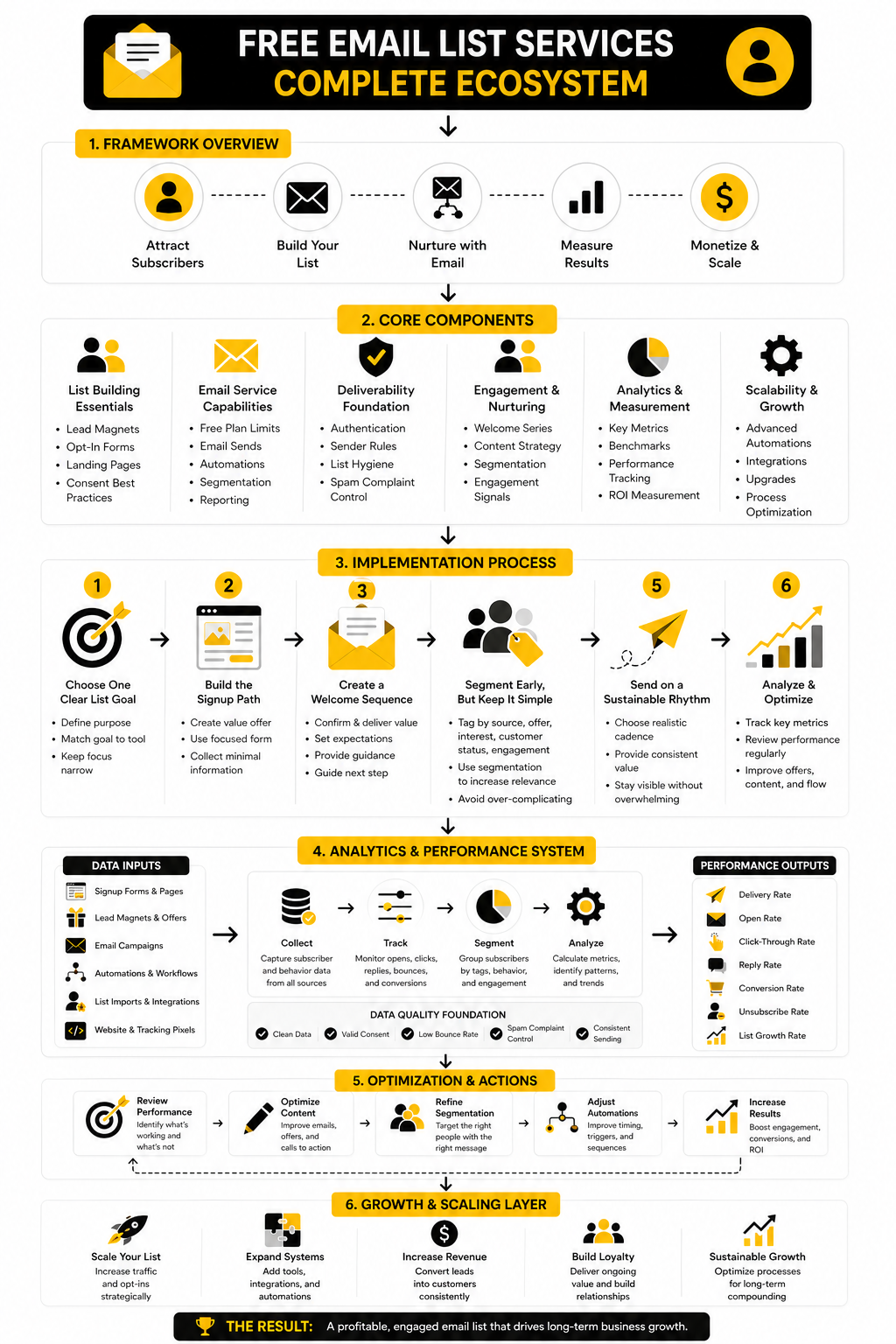
- The Free Email List Service Framework
- Core Features That Actually Matter
- Best Free Email List Services By Use Case
- Professional Implementation And Migration Planning
- FAQs And Final Recommendations
Why Free Email List Services Matter
A free plan can be the right move when your business is still proving its message. You do not need a complex marketing stack to validate a lead magnet, send a welcome sequence, or learn what your audience clicks. You need a clean signup process, reliable delivery, basic segmentation, and enough reporting to make better decisions.
But free email list services are not all built for the same type of user. A creator sending a weekly newsletter needs different limits than a local agency managing leads, and an ecommerce store needs different automation than a consultant booking calls. For example, Brevo is often attractive when daily sending limits matter more than contact caps, while Moosend fits teams that care more about campaign workflows and list growth paths.
The catch is that free tools create habits. If the platform makes it easy to import cold contacts, skip consent, or ignore authentication, it can quietly damage your sender reputation before your list ever becomes valuable. The FTC’s CAN-SPAM guidance makes the basics clear: accurate sender information, honest subject lines, a physical mailing address, and a working unsubscribe process are not optional.
The Free Email List Service Framework
Choosing a free email list service gets easier when you stop comparing logos and start comparing operating models. The right framework looks at four things: audience size, sending frequency, automation needs, and compliance risk. A platform that looks generous on contact limits may be weak on automation, while another may offer strong automation but restrict monthly sends quickly.
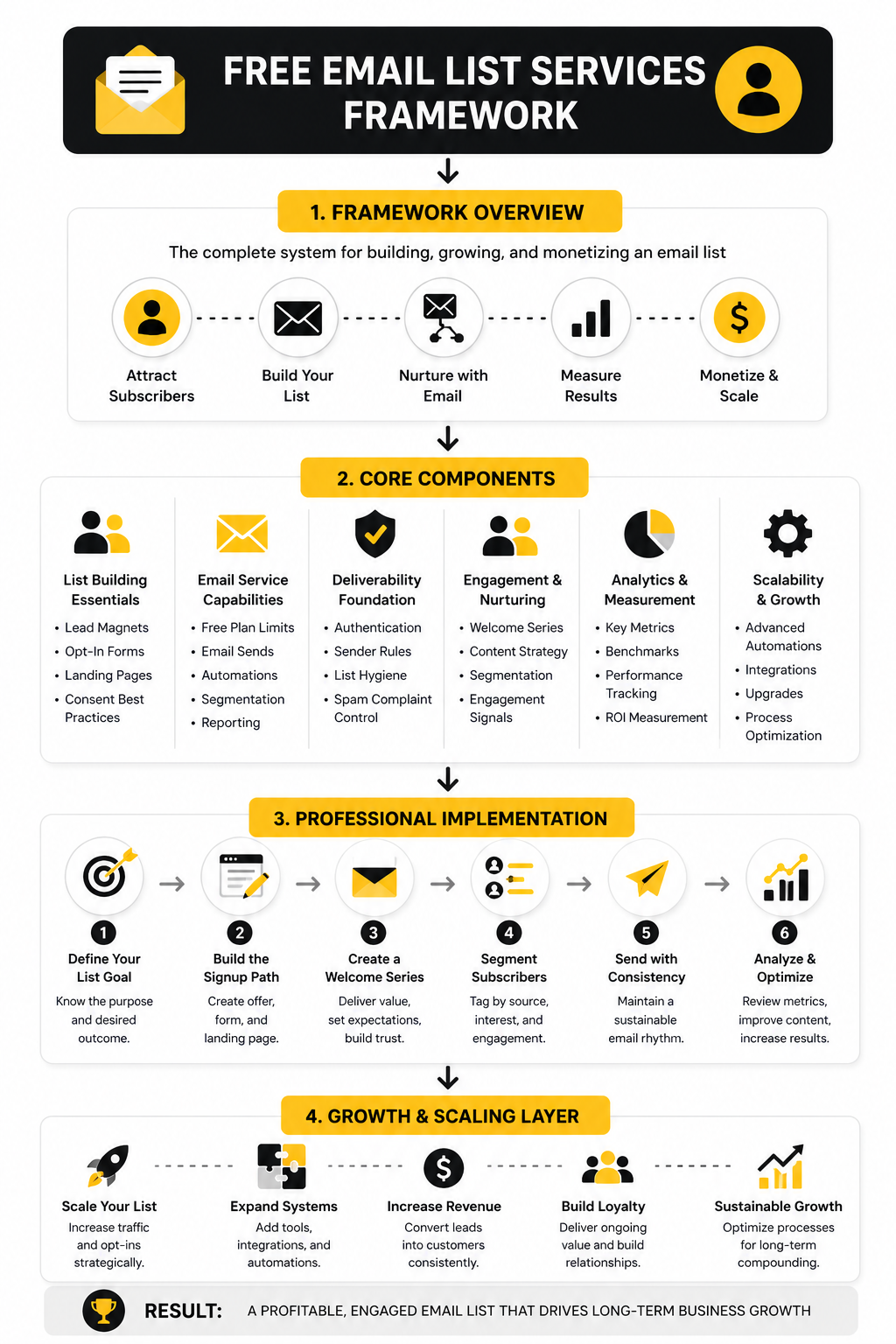
The first layer is capacity. Look at contact limits, monthly send limits, daily caps, branding requirements, and what happens when you cross the free threshold. A free plan that supports 2,000 contacts but only a few useful features may be worse than a smaller plan that gives you forms, segments, and automation from day one.
The second layer is control. You want clean export options, custom domains or sender authentication when available, simple unsubscribe handling, and enough analytics to understand list quality. Deliverability has become more demanding as mailbox providers tighten expectations, and Sinch Mailgun’s 2025 deliverability research emphasizes that inbox placement depends on sender behavior, authentication, and complaint management, not just the tool you choose.
The third layer is growth fit. If email will stay simple, a newsletter-first tool may be enough. If email needs to connect with funnels, CRM stages, SMS, chat, or booked appointments, an all-in-one system like GoHighLevel may become more practical once the free-tool stage is no longer enough.
Core Features That Actually Matter
The best free email list services are not the ones with the longest feature page. They are the ones that let you collect permission properly, send consistently, and learn what your subscribers actually do. That means you should judge free plans by the practical work they support, not by the number of shiny features they advertise.
Start with signup forms and landing pages. A free email tool should let you create a simple opt-in form, connect it to a clear list or segment, and send a confirmation or welcome email without making you fight the software. If the form builder is clunky, the embed process is messy, or the subscriber source is hard to track, your list will become harder to manage as it grows.
Then look at automation. You do not need a giant automation map in the beginning, but you do need at least a basic welcome sequence. A subscriber who joins today should not wait until your next broadcast to hear from you, because the first few emails are where trust, expectations, and buying intent are shaped.
Reporting is the next filter. Opens are less reliable than they used to be because privacy features can inflate or obscure them, so clicks, replies, conversions, unsubscribes, and spam complaints matter more. A free plan that only shows vanity metrics can make you feel productive while hiding whether your emails are actually moving the business forward.
List Quality Beats List Size
A bigger list is not automatically a better list. In fact, a low-quality list can hurt you faster than a small list can help you. Gmail’s sender rules require authentication for all senders and add stricter rules for higher-volume senders, while Yahoo’s sender guidance tells senders to keep spam complaints below 0.3%, which is a very small margin for sloppy list building.
This is why free email list services should never be used as a dumping ground for random contacts. If someone did not clearly ask to hear from you, do not add them. It is not just a legal issue; it is a deliverability issue, a brand issue, and a trust issue.
The practical move is simple: collect fewer subscribers with stronger intent. A checklist, discount, free training, calculator, or useful template will usually build a healthier list than a vague “join my newsletter” box. If you need a simple form tool to collect better lead data before pushing people into your email system, Fillout can fit naturally into that workflow.
Free Plan Limits You Should Check Before Signing Up
Every free plan has a tradeoff. Some limit subscribers, some limit sends, some limit automation, and some keep platform branding on your emails. None of that is automatically bad, but you need to know the constraint before you build your system around it.
The most important limits to check are:
- Contact limit
- Monthly email send limit
- Daily email send limit
- Automation access
- Segmentation access
- Landing page or form access
- Email template access
- Reporting depth
- Branding removal
- Support availability
- Export options
- Sender authentication support
Do not treat the contact limit as the only number that matters. A plan with 1,000 contacts and enough monthly sends for regular campaigns may be more useful than a plan with more contacts but weak automation. The real question is whether the free plan supports your next 90 days of growth without forcing you into bad habits.
Also check what happens when you upgrade. Some tools price by contacts, others by sends, and others by broader platform access. Brevo is worth reviewing when you care about send-based pricing, while Systeme.io can make sense when you want email, funnels, and simple selling tools in one place.
Deliverability Is Not A Bonus Feature
Deliverability is where many beginners get blindsided. They choose a free email service, send a few campaigns, see poor engagement, and blame the tool. Sometimes the tool is the issue, but often the real problem is weak consent, inconsistent sending, poor authentication, or emails that train subscribers to ignore them.
Mailbox providers are stricter now because inboxes are crowded and abuse is constant. Google’s sender requirements began applying to all senders to Gmail accounts on February 1, 2024, and Microsoft expanded authentication requirements for high-volume senders to Outlook.com, Hotmail.com, and Live.com in 2025. That means even small senders should build like professionals from the start.
The basics are not complicated. Use a real domain, authenticate it when your platform allows it, send only to people who opted in, make unsubscribe easy, and remove people who never engage. Free email list services can help with the mechanics, but they cannot fix a bad permission strategy.
This is why you should avoid any “free list” shortcut that promises thousands of contacts. Bought, scraped, or recycled lists are not assets. They are liabilities dressed up as growth.
Professional Implementation And Migration Planning
Once you understand the limits, the next move is implementation. This is where most people overcomplicate things. You do not need a giant system on day one; you need a clean path from visitor to subscriber to engaged lead.
The simplest setup has five parts: a useful offer, a focused signup form, a tagged subscriber record, a short welcome sequence, and a regular sending rhythm. Free email list services can usually handle this if you choose the platform based on the process instead of choosing it based on hype. The goal is to make the first version easy to run, easy to measure, and easy to improve.
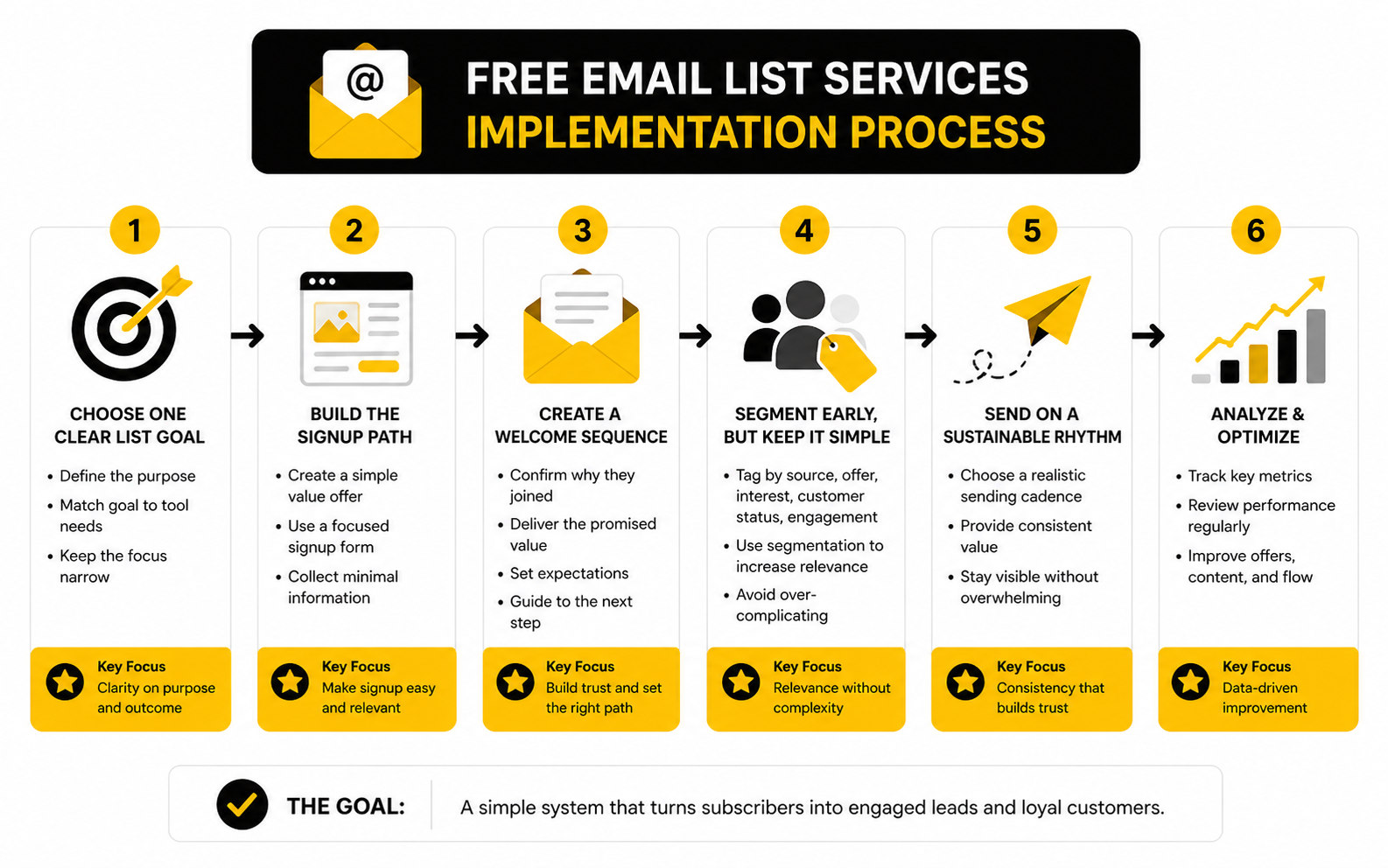
Step 1: Choose One Clear List Goal
Before picking software, decide what the list is supposed to do. Is it meant to sell a product, book calls, grow a newsletter, promote content, nurture ecommerce buyers, or support a local service business? That decision changes what you should look for in a free plan.
A creator may only need forms, broadcasts, and basic segmentation. A service business may need pipeline tracking, appointment booking, SMS, and follow-up tasks, which is where a broader platform like GoHighLevel can make more sense after the early free-tool stage. A funnel-based business may care more about landing pages and checkout paths, which makes Systeme.io worth considering when email is only one part of the sales system.
Step 2: Build The Signup Path
Your signup path should be painfully simple. One promise, one form, one next step. If someone lands on your page and has to decode what they get, why it matters, or what happens after signup, the problem is not your email service.
Use a lead magnet only when it supports the buyer journey. A random PDF may grow the list, but it can also attract people who only want free stuff. A better offer helps the subscriber solve a real first-step problem and naturally leads into the next conversation.
For the form itself, collect the least information you need. Name and email are usually enough in the beginning. If you need more context, a tool like Fillout can help you qualify subscribers without turning the signup experience into a tax form.
Step 3: Create A Welcome Sequence
The welcome sequence is the first real test of your list quality. It should confirm why the person joined, deliver what you promised, and set expectations for what comes next. This is not the place to ramble or dump every offer you have.
A practical beginner sequence can be three to five emails. The first email delivers the promised asset or confirmation. The next emails can explain the problem, share useful guidance, handle a key objection, and invite the subscriber to take one clear next step.
Do not make every email a pitch. That trains people to ignore you. The stronger play is to be useful first, then make the next action obvious when it naturally fits.
Step 4: Segment Early, But Keep It Simple
Segmentation sounds advanced, but it does not need to be complicated. At the start, you mainly want to know where subscribers came from, what they asked for, and whether they clicked or replied. Those signals are enough to avoid sending the same message to everyone forever.
A simple tagging system might include source, lead magnet, interest, customer status, and engagement. That gives you enough structure to send more relevant emails without creating a messy database. Free email list services often have basic tags or lists, and that is usually enough until your offers become more complex.
The mistake is creating too many segments too soon. If you cannot explain what a tag changes in your follow-up, you probably do not need it yet. Keep the system lean so you can actually use it.
Step 5: Send On A Sustainable Rhythm
Consistency matters more than intensity. A weekly or biweekly email is often better than sending daily for two weeks and disappearing for two months. Your subscribers should learn what kind of value you send and how often to expect it.
Pick a rhythm you can maintain. For many small businesses, one useful email per week is enough to stay visible without overwhelming the list. For ecommerce or launch-driven brands, the cadence may increase around campaigns, but the baseline should still feel intentional.
This is where free email list services show their real value. They let you build the habit before you build the machine. Once you know what people click, what they ignore, and what drives replies or sales, upgrading becomes a business decision instead of a guess.
Statistics And Data
The numbers around free email list services only matter when they help you make better decisions. Benchmarks are not scorecards for ego. They are diagnostic signals that show whether your list is healthy, your offer is relevant, and your sending habits are helping or hurting future performance.
Open rates are the easiest metric to notice, but they are not the cleanest metric to trust. Apple’s Mail Privacy Protection and other privacy changes can make opens look stronger or weaker than subscriber intent really is, so opens should be treated as a directional signal instead of proof of demand. If opens are falling over several campaigns, your subject lines, sender name, list quality, or sending rhythm may need work, but you should not make big decisions from opens alone.
Clicks are more useful because they show action. A subscriber who clicks is telling you what they care about, what offer they are considering, and which problem is urgent enough to explore. This is why even a basic free plan should give you click data, because that data can guide future content, segmentation, lead magnets, and offers.
The Metrics That Actually Deserve Attention
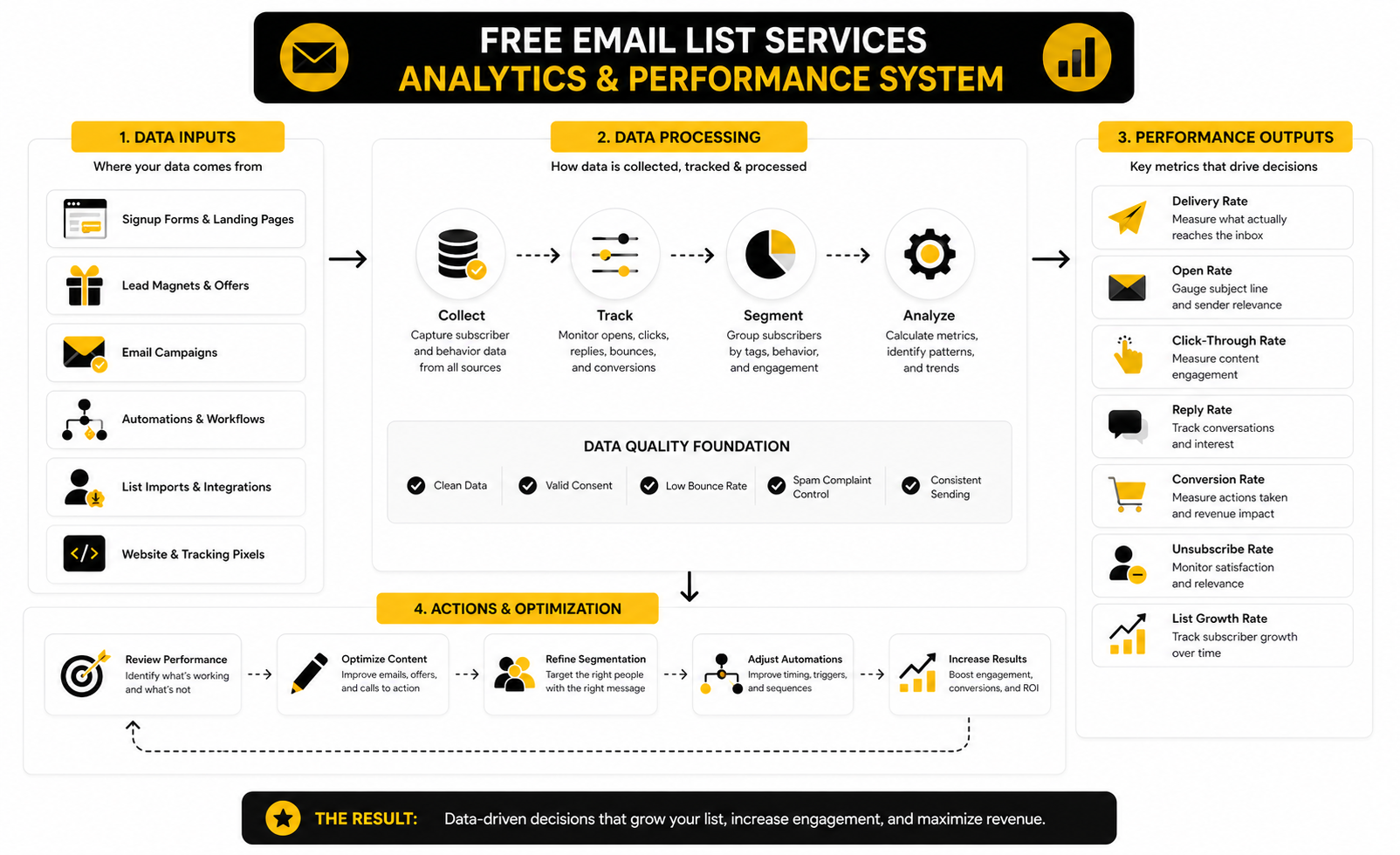
A simple analytics system beats a complex dashboard you never use. For most beginners, the right weekly review is not twenty metrics. It is a short check of list growth, delivery health, engagement, and business outcomes.
Track these signals first:
- New subscribers: Shows whether your lead magnet and traffic sources are working.
- Confirmation rate: Shows whether people actually want to join and complete the process.
- Click rate: Shows whether your email content creates action.
- Unsubscribe rate: Shows whether expectations and content are aligned.
- Spam complaint rate: Shows whether your list quality or message relevance is becoming dangerous.
- Conversion rate: Shows whether email is creating the business result you wanted.
- Revenue or booked calls: Shows whether the list is moving beyond attention into real outcomes.
The most important part is interpretation. If your list is growing but clicks are weak, you may have a traffic-quality problem or a weak offer. If clicks are strong but conversions are weak, the issue may be the landing page, checkout, sales call, or price point. If unsubscribes spike after one campaign, do not panic immediately; look at whether the message broke expectations or simply filtered out people who were never a fit.
Benchmarks Are Context, Not The Target
Email benchmarks vary heavily by industry, audience, source, and intent. A small expert newsletter with a tight audience can outperform a large ecommerce list on engagement, while an ecommerce brand may generate more revenue even with lower average engagement. That is why comparing your brand to broad averages can be useful, but only if you treat the numbers as context.
Recent benchmark reports show wide ranges rather than one universal “good” number. The Efficy 2025 email benchmark report reported an overall open rate of 35.64%, while MailerLite’s 2026 benchmark analysis reported a 2025 average open rate of 43.46% across its customer data. Those numbers are not identical because platforms, audiences, methodologies, and industries differ, which is exactly the point.
The useful move is to build your own baseline. Send consistently for 30 to 60 days, measure the same few signals, and compare your list against itself. Once you know your normal range, you can see whether a new lead magnet, subject line style, offer, or sending cadence actually improves performance.
What Good Performance Should Make You Do
Data should lead to action, not spreadsheet decoration. If your click rate is low across several emails, tighten the promise and reduce the number of links. If people click but do not buy or book, improve the page or offer they land on. If unsubscribes increase after promotional emails, review whether your welcome sequence prepared subscribers for offers.
Deliverability data deserves special attention because damage can compound. Google and Yahoo’s sender requirements made authentication and complaint control more important for serious senders, and Microsoft added authentication requirements for high-volume consumer email senders in 2025. That does not mean a beginner using free email list services needs enterprise infrastructure on day one, but it does mean sloppy sending is no longer harmless.
As a rule, watch complaints like a hawk. Yahoo’s sender guidance has used 0.3% as a clear complaint-rate ceiling, and a much lower rate is healthier if you want long-term inbox placement. If complaints rise, stop blaming the email platform first and inspect your source quality, consent language, frequency, and message relevance.
ROI Is The Final Measurement Layer
Email only becomes a real business asset when it connects to outcomes. The inbox metrics tell you what happened inside the campaign, but ROI tells you whether the list is worth the time, tools, and attention you are putting into it. That is especially important when comparing free email list services, because a free tool that blocks measurement can cost more than a paid tool that shows what is actually working.
Email still has strong upside when the system is built properly. Litmus reported that many companies see email ROI between 10:1 and 36:1, and recent reporting on Sinch Mailgun’s 2026 Email Impact findings noted that fewer than half of organizations reliably track email ROI even though many measured programs report strong returns. The lesson is obvious: email can work extremely well, but only if you can connect the list to revenue, bookings, purchases, or another real business outcome.
For a small list, ROI tracking can be simple. Use tagged links, dedicated landing pages, coupon codes, booking links, or CRM source fields. If you later need a stronger sales pipeline view, tools like GoHighLevel, Copper, or Cal.com can help connect email engagement to pipeline activity instead of leaving performance trapped inside campaign reports.
Advanced Tradeoffs Before You Scale
Free email list services are great for proving the basics, but they are not meant to hide strategic decisions forever. At some point, the cost of staying on a limited free plan becomes harder to see because it shows up as slower execution, weaker tracking, limited automation, or messy data. That is when “free” starts becoming expensive.
The key is knowing which tradeoff you are accepting. A free plan can be perfectly fine for a newsletter, early lead magnet, or small nurture sequence. It becomes risky when email is tied to real sales conversations, product launches, abandoned carts, client follow-up, or multi-step funnels where missing one automation can cost more than the software ever would.
When A Free Plan Is Still Enough
A free plan is enough when your system is simple and the list is still small. If you are sending one useful email per week, collecting subscribers from one or two sources, and running a short welcome sequence, you probably do not need a heavy platform yet. The best move is to stay lean and use the free tool until the business case for upgrading is obvious.
It is also enough when your primary goal is learning. Early email data teaches you which topics get clicks, which offers create replies, and which subscribers are worth attracting. That learning is more valuable than paying for advanced features you are not ready to use.
The danger is confusing simplicity with neglect. Even on a free plan, you still need clean consent, a real sending schedule, basic tagging, and a way to export your list. If the platform blocks those basics, choose a better free email list service before your list becomes harder to move.
When You Should Upgrade
Upgrade when the free plan starts limiting revenue, speed, or trust. That might mean you need more sends, deeper automation, better segmentation, cleaner reporting, or stronger integrations with your sales process. If you are manually doing follow-ups that software could handle reliably, the free plan is no longer saving you money.
Upgrade when your list becomes commercially important. If email drives bookings, sales calls, repeat purchases, course launches, affiliate revenue, or client onboarding, you need a system that can support the full journey. For funnels and simple product selling, Systeme.io can be a practical step up because email sits next to pages and offers instead of living alone.
Upgrade when your team needs visibility. A solo creator can survive with simple reports, but a business needs source tracking, pipeline context, and conversion data. If your email list feeds sales conversations, a CRM-connected setup like GoHighLevel or Copper can make the list more useful because contacts are connected to deals, calls, and follow-up.
The Migration Problem Nobody Wants To Think About
Most people choose free email list services as if they will never leave. That is a mistake. If your list grows, your offers change, or your automation needs expand, migration becomes much easier when you planned for it early.
Keep your data clean from the beginning. Use clear tag names, avoid duplicate lists, and document what each automation does. Export your contacts regularly, including consent source, signup date, tags, and engagement fields where available.
Before moving platforms, clean the list. Remove obvious invalid addresses, suppress people who repeatedly bounced, and consider re-engaging inactive subscribers before importing them somewhere new. Recent deliverability guidance from providers and email infrastructure companies keeps pointing in the same direction: authentication, consent, and list hygiene are now core operating requirements, not technical extras.
Automation Should Support Intent, Not Replace It
Automation is powerful, but it can also make bad messaging scale faster. A weak welcome email is still weak if it is automated. A confusing offer is still confusing if it is sent at the perfect time.
Use automation where timing matters. Welcome sequences, lead magnet delivery, abandoned checkout follow-up, appointment reminders, post-purchase education, and re-engagement campaigns are all logical places to automate. These emails solve real timing problems and reduce manual work without making the subscriber experience feel robotic.
Do not automate just to feel advanced. A simple broadcast with a sharp point can outperform a complex workflow with no clear purpose. The rule is simple: every automation should have a trigger, a reason, and a measurable next step.
Multi-Channel Growth Changes The Email Decision
Email rarely works alone once a business matures. Subscribers may come from search, YouTube, ads, webinars, social posts, chat widgets, forms, referrals, or checkout flows. That means your email platform needs to fit the wider acquisition system, not just send newsletters.
For social-led businesses, tools like Buffer can help keep content distribution consistent before people ever join the list. For chat-first lead capture, ManyChat can support conversations that later move into email follow-up. For websites and landing pages, tools like Replo can matter when conversion rate becomes the bottleneck instead of email sending.
This is where strategy beats tool collecting. Do not stack software because every feature sounds useful. Build the smallest system that captures the lead, follows up properly, measures the result, and gives you room to improve.
The Biggest Risks To Avoid
The biggest risk is not choosing the wrong free tool. The bigger risk is building the wrong list. A list filled with weak-fit subscribers, vague consent, and low engagement will create problems no platform can magically fix.
Avoid these mistakes:
- Importing contacts who did not clearly opt in
- Using one generic lead magnet for every audience
- Sending only when you want to sell
- Ignoring unsubscribes, bounces, and complaints
- Creating too many tags without a plan
- Depending on open rates as the main success metric
- Choosing a platform with poor export options
- Waiting too long to authenticate your sending domain
The best free email list services give you a clean starting point. They do not replace positioning, consistency, useful content, or a real offer. Get those right, and the tool becomes a growth asset instead of another dashboard you forget to check.
FAQ - Built For Complete Guide
What are free email list services?
Free email list services are email marketing platforms that let you collect subscribers, manage contacts, and send emails without paying at the start. Most free plans include limits on contacts, monthly sends, automation, branding, or support. They are useful for testing an audience, validating a lead magnet, and building your first simple email system.
Are free email list services actually good enough?
Yes, they can be good enough when your list is small and your process is simple. The best free email list services can handle forms, broadcasts, basic segmentation, and sometimes automation. They stop being enough when email becomes tied to serious revenue, sales follow-up, ecommerce recovery, or more advanced customer journeys.
What is the biggest mistake beginners make with free email tools?
The biggest mistake is chasing contact volume instead of subscriber quality. A list of 300 people who want your offer is more valuable than 5,000 people who barely remember joining. Poor consent, weak targeting, and irrelevant emails can hurt deliverability before the list has any real business value.
Should I use double opt-in?
Double opt-in is a smart choice when list quality matters more than raw signup numbers. It confirms that the subscriber really wants to join and helps reduce fake or mistyped email addresses. Single opt-in can grow faster, but it requires stronger monitoring of bounces, complaints, and engagement.
How often should I email a new list?
Start with a rhythm you can maintain. For many creators, consultants, and small businesses, one useful email per week is enough to build familiarity without overwhelming subscribers. If you only send when you want to sell, your list will feel transactional, and engagement will usually suffer.
Which metric matters most in the beginning?
Clicks matter more than opens in the beginning. Opens can be distorted by privacy features, but clicks show that people cared enough to act. Replies, bookings, purchases, and conversions matter even more once your list starts supporting a real offer.
When should I stop using a free plan?
Stop using a free plan when it limits growth, revenue, or trust. That usually happens when you need more sends, better automation, cleaner reporting, stronger integrations, or fewer branding restrictions. Upgrading should be tied to a business reason, not just the feeling that paid software looks more professional.
Can I move my list later?
Yes, but migration is much easier when your data is clean. Use clear tags, document your signup sources, avoid messy duplicate lists, and export your contacts regularly. Before moving, remove bad addresses, inactive subscribers, and contacts who did not clearly opt in.
Do free email list services hurt deliverability?
A free plan does not automatically hurt deliverability. Deliverability depends more on consent, list hygiene, authentication, content relevance, sending consistency, and complaint rates. A paid plan will not rescue a bad list or sloppy sending habits.
What should my first welcome sequence include?
Your first welcome sequence should deliver the promised resource, explain what subscribers can expect, provide useful guidance, and lead to one clear next step. Three to five emails is enough for most beginner systems. Keep it tight, useful, and focused on the problem the subscriber joined to solve.
Should I use an all-in-one platform instead of a free email tool?
An all-in-one platform makes sense when email is only one part of a bigger system. If you also need funnels, CRM, booking, SMS, checkout pages, or pipeline management, a simple free email tool may become limiting quickly. If you only need a newsletter and a basic lead magnet, starting with a focused free email service is usually cleaner.
What is the best free email list service?
There is no universal best option. The best free email list service depends on your contact count, send volume, automation needs, growth plan, and whether you need email alone or a broader marketing system. Choose the tool that fits your next 90 days, not the one with the loudest feature list.
Work With Professionals
Explore 10K+ Remote Marketing Contracts on MarkeWork.com
Most marketers spend too much time chasing clients, competing on crowded platforms, and losing a percentage of every project to middlemen.
MarkeWork gives you a better way. Browse thousands of remote marketing contracts and connect directly with companies desperate to hire skilled marketers like you, without platform commissions and without unnecessary gatekeepers.
If you're serious about finding better opportunities and keeping 100% of what you earn, explore available contracts and create a profile for free at MarkeWork.com.