

A free email sending service sounds simple until you actually need one. You are not just looking for a tool that lets you send emails without paying today. You are choosing the system that will handle your list, protect your sender reputation, support compliance, and hopefully still make sense when your audience grows.
That matters because email is still one of the few channels where you own the relationship. Social reach can drop overnight, ad costs can climb, and search traffic can shift after an algorithm update. But a clean email list, handled properly, gives you a direct line to people who asked to hear from you.
The catch is that “free” does not always mean “good enough.” Some platforms limit daily sending. Some cap contacts. Some add branding. Some are fine for newsletters but weak for transactional emails, automations, or sales follow-up. And since mailbox providers now expect stronger sender authentication, including SPF, DKIM, and DMARC alignment in many cases, the wrong setup can quietly damage deliverability before you notice the problem in your reports.
This guide will help you choose a free email sending service with a business mindset, not just a free-plan mindset. We will look at what these tools actually do, where free plans make sense, where they break down, and how to implement one professionally from the start.
Article Outline
- Why A Free Email Sending Service Matters
- The Free Email Sending Service Framework
- Core Components Of A Reliable Email Sending Setup
- How To Compare Free Email Sending Services
- Professional Implementation And Deliverability
- Best Use Cases, Common Mistakes, And FAQs
Why A Free Email Sending Service Matters
A free email sending service gives founders, creators, agencies, and small teams a way to start communicating without committing to software costs too early. That is useful when you are still validating an offer, building a waitlist, sending a first newsletter, or setting up simple customer follow-up. The best free plans help you test the channel before your volume justifies a paid upgrade.
But the real value is not the zero-dollar price tag. The value is speed with structure. A proper email platform gives you templates, list management, unsubscribe handling, campaign reporting, and often automation tools that are much safer than sending bulk email from a normal inbox.
There is also a revenue argument. Email continues to perform well because it combines direct access with low distribution cost, and recent industry data from Litmus shows many companies reporting email ROI between 10:1 and 36:1. That does not mean every beginner will see those results, but it does explain why even a free plan deserves a serious setup.
The Free Email Sending Service Framework
A smart choice starts with one question: what kind of email are you sending? A newsletter has different needs than abandoned-cart emails. A coaching business follow-up sequence has different needs than transactional password resets. A local agency needs different controls than a solo creator sending one weekly update.
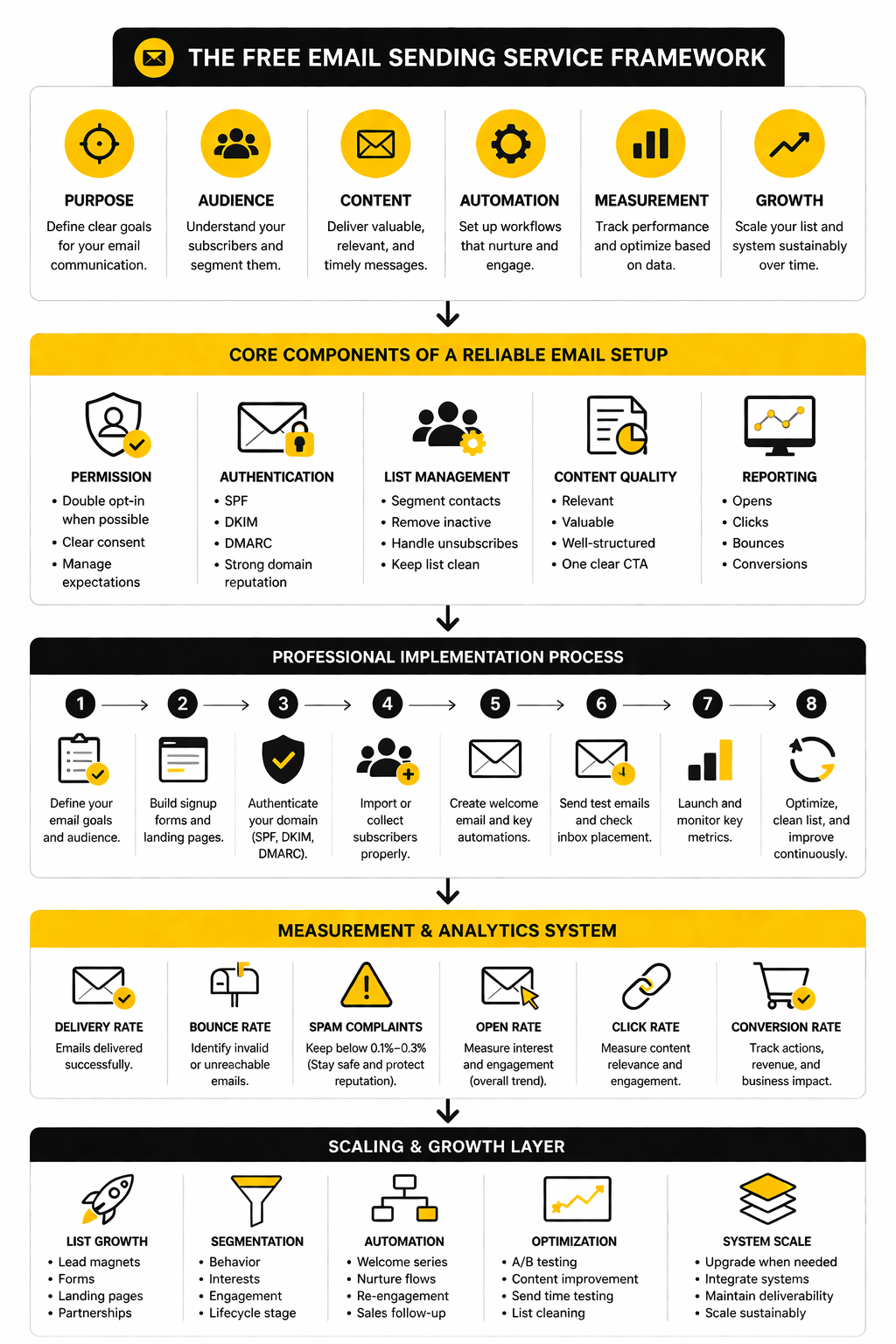
The framework is simple: match the tool to your email type, your list size, your growth path, and your deliverability requirements. For example, Brevo can make sense when you want email campaigns, transactional email, and contact management in one place. Moosend may fit teams focused on email marketing campaigns and automation. GoHighLevel is more relevant when email is part of a broader CRM, funnel, and client-management workflow rather than a standalone newsletter tool.
The mistake is choosing based only on the biggest free allowance. A generous sending limit is helpful, but it is not enough if the platform lacks the features your workflow needs. The better move is to choose the free tool you can implement cleanly now and scale without rebuilding everything later.
Core Components Of A Reliable Email Sending Setup
A free email sending service is only useful if it helps you send the right message to the right person without creating a deliverability mess. That means the platform is just one layer of the setup. Your list source, domain authentication, consent process, content quality, and reporting habits all affect whether your emails reach the inbox and drive action.
The first core component is permission. You want people on your list because they opted in, not because you scraped a spreadsheet or imported cold contacts from random sources. Clean consent protects your brand, keeps complaint rates low, and gives your email platform better engagement signals to work with.
The second component is authentication. Gmail’s sender guidelines require domain-based authentication through SPF, DKIM, and DMARC for many senders, and Yahoo’s sender guidance also emphasizes authentication and low complaint rates. This is not a technical luxury anymore. Even if you are starting small, set up authentication before you scale.
The third component is list management. A serious free email sending service should make it easy to collect subscribers, segment contacts, remove unsubscribes, and avoid repeatedly emailing people who never engage. This is where many beginners get sloppy. They think the tool is the strategy, but the real strategy is sending fewer, better emails to people who actually care.
Contact Limits And Sending Limits
Free plans usually restrict either contacts, email sends, or both. This matters because two tools can look equally “free” while behaving completely differently in practice. One platform may allow a large contact database but limit daily sends, while another may allow enough sends for a newsletter but restrict automation or branding controls.
For example, Brevo’s free plan is useful for early-stage sending because it supports a high contact allowance with a daily sending cap. That can work well for small newsletters, onboarding sequences, and basic campaigns where speed is less important than consistency. It is less ideal if you need to send one time-sensitive campaign to a large list in one blast.
Trial-based tools work differently. Moosend offers a free trial rather than a permanent free forever model, which can be better when you want to test automation, landing pages, forms, and campaign creation before choosing a paid plan. That is a different use case from “I need to send free emails every month forever,” so read the plan structure before moving your workflow in.
Marketing Emails, Transactional Emails, And Sales Follow-Up
Not every email is the same, and this is where beginners often choose the wrong tool. Marketing emails are newsletters, promotions, product updates, event invites, and nurture campaigns. Transactional emails are receipts, password resets, account notifications, and system-triggered messages. Sales follow-up emails sit somewhere in the middle because they often depend on CRM activity, pipeline stages, booking forms, and lead behavior.
A free email sending service for newsletters does not automatically make it the right tool for transactional email. Transactional messages need speed, reliability, and clean technical setup because users expect them immediately. Marketing emails need segmentation, design flexibility, consent handling, and reporting.
If your business depends on follow-up across forms, calendars, pipelines, and client conversations, a broader CRM platform like GoHighLevel may be more practical than a simple newsletter sender. It is not the same category as a basic free email tool, but it becomes relevant when email is part of a sales system instead of a standalone broadcast channel. That distinction matters because the cheapest tool is not always the lowest-cost setup once you add workarounds.
Templates, Forms, And Landing Pages
Templates matter because they help you send faster without designing from scratch every time. But they should not become a crutch. A clean, readable email with a strong subject line and one clear next step usually beats a heavily designed email that looks impressive but feels unfocused.
Forms are just as important as templates. Your signup form determines what expectation people have when they join your list. If your form promises weekly tips, do not immediately send daily promotions. If your form offers a lead magnet, make the delivery email useful and then transition naturally into follow-up.
Landing pages become useful when you want a focused opt-in page instead of embedding a form on an existing website. This is especially helpful for creators, service businesses, and small campaigns where speed matters. If you already use a funnel builder like ClickFunnels or an all-in-one platform like Systeme.io, your email decision should fit the rest of the funnel instead of creating a disconnected stack.
How To Compare Free Email Sending Services
Once the basics are clear, comparing tools becomes much easier. Do not start by asking, “Which free email sending service gives me the most?” Start by asking, “Which one supports the way I actually plan to send?” That one shift will save you from choosing a platform that looks generous on paper but creates friction in daily use.
A good comparison should cover five areas: sending allowance, contact storage, automation, deliverability controls, and upgrade path. Sending allowance tells you how often you can communicate. Contact storage tells you how much room you have to grow. Automation tells you whether the tool can follow up without manual work. Deliverability controls tell you whether you can protect the inbox. Upgrade path tells you whether the platform still makes sense once free is no longer enough.
The practical move is to score each tool against your current use case and your next use case. If you only judge the tool by today’s needs, you may outgrow it too quickly. If you only judge it by future needs, you may overcomplicate the setup before you even have consistent subscribers.
A Simple Comparison Process
Before you sign up for anything, write down what the email system needs to do in the next 90 days. Keep it honest. You do not need enterprise automation if your real need is a weekly newsletter, a lead magnet delivery email, and one simple welcome sequence.
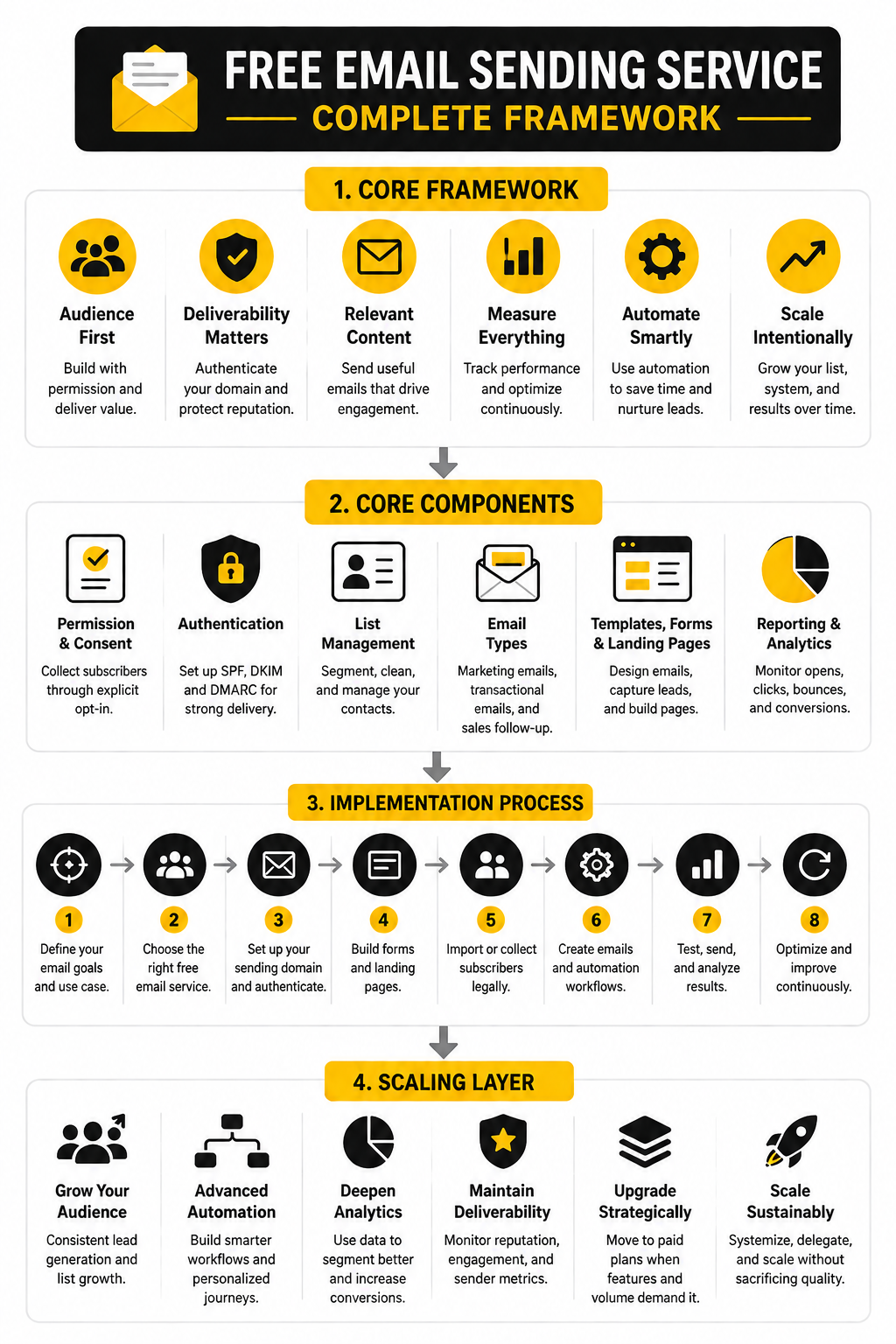
- Define your main email type: newsletter, transactional email, sales follow-up, ecommerce campaign, or onboarding sequence.
- Estimate your list size for the next 90 days, not your dream list size.
- Estimate how often you will send, including automated follow-ups.
- Check whether the free plan limits contacts, daily sends, monthly sends, automation, branding, or support.
- Confirm that your sending domain can be authenticated with SPF, DKIM, and DMARC.
- Review unsubscribe handling, list cleaning options, and basic reporting.
- Look at the first paid tier and decide whether the upgrade would still feel reasonable.
- Send test emails to yourself and a small group before importing a larger list.
This process keeps you grounded. A free email sending service should reduce friction, not create a hidden rebuild project. If a tool cannot handle your simplest required workflow cleanly, do not convince yourself it will magically work when the list gets bigger.
Choosing Based On Use Case
For a newsletter or creator list, prioritize ease of writing, signup forms, segmentation, and clear reporting. You want a tool that makes it simple to publish consistently and understand what people engage with. The best platform here is usually the one you will actually use every week without dreading the interface.
For small business marketing, look more closely at forms, automations, contact fields, and CRM-style organization. A platform like Brevo can be useful when you want campaigns, contact management, and transactional options in one ecosystem. Its free plan includes 300 email sends per day, so it fits steady communication better than sudden large broadcasts.
For automation-heavy marketing, test the workflow builder early. Moosend is worth considering when you want to evaluate campaign creation, subscription forms, landing pages, SMTP, and automation during a free trial. That is useful when the real question is not “Can I send for free forever?” but “Can this platform run the workflows I need before I commit?”
For agencies, consultants, and sales teams, email rarely lives alone. You may need forms, funnels, appointments, pipeline stages, SMS, reputation management, and client subaccounts. In that case, GoHighLevel fits a different decision path because the email layer sits inside a broader client acquisition and follow-up system.
Red Flags To Watch Before You Import Your List
The biggest red flag is weak consent. If your list was scraped, purchased, exported from LinkedIn, or collected without clear permission, do not upload it into a free email sending service and hope for the best. That is how accounts get flagged, deliverability drops, and your domain reputation takes damage.
Another red flag is missing authentication. Gmail requires SPF or DKIM for all senders and adds SPF, DKIM, and DMARC requirements for bulk senders, while Yahoo’s sender guidance also emphasizes authentication and keeping complaint rates low. Even if your current list is small, setting this up early is easier than fixing reputation problems later.
A third red flag is a free plan that hides the feature you actually need. Maybe the sending limit looks fine, but automation is restricted. Maybe the contact limit is generous, but branding removal, landing pages, A/B testing, or advanced reports are locked. Free is only valuable when the free version supports the job you need done.
Statistics And Data
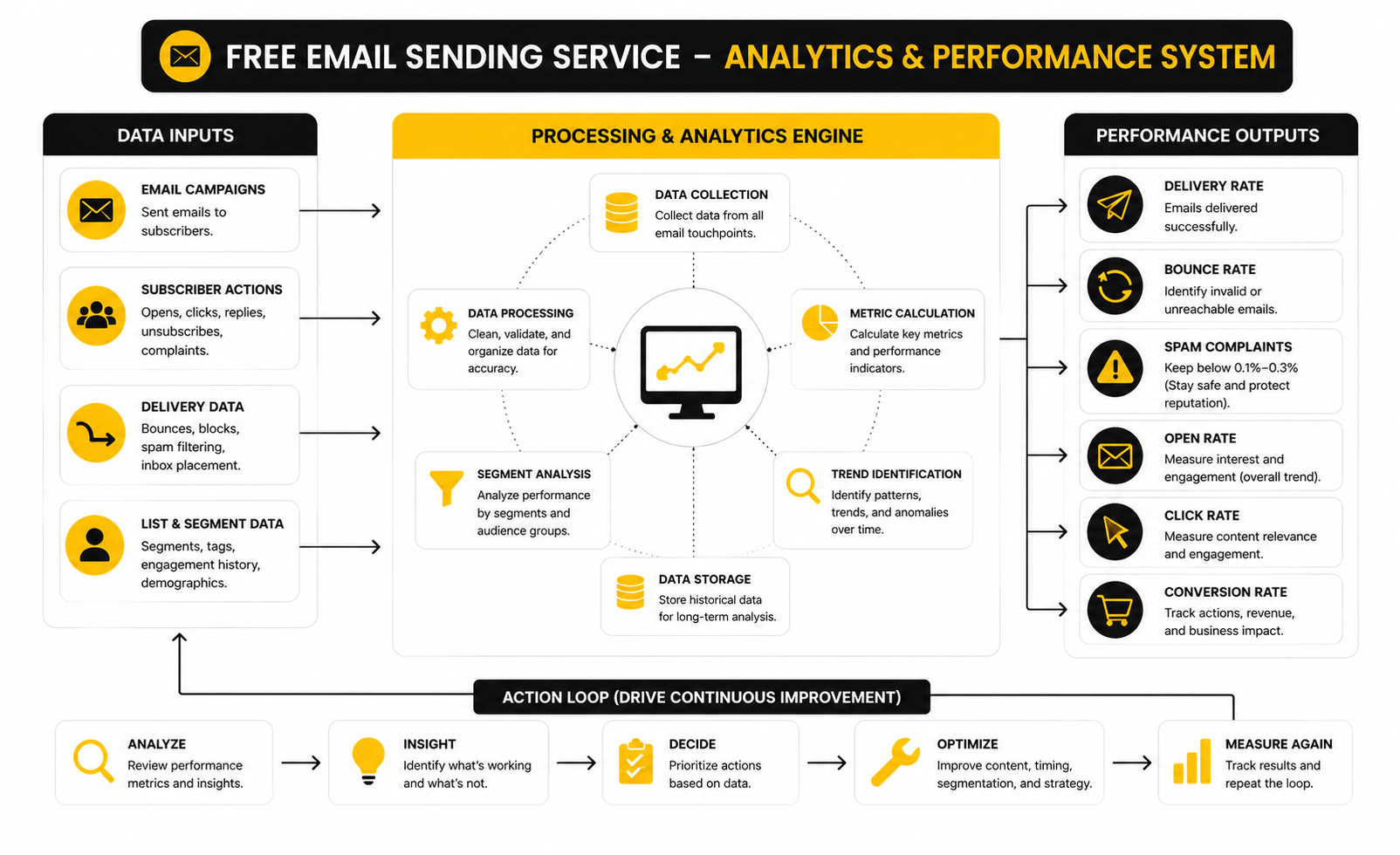
Email analytics are useful only when they help you make better decisions. A free email sending service may show opens, clicks, bounces, unsubscribes, and complaints, but those numbers do not all carry the same weight. Some are directional signals, some are deliverability warnings, and some are business signals that tell you whether the campaign actually worked.
Open rate is the most misunderstood metric. It can help you compare subject lines and list engagement over time, but privacy features and image-loading behavior make it imperfect. Click rate is usually more useful because it shows whether people cared enough to act. Conversion rate is the real test because it connects the email to the outcome you wanted, whether that is a booking, purchase, reply, download, or signup.
The key is to build a simple measurement system instead of staring at random dashboard numbers. Track delivery first, engagement second, and revenue or pipeline impact third. That order matters because a campaign cannot convert if it does not reach the inbox, and it should not be called successful just because people opened it.
The Metrics That Actually Matter
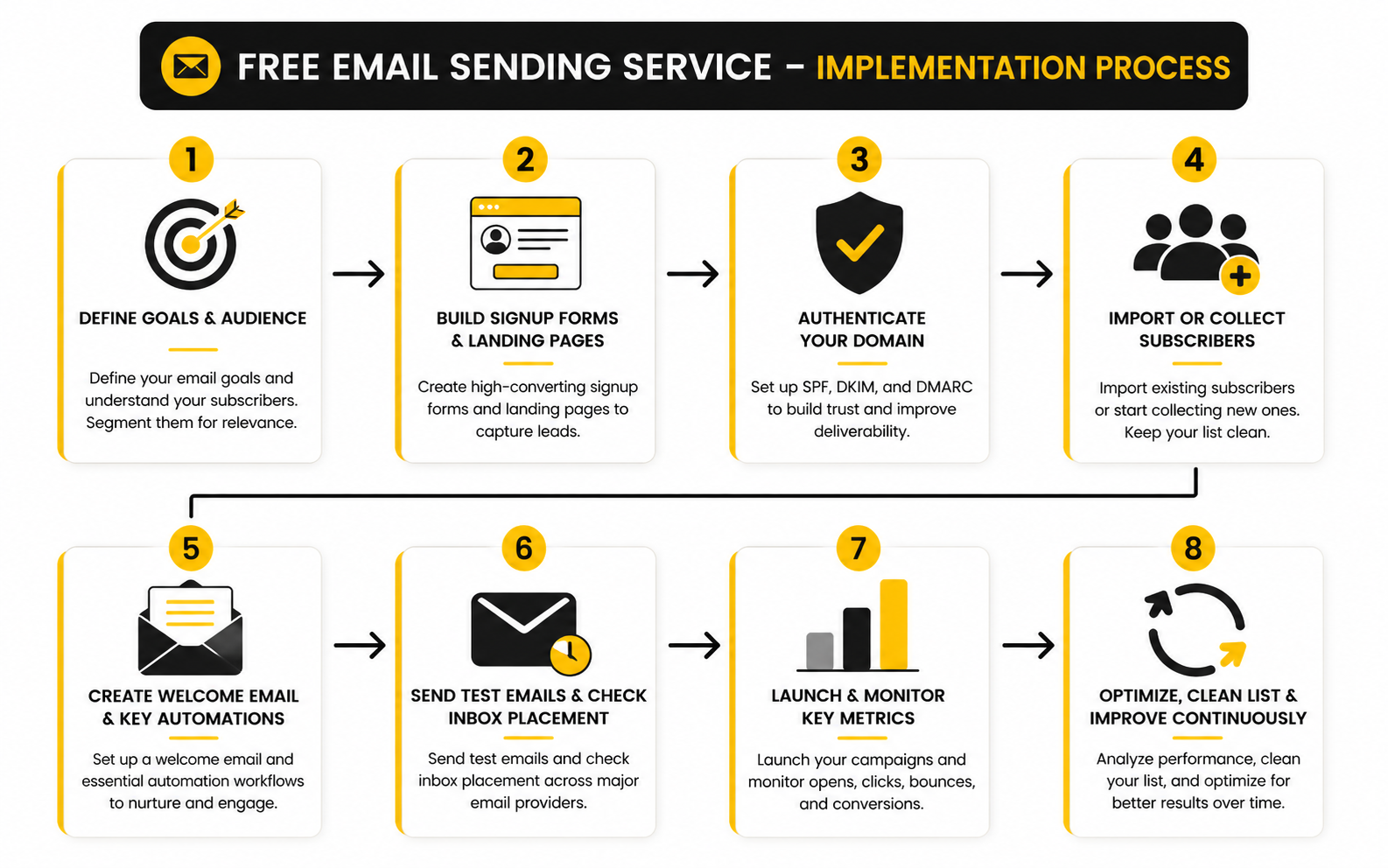
Delivery rate tells you whether the platform accepted and attempted to send your emails, but it does not prove inbox placement. Inbox placement is harder to measure, and that is why deliverability should be treated as an ongoing system instead of a one-time setup. Validity’s 2025 deliverability research found that Europe had an inbox placement rate of 89.1%, while Microsoft mailboxes were harder to reach at 75.6%, which shows why provider mix can change campaign performance dramatically.
Bounce rate tells you whether your list quality is slipping. A hard bounce means the address is invalid or unreachable, and too many of them signal poor list hygiene. If your free email sending service gives you bounce reporting, use it aggressively and remove invalid contacts instead of trying to squeeze one more send out of a bad address.
Spam complaints are the metric you should never ignore. Gmail tells senders to keep spam rates below 0.1% and avoid ever reaching 0.3%, while Yahoo also states that complaint rates should stay below 0.3%. That sounds tiny because it is tiny. If 1,000 people receive your email, one complaint already puts you near the safer operating target.
Benchmarks Are Starting Points, Not Goals
Benchmarks are helpful when you need context, but they are not strategy. A 40% open rate could be excellent for one list and mediocre for another. A 2% click rate could be a win for a cold reactivation campaign and weak for a highly engaged customer segment.
Recent benchmark data from MailerLite reported a 2025 average open rate of 43.46%, a click rate of 2.09%, and an unsubscribe rate of 0.22%. Those numbers can help you sanity-check performance, but they should not become your identity. Your own baseline matters more than a global average because your audience, offer, cadence, and email type are different.
Use benchmarks to ask better questions. If clicks are low but opens are healthy, the issue may be the offer, email structure, call to action, or audience fit. If opens drop sharply across multiple campaigns, the issue may be list fatigue, subject line quality, inbox placement, or sending frequency. If unsubscribes and complaints rise together, stop sending more and fix the expectation mismatch.
Turning Data Into Action
The simplest analytics rhythm is weekly review for small lists and campaign-by-campaign review for larger sends. Look at what changed, not just what happened. A single campaign can be noisy, but three or four campaigns usually reveal a pattern.
If open rates are declining, test sender name, subject line clarity, send timing, and list segments before blaming the platform. If clicks are weak, tighten the email around one action and remove competing links. If replies are strong but clicks are low, that may still be a great result for service businesses because conversations can be more valuable than dashboard activity.
If complaints increase, act immediately. Reduce frequency, suppress inactive contacts, clarify signup expectations, and stop sending broad promotional campaigns to people who have not engaged in a long time. This is where a free email sending service can still be powerful, but only if you treat the data as feedback rather than decoration.
When Free Plan Analytics Are Not Enough
Free plans often provide basic reporting, and that is fine at the beginning. You need enough data to know whether people received, opened, clicked, unsubscribed, or bounced. You do not need a giant analytics stack before you have a consistent sending habit.
The limits appear when email becomes tied to revenue, appointments, funnels, or sales pipeline. At that point, you need to know which emails create qualified leads, which sequences move people forward, and which segments are worth more attention. A tool like GoHighLevel becomes relevant when you want email metrics connected to CRM activity, booking behavior, and sales follow-up instead of isolated campaign reports.
For funnel-heavy businesses, analytics should connect the email to the landing page and the next step. If you use ClickFunnels or Systeme.io, do not judge emails only by opens and clicks. Judge the full path: opt-in rate, email engagement, page conversion, checkout completion, booking rate, and follow-up performance.
Professional Implementation And Deliverability
This is where a free email sending service either becomes an asset or quietly turns into a liability. The tool may be free, but your sender reputation is not. Once mailbox providers start seeing poor engagement, high complaints, weak authentication, or messy list behavior, fixing the damage takes more effort than setting things up properly from day one.
Professional implementation starts with a dedicated sending identity. Use a real domain, a recognizable sender name, and a reply address that someone actually monitors. Do not hide behind a no-reply address if the goal is trust, replies, sales conversations, or long-term audience building.
The next step is authentication. Gmail recommends setting up SPF, DKIM, and DMARC for your sending domain, and Yahoo’s sender guidance also expects authentication, low spam complaints, and proper sending behavior. This is not only for big brands. If you want email to be a serious channel, treat authentication as basic infrastructure.
Warm Up Before You Scale
Do not import a large list and blast everyone on day one. That is one of the fastest ways to create suspicious sending patterns, especially from a new domain, new platform, or inactive list. Start with your most engaged contacts, send useful emails first, and increase volume gradually.
Warming up is not about gaming the system. It is about proving that people want your emails. Mailbox providers look at engagement signals, complaints, bounces, and authentication patterns, so the safest growth path is steady and boring.
If you are moving from another platform, segment the migration. Bring over recent subscribers and active contacts first. Older, inactive contacts should be reintroduced carefully or left out completely, because the cheapest email is the one you do not send to the wrong person.
Keep The List Clean
List hygiene is where many free-plan users lose discipline. They collect every address they can, avoid deleting inactive contacts, and then wonder why performance drops. More contacts do not mean more opportunity if those contacts never open, click, reply, buy, or remember opting in.
Set rules for inactivity before the list gets messy. For example, if someone has not opened or clicked in several months, move them into a re-engagement segment instead of continuing normal campaigns forever. If they still do not respond, suppress them.
This matters even more when your free email sending service has contact or sending limits. Every slot should earn its place. Keeping dead contacts just because deleting them feels painful is not strategy; it is clutter.
Build Around Consent And Expectations
The cleanest email programs are built on clear expectations. Tell people what they will receive, how often they will receive it, and why it is worth staying subscribed. Then do exactly that.
This is especially important if you collect leads through funnels, forms, webinars, downloads, or social campaigns. A person who signs up for a checklist does not automatically want daily promotions. A person who books a consultation does not automatically want to be added to every newsletter you send.
If you use forms from a platform like Systeme.io, funnels from ClickFunnels, or CRM workflows inside GoHighLevel, make sure the opt-in language matches the follow-up sequence. The tool can automate the workflow, but it cannot fix a broken promise.
Know When Free Is Holding You Back
A free plan is great when it helps you prove the channel. It becomes expensive when it slows down execution, hides key data, limits automation, adds branding that weakens trust, or forces manual work every week. At that point, the real cost is not the software bill. It is lost momentum.
Upgrade when the paid feature directly supports a business outcome. That could mean higher sending volume, better automation, stronger segmentation, advanced reporting, dedicated support, landing page controls, or CRM integration. Do not upgrade just because a dashboard says you are near a limit; upgrade when the next level removes a real bottleneck.
The best sign is simple: email has started producing measurable value. When subscribers are booking calls, buying products, replying to offers, or moving through your funnel, paying for the right infrastructure becomes rational. Free got you started, but scale needs control.
Avoid The Stack Trap
One advanced mistake is stitching together too many tools too early. A form tool here, a free email sender there, a landing page builder somewhere else, a spreadsheet in the middle, and a CRM added later. It feels flexible at first, then suddenly every small change takes five tabs and a prayer.
A lean stack is better. Choose tools that match the workflow you actually use. If you only need a newsletter and basic automations, keep it simple. If you need funnels, bookings, pipeline management, and follow-up, use a more connected system instead of forcing a basic email tool to act like a full sales platform.
This is the tradeoff: standalone tools are often easier and cheaper at the beginning, while integrated platforms reduce operational drag as the business grows. Neither option is automatically better. The right choice is the one that supports your current execution without blocking the next stage.
Best Use Cases, Common Mistakes, And FAQs
A free email sending service is best when it helps you start clean, learn fast, and prove that email deserves a bigger role in your business. It is not best when you use it to avoid making strategic decisions. Free tools are powerful when the workflow is simple, the list is permission-based, and the follow-up is useful.
The best use cases are straightforward: a weekly newsletter, a lead magnet delivery sequence, a small launch list, basic customer updates, webinar reminders, appointment follow-up, and early-stage ecommerce campaigns. These do not require a massive platform on day one. They require clear consent, useful content, basic automation, clean tracking, and consistent execution.
The common mistakes are just as predictable. People import weak lists, skip authentication, send too often, ignore complaints, overdesign emails, and choose tools based only on free limits. The better approach is simple: start with the smallest system that can work professionally, then upgrade only when the bottleneck is real.
What is a free email sending service?
A free email sending service is a platform that lets you send marketing, transactional, or automated emails without paying at the starting level. Some services offer a permanent free plan, while others offer a free trial. The important detail is what the free version actually includes, because sending limits, contact limits, automation, support, branding, and analytics can vary a lot.
Is a free email sending service good enough for business?
Yes, it can be good enough for early-stage business use if your list is small and your workflow is simple. It works well for newsletters, basic lead nurturing, and simple customer updates. Once email starts driving sales, bookings, or serious pipeline activity, you may need stronger automation, segmentation, reporting, and support.
Which free email sending service is best for beginners?
The best option depends on what you need to send. Brevo is practical for steady sending because its free plan includes 300 emails per day. Moosend is better to evaluate during a free trial if automation, forms, landing pages, and SMTP features matter to your decision.
Can I send bulk emails for free?
You can send bulk emails for free only within the limits of the platform you choose. That usually means daily caps, monthly caps, contact limits, branding restrictions, or limited automation. Bulk sending also requires stronger discipline because Gmail and Yahoo both expect authentication, low complaint rates, and proper unsubscribe handling.
Do I need SPF, DKIM, and DMARC for a small list?
Yes, you should set them up even with a small list. Gmail recommends SPF, DKIM, and DMARC for better delivery, and Yahoo also emphasizes authentication as a sender best practice. It is easier to build this properly early than to repair a damaged sender reputation later.
What is the biggest risk with free email tools?
The biggest risk is treating free software like a shortcut around good email practices. A free plan does not protect you from bad consent, weak list quality, spam complaints, poor segmentation, or irrelevant content. The tool sends the email, but your strategy determines whether people trust it.
Should I use a normal Gmail account instead of an email platform?
No, not for marketing or bulk email. A normal inbox is built for personal communication, not campaign management, unsubscribe handling, segmentation, automation, and compliance. If you want to send to a list, use a proper free email sending service instead of forcing a personal mailbox to do a marketing platform’s job.
How often should I email my list?
Email as often as you can stay useful and consistent. For many beginners, once per week is a realistic starting point because it builds habit without overwhelming subscribers. If you send more often, make sure the value is clear and your unsubscribe or complaint rates are not rising.
When should I upgrade from a free plan?
Upgrade when the free plan blocks a business outcome. That could mean you need more sending volume, better automation, deeper reporting, landing pages, branding control, advanced segmentation, or CRM integration. Do not upgrade because paid sounds more serious; upgrade because the next tier removes a real constraint.
Can a free email sending service handle sales follow-up?
It can handle simple follow-up, but sales workflows often need more than email. Once you need pipelines, appointment booking, forms, multi-step follow-up, client records, and team visibility, a CRM-centered platform like GoHighLevel may make more sense. The question is not just whether the email can send, but whether the whole sales process is organized.
What should I track first?
Track bounces, complaints, unsubscribes, clicks, and conversions before obsessing over open rates. Opens can be useful, but they are not perfect because privacy features and image loading can distort them. Clicks and conversions tell you much more about whether the email created real action.
How do I choose the right tool without overthinking it?
Pick the tool that matches your next 90 days. If you need a newsletter, choose a simple platform with good forms and reporting. If you need funnels and checkout pages, consider ClickFunnels or Systeme.io as part of the wider system. If you need CRM, pipelines, and automated follow-up, choose around the full workflow instead of the cheapest email-only plan.
Work With Professionals
Explore 10K+ Remote Marketing Contracts on MarkeWork.com
Most marketers spend too much time chasing clients, competing on crowded platforms, and losing a percentage of every project to middlemen.
MarkeWork gives you a better way. Browse thousands of remote marketing contracts and connect directly with companies desperate to hire skilled marketers like you, without platform commissions and without unnecessary gatekeepers.
If you're serious about finding better opportunities and keeping 100% of what you earn, explore available contracts and create a profile for free at MarkeWork.com.