

A free mailing list service is an email marketing platform that lets you collect subscribers, send campaigns, and manage basic audience communication without paying upfront. That sounds simple, but the real decision is not just “which tool is free.” The better question is whether the free plan helps you build a list you can actually use later.
Email still matters because it is one of the few channels where you own the relationship. Social reach can change overnight, ad costs can jump, and search traffic can shift, but a clean email list gives you a direct line to people who asked to hear from you. Recent email research still shows strong commercial value, with Litmus reporting that 35% of companies see email ROI of 36:1 or more in its State of Email research.
The catch is that “free” can hide real limits. Some tools limit subscribers, some limit monthly sends, some restrict automation, and some make deliverability setup harder than it needs to be. A good free mailing list service should help you collect consent, send useful emails, keep spam complaints low, and upgrade smoothly when your list starts making money.
This guide will treat free email software like a business system, not a toy. We will look at what matters before you choose a platform, how to compare free plans, where tools like Brevo, Moosend, ManyChat, and GoHighLevel fit, and how to move from basic newsletters into a professional email system.
Article Outline
- Why A Free Mailing List Service Still Matters
- How Free Mailing List Services Actually Work
- The Framework For Choosing The Right Free Plan
- Core Components Every Email List Needs
- Professional Implementation Without Wasting Money
- Best Free Mailing List Service Options, FAQs, And Final Recommendations
Why A Free Mailing List Service Still Matters
A free mailing list service matters because it lowers the barrier between having an audience idea and actually building an audience asset. You do not need a full marketing department to start collecting subscribers, sending helpful updates, or testing whether people care about your offer. You need a clear reason for people to join, a simple signup flow, and a tool that will not punish you the moment your list starts growing.
The biggest advantage is control. A follower on a social platform is useful, but the platform still decides how much of your content gets seen. An email subscriber is different because they gave you permission to reach them directly, and that permission becomes more valuable as your content, offer, or business becomes more focused.
This is why choosing a free mailing list service should not be treated like picking a random free app. You are choosing the first layer of your customer communication system. If that layer is messy, your forms, tagging, welcome emails, consent records, and reporting all become harder to fix later.
Free Does Not Mean Small Thinking
The right free plan is not just for hobby projects. It can be enough for a creator validating a newsletter, a local business collecting leads, a freelancer building a client pipeline, or a startup testing its first offer. The point is not to stay free forever. The point is to start clean, learn what your audience responds to, and only upgrade when there is a real business reason.
This matters because early email mistakes compound. If you collect poor-quality contacts, send random campaigns, or ignore consent, you may grow a list that looks good on paper but performs badly in practice. A smaller list of people who actually want your emails is more useful than a bloated list that never opens, clicks, replies, or buys.
A good free mailing list service gives you enough room to build those habits properly. For example, Brevo is useful when you want a free plan based around daily email volume rather than a tiny contact cap. Moosend is better to evaluate when you want to test more complete email marketing features during a trial before committing.
Email Gives You A Direct Feedback Loop
Email is not only a broadcasting channel. It is a feedback loop that tells you what your audience cares about through opens, clicks, replies, unsubscribes, and purchases. That feedback can shape your content calendar, your lead magnets, your product positioning, and even your sales pages.
This is where beginners often get it wrong. They think the goal is to “send newsletters,” when the real goal is to learn which messages create movement. A free mailing list service lets you test subject lines, offers, segments, and follow-up sequences without paying before you understand the basics.
That learning loop is especially important if you sell services, digital products, coaching, software, or local appointments. Someone may not buy the first time they visit your site, but a useful email sequence can keep the relationship alive. That is the quiet power of email: it turns one visit into an ongoing conversation.
How Free Mailing List Services Actually Work
A free mailing list service usually gives you a limited version of a larger email marketing platform. You get the basics: contact storage, signup forms, campaign sending, templates, unsubscribe handling, and reporting. The limits usually appear around subscriber count, monthly sends, automation depth, branding, support, landing pages, segmentation, or advanced analytics.
This is normal. These companies are not charities, and free plans are designed to help you start while giving you a reason to upgrade later. Your job is to understand which limit will matter first for your specific business.
For a newsletter, monthly send volume may matter most. For a lead generation funnel, automation and forms may matter more. For an agency or service business, CRM, pipeline tracking, and appointment follow-up may eventually matter more than the email editor itself.
The Main Limits To Watch
Free plans usually look generous until you read the details. One platform may offer many contacts but limit daily sending. Another may offer strong design tools but restrict automation. Another may give you automation but add its own branding to forms, emails, or widgets.
The most common free-plan limits are:
- Subscriber limits, where you can only store a certain number of contacts.
- Send limits, where you can only send a certain number of emails per day or month.
- Automation limits, where welcome sequences or behavior-based flows are restricted.
- Branding limits, where the platform adds its logo to emails, forms, or widgets.
- Support limits, where faster help is reserved for paid users.
- Reporting limits, where deeper analytics only unlock after upgrading.
These limits are not automatically bad. A daily send cap can be fine for a small list, and platform branding may not matter when you are validating an idea. The problem starts when the limit blocks the main action your business needs, such as following up with new leads quickly or sending a launch email to everyone at once.
The Difference Between Email Tools And Marketing Systems
Some free tools are mainly email senders. They help you design a campaign, send it to a list, and see basic results. That can be enough if your business model is simple and you only need newsletters or occasional promotions.
Other tools are broader marketing systems. GoHighLevel, for example, is not positioned as a free mailing list service in the simple newsletter sense, but it becomes relevant when email is part of a larger system with CRM, funnels, calendars, SMS, pipelines, and client follow-up. That is a different category, and it makes more sense when you are managing leads or clients rather than just sending content.
There are also channel-specific tools that connect email with chat, social, or messaging automation. ManyChat fits that world because it is built around automated conversations across channels like Instagram, Messenger, WhatsApp, SMS, and email touchpoints. It is not the same as choosing a traditional newsletter platform, but it can be useful if your list-building starts from social conversations instead of website forms.
What You Should Expect From A Free Plan
At minimum, a free mailing list service should let you create a form, collect contacts with clear consent, send a basic campaign, and remove people automatically when they unsubscribe. It should also give you enough reporting to understand whether people are engaging. Without those pieces, you are not really building a mailing list; you are just collecting addresses.
You should also expect some friction. Free plans may include branding, lower support priority, or fewer advanced features. That is acceptable as long as the core workflow still works and your data remains exportable.
The smart move is to choose based on your next 90 days, not some fantasy version of your business two years from now. Pick the tool that helps you collect the right people, send the right first emails, and learn quickly. Then upgrade only when the free plan is holding back a process that is already working.
The Framework For Choosing The Right Free Plan
The best free mailing list service is not the one with the biggest number on the pricing page. It is the one that matches the way your audience joins, the kind of emails you need to send, and the next business outcome you are trying to create. That sounds obvious, but most people skip this step and end up comparing tools by random features instead of actual workflow fit.
Start with the job your email list needs to do. A creator needs a clean way to publish and build trust. A service business needs fast lead capture and follow-up. An ecommerce brand needs segmentation, behavior-based emails, and stronger reporting once sales volume grows. Those are different jobs, so they should not all be forced into the same tool decision.
A practical framework keeps you focused. Before you open ten pricing pages, decide what matters most: list size, sending volume, automation, forms, landing pages, integrations, deliverability controls, or upgrade path. A free plan is only useful when its limits sit outside your immediate workflow.
Step 1: Define The First Conversion
Your first conversion is the action that turns a visitor, viewer, or reader into a subscriber. It might be downloading a checklist, joining a newsletter, booking a call, getting a discount code, registering for a webinar, or receiving a short email course. Without this decision, your list-building setup becomes vague fast.
The offer does not need to be complicated. In fact, the best early lead magnets are usually specific, useful, and easy to deliver. A local service business might offer a quote request or maintenance checklist, while a creator might offer a short resource that helps the audience solve one narrow problem.
This step matters because your free mailing list service must support that first conversion cleanly. If you need landing pages, choose a tool that includes them. If you already have a website, a simple embedded form may be enough. If your audience mostly starts conversations through Instagram or Messenger, a tool like ManyChat may fit better than a traditional newsletter-first platform.
Step 2: Map The Signup Path
Once the offer is clear, map the path from discovery to subscription. A person sees your content, clicks a link, lands on a page or form, enters their email, confirms consent, and receives the promised follow-up. Every extra step creates friction, so the path should be simple enough that you can explain it in one sentence.
This is where landing pages, forms, popups, checkout pages, and chat automations become practical instead of theoretical. If you need a full funnel around the email signup, ClickFunnels or Systeme.io may make sense because the email list is connected to the page and offer flow. If you only need a lightweight form, a dedicated email platform is usually cleaner.
Do not overbuild this. The first version should collect the right subscriber, deliver the promise, and give you a measurable result. You can improve design, copy, and segmentation after the basic path works.
Step 3: Check The Free Plan Against Real Usage
Now compare the free plan against what you will actually do in the next 90 days. If you expect 300 subscribers and one weekly email, your needs are different from someone collecting 2,000 leads from paid ads. Free plans become risky when the limit hits right in the middle of your main campaign.
Look at the practical usage numbers:
- How many contacts can you store before paying?
- How many emails can you send per day or month?
- Can you send an automated welcome email?
- Can you create forms or landing pages without another tool?
- Can you remove platform branding if that matters to your brand?
- Can you export your contacts if you outgrow the platform?
- Can you authenticate your sending domain?
This is also where deliverability starts to matter. Gmail and Yahoo sender rules have made authentication more important, especially for bulk senders, with Google’s sender guidance emphasizing SPF, DKIM, DMARC, low spam rates, and easy unsubscribe handling through its email sender guidelines. A free mailing list service should not make those basics confusing once you are ready to send from your own domain.
Step 4: Choose For The Upgrade Path
A free plan is the starting point, not the strategy. The upgrade path matters because switching tools later can be painful if your forms, tags, automations, and reporting are scattered. You want a platform that gives you a clean path from simple sending to more serious marketing without forcing a rebuild too early.
For example, Brevo can be attractive when you want email marketing with room for transactional email, SMS, and CRM-style features. GoHighLevel fits better when the bigger plan includes lead management, funnels, appointments, and client follow-up. Moosend is worth checking when you want to test a focused email marketing platform before paying.
The key is to avoid choosing a tool only because it is free today. Choose the tool that keeps your next upgrade logical. If your first 500 subscribers prove there is demand, the last thing you want is a messy migration blocking your momentum.
Core Components Every Email List Needs
Once the platform decision is clear, the system itself needs structure. A mailing list is not just a database of email addresses. It is a set of moving parts that collect permission, deliver value, measure engagement, and protect your reputation.
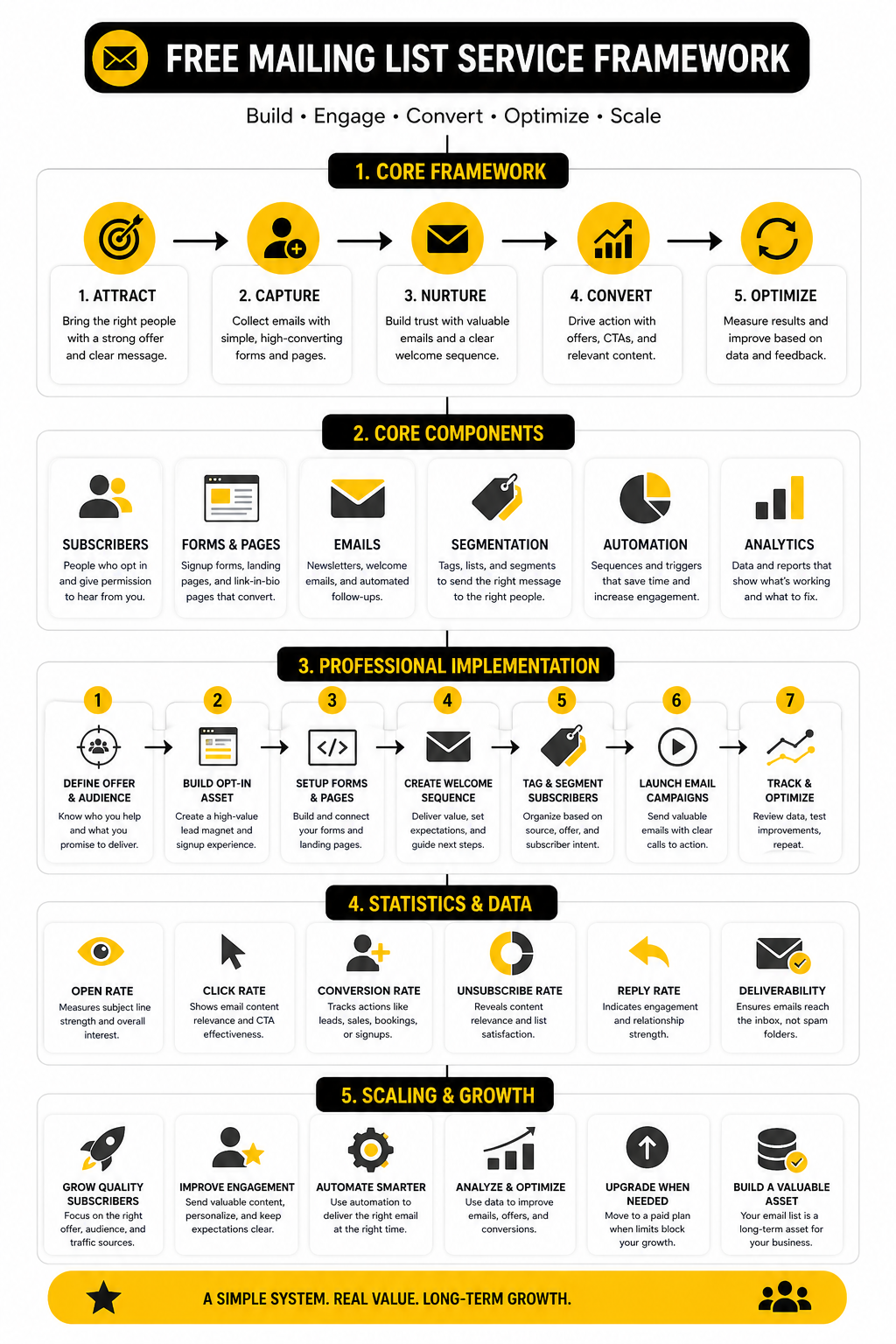
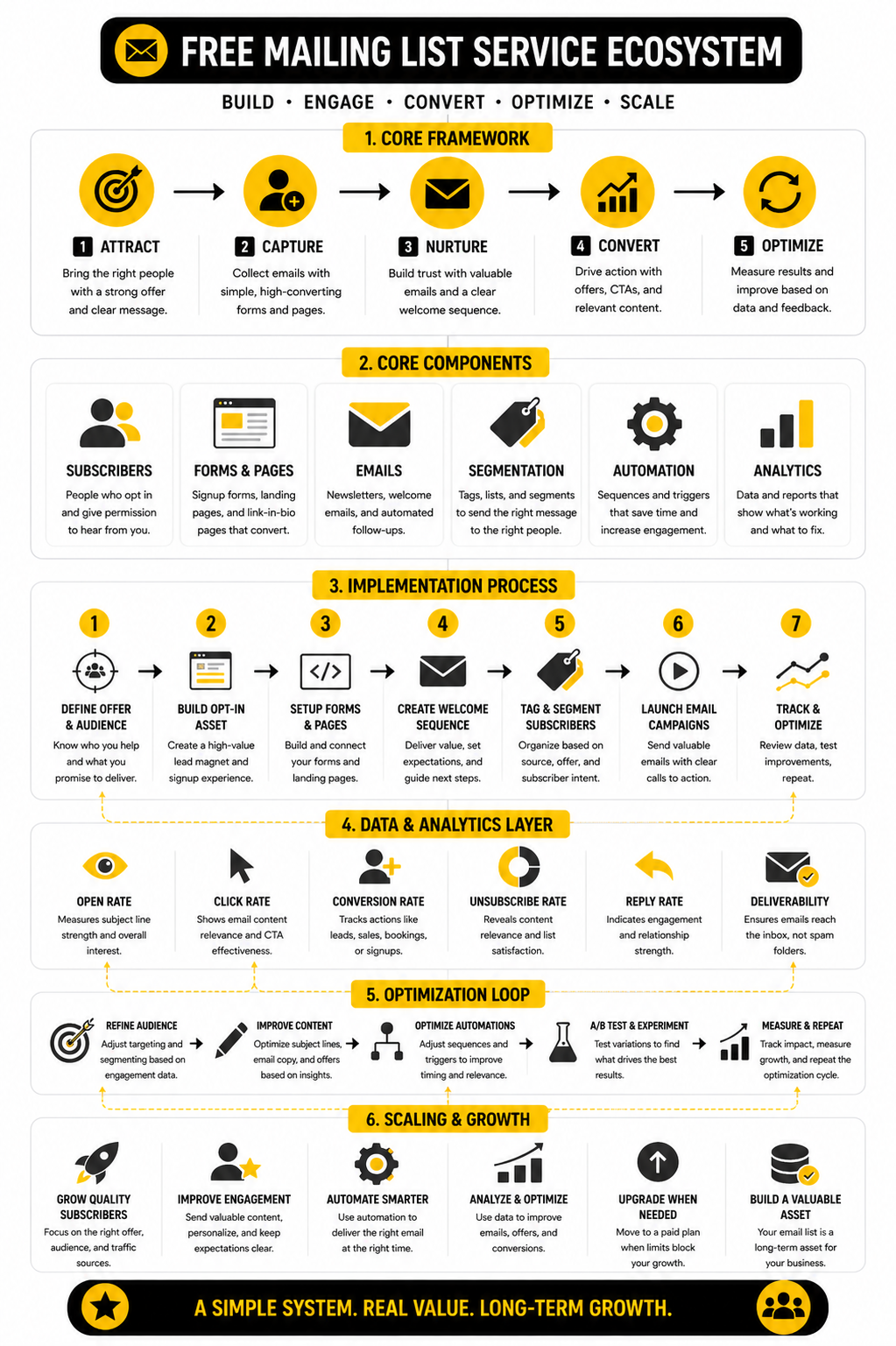
Every serious setup needs five core components: a signup offer, a capture point, a consent process, a welcome email, and a basic measurement habit. You can add advanced segmentation and automation later, but these five pieces should be present from the beginning. They are what turn a free mailing list service into a working marketing asset.
The mistake is trying to automate everything before the basics are proven. Your first job is to make sure people can join easily, understand what they signed up for, receive the first email, and get something useful. Once that works, optimization becomes much easier.
The Signup Offer
The signup offer is the reason someone joins. It must answer the silent question every visitor has: “Why should I give you my email?” A vague promise like “subscribe for updates” is usually weak unless the brand already has strong demand.
A better offer is specific. It might promise weekly tactical tips, early access, a free template, a private discount, a short training, or a practical checklist. The more obvious the benefit, the easier it is for the signup form to convert.
Keep the promise narrow at first. A free mailing list service can help you deliver almost anything, but your audience needs one clear reason to care. Clarity beats cleverness here.
The Capture Point
The capture point is where the email address is collected. This could be a website form, landing page, popup, checkout field, quiz, calendar page, chatbot, or social bio link. The right capture point depends on where your audience already pays attention.
If your traffic comes from content, a simple landing page may work best. If your traffic comes from service inquiries, the form should connect to your follow-up process. If the list is built from social conversations, a conversational automation tool can reduce friction.
Make the form short. Ask for the email address and only the extra information you truly need right now. Every unnecessary field lowers completion and creates more data to manage.
The Consent Process
Consent is not just a legal checkbox. It is also a trust signal. People should understand what they are signing up for, how often they might hear from you, and how they can unsubscribe.
This matters because email laws and privacy expectations are not optional. The FTC’s CAN-SPAM guidance requires commercial emails to avoid deceptive headers and subject lines, identify the message properly when needed, include a valid postal address, and provide a clear opt-out process through its business compliance guide. In the UK, the ICO’s direct marketing guidance also emphasizes consent for many electronic marketing messages in its electronic mail marketing rules.
Do not treat this as paperwork. Clean consent protects your brand, improves list quality, and reduces the chance that people mark your emails as spam. A smaller list with clear permission is stronger than a larger list built on confusion.
Statistics And Data
Data is where a free mailing list service stops being a guessing game. You do not need a huge analytics stack at the beginning, but you do need to know whether people are joining, opening, clicking, replying, unsubscribing, and eventually buying or booking. Without that feedback, you are just sending emails and hoping something good happens.
The point is not to obsess over every metric. The point is to understand what each number is trying to tell you. A high open rate can show interest, a low click rate can expose weak offers, and a rising unsubscribe rate can warn you that your promise and your emails are drifting apart.
Benchmarks are useful, but they are not commandments. A list built from warm client referrals will behave differently from a list built from cold traffic. A weekly expert newsletter will behave differently from a discount-heavy ecommerce list. Use benchmarks as a reality check, then judge your list against its own trend line.
What Email Benchmarks Actually Tell You
Open rate is the easiest number to watch, but it is not the cleanest number to trust. Privacy features, inbox behavior, and image loading can distort opens, so treat open rate as a directional signal rather than hard proof of attention. If opens rise or fall consistently, something is happening, but you still need clicks, replies, and conversions to understand the real impact.
Click rate is usually more useful because it shows action. When someone clicks, they moved from the inbox to the next step. That next step might be a blog post, product page, booking page, checkout, survey, or lead magnet. If open rates look fine but clicks are weak, your subject line may be doing its job while the email body or offer is not.
Unsubscribe rate is not always bad. Some unsubscribes are healthy because they remove people who no longer want your emails. The problem is a sudden spike after a specific campaign, because that usually means the email did not match the reason people joined.
The Metrics That Matter First
When you are using a free mailing list service, keep the measurement system simple. Early-stage lists do not need enterprise dashboards. They need a small set of numbers that tells you whether the list is growing, whether subscribers care, and whether the emails create a business outcome.
Track these first:
- Signup conversion rate: the percentage of visitors who join your list.
- Welcome email open rate: whether new subscribers notice your first message.
- Welcome email click rate: whether the first email moves people to the next step.
- Campaign click rate: whether your regular emails create action.
- Unsubscribe rate: whether your content still matches subscriber expectations.
- Reply rate: whether people are engaged enough to respond.
- Lead or sales conversion: whether email is supporting revenue, bookings, or pipeline.
These numbers work together. A growing list with low engagement means your acquisition is ahead of your relationship-building. Strong clicks with weak sales may mean the landing page or offer needs work. High replies from a small list can be more valuable than thousands of silent subscribers.
How To Build A Simple Analytics System
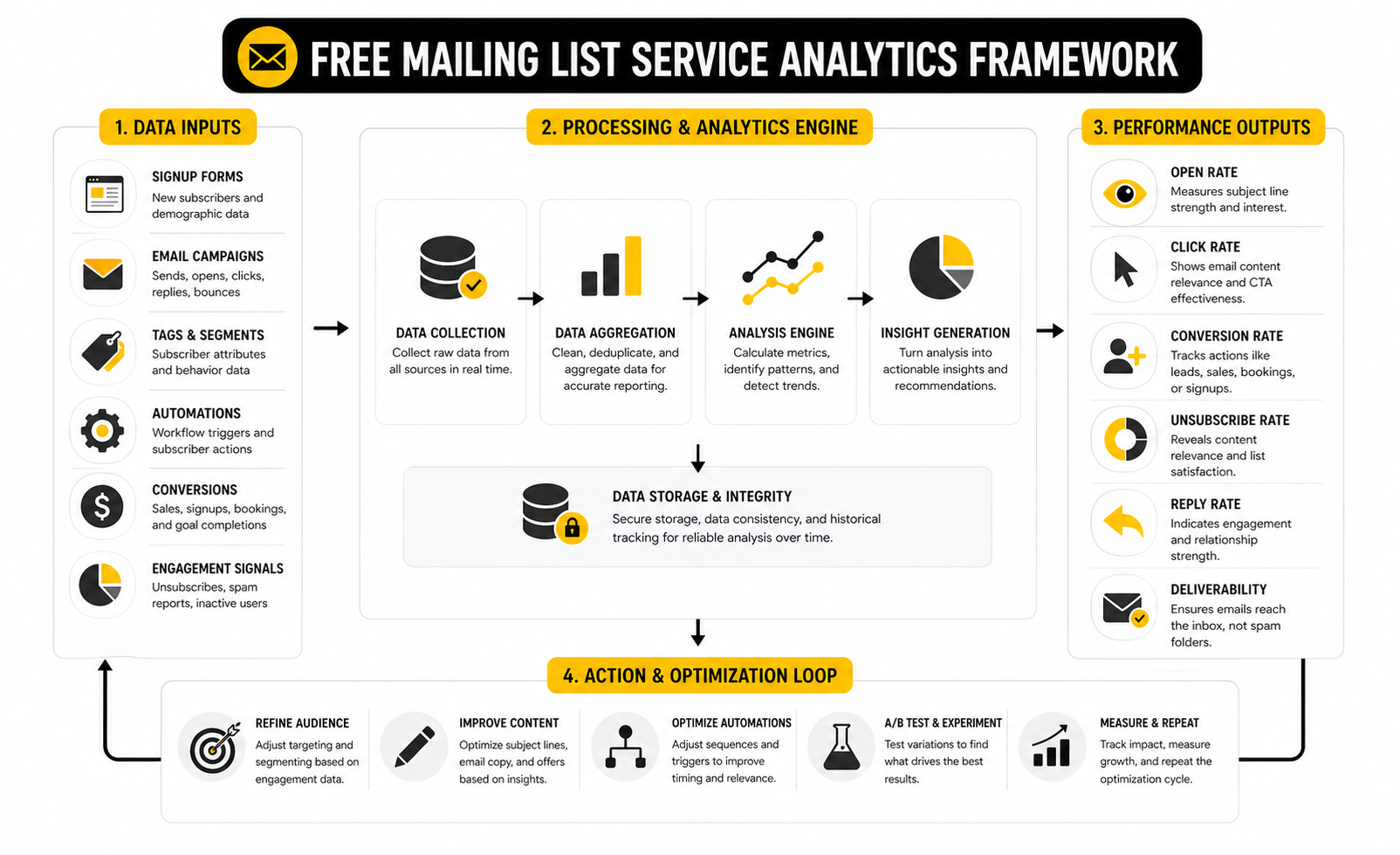
Start with one dashboard or spreadsheet that tracks the same numbers every week. Do not change the metric definitions every time you send a campaign. Consistency matters because you are looking for patterns, not isolated wins.
Your basic tracking rhythm can be simple:
- Record new subscribers each week.
- Record total list size.
- Record unsubscribes and spam complaints.
- Record open rate and click rate for each campaign.
- Record clicks to the main call to action.
- Record replies, booked calls, purchases, or qualified leads.
- Write one sentence about what you learned.
That final sentence is underrated. Data without interpretation becomes clutter. If you send an email and the click rate is low, write why you think it happened. Was the offer weak, the audience wrong, the email too long, the link buried, or the call to action unclear?
Benchmarks Are A Starting Point, Not A Strategy
MailerLite’s 2025 benchmark research reviewed over 3.6 million campaigns from 181,000 approved accounts across a full year, which makes it useful for understanding broad email performance ranges through its email marketing benchmarks report. That kind of benchmark can help you see whether your numbers are wildly outside normal expectations. It should not become an excuse to copy someone else’s strategy.
Litmus continues to report strong commercial value from email, including that 35% of companies see email ROI of 36:1 or more in its State of Email research. That number is useful because it explains why email keeps getting budget and attention. But it does not mean every free mailing list service setup will automatically produce high ROI.
The gap is execution. TechRadar’s coverage of Sinch Mailgun’s 2026 Email Impact Report noted that fewer than half of organizations can reliably track ROI, even though many teams still plan to maintain or increase email investment. That should be a warning for small teams: do not wait until your list is large before tracking the business result.
Reading Performance Signals Correctly
A weak subject line usually shows up as poor opens, but that is only one possibility. The audience may be cold, the sender name may be unfamiliar, or your emails may be landing in the wrong tab or folder. Before rewriting everything, check whether the problem is attention, deliverability, or relevance.
A weak email body usually shows up as low clicks. People opened the message, but they did not feel enough reason to act. This can happen when the email has too many links, no clear next step, a vague benefit, or a call to action that does not match the subscriber’s stage.
A weak offer usually shows up after the click. People visit the page, but they do not book, buy, register, or reply. That means the email may be doing its job, while the destination needs stronger positioning, proof, urgency, or clarity.
Deliverability Is A Measurement Issue Too
Deliverability is not only a technical topic. It directly affects your numbers because bad inbox placement makes every other metric harder to trust. If emails are not reaching inboxes, your open rate, click rate, and revenue data are all distorted.
Google’s bulk sender rules made this more important by requiring high-volume senders to authenticate email, avoid unwanted messages, and make unsubscribing easy through its sender guideline FAQ. Even if you are starting small, these rules point in the right direction. Authenticate your domain, keep complaints low, and make leaving easy.
This is one reason to choose a free mailing list service that does not hide the basics. You want clear unsubscribe handling, clean list management, and a path to proper domain authentication. Those features may not feel exciting when you start, but they protect the performance of everything you send later.
What To Improve Based On The Data
If signups are low, improve the offer before blaming the platform. Make the promise sharper, reduce form fields, improve the page headline, or place the form closer to where intent is strongest. A better signup reason usually beats a prettier form.
If opens are low, improve the sender relationship and subject line. Use a recognizable sender name, make the subject specific, and avoid sounding like a generic promotion. The inbox is crowded, so your subject line needs to earn attention without tricking people.
If clicks are low, simplify the email. One main idea, one main action, and one clear reason to click will usually beat a crowded newsletter with five competing links. If sales or bookings are low after the click, work on the destination page, not just the email.
When The Numbers Say It Is Time To Upgrade
A free plan is doing its job if it helps you learn, grow, and prove that email deserves more attention. It may be time to upgrade when the free limits stop you from sending to the right people, automating the right follow-up, removing branding, or connecting email to revenue tracking. Upgrade because the system is working, not because the paid plan looks exciting.
For a simple newsletter or early list, staying on a free mailing list service can be perfectly fine. For a lead-driven business, the upgrade moment usually comes when manual follow-up starts costing you opportunities. That is when a broader system like GoHighLevel, a funnel platform like ClickFunnels, or a dedicated email platform like Brevo becomes easier to justify.
The clean rule is this: pay when the next feature helps you capture, convert, or retain more value than it costs. Until then, keep the system lean. Measure what matters, learn from every send, and let the data tell you what to fix next.
Professional Implementation Without Wasting Money
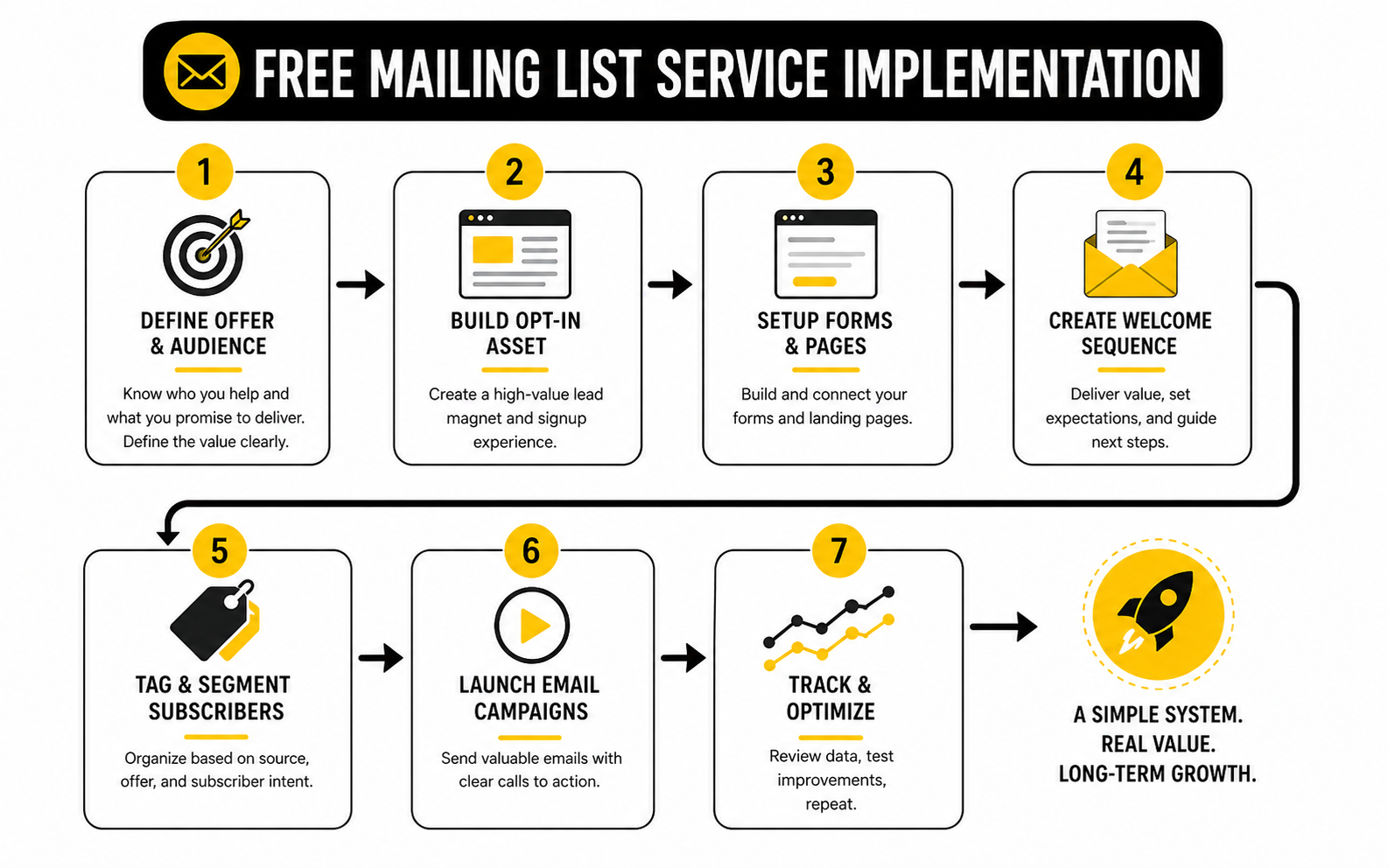
A free mailing list service is useful when it helps you move faster without creating hidden mess. The beginner version of email marketing is simple: collect subscribers, send emails, track results. The professional version adds structure: clean data, strong positioning, segmentation, automation, compliance, deliverability, and revenue attribution.
That does not mean you need to buy everything on day one. It means you should build the free version in a way that does not collapse when the list grows. The best setup is lean, but it is not random.
Think of this stage as building the operating system behind your list. Your platform is only one piece. The real advantage comes from how clearly you define who joins, what they receive, what action you want them to take, and how you decide what happens next.
Segment Before The List Gets Messy
Segmentation is easy when your list is small and painful when you wait too long. You do not need twenty tags, but you do need enough structure to know why someone joined. A subscriber who downloaded a beginner checklist is not the same as someone who requested a quote, clicked a pricing page, or joined from a webinar.
Start with a few simple tags:
- Source: where the subscriber came from.
- Offer: what they signed up for.
- Intent: whether they showed buying, booking, or learning interest.
- Customer status: whether they are a lead, customer, past customer, or partner.
- Engagement: whether they are active, cooling off, or inactive.
This helps you avoid sending the same message to everyone forever. A free mailing list service may limit advanced automation, but even basic tagging can make your emails sharper. Relevance beats volume, especially when inboxes are crowded.
Protect Deliverability Before You Need It
Deliverability problems rarely appear as one dramatic failure. They usually creep in through poor list quality, unclear consent, spam complaints, low engagement, weak authentication, and too many irrelevant sends. By the time you notice the damage, fixing it can take longer than preventing it would have.
Treat deliverability as part of your setup, not a future technical chore. Use a recognizable sender name, authenticate your domain when the platform allows it, remove hard bounces, avoid purchased lists, and make unsubscribing obvious. Google’s sender requirements highlight authentication, low spam rates, and easy unsubscribe as core expectations in its email sender guidelines.
This is where free-plan choice matters. If a free tool makes list hygiene difficult, hides unsubscribe handling, or gives you no clear path to domain authentication, be careful. Saving a few dollars is not worth damaging the sender reputation you will need later.
Build Automation Around Moments, Not Features
Automation should follow subscriber intent. A welcome email is useful because someone just joined. A reminder email is useful because someone registered but did not attend. A sales follow-up is useful because someone clicked a buying page or requested information.
Do not automate just because the button exists. Bad automation scales bad timing. If the message would feel irrelevant when sent manually, automation will not magically make it better.
A practical automation system usually starts with:
- A welcome email that delivers the promised resource.
- A follow-up email that explains what to do next.
- A value email that builds trust before asking for more.
- A conversion email that invites a reply, booking, trial, or purchase.
- A re-engagement email for people who stop interacting.
If you need email, forms, pipeline follow-up, calendars, and multi-step lead nurture in one place, GoHighLevel becomes a more strategic upgrade than a simple newsletter tool. If your main need is funnel pages connected to email capture, ClickFunnels or Systeme.io may fit better. The right move depends on the workflow, not the logo.
Watch The Tradeoff Between Simplicity And Control
Simple tools are great because they reduce friction. You can launch faster, write emails faster, and avoid spending days building a system nobody asked for. That is exactly what a free mailing list service should help you do at the beginning.
The tradeoff is control. As your list grows, you may need better segmentation, deeper automation, cleaner reporting, stronger integrations, and more flexible templates. The same tool that felt refreshingly simple at 200 subscribers may feel restrictive at 5,000.
This does not mean simple tools are bad. It means you should know what kind of business you are building. A solo creator may value publishing speed more than CRM complexity. A service business may care more about lead status, appointment reminders, and sales follow-up than newsletter design.
Avoid The Most Expensive Free-Tool Mistakes
The most expensive mistake is choosing a free tool that makes you rebuild everything later. Migration is not just exporting contacts. It can mean recreating forms, reconnecting landing pages, rebuilding automations, cleaning tags, updating DNS records, and checking every unsubscribe and consent process.
The second mistake is chasing features instead of message-market fit. If people do not want the offer, better automation will not save it. Fix the reason to subscribe before you fix the software.
The third mistake is treating all subscribers equally. Someone who joined from a buyer-intent page deserves a different follow-up than someone who joined from a general blog post. If your platform cannot support even basic separation, your list will become harder to monetize.
Use AI Carefully In The Email Workflow
AI can help with subject line drafts, email structure, segmentation ideas, personalization logic, and campaign analysis. It can speed up the boring parts of email marketing. That is useful, especially when you are starting with a free mailing list service and doing most of the work yourself.
But AI should not replace your point of view. Generic emails are easy to produce now, which means generic emails are easier to ignore. The advantage comes from using AI to clarify your message, not to flatten your voice.
The most practical use is analysis. After a few campaigns, use your results to identify what topics drive clicks, which subscriber groups respond, and which offers create actual action. A 2026 Sinch Mailgun study covered by TechRadar found that fewer than half of organizations can reliably track email ROI, even though many teams continue investing in email, which makes disciplined measurement a real advantage for smaller operators too.
Know When To Move Beyond Free
Free is ideal when you are validating. It is less ideal when the free limit starts blocking revenue, follow-up speed, deliverability control, or customer experience. At that point, staying free can become more expensive than upgrading.
Upgrade when one of these becomes true:
- You are manually doing follow-up that should happen instantly.
- You cannot segment people based on meaningful intent.
- You cannot send enough emails to support your campaign.
- You need better landing pages, forms, or funnel control.
- You need CRM, pipeline, calendar, SMS, or sales automation.
- You need stronger reporting to connect email activity to revenue.
That is the professional way to think about it. Do not upgrade because you feel behind. Upgrade because the next feature helps you capture more leads, convert more opportunities, or retain more customers than it costs.
Keep The System Portable
Even if you love your first tool, keep your system portable. Use clear naming conventions for forms, lists, tags, and automations. Export contacts regularly. Keep copies of your welcome sequence, campaign templates, lead magnets, and landing page copy outside the platform.
This gives you leverage. If pricing changes, features shift, or your business outgrows the tool, you are not trapped. You can move because your strategy lives outside the software.
A free mailing list service should help you start, not lock you in. The more disciplined your setup is, the easier it is to scale without chaos. That is the real goal: start lean, stay clean, and upgrade only when the business case is obvious.
Best Free Mailing List Service Options, FAQs, And Final Recommendations
By this point, the pattern should be clear. A free mailing list service is not “good” because it has the most features. It is good when it fits your current workflow, protects your deliverability, gives you useful data, and leaves you with a clean upgrade path.
For most beginners, the safest move is to choose a tool that makes the first 90 days easy. You want a clear signup form, a reliable welcome email, simple reporting, and enough sending capacity to learn from real behavior. After that, your decision becomes less about free features and more about which system supports the business you are actually building.
If you want a practical starting point, Brevo is worth reviewing when you want email, CRM-style contact management, and daily sending limits instead of a tiny contact cap. Moosend makes sense when you want to test a focused email marketing platform before committing. GoHighLevel fits better when email is only one part of a bigger lead generation, CRM, appointment, and follow-up system.
How To Make The Final Choice
Choose based on the first serious use case, not the biggest future dream. If you are publishing a newsletter, prioritize writing speed, clean templates, deliverability setup, and simple list growth. If you are generating leads, prioritize forms, automations, CRM visibility, and fast follow-up.
Also think about where your subscribers come from. Website traffic needs forms and landing pages. Social traffic may need chat automation or a link-in-bio flow. Paid traffic needs tighter attribution because every weak conversion costs money.
The final decision should feel boring in a good way. You should be able to say, “This tool helps me collect the right people, send the right first emails, and measure the right next action.” If you cannot say that, keep simplifying.
FAQ - Built For Complete Guide
What is a free mailing list service?
A free mailing list service is a platform that lets you collect email subscribers, manage contacts, and send emails without paying upfront. Most free plans include limits on contacts, monthly sends, automation, branding, or support. The goal is to start building a real email list before upgrading to a paid plan.
Is a free mailing list service enough for a small business?
Yes, it can be enough if your needs are simple. A small business can use a free plan to collect leads, send announcements, deliver a welcome email, and test basic campaigns. The limit appears when you need deeper automation, stronger reporting, CRM features, or higher sending volume.
What should I look for in a free mailing list service?
Look for contact limits, send limits, signup forms, unsubscribe handling, automation, segmentation, reporting, and export options. Also check whether the platform supports domain authentication as your list grows. A tool that looks generous but blocks your main workflow is not actually generous.
Which free mailing list service is best for beginners?
The best option depends on the workflow. Brevo is practical for beginners who want email marketing with CRM-style features and a free plan based around daily sending. Moosend is useful for testing email marketing features during a trial, while broader systems like GoHighLevel make more sense when email connects to pipelines, calendars, and sales follow-up.
Can I build a mailing list without a website?
Yes, but you still need a clear signup destination. That could be a hosted landing page, a social bio link, a form, a checkout page, or a chat automation flow. The key is making the signup reason clear and delivering the promised email immediately.
How many subscribers do I need before email marketing works?
You do not need thousands of subscribers to learn from email. A small list can already show which topics, offers, and calls to action create replies, clicks, bookings, or sales. The quality of the audience matters more than the size of the list.
Are free email marketing tools bad for deliverability?
Not automatically. Deliverability depends on list quality, consent, engagement, sender reputation, authentication, and complaint rates. A free mailing list service can work well if it gives you clean unsubscribe handling, list management, and a path to proper sender setup.
Should I use double opt-in?
Double opt-in can improve list quality because subscribers confirm they really want your emails. It may reduce total signup numbers, but the people who remain are usually more intentional. For serious long-term email marketing, quality often beats raw list size.
What is the first email I should send?
The first email should deliver what the subscriber requested and set expectations. Tell them what they will receive, why it matters, and what the next useful step is. Do not overload the first email with five different offers.
How often should I email my list?
Email often enough to stay relevant, but not so often that every message feels forced. A weekly rhythm works for many newsletters and service businesses, while ecommerce brands may send more often around launches or promotions. The better rule is consistency: pick a cadence you can sustain with useful content.
When should I upgrade from a free mailing list service?
Upgrade when the free plan blocks a process that already works. That could mean you hit sending limits, need better automation, want to remove branding, require deeper segmentation, or need CRM and revenue tracking. Do not upgrade just because the paid plan looks impressive.
Can I switch mailing list services later?
Yes, but switching can be annoying if your setup is messy. Keep your tags simple, export contacts regularly, save your email copy outside the platform, and document your forms and automations. A portable system gives you freedom when your needs change.
What is the biggest mistake beginners make with email lists?
The biggest mistake is collecting emails without a clear reason for people to join. The second mistake is sending random updates instead of building a consistent relationship. Software helps, but the real asset is trust.
Work With Professionals
Explore 10K+ Remote Marketing Contracts on MarkeWork.com
Most marketers spend too much time chasing clients, competing on crowded platforms, and losing a percentage of every project to middlemen.
MarkeWork gives you a better way. Browse thousands of remote marketing contracts and connect directly with companies desperate to hire skilled marketers like you, without platform commissions and without unnecessary gatekeepers.
If you're serious about finding better opportunities and keeping 100% of what you earn, explore available contracts and create a profile for free at MarkeWork.com.