

A free mass email sender sounds like the perfect shortcut when you want to reach a lot of people without adding another monthly software bill. That part is true, but only up to a point. The real challenge is not finding a tool that lets you send emails for free. It is finding one that still protects deliverability, keeps you compliant, and does not force a painful migration the moment your list starts working.
That is why this topic matters more now than it did a few years ago. Major inbox providers have tightened sender requirements, and bulk email is no longer something you can treat like a simple blast button. Google’s sender guidance makes authentication and unsubscribe handling part of the basic operating standard for serious senders, especially once volume grows.
The good news is that a free mass email sender can still be a smart move for a small business, creator, startup, or agency that wants to validate an offer before paying for a bigger stack. The bad news is that “free” often hides limits on contacts, sends, branding, automation depth, or support. If you do not evaluate those tradeoffs early, the cheapest option becomes the expensive one later.
Article Outline
- Why Free Mass Email Senders Matter
- A Practical Framework for Evaluating Free Plans
- Core Features That Actually Matter
- Deliverability, Compliance, and Risk Control
- Professional Implementation Without Enterprise Complexity
- Frequently Asked Questions About Free Mass Email Senders
Why Free Mass Email Senders Matter
Most people start searching for a free mass email sender because they need speed, not theory. They have a product launch coming, a newsletter to send, a customer list to warm up, or a new audience channel to test. In that moment, the market looks crowded with “free” promises, but the meaningful differences are usually hidden in send caps, contact caps, and what happens after your first real campaign.
That matters because email still works when the fundamentals are right. Benchmarks published across large campaign datasets in 2025 show that email engagement remains strong enough to justify serious investment, which is exactly why choosing the wrong sending setup early can quietly slow down growth.
It also matters because inbox placement is now tied more tightly to sender behavior. If you plan to scale beyond casual newsletters, you need to think about authentication, consent quality, complaint risk, and unsubscribe experience from day one rather than “fixing it later.” That is not overkill. It is the difference between using a free plan as a launchpad and using it as a trap.
For small lists, a free plan can absolutely make sense. Some mainstream platforms still offer entry-level access with clear limits, such as free tiers built around low contact counts or capped monthly sends, while others have shifted toward trials instead of permanent free plans. The lesson is simple: do not ask whether a tool is free; ask what kind of business model its free tier is actually designed to support.
A Practical Framework for Evaluating Free Plans
The fastest way to get this wrong is to compare free mass email sender tools by headline price alone. Free is not a strategy. Free is just one variable inside a bigger operating decision. What you really need is a framework that tells you whether a platform fits your current stage and your next stage, because switching later usually costs more than the monthly fee you tried to avoid.
Start with volume reality. Look at how many contacts you have now, how often you plan to send, and whether your messages are promotional, transactional, or mixed. A tool that looks generous on paper can become restrictive very quickly if it limits monthly sends, pauses sending after threshold breaches, or reserves automations for paid tiers.
Then look at control. A serious free mass email sender should let you manage list hygiene, segmentation, basic reporting, and sender authentication without turning every important setting into an upsell wall. If a platform gives you a free sending button but weak visibility into performance or poor control over sender reputation, it is not really helping you build an email channel. It is helping you rent one temporarily.
The third filter is compliance and deliverability readiness. Commercial email is not just a design problem or a copywriting problem. It is an operational system that has to align with rules around identity, consent, and opt-out handling. The FTC’s CAN-SPAM guidance still makes the basics clear, and mailbox providers have raised the technical floor for trusted delivery.
The fourth filter is transition cost. This is the one people ignore until they are forced to rebuild templates, automations, forms, domains, and reporting inside another platform. A free plan is most valuable when it gives you a smooth path into a paid plan or a more advanced stack without rebuilding your whole operation. That is why tools that combine email with CRM, landing pages, or broader workflow support often deserve a closer look than a basic sender that only solves today’s send. For teams comparing broader growth stacks, options like Brevo or GoHighLevel are usually worth evaluating in that wider context, not just as sending tools.
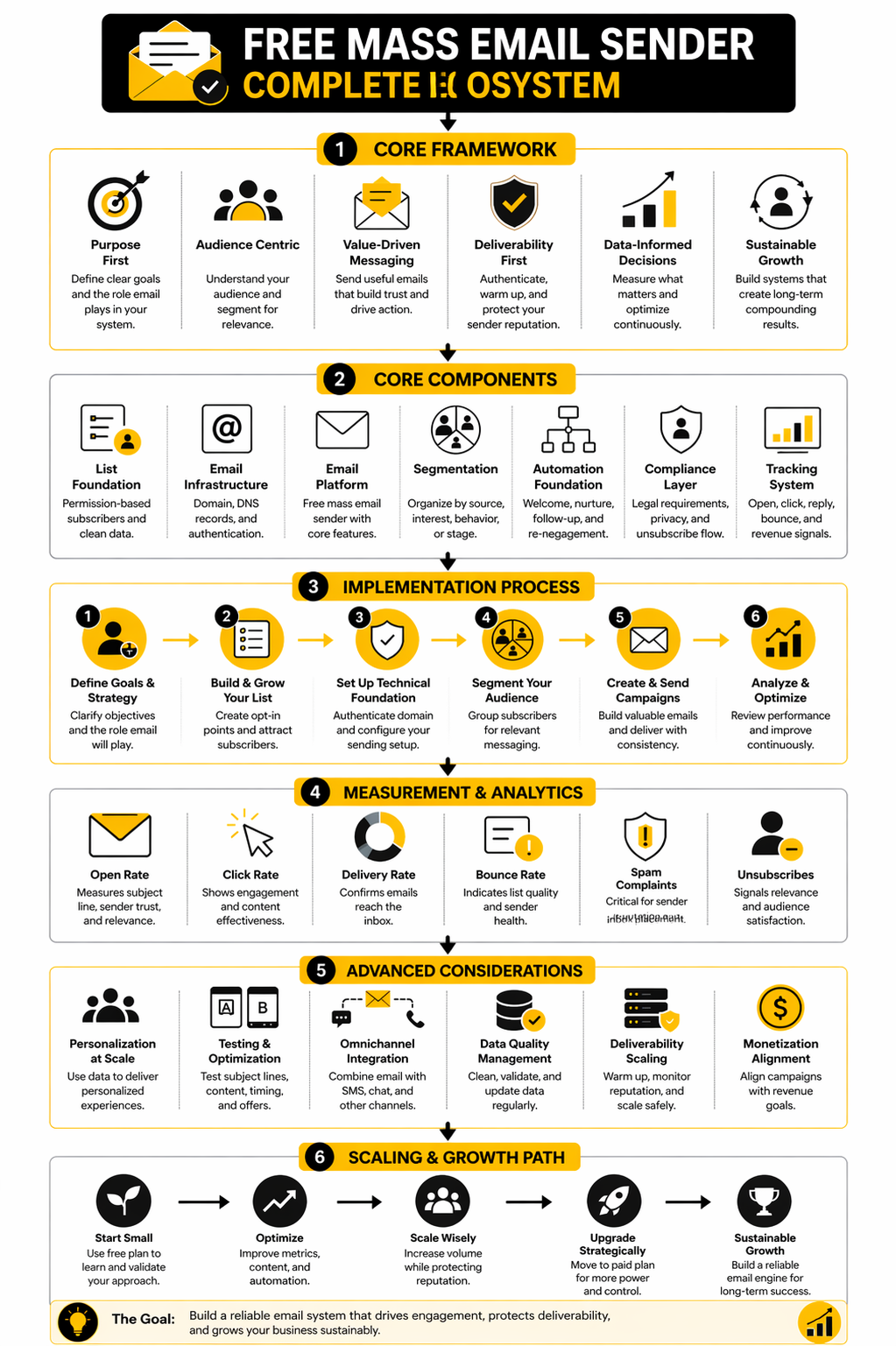
Put those four filters together and the framework becomes practical:
- Check real sending and contact limits.
- Check what control you get over segmentation, analytics, and authentication.
- Check whether the platform supports compliant, trust-building sending behavior.
- Check how painful it will be to grow past the free tier.
That framework is what separates a useful free mass email sender from a free tool that only looks good in a comparison table. In the next part, the focus shifts from evaluation logic to the actual features that matter most when you are deciding what to use first.
Core Features That Actually Matter
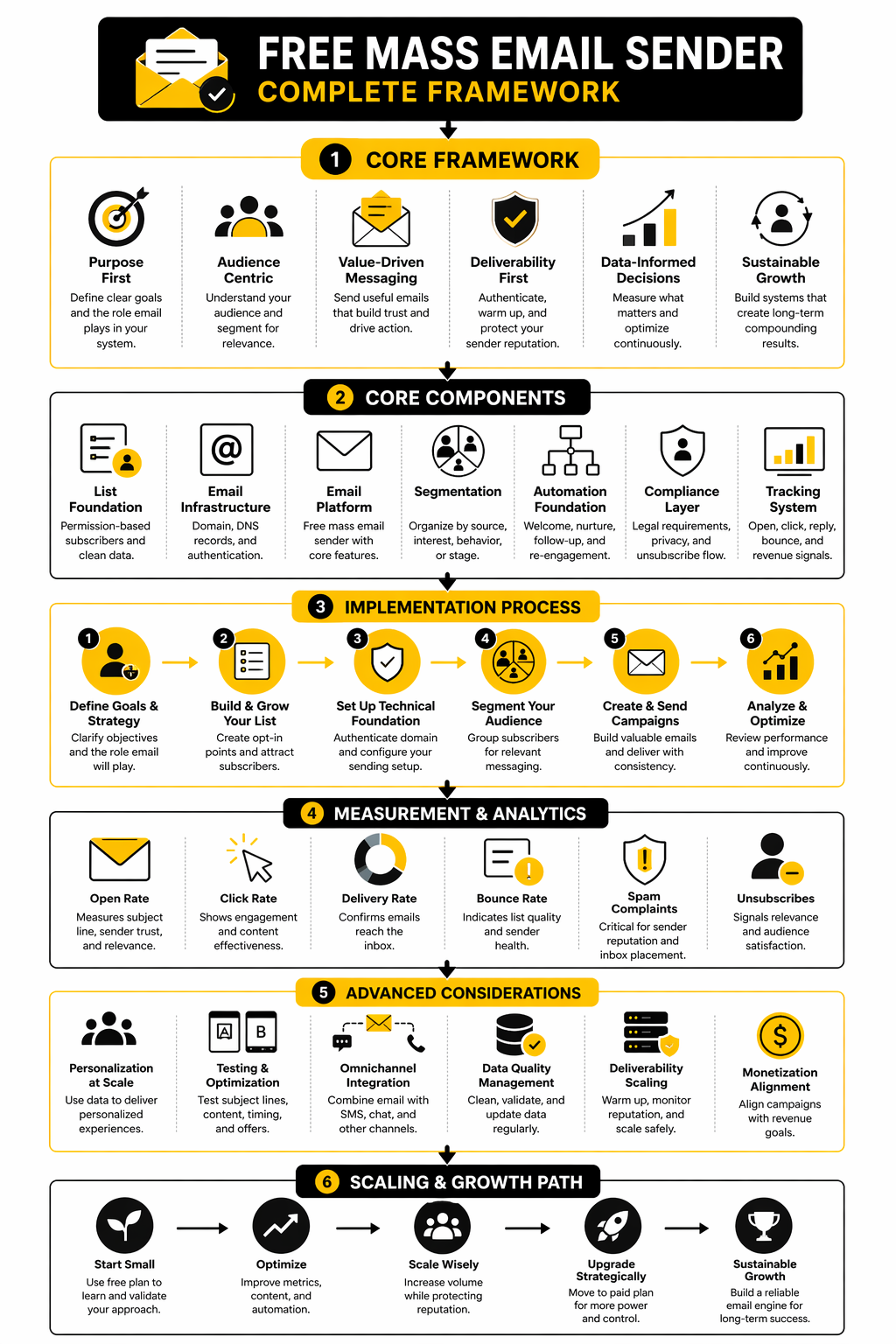
Choosing a free mass email sender gets much easier once you stop looking at brand names and start looking at operating constraints. Most free plans are not really competing on “can you send email.” They are competing on how much useful control they give you before they force an upgrade.
That is why the feature checklist matters more than the homepage promise. A free tool can look generous until you notice that segmentation is weak, automation is locked, reporting is thin, or the daily cap makes time-sensitive campaigns almost impossible. The right move is to judge the platform by the parts that affect real sending, not just by the word free.
Sending Limits Tell You What the Tool Is Really For
The first feature to inspect is not the editor or the template gallery. It is the sending model. That one number tells you whether the platform is built for occasional newsletters, steady weekly campaigns, or something closer to real growth marketing.
You can see how different the models are by looking at current free tiers. Brevo’s free plan details show 300 daily email sends with up to 100,000 stored contacts, while MailerLite’s pricing page frames its free plan around 500 subscribers and core campaign tools, Mailjet’s pricing page lists 6,000 emails per month with a 200-per-day cap, and Sender’s free plan offers up to 15,000 emails per month for up to 2,500 subscribers. Those numbers are not small details. They tell you whether your biggest limit will be audience size, monthly volume, or daily execution speed.
This matters because a free mass email sender with a strict daily limit can quietly break your workflow even if the monthly total looks acceptable. If you need to announce a launch, deadline, event, or promotion on a specific day, daily throttling can be a bigger problem than total send volume. In other words, the real question is not “How many emails do I get?” but “Can I send them when they actually matter?”
Contact Management Is More Important Than Big Storage Numbers
A lot of beginners overvalue headline contact storage because it feels like scale. In practice, a bloated list is not an asset if you cannot clean it, segment it, and exclude the wrong people at the right time. A smaller list with better control almost always beats a bigger list with weak management.
That is why list tools deserve more attention than they usually get. You want a free mass email sender that makes it easy to import contacts properly, organize subscribers by source, separate engaged people from cold names, and avoid sending the same message to everyone just because it is easier. Even broad benchmark reporting keeps pointing in the same direction: segmentation and relevance matter because email performance varies widely by industry, audience, and message type, which means blunt list-wide sending is usually the lazy option, not the smart one. MailerLite’s 2026 benchmark dataset shows how far engagement can swing across sectors.
There is also a deliverability angle here that people miss. When your contact management is sloppy, complaint risk goes up, unsubscribe rates go up, and engagement signals get weaker. That is exactly the pattern mailbox providers are trying to punish.
Templates and Forms Should Save Time, Not Create Dependency
A good free mass email sender should help you get campaigns out quickly without forcing you into ugly, rigid layouts. That means the template builder matters, but not because design is the main event. It matters because speed, consistency, and ease of editing all affect whether email becomes a repeatable channel or an annoying side task.
Forms matter just as much, even though they get less attention. If the platform helps you collect leads, embed forms, and route signups into the right list from day one, you remove a lot of manual work later. That is one reason entry-level plans that include landing pages, sign-up forms, or reusable sections punch above their price tag, including MailerLite’s free plan and Sender’s free tier.
There is a practical warning here too. Some free tools make the creation experience feel generous, then lock important customization behind paid plans or force platform branding into your emails. That is not always a dealbreaker, but it is absolutely something you should know before building your whole acquisition flow around one tool.
Basic Automation Is the Line Between a Tool and a System
This is where many free plans separate casual senders from serious operators. A free mass email sender that only lets you send one-off campaigns can still be useful, but it will not do much to reduce workload. The moment you want welcome emails, lead nurturing, follow-ups, or simple behavior-based flows, automation stops being a bonus and starts being infrastructure.
Some free tiers still include meaningful automation access, but the limits vary a lot. Brevo’s pricing information, MailerLite’s free plan overview, and Sender’s plan details all show that automation can exist on free entry tiers, but not with the same depth, scale, or flexibility. That difference matters because the first useful automation usually saves more time than the first pretty template.
This is also where broader platforms can become more attractive than pure email tools. If your free sender also connects with CRM, pipelines, forms, and simple sales workflows, the setup is often more durable. For businesses that expect email to be tied to follow-up, booking, or sales activity, a platform like GoHighLevel is worth evaluating as a system play rather than just an email app.
Reporting Needs to Be Good Enough to Make Decisions
You do not need enterprise analytics to get value from email. You do need enough reporting to tell whether a campaign worked, whether a segment is improving, and whether your list quality is getting better or worse. Without that, a free mass email sender is basically a guessing machine.
At minimum, you want opens, clicks, unsubscribes, bounce visibility, and some way to compare campaign performance over time. That does not sound advanced, but it is the difference between learning and repeating the same mistakes with different subject lines. Industry benchmark reports keep reinforcing that basic measurement is what turns email from a broadcasting habit into a channel you can actually improve, including the DMA’s 2025 benchmarking report and the Efficy email benchmark report for 2025.
The key is not chasing vanity metrics. The key is having enough signal to know whether your audience is responding and whether your sending behavior is healthy. That becomes even more important once sender rules tighten, which is exactly where the next section goes.
Deliverability, Compliance, and Risk Control
A free mass email sender only helps if your emails actually land in the inbox. That sounds obvious, but this is where a lot of people get sloppy. They focus on templates, pricing, and send limits, then treat deliverability like something the software should magically solve for them.
It does not work like that anymore. Google’s sender rules require all senders to meet baseline standards, and bulk senders face stricter expectations around authentication, easy unsubscribe, and spam complaints. Yahoo is pushing in the same direction with its own sender best practices, which means the market is no longer tolerating lazy email operations. Google’s sender guidelines and Yahoo’s sender best practices make that pretty clear.
That is exactly why the safest way to use a free mass email sender is to think like a professional sender from the start, even if your list is still small. You do not need enterprise software to do that. You need a clean setup, good sending behavior, and enough discipline to avoid the usual self-inflicted mistakes.
Authentication Is Not Optional Anymore
The first implementation step is domain authentication. If you send marketing email from your own domain, mailbox providers want proof that the platform is allowed to send on your behalf. That is where SPF, DKIM, and DMARC come in, and it is also why reputable platforms give you setup guides for them, including Brevo’s domain authentication documentation.
This matters even more than it used to. Google says all senders must authenticate email, and bulk senders need DMARC as well, even if the policy is set to p=none at minimum. Google’s FAQ on spam rates and sender requirements adds another important point: Google wants senders to stay below a 0.1% spam rate and avoid ever hitting 0.3%.
That single detail changes the whole mindset. You are not just trying to “send emails.” You are trying to maintain trust with inbox providers. A free mass email sender can help you do that, but it cannot rescue a sender who skips authentication or sends to the wrong people.
Compliance Starts Before the First Campaign
Legal compliance is not the glamorous part of email marketing, but it is one of the cheapest places to avoid expensive mistakes. In the United States, the FTC’s CAN-SPAM guide still lays out the basics clearly: do not use deceptive header information, do not use misleading subject lines, tell people where the message is coming from, include a physical postal address, and make opt-out easy.
The practical lesson is simple. If your free mass email sender lets you design a nice campaign but makes it hard to include unsubscribe handling or sender identity details, that is not a small weakness. That is an operational risk. The best platforms make the compliant path the easy path because they know mailbox providers are watching the same signals regulators care about.
There is also a reputational angle here that matters just as much as legal compliance. When recipients cannot quickly understand who is emailing them or how to stop getting messages, they do not always unsubscribe politely. They hit spam. That turns a copy problem into a deliverability problem fast.
Bad Lists Break Good Tools
This is the part many people do not want to hear. A free mass email sender is rarely the real reason campaigns underperform. More often, the platform gets blamed for a list quality problem that was already there.
If your contacts were scraped, imported from old spreadsheets, collected without clear intent, or left untouched for too long, your risk goes up immediately. Complaints rise, bounces rise, engagement falls, and inbox providers start treating your mail like noise. Google’s spam-rate thresholds make that a hard operational limit, not just a best-practice suggestion. Postmaster Tools exists for exactly this reason: senders need visibility into how Gmail sees their traffic.
That is why list hygiene has to happen before scale. A smaller list of recent, clearly opted-in contacts is almost always safer and more profitable than a larger list full of stale names. This is one of those moments where discipline beats ambition.
How to Launch a Free Mass Email Sender the Right Way
Once the rules are clear, the setup process becomes much less intimidating. You do not need a huge team to do this properly. You just need to follow the right sequence and avoid skipping the boring steps.
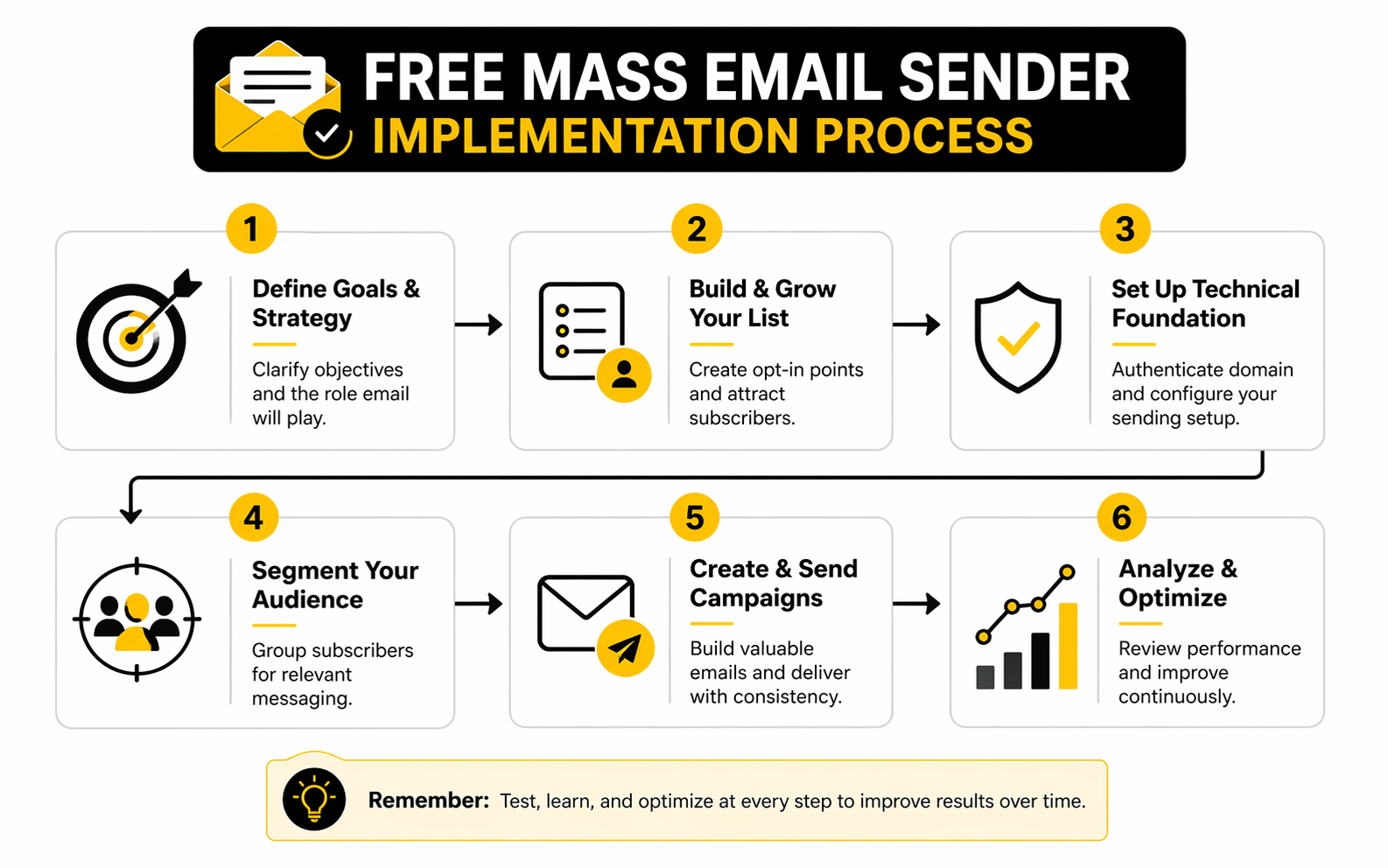
- Pick a platform whose free limits match your real sending pattern, not your fantasy growth curve.
- Connect your sending domain and finish SPF, DKIM, and DMARC setup.
- Import only contacts with clear permission and remove anything questionable before the first send.
- Configure sender identity, physical address details, and unsubscribe handling.
- Send first to your warmest segment, not your full database.
- Watch complaints, bounces, clicks, and unsubscribe behavior before increasing volume.
- Adjust content, targeting, and cadence before you scale.
That process is not complicated, but it is incredibly easy to rush. The biggest mistake is trying to make a free mass email sender behave like a high-volume engine on day one. If you move too fast, the inbox providers do not see ambition. They see risk.
Start With Your Warmest Audience First
The smartest first campaign is rarely the biggest one. It is the most likely to get positive engagement. That means recent subscribers, recent buyers, active leads, or people who clearly asked to hear from you.
There is a reason this works. Positive engagement helps confirm relevance, while weak engagement and complaints tell providers the opposite. When Google gives qualified bulk senders access to Postmaster Tools, it is effectively saying the same thing: reputation is measurable, and senders should pay attention before problems become systemic.
This is also where segmentation stops being a “nice feature” and becomes a risk-control tool. If your free mass email sender supports audience filters and basic automation, use them early. Broad blasts are easier to send, but they are often much harder to recover from.
Volume Should Expand Gradually, Not Emotionally
A lot of email problems start with impatience. Someone gets excited, uploads a list, hits send to everyone, and assumes a free mass email sender is now responsible for inbox placement. That is not how sender reputation gets built.
Even platform help centers treat gradual scaling as normal practice. When dedicated infrastructure is involved, Brevo’s warm-up guidance recommends gradually increasing volume because inbox providers need time to recognize stable, trustworthy patterns. Free-plan users on shared infrastructure are not warming a dedicated IP in the same way, but the underlying logic still applies: consistent, relevant sending beats sudden spikes.
That means your early goal is not maximum reach. It is signal quality. You want clean engagement patterns, low complaint pressure, and enough data to know what your audience actually wants from you.
The next section builds on that foundation and looks at what professional implementation really looks like when you want your email setup to support lead generation, follow-up, and growth instead of acting like a standalone sending tool.
What the Data Is Really Telling You
Once a free mass email sender is live, the next trap is misreading the dashboard. People see a decent open rate, assume everything is fine, and keep sending the same campaigns to the same list. That is how weak systems stay weak for months.
The better approach is to treat analytics as feedback on three things at once: audience fit, message quality, and sender health. Those are not the same problem, and the numbers only become useful when you know which one you are actually looking at. A free mass email sender can give you enough data to improve, but only if you stop treating every percentage like a vanity score.
Benchmark Ranges Are Useful, but Only If You Read Them Correctly
Current benchmark reports are still worth using because they give you context, not because they hand you a universal target. MailerLite’s 2025 benchmark dataset puts the median open rate at 43.46%, the median click rate at 2.09%, the median click-to-open rate at 6.81%, and the unsubscribe rate at 0.22%. The DMA’s 2025 Email Benchmarking Report shows a different lens, with delivery at 98%, open rates at 35.9%, and unique click rates at 2.3%, while Mailchimp’s benchmark guidance frames a good overall open rate at about 34.23% and an average CTR near 2.66%.
Those differences are not a contradiction. They are a reminder that benchmark numbers depend on dataset makeup, industry mix, tracking method, and platform behavior. The action point is simple: use benchmarks to check whether you are in the right neighborhood, then judge progress against your own list over time.
If your free mass email sender shows results that are far below these broad ranges, you probably have a relevance problem, a list-quality problem, or both. If your results are comfortably inside the range, that does not automatically mean you are winning. It just means you have earned the right to look deeper.
Open Rates Still Matter, but They Do Not Tell the Whole Story
Open rate is useful because it tells you whether the subject line, sender name, and relationship with the recipient are strong enough to earn attention. That is why it still belongs on every dashboard. But it is no longer precise enough to be treated like a single source of truth.
MailerLite’s benchmark notes explicitly point out that Apple Mail Privacy Protection inflates opens by automatically marking some emails as opened. That means open rate is now more directional than literal. A rising trend can still be meaningful, but a high open rate on its own does not prove deep engagement.
The practical move is to read opens as an early signal, not a final verdict. If opens rise while clicks, replies, or conversions stay flat, your subject line is doing more work than your actual email. That is not a win. It is a mismatch.
Click Rate and Click-to-Open Rate Usually Tell You More
Click rate matters because it measures action from the full delivered audience. Click-to-open rate matters because it isolates what happened after someone actually opened the email. Together, those two numbers tell you whether the message body, offer, and call to action are doing their job.
This is why Mailchimp’s benchmark explanation is useful in practice. It treats CTR as a stronger engagement signal than opens because it reflects whether recipients were motivated to do something. MailerLite’s 2025 dataset also reinforces that CTOR can vary dramatically by industry, which means weak clicks are not always a list problem. Sometimes they are just a message problem.
If your free mass email sender shows solid opens but weak clicks, improve the content before you touch frequency. Tighten the offer, reduce friction, simplify the layout, and make the next step obvious. If both opens and clicks are weak, the problem is probably earlier in the chain: wrong segment, weak list quality, or poor timing.
Delivery, Bounce, and Complaint Signals Matter More Than Most People Think
The most dangerous mistake in email analytics is staring at engagement numbers while ignoring sender-health signals. Delivery rate, bounce rate, unsubscribe rate, and spam complaints tell you whether your system is stable enough to keep scaling. If those signals start moving the wrong way, the rest of the dashboard becomes less trustworthy.
The DMA’s 2025 report showing a 98% delivery rate is useful because it gives you a rough reality check for healthy programs. If your delivery performance is materially below that, something is off before anyone even has the chance to engage. That usually points to poor list collection, aging data, or technical setup issues.
Complaint data matters even more. Google’s sender FAQ says spam rates are calculated daily, should stay below 0.1%, and should never reach 0.3% or higher. That is not just an abstract deliverability guideline. It is a hard operational signal that should drive immediate action when it rises.
Unsubscribes Are Not Always Bad News
A lot of people panic when unsubscribe rates go up, but that reaction is often too simplistic. Sometimes more unsubscribes mean your list is cleaning itself, which can actually improve long-term performance. The important question is whether unsubscribes are happening at a healthy, explainable level or whether they are spiking because the message was irrelevant or too aggressive.
This is one reason MailerLite’s 2025 benchmark report is more useful than it first appears. It notes that unsubscribe rates rose to 0.22% and ties part of that shift to inbox-level unsubscribe improvements, especially in Gmail. In plain English, it is easier now for people to leave quietly instead of tolerating irrelevant email for too long.
That is actually a good thing. A free mass email sender should help you lose the wrong subscribers cleanly rather than keep them on the list until they start hurting deliverability. The action is not to chase zero unsubscribes. The action is to keep relevance high enough that unsubscribes stay controlled and complaints stay low.
What Good Measurement Looks Like in Practice
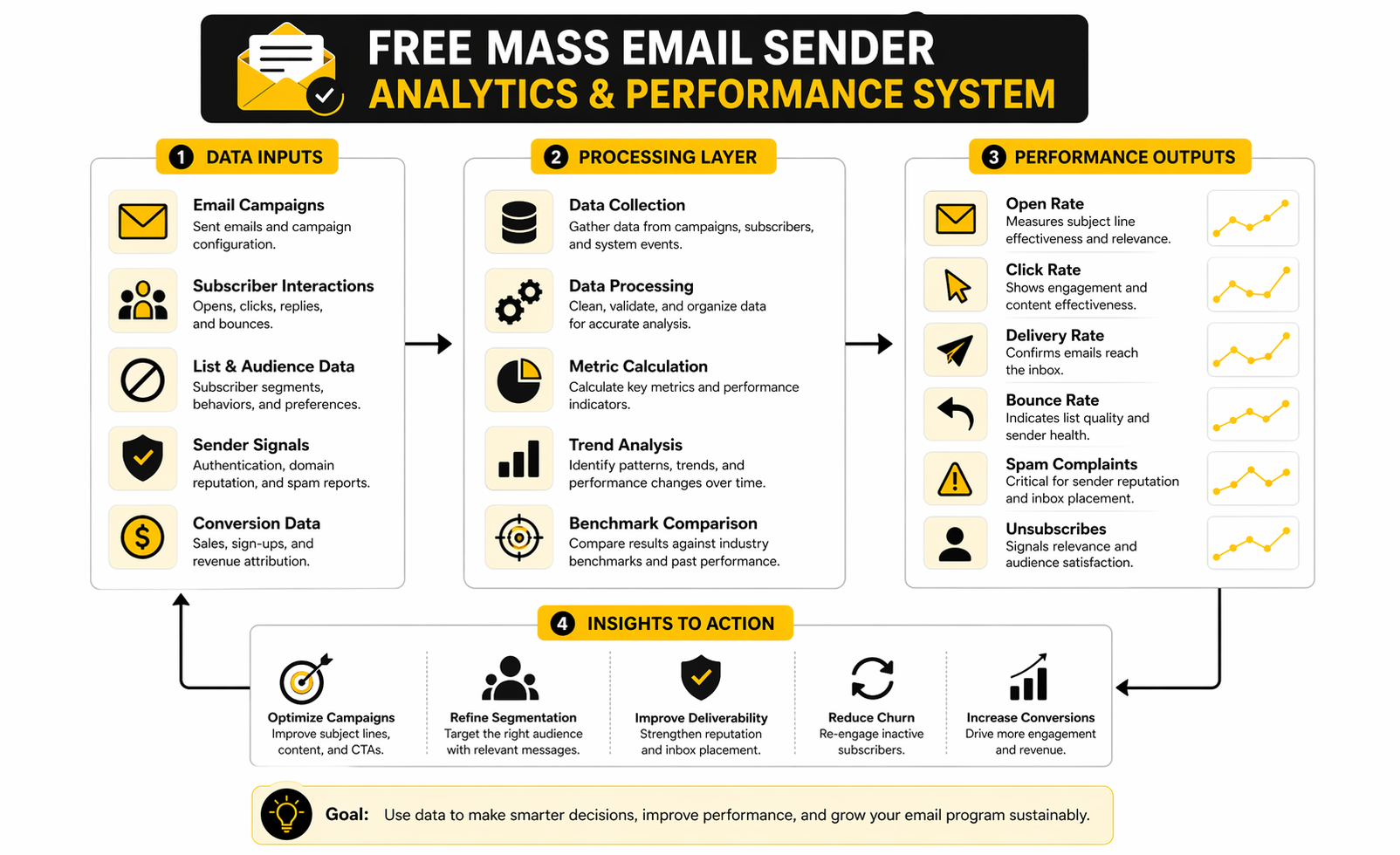
A useful analytics system does not need to be complicated. It just needs to separate performance into clear categories so you know what to fix next. The easiest way to do that is to read the dashboard in layers instead of as one giant performance score.
- Start with delivery and bounce data to confirm the email actually reached real inboxes.
- Check spam complaints and unsubscribe behavior to spot trust issues early.
- Review open rate as a directional read on sender recognition and subject-line pull.
- Review click rate and click-to-open rate to judge message quality and offer strength.
- Compare segments, not just totals, so strong audiences do not hide weak ones.
- Track trends over multiple sends instead of overreacting to one campaign.
That workflow changes the quality of decisions fast. It helps you see whether the next move should be better targeting, better copy, lower frequency, list cleanup, or technical fixes. Without that structure, a free mass email sender becomes another tool that produces data but not insight.
The Right Action Depends on Which Metric Is Failing
Metrics only matter when they lead to action. That is the whole point of this section. A dashboard should tell you what to do next, not just whether you should feel good or bad.
If delivery is weak, fix setup and list quality first. If opens are weak, test sender identity, timing, and subject lines. If opens are fine but clicks are poor, improve the content and the offer. If complaints rise, slow down immediately, tighten segmentation, and stop sending to anyone who did not clearly want the message.
That is how measurement becomes operational instead of decorative. And once you can read the data that way, the jump into a more professional email system becomes much easier, because you are no longer just sending campaigns. You are managing a channel.
Professional Implementation Without Enterprise Complexity
This is the point where a free mass email sender either stays useful or starts getting in your way. Early on, almost any decent tool can handle a small list and a few campaigns. The pressure shows up later, when email stops being a side task and becomes part of lead generation, sales follow-up, onboarding, retention, or client delivery.
That is why the smartest operators do not just ask whether the free plan still works. They ask whether the whole setup still makes operational sense. Once email starts touching multiple parts of the business, the real cost is rarely the monthly software fee. It is the friction of disconnected tools, messy handoffs, weak attribution, and manual follow-up.
The Biggest Strategic Tradeoff Is Simplicity Versus Control
A simple free mass email sender is often the right starting point because it reduces setup friction. You can build a list, send campaigns, watch engagement, and learn fast without overengineering the stack. For a solo creator, small local business, or early-stage offer, that is a real advantage.
The tradeoff is that simplicity usually comes with ceilings. Free plans often cap sends, restrict automation depth, limit advanced reporting, or make it harder to connect email to the rest of your customer journey. Brevo’s free tier, for example, still limits sending to 300 emails per day, which is workable for testing but restrictive once timing and scale start to matter.
That is the moment when control becomes more valuable than convenience. Not because complexity is glamorous, but because growth creates more moving parts. When email needs to sync with forms, pipelines, appointment flows, CRM stages, or multichannel follow-up, a standalone sender starts solving only part of the problem.
Scaling Breaks Workflows Before It Breaks Software
Most people assume they will notice the need to upgrade when the platform literally stops sending. In reality, the first thing that breaks is usually the workflow around the send. The list is in one place, forms are in another, attribution is fuzzy, and leads fall into gaps because email is not tied tightly enough to the rest of the process.
That is why expert-level guidance here is less about “best tool” and more about architecture. A free mass email sender should fit into a system that can grow without forcing constant rebuilding. If your setup requires exporting contacts, cleaning lists manually, copying leads between tools, and guessing which email drove which action, the weakness is no longer tactical. It is structural.
This is exactly where broader platforms start to earn their keep. A tool like GoHighLevel becomes more attractive when email needs to sit inside a bigger operational layer that includes CRM, forms, workflows, and follow-up. A tool like Brevo makes sense when you want email and customer management in one lighter-weight environment without immediately jumping into a heavier stack.
Shared Infrastructure Is Fine Until Reputation Becomes a Competitive Variable
Free email plans usually run on shared sending infrastructure, and that is not automatically a problem. For small-scale, permission-based sending, shared environments can be perfectly adequate. The issue is that shared infrastructure gives you less control over how reputation is managed at scale, which matters more as your business depends more heavily on inbox placement.
That is why mature sending operations eventually start thinking about dedicated sending options, verification layers, and tighter reputation control. GoHighLevel’s current LC Email documentation explicitly positions dedicated IPs as a way to gain more control over sender reputation and deliverability, while its email best-practices guidance emphasizes warm-up and disciplined sending behavior.
The point is not that everyone needs a dedicated IP. Most do not, especially early. The point is that once reputation becomes a strategic asset, the infrastructure conversation changes. At that stage, a free mass email sender is no longer the whole answer, even if it was the right answer at the beginning.
Segmentation Gets More Valuable as Your Audience Gets Bigger
When your list is tiny, broad campaigns can still work because your audience is narrow and easy to understand. As the list grows, that stops being true. Different sources, different levels of intent, different buyer stages, and different engagement histories all start living inside the same database.
That is where better segmentation stops being optional. It is not just about getting higher clicks. It is about protecting relevance, reducing complaints, and making sure your strongest audience does not get buried under generic messaging. Google and Yahoo both continue to signal that trusted sending behavior depends on relevance, authentication, easy unsubscribe, and low complaint pressure, which means blunt broadcasting gets riskier as scale rises.
This also changes how you should think about upgrades. You do not upgrade just because you want more features. You upgrade because segmentation, automation, and routing precision start protecting revenue and deliverability at the same time.
The Hidden Risk Is Delaying the Upgrade Too Long
One of the more expensive mistakes in email is hanging onto a free mass email sender long after it stopped fitting the business. That usually happens because the visible software cost still looks attractive. But hidden costs have already started piling up in the background.
The team is doing extra manual work. Campaign timing is constrained by send caps. Reporting is too shallow to support good decisions. Automations are patched together instead of built properly. At that point, “free” is mostly an accounting illusion.
The better way to think about it is this: free tools are for proving a channel, not for avoiding investment forever. Once email clearly contributes to lead flow, sales, bookings, or retention, the main question becomes how to strengthen the channel without introducing unnecessary complexity. Sometimes that means moving up inside the same platform. Sometimes it means shifting to a system with broader workflow support. The right answer depends less on list size alone and more on how central email has become to the business.
What an Expert-Level Setup Usually Looks Like
A more mature setup does not have to feel enterprise-heavy. In practice, it usually means a few very practical upgrades that make everything cleaner and more resilient. The goal is not to add tools for the sake of it. The goal is to reduce failure points.
A strong next-stage setup usually includes:
- A fully authenticated domain with clear separation between marketing and transactional use where needed.
- Reliable list collection tied directly to forms, funnels, or CRM stages instead of manual imports.
- Basic lifecycle automation for welcome, follow-up, nurture, and re-engagement.
- Segmentation by source, intent, engagement, and customer stage.
- Clear analytics that connect sends to outcomes, not just opens and clicks.
- A platform path that can handle higher volume without forcing a complete rebuild.
That is why some businesses eventually pair email with funnel and CRM layers instead of keeping everything inside a basic sender. Depending on the model, that could mean building the front-end conversion path in ClickFunnels, using Systeme.io for simpler all-in-one flows, or expanding into GoHighLevel when follow-up automation and client operations need more depth. The right choice is less about hype and more about how many handoffs you want to remove.
The Real Goal Is Not Free Email, It Is Durable Email
That is the final strategic shift. A free mass email sender is useful because it helps you start. But the real win is not sending free emails forever. The real win is building an email channel that keeps working as the business gets more complex.
If you treat the free plan like a proving ground, it can be incredibly valuable. You can validate messaging, test list quality, learn your metrics, and build early momentum without overspending. If you treat it like a permanent replacement for system design, it usually turns into a bottleneck.
That is why the close of this conversation is not “pick the cheapest tool and hope.” It is “use the free stage intelligently, then scale before the constraints start hurting the channel.” The final part will answer the most common questions people still have when choosing and using a free mass email sender in the real world.
Frequently Asked Questions About Free Mass Email Senders
What is a free mass email sender, really?
A free mass email sender is a platform that lets you send email campaigns to a list of subscribers without paying at the entry level. The important part is that “free” usually comes with limits on contacts, sends, branding, automation, or analytics. So the better question is not whether the tool is free, but whether the free version is useful enough for the stage you are in right now.
Can I use a free mass email sender for a real business?
Yes, absolutely, as long as the volume is still modest and the setup is clean. A free plan can work well for newsletters, small promotions, list building, early nurturing, or validating a new offer before you invest in a bigger stack. The mistake is assuming a free mass email sender should carry the entire business forever, even after the list, workflow, and revenue demands have grown past its limits.
Is Gmail itself a free mass email sender?
Not in the way most businesses need. Gmail is fine for one-to-one communication and small-scale personal use, but it is not built to manage subscriber lists, campaign analytics, segmentation, opt-out flows, or broader email operations. If you want proper campaigns, audience control, and safer bulk sending behavior, you need a real email platform.
What is the biggest mistake people make with a free mass email sender?
The biggest mistake is treating the tool like the strategy. People rush into sending before they authenticate the domain, clean the list, think through segmentation, or set up a compliant unsubscribe experience. When results are poor, they blame the platform, even though the real problem is usually weak list quality or careless execution.
How many contacts do I need before I should upgrade?
There is no magical number, because the real trigger is operational pressure, not vanity scale. You should upgrade when send caps start affecting timing, when automation limits create manual work, when reporting is too shallow to support decisions, or when email needs to connect tightly with CRM, lead routing, sales follow-up, or client delivery. That point often arrives earlier than people expect.
Is deliverability worse on free plans?
Not automatically. A free mass email sender can perform perfectly well if your domain is authenticated, your list is permission-based, and your campaigns are relevant. Deliverability usually gets worse because of bad inputs, rushed scaling, or poor audience hygiene, not just because the account happens to be free.
Which matters more: more sends or better automation?
In the beginning, basic automation often matters more. More sends are nice, but a welcome sequence, lead nurture flow, or simple re-engagement campaign can create more value than blasting one extra newsletter. That is why it is smart to look beyond volume limits and ask whether the platform helps you build a repeatable system.
Should I choose a standalone email tool or an all-in-one platform?
That depends on how central email is to the rest of the business. If you mainly need newsletters and simple campaigns, a focused platform can be enough. If you want email tied to funnels, CRM, forms, scheduling, follow-up, and broader workflow automation, a more connected system like GoHighLevel or a lighter all-in-one option like Systeme.io can make more sense.
What should I look for first when comparing tools?
Start with four things: send limits, contact limits, automation access, and reporting depth. After that, look at authentication support, segmentation, form capture, and how painful it will be to grow past the free tier. If the platform makes those basics easy, it is much more likely to remain useful after the honeymoon phase.
Can a free mass email sender work for lead generation?
Yes, especially when it is paired with a solid front-end capture system. The most effective setup is usually not just the sender itself, but the full path from traffic to opt-in to follow-up. That is why some businesses pair their email tool with a funnel platform like ClickFunnels or use a broader CRM-driven stack once lead flow becomes more serious.
What if I want email plus CRM without building a complicated stack?
That is where platforms with broader customer management features start becoming attractive. If you want a simpler path into email, contact organization, and multichannel marketing, Brevo is often worth a look. If you want something more workflow-heavy for agencies, service businesses, or multi-step follow-up, GoHighLevel’s trial path makes more sense.
Is a free mass email sender enough for agencies?
Sometimes, but usually only at the very beginning or for very simple internal campaigns. Agencies tend to outgrow basic senders faster because they need account structure, client workflows, segmentation across offers, reporting clarity, and tighter connections between acquisition and follow-up. Once client delivery depends on the system, the platform choice becomes a business-model decision, not just a software choice.
What is the smartest way to start?
Start with a clean list, an authenticated domain, one strong segment, and a small number of campaigns you can actually learn from. Watch deliverability signals, not just vanity metrics. Then scale only after the system proves it can handle more volume without hurting trust or performance.
Work With Professionals
Explore 10K+ Remote Marketing Contracts on MarkeWork.com
Most marketers spend too much time chasing clients, competing on crowded platforms, and losing a percentage of every project to middlemen. MarkeWork gives you a better way. Browse thousands of remote marketing contracts and connect directly with companies desperate to hire skilled marketers like you, without platform commissions and without unnecessary gatekeepers.
If you're serious about finding better opportunities and keeping 100% of what you earn, explore available contracts and create a profile for free at MarkeWork.com.