

Gmail email marketing is a powerful tool for businesses aiming to connect directly with their audience. With over 1.5 billion active users globally, Gmail represents a massive opportunity for marketers to engage subscribers with personalized messages, promotions, and content updates. Unlike social media channels, email provides a direct line to your audience’s inbox, offering higher control over timing, segmentation, and follow-up strategies.
Effectiveness in Gmail isn’t just about sending more emails—it’s about sending the right emails in the right way. Proper segmentation, compelling subject lines, and a focus on deliverability ensure that your messages reach primary inboxes rather than spam or promotions tabs. Moreover, understanding Gmail-specific features, such as annotations, images, and promotional tabs, allows marketers to optimize campaigns for higher visibility and engagement.
By applying a structured approach to Gmail email marketing, you can increase open rates, drive conversions, and nurture long-term customer relationships. The right framework not only supports campaign consistency but also provides actionable insights to refine your messaging over time.
Article Outline
- Why Gmail Email Marketing Matters
- Core Framework for Campaign Success
- Key Components of Effective Gmail Campaigns
- Step-by-Step Implementation Process
- Measurement, Analytics, and Optimization
- Professional Resources and Scaling Strategies
Why Gmail Email Marketing Matters
Gmail remains one of the most dominant email platforms, making it essential for marketers who want to reach a wide audience effectively. Engaging subscribers directly in their inbox gives businesses a unique advantage over social media campaigns, which are often limited by algorithms and fleeting visibility. A well-crafted Gmail email marketing campaign can increase open rates, foster trust, and drive higher conversions compared to generic email blasts.
The platform also offers advanced segmentation and personalization capabilities. Using Gmail’s native features and integration with marketing automation tools, marketers can send highly targeted messages, improving engagement while reducing unsubscribes. By leveraging Gmail’s structured layout and annotation capabilities, campaigns can appear more professional and capture user attention in a crowded inbox.
Furthermore, Gmail’s analytics and deliverability features allow marketers to track performance and adjust strategies in real-time. Monitoring metrics like open rates, click-throughs, and user engagement can provide insights that guide future campaigns, ensuring continuous optimization and measurable ROI.
Core Framework for Gmail Email Campaigns
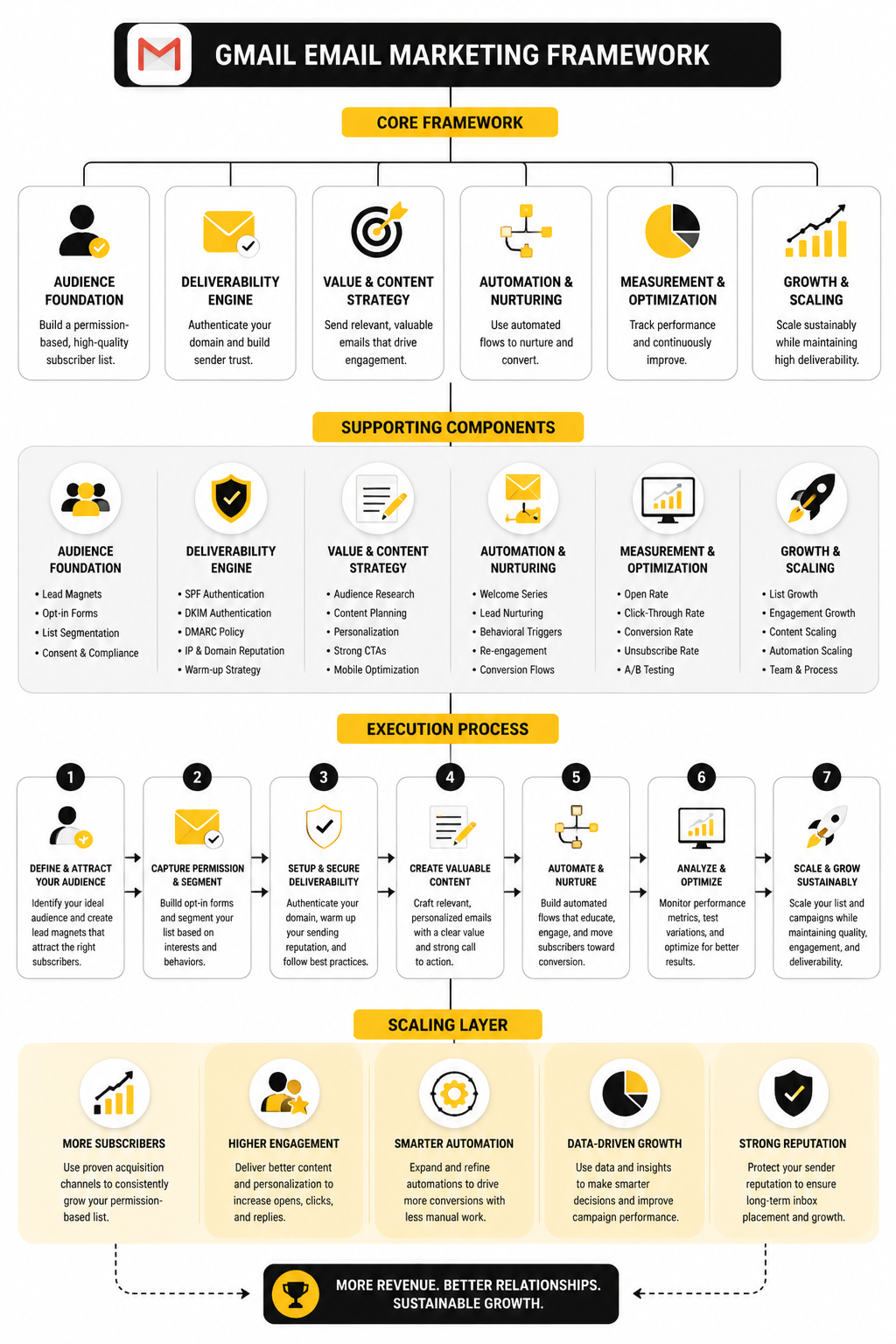
To run an effective Gmail email marketing campaign, understanding the core framework is crucial. This framework consists of:
- Audience Segmentation: Grouping subscribers based on interests, behavior, and demographics to ensure messages are relevant.
- Content Strategy: Crafting compelling subject lines, preheaders, and email copy that drive action.
- Design and Layout: Ensuring emails are mobile-friendly, visually appealing, and compatible with Gmail’s display standards.
- Automation and Scheduling: Using tools to send emails at optimal times and trigger messages based on user behavior.
- Analytics and Optimization: Continuously measuring performance and refining campaigns based on actionable insights.
Setting Up a Gmail Email Marketing Campaign
Implementing a Gmail email marketing campaign starts with establishing a structured workflow that ensures every message reaches the right audience at the right time. The first step is to organize your subscriber list using segmentation criteria like behavior, purchase history, or engagement levels. This allows messages to be highly targeted, increasing the likelihood of opens and conversions.
Next, craft the content itself. Focus on compelling subject lines, concise copy, and clear calls-to-action. Gmail users are accustomed to scanning quickly, so your emails must communicate value instantly. Incorporate responsive design to ensure messages render well on both desktop and mobile devices, maintaining brand consistency across platforms.
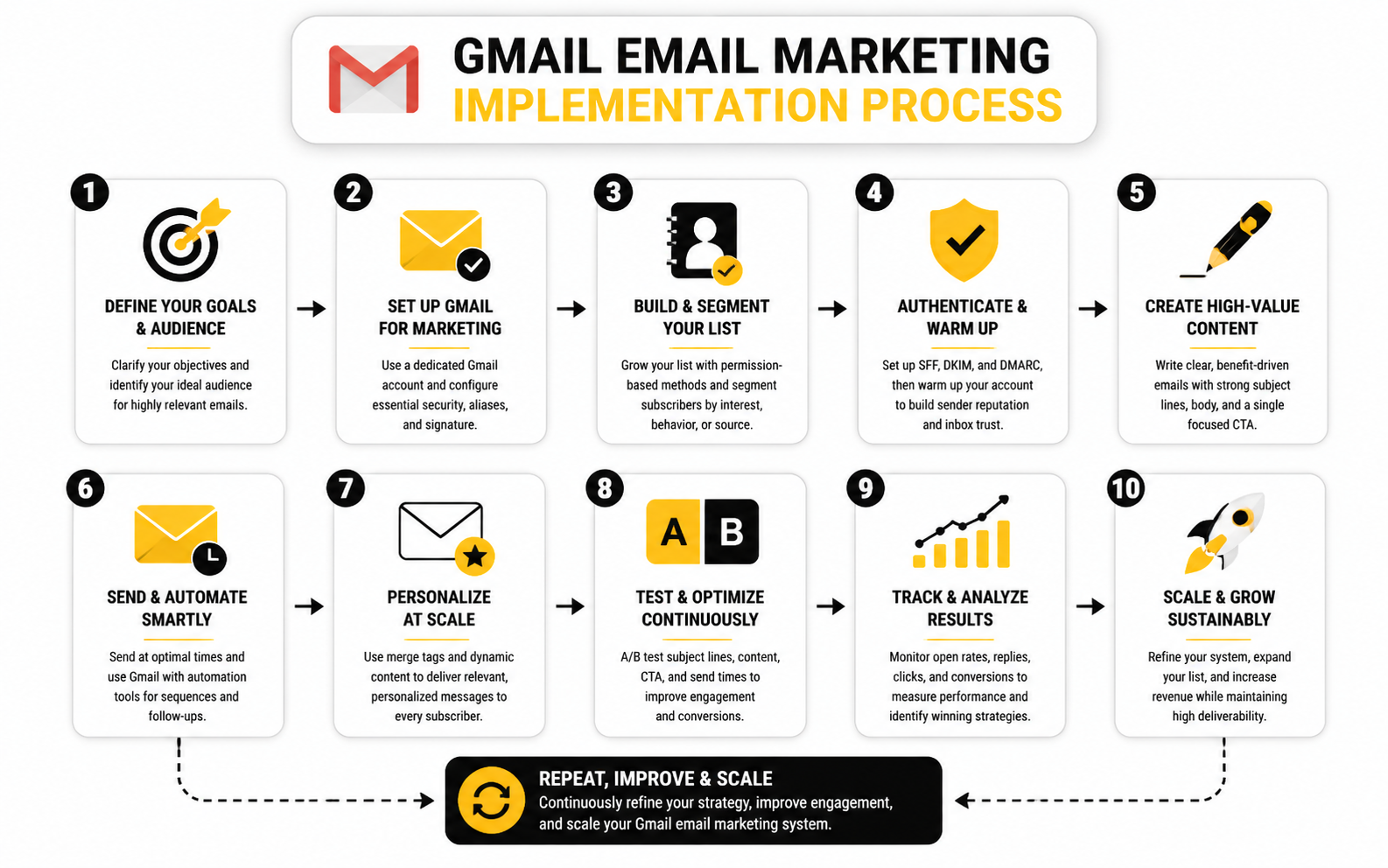
Once the emails are ready, use scheduling and automation tools to streamline delivery. Tools like GoHighLevel or Brevo enable triggers based on user behavior, such as opens, clicks, or website visits. This dynamic approach ensures your audience receives relevant content without manual oversight. Monitoring engagement in real time allows adjustments on subject lines, content, or sending times to maximize performance, completing the execution loop efficiently.
Executing Gmail Email Marketing Campaigns
Once your strategy and framework are in place, the focus shifts to the practical implementation of a Gmail email marketing campaign. Execution starts with segmenting your audience to ensure messages are relevant to each recipient group. This targeted approach reduces unsubscribes and increases engagement, which directly impacts your campaign’s overall effectiveness.
Next, create content tailored to each segment. Subject lines must capture attention in the crowded Gmail inbox, while the body should deliver concise, compelling value that motivates action. Incorporating clear calls-to-action and mobile-optimized layouts ensures higher click-through rates and a seamless user experience across devices.
Automation is a critical part of implementation. Tools like GoHighLevel or Brevo enable trigger-based email flows, such as welcome sequences, cart abandonment reminders, and follow-ups based on user behavior. Monitoring key performance indicators like open rates, click-through rates, and conversion metrics allows marketers to refine messaging in real time, ensuring each step in the execution process drives measurable results.
Statistics and Data
In Gmail email marketing, understanding performance metrics is essential for refining your campaigns and ensuring each message achieves its intended effect. Key indicators include open rates, click-through rates, conversion rates, bounce rates, and unsubscribe rates. These metrics collectively provide insight into how recipients engage with your emails and which aspects of your messaging resonate most effectively.
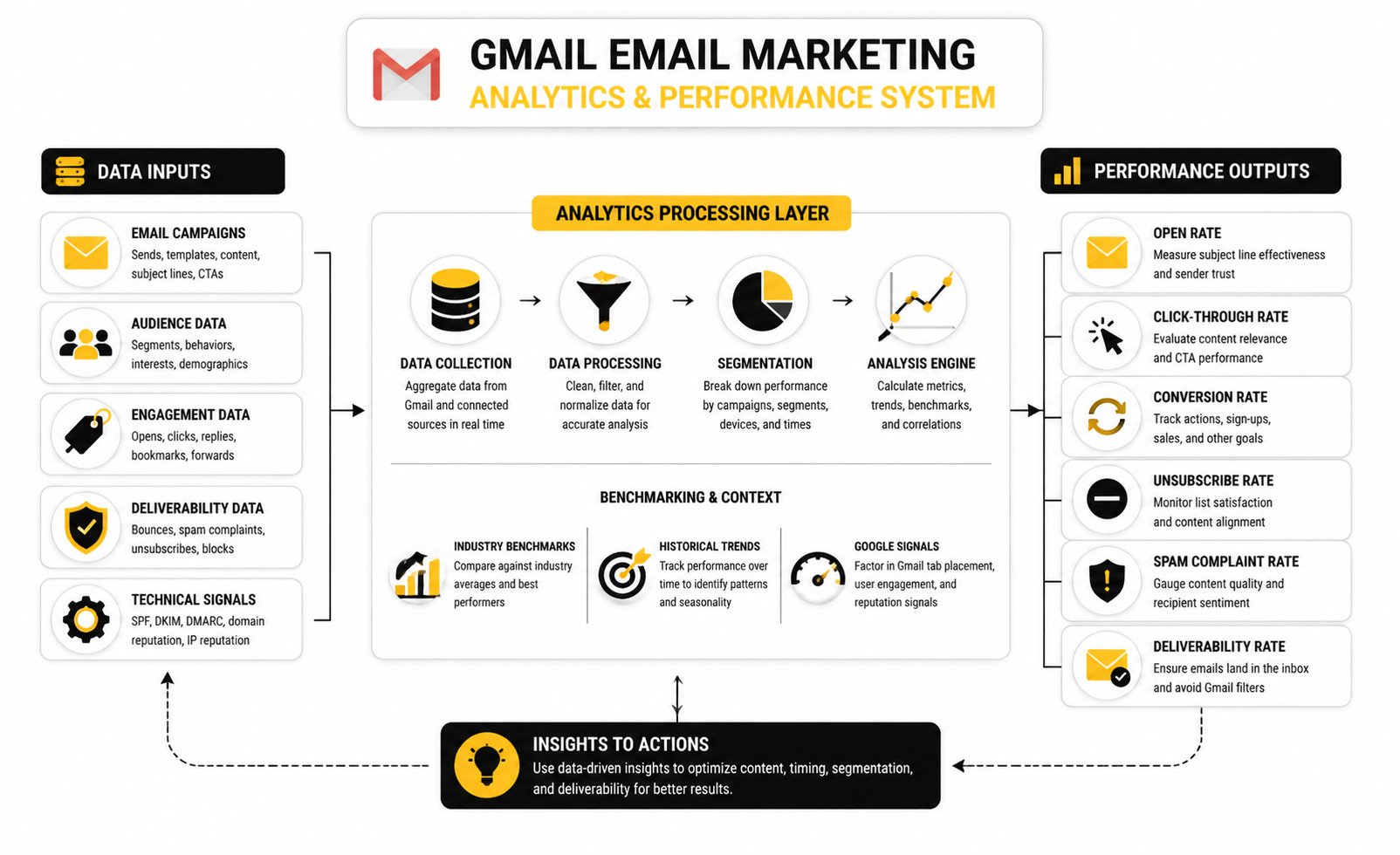
Open rates give a clear picture of subject line effectiveness and initial engagement. High open rates indicate strong curiosity or interest, whereas low rates often signal a need to optimize the subject line or sender reputation. Click-through rates then reveal whether the email content itself is compelling enough to drive action, offering direct insight into the alignment of copy, design, and offer.
Conversion rates track the ultimate success of your campaign—how many recipients take the desired action after engaging with your email. By analyzing these alongside bounce rates, marketers can identify issues with email deliverability or list quality. Unsubscribe rates serve as an early warning system for content fatigue or misalignment with audience expectations, signaling the need for more precise segmentation or better personalization.
Benchmarking against industry standards can help contextualize these numbers. For instance, knowing that the average open rate in the technology sector hovers around 21% allows marketers to identify campaigns that underperform and iterate strategically. Data should drive action: refine messaging, segment more effectively, optimize send times, and test creative elements continuously to maximize ROI from your Gmail email marketing campaigns.
Gmail Email Marketing Ecosystem
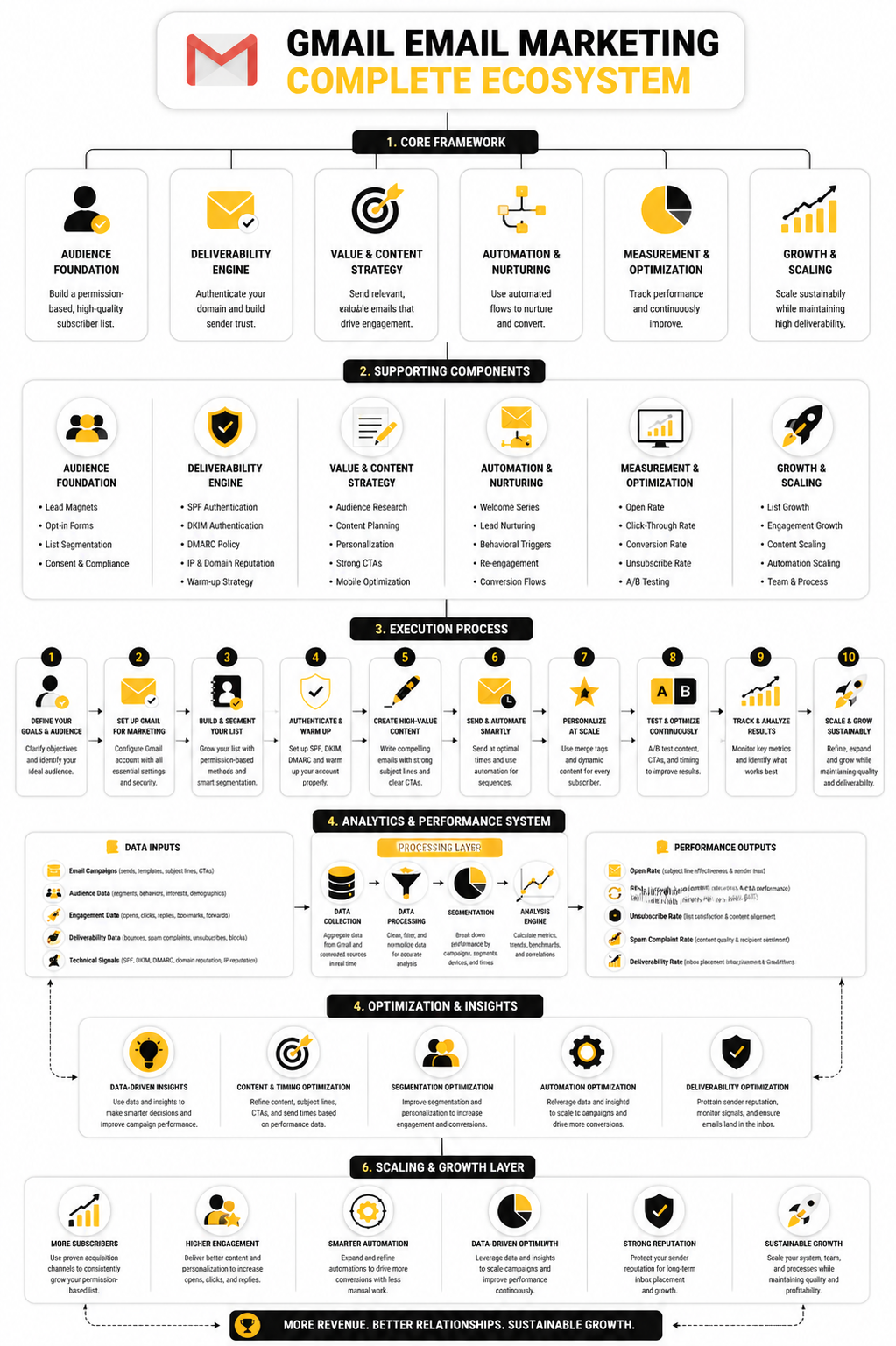
Gmail email marketing is more than sending messages—it's a complete ecosystem of strategy, execution, and optimization. At the top level, your campaign framework defines objectives, audience segmentation, and key messaging priorities. Mid-level components include content creation, automation setup, personalization rules, and template management. The execution layer handles actual email sends, scheduling, and workflow triggers, while the optimization layer focuses on A/B testing, engagement monitoring, and deliverability checks. Finally, scaling involves list growth, multi-segment targeting, and iterative improvements based on analytics feedback.
FAQ - Built for Complete Guide
1. What is Gmail email marketing?
Gmail email marketing is the process of using Gmail as a platform to reach subscribers, promote products, or share content while leveraging segmentation and personalization for better engagement.
2. How do I build an effective Gmail email list?
Start with opt-in forms on your website, lead magnets, and integrations with CRM tools. Ensure subscribers consent and are segmented based on interests for higher engagement.
3. What metrics should I track?
Open rates, click-through rates, conversion rates, bounce rates, and unsubscribe rates are essential to understanding your campaign performance and areas for improvement.
4. How can I improve email deliverability?
Maintain list hygiene, avoid spammy words in subject lines, authenticate your domain with SPF/DKIM/DMARC, and monitor engagement regularly.
5. What content performs best in Gmail emails?
Personalized, concise, and visually engaging content with clear CTAs performs best. Use dynamic content blocks and strong subject lines for higher open rates.
6. How often should I send Gmail campaigns?
Frequency depends on audience tolerance and content value. Many brands find 1-2 times per week optimal; over-sending can lead to unsubscribes.
7. Should I use automation?
Yes. Automated workflows for welcome sequences, cart abandonment, or re-engagement can significantly improve efficiency and ROI.
8. Can I integrate Gmail campaigns with other platforms?
Absolutely. Gmail campaigns integrate with CRMs, landing pages, and analytics tools to provide a cohesive marketing ecosystem.
9. How do I test and optimize emails?
Use A/B testing for subject lines, content, and send times. Review performance metrics, and iterate campaigns based on results.
10. Is Gmail email marketing suitable for B2B and B2C?
Yes. Both B2B and B2C marketers can benefit, though strategy and content may differ. B2B often prioritizes lead nurturing, while B2C focuses on conversions and engagement.
Work With Professionals
Explore 10K+ Remote Marketing Contracts on MarkeWork.com
Most marketers spend too much time chasing clients, competing on crowded platforms, and losing a percentage of every project to middlemen. MarkeWork gives you a better way. Browse thousands of remote marketing contracts and connect directly with companies desperate to hire skilled marketers like you, without platform commissions and without unnecessary gatekeepers.
If you're serious about finding better opportunities and keeping 100% of what you earn, invite readers to explore available contracts and create a profile for free at MarkeWork.com.