

Most Google Ads advice sounds useful until you try to run it in a live account. Then you realize the hard part is not learning random tactics. The hard part is knowing which levers matter first, which ones work together, and which mistakes quietly drain budget before the campaign has a fair chance to perform.
That matters even more now because Google is handling more than 5 trillion searches a year, while newer search experiences are expanding the kinds of queries people use to discover products and services. At the same time, Alphabet’s filings show Google Search & other revenue grew in 2025, which is a strong signal that businesses still see intent-rich search traffic as worth fighting for. So the real opportunity is not just to “be on Google.” It is to build campaigns that match intent, measure the right actions, and give Google’s systems clean inputs.

Why Google Ads Still Matters
Google Ads still works because it reaches people at the moment they are actively comparing, researching, or trying to solve a problem. That is a different situation from interruption-based channels, where you often have to create demand before you can capture it. When your structure is tight and your offer matches the search, paid search can still be one of the fastest ways to turn demand into measurable revenue.
The platform has changed, though. Google now leans heavily on automation, auction-time bidding, broader matching, and AI-assisted campaign types, which means old-school micromanagement is less reliable than it used to be. Google’s own documentation is clear that Smart Bidding uses auction-time signals, and that broad match can work especially well when paired with Smart Bidding. In other words, modern Google Ads success comes from giving the system better strategy, better conversion data, and better creative direction, not from obsessing over tiny manual tweaks.
The Google Ads Success Framework
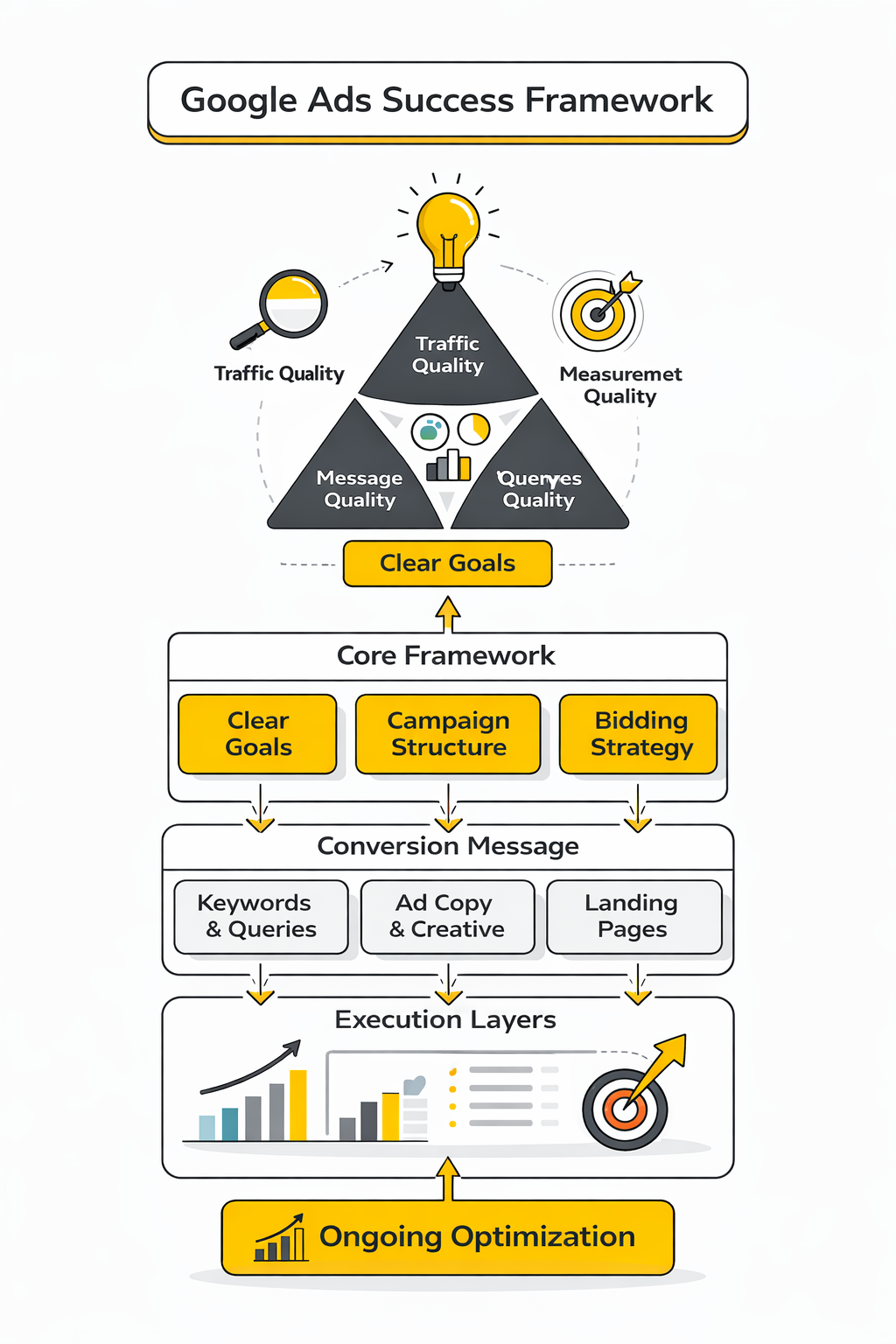
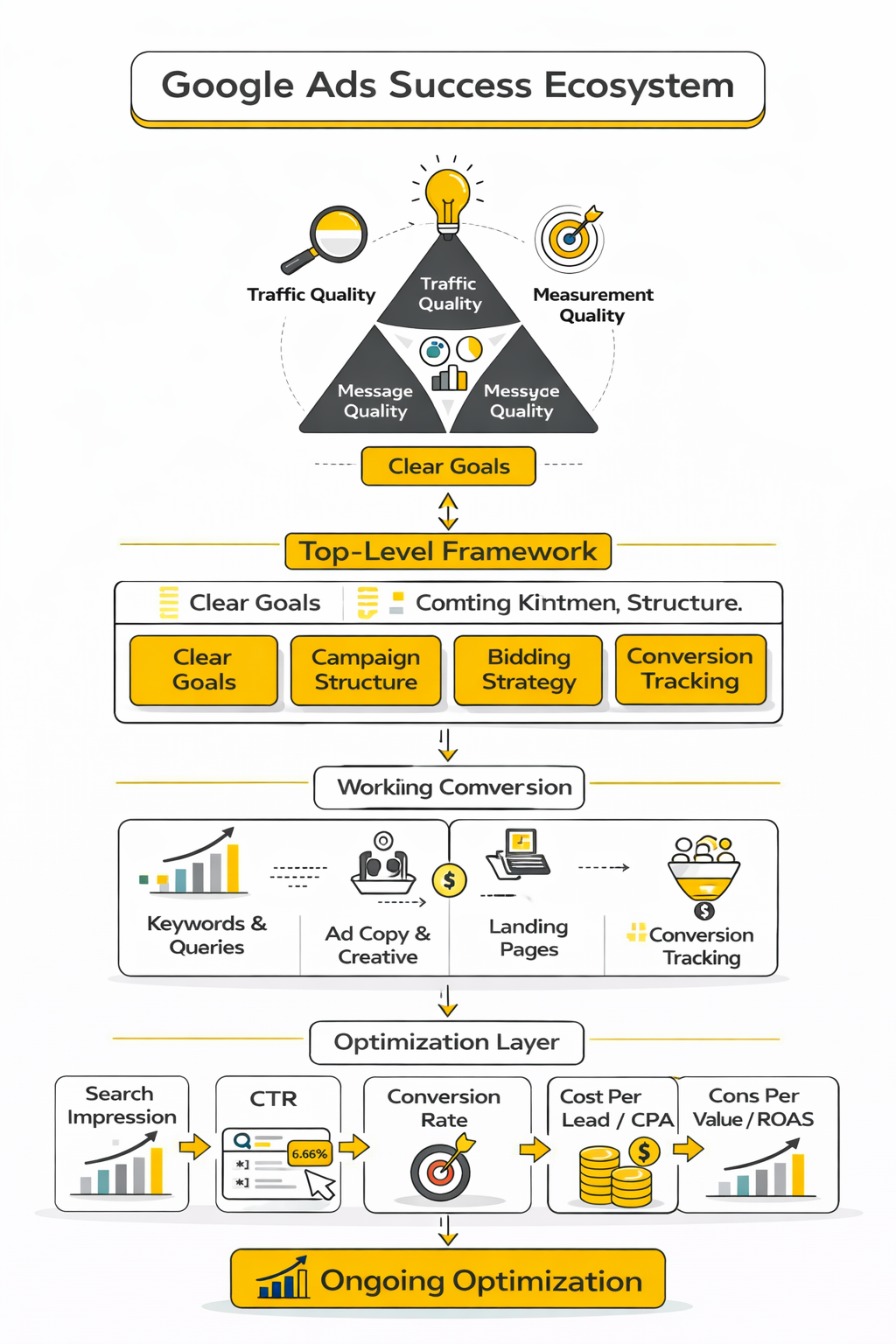
The simplest way to think about Google Ads is this: traffic quality, message quality, and measurement quality have to support each other. If one of those breaks, the account usually underperforms no matter how much you spend. That is why good Google Ads tips are rarely isolated tricks; they are parts of a framework.
At a practical level, that framework starts with clear goals, then moves into campaign structure, bidding, keyword or query control, ad quality, landing-page experience, and ongoing optimization. Google also emphasizes that Quality Score is a diagnostic signal tied to relevance and usefulness, while Ad Rank determines eligibility and position. So the best-performing accounts usually do not win because they found one magical setting. They win because the entire system is aligned.
If you need to launch landing pages and offers faster while building that system, tools like ClickFunnels or Systeme.io can make it easier to test the offer side of the equation without waiting on a full custom build. That will not fix weak targeting on its own, but it can remove a major bottleneck when speed matters. In Google Ads, faster testing often means faster learning.
Article Outline
This article follows a six-part structure so each section builds on the one before it. The order is intentional because strong Google Ads performance usually comes from getting the fundamentals right before moving into advanced optimization. We will keep these exact section names throughout the full article.
- Part 1: Why Google Ads Still Matters
- Part 1: The Google Ads Success Framework
- Part 2: Campaign Goals, Conversion Tracking, and Account Setup
- Part 3: Keyword Strategy, Search Intent, and Account Structure
- Part 4: Ad Copy, Creative Assets, and Landing Page Performance
- Part 5: Bidding, Budget Control, and Professional Implementation
- Part 6: Optimization, Reporting, and Long-Term Growth
Campaign Goals, Conversion Tracking, and Account Setup
The next layer of smart Google Ads tips is less exciting than bidding hacks, but it is where real performance starts. Before you touch keywords, ads, or budget, you need to decide what the account is actually trying to produce. If that part is fuzzy, Google’s automation will still optimize, but it may optimize for the wrong outcome.
A lot of wasted spend comes from a simple mismatch between business goals and platform signals. A company wants profitable sales, but the account is built around page views, weak lead forms, or every tiny interaction being treated like a win. That disconnect is expensive because modern Google Ads leans heavily on automated bidding and conversion-driven optimization, so the platform learns from whatever you tell it matters most. Google Podpora+2
Start With One Primary Goal Per Campaign
A campaign works better when its job is obvious. That means one primary goal, one clear conversion path, and one main type of user intent. When advertisers mix incompatible objectives inside the same campaign, reporting gets muddy and optimization gets slower.
Google’s own campaign setup guidance is built around selecting a business goal first, not picking random settings and hoping they line up later. That sounds basic, but it is one of the most useful Google Ads tips because a goal decides everything downstream: bid strategy, landing-page design, conversion action setup, and how success should be judged. A lead generation campaign, an ecommerce sales campaign, and a local store visit campaign should not be measured the same way because they are not solving the same problem. Google Podpora+2
The practical move is to define the primary conversion before the campaign goes live. For ecommerce, that is usually a purchase with revenue passed back into Google Ads. For lead generation, it is usually a qualified form submission, booked call, or another action that has a real relationship to revenue rather than just contact volume.
Choose Conversions That Reflect Business Value
Not every conversion deserves equal weight. Someone clicking a phone number, downloading a PDF, or staying on the site for a while may be useful, but those actions are not necessarily the same as a sale or a sales-qualified lead. If you feed weak signals into the account, weak optimization usually follows.
Google Ads supports conversion value and value-based optimization for a reason. The system performs better when it can distinguish between low-value and high-value outcomes instead of treating every action as identical. Google also states that data-driven attribution helps assign value across the path to conversion, which becomes much more useful when the underlying conversion setup reflects actual business impact. Google Podpora+2
This is where many advertisers need a reset. A cleaner setup often looks like this:
- Primary conversions are the actions you want bidding to optimize for.
- Secondary conversions are useful diagnostic signals, but not the main target.
- Conversion values should reflect revenue or lead quality whenever possible.
If you are generating leads instead of direct online sales, this distinction becomes even more important. Google’s documentation on enhanced conversions for leads and offline conversion imports makes it clear that advertisers can improve optimization by sending back stronger lead-quality signals from CRM systems, not just raw lead counts. Google Podpora+2
Build Conversion Tracking Before You Scale Spend
This is the part people rush, and then regret later. Running Google Ads without reliable tracking is like trying to steer at night with broken headlights. You might still move forward, but you are guessing.
Google recommends setting up web conversions through the Google tag and related event configuration so the platform can measure the actions that matter on your site. Google also notes that the Google tag can be used across linked product destinations, which makes it easier to create a more unified measurement setup instead of stitching together disconnected tags everywhere. That kind of consistency matters because bidding systems only work as well as the data they receive. Google Podpora+2
A solid baseline setup usually includes:
- a correctly installed Google tag
- clearly defined conversion actions
- testing to confirm the conversion fires when it should
- separation between primary and secondary conversions
- conversion value passed where relevant
- consent-aware measurement handled properly
This is also where many teams decide whether they want a faster funnel-building workflow. If the landing-page and form stack is slowing testing down, a tool like Systeme.io or ClickFunnels can make it easier to deploy and test offers without turning every change into a full development project. That does not replace proper tracking implementation, but it can remove friction when you need faster iteration.
Use Enhanced Conversions to Improve Signal Quality
Basic conversion tracking is no longer enough in many accounts. Privacy changes, browser limitations, and fragmented journeys have made clean measurement harder, which is exactly why Google keeps expanding enhanced conversion options. Better signal quality helps both reporting and bidding.
Google describes enhanced conversions as a way to improve measurement accuracy and unlock stronger bidding performance by using privacy-safe first-party data. For lead generation, Google specifically recommends enhanced conversions for leads as an upgraded offline conversion approach with more durable reporting and broader measurement support. That matters because many lead-gen accounts are not really losing demand; they are losing visibility into which clicks turned into quality pipeline later. Google Podpora+2
There is also a newer infrastructure angle here. Google announced that advertisers using Google tag gateway for advertisers saw 11% more signals, which is a meaningful reminder that measurement resilience is now a performance issue, not just a technical one. More stable first-party measurement gives Smart Bidding more to work with, and that usually beats trying to outsmart the platform with manual guesswork. Google’s 2025 rollout notes on the tag gateway make that point pretty directly. Google Podpora+1
Connect Google Ads and GA4 the Right Way
A connected Google Ads and GA4 setup is useful, but it should be handled with discipline. Importing the wrong events creates noise, and importing everything just because it is available is a classic mistake. Cleaner data almost always beats more data.
Google allows advertisers to create Google Ads conversions based on GA4 key events so the same important actions can be used across both platforms. That can be powerful, especially for businesses that already rely on GA4 for event design and site analysis, but only if the events being imported are meaningful enough to guide campaign optimization. A bloated event list makes decision-making harder and can send Smart Bidding after shallow wins. Google Podpora+1
A better approach is to keep the imported set tight. Use GA4 to understand behavior, but reserve Google Ads primary conversions for the actions that genuinely move the business forward. That way, reporting stays useful and bidding stays pointed at real outcomes instead of vanity metrics.
Keep Account Structure Simple Enough to Learn Fast
Good account setup is not about building the largest possible structure. It is about making the structure clear enough that intent, messaging, and conversion tracking stay aligned. Most accounts perform worse when they are overbuilt too early.
That is even more true now because automated bidding and broader matching rely on enough data to learn. If you split campaigns too aggressively by tiny themes, devices, or geographies before volume exists, you create fragmentation instead of control. Google’s guidance across Smart Bidding and automated bidding repeatedly points back to machine learning working from meaningful signals and sufficient data, not from endless manual segmentation. Google Podpora+1
For most advertisers, a cleaner starting structure is the smarter move:
- separate campaigns by goal, not by every minor variation
- keep conversion actions mapped clearly to each campaign’s purpose
- group landing pages by intent and offer
- avoid duplicate targeting paths that compete against each other
- make naming conventions obvious so reporting is easier later
This is one of those Google Ads tips that sounds almost too simple, but it matters. Simpler accounts are easier to audit, easier to optimize, and much harder to sabotage with accidental overlap.
Set the Account Up for Better Decisions Later
The best setup decisions are the ones that make future optimization easier. Clear naming, clean conversion categories, proper tag implementation, and accurate value tracking may not feel exciting on day one, but they make every later decision sharper. Without that foundation, optimization becomes a string of guesses dressed up as strategy.
Google has continued pushing advertisers toward conversion-first, AI-assisted workflows, and that direction is not reversing. You can fight that reality, or you can build an account that gives the system better instructions. The second option is usually the profitable one. Google Business+2
In the next part, the focus shifts to the part most people think of first when they search for Google Ads tips: keyword strategy, search intent, and account structure. That is where campaign performance starts to become visible in the auction, but it works far better when the goals and measurement foundation are already solid.
Keyword Strategy, Search Intent, and Account Structure
Once campaign goals and conversion tracking are working properly, the next step is deciding which searches your ads should appear for and how tightly those searches match your offer. This is where many Google Ads tips focus, but the truth is that keyword strategy only works when the foundation from the previous section is already in place.
Google’s search system processes billions of queries every day, and many of them have never been searched before in exactly the same way. Google has repeatedly stated that roughly 15% of daily searches are new queries, which shows how much variation exists in search behavior. That variability is exactly why keyword strategy now revolves around intent and coverage, not just rigid keyword lists. (thinkwithgoogle.com)
Good keyword strategy today means understanding how real users express problems, not just copying a list from a keyword tool. The advertiser’s job is to map those searches to relevant ads and landing pages so the system can confidently match the right query to the right experience.
Start With Search Intent, Not Keyword Lists
Most beginners approach Google Ads by collecting as many keywords as possible. Experienced advertisers usually do the opposite. They start with intent categories, then build keywords that represent those intents.
This shift matters because different searches represent very different levels of buying readiness. Someone searching for “best CRM software comparison” is still researching, while someone searching for “CRM software pricing for small business” is much closer to a decision. Mixing those searches in the same campaign often leads to weaker messaging and inconsistent results.
A cleaner intent framework usually breaks queries into categories such as:
- Problem-aware searches where the user is still learning
- Solution-aware searches where the user knows what type of product they want
- Brand or product searches where the user is close to purchasing
- Local or service searches where immediate action is likely
Google Ads works best when each category connects to a clear landing page and ad message. The closer the alignment between query, ad, and page, the more likely the system is to reward the campaign with stronger performance signals.
Match Types and Automation Now Work Together
One of the most important modern Google Ads tips is understanding how match types interact with automation. Older strategies relied heavily on exact match keywords, but the platform now recommends broader coverage combined with Smart Bidding signals.
Google explains that broad match paired with Smart Bidding can help capture additional relevant queries because the system evaluates signals such as location, device, search context, and user behavior at auction time. Those signals allow the platform to interpret intent more accurately than a simple keyword list alone. (support.google.com)
That does not mean advertisers should abandon control entirely. A balanced approach usually works best:
- Broad match expands discovery and captures new search variations
- Phrase match maintains closer alignment with core intent
- Exact match protects the highest-value search terms
The key insight is that match types now act more like guidelines for intent coverage than rigid triggers.
Structure Campaigns Around Intent Clusters
Campaign structure should mirror the way users search. When campaigns are built around tightly related intent clusters, ad relevance improves and reporting becomes easier to interpret.
An effective structure often looks like this:
- Campaign level: defined by a clear goal or audience type
- Ad group level: organized around closely related search themes
- Keyword level: representing the variations users might type
This hierarchy allows advertisers to keep control without fragmenting the account. Overly complex structures used to be common in older Google Ads strategies, but automated bidding systems perform better when data is concentrated instead of scattered across dozens of tiny segments.
Another benefit of this structure is creative clarity. When all keywords in an ad group share similar intent, the ad copy can address the user’s specific problem directly instead of speaking in vague generalities.
Implement the Keyword Strategy Step by Step
The implementation phase is where planning turns into execution. At this point the account should already have goals, tracking, and a basic campaign framework in place. The next step is building the keyword layer in a disciplined way so the account gathers useful data quickly.
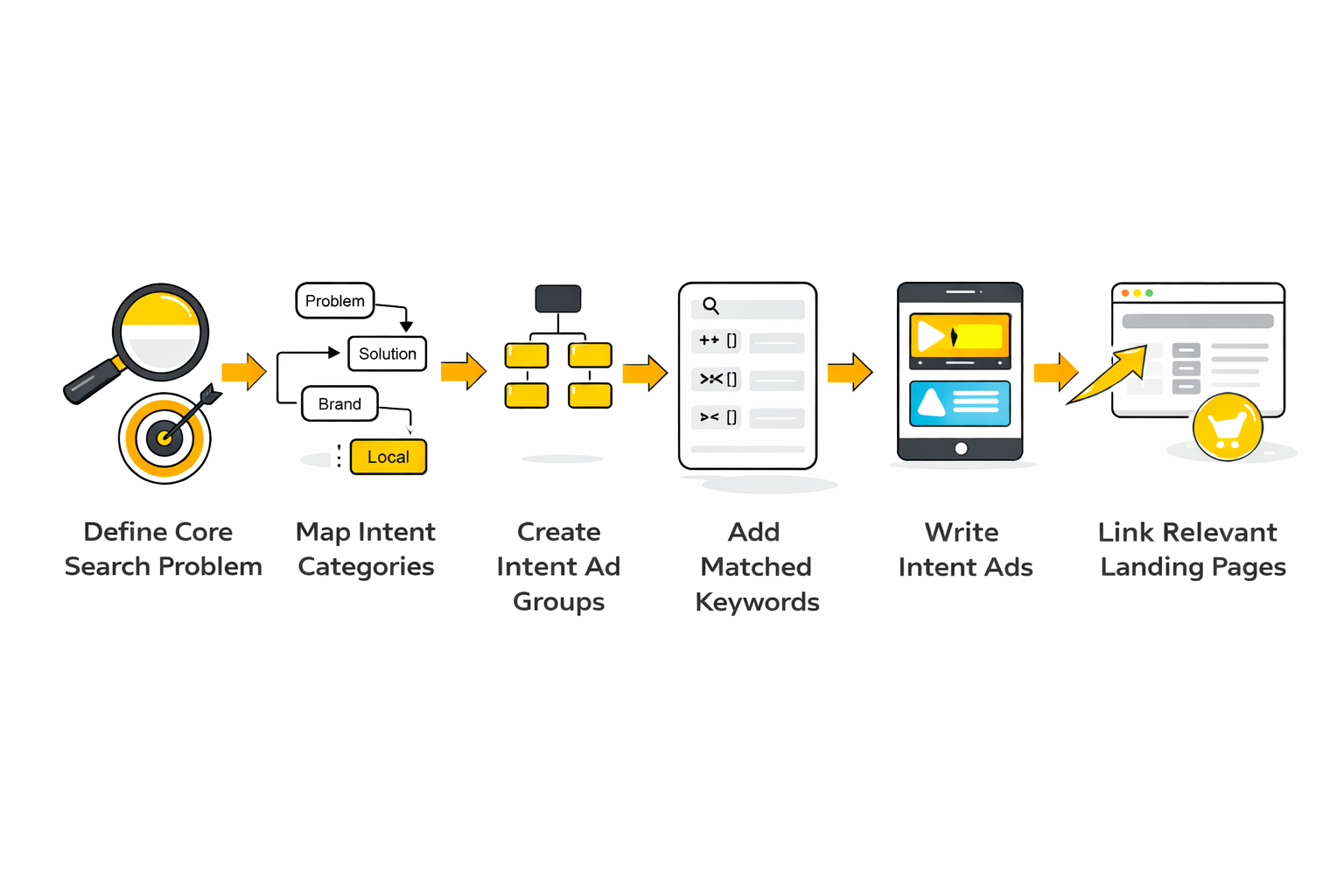
A practical process looks like this:
- Define the core search problem your product or service solves.
- Map the main intent categories that users might search for.
- Create ad groups around those intent clusters.
- Add keyword variations using multiple match types.
- Write ads that directly reference the search intent.
- Link each ad group to the most relevant landing page.
This process might sound simple, but it removes a lot of confusion from campaign setup. Instead of randomly adding keywords and hoping the algorithm figures it out, the account becomes a structured system designed around real search behavior.
If landing page creation becomes a bottleneck during this stage, tools like ClickFunnels or Systeme.io can make it easier to quickly deploy focused pages for each intent group. Faster deployment means campaigns start gathering useful data sooner, which accelerates the learning cycle.
Use Negative Keywords to Protect Budget
Negative keywords are one of the most underrated Google Ads tips because they prevent the system from showing ads on irrelevant searches. Without them, campaigns often spend money on queries that were never part of the intended audience.
Google Ads allows advertisers to exclude terms that do not match their offer. For example, a software company selling premium tools may want to exclude searches containing words like “free,” “tutorial,” or “jobs.” Removing those mismatched searches keeps the budget focused on users who are more likely to convert.
The best approach is to treat negative keywords as an ongoing optimization task, not a one-time setup. Search term reports often reveal unexpected queries, and reviewing them regularly helps refine targeting over time.
Balance Discovery With Control
Modern Google Ads strategies require a balance between exploration and precision. Too much control limits discovery and hides valuable new queries. Too little control wastes budget on irrelevant traffic.
The best-performing accounts usually run a mix of both:
- campaigns designed to capture proven high-intent searches
- campaigns designed to discover new query opportunities
This combination allows the account to grow while still protecting the budget from inefficient traffic. Over time, new discoveries can be promoted into tighter campaign structures once they prove valuable.
By this stage, the campaign has clear goals, working measurement, and a keyword strategy built around real search intent. The next part of the article focuses on what happens after a user sees the ad: ad copy, creative assets, and landing page performance, which often determine whether a click turns into a conversion or disappears without results.
Ad Copy, Creative Assets, and Landing Page Performance
By the time a Google Ads account reaches this stage, the question changes from “Are we getting traffic?” to “Are we learning from the right signals?” That is a much better question because clicks alone do not tell you whether the ad, the landing page, and the offer are doing their jobs. Some of the best Google Ads tips are really about reading performance data correctly before you change anything.
Google gives advertisers several diagnostic layers for this. Quality Score looks at expected CTR, ad relevance, and landing page experience, while Ad Rank determines whether the ad is eligible to show and where it appears. Those are not the same thing, and mixing them up causes a lot of bad decisions. Google Podpora+1
A keyword with a weak Quality Score is not automatically the biggest business problem in the account. It is a warning light, not the engine itself. Google explicitly frames Quality Score as a diagnostic tool, which means its real value is helping you identify whether the weakness is coming from the ad, the query match, or the page after the click. Google Podpora+1
Read the Ad Signals in the Right Order
Start with CTR, but do not stop there. A strong CTR usually tells you the search term, headline, and offer are aligned well enough to earn attention. A weak CTR can point to poor messaging, weak intent match, or simply the wrong query set getting through.
Then look at conversion rate and cost per conversion. If CTR is strong but conversion rate is weak, the ad may be persuasive while the landing page or offer is underperforming. If CTR is weak and conversion rate is also weak, the problem usually starts earlier in the chain, which means targeting, keyword grouping, or message match needs attention before you worry about page tweaks.
Google also gives advertisers Ad Strength for responsive search ads and recommends aiming for a Good or Excellent status. That metric is useful, but only when treated as a creative diagnostic. It can help you build broader, more testable ad coverage, yet it should never outrank actual conversion performance when the two disagree. Google Podpora+1
Landing Page Performance Is Not Just a Design Issue
A landing page does not fail only when it looks bad. It fails when it breaks the promise made by the ad or slows the visitor down enough to kill momentum. Google’s own guidance on landing page navigation makes that point clearly: when a person clicks expecting one thing and lands somewhere confusing, they often return to search and try again.
That is why landing page performance should be read through a few connected signals at once. Conversion rate shows whether the page helps users complete the action. Landing page experience diagnostics show whether Google sees the page as relevant and useful. Core Web Vitals and the Core Web Vitals report add another layer by showing real-world loading, interactivity, and visual stability, which matter because speed and usability affect whether people stay long enough to convert. blog.google+2
A useful way to think about this is simple. If people click but do not convert, do not assume the audience is bad. First check whether the page is slow, whether the headline matches the search intent, whether the form asks for too much too early, and whether the page makes the next step obvious.
Build a Simple Measurement Stack That Leads to Action
A lot of advertisers drown in numbers because they track everything at once. The better approach is to build a short stack of metrics where each number points to a specific decision. That keeps reporting practical instead of decorative.
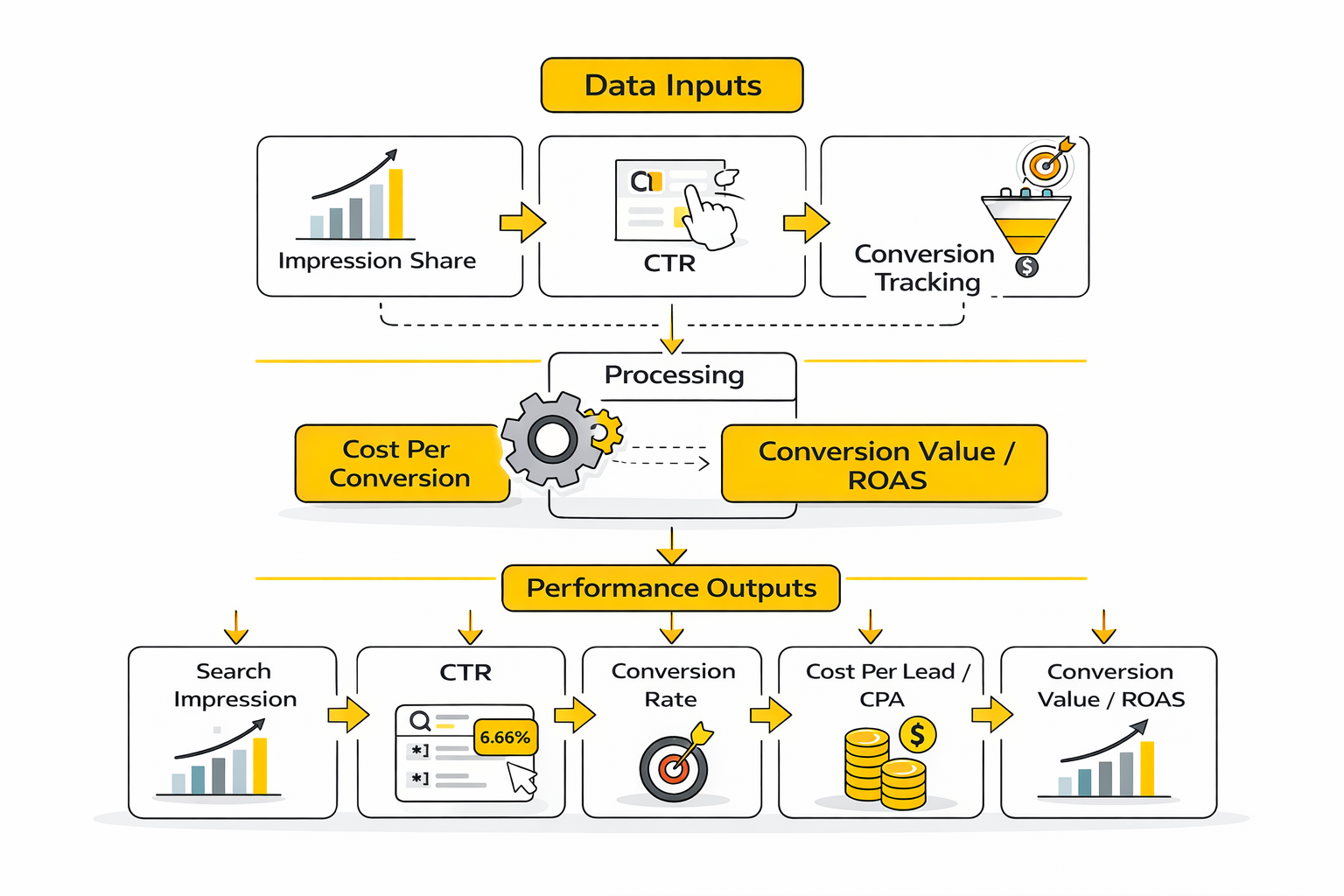
A clean measurement stack for search campaigns usually looks like this:
- Impression share to understand how much eligible demand you are actually reaching
- CTR to measure how well the ad earns attention
- Conversion rate to show whether the click turns into action
- Cost per conversion to show whether the action is efficient enough
- Conversion value or ROAS to show whether the campaign is commercially worth scaling
Google defines impression share as impressions received divided by total eligible impressions. It also reports Search lost IS (budget) and Search lost IS (rank), which is where the metric becomes genuinely useful. If lost impression share is mostly budget-related, you may have room to scale. If it is mostly rank-related, throwing more money at the campaign may simply buy expensive inefficiency unless you improve bids, relevance, or landing-page quality first. Google Podpora+1
Performance Data, Benchmarks, and What the Numbers Mean
Benchmarks are useful when they help you ask better questions. They are dangerous when they become goals on their own. A CTR that looks strong in one industry can be mediocre in another, and a cost per lead that seems high may still be excellent if close rates and customer value justify it.
That context matters because benchmark reports are broad averages, not strategy. LocaliQ’s 2025 search advertising benchmark update reported an average conversion rate of 7.52% across industries, while its benchmark summary cited by Search Engine Journal put average click-through rate across Google and Microsoft Ads at 6.66%. WordStream’s 2025 benchmark review also noted that overall CTR rose only modestly year over year and that results varied sharply by industry, which is exactly why benchmark numbers should guide diagnosis rather than ego. LocaliQ+2
Here is the practical interpretation. If your CTR is far below relevant industry norms, start by checking search-term quality, ad messaging, and whether the campaign is trying to cover too many intents at once. If CTR looks healthy but conversion rate trails benchmark ranges, the bigger issue is often landing-page experience, offer clarity, or lead quality friction rather than ad visibility.
The Numbers That Usually Deserve the Most Attention
Not every metric deserves equal attention every week. Some numbers are diagnostic, some are directional, and some are tied directly to financial decisions. The smartest Google Ads tips usually come down to knowing which category a metric belongs to.
These are the numbers that usually matter most:
- Search impression share tells you how much qualified demand you are capturing
- Search lost IS (budget) tells you whether demand is being capped by spend
- Search lost IS (rank) tells you whether competitiveness or relevance is the bigger issue
- CTR tells you whether the ad wins the click
- Conversion rate tells you whether the landing page and offer finish the job
- Cost per lead or cost per acquisition tells you whether the system is sustainable
- Conversion value and ROAS tell you whether scaling makes financial sense
Competitive context matters too. Google’s Auction Insights report lets you compare your performance with other advertisers in the same auctions. That matters because a decline in impression share is not always an internal failure. Sometimes the market simply got more aggressive, and the right response is to improve positioning on the most profitable terms instead of trying to dominate everything. Google Podpora+1
Do Not Treat Every Drop as a Crisis
One bad week is not a trend. That sounds obvious, but many accounts get damaged by constant reactive edits based on short-term noise. A small CTR dip, a few expensive clicks, or a temporary drop in conversion rate does not automatically mean the strategy is broken.
What matters is whether multiple signals point in the same direction over enough volume. If impression share is falling, lost rank is rising, CTR is slipping, and conversion rate is also down, that usually means the account is losing auction strength and post-click performance at the same time. If only one metric moved while the rest stayed stable, the smarter move is usually to keep watching before making structural changes.
This is where clean reporting really helps. If you want a simple way to turn campaign data into something a team can actually review, a tool like Fillout can help standardize lead capture and handoff workflows, while Brevo can support follow-up measurement once the lead enters the funnel. Those are not substitutes for Google Ads reporting, but they can make the downstream performance picture clearer when you care about what happens after the click.
What Good Data Should Make You Do Next
The whole point of analytics is action. If the data does not lead to a clear next move, the report is probably too bloated or too vague. Strong advertisers use numbers to decide whether they should scale, refine, pause, or leave the campaign alone.
A useful decision framework looks like this:
- High impression share, weak CTR means fix the message before raising spend
- Strong CTR, weak conversion rate means fix the landing page or offer
- Low impression share, high lost budget means scale carefully if efficiency is proven
- Low impression share, high lost rank means improve competitiveness before increasing budget
- Good cost per lead, weak downstream revenue means tighten lead qualification and sales feedback loops
That last point is easy to miss. Google Ads can look efficient on the surface while producing leads that never close. When that happens, the right response is not just bid optimization. It is better conversion definitions, offline revenue feedback, and stronger coordination between marketing and sales.
The next part moves into bidding, budget control, and professional implementation. That is where these signals stop being academic and start shaping how aggressively the account should be scaled, protected, or restructured.
Bidding, Budget Control, and Professional Implementation
Once the account has clean goals, usable conversion data, clear search intent, and a measurement system that actually means something, the next challenge is control without paralysis. This is where advanced Google Ads tips start to matter because scaling is rarely about finding one more trick. It is about knowing how to push harder without breaking the parts of the system that are already working.
Google’s bidding ecosystem is built around automation now, not around endless manual bid edits. Smart Bidding strategies such as Target CPA, Target ROAS, Maximize Conversions, and Maximize Conversion Value use auction-time signals to adjust bids in real time, which means the quality of your targets and conversion inputs matters more than the old habit of hand-tuning every keyword. That shift is not cosmetic. It changes how professionals think about budget, pacing, and risk.
Pick a Bid Strategy That Matches the Real Business Goal
This sounds obvious, but it is still where many accounts go sideways. If the business wants profitable revenue, a strategy built around cheap volume can quietly make the account worse while the dashboard looks busy. If the business needs lead volume first because sales capacity is underused, a strict efficiency target can choke growth before the campaign has room to learn.
Google’s own bid strategy guidance is built around aligning the strategy with the outcome you actually care about. Target CPA is meant to get as many conversions as possible around your desired average cost per conversion, while Target ROAS and Maximize Conversion Value are designed for advertisers who care more about value than raw count. That distinction matters because “more conversions” and “better conversions” are not always the same thing.
A practical way to think about it looks like this:
- use Maximize Conversions when volume is the immediate priority and conversion values are limited or immature
- use Target CPA when you have stable conversion quality and a realistic efficiency threshold
- use Maximize Conversion Value when revenue signals are available and you want the system to prioritize value
- use Target ROAS when the account has enough value history to optimize toward return instead of just output
Do Not Set Targets So Tight That the Campaign Cannot Breathe
A lot of advertisers sabotage automation by trying to force perfect efficiency too early. The campaign gets a rigid CPA target, a strict ROAS target, and a limited budget all at once, then people wonder why impressions collapse or learning stalls. In practice, that is not discipline. It is suffocation.
Google warns about this directly in its Performance Max setup guidance, where it notes that overly restrictive Target CPA or Target ROAS settings can limit reach. The same logic applies more broadly across search campaigns. If you ask the system to hit an unrealistic target with too little room to explore, it will often reduce participation rather than magically invent efficient traffic that does not exist.
That is why advanced Google Ads tips usually sound less dramatic than people expect. Often the best move is to loosen the target slightly, keep the budget stable long enough to learn, and judge performance over a reasonable window instead of reacting to every short-term fluctuation.
Budget Control Is About Pacing, Not Just Caps
Budget control matters, but many advertisers misunderstand what a daily budget does. Google can spend more than your average daily budget on higher-opportunity days, and it states clearly that daily spend can exceed the average daily budget through overdelivery. The protection is that over a month-long billing cycle, Google says you will not be charged more than what your average daily budget would allow over 30.4 days. That is a useful safeguard, but it also means daily pacing is more flexible than many beginners assume.
That flexibility is not a bug. It exists because search demand is uneven. Some days present more qualified auctions than others, and a rigid day-by-day cap would cause the system to miss those moments. Still, this creates an important strategic tradeoff: if your margins are thin or cash flow is tight, you need to manage budgets with real pacing expectations rather than assuming the account will stop exactly at a neat daily number.
The more professional way to handle this is to manage budget at three levels:
- Daily budget for campaign pacing
- Monthly tolerance for billing reality
- Business guardrails based on actual cash flow and profit thresholds
Scaling Too Fast Is One of the Most Common Failure Points
A campaign that works at one spending level will not always behave the same way at double the spend. As budget rises, the system often has to reach into less efficient auctions, broader queries, or more expensive inventory to keep growing. That means scale almost always comes with tradeoffs.
This is why the better Google Ads tips around growth are usually about sequencing. Increase budgets or relax targets in controlled steps, then watch whether impression share, cost per conversion, and conversion value stay within acceptable ranges. If efficiency holds, keep going. If efficiency breaks, do not assume the answer is to keep pushing harder. Sometimes you have reached the practical limit of that campaign structure, audience set, or offer.
Google’s Performance Planner exists for exactly this reason. It is designed to forecast how campaign changes may affect spend, conversions, and other key metrics, which helps advertisers model growth before making large adjustments. It is not a crystal ball, but it is far better than making scale decisions based purely on instinct.
Forecast Before You Make Expensive Changes
One of the clearest differences between casual campaign management and professional implementation is forecasting. Professionals do not just ask whether they can spend more. They ask what that extra spend is likely to buy, how it changes efficiency, and whether the business can support the new profile.
Google offers more than one way to estimate those outcomes. Performance Planner models budget and target allocations across campaigns, while bid and budget simulators estimate how different bids might have affected clicks, impressions, conversions, cost, and conversion value. These tools are not perfect, but they are extremely useful for avoiding blind changes, especially when account history is already rich enough to support a forecast.
That matters most when budgets are no longer small. At low spend, inefficiency can be annoying. At larger spend, inefficiency becomes expensive enough to distort real business decisions.
Feed Better Revenue Data Back Into the System
At an expert level, bidding is really a data quality problem disguised as a budget problem. If Google is optimizing toward weak or incomplete conversion data, even a clever bid strategy can only do so much. The stronger the feedback loop, the better the bidding decisions tend to become.
Google now pushes advertisers toward enhanced conversions for leads and related offline conversion import upgrades because not all valuable outcomes happen immediately on the website. For lead generation in particular, the gap between a form fill and closed revenue can be huge. When that downstream value is invisible, the account often overweights cheap low-quality leads and underweights the sources that actually create pipeline.
This is where professional implementation usually separates itself from average account management. The account is not just tracking leads. It is sending quality signals back into Google so bidding can learn which clicks deserve more budget and which ones only look good on the surface.
If your workflow between landing page, form capture, and follow-up is still messy, tools like Fillout, Brevo, or Copper can help tighten the handoff between ad click and sales process. The important point is not the brand. It is the discipline of getting better first-party data back into the system.
Know the Risks of Over-Automation
Automation is powerful, but it is not permission to stop thinking. One of the more dangerous modern habits is turning on automated bidding, broad match, and asset automation all at once in an account with weak conversion definitions and then assuming AI will sort it out. Usually it will sort something out, but not necessarily the thing the business actually wants.
The real risk is not automation itself. The risk is vague instructions. If your targets are off, if your value signals are shallow, or if your campaigns mix incompatible intents, the system may optimize efficiently toward the wrong outcome. That is why strong Google Ads tips still include fundamentals like clean segmentation, disciplined negative keyword management, and regular search term review even in highly automated accounts.
Professional advertisers treat automation as leverage, not as a substitute for judgment. They let the system make fast auction-time decisions, but they still control the strategy, the measurement model, and the budget logic.
Build an Operating Rhythm Instead of Constantly Patching Problems
Advanced performance usually comes from rhythm, not heroics. That means planned review cycles, stable testing windows, and clear rules for when to change bids, when to raise budgets, and when to leave the campaign alone. Without that rhythm, even good accounts get jerked around by noise.
A useful professional cadence often includes:
- weekly checks for pacing, search-term quality, and obvious waste
- biweekly or monthly reviews of bid targets, budget allocation, and impression share trends
- quarterly reviews of conversion definitions, landing pages, and offer-market fit
- structured experiments instead of random overlapping changes
That last point matters more than people think. If you change targeting, bids, ads, and landing pages at the same time, the account may improve or decline and you still will not know why. Cleaner testing is slower emotionally, but much faster strategically because it produces reusable learning.
The final part of the article brings everything together with optimization, reporting, long-term growth, and the FAQ. That is where these Google Ads tips stop being a checklist and become a system you can keep improving without rebuilding the account every month.
Optimization, Reporting, and Long-Term Growth
At this stage, the Google Ads system you built across the earlier sections should already be producing useful signals. Campaigns have clear goals, keyword strategy reflects real search intent, conversion tracking is working, and bidding decisions are connected to actual business outcomes. The remaining challenge is keeping that system improving over time without destroying the stability that allows it to perform.
Long-term performance in paid search usually comes down to disciplined optimization cycles rather than dramatic resets. Many experienced advertisers follow a rule that major structural changes should only happen when the data clearly demands it. Smaller improvements, such as refining search terms, improving ad messaging, or adjusting landing page friction, often produce stronger results than constant campaign rebuilds.
This is also why many Google Ads tips emphasize patience with learning periods. Automated bidding strategies rely on historical signals, and frequent resets can interrupt that learning. Google explains that major configuration changes can trigger new learning phases, which temporarily affect performance until the system stabilizes again. Google’s Smart Bidding documentation outlines how these learning periods work and why stability matters when evaluating campaign changes.
Build a Continuous Optimization Loop
A healthy Google Ads account rarely stays static. New competitors enter auctions, search behavior evolves, and offers change. The smartest advertisers build optimization loops that repeat over time instead of relying on one-time setup work.
A practical loop often looks like this:
- Review search term reports to identify wasted spend or new opportunities.
- Improve ad copy based on CTR and engagement signals.
- Refine landing pages using conversion rate insights and user behavior.
- Adjust bid strategies or targets based on profitability trends.
- Expand campaigns carefully into new search themes or markets.
This approach keeps the account evolving without introducing chaos. Each step produces new information, which then informs the next improvement cycle.
Use Experiments Instead of Guessing
Google Ads includes campaign experiments specifically designed to test changes without risking the entire account. These experiments allow advertisers to split traffic between the existing setup and a new variation, then compare results across metrics like conversion rate, cost per conversion, and conversion value.
Running structured tests is far more reliable than making multiple changes at once. Google’s experiment framework allows advertisers to isolate variables such as bidding strategies, keyword match types, or landing page changes. When the results are clear, the winning configuration can be applied to the full campaign with confidence.
Experiments also reduce emotional decision-making. Instead of debating whether a strategy “feels right,” the data decides which version performs better.
Watch Market Signals, Not Just Campaign Metrics
Google Ads performance does not exist in isolation. Auction pressure, seasonal demand, and competitor behavior all influence results. A sudden cost increase or impression share drop may not mean the campaign is broken; it may mean the market changed.
The Auction Insights report helps identify these shifts by comparing your performance against other advertisers competing in the same auctions. Changes in overlap rate, position above rate, or outranking share often reveal when a new competitor has entered the space or when aggressive bidding has intensified competition.
Professional campaign management therefore includes periodic market reviews, not just campaign tweaks. When the competitive landscape changes, strategy adjustments may be required even if your internal metrics initially look stable.
Think in Systems, Not Individual Campaigns
The strongest long-term Google Ads strategies treat campaigns as part of a broader marketing ecosystem. Paid search works best when it complements organic search, email marketing, content marketing, and customer retention efforts.
Search traffic often captures demand created elsewhere. Someone who first discovers a brand through content, social media, or email may later search for that brand directly. When that happens, the Google Ads campaign captures the conversion credit even though the journey started earlier.
This is why many advanced marketers integrate Google Ads with broader customer lifecycle tools. Platforms such as Brevo or Moosend help continue the conversation after the initial conversion, turning a single lead into a long-term relationship. Paid search then becomes the acquisition engine feeding the rest of the marketing system.
FAQ - Built for Complete Guide
What budget do you need to start running Google Ads?
There is no universal minimum budget, but campaigns typically need enough spend to generate meaningful data. Many advertisers start with a few hundred dollars per month for testing, while competitive industries may require far larger budgets to produce statistically useful results. The important factor is not the starting number but whether the budget can produce enough clicks and conversions to guide optimization.
How long does it take for Google Ads to start working?
Campaigns often begin generating traffic immediately, but meaningful optimization usually takes longer. Automated bidding systems and conversion tracking require data to stabilize performance. Many campaigns show clearer trends after several weeks once enough interactions have been recorded for the system to learn from.
Is Google Ads better than SEO?
Google Ads and SEO serve different roles in digital marketing. SEO builds long-term organic visibility, while Google Ads can generate immediate traffic and test new offers quickly. Many businesses use both channels together because paid search can capture high-intent traffic while organic search builds authority and long-term visibility.
What is a good conversion rate for Google Ads?
Conversion rates vary widely depending on industry, offer, and traffic intent. Search advertising benchmarks compiled by marketing platforms show average conversion rates across industries around 7.52%, but individual campaigns may perform higher or lower depending on context. The more important metric is whether conversions are profitable relative to customer value.
Should beginners use automated bidding strategies?
Automated bidding strategies often perform well when conversion tracking is properly configured. They allow Google’s system to evaluate signals like device, location, and search context during each auction. Beginners can benefit from automation as long as the account has clear conversion goals and sufficient data.
How important are landing pages in Google Ads performance?
Landing pages are critical because they determine whether a click turns into a conversion. Even the best ad campaigns can fail if the landing page is slow, confusing, or poorly aligned with the search intent. Improving landing page clarity and speed often increases conversion rates more than adjusting keywords alone.
What are negative keywords and why do they matter?
Negative keywords prevent ads from showing for irrelevant searches. They protect campaign budgets by filtering out queries that are unlikely to convert. Reviewing search term reports regularly helps identify new negative keywords that can improve targeting precision.
Can small businesses compete with large advertisers in Google Ads?
Yes, especially when targeting highly specific search intent. Large advertisers often compete on broad, expensive keywords, while smaller businesses can focus on niche queries or localized demand. Smart keyword strategy and strong messaging often allow smaller companies to compete effectively.
How do you scale a Google Ads campaign?
Scaling usually involves gradually increasing budgets or expanding keyword coverage while monitoring efficiency metrics. If cost per conversion and return on ad spend remain stable during small increases, the campaign may support additional growth. Rapid scaling without monitoring performance often leads to diminishing returns.
What are the most common Google Ads mistakes?
Common mistakes include poor conversion tracking, targeting overly broad keywords without proper negatives, sending traffic to weak landing pages, and reacting too quickly to short-term performance changes. Successful campaigns usually focus on consistent data analysis and structured optimization rather than constant experimentation without direction.
Work With Professionals
Explore 10K+ Remote Marketing Contracts on MarkeWork.com
Most marketers spend too much time chasing clients, competing on crowded platforms, and losing a percentage of every project to middlemen.
MarkeWork gives you a better way. Browse thousands of remote marketing contracts and connect directly with companies desperate to hire skilled marketers like you, without platform commissions and without unnecessary gatekeepers.
If you're serious about finding better opportunities and keeping 100% of what you earn, explore available contracts and create a profile for free at MarkeWork.com.