

Google email marketing is not just “sending newsletters from Gmail.” It is the discipline of building email campaigns that can reach, survive, and perform inside the Google inbox ecosystem: Gmail, Google Workspace, Google Postmaster Tools, sender authentication, spam-rate monitoring, unsubscribe compliance, and the content signals that decide whether people open, ignore, archive, or report your message.
That matters because Gmail is no longer a casual channel where brands can blast a list and hope for the best. Google’s sender rules now expect proper SPF, DKIM, DMARC, low spam complaints, and easy unsubscribe handling, especially for bulk senders reaching personal Gmail accounts through campaigns and automations. Google says senders should keep spam rates below 0.1% and avoid ever reaching 0.3% or higher in Postmaster Tools data, which makes reputation management part of the marketing job, not just the technical setup.
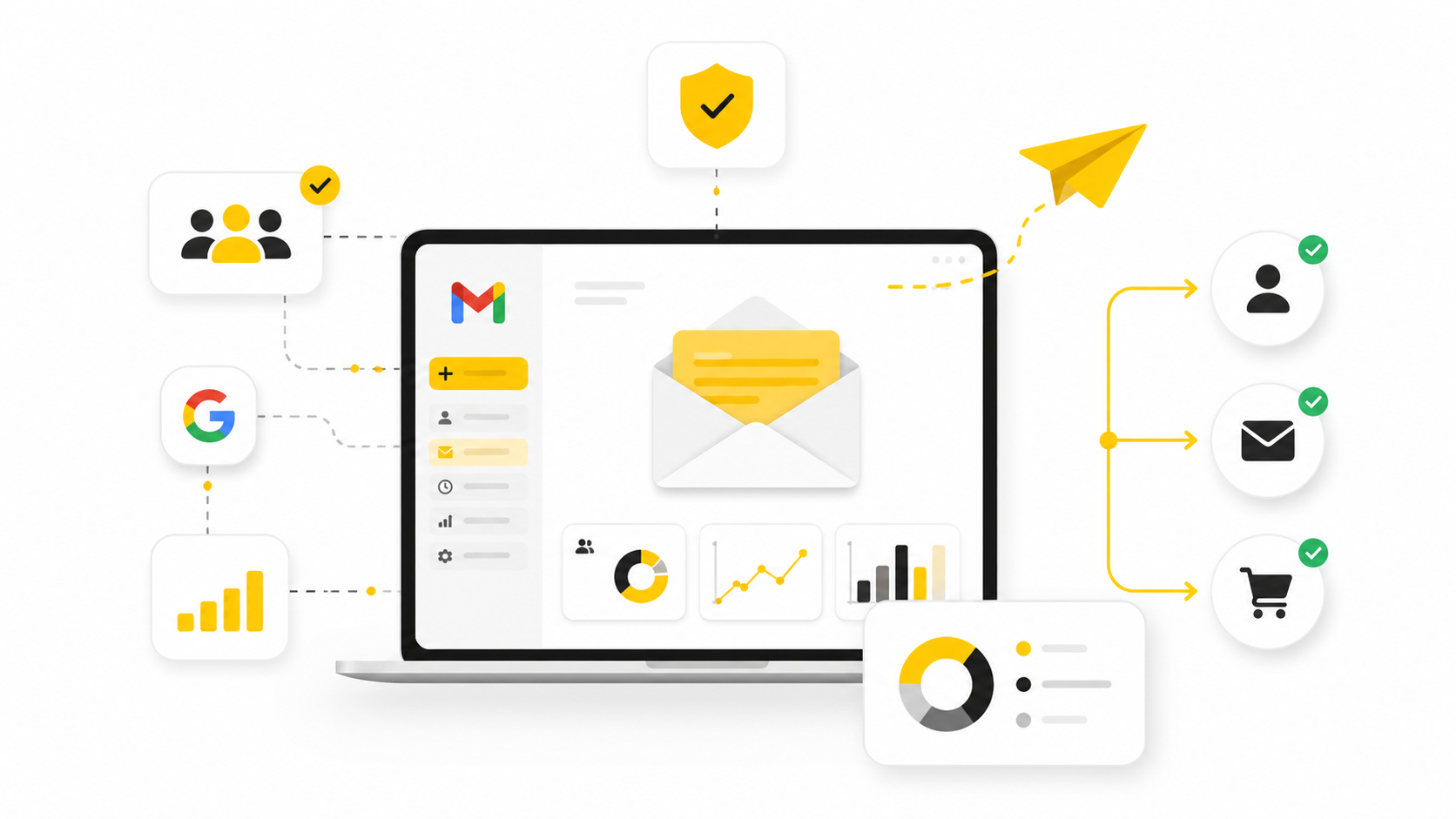
This guide treats Google email marketing as a full system. The goal is not only to send more emails, but to send emails that are authenticated, wanted, measurable, and useful enough to earn inbox placement over time. Tools like Brevo, Moosend, and GoHighLevel can help run the campaigns, but the real edge comes from understanding the framework behind deliverability, segmentation, messaging, and measurement.
Article Outline
- Why Google Email Marketing Matters Now
- The Google Email Marketing Framework
- Core Components Of A Gmail-Ready Email System
- Professional Implementation: Setup, Sending, And Compliance
- Campaign Strategy For Better Opens, Clicks, And Revenue
- FAQ And Final Optimization Checklist
Why Google Email Marketing Matters Now
Email is still one of the most commercially useful marketing channels, but the margin for sloppy sending has shrunk. The latest industry reporting continues to show strong email ROI for teams that can measure and optimize their programs, while Google’s sender requirements make it clear that authentication, complaint rates, and unsubscribe experience now directly affect whether marketing emails reach Gmail users. In plain English: your creative can be good, your offer can be strong, and your list can be valuable, but weak sending infrastructure can still bury the campaign.
Google email marketing also matters because Gmail users behave differently from a spreadsheet full of “leads.” They filter fast, ignore generic promotions, and report messages that feel irrelevant or hard to escape. That means your job is to build trust before you ask for the click.
The good news is that this creates an advantage for disciplined marketers. If your domain is authenticated, your list is clean, your segmentation is tight, and your emails are genuinely useful, you are competing against a lot of senders who still treat email like a cheap broadcast tool. That is where the opportunity is.
The Google Email Marketing Framework
A strong Google email marketing system has four layers: permission, infrastructure, relevance, and measurement. Permission answers whether people should be receiving your emails in the first place. Infrastructure answers whether Gmail can trust your domain and technical setup.
Relevance answers whether the message matches the person, the timing, and the intent. Measurement answers whether you can see what is happening and improve it before reputation problems compound. Google Postmaster Tools is especially important for higher-volume senders because it gives visibility into Gmail-specific signals like spam rate, domain reputation, authentication, encryption, and delivery errors.
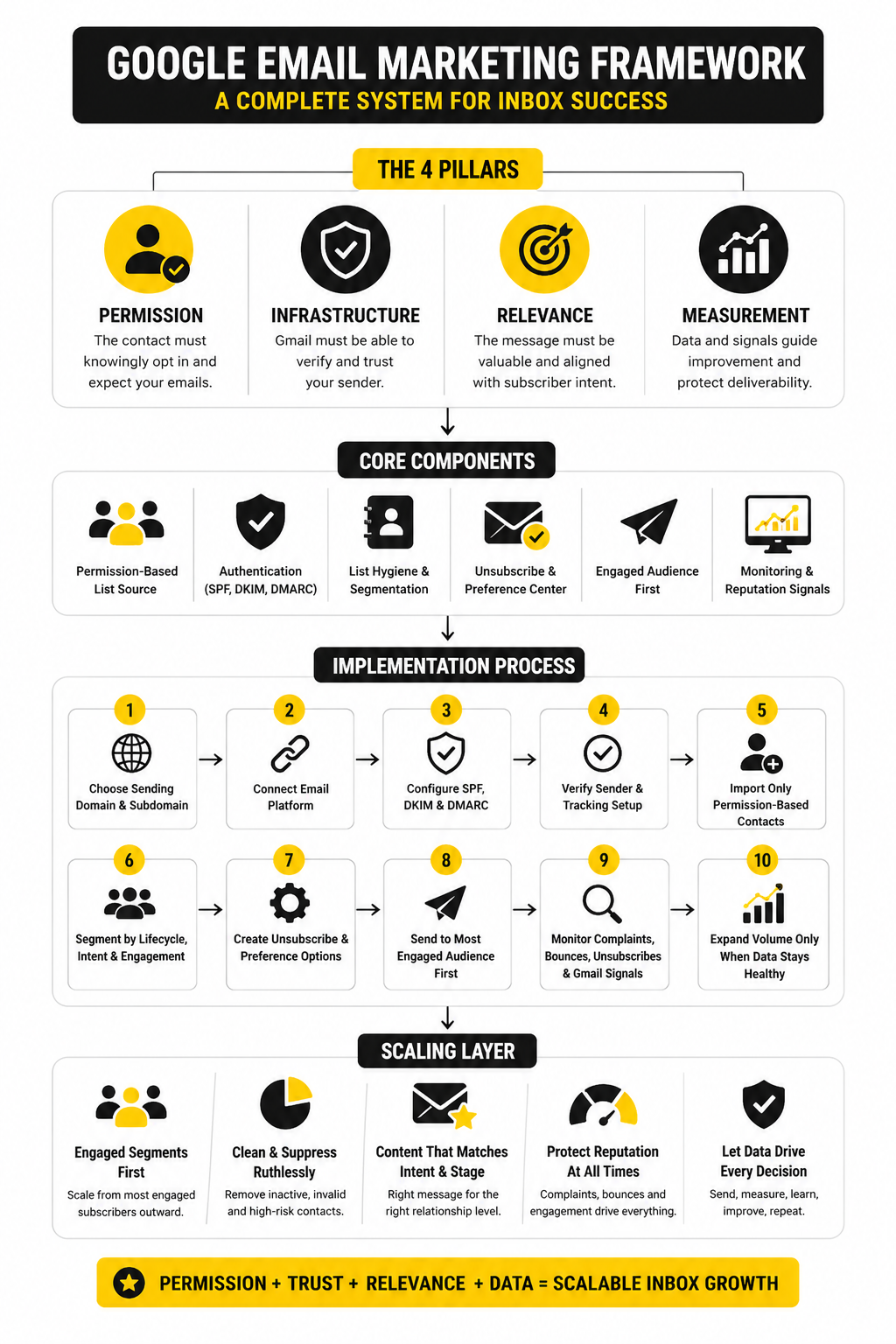
The framework is simple, but it is not optional. A campaign that skips permission creates complaints. A campaign that skips authentication creates deliverability risk. A campaign that skips relevance creates low engagement. A campaign that skips measurement keeps repeating mistakes until performance drops.
Core Components Of A Gmail-Ready Email System
The first component is domain authentication. At minimum, serious senders need SPF, DKIM, and DMARC configured correctly, because Gmail uses authentication to verify that your messages are actually allowed to come from your domain. This is the foundation, not an advanced tactic.
The second component is list quality. Purchased lists, cold scraped contacts, stale subscribers, and unclear opt-ins all create the same problem: people do not recognize you, so they ignore you or complain. Gmail does not need your explanation; it sees behavior.
The third component is a sending platform that matches the use case. For newsletters and lifecycle campaigns, a dedicated email marketing platform is usually cleaner than trying to run everything manually from Google Workspace. For agencies and local businesses that need pipelines, automations, SMS, forms, and follow-up workflows in one place, GoHighLevel can fit naturally, while simpler newsletter-focused teams may prefer tools like Brevo or Moosend.
Professional Implementation Starts With The System
Professional implementation does not start with the subject line. It starts with the sending domain, DNS records, consent source, list segments, unsubscribe flow, and monitoring dashboard. Once those pieces are in place, copywriting and design have a fair chance to perform.
This is also where many businesses overcomplicate the wrong things. They debate button colors while ignoring authentication. They write five promotional emails before defining who should receive each one. They check open rates but never check complaint trends, bounce quality, or Gmail-specific reputation signals.
The rest of this article will build the system in order. First, we will clarify why Google’s email ecosystem changed the rules. Then we will walk through the framework, the technical setup, the campaign structure, and the optimization process that turns Google email marketing from a risky broadcast channel into a reliable growth asset.
Why Google Email Marketing Matters Now
Google email marketing has become more technical because Gmail has become more protective. That is not a bad thing. It simply means the inbox is rewarding brands that send wanted, authenticated, easy-to-leave emails and punishing brands that treat email like a volume game.
For most businesses, Gmail is too large to ignore. A campaign can look healthy inside an email platform while still underperforming with Gmail users because Gmail evaluates signals that a normal marketing dashboard may not show clearly. Authentication, spam complaints, domain reputation, unsubscribe behavior, and engagement all work together, so the channel has to be managed as a system.
The practical shift is simple: email marketing is no longer just a copywriting task. It is part messaging, part compliance, part technical setup, and part customer experience. If any one of those pieces is weak, the campaign becomes harder to scale.
Gmail Changed The Standard For Bulk Senders
Google’s bulk sender rules made several long-time best practices much harder to ignore. Senders reaching large numbers of Gmail users now need proper authentication with SPF, DKIM, and DMARC, along with a clear unsubscribe experience and low spam complaints. The public guidance is blunt: keep the user-reported spam rate below 0.1% and avoid reaching 0.3% or higher.
That number matters because complaints are not abstract. When someone clicks “Report spam,” Gmail receives a direct signal that the message was unwanted. Enough of those signals can damage delivery for future campaigns, even if the campaign looked profitable in the short term.
This is why serious Google email marketing starts before the email is written. You need to know who is receiving the message, why they are receiving it, what they expect from you, and how easily they can opt out. That is the boring work that protects the exciting work.
The Inbox Is A Trust Environment
People do not open emails because a sender had a clever automation. They open because the sender is recognizable, the promise is relevant, and the message feels worth their time. Gmail’s filtering systems are built around protecting that user experience, so your marketing strategy has to respect it.
This changes how you think about frequency. Sending more can help when the list is engaged and the content is useful, but sending more to the wrong people usually creates the opposite effect. More volume means more chances for unsubscribes, ignores, and complaints.
The better question is not “How many emails can we send?” The better question is “Which subscribers should receive this specific email now?” That one question instantly makes your campaigns sharper.
Reputation Compounds In Both Directions
Email reputation is not rebuilt by one great campaign. It compounds over time through consistent sending behavior, clean lists, low complaint rates, and useful content. The opposite is also true: one aggressive push to a stale segment can create reputation problems that take longer to fix than they took to create.
This is where many teams get trapped. They wait until opens drop or revenue dips before they investigate deliverability. By then, they are reacting to symptoms instead of managing the system.
Google Postmaster Tools can help here because it shows Gmail-specific signals such as spam rate, authentication, domain reputation, and delivery errors. If Gmail is a meaningful part of your audience, this should not be treated as an optional dashboard. It is one of the clearest windows into whether your email marketing is earning trust or losing it.
Better Email Marketing Starts With Better Expectations
A good Google email marketing strategy does not promise instant inbox dominance. It promises a repeatable process for earning better placement, better engagement, and better customer response. That process depends on consent, relevance, consistency, and measurement.
This also means benchmarks should be used carefully. Industry reports can help you understand the market, but your own list quality, offer, audience, and sending history matter more than a generic average. A small, engaged list can outperform a massive list that was built carelessly.
The goal is not to chase every benchmark. The goal is to build a channel where Gmail users recognize your brand, understand why they are hearing from you, and feel that staying subscribed is worth it. That is the foundation for every section that comes next.
The Google Email Marketing Framework
A strong Google email marketing system is not built around one campaign. It is built around a repeatable framework that protects your sender reputation while giving subscribers a clear reason to keep engaging. That framework has four practical layers: permission, infrastructure, relevance, and measurement.
Permission decides whether the person should be on your list. Infrastructure decides whether Gmail can trust the sender. Relevance decides whether the message deserves attention. Measurement decides whether you can improve before small issues become expensive problems.
The mistake is treating these layers as separate tasks. They are connected. Weak permission creates complaints, poor infrastructure creates authentication problems, vague relevance creates disengagement, and weak measurement leaves you guessing.
Start With Permission And List Source
Google email marketing begins with the source of the contact. A subscriber who knowingly opted in is completely different from a scraped contact, a purchased lead, or someone imported from an old spreadsheet. Gmail users respond to that difference with behavior, and behavior is what shapes reputation over time.
This means every list should have a clear consent story. You should know where the subscriber came from, what they expected to receive, when they opted in, and which segment they belong to now. If you cannot answer those questions, the list needs cleanup before it needs another campaign.
A practical permission audit is simple. Separate active subscribers from inactive contacts, remove addresses that repeatedly bounce, and suppress people who have not engaged after a fair reactivation attempt. This feels conservative, but it protects the asset that matters most: your ability to reach the inbox next month.
Build The Sending Infrastructure Before The Campaign
The technical setup comes next because Gmail needs to verify that your messages are legitimate. SPF tells receiving servers which systems are allowed to send for your domain. DKIM adds a cryptographic signature to prove the message was not altered in transit. DMARC tells receivers what to do when authentication fails and helps align your visible sender domain with the underlying sending system.
Do not treat this as developer-only work. Marketers should understand the basics because DNS records affect campaign performance directly. If your email platform says authentication is incomplete, that is not a small warning tucked away in settings; it is a delivery risk.
This is where choosing the right platform matters. A platform like Brevo or Moosend can handle email campaigns and automation cleanly, while GoHighLevel is better suited when email sits inside a broader CRM, pipeline, appointment, and follow-up system. The tool should match the workflow, not the other way around.
Professional Implementation: Setup, Sending, And Compliance
Professional implementation turns the framework into an operating process. This is where Google email marketing becomes tangible: you define the domain, authenticate the sender, organize the list, build the segments, create the unsubscribe path, send gradually, and monitor the results. None of this is flashy, but it is exactly what separates reliable email programs from fragile ones.
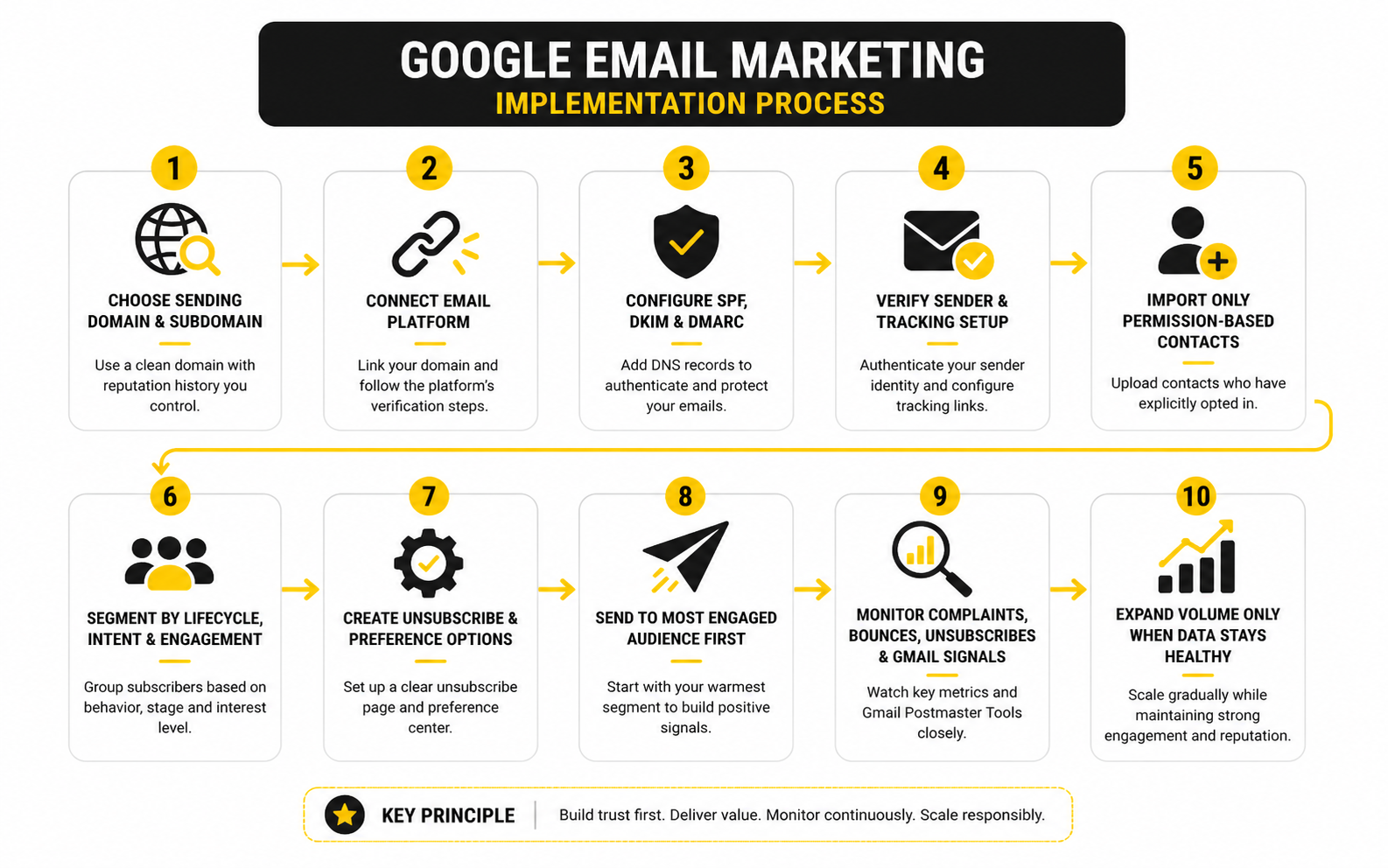
The order matters. If you write campaigns before the list is organized, the message will be too broad. If you send before authentication is complete, you are risking delivery before the strategy even has a chance. If you scale before monitoring reputation, you may not notice damage until performance has already dropped.
A clean implementation process looks like this:
- Choose the sending domain and subdomain.
- Connect the email platform.
- Configure SPF, DKIM, and DMARC.
- Verify the sender and tracking setup.
- Import only permission-based contacts.
- Segment contacts by lifecycle, intent, and engagement.
- Create unsubscribe and preference options.
- Send to the most engaged audience first.
- Monitor complaints, bounces, unsubscribes, and Gmail-specific signals.
- Expand volume only when the data stays healthy.
Choose A Sending Domain Carefully
Your sending domain is part of your reputation. Some businesses send marketing from the root domain, while others use a subdomain such as mail.example.com or news.example.com. The right choice depends on your risk tolerance, existing domain reputation, and how much email volume you plan to send.
A subdomain can help separate marketing activity from critical business email, but it is not a magic shield. Gmail still evaluates behavior, authentication, and engagement. If people complain about messages from a subdomain, that reputation problem still belongs to your brand ecosystem.
The safest approach is to use a domain structure you can manage consistently. Avoid switching sender domains casually, avoid sending from random addresses, and avoid mixing unrelated campaign types under the same identity. Consistency helps subscribers recognize you and helps mailbox providers understand your sending pattern.
Configure Authentication Properly
Authentication should be completed before campaigns go live. SPF should include the systems that are allowed to send on behalf of your domain, but it should not become a messy record stuffed with old tools you no longer use. DKIM should be enabled inside your email platform and verified through DNS.
DMARC deserves special attention because it connects authentication with policy. Many teams start with a monitoring policy so they can see what is happening before moving toward stricter enforcement. That is reasonable, but the long-term goal should be a domain that is not easy to spoof and not dependent on blind trust.
After setup, test the configuration. Do not assume the records work because they were pasted into DNS. Verify them in the sending platform, check that messages pass authentication, and review early campaign data before increasing volume.
Prepare The List Before Sending
List preparation is where most email performance is won or lost. Before importing contacts into a campaign platform, remove obvious invalid addresses, role-based addresses where appropriate, duplicates, previous unsubscribes, and contacts with unclear consent. A smaller clean list is almost always stronger than a larger risky one.
Next, organize subscribers by context. New leads, customers, inactive subscribers, webinar registrants, abandoned checkout contacts, and long-term newsletter readers should not all receive the same message. Their relationship with the brand is different, so the email should be different too.
This is also where tags and custom fields matter. If you are using GoHighLevel, tags can connect email behavior with pipelines, forms, bookings, and follow-up automations. If you are using a newsletter-focused platform, the same principle applies through segments, lists, and automation triggers.
Set Up Unsubscribe And Preference Options
A clear unsubscribe path is not a weakness. It is a reputation protection tool. People who cannot leave easily are more likely to report spam, and spam complaints are far more damaging than normal unsubscribes.
Every promotional campaign should make it easy for someone to opt out. For many brands, a preference center is even better because it lets subscribers reduce frequency or choose topics instead of leaving completely. That keeps the relationship alive without forcing people into an all-or-nothing choice.
The mindset shift is important. You are not trying to trap subscribers. You are trying to keep the right people engaged and let the wrong-fit contacts exit cleanly. That is healthier for the list, the brand, and Gmail performance.
Send Gradually And Watch Early Signals
Once the system is ready, start with engaged subscribers first. These are the people most likely to open, click, reply, or otherwise show positive behavior. Their engagement helps establish a healthier sending pattern than blasting the full database immediately.
Volume should grow based on performance, not impatience. If complaints rise, bounces look high, or engagement is weak, pause and diagnose before expanding. Sending more into a weak signal usually makes the problem worse.
This is where Google email marketing becomes a discipline. You send, read the data, adjust the audience, improve the message, and protect reputation as you scale. That loop is what turns implementation from a checklist into an operating system.
Statistics And Data That Actually Matter
Data is useful only when it changes what you do next. In Google email marketing, the goal is not to collect every possible metric. The goal is to understand whether Gmail users are receiving, trusting, opening, clicking, ignoring, unsubscribing from, or reporting your emails.
That is why measurement needs two layers. Your email platform shows campaign performance, while Google Postmaster Tools shows Gmail-specific reputation and compliance signals. If you only look at one layer, you can miss the real issue.
For example, a campaign can show decent opens inside your email platform while Gmail-specific complaints are quietly rising. That is not a creative problem first. That is a reputation problem, and it needs a different response.
The Metrics That Deserve Your Attention
Open rate is still useful, but it is not as clean as it used to be. Privacy features, image loading behavior, and inbox scanning can affect how opens are counted, so open rate should be treated as a directional signal rather than absolute truth. A rising open rate can suggest stronger subject lines or better audience fit, but it should never be the only metric used to judge success.
Click rate is usually more actionable because it shows whether the email created enough intent for someone to act. If opens are strong but clicks are weak, the subject line may be promising something the body does not deliver. If clicks are strong among a small segment, that segment may deserve a dedicated campaign instead of being buried inside a broad send.
Unsubscribe rate is not automatically bad. A normal level of unsubscribes can clean the list and reduce future complaints. The real warning sign is when unsubscribes rise at the same time as spam complaints, because that usually means the audience feels the email is unwanted, irrelevant, or too frequent.
Gmail-Specific Signals Matter More Than Generic Benchmarks
Benchmarks can help you sanity-check performance, but Gmail-specific signals are more important for Google email marketing. Google’s own sender guidance says senders should keep spam rates below 0.1% and avoid reaching 0.3% or higher. That benchmark matters because it is tied directly to how Gmail evaluates sender behavior.
Spam rate should be read differently from unsubscribe rate. An unsubscribe means someone used the proper exit. A spam complaint means the subscriber felt the email did not belong in their inbox. That is a much sharper signal.
This is why the unsubscribe experience is part of measurement, not just compliance. If unsubscribing is easy, more unhappy subscribers leave cleanly. If unsubscribing is hidden, slow, or confusing, more of them may report spam instead.
How To Build A Simple Analytics System
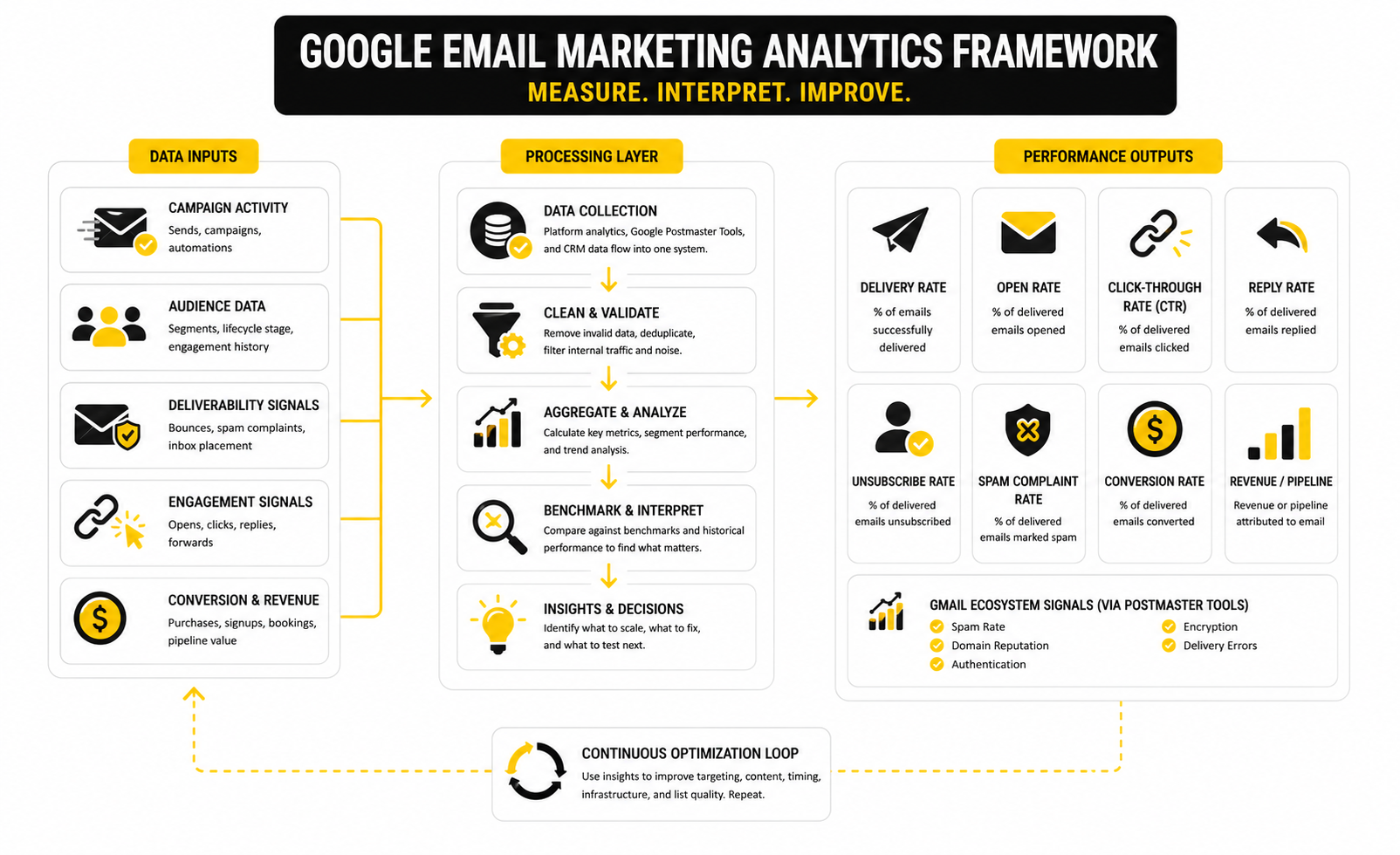
A practical analytics system should connect delivery, engagement, and revenue without becoming a dashboard circus. Start with the delivery layer: bounces, authentication status, spam complaints, unsubscribe rate, and Gmail Postmaster signals. These numbers tell you whether the campaign has permission to keep scaling.
Then review the engagement layer. Look at opens directionally, clicks more seriously, and click-to-open rate when you want to understand whether the message matched the subject line. Segment the results by audience type because an email sent to recent buyers should not be judged against an email sent to inactive leads.
Finally, review the business layer. Track conversions, booked calls, replies, purchases, trials, or pipeline movement depending on your model. If you are using a CRM-style platform such as GoHighLevel, this is where email performance can connect to appointments, opportunities, and follow-up workflows instead of stopping at clicks.
What Benchmarks Can And Cannot Tell You
Email marketing benchmark reports are helpful because they show broad directional patterns across industries. Recent benchmark research from providers and industry groups continues to track open rates, click rates, unsubscribe rates, and engagement trends across large campaign datasets. That can help you spot whether your numbers are wildly outside the normal range.
But benchmarks cannot tell you whether your offer is good. They cannot tell you whether your list was built ethically. They cannot tell you whether your subscribers expected the email they received. Those are strategic questions, and they matter more than comparing your open rate to a broad industry average.
Use benchmarks as context, not as a target. If your list is small, high-intent, and relationship-driven, your numbers may beat the market. If your list is old, broad, and promotion-heavy, even “average” results may hide reputation risk.
How To Interpret Performance Patterns
When opens are low and clicks are low, the first place to look is audience-message fit. The email may be going to the wrong people, the subject line may be weak, or the sender name may not be recognizable. Do not jump straight into redesigning the template when the real issue may be relevance.
When opens are decent but clicks are weak, the promise and the body probably do not align tightly enough. The subject line may create curiosity, but the email fails to build enough desire or clarity. In that case, improve the offer, shorten the path to action, and make the call to action easier to understand.
When complaints rise, stop treating the campaign like a copy problem. Review consent source, sending frequency, segment quality, and whether inactive subscribers were included. A complaint spike is the audience telling you the system is wrong, not just the wording.
The Numbers Should Drive Clear Decisions
Every metric should have a decision attached to it. If bounce rates are high, clean the list before sending again. If Gmail spam complaints rise, reduce volume, tighten segmentation, and review consent quality. If clicks are low, improve the offer and email structure before blaming deliverability.
This is also where automation should be used carefully. Automated sequences can produce great results when they are triggered by real behavior, but they can also create silent damage when they keep sending to people who are no longer engaged. A good automation platform should make it easy to pause, suppress, branch, and clean contacts based on behavior.
That is the practical standard. Data should not sit in reports. It should tell you who to send to, who to exclude, what to fix, and when to scale.
Campaign Strategy For Better Opens, Clicks, And Revenue
Once the technical system is stable, the next challenge is strategy. This is where Google email marketing moves from “Can we send?” to “Should this person receive this message right now?” That question sounds simple, but it changes everything.
Advanced email performance usually comes from sharper decisions, not louder campaigns. Better segmentation, better timing, better offers, and better suppression rules can do more than another redesign. The inbox rewards relevance because users reward relevance.
The strategic job is to make every campaign feel like it belongs. When a subscriber sees your sender name, subject line, and opening sentence, they should understand why the email is in their inbox. If they cannot connect the message to their own context, the campaign is already fighting uphill.
Segment By Intent, Not Just Demographics
Basic segmentation usually starts with fields like industry, location, job title, or customer type. Those fields can help, but they do not always explain what the person wants now. Intent is more useful because it tells you what kind of message is likely to feel timely.
A subscriber who downloaded a checklist is not the same as someone who booked a demo, clicked a pricing link, abandoned a checkout, or bought last week. Their intent level is different, so their email sequence should be different. Treating all of them the same is how brands turn warm attention into inbox fatigue.
The cleanest approach is to build segments around behavior. Recent clickers, first-time buyers, repeat buyers, inactive subscribers, high-value leads, and product-specific interests all deserve different messaging. This keeps Google email marketing practical instead of generic.
Use Suppression As A Growth Tool
Suppression is not just about removing unsubscribed contacts. It is about deciding who should not receive a specific campaign. That may include inactive subscribers, recent purchasers, people already in a sales conversation, or contacts who just received another automation.
This matters because over-emailing creates hidden costs. A campaign may generate short-term clicks while quietly increasing unsubscribes, complaints, and list exhaustion. If you only measure the visible win, you miss the damage.
Good suppression rules protect the relationship. They help you avoid sending a discount to someone who already purchased, a sales pitch to someone waiting for support, or a beginner email to someone deep in the buying process. That is not being cautious; that is being professional.
Balance Broadcasts And Automations
Broadcast campaigns are useful for launches, newsletters, announcements, seasonal offers, and timely promotions. Automations are useful for behavior-based follow-up, onboarding, abandoned checkouts, lead nurturing, and reactivation. Both have a place, but they should not compete for the subscriber’s attention.
The risk is overlap. A subscriber can enter an automation, receive a newsletter, get a promo, and trigger a reminder within the same week if the system is not controlled. That may look active from the brand side, but from the subscriber side it can feel messy.
A platform like GoHighLevel can be useful when email needs to coordinate with forms, appointments, CRM stages, calls, SMS, and pipeline actions. For simpler campaign programs, Brevo or Moosend may be enough. The key is not the tool name; it is whether the tool helps you control timing, segmentation, and follow-up cleanly.
Scale Volume Without Damaging Trust
Scaling email volume is not the same as sending to everyone. The safer path is to expand from the most engaged audience outward. Start with subscribers who recently opened, clicked, replied, purchased, or otherwise showed strong interest, then widen only if the signals stay healthy.
This is especially important when a list has been quiet for a while. A dormant list is not a hidden goldmine by default. It may contain outdated addresses, forgotten opt-ins, low intent, and people who no longer recognize the brand.
Reactivation should be handled separately from normal promotions. Use a clear, honest message that gives people a reason to stay and an easy way to leave. If they do not respond, suppress them instead of dragging them through every future campaign.
Protect Revenue From Over-Optimization
Testing matters, but not every improvement is meaningful. A subject line test that increases opens but lowers clicks is not a win. A discount campaign that spikes revenue but trains the list to wait for discounts may create a long-term problem.
This is the strategic tradeoff: short-term campaign performance can conflict with long-term list quality. You can force urgency, push harder, and send more often, but the inbox eventually reflects subscriber behavior. If people stop trusting the emails, the channel gets weaker.
A better approach is to test around real business outcomes. Measure revenue, booked calls, qualified replies, product adoption, repeat purchases, and retention where possible. Opens and clicks help diagnose performance, but they should not become the final scoreboard.
Make The Offer Match The Relationship
Cold or early-stage subscribers usually need clarity, education, and trust. Warm leads need proof, comparison, objection handling, and a reason to take the next step. Customers need onboarding, support, expansion, and retention messaging.
This is where many campaigns fall apart. They send a closing offer to people who are still trying to understand the problem. Or they send educational content to people who are clearly ready to buy. Both mistakes waste attention.
Google email marketing works best when the offer matches the stage of the relationship. Ask for smaller actions early, such as reading a guide, watching a walkthrough, answering a question, or choosing a preference. Save stronger commercial asks for subscribers whose behavior shows they are ready.
Know When Not To Send
The most advanced email decision is often restraint. If the list is stale, the offer is weak, the segment is unclear, or recent complaint signals look unhealthy, sending another campaign may be the wrong move. Fix the system first.
This does not mean being timid. It means understanding that access to the inbox is an asset. Every send either strengthens or weakens that asset.
When in doubt, narrow the audience, sharpen the message, and make the next action obvious. That is how you scale without turning email into noise.
Final Optimization Checklist
At this point, Google email marketing should look less like a one-off campaign and more like a connected system. The sender domain, list source, segmentation, content, automation logic, unsubscribe flow, and reporting all support each other. When those pieces work together, email becomes easier to scale without guessing.
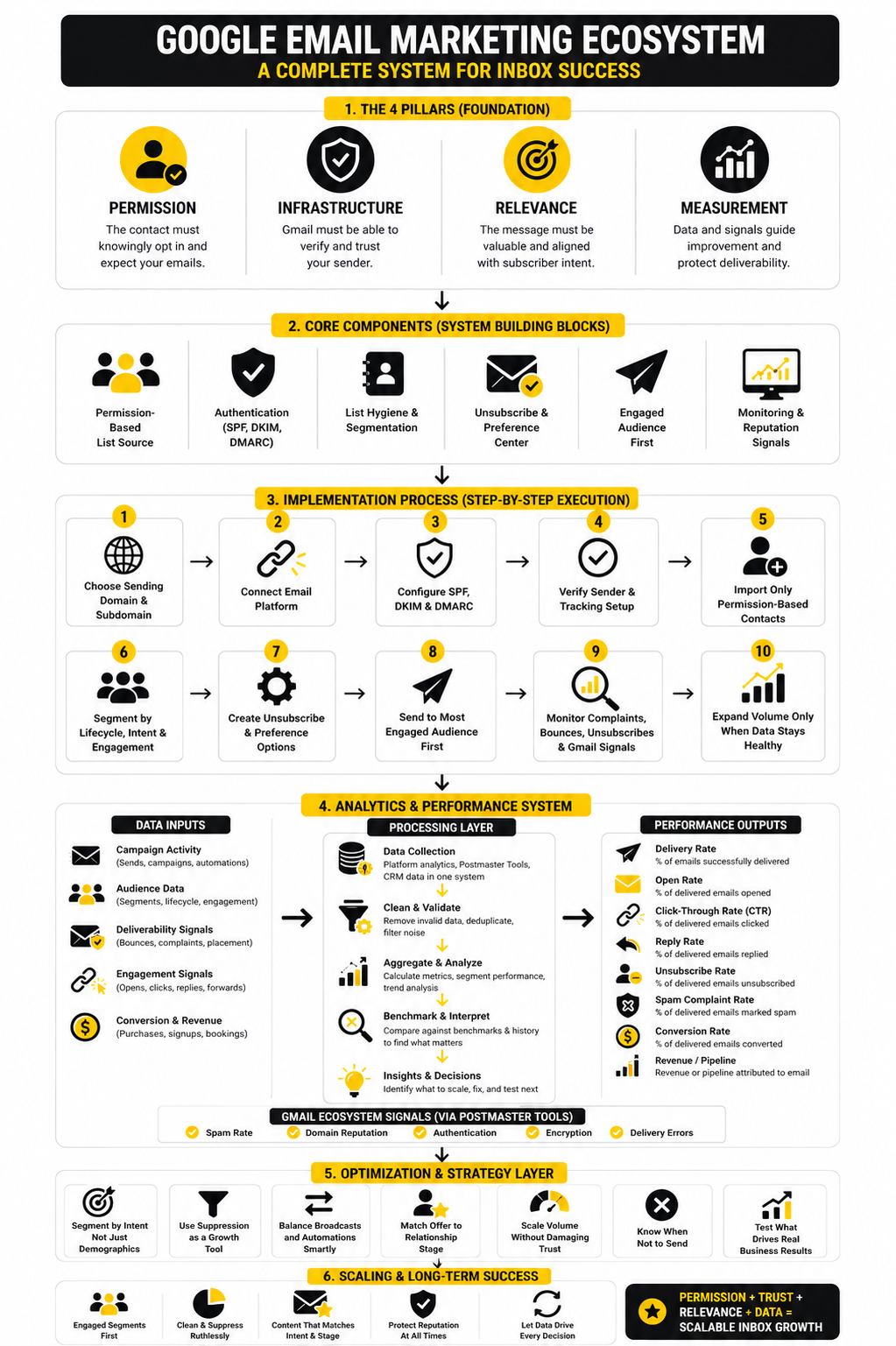
Before increasing volume, review the whole system one more time. Make sure authentication is complete, inactive contacts are suppressed, promotional emails include a clear unsubscribe path, and campaign results are being judged by both engagement and business outcomes. This final check is not busywork; it is how you avoid turning a good channel into a fragile one.
A healthy system should answer these questions clearly:
- Who should receive this email?
- Why should they care right now?
- What action should they take next?
- What signals tell us the campaign helped?
- What signals tell us to pause, clean, or adjust?
If those answers are vague, the campaign is not ready to scale. Tighten the audience, sharpen the message, and simplify the next step before sending more.
FAQ - Built for Complete Guide
What is Google email marketing?
Google email marketing is the process of creating, sending, measuring, and improving campaigns that reach people using Gmail or Google Workspace inboxes. It includes normal email marketing work like segmentation and copywriting, but it also requires attention to sender authentication, Gmail reputation, spam complaints, and unsubscribe compliance. The goal is not just to send emails, but to earn consistent inbox access with messages people actually want.
Can I use Gmail for email marketing?
You can use Gmail or Google Workspace for basic one-to-one communication, but it is not built for serious bulk email marketing. For newsletters, automations, promotional campaigns, and larger lists, a dedicated platform is usually safer and easier to manage. Tools like Brevo, Moosend, and GoHighLevel are better suited for campaign management, automation, and reporting.
What do I need before sending marketing emails to Gmail users?
You need permission-based contacts, a verified sending domain, proper authentication, a clear unsubscribe process, and a campaign platform that can manage lists responsibly. SPF, DKIM, and DMARC should be configured before serious sending begins. You also need a plan for segmentation, suppression, and monitoring so you are not sending blindly.
What is the biggest mistake in Google email marketing?
The biggest mistake is sending to too many people too quickly without knowing whether they want the message. That usually happens when brands import old contacts, skip segmentation, or treat every subscriber as equal. Gmail users respond with behavior, and weak behavior can damage future performance.
How often should I send marketing emails?
There is no universal perfect frequency. A highly engaged audience may tolerate frequent emails when the content is useful, while a colder audience may disengage quickly. The right frequency depends on intent, relationship stage, offer strength, and engagement trends.
What is a good open rate for Google email marketing?
Open rate can be helpful, but it should not be treated as the final truth. Privacy features and image-loading behavior can affect open tracking, so it is better to use opens as a directional signal. Clicks, conversions, replies, unsubscribes, complaints, and Gmail-specific reputation signals give a more complete picture.
Why are my emails going to spam in Gmail?
Emails can land in spam because of weak authentication, poor sender reputation, high complaint rates, low engagement, risky list sources, misleading content, or inconsistent sending behavior. The fix depends on the cause. Start by checking authentication, list quality, complaint trends, and whether the email is genuinely relevant to the segment receiving it.
Do I need Google Postmaster Tools?
If Gmail users are a meaningful part of your audience, yes. Google Postmaster Tools gives you visibility into Gmail-specific signals that a normal email platform may not show clearly. It is especially useful for monitoring spam rate, domain reputation, authentication, encryption, and delivery issues.
Should I use one domain or a subdomain for marketing emails?
A subdomain can help organize marketing email separately from other business communication, but it does not remove responsibility. Gmail still evaluates authentication, sending behavior, complaints, and engagement. The best choice is the one you can manage consistently with clean records and disciplined sending.
Are purchased email lists safe for Google email marketing?
No. Purchased lists are risky because the recipients usually did not clearly ask to hear from your brand. That increases the chance of ignores, unsubscribes, spam complaints, and deliverability problems. A smaller list of people who actually opted in is usually far more valuable.
What should I track after every campaign?
Track delivery issues, bounces, unsubscribes, complaints, opens, clicks, conversions, and revenue or pipeline impact. Do not look at these numbers in isolation. The real value comes from seeing the pattern and deciding whether to scale, pause, clean, or improve the next campaign.
How do I scale without hurting deliverability?
Scale gradually from your most engaged segments outward. Suppress inactive contacts, monitor complaints closely, and avoid sudden jumps in volume unless the list is clean and engaged. Scaling works best when it follows healthy signals instead of forcing volume because the business wants faster results.
What tool is best for Google email marketing?
The best tool depends on the workflow. Newsletter-heavy teams may prefer a focused email platform like Brevo or Moosend. Businesses that need email tied to CRM, appointments, pipelines, and follow-up workflows may get more value from GoHighLevel.
How do I know if my strategy is working?
Your strategy is working when healthy engagement and business outcomes improve without reputation signals getting worse. That means clicks, replies, conversions, bookings, or purchases are increasing while complaints, bounces, and unsubscribes stay controlled. If revenue rises but complaints rise too, the campaign may be borrowing from future deliverability.
Work With Professionals
Explore 10K+ Remote Marketing Contracts on MarkeWork.com
Most marketers spend too much time chasing clients, competing on crowded platforms, and losing a percentage of every project to middlemen.
MarkeWork gives you a better way. Browse thousands of remote marketing contracts and connect directly with companies desperate to hire skilled marketers like you, without platform commissions and without unnecessary gatekeepers.
If you're serious about finding better opportunities and keeping 100% of what you earn, explore available contracts and create a profile for free at MarkeWork.com.