

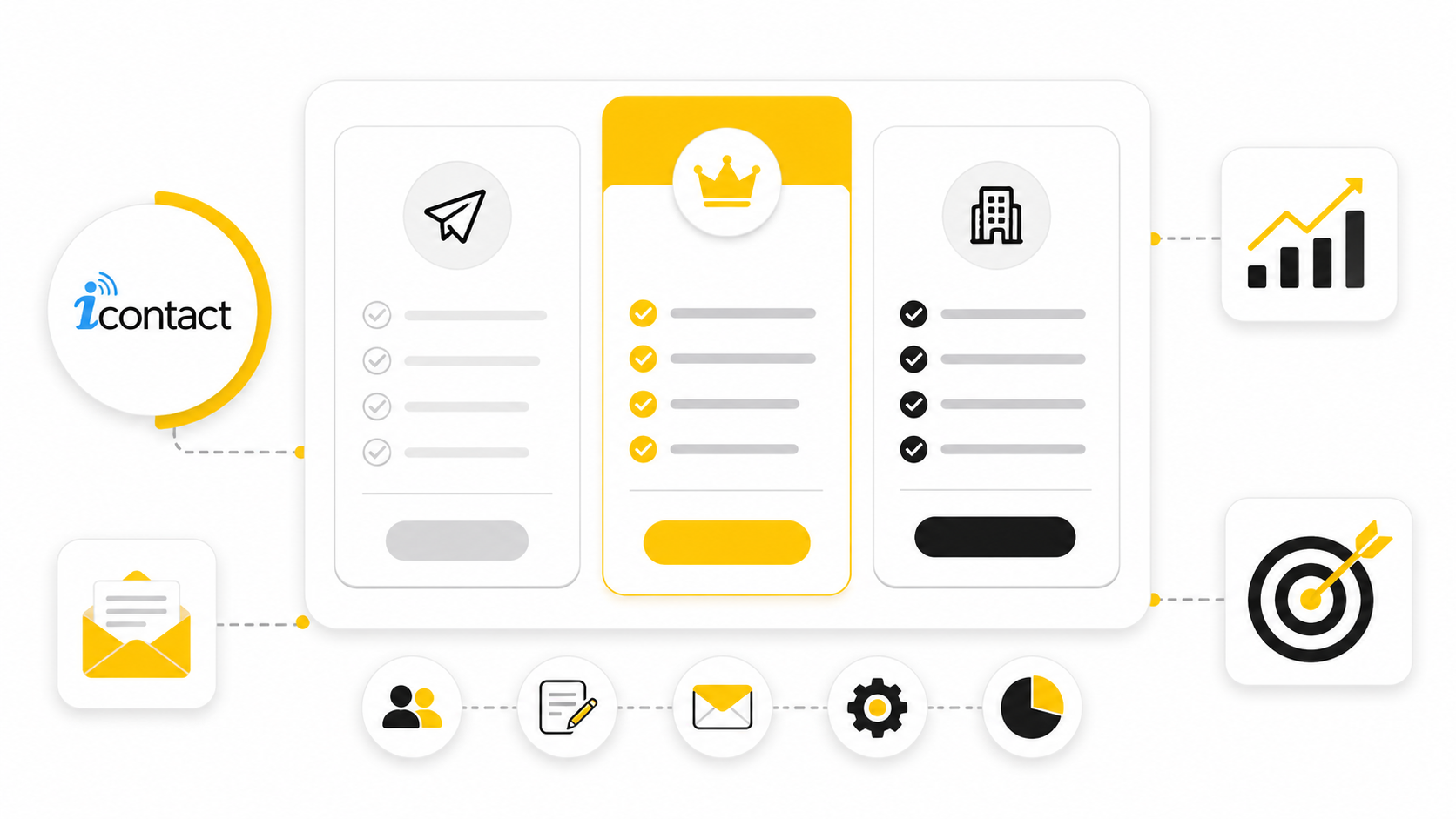
iContact pricing looks simple at first, but the real decision is not just “Which plan is cheapest?” The better question is whether iContact gives your business enough email volume, automation, support, landing pages, and list growth room for the price you will actually pay as your contact list grows.
That matters because email marketing costs can quietly compound. A plan that feels affordable at 500 contacts can feel very different at 5,000, 25,000, or more. This guide breaks down iContact pricing in a practical way so you can compare the platform against your actual marketing needs, not just the headline monthly price.
Article Outline
- Why iContact Pricing Matters
- iContact Pricing Framework Overview
- Core Pricing Components
- What You Get With Each iContact Plan
- How To Compare iContact Against Alternatives
- Professional Implementation Checklist And FAQ
Why iContact Pricing Matters
iContact sits in a crowded email marketing category where small differences in pricing structure can change the total value quickly. Some platforms price mostly by subscribers, others by email sends, and others bundle automation, landing pages, users, support, or AI tools differently. That is why looking only at the starting price can lead to a bad buying decision.
The current public pricing picture shows iContact as a platform aimed at small businesses, professional marketers, and higher-volume senders. Third-party software marketplaces list iContact with a free option, paid plans starting around the low monthly range, and custom pricing for high-volume senders, while review platforms highlight features such as unlimited sending on certain plans, landing pages, multiple users, smart sending, marketing automation, and live chat or email support through the iContact pricing profile on G2. Those details matter because the cheapest plan is not always the lowest-cost plan once your campaigns become more serious.
The practical takeaway is simple: iContact pricing should be judged by use case. A beginner newsletter does not need the same setup as a local service business running lead nurturing, a nonprofit sending donor appeals, or an ecommerce brand segmenting buyers by behavior. The best plan is the one that matches your list size, send frequency, automation needs, and support expectations without forcing you to pay for features you will not use.
iContact Pricing Framework Overview
A smart iContact pricing review starts with four questions. How many contacts do you have now? How fast is that list likely to grow? How many emails will you send each month? Which features are required for your campaigns to actually make money?
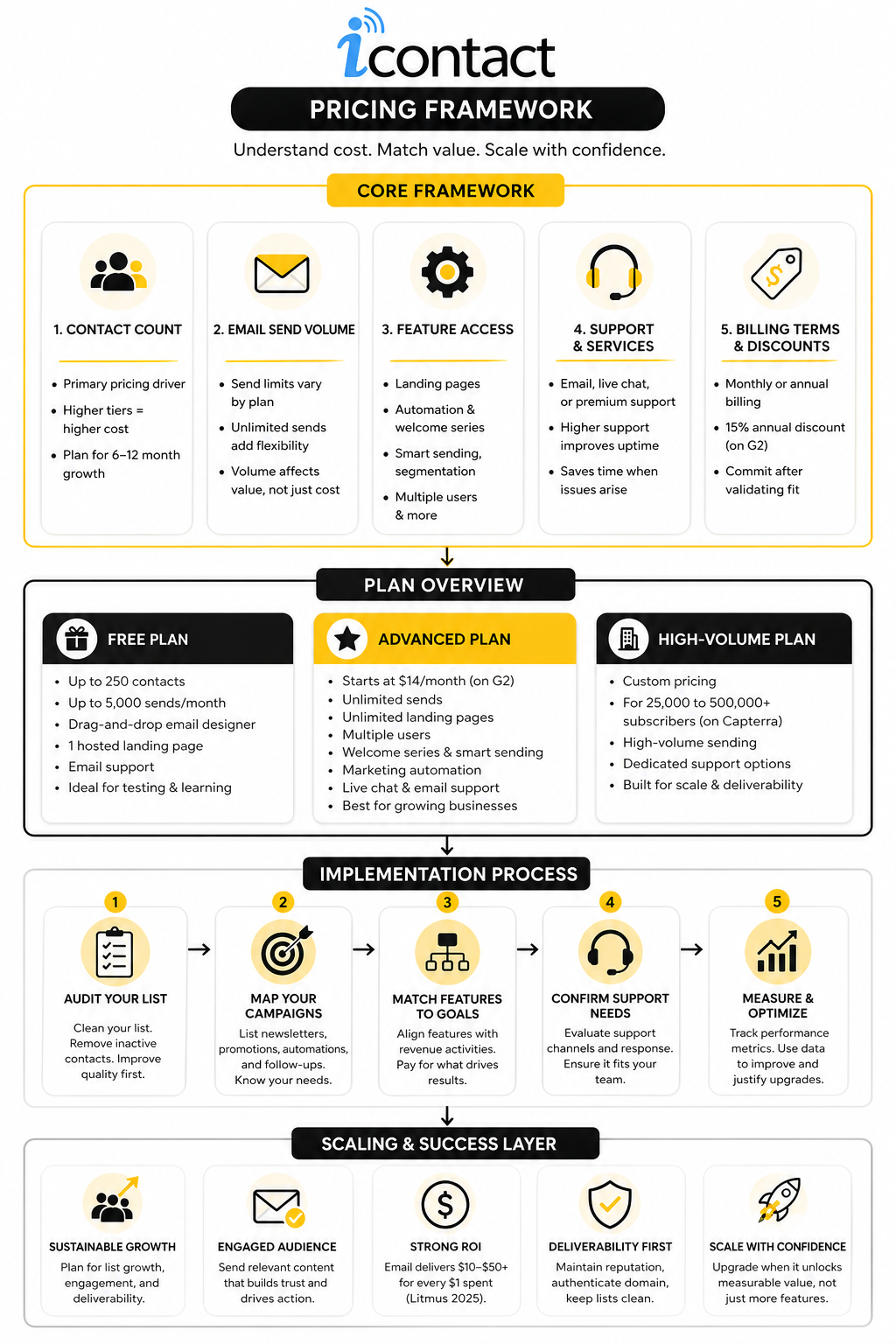
This framework keeps the decision grounded. Contact count affects the base cost, send limits or unlimited sending affect campaign flexibility, feature access affects what your team can build, and support quality affects how quickly you can fix problems when campaigns matter. If you skip any one of those, you risk choosing a plan that looks fine on paper but becomes frustrating in daily use.
The rest of this article will use that same framework throughout. First, we will separate the visible subscription price from the hidden operational costs. Then we will compare what each plan is built for, where iContact makes sense, and when another tool may be a better fit.
Core Pricing Components
iContact pricing is mainly shaped by list size, feature access, and sending needs. That sounds normal for email marketing software, but the details matter because two businesses can pay for the same platform and get very different value from it. A small newsletter, a sales team, and a high-volume sender are not buying the same outcome.
The public pricing data shows a free tier for small lists, an Advanced paid plan that starts around $14 per month, and custom pricing for high-volume senders on the iContact pricing profile on G2. Capterra also lists iContact with a free version and paid pricing from $14 per month on its iContact pricing page. That gives you a useful starting point, but it is not the whole buying decision.
Contact Count
Your contact count is usually the first pricing lever to check. If your list is small, the entry-level pricing may be enough to start sending campaigns without overthinking the budget. Once your list grows, the monthly cost can move quickly, so it is smarter to price the plan based on where your list will be in six to twelve months, not only where it is today.
This is where many buyers get caught. They compare tools at 500 or 1,000 contacts, then feel surprised when the cost changes at larger tiers. For iContact pricing, the practical move is to model your real growth path before you commit.
Email Send Volume
Send volume matters because your list size does not tell the full story. A company sending one monthly newsletter has a very different workload from a business sending weekly promotions, automated welcome emails, reactivation campaigns, and event reminders. If you send often, a plan with unlimited monthly sends can be much more valuable than a cheaper plan with tight limits.
The free iContact tier listed by G2 includes up to 250 contacts and up to 5,000 sends per month, while the Advanced plan includes unlimited sends. That difference is important because send limits can become a hidden constraint long before your list looks “large.” If email is a serious revenue channel, flexibility matters.
Feature Access
The cheapest plan is not always the best deal if it blocks the features you actually need. For example, landing pages, multiple users, welcome series, smart sending, and marketing automation can change what your team can build. If those features save time or improve campaign performance, they should be treated as part of the value calculation, not just nice extras.
This is also where iContact pricing becomes more strategic. A basic sender may only need templates and simple email creation. A business running lead generation, sales follow-up, or donor engagement will care more about automation, segmentation, and campaign workflow.
Support And Services
Support is easy to ignore until something breaks. Then it becomes one of the most important parts of the subscription. Live chat, email support, and higher-touch services can matter a lot when campaigns are tied to launches, events, seasonal sales, or fundraising deadlines.
iContact has historically positioned support as part of its value, especially for businesses that do not have a large technical marketing team. The GetApp iContact profile lists customer support at 4.6 out of 5 based on user reviews, which is useful context when comparing the platform against cheaper tools. A lower monthly price is not always better if your team loses hours trying to fix basic campaign problems.
Billing Terms And Discounts
Billing terms can also affect the real cost. G2 notes that iContact pricing is available monthly or annually, with an annual prepayment discount listed at 15% on its pricing profile. That matters if you already know you will use the platform for the full year.
Still, annual billing should not be automatic. Test the workflow first, confirm deliverability feels solid for your audience, and make sure the editor, templates, reporting, and automation tools fit how your team actually works. A discount only helps if you are buying the right tool.
What You Get With Each iContact Plan
Once you understand the core pricing levers, the next step is implementation. This is where iContact pricing becomes less theoretical. You are no longer asking, “What does it cost?” You are asking, “What can I actually build with this plan?”
The clean way to think about iContact is to match each plan to the maturity of your email marketing. A small list needs a simple sending system. A growing business needs repeatable campaigns, landing pages, automation, and better reporting. A high-volume sender needs scalability, support, and room to manage bigger subscriber databases without rebuilding the system later.
Free Plan
The free plan is best treated as a testing environment or a very small-list starting point. Public pricing profiles list iContact Free with up to 250 contacts, up to 5,000 sends per month, a drag-and-drop email designer, one hosted landing page, and email support through the iContact pricing profile on G2. That is enough to learn the interface, send basic campaigns, and see whether the editor feels comfortable.
The limitation is obvious. A 250-contact ceiling is not built for serious list growth. If you are collecting leads every week, running paid traffic, or building a content-driven newsletter, you will likely outgrow this tier quickly.
Use the free plan to validate fit, not to avoid making a real email marketing decision. Test the editor, create a landing page, import a small clean list, and send a simple campaign. If the workflow feels smooth, then you can judge the paid plan with more confidence.
Advanced Plan
The Advanced plan is where iContact becomes more useful for ongoing marketing. G2 lists the Advanced plan as starting at $14 per month with unlimited sends, unlimited landing page creation, multiple users, unlimited welcome series, smart sending, marketing automation, and live chat plus email support. That bundle matters because it gives you the building blocks for a real email system instead of one-off broadcasts.
For most small businesses, this is the plan that deserves the closest look. Unlimited sends are useful if you send newsletters, promotions, reminders, and automated follow-ups in the same month. Multiple users also matter when email is no longer handled by one person doing everything manually.
The implementation question is whether you will actually use the added features. If your team only sends one newsletter per month, advanced automation may not change much. If you plan to nurture leads, follow up after form submissions, and build repeatable welcome flows, the Advanced plan makes more sense.
High-Volume Sender Plan
The high-volume option is for teams that need custom pricing and more scale. Capterra describes iContact as serving businesses from small senders to professional marketers, agencies, and high-volume senders with 25,000 to 500,000-plus subscribers on its iContact product profile. At that size, the buying process should be more careful because deliverability, onboarding, list hygiene, and support become serious operational issues.
This is not the stage where you choose software by glancing at a pricing table. You need to know how your list was built, how often you send, what your engagement rates look like, and whether you need migration help. The wrong setup can hurt performance even if the software itself is solid.
High-volume buyers should ask for exact pricing, onboarding details, deliverability support, account management expectations, and any limits that apply to contacts, sends, users, landing pages, or automation. Vague answers are not good enough here. At scale, clarity is part of the product.
How To Implement iContact Without Overpaying
The fastest way to waste money on email software is to buy features before you have a process. iContact pricing only makes sense when it is tied to a clear operating plan. That means you should decide what campaigns you will run before you decide which plan is “best.”
A simple implementation process keeps the decision grounded. Start with your current list, your planned campaigns, your required features, and your support needs. Then compare that against the plan limits and upgrade triggers.
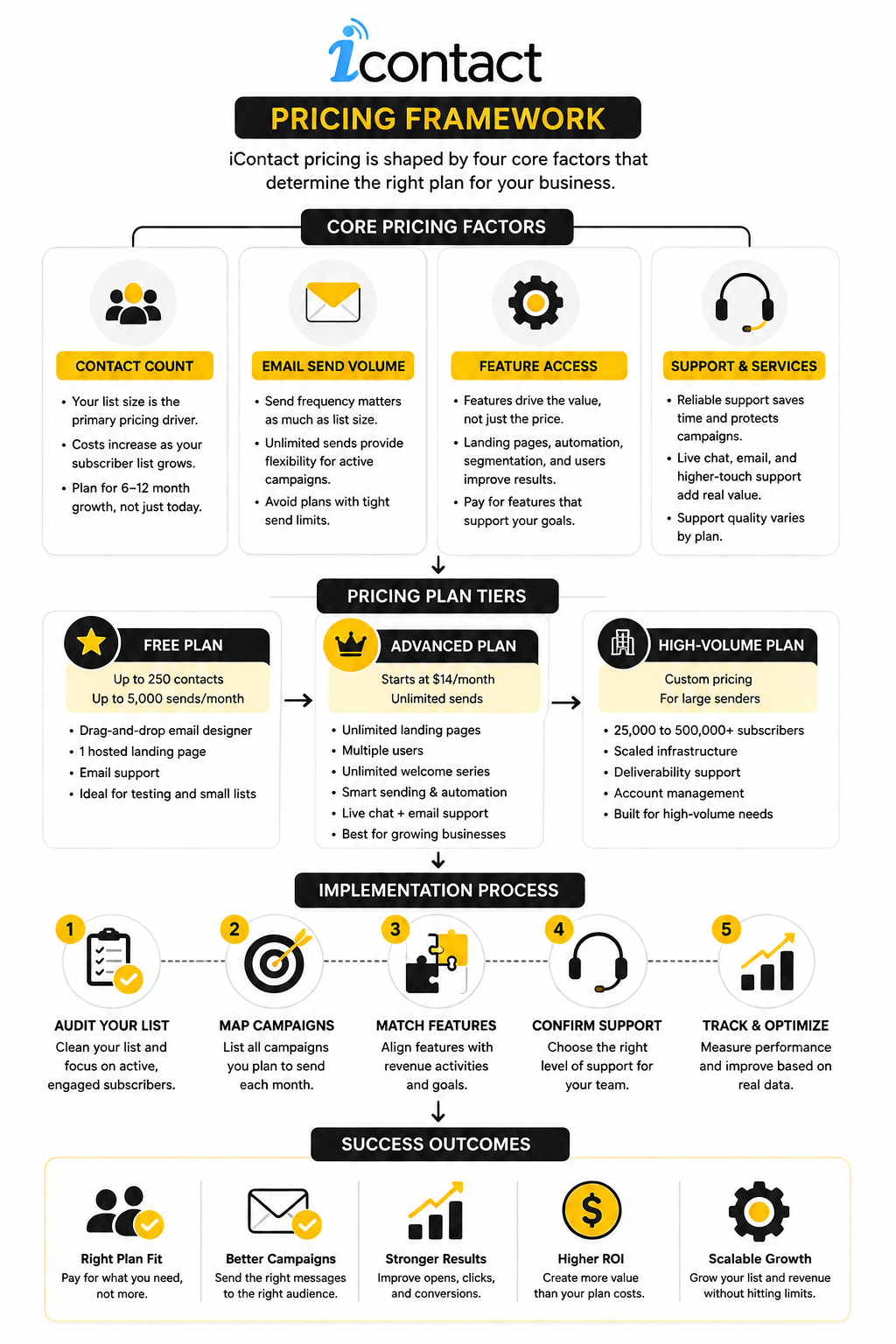
Step 1: Audit Your List
Start with list quality, not list size. A smaller engaged list is usually more valuable than a larger list full of inactive, outdated, or poorly sourced contacts. Before paying for a bigger plan, clean the list and remove contacts that should not be mailed.
This matters because email platforms price around access and volume, but revenue comes from attention and trust. A bloated list can push you into a higher pricing tier without improving results. Clean data gives you a more honest view of what iContact will cost.
Step 2: Map Your Campaigns
Next, write down the campaigns you plan to send in a normal month. Include newsletters, promotions, welcome emails, event reminders, lead magnet follow-ups, reactivation messages, and customer updates. This gives you a practical view of whether send limits or automation features will matter.
This step also prevents underbuying. A business may think it only needs basic email, then realize it needs landing pages, welcome sequences, and segmented follow-up. When that happens, the cheapest plan stops being the smartest plan.
Step 3: Match Features To Revenue Activities
Every paid feature should connect to a business activity. Landing pages should help collect leads. Welcome series should help convert new subscribers. Smart sending should support better timing. Reporting should help you improve campaigns, not just look at dashboards.
That is the right way to judge iContact pricing. Do not pay for complexity just because it sounds powerful. Pay for the features that directly support list growth, conversion, retention, or operational speed.
Step 4: Confirm Support Needs
Support needs depend on your team. A solo founder may need help setting up basic campaigns. A nonprofit may need reliable assistance before fundraising pushes. A marketing team may care more about fast troubleshooting and clear documentation.
Review platforms consistently show iContact being used by small and mid-sized organizations that value usability and support, with GetApp listing iContact at 4.5 out of 5 overall across hundreds of reviews on its iContact review profile. That does not guarantee your experience, but it does show why support should be included in the pricing conversation. Cheap software is expensive when your team cannot get campaigns out the door.
Statistics And Data
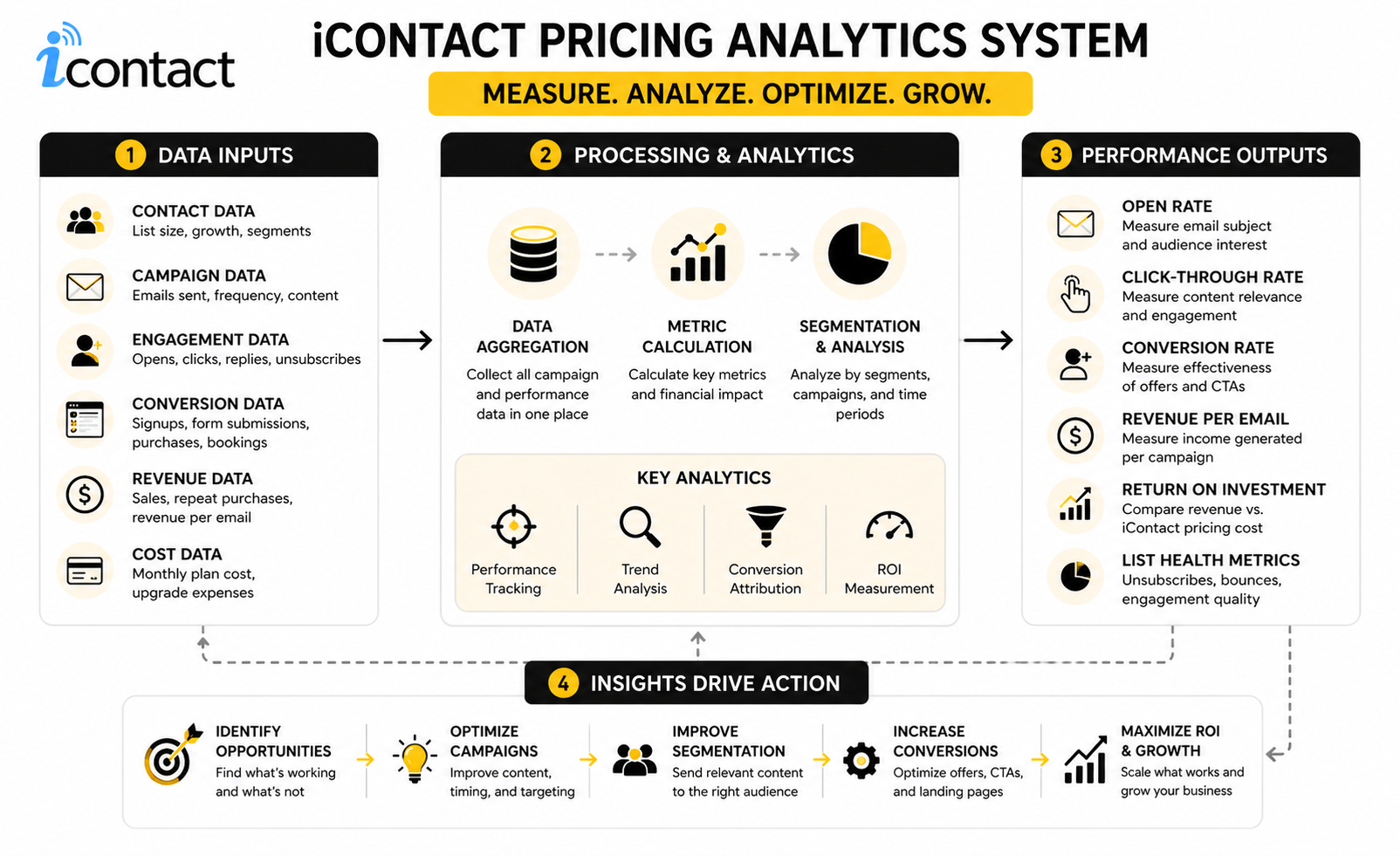
The numbers behind iContact pricing only matter when they help you make a better decision. Random benchmarks can make email marketing look either amazing or disappointing, depending on what someone wants to prove. The useful approach is to connect each metric to a buying decision: plan size, campaign frequency, list quality, automation needs, and whether the platform is helping you create measurable revenue.
Email is still one of the easier channels to measure because you can track delivery, opens, clicks, conversions, unsubscribes, and list growth inside a relatively controlled system. That does not mean every number is equally trustworthy. Open rates are useful for spotting directional trends, but clicks, conversions, revenue, and unsubscribe behavior usually tell you more about whether your iContact pricing is justified.
Email ROI Should Set The Budget Context
Email marketing often earns a strong return, but the range is wide. Litmus reported that 35% of marketing leaders receive $10 to $36 back for every $1 spent on email, while 30% receive $36 to $50 back, and 5% receive more than $50 back through its 2025 email ROI research. That is the reason email software pricing should not be judged like a simple expense line.
The action is straightforward. If email already drives sales, leads, bookings, donations, or repeat purchases, you can justify a stronger plan when the features help you improve revenue. If email is not yet tied to measurable outcomes, start lean and build the tracking before you upgrade.
Benchmarks Are Directional, Not Absolute
Industry benchmarks are useful, but they should not become your entire strategy. The DMA’s 2025 email benchmarking report found delivery rates rose to 98%, open rates reached 35.9%, and unique click rates hit 2.3% in 2024 through its Email Benchmarking Report 2025. MailerLite’s 2025 benchmark analysis reported a 43.46% average open rate, 2.09% average click rate, and 0.22% unsubscribe rate in its email marketing benchmarks by industry.
Those differences are exactly why you should avoid treating one benchmark as universal truth. Methodology, audience type, geography, campaign mix, and privacy changes can all shift the numbers. Use benchmarks as a sanity check, then judge iContact against your own baseline.
The Measurement System That Actually Matters
Your analytics system should answer one question: is the plan helping you create enough value to justify the cost? That means looking beyond vanity metrics. A campaign with a high open rate but weak clicks and no conversions is not performing well just because the subject line worked.
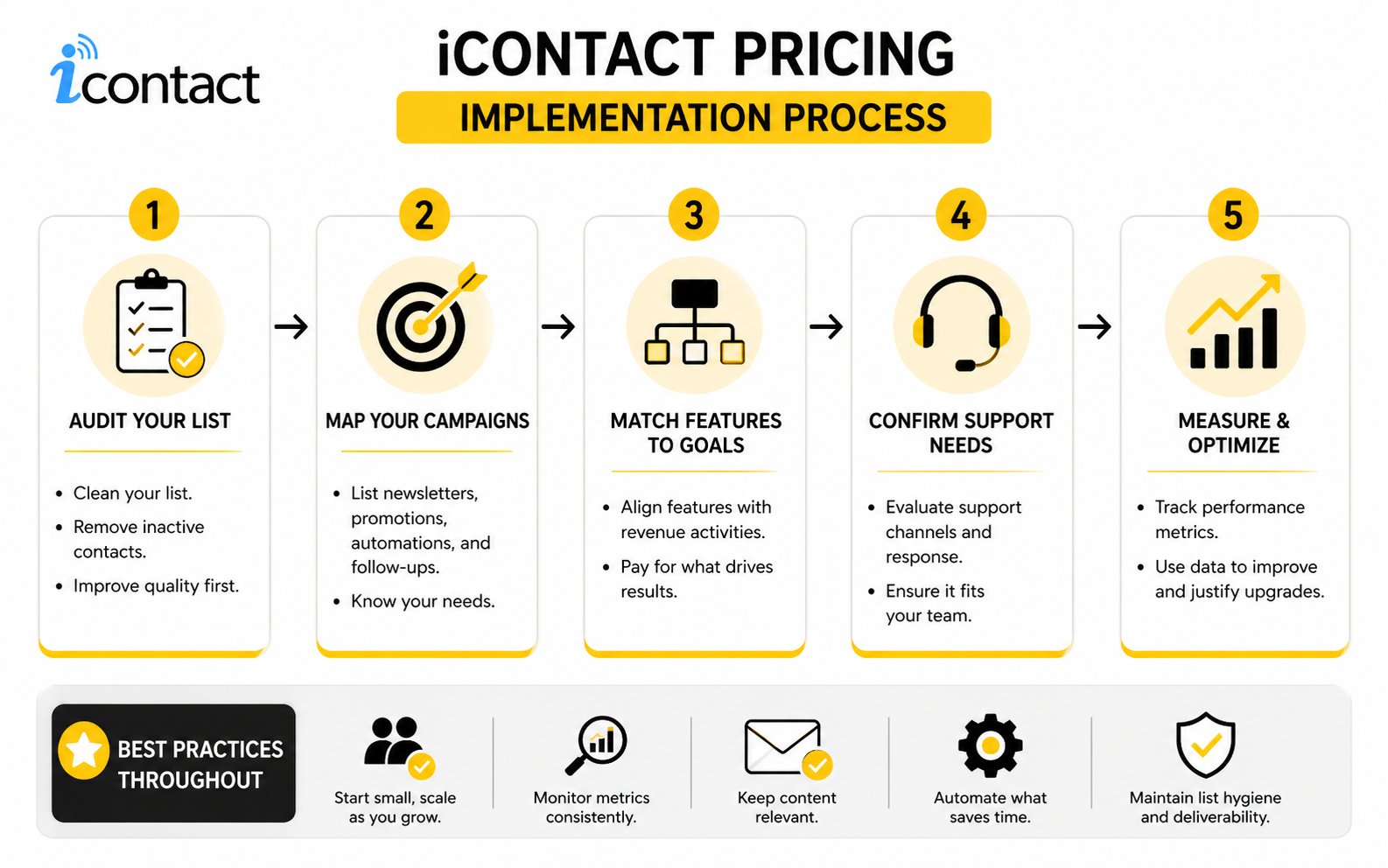
Track these signals together instead of separately:
- Delivery rate: Are your emails reaching inboxes often enough to make the list useful?
- Open rate: Are your subject lines and sender name creating enough initial interest?
- Click rate: Are subscribers interested enough to take action?
- Conversion rate: Are clicks turning into leads, sales, bookings, or another meaningful result?
- Unsubscribe rate: Are you sending relevant messages at the right frequency?
- Revenue or lead value: Is the email program producing enough business value to support the monthly cost?
This is where iContact pricing becomes easy to judge. If the software cost rises but revenue, lead quality, or operational speed rises with it, the upgrade may be justified. If the cost rises and your core metrics stay flat, the issue is probably not the price alone; it is the campaign strategy.
Open Rates Need Careful Interpretation
Open rates are tempting because they are easy to understand. The problem is that opens are no longer a clean signal of human attention, especially after privacy-related changes in email clients. They can still show trends, but they should not be the only metric used to decide whether iContact is working.
A better use of open rates is comparison inside your own account. Compare newsletter against newsletter, welcome email against welcome email, and audience segment against audience segment. If one segment consistently opens and clicks more, that tells you where better content, stronger offers, or more focused automation may pay off.
Clicks Tell You More Than Opens
Clicks are a stronger signal because they show action. Someone moved from the inbox to your website, landing page, booking page, donation form, or product page. That is where the business value begins.
If click rates are weak, do not immediately blame the platform. Check the offer, email structure, call to action, segmentation, and timing first. A better iContact plan can give you more tools, but it cannot rescue unclear messaging.
Unsubscribes Protect You From False Confidence
Unsubscribes are not automatically bad. Some list churn is healthy because it removes people who do not want your emails. The problem appears when unsubscribes rise after specific campaign types, frequencies, or audience segments.
MailerLite’s 2025 benchmark data shows average unsubscribe rates can sit around fractions of a percent, which makes sudden spikes worth investigating. If unsubscribes rise while clicks fall, your list is telling you the content is not relevant enough. That should drive action before you spend more on a larger plan.
Cost Per Valuable Action Is The Cleanest Pricing Metric
The simplest way to judge iContact pricing is to calculate cost per valuable action. Take the monthly software cost and divide it by the number of qualified leads, purchases, bookings, donations, or other meaningful outcomes your email program creates. This is much more useful than asking whether the subscription is “cheap.”
For example, a higher-priced plan can be a bargain if automation turns more new subscribers into customers. A lower-priced plan can be expensive if it saves money but limits the campaigns that would have generated revenue. Price matters, but performance matters more.
How To Compare iContact Against Alternatives
At this stage, iContact pricing should be compared against the job you need the platform to do. Do not compare tools feature by feature like you are buying office furniture. Compare them by workflow, growth path, support needs, and how much revenue or efficiency the email system can realistically create.
The biggest mistake is treating every email platform as interchangeable. One tool may be cheaper for a tiny list, another may be better for ecommerce automation, another may make more sense for agencies, and another may be stronger if you need landing pages, funnels, CRM, or SMS in the same stack. The right choice depends on what your marketing operation is becoming, not only what it looks like today.
When iContact Makes Sense
iContact makes sense when you want email marketing that is practical, support-focused, and not overloaded with unnecessary complexity. Capterra describes iContact as supporting small businesses, professional marketers, agencies, and high-volume senders with 25,000 to 500,000-plus subscribers on its iContact product profile. That range suggests the platform is not only for beginners, but the buying decision still needs to match your actual level of execution.
It is a stronger fit when your team values straightforward campaign creation, landing pages, support access, and predictable email workflows. If you are moving from occasional newsletters into more consistent marketing, the Advanced plan can be a reasonable middle ground. You get more room to operate without jumping straight into a complex enterprise stack.
The key is not whether iContact has every advanced feature on the market. The key is whether your team will actually use what it offers. Software you understand and use consistently usually beats software that looks impressive but slows everyone down.
When A Different Tool May Be Better
A different tool may be better if your marketing system needs more than email campaigns and landing pages. For example, if you are building full sales funnels, checkout flows, upsells, and lead capture pages, ClickFunnels may fit the broader funnel workflow better. If you want CRM, pipelines, appointment booking, SMS, automation, and client management in one place, GoHighLevel may be the more complete operating system.
If you mainly need affordable email sending with a different pricing model, Brevo is worth comparing because its market positioning often emphasizes pricing based around email volume rather than only list size. If you want a simpler funnel-and-email setup for creators or small online businesses, Systeme.io may also deserve a look. The point is not that these tools are automatically better; the point is that their pricing models solve different problems.
This is where intent matters. If you only need email, do not buy an all-in-one platform just because it has more buttons. If you need a complete sales and marketing machine, do not force a pure email tool to do work it was not built to handle.
Scaling Risks To Watch
The first scaling risk is list growth without list quality. A growing subscriber count can make iContact pricing more expensive while performance stays flat. That is a bad trade because you are paying for access to people who are not responding.
The second risk is automation sprawl. Once you have access to more automation features, it is tempting to build too many sequences too quickly. Keep the system simple: welcome new subscribers, follow up on clear intent, re-engage inactive contacts, and support sales or retention campaigns that have a measurable business purpose.
The third risk is poor attribution. Recent coverage of Sinch Mailgun’s 2026 Email Impact Report noted that fewer than half of surveyed organizations could reliably track email ROI, even though many companies measuring ROI reported strong returns from email. That matters because without attribution, iContact pricing becomes a guess instead of a business decision.
Migration And Switching Costs
Switching email platforms is rarely just a login change. You may need to move contacts, tags, segments, signup forms, landing pages, templates, automations, reporting history, and suppression lists. That work has a cost even when the new software looks cheaper.
Before switching to or from iContact, document what must be rebuilt. Include active forms, embedded signup boxes, campaign templates, automated welcome messages, and any integrations connected to your website or CRM. If those pieces are ignored, the migration can create gaps that hurt list growth and campaign performance.
This is why pricing comparisons should include implementation effort. A platform that saves $20 per month but takes 20 hours to rebuild may not be cheaper. The math has to include time, risk, and operational disruption.
Deliverability And Reputation
Deliverability is one of the least glamorous parts of email marketing, but it affects everything. If messages do not reach inboxes, the plan price is almost irrelevant. Litmus has emphasized deliverability as a core driver of email performance in its 2025 marketer’s guide to email deliverability, and that is exactly why pricing should be judged alongside sender reputation, list hygiene, authentication, and engagement.
This is especially important for businesses migrating lists or scaling volume. Sudden changes in sending patterns can create performance issues if your list is cold, messy, or poorly segmented. A good plan will not fix a bad sending strategy.
Before scaling, confirm that your domain authentication is set up, inactive contacts are managed, unsubscribe handling is clean, and your campaigns are wanted by the audience. Boring? Yes. Critical? Absolutely.
The Expert-Level Buying Rule
The expert-level rule is simple: buy the smallest plan that can execute your current strategy cleanly, then upgrade only when the next plan unlocks measurable value. Do not upgrade because a feature sounds impressive. Upgrade because it removes a real bottleneck or creates a clear opportunity.
For iContact pricing, that usually means starting with the plan that fits your list size and campaign volume, then watching whether automation, landing pages, user access, or support become constraints. When a constraint starts costing time or revenue, the upgrade conversation becomes easy. Until then, keep the system lean.
A good email platform should make your marketing more consistent, not more complicated. If iContact helps your team send better campaigns, manage growth, and measure results without friction, the price can make sense. If your needs are bigger than email, compare it honestly against broader tools before you commit.
Professional Implementation Checklist And FAQ
A good iContact pricing decision should end with a simple checklist. You should know your list size, expected growth, monthly send volume, must-have features, support needs, migration effort, and reporting setup before you commit. When those pieces are clear, the plan decision becomes practical instead of emotional.
Use this final check before choosing a plan:
- Confirm your current active contact count.
- Estimate your contact growth over the next 6 to 12 months.
- List every campaign you plan to send monthly.
- Identify whether you need landing pages, welcome series, automation, smart sending, or multiple users.
- Check whether annual billing makes sense after you test the workflow.
- Clean inactive or low-quality contacts before upgrading.
- Set up conversion tracking so pricing is measured against real outcomes.
- Compare iContact against broader tools only if you need funnels, CRM, SMS, or sales pipelines.
FAQ - Built for Complete Guide
How much does iContact cost?
Public pricing sources currently list iContact with a free version and paid pricing starting around $14 per month. G2 lists an Advanced plan starting at $14 per month with unlimited sends, unlimited landing pages, multiple users, welcome series, smart sending, marketing automation, and live chat plus email support on its iContact pricing page. Capterra also lists iContact pricing from $14 per month on its iContact pricing profile.
Does iContact have a free plan?
Yes, public software profiles list a free iContact plan. The free tier is best for testing the editor, sending basic campaigns, and learning the workflow with a small list. It should not be treated as a long-term growth plan if you are actively building an audience.
Is iContact pricing based on contacts or email sends?
iContact pricing is commonly described as contact-based, with plan value also affected by send limits and feature access. Business.com describes iContact pricing as based on the number of subscribers, with monthly or annual billing and an annual prepayment discount on its email marketing service review. That means your list size matters, but your send frequency and required features still affect the real value.
What is included in the iContact Advanced plan?
The Advanced plan is positioned as the main paid plan for businesses that need more than basic email sending. Public pricing data lists unlimited sends, unlimited landing page creation, multiple users, unlimited welcome series, smart sending, marketing automation, live chat, and email support. That makes it more relevant for businesses running ongoing campaigns instead of occasional newsletters.
Is iContact good for small businesses?
iContact can make sense for small businesses that want a practical email marketing platform with support, landing pages, and automation without jumping into a full enterprise system. The best fit is a business that wants repeatable campaigns, clean list management, and enough support to move quickly. If you need complex sales funnels, CRM pipelines, SMS, or full agency workflows, you may need to compare it against broader platforms.
Is iContact cheaper than Mailchimp?
It depends on your list size, send frequency, and required features. Pricing comparisons can change quickly because email platforms adjust free plans, contact tiers, and feature limits over time. The only useful comparison is to price both tools at your current list size and your projected list size over the next year.
What should I check before upgrading iContact?
Check whether the upgrade unlocks something you will actually use. Good reasons to upgrade include needing more contacts, unlimited sends, automation, landing pages, multiple users, stronger support, or better workflow capacity. Bad reasons include upgrading because a feature sounds impressive but has no clear role in your campaigns.
Can iContact handle high-volume email marketing?
Public software profiles describe iContact as serving high-volume senders, with custom pricing available for larger lists. At that level, you should ask detailed questions about onboarding, deliverability, support, migration, account management, and usage limits. High-volume email is not just a pricing decision; it is an operational decision.
How do I know if iContact is worth the price?
Measure cost against meaningful outcomes. Track leads, sales, bookings, donations, repeat purchases, or another valuable action created by your email campaigns. If the platform helps you create more value than it costs while saving time and keeping campaigns consistent, the price can make sense.
Should I pay annually for iContact?
Annual billing can be smart if you have tested the platform and know it fits your workflow. Business.com notes a 15% annual prepayment discount in its iContact review, which can reduce the total yearly cost. Do not choose annual billing only because of the discount if you have not tested the editor, automation, landing pages, reporting, and support.
What are the biggest hidden costs of iContact?
The biggest hidden costs are usually list bloat, poor migration planning, weak attribution, and unused features. A messy list can push you into a higher tier without improving results. A poor migration can break forms, automations, and reporting. Unused features turn a reasonable subscription into wasted spend.
What is the best alternative to iContact?
The best alternative depends on what you need. For funnels and checkout flows, ClickFunnels may be a better fit. For CRM, pipelines, automation, SMS, and agency-style workflows, GoHighLevel may make more sense. For a creator-friendly email and funnel setup, Systeme.io is also worth comparing.
What is the simplest way to choose the right iContact plan?
Choose the smallest plan that can execute your current strategy properly. Then upgrade only when the next plan removes a real constraint or creates measurable value. That rule keeps iContact pricing tied to performance instead of guesswork.
Work With Professionals
Explore 10K+ Remote Marketing Contracts on MarkeWork.com
Most marketers spend too much time chasing clients, competing on crowded platforms, and losing a percentage of every project to middlemen.
MarkeWork gives you a better way. Browse thousands of remote marketing contracts and connect directly with companies desperate to hire skilled marketers like you, without platform commissions and without unnecessary gatekeepers.
If you're serious about finding better opportunities and keeping 100% of what you earn, explore available contracts and create a profile for free at MarkeWork.com.