

Picking a mail marketing service looks easy until you are the one living with the decision. The demo looks clean, the pricing seems manageable, and every platform promises better automation, smarter segmentation, and higher revenue. Then reality shows up: deliverability gets messy, reporting feels shallow, migrations drag on, and the tool that looked perfect for month one becomes a bottleneck by month six.
That is why this topic matters more now than it did a few years ago. Email is still one of the few owned channels a business controls directly, and the inbox has become more demanding at the same time, with Google enforcing sender requirements for Gmail beginning on February 1, 2024 and Yahoo maintaining strict bulk-sender standards around authentication, complaints, and unsubscribe handling.
A good mail marketing service is not just a newsletter tool anymore. It sits at the intersection of list growth, audience data, automation, deliverability, attribution, and customer retention, which is exactly why weak software decisions ripple through the whole business. Platforms are also splitting into clearer categories now: lightweight newsletter tools, commerce-first automation systems, and broader CRM suites that bundle email into a larger customer journey.
This article breaks the decision down in a practical way, so you can choose based on business model, growth stage, and operational reality instead of feature-page hype. We will focus on what actually changes outcomes: sending infrastructure, segmentation depth, automation logic, usability, reporting, and how well the platform fits the way your team works.
Article Outline
- Why a Mail Marketing Service Still Matters
- The Selection Framework That Prevents Expensive Mistakes
- Core Features That Separate Basic Tools From Real Growth Platforms
- How Professional Teams Implement Email Without Deliverability Problems
- Which Mail Marketing Service Fits Your Business Model Best
- Final Decision Checklist and Long-Term Optimization

Why a Mail Marketing Service Still Matters
The biggest mistake businesses make is treating email software like a simple sending tool. In practice, the platform you choose shapes how fast you can launch campaigns, how precisely you can segment people, how reliably your messages land in the inbox, and how clearly you can connect sends to revenue. That is a much bigger job than “send newsletter every Tuesday.”
Email also keeps earning its place because it is durable. Social reach changes, paid media gets more expensive, and algorithmic channels can disappear under you, but a permission-based email list remains an owned asset. Even now, email continues to play a central role in online behavior, with DataReportal noting in its 2025 digital analysis that Gmail’s mobile app reaches roughly 2 billion handsets each month.
The operational stakes are higher now too. Google’s current sender rules for Gmail and Yahoo’s sender best practices make authentication, complaint control, and easy unsubscribes part of the baseline, not advanced optimization. So when you evaluate a mail marketing service, you are not just buying convenience. You are buying your ability to stay compliant, protect domain reputation, and keep scaling without getting filtered out.
That is also why feature depth matters differently depending on the company. A creator business may care most about simplicity, forms, landing pages, and clean broadcasts. An ecommerce brand usually needs behavior-based flows, stronger product data, and revenue reporting. A service business may get more value from a platform that blends email with CRM, pipelines, and broader automation, which is where tools like Brevo or Moosend can fit different operational styles.
The Selection Framework That Prevents Expensive Mistakes
The right way to choose a mail marketing service is to start with the business model, not the software category. Most bad purchases happen because teams compare templates, dashboards, and pricing tables before they define what the platform actually needs to do. That reverses the logic and almost guarantees frustration later.
The better approach is to judge every tool through four filters: audience complexity, automation depth, channel mix, and team workflow. Audience complexity tells you how much segmentation and customer data flexibility you need. Automation depth tells you whether you need simple broadcasts, a few evergreen sequences, or event-driven journeys that react to behavior in real time. Channel mix matters because some businesses now want email to work alongside SMS, WhatsApp, transactional messaging, or CRM activity rather than operating alone.
Team workflow is where many decisions quietly fail. A founder-led business may want speed and low setup friction. A lean marketing team may care most about ease of use, templates, and reporting clarity. A larger team often needs approval processes, deeper integrations, cleaner data structure, and stronger governance so campaigns do not break every time someone edits a list or workflow.
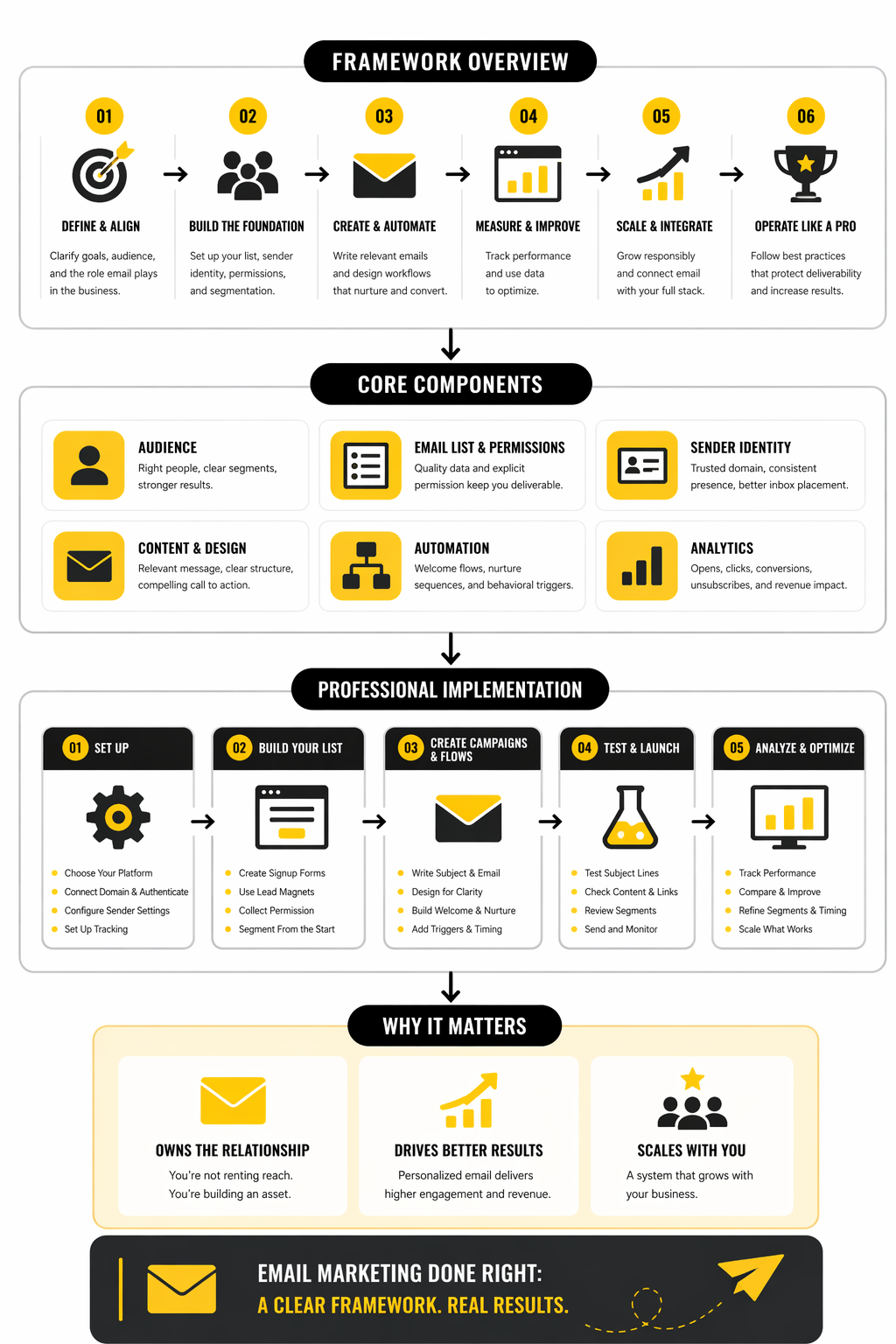
A practical framework usually looks like this. First, define the revenue motion: are you nurturing leads, driving repeat ecommerce purchases, or managing a full lifecycle across sales and support. Second, define the triggers you need: signup, browse, cart, purchase, inactivity, renewal, appointment, or internal CRM events. Third, define your operational ceiling: who will build the automations, who owns deliverability, and how much technical help you realistically have. Once those answers are clear, the shortlist gets dramatically smaller and much more accurate.
That is the lens we will use throughout the rest of the article. Instead of chasing a mythical best platform, we are going to narrow the field based on what the business actually needs the mail marketing service to do, how professionally it needs to do it, and how much complexity the team can support without slowing growth.
Core Features That Separate Basic Tools From Real Growth Platforms
Once the framework is clear, the next step is looking past surface-level features and into the capabilities that actually affect performance. Plenty of platforms can send a campaign, store a list, and offer a drag-and-drop editor. That does not mean they are equally useful once you need sharper targeting, cleaner automation, and reporting you can trust.
This is where a mail marketing service stops being a commodity. The serious difference shows up in how the platform handles contact data, reacts to behavior, supports compliance, and connects campaigns to business outcomes. That is also why two tools with similar pricing can produce very different results in practice.
Deliverability and Sender Controls Come First
If a platform cannot help you protect inbox placement, the rest of the feature list barely matters. Google’s current sender requirements for Gmail make authentication, complaint control, and easy unsubscribe handling part of the operational baseline, especially for higher-volume senders, and Gmail still uses the roughly 5,000-messages-per-day threshold for bulk senders. A mail marketing service should make domain authentication, suppression handling, sender identity setup, and unsubscribe management straightforward instead of burying them in technical friction.
This matters because performance starts before the email is opened. If your domain reputation slips, the smartest automation in the world still lands in spam or promotions too often to do its job properly. A platform with strong sender controls gives you a much better shot at maintaining consistency as volume rises.
You also want visibility into the ugly metrics, not just the flattering ones. Bounce behavior, spam complaint trends, unsubscribe patterns, and list hygiene signals tell you whether growth is healthy or whether you are quietly eroding trust. That is why deliverability is not a backend detail. It is a core buying criterion.
Segmentation Has to Go Beyond Static Lists
Basic list management is not enough anymore. The stronger platforms let you build dynamic groups using attributes, actions, events, purchase behavior, and engagement history, which is exactly how Brevo describes its segments and how Mailchimp documents audience and ecommerce-based segmenting options. That kind of flexibility is what lets a business send fewer emails that perform better.
Static segmentation usually breaks down as soon as the audience gets more complex. People move between lifecycle stages, buying intent changes, engagement cools off, and product interest shifts faster than manual list cleanup can keep up. A good mail marketing service updates those conditions automatically so the targeting stays relevant without constant intervention.
This is one of the clearest lines between a newsletter tool and a growth platform. If the system can only split contacts into a few rigid buckets, personalization stays shallow. If it can react to behavior and data changes in real time, you can build messaging around what the customer is actually doing.
Automation Depth Is Where Real Leverage Shows Up
Automation is where the return on the platform starts compounding. Simple autoresponders are useful, but real leverage comes from workflows that respond to events, branch based on behavior, wait intelligently, and trigger the next step without manual babysitting. Mailchimp’s automation flow documentation and HighLevel’s workflow documentation both make this distinction clear: the value is in connected sequences, not isolated sends.
This is also why many teams underestimate their future needs. They buy a tool for broadcasts and a welcome sequence, then later need abandoned-cart logic, lead nurturing, appointment reminders, reactivation campaigns, or multi-step onboarding journeys. Suddenly the original platform feels cramped, and the business is stuck rebuilding everything mid-growth.
A better mail marketing service gives you room before you need it. That does not mean chasing the most complex automation builder on the market. It means choosing a system that can support the likely next layer of sophistication without forcing a painful migration the moment your strategy gets better.
Reporting Should Connect Activity to Revenue, Not Just Vanity Metrics
A lot of email dashboards still flatter the user instead of informing them. Opens, clicks, and campaign summaries matter, but they are only useful when they are connected to conversion behavior, sales impact, and retention signals. Even mainstream benchmark sets show how widely engagement can vary by industry, with Mailchimp’s benchmark data and Brevo’s 2025 benchmark analysis based on 44 billion emails making it obvious that surface metrics need context.
That is why clean attribution matters. You want to know which flows produce revenue, which segments convert, which campaigns assist pipeline movement, and where engagement falls apart. A mail marketing service that cannot connect behavior to outcomes leaves you optimizing headlines while missing the real bottleneck.
This becomes even more important when Apple Mail Privacy Protection and similar changes distort simplistic open-based interpretation. Platforms that help teams analyze clicks, conversions, downstream actions, and segment-level outcomes are far more useful than ones that just celebrate opens and call it insight. Mailchimp’s own reporting documentation now emphasizes a broader measurement model for exactly this reason.
The User Experience Still Matters More Than People Admit
Even strong features lose value when the tool is frustrating to operate. If the interface slows down campaign building, hides critical settings, or makes workflow logic hard to audit, the team will avoid using the platform well. The best mail marketing service is not just powerful. It is usable enough that good execution happens consistently.
This point gets overlooked because buyers tend to compare features line by line. But in real teams, clarity wins. Builders need to understand what a workflow is doing, where contacts enter, why they branch, and what happens when a condition changes. When that visibility is poor, mistakes pile up quietly and stay live longer than anyone realizes.
That is one reason simpler tools keep winning certain categories of business. For a creator, solo operator, or lean team, speed and clarity may matter more than enterprise depth. For a more operationally mature company, a slightly steeper learning curve can be worth it if the platform unlocks better control and coordination.
Integrations Decide Whether the Platform Becomes Central or Annoying
A mail marketing service rarely works alone for long. It usually needs to connect with ecommerce data, forms, booking systems, CRMs, landing pages, ad platforms, or internal apps. The quality of those connections determines whether the platform becomes a useful operating layer or just another place where data gets stuck.
This is where the difference between categories shows up fast. A broader platform like Brevo leans into email, CRM, and multichannel communication in one environment, while HighLevel pushes harder into workflows, sales processes, and agency-style operational control. A lighter option like Moosend can work well when the business wants practical automation and reporting without turning the email stack into a full CRM project.
The real question is not whether integrations exist on a feature page. It is whether the data you care about can move cleanly enough to power segmentation, automation, and reporting without manual patchwork. If the answer is no, the platform will create drag no matter how attractive the front-end editor looks.
Support for Growth Paths Matters More Than Current Needs
One of the smartest ways to evaluate a platform is to ask what happens when the list doubles, the team expands, and the campaigns get more ambitious. Some tools feel excellent at low complexity and then start breaking rhythm as volume, automation count, or channel coordination increases. Others feel heavier at first but become more valuable as the business matures.
This is where roadmap fit matters. A company that expects to add SMS, CRM workflows, or broader lifecycle automation should think seriously about whether the chosen mail marketing service can evolve into that role. A company that wants straightforward newsletters, clean automations, and faster execution may be better off staying lean instead of buying a platform built for a future it will never actually need.
That decision should be deliberate, not aspirational. Buying too small creates migration pain. Buying too big creates operational drag and feature waste. The right choice usually sits in the middle: enough headroom to grow, but not so much complexity that the team dreads logging in.
How Professional Teams Implement Email Without Deliverability Problems
The difference between amateur and professional email execution is usually not creativity. It is systems. Professional teams treat email as an operational discipline with clear rules for data quality, authentication, segmentation logic, testing, and post-send analysis, because they know a mail marketing service only performs as well as the setup behind it.
That matters because most email problems are self-inflicted. Weak list collection, sloppy imports, over-mailing cold contacts, and unclear workflow logic create problems that no platform can magically repair. The software matters, but the operating model matters just as much.
Professional teams usually implement a mail marketing service in phases, not in one dramatic switch. That sounds less exciting, but it is exactly how you avoid wrecking deliverability, breaking automations, or importing a messy database into a clean system. The implementation process should protect sender reputation first, then stabilize data, then expand campaigns once the foundation is trustworthy.
That order matters because inbox providers are less forgiving now. Google’s sender rules and Yahoo’s sender standards are not edge-case technicalities anymore. They are the minimum operating standard for serious email programs, which means implementation is not an admin task in the background. It is the work that determines whether the platform can actually perform.
How Professional Teams Implement Email Without Deliverability Problems
The cleanest implementations follow a simple pattern. First, set up the sending environment correctly. Second, migrate only permission-based contacts and usable data. Third, rebuild the highest-value automations before chasing every legacy campaign. Fourth, warm volume gradually and watch the ugly metrics closely.
That sequence keeps the business moving while reducing risk. A lot of teams do the exact opposite. They rush the migration, dump old lists into the new account, recreate every workflow at once, and then act surprised when engagement dips and complaints rise.
Start With Authentication and Sending Infrastructure
Before a single campaign goes out, the domain setup has to be right. A professional mail marketing service rollout begins with SPF, DKIM, and DMARC alignment because that is now core inbox infrastructure, not advanced optimization, and Google’s sender guidance is explicit about authentication and alignment requirements for promotional email. Google’s email sender guidelines are worth reviewing line by line before launch.
This is also the point where teams decide whether they are sending from a shared environment or moving toward a dedicated sending reputation. That choice depends on volume, consistency, and internal discipline. For many growing brands, a shared environment is fine at first, but once volume becomes meaningful, sender reputation control becomes more important.
If the platform supports dedicated infrastructure, the implementation has to include warm-up, not just setup. Brevo’s deliverability documentation and its dedicated IP guidance both make the same practical point: you do not just flip on new infrastructure and blast the whole list. You increase volume gradually so mailbox providers can build trust around your patterns.
Clean the List Before You Move Anything
Most migrations fail before the first send because the data going in is already compromised. Old contacts, vague consent history, duplicate records, broken fields, and stale segments create problems that the new platform then gets blamed for. A good mail marketing service cannot rescue a bad database.
This is why professional teams audit contact quality before import. They remove obvious dead weight, verify field structure, preserve consent evidence, and make a hard distinction between active subscribers and legacy contacts that should not be mailed without reconfirmation. Mailchimp’s migration checklist and its import formatting guide both reinforce the same idea: importing everything is not the goal, importing only usable and permission-based data is.
The painful truth is that a smaller clean list almost always beats a bigger contaminated one. This is one of those moments where discipline directly protects revenue. Teams that cling to bloated, aging lists usually pay for it through complaint spikes, weak engagement, and reputation damage that lingers well past the migration itself.
Rebuild the Essential Journeys First
When the contact base is clean and the domain is configured, the next move is not rebuilding every email you have ever sent. It is identifying the flows that matter most to revenue and customer movement. For most businesses, that means some version of welcome, nurture, abandoned cart or lead follow-up, post-purchase or onboarding, and reactivation.
This is where implementation becomes tangible. The team needs to define triggers, entry rules, delays, exclusions, suppression logic, and clear success metrics for each journey. That turns the rollout from a software exercise into an operating system for communication.
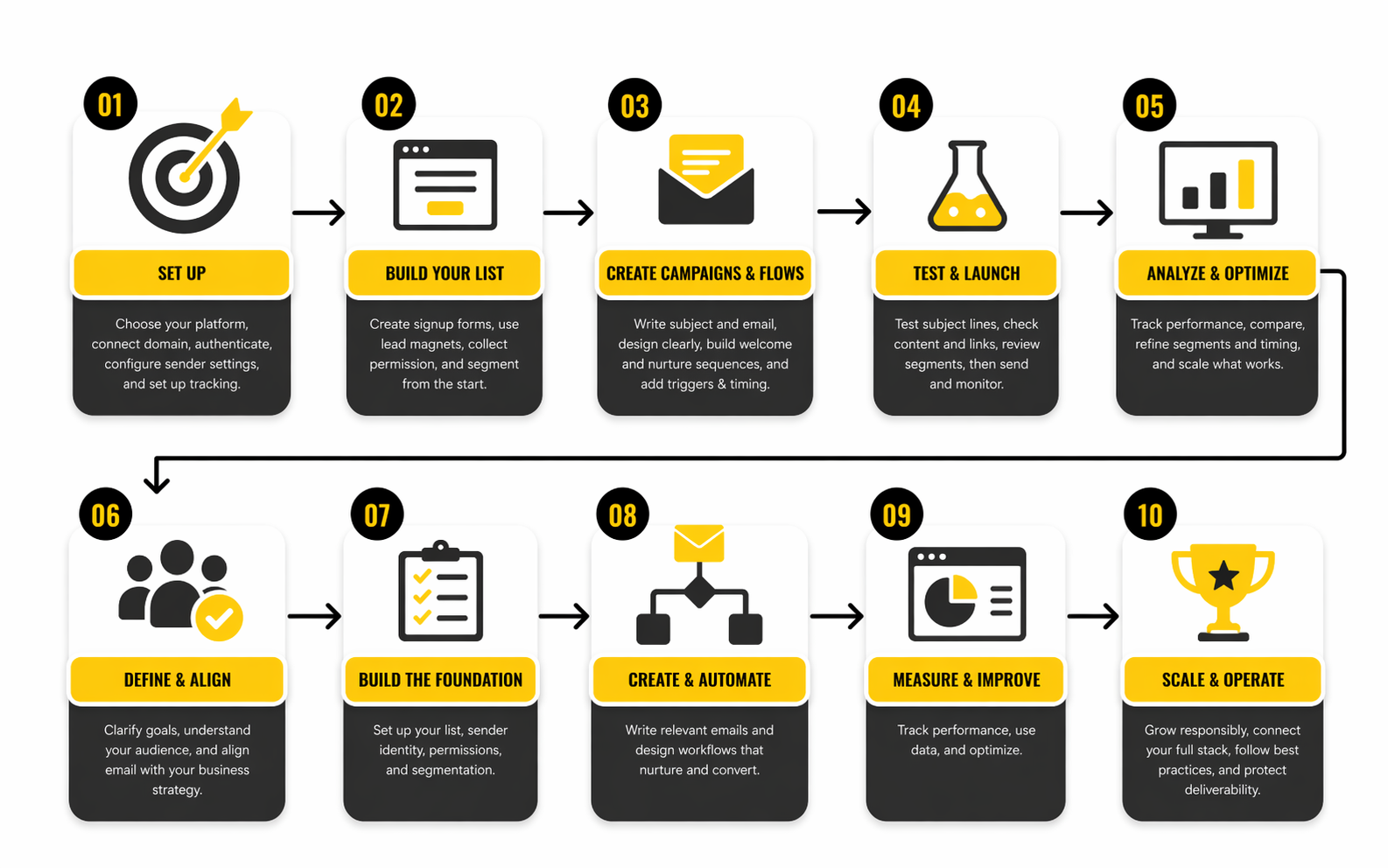
A professional build process usually works best in this order:
- Set up the sending domain and sender identities
- Import only clean, permission-based contacts
- Recreate core segments based on real lifecycle stages
- Launch the welcome and onboarding automations first
- Add revenue-driving flows like cart, lead nurture, or follow-up
- Reintroduce broadcast campaigns only after the foundation is stable
- Review complaints, bounces, unsubscribes, and engagement after each phase
That step-by-step sequence sounds almost boring, which is exactly why it works. It reduces moving parts. It also makes troubleshooting much easier because when something underperforms, you can isolate whether the problem is data quality, workflow logic, content, or sender reputation instead of guessing blindly.
Build Segments Around Behavior, Not Internal Org Charts
One of the smartest implementation decisions is choosing how segmentation will work before campaigns start flying. Weak teams build lists around convenience. Strong teams build segments around behavior, intent, lifecycle stage, and commercial value.
That difference changes everything. A segment like “webinar leads from last 90 days who clicked but did not book” is useful. A segment like “Q3 prospects from source B owned by team north” might help internally, but it rarely produces better messaging on its own. The mail marketing service should reflect how customers move, not just how the business labels them.
This is also why platform fit matters so much. Systems with stronger automation and CRM logic, like HighLevel, can support more operational segmentation when email is tightly connected to sales processes. Simpler tools can still work very well, but only if the segmentation model stays disciplined and focused on actions that actually affect message relevance.
Control Frequency Before Subscribers Get Fatigued
A professional implementation includes rules for who should not receive an email, not just who should. That sounds obvious, but many teams still build automations in isolation, so the same subscriber ends up getting a campaign, a sequence email, a promo, and a reminder inside a tiny window. Then they wonder why unsubscribes rise.
Frequency control is one of the clearest signs that a mail marketing service is being run well. Some platforms explicitly support email-overload protections or suppression logic, while others require more manual workflow design. Either way, the principle is the same: message coordination matters as much as message quality.
This becomes especially important as the program matures. At low volume, fatigue is easy to miss. At scale, it becomes a silent performance killer. The brands that manage this well are not always the ones sending the most. They are the ones sending with better orchestration.
Test the System Like an Operator, Not a Designer
A lot of email reviews focus too heavily on whether the template looks good. That matters, but it is not the main implementation risk. Professional teams test links, fallbacks, personalization tokens, audience entry logic, exit conditions, mobile rendering, and unsubscribe handling before declaring a workflow ready.
That operational mindset prevents embarrassing failures. Broken logic can quietly send the wrong message to the wrong segment for days if no one checks the actual journey path. A beautiful email with a broken condition tree is still a broken campaign.
This is also where documentation helps. Teams that map each automation clearly, including trigger, objective, audience, exclusions, and owner, tend to recover faster when something changes. The implementation becomes maintainable instead of tribal knowledge trapped inside one person’s head.
Use a Controlled Warm-Up Instead of a Big Launch
Even when everything is technically ready, the smartest rollout is still gradual. Google’s one-click unsubscribe FAQ ties sender compliance to broader eligibility and reputation behavior, and mailbox providers clearly reward steady, trustworthy sending patterns over sudden spikes. Google’s sender FAQ is blunt about growing volume carefully and monitoring spam reports.
That means the best first sends usually go to the most engaged audience. Not the biggest audience. Start with recent openers, clickers, recent buyers, or highly active leads. Let those engagement signals help establish a healthy pattern before expanding further into colder segments.
This part is hard for impatient teams because the temptation is to “go live” all at once. But a mail marketing service implementation is not a product launch stunt. It is closer to infrastructure commissioning. Done well, it feels controlled, steady, and almost uneventful, which is exactly what you want when reputation is on the line.
Measure the Rollout Like a Risk-Control Exercise
The first month after implementation should be measured differently from a mature program. You are not just looking for conversions. You are looking for signs that the system is stable. Complaints, bounce behavior, unsubscribes, inbox placement patterns, and engagement by segment matter more than headline revenue during the earliest sends.
This is the part many businesses skip because it feels less exciting than campaign reporting. But it is where the mail marketing service proves whether the setup is healthy. A slightly slower ramp with stable engagement is far better than a flashy first week followed by deliverability issues that take months to unwind.
Professional teams also keep these early observations tied to segments and workflows, not just overall account numbers. That way they can see whether one specific import batch, one automation, or one audience slice is creating drag. The goal is not just launching email. The goal is launching a system that can scale without cracking.
Reading the Numbers That Matter
Once a mail marketing service is live, the next trap is staring at dashboards without understanding what the numbers are actually saying. Most teams have access to more metrics than they know how to use, but still make decisions off the shallowest signals. That is how you end up celebrating open rates while revenue stalls or panicking about clicks when the real problem is list fatigue.
The right way to read email analytics is to connect each metric to a practical question. Is inbox placement healthy. Is the message relevant. Is the offer compelling. Is the audience getting tired. Is the channel producing commercial value. A strong measurement system answers those questions in order instead of dumping a wall of percentages on the screen.
Benchmarks Are Useful, but Only When You Use Them Properly
Benchmark data helps, but only when it is treated as context rather than a scoreboard. Brevo’s 2025 benchmark report is based on more than 44 billion emails, and its companion breakdown shows overall email averages around 31.22% open rate, 3.64% click-through rate, 0.4% unsubscribe rate, 3.6% soft bounce rate, and 0.19% hard bounce rate across industries and regions. Moosend’s benchmark overview also places average click-through performance in the low single digits, which is a useful reminder that email usually wins through consistency and relevance, not miracle CTRs.
Those numbers matter because they tell you what is normal enough to stop overreacting. A 2% to 4% click-through range can still be healthy depending on the industry, the email type, and the audience temperature. The mistake is assuming one universal target should guide every campaign.
Benchmarks also help you spot category errors. If your open rate looks acceptable but your clicks lag far behind the range you would expect, the subject line may be doing its job while the message body or call to action is not. If clicks are fine but conversions are weak, the problem may sit on the landing page or sales process rather than inside the mail marketing service itself.
Open Rate Is a Directional Signal, Not the Final Verdict
Open rate still has value, but it should not carry the whole analysis. Brevo’s KPI definitions and its campaign benchmark guide both treat opens as one engagement signal among several, not as a standalone truth. That is the right mindset, especially now that privacy protections have made open measurement less precise than it used to be.
A good open rate generally tells you three things. Your sender identity is recognizable enough to earn attention. Your subject line created enough curiosity or relevance to get the click into the email. And your inbox placement is at least functional. What it does not tell you is whether the email actually moved the business forward.
That is why open rate is best used as an early-warning metric. If it drops sharply, check deliverability, list quality, timing, or subject-line relevance. If it stays high while downstream performance weakens, stop trying to fix the subject line and look deeper into message content, segmentation, or offer-market fit.
Click-Through Rate Reveals Message-to-Offer Fit
Click-through rate is where analytics start becoming more actionable. Moosend’s CTR explainer defines it cleanly as clicks divided by delivered emails, which makes it one of the clearest indicators of whether the content created real intent. It is not perfect, but it is much closer to commercial interest than an open rate on its own.
When CTR is weak, the right response depends on what the rest of the funnel looks like. If opens are healthy and clicks are soft, the email itself is usually the problem. The body copy may be dragging, the offer may be unclear, the CTA may be buried, or the audience may be too broad for the message to feel personal.
When CTR is strong, that does not automatically mean the campaign worked. It may simply mean curiosity was high. You still need to see whether those clicks turned into bookings, purchases, replies, demos, or whatever action actually matters in the business model behind the mail marketing service.
Click-to-Open Rate Helps You Separate Subject-Line Success From Content Success
Click-to-open rate is one of the most useful secondary metrics because it isolates what happened after the open. Brevo’s benchmark pages track CTOR by industry for exactly this reason. It helps you tell whether the email content delivered on the promise that got people to open in the first place.
This is incredibly useful when a team keeps changing subject lines but leaving weak email structure untouched. If opens are respectable and CTOR is low, the promise and the payload are out of sync. People were interested enough to look, but not persuaded enough to act.
That difference matters because it changes the action you take next. Low opens call for work on sender trust, timing, or subject lines. Low CTOR calls for stronger message structure, better sequencing, sharper creative hierarchy, or a more relevant offer.
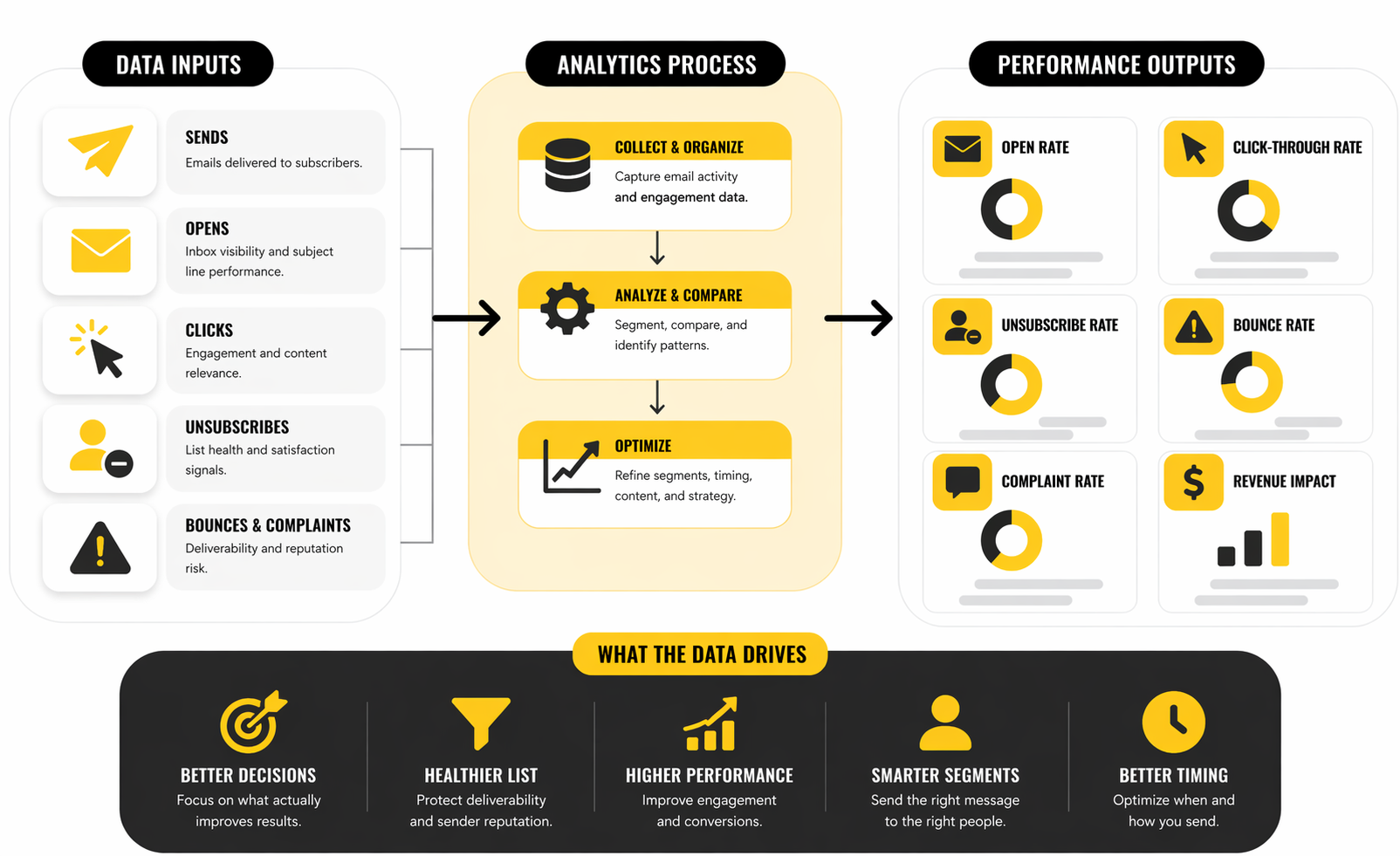
Unsubscribe and Bounce Rates Are Health Metrics, Not Footnotes
A lot of teams glance at unsubscribe and bounce numbers only when they look catastrophic. That is too late. These are health metrics, and they often tell the truth before revenue metrics do.
Brevo’s 2025 benchmark figures place overall unsubscribe rates at roughly 0.4% and hard bounce rates at roughly 0.19%, which gives you a practical baseline for spotting abnormal behavior. If your unsubscribe rate starts climbing materially above normal, you probably have a relevance problem, a frequency problem, or an audience-quality problem. If bounce rates drift upward, list hygiene and acquisition discipline should immediately come under review.
This is one of the easiest ways to separate a content issue from a list issue. Weak messaging can hurt clicks. Weak list quality hurts deliverability and damages reputation. A mail marketing service can help manage suppressions and bounces, but it cannot save a business that keeps feeding low-quality contacts into the system.
The action here is simple but important. Rising unsubscribes should trigger a review of send frequency, segmentation precision, and promise-to-content alignment. Rising bounces should trigger list cleaning, source audits, and tighter controls on how contacts enter the database in the first place.
Inbox Placement Is the Metric Behind the Metrics
Every visible metric sits downstream from deliverability. If emails are not reaching the inbox reliably, your opens, clicks, and conversions are all distorted. That is why inbox placement deserves more attention than it usually gets in routine reporting.
Brevo’s mailbox-provider data shows meaningful differences in inbox, spam, and missing placement across providers, which is a useful reminder that campaign performance is partly a deliverability story, not just a creative one. If one segment underperforms heavily on a specific mailbox ecosystem, the answer may have very little to do with copywriting.
This matters because teams often try to fix a placement issue with creative tweaks. They test subject lines, shorten copy, or redesign templates while the real problem sits in reputation, authentication, or audience quality. That wastes time and usually makes reporting noisier instead of clearer.
The right response is to diagnose in layers. First check whether delivered volume and bounce behavior look stable. Then compare engagement by segment and provider when possible. Only after that should you start making creative judgments about the campaign itself.
Revenue Metrics Should Sit Above Engagement Metrics
At some point every serious email program has to graduate from engagement reporting to business reporting. The real question is not whether a campaign got opened. It is whether it produced revenue, qualified pipeline, booked calls, reorders, upgrades, renewals, or whatever the business actually sells.
That is why the best analytics stack for a mail marketing service does not end inside the email dashboard. It connects platform behavior to ecommerce events, CRM stages, booking outcomes, or assisted conversions. Tools that support stronger automation and CRM coordination, like HighLevel, become more attractive here because they can reduce the gap between message activity and commercial outcomes.
This changes how decisions get made. Instead of asking which subject line won, you start asking which flow creates the most first purchases, which segment has the best repeat-buy pattern, or which sequence moves the highest-value leads faster. That is a much better use of analytics because it ties action directly to business value.
What the Data Should Drive Next
Good analytics should lead to a clear next move. That is the point. If the numbers do not change behavior, the reporting is decorative.
A useful interpretation framework looks like this:
- Low opens with stable list quality usually point to deliverability, timing, or sender-recognition issues
- Good opens with weak clicks usually point to content relevance, structure, or offer clarity problems
- Good clicks with weak conversions usually point to landing page, funnel, or sales-process friction
- Rising unsubscribes usually point to frequency overload or audience-message mismatch
- Rising bounces usually point to data quality problems and poor acquisition discipline
This is where a mail marketing service becomes a real operating asset. The platform is no longer just sending email. It is revealing where customer communication is breaking down and where leverage exists. Used properly, analytics stop being a reporting ritual and start becoming a decision system.
Which Mail Marketing Service Fits Your Business Model Best
By this point, the right mail marketing service should feel less like a popularity contest and more like an operational fit question. The platform that works well for a creator newsletter is not automatically the right choice for a service business with appointment reminders, lead pipelines, and sales follow-up. The same goes for ecommerce brands, which usually need stronger event-based automation, catalog-aware segmentation, and cleaner revenue attribution than a simple broadcast tool can provide.
That is why “best” is usually the wrong buying question. A better question is this: which system matches the way your business acquires attention, converts leads, and keeps customers engaged without creating operational drag. Once you frame it that way, the tradeoffs become much easier to see.
For Small Businesses That Need Simplicity First
Some businesses do not need a sprawling automation stack on day one. They need a mail marketing service that lets them build campaigns quickly, create forms, segment cleanly, and understand performance without a technical maze. That is where simpler platforms can be the smart choice, especially for teams that care more about speed and consistency than about building a giant operating system too early.
This is also where pricing psychology gets dangerous. Cheap software is not actually cheap if it slows execution, limits segmentation, or forces a migration six months later. But overbuying is just as expensive in a different way, because the team ends up paying for complexity it never uses and avoiding features that looked exciting in the sales demo.
For this category, a practical option like Moosend can make sense when the business wants email campaigns, automation, forms, landing pages, analytics, and segmentation without turning the stack into a full CRM transformation project. That kind of fit is often underrated, but it matters a lot when a small team has to move fast and keep things manageable.
For Service Businesses That Need CRM and Follow-Up in One Place
Service businesses usually hit a different wall. Email alone is not the whole system. They need lead capture, pipeline visibility, appointment reminders, nurture sequences, internal task logic, and often text messaging sitting close to the same workflow. When that is the real operating model, a mail marketing service with deeper CRM and automation capability becomes much more attractive.
This is where HighLevel stands out more clearly. Its official product and workflow documentation lean heavily into automated follow-up, CRM updates, appointment flows, and multi-step automations triggered by user actions, which is exactly what many agencies, consultants, and local-service businesses need more than a pure newsletter environment.
The tradeoff is obvious though. A more operationally capable platform asks more from the team. If nobody is going to maintain workflows, audit segmentation, and manage the underlying process, the extra power becomes clutter. So the strategic question is not whether the features exist. It is whether your business will actually operationalize them.
For Businesses That Want Multichannel Without Stitching Five Tools Together
Some companies outgrow pure email faster than they expect. They start wanting SMS, transactional messaging, CRM data, chat, or WhatsApp campaigns tied more closely to lifecycle communication. Once that happens, the decision is no longer just about choosing a mail marketing service. It becomes a question of whether to keep stacking specialized tools or move toward a broader customer engagement platform.
That is why Brevo is often a sensible middle ground. Its current platform positioning combines email marketing, SMS, automation, CRM, transactional messaging, chat, and WhatsApp campaigns in one environment, which can reduce the integration sprawl that slows down smaller and mid-sized teams.
This matters because tool sprawl creates hidden costs. Data gets duplicated, attribution gets blurry, and one small process change suddenly means touching four separate systems. A broader platform is not automatically better, but it can become strategically cleaner when the business wants more coordinated customer communication without building a fragile patchwork.
The Biggest Scaling Risk Is Not the Tool Itself
When businesses scale their email program, they often blame the platform for problems that are really process failures. The list grows faster than hygiene discipline. More campaigns go out, but suppression logic stays weak. New automations are added, but nobody owns naming conventions, documentation, or performance review. Then performance softens and people start talking about switching tools.
Sometimes the platform really is the bottleneck. But often the bigger issue is that the business scaled send volume without scaling governance. Google’s sender rules still require stronger discipline as volume rises, and Yahoo continues to emphasize complaint control, authentication, and unsubscribe handling as baseline requirements. That means the operational burden grows with the program, whether the team likes it or not.
This is the expert-level point many teams miss. A mail marketing service does not become professional just because the platform has enterprise-looking features. It becomes professional when the team can maintain data quality, sending discipline, segment logic, reporting clarity, and cross-channel coordination as complexity increases.
Strategic Tradeoffs That Matter More Than Feature Checklists
There are a few tradeoffs that matter more than almost any feature comparison. The first is flexibility versus simplicity. A simpler platform can help a smaller team execute more consistently, while a more flexible platform can create much more leverage once the business has the process maturity to support it.
The second is specialization versus consolidation. A specialized email tool may feel sharper for one job, but a broader platform can reduce operational friction once the business wants email, CRM, SMS, and automation logic working together. There is no universal winner here. The right answer depends on whether your next growth stage is going deeper into email or wider across the whole customer journey.
The third is present fit versus future fit. Buying only for today can force an ugly migration later. Buying only for a hypothetical future can bury the team in complexity right now. The smartest choice usually sits between those extremes: enough headroom for the next stage, but not so much overhead that the system becomes a burden before it becomes an asset.
How to Know When It Is Time to Upgrade
A business usually outgrows its current mail marketing service in predictable ways. Segmentation starts feeling too rigid. Reporting no longer answers commercial questions. Workflows become hard to map cleanly. The team starts relying on manual workarounds for things that should be automated. Those are operational signals, not just annoyances.
The wrong time to migrate is during chaos, right after deliverability issues, or while the team is still unclear on what the next platform actually needs to solve. The right time is when the constraints are obvious enough to define, the contact data is clean enough to move, and the business has a realistic plan for using the added capability it is paying for.
That is the key distinction between reactive switching and strategic upgrading. Reactive switching feels emotional. Strategic upgrading is based on real operational friction, clean implementation goals, and a clear idea of how the next system will improve execution rather than just changing the dashboard.
Moving Toward the Final Decision
At this stage, the decision should feel narrower. You are no longer asking which mail marketing service has the longest feature list or the loudest reviews. You are asking which one matches your business model, your team’s operating capacity, your compliance obligations, and the way you expect customer communication to evolve over the next year.
That is the right place to be before making the final call. The last step is not another round of vague comparison shopping. It is a sharper decision framework: what to prioritize, what to ignore, and how to choose a platform you can still live with after the honeymoon period ends.
Final Decision Checklist and Long-Term Optimization
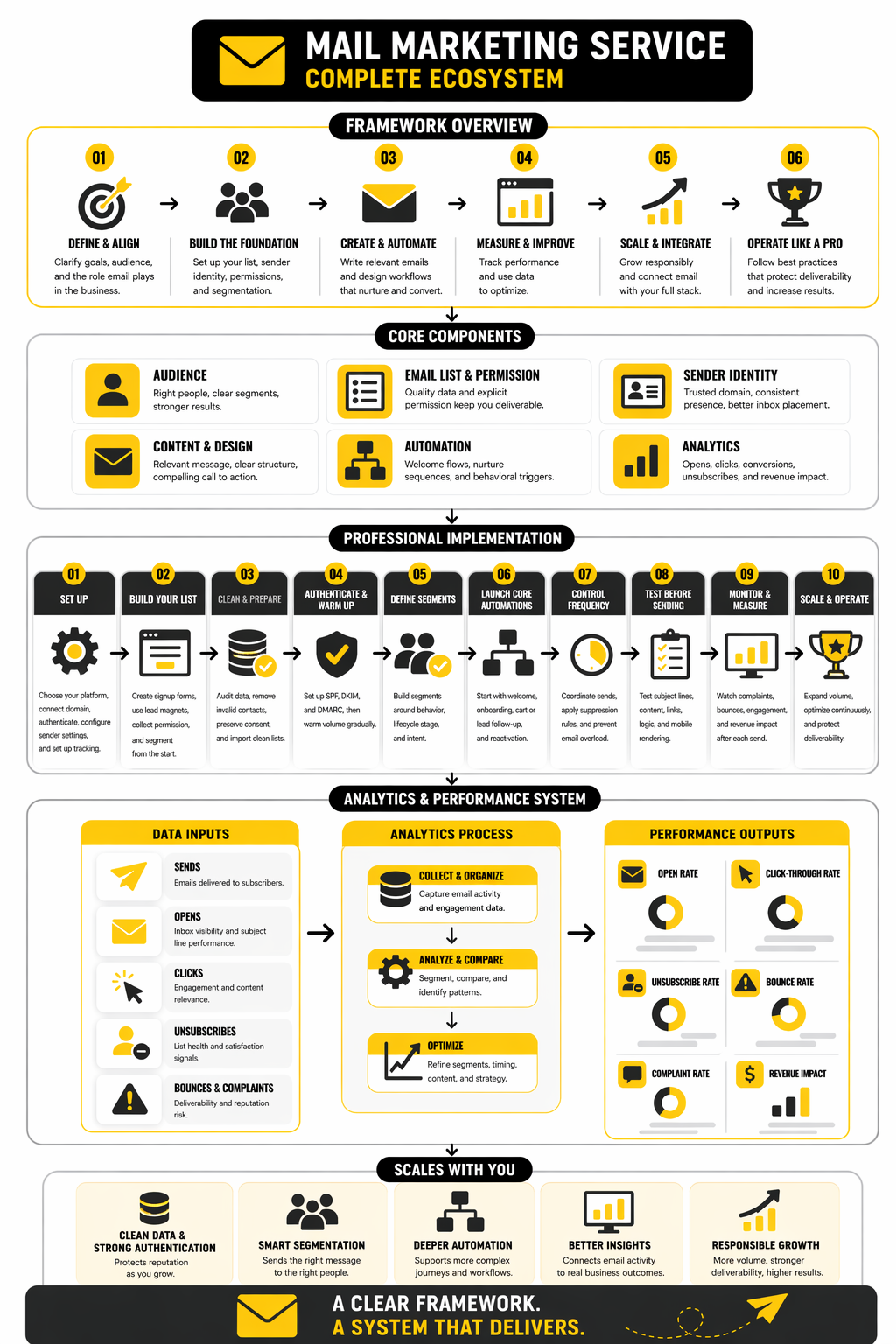
By now, the choice should feel a lot clearer. A mail marketing service is not something you choose because a feature grid looks impressive for five minutes. It is something you choose because it matches your customer journey, your team’s execution capacity, and the level of operational discipline your business can actually maintain.
The final checklist is simple, but it needs honesty. Can the platform support your current automation needs without pushing you into manual workarounds. Can it handle the next stage of growth without forcing a painful migration too soon. Can your team realistically use the depth you are paying for instead of getting buried in menus, disconnected workflows, and half-built logic.
A good final screen looks like this:
- The platform supports clean authentication, sender controls, and unsubscribe handling
- Segmentation can be built around behavior, lifecycle stage, and commercial intent
- Automation depth matches both current campaigns and the next likely growth phase
- Reporting can connect sends to revenue, pipeline movement, or other business outcomes
- The interface is usable enough that the team will actually execute consistently
- Integrations are strong enough to keep customer data flowing cleanly
- Pricing still makes sense when volume and complexity increase
- The business has a documented rollout plan instead of a vague hope that it will “figure it out later”
Long-term optimization is where the real payoff happens. Once the platform is stable, the work shifts from setup to improvement: better segments, tighter suppression rules, stronger flows, cleaner attribution, and more disciplined testing. That is also where the best teams separate themselves, because they stop treating their mail marketing service like a campaign tool and start treating it like a compounding business asset.
If you want a broader platform that can stretch into CRM and multichannel execution, Brevo is a strong option to evaluate. If you need heavier workflow logic and tighter alignment with service-business operations, HighLevel is worth a serious look. If you want a simpler path with practical automation and less overhead, Moosend can make a lot of sense.
FAQ
What is a mail marketing service, really?
A mail marketing service is the system a business uses to send campaigns, manage subscribers, automate messages, and track how email contributes to growth. The better platforms go well beyond newsletters and help manage segmentation, lifecycle messaging, reporting, and deliverability. In practice, it becomes part of the business infrastructure, not just a communication tool.
How do I choose the right mail marketing service for my business?
Start with your business model and customer journey, not the tool’s homepage. A creator business, a local service company, and an ecommerce brand usually need very different combinations of automation, CRM depth, and reporting. The right choice is the one that fits your workflow now while giving you enough headroom for the next stage of growth.
Is the cheapest email platform usually the best place to start?
Not always. A lower monthly price can turn into a more expensive decision if the platform creates manual work, limits segmentation, or forces a migration right when momentum is building. Cheap tools are only truly cheap when they help the team move faster without boxing them in.
When should I upgrade from a simpler email tool?
You should think about upgrading when manual workarounds are becoming normal. If segmentation is too rigid, reporting is too shallow, or workflows are getting messy and hard to maintain, the system is probably holding the business back. The best time to upgrade is before those issues become a crisis, not after they start damaging performance.
How important is deliverability when comparing platforms?
It is one of the most important filters, full stop. Fancy templates and automation builders do not matter much if messages are not reaching the inbox consistently. A strong mail marketing service should make authentication, suppression handling, unsubscribe management, and sender setup clear enough that the business can protect its reputation as volume grows.
Are open rates still useful in 2026?
Yes, but they should be treated as directional, not definitive. Open rates can still tell you something about sender recognition, subject-line strength, and general inbox visibility, but they do not tell the whole story. The better approach is to read opens alongside clicks, unsubscribes, bounce trends, and downstream conversion behavior.
What metrics matter most after a new platform launch?
Right after launch, health metrics matter more than vanity metrics. Watch complaint signals, unsubscribe behavior, bounces, and segment-level engagement before obsessing over campaign wins. That gives you a better read on whether the new mail marketing service is stable enough to scale without hurting reputation.
Do small businesses need CRM features inside their email platform?
Some do, and some absolutely do not. If your business depends on lead follow-up, appointment flows, sales stages, or internal coordination, CRM-connected email can be a huge advantage. If your needs are mostly campaigns, forms, and a few automations, buying a giant CRM suite too early can create more drag than value.
Which type of platform is best for service businesses?
Service businesses often do better with a platform that connects email to pipelines, reminders, nurture flows, and customer follow-up. That is why tools like HighLevel tend to make more sense in that category than pure newsletter tools. The real advantage is not just email delivery, but workflow coordination across the whole lead-to-client journey.
Which type of platform is best for businesses that want multichannel marketing?
If you want email, CRM, SMS, and broader customer engagement living closer together, a more unified platform usually makes sense. That is where Brevo is appealing, because it combines email with CRM, automation, transactional messaging, and other channels in one environment. The benefit is less tool sprawl and cleaner coordination across the customer lifecycle.
Can a simple platform still work well for growing teams?
Yes, if the business stays disciplined and the use case is still relatively focused. Growth does not automatically require the heaviest platform on the market. A practical tool like Moosend can still be the right answer when the team wants strong execution without loading unnecessary operational complexity into the stack.
What is the biggest mistake companies make with a mail marketing service?
They choose software before defining how the business actually communicates and grows. That usually leads to mismatched features, weak implementation, and frustration that gets blamed on the platform. The smartest companies reverse that process: they define the workflow first, then choose the system that supports it cleanly.
Work With Professionals
Explore 10K+ Remote Marketing Contracts on MarkeWork.com
Most marketers spend too much time chasing clients, competing on crowded platforms, and losing a percentage of every project to middlemen. MarkeWork gives you a better way. Browse thousands of remote marketing contracts and connect directly with companies desperate to hire skilled marketers like you, without platform commissions and without unnecessary gatekeepers.
If you're serious about finding better opportunities and keeping 100% of what you earn, explore available contracts and create a profile for free at MarkeWork.com.