

Mailchimp is still one of the best-known names in email marketing, but brand recognition is not the same thing as best fit. A lot of teams start there because it feels safe, then hit the usual friction points later: rising contact-based costs, feature gates that appear right when automation gets serious, or a setup that feels fine for simple newsletters but less convincing once revenue, lifecycle messaging, and CRM handoffs start to matter. Mailchimp’s own pricing page makes that tradeoff pretty visible, from a free tier capped at 250 contacts and 500 monthly sends to much higher-cost plans as list size and feature needs grow on the official pricing page.
That is why the conversation around Mailchimp competitors has become much more practical in the past two years. Email still earns strong returns for many teams, with Litmus reporting that large groups of marketing leaders see returns in the $10 to $50+ range for every $1 spent on email in its 2025 ROI breakdown, but inbox placement is also less forgiving now that Gmail and Yahoo have tightened bulk-sender expectations around authentication, spam complaints, and easy unsubscribes in Google’s sender guidelines and Yahoo’s Sender Hub requirements. In plain English, the platform you choose now affects far more than templates and automations. It affects cost control, compliance, operations, and how hard your team has to work to keep revenue emails actually landing.
The market is also broad enough now that “best Mailchimp alternative” is the wrong question for most buyers. Review ecosystems like G2 show strong competition across the category, with names like Constant Contact, Brevo, Mailchimp, and Systeme.io all appearing among top-rated tools in its current email marketing software rankings. So the real job is not finding the most famous replacement. It is finding the one that matches your business model, sending pattern, and budget without forcing you into awkward workarounds six months from now.
If your business cares as much about landing pages, lead capture, and lightweight funnels as it does about newsletters, that usually changes the shortlist immediately. For that kind of all-in-one setup, Systeme.io often belongs in the same conversation as classic email platforms, because some teams are not really replacing Mailchimp with another newsletter tool. They are replacing it with a simpler revenue stack.
Article Outline
- Why Mailchimp alternatives matter in 2026
- A framework for choosing the right Mailchimp competitor
- Best Mailchimp competitors for budget-conscious small businesses
- Best Mailchimp competitors for creators, B2B teams, and ecommerce brands
- How to compare migration, deliverability, and total cost before switching
- Final recommendations and FAQ
Why Mailchimp Alternatives Matter in 2026
Most buyers do not switch away from Mailchimp because it is bad. They switch because their business becomes more specific than Mailchimp’s default positioning. A local service company that sends occasional campaigns has a different cost structure from a creator sending weekly broadcasts, and both are different again from an ecommerce brand that needs product-driven flows, SMS, and tight store integrations.
That is where the current competitor landscape gets interesting. Brevo leans hard into multichannel messaging and volume-based pricing on its official pricing page, MailerLite stays attractive for simpler setups and lower starting costs on its pricing page, Kit positions itself around creators on its official pricing page, ActiveCampaign emphasizes automation depth on its pricing page, and Klaviyo keeps leaning into ecommerce data and messaging on its official pricing page. Those are not cosmetic differences. They change the economics and the daily workflow.
What matters even more is that the penalties for choosing the wrong platform are usually delayed. At first, almost every tool can send a welcome email and a monthly newsletter. The trouble appears later when the list grows, when segmentation gets more nuanced, when sales needs CRM visibility, or when leadership starts asking why a basic automation stack suddenly costs far more than expected. That is why comparing Mailchimp competitors is less about feature checklists and more about avoiding an expensive second migration.

A Framework for Choosing the Right Mailchimp Competitor
The cleanest way to evaluate Mailchimp competitors is to ignore branding for a moment and grade each option on four things: pricing model, automation depth, business fit, and operational complexity. This sounds obvious, but most bad software decisions happen because teams obsess over one of those categories and skip the other three. A cheaper platform that creates messy workflows is not actually cheaper, and a powerful platform that no one uses well is not actually more advanced.
Start with the pricing model, because this is where many Mailchimp alternatives win or lose immediately. Mailchimp is primarily contact-driven on its official plan comparison, while Brevo is notably email-volume-driven on its pricing page, and that one structural difference can completely change your monthly cost depending on how often you send. If you have a large list but communicate selectively, a volume-based model can be far more forgiving. If you send constantly to an engaged list, a contact-based model may still work, but you need to map the numbers before assuming anything.
Next, look at business fit before you get distracted by long feature matrices. Kit is built around creators and audience monetization on its official pricing page, Klaviyo is tightly shaped for ecommerce with email and SMS on its pricing page, Omnisend makes a similar ecommerce play on its pricing page, and HubSpot moves the conversation toward a broader go-to-market system on its Marketing Hub pricing page. A small business that mainly wants newsletters, popups, and a few automations should not buy like an ecommerce retention team. That sounds basic, but plenty of teams still do exactly that.
Then evaluate automation depth with a bit of discipline. ActiveCampaign has long positioned itself around more advanced automation and personalization on its platform pricing page, while MailerLite tends to appeal to teams that want enough automation without the weight of a more complex operating system on its pricing page. Neither approach is automatically better. The right choice depends on whether your team truly needs branching logic, lead scoring, CRM workflows, and cross-functional orchestration, or whether it just needs reliable campaigns that ship on time.
Finally, account for operational complexity. The more your success depends on deliverability, sender reputation, and compliance with mailbox-provider rules, the less you can treat your email platform like a simple design tool. Google’s bulk-sender FAQ defines a bulk sender as one sending around 5,000 or more messages a day to personal Gmail accounts in a help page, and Google’s broader sender guidelines make it clear that authentication, complaint rates, and list quality are operational disciplines, not optional extras. That means the best Mailchimp competitor is often the one your team can run consistently and cleanly, not the one with the flashiest demo.
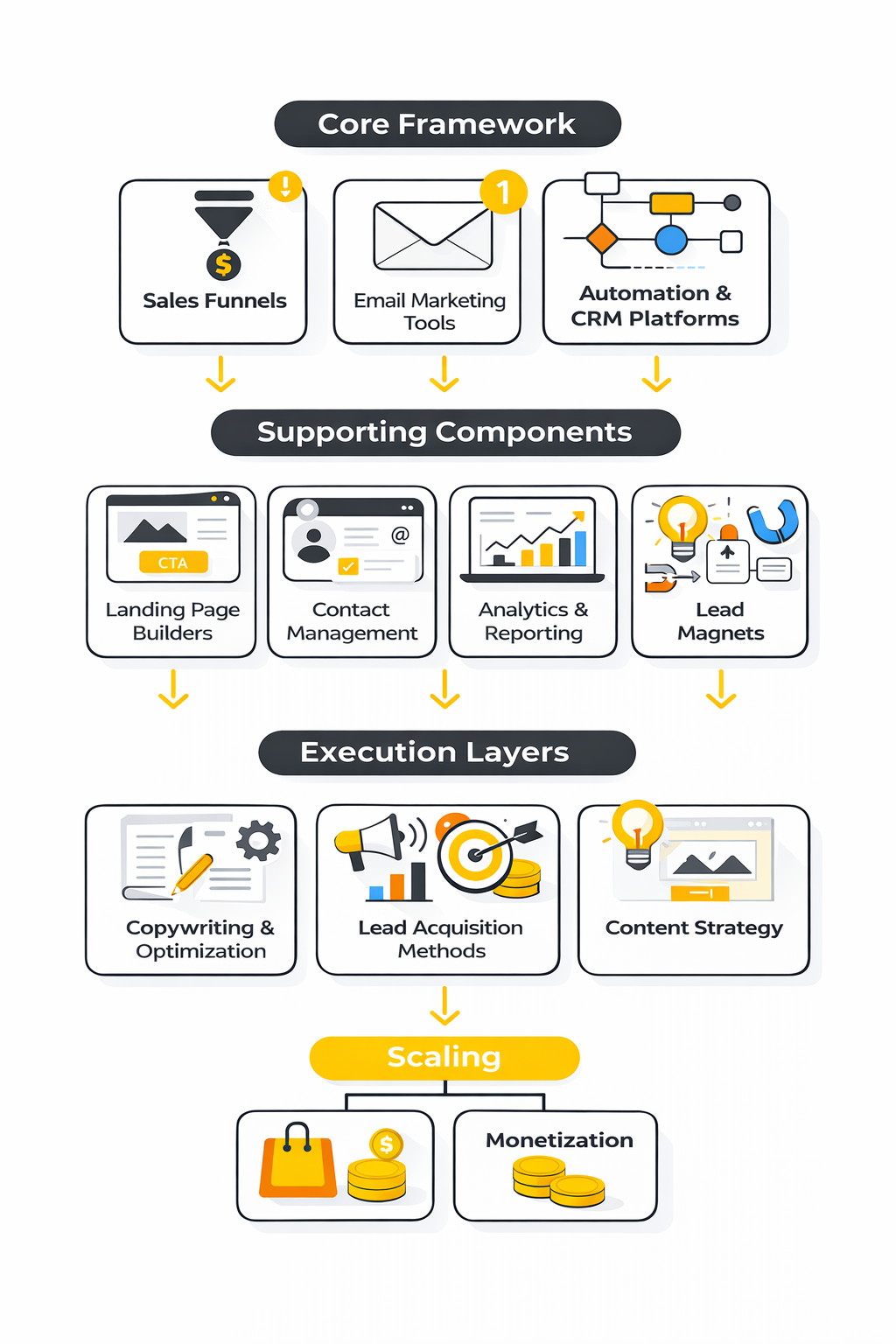
A simple way to use this framework is to ask four blunt questions before you shortlist anything. Do you need cheaper sending, stronger automation, better ecommerce behavior, or a more unified stack? The honest answer usually shrinks the field fast. And once the field is smaller, the rest of this article becomes much easier, because you stop comparing everything against everything and start comparing the right tools against your actual use case.
Best Mailchimp Competitors for Budget-Conscious Small Businesses
If cost pressure is the reason you started looking at Mailchimp competitors, this is where the shortlist gets useful. Mailchimp’s free plan stays tight at 250 contacts and 500 monthly sends, while paid plans scale upward as your contact count and feature needs grow on its official pricing page and plan comparison page. For a small business that sends often, runs a lean team, or wants landing pages and automation without stepping into a much higher tier too early, several alternatives simply make the math look better.
The important thing is not to confuse “cheap” with “good value.” Good value means the tool stays affordable after your first few thousand contacts, gives you enough automation to avoid manual work, and does not force a second migration the moment your marketing gets slightly more serious. That is why the strongest low-cost Mailchimp competitors are not all the same kind of product.
Brevo Is the Strong Budget Pick for High Contact Counts
Brevo stands out because it prices around sending volume rather than only contact count, which changes the equation for businesses with larger databases and selective campaigns. Its official pricing starts at 5,000 emails per month on the Starter tier, and the platform also keeps a free option with 300 emails per day on the Brevo pricing page and in Brevo’s own plan explanation. That makes Brevo one of the first Mailchimp competitors worth checking when your list is growing faster than your send frequency.
Brevo also earns attention because it is not just an email tool. The platform bundles email, SMS, forms, segmentation, and sales features on its official pricing page, which matters for small businesses that do not want five disconnected tools held together with Zapier and hope. Review platforms still rank it strongly for small-business use, with G2 highlighting Brevo among top email marketing tools and specifically surfacing it in the small-business category on G2’s category page and small-business rankings.
The caveat is simple. Brevo is strongest when your business can benefit from that volume-based model and from the broader multichannel stack. If you just want the absolute lightest newsletter tool with minimal setup, another option may feel cleaner.
MailerLite Is the Easiest Low-Cost Upgrade for Simpler Teams
MailerLite is one of the most practical Mailchimp competitors for small teams that want cleaner pricing and less friction without losing the basics. Its pricing starts at $10 per month for the Growing Business plan and $20 per month for Advanced on the official pricing page, while the company positions the product around email, automations, landing pages, signup forms, and websites on its homepage. That combination is why MailerLite keeps showing up in conversations about small business and creator-friendly platforms.
It also has a strong reputation for usability. Capterra’s 2026 shortlist shows MailerLite with an overall score of 89/100, a 4.7 rating, and particularly strong marks for value for money and customer service on its shortlist page. Those review signals matter because small businesses rarely fail with email marketing because a feature was missing on paper. They fail because the team avoids the tool after the first month.
MailerLite makes the most sense when you want straightforward campaigns, sensible automation, and low drama. It is not the tool I would pick for a deeply complex B2B sales process or a large ecommerce retention machine, but for small companies sending regular newsletters, lead magnets, and nurture sequences, it hits a very practical sweet spot.
Moosend Is a Quiet Value Play for Unlimited Sending
Moosend gets less mainstream attention than Mailchimp or Brevo, but that does not mean it should be ignored. On the official pricing page, Moosend emphasizes unlimited email campaigns, automation, landing pages, and forms, and it offers a 30-day free trial without a credit card. That alone makes it one of the more appealing Mailchimp competitors for businesses that want to test thoroughly before committing.
The pricing structure also stays attractive for smaller lists. Recent pricing breakdowns published in early 2026 show Pro plans starting around $9 per month for lower contact counts, with discounts for longer billing cycles in sources such as Email Vendor Selection and That Marketing Buddy. I would still treat the official pricing page as the source of truth for final numbers, but the broader pattern is consistent: Moosend competes hard on affordability.
Where Moosend fits best is a business that wants strong core email functionality without paying for a broader go-to-market platform. It is not the loudest brand in the market, but sometimes that is exactly the point. You are not paying for the biggest name. You are paying for enough capability at a cost that does not punish you for growing.
Systeme.io Makes Sense When You Need Funnels, Not Just Email
Some businesses searching for Mailchimp competitors are solving the wrong problem. They think they need another email platform, when what they actually need is a lightweight system for forms, funnels, automations, and selling. That is where Systeme.io becomes more interesting than a pure email replacement.
Systeme.io’s official pricing page shows a free plan with 2,000 contacts, and the platform combines email marketing with sales funnels, courses, blogs, automation rules, and CRM-style contact management. For solo operators, consultants, coaches, and small digital businesses, that is a very different value proposition from Mailchimp’s narrower email-first model on the Mailchimp pricing page. In a lot of cases, Systeme.io is not just cheaper. It removes the need to pay for extra tools.
That does not make it the best option for everyone. If your team already has a separate website stack, ecommerce stack, and CRM, you may not want an all-in-one layer. But if you want one login, one bill, and one simple system that can capture leads and follow up automatically, Systeme.io is one of the most practical budget options in this entire market.
Constant Contact Is Better for Support-Heavy Small Businesses Than Pure Price Shoppers
Constant Contact deserves a place in this part of the article, but for a different reason. It is not the cheapest platform in this group. Its official pricing starts with Lite, then Standard, then Premium on the Constant Contact pricing page, and current market summaries place those entry tiers around $12, $35, and $80 for smaller contact bands in sources like Groupmail’s 2026 breakdown and Mailsoftly’s pricing review.
What Constant Contact still does well is clarity and support. Capterra describes it as a reliable option for SMBs and highlights strengths like campaign scheduling and email campaign management on its email marketing category page and Constant Contact profile. G2 also continues to rank it among leading email marketing platforms on its category page.
So here is the honest take. If your only goal is paying less than Mailchimp, Constant Contact is not the most aggressive value play. But if your small business wants a familiar interface, predictable workflows, and a platform that feels built for traditional SMB marketing teams rather than power users, it can still be a sensible alternative.
What Small Businesses Should Take From This Shortlist
The cheapest option is not automatically the best Mailchimp competitor for your business. Brevo is usually the most compelling when contact count is high but send volume is controlled. MailerLite is often the cleanest choice for teams that want ease, value, and solid core functionality. Moosend is the underrated affordability play, while Systeme.io becomes the smart move when email is only one part of a broader funnel.
That leaves one more important reality. Small-business needs are only one slice of the market. Once you move into creator monetization, B2B lifecycle marketing, or ecommerce retention, the leaderboard changes fast. That is where the next section goes, because some of the strongest Mailchimp competitors are not trying to win on entry-level price at all.
Best Mailchimp Competitors for Creators, B2B Teams, and Ecommerce Brands
Once you move beyond small-business basics, the conversation around Mailchimp competitors changes completely. At this level, the decision is less about saving money and more about unlocking better automation, deeper segmentation, and tighter alignment with how your business actually makes money.
This is where many teams realize Mailchimp feels “fine” but not optimized. It works, but it does not feel built for your workflow. And when email is tied directly to revenue, “fine” becomes expensive over time.
Kit Is Built for Creators Who Monetize Audiences
Kit has positioned itself very clearly around creators, and that clarity is exactly why it works. Its platform focuses on email newsletters, audience tagging, monetization tools, and simple automation on the official pricing page, which makes it very different from Mailchimp’s broader SMB positioning.
The advantage here is focus. Creators do not need enterprise CRM features or complex pipelines. They need clean segmentation, reliable broadcasts, and ways to sell directly to their audience. Kit leans into that, which is why it keeps showing up as a strong Mailchimp competitor for newsletters, courses, and digital products.
The tradeoff is equally clear. If you run a multi-channel B2B sales process or an ecommerce store with dynamic product data, Kit will feel limiting. It is excellent inside its lane, but it stays in that lane.
ActiveCampaign Is the Serious Upgrade for Automation-Heavy B2B
ActiveCampaign is one of the most common upgrades for teams that outgrow Mailchimp’s automation limits. Its platform emphasizes advanced workflows, CRM integration, lead scoring, and personalization on its pricing page, which makes it far more powerful for lifecycle marketing.
This matters because B2B email is rarely just about sending campaigns. It is about nurturing leads, triggering actions based on behavior, syncing with sales teams, and moving prospects through longer funnels. ActiveCampaign is built for that kind of work.
The cost and complexity are higher, and that is intentional. You are not paying for simplicity. You are paying for control. If your team is not ready to use that control properly, it can become overkill. But if you are, it is one of the strongest Mailchimp competitors in the automation category.
Klaviyo Dominates Ecommerce Email and SMS
Klaviyo has become one of the default choices for ecommerce brands, and the reason is straightforward. It connects deeply with ecommerce platforms, uses real-time customer data, and combines email and SMS into one system on its official pricing page.
For ecommerce, this changes everything. Instead of generic campaigns, you get behavior-driven flows like abandoned carts, post-purchase sequences, win-back campaigns, and product recommendations. Those are not optional anymore. They are core revenue drivers.
Market data reinforces that shift. Klaviyo’s platform overview highlights its focus on customer data and personalization at scale on its product page, and industry analysis consistently places it among the leaders in ecommerce retention marketing. Compared to Mailchimp, it simply feels more native to how online stores operate.
Omnisend Is a Strong Alternative for Ecommerce Simplicity
Omnisend competes in the same ecommerce space but takes a slightly different approach. It focuses on pre-built workflows, email and SMS automation, and easier setup on its pricing page.
That makes it appealing for smaller ecommerce brands or teams that want results without building everything from scratch. Omnisend’s automation templates reduce setup time, which is often the biggest bottleneck for growing stores.
The difference between Omnisend and Klaviyo is not about capability alone. It is about how much customization you need. Klaviyo gives more depth. Omnisend gives more speed.
HubSpot Is the Enterprise-Level Alternative
HubSpot moves the conversation beyond email entirely. Its Marketing Hub combines email, CRM, automation, landing pages, and analytics into one platform on its official pricing page.
This is where Mailchimp competitors start looking more like full growth platforms. HubSpot is not just about sending emails. It is about aligning marketing, sales, and customer data into one system.
The downside is obvious. Pricing increases quickly, and implementation takes effort. But for companies that want a unified system rather than separate tools, HubSpot becomes a serious alternative.
Professional Implementation: How to Switch Without Breaking Your Revenue
Choosing a better platform is only half the job. The real risk is in the transition. Many teams lose performance during migration because they treat it like a technical task instead of a revenue-sensitive process.
A clean implementation follows a structured path, and skipping steps here is where most mistakes happen.
Step 1: Audit Your Current Email System Before You Move
Before you even sign up for a new platform, you need a clear map of what exists today. That includes:
- Active campaigns and automations
- List segmentation and tagging structure
- Signup forms and lead sources
- Deliverability setup (SPF, DKIM, DMARC)
- Revenue-driving flows like welcome sequences and abandoned carts
This step matters more than most people expect. Google’s sender requirements emphasize authentication and complaint management in its email sender guidelines, which means your setup is not just about convenience. It directly impacts whether your emails land in the inbox.
If you migrate without understanding your current system, you are not upgrading. You are rebuilding blindly.
Step 2: Choose the Right Replacement Based on Use Case
At this point, the earlier framework becomes practical. You are not choosing between all Mailchimp competitors. You are choosing between the ones that match your actual needs.
- For funnels and simplicity: Systeme.io
- For volume-based sending: Brevo
- For automation depth: ActiveCampaign
- For ecommerce: Klaviyo or Omnisend
- For simplicity and value: MailerLite
This is where most teams overcomplicate things. The right answer is usually obvious once you stop comparing everything at once.
Step 3: Rebuild Core Assets Before Importing Contacts
This is the step people skip, and it is where performance drops happen.
Before importing your full list, you should rebuild:
- Signup forms and landing pages
- Core automations (welcome, nurture, conversion flows)
- Email templates
- Tracking and integrations
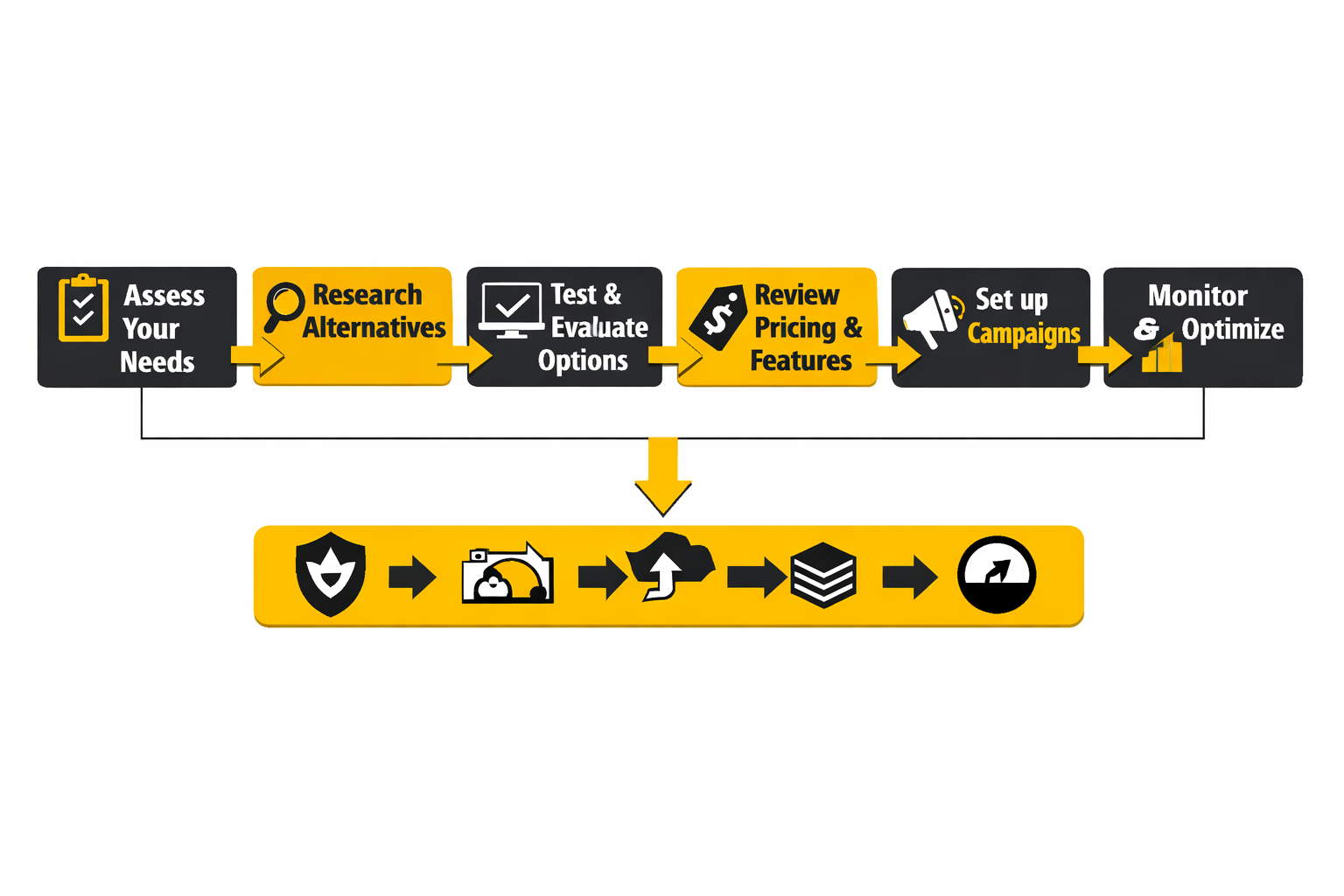
Rebuilding first ensures that when contacts arrive, they enter a working system. It also gives you a chance to improve what was not working before instead of copying old mistakes into a new platform.
For businesses that rely heavily on funnels, this is where tools like ClickFunnels or Systeme.io can simplify the process by keeping lead capture, automation, and follow-up in one place.
Step 4: Warm Up Your Sending Reputation Gradually
This is one of the most overlooked steps in any migration. Email platforms track sender reputation, and switching systems can reset part of that trust.
Best practice is to:
- Start with your most engaged subscribers
- Gradually increase send volume
- Monitor open rates, bounce rates, and complaints
- Avoid blasting your full list on day one
Mailbox providers are stricter now, especially with the updated Gmail and Yahoo requirements on authentication and spam control in Google’s guidelines and Yahoo’s sender hub. If you ignore this step, even the best Mailchimp competitor will underperform.
Step 5: Validate Performance Before Fully Switching
The final step is not flipping a switch. It is validating that your new system performs at least as well as the old one before committing fully.
Track:
- Open rates and click-through rates
- Conversion rates from email campaigns
- Revenue from automation flows
- Deliverability signals like spam complaints
If performance drops, you fix it before scaling. If it improves, you double down.
Why Implementation Matters More Than the Tool Itself
Most people searching for Mailchimp competitors think the platform is the problem. Sometimes it is. But more often, the real issue is how the system is set up and used.
A better tool helps, but it does not fix a broken strategy. The teams that see the biggest gains after switching are not the ones that picked the “best” platform. They are the ones that used the transition to clean up their entire email operation.
That is the mindset to carry into the next part, because choosing the right tool is only step one. The real advantage comes from understanding how to compare long-term cost, deliverability, and scalability before you commit.
The Numbers That Should Actually Guide Your Decision
A lot of comparisons between Mailchimp competitors go wrong because they focus on feature lists and ignore performance signals. That is backwards. The real question is not whether a platform has automation, reporting, or AI copy help. The real question is whether it helps you send profitably, land in the inbox, and scale without your costs getting weird. Mailchimp’s own pricing structure is still heavily tied to contacts and plan tiers on its pricing page and plan comparison page, while competitors like Brevo structure pricing around send volume on the Brevo pricing page. That one difference can change the economics of your email program before you even touch automation. Google Help+2
Email is still one of the strongest-performing owned channels, but only when you read the numbers correctly. Litmus reported in 2025 that many companies see email ROI in the $10 to $36 range per $1 spent, with another large group reporting even higher returns in the $36 to $50 range on its 2025 ROI breakdown. That sounds great, but it can also hide weak execution. A channel can have strong category-level ROI while your specific setup still underperforms because of poor segmentation, list quality, or deliverability. Litmus+1
The First Number to Watch Is Not Open Rate
Open rate is still useful, but it is no longer the cleanest performance signal. Litmus explains in its deliverability glossary that Apple’s Mail Privacy Protection made open rate less reliable as a stand-alone success metric. That means any platform demo that overemphasizes opens without helping you connect clicks, conversions, complaints, and inbox placement is giving you a partial story. Litmus+1
What matters more is how your metrics work together. A decent open rate with weak click-through usually points to subject lines doing their job while the message or offer falls flat. Strong clicks with weak downstream conversion often means the email is fine but the landing page, product page, or funnel is the problem. High opens and high unsubscribes usually mean you created curiosity but not trust. Those are different problems, and the right Mailchimp competitor should make them easier to diagnose rather than bury them in vanity dashboards. Litmus+2
Deliverability Metrics Matter More Than Most Teams Admit
This part is not glamorous, but it is where expensive mistakes show up. Google’s sender rules require authentication for all senders and impose stricter standards for bulk senders, while Google’s FAQ makes clear that bulk senders can lose mitigation eligibility when user-reported spam rates go above 0.3% on its sender guidelines and FAQ page. Yahoo’s sender best practices also call for authentication, one-click unsubscribe, and keeping spam rates below 0.3%. This is exactly why evaluating Mailchimp competitors is not just a pricing exercise. It is also a deliverability-risk exercise. Google Help+2
The harder truth is that “sent” does not mean “seen.” Litmus highlighted findings from Validity’s 2025 benchmark showing that roughly one in six legitimate marketing emails failed to reach the inbox, with average placement at 83.5% inbox, 6.7% spam, and 9.8% missing in its deliverability analysis. That should completely change how you compare tools. A cheaper platform is not cheaper if weak list hygiene, poor reporting, or bad reputation management quietly reduce inbox placement and destroy conversion efficiency. Litmus+1
What Good Benchmarking Looks Like in Practice
Benchmarks only help when they lead to action. Litmus’s 2025 campaign strategy guidance recommends tracking open rate, bounce rate, CTR, click-to-open rate, read rate, unsubscribe rate, spam complaint rate, and engagement rate in its campaign strategy guide. That is a better benchmark set than the old habit of staring at opens and calling it a day. Litmus+1
Use those numbers like a decision tree. If bounce rate is high, fix data quality and acquisition sources first. If spam complaints rise, tighten targeting and frequency before rewriting copy. If click-to-open rate is weak, improve message relevance and structure. If revenue per send is low but click quality is solid, your problem may sit further down the funnel. This matters because the best Mailchimp competitors are the ones that help you isolate the right problem fast, not the ones that just produce prettier reports. Litmus+2
Compare Platforms Using Revenue Signals, Not Just Email Signals
Email metrics tell you what happened inside the campaign. Revenue metrics tell you whether it mattered. HubSpot’s 2026 statistics page cites email conversion rates around 2.8% for B2C and 2.4% for B2B in its marketing statistics roundup, which is useful not because those exact numbers are universal, but because they remind you to track conversion after the click. A platform that improves reporting but does not improve revenue visibility is only doing half the job. HubSpot
This is where platform fit shows up clearly. Klaviyo’s reporting and deliverability tools are designed around ecommerce behaviors on its deliverability reporting page, while creator-focused tools like Kit lean more toward audience growth and monetization flows on the Kit pricing page. ActiveCampaign pushes deeper lifecycle automation and CRM alignment on its pricing page, and Brevo leans into broader messaging and cost efficiency on the Brevo pricing page. The numbers you prioritize should match that business model. Klaviyo Help Center+2
The Analytics Stack You Actually Need Before Switching
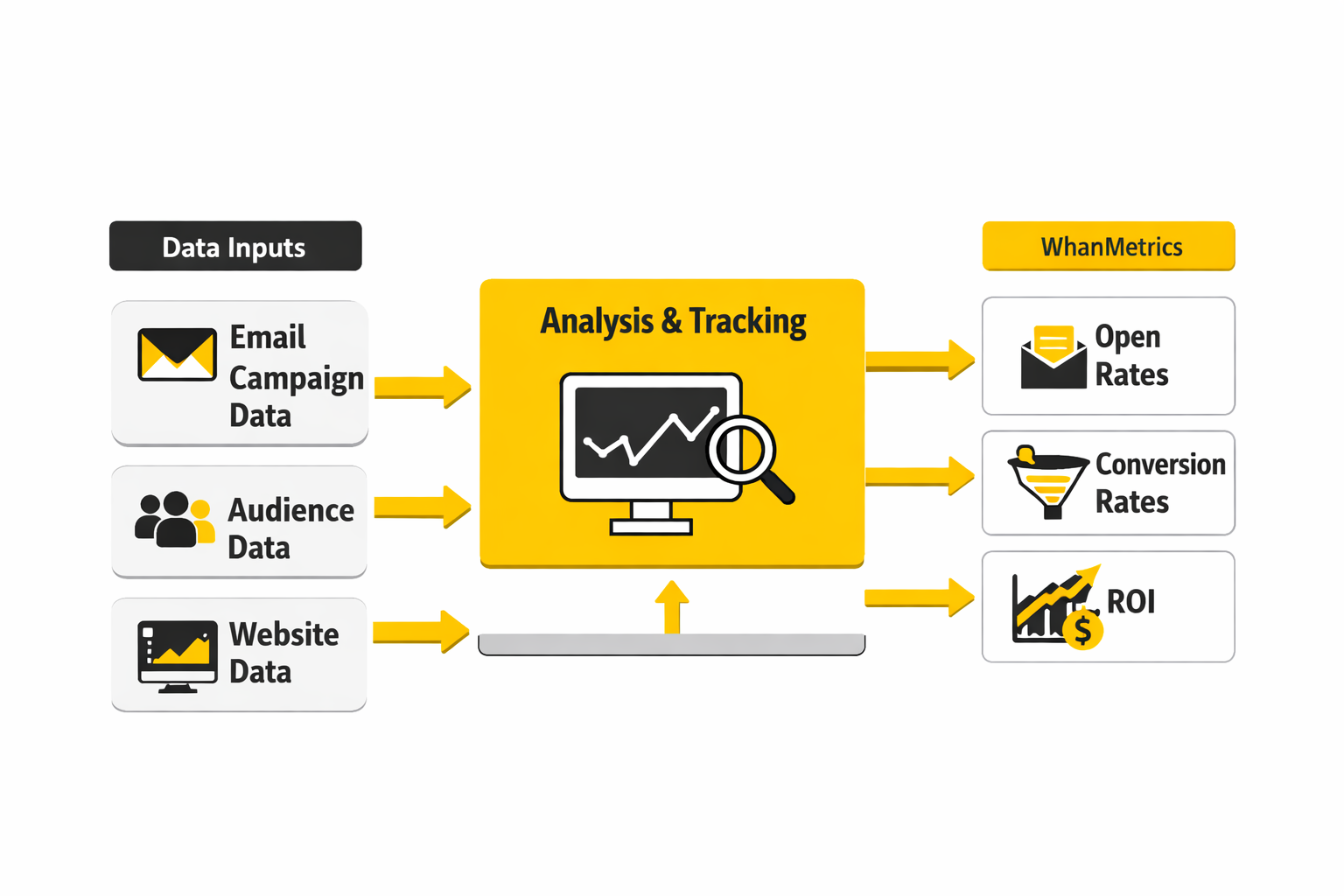
You do not need a giant BI project to compare Mailchimp competitors properly. You need a small, disciplined measurement system that combines platform metrics with business metrics. At minimum, that means tracking delivery rate, bounce rate, spam complaints, unsubscribe rate, click-through rate, click-to-open rate, landing-page conversion rate, and revenue per campaign or flow. Litmus’s recent guidance keeps reinforcing that the “best” KPI depends on campaign purpose, which is exactly right in its 2025 planning guide and State of Email recap. Litmus+1
That framework keeps you from making dumb decisions. If a new platform lifts click rate but raises complaints, the gain is not clean. If it lowers cost per month but weakens conversion from automations, it may be more expensive in real terms. If it improves inbox placement and reduces manual work, a higher subscription fee may still be the better deal. This is why raw software price is one metric, not the decision. Google Help+2
How to Read Cost Data Without Fooling Yourself
When people compare Mailchimp competitors, they often compare entry plans and stop there. That is a mistake. The cost you should care about is not the sticker price for month one. It is the effective cost at your projected contact count, send volume, automation needs, and team workflow six to twelve months from now. Mailchimp, Brevo, ActiveCampaign, and Klaviyo all present very different pricing logic on their official Mailchimp page, official Brevo page, official ActiveCampaign page, and official Klaviyo page. Brevo+1
That is why the better comparison is cost per useful outcome. How much are you paying per qualified lead, per customer reactivation, or per automated conversion flow that actually generates revenue? For businesses that also need forms, funnels, and checkout journeys, an all-in-one stack can change that math fast. A tool like Systeme.io can make sense when consolidating tools reduces both subscription cost and operational drag, while Brevo becomes more attractive when send volume matters more than raw list size.
What the Data Should Push You to Do Next
The action here is not “pick the platform with the most features.” It is to identify which numbers matter most for your business model, then choose the tool that helps you improve those numbers with the least friction. For ecommerce, that usually means stronger flow reporting, customer data, and deliverability visibility. For B2B, it often means lifecycle automation and CRM coordination. For creators and smaller businesses, it usually means lower complexity and cleaner economics. Klaviyo Help Center+2
That is also why switching platforms should never be treated like a branding decision. It is a performance decision. And once you view it that way, the final comparison gets much easier: you stop asking which Mailchimp competitor sounds best, and start asking which one gives you the clearest path to better numbers.
How to Compare Migration, Deliverability, and Total Cost Before Switching
By this point, the shortlist should be much smaller. You are no longer comparing every brand that shows up in a “best email platforms” list. You are comparing a few realistic Mailchimp competitors against the things that will actually affect performance over the next year: migration effort, inbox placement, pricing behavior at scale, and how much operational mess each tool creates behind the scenes.
This is the part many teams rush, and that is usually where they get trapped. A platform can look cheaper in month one and become more expensive by month six once contact growth, automation limits, extra seats, SMS usage, or premium reporting start stacking up. Mailchimp’s own plan structure makes clear that pricing changes with contacts and send limits on its pricing page and plan comparison page, while platforms like Brevo, Klaviyo, ActiveCampaign, and HubSpot all follow very different logic. That is why the smarter comparison is not “which one is cheapest?” but “which one stays efficient as my system gets more serious?”
Migration Cost Is Bigger Than the Subscription Bill
The monthly software price is the visible cost. Migration work is the hidden one. If your team has to rebuild forms, reconnect tracking, recreate automations, clean tags, rewrite templates, and retrain staff, the true switching cost can easily outweigh a few months of subscription savings.
That does not mean you should stay put. It means you should compare tools based on implementation drag as well as features. MailerLite, Brevo, and Systeme.io usually feel lighter to migrate into for smaller teams because the systems are simpler, while ActiveCampaign, HubSpot, and Klaviyo tend to ask for more planning because they can do more once you are inside them. That is not a flaw. It is just the price of depth.
A practical way to think about this is simple. Ask which platform will let you recreate your top 20 percent of revenue-driving assets fastest. If the answer is clear, that usually tells you more than a 60-row feature comparison ever will.
Deliverability Risk Should Be Priced Into the Decision
A lot of businesses treat deliverability like a technical detail until it hurts revenue. That is backwards. Google requires authentication for senders and expects bulk senders to meet tighter standards around complaint rates and one-click unsubscribe in its sender guidelines and bulk sender FAQ. Yahoo has reinforced similar standards in its sender best practices and FAQ guidance. Those rules changed the market because platform choice now has direct operational consequences.
This matters when comparing Mailchimp competitors because the right tool is not just the one with strong automation. It is the one your team can keep healthy. If a platform gives you better visibility into engagement, list hygiene, suppression logic, and sender configuration, that operational clarity has real value. A slightly higher monthly fee can be a bargain if it helps you avoid complaint spikes, reputation damage, or a slow decline in inbox placement.
The hard truth is that many weak email programs do not fail dramatically. They decay quietly. Opens soften, clicks dip, spam placement increases, and revenue slips without anybody noticing for three months. That is exactly why deliverability should sit next to pricing in your evaluation sheet, not beneath it.
Total Cost of Ownership Is What Actually Matters
This is where the decision gets more adult. Total cost of ownership includes subscription fees, setup time, internal labor, agency or freelance help, integration costs, data cleanup, testing, and the cost of getting reports your team can actually use. It also includes the opportunity cost of staying in a platform that slows you down.
For example, a cheaper tool that saves $80 a month but forces awkward workarounds for segmentation, forms, or CRM sync is not necessarily cheaper. A more expensive tool that replaces multiple subscriptions may end up costing less overall. That is why all-in-one setups can become surprisingly attractive for certain businesses. When forms, funnels, automation, and selling live in one place, a tool like Systeme.io can change the economics fast. The same logic explains why some businesses move toward ClickFunnels instead of replacing Mailchimp with another standalone email tool.
The cleanest way to model total cost is to compare three scenarios:
- What this platform costs at your current size
- What it costs at your projected size in 12 months
- What extra tools or labor it removes or creates
That exercise sounds boring, but it prevents bad decisions. It also exposes which Mailchimp competitors are genuinely affordable and which ones only look affordable at the entry tier.
Scaling Problems Usually Start With Data, Not Software
When teams say they have “outgrown” Mailchimp, the issue is often partly true and partly self-inflicted. Yes, some platforms are better for scaling than others. But scale problems often begin with messy tags, inconsistent acquisition sources, duplicated contacts, unclear funnel ownership, or weak suppression logic. Moving to a new platform without fixing those issues just gives you a newer dashboard on top of the same confusion.
This is why the best migrations usually start with cleanup. Standardize naming. Remove dead segments. Clarify which automations matter. Archive what is no longer used. Decide which lifecycle stages actually drive revenue. Once that work is done, comparing Mailchimp competitors becomes easier because you know what your system is supposed to do.
It also protects you from overspending. A messy account creates the illusion that you need a more advanced platform, when sometimes what you really need is a cleaner operating model. That distinction matters, because advanced software is expensive when used to solve basic organizational problems.
Expert-Level Tradeoffs Most Buyers Notice Too Late
The first tradeoff is flexibility versus speed. Tools with deeper automation and richer data models usually take longer to set up and require more discipline. Tools with simpler workflows usually get you live faster but can feel limiting once segmentation, attribution, and cross-functional coordination become more important.
The second tradeoff is channel breadth versus channel quality. Some Mailchimp competitors try to become broader customer communication hubs, combining email, SMS, CRM, chat, forms, and sales features. That can be great, especially with platforms like Brevo or HubSpot, but only if your team truly benefits from the bundle. If not, you may end up paying for complexity you never use.
The third tradeoff is specialization versus consolidation. Klaviyo and Omnisend make sense when ecommerce is the center of gravity. Kit makes sense when creators are monetizing an audience. ActiveCampaign makes sense when lifecycle automation is the growth engine. Consolidated platforms make sense when you want fewer moving parts. Specialized platforms make sense when one channel or use case drives most of the money. There is no universal winner here. There is only fit.
When Staying With Mailchimp Is Still the Right Move
Not every search for Mailchimp competitors should end in a switch. If your list is modest, your campaigns are simple, your team already knows the tool well, and the current setup is producing acceptable results, staying may be the rational decision. Mailchimp still offers a familiar environment, broad brand trust, and an email-first workflow that fits many straightforward marketing programs on its main platform page and pricing documentation.
The key is honesty. Staying makes sense when the platform still fits the business. It does not make sense when the team is constantly working around limits, when pricing has drifted away from value, or when reporting and automation are no longer good enough for the role email plays in revenue.
That distinction matters because switching platforms always creates short-term disruption. You should earn that disruption with a clear upside. If you cannot describe the upside in operational or financial terms, you probably do not have a strong enough reason to move yet.
A Smarter Final Filter for Your Shortlist
At this stage, the decision should come down to a few blunt questions.
- Which platform best matches how your business actually makes money?
- Which one keeps costs sane as contacts, sends, and complexity grow?
- Which one gives you the clearest path to strong deliverability?
- Which one can your team realistically run well every week?
Those questions cut through most of the noise. They also help prevent a very common mistake: choosing a platform for its promise instead of its likely day-to-day reality. The best Mailchimp competitors are not the ones with the longest feature list. They are the ones that make your next stage of growth simpler, cleaner, and more profitable.
The final part brings all of this together. That means clear recommendations by use case, the closing decision framework, and the FAQ that answers the practical questions most buyers still have right before they switch.
Final Recommendations by Business Type
After comparing the serious Mailchimp competitors, the pattern is pretty clear. There is no single winner for every company, and chasing one is how buyers end up with the wrong stack. The better move is to match the platform to the revenue model, the complexity of your automation, and the level of operational discipline your team can actually sustain.
For small businesses that mainly want solid email campaigns without runaway costs, Brevo and MailerLite remain the most practical alternatives. Brevo is especially compelling when send volume matters more than raw list size because its pricing model differs sharply from Mailchimp’s contact-based structure on the Mailchimp pricing page and the Brevo pricing page. MailerLite makes sense when simplicity, ease of use, and lower-friction execution matter more than building an advanced customer-data machine.
For creators, Kit is usually the more natural fit. Its product and pricing are clearly designed around newsletters, audience ownership, and monetization on the Kit pricing page, which makes it stronger than Mailchimp for solo operators and content businesses that sell through trust, content, and regular broadcasts. It is not the cheapest option in the category, but creator-focused businesses often care more about fit than about shaving a few dollars off a monthly subscription.
For ecommerce brands, Klaviyo and Omnisend still make the cleanest case. Klaviyo is the deeper platform when customer data, segmentation, and lifecycle revenue are central to growth, while Omnisend is often easier for brands that want faster deployment with strong prebuilt automations. In that part of the market, Mailchimp competitors are not just replacing newsletters. They are replacing a chunk of the retention engine.
For B2B teams and more complex lifecycle marketing, ActiveCampaign is the stronger upgrade path. Its pricing and positioning make the automation-first angle obvious on the ActiveCampaign pricing page. If your growth depends on behavior-based campaigns, lead qualification, CRM coordination, and sales handoffs, that extra sophistication is not a luxury. It is the job.
And for businesses that do not just need email, but also need funnels, forms, automations, and selling infrastructure in one place, Systeme.io is one of the smartest alternatives in this whole conversation. The reason is simple. Sometimes the best Mailchimp competitor is not another email tool. It is a simpler operating system for the whole lead-to-sale journey.
The Real Decision Comes Down to Operational Fit
The most expensive mistake in this category is not choosing the wrong brand. It is choosing a platform that looks impressive but does not fit your team’s reality. A platform with deeper automation is not better if nobody maintains it. A cheaper platform is not cheaper if it weakens deliverability, creates manual work, or forces another migration a year later.
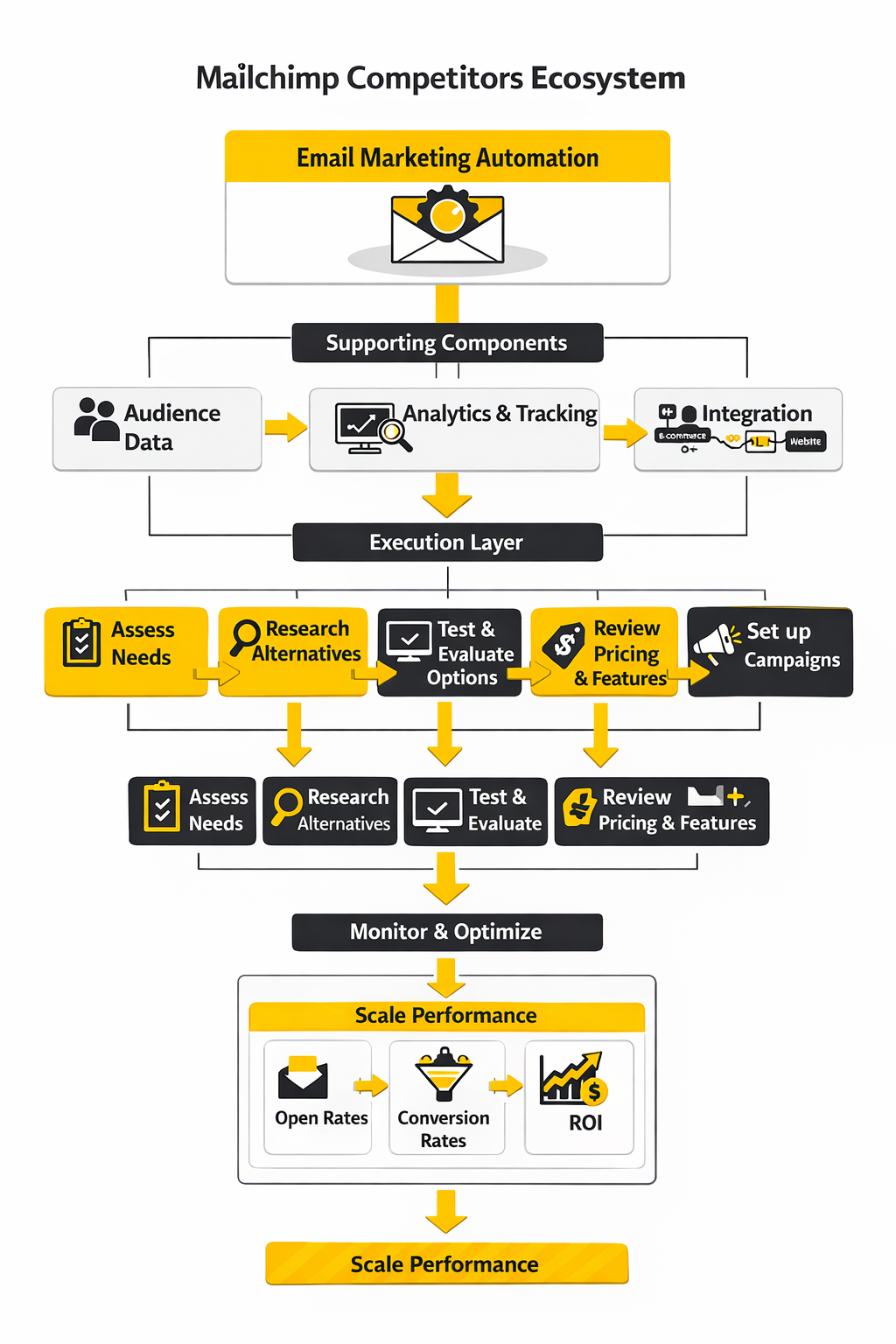
That is why the final filter should stay brutally practical. Compare your shortlist against four things: how you acquire leads, how you segment contacts, how you generate revenue from email, and how much technical and operational complexity your team can run without things getting sloppy. Once those answers are honest, the field shrinks very fast.
This is also the point where a lot of buyers realize they were asking the wrong question at the start. They were asking which Mailchimp competitors were best. The more useful question is which one helps their business send more effectively, measure more clearly, and scale without turning email into an expensive maintenance problem. That is the question that actually saves money.
FAQ - Built for Complete Guide
What is the best Mailchimp competitor overall?
There is no universal winner because the “best” platform depends on the business model. For small businesses, Brevo and MailerLite are usually the easiest value plays. For creators, Kit makes more sense. For ecommerce, Klaviyo and Omnisend are stronger. For automation-heavy B2B, ActiveCampaign is usually the better fit. That is why the smartest buyers compare use case first and features second.
Why do so many businesses look for Mailchimp competitors?
The most common reasons are pricing pressure, feature limits, and changing business needs. Mailchimp’s pricing scales around contacts and plan tiers on its official pricing page and plan comparison page, which can feel less attractive as lists grow or automation needs become more advanced. For some teams, the platform is still fine. For others, it stops being a great fit once email becomes more important to revenue.
Is Mailchimp still good for beginners?
Yes, it can still be a solid starting point. Mailchimp remains familiar, widely known, and relatively approachable for simple newsletters and early-stage campaigns on its main platform page. The issue is not that it is unusable for beginners. The issue is that some businesses outgrow the pricing model or need a platform that is more specialized for creators, ecommerce, or lifecycle automation.
Which Mailchimp competitor is cheapest?
That depends on your list size and send behavior. Brevo often looks stronger when you have a larger database but do not email everyone constantly because its pricing structure differs from Mailchimp’s on the Brevo pricing page. MailerLite and Moosend can also be cost-effective for smaller teams. But the better question is not which tool is cheapest at the entry tier. It is which tool stays cost-efficient once your business grows.
Which alternative is best for ecommerce brands?
Klaviyo is usually the strongest choice for ecommerce brands that want deep segmentation, customer data, email and SMS coordination, and strong reporting on the Klaviyo pricing page. Omnisend is also a strong ecommerce-focused option, especially for brands that want faster setup and prebuilt workflows on the Omnisend pricing page. If ecommerce retention is a major growth lever, those two usually deserve the closest look.
Which platform is best for creators and newsletter businesses?
Kit is usually the cleanest answer here. Its plans and product positioning are built around creators, audience growth, and monetization on the Kit pricing page. That makes it more natural than Mailchimp for businesses built around publishing, direct relationships with readers, digital products, and recurring content-led sales.
Which option is best for advanced automation?
ActiveCampaign is one of the strongest Mailchimp competitors when automation depth is the priority. Its platform focuses heavily on automations, cross-channel workflows, and CRM-connected lifecycle marketing on the ActiveCampaign pricing page. It is not always the simplest option, but it is one of the most capable when complexity is genuinely needed.
Can switching platforms hurt deliverability?
Yes, absolutely, especially if the migration is sloppy. Google and Yahoo both reinforce standards around authentication, spam complaints, and one-click unsubscribe in Google’s sender guidelines, Google’s bulk sender FAQ, and Yahoo’s sender best practices. If you move lists badly, blast cold segments, or ignore setup details like SPF, DKIM, and suppression rules, even a better platform can perform worse at first.
Should I migrate everything at once?
Usually not. A phased migration is safer because it lets you rebuild critical assets, validate integrations, and warm sending gradually before pushing the full list through a new system. That approach reduces operational risk and makes performance easier to diagnose. A rushed full migration may look faster on paper, but it often creates more cleanup later.
What should I compare besides price?
Compare pricing model, automation depth, reporting quality, integrations, migration effort, deliverability visibility, and long-term operating cost. Price matters, but it is only one part of the decision. A platform that reduces tool sprawl, simplifies workflows, or improves revenue visibility can be worth more even if the monthly subscription looks higher at first glance.
Is Brevo better than Mailchimp?
For some businesses, yes. Brevo can be a better fit when you care about volume-based pricing, multichannel messaging, and a broader communication stack on the Brevo pricing page. Mailchimp can still be easier for teams that want a familiar email-first environment. The answer depends on what kind of business you run and how your list behaves.
Is MailerLite a good Mailchimp alternative?
Yes, especially for smaller teams that want a cleaner, simpler, and often more affordable setup. MailerLite’s platform is built around email, automation, landing pages, forms, and websites on its official pricing page. It is not the most advanced system in the market, but it is one of the most practical when simplicity and value matter.
When does an all-in-one platform make more sense than a standalone email tool?
An all-in-one platform becomes more attractive when your business needs forms, landing pages, automation, funnels, and selling tools in one place. In that situation, replacing Mailchimp with another standalone email platform may only solve one piece of the problem. A tool like Systeme.io can make more sense because it consolidates the stack instead of adding another disconnected tool.
How do I know whether I should stay with Mailchimp?
Stay if the current setup still fits your business, the pricing remains acceptable, and the team is not constantly fighting the platform. Switch if cost keeps rising without matching value, if reporting and automations are no longer enough, or if your business has become more specialized than Mailchimp’s general SMB positioning. The right answer is not emotional. It is operational.
Work With Professionals
Explore 10K+ Remote Marketing Contracts on MarkeWork.com
Most marketers spend too much time chasing clients, competing on crowded platforms, and losing a percentage of every project to middlemen.
MarkeWork gives you a better way. Browse thousands of remote marketing contracts and connect directly with companies desperate to hire skilled marketers like you, without platform commissions and without unnecessary gatekeepers.
If you're serious about finding better opportunities and keeping 100% of what you earn, explore available contracts and create a profile for free at MarkeWork.com.