

Mailchimp CRM sits in an interesting spot. A lot of businesses start with it because they already use Mailchimp for email, forms, or automations, and then realize the platform also gives them a customer database, contact profiles, tags, segmentation, and activity history through its audience tools and marketing CRM features. That makes it useful, but it also creates confusion, because Mailchimp is not trying to be a full enterprise sales CRM in the same way a deal-heavy platform is.
That distinction matters more now than it did a few years ago. Modern marketing teams are under pressure to personalize faster, work from cleaner data, and connect campaigns to actual customer behavior, which is exactly why unified customer records and segmentation keep showing up in current research from Salesforce’s latest marketing report and Mailchimp’s own CRM overview. When a business understands what Mailchimp CRM is good at, it can move much faster without forcing the tool to do a job it was never built for.
The smartest way to approach Mailchimp CRM is not to ask whether it is a “real CRM.” It is to ask whether your business needs a marketing-centered CRM that keeps contact data, campaign behavior, and basic customer context in one place, or whether you already need a deeper sales pipeline system. That is the line this article will keep coming back to.
- Why Mailchimp CRM Matters
- What Mailchimp CRM Actually Is
- The Mailchimp CRM Framework
- Core Components That Drive Results
- How to Implement Mailchimp CRM Professionally
- When Mailchimp CRM Fits and When to Choose Something Else
Why Mailchimp CRM Matters
For a small business, creator brand, ecommerce team, or service company, customer information usually gets messy before leadership even notices. One form tool has lead data, the store has order history, email engagement lives somewhere else, and the team starts making decisions from fragments instead of a usable customer picture. Mailchimp CRM matters because it gives smaller teams a practical way to centralize enough of that information to send smarter messages and organize contacts without immediately buying a heavier system.
That is especially relevant when personalization has shifted from “nice to have” to expected. Mailchimp positions its CRM around audience management, contact profiles, tags, and behavior-based messaging, while its store and finance integrations can add purchase context that makes campaigns more relevant over time through tools like contact profiles, tags, and connected data from Shopify or QuickBooks. In plain English, that means you stop blasting the same message to everyone and start communicating based on what people actually did.
There is also a practical budget reason to care. Mailchimp still attracts smaller teams because it can cover list growth, segmentation, automations, reporting, and a lightweight CRM workflow inside one product, with current pricing built around contact volume rather than a classic per-seat sales CRM model as shown on Mailchimp’s pricing pages and plan comparison. If your operation is still marketing-led rather than sales-rep-led, that can be a very efficient place to start.
What Mailchimp CRM Actually Is
Mailchimp CRM is best understood as a marketing CRM built around your audience. Mailchimp itself describes the product as a way to capture leads, organize customer data, automate messaging, and stay connected with contacts through audience activity, individual profiles, tags, and segmentation in its CRM feature overview and marketing CRM page. So yes, it is a CRM, but it is a relationship-management layer designed primarily to power marketing actions.
That means the center of gravity is the contact record, not the sales deal board. In Mailchimp, the important questions are usually who this contact is, what source they came from, what tags they carry, what campaigns they engaged with, whether they purchased, and which automation they should enter next. You can see that philosophy clearly in Mailchimp’s documentation on contacts, segments, and contact profiles.
This is where many buyers get it wrong. They hear “CRM” and assume opportunity stages, sales forecasting, task-heavy pipeline management, and advanced rep workflows are included at the same depth as a dedicated sales platform. Mailchimp can absolutely help you manage relationships, but it is strongest when relationship management means better segmentation, better lifecycle messaging, and cleaner customer context for campaigns.
The Mailchimp CRM Framework
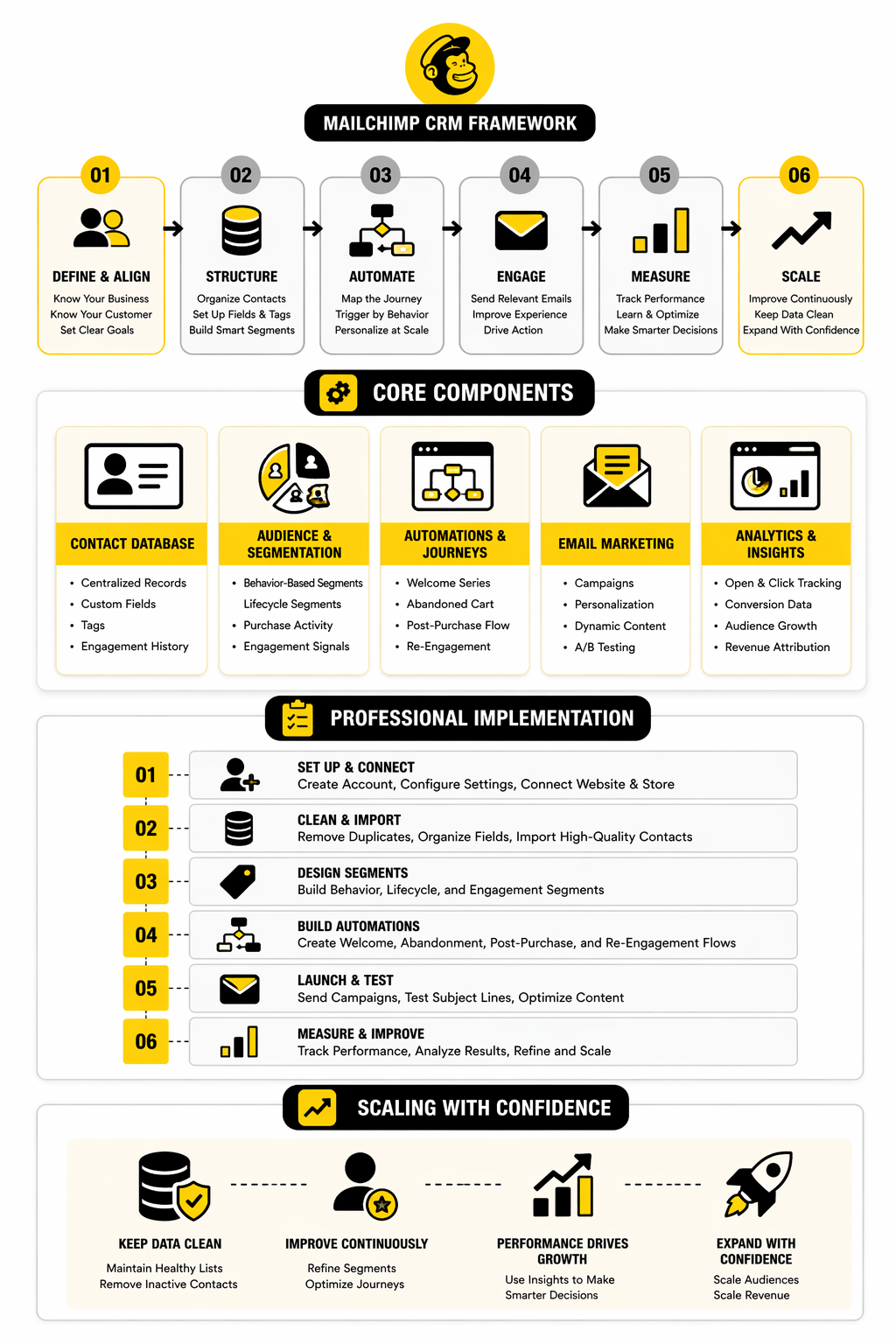
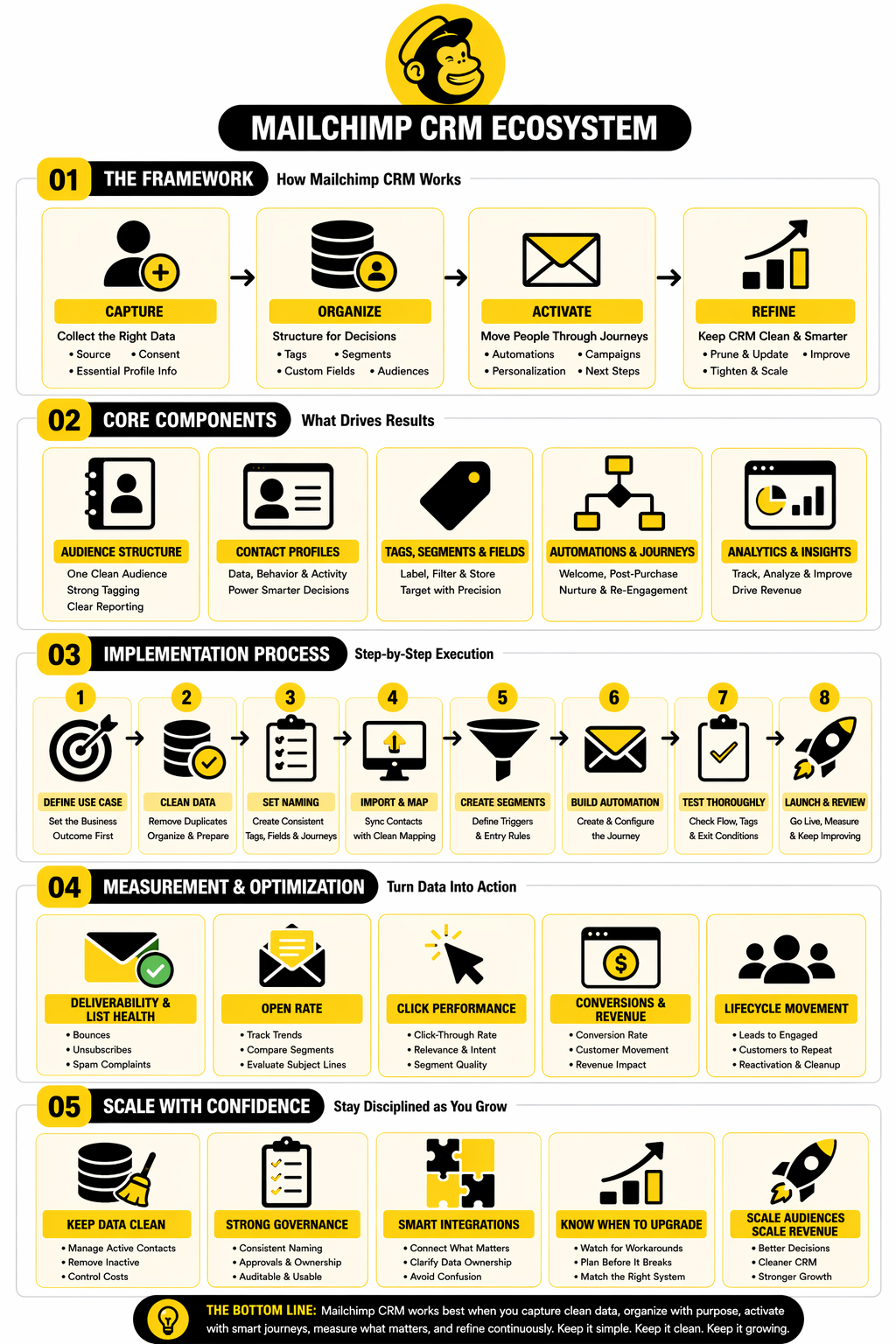
The easiest way to think about Mailchimp CRM is as a four-layer system. First, you collect data through forms, imports, integrations, and customer actions. Second, you organize that data with audiences, tags, segments, and profile details. Third, you activate it through campaigns, journeys, and automations. Fourth, you refine it by watching engagement, purchases, and response patterns and then adjusting how contacts move through the system.
That framework sounds simple, but it is exactly why Mailchimp works well for lean teams. The platform is not asking you to build a giant operational monster before you can get value. It gives you a usable loop: collect, organize, activate, improve.
In the next part, that framework will become more concrete. We will break down the core components that actually make Mailchimp CRM effective, and which ones most businesses underuse in the beginning.
The Mailchimp CRM Framework
A useful Mailchimp CRM setup runs on a simple sequence: capture, organize, activate, and refine. That sounds basic, but most teams get stuck because they try to jump straight into campaigns before the data layer is clean enough to support smart decisions. When that happens, the CRM becomes a messy contact warehouse instead of a revenue tool.
The first stage is capture. In practice, that means every new subscriber, customer, lead, or inquiry should enter Mailchimp with enough context to be useful later. Source matters, consent matters, and the first few pieces of profile data matter, because the quality of what goes in determines the quality of every automation and segment that comes after it.
The second stage is organization. This is where Mailchimp CRM starts to become genuinely useful, because raw contacts turn into structured audiences you can work with. Instead of seeing one giant list, you begin to separate people by interest, lifecycle stage, behavior, purchase history, or lead source, which is what makes future messaging feel relevant instead of generic.
The third stage is activation. Once the contact data is structured properly, Mailchimp can do what it is actually good at: trigger journeys, send campaigns, personalize messages, and move people through an intentional communication flow. At this point, the CRM is no longer passive storage. It becomes the operating system behind your email and customer messaging.
The fourth stage is refinement. Strong teams do not set up Mailchimp CRM once and leave it alone for a year. They keep tightening the tags, rethinking the segments, removing dead fields, watching how different groups behave, and improving the logic so the system gets smarter rather than heavier.
Capture the Right Data First
This is the part many businesses underestimate. They obsess over templates, copy, and campaign timing, but ignore the contact structure that will power everything later. If the wrong fields come in, or if there is no standard for naming, tagging, and source tracking, the CRM becomes harder to trust very quickly.
A good rule is to capture only what you can actually use. You do not need to build a giant form just because Mailchimp lets you store custom fields. You need the smallest amount of information that helps you identify the contact, understand intent, and decide what should happen next.
That usually means starting with essentials like email address, source, broad interest, and one or two practical business-specific fields. From there, behavior can do the rest of the work. In a healthy Mailchimp CRM setup, actions tell you more over time than bloated intake forms ever will.
Organize for Decisions, Not for Decoration
A lot of accounts look organized on the surface but are useless when it is time to launch something. They have dozens of tags, random groups, inconsistent field values, and overlapping segments that nobody remembers how to use. That is not organization. That is drift.
The better approach is to structure Mailchimp CRM around decisions. Every field, tag, and segment should help answer a real business question such as who should get this offer, who already bought, who is warming up, who is inactive, or who came from a specific channel. If a data point does not improve targeting, reporting, or automation logic, it probably does not deserve space in the system.
This mindset changes everything. Instead of collecting data because it feels sophisticated, you build a lean database that supports action. That is where smaller teams gain speed, because they are not buried under their own admin work.
Activate Through Journeys, Not One-Off Blasts
Once the structure is clean, activation becomes much easier. Mailchimp CRM works best when it supports sequences and behavior-based communication, not just isolated campaigns sent to broad lists. The point is to create motion that feels intentional.
That includes welcome flows, post-purchase follow-ups, lead nurturing, re-engagement, and other lifecycle-based communication. The exact automation mix depends on the business model, but the principle stays the same: every contact should have a logical next step. When there is no next step, the CRM is not guiding the relationship.
This is where businesses often start seeing the difference between using Mailchimp casually and using it professionally. Casual use sends newsletters. Professional use builds communication paths that respond to contact behavior and keep moving people toward a defined outcome.
Refine the System Before It Bloats
Mailchimp CRM can stay clean for a long time, but only if someone actively protects it. Data systems naturally collect clutter. Campaign-specific tags pile up, old segments stop being useful, and outdated fields continue hanging around long after the original use case has disappeared.
Refinement means pruning aggressively. It means checking whether naming conventions still make sense, whether segments still reflect reality, and whether automations are using the most reliable triggers available. This is not glamorous work, but it is often the difference between a CRM that scales and one that slowly becomes unmanageable.
The best operators treat refinement as part of implementation, not as a cleanup project for later. That matters because a lightweight system like Mailchimp can feel wonderfully simple at the beginning, then suddenly chaotic once volume grows. If you do not maintain the structure, growth exposes every weak decision you made early on.
Core Components That Drive Results
Mailchimp CRM is not one feature. It is a stack of connected components that only become powerful when they work together. Most disappointing results come from using one or two pieces in isolation instead of treating the system like an integrated workflow.
The real drivers are the audience structure, contact profiles, tags, segments, custom fields, and automations built on top of them. If one of those layers is weak, the rest lose precision. If they are aligned, the system becomes much more capable than many businesses expect from a platform they originally bought for email.
That is why this section matters. A lot of teams think they have a Mailchimp CRM strategy when they really just have a subscriber list and a few campaigns. The difference between those two setups is not cosmetic. It changes how well the business can personalize, automate, and measure what is actually happening.
Audience Structure
The audience is the base layer of the whole system. In Mailchimp, this is where contacts live, and how you structure that audience affects reporting, segmentation, and ongoing cost discipline. If the audience design is sloppy, almost everything else becomes harder.
For most businesses, simpler is better. One clean audience with strong tagging, sensible fields, and useful segments is usually easier to manage than splitting people across multiple audiences too early. Once contacts start living in separate silos, consistency becomes harder, reporting gets murkier, and campaign decisions become less reliable.
This matters even more when a business is growing fast. A clean audience structure helps the team see the full relationship with the customer instead of creating fragmented records that make personalization weaker. Mailchimp CRM performs better when the contact database reflects one coherent customer journey rather than a pile of disconnected lists.
Contact Profiles
The contact profile is where the CRM starts feeling real. This is the individual record that shows who the person is, what data is attached to them, how they engaged, and what context the team has available before sending the next message. It turns abstract “list size” thinking into an actual person-based view.
That matters because good marketing decisions happen at the profile level before they scale to the segment level. When you can look at a record and understand source, behavior, tags, activity, and status, the logic behind campaigns becomes much sharper. You are no longer guessing what a contact might want. You are working from observed signals.
For businesses using Mailchimp CRM seriously, contact profiles should not be an afterthought. They should be the reference point for how data is captured, labeled, and updated. If a profile looks confusing, incomplete, or inconsistent, that is usually a signal the broader CRM structure needs attention.
Tags, Segments, and Fields
This is the engine room. Tags help label contacts in flexible ways, segments help define who matches certain conditions, and fields store the actual data that makes targeting possible. Used well, these three components make Mailchimp CRM feel sharp and responsive.
Used badly, they create chaos. Businesses often blur their roles by treating tags like fields, fields like segments, and segments like permanent labels. That leads to overlap, confusion, and broken logic when automations need to rely on clean criteria.
The practical way to think about it is simple. Fields store stable information, tags add flexible labels, and segments create living filters for action. Once that distinction is clear, the whole CRM becomes easier to manage and much easier to scale without breaking the system every time a new campaign appears.
How to Implement Mailchimp CRM Professionally
Once the foundation is clear, implementation becomes less mysterious. A professional Mailchimp CRM setup is not about turning on every feature. It is about building a system that captures the right contacts, labels them consistently, moves them through sensible journeys, and stays clean enough that the team still trusts it six months later.
This is where a lot of teams either get serious or get stuck. They assume the platform itself will create order, but Mailchimp mostly reflects the logic you bring into it. If the implementation is sloppy, the CRM will look busy while producing weak targeting, fragile automations, and reports nobody fully believes.
A better approach is to treat implementation like system design. You decide what data enters the account, how it is structured, what each label means, which journeys matter first, and how performance will be reviewed. That sounds more disciplined because it is, and that discipline is exactly what keeps a lightweight CRM useful as the business grows.
Start With One Clear Use Case
The easiest mistake is trying to build the full machine on day one. That usually leads to too many tags, too many custom fields, half-finished journeys, and no real confidence in what is working. A stronger implementation starts with one core use case that matters to the business right now, such as lead capture, post-purchase follow-up, or customer re-engagement.
That first use case gives the whole Mailchimp CRM setup a center of gravity. It forces you to define what data is required, what segmentation matters, and what outcome the automation should drive. Instead of building abstract infrastructure, you are building something tied to a real business motion.
This matters because early decisions tend to become permanent. If the first workflow is clean, the naming logic is clear, and the audience structure is sensible, everything that comes later becomes easier to add. If the first workflow is messy, every future workflow inherits the same confusion.
Clean the Data Before You Automate Anything
Automation is where people get excited, but data quality comes first. Mailchimp’s own import and formatting guidance makes that very clear by emphasizing structured imports, field mapping, and tag preparation before contacts are brought into the system.
That means cleaning duplicates, standardizing field values, deciding which fields are truly permanent, and preparing tags before the first serious workflow goes live. It also means being careful with old spreadsheets and legacy lists, because importing bad contact logic into a new CRM setup only gives you faster bad outcomes.
This is one of those unglamorous steps that professionals do and rushed teams skip. The rushed team says it will clean things up later. The professional team knows later rarely comes, and that a dirty dataset poisons segmentation long before anyone notices the damage.
Define a Naming System That Survives Growth
Mailchimp CRM becomes much easier to manage when names mean something. Tags, segments, journeys, and fields should all follow a naming convention that makes sense to someone who did not build the original system. If the team cannot understand a label quickly, it will start creating new versions of the same thing and the account will drift.
A simple naming system works best. Tags should describe what they represent, fields should describe stable data, and journeys should describe the actual business process they control. Clarity beats cleverness every time.
This sounds small, but it changes daily operations. When naming is consistent, the team can audit faster, troubleshoot faster, and hand off work without creating confusion. When naming is inconsistent, Mailchimp CRM turns into a memory test, which is a terrible way to run a database.
Build the First Workflow Step by Step
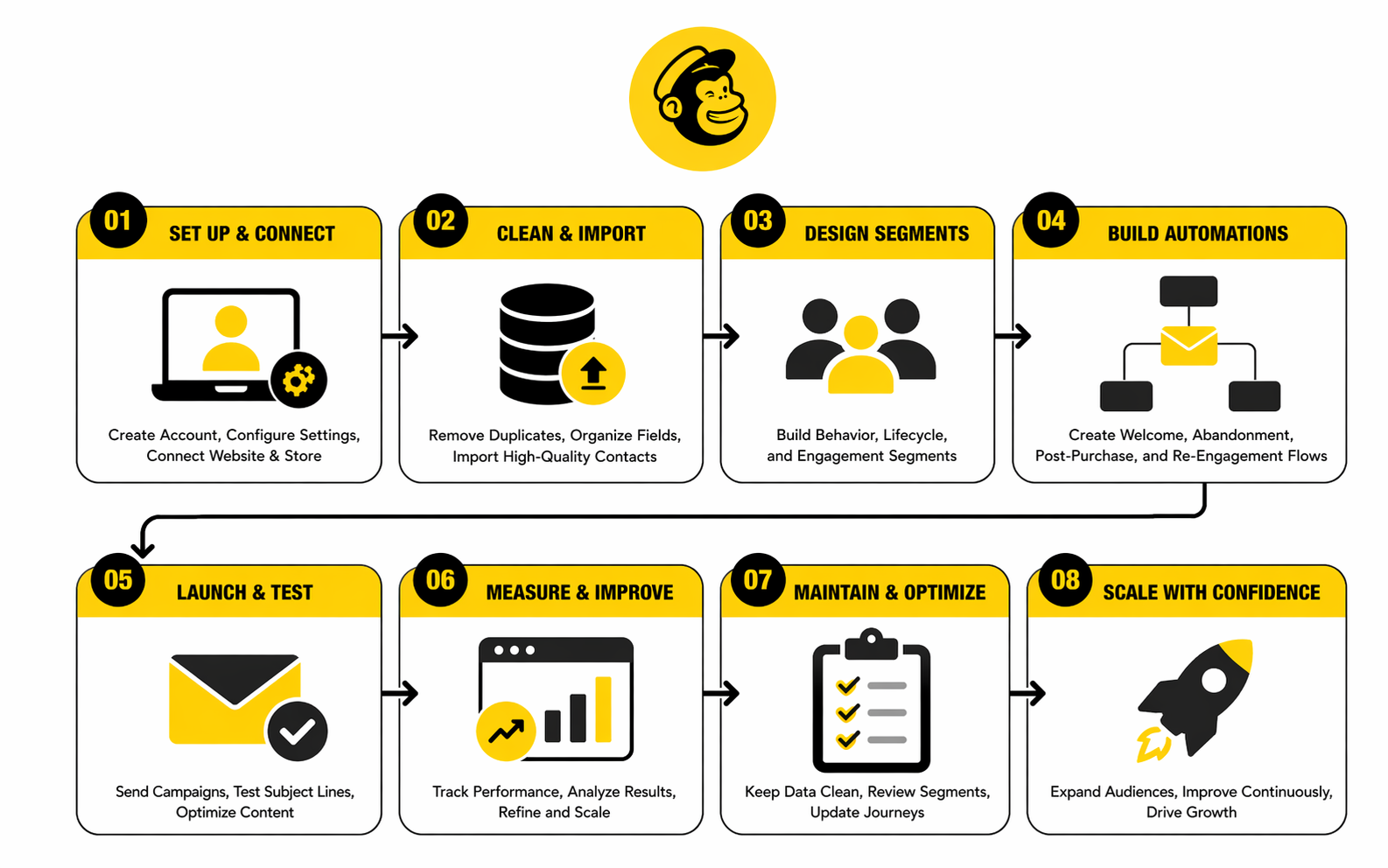
A practical Mailchimp CRM rollout usually looks like this:
- Define the business outcome for the workflow.
- Decide which contacts should enter it.
- Confirm which fields and tags are needed.
- Import or sync contacts with clean mapping.
- Create the segment or trigger logic.
- Build the journey or automation.
- Test with internal records first.
- Launch with a narrow audience before expanding.
That sequence matters because it forces logic before execution. Teams that skip straight to email building often discover too late that the wrong people are entering the automation, the wrong data is available for personalization, or the segment conditions are too loose to be trusted.
The step-by-step approach also makes troubleshooting far easier. If something breaks, you can usually isolate whether the issue started in contact capture, field mapping, tagging, segmentation, or journey logic. Without that structure, every problem looks like a Mailchimp problem when it is often a setup problem.
Use Tags and Segments With Restraint
This is where professional implementation really shows. Mailchimp gives you plenty of flexibility with tags and segmentation, but flexibility is not the same thing as permission to create endless clutter. Its documentation consistently frames tags as labels for organization and segments as filters based on contact and audience conditions, which is a useful distinction to protect.
In a strong setup, tags are intentional and limited. They mark something meaningful that may affect messaging, routing, or reporting. They are not random notes scattered across the database because someone wanted a quick workaround during a campaign.
Segments should be just as disciplined. They exist to drive action, not to create decorative dashboards. If a segment is never used for targeting, automation, or analysis, it is probably noise and should not stay in the system forever.
Connect the Right Data Sources, Not All of Them
Mailchimp promotes a large integrations ecosystem, including ecommerce connections like Shopify, and those integrations can absolutely improve the CRM by bringing in behavioral and commerce signals. But more connections do not automatically create a better implementation. They only help when the incoming data supports a clear use case.
This is an important mindset shift. Teams often connect every available platform because it feels like progress, then end up with extra fields, unclear sync behavior, and records that are technically richer but operationally harder to use. That is not maturity. That is just more complexity.
A better rule is to connect only the systems that improve targeting, automation, or reporting in a concrete way. If a source does not help the team make better decisions inside Mailchimp CRM, it probably does not belong in the first wave of implementation.
Test the Journey Like an Operator, Not Like a Hopeful Marketer
Hope is not a workflow strategy. Before any serious automation goes live, the team should test entry rules, timing delays, merge fields, tag application, exclusions, and exit conditions. Mailchimp’s segmentation and import options are flexible enough that a small setup error can quietly push the wrong contacts into the wrong experience if no one checks the path end to end.
The smartest teams test with internal contacts first and inspect the actual profile changes as the journey runs. They do not just verify that an email sends. They verify that the CRM record updates in the right order, that tags appear when expected, and that the contact exits the workflow when the intended condition is met.
That level of testing sounds obvious, but plenty of businesses skip it because they are in a hurry. Then the cleanup starts. And cleanup inside a live CRM is always slower, more stressful, and more expensive than testing properly before launch.
Create a Maintenance Rhythm Early
A Mailchimp CRM system should never be treated as a set-and-forget asset. Plan rules change, products change, lead sources change, and old labels lose relevance over time. Without maintenance, even a clean implementation slowly turns into a tangle of outdated logic.
The answer is simple but important: schedule reviews. Check unused tags, stale segments, broken assumptions, duplicate fields, and workflows that no longer match how the business actually sells. A lightweight review rhythm prevents the account from decaying in silence.
This is one of the biggest differences between amateur and professional execution. Amateur setups are built once and admired. Professional setups are reviewed, tightened, and simplified on purpose so the CRM keeps earning its place in the stack.
The next part is where the choice becomes sharper. Once implementation is on the table, it becomes easier to see where Mailchimp CRM fits well and where a business should stop forcing it to behave like a heavier sales platform.
Measuring What Mailchimp CRM Is Actually Doing
Once Mailchimp CRM is live, the next question is not whether emails are going out. It is whether the system is creating better customer movement. That is the real measurement job. A healthy CRM should help you understand who is engaging, which segments are improving, where automation is leaking attention, and whether the business is getting closer to revenue instead of just producing prettier dashboards.
This is where teams often get lazy. They look at one strong open rate, feel good for a day, and move on. But Mailchimp CRM only becomes valuable when the numbers are tied back to contact quality, audience structure, and the actual customer journey.
That also means raw benchmarks need context. A metric can look good while the system underneath is weak, and a metric can look average while the business is quietly improving list quality, conversion efficiency, and customer retention. The point is not to worship numbers. The point is to read them correctly and act on them fast.
What Good CRM Measurement Looks Like
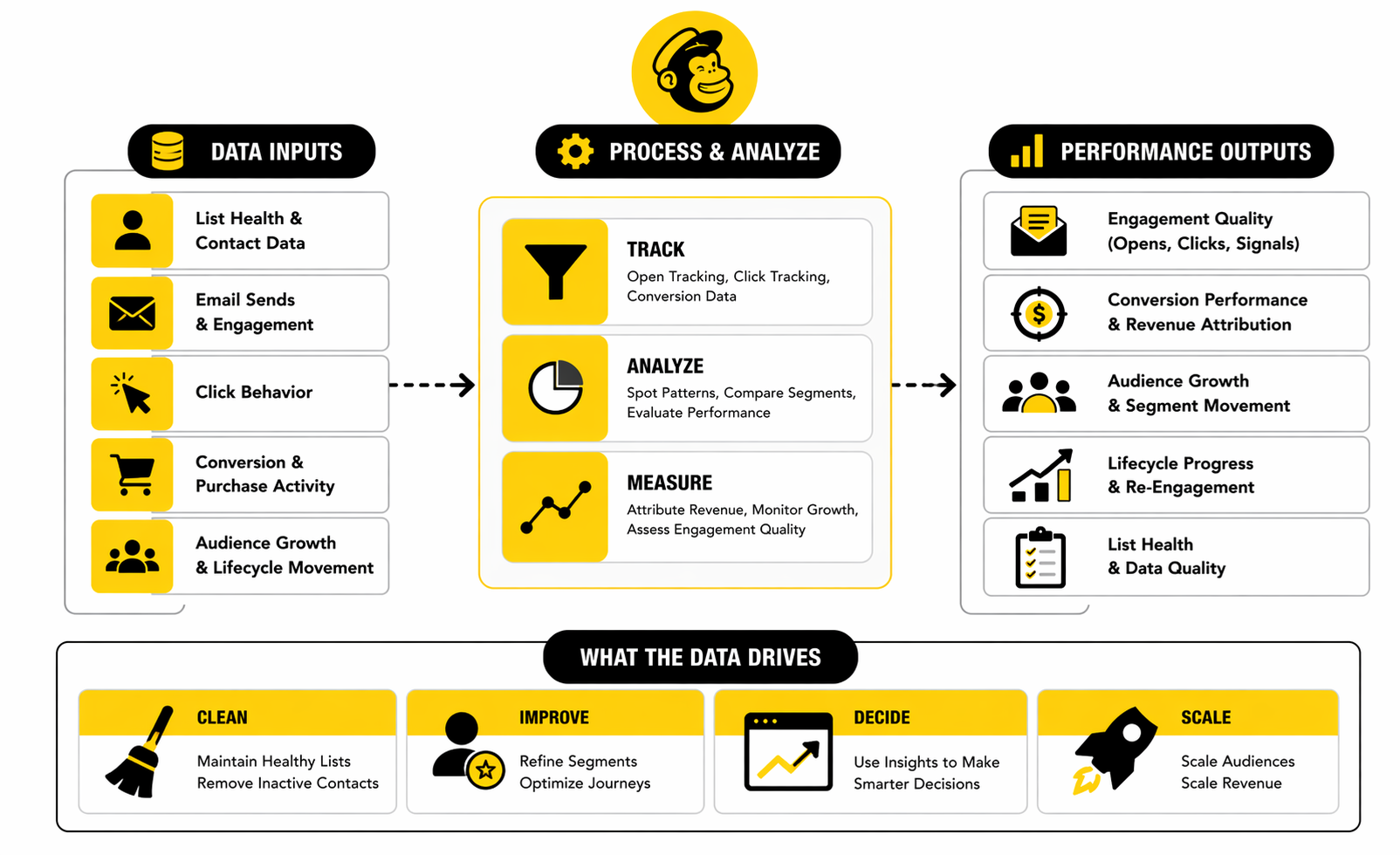
The right way to measure Mailchimp CRM is to work in layers. Start with delivery and list health, then look at engagement, then move into conversion behavior, and finally connect that back to lifecycle movement. If you skip straight to top-line campaign reports, you miss why the system is working or failing.
That layered view matters because CRM performance is cumulative. Strong deliverability makes engagement possible. Strong engagement makes clicks possible. Strong clicks make conversions possible. And strong conversions only become repeatable when the contact data behind them is clean enough to support smart follow-up.
This is why a professional measurement setup feels calmer. It does not panic over one bad send or celebrate one good send too early. It watches patterns over time and tries to understand whether the system is becoming more relevant, more efficient, and more commercially useful.
Start With Deliverability and List Health
Before interpreting anything else, check whether your emails are actually reaching people. Mailchimp promotes deliverability as a major platform strength and reports 99.99% transactional email delivery rates for its transactional product, but that kind of platform capability does not rescue a weak list strategy. If your acquisition sources are poor, your consent is sloppy, or your list hygiene is neglected, your CRM signals will get distorted before engagement data even becomes meaningful.
That is why unsubscribe rates, bounces, and spam complaints deserve more attention than many teams give them. They are not side metrics. They are early warnings that the database is drifting away from relevance or quality. When those signals worsen, the problem is usually deeper than one campaign.
In practical terms, this is the first question to ask: is the audience getting healthier or noisier over time? If the answer is noisier, improving copy alone will not fix the underlying issue. You need to look at acquisition, expectations, segmentation, and inactive-contact management.
Open Rates Still Matter, but Not the Way They Used To
Open rates are still useful, just not as a standalone scoreboard. Mailchimp’s current benchmark resource says the average email open rate across industries is around 34.23%, while other large benchmark sets land in a similar but not identical range, including 32.55% in Constant Contact’s broader statistics roundup and 42.35% in HubSpot’s more recent benchmark summary. That spread is exactly why blind benchmarking is dangerous.
What those numbers really tell you is that “good” depends heavily on audience quality, industry, and measurement methodology. A smaller, well-qualified list can beat a much larger one by a wide margin, and a highly engaged niche audience can make general benchmarks look irrelevant. So the better use of open rate is trend detection, not ego management.
If your open rate is climbing while unsubscribe rates stay stable and clicks are also moving in the right direction, that usually signals stronger message-market fit. If open rate looks strong but clicks stay flat, that usually means the subject line is doing its job while the email body or offer is not. That difference matters a lot.
Click Performance Tells You Whether Interest Is Real
Click metrics are where Mailchimp CRM starts becoming more revealing. Mailchimp explains the difference between open rate, click rate, and click-through style engagement metrics, and that distinction matters because clicks are usually closer to real intent than opens. A person may open from curiosity. They click when something inside the message feels worth acting on.
Across the market, click benchmarks are usually much lower than open benchmarks, which is normal. Constant Contact cites an average email click-through rate of 1.36% as of December 2024, while Campaign Monitor frames a successful campaign more broadly around a 2% to 3% CTR range. That gap does not mean one source is wrong. It means benchmark definitions, vertical mix, and audience quality change the picture.
For Mailchimp CRM users, the action point is simple. Use clicks to judge whether your segmentation and message relevance are actually improving. If one segment consistently opens but never clicks, that audience may be too broad, too cold, or too mismatched with the offer. If another segment produces modest open rates but unusually strong click performance, that segment deserves more focused attention because it may contain your highest-intent contacts.
Use Click-to-Open Rate to Judge Message Quality
This is one of the most useful analytics layers because it separates subject-line performance from message performance. Campaign Monitor notes that click-to-open rate often falls between 6% and 17% depending on industry. That range is helpful because it tells you what happens after the open, which is where content quality becomes visible.
In a Mailchimp CRM context, CTOR helps answer a sharper question: once the right people open, are they seeing something that matches their expectations and motivates action? That makes it especially useful when you are testing segment quality, offer positioning, and email structure. A weak CTOR usually means the message did not cash the promise made by the subject line.
This is why CTOR is often more diagnostic than open rate alone. If opens are healthy but CTOR is weak, your targeting may be acceptable while your content is underperforming. If CTOR is strong but opens are weak, the offer may be solid and the problem may sit in subject lines, timing, or sender trust instead.
Conversion Data Is Where CRM Measurement Stops Being Cosmetic
Mailchimp CRM should eventually be judged by what happens after the click. Mailchimp’s own conversion-rate guidance defines conversion as the percentage of users who complete a desired action, which sounds obvious but is still where many teams lose discipline because they stop analysis at the campaign layer instead of following the customer into the next step. That is a mistake.
If your CRM is doing its job, it should help increase the rate at which qualified contacts become buyers, booked calls, repeat customers, or whatever the business actually values. HubSpot’s current marketing statistics roundup points to email conversion benchmarks of 2.8% for B2C and 2.4% for B2B, which gives useful directional context, but the more important benchmark is your own improvement over time within consistent segments and workflows.
This is the big shift from vanity measurement to operating measurement. Instead of asking whether a campaign performed well in general, ask whether the CRM moved the right people toward the next commercial step. That question is harder, but it is the one that matters.
Benchmarks Are Useful Only When You Compare the Right Things
Benchmarks can help calibrate expectations, but they should never replace internal context. Mailchimp’s benchmark library breaks performance down by industry, and that matters because a government email list, a local service business, and an ecommerce brand do not behave the same way. Comparing them as if they do leads to bad decisions.
The smarter move is to compare three things at once: your current performance against your past performance, your strongest segments against your weakest segments, and your category against broad external ranges. That combination creates a much more honest picture. It tells you whether the business is improving, where the real performance gap sits, and whether the problem is internal execution or just unrealistic expectations.
This also protects you from overreacting. A campaign that misses a public benchmark may still be a win if it outperforms your own historical norm with the same audience type. On the other hand, a campaign that clears a public benchmark may still be disappointing if it underperforms against your best segment logic and conversion history.
Watch Movement Between Segments, Not Just Campaign Scores
A strong Mailchimp CRM program does not only measure sends. It measures audience movement. Are new leads becoming engaged subscribers? Are engaged subscribers becoming buyers? Are buyers becoming repeat customers? Are inactive contacts either reactivating or getting removed before they drag the system down?
This is where CRM analytics become strategic instead of tactical. You stop looking at isolated campaign reports and start looking at how contact groups change over time. That makes the data far more useful because it reflects the full job of the system, not just the last email.
In practical terms, this means creating a few lifecycle views that matter to the business and checking them regularly. If a large percentage of contacts stays stuck in early stages without progressing, that usually points to a segmentation problem, an offer problem, or a weak automation bridge. The CRM is telling you where the journey is breaking.
The Numbers Should Always Drive a Specific Next Action
This is the part many teams skip. They review a dashboard, notice interesting patterns, and then do nothing with them. But measurement only matters if each signal pushes a decision.
A falling open rate should trigger a review of audience freshness, subject lines, sender consistency, or send timing. A weak click rate should trigger a review of message relevance, offer clarity, and segment fit. A weak conversion rate should trigger a review of landing-page continuity, sales friction, and whether the CRM is sending the right people in the first place.
That is the whole point of measuring Mailchimp CRM properly. You are not trying to collect impressive-looking numbers. You are trying to build a feedback loop that makes each campaign, each workflow, and each customer segment more useful than it was before.
The final two parts will bring this to the decision layer. That is where it becomes clear when Mailchimp CRM is the right tool, when it starts becoming a constraint, and how to choose the next move without overcomplicating the stack.
When Mailchimp CRM Fits and When to Choose Something Else
By this point, the question is not whether Mailchimp CRM works. It clearly can. The real question is whether it fits the operating model of the business now, and whether it will still fit once the team, sales process, and customer journey become more complex.
This is where a lot of companies waste time. They keep trying to make one tool cover every job because switching feels annoying, retraining feels expensive, and nobody wants to admit the stack has changed faster than the original setup. But forcing the wrong platform to carry the wrong process usually costs more than making a clean decision earlier.
Mailchimp CRM is strongest when marketing is the center of the relationship engine. It works well when the business needs a clean contact database, good segmentation, practical automation, and audience-driven messaging without the overhead of a deeply sales-led system. Once the business starts relying on multi-stage deals, rep ownership, heavy forecasting, complex handoffs, or detailed pipeline accountability, the tradeoffs become much harder to ignore.
Mailchimp CRM Is a Strong Fit for Marketing-Led Businesses
Mailchimp CRM fits best when the business grows through audience building, recurring communication, and conversion flows that begin in marketing. That includes ecommerce brands, creators, local businesses, lean service companies, newsletters, and smaller teams that need one place to organize contacts and keep communication moving. In those cases, the platform’s value comes from speed, simplicity, and the fact that the database is directly tied to campaigns and journeys.
That fit gets even stronger when the customer journey is relatively clean. A person subscribes, browses, buys, books, or responds, and the next message can be automated from there. The logic is mostly behavioral and lifecycle-based rather than rep-based, which is exactly where Mailchimp CRM feels natural.
This matters because the right fit creates leverage. When the structure matches the business model, the team spends less time fighting the tool and more time improving messaging, segmentation, and follow-up. That is what a good CRM should feel like. It should reduce friction, not introduce new layers of process theater.
It Starts to Strain When Sales Becomes More Operational
The cracks usually show up when the business no longer runs mainly on campaigns and customer journeys. If sales starts depending on opportunity stages, custom deal logic, task assignment, pipeline visibility, call notes, forecast discipline, and rep-by-rep accountability, Mailchimp CRM begins to feel like a workaround instead of a real operating system. That is not a flaw in the platform. It is a sign that the business is asking a marketing CRM to behave like a sales CRM.
This is where teams often get stuck in a dangerous middle state. They are too advanced for a simple audience-first setup, but not yet willing to adopt a more specialized sales stack. So they start layering manual processes around Mailchimp, patching visibility gaps with spreadsheets, and inventing internal rituals to compensate for features the platform was never designed to own.
That middle state is expensive because it hides the real cost. The subscription may still look affordable, but the operational drag grows quietly. Handoffs become messier, reporting becomes less trustworthy, and the team starts spending human attention to fix structural limitations that software should have handled in the first place.
The Biggest Strategic Tradeoff Is Simplicity Versus Depth
This is the decision point that matters most. Mailchimp CRM gives smaller teams a lot of value because it keeps marketing execution close to the customer record. That is powerful. But the same simplicity that makes it attractive early on can become the reason a more mature team outgrows it later.
The tradeoff is not just features. It is operating philosophy. A lighter system helps you move fast when the business needs clean communication and practical automation. A deeper system helps you coordinate when the business needs more hierarchy, more sales process control, and more detailed ownership across people and stages.
Neither side is automatically better. The mistake is pretending you can avoid the tradeoff forever. At some point, every growing business has to decide whether it still needs a sharper marketing engine, or whether it now needs a broader revenue operating system.
Advanced Considerations Before You Scale Further
The hard part about scaling Mailchimp CRM is that growth can make a setup look healthier than it is. More contacts, more campaigns, and more automations can create the impression of progress even while the underlying structure is getting harder to govern. That is why advanced teams stop asking only what the system can do and start asking what the system can keep doing cleanly.
This is also where experience starts to matter more than enthusiasm. Early-stage setups are forgiving because the stakes are smaller and the contact volume is lower. Later-stage setups expose weak naming, weak field design, weak lifecycle logic, and weak ownership much faster. The same mess that felt manageable at 2,000 contacts can become a real operational problem at 50,000.
So the goal in this stage is not to bolt on more complexity just because the business is growing. The goal is to decide what should stay simple, what needs stronger control, and what should move into a different system before the account becomes difficult to trust.
Cost Discipline Becomes More Important as the Audience Grows
One of the most overlooked scaling issues is cost shape. A Mailchimp CRM setup can feel very efficient at smaller volumes, then become more sensitive as audience size increases and the business carries more inactive, duplicate, or weakly qualified contacts than it should. When that happens, the platform is not just storing bad data. It is charging the business to keep bad data around.
That is why serious teams get stricter about audience hygiene as they grow. They remove dead weight, define who should stay marketable, and stop treating every email address as a long-term asset. More records do not automatically create more value. In many cases, they create more cost and less clarity at the same time.
This is a strategic discipline issue, not just an admin task. If the business wants Mailchimp CRM to scale profitably, it has to become more selective about what enters the system, what remains active, and what should be archived or excluded from future motion.
Governance Matters More Than Features
As accounts grow, governance quietly becomes one of the most important parts of CRM success. Someone needs to decide how fields are created, when tags are approved, who can launch new automations, how naming stays consistent, and what counts as clean lifecycle logic. Without that control, scale produces sprawl.
This is the point where many teams realize they do not really have a CRM strategy. They have a collection of well-meaning actions taken by different people at different times. That can work for a while, but it becomes unstable once multiple campaigns, segments, and operators are all touching the same customer data.
Good governance does not mean bureaucracy for its own sake. It means making sure the system remains understandable, auditable, and usable by people other than the original builder. That is the kind of maturity that keeps a CRM helpful instead of fragile.
Integrations Can Help, but They Can Also Blur Ownership
As the stack gets bigger, integrations start looking like the answer to everything. Sometimes they are. They can enrich records, trigger smarter automations, and reduce manual work. But they can also create a new problem, which is that nobody is fully sure where truth lives anymore.
That gets dangerous fast. If one system owns customer status, another owns purchases, another owns lead source, and Mailchimp CRM is expected to orchestrate communication across all of it, the team needs clear rules about which platform is authoritative for which kind of data. Otherwise, people start making decisions from conflicting records.
This is one of those expert-level issues that smaller teams often discover only after the pain arrives. Integrations are useful, but they are not neutral. Every new connection changes the architecture of trust inside the stack, and that architecture needs to be designed on purpose.
The Right Time to Upgrade Is Before the System Breaks
A lot of businesses wait too long to make a stack decision because they want a dramatic signal. They expect an obvious collapse, a total reporting failure, or some huge operational crisis that proves the current setup is done. Most of the time, that is not how outgrowing a tool actually happens.
It usually looks quieter than that. Reporting takes longer. Workarounds multiply. Sales visibility becomes fuzzy. Team confidence drops. Automations still run, but the business no longer feels fully in control of how contacts move across the entire revenue process.
That is the real signal. When the team spends more energy compensating for structural gaps than improving the customer journey itself, the platform is no longer creating enough leverage. That is when a smart operator starts planning the next system before the existing one becomes a bottleneck that slows everything down.
The final part will wrap this up cleanly with the practical decision framework most readers actually need: what Mailchimp CRM is best at, where to be careful, and how to decide the next move without overcomplicating the business.
The cleanest way to close this out is to be honest about what Mailchimp CRM is and what it is not. It is a strong marketing-centered system for contact organization, segmentation, lifecycle messaging, and customer communication when the business does not need a heavy sales pipeline layered on top. That makes it a very good fit for a lot of brands, but only when the team stays disciplined about structure, measurement, and the point where simplicity stops being an advantage.
The businesses that win with Mailchimp CRM usually do a few things well. They keep the audience clean, they build around real customer journeys, they measure movement instead of vanity, and they do not pretend the tool should handle every future need forever. That last point matters more than people think, because a platform can be the right answer for this stage of growth without being the right answer for the next one.
If you want the practical takeaway, it is this: use Mailchimp CRM when you need a smarter marketing engine around customer data, not when you need a fully operational sales command center. That single distinction clears up most of the confusion around the platform. Once you understand that line, implementation gets simpler, analytics get sharper, and stack decisions become much easier to make.
FAQ
Is Mailchimp CRM a real CRM or just an email tool?
Mailchimp CRM is real in the sense that it stores customer data, organizes contacts, tracks engagement, and helps automate communication based on behavior and lifecycle logic. The confusion comes from the fact that it is a marketing CRM first, not a sales-first CRM built around deal stages and rep workflows. So the right answer is that it is absolutely a CRM, but it is designed for a different job than a pipeline-heavy sales platform.
Who is Mailchimp CRM best for?
Mailchimp CRM is usually best for small to midsize businesses that grow through marketing, email, audience building, ecommerce activity, and customer journeys rather than through a complicated sales team. That includes creators, ecommerce brands, service businesses, local companies, newsletters, and lean teams that need one place to manage contact data and communication logic. It tends to work best when the path from lead to customer is driven more by campaigns and automations than by individual sales reps.
What makes Mailchimp CRM different from a traditional sales CRM?
The core difference is what the system is built to optimize. Mailchimp CRM is built to help you segment audiences, personalize messaging, automate follow-up, and understand contact behavior in a marketing context. A traditional sales CRM is usually built to manage pipeline stages, deal ownership, forecast discipline, rep activity, and sales execution across a team.
Can Mailchimp CRM work for ecommerce businesses?
Yes, and that is one of the clearest use cases. Ecommerce teams often need customer profiles, purchase-linked segmentation, repeat communication, abandoned cart flows, post-purchase follow-up, and lifecycle messaging much more than they need a complex B2B pipeline. That makes Mailchimp CRM a strong operational fit as long as the store data is connected cleanly and the audience structure stays organized.
Is Mailchimp CRM enough for a service business?
Sometimes yes, sometimes no. If the service business is mostly using lead capture, nurturing, appointment follow-up, and email-based relationship building, Mailchimp CRM can be enough for quite a while. If the service business depends on long sales cycles, proposal stages, multiple stakeholders, detailed task management, and forecast visibility, the limitations start showing much sooner.
What are the biggest mistakes people make with Mailchimp CRM?
The first big mistake is importing messy data and assuming automation will somehow fix it later. The second is creating too many tags, too many fields, and too many segments without a real operating logic behind them. The third is treating campaign reports as success while ignoring whether the CRM is actually improving movement between lifecycle stages.
Should you keep one audience or split into multiple audiences?
In many cases, one cleaner audience is the better starting point because it reduces duplication, keeps reporting more coherent, and makes customer history easier to understand. Multiple audiences can make sense when the business is truly managing very different communication environments, brands, or consent structures. The problem is that many teams split too early and create silos they later regret.
How often should a Mailchimp CRM setup be reviewed?
More often than most teams think. A healthy review rhythm means checking naming logic, unused tags, stale segments, broken assumptions, inactive contacts, and workflows that no longer reflect the current business model. Without those reviews, the system usually does not fail all at once, but it slowly becomes harder to trust.
What metrics matter most inside Mailchimp CRM?
The most useful metrics are the ones that connect customer quality to business movement. That includes list health, engagement quality, click behavior, conversion behavior, and movement between lifecycle groups rather than just top-line campaign scores. Strong operators look for patterns that explain why contacts are progressing, stalling, reactivating, or dropping out, because those patterns tell you what to fix next.
When does a business outgrow Mailchimp CRM?
A business usually outgrows it when sales operations become more demanding than marketing operations. That often shows up through deal complexity, rep ownership, manual workarounds, pipeline visibility gaps, and rising frustration around coordination rather than through one dramatic system failure. When the team spends more energy compensating for structural limits than improving the customer journey, the platform is probably being asked to do too much.
Is it better to switch early or wait until things break?
Switching too early can create unnecessary complexity and cost, so there is no prize for upgrading just to feel sophisticated. At the same time, waiting until the current setup is actively painful usually means the migration is happening under pressure, which is never ideal. The smart move is to start planning the next layer when workarounds begin multiplying, not when the whole system finally snaps.
What should you use if you need more than Mailchimp CRM?
That depends on what “more” actually means. If you need a broader agency-style or all-in-one revenue system, GoHighLevel is the kind of platform people often look at when they want more workflow depth and operational breadth. If you want a more sales-centric relationship platform with tighter workspace alignment, Copper is a more natural comparison, while Brevo can make sense for teams that want a broader communications stack around email, automation, and customer messaging.
Work With Professionals
Explore 10K+ Remote Marketing Contracts on MarkeWork.com
Most marketers spend too much time chasing clients, competing on crowded platforms, and losing a percentage of every project to middlemen. MarkeWork gives you a better way. Browse thousands of remote marketing contracts and connect directly with companies desperate to hire skilled marketers like you, without platform commissions and without unnecessary gatekeepers.
If you're serious about finding better opportunities and keeping 100% of what you earn, explore available contracts and create a profile for free at MarkeWork.com.