

Mailchimp ecommerce is not just “sending newsletters from Mailchimp.” It is the process of connecting your store, customer data, product catalog, purchase history, and behavior triggers so your email and SMS marketing can respond to what shoppers actually do.
That matters because ecommerce growth is no longer just about getting more traffic. Paid acquisition is expensive, shoppers compare more, and abandoned carts are still a major revenue leak, with ecommerce benchmark data showing that roughly 7 out of 10 carts are abandoned. A connected Mailchimp ecommerce setup gives you a practical way to recover missed revenue, improve repeat purchases, and build owned customer relationships instead of depending only on ads.
Article Outline
- Why Mailchimp Ecommerce Matters
- The Mailchimp Ecommerce Framework
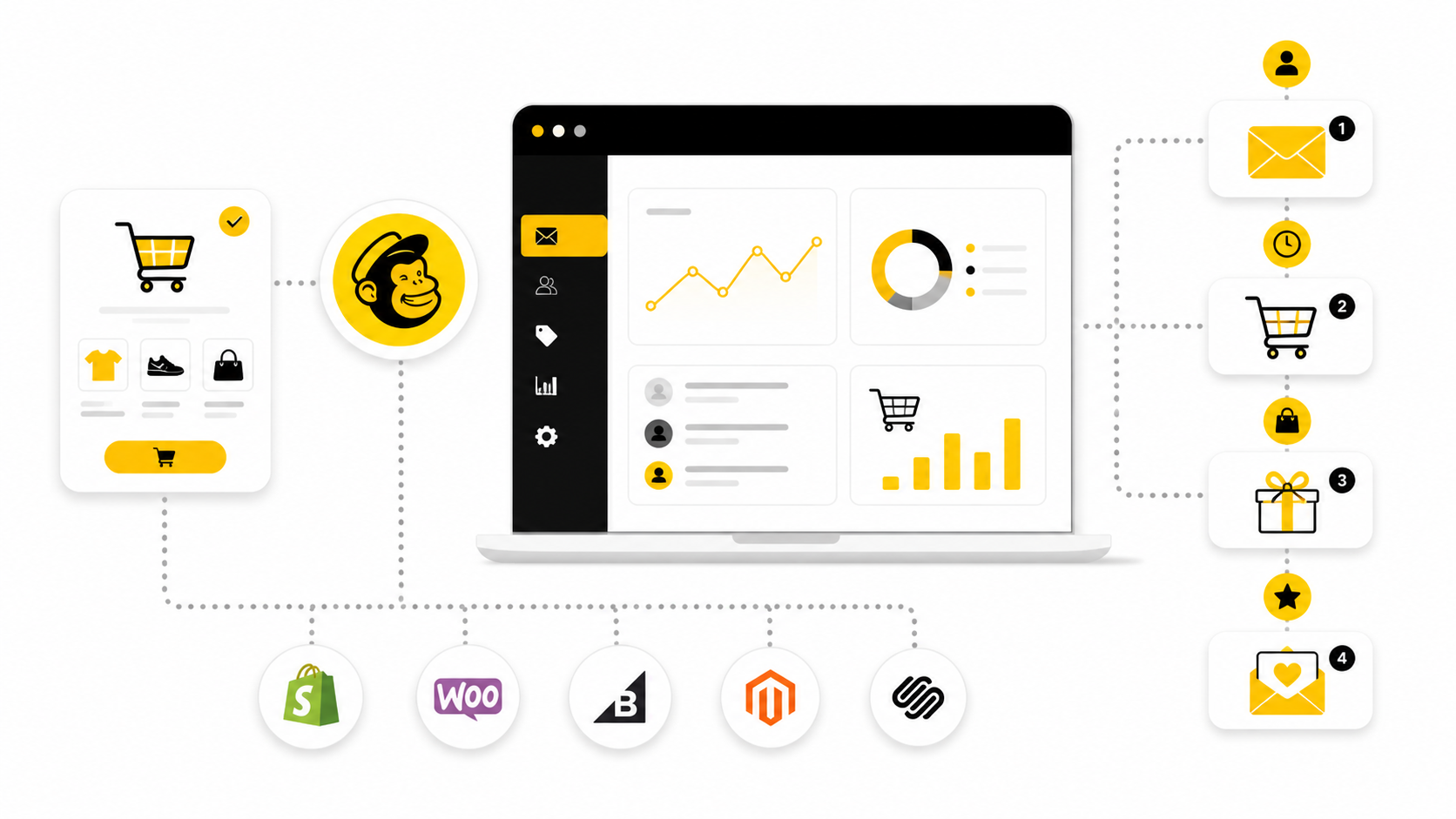
- Store Connection And Data Sync
- Audience Segmentation For Ecommerce
- Core Ecommerce Automations
- Campaigns, Product Recommendations, And Promotions
- Analytics, Revenue Attribution, And Optimization
- Professional Implementation Checklist
- Common Mistakes To Avoid
- Mailchimp Ecommerce FAQ
Why Mailchimp Ecommerce Matters
Mailchimp ecommerce matters because your store already creates valuable buying signals every day. Product views, checkout starts, abandoned carts, first purchases, repeat purchases, discount usage, and category preferences all tell you what a customer is likely to need next. When that data sits disconnected from your marketing, you end up sending generic campaigns to people who are in completely different stages of the buying journey.
The bigger opportunity is lifecycle marketing. A new subscriber needs trust and product education, while a cart abandoner needs a timely reminder, and a recent buyer may need onboarding, cross-sells, replenishment, or loyalty messaging. Mailchimp’s automation tools are built around trigger-based customer journeys, so ecommerce brands can send messages based on signup, purchase, cart, and engagement behavior rather than relying only on one-off broadcasts from Mailchimp automation features.
This is also why email remains a serious ecommerce channel. Recent email ROI research shows many companies still see returns in the range of $10 to $36 for every $1 spent, especially when campaigns are personalized, segmented, and tied to clear customer actions. The point is not that Mailchimp magically fixes ecommerce revenue; the point is that a disciplined Mailchimp ecommerce system helps you use your existing traffic and customer data more intelligently.
The Mailchimp Ecommerce Framework
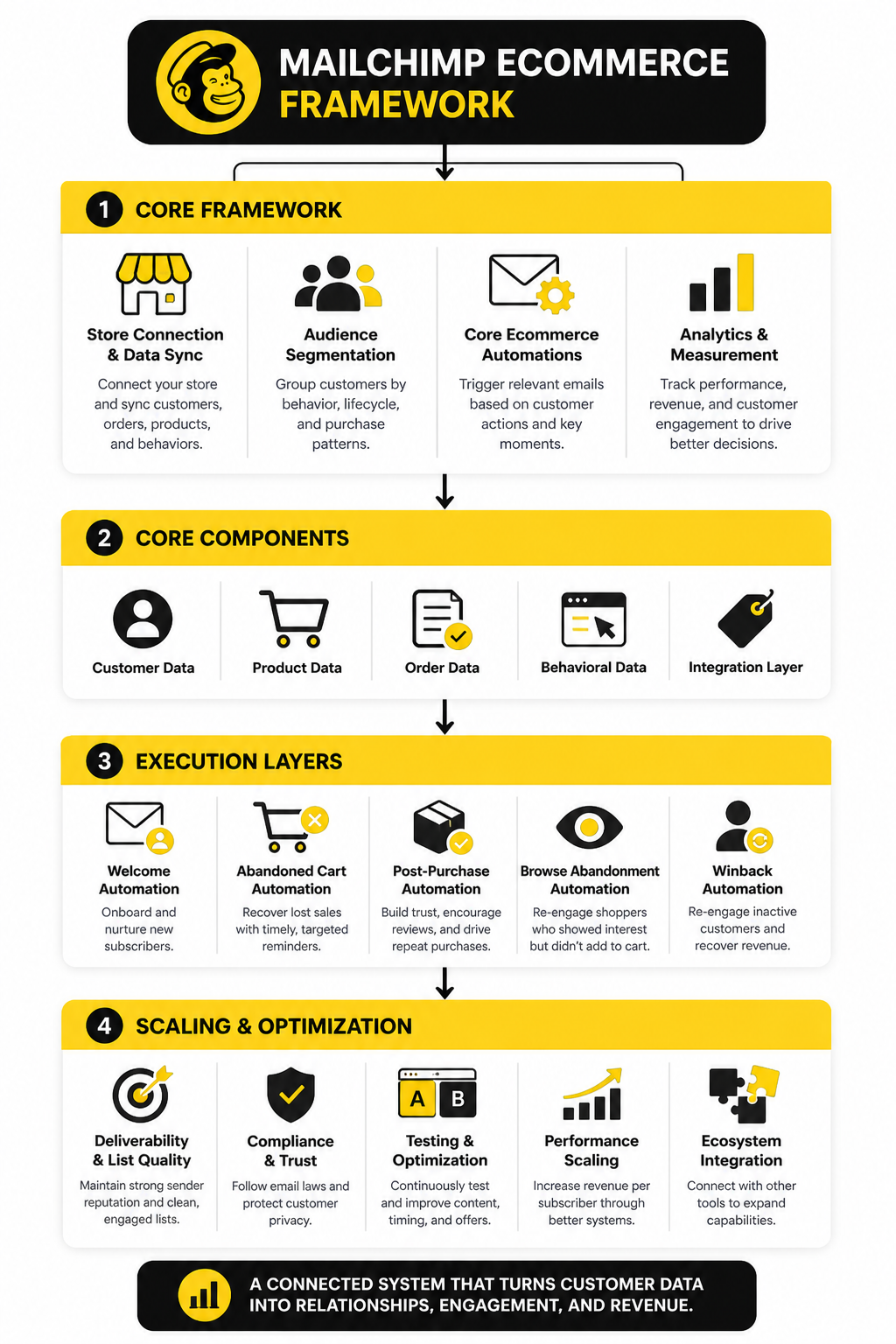
A strong Mailchimp ecommerce setup has four layers: connection, segmentation, automation, and optimization. The connection layer brings store data into Mailchimp from platforms such as Shopify or WooCommerce, including products, customers, orders, and behavioral events where supported. The segmentation layer turns that raw data into useful groups, such as first-time buyers, VIP customers, inactive subscribers, cart abandoners, and product-category buyers.
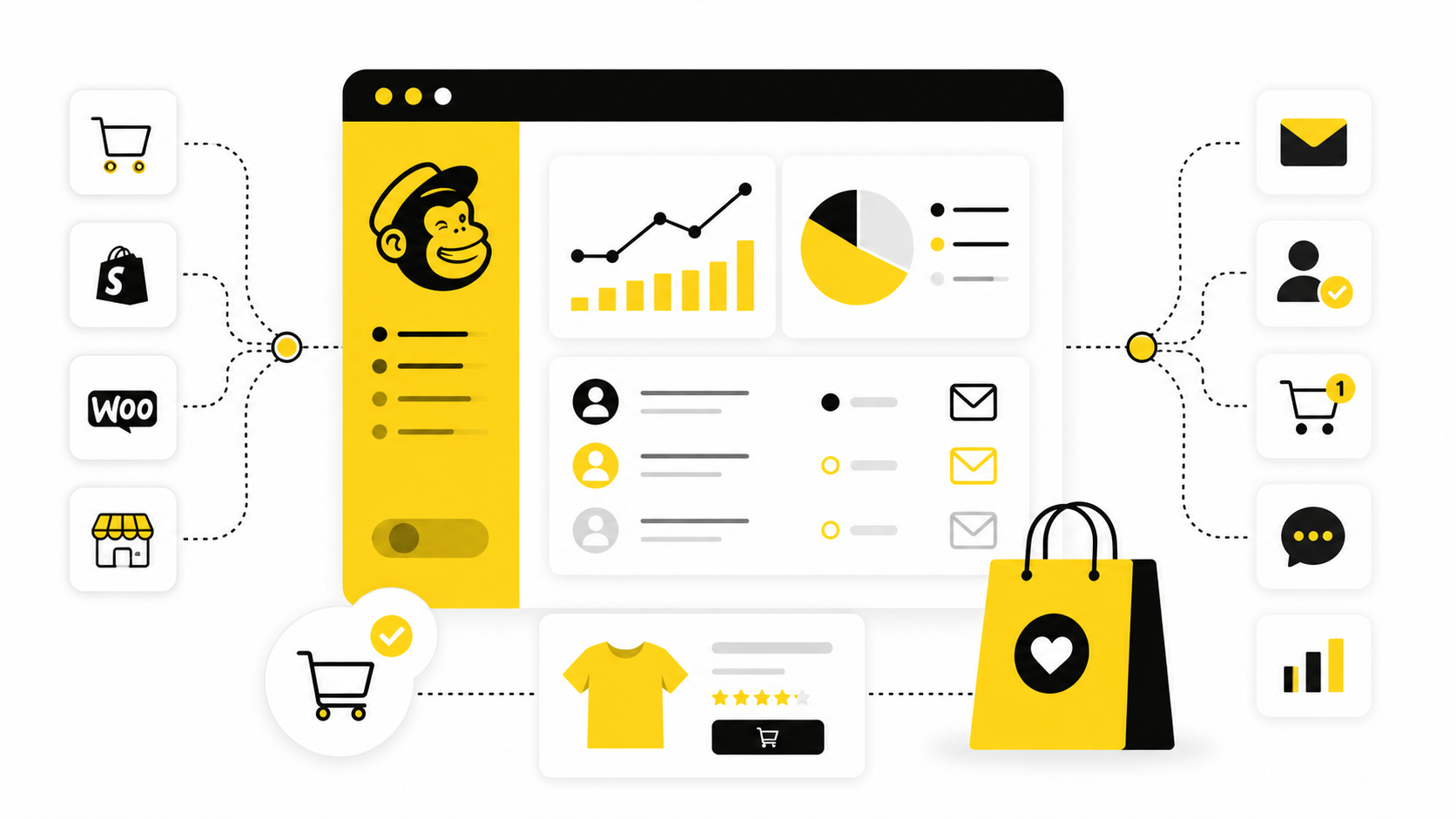
The automation layer is where most of the revenue impact usually happens. Welcome flows, abandoned cart flows, post-purchase flows, winback flows, and product recommendation campaigns let you respond to moments that matter. Mailchimp’s Shopify listing highlights ecommerce-specific automations such as welcome, cart, and back-in-stock emails, plus Shopify segment syncing and attributed revenue tracking inside Shopify through the Mailchimp Shopify app.
The optimization layer is what separates a basic setup from a professional one. You measure revenue, clicks, unsubscribes, conversion rates, list growth, deliverability, and customer movement between segments. Then you improve subject lines, offers, timing, creative, product blocks, and segmentation logic based on what customers actually do, not what the team guesses they might do.
Store Connection And Data Sync
Everything in Mailchimp ecommerce starts with clean, reliable data. If your store is not properly connected, every automation, segment, and campaign you build will be working with incomplete or delayed information. That leads to mistimed emails, irrelevant product recommendations, and lost revenue opportunities that are hard to trace back.
The goal is simple: your ecommerce platform should continuously sync customers, orders, products, and behavioral events into Mailchimp. Integrations like Shopify, WooCommerce, and BigCommerce allow you to pass purchase data, cart activity, and customer profiles directly into your audience. The official Mailchimp integrations directory shows how deeply these connections can go, including syncing product catalogs and enabling ecommerce-specific triggers.
There are three things that actually matter during setup:
- Event depth: Are you tracking just purchases, or also product views, cart activity, and browsing behavior?
- Sync frequency: Real-time or near real-time data is critical for abandoned cart and post-purchase flows.
- Data consistency: Customer emails, order IDs, and product SKUs must match cleanly across systems.
If you want more control beyond native integrations, tools like GoHighLevel can act as a central layer for managing leads, pipelines, and automation across channels. This becomes especially useful when your ecommerce business expands into SMS, funnels, or multi-step customer journeys that go beyond standard email flows.
Common Data Sync Mistakes
Most ecommerce teams assume the integration “just works,” but the reality is more fragile. Even small inconsistencies can break automation logic.
Watch for these issues:
- Missing product IDs, which break dynamic product recommendations
- Duplicate contacts caused by multiple signup sources
- Delayed order syncing that triggers emails hours too late
- Incomplete customer profiles that prevent proper segmentation
Fixing these early is not optional. It is the difference between automation that feels personal and automation that feels broken.
Audience Segmentation For Ecommerce
Once your data is flowing, segmentation is where Mailchimp ecommerce starts to show real leverage. Sending the same message to your entire list is not just inefficient—it actively reduces engagement and can hurt deliverability over time.
Segmentation allows you to group customers based on what they actually do. That includes purchase behavior, engagement history, product preferences, and lifecycle stage. When done right, it turns your email list into a set of targeted micro-audiences instead of one large, generic group.
Research consistently shows that segmented campaigns outperform non-segmented ones, with significantly higher open and click rates across ecommerce campaigns, as highlighted in email marketing benchmark reports.
High-Impact Ecommerce Segments
You do not need dozens of segments to see results. A focused set of high-impact segments will cover most revenue opportunities.
Start with:
- New subscribers – people who just joined but have not purchased
- First-time buyers – recent customers who need onboarding and trust building
- Repeat customers – buyers with at least two purchases
- VIP customers – high lifetime value or high frequency buyers
- Cart abandoners – users who added products but did not complete checkout
- Inactive subscribers – people who have not opened or clicked in a defined period
Each of these segments represents a different intent. Treating them the same is one of the biggest missed opportunities in ecommerce email marketing.
Behavioral vs Static Segmentation
Static segments are based on fixed attributes, like location or signup source. They are useful, but limited. Behavioral segments, on the other hand, update dynamically based on what users do—this is where Mailchimp ecommerce becomes powerful.
For example:
- A customer moves from “new subscriber” to “first-time buyer” automatically
- A repeat buyer becomes a VIP after crossing a revenue threshold
- An active subscriber becomes inactive after 60 days without engagement
This dynamic movement keeps your messaging relevant without constant manual updates.
If you want to go deeper into behavioral tracking and automation beyond email, platforms like ManyChat extend segmentation into chat and messaging channels, which is increasingly relevant as ecommerce shifts toward conversational experiences.
Segmentation That Drives Revenue
The key shift is this: segmentation is not about organizing your list. It is about matching the message to the moment.
When someone abandons a cart, they do not need a brand story—they need a reminder or incentive. When someone just bought, they do not need another sales push—they need confirmation, reassurance, and possibly a complementary product.
Mailchimp ecommerce works best when segmentation feeds directly into automation. That is what turns customer data into consistent, predictable revenue instead of occasional campaign spikes.
Core Ecommerce Automations
Once your store data and segments are in place, the next step is automation. This is where Mailchimp ecommerce becomes practical instead of theoretical. You are no longer just collecting data—you are using it to send the right message when a customer’s intent is highest.
Mailchimp’s ecommerce API supports order notifications, abandoned cart automations, follow-ups, and product recommendations through connected store data. That means the execution process should not start with “What campaign should we send?” It should start with “What customer moment deserves an automatic response?”
The most important automations are not complicated. They are simple, high-intent flows that run consistently in the background and improve the economics of your store.
Welcome Automation
Your welcome automation should introduce the brand, set expectations, and guide a new subscriber toward their first purchase. This is not the place to dump every product, every discount, and every brand value into one email. Keep it focused.
A practical welcome sequence usually includes:
- A first email that confirms the signup and explains the core value of the brand
- A second email that highlights bestsellers, customer favorites, or product categories
- A third email that removes friction with shipping details, guarantees, reviews, or buying guidance
The mistake is treating the welcome flow as a polite formality. It is often the first serious conversion window after a visitor gives you their email, so the copy should be clear, helpful, and commercially intentional. If you use landing pages or dedicated offer funnels alongside Mailchimp, a tool like ClickFunnels can help structure the signup path before the subscriber ever reaches the automation.
Abandoned Cart Automation
The abandoned cart flow is usually one of the first automations worth building because the intent is obvious. The shopper has already selected a product, started the buying process, and then left. With average cart abandonment still sitting around 70% across documented ecommerce studies, this is too big to ignore.
A strong abandoned cart sequence should do three things. First, remind the shopper what they left behind. Second, reduce friction by answering common objections around shipping, returns, sizing, delivery, or trust. Third, give them a simple path back to checkout.
A clean structure looks like this:
- Email 1: Send a reminder while the purchase intent is still fresh
- Email 2: Add reassurance, benefits, reviews, or product-specific context
- Email 3: Use urgency or an incentive only if it fits your margin and brand strategy
Do not train customers to abandon carts just to get discounts. That is lazy marketing, and it quietly damages your margins. Use incentives carefully, especially if your product already has strong demand or your cart abandonment is caused by checkout friction rather than price resistance.
Post-Purchase Automation
The post-purchase flow is where many ecommerce brands leave money on the table. After someone buys, they are not “done.” They are entering the most important part of the customer relationship.
Your first job is reassurance. Confirm that the order was received, explain what happens next, and reduce buyer anxiety. Then you can move into education, product usage, review requests, replenishment, referrals, or cross-sells depending on what the customer bought.
A practical post-purchase sequence may include:
- Order reassurance and next steps
- Product education or usage guidance
- Review request after the customer has had enough time to experience the product
- Relevant cross-sell or replenishment reminder
This is where product-specific segmentation matters. A customer who bought skincare needs a different follow-up timeline than someone who bought a digital product, apparel item, supplement, or home accessory. Mailchimp ecommerce works best when the follow-up respects the buying context instead of blasting every buyer with the same generic “thanks for your order” message.
Browse Abandonment Automation
Browse abandonment targets shoppers who looked at products but did not add anything to cart. This signal is softer than cart abandonment, so the message needs to feel helpful rather than aggressive. You are not chasing them; you are guiding them back to something they showed interest in.
This flow works best when product catalog data is clean and behavioral tracking is active. The email can reference viewed products, related categories, or popular alternatives without pretending the shopper made a stronger commitment than they actually did. That distinction matters because over-personalization can feel uncomfortable when the customer’s intent is still early.
Use browse abandonment when your store has enough traffic and product discovery matters. Fashion, beauty, home goods, accessories, and multi-SKU stores tend to benefit more than stores with only a few products. If your catalog is small, a stronger welcome flow and abandoned cart flow may produce better returns first.
Winback Automation
A winback automation targets customers or subscribers who have stopped engaging. It is not just a “we miss you” email. It is a controlled attempt to reactivate people before they become completely cold.
The flow should be based on a clear inactivity rule. That might be no purchase in 90 days, no engagement in 60 days, or no repeat order after the expected replenishment window. The exact timing depends on your product category and buying cycle.
A useful winback flow usually includes:
- A reminder of the brand or product value
- A personalized reason to return based on past behavior
- A final reactivation message before suppressing or reducing send frequency
This protects performance as much as it recovers revenue. Sending forever to inactive contacts can weaken engagement metrics and make your list look bigger than it really is. A smaller, more responsive list is usually more valuable than a bloated list full of people who stopped paying attention months ago.
Analytics, Revenue Attribution, And Optimization
Mailchimp ecommerce analytics should answer one practical question: what is actually making the store more money? Opens, clicks, and subscribers matter, but they are not the final score. The final score is revenue, profit, customer retention, and whether your marketing is helping people move from interest to purchase without damaging trust.
This is why measurement has to be built around the customer journey, not just individual campaigns. A newsletter might create product interest, an abandoned cart email might recover the order, and a post-purchase flow might create the second sale. If you only look at one email at a time, you miss how the system works together.
Statistics And Data
Benchmarks are useful, but only when you treat them as context. Mailchimp’s own benchmark data lists ecommerce averages around 29.81% open rate, 1.74% click rate, and 0.19% unsubscribe rate across its reported industry categories. Those numbers do not mean your store is “good” or “bad” automatically; they give you a starting point for diagnosing where attention is leaking.
A low open rate usually points to weak subject lines, poor list quality, bad timing, or deliverability problems. A healthy open rate with a weak click rate usually means the message did not create enough intent after the open. A healthy click rate with poor revenue usually points to the offer, landing page, product-market fit, checkout friction, or audience mismatch.
Cart abandonment is the clearest example of why interpretation matters. Baymard’s long-running research puts the documented average cart abandonment rate at about 70.22% across 50 studies. That does not mean you should panic because people abandon carts; it means abandoned cart recovery is a normal, expected part of ecommerce operations and should be measured like a core revenue system.
The Metrics That Actually Matter
A serious Mailchimp ecommerce dashboard should separate engagement metrics from commercial metrics. Engagement tells you whether people are paying attention. Commercial metrics tell you whether that attention is turning into revenue.
Track these numbers clearly:
- Revenue per recipient: how much revenue each campaign or automation generates relative to send volume
- Revenue per email: how much each individual message contributes inside a flow
- Conversion rate: how many recipients complete the intended action after clicking
- Average order value: whether emails drive low-margin discounts or profitable orders
- Repeat purchase rate: whether post-purchase messaging is improving retention
- Unsubscribe rate: whether your frequency or relevance is creating fatigue
- Spam complaint rate: whether your list quality and messaging are damaging trust
Do not optimize these in isolation. A campaign with a big revenue spike but a high unsubscribe rate may be burning future value. A flow with modest immediate revenue but strong repeat purchases may be more valuable than it looks on the surface.
How To Read Open Rates Now
Open rates are still useful, but they are not as clean as they used to be. Privacy changes, image caching, and inbox behavior can inflate or distort open tracking. That means open rate should be treated as a directional signal, not a perfect measurement of human attention.
Use open rates to spot broad movement. If a segment’s open rate drops sharply, investigate subject lines, frequency, deliverability, and list quality. But do not make major revenue decisions based only on opens.
Clicks and conversions are more grounded. They show that someone moved beyond passive inbox exposure and took action. For Mailchimp ecommerce, the stronger chain is open, click, product view, cart, checkout, purchase, and repeat purchase.
Revenue Attribution Without Fooling Yourself
Revenue attribution can be helpful, but it can also make marketing look cleaner than reality. If a customer clicks an email and buys later, the platform may attribute revenue to that email. That is useful, but it does not prove the email alone caused the purchase.
Use attribution as a decision tool, not an ego tool. Compare flows against their own baseline, look at trends over time, and watch whether revenue grows without destroying margins. The question is not “Can this email claim revenue?” The question is “Would the store likely be worse without this automation?”
For advanced stores, compare segments before and after automation changes. Look at repeat purchase rates, time between orders, discount dependency, and lifetime value. That gives you a more honest view than celebrating one high-performing campaign in isolation.
What The Data Should Make You Do
Data is only useful if it changes behavior. If abandoned cart revenue is strong but checkout conversion is weak, fix checkout friction before adding more emails. If welcome emails get clicks but no purchases, improve the offer, product education, or landing page experience.
If campaigns drive revenue but unsubscribe rates rise, reduce frequency or tighten segmentation. If post-purchase emails generate cross-sells but support tickets increase, your messaging may be promising too much or sending people to the wrong products. Good analytics should make your marketing sharper, not just prettier.
For teams that want a broader customer journey dashboard across email, SMS, funnels, and CRM activity, GoHighLevel can be useful when Mailchimp is only one part of the sales system. The point is not to collect more dashboards. The point is to see the whole customer path clearly enough to improve it.
Professional Implementation Checklist
At this stage, the question is no longer whether Mailchimp ecommerce can support your store. The real question is whether your setup is disciplined enough to scale without becoming messy. Most problems do not come from the tool itself; they come from rushed implementation, unclear ownership, weak data hygiene, and automations that nobody reviews after launch.
A professional implementation starts with the business model. A brand with one hero product needs a different system than a store with hundreds of SKUs, seasonal drops, subscriptions, or replenishable products. Before you build another flow, decide what customer behavior matters most: first purchase, second purchase, higher average order value, replenishment, referrals, or reactivation.
Use this checklist as the practical filter:
- Confirm that store, order, product, and customer data sync correctly
- Separate buyers, non-buyers, repeat buyers, VIPs, and inactive contacts
- Build the core automations before adding advanced personalization
- Create suppression rules for unengaged contacts and recent purchasers
- Review deliverability before increasing send frequency
- Measure revenue, unsubscribes, complaints, and repeat purchases together
- Audit flows every month instead of letting old messages run forever
This is where many ecommerce teams get impatient. They want advanced segmentation, AI recommendations, SMS, quizzes, loyalty flows, and complex personalization before the foundation is stable. That is backwards. Nail the basics first, then scale the sophistication.
Scaling Without Over-Automating
More automation is not always better. A customer can abandon a cart, browse another product, join a popup offer, receive a campaign, and enter a post-purchase sequence in a short window. If your logic is loose, that person gets hit from every angle and your brand starts feeling desperate.
The solution is not to avoid automation. The solution is to control priority. High-intent flows should usually take precedence over low-intent flows, and recent buyers should not immediately receive aggressive prospecting messages unless there is a clear reason.
A clean priority structure might look like this:
- Transactional and order-related messages
- Abandoned checkout and cart recovery
- Post-purchase education and retention
- Welcome and first-purchase nurturing
- Browse abandonment
- Promotional campaigns
- Winback and reactivation
This order is not universal, but the principle matters. Your Mailchimp ecommerce system should feel coordinated from the customer’s perspective, not like seven separate automations fighting for attention.
Deliverability Becomes A Growth Constraint
Deliverability is not a technical side issue. It directly affects revenue because emails that land in spam do not sell products. Mailchimp’s own deliverability guidance makes the point clearly: deliverability is the difference between a message being seen and missed, and sender reputation plays a major role in that outcome through email deliverability fundamentals.
As the list grows, weak sending habits become more expensive. Sending too often to inactive contacts can lower engagement signals. Buying lists, scraping contacts, or importing low-quality leads can damage trust fast. Ignoring unsubscribe and complaint trends is how brands quietly poison their own channel.
The practical rules are simple:
- Send more often to engaged buyers and subscribers
- Send less often to cold contacts
- Remove or suppress contacts who never engage
- Keep signup sources clean and permission-based
- Authenticate your sending domain properly
- Watch spam complaints like a serious business metric
This is not glamorous work, but it compounds. Better inbox placement improves every campaign and every automation you already built.
Consent, Privacy, And Customer Trust
Ecommerce email marketing sits inside a legal and trust environment. You are handling personal data, purchase history, browsing behavior, and communication preferences. That means consent and transparency are part of the system, not something to bolt on later.
For stores selling to people in the EU, GDPR requires a valid legal basis for processing personal data, and email marketing commonly relies on clear consent or another appropriate basis explained in GDPR email marketing guidance. In the United States, CAN-SPAM focuses heavily on truthful identification, accurate headers, clear unsubscribe access, and honoring opt-out requests through the FTC’s CAN-SPAM compliance rules.
Do not treat compliance as a checkbox. Treat it as customer trust in operational form. The more personal your Mailchimp ecommerce messaging becomes, the more important it is that customers understand why they are receiving messages and how they can control them.
When Mailchimp Is Enough And When It Is Not
Mailchimp is enough for many ecommerce stores, especially when the priority is email campaigns, customer journeys, segmentation, product recommendations, and connected store analytics. It is often a strong fit for lean teams that want a practical system without managing a heavy marketing stack. The best setup is usually the one your team can actually maintain.
But there are situations where Mailchimp should become one part of a broader system. If you need deeper CRM workflows, pipeline management, sales calls, appointment booking, SMS-heavy follow-up, or agency-style client management, GoHighLevel may fit around the ecommerce email layer. If your store relies heavily on quizzes, application funnels, webinars, or dedicated offer pages, ClickFunnels can support the front-end conversion path before contacts enter email automation.
The tradeoff is complexity. Every extra platform adds more integration points, more reporting questions, and more chances for data to drift. Add tools only when they solve a specific bottleneck, not because the stack looks more impressive.
Advanced Personalization Without Getting Creepy
Personalization should feel useful, not invasive. Showing relevant product categories, replenishment timing, or recommendations based on purchase history can improve the customer experience. But overly specific references to browsing behavior can feel uncomfortable if the message is not framed carefully.
A good rule is to personalize around helpfulness. “You may like these because they pair well with your last order” feels different from “We saw you looking at this exact product three times last night.” One builds confidence; the other can feel like surveillance.
The best Mailchimp ecommerce personalization usually uses broad behavioral relevance:
- Product category interest
- Purchase history
- Customer lifecycle stage
- Average order value tier
- Repeat purchase timing
- Engagement level
That is enough to make messages feel relevant without making the brand feel intrusive. Smart personalization is not about proving how much data you have. It is about making the buying decision easier.
Common Mistakes To Avoid
The first big mistake is building too many automations before understanding the customer journey. Automations are not decorations. Every flow needs a clear trigger, purpose, audience, message, and success metric.
The second mistake is discounting too aggressively. Discounts can recover carts and drive campaign spikes, but they can also train customers to wait. If every important email relies on a coupon, the offer is doing the work the brand should be doing.
The third mistake is ignoring post-purchase communication. Many stores obsess over acquisition but underinvest in the second order. That is expensive because retaining a real buyer is usually easier than convincing a cold visitor to trust you for the first time.
The fourth mistake is measuring only short-term revenue. A campaign can look successful today while increasing unsubscribes, lowering margin, or weakening future engagement. Strong operators look at the full picture.
The fifth mistake is letting the system go stale. Products change, positioning changes, shipping policies change, customer objections change, and old emails become inaccurate. A Mailchimp ecommerce setup is not a one-time build. It is a revenue system that needs regular maintenance.
Final System Review
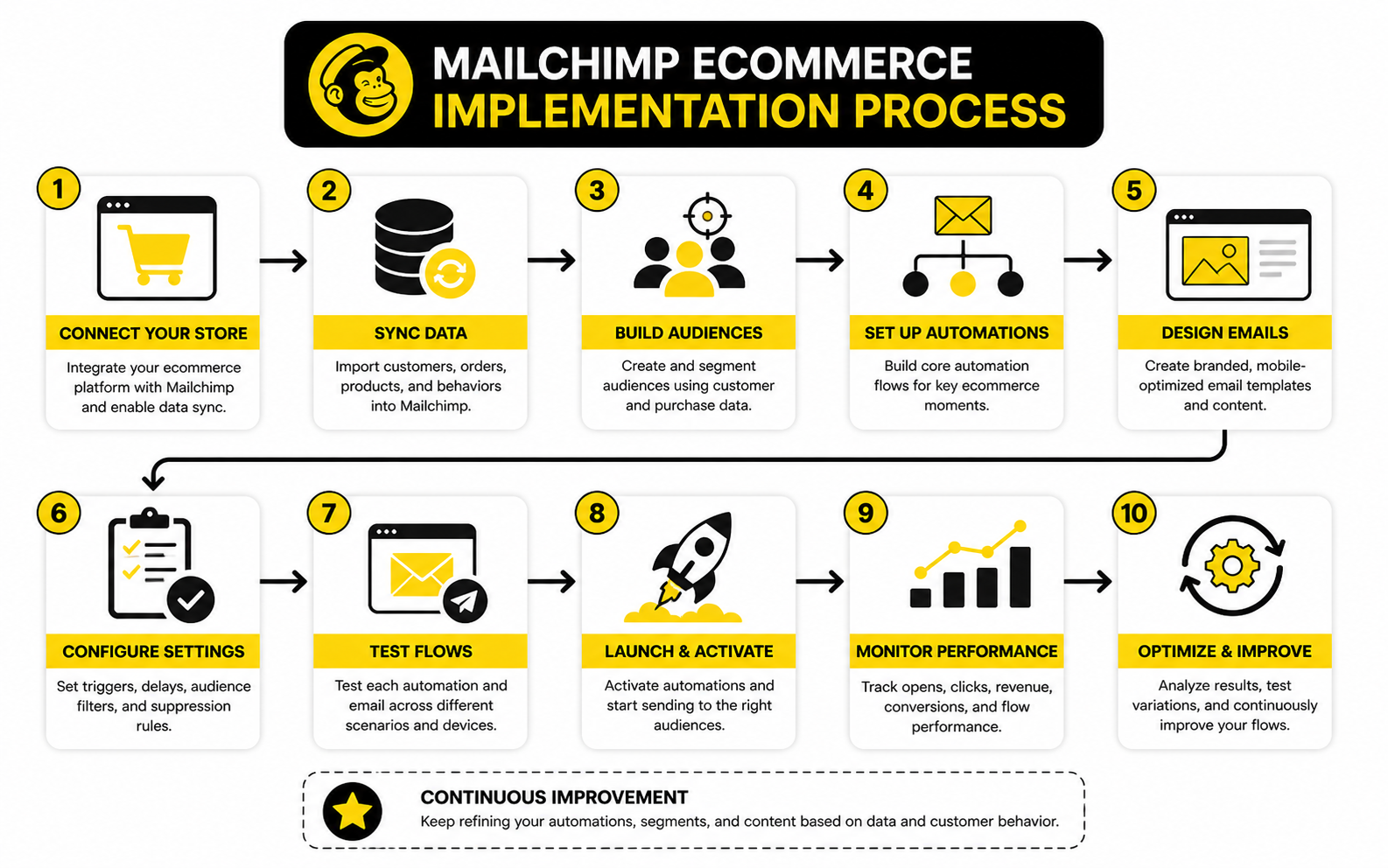
A finished Mailchimp ecommerce setup should feel like one connected system, not a pile of campaigns. Your store sends customer and order data into Mailchimp. Your segments turn that data into useful audiences. Your automations respond to customer behavior. Your analytics show what is working, what is wasting attention, and where the next improvement should happen.
That is the real advantage. You stop guessing and start operating from customer signals. A good ecommerce email system does not need to be loud, complicated, or packed with gimmicks. It needs to be relevant, measurable, and consistent.
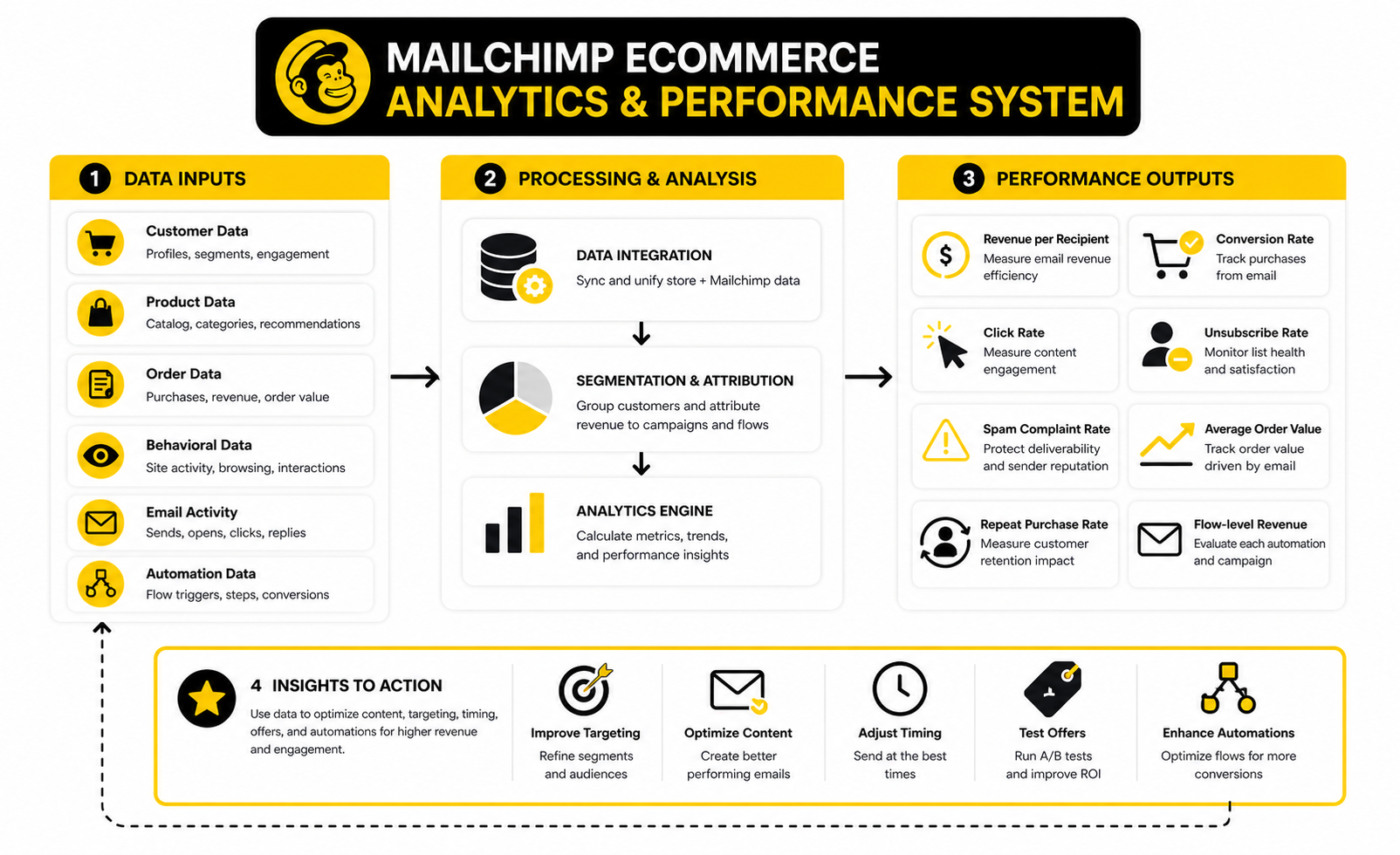
Before you call the system complete, review it from the customer’s perspective. Subscribe through your own popup, abandon a cart, place a test order, wait for post-purchase messages, and check whether the experience feels helpful. If the journey feels confusing to you, it will feel worse to a real shopper who has less context and less patience.
A strong final review should check:
- Whether every signup source leads into the right welcome path
- Whether buyers and non-buyers receive different messages
- Whether cart and checkout emails trigger at the right time
- Whether post-purchase emails match the product bought
- Whether inactive contacts are suppressed or re-engaged carefully
- Whether reports connect email activity to real ecommerce outcomes
- Whether old promotions, policies, and product references have been removed
This is the point where Mailchimp ecommerce becomes less about software and more about operating discipline. The brands that win are not always the ones with the most complex automations. They are usually the ones that keep the customer journey clean, relevant, and profitable.
FAQ - Built For Complete Guide
What is Mailchimp ecommerce?
Mailchimp ecommerce is the use of Mailchimp with an online store so customer, product, order, and behavioral data can support email marketing, automation, segmentation, and reporting. Instead of sending the same email to everyone, the store can trigger messages based on real customer actions. That includes welcome emails, abandoned cart reminders, post-purchase follow-ups, product recommendations, and winback campaigns.
Is Mailchimp good for ecommerce?
Mailchimp can be a good ecommerce platform for stores that want email marketing, automations, segmentation, product blocks, and connected store reporting without building a complicated tech stack. It works best when the store integration is clean and the marketing strategy is clear. It is less effective when teams expect the tool to fix weak offers, poor data, or messy customer journeys by itself.
Which ecommerce platforms connect with Mailchimp?
Mailchimp supports ecommerce connections through platforms and integrations such as Shopify, WooCommerce, BigCommerce, Magento, PrestaShop, Lightspeed, and other store systems. The exact feature depth depends on the platform, so it is important to check whether the connection supports abandoned cart emails, product recommendations, purchase segmentation, and revenue tracking. A basic contact sync is not the same as a full ecommerce integration.
What are the most important Mailchimp ecommerce automations?
The most important automations are usually the welcome flow, abandoned cart flow, post-purchase flow, browse abandonment flow, and winback flow. These cover the highest-impact moments in the customer journey: signup, purchase intent, first order, product interest, and inactivity. Start with these before building advanced flows.
How many emails should be in an abandoned cart sequence?
Most stores can start with two or three abandoned cart emails. The first email should remind the shopper, the second should reduce friction, and the third can add urgency or an incentive if it fits the brand and margins. Do not rely on discounts too quickly because that can train customers to abandon carts on purpose.
What metrics should I track in Mailchimp ecommerce?
Track revenue per recipient, conversion rate, click rate, unsubscribe rate, spam complaint rate, average order value, repeat purchase rate, and flow-level revenue. Opens can still be useful as a directional signal, but they should not be treated as perfect proof of attention. The best reporting connects email behavior to actual store outcomes.
How often should ecommerce brands email their list?
There is no universal number because frequency depends on product category, customer engagement, seasonality, and buying cycle. A highly engaged VIP segment can usually handle more email than cold subscribers. The smarter approach is to send based on engagement and intent instead of blasting the same frequency to everyone.
Should I use discounts in Mailchimp ecommerce campaigns?
Use discounts carefully. They can help with cart recovery, seasonal promotions, and first-purchase offers, but overusing them can reduce margin and teach customers to wait. Strong ecommerce email strategy uses education, relevance, product value, reviews, trust signals, and timing before defaulting to coupons.
How do I improve Mailchimp ecommerce deliverability?
Improve deliverability by using permission-based signup sources, authenticating your sending domain, suppressing inactive contacts, monitoring spam complaints, and sending more relevant emails to better segments. Deliverability gets harder as your list grows, so list quality matters more than list size. A smaller engaged audience is usually more valuable than a large cold one.
Can Mailchimp handle product recommendations?
Yes, Mailchimp can support product recommendations when your ecommerce store and product catalog are connected correctly. Recommendations work best when product data, purchase history, and customer behavior are synced cleanly. If the catalog data is incomplete, recommendation blocks may feel random or irrelevant.
Is Mailchimp enough for a scaling ecommerce brand?
Mailchimp can be enough for many stores, especially when the main focus is email marketing, segmentation, automation, and campaign reporting. As the business grows, some teams may add tools for funnels, CRM, SMS, chat, customer support, or advanced analytics. The key is to add platforms only when they solve a specific operational bottleneck.
What is the biggest mistake with Mailchimp ecommerce?
The biggest mistake is treating Mailchimp like a newsletter tool instead of a customer journey system. Ecommerce email should respond to customer behavior, purchase stage, product interest, and engagement level. If every subscriber receives the same message, most of the value of Mailchimp ecommerce is being wasted.
Work With Professionals
Explore 10K+ Remote Marketing Contracts on MarkeWork.com
Most marketers spend too much time chasing clients, competing on crowded platforms, and losing a percentage of every project to middlemen.
MarkeWork gives you a better way. Browse thousands of remote marketing contracts and connect directly with companies desperate to hire skilled marketers like you, without platform commissions and without unnecessary gatekeepers.
If you are serious about finding better opportunities and keeping 100% of what you earn, explore available contracts and create a profile for free at MarkeWork.com.