

Mailchimp for nonprofits can be a smart starting point when your organization needs reliable email marketing without adding unnecessary complexity. The appeal is obvious: one platform for newsletters, donor updates, campaign emails, automations, landing pages, segmentation, and basic reporting.
But here is the part that matters: Mailchimp is not automatically the best fit just because it is familiar. Nonprofits have different needs than ecommerce brands. You are not just chasing clicks; you are building trust, moving supporters from awareness to action, and protecting donor relationships over time.
Mailchimp offers a 15% discount for verified nonprofit organizations and charities, which helps, but price is only one part of the decision. The bigger question is whether your team can use the platform consistently enough to grow donations, volunteer participation, event attendance, advocacy actions, and long-term supporter engagement.
Article Outline
- Why Mailchimp For Nonprofits Matters
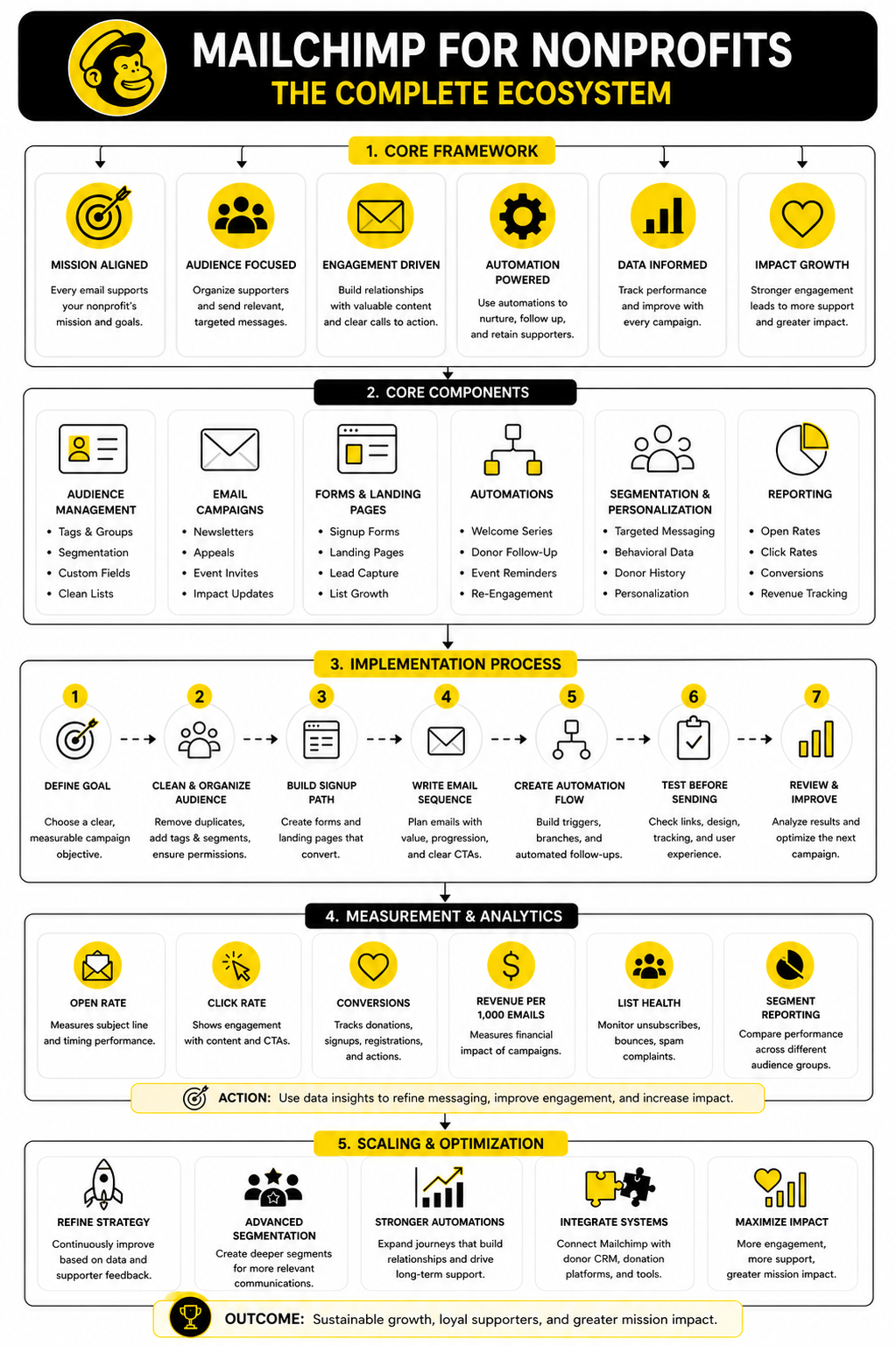
- The Nonprofit Email Marketing Framework
- Core Mailchimp Features Nonprofits Should Understand
- How To Set Up Mailchimp For A Nonprofit Campaign
- Professional Implementation And Optimization
- Mailchimp For Nonprofits FAQ And Final Recommendations
Why Mailchimp For Nonprofits Matters
Email is still one of the few channels where nonprofits can speak directly to supporters without depending completely on social media algorithms. That matters because donor attention is fragmented, ad costs change, and organic reach is never guaranteed. A healthy email list gives your organization an owned communication channel that can support fundraising, education, advocacy, events, and volunteer activation.
The nonprofit email opportunity is real, but it is not effortless. The latest M+R Benchmarks email data shows that nonprofit fundraising emails generated revenue per 1,000 emails sent, while advocacy emails often earned higher engagement than direct fundraising appeals. That should shape how nonprofits use Mailchimp: not every message should ask for money, and not every subscriber is ready to donate today.
The best use of Mailchimp for nonprofits is not blasting every contact with the same newsletter. It is building a simple system where new supporters are welcomed, donors are thanked, volunteers are segmented, lapsed supporters are re-engaged, and campaign results are reviewed before the next send. That is where Mailchimp becomes more than an email tool.
The Nonprofit Email Marketing Framework
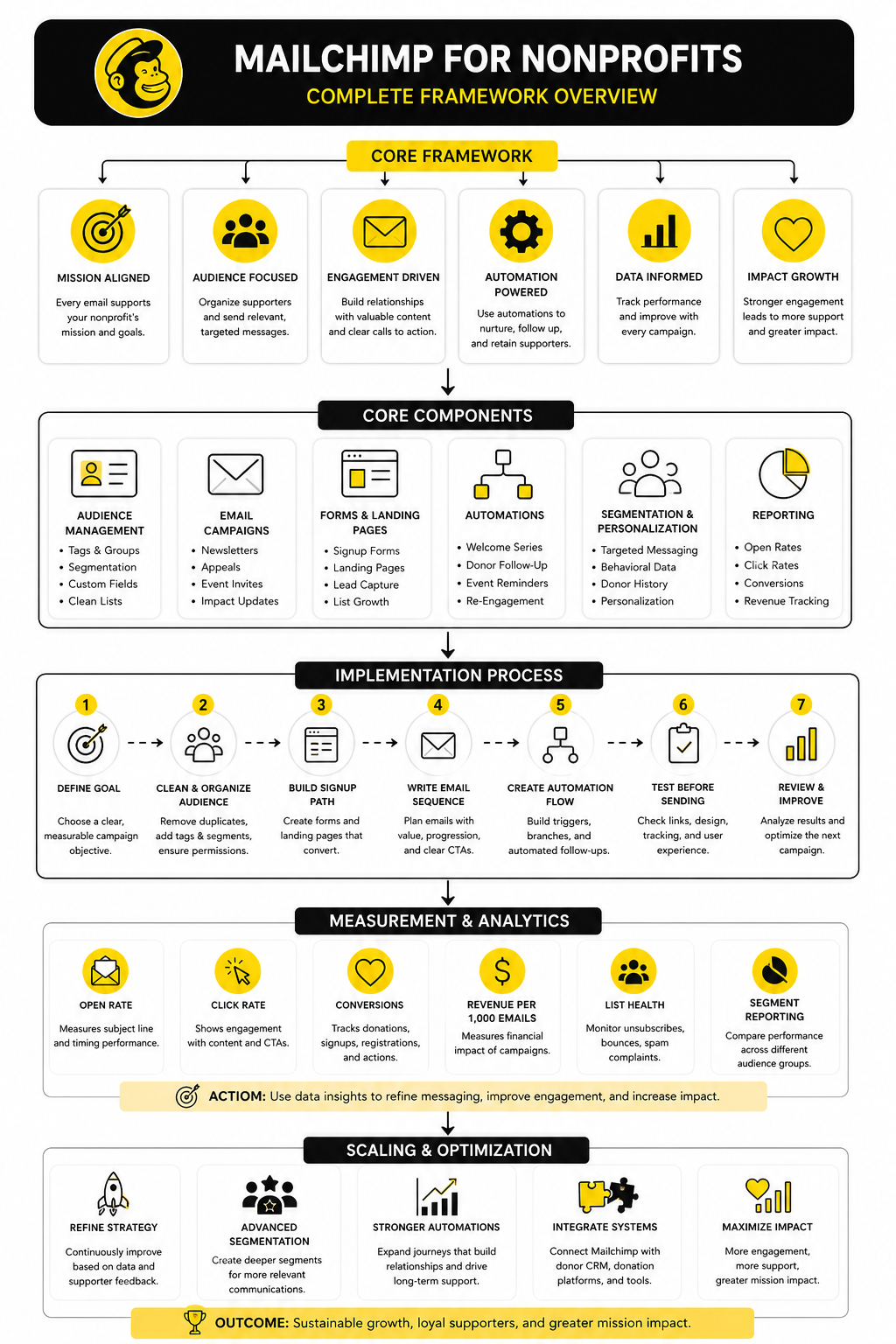
A strong nonprofit email program has four layers: audience, message, journey, and measurement. Audience means knowing who is on your list and why they joined. Message means matching your content to the supporter’s relationship with your mission.
Journey is where Mailchimp can become especially useful. A first-time donor should not receive the same follow-up as someone who only downloaded a resource or signed a petition. Simple automations can help your nonprofit welcome people, explain impact, invite the next action, and build trust without manually writing every follow-up.
Measurement keeps the system honest. Open rates can tell you whether your subject lines are earning attention, but clicks, conversions, donations, unsubscribes, and list growth show whether your communication is actually working. The goal is not to send more email; the goal is to send better email with a clear purpose.
Core Mailchimp Features Nonprofits Should Understand
Mailchimp for nonprofits works best when you treat it as a supporter communication system, not just a newsletter sender. The platform can help you collect contacts, organize audiences, send campaigns, build automations, and review performance from one place. That sounds basic, but for a small nonprofit team, basic done consistently is powerful.
The mistake is trying to use every feature at once. Most nonprofits need a clean setup before they need advanced marketing experiments. Start with the features that directly support donor trust, campaign clarity, and repeatable communication.
Audience Management
Your audience is the foundation of everything you do inside Mailchimp. A nonprofit list usually includes donors, volunteers, event attendees, board members, partners, advocates, and people who joined because they cared about one specific campaign. Those people should not all be treated the same.
Mailchimp lets you organize contacts with tags, groups, segments, and audience fields. That matters because a monthly donor should receive different messaging than someone who has never donated. A volunteer should not be buried under fundraising emails when they mainly care about service opportunities.
Keep the structure simple at first. Use tags for major supporter types, fields for important profile data, and segments for campaign sending. A clean list makes every future campaign easier.
Email Campaigns
Email campaigns are where most nonprofits begin. You can send newsletters, appeals, event invitations, impact updates, volunteer calls, advocacy alerts, and year-end fundraising messages. The key is to give every email one primary job.
A strong nonprofit email does not try to say everything. It focuses attention on one message, one emotional reason to care, and one next step. That next step might be donating, registering, signing, replying, reading, sharing, or showing up.
Recent nonprofit benchmarks show why clarity matters. The M+R 2026 email messaging benchmark found that fundraising emails and advocacy emails behave very differently, with advocacy messages often earning stronger click and response activity. That means your campaign type should shape your subject line, copy, call to action, and follow-up.
Signup Forms And Landing Pages
Mailchimp includes signup forms and landing pages that can help nonprofits grow their list without needing a complicated website project. This is useful for campaigns, events, downloadable resources, petitions, volunteer interest forms, and donor education sequences. The goal is to turn casual attention into a permission-based relationship.
Do not ask for too much information at the first step. Name and email are usually enough unless the form has a specific purpose that requires more detail. Every extra field adds friction, and friction quietly reduces signups.
Your landing page should make the value obvious. Tell people what they will receive, why it matters, and how often they can expect to hear from you. Trust starts before the first email is sent.
Automations
Automations are one of the strongest reasons to use Mailchimp for nonprofits. They let you create follow-up sequences that run after someone subscribes, donates, registers, or joins a specific campaign. This helps small teams communicate more consistently without manually chasing every supporter.
A welcome sequence is usually the best first automation. It can introduce your mission, show the problem you are solving, explain your impact, and invite one meaningful next step. This is much better than letting a new subscriber sit silently on your list until the next general newsletter.
Donor follow-up is another high-value use case. A simple post-donation sequence can thank supporters, show what their gift helps make possible, and explain how they can stay involved. That kind of communication is not decoration; it is retention work.
Segmentation And Personalization
Segmentation is where nonprofit email starts becoming more strategic. Instead of sending the same message to everyone, you can send more relevant messages to smaller groups. That can improve engagement because the email feels connected to the supporter’s actual relationship with your organization.
Personalization should go beyond adding a first name. You can personalize based on donation history, event attendance, volunteer interest, campaign source, location, or engagement level. The more relevant the message, the less it feels like a mass broadcast.
This matters because inbox trust is fragile. If people regularly receive emails that do not match their interests, they stop opening. Once that happens, your future campaigns have to work harder just to regain attention.
Reporting
Mailchimp reporting helps nonprofits see what is working and what needs to change. Open rate, click rate, unsubscribes, bounces, conversions, and revenue tracking all give clues about campaign performance. None of those numbers should be viewed alone.
A low open rate may point to weak subject lines, poor timing, list fatigue, or deliverability issues. A strong open rate with weak clicks may mean the message earned attention but failed to move people to action. A high unsubscribe rate may mean the audience, message, or frequency is misaligned.
The most useful habit is comparing similar campaigns over time. Look at appeal against appeal, newsletter against newsletter, and event invite against event invite. That gives your nonprofit a practical baseline instead of chasing generic benchmarks that may not match your audience.
How To Set Up Mailchimp For A Nonprofit Campaign
Once the core pieces are clear, implementation becomes much easier. Mailchimp for nonprofits should be set up around a specific campaign goal first, then expanded into a broader communication system. Trying to organize everything at once usually creates a messy account, unclear tags, and email flows nobody wants to maintain.
Pick one meaningful campaign and build the structure around it. That could be a year-end appeal, monthly giving push, volunteer recruitment drive, event campaign, advocacy action, or donor reactivation effort. A focused campaign gives your team a practical reason to clean up the audience, write better emails, and measure outcomes properly.
Step 1: Define The Campaign Goal
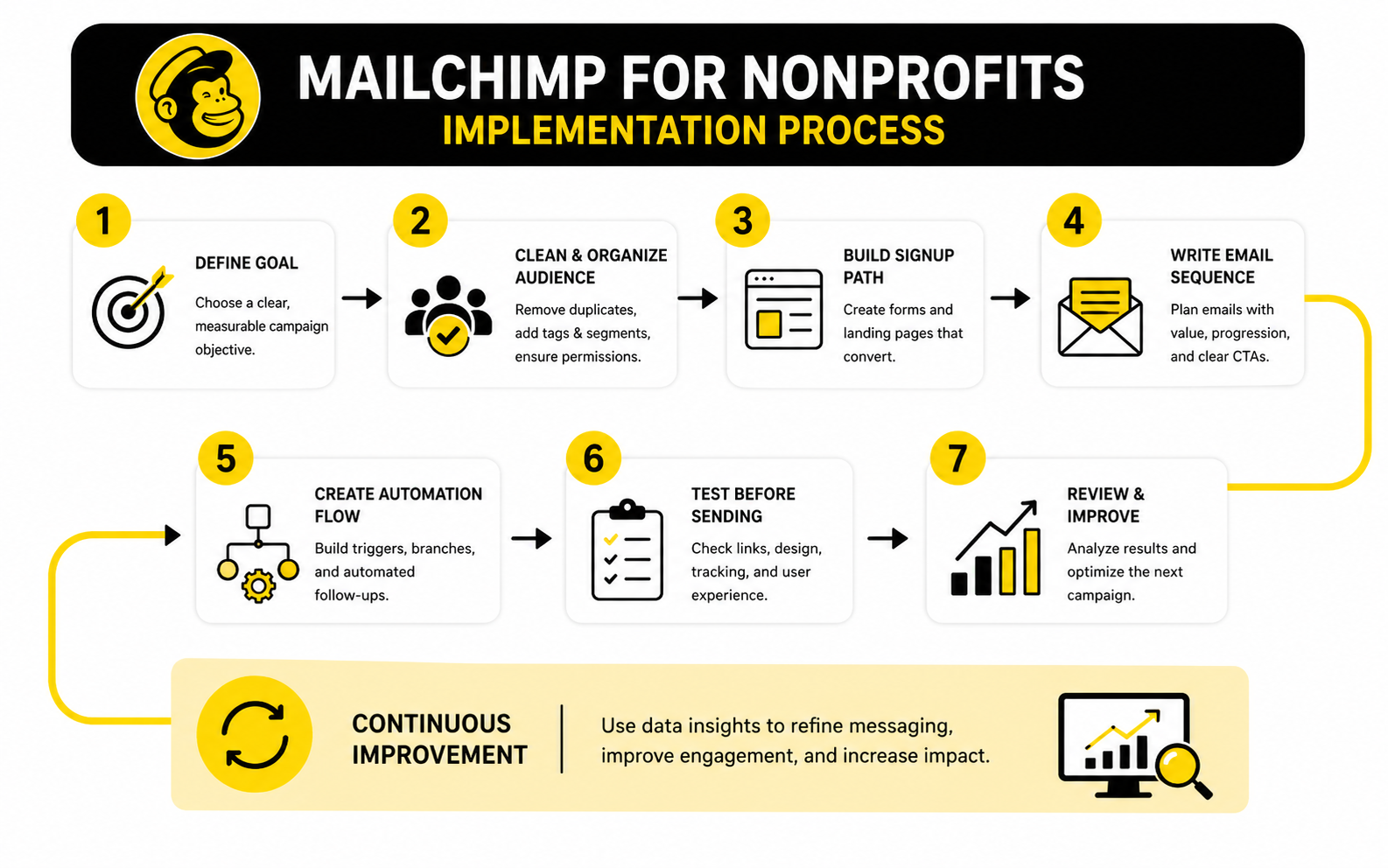
Start with the outcome, not the email. Decide exactly what this campaign needs to achieve before you build anything in Mailchimp. A vague goal like “raise awareness” is too soft to guide good decisions.
A better goal is specific and measurable. For example, you might aim to bring in first-time donors, increase monthly giving, register volunteers, drive event attendance, or re-engage supporters who have not clicked in six months. That one decision shapes your audience, message, timing, landing page, and follow-up.
This is also where you decide what success means. The M+R 2026 Benchmarks email data shows that nonprofits raised $54 for every 1,000 fundraising emails sent in 2025, while email list sizes grew by 5%. Those numbers are useful context, but your own baseline matters more because your list quality, cause, timing, and donor relationship are unique.
Step 2: Clean And Organize Your Audience
Before sending a campaign, clean the audience. Remove obvious duplicates, fix broken fields, check permission status, and make sure your list is made of people who actually opted in or have a legitimate relationship with your organization. Deliverability starts with list quality.
Then create a simple structure using tags, groups, and segments. Mailchimp’s tag system is useful for internal labels such as donor, volunteer, board member, event attendee, lapsed donor, or campaign source. Mailchimp’s groups feature works better when contacts choose interests themselves, such as volunteering, events, advocacy, education, or monthly giving updates.
Do not overbuild this. A nonprofit does not need 80 tags to be strategic. You need enough structure to send relevant emails without making the account impossible for another team member to understand.
Step 3: Build The Signup Path
Every campaign needs a clear signup or conversion path. For a fundraising campaign, that path may lead to a donation page. For a volunteer campaign, it may lead to a form. For a community education campaign, it may start with a signup form and then move people into a welcome sequence.
The path should be short, obvious, and aligned with the promise in the email. If the email asks people to support a specific project, the landing page should continue that same project message. Do not make supporters hunt for the right action.
Mailchimp can support this with signup forms and landing pages, but nonprofits should be careful with page purpose. A landing page should not behave like a full website. It should explain the campaign, remove doubt, and move the supporter toward one next step.
Step 4: Write The Email Sequence
A campaign sequence usually performs better than one isolated email. One email can be missed, ignored, or opened at the wrong time. A thoughtful sequence gives your message more than one chance without becoming annoying.
For a nonprofit campaign, a practical sequence might include:
- A launch email that explains the need and the action
- A proof email that shows impact or urgency
- A reminder email for people who clicked but did not act
- A final email close to the deadline
- A thank-you email for people who completed the action
The important part is progression. Each email should add something new instead of repeating the same appeal with a different subject line. Supporters can feel the difference immediately.
Step 5: Create The Automation Flow
Mailchimp’s marketing automation flows let you build automated paths with triggers, branches, and actions. For nonprofits, this is useful because different supporters need different follow-up. Someone who donates should not receive the same next email as someone who only opened the first message.
A basic campaign automation can tag contacts when they join, send the first email, wait a few days, branch based on engagement, and send a different follow-up depending on whether the person clicked or donated. Mailchimp also notes that automation flows can add tags and send targeted emails, which makes them useful for keeping supporter data organized while the campaign runs. That is a big deal for small teams.
Keep the first automation simple. Build the flow, test every step, and make sure the right people enter and exit correctly. Complexity is not impressive if it creates mistakes.
Step 6: Test Before Sending
Testing is not optional. Send test emails to your team, check every link, preview the mobile version, confirm merge tags, review subject lines, and make sure the reply-to address is monitored. Small errors can damage trust fast.
Check the donation, registration, or signup path from start to finish. Click from the email to the landing page, complete the form or donation step if possible, and confirm that the expected tag or follow-up happens inside Mailchimp. This is where many campaigns quietly break.
Also review accessibility basics. Use clear language, descriptive link text, readable formatting, and enough contrast in your design. Your supporters should not have to fight the email to understand the mission.
Step 7: Review Results And Improve The Next Send
After the campaign runs, review performance with a calm head. Do not overreact to one email. Look for patterns across subject lines, clicks, unsubscribes, donation activity, and segment behavior.
Mailchimp reporting can show which messages attracted attention and which calls to action actually moved people. The lesson may be that your audience prefers impact updates before asks, that volunteers engage better on weekdays, or that lapsed donors need a softer reactivation path. These insights are only useful if you apply them to the next campaign.
The best nonprofit email programs improve in cycles. Send, measure, learn, adjust, and send again. That rhythm is what turns Mailchimp from a simple email tool into a real growth asset for your mission.
Performance Data That Actually Matters
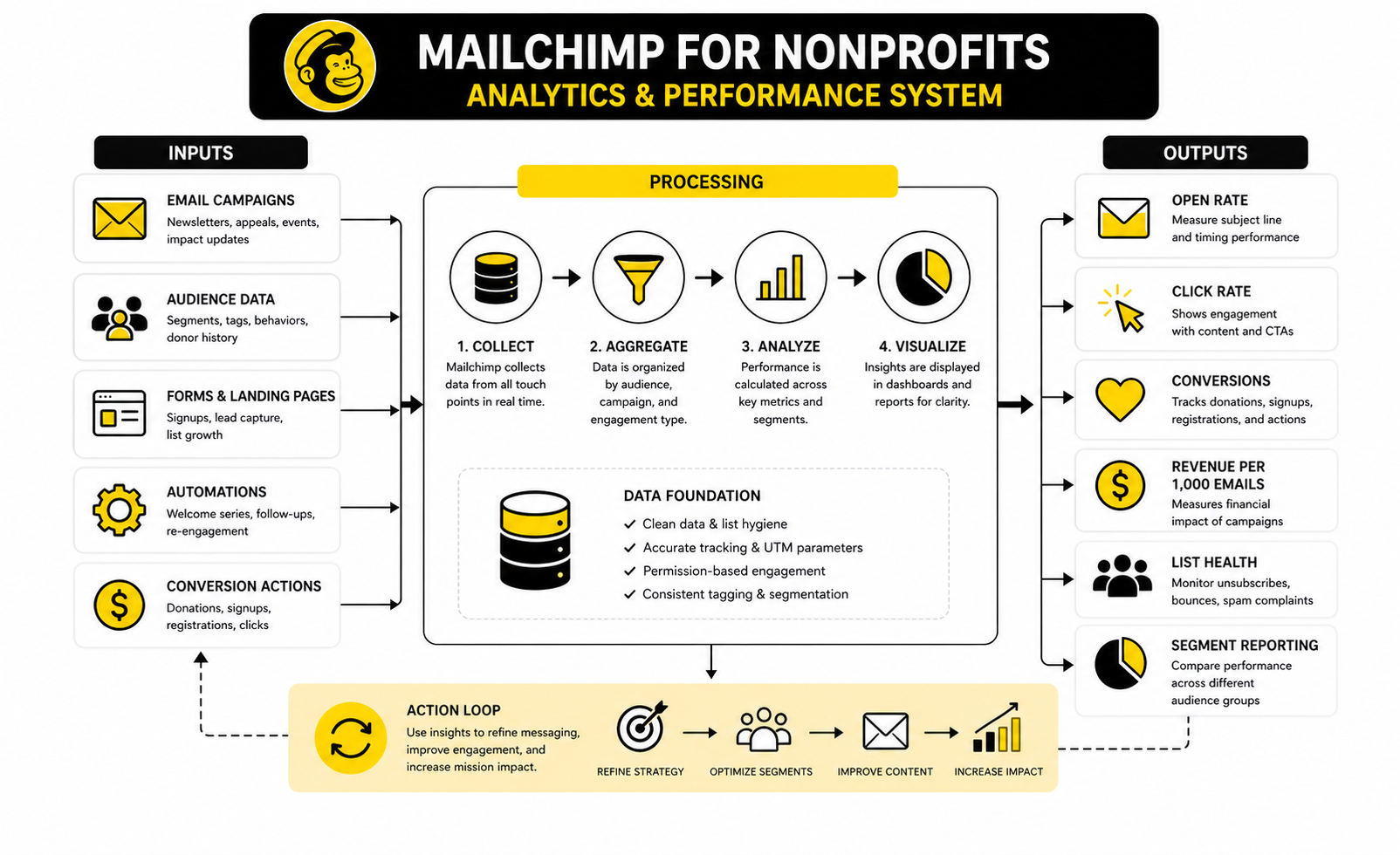
Measurement is where Mailchimp for nonprofits becomes practical. Without data, every campaign turns into a guessing game about subject lines, send times, donor interest, and message quality. With the right data, your team can see where supporters are paying attention, where they are dropping off, and what to improve before the next campaign.
The trap is measuring too much and learning too little. A nonprofit does not need a dashboard packed with vanity metrics. It needs a small set of numbers that connect email activity to mission outcomes.
Start With The Campaign Question
Every report should begin with one question: did this email move people toward the intended action? If the campaign was built to drive donations, the most important numbers are donation clicks, completed gifts, revenue per email, and donor follow-up performance. If the campaign was built for volunteer recruitment, the key numbers are form clicks, completed signups, and attendance or onboarding after the signup.
This keeps the team from celebrating the wrong thing. A high open rate is nice, but it does not prove the campaign worked. A smaller segment with fewer opens can outperform a large blast if it drives more completed actions.
The M+R 2026 Benchmarks email data gives useful nonprofit context: fundraising emails averaged a 0.59% click-through rate, a 0.05% response rate, and $54 in revenue per 1,000 fundraising emails sent. Those numbers are not goals to worship. They are reference points that help you ask better questions about your own list.
Read Open Rates Carefully
Open rates can still be useful, but they are not as clean as they used to be. Privacy changes, inbox preloading, and automated scanning can distort open tracking. That does not mean open rates are worthless; it means they should be treated as directional signals, not proof of real supporter interest.
Use open rates mainly to compare similar emails sent to similar audiences. If your donor newsletter usually opens around one range and suddenly drops sharply, something probably changed in your subject line, timing, deliverability, or list quality. If one segment consistently opens more than another, that may reveal stronger relationship depth or better message fit.
Do not optimize your whole nonprofit email strategy around opens alone. That pushes teams toward curiosity-driven subject lines that earn attention but do not necessarily build trust. For nonprofits, trust is the asset.
Focus More On Clicks And Conversions
Clicks show that someone did more than glance at the email. They saw the message, found the next step relevant, and chose to act. That makes click-through rate one of the most useful day-to-day metrics inside Mailchimp.
But clicks are still not the finish line. A supporter can click a donation button and abandon the page. A volunteer can click an interest form and never submit it. That is why the best Mailchimp reporting setup connects email clicks to downstream outcomes wherever possible.
For fundraising, review revenue per 1,000 emails, average gift size, donation page completion, and number of donors. For events, review registration completion and attendance. For advocacy, review action completions rather than only link clicks.
Watch List Health
List growth looks good on paper, but list health matters more. A nonprofit with a smaller engaged list can outperform a large list filled with inactive contacts. Mailchimp for nonprofits should be managed with that reality in mind.
Track unsubscribes, bounces, spam complaints, inactive contacts, and engagement by segment. If unsubscribes rise after a specific campaign, the audience or message may have been misaligned. If bounces increase, your list hygiene needs attention.
The 2025 Nonprofit Communications Trends Report shows how stretched many nonprofit teams are, with a large share of fundraising-led communications teams operating with solo or small-team capacity. That makes list discipline even more important. Small teams cannot afford to waste time sending poorly targeted emails to people who no longer engage.
Compare Segments, Not Just Campaigns
The most useful Mailchimp insights often appear when you compare segments. Donors may respond differently from volunteers. Event attendees may click education content more often than fundraising appeals. New subscribers may need more mission context before they are ready to give.
Segment reporting helps your nonprofit avoid one-size-fits-all conclusions. If a fundraising email underperforms overall but does well with previous donors, the problem may not be the email. The problem may be that the ask was sent to people who were not ready for it.
This is where tags and audience structure from the earlier setup work start paying off. Clean segments make reporting more honest. Messy segments make the data harder to trust.
Use Benchmarks Without Becoming Trapped By Them
Benchmarks are useful when they give you context, not when they become the whole strategy. The Blackbaud Institute’s 2025 giving data showed online giving growing by roughly 11% year over year, with digital revenue concentrated heavily in the final months of the year. That tells nonprofits to take digital fundraising seriously, especially around year-end.
But your own data should guide your next move. A local animal rescue, a university foundation, a public health nonprofit, and a faith-based organization may all use Mailchimp, but their audiences behave differently. Their benchmark comparisons should not be identical.
Use outside data to set expectations, then use your Mailchimp data to make decisions. That is the balance. External benchmarks show the field; your own metrics show the road.
Turn Reports Into Actions
A report is only useful if it changes what you do next. If click rates are low, tighten the email around one call to action. If donation page clicks are strong but gifts are weak, review the donation page rather than rewriting every email. If recurring donors engage with impact stories but not general newsletters, give them a more focused update.
A simple monthly review is enough for most nonprofits. Look at the best campaign, the weakest campaign, the strongest segment, the weakest segment, and one improvement to test next. Keep the review short, but make it consistent.
The goal is not to become obsessed with analytics. The goal is to make better decisions with less drama. When Mailchimp data is used properly, your nonprofit stops guessing and starts improving.
Professional Implementation And Optimization
At this stage, the question is no longer whether Mailchimp for nonprofits can send campaigns. It can. The real question is whether your setup can support growth without creating confusion, waste, or risk.
A professional implementation is not about making the account look complicated. It is about making the system dependable. The right people should receive the right messages, the data should stay clean, and the team should know exactly how campaigns move from idea to send to review.
Know When Mailchimp Is Enough
Mailchimp is a strong fit for many nonprofits that need email campaigns, basic automation, signup forms, audience segmentation, and accessible reporting. If your team mainly needs to communicate with supporters, run appeals, welcome subscribers, and review campaign performance, Mailchimp can cover a lot of ground. The nonprofit discount also helps make the platform easier to justify for smaller teams, since Mailchimp offers 15% off for verified nonprofit organizations and charities.
But Mailchimp is not a full donor management system. It can store useful supporter data, but it is not designed to replace a proper fundraising CRM when your organization needs pledge tracking, moves management, grant records, household relationships, major donor notes, or deep gift history. That distinction matters because forcing Mailchimp to do CRM work can create messy data and weak reporting.
The cleanest setup is usually this: use your donor database as the source of truth for giving history, and use Mailchimp as the communication layer. Sync only the fields you actually need for segmentation and personalization. That gives your fundraising team better control without turning every email campaign into a data cleanup project.
Avoid The One-Audience Mess
One of the biggest Mailchimp mistakes nonprofits make is dumping everyone into one audience with inconsistent tags. At first, it feels simple. Later, it becomes painful because nobody knows which contacts are donors, which ones are volunteers, who opted into what, or which records are still safe to email.
A better structure starts with governance. Decide who can create tags, what naming format the team will use, which fields are required, and how old segments will be retired. This is not glamorous work, but it prevents the account from becoming a junk drawer.
Use naming conventions your team can understand six months from now. For example, campaign tags should follow a consistent format, source tags should explain where the person came from, and supporter status tags should be limited to meaningful categories. If a tag does not help you send, suppress, personalize, or report, it probably does not belong there.
Balance Automation With Human Judgment
Automation can make nonprofit communication more consistent, but it should never make the organization sound detached. A donor who gives a meaningful gift, replies with a personal story, or raises a concern should not be treated like just another workflow step. Mailchimp can support the journey, but your team still owns the relationship.
Use automation for predictable communication moments. Welcome new subscribers, confirm interest, follow up after a donation, invite the next action, and re-engage quiet supporters. Those flows save time and reduce missed opportunities.
But set clear rules for human review. Major gifts, angry replies, unusual donor behavior, and sensitive supporter situations should be flagged for a real person. The more emotionally loaded the interaction, the less you should rely on automation alone.
Protect Deliverability Before It Becomes A Problem
Deliverability is one of those issues nonprofits often ignore until results suddenly drop. If too many emails bounce, too many people stop engaging, or too many recipients mark messages as spam, future campaigns can suffer. This is especially dangerous during year-end fundraising, when many nonprofits depend on email revenue.
The fix is not one magic setting. It is a set of habits: collect permission properly, avoid purchased lists, remove bad addresses, monitor inactive contacts, write relevant emails, and make unsubscribing easy. That last one may feel counterintuitive, but a clean unsubscribe is far better than a spam complaint.
List hygiene also protects your reporting. If thousands of inactive contacts stay on the list forever, open rates, click rates, and conversion rates become harder to interpret. A smaller engaged list is usually more valuable than a large list that barely responds.
Think Carefully About Total Cost
The 15% nonprofit discount is useful, but it should not be the only pricing factor. Mailchimp pricing is tied to plan level, contact volume, and feature access, so costs can rise as your list grows or your needs become more advanced. That is normal, but it needs to be planned.
Small nonprofits should pay close attention to which features they actually need. Advanced automations, multistep journeys, more detailed testing, and larger contact limits may require a higher plan. If your team will not use those features, paying for them does not make the system more strategic.
There is also the hidden cost of staff time. A cheaper tool can become expensive if it creates manual work every week. A more expensive setup can be worth it if it saves time, reduces errors, and helps campaigns raise more money.
Know When To Consider Other Tools
Mailchimp is not the only option, and that is fine. If your nonprofit needs stronger CRM-style pipelines, sales-style follow-up, SMS, appointment booking, or multi-channel automation, a broader platform like GoHighLevel may be worth comparing. If the priority is simpler email marketing with a different pricing model, Brevo or Moosend may also deserve a look.
The point is not to chase tools. The point is to match the system to the job. A small nonprofit sending newsletters and donor updates does not need the same stack as a national organization managing complex journeys across email, SMS, ads, events, and fundraising teams.
Before switching platforms, document the real problem. Is Mailchimp too expensive, too limited, too messy, or simply underused? Those are different problems, and they need different decisions.
Build A Repeatable Operating Rhythm
The best nonprofit email programs are not built on inspiration. They are built on rhythm. Your team needs a simple process for planning, building, approving, sending, measuring, and improving campaigns.
A practical monthly rhythm might include:
- Review the previous month’s email performance
- Choose the next campaign priority
- Update segments and suppressions
- Draft emails around one clear action
- Test links, mobile formatting, and tracking
- Send the campaign
- Record one lesson for the next cycle
This rhythm keeps Mailchimp from becoming another tool the team “should use better someday.” It turns the platform into part of how the organization communicates. That is where the value compounds.
Mailchimp For Nonprofits FAQ And Final Recommendations
Mailchimp for nonprofits makes the most sense when your organization needs a practical email marketing system that can grow with your supporter base. It is especially useful when the team has a clear campaign rhythm, clean audience data, and enough discipline to review results after each send. The platform will not fix unclear messaging, weak donor strategy, or poor list hygiene, but it can support a strong nonprofit communication system when those basics are in place.
The final recommendation is simple: start with the smallest setup that can reliably support your mission. Build one clean audience structure, one strong welcome journey, one repeatable campaign process, and one monthly reporting habit. Then expand only when the data and team capacity justify it.
Is Mailchimp Good For Nonprofits?
Yes, Mailchimp can be good for nonprofits that need email campaigns, signup forms, segmentation, automations, and campaign reporting in one accessible platform. It is a strong fit for newsletters, fundraising appeals, event promotion, volunteer updates, advocacy campaigns, and donor education. It works best when your nonprofit has a clear audience structure and does not expect Mailchimp to replace a full donor CRM.
Does Mailchimp Offer A Nonprofit Discount?
Yes, Mailchimp offers a 15% discount for verified nonprofit organizations and charities. The discount can help reduce the cost of paid plans, but it does not remove the need to choose the right plan carefully. Nonprofits should still compare contact limits, send limits, automation features, and team needs before upgrading.
What Should A Nonprofit Use Mailchimp For First?
The best first use is usually a welcome sequence for new subscribers. This helps your nonprofit introduce the mission, explain the problem, show impact, and invite a meaningful next step. After that, build campaign-specific emails for fundraising, volunteering, events, or advocacy.
Can Mailchimp Replace A Donor Database?
No, Mailchimp should not usually replace a proper donor database. It can store contact data and support email segmentation, but it is not built for full fundraising operations such as pledge tracking, major donor notes, grant management, household relationships, or long-term gift history. For most growing nonprofits, Mailchimp works better as the communication layer connected to a donor CRM.
How Often Should A Nonprofit Email Its List?
A nonprofit should email often enough to stay useful, but not so often that supporters feel overwhelmed. A monthly newsletter plus campaign-specific emails is a reasonable starting point for many organizations. The right cadence depends on audience expectations, campaign urgency, engagement data, and the quality of what you have to say.
What Metrics Matter Most In Mailchimp?
The most useful metrics are clicks, conversions, revenue or action completions, unsubscribes, bounces, and engagement by segment. Open rates can help compare subject lines and timing, but they should not be treated as perfect proof of interest. The best question is always whether the email moved the supporter toward the intended action.
How Should Nonprofits Segment Their Mailchimp Audience?
Start with practical segments such as donors, monthly donors, volunteers, event attendees, advocates, lapsed donors, new subscribers, and inactive contacts. Keep the structure simple enough for the whole team to understand. Segmentation should help you send more relevant messages, not create a confusing tag system nobody maintains.
What Is The Biggest Mailchimp Mistake Nonprofits Make?
The biggest mistake is sending the same message to everyone. A first-time subscriber, monthly donor, inactive contact, and active volunteer do not have the same relationship with your organization. When every email goes to everyone, relevance drops and list trust weakens.
Should Nonprofits Use Mailchimp Automations?
Yes, but they should start simple. Welcome journeys, post-donation follow-ups, event reminders, volunteer onboarding, and re-engagement sequences are all useful automation ideas. The goal is not to automate the whole relationship; the goal is to make important communication moments more consistent.
Is Mailchimp Enough For Fundraising?
Mailchimp can support fundraising emails, donor education, campaign follow-ups, and basic reporting. It is not enough by itself if your nonprofit needs deeper donor management, gift tracking, wealth screening, grant records, or major donor workflows. Think of it as part of the fundraising system, not the entire system.
What Should Nonprofits Do Before Sending A Campaign?
Before sending, check the audience segment, subject line, preview text, links, mobile layout, donation or signup path, merge tags, and reply-to address. Also confirm that the campaign has one clear action. Testing feels small, but it prevents embarrassing mistakes that can weaken supporter trust.
When Should A Nonprofit Consider A Mailchimp Alternative?
Consider an alternative when Mailchimp becomes too expensive, too limited, too disconnected from your CRM, or too difficult for your team’s workflow. Also consider other tools if your nonprofit needs stronger SMS, pipeline management, appointment booking, or multi-channel automation. The right decision depends on the job your platform needs to do, not on brand familiarity.
Work With Professionals
Explore 10K+ Remote Marketing Contracts on MarkeWork.com
Most marketers spend too much time chasing clients, competing on crowded platforms, and losing a percentage of every project to middlemen.
MarkeWork gives you a better way. Browse thousands of remote marketing contracts and connect directly with companies desperate to hire skilled marketers like you, without platform commissions and without unnecessary gatekeepers.
If you're serious about finding better opportunities and keeping 100% of what you earn, explore available contracts and create a profile for free at MarkeWork.com.