

Mailchimp for non profits is not just about sending newsletters. For most organizations, it becomes the system that keeps donors informed, volunteers engaged, campaigns moving, and supporters connected between major fundraising moments.
That matters because email still does real work for nonprofits. In the latest M+R Benchmarks data, nonprofit email revenue increased, email lists grew, and email continued to contribute a meaningful share of online revenue through fundraising, advocacy, and relationship-building campaigns shown in M+R’s email messaging benchmarks.
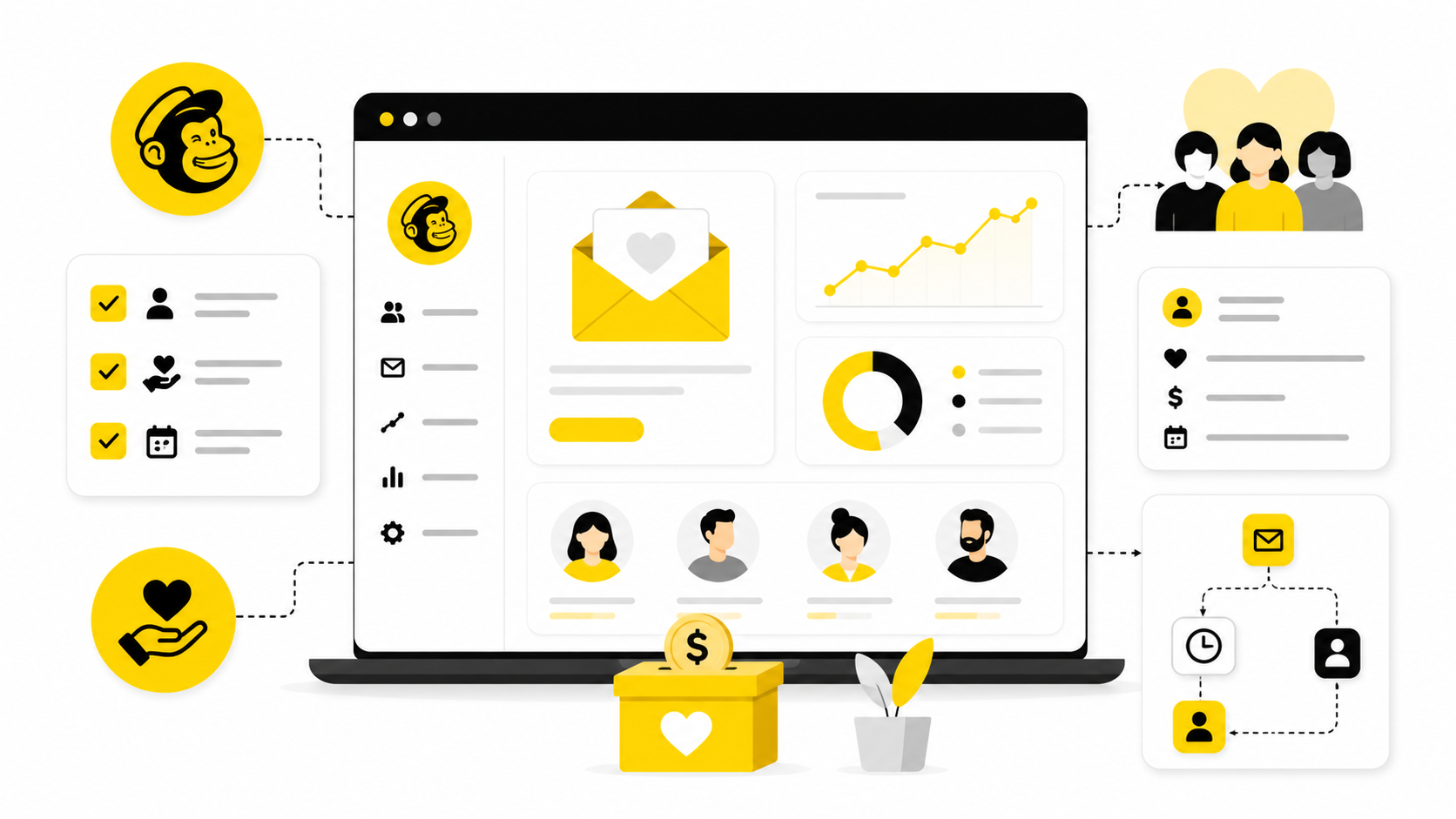
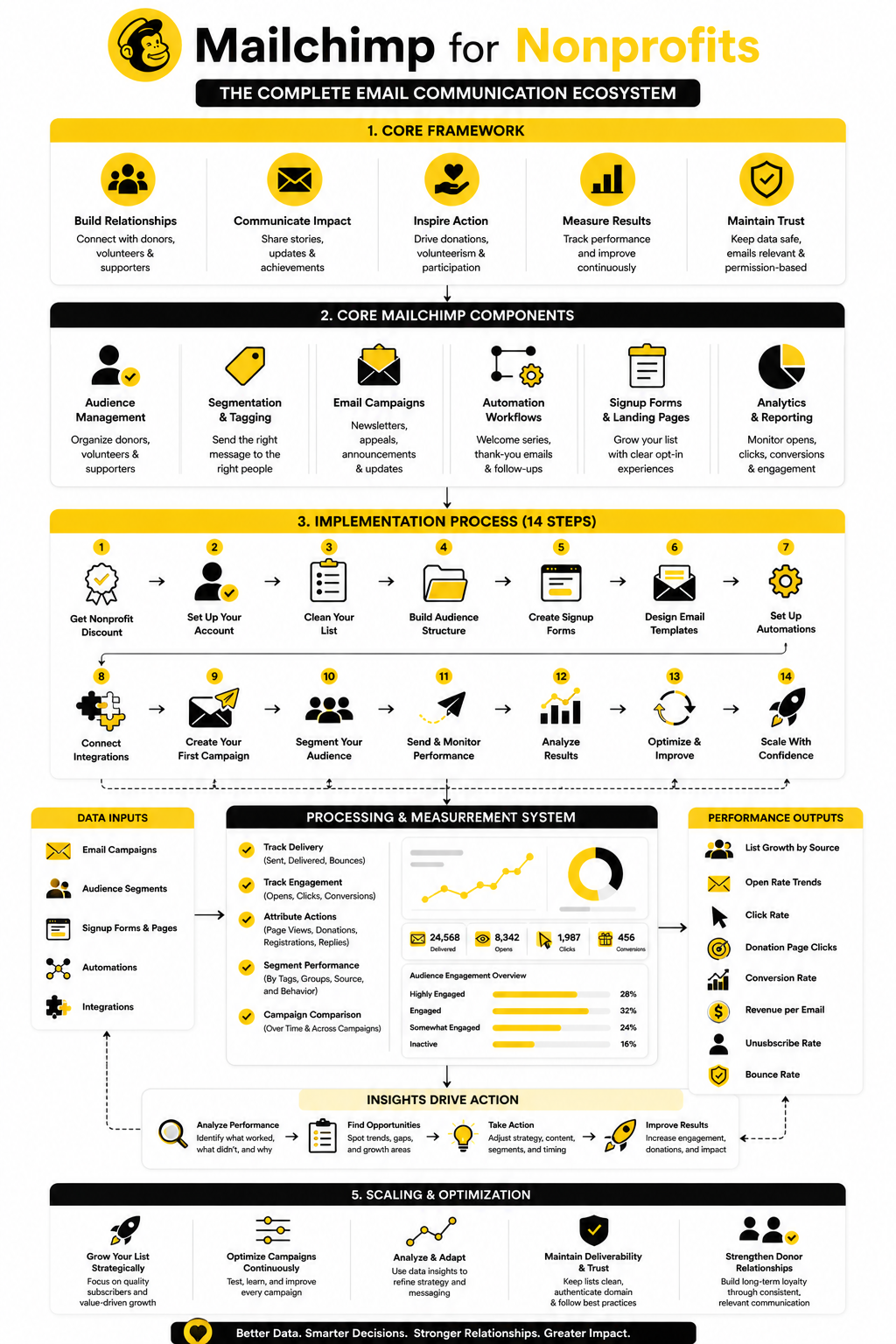
This guide breaks the topic into six connected parts, so the full article moves from strategy to implementation without jumping around.
- Why Mailchimp Matters For Nonprofits
- The Mailchimp For Nonprofits Framework
- Core Mailchimp Features Nonprofits Should Understand
- How To Set Up Mailchimp For Nonprofit Campaigns
- Professional Implementation And Optimization
- Mailchimp For Nonprofits FAQ And Final Recommendations
Why Mailchimp Matters For Nonprofits
Nonprofits usually do not have the luxury of messy communication. A missed donor update, weak campaign follow-up, or poorly timed appeal can quietly cost trust, momentum, and revenue.
Mailchimp matters because it gives nonprofit teams one practical place to manage email lists, design campaigns, segment supporters, and automate basic communication. Its official nonprofit program offers a 15% discount for verified nonprofit organizations and charities, which makes it more accessible for teams trying to control software costs while still communicating professionally through Mailchimp’s nonprofit discount program.
The bigger point is not the discount alone. The real value is whether your nonprofit can turn Mailchimp into a repeatable communication system instead of using it as a last-minute newsletter tool.
The Mailchimp For Nonprofits Framework
A strong Mailchimp setup for nonprofits has four moving parts: audience structure, campaign purpose, automation, and reporting. When those pieces work together, email becomes much easier to manage because every message has a clear job.
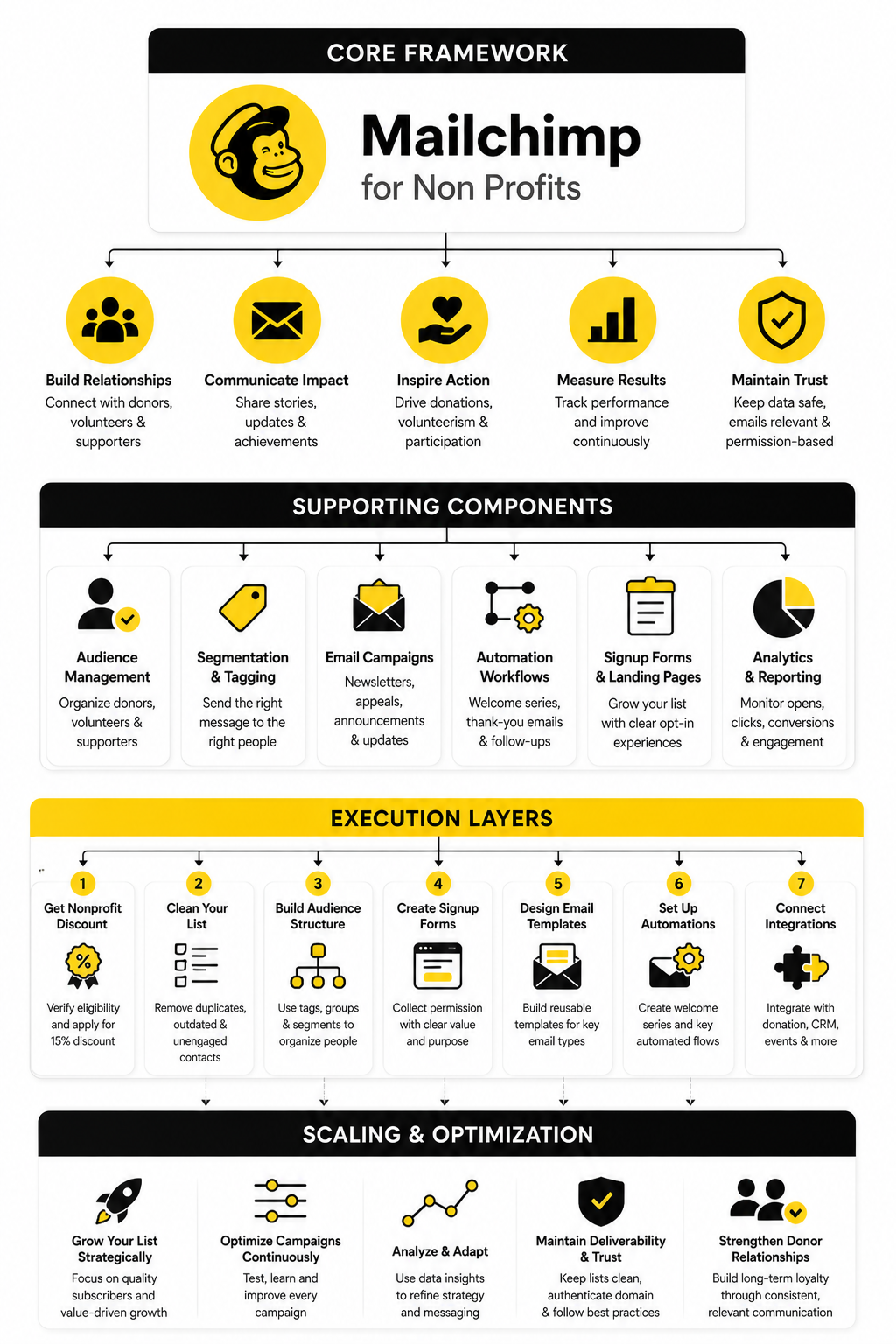
The framework starts with your audience. Donors, volunteers, event attendees, board members, partners, and inactive subscribers should not all receive the same message every time.
Then comes campaign purpose. A fundraising appeal, volunteer reminder, impact update, event invitation, and advocacy alert each need different timing, tone, and call to action.
Finally, automation and reporting keep the system from depending on memory. Welcome emails, donation follow-ups, re-engagement campaigns, and performance reviews help your nonprofit communicate consistently without manually rebuilding every campaign from scratch.
Core Mailchimp Features Nonprofits Should Understand
Mailchimp for non profits works best when you stop thinking about it as a simple email sender. The useful parts are the features that help you organize supporters, send more relevant messages, and understand what people actually do after they receive your emails.
That does not mean every nonprofit needs every feature on day one. A small community organization can start with clean audience management and basic campaigns, while a larger nonprofit may need segmentation, automation, landing pages, integrations, and more detailed reporting.
The mistake is trying to build everything at once. The smarter move is to understand the core pieces, then add complexity only when it helps your fundraising, volunteer engagement, or community-building goals.
Audience Management
Your audience is the foundation of the whole setup. If your Mailchimp account is messy, every campaign becomes harder because you do not know who should receive what.
For nonprofits, a clean audience usually starts with clear contact categories. Donors, monthly donors, volunteers, event attendees, program participants, partners, and general newsletter subscribers all have different relationships with your organization.
This matters because relevance drives trust. A first-time volunteer should not be treated like a long-term major donor, and a lapsed supporter should not receive the exact same message as someone who gave last week.
Tags, Groups, And Segments
Tags, groups, and segments are where Mailchimp becomes more useful for nonprofit communication. They help you separate people by behavior, interest, relationship, source, or engagement level.
A practical nonprofit setup might tag contacts by donation history, event attendance, volunteer interest, campaign source, or geographic area. Then you can send a local event invite only to people nearby, or send a donor impact update only to people who contributed to that specific campaign.
Segmentation is especially important because nonprofit supporters often care about different parts of the mission. Someone who cares about animal rescue may not respond to the same message as someone who supports education, disaster relief, or community programs.
Email Campaigns
Email campaigns are still the center of Mailchimp for most nonprofits. They are where you send newsletters, fundraising appeals, event reminders, advocacy updates, volunteer calls, and impact stories.
The best nonprofit campaigns do not feel like random announcements. They have one clear purpose, one primary audience, and one main action.
That action could be donating, registering, replying, sharing, volunteering, reading a report, or attending an event. When you try to make one email do five jobs, people usually do none of them.
Signup Forms And Landing Pages
List growth matters, but quality matters more. A nonprofit does not just need more subscribers; it needs the right people joining for the right reasons.
Mailchimp signup forms and landing pages can help you collect new contacts from your website, campaigns, events, and social channels. For example, a nonprofit could create a landing page for a volunteer interest list, a campaign-specific donor update list, or an event registration follow-up list.
The key is to set expectations clearly. Tell people what they will receive, how often they will hear from you, and why joining the list is useful to them.
Automation
Automation is where small nonprofit teams can save serious time. You do not need to manually send every welcome message, thank-you follow-up, reminder, or re-engagement email.
A basic welcome sequence can introduce your mission, explain your impact, invite a first action, and help new supporters understand how to stay involved. That is much stronger than adding someone to a list and waiting until the next monthly newsletter.
Automation also helps with timing. Since nonprofit email revenue rose 16% and email accounted for 11% of online revenue in the latest M+R email benchmarks, the opportunity is not just sending more messages. It is sending the right message when the supporter is most likely to care.
Reporting And Analytics
Reporting is not there to make your dashboard look impressive. It is there to tell you what to improve next.
For nonprofits, the most useful numbers are usually open rate trends, click rate, unsubscribe rate, conversion behavior, revenue attribution, audience growth, and engagement by segment. You are looking for patterns, not vanity metrics.
A campaign with fewer opens but more donations may be more valuable than a newsletter with high opens and no action. That is why every report should connect back to the real goal of the email.
Integrations
Mailchimp becomes more powerful when it connects with the rest of your nonprofit stack. That might include your donation platform, CRM, website, event tools, forms, or social channels.
The goal is simple: reduce manual work and keep supporter data cleaner. If someone donates, registers, or fills out a volunteer form, that behavior should ideally help shape future communication.
This is also where nonprofits should be careful. Integrations can help, but too many disconnected tools can create duplicate records, compliance headaches, and confusing reporting. Start with the systems that directly affect donor communication, then expand from there.
How To Set Up Mailchimp For Nonprofit Campaigns
Once the strategy is clear, implementation becomes much easier. Mailchimp for non profits should be set up around the way your organization actually communicates, not around a generic template that ignores donors, volunteers, programs, and campaigns.
The process below is the practical version. It keeps the system simple enough for a small team, but structured enough that you can grow without rebuilding everything later.
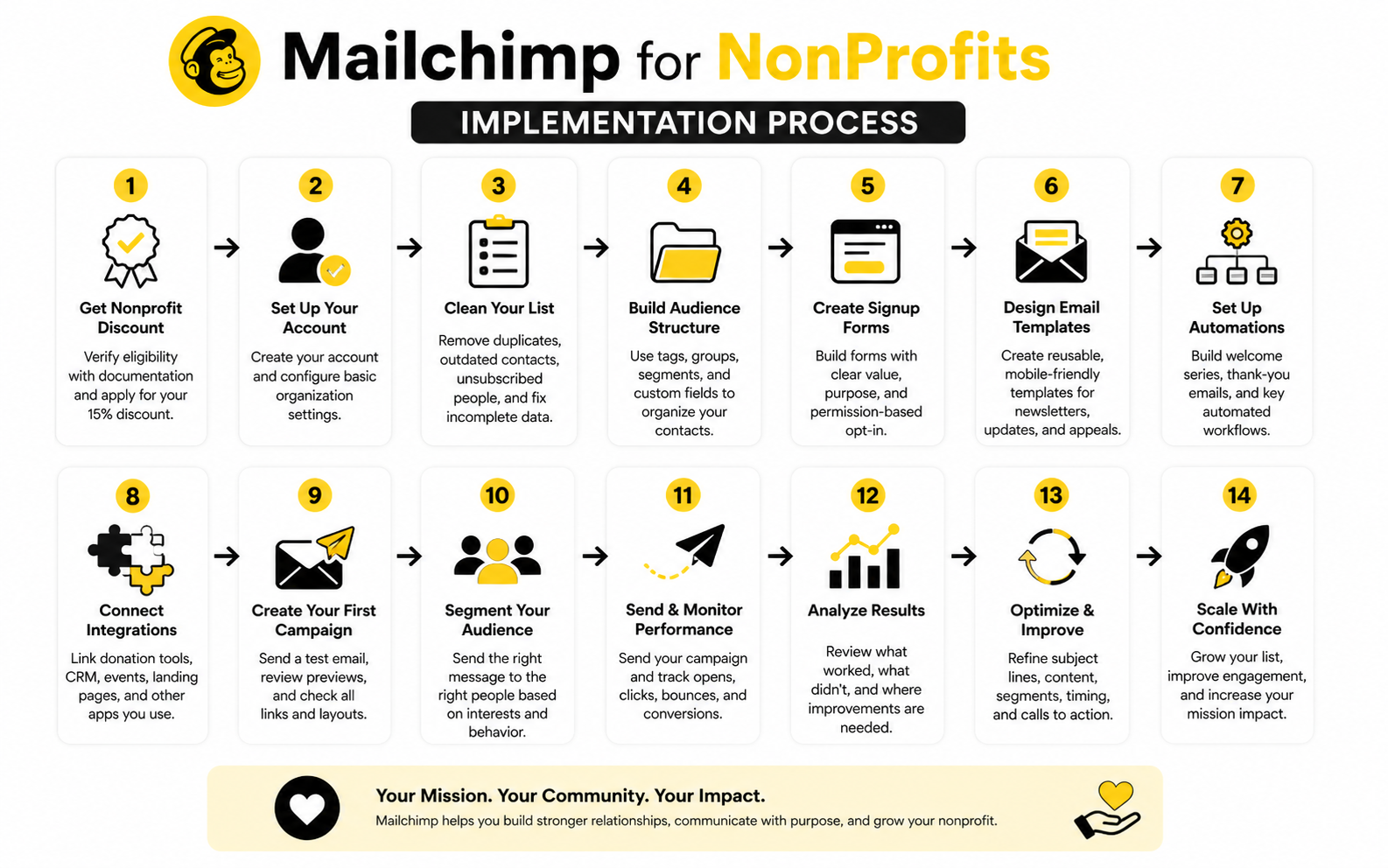
Step 1: Confirm Your Nonprofit Discount And Account Basics
Start with the boring setup work because it affects everything that comes after it. Mailchimp offers a 15% discount for verified nonprofit organizations and charities, so eligible teams should apply before scaling their contact list or moving into a higher plan through Mailchimp’s nonprofit discount process.
Then check your sender name, reply-to address, organization details, and default audience settings. These details sound small, but they influence trust every time someone opens an email from your nonprofit.
Use a real organizational email address whenever possible. A donor is more likely to trust a message from your nonprofit domain than a generic inbox that looks disconnected from the organization.
Step 2: Clean Your Existing Contact List
Before importing contacts, slow down and clean the list. This is where many nonprofit teams create problems for themselves because they upload every spreadsheet they can find without checking source, permission, or relevance.
Remove obvious duplicates, outdated contacts, role-based inboxes that do not belong on the list, and anyone who should not receive marketing emails. Mailchimp is clear that contacts need permission to receive email marketing, and permission is not just a nice-to-have; it is part of responsible email compliance through Mailchimp’s email marketing permission guidance.
This step protects deliverability and trust. A smaller list of people who actually want to hear from you is more valuable than a large list full of people who ignore, delete, or report your messages.
Step 3: Build A Simple Audience Structure
Do not create a complicated system on day one. Start with one primary audience, then use tags, groups, and segments to organize people inside it.
A clean nonprofit structure might include tags for donor, monthly donor, volunteer, event attendee, board member, partner, program interest, campaign source, and inactive contact. You can refine this later, but those categories are enough to make your early campaigns more relevant.
The goal is to make future sending decisions easier. When your team asks, “Who should receive this?” the answer should come from your structure instead of someone guessing from memory.
Step 4: Set Up Signup Forms With Clear Consent
Your signup forms should tell people exactly what they are joining. “Subscribe to our newsletter” is fine, but it is weaker than explaining that subscribers will receive impact updates, campaign news, volunteer opportunities, and occasional fundraising appeals.
If your nonprofit serves supporters in regions covered by privacy laws, consent needs extra care. Mailchimp’s GDPR guidance explains that enabling GDPR fields is only part of the process; organizations still need to set up forms, create segments, and manage consent correctly through its GDPR consent collection guidance.
This is not just legal housekeeping. Clear consent improves list quality because people understand the relationship before they join.
Step 5: Create Your First Campaign Templates
Templates save time, but they should not make every email look identical. Build a few reusable formats for the messages your nonprofit sends most often.
A practical starting set includes:
- A monthly impact update
- A fundraising appeal
- A volunteer opportunity email
- An event invitation
- A campaign progress update
- A donor thank-you follow-up
Each template should have one job. The impact update should build belief, the appeal should drive giving, the volunteer email should drive signups, and the event invitation should drive registration.
Step 6: Write A Basic Welcome Sequence
A welcome sequence is one of the most useful automations for a nonprofit because it shapes the relationship early. When someone joins your list, they are paying attention right now, not three months from now.
Start with three simple emails. The first welcomes them and explains the mission, the second shows the impact of the work, and the third invites one meaningful next step such as donating, volunteering, registering, or sharing the campaign.
Keep the sequence human. People join nonprofit lists because they care about a cause, so the emails should feel like a guided introduction to the mission, not a corporate onboarding flow.
Step 7: Connect Mailchimp To The Tools That Matter
After the basics are stable, connect Mailchimp to the systems that directly affect communication. This might include your donation platform, website forms, event registration tool, CRM, or calendar workflow.
Be selective. Every integration should either save manual work, improve targeting, or make reporting clearer.
For nonprofits that need a broader marketing and CRM system beyond email, GoHighLevel can be worth reviewing, especially when the organization wants pipelines, landing pages, automation, SMS, and follow-up workflows in one place. That does not mean every nonprofit should replace Mailchimp, but it does mean your team should understand whether you need an email platform, a CRM, or a more complete operating system.
Step 8: Launch With A Small Campaign First
Do not make your first Mailchimp campaign a major year-end fundraising push. Test the system with a lower-risk email first, such as a short impact update, event reminder, or volunteer announcement.
This gives you a chance to check formatting, links, audience selection, sender details, unsubscribe behavior, and reporting before money is on the line. It also helps your team learn the publishing process without pressure.
After the email goes out, review the basics. Look at delivery, opens, clicks, unsubscribes, replies, and any conversion data you can connect back to the campaign. Then improve the next send instead of treating every email like a one-off task.
Statistics And Data
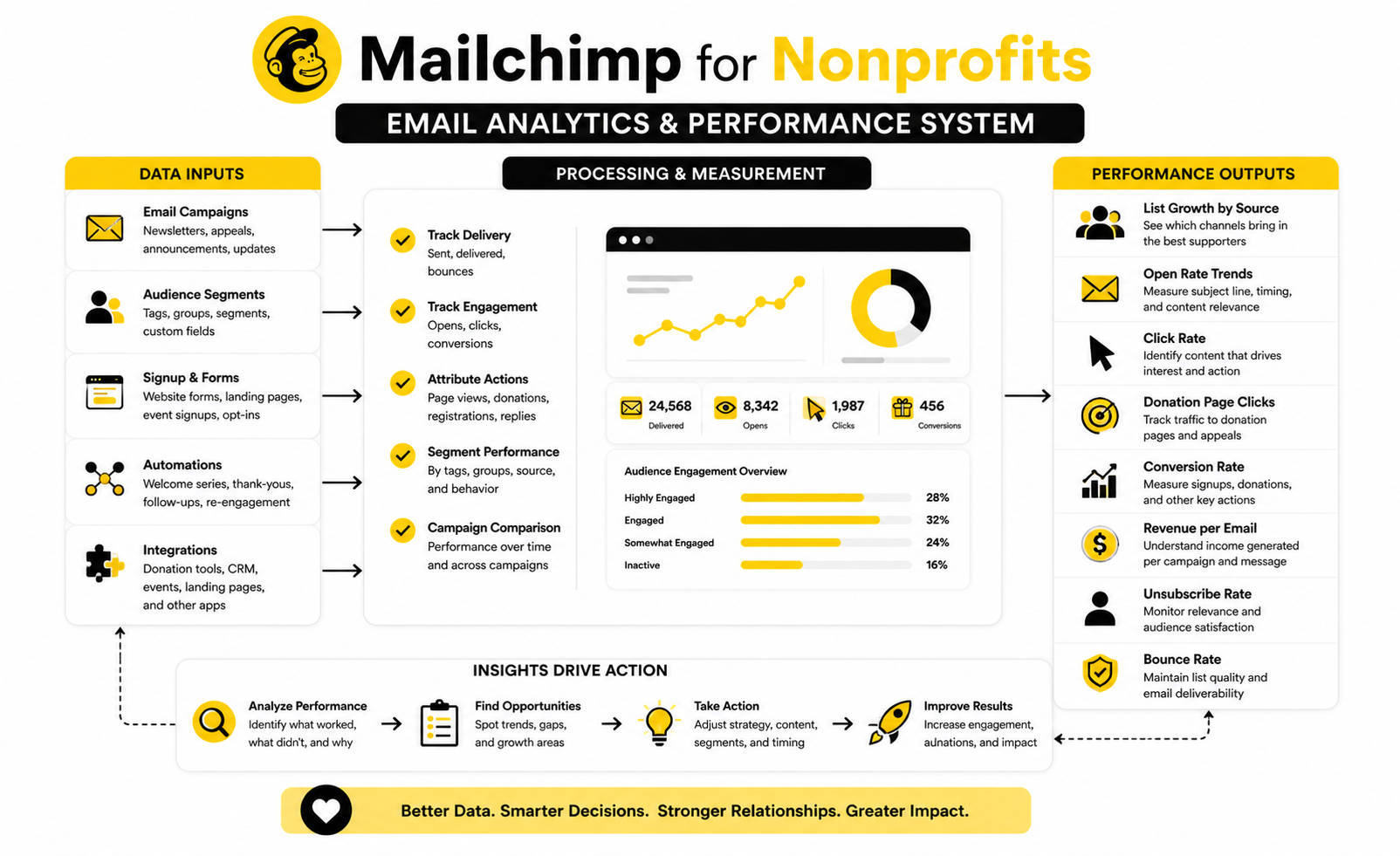
Data is where Mailchimp for non profits becomes more than a communication tool. It shows whether your emails are building trust, driving action, and creating measurable value for the organization.
The important thing is not collecting every possible number. The important thing is knowing which numbers matter, what they mean, and what decision they should trigger.
A healthy nonprofit email program usually measures four layers: list quality, engagement, action, and revenue or mission impact. When those layers are connected, your reports stop being interesting trivia and start becoming a practical management system.
List Growth Is Only Useful When It Comes With Permission
A growing list looks good on paper, but growth alone does not prove that your email program is healthy. A nonprofit can add hundreds of contacts from events, petitions, lead magnets, or donation forms and still have weak performance if those people did not clearly expect future email.
That is why permission matters. Mailchimp’s own guidance on email marketing permission makes it clear that contacts should knowingly agree to receive marketing messages, and that principle is especially important for nonprofits because trust is part of the asset.
The practical action is simple. Track where subscribers come from, tag the source, and compare engagement by source over time. If event signups open and click more than imported legacy contacts, your next growth move should be more event-based list building, not another broad spreadsheet import.
Open Rates Show Attention, But Not Commitment
Open rates are useful, but they are not the finish line. They can tell you whether your sender name, subject line, timing, and audience fit are working well enough to earn attention.
Still, opens should be interpreted carefully. Privacy changes and inbox behavior can make open rates less precise, so a strong open rate does not automatically mean the campaign created value.
Use opens as an early signal, not a final score. If opens are weak, improve subject lines, sender trust, list hygiene, and segmentation. If opens are strong but clicks are weak, the problem is probably inside the email itself.
Click Rates Show Real Interest
Clicks are usually more meaningful than opens because they show that someone moved from passive attention to active interest. For a nonprofit, that interest might be a donation page visit, event registration click, volunteer form click, petition click, or annual report click.
Mailchimp’s benchmark guidance notes that click-through rates vary by industry, with an overall optimal CTR around 2.66% and many industries ranging from 1% to 5% in its email marketing benchmark data. That range matters because nonprofits should not judge every campaign against one universal number.
A fundraising appeal and an impact newsletter should not be measured the same way. If the goal is giving, clicks to the donation page matter most. If the goal is education, clicks to a report, story, or program update may be the better signal.
Revenue Per Email Is The Metric Fundraising Teams Should Watch
For fundraising campaigns, revenue per email sent is often more useful than open rate or click rate. It connects email activity to actual financial outcomes.
The latest M+R Benchmarks data found that nonprofit email revenue increased 16%, while email generated 11% of online revenue in its email messaging benchmarks. That does not mean every nonprofit should expect the same result, but it does prove that email can still carry real fundraising weight when the list, message, and donation experience work together.
The action is to calculate revenue by campaign type. Compare appeals, match campaigns, emergency campaigns, monthly giving pushes, and year-end emails separately, because each one behaves differently.
Unsubscribes Are Not Always Bad
Unsubscribes can feel negative, but they are not automatically a problem. Sometimes they simply remove people who were never going to engage again.
The signal to watch is the pattern. A normal unsubscribe rate after a strong appeal is different from a sudden spike after a confusing, irrelevant, or overly aggressive email.
When unsubscribes rise, review the audience, promise, frequency, and message fit. The fix is rarely “send nothing.” The better fix is usually tighter segmentation, clearer expectations, and fewer emails that try to speak to everyone at once.
Donation Page Data Completes The Picture
Mailchimp can show email performance, but the donation page tells you whether that attention turned into revenue. If people click but do not give, the problem may not be the email.
The donation page may be too slow, too confusing, too long, poorly optimized for mobile, or disconnected from the campaign message. That is why nonprofits should review email clicks and donation conversions together, not separately.
If a campaign drives strong traffic and weak donations, test the landing page before rewriting the entire email strategy. Tools like ClickFunnels or Systeme.io can be useful when a team needs dedicated campaign pages, simple funnels, or clearer conversion paths outside the main website.
The Best Reports Lead To One Clear Decision
A report is only valuable if it changes what you do next. After each campaign, your nonprofit should be able to name one improvement for the next send.
That improvement might be a better segment, a clearer call to action, a shorter email, a stronger donation page, a different send time, or a cleaner subject line. Keep it practical.
The goal is not perfect analytics. The goal is a learning loop where every campaign gives your team one useful lesson, and that lesson makes the next campaign sharper.
Professional Implementation And Optimization
At a certain point, Mailchimp for non profits becomes less about sending campaigns and more about operating a reliable supporter communication system. This is where advanced decisions start to matter because small mistakes can compound across fundraising, deliverability, reporting, and donor trust.
The goal is not to make the system complicated. The goal is to make it stable, measurable, and useful enough that your nonprofit can grow without breaking its communication process every time the list gets bigger.
This is also where leadership needs to think beyond “Can we send this email?” and start asking, “Is this the right message, to the right people, through the right system, with the right follow-up?”
Deliverability Becomes A Leadership Issue
Deliverability is not just a technical setting hidden inside your email account. If your nonprofit depends on email for donations, event attendance, volunteer mobilization, or emergency response, inbox placement directly affects revenue and mission execution.
Google’s sender guidance requires authentication practices like SPF, DKIM, and DMARC alignment for reliable sending, while Yahoo’s sender requirements also emphasize authentication and keeping spam complaint rates low through its email sender best practices. That means your domain reputation is now part of your fundraising infrastructure.
The practical move is to treat deliverability as an owned responsibility. Someone on the team should check authentication, monitor spam complaints, remove inactive contacts, and avoid sudden sending spikes before a major appeal.
Segmentation Should Follow Donor Intent
Advanced segmentation is not about making dozens of tiny lists for the sake of looking sophisticated. It is about understanding why people are connected to your nonprofit and sending messages that respect that relationship.
A monthly donor, a first-time donor, a volunteer, a lapsed donor, and an event attendee may all support the same mission, but they are not in the same moment. If they all receive identical fundraising appeals every time, your nonprofit is leaving relevance on the table.
A stronger approach is to segment by intent and behavior. Look at donation recency, donation frequency, campaign interest, engagement level, program preference, and event history, then use those signals to shape the message.
Automation Needs Human Judgment
Automation can save time, but bad automation can damage trust faster than a bad one-off email. A poorly timed appeal after someone just donated, a generic welcome sequence for a major donor, or a repeated re-engagement email to someone who already responded can make your nonprofit feel careless.
That is why every automation should have a clear trigger, clear exit rules, and a clear owner. Nobody should build a workflow and then forget it exists.
Review automations at least quarterly. Check whether the language is still accurate, the links still work, the audience logic still makes sense, and the calls to action still match your current campaigns.
Scaling Your List Changes The Economics
A small Mailchimp account can feel inexpensive, but list growth changes the cost structure. Nonprofits should look at pricing before they scale, not after they have already built a system around a larger database.
Mailchimp’s paid marketing plans vary by contact count and feature level, so teams should review the current Mailchimp marketing plan comparison before deciding how aggressively to import contacts, retain inactive subscribers, or unlock advanced features. The nonprofit discount helps, but it does not remove the need for list discipline.
This is where inactive contacts become a strategic issue. Keeping people who never open, click, donate, volunteer, or respond can increase costs while weakening performance signals.
Data Hygiene Protects Future Campaigns
Data hygiene sounds boring until a campaign goes to the wrong people. Then it becomes urgent.
A nonprofit should have clear rules for imports, tags, duplicate contacts, unsubscribed contacts, bounced addresses, deceased donors, role changes, and outdated event lists. Without those rules, Mailchimp slowly turns into a junk drawer.
Good data hygiene also makes reporting more honest. If your donor tags are inaccurate or your campaign sources are inconsistent, your analytics will confidently point you in the wrong direction.
Mailchimp May Not Be The Whole System Forever
Mailchimp can be a strong email platform for many nonprofits, but it may not be the only system your organization needs as it grows. The question is not whether Mailchimp is “good” or “bad.” The question is whether it fits the job your team needs done now.
If your nonprofit mainly needs newsletters, appeals, basic automations, and audience segmentation, Mailchimp can be a practical choice. If your team also needs donor pipelines, sales-style follow-up, SMS workflows, appointment booking, landing pages, reputation management, or a more unified CRM, then a broader platform like GoHighLevel may deserve a closer look.
The tradeoff is complexity. A bigger system can centralize more work, but only if your team has the process discipline to use it properly.
The Biggest Risk Is Sending More Without Saying More
Nonprofit email performance does not improve just because you increase volume. The 2026 M+R Benchmarks found that nonprofits sent an average of 50 email messages per subscriber in 2025, including 31 fundraising messages, while email generated 11% of online revenue through its email messaging benchmarks.
That tells you email is still powerful, but it also creates a warning. Supporters are already receiving a lot of messages, so your nonprofit has to earn attention with relevance, clarity, and timing.
More email is not the strategy. Better sequencing, sharper segmentation, stronger offers, cleaner data, and clearer impact are the strategy.
Expert-Level Implementation Comes Down To Ownership
The best Mailchimp setups usually have one thing in common: ownership. Someone is responsible for the audience structure, campaign calendar, templates, automations, deliverability, reporting, and cleanup process.
That does not mean one person has to do all the work. It means the system cannot be everyone’s side project and nobody’s responsibility.
When ownership is clear, Mailchimp becomes easier to improve. Campaigns get reviewed, automations stay current, segments stay useful, and the team stops rebuilding the same work every month.
Mailchimp For Nonprofits FAQ And Final Recommendations
Mailchimp for non profits works best when it is treated as part of a complete supporter communication system. The platform can help you send campaigns, organize contacts, automate follow-up, and measure performance, but the strategy still has to come from your nonprofit.
The final decision is not just whether Mailchimp is popular or easy to use. The better question is whether it fits your team’s audience size, campaign volume, fundraising model, donor journey, and internal capacity.
If your nonprofit is early-stage, Mailchimp can be a practical place to start. If your nonprofit is scaling fast, you should review costs, integrations, reporting needs, deliverability requirements, and whether email alone is enough for the system you are trying to build.
Is Mailchimp Good For Nonprofits?
Yes, Mailchimp can be good for nonprofits that need email campaigns, audience management, basic automations, signup forms, landing pages, and reporting. It is especially useful when the team wants a familiar email platform without immediately committing to a large CRM implementation.
The main limitation is that Mailchimp is not a full donor management system by default. If your nonprofit needs deep donor records, gift histories, major donor workflows, grant tracking, or complex fundraising operations, you may need a dedicated nonprofit CRM alongside it.
The practical answer is simple. Mailchimp is strong for communication, but it should not be forced to replace systems it was not designed to replace.
Does Mailchimp Offer A Nonprofit Discount?
Yes, Mailchimp offers a 15% discount for verified nonprofit organizations and charities through its nonprofit discount program. Eligible organizations need to submit a request and provide the information Mailchimp requires for verification.
The discount can help, especially as your list grows and monthly costs increase. Still, nonprofits should compare the discounted price against their contact count, send volume, required features, and long-term budget.
Do not judge the platform only by the starting price. Look at what your account will cost when your list doubles, your team needs more automation, or your reporting requirements become more serious.
What Is The Best Way To Organize A Nonprofit Audience In Mailchimp?
The best way is to keep one main audience and organize contacts with tags, groups, and segments. That keeps the account cleaner than creating separate audiences for every campaign, event, or program.
Useful tags might include donor, monthly donor, volunteer, event attendee, board member, partner, program interest, lapsed donor, and campaign source. Those tags make it easier to send more relevant messages without rebuilding your list every time.
The rule is to organize contacts around real decisions. If a tag will not help you send better emails, report more clearly, or automate smarter follow-up, it probably does not need to exist.
How Often Should A Nonprofit Send Emails?
There is no perfect universal frequency. The right cadence depends on your mission, campaign calendar, audience expectations, and the quality of what you have to say.
The 2026 M+R Benchmarks found that nonprofits sent an average of 50 email messages per subscriber in 2025, including 31 fundraising messages, while email drove 11% of online revenue in its email messaging benchmarks. That shows email still matters, but it also proves supporters are already receiving a lot.
A practical starting point is one regular impact email per month, plus campaign-specific emails when there is a real reason to send. Increase frequency when the message is timely, relevant, and useful; do not increase it just because the calendar is empty.
What Emails Should A Nonprofit Automate First?
Start with the emails that should happen every time and should not depend on someone remembering. A welcome sequence is usually the first automation to build because it introduces new subscribers while their interest is fresh.
After that, consider donation thank-you follow-ups, volunteer interest follow-ups, event registration reminders, re-engagement emails, and campaign-specific nurture sequences. Each one should have a clear trigger and a clear stopping point.
Automation should feel thoughtful, not robotic. If the message would feel awkward or insensitive when sent manually, automation will not fix it.
What Metrics Matter Most In Mailchimp For Nonprofits?
The most useful metrics are list growth by source, open rate trends, click rate, donation page clicks, conversion rate, revenue per email, unsubscribe rate, bounce rate, and engagement by segment. These numbers show whether your audience is growing, paying attention, taking action, and staying subscribed.
Do not treat every metric equally. For a fundraising appeal, donation revenue matters more than opens. For an event invitation, registrations matter more than general clicks.
The best reports lead to one next action. If the data does not help you improve the next campaign, simplify what you are tracking.
Can Mailchimp Replace A Nonprofit CRM?
Sometimes, but not always. Mailchimp can manage contacts and communication, but a nonprofit CRM usually handles deeper donor records, donation history, relationship notes, household data, fundraising pipelines, and reporting that goes beyond marketing campaigns.
For small nonprofits, Mailchimp plus a donation platform may be enough for a while. For growing organizations, the limitations become more obvious when donor relationships, recurring gifts, major gifts, and segmented fundraising become more complex.
Think of Mailchimp as the communication layer. If your fundraising operations need more structure, connect it to a CRM instead of stretching it too far.
What Are The Biggest Mailchimp Mistakes Nonprofits Make?
The biggest mistakes are importing messy lists, sending the same email to everyone, ignoring inactive contacts, skipping authentication, and measuring only opens. These problems usually look small at first, then become expensive when your list grows.
Another common mistake is treating email like a broadcast channel instead of a relationship channel. Supporters do not want to be blasted; they want relevant updates, clear asks, and proof that their attention or money matters.
The fix is not complicated. Keep the data clean, segment with purpose, send useful messages, and review performance after every major campaign.
How Should A Nonprofit Handle Inactive Subscribers?
Inactive subscribers should be reviewed, not ignored. If someone has not opened, clicked, donated, registered, or responded for a long period, they may be hurting performance and increasing costs.
Start with a re-engagement campaign that asks whether they still want to hear from you. Make the message direct, human, and easy to answer.
If they do not respond, consider reducing frequency or removing them from regular campaigns. A smaller engaged list is usually more valuable than a large list full of people who never act.
Is Mailchimp Enough For Fundraising Funnels?
Mailchimp can support fundraising funnels through email sequences, landing pages, forms, segmentation, and campaign tracking. For simple donor journeys, that may be enough.
If your nonprofit needs more advanced campaign pages, upsells, multi-step donation experiences, or dedicated conversion flows, tools like ClickFunnels or Systeme.io may be useful to evaluate. The right choice depends on whether your bottleneck is email, landing pages, donor data, or follow-up.
Do not add funnel software just because it sounds advanced. Add it when the donation path is clearly limiting results and your team has the capacity to manage another system well.
When Should A Nonprofit Consider A Mailchimp Alternative?
A nonprofit should consider alternatives when Mailchimp becomes too expensive, too limited, too disconnected from donor data, or too difficult to manage with the rest of the tech stack. That does not mean Mailchimp failed; it may simply mean the organization has outgrown its original setup.
If your team needs email plus SMS, pipelines, appointment booking, CRM workflows, landing pages, and more advanced follow-up in one place, GoHighLevel may be worth comparing. If you mainly need budget-friendly email marketing with automation, Brevo or Moosend may also deserve a look.
The smart move is to compare based on your actual workflow, not feature lists. A cheaper tool that creates more manual work is not really cheaper.
What Is The Final Recommendation For Mailchimp For Nonprofits?
Use Mailchimp if your nonprofit needs a practical email platform for campaigns, audience organization, forms, automations, and reporting. It is a solid fit when the team wants to communicate more consistently without building a complex marketing stack immediately.
Before you commit deeply, clean your list, map your audience structure, confirm the nonprofit discount, authenticate your domain, and define what success means for each campaign type. Those steps matter more than any template or tool feature.
The strongest nonprofit email programs are not the ones with the fanciest software. They are the ones with clean data, clear messaging, useful segmentation, honest reporting, and a team that keeps improving the system.
Work With Professionals
Explore 10K+ Remote Marketing Contracts on MarkeWork.com
Most marketers spend too much time chasing clients, competing on crowded platforms, and losing a percentage of every project to middlemen.
MarkeWork gives you a better way. Browse thousands of remote marketing contracts and connect directly with companies desperate to hire skilled marketers like you, without platform commissions and without unnecessary gatekeepers.
If you're serious about finding better opportunities and keeping 100% of what you earn, explore available contracts and create a profile for free at MarkeWork.com.