

Most people hear about Mailchimp free and assume it’s just a limited trial. That’s not quite true. The free plan is actually a fully usable email marketing system—but only if you understand where it shines and where it quietly restricts you.
Email marketing still delivers one of the highest ROI channels in digital marketing, with reports consistently showing returns like $36 for every $1 spent. That’s why tools like Mailchimp became so popular in the first place. The free tier gives beginners a way in, but it also nudges you toward upgrading faster than you might expect.
This article breaks down what the Mailchimp free plan actually offers, how to use it properly, and when it makes sense to move beyond it.
Article Outline
- What Mailchimp Free Really Means Today
- Why the Free Plan Still Matters
- Mailchimp Free Plan Overview
- The Core Features You Actually Get
- Limitations That Catch Most Users Off Guard
- When to Upgrade or Switch Platforms
What Mailchimp Free Really Means Today
The Mailchimp free plan has evolved a lot over the years. It used to be extremely generous, allowing large lists and broad automation. Today, it’s more controlled, but still powerful enough for early-stage creators and small businesses.
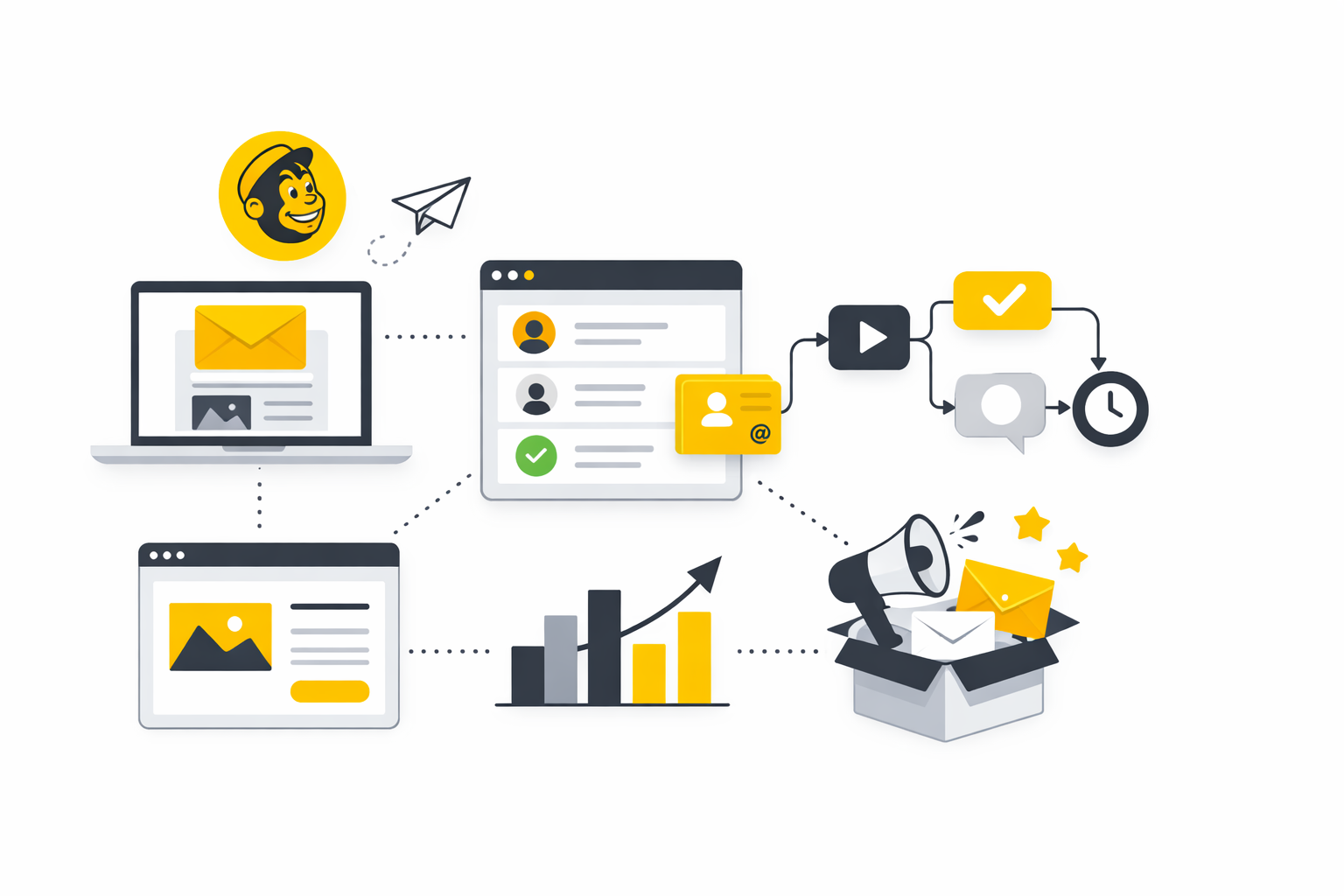
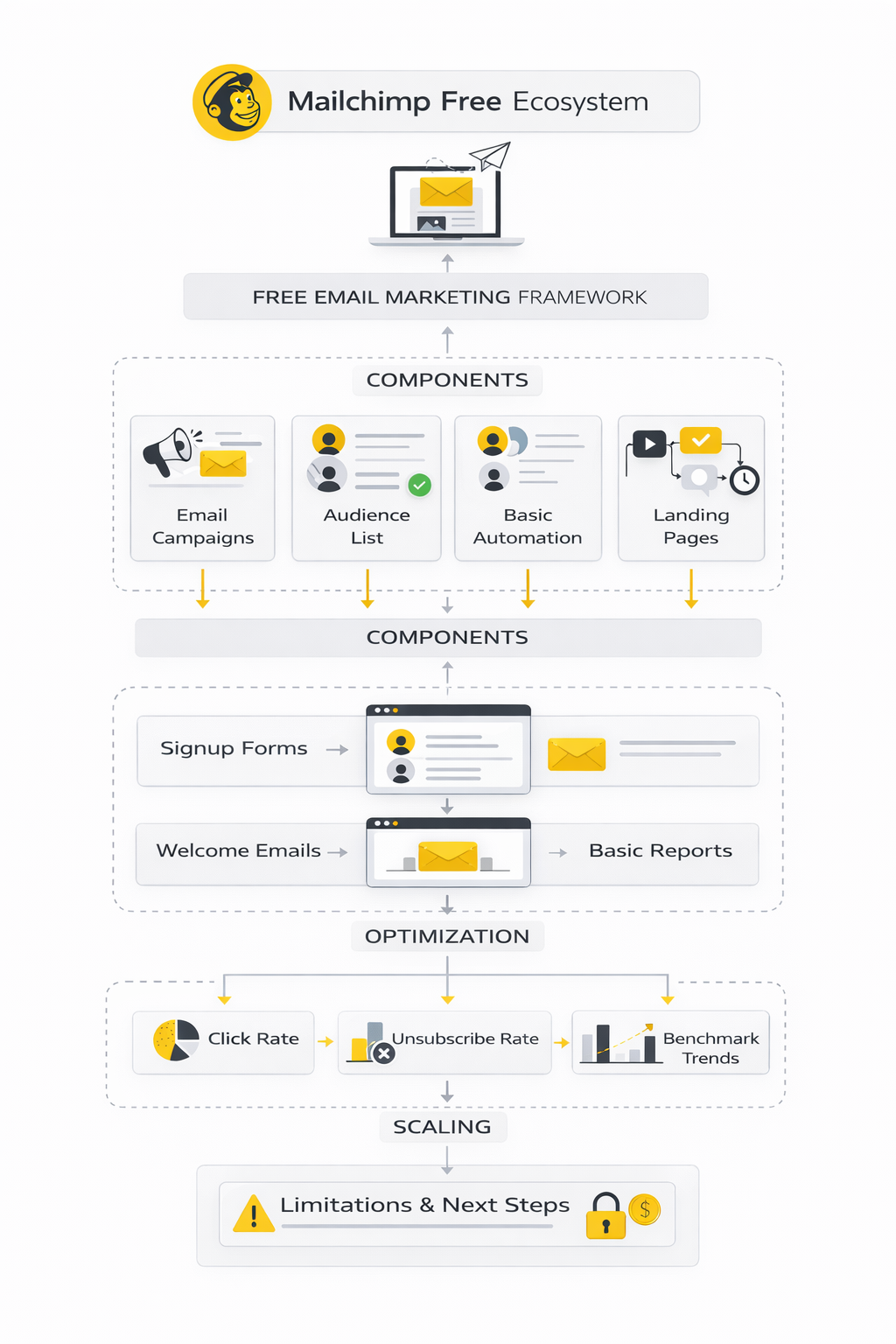
At its core, Mailchimp free gives you access to email campaign creation, basic automation, and audience management without paying upfront. You can build real campaigns, send newsletters, and start growing a list from zero. That alone makes it one of the most accessible entry points into email marketing.
But there’s an important shift: the platform now prioritizes monetization through feature gating rather than list size alone. That means many of the advanced capabilities—especially automation depth and segmentation—are locked behind paid tiers.
Understanding this change is critical if you want to use the free plan strategically instead of getting stuck in it.
Why the Free Plan Still Matters
Despite its limitations, Mailchimp free still plays a crucial role for beginners. It removes the biggest barrier in email marketing: upfront cost. You can test ideas, validate audiences, and build your first campaigns without financial pressure.
For creators launching a newsletter, freelancers building a personal brand, or small businesses testing email for the first time, this is huge. You don’t need perfect funnels or complex systems. You just need to start collecting emails and communicating consistently.
There’s also a psychological advantage. When there’s no cost, experimentation becomes easier. You’re more likely to try different subject lines, layouts, and content formats. That learning phase is where most long-term success actually comes from.
At the same time, the free plan acts as a filter. Once your business starts working, you’ll quickly feel the constraints. That’s not a flaw—it’s part of the design.
Mailchimp Free Plan Overview
The free plan gives you a functional toolkit, but it’s intentionally minimal. You can think of it as a starter framework rather than a full marketing system.
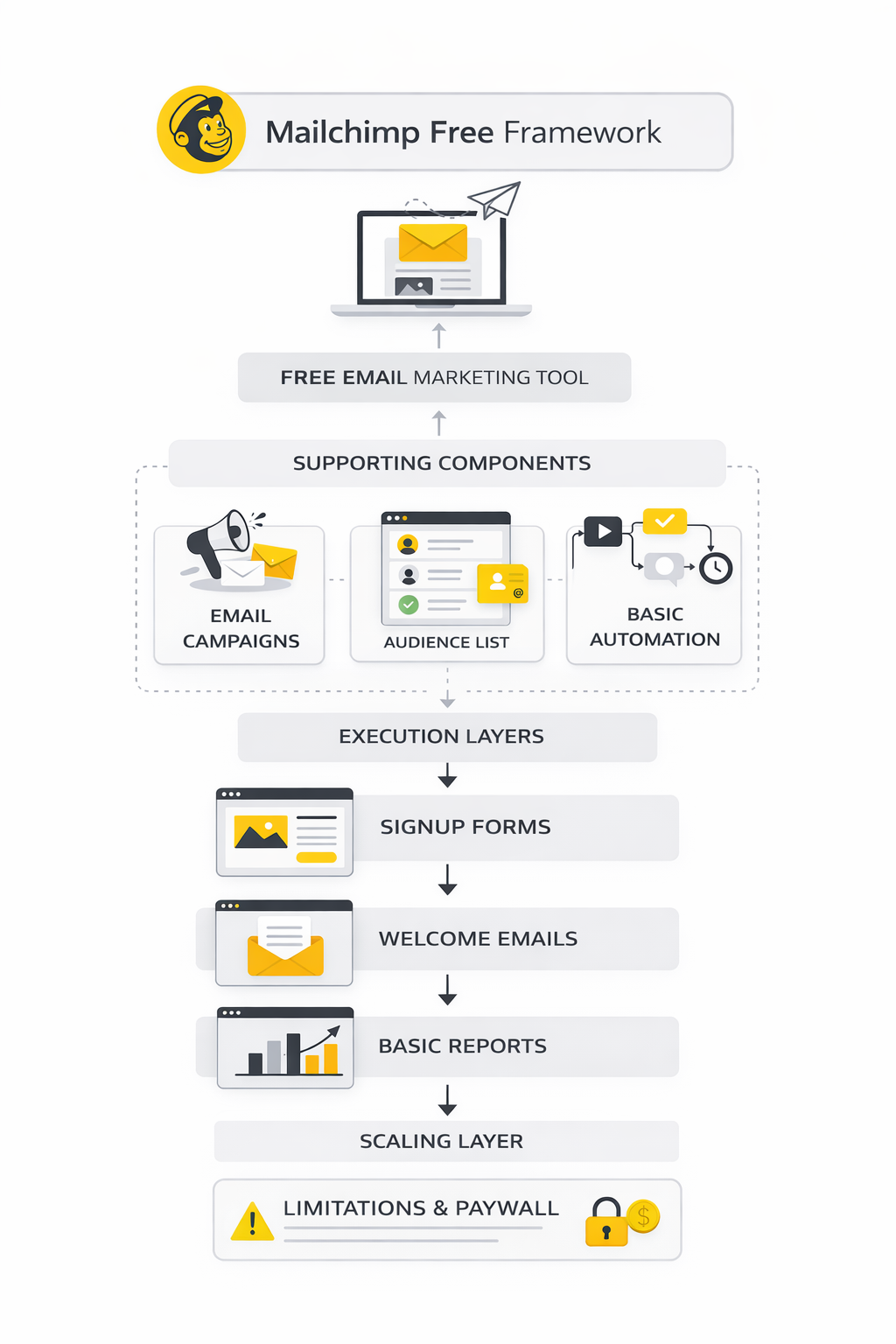
Here’s what you typically get access to:
- Up to 500 contacts in your audience
- Monthly email send limit (usually around 1,000 sends)
- Basic email templates and builder
- Single-step automation (like welcome emails)
- Landing page and signup form creation
- Basic reporting and analytics
On paper, that looks like enough. And for many beginners, it is. You can build a simple funnel: collect emails → send a welcome email → send occasional campaigns.
But the real question isn’t what’s included. It’s how far those features can take you before friction slows you down.
The Core Features You Actually Get
Mailchimp free focuses on the essentials. If you strip away advanced marketing tactics, these are the core building blocks you need—and they’re all here.
Email Campaign Builder
The drag-and-drop editor is one of Mailchimp’s strongest features. It’s intuitive, flexible, and doesn’t require design skills. You can quickly create professional-looking emails that work across devices.
This matters more than people think. Poor design kills engagement. A clean, readable layout increases clicks and conversions without extra effort.
Audience Management
You can store contacts, organize them into audiences, and track basic engagement metrics. While segmentation is limited, you still get visibility into who opens and clicks your emails.
That’s enough to start understanding your audience behavior. Even basic data can guide better decisions over time.
Signup Forms and Landing Pages
Mailchimp lets you build simple forms and landing pages to capture leads. These aren’t as advanced as dedicated funnel builders, but they work for basic list growth.
If you want more control over funnels, tools like ClickFunnels or Systeme.io can extend what Mailchimp starts—but for many users, the built-in options are enough in the beginning.
Basic Automation
You get access to simple automation flows, like sending a welcome email when someone subscribes. This is one of the most valuable features, even in its limited form.
A well-written welcome email can dramatically increase engagement. Some reports show welcome emails getting 4x higher open rates compared to standard campaigns.
That alone makes automation worth using—even on the free plan.
This is where most people start. And honestly, it’s enough to build real momentum. But as your list grows and your strategy matures, the limitations become impossible to ignore.
In the next part, we’ll break down exactly where Mailchimp free starts holding you back—and what serious users do differently.
Limitations That Catch Most Users Off Guard
This is the point where Mailchimp free stops feeling like a generous starter plan and starts feeling like a tightly controlled sandbox. You can absolutely use it to launch, test messaging, and send a simple newsletter. But once you want more precision, more consistency, or more room to grow, the walls show up fast.
The mistake most people make is assuming the free plan will stretch with them for a while. In reality, it works best for very early experiments, not for serious long-term execution. That difference matters, because it changes how you should build from day one.
The Contact and Send Limits Are Tighter Than They Look
The first issue is simple: the list and send caps are now small enough that you can hit them without doing anything advanced. If your audience is growing and you want to email regularly, the math gets restrictive very quickly. A free tool is helpful, but a free tool with barely any breathing room can quietly slow momentum.
That matters because email marketing works best when you send consistently, not only when you feel safe using up your allowance. Once you start hesitating before every campaign, strategy gets replaced by caution. That is usually the moment people realize they are building around the tool instead of using the tool to support the business.
There is also a practical problem here. A small list cap sounds manageable until you start collecting inactive subscribers, test signups, older leads, and customers you still want to keep in the database. Suddenly, Mailchimp free is not just limiting growth. It is forcing you to think about who deserves to stay on your list before the business is really ready for that decision.
Automation Is Where the Free Plan Starts Feeling Thin
Basic email sending is fine on the free plan. The problem appears when you want behavior-based follow-up, multi-step nurturing, or even a cleaner onboarding sequence. That is where Mailchimp free starts to feel less like a marketing platform and more like a basic newsletter tool.
This is a bigger issue than it sounds. Modern email marketing is rarely about sending one campaign and hoping for the best. The real leverage comes from sequences, branching logic, timely follow-up, and messages that respond to what people actually do.
Without deeper automation, you end up doing too much manual work or settling for a flatter strategy than your business probably needs. You can still get results, but it becomes harder to build systems that scale cleanly. For a creator or small business owner already juggling content, sales, and operations, that extra friction adds up fast.
Segmentation Gets Shallow Fast
The next wall is segmentation. At the beginning, sending the same email to everyone feels normal. But the moment your audience starts behaving differently—buyers, subscribers, leads, repeat customers, inactive readers—you need more control.
Mailchimp free gives you a basic starting point, but not enough depth for serious targeting. That means your campaigns can become broader than they should be, which usually lowers relevance. And when relevance drops, engagement tends to follow.
This is one of those hidden limits that beginners do not notice at first. The platform still works, so it feels fine. But over time, the inability to separate people properly makes your email strategy less personal, less efficient, and less profitable.
Testing and Optimization Are Not Really the Focus
A lot of growth in email marketing comes from refinement. You test subject lines, offers, timing, structure, and calls to action. You learn what your audience responds to, then improve from there.
Mailchimp free is not built to make that process especially deep or flexible. You can create campaigns, but the optimization layer is not where the plan shines. That means you are often making decisions with less feedback and less room to experiment than you would ideally want.
For a total beginner, that may be acceptable. For anyone who already understands that small gains compound over time, it becomes frustrating. The issue is not that you cannot improve. The issue is that the free plan does not make improvement especially easy.
Support and Advanced Tools Stay at Arm’s Length
Another thing people underestimate is how important support becomes once something breaks, a form stops working, or a campaign behaves differently than expected. In the early stage, tutorials and help docs might be enough. But eventually, you want faster answers and clearer guidance.
Mailchimp free is built for self-service. That keeps the entry barrier low, but it also means you are largely on your own when the platform becomes confusing. For some users, that is fine. For others, especially business owners moving quickly, it becomes a real cost.
The same pattern shows up across the product. You can access the basics, but many of the tools that make execution smoother, smarter, and less stressful sit just outside the free tier. So the platform is usable, but it is always reminding you that the more serious version lives behind the paywall.
When the Free Plan Still Makes Sense
Even with all those limitations, Mailchimp free is not useless. It still makes sense for someone validating a newsletter idea, building a tiny audience, or learning the fundamentals of email marketing without spending money too early. Used with clear expectations, it can do exactly what a starter plan should do.
The key is not to confuse “good enough to begin” with “good enough to build on forever.” Those are completely different standards. Mailchimp free clears the first one quite well, but it reaches the second one much faster than many users expect.
That is why the smart move is to treat the free plan like a launchpad. Start there if it fits. Just do not build your whole growth strategy on the assumption that it will remain comfortable once traction starts showing up.
How to Implement Mailchimp Free Without Creating Problems Later
The best way to use Mailchimp free is to treat it like a lean operating system, not a forever home. You are working with a small contact limit, one audience, and a narrow sending allowance on the current free plan, which Mailchimp lists as 250 contacts and 500 monthly sends with a 250-per-day cap. That means your setup has to be clean from the start, because sloppy structure burns through your room faster than most people expect.
This is where a lot of beginners get it wrong. They start collecting emails before they know what the list is for, they dump everyone into one bucket, and then they try to fix it later. With Mailchimp free, you do not have enough margin for that kind of mess.
A better approach is simple: one clear audience, one clear lead source, one clear welcome path, and one clear publishing rhythm. That keeps the free plan useful for as long as possible. It also makes the eventual move to a bigger platform or paid tier much less painful.
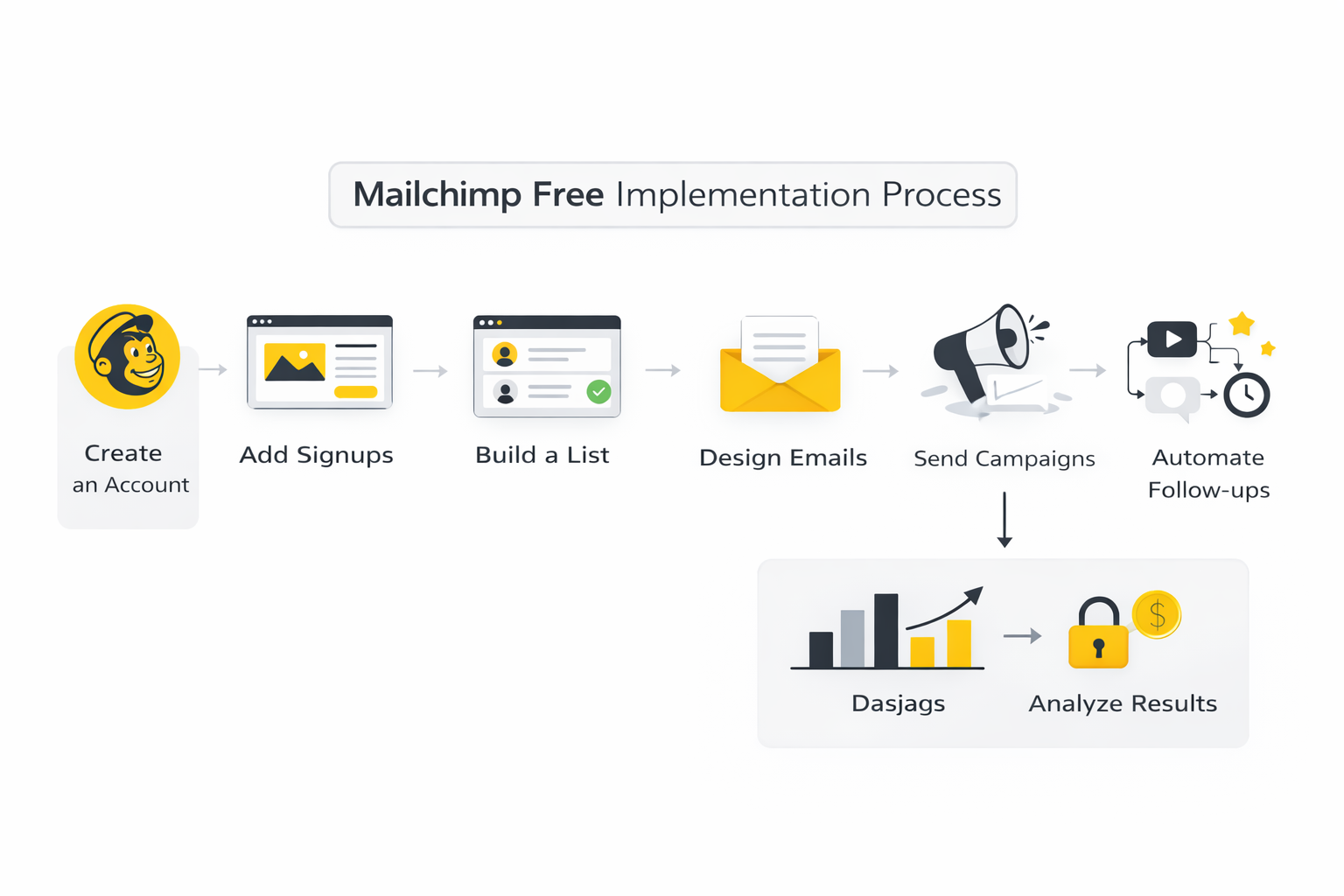
Step 1: Start With One Audience and One Clear Goal
Mailchimp’s own plan comparison shows the free tier is built around one audience and one seat. That alone should shape your entire setup. Instead of trying to run multiple brands, offers, or content streams inside one account, pick a single audience goal and build around it.
For example, your goal might be a weekly newsletter, a lead magnet follow-up, or a simple product update list. What matters is not the format. What matters is that every person joining the list understands what they signed up for, and every email they receive matches that expectation.
That clarity helps on two levels. First, it keeps your content more relevant. Second, it prevents you from wasting precious contact capacity on people who were never a strong fit in the first place.
Step 2: Build the Signup Point Before You Worry About Campaigns
Mailchimp automatically gives you signup options, and its help documentation walks through hosted forms, embedded forms, and other signup form options. That means your first real asset is not the email itself. It is the entry point that brings the right people into the list.
This matters because the quality of your list determines almost everything that comes after it. If the promise is weak, the form is vague, or the page feels generic, you attract low-intent subscribers. Then your open rates, clicks, and unsubscribes start telling a bad story that is really about positioning, not email skill.
Keep the form tight. Ask only for the information you truly need. On a free plan, simplicity is an advantage, because every extra field creates friction and every weak subscriber takes up one of your limited contact slots.
Step 3: Use a Landing Page Only When It Clarifies the Offer
Mailchimp supports landing pages and explains that they can be used to connect signup forms, offers, and reporting in one place. That is useful when your website is weak, your offer needs context, or you want one focused page instead of sending traffic to a cluttered homepage.
But here is the important part: not every list needs a landing page. If your offer is obvious and your signup form fits naturally on your site, keep it there. Adding an extra page just because you can often makes the funnel worse, not better.
Use a landing page when the visitor needs a stronger reason to subscribe. A checklist, newsletter angle, product waitlist, or event registration usually benefits from that focused environment. A general “join my updates” message usually does not.
Step 4: Write the Welcome Email Before the First Subscriber Arrives
One of the easiest wins inside any email setup is the welcome email. It matters because first messages consistently outperform regular campaigns, with data from Klaviyo showing average welcome-email open rates around 51%. That is a rare moment of attention, and wasting it is expensive.
Your welcome email does not need to be clever. It needs to confirm the promise, deliver the thing they asked for if there is one, and set expectations for what comes next. That is it.
The best version is usually short. Thank them for joining, explain what they will receive, and give them one next step. That next step could be reading a key article, checking out a product, replying to the email, or simply looking out for the next issue.
Step 5: Create a Small Sending Rhythm You Can Actually Sustain
A lot of people break their email habit because they plan like a media company and execute like a solo operator. Mailchimp free is much better suited to a steady rhythm than a high-volume one. A simple weekly or twice-monthly schedule is usually more realistic than trying to send constantly.
That consistency matters more than intensity. Industry benchmark data keeps showing that overall engagement is won through relevance and regularity, with broad email datasets from MailerLite placing the average 2025 open rate around 43.46% and click rate around 2.09%. You do not beat those numbers by sending more noise. You beat them by sending better emails on a cadence your audience can trust.
So keep the plan small. Pick a format you can maintain even during a busy month. The free plan becomes much more useful when your system is stable instead of ambitious.
Step 6: Track Clicks, Not Just Opens
Open rates still tell you something, but they are not clean enough to run your whole strategy around. Privacy features have made them less precise, which is why many benchmark reports now treat click-based engagement as a stronger signal than raw opens alone, including Salesforce’s guidance that a good email click-through rate often falls around 2% to 5% depending on context.
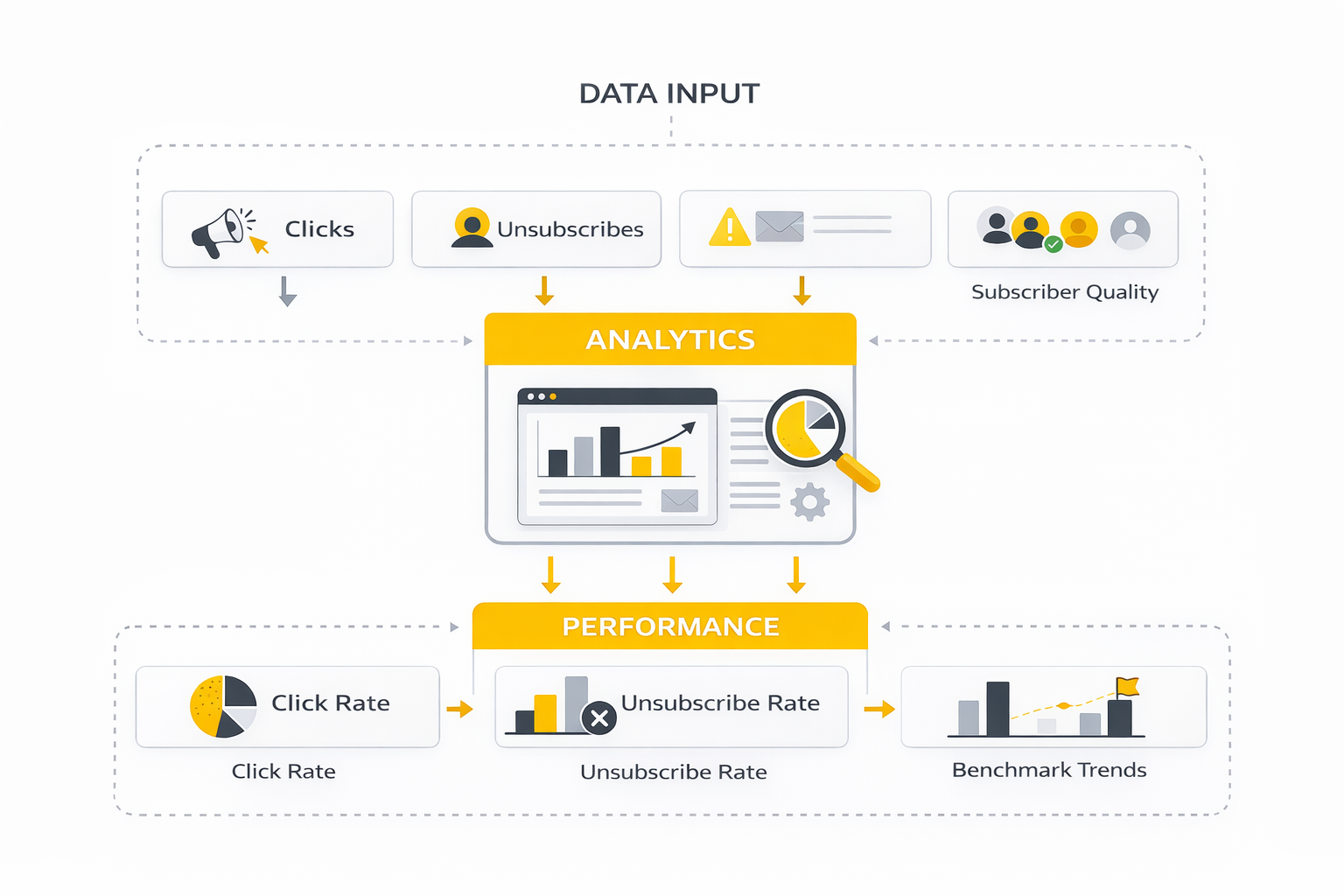
That is especially important on Mailchimp free. You do not have unlimited reporting depth, so you need to focus on the signals that actually help you make decisions. Clicks, unsubscribes, and replies are usually more actionable than obsessing over opens in isolation.
Watch which topics get clicks. Watch which calls to action get ignored. Watch whether the same people keep engaging. Those patterns tell you what your audience wants, and they help you make better decisions before you ever need more advanced tooling.
The Practical Framework That Makes the Free Plan Work
If you want a clean version of the whole process, it looks like this:
- Define one audience and one promise.
- Create one signup form or one focused landing page.
- Write one welcome email that sets expectations.
- Publish on one realistic schedule.
- Review clicks, unsubscribes, and subscriber quality every month.
That framework is not flashy, but it works. It also matches the real shape of Mailchimp free instead of fighting it. You are using the platform for what it does well: basic list building, basic publishing, and early validation.
This is the professional way to use a limited tool. Not by pretending the restrictions do not exist, but by building a process that stays effective inside them. Once you do that, the next decision becomes much clearer: when should you keep going with Mailchimp, and when is it smarter to upgrade or switch?
What the Numbers Actually Tell You
Once you start sending emails through Mailchimp free, the real question is no longer whether the platform works. The real question is whether your numbers are telling you something useful. Metrics are only valuable when they change what you do next.
That is where many beginners get lost. They open the report, stare at a few percentages, and either panic or celebrate too early. But email data only becomes useful when you read it in context: audience quality, send timing, offer strength, and list hygiene all shape the numbers you see.
Mailchimp itself frames open and click rates as starting points for testing and improvement, not final verdicts on success. It also warns that privacy tools and bot activity can distort engagement data, which means raw performance numbers need a little more interpretation than they used to.
The Core Metrics Worth Watching First
If you are using Mailchimp free, you do not need a giant analytics dashboard. You need a short list of signals that actually help you make decisions. In practice, that usually means open rate, click rate, unsubscribe rate, bounce rate, and list growth.
Mailchimp’s reporting documentation makes that logic pretty clear. Its standard reporting system focuses on delivered emails, clicks, opens, unsubscribes, and bounces because those metrics tell you whether people are receiving your emails, noticing them, and doing anything meaningful after they open.
The biggest mistake is treating all five metrics as equally important in every situation. They are not. Some diagnose attention, some diagnose intent, and some diagnose audience quality.
Open Rate Tells You About Attention, Not Necessarily Interest
Open rate is still useful, but it is not clean enough to carry your whole analysis. Mailchimp explicitly notes that Apple Mail Privacy Protection can make open-based reporting less accurate and recommends using click behavior more heavily when open data gets distorted.
That means a strong open rate is best understood as a signal that your sender name, timing, and subject line did their job. It does not automatically mean the content inside the email worked. If people open but do not click, reply, or convert, you earned attention without creating movement.
That is why benchmark numbers need restraint. Industry-wide averages are useful as orientation, not as a trophy case. Brevo’s 2025 benchmark report puts average open rates around 21% globally, while its regional and industry slices run much higher in some categories and markets. Brevo’s 2025 benchmark data and Mailchimp’s own benchmark resource both show how widely open rates can vary by industry, which is exactly why broad comparisons can mislead if you ignore context.
Click Rate Usually Tells the More Useful Story
If open rate measures attention, click rate measures action. It shows whether the content, offer, and call to action were strong enough to make someone move. That makes it a much better operational metric when you are trying to improve campaigns on a limited plan.
Mailchimp says click rates are one of the key engagement measures inside its reports, and that lines up with the wider market. Brevo’s 2025 benchmark data shows an average click-through rate of 3.96%, while more recent large-scale benchmark tracking from MailerLite puts the overall average click rate closer to 2.09% in 2025, which gives you a realistic range rather than a fake universal target.
The action this should drive is simple. If opens look healthy but clicks stay weak, do not immediately blame the audience. Look first at the body copy, the clarity of the offer, and whether the email asked the reader to do too much. Most weak click performance is not a deliverability problem. It is a message problem.
Unsubscribes Are a Quality Signal, Not Just a Negative One
A small unsubscribe rate is normal. In fact, it can be healthy. It means people are self-selecting out instead of sitting on the list disengaged for months.
This is where nuance matters. Brevo’s 2025 benchmark report places the average unsubscribe rate at about 0.10% overall by weekday data and 0.39% for North America in one regional slice, while MailerLite’s 2025 benchmark article reports an average unsubscribe rate of 0.22%. Those numbers are not identical, but they point to the same practical truth: once unsubscribes start climbing meaningfully above your baseline, something in your targeting, frequency, or expectation-setting is probably off.
So do not read unsubscribes emotionally. Read them diagnostically. A spike after a very promotional campaign might tell you the list expected education, not sales. A spike after increased sending frequency might tell you your cadence no longer matches the promise people opted into.
Bounce Rate Is Often the Earliest Warning Sign
Bounce rate is less glamorous than opens or clicks, but it often tells you something more urgent. If emails are bouncing, your list quality is weakening, your addresses are aging, or your collection methods are too loose.
Mailchimp’s help guidance notes that high bounce rates come with stored bounce reasons in campaign reports and that stale addresses tend to hurt open rates, click rates, and ROI. That matters on Mailchimp free because your contact cap is small. A bloated list full of weak addresses is not just bad for performance. It is actively consuming your limited room.
The action here is practical, not theoretical. Tighten your forms, remove dead weight, and avoid importing old lists just because you have them. On a free plan, list hygiene is not a best practice. It is survival.
Growth Metrics Matter More Than Vanity Metrics
One underused metric is net list growth. Mailchimp’s audience analytics tracks subscribed, unsubscribed, and other contact changes over time, which gives you a better sense of whether your email system is actually compounding.
This is important because a campaign can “perform well” and still fail to grow the business. Maybe the open rate is strong, but new subscribers are not coming in. Maybe clicks look decent, but unsubscribes cancel out your gains. Maybe list growth is happening, but the new subscribers are poor quality and disappear after the first send.
The right question is not “Did this email get opened?” The right question is “Did this email improve the health of the list and move the audience toward action?” That is a much higher standard, and it leads to better decisions.
How to Read the Data Without Overreacting
The smartest way to use analytics inside Mailchimp free is to compare patterns, not isolated campaigns. One email can underperform for random reasons. Three or four campaigns in a row usually reveal something real.
That is also how Mailchimp positions comparative reporting: look across campaigns, spot patterns, and use those patterns to improve future sends. Even if you are keeping it simple on the free plan, the mindset still applies. You are not hunting for one perfect number. You are trying to understand what consistently works with your audience.
A practical reading system looks like this:
- Check whether delivery looks healthy.
- Compare opens against your recent average, not someone else’s best case.
- Compare clicks against opens to see whether attention turned into action.
- Check unsubscribes and bounces for list-quality problems.
- Ask what specific change the data suggests for the next send.
That last step is where the real value lives. Metrics should create decisions. If the report does not tell you what to test next, you are still looking at it too passively.
The Benchmark Mindset That Actually Helps
Benchmarks are helpful when they stop you from misreading normal performance as failure. They are harmful when they make you chase averages that have nothing to do with your industry, audience maturity, or business model. Used properly, they give you guardrails, not marching orders.
So here is the right way to use them with Mailchimp free. Treat broad benchmarks as a reality check, then build your own internal baseline after a handful of campaigns. Once you have that, your own trend line becomes more useful than any generic industry chart.
That is the turning point where analytics stop being decorative and start becoming operational. And once you can read the numbers correctly, the next decision becomes easier too: do you keep using Mailchimp free, upgrade inside Mailchimp, or move to a platform that gives you more room to grow?
When to Upgrade or Switch Platforms
This is the strategic decision point. Mailchimp free can absolutely help you start, validate an idea, and build your first layer of email discipline. But once growth becomes real, the question changes from “Can this work?” to “Is this still the right operating system for the next stage?”
That distinction matters more than most people think. A platform that is fine at 100 subscribers can become expensive, limiting, or operationally awkward at 1,000. Mailchimp itself is very clear that the free plan is designed for early growth, with one audience, one seat, 250 contacts, and 500 monthly sends, and that sending pauses if you exceed those limits.
The Real Risk Is Building Around Temporary Limits
The biggest scaling mistake is not starting on a free plan. The biggest mistake is shaping your entire marketing system around the limitations of that free plan and then acting surprised when growth creates friction. That usually shows up in the form of shallow segmentation, manual workarounds, weak automation, and a messy audience structure that becomes harder to fix later.
This is why expert users think about portability early. They tag clearly, keep forms simple, avoid unnecessary list sprawl, and make sure the email strategy itself could survive a platform change. That way, if Mailchimp free stops fitting, they are migrating a system, not rescuing a mess.
Upgrading Inside Mailchimp Makes Sense When the Constraint Is Mostly Volume
There is a simple case for staying with Mailchimp: you like the interface, your team already knows it, and your main problem is that you have outgrown the starter limits. In that case, upgrading inside the ecosystem can be the most practical move because you avoid rebuilding forms, retraining workflows, and rethinking the whole stack. Mailchimp’s plan comparison shows the jump from Free to paid plans adds more audiences, more seats, and significantly deeper marketing automation.
That path is especially reasonable when your strategy is still mostly newsletter-driven. If you are sending regular campaigns, using light automations, and not running a complex lifecycle machine, paying for continuity can be smarter than switching tools just to save a little money. Friction has a cost too, and people often underestimate it.
Switching Makes Sense When the Limitation Is Strategic, Not Just Numeric
The stronger argument for switching is not “Mailchimp got more expensive.” The stronger argument is “My business now needs capabilities this setup was never built to support well.” That usually means more sophisticated automation, deeper personalization, better funnel control, stronger CRM alignment, or tighter integration with sales and customer data.
That is when alternatives start looking more attractive. If you want a simpler funnel-first stack, Systeme.io can make sense. If you care more about sales funnels and offer flow than traditional email structure, ClickFunnels may be the better fit. If you want a broader all-in-one environment with CRM and automation built closer together, GoHighLevel becomes a more serious conversation.
The key is to switch because the business model demands it, not because you are bored with the current tool. Platform changes are annoying, and unnecessary ones waste time. But staying too long in a constrained setup wastes growth.
Deliverability Gets More Important as You Scale
At the beginning, most people focus on features. Later, the bigger issue is whether your emails are consistently reaching inboxes and maintaining trust with mailbox providers. Mailchimp’s own guidance is blunt on this point: poor list hygiene, weak engagement, bad addresses, and inconsistent sending damage sender reputation and make inbox placement harder.
That means scaling is not just about unlocking more sends. It is about protecting performance while volume increases. Double opt-in, cleaner collection practices, and regular list maintenance stop being optional nice-to-haves and start becoming part of risk management. Mailchimp’s guidance on bounce reduction points to double opt-in as one concrete way to improve data quality and reduce invalid addresses, and broader deliverability guidance from Brevo reinforces that list cleaning remains one of the simplest ways to protect inbox performance.
This is a critical mindset shift. A bigger list is not automatically an asset. A bigger list with weaker quality can make the whole system worse.
Inbox Changes Can Break Lazy Email Strategies
Another advanced issue is that inbox environments keep changing. Mailchimp’s 2025 guidance on Gmail updates points out that Gmail is getting smarter about classifying messages, including stronger separation between promotional and transactional content. That means sloppy campaign design, mixed-message emails, and unclear intent can reduce visibility even when your technical setup is fine.
This matters because many beginners treat email as one generic channel. It is not. Transactional messages, promotional campaigns, onboarding emails, and retention sequences each play a different role, and mailbox systems increasingly notice the difference. The more serious your email strategy becomes, the more that separation matters.
So if you are scaling beyond the basics, you need clearer message architecture, cleaner audience expectations, and stronger channel discipline. That is not advanced because it sounds fancy. It is advanced because inboxes are less forgiving now.
The Best Expert Move Is to Decide Earlier Than Feels Comfortable
Most people wait too long to make a platform decision. They keep patching around limits, hoping one more workaround will buy them another few months. That usually creates a more painful transition later, because the list is bigger, the automations are messier, and the team is more attached to a system that no longer fits.
The smarter move is to decide while the stakes are still manageable. If Mailchimp free is still serving the business, use it confidently. If the gaps are already shaping your strategy in the wrong direction, move before those compromises harden into habits.
That is the expert-level view of Mailchimp free. It is not about whether free is good or bad. It is about understanding exactly what stage it is built for, then having the discipline to leave that stage when the business is ready.
The Strategic Bottom Line
Mailchimp free is best used as a proving ground. It gives you enough room to build the habit of email marketing, test your message, and learn what your audience responds to. That is valuable, and for a lot of people, it is the right place to begin.
But the more seriously you take email, the more you need to think beyond the word “free.” Cost matters, but capability, flexibility, deliverability, and long-term fit matter more. Once those become the real priorities, your next move becomes obvious.
The final piece is practical: in the last part, we will wrap this up with direct answers to the questions people usually ask right before they choose whether to stick with Mailchimp free, upgrade, or move on.
The Final System View
By this point, the decision around Mailchimp free should feel a lot less emotional and a lot more practical. It is a good starting tool for a small list, a simple publishing rhythm, and a lightweight welcome flow. It stops being a great fit when growth demands better automation, deeper segmentation, cleaner reporting decisions, and more operational flexibility.
That is the real ecosystem view. Mailchimp free can sit at the front of a lean setup, but it should not automatically become the center of your entire marketing stack. The smartest users keep the system modular so they can plug in better landing pages, funnel tools, CRM workflows, or broader automation once the business actually earns that complexity.
If you stay on the free plan, stay there on purpose. If you upgrade, do it because the next level of capability will clearly pay for itself. And if you switch, do it before temporary workarounds become permanent structural problems.
FAQ
Is Mailchimp free actually free, or is it just a trial?
Mailchimp free is a real plan, not just a short teaser. The current free marketing plan includes up to 250 contacts, 500 monthly sends, and a daily limit of 250, which makes it usable for early-stage list building and basic campaigns. What changes is not whether the plan is real, but how quickly the limits start shaping your strategy once you gain traction.
How many contacts can you have on Mailchimp free?
The current cap is 250 contacts on the free marketing plan. That is enough for testing an idea, running a small newsletter, or building an early waitlist, but it is not much room once inactive subscribers, test signups, and real leads all start mixing together. This is why list quality matters more on Mailchimp free than many beginners realize.
How many emails can you send on the free plan?
Mailchimp says the free plan includes 500 sends per month with a 250-per-day limit. That means the plan works best for small, intentional sends rather than frequent broad campaigns. If you want a high-volume newsletter rhythm, the send ceiling becomes a practical issue surprisingly fast.
Is Mailchimp free good enough for a beginner?
Yes, for the right kind of beginner. If you are learning email marketing, validating an offer, or building your first 100 to 200 subscribers, Mailchimp free gives you enough to start sending, measuring, and improving. It becomes less ideal when you need more sophisticated flows, sharper segmentation, or enough room to run multiple audience strategies at once.
Can you build landing pages with Mailchimp free?
Mailchimp offers landing page functionality, and that is one of the more useful parts of the ecosystem for early-stage users. It helps when you need a focused page for lead capture, a basic offer, or a simple signup destination without building a full site flow first. The key is to use it when clarity improves conversions, not just because the feature exists.
Does Mailchimp free include automation?
It includes basic automation, but not the kind of advanced lifecycle system most growth-focused brands eventually want. That is fine for a welcome email or a simple first-touch flow, but it becomes thin once you want branching logic, deeper triggers, or more personalized nurture sequences. This is one of the clearest reasons people eventually upgrade or switch.
Is Mailchimp free enough for ecommerce?
It can be enough for a very small store that only needs simple list capture and occasional campaigns. It is usually not enough for a more serious ecommerce setup where lifecycle flows, product-based segmentation, repeat-purchase logic, and higher send volume start driving meaningful revenue. Once retention marketing matters, a more capable system often makes more financial sense than clinging to a free tier.
What metrics should matter most on Mailchimp free?
Focus on the metrics that actually change what you do next. Clicks, unsubscribes, bounce trends, and net subscriber quality usually matter more than obsessing over opens alone, especially because privacy protections can distort open-rate data. Benchmarks from large 2025 datasets are useful as orientation, but your own trend line becomes more valuable once you have a few real campaigns to compare.
What is a good open rate or click rate for a small list?
There is no single magic number, and pretending there is usually makes marketers misread their own performance. Broad 2025 benchmark reporting from Brevo shows overall email open rates around the low 30% range and click-through rates around the mid-3% range, but your industry, list quality, and content model can move those numbers significantly. The right move is to use benchmarks as guardrails, then build against your own recent averages instead of chasing someone else’s chart.
When should you upgrade instead of staying free longer?
Upgrade when the free plan is actively shaping your strategy in the wrong direction. If you are avoiding sends because of monthly caps, flattening your messaging because segmentation is too limited, or doing manual work because automation is too shallow, the cost of staying free is already showing up. At that point, paying for better infrastructure is usually more rational than continuing to patch around limits.
When should you switch away from Mailchimp completely?
Switch when the problem is strategic, not just numerical. If your business now needs stronger funnel control, deeper CRM behavior, more serious automation, or a stack that is built around sales workflows instead of basic email sending, staying inside Mailchimp may no longer be the best move. That is where tools like Systeme.io, ClickFunnels, or GoHighLevel start becoming more relevant depending on how your business actually operates.
Can Mailchimp free still be worth using in 2026?
Yes, but only with the right expectations. It is still worth using when you want a low-cost entry into email marketing, a clean way to test messaging, and a straightforward system for a small audience. It stops being worth forcing once growth, complexity, or deliverability discipline demand a stronger foundation.
Work With Professionals
Explore 10K+ Remote Marketing Contracts on MarkeWork.com
Most marketers spend too much time chasing clients, competing on crowded platforms, and losing a percentage of every project to middlemen. MarkeWork gives you a better way. Browse thousands of remote marketing contracts and connect directly with companies desperate to hire skilled marketers like you, without platform commissions and without unnecessary gatekeepers.
If you're serious about finding better opportunities and keeping 100% of what you earn, explore available contracts and create a profile for free at MarkeWork.com.