

Mailchimp can be part of a GDPR-compliant email program, but it is not a compliance switch you turn on once and forget. Mailchimp’s own GDPR overview says the platform offers tools related to consent and individual rights, while its GDPR forms guide is even more blunt: enabling GDPR fields is only the first step. That is the first thing to understand before you touch a signup form, import a list, or send a re-permissioning campaign. Mailchimp+1
The uncomfortable truth is that software does not carry your legal judgment for you. Mailchimp gives you forms, exports, segmentation tools, deletion options, and transfer paperwork, but you still control the lawful basis, the copy on the form, the integrations feeding the audience, and the actions that happen after a person unsubscribes, objects, or asks to be erased. In practice, that means a weak process does not become compliant just because it lives inside a trusted platform. Mailchimp+3
Cross-border transfers are part of the story too. Mailchimp says its Data Processing Addendum incorporates the EU’s Standard Contractual Clauses, its European data transfers page says it is covered under Intuit’s EU-U.S. Data Privacy Framework, UK Extension, and Swiss-U.S. Data Privacy Framework program, and its security page says its owned and operated servers are located in the United States. So the real question is not whether Mailchimp touches GDPR. The real question is whether your use of Mailchimp is permission-based, documented, and consistent from form to inbox to deletion. Mailchimp+2
Article Outline
To keep this practical, the full article follows the life cycle of a contact inside your email system rather than wandering through abstract legal theory. The goal is to show where Mailchimp helps, where it does not, and where teams usually create risk without noticing. These are the six section names the rest of the article will continue using.
- Why Mailchimp GDPR Still Matters
- The Mailchimp GDPR Framework At A Glance
- The Core Compliance Settings Inside Mailchimp
- How To Implement Consent Across Forms, Automations, And Integrations
- International Transfers, Documentation, And Team Workflows
- Common Mistakes, Smarter Alternatives, And FAQ
Why Mailchimp GDPR Still Matters
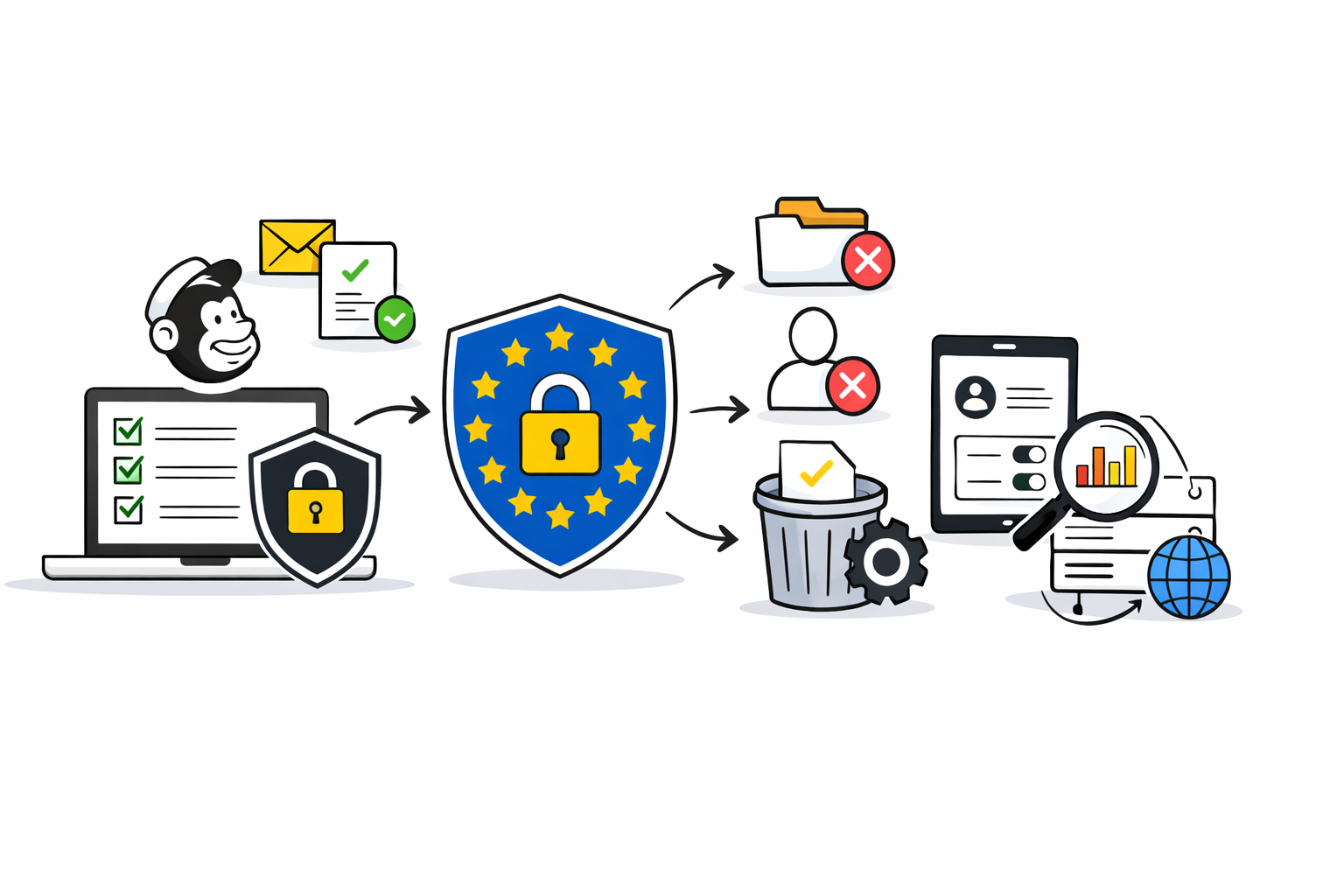
Mailchimp GDPR still matters because email marketing does not sit under one rule. In the EU, the GDPR handles the lawful basis and data rights, while the ePrivacy framework adds channel-specific rules for electronic marketing, and the EDPB has made clear that GDPR consent standards still apply in that context. In the UK, the ICO says marketing emails to individuals generally need specific consent unless the narrow soft opt-in exception applies. EUR-Lex+2
That means the real risk is not a missing checkbox. The real risk is a broken chain between collection, syncing, segmentation, sending, and suppression. The European Commission’s summary of GDPR rights makes clear that people can ask for access, correction, erasure, portability, and can object to marketing, while the EDPB’s 2024 guidance says the right to object to direct marketing is unconditional and should be easy and free to exercise. European Commission+1
This is also why permission quality beats list size every time. Mailchimp explicitly tells users to secure permission, avoid unsolicited marketing, and use signup forms so there is a record of each person’s signup; its GDPR documentation also says hosted-form signup information can be exported and that double opt-in can provide stronger evidence when consent is your lawful basis. That is a much stronger operating model than hoping an imported spreadsheet will survive scrutiny later. Mailchimp+2
The Mailchimp GDPR Framework At A Glance
Here is the practical way to think about this topic. Treat mailchimp gdpr as a system, not a setting. If one layer is weak, the rest of the stack inherits the weakness, no matter how polished the campaign builder looks.
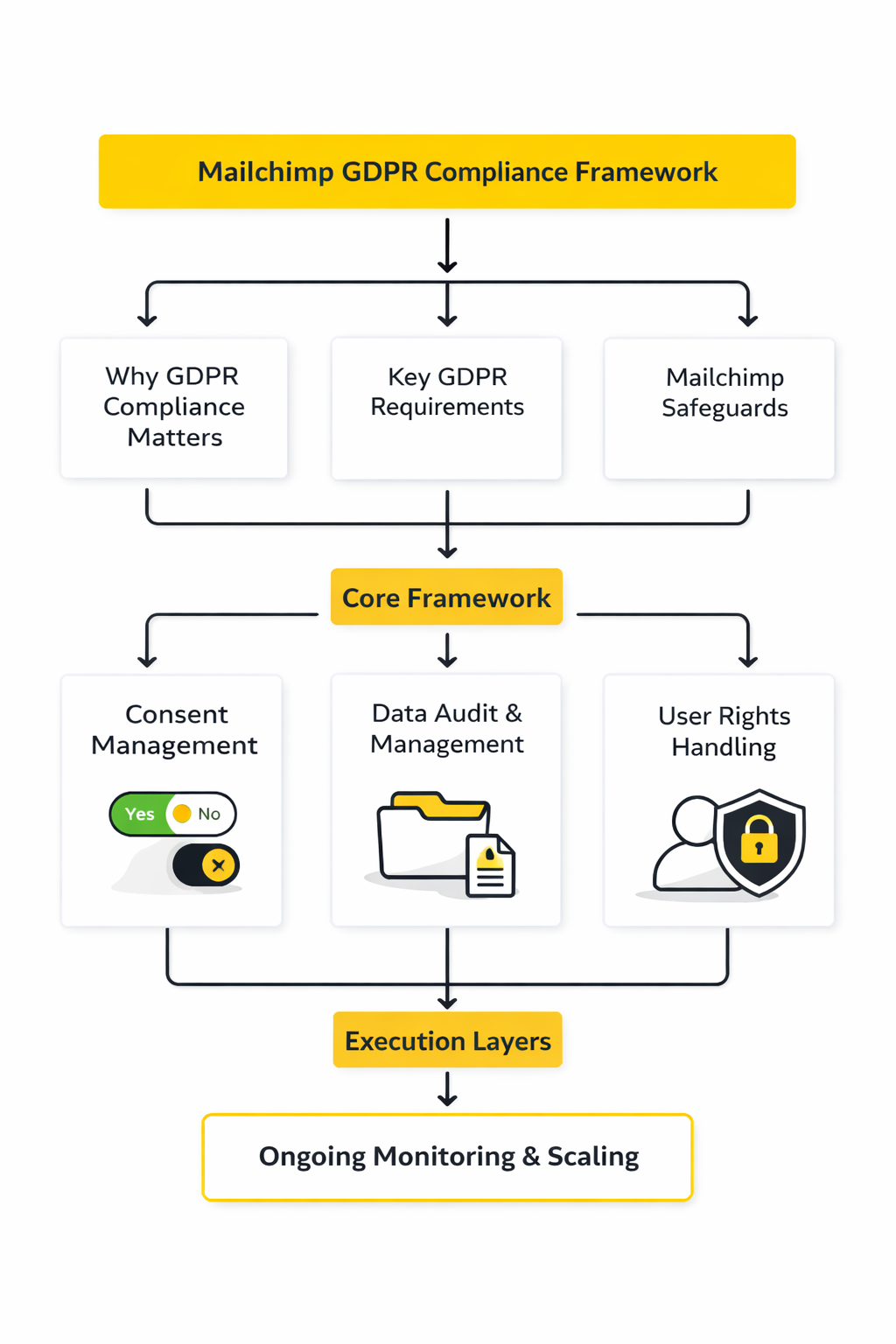
- Choose the lawful basis before the form goes live. If you rely on consent, the request has to be freely given, specific, informed, and unambiguous, and Mailchimp’s GDPR-friendly forms are built around that logic rather than vague blanket permission. edpb.europa.eu+1
- Match each marketing activity to separate permissions. Mailchimp’s GDPR fields support distinct checkboxes for marketing activities, and the platform says each activity must be clearly communicated and requires separate consent. Mailchimp
- Capture evidence that survives an audit. Mailchimp says it stores forms and contact data, lets you export signup information for hosted-form signups, and suggests double opt-in when you want stronger evidence of consent. Mailchimp+1
- Control how data enters the audience. Mailchimp warns that GDPR fields are only the first step and specifically tells users to review third-party integrations so they do not add people without a real opt-in; it also notes that double opt-in for email works only with Mailchimp signup forms, not every outside form or API workflow. Mailchimp+2
- Segment and send only against the permissions you actually have. Mailchimp instructs users to build marketing-permission segments and send only to contacts who have expressly opted in for those permissions. Mailchimp+1
- Plan for rights requests, deletion, and transfers before growth makes the process messy. Mailchimp provides export and deletion tools, says members have 30 days to delete a contact after a GDPR erasure notice, and supports international transfers through SCCs alongside Intuit’s Data Privacy Framework coverage. Mailchimp+3
That framework is why copying someone else’s footer language rarely fixes the real problem. Your form, your sync layer, your audience structure, and your deletion workflow all have to say the same thing in practice. If you are reworking acquisition at the same time, it is worth comparing Fillout, Manychat, Brevo, or Moosend before you hardwire a weak consent model into the next version of your stack.
The next section moves from the big picture into the exact Mailchimp settings that matter most: GDPR fields, marketing permissions, double opt-in, exports, and deletion controls.
The Core Compliance Settings Inside Mailchimp
This is the section where mailchimp gdpr stops being abstract and starts becoming operational. The platform gives you the right building blocks, but those blocks only work if the audience settings, forms, imports, and suppression logic all line up. Get these settings right and the rest of your compliance process gets much easier; get them wrong and every automation you build on top becomes harder to defend.
GDPR Fields And Marketing Permissions
The first control that matters is Mailchimp’s GDPR-friendly signup form setup. Mailchimp is clear that simply turning on those fields does not make you compliant, because the fields are only the opening move in a larger process that also includes segmentation and consent collection from existing contacts. The practical takeaway is simple: treat the checkbox as evidence capture, not as your whole compliance strategy.
Those fields matter because they let you ask for consent in a more specific way. Mailchimp’s GDPR overview explains that its GDPR fields include opt-in checkboxes and editable descriptions, while its GDPR FAQ confirms you can even adapt that wording to cover processing activities that happen outside Mailchimp, as long as you are explicit about what you are collecting consent for. That makes these fields useful for real-world stacks where email, CRM syncing, remarketing, or chatbot follow-up all connect behind the scenes.
Specificity is where many teams cut corners. The UK ICO’s guidance on email marketing consent says consent requests should be prominent, concise, easy to understand, and separate from general terms. So if your form says “join our newsletter” but your workflow also triggers CRM enrichment, ad audience syncing, and promotional sequences, your form copy needs to reflect that reality rather than hiding it behind generic wording.
That also means your GDPR fields are not a replacement for broader transparency. The European Commission’s summary of individual data protection rights makes clear that people should be told the purpose of processing, the legal basis, how long data is stored, who receives it, whether it is transferred outside the EU, and how to exercise their rights. Mailchimp can host the consent moment, but your privacy notice and surrounding form experience still have to carry the rest of that explanation.
Double Opt-In Is A Quality Filter, Not A Magic Shield
Mailchimp gives you both single opt-in and double opt-in for email contacts, and the difference matters. With double opt-in, someone submits the form, receives a confirmation email, clicks the verification link, and only then becomes a subscribed contact. That extra step will not solve every legal question, but it does create a cleaner record of intent and usually produces a healthier list.
Mailchimp also notes that double opt-in can be enabled in audience settings and that turning it on for email forms automatically enables reCAPTCHA. That matters because one of the quiet benefits of double opt-in is not just compliance evidence but list hygiene: fewer typos, fewer fake signups, fewer junk submissions, and fewer accidental subscriptions. If your forms are public, promoted heavily, or connected to giveaways, that extra filter becomes much more valuable.
There is one catch that catches people all the time. Mailchimp’s double opt-in documentation explicitly says double opt-in for email contacts can only be enabled for Mailchimp signup forms, not for every outside form integration or custom API flow. So if your site uses a custom lead form, a separate landing page builder, or a chatbot tool, you need to make sure the same confirmation logic and evidence trail exist outside Mailchimp too.
This is why the cleanest setup is often the one with the fewest moving parts. If your current form layer is awkward, tools like Fillout, Brevo, or GoHighLevel can make consent capture, preference handling, and follow-up logic easier to control from the start. The point is not that one tool is automatically more compliant than another. The point is that a simpler consent flow is easier to explain, test, and audit.
Contact Statuses Control What You Can Send
A lot of Mailchimp compliance mistakes happen because teams do not respect contact status. Mailchimp’s guide to contact types separates people into subscribed, unsubscribed, non-subscribed, cleaned, and pending, and those labels are not cosmetic. They determine what marketing content a person can receive and whether they are actually in a state you can safely treat as opted in.
The most important status is still subscribed, and Mailchimp defines that as someone who has opted in to receive your marketing content. The same guide says people can become subscribed through signup forms, landing pages, connected stores, or manual import, but manual addition and imports still require explicit permission. That is where weak processes fall apart: a contact sitting in your CRM is not the same thing as a contact who has consented to email marketing.
Pending contacts are just as important because they show you where confirmation is incomplete. Mailchimp explains that pending contacts must confirm their opt-in before being added, which is exactly what you want if double opt-in is part of your compliance approach. If you are looking at a list and treating everyone in it as equally marketable, you are already too loose with the data.
The platform’s own permission guidance pushes in the same direction. Mailchimp’s article on permission-based email marketing tells users never to assume permission and strongly recommends using Mailchimp signup forms so there is a record of each person’s signup. That is the standard worth following even when you import from another system: if you cannot explain where permission came from, do not import the contact as subscribed.
Unsubscribe, Preference Updates, And Suppression
Once someone is in your audience, the next controls that matter are the ones that let them change their mind. Mailchimp’s guidance on unsubscribes says every email campaign must include an unsubscribe method, Mailchimp templates include one by default, and custom templates still need the platform’s unsubscribe mechanism rather than an outside process. That is not just good deliverability hygiene. It is the baseline for respecting a person’s choice without friction.
Mailchimp also gives you a softer option than a full unsubscribe. Its update your preferences link lets contacts update their profile information, adjust interests, and manage how often they hear from you. In practice, that can be one of the most useful settings in the whole platform because it gives people a controlled way to narrow consent instead of forcing an all-or-nothing exit.
The legal reason this matters is straightforward. The ICO’s guidance on electronic mail marketing says you should keep a record of consent and make withdrawal easy, and its guidance on what else you need to consider says people have an absolute right to object to direct marketing and that you should keep a do-not-contact or suppression list. In other words, suppression is not admin work. It is part of compliance.
Mailchimp adds one more wrinkle here: unsubscribes are audience-specific. If a person unsubscribes from one audience, that does not automatically unsubscribe them from every audience in your account. So if you run multiple audiences for brands, regions, or business units, you need a deliberate suppression process across the wider stack, not blind faith that one audience-level opt-out solved everything.
Archive And Delete Are Not The Same Thing
This is one of the most important distinctions in the platform. Mailchimp’s archiving guide says archiving removes a contact from the active audience without losing their data, and those archived contacts can later be unarchived. That can be useful for billing cleanup, duplicates, or inactive contacts, but it is not the same as erasure.
Mailchimp is unusually direct on this point. The same archiving documentation says that for GDPR purposes, archiving is not a legal substitute for deletion, and if an EU contact asks to be removed from your account you must permanently delete them from all audiences where their data is stored. That is exactly the kind of detail teams miss when they assume “removed from dashboard view” means “gone.”
That distinction lines up with broader rights under European privacy law. The European Commission’s summary of data subject rights includes the rights to erasure, access, rectification, portability, and objection to marketing, while the ICO’s explanation of the right to erasure makes clear that erasure is a formal right even though it is not absolute in every circumstance. For direct marketing, though, the practical lesson is easy: if someone objects or withdraws where consent is your basis, your system needs to stop the marketing and your workflow needs to decide whether suppression, deletion, or both are required.
Mailchimp’s own privacy rights request page shows how this works at platform level as well. If a contact asks Mailchimp to forward a deletion request to the account owner, Mailchimp notifies the relevant member and instructs them to permanently delete the personal information from their account. So deletion is not just a button tucked away in settings. It is part of the operational contract you take on when you collect personal data in the first place.
The next part moves from settings to execution: how to apply these controls across forms, automations, imports, popups, landing pages, and third-party integrations without creating contradictions between what you promised and what your stack actually does.
How To Implement Consent Across Forms, Automations, And Integrations
This is where mailchimp gdpr becomes a real operating system instead of a legal checkbox. Mailchimp’s own workflow is multi-step: set up GDPR-friendly forms, segment people by permissions, collect consent from new and existing contacts, and then send only to the people who actually opted in. That sequence matters because the ICO is right that direct marketing compliance is much harder and more expensive to retrofit after campaigns and automations are already live. Mailchimp+1
Start With One Audience And A Permission Map
The cleanest setup starts with one primary audience, not a maze of separate audiences. Mailchimp recommends one main audience and then using tags, groups, and segments to organize contacts, and it also warns that duplicates, bounces, and unsubscribes are not detected across multiple audiences. In practice, that means a messy audience structure is not just harder to manage; it is also easier to break when someone opts out in one place and keeps getting messages from another. Mailchimp+2
Before you touch a form, map out the exact data and permissions you need. In Mailchimp, tags are internal labels you assign, groups are preference choices contacts can make themselves, segments are the sending logic, and audience fields are the stored data layer behind all of it. That matters because permission should sit in a structure you can actually use later, not in random notes, vague form copy, or a field nobody remembers to segment by. Mailchimp+1
A good permission map usually answers four questions before launch. What data is required to deliver the email program, what data is optional, what kinds of marketing a person can say yes to, and what actions should happen if they say no. The point is to make your form, your audience structure, and your automation triggers all describe the same relationship. ICO+1
Build Consent Into Every Entry Point
Mailchimp gives you multiple ways to collect subscribers, including hosted forms, embedded forms, popup forms, and landing page signup blocks. Those options are useful, but they are only safe when the wording, required fields, and preference structure are consistent across every entry point a lead can use. If your embedded form asks for one thing and your popup implies something broader, your consent trail gets weaker immediately. Mailchimp+2
The form copy has to do real work. The ICO says consent requests should be prominent, concise, easy to understand, and separate from general terms, while Mailchimp says you need to be explicit about why you are collecting data when you edit GDPR fields. That is why vague language like “stay updated” is usually too soft for a stack that also includes product promos, newsletters, event alerts, or cross-channel follow-up. ICO+1
Popup forms deserve special attention because they are often the sloppiest part of the funnel. Mailchimp says GDPR-friendly popups still remain your responsibility, recommends simple and specific language, and says consent checkboxes should not be pre-checked; if consent is required for the action, the box should also be required. That makes popup forms useful, but only when they are treated as a deliberate consent surface instead of a quick lead-capture hack. Mailchimp
Mailchimp also builds some anti-abuse protection into the form layer, but you still have to turn the right pieces on. ReCAPTCHA is required for Mailchimp-hosted signup forms, and Mailchimp recommends enabling it for embedded forms and landing page signup form blocks as well. That will not solve your legal basis, but it does reduce fake signups and keeps low-quality records from polluting the audience you later rely on for consent evidence. Mailchimp+1
Roll Out Consent In A Sequence Your Team Can Actually Follow
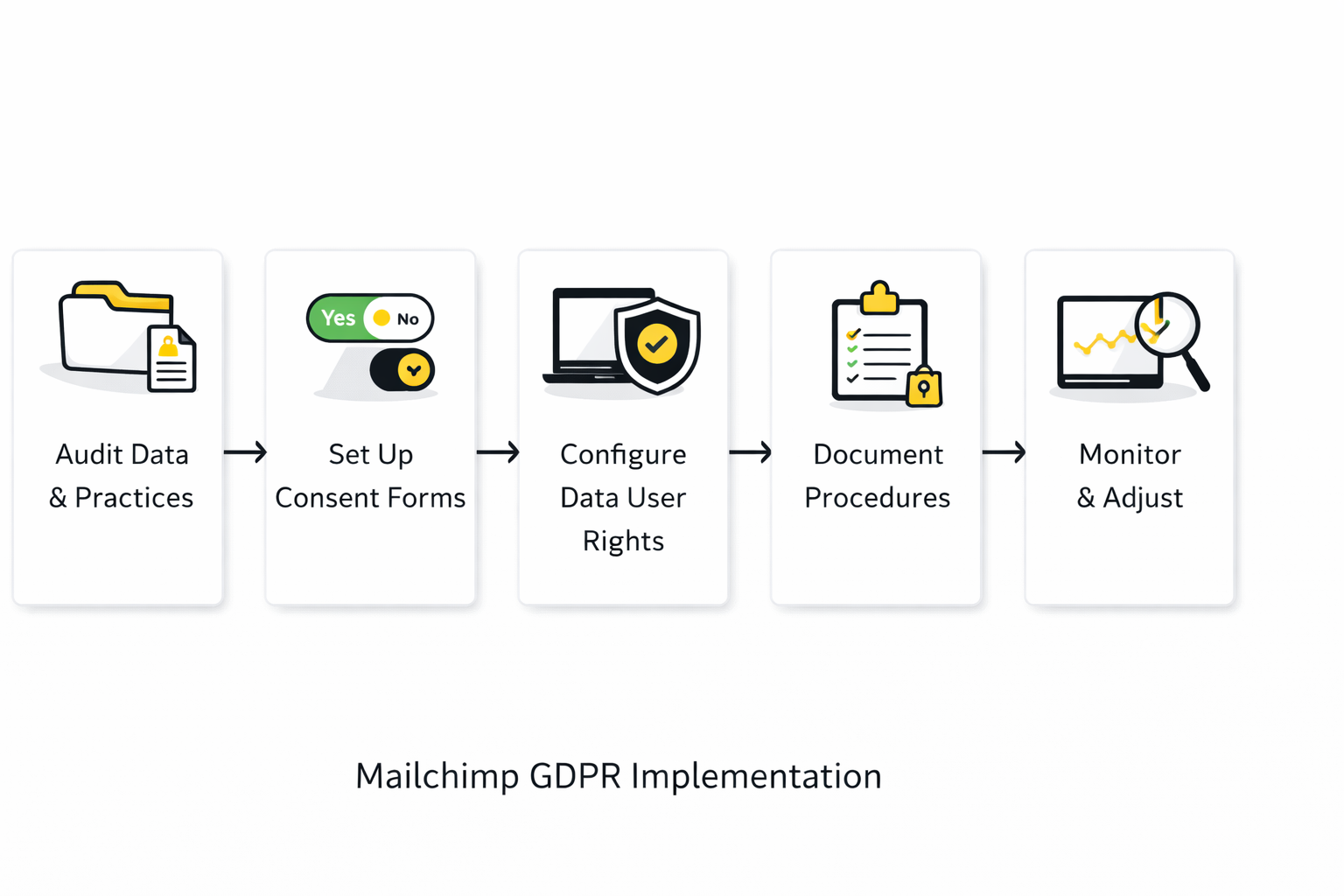
The safest way to implement mailchimp gdpr is to make the rollout boring and repeatable. Mailchimp’s own documentation points to a simple sequence: update the forms, create permission-based segments, collect consent from new and existing contacts, and then limit sends to those permission segments. If your team follows that order every time, you remove most of the ambiguity that usually causes trouble later. Mailchimp+1
- Turn on GDPR fields for each affected audience and rewrite the descriptions so they match your real marketing activities. Mailchimp
- Create separate segments for each marketing permission rather than dumping everyone into one generic “subscribed” bucket. Mailchimp
- Publish the updated forms for new contacts and make sure every website entry point uses the same permission logic. Mailchimp+1
- Send a consent or re-permission email to existing contacts and include an Update Your Preferences path so they can actively choose what they want. Mailchimp+1
- After that campaign runs, send future marketing only to the people inside the relevant Marketing Permissions segments. Mailchimp
- Clean up the remainder instead of pretending silence equals consent; Mailchimp even notes that bulk unsubscribing non-responders may be helpful after a consent collection pass. Mailchimp
This is also the point where many teams realize they need better lead-capture infrastructure outside Mailchimp. If your forms or chat flows live elsewhere, tools like Fillout, Manychat, Brevo, or GoHighLevel are only worth using if they preserve explicit permissions cleanly and pass them into Mailchimp without guesswork. Mailchimp is clear that third-party apps and stores are still your responsibility under GDPR, so a prettier form builder does not rescue a broken consent trail. Mailchimp+1
Wire Automations To Permission, Not Mere Presence
A contact appearing in your audience is not enough. Mailchimp lets you segment from signup form data, tags, group preferences, email interactions, location, and purchase activity, which means you have no excuse to trigger campaigns from a shallow rule like “joined audience” when a stronger permission rule is available. In a compliant setup, automations should fire because a person gave a defined permission or selected a relevant preference, not because their email address happened to land in the database. Mailchimp+2
Groups are especially useful here because they let subscribers express preferences themselves. Mailchimp describes groups as shared interests or preferences chosen by contacts, and it specifically recommends using the Update Your Preferences flow so existing subscribers can change those selections later. That makes groups a better foundation for newsletter topics, frequency choices, or content streams than random internal tagging done by your team after the fact. Mailchimp+1
Testing matters too, because broken merge tags and bad links can quietly undermine a good consent structure. Mailchimp recommends previewing emails, testing links, and using live merge tag info or a small live segment when you need to see how dynamic content will actually render, since contact-specific merge tags do not behave like normal in standard test emails. A practical workflow is simple: test the logic before you scale the automation, not after complaints start arriving. Mailchimp
Treat Imports And Integrations As A Risk Surface
Imports are where a lot of GDPR problems sneak in. Mailchimp says imported subscribed contacts do not go through the signup process, so you need to verify that you already have permission to market to them, and its import formatting guide adds that imported marketing permissions must match the permission options already defined in your GDPR-friendly form. That means you should never use an import as a shortcut around consent collection. Mailchimp+1
The same logic applies to third-party syncs. Mailchimp’s GDPR FAQ says you are responsible for deciding whether outside apps, integrations, and e-commerce stores meet GDPR requirements, and its authorized applications guide reminds you that connected apps get access to information in your account. So every connected tool should be reviewed as part of the consent flow, and anything you no longer use should have its access revoked instead of lingering quietly in the background. Mailchimp+2
The practical rule is blunt: sync permission data, not just identity data. If an outside form sends only an email address into Mailchimp but drops the source, permission type, or preference information on the floor, your automation layer becomes much harder to defend and much easier to misuse. Good integrations preserve context; bad ones create “subscribed” contacts nobody can fully explain six months later. Mailchimp+1
Build A Cleanup Routine Before The Audience Gets Big
A workable GDPR process always includes cleanup. Mailchimp lets you export an entire audience, a segment, a tag, or a group, which is useful before major changes, and it also warns that deleting an audience field deletes the collected data in that field from your audience. That is why cleanup should be deliberate: back up first, then decide whether you need to hide a field, delete a field, archive a contact, unsubscribe a contact, or permanently delete a contact. Mailchimp+2
Not every “remove this person” request should be handled the same way. The ICO says people who no longer want direct marketing should usually go onto a suppression or do-not-contact list so you do not accidentally market to them again, while Mailchimp says contacts who unsubscribed themselves need to opt back in through a signup form and notes that Mailchimp-hosted forms capture the date and time permission was given. That combination gives you a much cleaner operational model: suppress opt-outs reliably, and only restore marketing eligibility through a fresh opt-in. ICO+1
That is the real implementation standard. A compliant Mailchimp setup is not the one with the most fields, automations, or integrations. It is the one where every contact path, from first signup to last unsubscribe, follows a process your team can explain without hesitation. Mailchimp+1
What The Data Should Tell You
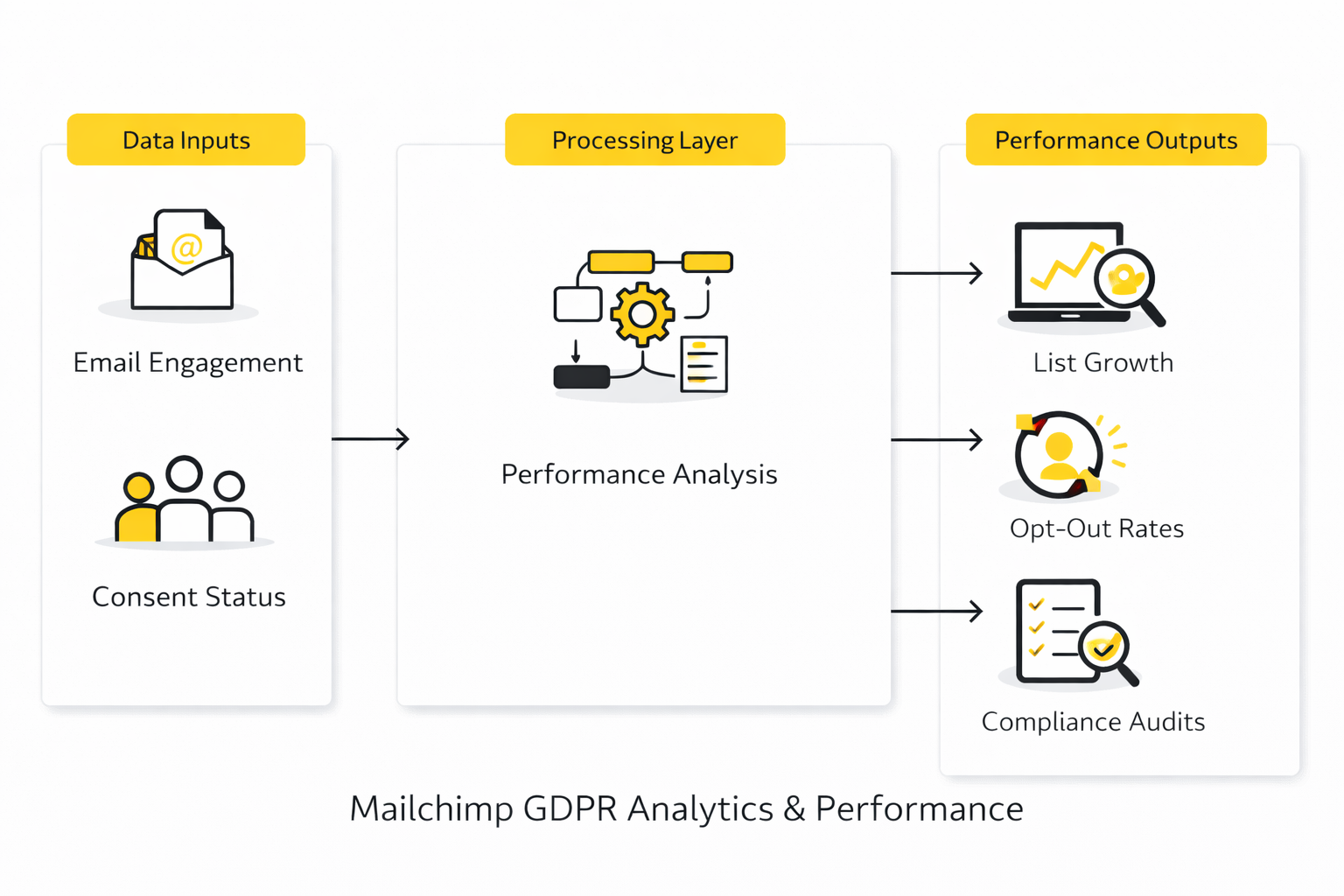
Once the implementation is live, mailchimp gdpr has to be measured like an operating system, not a legal memo. The point is not to stare at one vanity metric and feel good about it. The point is to know whether your consent process is producing inbox reach, real engagement, low friction, and commercial value without drifting into spammy behavior. Mailchimp+2
Build A Scorecard That Reflects Consent Quality
A useful scorecard starts with four layers: delivery, engagement, churn, and conversion. Mailchimp’s reporting already gives you click rate, clicks per unique open, bounced contacts, unsubscribes, and recipient activity, while its Conversions dashboard is built to show revenue attribution and funnel performance when your store data is connected. That mix matters because a compliant program is not just “people received the email.” It is “the right people received it, stayed comfortable with it, and did something valuable afterward.” Mailchimp+2
The mistake I see most often is treating every email metric as equal. They are not equal. In a GDPR-aware setup, delivery and complaints tell you whether your permission model is safe, clicks tell you whether the content matches the promise, unsubscribes tell you whether people still want the relationship, and conversions tell you whether the list is commercially healthy instead of just cosmetically active. Mailchimp+2
Use Benchmarks As Context, Not Gospel
Benchmarks are useful when they stop you from overreacting to a single campaign. Mailchimp’s own benchmarking data says its cross-industry target is about 34.23% for opens and 2.66% for click-through rate, and its campaign benchmarking feature says those comparisons are built from hundreds of millions of emails. But even broad benchmark providers do not land on one universal number: Constant Contact’s email statistics roundup puts the average open rate at 32.55%, which is close enough to confirm the general range but different enough to remind you that methodology matters. Mailchimp+3
That is exactly why open rate is no longer strong enough to carry the whole story. Apple says Mail Privacy Protection downloads remote content in the background rather than only when the user engages, and Mailchimp says Apple MPP inflates open-related metrics while bot activity can inflate both opens and clicks; Mailchimp now enables bot filtering by default and explicitly recommends focusing more on clicks, bounces, unsubscribes, conversions, and purchases. So when you compare your numbers, do not ask, “Is this open rate good?” Ask, “Is this audience getting more responsive, or am I being fooled by measurement noise?” Apple+3
Read The Warning Signs Early
The first warning sign is a bounce spike. Mailchimp says high bounce rates are often caused by an outdated audience or contacts that were added or imported improperly, and it also says hard-bounced and repeatedly soft-bounced addresses become cleaned contacts that are excluded from future sends. That means a sudden jump in bounces usually points to a source problem upstream, not just a deliverability problem downstream. If this number moves in the wrong direction, the right action is to audit your forms, imports, and syncs before you send again. Mailchimp+2
The second warning sign is rising churn. Mailchimp says many industries see average unsubscribe rates as high as 1% to 2%, so a single campaign with a noticeable unsubscribe rate is not automatically a crisis, but a repeated upward trend usually means people were not expecting the content, the frequency, or the targeting. When that happens, the fix is usually better segmentation, tighter signup copy, and a cleaner preference center rather than louder creative. Mailchimp+1
The third warning sign is complaints, because complaints can become a hard deliverability constraint. Google’s sender guidelines tell senders to keep spam rates in Postmaster Tools below 0.3%, and for anyone sending more than 5,000 messages a day to Gmail accounts, marketing emails must also support one-click unsubscribe and include a visible unsubscribe link in the message body. That makes complaints more than a reputation issue. They are one of the clearest signals that your consent quality, list hygiene, or sending expectations are breaking down. Google Podpora+1
Focus More On Click Quality Than Open Volume
If you still use opens, use them as a rough directional clue, not a verdict. Mailchimp’s reporting guidance says click-through rate shows engagement across the delivered audience, while click-to-open rate tells you how compelling the content was once people actually viewed it. That distinction is useful because it separates subject-line curiosity from content-market fit. High opens with weak clicks usually mean the message promise was stronger than the message itself, while decent clicks with moderate opens can still signal a healthy, permission-based list. Mailchimp+1
This is where Mailchimp’s click tools become more useful than people think. The report overview, click performance tab, click map, and recipient activity view let you see which links actually pulled attention and which segments behaved differently. For GDPR work, that matters because relevant, consent-aligned emails usually produce concentrated, explainable clicks, while weak-permission campaigns often produce shallow engagement followed by unsubscribes or complaints. Mailchimp+2
Tie Compliance To Revenue, Not Just Engagement
The best measurement model ends with business outcomes. Mailchimp’s Conversions dashboard is built around revenue attribution and funnel performance, and its Google Analytics integration lets you push tracking into GA4 for standard emails, automation emails, and A/B tests. That means you can move beyond “people clicked” and ask the better question: which segments, offers, and consent paths actually produce leads, orders, or booked actions without raising churn. Mailchimp+1
This is the practical interpretation that matters most. If your opens look fine but revenue per campaign is flat, your content may be attracting curiosity without intent. If clicks and conversions rise while unsubscribe and complaint rates stay stable, that usually means your permission model is getting sharper, not just bigger. And if you want a more unified attribution stack while you clean this up, some teams also compare GoHighLevel, Brevo, or Fillout before adding even more reporting layers on top of a messy consent process. Mailchimp+2
What Each Metric Should Make You Do
When the numbers are interpreted correctly, they should force action. A rising bounce rate should make you inspect imports and stale capture sources. A rising unsubscribe rate should make you tighten expectations, cadence, and segmentation. A complaint problem should make you stop aggressive growth tactics immediately and review consent evidence before the next send. Weak clicks should push you to improve message relevance, not just redesign buttons. Mailchimp+3
Mailchimp’s comparative reporting is useful here because it lets you compare campaigns that share the same naming pattern, timing, or audience shape instead of judging each send in isolation. That is how you spot whether your newsletter is getting healthier over time or whether one broken form, one bad import, or one sloppy automation is quietly degrading the whole system. The next part moves from measurement into the governance layer behind those numbers: international transfers, documentation, and the internal workflows that keep Mailchimp GDPR defensible when the team grows. Mailchimp+1
International Transfers, Documentation, And Team Workflows
Once a Mailchimp setup grows beyond one person and one simple newsletter, the hard part is no longer the signup form. The hard part is proving that your choices still make sense when personal data crosses borders, multiple teammates touch the account, and outside tools start writing into the audience. That is where mailchimp gdpr becomes a governance problem, not just a campaign problem.
Cross-Border Transfers Need A Deliberate Position
Mailchimp is still a US-based service, and Mailchimp says both its headquarters and its servers are in the United States. Its European transfer documentation says the Data Processing Addendum is built into the standard terms, that Mailchimp is covered under Intuit’s EU-U.S. Data Privacy Framework, UK Extension, and Swiss-U.S. Data Privacy Framework participation, and that the Standard Contractual Clauses apply automatically through the DPA if the DPF were ever invalidated. That means using Mailchimp can be lawful, but it is not the same thing as choosing an EU-hosted default. Mailchimp+2
That distinction matters more as the business scales. The ICO’s updated January 2026 guidance says international transfer rules can apply when personal information is made accessible to a separate organisation outside the UK, not just when a file is physically emailed abroad. So if your team treats SaaS access as “not really a transfer,” your internal documentation is already behind reality. ICO+2
This is why the best strategic question is not “Is Mailchimp allowed?” but “Does Mailchimp still fit our transfer posture?” If your legal, procurement, or client requirements now push toward a different stack, teams at that point often evaluate tools like Brevo, Moosend, or governance layers like Comp AI. The smart reason to switch is not panic. It is a mismatch between your actual obligations and the operating model you are trying to force onto the platform.
Documentation Is What Keeps Compliance Real
When a team says it is “mostly compliant” but cannot describe the flow of data, that is usually a documentation failure first. The ICO says records of processing should be kept in writing, are usually best maintained electronically, need to stay up to date, and should reflect current processing in a granular and meaningful way. In other words, your compliance position cannot live only in someone’s head or in a privacy policy nobody updates. ICO+1
A serious Mailchimp record should be boringly specific. It should show what personal data you collect, which forms or integrations collect it, the lawful basis you rely on, the purpose of each email stream, where the data goes, which vendors can access it, how long you keep it, what triggers deletion or suppression, and who inside the company owns the workflow. The European Commission’s storage-limitation guidance says data should be kept for the shortest time possible and reviewed or erased against defined time limits, so retention cannot stay vague once your list becomes a long-term asset. European Commission+2
This is also where vendor oversight gets more serious than just signing one DPA. Mailchimp publishes a subprocessor list with entity names, locations, and uses, and the EDPB’s 2024 opinion on processors says the controller still carries the ultimate responsibility for deciding whether sub-processors provide sufficient guarantees. So at scale, “Mailchimp uses vendors” is not enough. You need to know which processors sit downstream and why your organisation is comfortable with that chain. Mailchimp+1
Rights Requests Need An Internal SLA, Not A Scramble
A mature email program assumes rights requests will happen and prepares for them before they arrive. The EDPB says access requests should be answered without undue delay and at the latest within one month, with an extra two months available only when the request is complex and the individual is told within the first month. That deadline is short enough that improvising the process after a request lands is already a weak operating model. EDPB+2
Mailchimp gives you tools that help, but the tools are not the workflow. Its contact export guidance says you can export a contact’s stored data, and Mailchimp also has DSAR tooling on the platform side for access requests. Those features are useful only when someone internally owns intake, identity checks, export review, redaction where needed, and the final response. Mailchimp+2
Erasure requests are where the difference between theory and operations becomes obvious. Mailchimp’s delete-contacts guidance says that when a contact asks for complete removal for GDPR purposes and Mailchimp forwards that request, you have 30 days to delete the contact from every audience in the account and from connected integrations. That is a strong reminder that deletion is not one button in one dashboard. It is a cross-system workflow that has to reach every place the contact still lives. Mailchimp+1
This is the kind of process that benefits from real ownership. A simple internal queue, checklist, and audit log often matter more than fancy tooling, though teams with more formal governance sometimes add platforms like Comp AI to keep the paper trail tighter. The point is to make every rights request traceable from intake to final action.
Access Control Becomes A Bigger Risk Than Form Copy
As soon as more people touch the account, human access becomes part of the privacy model. Mailchimp’s user-level guidance shows that Owners and Admins have full access, while lower roles can still create campaigns, import audiences, or view reports depending on permissions. That means a growing team should stop sharing logins and start treating role design as part of compliance, not just convenience. Mailchimp
Mailchimp also makes 2FA more than a nice extra. Its account guidance says Owners and Admins can require 2-factor authentication for multi-user protection, and its 2FA documentation says that once 2FA is configured it cannot be removed or disabled, only reconfigured. That is exactly the kind of control worth turning on before the account becomes central to revenue. Mailchimp+1
The same goes for integrations and API access. Mailchimp says authorised apps may read, write, modify, delete, and share data in your account; it also says Mailchimp reviews integrations in its directory but does not review every registered app and is not responsible for the privacy, security, or integrity of third-party integrations. So every connected app should be treated as a real vendor decision, not as a harmless add-on someone clicked during setup. Mailchimp
API keys deserve even more caution. Mailchimp says API keys allow full account access, recommends using a different key for each integration, and notes that keys created by a user are removed if that user’s access is revoked. That makes offboarding, key naming, and app revocation part of your privacy hygiene, not just your developer hygiene. Mailchimp+1
Retention And Backups Can Quietly Undermine Good Intentions
A lot of teams clean up the audience but forget the copies around it. The European Commission says personal data should be stored for no longer than necessary, and the EDPS describes data minimisation as collecting only what is directly relevant and necessary and keeping it only as long as needed. That principle applies just as much to exports, backups, and internal spreadsheets as it does to the live audience in Mailchimp. European Commission+2
Mailchimp makes exporting easy, which is helpful and risky at the same time. Mailchimp’s help docs say you can export an entire audience, segment, tag, or group, and that account exports can package large amounts of account data into a downloadable ZIP file. The practical inference is obvious: every export you download creates another governed copy of personal data that now needs retention rules, access control, and deletion discipline of its own. Mailchimp+1
Migration is where this goes wrong most often. Mailchimp’s export tools can include subscribed, non-subscribed, unsubscribed, and cleaned contacts, which is exactly why a proper migration has to carry suppression logic as well as active subscribers. If you move only the “good” list and lose the opt-out history, you create the kind of accidental remarketing problem that takes one campaign to turn into a complaint. Mailchimp+1
That is the expert-level tradeoff in one line: scale multiplies copies, people, and systems. If you want Mailchimp to stay workable under GDPR, you need fewer mystery integrations, tighter records, cleaner access control, and a retention policy that survives growth. The final section closes the article with the mistakes that cause the most avoidable risk, the cases where an alternative setup makes more sense, and the FAQ people usually ask too late.
Common Mistakes That Still Create Risk
The biggest mistake with mailchimp gdpr is assuming the hard part is over once the checkbox exists. It is not. Mailchimp’s own GDPR forms guidance says the fields are only the start, and the ICO’s direct marketing guidance makes the standard even clearer: consent has to be specific, easy to understand, and separable from everything else.
The second mistake is quietly changing the permission logic after people already opted in. Mailchimp says in its GDPR form instructions that if you change a checkbox option, the consent collected before that change is no longer valid and you need to reconfirm opt-in. That sounds technical, but it is really a strategy problem: if your offer, content streams, or channels keep shifting, your consent architecture has to be stable enough to survive those changes.
The third mistake is confusing list management with rights management. Mailchimp’s archiving guide says archiving is not a legal substitute for deletion, while the ICO’s guidance on objections and suppression says you should keep a do-not-contact list so people who object or unsubscribe do not get contacted again by accident. That is why mature teams build one final system around forms, audiences, integrations, suppressions, and deletion rules instead of trying to fix each campaign one at a time.
If you reach the point where Mailchimp is carrying more than it should, the smartest move is often simplification, not more patchwork. A stack that uses Fillout for cleaner form logic, Manychat for explicit conversational opt-ins, Brevo or GoHighLevel for broader CRM workflows, and Comp AI for governance can be easier to defend than a bloated Mailchimp account glued to ten half-reviewed integrations. The lesson is not that Mailchimp is wrong. The lesson is that the platform has to match the operating model you are actually running.
FAQ For The Complete Guide
This FAQ closes the loop on the questions that usually come up after the setup is already live. That is usually when the hidden edge cases appear. These answers are the practical version, built around what Mailchimp and regulators actually say rather than what marketers wish were true.
Is Mailchimp itself GDPR compliant?
Mailchimp gives you GDPR-related tools, but it does not take over your compliance obligations for you. Mailchimp’s own GDPR overview says the platform offers features for consent and individual rights, while its GDPR FAQ makes clear that you are still responsible for how you collect, explain, sync, and use personal data. The clean way to say it is this: Mailchimp can support a compliant process, but it cannot turn a sloppy process into a compliant one by itself.
Do I need GDPR fields on every Mailchimp signup form?
If you rely on consent for email marketing, the safest answer is yes, at least for every form that is meant to collect that consent. Mailchimp’s GDPR form guide says its GDPR-friendly forms include editable explanations and opt-in checkboxes, and the ICO’s consent guidance for electronic mail says consent requests must be prominent, concise, and specific to the type of marketing involved. The real standard is consistency across every entry point, not one polished form and three messy ones.
Can I change my permission checkboxes later?
You can, but there is a catch that matters a lot. Mailchimp says in its GDPR forms documentation that if you change a checkbox option, the consent collected before the change will no longer be valid and you will need to reconfirm opt-in. That means permission wording should be designed carefully at the start, because changing it casually can force a full clean-up campaign later.
Can I import an old CRM list or spreadsheet into Mailchimp?
Only if you already have the right permission to market to those people. Mailchimp’s contact import guidance and related permission guidance make it clear that imported subscribed contacts still need explicit permission, and the ICO’s guidance on bought-in lists and soft opt-in says there is no such thing as a third-party marketing list that is soft-opt-in compliant. So an old spreadsheet is not evidence. It is just a spreadsheet until you can explain where the permission came from.
Can I use custom forms or the API and still preserve marketing permissions?
Yes, but only if you map the permissions cleanly instead of sending over just an email address. Mailchimp’s GDPR FAQ says marketing_permissions is available in the Marketing API, which means custom forms and connected systems can sync those consent choices if the implementation is done properly. That is useful, but it also means the burden moves to your build quality and your developer handoff.
Does double opt-in solve GDPR by itself?
No, and Mailchimp does not pretend otherwise. Mailchimp’s double opt-in guide explains the confirmation flow and makes clear that double opt-in for email contacts can only be enabled for Mailchimp signup forms, while its GDPR forms guide still says you need clear explanations and separate permissions. Double opt-in is a strong evidence and list-quality tool, but it is not a substitute for honest form copy and a lawful process.
What happens when someone unsubscribes?
You need to stop sending that type of marketing as quickly as possible and keep your suppression logic clean. The ICO’s guidance on objections and unsubscribes says you should not send electronic mail marketing to anyone who has opted out and should maintain a do-not-contact or suppression list, while Mailchimp’s unsubscribe guidance says unsubscribes are audience-specific. That is why one unsubscribe link is not the whole answer when multiple audiences or connected tools are involved.
Can I resubscribe someone who previously unsubscribed?
Yes, but not by pretending the old consent is still alive. Mailchimp’s resubscribe guide says that when someone unsubscribed themselves, they need to opt in again through your signup form, and Mailchimp-hosted forms capture the date and time permission was given. That is exactly the right standard, because resubscription should create a new record of permission rather than relying on guesswork or internal pressure from sales.
Is archiving the same as deleting a contact?
No, and confusing the two creates avoidable risk. Mailchimp’s archive guidance says archiving removes contacts from the active audience without deleting their data, and for GDPR purposes it is not a legal substitute for deletion. If the issue is cost control or list hygiene, archiving can help, but if the issue is a real erasure request, you are in deletion territory.
What does permanent deletion actually do?
Permanent deletion is the more serious action, and it should be treated that way. Mailchimp’s GDPR FAQ says permanent deletion removes a contact’s personal information and anonymizes their data in reports, and its delete contacts guide shows that the workflow is explicitly framed for privacy-law compliance. This is why teams should not hand out deletion rights casually inside the account, but they should absolutely have a defined process for using them when required.
Can I translate or customize Mailchimp’s GDPR fields?
You can customize a lot of the GDPR form experience, but not every field. Mailchimp’s GDPR FAQ says you can translate GDPR fields except for the Privacy Policy and Terms field, and it also says you can require at least one permission option so a person cannot submit the form as a subscribed contact without selecting how they want to hear from you. That is useful because it lets you localize the form while keeping the platform’s core disclosure layer intact.
Do custom HTML emails still need an unsubscribe link and a permission reminder?
Absolutely, and Mailchimp is direct about this. Its custom HTML compliance guidance says every marketing email sent through Mailchimp must include the unsubscribe tag, and it also says self-coded templates should include a permission reminder that explains how the recipient joined your marketing list. That reminder is not decoration. It reduces confusion, lowers false abuse complaints, and forces you to stay honest about how the relationship started.
Do tracking pixels and open tracking create another compliance layer?
Yes, they can. The ICO’s electronic mail guidance says tracking pixels are not covered by the electronic-mail rules themselves but instead fall under the separate rules on cookies and similar technologies. So even if the email send is lawful, measurement still needs its own review, especially if your analytics setup goes beyond basic campaign reporting.
Can I rely on legitimate interests instead of consent?
Sometimes, but only in a narrower lane than many marketers assume. The ICO’s explanation of the soft opt-in and lawful basis says that where the soft opt-in applies, legitimate interests may be the relevant lawful basis, but the same guidance is very clear that the soft opt-in has strict conditions and does not apply to bought-in lists. In practice, most teams using Mailchimp for standard lead capture are safer when they design for explicit permission first and treat exceptions as exceptions.
Work With Professionals
Explore 10K+ Remote Marketing Contracts on MarkeWork.com
Most marketers spend too much time chasing clients, competing on crowded platforms, and losing a percentage of every project to middlemen. MarkeWork gives you a better way. Browse thousands of remote marketing contracts and connect directly with companies desperate to hire skilled marketers like you, without platform commissions and without unnecessary gatekeepers.
If you're serious about finding better opportunities and keeping 100% of what you earn, explore available contracts and create a profile for free at MarkeWork.com.