

Mailchimp packages look simple at first: Free, Essentials, Standard, and Premium. But the real decision is not just which plan has the lowest monthly price. It is whether the package matches your contact list, sending volume, automation needs, reporting depth, and team workflow.
That matters because Mailchimp pricing is tied to contact tiers, and Mailchimp says subscribed, unsubscribed, and non-subscribed contacts can count toward your contact limit in paid plans on its pricing tiers documentation. So the package that looks affordable today can become expensive if your audience is messy, duplicated, or full of inactive contacts.
This article breaks down Mailchimp packages in a practical way. Not just “what each plan costs,” but what each plan is actually for, when an upgrade makes sense, and when a different email platform such as Brevo or Moosend may be a cleaner fit.
Article Outline
- Why Mailchimp Packages Matter
- Mailchimp Packages at a Glance
- The Decision Framework for Choosing a Plan
- Core Components That Affect the Real Cost
- Professional Implementation: How to Set Up Mailchimp Without Waste
- Mailchimp Packages FAQ and Final Recommendation
Why Mailchimp Packages Matter
Mailchimp packages matter because email marketing is rarely just about sending newsletters anymore. Most businesses need landing pages, forms, segmentation, automations, customer journeys, analytics, and sometimes SMS or transactional email. Choosing the wrong package usually creates one of two problems: you either overpay for features you do not use, or you hit limits right when your campaigns start working.
The Free plan can be useful for testing, but it is not a long-term operating system for most growing businesses. Essentials is usually the first serious step, Standard is where Mailchimp becomes more useful for automation and optimization, and Premium is built for larger teams with more complex audience and reporting needs. Mailchimp’s own plan comparison page shows how features, audiences, seats, support, and advanced tools change by tier.
The real question is not “Which Mailchimp package is cheapest?” The better question is “Which package gives me the fewest constraints for the campaigns I actually plan to run?” That is the lens this article will use from here.
Framework Overview
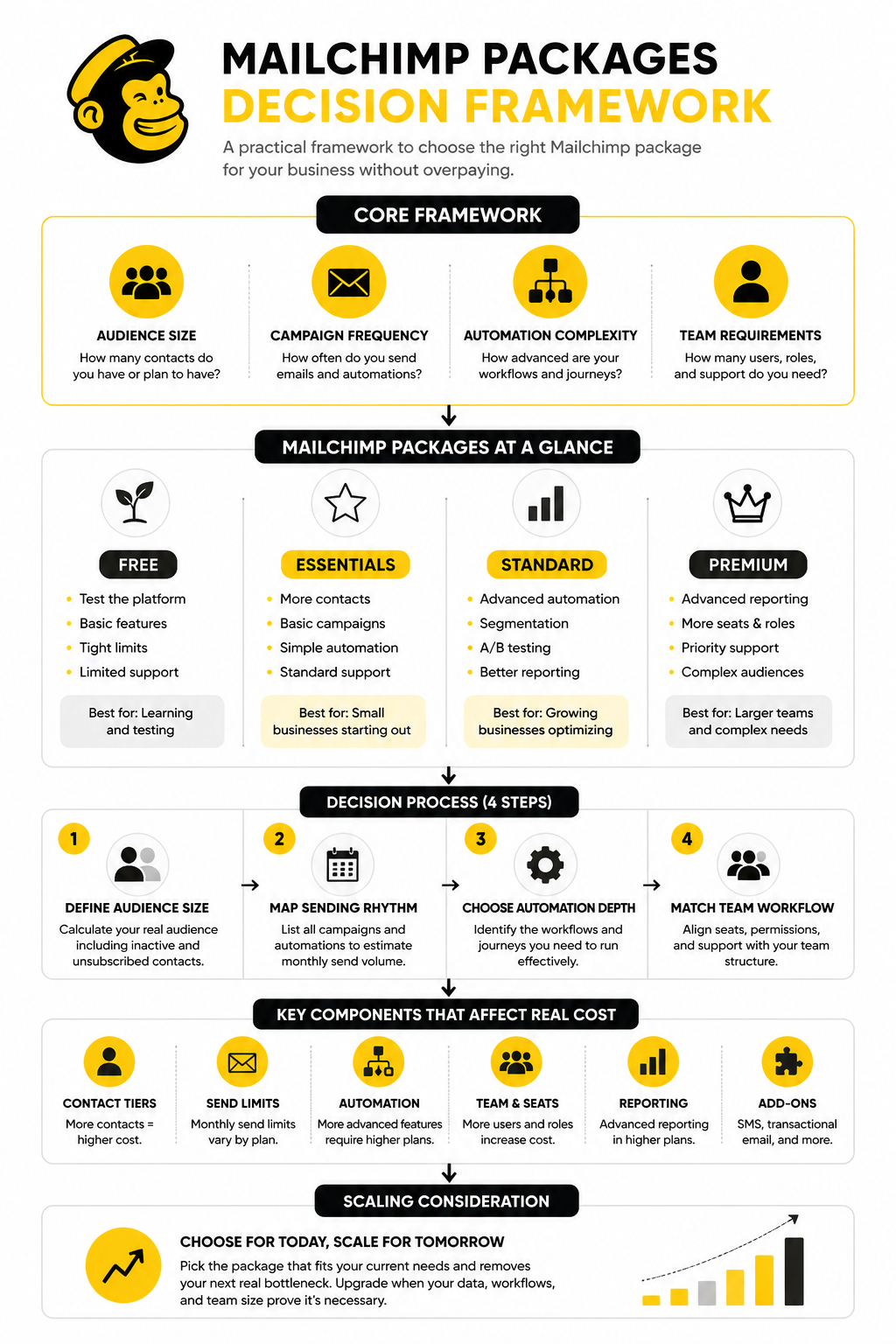
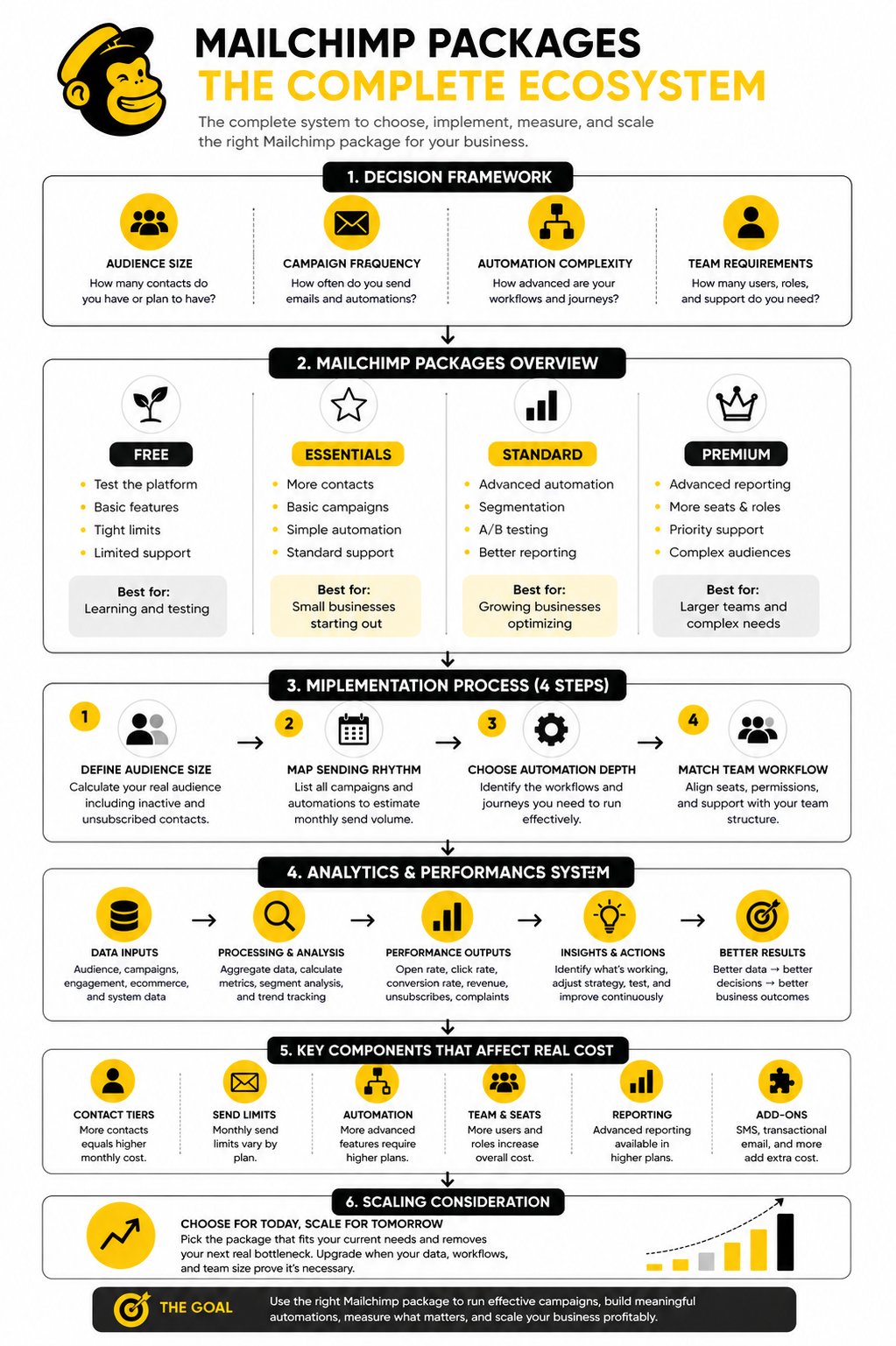
A good Mailchimp packages decision starts with four inputs: audience size, campaign frequency, automation complexity, and team requirements. Audience size affects the pricing tier. Campaign frequency affects whether monthly send limits are enough. Automation complexity affects whether Essentials is too limited or Standard becomes necessary. Team requirements affect seats, permissions, approval workflows, and support expectations.
This framework keeps the decision practical. A solo creator with 700 contacts and one weekly newsletter does not need the same package as an ecommerce brand with abandoned cart flows, post-purchase segmentation, and seasonal campaigns. A local service business may care more about forms and basic follow-up, while a larger marketing team may care about advanced reporting, permissions, and onboarding.
The rest of the article will use this framework to evaluate each package without getting trapped in feature-list thinking. Features matter, but only when they support a real marketing workflow. That is the difference between buying software and building a system.
Mailchimp Packages at a Glance
Mailchimp packages are easiest to understand when you separate the plan name from the pricing tier. The plan controls the features you get. The pricing tier controls how many contacts you can store and how many emails you can send each month.
That distinction matters because two businesses can both be on Standard and still pay very different monthly amounts. A list with 500 contacts is not priced the same as a list with 10,000 contacts. Mailchimp explains this directly in its pricing tier documentation, where the contact count you select determines your base pricing tier.
Free
The Free package is best for testing Mailchimp, building a very small list, or learning the interface before committing to a paid plan. It is not ideal for a serious business that depends on email as a revenue channel. The limits are tight, and support is more restricted than paid plans.
The main value of Free is that it gives you a low-risk way to set up basic forms, send simple campaigns, and understand how Mailchimp organizes audiences. But once you need more contacts, more sends, better support, or stronger automation, you will quickly feel the ceiling. Treat Free as a sandbox, not your long-term email system.
Essentials
Essentials is the first paid Mailchimp package most small businesses consider. It gives you more room than Free and is usually enough for basic email campaigns, simple customer communication, and early-stage list building. If your email strategy is mostly newsletters, announcements, and occasional promotional sends, Essentials can be a reasonable starting point.
The tradeoff is that Essentials is still limited when it comes to deeper automation and optimization. You can run campaigns, but you do not get the full strategic flexibility that more advanced businesses usually want. If you already know that customer journeys, behavioral targeting, and testing will matter, Essentials may become a stepping stone rather than a final choice.
Standard
Standard is where Mailchimp becomes more useful for businesses that want email to do more than broadcast updates. This package is typically the better fit when you care about automation, segmentation, testing, and improving campaigns over time. It is also the package many growing businesses should compare against alternatives like Brevo or Moosend, because the value depends heavily on how often you use the extra features.
Standard makes sense when your list is no longer just one big audience. You may want different messages for leads, buyers, repeat customers, inactive subscribers, or people who clicked specific offers. That is where stronger automation and segmentation start to matter, because better timing usually beats louder sending.
Premium
Premium is not designed for beginners. It is built for larger teams, bigger lists, more advanced reporting, more complex segmentation, and businesses that need stronger support. The package can make sense when email is a major channel and multiple people are involved in planning, approving, analyzing, and scaling campaigns.
For most small businesses, Premium will feel expensive before it feels necessary. That does not make it bad. It just means the package should be justified by operational complexity, not ego. If you do not need advanced team features, comparative reporting, or high-touch support, Standard usually deserves a serious look before jumping to Premium.
The Practical Difference Between the Packages
The biggest mistake is comparing Mailchimp packages only by the starting monthly price. Starting prices are useful for orientation, but they do not show what happens as your list grows. Mailchimp’s marketing plan comparison shows the visible feature differences, while the contact tier rules determine what you actually pay as the account scales.
A better way to compare the packages is to ask what constraint would hurt you first. If contact limits hurt first, your issue is list growth. If automation limits hurt first, your issue is workflow complexity. If reporting limits hurt first, your issue is decision quality. If seat and permission limits hurt first, your issue is team structure.
That is why the right Mailchimp package is rarely the one with the longest feature list. It is the one that removes the next real bottleneck in your marketing system. For a small newsletter, that may be Essentials. For a revenue-focused business with follow-up sequences, Standard is often the more practical package. For larger teams managing serious email operations, Premium is the package built for that level of control.
The Decision Framework for Choosing a Plan
Choosing between Mailchimp packages gets much easier when you stop comparing every feature side by side and start with the way your business actually sends email. A small newsletter, a service business, an ecommerce store, and an agency all need different levels of control. The right package is the one that supports your next 90 days of execution without forcing you into unnecessary complexity.
Start with your current list size, but do not stop there. Mailchimp’s monthly plans are shaped by both the plan type and the contact tier, and the selected contact tier determines your contact limit and send limit through Mailchimp’s pricing plan structure. That means your real cost is not only about how many subscribers you have today, but also how quickly your list is growing and how clean your database is.
Step 1: Define Your Real Audience Size
Your real audience size is not the number you casually remember from your dashboard. It is the number of contacts that count toward billing, including subscribed, unsubscribed, and non-subscribed contacts under Mailchimp’s pricing tier rules. This is where many businesses underestimate the cost of Mailchimp packages, because inactive or unsubscribed contacts can still sit inside the account unless they are archived, cleaned, or removed.
Before choosing a package, export or review your audience and separate contacts into practical groups. You want to know how many people can receive campaigns, how many no longer engage, how many are transactional or imported records, and how many should not be kept in the active marketing database. This cleanup step is not glamorous, but it can prevent you from paying for contacts that are not helping the business.
A clean list also makes the rest of your decision sharper. If you have 8,000 contacts but only 3,500 are active and relevant, your package choice should not be based on vanity size. It should be based on the audience you can actually market to, segment, and learn from.
Step 2: Map Your Sending Rhythm
The next question is how often you plan to send. A business sending one newsletter per month has a very different usage pattern from a brand sending weekly campaigns, launch sequences, seasonal offers, and automated follow-ups. Mailchimp packages include monthly send limits, so your sending rhythm can become a constraint even when your contact count looks fine.
Write down your expected sends before you choose the plan. Include newsletters, promotional campaigns, onboarding sequences, event reminders, lead magnet follow-ups, and win-back emails. If you only count newsletters, you will underestimate usage because automations can quietly add meaningful send volume once they are active.
This step also helps you avoid buying the wrong tool for the wrong job. If your business depends on frequent email plus SMS, CRM follow-up, pipeline management, and appointment reminders, a broader platform like GoHighLevel may fit better than trying to force every workflow through Mailchimp. If you mainly need email campaigns and straightforward automation, Mailchimp can still be a clean choice.
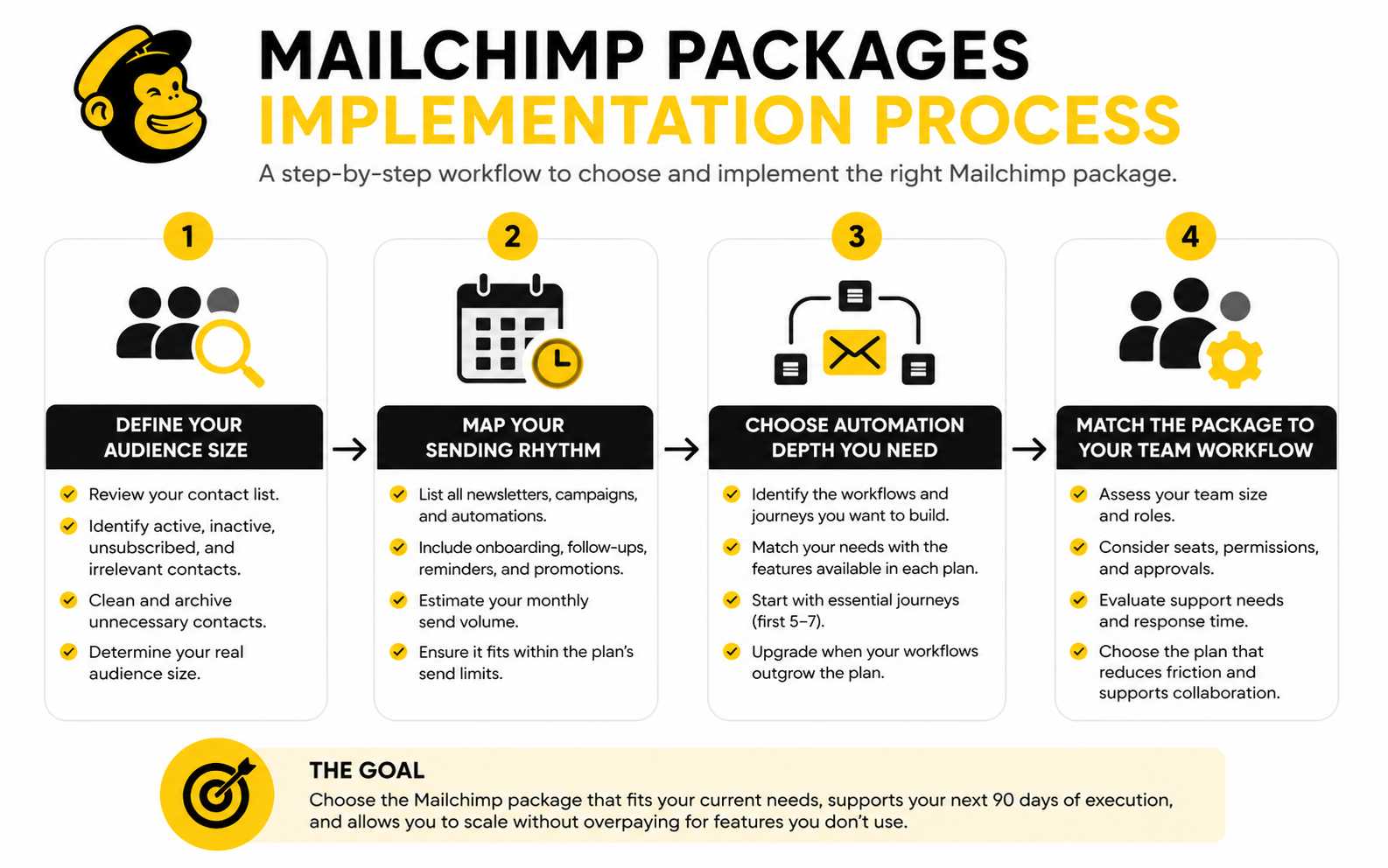
Step 3: Choose the Automation Depth You Actually Need
Automation is where the plan decision becomes serious. Basic campaigns are one thing, but customer journeys, behavioral triggers, branching logic, and more advanced personalization can change which Mailchimp package makes sense. The package should match the journey you plan to build, not the most advanced journey you can imagine.
For a simple newsletter business, Essentials may be enough because the workflow is mostly manual campaign creation and occasional list updates. For a business that needs welcome sequences, lead nurture, product education, or post-purchase follow-up, Standard usually becomes more practical. Mailchimp’s plan comparison makes this distinction important because advanced features are not evenly available across every package.
Be honest here. Do not upgrade because automation sounds impressive. Upgrade when you can name the exact journeys you will build, the segments they will target, and the business outcome they should improve.
Step 4: Match the Package to Your Team Workflow
Team structure is often ignored until it becomes annoying. If one person writes, designs, approves, sends, and reports on every email, the package decision can stay simple. Once multiple people touch campaigns, you need to think about seats, permissions, approval habits, and support access.
A founder-led business usually needs speed and simplicity more than enterprise controls. A marketing team needs fewer bottlenecks, clearer roles, and better visibility into what has been sent, tested, and learned. This is where higher Mailchimp packages can become easier to justify, especially when mistakes are expensive or campaigns move through several stakeholders.
Do not pay for team features before you need them, but do not ignore them if email is already a shared workflow. A messy approval process can cost more than a software upgrade because it slows launches, creates errors, and makes reporting harder to trust. The right package should reduce friction, not just unlock more buttons.
Statistics and Data
Data should help you choose between Mailchimp packages, not confuse you with random benchmarks. Open rates, click rates, unsubscribe rates, bounce rates, conversion rates, and revenue per recipient all tell you something different. The mistake is treating one metric as the whole story.
Open rate is useful for spotting subject line, sender name, timing, and audience-fit issues, but it is not as reliable as it used to be. Privacy features can inflate or distort opens, so an open rate should be treated as a directional signal rather than a clean measure of intent. If your opens look healthy but clicks and conversions are weak, the problem is probably not the package; it is the offer, message, landing page, or audience match.
Click rate is usually more useful when comparing Mailchimp packages because it shows whether subscribers are taking action. A business using Free or Essentials may only need basic reporting if the goal is simple newsletter engagement. A business using Standard or Premium should be looking deeper at segments, journeys, product interest, and campaign-level behavior because those packages are easier to justify when the data improves decisions.
The Metrics That Actually Matter
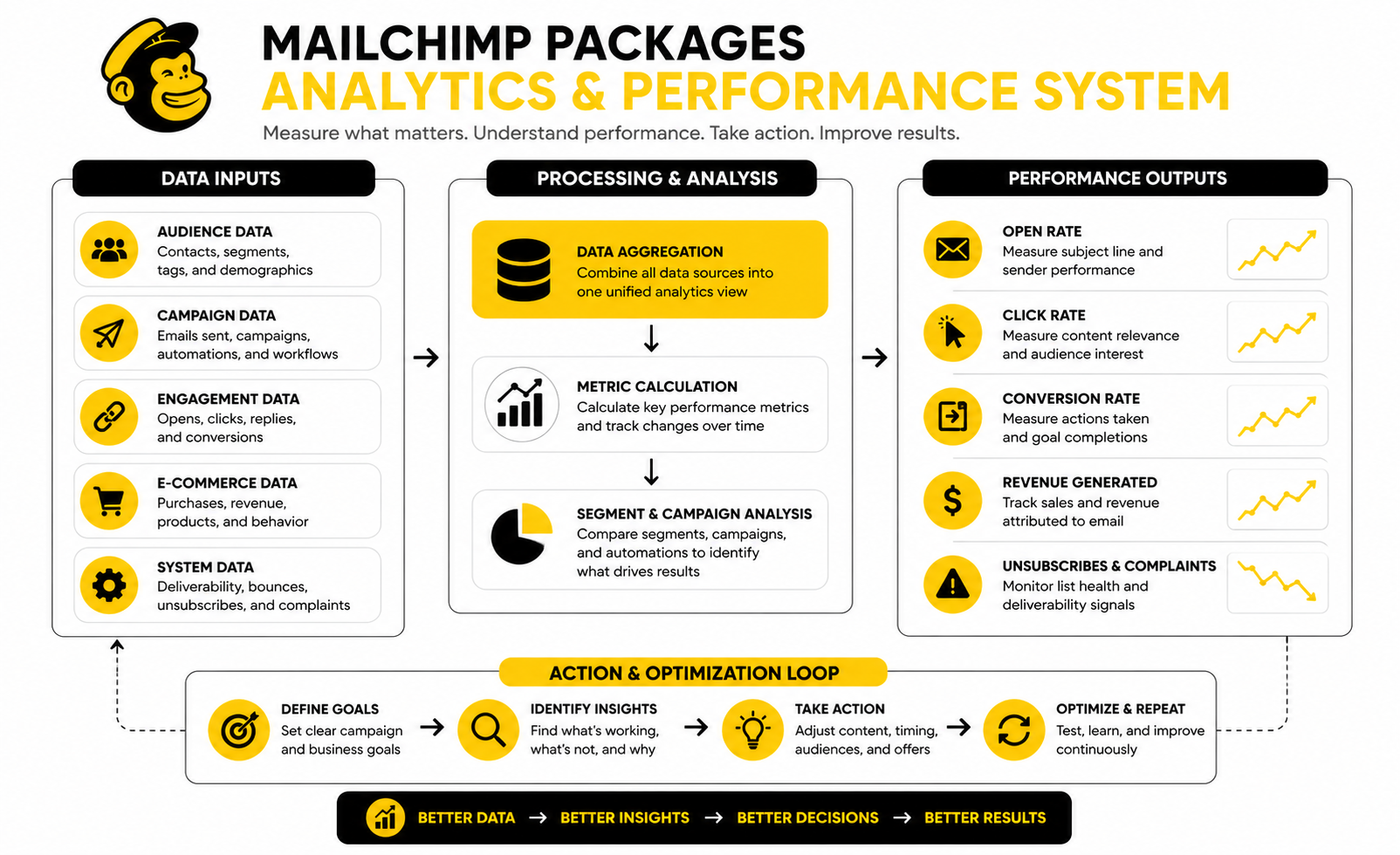
The most important email metrics are the ones that connect to a business decision. Open rate helps you judge initial attention. Click rate helps you judge message relevance. Conversion rate helps you judge whether the campaign moved someone closer to revenue. Unsubscribe and spam complaint rates help you judge whether your sending strategy is damaging trust.
This matters because Mailchimp packages become more expensive as your list and usage grow. If you are paying for a larger contact tier, you should know whether those contacts are producing engagement or just sitting in the database. A bloated list makes every package look worse because you pay for reach that does not create enough response.
The cleanest way to measure performance is to build a simple campaign scorecard. Track each campaign by audience segment, offer, send date, subject line, open rate, click rate, conversions, unsubscribes, and revenue or qualified leads. You do not need a complicated dashboard at the start. You need consistent numbers that help you make better next moves.
How to Read Benchmarks Without Getting Misled
Benchmarks are useful, but only when you compare them to the right context. A retail promotion, a nonprofit update, a SaaS onboarding email, and a local service reminder will not behave the same way. Recent benchmark roundups from platforms like Brevo and Moosend show that performance varies heavily by industry, audience, and message type.
That is why you should not panic because one campaign underperforms a general average. A cold promotional email to a broad list will usually perform differently from a triggered welcome email sent immediately after someone signs up. Automated and behavior-based emails often deserve their own benchmark because they are sent in a completely different context.
Use benchmarks as a diagnostic tool, not a scoreboard. If your click rate is below typical ranges for your industry, review the offer, call to action, segmentation, and landing page. If your unsubscribe rate jumps after a campaign, review whether the email matched subscriber expectations. If bounce rates rise, clean the list before upgrading into a higher contact tier.
What the Data Should Tell You About Your Package
Your analytics should show whether your current package is limiting growth or whether your strategy needs work first. If you are on Essentials and your campaigns are performing well but you cannot build the journeys you need, Standard may be the logical upgrade. If you are already on Standard but your reporting is messy, upgrading will not fix unclear goals or poor tracking.
A package upgrade makes sense when the next feature unlocks a measurable action. That could be better segmentation, more advanced customer journeys, deeper testing, or more useful reporting. It does not make sense when the real issue is weak messaging, poor list hygiene, or sending campaigns without a clear offer.
This is also where alternatives deserve a fair look. If your measurement needs are tied to CRM pipelines, calls, appointments, and multi-channel follow-up, GoHighLevel may be more practical than stacking tools around Mailchimp. If your needs stay focused on email campaigns and automation, the right Mailchimp package can still be a strong fit.
Turning Email Data Into Action
A simple monthly review is enough for most businesses. Look at your best campaign, your worst campaign, your highest-clicking segment, your weakest segment, and your most profitable automation. Then decide what to keep, what to cut, and what to test next.
Do not change everything at once. Test one variable at a time when possible: subject line, offer angle, call to action, segment, send time, or landing page. This keeps the learning clean and makes your Mailchimp package more valuable because the platform becomes part of a repeatable optimization process.
The goal is not to stare at reports. The goal is to make better decisions faster. When your data tells you which audiences respond, which offers convert, and which workflows create value, choosing between Mailchimp packages becomes much more obvious.
Core Components That Affect the Real Cost
The real cost of Mailchimp packages is not only the monthly plan price. It is the combination of contacts, send volume, add-ons, deliverability setup, list hygiene, integrations, and the time your team spends managing the system. Once you understand those moving parts, you can make a much cleaner decision.
This is where most pricing comparisons stay too shallow. They compare Free, Essentials, Standard, and Premium as if every business uses email the same way. In reality, the same package can feel affordable for one company and wasteful for another, depending on how the account is structured.
Contact Management
Contact management is the first place to look because Mailchimp monthly plans are built around how many contacts you choose to store. Mailchimp’s pricing plan structure explains that the selected contact tier determines both the contact limit and monthly sending limit. So if your account is full of old imports, inactive subscribers, duplicate records, or unnecessary audiences, you may be paying for complexity that does nothing useful.
The practical move is simple: clean before you upgrade. Archive contacts that should not count toward active marketing, remove obvious junk, and consolidate audiences when tags or segments would do the job better. Do this before choosing between Mailchimp packages, because a smaller and cleaner audience can change the plan math completely.
This also improves performance. A list full of people who do not engage can drag down your signals and make future campaigns harder to judge. Clean data is not just an admin task; it is part of the marketing system.
Deliverability and Compliance
Deliverability is not a premium feature. It is the foundation. If your emails do not reach the inbox, the package does not matter.
Modern email sending requires proper domain authentication, especially after Gmail and Yahoo raised sender requirements around SPF, DKIM, DMARC, one-click unsubscribe, and spam complaint controls. Mailchimp has published guidance for customers preparing for those requirements in its Gmail and Yahoo sender update. This matters because a business can pay for Standard or Premium and still underperform if the sending domain is not trusted.
Treat deliverability setup as part of implementation, not something you fix later. Authenticate your sending domain, keep complaint rates low, remove bad addresses, and avoid blasting disengaged contacts. The bigger your list gets, the more expensive sloppy sending becomes.
Automation Scope
Automation scope is the difference between buying Mailchimp as a newsletter tool and using it as a lifecycle marketing platform. A small business with one lead magnet and one monthly newsletter can stay lean. A business with welcome sequences, product education, upsell paths, renewal reminders, and reactivation campaigns needs a more serious setup.
This is where Standard often becomes the practical middle ground among Mailchimp packages. It gives more room for customer journeys and optimization than Essentials, without jumping straight into the cost and complexity of Premium. But the upgrade only makes sense if you have real workflows to build.
Do not create automations just because the feature exists. Start with the highest-leverage moments: new subscriber, new lead, first purchase, abandoned interest, inactive customer, and post-purchase follow-up. Each automation should have a job, a clear audience, and a measurable outcome.
Integrations and Revenue Tracking
Integrations can make Mailchimp more valuable, but they can also make the stack messy. Ecommerce stores, CRMs, form tools, landing page builders, webinar platforms, and analytics tools all need clean data flow. If the wrong fields sync or the same contact appears in multiple places, reporting gets noisy fast.
For ecommerce and funnel-heavy businesses, the question is whether Mailchimp should remain the center of the system or become one piece of a broader stack. If the business needs dedicated funnels, offers, and checkout flows, ClickFunnels may handle the sales path while Mailchimp handles email follow-up. If the business wants CRM, pipeline, booking, SMS, email, and automation in one place, GoHighLevel may reduce tool sprawl.
The key is not to connect everything just because integrations exist. Connect the tools that improve capture, segmentation, attribution, or follow-up. Every integration should make the system clearer, not harder to manage.
Transactional Email and Add-Ons
Transactional email is a separate consideration from regular marketing campaigns. Receipts, password resets, account notifications, order updates, and other triggered operational messages are not the same as newsletters. Mailchimp offers transactional email through Mandrill, and its transactional email pricing is separate from the normal marketing plan decision.
This matters because some businesses assume one Mailchimp package covers every email use case. It may not. If you need both marketing email and transactional email, evaluate the combined cost before committing to the stack.
The same logic applies to SMS, advanced websites, ecommerce features, and other add-ons. The base package is only one part of the total cost. Always model the full workflow you plan to run, then compare the actual monthly cost against the revenue or operational value it should create.
When Scaling Becomes a Strategy Question
At a certain point, choosing between Mailchimp packages becomes less about features and more about operating model. A growing business needs to decide whether Mailchimp is the long-term marketing hub or a strong email layer inside a wider system. That decision affects data, reporting, team roles, and future migrations.
Mailchimp is a strong fit when email campaigns, audience management, forms, and approachable automation are the core need. It becomes less obvious when the business also needs sales pipelines, client portals, appointment booking, SMS-heavy follow-up, or agency-style account management. That is not a criticism; it is a scope decision.
The safest move is to choose the package that matches your next stage, not your fantasy future. Pay for what you can implement well in the next few months. Then upgrade when the data, workflow, and team process prove that the extra capability will actually be used.
Mailchimp Packages FAQ and Final Recommendation
What are the main Mailchimp packages?
The main Mailchimp packages are Free, Essentials, Standard, and Premium. Free is mainly for testing and very small lists. Essentials is the entry-level paid package, Standard adds stronger automation and optimization, and Premium is built for larger teams that need advanced controls, reporting, and support.
Which Mailchimp package is best for beginners?
Free is best for learning the platform, but Essentials is usually the better beginner package for a real business. Free gives you a low-risk way to test forms, campaigns, and basic audience setup. Essentials gives more breathing room once you are ready to send consistently and treat email as a serious channel.
Is Mailchimp Free enough for a small business?
Mailchimp Free can be enough for a small business that is still validating an idea or building its first audience. It is not ideal if email is already part of your sales process, client communication, or repeat marketing rhythm. Once you need more sends, support, or automation, Free starts to feel restrictive quickly.
When should I upgrade from Free to Essentials?
Upgrade from Free to Essentials when your list size, send volume, or support needs outgrow the free limits. You should also upgrade when you want your email marketing to look more professional and operate with fewer restrictions. The key is not upgrading because you feel like you “should,” but because the current package is blocking normal execution.
When is Standard better than Essentials?
Standard is better than Essentials when you need more advanced automation, segmentation, optimization, and customer journey tools. This is usually the right move when email is not just a newsletter but part of lead nurturing, ecommerce follow-up, onboarding, or reactivation. If you can clearly name the workflows you want to build, Standard becomes easier to justify.
Who should choose Mailchimp Premium?
Premium is best for larger teams, bigger databases, and businesses that need advanced reporting, permissions, segmentation, and priority support. It is usually not the right first paid package for small teams. Choose Premium when the operational value is obvious, not because it sounds like the most powerful option.
Do unsubscribed contacts count toward Mailchimp billing?
Yes, unsubscribed and non-subscribed contacts can count toward contact limits on Mailchimp monthly plans through Mailchimp’s pricing tier rules. That is why list hygiene matters so much. If you do not archive or clean contacts properly, you may pay for records that are not helping your campaigns.
Why do Mailchimp packages get expensive as a list grows?
Mailchimp packages scale with contact tiers, and larger lists usually mean higher monthly costs. The price can also rise when you need more sends, stronger automation, add-ons, or separate transactional email. This is why a clean audience and clear sending plan are essential before upgrading.
Is Mailchimp good for ecommerce?
Mailchimp can work well for ecommerce businesses that need campaigns, forms, segmentation, and automated follow-up. It becomes more valuable when customer data is synced cleanly and campaigns are tied to real purchase behavior. For funnel-heavy ecommerce or offer-driven sales systems, pairing email with a dedicated funnel platform like ClickFunnels may make the overall setup stronger.
What is the best Mailchimp package for automation?
Standard is usually the best Mailchimp package for automation if you want a practical balance between capability and cost. Essentials can work for simpler needs, but it is easier to outgrow once customer journeys become important. Premium is better when automation is part of a larger team workflow with advanced reporting and permissions.
Should I use Mailchimp or an alternative?
Use Mailchimp if you want an approachable email marketing platform with strong campaign tools and a familiar interface. Consider alternatives if pricing, CRM depth, SMS, funnel building, or multi-channel follow-up are bigger priorities. For example, Brevo and Moosend are worth comparing for email-focused use cases, while GoHighLevel is more relevant when CRM, pipelines, appointments, SMS, and automation need to live together.
How should I choose between Mailchimp packages?
Choose based on the next real bottleneck in your business. If your bottleneck is list size, review your contact tier and clean the database first. If your bottleneck is automation, compare Essentials and Standard carefully. If your bottleneck is team control, reporting, and support, Premium may be worth evaluating.
What is the safest recommendation for most growing businesses?
For most growing businesses, the safest path is to start lean, clean the list, define the workflows, and upgrade only when the next package removes a real constraint. Essentials can be enough for basic sending. Standard is often the strongest middle option when automation and segmentation start to matter. Premium should be reserved for teams that can actually use the extra control.
The best Mailchimp packages decision is not about buying the biggest plan. It is about building a system you will actually use. Keep the list clean, measure the right signals, and pay for the features that directly improve execution.
Work With Professionals
Explore 10K+ Remote Marketing Contracts on MarkeWork.com
Most marketers spend too much time chasing clients, competing on crowded platforms, and losing a percentage of every project to middlemen.
MarkeWork gives you a better way. Browse thousands of remote marketing contracts and connect directly with companies desperate to hire skilled marketers like you, without platform commissions and without unnecessary gatekeepers.
If you are serious about finding better opportunities and keeping 100% of what you earn, explore available contracts and create a profile for free at MarkeWork.com.