

Choosing between Mailchimp plans sounds simple until you realize how quickly pricing, features, and limits start to blur together. What looks like a $13/month tool can quietly turn into a $100+ monthly expense as your contact list grows, especially because Mailchimp charges based on contacts, not emails sent .
That’s why a proper mailchimp plans comparison isn’t just about features—it’s about understanding how the system behaves as your business scales. The difference between a “good deal” and an expensive mistake often comes down to details most people skip.
This guide breaks it down clearly, starting with structure so you know exactly where this is going.
Article Outline
- Why Mailchimp Pricing Matters More Than You Think
- Mailchimp Plans Overview (Free, Essentials, Standard, Premium)
- Key Differences Between Mailchimp Plans
- Hidden Costs and Pricing Traps
- How to Choose the Right Plan for Your Business
- Best Alternatives to Mailchimp (When It Stops Making Sense)
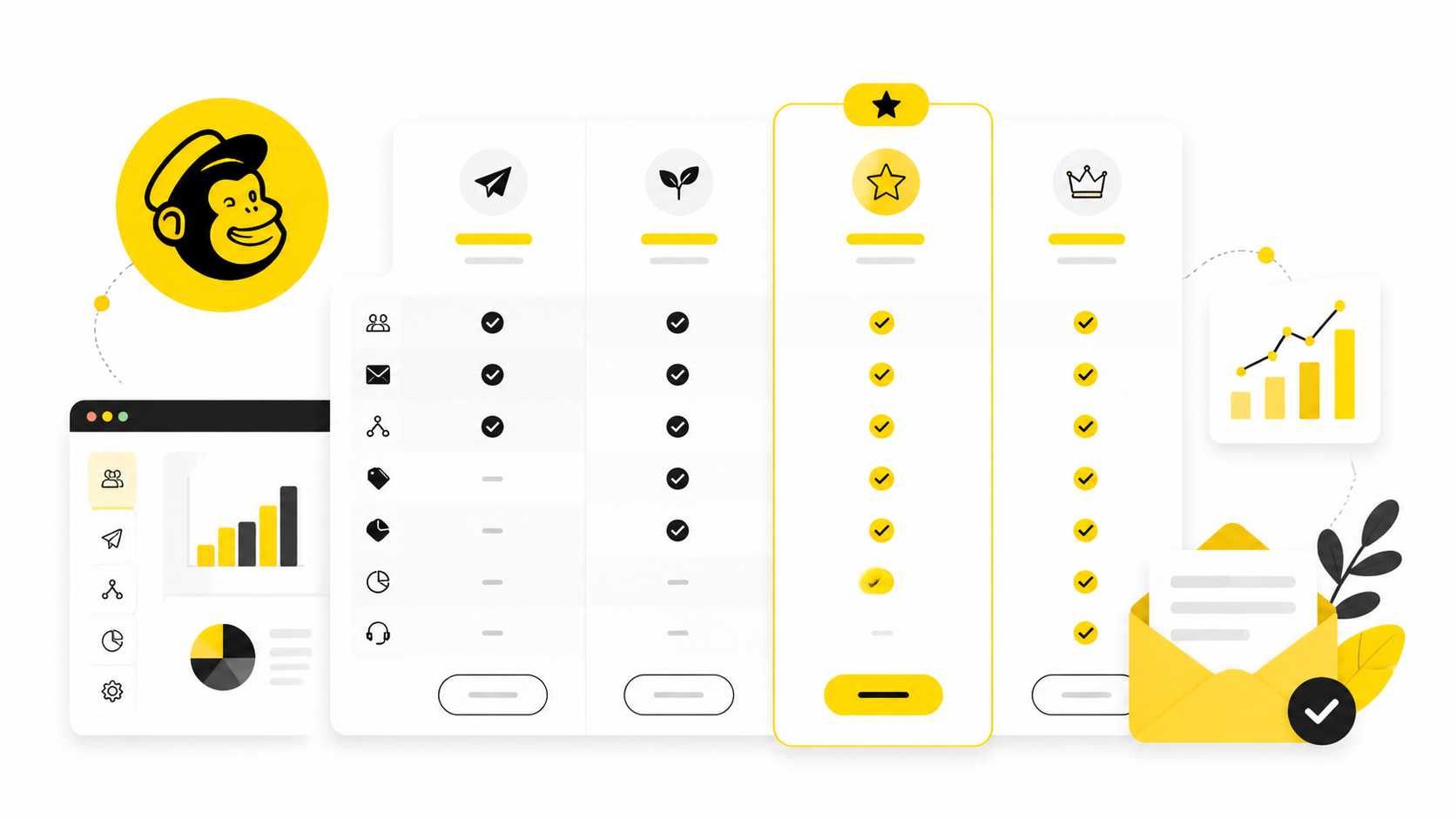
Why Mailchimp Pricing Matters More Than You Think
Mailchimp used to be the go-to beginner tool because it was simple and generous. That’s no longer the case. The free plan now caps at just 250 contacts and 500 monthly emails, which forces most growing businesses to upgrade quickly .
The real issue isn’t just the limits—it’s how pricing scales. Mailchimp charges based on total contacts stored, including unsubscribed users unless you manually archive them. That alone can inflate your bill by 10–20% without increasing results .
For businesses that rely on email marketing as a revenue channel, this pricing structure directly impacts profitability. If your list grows to 5,000–10,000 contacts, you’re already looking at $75–$135 per month depending on the plan . At that point, choosing the wrong tier isn’t a minor mistake—it compounds every month.
Mailchimp Plans Overview (The Big Picture)
Before comparing details, you need a clear snapshot of how Mailchimp structures its plans. There are four main tiers, each designed for a different stage of growth.
- Free — for testing and very small lists
- Essentials — basic email marketing features
- Standard — automation and optimization tools
- Premium — enterprise-level scaling and support
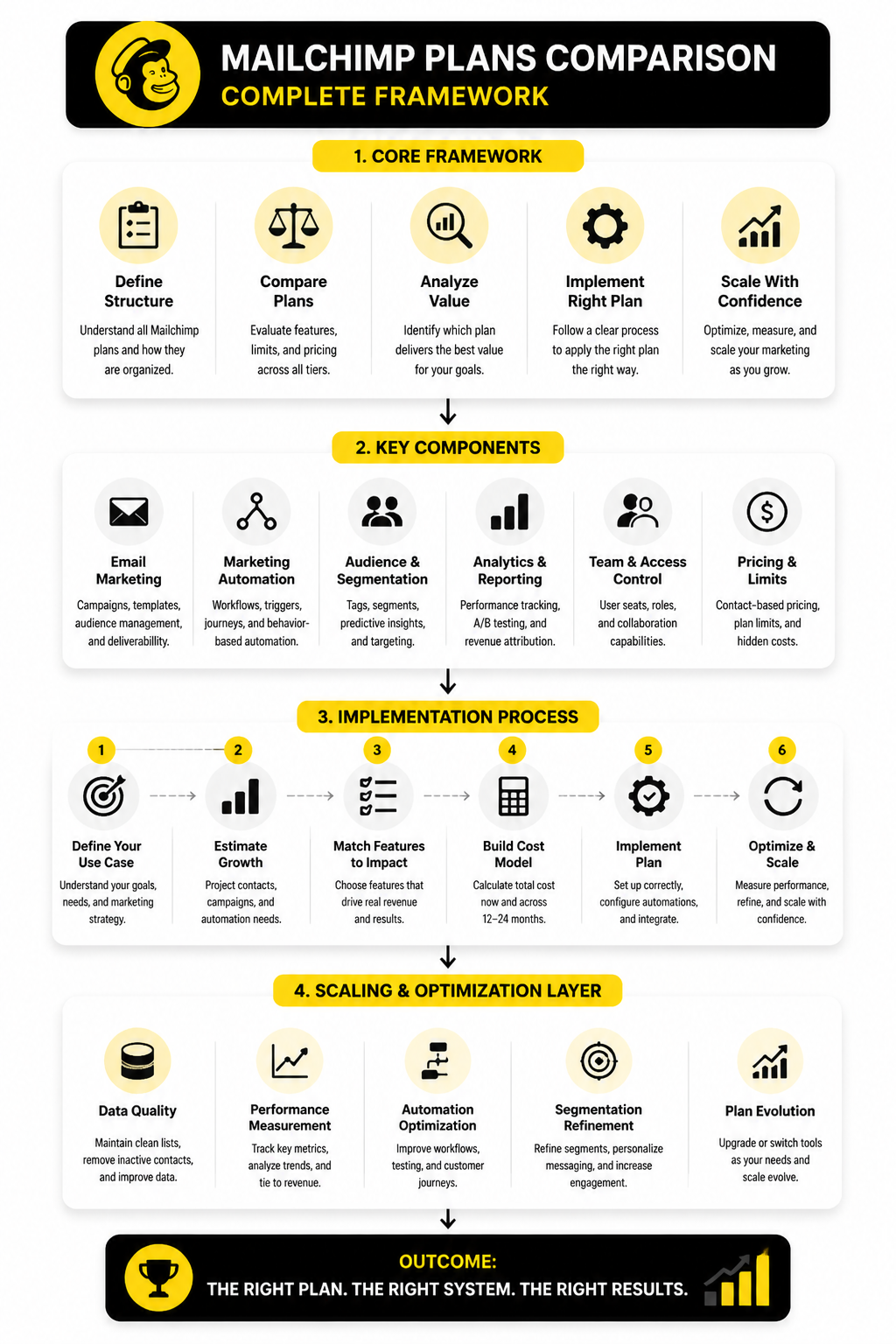
At a glance, the difference between these plans isn’t just features—it’s capability ceilings. Each upgrade unlocks more automation, better analytics, and higher sending limits, but also increases cost significantly.
Here’s the simplified breakdown:
Free Plan
This is the entry point. It’s designed for learning the platform, not for serious marketing.
- Up to 250 contacts
- 500 emails per month
- Single audience and user
- Limited templates and reporting
It’s enough to understand how email campaigns work, but not enough to build a real growth system. Automation and testing features are mostly locked.
Essentials Plan
This is where most small businesses start paying.
- Starts around $13/month for 500 contacts
- Email templates and branding removal
- Basic A/B testing
- Limited automation (up to a few steps)
- Up to 3 users
Essentials gives you the tools to run campaigns consistently, but it’s still restrictive. Automation depth is limited, which becomes a bottleneck quickly if you want to scale.
Standard Plan
This is the most commonly recommended tier for growing businesses.
- Starts around $20/month for 500 contacts
- Advanced automation workflows
- Predictive segmentation and AI tools
- Better reporting and optimization
- More user seats and audiences
The Standard plan is where Mailchimp becomes a real marketing engine. Features like automation flows and AI-driven optimization significantly improve performance.
Premium Plan
This is designed for large teams and high-volume operations.
- Starts around $350/month
- Unlimited users and advanced segmentation
- Priority support and onboarding
- Advanced testing and reporting tools
Most businesses never need this tier unless email is a primary revenue driver at scale. The jump in price is substantial, so it only makes sense when complexity demands it.
Where Most People Get It Wrong
Most comparisons stop at listing features, but that’s not how real decisions are made.
The mistake is choosing based on current needs instead of growth trajectory.
If you’re planning to build funnels, automation, or segmented campaigns, jumping straight to a more capable system—or even exploring platforms like GoHighLevel—can sometimes be more cost-efficient long-term than upgrading through Mailchimp tiers step by step.
Mailchimp works best when:
- You value simplicity and integrations
- You don’t need deep CRM functionality
- You’re okay with pricing scaling aggressively
It struggles when:
- Your list grows quickly
- You need advanced automation early
- You want predictable pricing
The next section will break down the exact differences between plans—feature by feature—so you can see where each tier actually starts to diverge in real-world use.
Key Differences Between Mailchimp Plans
At a surface level, Mailchimp plans look like a simple upgrade ladder. But when you break them down feature by feature, the differences aren’t linear—they’re structural. Each tier unlocks entirely new capabilities that change how you can run your marketing.
This is where a real mailchimp plans comparison becomes useful. You’re not just comparing “more features,” you’re comparing what kind of marketing system you can actually build.
Automation Depth Changes Everything
Automation is the clearest dividing line between plans.
- Free: almost no automation beyond basic email sends
- Essentials: simple autoresponders, limited steps
- Standard: multi-step customer journeys with triggers and conditions
- Premium: advanced branching, behavior-based targeting at scale
The jump from Essentials to Standard is especially important. With Standard, you can create behavior-based sequences—like sending different emails depending on clicks, purchases, or engagement patterns.
That’s the difference between sending newsletters and building a revenue system.
If automation is central to your strategy, tools like GoHighLevel often get considered at this stage because they combine CRM, funnels, and automation into one system instead of splitting it across upgrades.
Segmentation and Targeting Capabilities
Segmentation determines how precisely you can target your audience. And this is where Mailchimp quietly limits lower-tier users.
- Free & Essentials: basic segmentation (tags, simple filters)
- Standard: predictive segmentation and behavioral targeting
- Premium: advanced segmentation with complex logic and large datasets
Standard introduces predictive insights like likely buyers or churn risk, which are powered by Mailchimp’s AI models. That can improve campaign performance significantly, especially as your list grows.
But here’s the catch: those features only work well if you already have enough data. Smaller lists won’t see the same value, which makes upgrading too early a wasted expense.
Reporting and Analytics Differences
Most users underestimate how much reporting improves between plans.
- Free: basic open and click rates
- Essentials: A/B testing and slightly deeper metrics
- Standard: revenue tracking, customer lifetime value insights
- Premium: advanced comparative reporting and custom analytics
For eCommerce businesses, Standard is usually the minimum because it connects campaigns to actual revenue, not just engagement. Without that, you’re optimizing blindly.
This is one of the reasons many growing brands eventually compare Mailchimp against platforms like Brevo, which offers more transparent pricing tied to email volume rather than stored contacts.
User Access and Team Collaboration
This is often overlooked until teams start growing.
- Free: 1 user
- Essentials: up to 3 users
- Standard: more seats with role-based permissions
- Premium: unlimited users with advanced permissions
If you’re working solo, this doesn’t matter. But as soon as you involve designers, marketers, or external partners, user limits can slow you down.
Premium is really the only tier built for larger teams, but it comes with a steep price jump. That’s why many agencies skip Mailchimp entirely and go straight to platforms like GoHighLevel, which are designed for multi-client environments.
Contact Limits and Pricing Scaling
This is the most important difference—and the one that causes the most frustration.
Mailchimp pricing increases as your contact list grows. That means:
- You pay more even if your engagement doesn’t improve
- You’re charged for inactive contacts unless cleaned regularly
- Costs can double faster than expected
For example, moving from 1,500 to 5,000 contacts can push you from entry-level pricing into mid-tier monthly costs without adding new features—just more contacts.
That’s why platforms like Moosend and Systeme.io get attention in comparisons—they offer flatter pricing structures that are easier to predict.
The Real Gap Between Essentials and Standard
If there’s one decision point that matters most in this entire mailchimp plans comparison, it’s this: Essentials vs Standard.
Essentials is enough to send emails consistently. But it lacks the depth needed to optimize, automate, and scale.
Standard, on the other hand, unlocks:
- Customer journey automation
- Behavioral triggers
- Predictive insights
- Revenue tracking
That’s why most serious businesses end up there. The problem is that jumping to Standard early increases costs before you fully use the features.
So the decision isn’t just “which plan is better.” It’s when does the upgrade actually pay for itself.
The next section dives into the part most comparisons ignore completely—hidden costs and pricing traps that change the real price you’ll pay over time.
Hidden Costs and Pricing Traps
By now, the differences between plans are clear. But this is the part most comparisons completely ignore—and it’s where the real cost of Mailchimp shows up.
A proper mailchimp plans comparison isn’t just about base pricing. It’s about understanding how your bill evolves as your list, campaigns, and complexity grow.
You Pay for Stored Contacts, Not Engagement
This is the single biggest pricing trap.
Mailchimp charges based on how many contacts you store, not how many you actively email. That means:
- Unsubscribed contacts can still count unless archived
- Cold leads and inactive users still increase your bill
- List hygiene directly affects your monthly cost
In practice, this creates a hidden tax on growth. If your list grows quickly but engagement drops, your costs increase while performance doesn’t.
This is one of the reasons many marketers shift to platforms like Brevo, where pricing is tied more closely to email volume rather than stored contacts.
Automation Limits Force Early Upgrades
Another subtle cost driver is automation.
You might start on Essentials thinking it’s enough. But once you try to build real workflows—like onboarding sequences, abandoned cart emails, or lead nurturing—you hit limitations fast.
That forces an upgrade to Standard, even if:
- Your list is still small
- You’re not fully using advanced features
- You only need one or two complex automations
So instead of scaling naturally, you’re pushed into higher pricing tiers earlier than expected.
This is where all-in-one platforms like GoHighLevel become attractive, because automation isn’t locked behind multiple pricing jumps.
Audience and List Structure Costs
Mailchimp’s audience structure can also increase costs in ways that aren’t obvious at first.
If you manage multiple audiences (lists), the same contact can be counted multiple times. That means:
- One person in two lists = counted twice
- Segmentation across audiences becomes inefficient
- Costs increase without adding real value
The recommended workaround is to use one audience with tags and segments. But many users only discover this after their costs have already increased.
Add-Ons and Feature Gaps
Mailchimp’s base plans don’t always include everything you expect.
Depending on your needs, you may need to pay extra for:
- Transactional emails
- Advanced reporting tools
- Dedicated IP addresses
- SMS marketing
Each add-on pushes your total cost higher. And when combined with contact-based pricing, the gap between “advertised price” and “real price” can become significant.
That’s why some businesses evaluate alternatives like Systeme.io, which bundles funnels, email, and automation into one predictable subscription.
How to Actually Implement the Right Plan Decision
Understanding the differences is one thing. Applying them correctly is where most people get stuck.
Instead of guessing, you can approach this decision like a simple framework.
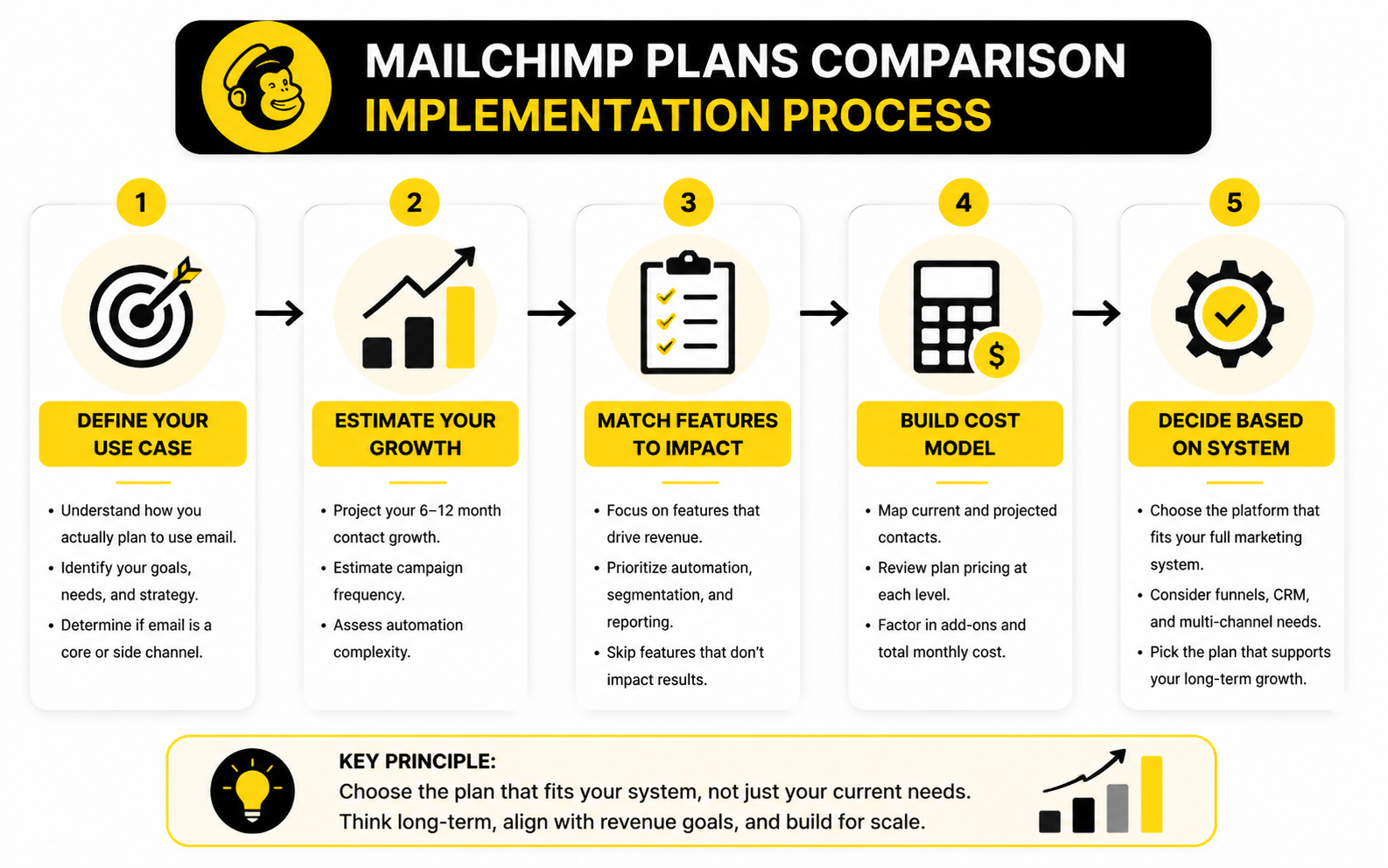
Step 1: Define Your Real Use Case
Start with how you actually plan to use email—not what sounds good.
Ask yourself:
- Are you sending newsletters or building automated funnels?
- Do you need segmentation beyond basic tags?
- Is email a side channel or a core revenue driver?
If your use case is simple, Essentials might be enough. But if you’re planning automation from day one, skipping straight to a more capable setup can save time and money.
Step 2: Estimate Your 6–12 Month Growth
Most people choose based on current list size. That’s a mistake.
Instead, project:
- Expected contact growth
- Monthly campaign frequency
- Automation complexity
If you expect to double your list within months, your pricing will scale with it. That’s where Mailchimp becomes less predictable compared to alternatives with flat pricing models.
Step 3: Match Features to Revenue Impact
Not every feature matters equally.
Focus on what directly impacts revenue:
- Automation workflows
- Segmentation quality
- Reporting depth
If a feature doesn’t help you generate or optimize revenue, it’s not worth upgrading for.
This is why some businesses prioritize funnel builders like ClickFunnels alongside or instead of Mailchimp—because conversion systems often matter more than email volume alone.
Step 4: Build a Simple Cost Model
Before committing, map out your expected monthly cost:
- Current contacts → projected contacts
- Plan pricing at each level
- Additional tools or add-ons
This gives you a realistic monthly range instead of relying on entry-level pricing.
When you do this, you’ll often find that:
- Mailchimp starts affordable
- Costs rise faster than expected
- Alternatives become competitive sooner than you thought
Step 5: Decide Based on System, Not Tool
This is the key shift.
Don’t choose a plan in isolation. Choose the system you want to build.
If your system includes:
- Funnels
- CRM
- Multi-channel automation
Then tools like GoHighLevel or Systeme.io might align better long-term.
If your system is:
- Email-first
- Simpler campaigns
- Integration-heavy
Then Mailchimp can still be a solid choice.
The next section will tie this all together by helping you choose the right plan based on your specific business stage—so you’re not overpaying or underpowered.
Email Marketing Performance Benchmarks and What They Actually Mean
Understanding pricing and features is only half of a real mailchimp plans comparison. The other half is performance. If you don’t know what numbers to expect—or how to interpret them—you can’t tell whether a higher-tier plan is actually worth it.
Most businesses track opens and clicks, but those are surface-level signals. What matters is how those metrics connect to revenue and decision-making.
The Core Metrics That Actually Matter
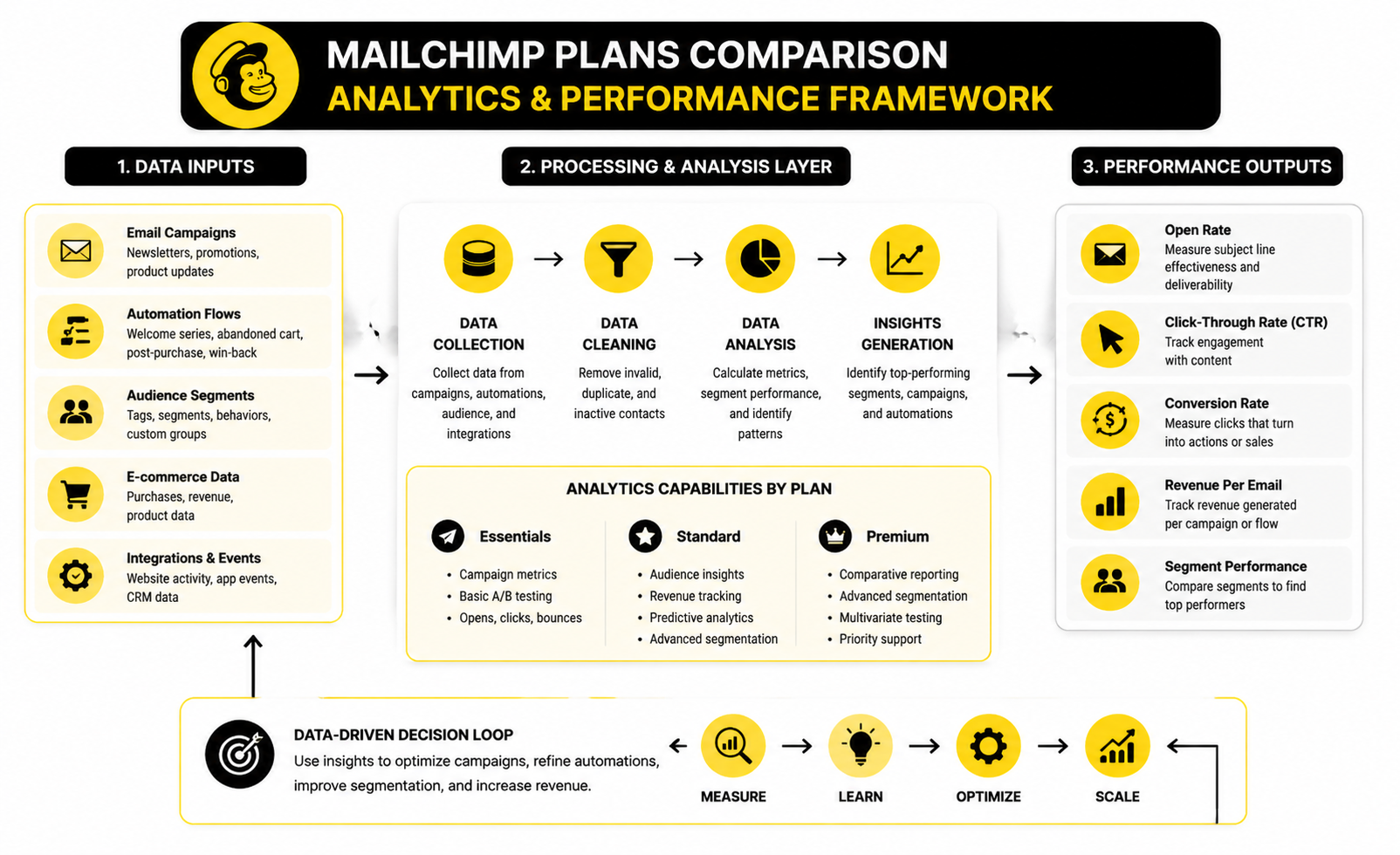
Every Mailchimp plan gives you access to some level of reporting, but not all metrics are equally useful.
Here are the ones that directly impact your results:
- Open rate: Indicates subject line effectiveness and deliverability
- Click-through rate (CTR): Shows engagement with your content
- Conversion rate: Tracks how many clicks turn into actual actions
- Revenue per email: The most important metric for scaling decisions
Across industries, email open rates often land between 20% and 30%, while click-through rates average around 2% to 5% (mailchimp.com). These numbers give you a baseline, not a goal.
What matters more is trend direction. If your CTR improves after segmentation or automation changes, that’s a signal your system is working.
Why Basic Metrics Are Not Enough
The Free and Essentials plans limit how deeply you can analyze performance. You see what happened, but not why it happened.
For example:
- You might see a 25% open rate, but not know which segments performed best
- You might track clicks, but not tie them directly to revenue
- You might run A/B tests, but lack statistical depth
This creates a ceiling on optimization. You can improve campaigns, but only incrementally.
That’s why Standard becomes important—it connects email behavior to business outcomes like purchases and customer lifetime value.
How Analytics Improves as You Upgrade
Each Mailchimp tier expands your ability to interpret data.
- Essentials: campaign-level metrics and basic A/B testing
- Standard: audience insights, revenue tracking, predictive analytics
- Premium: comparative reporting, advanced segmentation analytics
Once you reach Standard, you’re no longer guessing. You can identify:
- Which segments generate the most revenue
- Which campaigns drive repeat purchases
- Which automation flows perform best over time
That’s the difference between running campaigns and running a system.
Interpreting Data the Right Way
Most marketers misread their data because they focus on isolated metrics instead of patterns.
Here’s how to approach it properly:
- Start with trends, not single campaigns
One campaign can spike or drop randomly. What matters is consistency over time.
- Compare segments, not averages
Your overall open rate might be 25%, but one segment could be hitting 40% while another sits at 10%. That gap is where optimization happens.
- Tie everything back to revenue
A campaign with lower open rates but higher conversions is more valuable than one with high engagement but no sales.
- Use automation performance as a benchmark
Automated flows often outperform campaigns significantly because they’re behavior-triggered. If your automation isn’t beating your campaigns, something is off.
When the Data Tells You to Upgrade (or Leave)
Your analytics should drive your tool decisions, not the other way around.
Upgrade within Mailchimp when:
- You need deeper segmentation insights
- You want to track revenue per campaign
- You’re actively optimizing automation
But consider switching tools when:
- Your costs are rising faster than revenue
- You need cross-channel data (email + SMS + funnels)
- Your reporting still feels limited even on higher tiers
That’s when platforms like GoHighLevel or Brevo start to make more sense, because they connect more parts of your marketing system into one analytics layer.
The key takeaway is simple: metrics aren’t just numbers. They’re decision signals. If you interpret them correctly, they tell you exactly when your current plan is limiting growth—and when it’s time to move.
Strategic Tradeoffs Most People Miss
By this point, you understand pricing, features, and performance. But the real value in a mailchimp plans comparison comes from understanding the tradeoffs—because every plan decision locks you into a certain way of operating.
Most businesses don’t fail because they chose the wrong tool. They fail because they chose a tool that didn’t match how they intended to scale.
Simplicity vs System Depth
Mailchimp is built for simplicity first. That’s its strength, but also its limitation.
When you stay within:
- newsletters
- basic campaigns
- light automation
It works smoothly. The interface is clean, integrations are strong, and execution is straightforward.
But as soon as you move toward:
- multi-step funnels
- cross-channel marketing
- CRM-driven automation
You start feeling friction. At that point, you’re not just upgrading plans—you’re trying to stretch a tool beyond its design.
That’s where platforms like GoHighLevel come into play. They’re built around systems, not just email.
Short-Term Savings vs Long-Term Cost
One of the most common mistakes is optimizing for the lowest starting price.
Mailchimp’s entry pricing looks attractive. But because it scales with contacts, your long-term cost can outpace alternatives that seem more expensive upfront.
Here’s the tradeoff:
- Mailchimp: low entry cost, rising variable cost
- All-in-one platforms: higher entry cost, more predictable scaling
If you expect slow, steady growth, Mailchimp works well. But if your list grows aggressively, the pricing model becomes a constraint.
That’s why experienced marketers often model costs over 12–24 months instead of comparing month one.
Flexibility vs Lock-In
Mailchimp integrates with a huge number of tools. That flexibility is valuable—but it also creates dependency.
As your stack grows, you might end up using:
- one tool for funnels
- another for CRM
- another for SMS
- Mailchimp for email
Individually, each tool makes sense. But together, they create complexity.
Switching later becomes harder because:
- data is fragmented
- automations are split across systems
- workflows become harder to manage
This is why some businesses consolidate early into platforms like Systeme.io, even if they don’t use every feature immediately.
Performance Ceiling vs Operational Complexity
There’s also a hidden performance ceiling.
Mailchimp can take you far, but eventually:
- segmentation becomes limited
- automation logic hits constraints
- reporting lacks cross-channel visibility
At that point, improving results requires more manual work instead of smarter systems.
The alternative is moving to a more complex platform earlier. But that introduces its own challenges:
- steeper learning curve
- more setup time
- higher upfront investment
So the real question becomes: do you want simplicity now or scalability later?
When Mailchimp Starts to Break
There are clear signals that your current plan—or even the platform itself—is becoming a bottleneck.
Watch for these:
- You’re building workarounds instead of workflows
- Your email tool doesn’t connect cleanly with your funnel or CRM
- Your costs increase faster than your revenue from email
- You need features that only exist in higher tiers you’re not fully using
At that point, staying isn’t just inefficient—it actively slows growth.
Some businesses solve this by layering tools like ClickFunnels on top of Mailchimp. Others replace the stack entirely.
The Expert-Level Decision Framework
If you strip everything down, your decision comes down to three variables:
- Growth speed
Faster growth amplifies pricing issues and feature limitations.
- System complexity
More complex marketing requires deeper automation and integration.
- Revenue dependency on email
The more your business relies on email, the more important advanced features become.
When all three are low, Mailchimp is a strong choice.
When two or more are high, you need to think beyond plan upgrades and start evaluating systems.
That’s the difference between choosing a tool and building infrastructure.
The final part will bring everything together with clear recommendations, use-case breakdowns, and answers to the most common questions—so you can make a confident decision without second-guessing it later.
Putting It All Together: Choosing the Right System Long-Term
By now, this mailchimp plans comparison has covered pricing, features, hidden costs, analytics, and strategic tradeoffs. The final step is seeing how everything connects into a real marketing ecosystem.
Most people treat email as a standalone tool. That’s the mistake. Email only performs at its highest level when it’s part of a larger system that includes acquisition, conversion, and retention.
If your setup looks like this:
- traffic → email list → occasional campaigns
You’re leaving performance on the table.
But if your system looks like this:
- traffic → funnel → segmentation → automation → revenue tracking
Then every upgrade, tool, and plan decision becomes clearer.
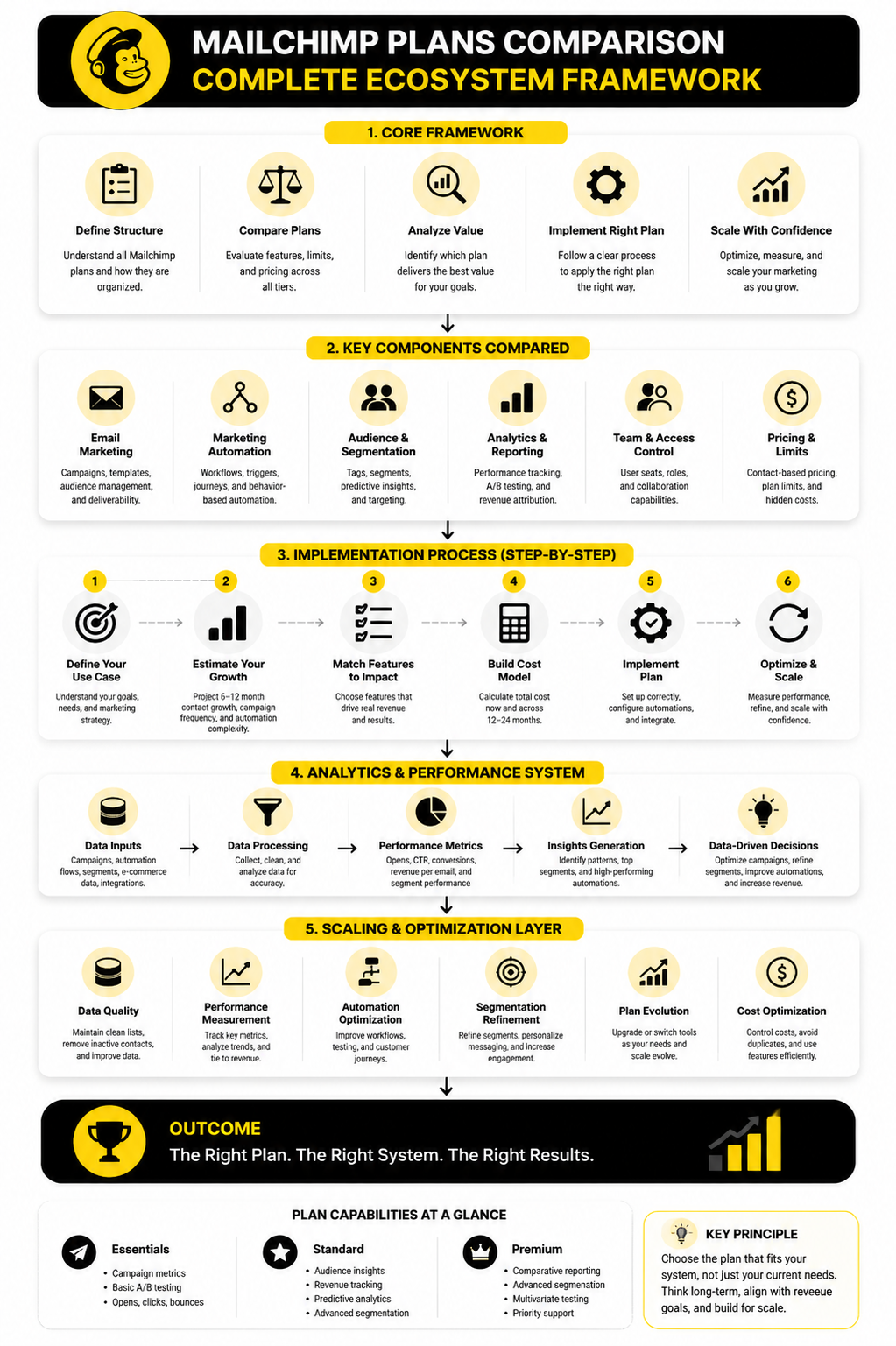
This is where Mailchimp fits best—as the email layer inside a broader system. The moment you expect it to handle everything, you start running into limitations discussed earlier.
For simple systems, Mailchimp is enough. For advanced systems, it becomes one piece of a larger stack or gets replaced entirely.
FAQ - Built for Complete Guide
1. Which Mailchimp plan is best for beginners?
The Free plan is enough to understand the basics, but it’s not practical for growth. Most beginners who are serious about building a list move to Essentials quickly because of the low contact limits and missing features in the free tier.
2. Is the Standard plan worth the price?
Yes, if you’re using automation and segmentation properly. The Standard plan unlocks the features that actually drive revenue, like customer journeys and predictive insights. Without those, you’re mostly sending static campaigns.
3. When should I upgrade from Essentials to Standard?
Upgrade when automation becomes important. If you’re trying to build funnels, behavior-based emails, or segmented campaigns, Essentials becomes a bottleneck fast.
4. Why does Mailchimp get expensive so quickly?
Because pricing is based on stored contacts. As your list grows, your costs increase even if your engagement doesn’t. That’s the core reason many businesses start comparing alternatives.
5. Can Mailchimp handle advanced marketing systems?
To a point. It works well for email-focused systems, but it’s not designed to manage full funnels, CRM pipelines, and multi-channel automation in one place. That’s where tools like GoHighLevel come in.
6. Is it better to use one tool or multiple tools?
It depends on your complexity. Simpler setups benefit from one tool. More advanced systems often require multiple tools—but that introduces integration and management overhead.
7. How do I reduce Mailchimp costs?
- Regularly clean inactive contacts
- Archive unsubscribed users
- Avoid duplicate audiences
- Use segmentation instead of multiple lists
These small changes can significantly reduce your monthly bill.
8. Are there cheaper alternatives to Mailchimp?
Yes. Platforms like Brevo and Moosend often offer more predictable pricing models, especially as your list grows.
9. Should I switch platforms or just upgrade my plan?
If your issue is missing features, upgrading makes sense. If your issue is pricing structure or system limitations, switching platforms is often the better long-term move.
10. What’s the biggest mistake people make with Mailchimp?
Choosing based on current needs instead of future growth. Most users underestimate how quickly they’ll outgrow their initial plan, which leads to unnecessary upgrades or migrations later.
11. Is Mailchimp still worth it in 2026?
Yes, for the right use case. It remains one of the easiest platforms to start with and has strong integrations. But it’s no longer the default best choice for scaling businesses.
12. What should I do before choosing a plan?
Map out your system first. Define your automation needs, expected growth, and revenue goals. Then choose the plan—or platform—that supports that system instead of limiting it.
Work With Professionals
Explore 10K+ Remote Marketing Contracts on MarkeWork.com
Most marketers spend too much time chasing clients, competing on crowded platforms, and losing a percentage of every project to middlemen.
MarkeWork gives you a better way. Browse thousands of remote marketing contracts and connect directly with companies desperate to hire skilled marketers like you, without platform commissions and without unnecessary gatekeepers.
If you're serious about finding better opportunities and keeping 100% of what you earn, explore available contracts and create a profile for free at MarkeWork.com.