

Mailchimp reviews are weirdly split. Some users love how simple it feels when they just need to send campaigns, build basic automations, and keep a small list organized. Others get frustrated once pricing, support limits, contact growth, and more advanced automation needs enter the picture.
That split is exactly why a useful Mailchimp review cannot be just “good” or “bad.” Mailchimp still has strong brand recognition, a beginner-friendly editor, and broad integrations. But the buying decision has changed because the free plan now lists 250 contacts and 500 monthly sends on Mailchimp’s own pricing information, while serious email marketing often depends on automation, segmentation, reporting, and deliverability discipline.
This article breaks down Mailchimp from the perspective that actually matters: whether it fits your business model, budget, team skill level, and growth path. Email still deserves serious attention because recent industry research shows many companies continue to see strong returns from email, with Litmus reporting that 35% of companies see email ROI of 36:1 or more in its State of Email data. The tool you choose matters because your list, workflows, customer data, and reporting habits become harder to move later.
Article Outline
- Part 1: What Mailchimp Reviews Really Tell You
- Part 2: Mailchimp Features, Pricing, And Plan Limits
- Part 3: Ease Of Use, Automation, Templates, And AI Tools
- Part 4: Deliverability, Reporting, Integrations, And Support
- Part 5: Mailchimp Alternatives And Best-Fit Use Cases
- Part 6: Final Verdict, Buying Checklist, And FAQ
What Mailchimp Reviews Really Tell You
Mailchimp reviews usually agree on one thing: the platform is easy to start with. G2’s review summary says users commonly praise Mailchimp for its intuitive design and simple campaign management, while also noting that pricing can rise quickly as contact lists grow. Capterra’s review coverage gives a similar pattern: users like the interface and campaign tools, but pricing flexibility and support experience show up as recurring concerns.
That tells you something important. Mailchimp is not mainly judged as a broken tool. It is judged as a tool that feels excellent at the beginning and more debatable as requirements become more serious.
The real question is not “Is Mailchimp good?” The better question is “At what stage does Mailchimp stop being the obvious choice?” That is the lens this article will use from here on.
Why Mailchimp Reviews Matter Before You Choose An Email Platform
Email software is sticky. Once your signup forms, tags, customer segments, automations, ecommerce data, and reporting workflows are inside one system, switching tools becomes annoying. That is why Mailchimp reviews matter more than a quick feature checklist.
The cost of choosing wrong is not just the monthly subscription. It is the time spent rebuilding automations, cleaning lists, reconnecting integrations, retraining the team, and trying not to lose revenue during the migration. This is especially true for ecommerce brands, creators, agencies, and service businesses that depend on email for repeat purchases, launches, appointments, or lead nurturing.
Mailchimp can still be a sensible choice for beginners and small teams. But if you already know you need deeper funnels, client subaccounts, advanced CRM workflows, or full sales pipeline automation, you should compare it early against platforms built around that broader system, such as GoHighLevel, Brevo, or Moosend. The point is not to chase the cheapest option. The point is to avoid buying a simple email tool when you actually need a revenue operating system.
The Framework This Review Will Use
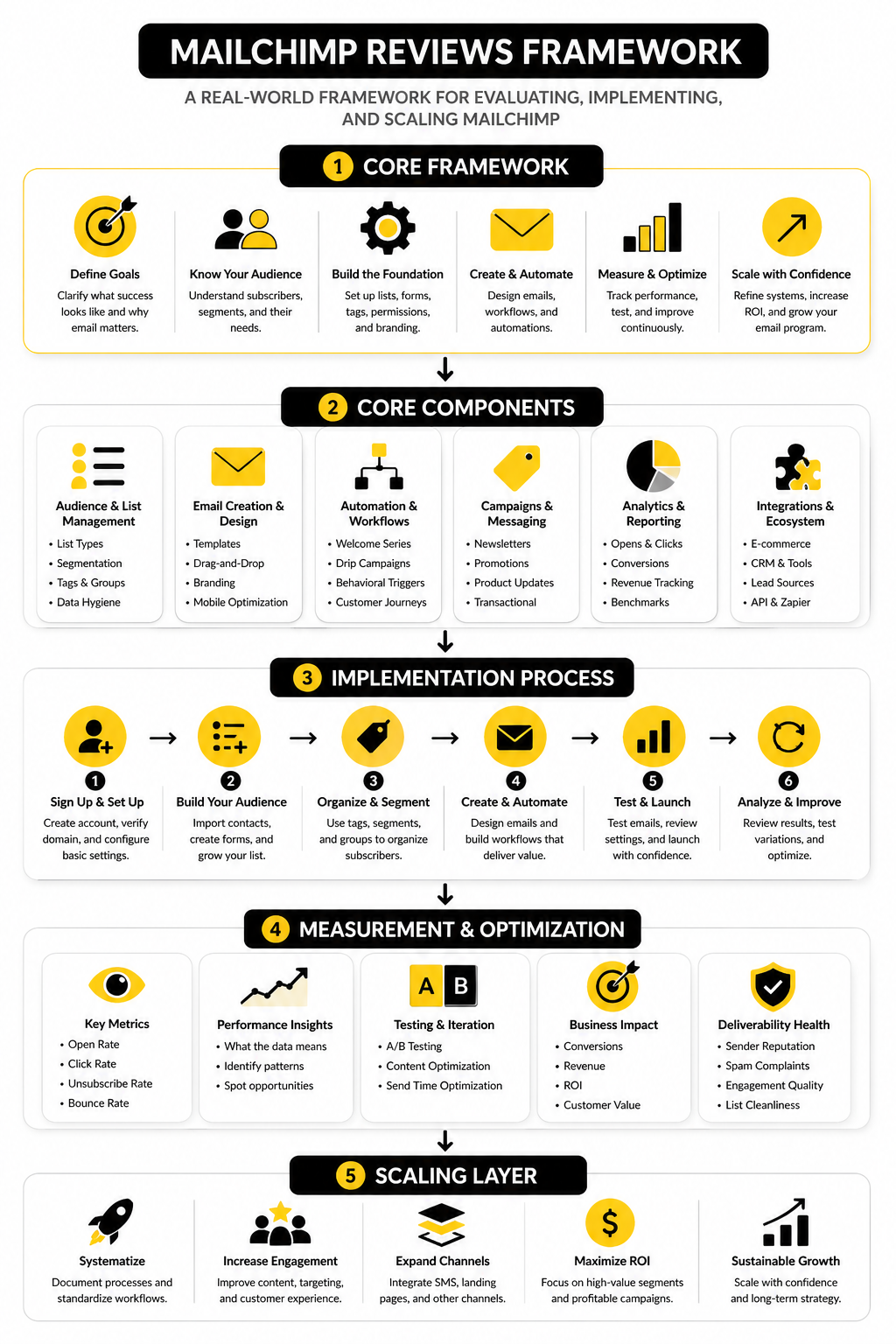
A fair Mailchimp review needs a framework, not vibes. The platform has enough features that you can make it look great or terrible depending on what you choose to emphasize. So this article will evaluate Mailchimp through five practical filters.
- Fit: Who is Mailchimp actually best for?
- Cost: What happens as your list and send volume grow?
- Execution: How easy is it to build campaigns, automations, forms, and segments?
- Performance: What can you realistically expect from reporting, deliverability, and integrations?
- Alternatives: When does another platform make more sense?
This framework keeps the review grounded. A solo creator with 800 subscribers does not need the same answer as an ecommerce brand with 75,000 contacts. A local agency managing multiple clients does not need the same setup as a nonprofit sending one newsletter per month.
Core Components Of A Useful Mailchimp Review
The first component is usability. Mailchimp has earned a lot of positive feedback because its campaign builder, templates, and basic audience tools are approachable. For beginners, that matters because the best email platform is often the one they will actually use.
The second component is scalability. Mailchimp’s own help documentation says the free marketing plan includes up to 250 contacts and 500 sends per month, with a daily send limit of 250 on the pricing plan help page. That may be enough for testing, but it is not much room for a growing list, frequent newsletters, launches, or ecommerce campaigns.
The third component is operational fit. Mailchimp offers AI features through Intuit Assist, automation flow templates, segmentation, landing pages, ecommerce integrations, and campaign analytics. Those features can be useful, but the value depends on whether your team needs simple email execution or a more connected system for CRM, funnels, appointments, SMS, pipeline tracking, and sales follow-up.
Professional Implementation Starts Before You Pay
A professional Mailchimp setup starts with the business model, not the software. Before choosing any plan, define what the email program must do: welcome new subscribers, recover carts, nurture leads, onboard customers, promote offers, win back inactive buyers, or support a newsletter business. Without that clarity, every platform looks either too expensive or not powerful enough.
You also need to map the data you will rely on. Tags, groups, segments, consent status, purchase behavior, signup source, and engagement history all affect how useful your campaigns become later. A messy Mailchimp account can still send emails, but it will not give you the clean decision-making you need as the list grows.
That is the foundation for the rest of this review. Part 2 will move from general Mailchimp reviews into the practical details that usually decide the purchase: features, pricing, plan limits, and where the platform starts to feel restrictive.
Mailchimp Features, Pricing, And Plan Limits
Mailchimp’s feature set looks broad on paper, and that is part of the appeal. You get email campaigns, templates, landing pages, signup forms, audience management, basic CRM-style contact records, segmentation, automations, reporting, ecommerce integrations, and AI-assisted content tools. For a small business that wants one familiar place to send newsletters and simple promotional campaigns, that package can feel convenient.
The catch is that not every feature is equally deep. Mailchimp started as an email marketing platform, then expanded into a wider marketing suite. That expansion helps beginners because they can do more without stitching together five tools, but it can frustrate advanced users who want deeper automation, cleaner CRM workflows, or more control over customer journeys.
This is where many Mailchimp reviews become mixed. The platform is easy enough to recommend for simple campaigns, but harder to defend when a business needs flexible automation, multi-step sales workflows, or agency-style client management.
What You Actually Get With Mailchimp
At the core, Mailchimp is still strongest as an email campaign tool. The drag-and-drop builder is approachable, templates are easy to customize, and list management is simple enough for non-technical users. That matters because many businesses do not need a complicated automation machine on day one.
Mailchimp also includes landing pages, signup forms, surveys, social posting features, customer journeys, and reporting dashboards. These extras make the product feel like a lightweight marketing hub rather than a pure email sender. For creators, local businesses, nonprofits, and early-stage ecommerce stores, that can be enough to get moving.
Where you need to be careful is assuming “included” means “complete.” Basic landing pages are not the same as a full funnel builder. Basic customer journeys are not the same as advanced behavioral automation. If your strategy depends heavily on sales pipelines, SMS follow-up, appointment booking, or client accounts, a broader platform like GoHighLevel may fit better from the beginning.
Mailchimp Pricing In Plain English
Mailchimp pricing is based mainly on your plan, contact count, and sending needs. The free plan is useful for testing, but it is intentionally limited. Once your audience grows or you need more advanced features, you will usually end up looking at Essentials, Standard, or Premium.
The important thing is not just the starting price. The important thing is what happens when your list grows from a few hundred contacts to a few thousand, then to tens of thousands. Many negative Mailchimp reviews come from users who liked the product early, then felt boxed in by price increases as their audience expanded.
That does not automatically make Mailchimp overpriced. It means you need to judge the cost against revenue, not against the emotional comfort of a low entry price. If email is generating sales, higher software costs can still make sense. If you are mostly sending occasional newsletters with weak monetization, the same bill can feel painful fast.
Free Plan Limits Are Fine For Testing, Not Growth
Mailchimp’s free plan is best treated as a sandbox. It lets you explore the interface, build basic campaigns, and understand whether the workflow feels right. That is useful, especially if you are new to email marketing and do not want to pay before you have a list.
But the free plan is not a serious long-term growth plan. Once you need more contacts, more monthly sends, better branding control, stronger testing options, or more automation depth, you will hit the ceiling. That is not a flaw by itself; free plans are supposed to have limits.
The mistake is building your entire email strategy around staying free. If email is part of your revenue engine, you should expect to pay for the tool. The smarter question is whether Mailchimp is the paid tool you want to grow into.
Essentials, Standard, And Premium: The Real Difference
Essentials is mostly for businesses that want basic email marketing without staying on the free plan. It gives you more room to send, access to more templates, and fewer beginner restrictions. For a small newsletter or simple promotional calendar, it can be enough.
Standard is where Mailchimp becomes more interesting for businesses that want better automation and optimization. This is usually the plan people evaluate when they are serious about email but not enterprise-level. It is also where the comparison with alternatives becomes more important, because you are no longer just paying for “sending emails”; you are paying for marketing infrastructure.
Premium is aimed at larger teams and more complex accounts. It unlocks more advanced segmentation, additional support options, and higher-level controls. For most small businesses reading Mailchimp reviews, Premium will feel expensive unless email is already tied directly to meaningful revenue.
Contact-Based Pricing Can Change The Math
Contact-based pricing sounds simple until your list gets messy. If you keep old, inactive, duplicate, unsubscribed, or low-quality contacts around, your bill can rise while your real reach barely improves. That is why list hygiene matters so much with platforms like Mailchimp.
This is not just an accounting issue. A bloated list can also weaken engagement signals because you are sending to people who no longer care. Better segmentation, regular cleanup, and clear re-engagement rules can make a smaller list more profitable than a larger one.
So before blaming Mailchimp pricing, audit the list. Remove dead weight, segment by engagement, and separate buyers from casual subscribers. Then compare tools based on the contacts that actually matter.
Automation Is Useful, But Know Its Ceiling
Mailchimp’s automations are good for common email marketing flows. Welcome sequences, abandoned cart emails, product follow-ups, date-based messages, and basic nurture campaigns are realistic use cases. For many businesses, these workflows cover the majority of what they need.
The limitation appears when automation needs to connect deeply with sales activity, CRM stages, call booking, SMS, client management, or custom pipeline logic. Mailchimp can integrate with other tools, but integrations add complexity. At some point, the question becomes whether you want a connected stack or one platform designed around the full customer journey.
That is why agencies and service businesses often compare Mailchimp with GoHighLevel, while cost-conscious creators may look at Systeme.io, Moosend, or Brevo. Mailchimp is not weak because these tools exist. It just serves a different kind of buyer.
The Pricing Decision Comes Down To Use Case
Mailchimp makes the most sense when you want a polished, familiar email platform and your marketing needs are not overly complex. It is especially reasonable when your team values ease of use more than advanced customization. That is why many positive Mailchimp reviews come from small teams that just want campaigns to go out reliably.
It becomes less attractive when you need more than email and basic automations. If you are managing leads across calls, forms, SMS, calendars, pipelines, and follow-ups, paying for Mailchimp plus several extra tools can become messy. In that situation, the cheaper-looking choice may not be the cheapest system.
The practical move is simple: map your next 12 months before choosing the plan. If you only need newsletters and straightforward automations, Mailchimp can still be a strong option. If you are building funnels, client workflows, or multi-channel follow-up, compare the total stack before committing.
Ease Of Use, Automation, Templates, And AI Tools
Mailchimp’s biggest strength is still execution speed. You can create an audience, import contacts, choose a template, write a campaign, and send your first email without needing a developer or a technical marketing ops person. That is why many Mailchimp reviews praise the platform even when they complain about pricing later.
The interface is built for normal business users, not only email specialists. Campaign creation, list management, basic segmentation, and reporting are all presented in a way that feels approachable. That does not mean every workflow is perfect, but it does explain why Mailchimp remains a common first serious email platform.
The key is to treat ease of use as a starting advantage, not the whole decision. A tool that is simple on day one still needs to support better segmentation, cleaner automations, and more disciplined testing as your list becomes more valuable.
The Practical Mailchimp Setup Process
A strong Mailchimp implementation starts before you touch the campaign builder. The first step is deciding what role email will play in the business. Are you building a newsletter, recovering abandoned carts, nurturing service leads, onboarding customers, promoting launches, or keeping past buyers warm?
Once that is clear, the setup becomes much easier. You can structure your audience, tags, groups, forms, and automations around real business goals instead of random labels. This matters because messy email accounts usually come from unclear strategy, not from bad software.
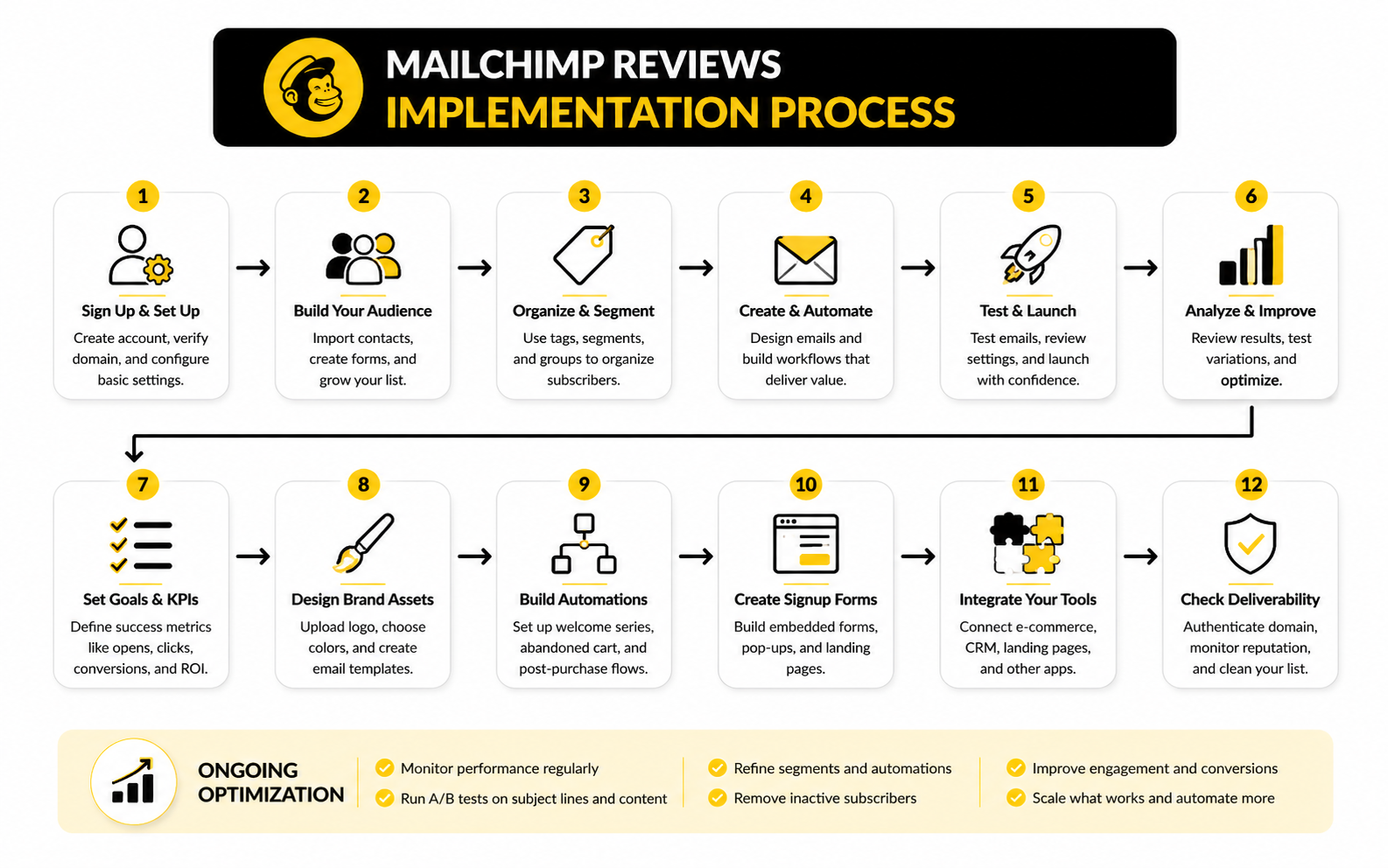
A practical setup usually follows this sequence:
- Define the main audience and remove contacts that should not be imported.
- Create signup forms that match the source of the lead.
- Organize contacts with tags, groups, and essential profile fields.
- Build the first welcome or nurture sequence before sending random broadcasts.
- Connect ecommerce, CRM, landing page, or form tools only when the data flow is clear.
- Set basic reporting goals for opens, clicks, conversions, unsubscribes, and revenue.
- Review performance every month and clean inactive contacts before they inflate costs.
This is where Mailchimp can work well for beginners. The process is visible, the campaign builder is not intimidating, and the default workflow encourages you to send instead of overplanning forever. But if you skip the structure above, you will eventually feel the pain when your list grows.
Campaign Creation Feels Smooth
Mailchimp’s email builder is one of the reasons the platform became so popular. Drag-and-drop editing, reusable blocks, templates, preview tools, and basic brand controls make campaign production feel manageable. For small teams without a designer, that is a real advantage.
The platform is especially useful for newsletters, product announcements, event reminders, seasonal campaigns, and basic promotional emails. You can move from idea to finished campaign quickly, which matters when marketing has to happen alongside sales, customer service, operations, and everything else. Speed is not a small feature; it is often the difference between sending consistently and disappearing for months.
The limitation is that convenience can create sameness. If you rely too heavily on default templates, your emails may look polished but generic. The better approach is to use templates for production speed, then sharpen the actual message, offer, segmentation, and call to action.
Templates Are Helpful, But They Are Not Strategy
Templates solve layout problems. They do not solve positioning, offer clarity, list quality, or weak messaging. This is where many businesses misuse Mailchimp and then blame the platform.
A good template helps readers understand the email quickly. It supports the offer, makes the next action obvious, and works well on mobile. It should not distract from the message or turn every campaign into a crowded mini-website.
The practical move is to create a small template system. Use one format for newsletters, one for product or service promotions, one for educational nurture emails, and one for announcements. That gives your team speed without making every email feel like a copy of the last one.
Automation Is Best For Clear, Repeatable Journeys
Mailchimp’s Customer Journey Builder is useful when the path is simple and repeatable. Welcome flows, lead magnet follow-ups, birthday messages, post-purchase emails, abandoned cart flows, and re-engagement campaigns are the natural place to start. These automations save time because they handle moments that happen again and again.
Mailchimp says its Customer Journey Builder automations have generated 4x more orders on average than bulk emails alone for users of that feature on its automation page. That claim lines up with the broader logic of lifecycle marketing: relevant timing usually beats one-size-fits-all broadcasting. Still, the result depends on the offer, audience, list quality, and whether the automation is built around a real buying journey.
For most businesses, the first automation should not be complicated. Start with a welcome sequence that sets expectations, delivers value, introduces the brand, and points people toward the next useful action. Once that works, build more flows around behavior instead of guessing.
Segmentation Makes Or Breaks The Results
Segmentation is where Mailchimp becomes more useful than a basic newsletter sender. You can group contacts by signup source, engagement, purchase behavior, interests, tags, location, and other useful fields. That lets you send fewer irrelevant emails, which is good for both performance and trust.
Mailchimp’s own benchmark data shows that performance varies heavily by industry, with its listed all-user averages showing 35.63% open rate, 2.62% click rate, and 0.22% unsubscribe rate on its email benchmark resource. Those numbers are useful as a rough reference, but they should not become your obsession. Your best benchmark is whether each segment moves closer to a real business outcome.
The most practical segmentation usually starts simple. Separate customers from non-customers, active readers from inactive subscribers, high-intent leads from casual subscribers, and recent buyers from long-dormant contacts. You do not need 50 segments to improve results. You need the few that change what you send.
AI Tools Can Help, But Do Not Outsource The Thinking
Mailchimp has been adding AI support through Intuit Assist and related features. Mailchimp describes Intuit Assist as a way to help with manual marketing work, insights, and personalized content at scale on its AI tools page. It can be useful for drafting, ideation, content variation, and getting past the blank page.
The danger is using AI to produce bland emails faster. That is not an upgrade. If every email sounds like a generic promotion, better formatting will not save it.
Use AI for acceleration, not strategy. Let it help with subject line variations, first drafts, summaries, and layout ideas, but keep the offer, customer insight, proof, and final voice human. Your audience can feel the difference.
When Implementation Starts To Feel Tight
Mailchimp implementation can start to feel tight when your marketing system expands beyond email. A business that needs forms, email, SMS, pipelines, appointment booking, payments, funnels, and client follow-up may find itself connecting too many tools around Mailchimp. That works for a while, but it can become fragile.
This is why the implementation question is bigger than “Can Mailchimp send the emails?” Of course it can. The real question is whether Mailchimp should be the center of the system or just one piece of it.
If email is the core channel and your workflows are simple, Mailchimp remains a strong practical option. If the customer journey depends on multi-channel follow-up, sales conversations, bookings, pipeline stages, or agency delivery, compare it with a more connected platform like GoHighLevel before you build too much. Migration gets harder after the system becomes important.
Statistics And Data That Actually Matter
Mailchimp reviews are only useful when the numbers connect to decisions. Open rates, click rates, unsubscribes, bounces, revenue, and conversions all tell you something different. The mistake is treating one metric as the whole truth.
Open rates can show whether your subject line, sender name, and audience relationship are working, but they are less reliable than they used to be because privacy features can inflate or obscure opens. Clicks show stronger intent because someone took action inside the email. Revenue, booked calls, trials, replies, and qualified leads are even more useful because they connect email activity to business outcomes.
That is why a Mailchimp dashboard should not be used like a scoreboard for vanity metrics. It should be used like a diagnostic system. If the number changes, your next question should be simple: what action does this tell us to take?
How To Read Mailchimp Benchmarks Without Fooling Yourself
Mailchimp’s benchmark resource lists broad averages across industries, including 35.63% average open rate, 2.62% average click rate, and 0.22% average unsubscribe rate in its email marketing benchmarks. Those numbers are helpful as a reference point, but they should not become your only definition of success. A cold newsletter, a buyer-only ecommerce list, and a warm service lead sequence will not behave the same way.
Benchmarks are useful when they tell you whether something is obviously broken. If your click rate is far below your industry range, your offer, segmentation, email content, or call to action may need work. If unsubscribes spike after a campaign, the message may have been misaligned with what people expected when they joined.
But benchmarks cannot tell you whether your email program is profitable. A campaign with a modest open rate can still produce excellent sales if the audience is qualified and the offer is strong. A campaign with a high open rate can still be useless if nobody clicks, replies, books, or buys.
The Measurement System You Should Build
A good Mailchimp measurement system has three layers. The first layer tracks campaign health, the second tracks audience quality, and the third tracks business impact. You need all three because one layer alone can mislead you.
Campaign health includes opens, clicks, click-to-open rate, bounces, unsubscribes, spam complaints, and device performance. Audience quality includes engagement by segment, active versus inactive contacts, buyer versus non-buyer behavior, and list growth source. Business impact includes revenue, lead quality, booked calls, trial starts, checkout activity, repeat purchases, and customer lifetime value where the data is available.
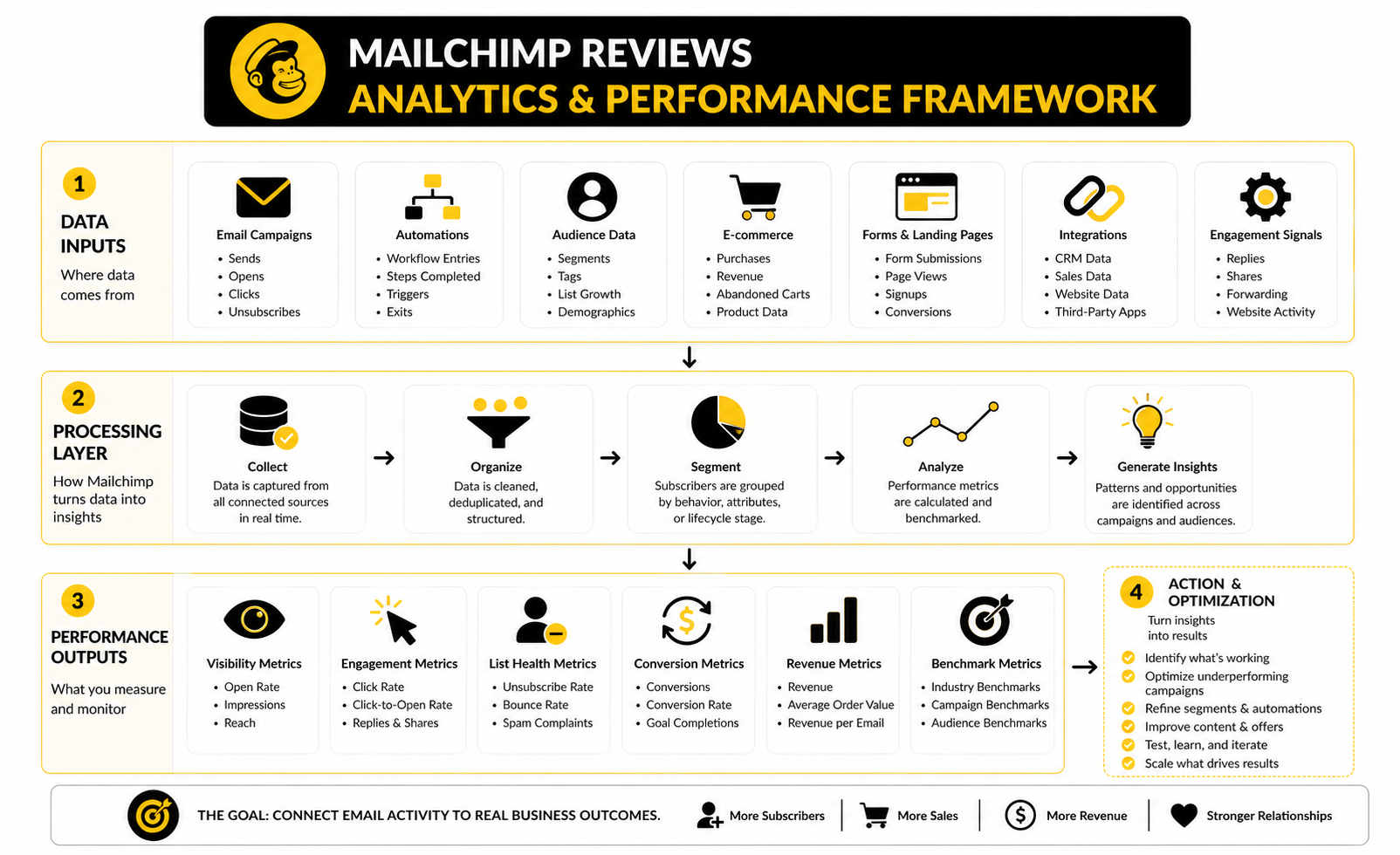
This is where Mailchimp can be useful because its reports make basic campaign performance easy to review. You can see what happened after each send, compare campaigns, and look at engagement patterns. The weakness is not that Mailchimp lacks reporting; the weakness is that many users never define what the reporting is supposed to prove.
What Open Rates Should Drive
Open rates are best used to diagnose attention. If opens are low, look at sender reputation, subject line clarity, list source, send timing, and whether subscribers still recognize why they are hearing from you. Do not immediately rewrite the entire business strategy because one campaign underperformed.
A falling open rate over several campaigns usually means the list is cooling down. That can happen when you send too often, send too rarely, attract low-intent subscribers, or fail to deliver what people expected. The fix is usually cleaner segmentation and better expectation-setting, not louder subject lines.
Open rates should drive testing around sender name, subject line, preview text, and audience targeting. They should not be your main success metric. Attention matters, but action matters more.
What Click Rates Should Drive
Click rates are more actionable than open rates because they show whether the email created enough interest for someone to move. If people open but do not click, the issue is usually inside the message. The offer may be weak, the link may be buried, or the email may have too many competing actions.
Mailchimp’s A/B testing tools let you test subject lines, content, from names, and send times through its email testing features. That is useful, but the best tests are not random. Test one meaningful variable at a time so you know what caused the result.
A low click rate should push you to simplify. One clear promise, one main call to action, and one audience segment usually beats a crowded campaign trying to speak to everyone. If the click does not matter to the business, the campaign probably was not focused enough.
What Unsubscribes And Complaints Should Drive
Unsubscribes are not automatically bad. Some people should leave your list because they are no longer interested, and paying to keep them is not smart. A healthy email program lets the wrong people exit without panic.
The problem is sudden movement. If unsubscribes or spam complaints jump after a campaign, that is a warning. The message may have been too aggressive, too frequent, off-topic, misleading, or sent to a segment that should not have received it.
Use unsubscribe patterns to improve list quality and promise alignment. If people subscribed for practical tutorials and you suddenly send hard promotional emails every day, the data will tell you. Believe it.
What Revenue And Conversion Tracking Should Drive
Revenue tracking is where Mailchimp reviews become more serious. A platform can look expensive until you connect campaigns to sales. It can also look successful until you realize high engagement is not producing money, leads, or retention.
Litmus reported that in its 2025 email ROI data, 30% of marketing leaders saw $36 to $50 returned for every $1 spent on email, while 5% saw more than $50 in its email ROI research. Those numbers are not a promise for your account. They are a reminder that email can be extremely valuable when measurement and execution are strong.
The practical action is to track outcomes that match your model. Ecommerce brands should watch campaign revenue, abandoned cart recovery, repeat purchases, and product category behavior. Service businesses should track replies, booked calls, lead quality, and pipeline movement. Creators should track clicks, purchases, renewals, and audience engagement over time.
Deliverability Signals Need Regular Attention
Deliverability is not one number inside Mailchimp. It is the combined result of list quality, authentication, engagement, sending consistency, content, complaints, and inbox provider behavior. If your emails do not reach the inbox, the rest of the analytics become weaker.
The key signals are bounces, spam complaints, sudden engagement drops, domain reputation warnings, and poor performance from specific segments. Mailchimp can show campaign-level symptoms, but you still need good sending habits. Clean lists, clear consent, consistent branding, and relevant content do more than clever subject lines.
This matters because deliverability problems compound. A few bad sends to the wrong contacts can hurt future campaigns. A disciplined sender protects the list like an asset, because that is exactly what it is.
How To Turn Mailchimp Data Into Better Decisions
The best way to use Mailchimp reporting is to create a simple monthly review. Look at your best campaign, worst campaign, strongest segment, weakest segment, list growth quality, unsubscribes, and revenue or conversion outcomes. Then choose one improvement for the next month.
Do not change everything at once. If you change the offer, segment, subject line, design, send time, and call to action together, you will not know what worked. Good email optimization is boring in the best way: one clear hypothesis, one clean test, one useful lesson.
This is also where alternatives become part of the measurement discussion. If Mailchimp gives you enough visibility to improve campaigns, stay focused and optimize. If your business needs deeper pipeline attribution, multi-channel reporting, client-level dashboards, or CRM-connected measurement, compare Mailchimp against systems like GoHighLevel, Brevo, or Moosend before your reporting gaps become expensive.
Mailchimp Alternatives And Best-Fit Use Cases
At this stage, the Mailchimp decision becomes strategic. The platform can still be a strong choice, but it should not be treated as the default just because everyone has heard of it. The better move is to compare Mailchimp against the actual shape of your business.
Most Mailchimp reviews focus on features, pricing, and ease of use. Those matter, but the deeper question is whether your marketing system needs a simple email hub, a commerce-focused retention tool, a full CRM, a funnel builder, or an agency operating system. Once you frame the decision that way, the tradeoffs become much clearer.
Mailchimp is strongest when email is important but not painfully complex. It becomes less attractive when your revenue process depends on several connected steps that need to be tracked, automated, and optimized across channels.
When Mailchimp Is The Right Choice
Mailchimp makes sense for small teams that want polished email campaigns without a steep learning curve. If your main needs are newsletters, simple automations, basic segmentation, signup forms, and campaign reporting, Mailchimp can get the job done well. That is why positive Mailchimp reviews often come from users who value speed and familiarity more than advanced control.
It also works well when your team does not have a dedicated marketing operations person. The interface is friendly enough that a founder, assistant, content marketer, or ecommerce manager can send campaigns without needing heavy technical support. That matters because a powerful tool nobody uses is worse than a simpler tool that keeps campaigns moving.
Mailchimp is especially reasonable when your email list is still small and your automation needs are predictable. Welcome sequences, abandoned cart flows, product announcements, and occasional newsletters are natural use cases. The platform starts to feel less obvious only when your customer journey needs more than that.
When Mailchimp Starts To Struggle
Mailchimp starts to struggle when you need deeper control over the full sales process. Email is only one part of many customer journeys. Leads may come from ads, forms, chat, phone calls, booking pages, webinars, funnels, and sales conversations before they ever become customers.
If those steps live in separate tools, reporting gets messy. You may know that an email was clicked, but not whether the person became a qualified lead, booked a call, moved to proposal, or closed. That is where a pure email-first platform can feel disconnected.
This is also where scaling issues show up. Larger lists create higher costs. More segments create more operational complexity. More automations create more places where broken logic, outdated offers, or poor naming conventions can quietly hurt performance.
The Real Risk Is Outgrowing The System
The biggest risk with Mailchimp is not that it cannot send emails. It can. The bigger risk is building a system around it, then realizing the rest of your marketing and sales process needs something more connected.
Migration is painful because email platforms hold valuable business memory. Tags, segments, customer journeys, campaign history, engagement data, ecommerce activity, forms, landing pages, and templates all become part of your operating system. Moving later is possible, but it is rarely clean.
That is why the decision should be based on where the business is going, not only where it is today. If you are testing a newsletter, Mailchimp may be enough. If you are building a multi-channel revenue machine, choose the platform around the machine, not around the first campaign.
Best Alternatives By Business Type
Different alternatives make sense for different reasons. Do not compare tools as if one platform should win every category. The best choice depends on the job you need the software to do.
For agencies, local service businesses, consultants, and teams that need CRM, funnels, pipelines, SMS, calendars, and follow-up in one place, GoHighLevel is the more natural comparison. It is not just an email tool. It is built around lead capture, client management, automation, sales workflows, and multi-channel follow-up.
For creators, solo founders, and budget-conscious businesses that want email, funnels, simple automation, and digital product infrastructure without a heavy stack, Systeme.io is worth considering. It is especially relevant when the priority is launching quickly with fewer moving parts. The tradeoff is that it may not feel as polished as Mailchimp for brand-heavy email design.
For teams that want email and marketing automation with a practical pricing angle, Brevo and Moosend are sensible options to compare. They can be attractive when Mailchimp’s contact-based pricing starts to feel uncomfortable, but you still want a focused email marketing workflow.
For funnel-heavy businesses, coaches, info-product sellers, and offer-driven campaigns, ClickFunnels may be more relevant than Mailchimp. Mailchimp can support the email side of a launch, but ClickFunnels is built around pages, offers, checkout flows, upsells, and conversion paths. If the funnel is the center of the business, judge the email tool in that context.
Advanced Tradeoffs Serious Buyers Should Consider
The first advanced tradeoff is data ownership and portability. You should always know how easy it is to export contacts, preserve consent data, move tags, and rebuild automations somewhere else. A platform is easier to choose when you also know how you would leave it.
The second tradeoff is integration depth. A long app marketplace looks impressive, but not every integration passes the right data at the right time. Before committing, check whether your ecommerce platform, CRM, form tool, booking tool, payment processor, and analytics setup can send the exact data you need.
The third tradeoff is team workflow. A solo creator can tolerate rough edges that would annoy a team of five. Larger teams need permissions, approval processes, brand controls, naming conventions, documentation, and reliable support. This is where a cheap plan can become expensive if it slows everyone down.
What To Audit Before You Scale Mailchimp
Before scaling Mailchimp, audit the account like a professional. Do not wait until the bill grows or reporting becomes confusing. Clean systems make better decisions.
Start with contacts. Remove obvious clutter, review inactive subscribers, check duplicate records, and confirm that consent data is organized. A smaller healthy list is usually more valuable than a larger list full of people who never engage.
Then audit automations. Every journey should have a purpose, an owner, a trigger, an expected outcome, and a review date. If nobody knows why an automation exists, it should be paused, fixed, or deleted.
Finally, audit your reporting. Every recurring campaign should connect to a business goal. If a campaign is not meant to generate clicks, replies, sales, bookings, retention, or trust, be honest about why you are sending it.
The Expert Way To Decide
The expert way to decide is not to ask which email platform has the most features. It is to ask which platform creates the least friction between your strategy and execution. That is the real standard.
Mailchimp is a good fit when you want approachable email marketing, fast campaign creation, recognizable templates, useful reporting, and simple automation. It is not the best fit when your business needs a deeper CRM, multi-channel sales automation, or funnel-first infrastructure. That is not a criticism; it is positioning.
So read Mailchimp reviews with context. A frustrated agency owner and a happy newsletter creator can both be right. The only review that matters is the one that matches your use case, your growth plan, and the system you are actually trying to build.
Final Verdict And Buying Checklist
Mailchimp is still a strong email marketing platform when the job is clear. It works best for teams that want polished campaigns, simple automation, approachable reporting, and a tool that does not require heavy technical setup. That is why the best Mailchimp reviews are usually positive from beginners, small businesses, creators, and teams that value speed.
The hesitation starts when the business needs more than email. If you need CRM depth, multi-channel follow-up, client accounts, sales pipelines, funnels, SMS, booking flows, or more advanced attribution, Mailchimp may become one part of the stack instead of the center of it. That is not a failure. It is a fit issue.
Before choosing Mailchimp, ask these questions:
- Do we mainly need email campaigns and basic automations?
- Will our contact list growth make pricing uncomfortable within 12 months?
- Do we need CRM, SMS, calendars, pipelines, or funnel tools in the same system?
- Can we clearly track revenue, leads, bookings, or retention from email?
- Do we have the discipline to keep contacts, tags, and automations clean?
- Would switching platforms later be easy or painful?
- Are we choosing Mailchimp because it fits, or because it is familiar?
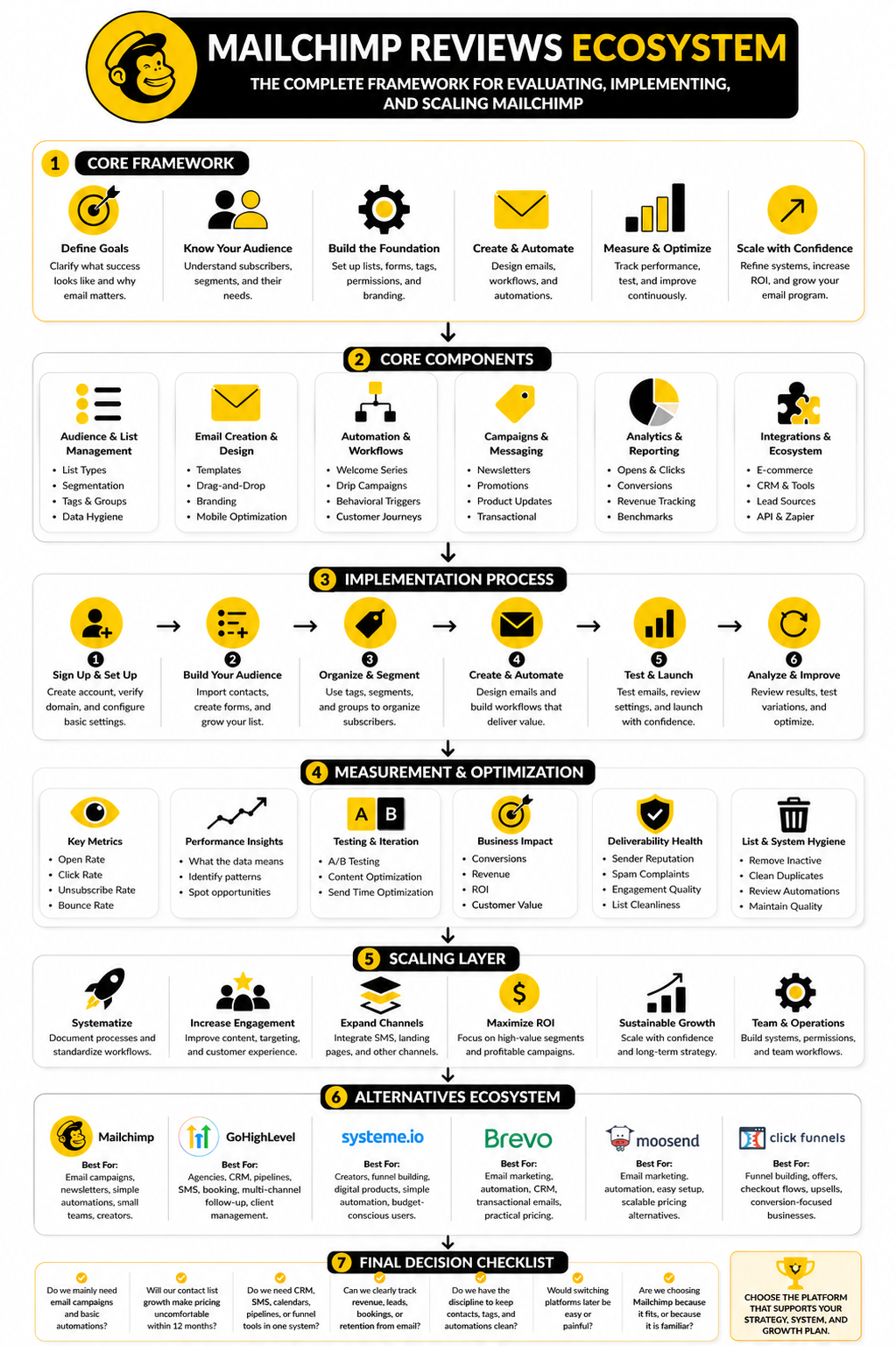
If the answer points to simple, reliable email marketing, Mailchimp can be a smart choice. If the answer points to a full revenue system, compare it seriously against GoHighLevel, Systeme.io, Brevo, Moosend, or ClickFunnels. The right platform is the one that supports the way your customers actually move from first touch to purchase and repeat business.
FAQ - Built for Complete Guide
Is Mailchimp still worth it?
Yes, Mailchimp is still worth it for the right user. It is a good fit if you want easy campaign creation, basic automation, signup forms, templates, and understandable reporting. It becomes less compelling when your business needs deeper CRM workflows, advanced sales automation, or a full funnel system.
Why are Mailchimp reviews mixed?
Mailchimp reviews are mixed because different users judge it from different stages of growth. Beginners often like the interface, templates, and fast setup. More advanced users are more likely to complain about pricing, support expectations, automation limits, and scaling friction.
Is Mailchimp good for beginners?
Mailchimp is one of the easier email platforms for beginners to understand. The campaign builder is friendly, the templates are accessible, and the basic reporting is not overwhelming. That makes it useful for small teams that need to start sending without building a complicated marketing system first.
Is Mailchimp good for ecommerce?
Mailchimp can work for ecommerce, especially for newsletters, product announcements, abandoned cart emails, and basic customer segmentation. It integrates with major commerce tools and gives store owners a practical way to communicate with buyers. Larger ecommerce brands may eventually want deeper retention, SMS, personalization, or lifecycle marketing tools.
What is the biggest downside of Mailchimp?
The biggest downside is that Mailchimp can become expensive or restrictive as your list and workflows grow. The platform is easy to start with, but the total value depends on whether its paid plans match your actual marketing needs. If you need more than email, the surrounding stack can become the real cost.
Is Mailchimp automation good enough?
Mailchimp automation is good enough for common journeys like welcome sequences, abandoned cart flows, post-purchase emails, and re-engagement campaigns. It is not always the best choice for complex CRM logic, pipeline automation, or multi-channel sales follow-up. The right answer depends on how complicated your customer journey is.
What should I track inside Mailchimp?
Track opens, clicks, unsubscribes, bounces, spam complaints, segment performance, conversions, and revenue where possible. Do not obsess over one metric in isolation. The best Mailchimp reporting setup connects email behavior to real business outcomes like sales, bookings, replies, retention, or qualified leads.
Is the Mailchimp free plan enough?
The free plan is enough for testing the interface and sending very small campaigns. It is not a serious long-term growth plan for most businesses. If email is part of your revenue strategy, expect to move into a paid plan or compare alternatives before your list becomes harder to move.
What is the best Mailchimp alternative?
The best alternative depends on the use case. GoHighLevel is stronger for agencies and sales-driven workflows, Systeme.io is useful for creators and funnel-based businesses, Brevo can make sense for practical email and automation needs, and ClickFunnels is relevant when funnels and offers are the center of the business.
Should agencies use Mailchimp?
Agencies can use Mailchimp for simple client newsletters and campaign management. But if the agency needs client subaccounts, CRM pipelines, appointment booking, SMS follow-up, and white-label-style operations, Mailchimp may not be the best center of the system. In that case, an agency-focused platform is usually more practical.
Does Mailchimp help with deliverability?
Mailchimp provides the infrastructure and tools to support email sending, but deliverability still depends heavily on your list quality, sender reputation, authentication, engagement, and content relevance. A bad list can hurt performance on any platform. Good deliverability is a discipline, not a button.
How should I decide after reading Mailchimp reviews?
Use Mailchimp reviews as pattern recognition, not as the final answer. Look for reviews from users who match your business type, list size, technical skill, budget, and marketing goals. Then test the platform against your actual workflow before committing deeply.
Work With Professionals
Explore 10K+ Remote Marketing Contracts on MarkeWork.com
Most marketers spend too much time chasing clients, competing on crowded platforms, and losing a percentage of every project to middlemen.
MarkeWork gives you a better way. Browse thousands of remote marketing contracts and connect directly with companies desperate to hire skilled marketers like you, without platform commissions and without unnecessary gatekeepers.
If you're serious about finding better opportunities and keeping 100% of what you earn, explore available contracts and create a profile for free at MarkeWork.com.