

Mailchimp SMS marketing is not just “email, but shorter.” It is a permission-based revenue channel built for fast, timely, high-intent customer communication. That makes it powerful, but also easier to misuse if the strategy is vague.
The real advantage is orchestration. Mailchimp lets eligible businesses add SMS to paid plans, manage consent, and connect text messaging with email, automations, ecommerce activity, and audience data through the same marketing system.
Article Outline
- Why Mailchimp SMS Marketing Matters Now
- The Mailchimp SMS Marketing Framework
- Core Components Of A Strong SMS Program
- Professional Implementation: Setup, Consent, And Compliance
- Campaigns, Automations, And Revenue Workflows
- Measurement, Optimization, And FAQs
Why Mailchimp SMS Marketing Matters Now
SMS works because it sits closer to the customer’s daily life than most marketing channels. Recent consumer research shows that 84% of consumers have opted in to receive texts from businesses, which means the channel is no longer limited to appointment reminders or delivery updates. People will accept brand texts when the value is clear, timely, and easy to control.
That permission is the point. Mailchimp’s own SMS setup guidance emphasizes legal review, SMS terms, privacy policy requirements, and approval before sending, because text marketing carries stricter expectations than many email campaigns. The business upside is real, but only when consent, relevance, and frequency are handled properly.
The best way to think about Mailchimp SMS marketing is simple: email builds the relationship, SMS activates the moment. Email can explain, educate, and nurture. SMS is better for urgency, reminders, cart recovery, limited-time offers, and concise updates that deserve immediate attention.
The Mailchimp SMS Marketing Framework
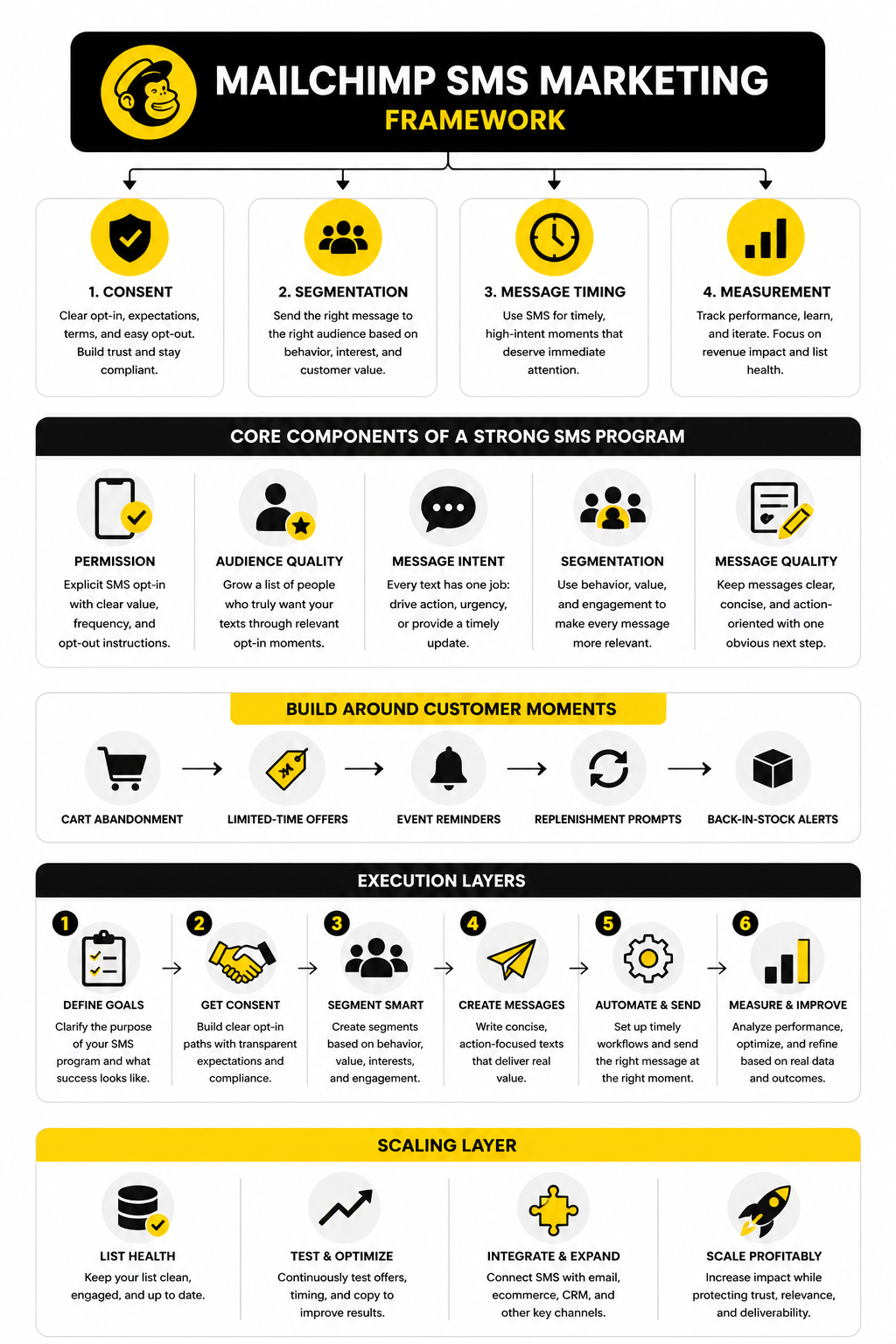
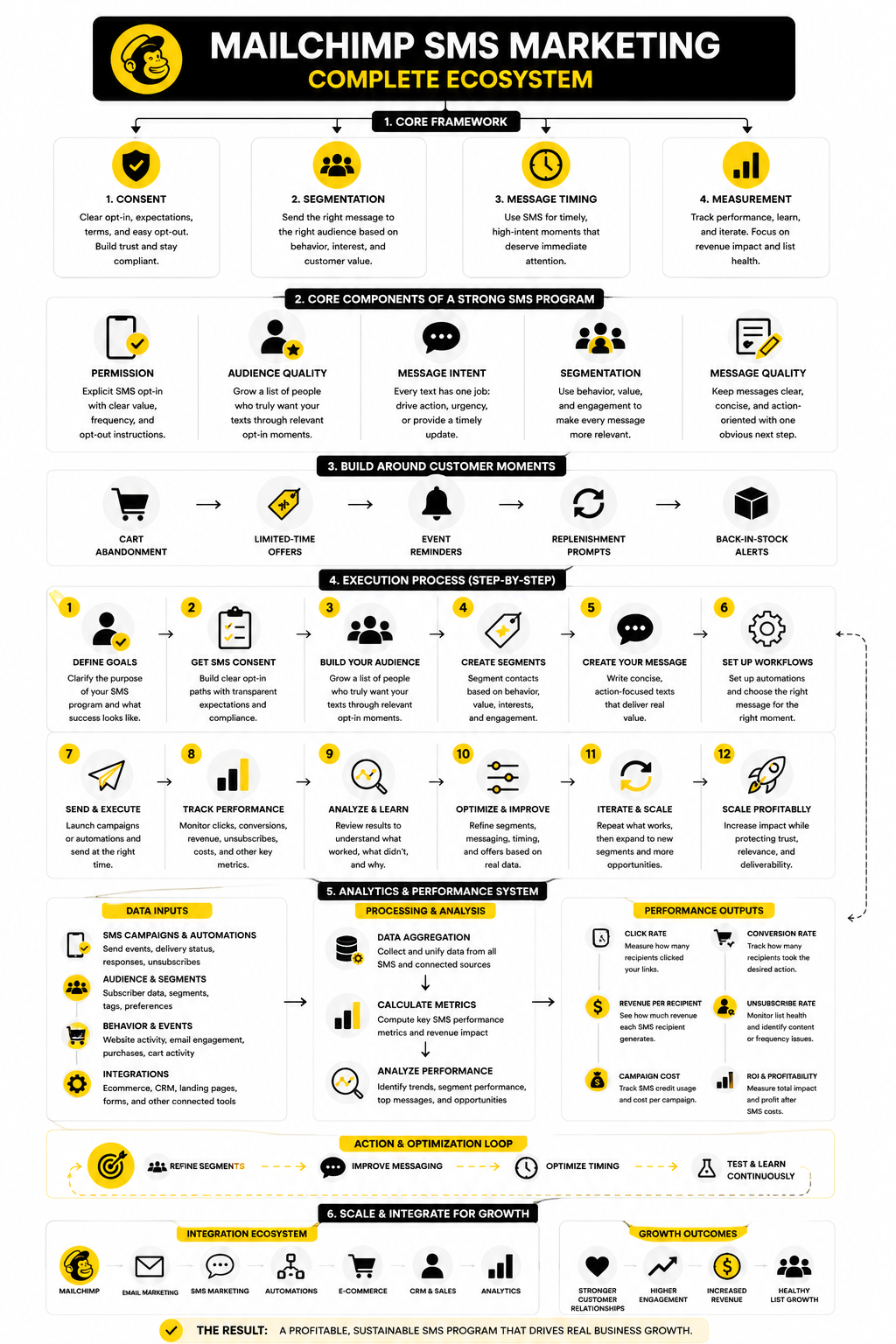
A strong SMS program has four layers: consent, segmentation, message timing, and measurement. Consent protects the business and sets the customer expectation. Segmentation makes sure the right people receive the right message instead of turning every campaign into a blast.
Timing is where SMS earns its place. Mailchimp positions ecommerce SMS as a channel for time-sensitive promotions and immediate updates, while email handles longer-form communication and detailed product context through a broader strategy. That split matters because SMS should feel useful, not noisy.
Measurement closes the loop. SMS should be judged by clicks, conversions, revenue per recipient, unsubscribe rate, and the effect it has when paired with email. Benchmarks from platforms like Klaviyo’s SMS benchmark reporting are useful, but your own list quality and offer timing will decide the real outcome.
Core Components Of A Strong SMS Program
A good Mailchimp SMS marketing program starts with a clean reason to text people. Not every announcement deserves a text. If the message is not timely, useful, or tied to a clear customer action, it probably belongs in email instead.
The first core component is permission. SMS subscribers should know what they are signing up for, what kind of messages they will receive, how often they might hear from you, and how they can opt out. This is not just a legal box to check. It is the trust layer that protects the performance of the channel.
The second component is audience quality. A smaller list of people who actively want your texts is more valuable than a large list built through vague forms or aggressive popups. Mailchimp SMS marketing works best when subscribers are collected through clear opt-in moments, such as checkout, account signup, post-purchase flows, or dedicated SMS signup forms.
The third component is message intent. Every text should have one job. That job might be to recover a cart, announce a limited promotion, send a launch reminder, confirm an update, or bring a customer back after a quiet period. The more jobs you force into one SMS, the weaker the message becomes.
Building SMS Around Customer Moments
The easiest way to make SMS useful is to attach it to real customer behavior. A new subscriber does not need the same message as a loyal repeat buyer. A cart abandoner does not need the same message as someone who just purchased yesterday.
Start with moments where speed matters. Cart abandonment, limited-time offers, event reminders, replenishment prompts, and back-in-stock alerts are usually better SMS candidates than long educational content. The message should arrive when the customer is already close to action.
This is where Mailchimp’s broader marketing system becomes useful. Because SMS can sit beside email and automation workflows, you can avoid treating text messages as a separate blast channel. The better approach is to use SMS as one step in a journey, not the whole journey.
Segmentation Makes SMS Feel Personal
Segmentation is what keeps SMS from feeling intrusive. If everyone receives every message, the channel gets noisy fast. If each group receives messages based on behavior, interest, and timing, the same channel starts to feel helpful.
Useful segments often include first-time buyers, repeat customers, VIP customers, inactive customers, cart abandoners, product category interests, and subscribers who opted in through a specific campaign. These groups do not need dramatically different brand voices. They need different timing, different offers, and different levels of urgency.
For example, a VIP customer may respond well to early access because they already trust the brand. A first-time buyer may need reassurance, clarity, or a simple incentive to complete the next step. A cold subscriber may need a stronger reason to care before you spend SMS credits trying to reactivate them.
Message Quality Matters More Than Message Length
SMS is short, but short does not mean careless. The best messages are clear, specific, and easy to act on. They usually identify the brand, explain the value, and give the subscriber one obvious next step.
Avoid trying to sound clever at the cost of clarity. A customer should understand the offer without rereading the text. If there is a deadline, state it plainly. If there is a discount, make the condition clear. If there is a link, the surrounding copy should explain exactly why someone should tap it.
The strongest Mailchimp SMS marketing messages usually feel like a useful nudge, not a sales ambush. That distinction matters. People tolerate email clutter more easily, but a bad text feels personal in the wrong way.
Professional Implementation: Setup, Consent, And Compliance
Implementation is where Mailchimp SMS marketing either becomes a clean revenue channel or a future headache. The mistake is treating setup like a technical task only. The real work is making sure the business, the audience, the offer, and the consent language all line up before the first text goes out.
Mailchimp requires businesses to go through an SMS setup and approval process before sending marketing texts. That process includes business details, SMS terms, privacy policy alignment, and a monthly SMS credit subscription once the application is approved. This matters because the sending infrastructure is only one part of the program; the bigger issue is whether your customers clearly agreed to receive texts from your brand.
The practical mindset is simple: build the system as if a customer, carrier, or regulator could ask you to prove consent later. That does not mean being paranoid. It means documenting the signup source, using clear language, storing consent properly, and making opt-out easy from day one.
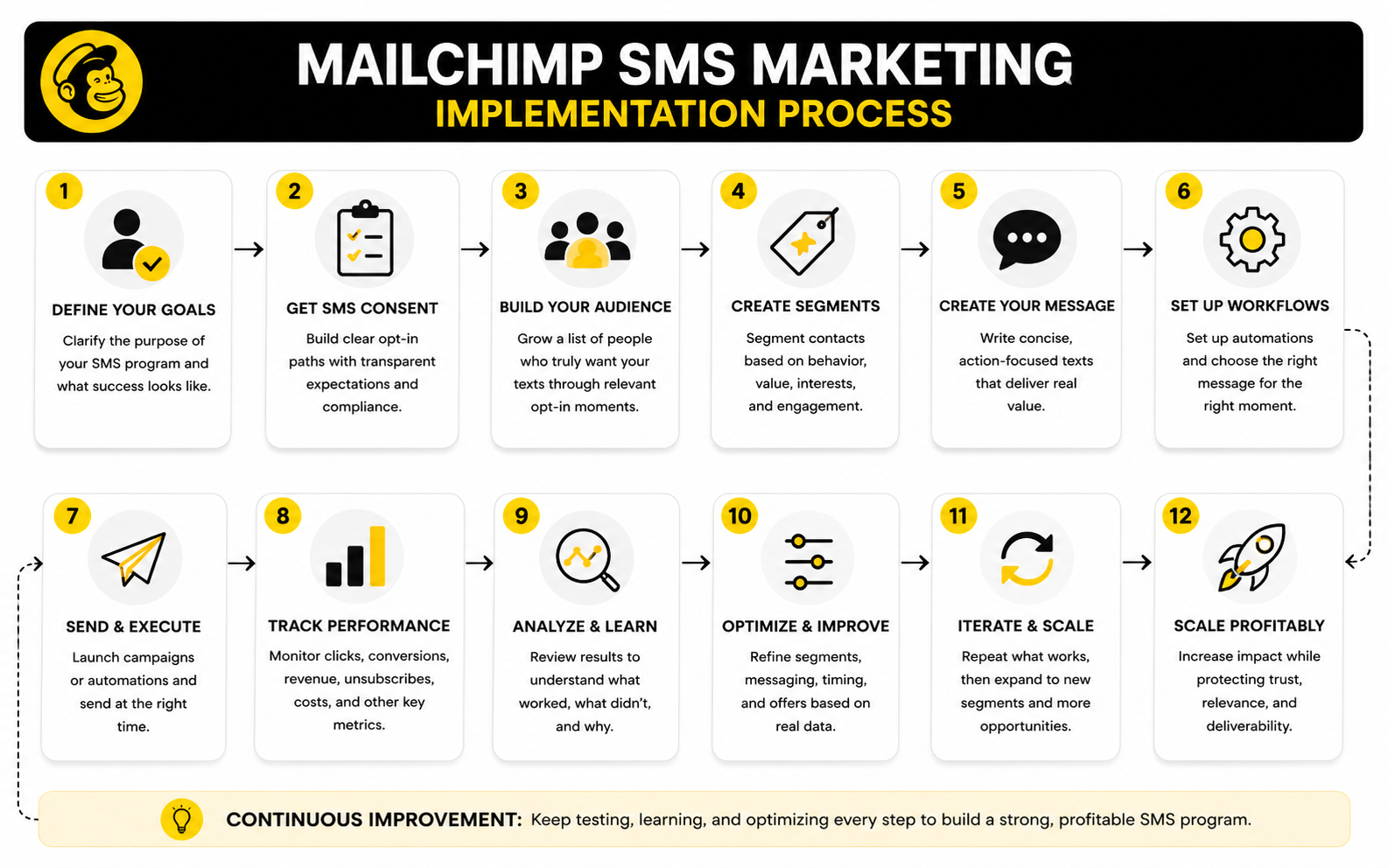
Step 1: Confirm Eligibility And Account Readiness
Before writing campaigns, confirm that SMS is available for your business, region, and Mailchimp plan. Mailchimp SMS is offered as an add-on for eligible paid accounts, and it uses SMS credits rather than being bundled into the free email trial. That creates a real cost structure, so you want the program tied to clear business outcomes from the beginning.
Next, review the audience you plan to use. Email consent does not automatically equal SMS consent, and that distinction is critical. Someone who signed up for your newsletter has not necessarily agreed to receive promotional text messages from your business.
You also need a working privacy policy, SMS terms, and a visible business identity. These details may feel administrative, but they directly affect trust. Customers should be able to understand who is texting them, why they are receiving the message, and how to stop receiving it.
Step 2: Create A Clear Opt-In Path
The opt-in path should explain the value of subscribing without burying the terms. A strong SMS signup moment tells people what they will receive, whether message and data rates may apply, and how they can opt out. It should not rely on vague language like “get updates” when the real plan is to send promotional campaigns.
Good opt-in points usually happen where customer intent is already high. Checkout, account creation, post-purchase pages, and dedicated signup forms tend to make more sense than random popups shown to cold visitors. The subscriber is already engaging with the brand, so the SMS invitation feels more relevant.
Do not overcomplicate the promise. If the list is mainly for offers, say that. If it is for product drops, shipping updates, or appointment reminders, say that too. Clear expectations reduce complaints and make unsubscribes less surprising later.
Step 3: Set Frequency Rules Before You Send
Frequency is one of the fastest ways to damage an SMS list. Even customers who like your brand will get irritated if every minor announcement becomes a text. A smart program decides the sending rhythm before campaigns start.
For many businesses, SMS should be reserved for high-intent moments and genuinely timely messages. That might mean a small number of campaign texts per month, plus automated texts tied to behavior. The exact rhythm depends on the business model, but the principle stays the same: every message should earn its interruption.
Mailchimp SMS marketing becomes much easier to manage when frequency rules are written down. Decide which message types qualify for SMS, which ones stay in email, and which ones should be suppressed for recent buyers. This keeps the team from turning SMS into a panic button every time revenue is soft.
Step 4: Build The First Segments
Once the opt-in path is ready, build the first practical segments. You do not need a complex segmentation model on day one. You need a few useful groups that prevent lazy blasting.
Start with subscribers who opted in recently, customers who purchased, customers who have not purchased, cart abandoners, and high-value customers. These segments give you enough control to send relevant messages without building a complicated system nobody maintains. Over time, you can layer in product interest, order frequency, location, and engagement.
The goal is not personalization theater. The goal is better judgment. A loyal buyer should not always receive the same message as a first-time visitor, and a recent purchaser should not immediately get a discount that makes them regret buying yesterday.
Step 5: Test A Small Launch Before Scaling
Your first send should prove the system, not maximize the list. Start with a focused audience, one clear message, and one measurable action. This gives you cleaner feedback on deliverability, clicks, opt-outs, and revenue without risking the whole SMS database.
Check the basics after the first campaign. Look at click behavior, unsubscribe rate, customer replies, timing, and whether the landing page matched the promise in the text. If the message creates confusion, the problem may not be SMS itself. It may be unclear copy, weak segmentation, poor timing, or a landing page that does not continue the conversation.
Then scale carefully. Add more segments, more automations, and more campaign types only after the foundation works. That is how Mailchimp SMS marketing becomes a durable channel instead of a short burst of attention.
Statistics And Data That Actually Matter
The numbers behind Mailchimp SMS marketing only matter when they help you make better decisions. A high click rate is not automatically good if the campaign attracts discount hunters who never buy again. A lower click rate can still be profitable if the audience is smaller, more qualified, and closer to purchase.
Start by separating vanity metrics from operating metrics. Opens are often discussed in SMS marketing, but they do not tell you whether the campaign made money or improved the customer relationship. Clicks, conversions, revenue per recipient, unsubscribe rate, opt-out reasons, and SMS credit cost are more useful because they connect attention to business impact.
Benchmarks are helpful, but they should not become the strategy. SMS performance varies heavily by industry, offer, list quality, timing, and whether the message is behavior-triggered or sent as a broad campaign. Use external benchmarks as a pressure test, then judge your own program against its own trend line.
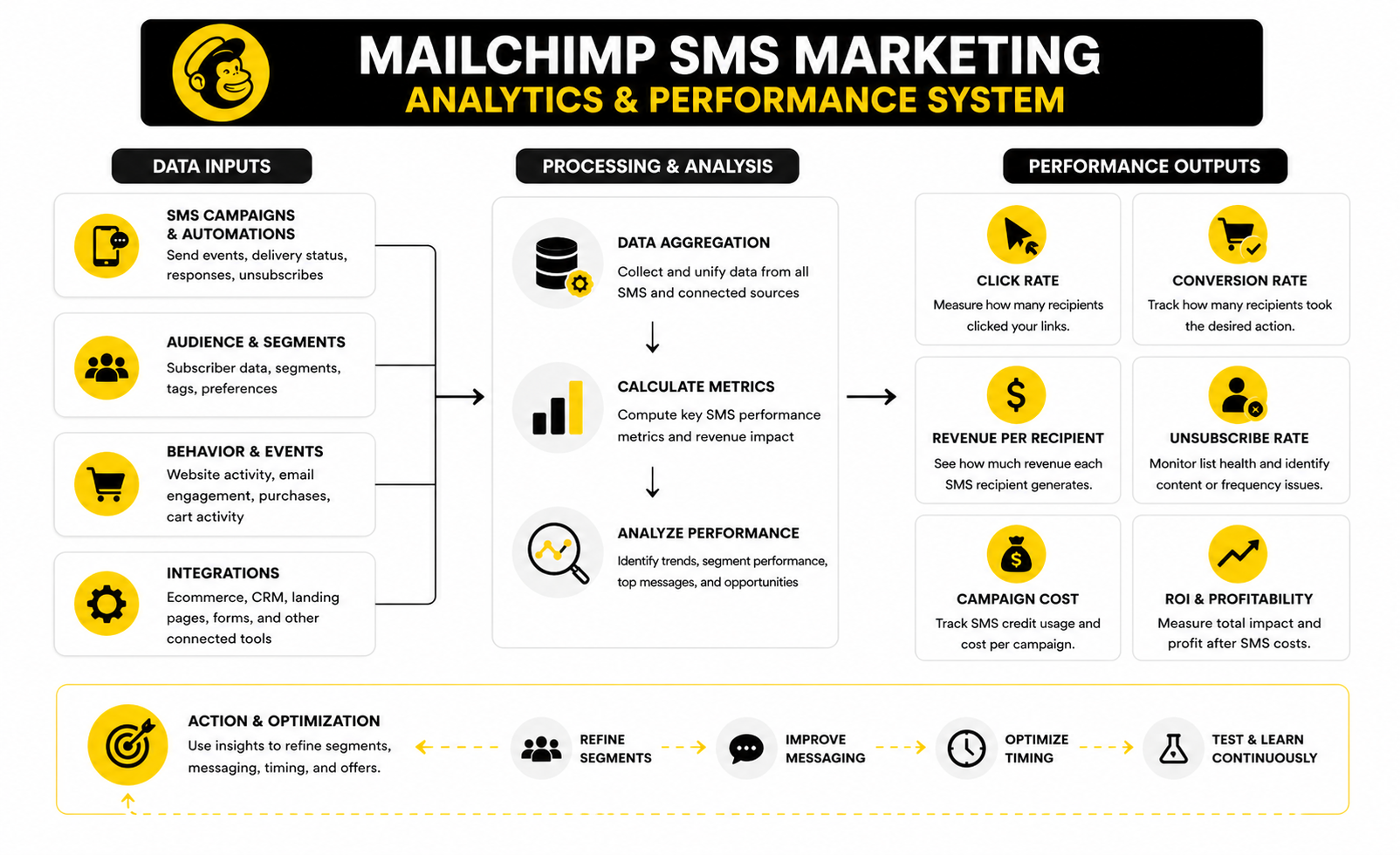
The Core SMS Metrics To Track
The first metric to watch is click rate. This tells you whether the message created enough interest for someone to take the next step. If click rate is weak, the issue is usually the offer, timing, segment, or copy clarity.
The second metric is conversion rate. This shows whether the landing page, checkout flow, and offer actually matched the promise in the text. A strong click rate with weak conversions usually means the SMS did its job, but the post-click experience failed.
The third metric is revenue per recipient. This is one of the cleanest ways to compare campaigns because it connects list size, conversion value, and campaign quality. If one smaller segment generates more revenue per recipient than a broad send, that is a signal to stop chasing volume and start improving targeting.
The fourth metric is unsubscribe rate. This is not just a compliance signal. It is a customer irritation signal. A spike in opt-outs usually means the message was poorly timed, too frequent, irrelevant, or not aligned with what subscribers expected when they opted in.
How To Interpret SMS Benchmarks
Recent SMS research keeps pointing to the same broad reality: consumers are open to business texting when the value is obvious. A 2025 consumer survey found that 84% of consumers have opted in to receive texts from businesses, which supports the idea that SMS is now a mainstream customer communication channel. That does not mean people want more texts from every brand. It means they will accept texts from brands that respect timing, relevance, and consent.
Benchmark reports also show why triggered messages often outperform generic campaigns. Industry analysis of SMS performance found that top campaigns often come from real-time user actions like signup, cart abandonment, or purchase behavior, with stronger click and conversion performance than broad promotional blasts. That should push your Mailchimp SMS marketing strategy toward behavior-based flows before aggressive campaign volume.
This is the practical takeaway: compare campaign texts and automated texts separately. A flash sale sent to your full SMS list should not be judged against a cart recovery text sent to someone who just showed buying intent. Those are different moments, and they deserve different expectations.
What Mailchimp SMS Reports Should Tell You
Mailchimp SMS reports are useful because they help you see how each text performed instead of guessing from revenue alone. The report view is designed to show campaign performance so you can understand engagement and improve future targeting. That is the right mindset: every campaign should teach you something about your audience.
Look for patterns across message type, audience, timing, and offer. If product launch texts consistently beat discount texts, your list may care more about access than savings. If weekend campaigns underperform but weekday reminders work well, timing may be the lever. If loyal customers click but do not buy, the offer may not be special enough for people who already know the brand.
The mistake is changing everything after one campaign. One weak send is not a strategy failure. Three or four sends with the same pattern are a signal. That is when you adjust segmentation, send time, offer structure, or the landing page.
Turning Data Into Better Decisions
SMS analytics should lead to specific actions. If unsubscribes rise, reduce frequency and tighten segmentation. If clicks are strong but conversions are weak, fix the landing page, offer clarity, or checkout friction. If revenue per recipient is strong in one segment, build more campaigns around that segment instead of pushing the entire list harder.
A simple review rhythm works best. After each campaign, record the segment, send time, offer, click rate, conversion rate, revenue per recipient, unsubscribe rate, and any unusual replies or complaints. Over time, this gives you a practical decision log instead of a messy pile of disconnected campaign reports.
This is where Mailchimp SMS marketing becomes more strategic. You stop asking, “Did this text perform well?” and start asking, “What did this text prove?” That shift is small, but it changes everything.
Advanced Tradeoffs Before You Scale
Scaling Mailchimp SMS marketing is not about sending more texts. It is about knowing which messages deserve the channel, which customers should receive them, and when another channel would do the job better. That discipline is what separates a profitable SMS program from a list that slowly burns out.
The biggest tradeoff is reach versus trust. A broad send may generate more total clicks today, but it can also create more unsubscribes, complaints, and fatigue. A tighter segment may look smaller in the campaign report, but it often protects the list and gives you cleaner data about what actually motivates buyers.
This is why SMS should not compete with email. It should sharpen the whole customer journey. Email can carry the explanation, product education, comparison details, and brand story. SMS should step in when speed, urgency, or behavior-based timing makes the message more useful as a text.
When To Use SMS Instead Of Email
Use SMS when the message is short, timely, and tied to a specific action. Cart recovery, early access, appointment reminders, back-in-stock alerts, and short promotional windows are natural fits. The customer should instantly understand why the text arrived now.
Use email when the message needs space. Product guides, newsletters, long announcements, detailed launches, and educational sequences usually perform better when the customer can browse, scan, and return later. Forcing long-form content into SMS makes the message feel cramped and pushy.
The real skill is deciding when to use both. A strong sequence might send an email first with the full context, then use SMS later as a final reminder for subscribers who showed intent but did not act. That gives each channel a clear job instead of making them repeat each other.
The Risk Of Over-Automation
Automation is useful, but too much automation can make SMS feel mechanical. If every behavior triggers a text, the customer starts feeling watched instead of helped. That is the line you do not want to cross.
Before adding a new SMS automation, ask whether the text improves the customer experience or just gives the business another chance to sell. A cart reminder can be helpful. A replenishment reminder can be helpful. A constant stream of nudges after every click, browse, and delay can feel aggressive fast.
Mailchimp SMS marketing works best when automations are intentionally limited. Keep the flows that solve obvious customer moments, then suppress messages that overlap or compete with each other. The customer should never feel like they triggered a machine that will not stop.
Cost Control And SMS Credits
SMS has a more direct cost structure than email, so weak targeting gets expensive quickly. Mailchimp SMS uses credits, and that forces a useful question: is this message worth spending credits on this audience? If the answer is unclear, the campaign probably needs more work.
The easiest way to control cost is to stop sending low-intent campaigns to the full SMS list. Prioritize segments with a clear reason to act, such as recent cart abandoners, high-value customers, or subscribers who joined through a campaign tied to the offer. This keeps spend connected to behavior instead of hope.
You should also review campaign profitability after costs, not just top-line revenue. A campaign that generates revenue but uses too many credits on low-value recipients may look better than it is. The goal is not activity. The goal is efficient revenue and a healthier customer list.
Compliance Becomes Harder As Teams Grow
Small teams usually know who is sending what. Larger teams need rules because more people can create campaigns, change copy, or launch automations. Without governance, SMS quality drops fast.
Set internal standards for consent language, quiet hours, opt-out handling, campaign approval, and suppression rules. This is especially important because U.S. TCPA-related guidance now puts heavy emphasis on honoring opt-outs through reasonable means, not just perfectly formatted replies like “STOP.” SMS is intimate enough that compliance should be treated as an operating system, not a legal footnote.
This is also where documentation matters. Keep records of signup forms, consent language, campaign approvals, and major workflow changes. If a problem appears later, you do not want to reconstruct the program from memory.
Scaling Into A Multi-Channel System
The next level is not “more SMS.” The next level is smarter coordination across SMS, email, landing pages, forms, and sales follow-up. If the business needs a broader CRM and pipeline layer around customer communication, a platform like GoHighLevel can make sense for teams that want marketing automation tied more closely to sales workflows.
For ecommerce and creator-led businesses, the channel stack may look different. Mailchimp can handle the email and SMS layer, while tools for funnels, landing pages, forms, and scheduling support the customer journey around it. The important part is making sure the customer experience feels connected instead of stitched together.
Do not scale complexity before the core engine works. First, prove that people want the texts, the offers convert, the opt-out rate stays healthy, and the business understands the economics. Then add more channels, more workflows, and more advanced segmentation.
Campaigns, Automations, And Revenue Workflows
At this stage, Mailchimp SMS marketing should feel less like a separate tactic and more like a revenue system. The list has consent. The segments have logic. The reporting shows what is working. Now the goal is to connect the pieces into workflows that make the customer journey easier and more profitable.
The strongest SMS programs usually combine campaigns and automations. Campaigns are useful for launches, limited offers, seasonal pushes, and high-priority announcements. Automations are better for customer moments that happen every day, like abandoned carts, welcome sequences, post-purchase updates, and win-back timing.
This is also where the ecosystem matters. Mailchimp can connect SMS with email, automation templates, ecommerce behavior, and reporting, while surrounding tools can support landing pages, funnels, forms, scheduling, CRM workflows, or customer support. The system should feel simple from the customer’s side, even if the backend has multiple moving parts.
Revenue Workflows Worth Building First
The first workflow to build is the welcome flow. A new SMS subscriber should receive a clear first message that confirms the value they signed up for and gives them an easy next step. This is not the place for a long brand manifesto; it is the place to make the subscription feel useful immediately.
The second workflow is cart recovery. Someone who added a product to cart already showed intent, so a short reminder can work well when it is timed properly. Keep it helpful, not desperate, and avoid training customers to abandon carts just to receive discounts.
The third workflow is post-purchase communication. SMS can support order confidence, product education, review requests, replenishment timing, or a second-purchase offer when the timing makes sense. Be careful here because the customer just bought from you. The wrong follow-up can make the brand feel pushy instead of helpful.
When To Add More Tools Around Mailchimp
Mailchimp can be the core email and SMS layer, but some businesses need additional tools around it. If you need sales pipelines, call tracking, appointment workflows, or agency-style client management, GoHighLevel may fit better around the broader operational system. If the priority is funnel building, offers, and landing page paths, ClickFunnels can support the conversion layer outside the message itself.
For smaller operators who want a simpler funnel and email stack, Systeme.io can be worth comparing before adding too many separate tools. For conversational automation beyond email and SMS, especially where chat flows are part of the acquisition path, ManyChat can make sense. The key is not collecting software. The key is building a stack where each tool has a job.
Do not add platforms because the workflow looks impressive on a diagram. Add them because there is a real bottleneck: weak landing pages, poor lead capture, missing CRM visibility, slow follow-up, or disconnected reporting. Otherwise, complexity becomes the tax you pay for avoiding strategy.
FAQ - Built For Complete Guide
What is Mailchimp SMS marketing?
Mailchimp SMS marketing is a way to send permission-based text messages to subscribed contacts through Mailchimp. It works alongside email, automations, audience data, and reporting so businesses can manage more of the customer journey from one place. The best use cases are timely messages, customer reminders, promotional alerts, cart recovery, and short updates that deserve immediate attention.
Is Mailchimp SMS marketing available on every Mailchimp account?
No, SMS availability depends on eligibility, account type, region, and plan requirements. Mailchimp positions SMS as an add-on for eligible paid accounts, and sending requires SMS credits rather than unlimited messaging. Before building campaigns, businesses should confirm account eligibility and review the current Mailchimp SMS setup requirements.
Do email subscribers automatically become SMS subscribers?
No, email consent and SMS consent are not the same thing. A customer who joins your email list has not automatically agreed to receive promotional text messages. SMS opt-in should be explicit, clear, and tied to the phone number being subscribed.
What should an SMS opt-in form include?
A proper SMS opt-in should explain what the subscriber will receive, who is sending the messages, how often messages may arrive, and how to opt out. It should also include any required messaging about rates, terms, and privacy. The exact wording should be reviewed for your market and legal context because SMS rules can vary by country, state, and use case.
How often should a business send SMS campaigns?
There is no perfect universal frequency, but fewer and better messages usually win. A strong starting point is to reserve SMS for timely campaigns, important reminders, and behavior-based automations rather than sending every normal promotion by text. If unsubscribes rise or replies become negative, the list is telling you the frequency or relevance is off.
What types of campaigns work best with Mailchimp SMS marketing?
The strongest SMS campaigns usually have urgency, clarity, and a single action. Limited-time offers, launch reminders, early access, cart recovery, back-in-stock alerts, and event reminders are common fits. Long educational updates, newsletters, and detailed announcements usually belong in email instead.
How should SMS and email work together?
Email should carry the detail, while SMS should trigger the moment. For example, email can explain a launch, show product benefits, and handle longer content. SMS can follow up with a short reminder when the deadline is close or when customer behavior shows buying intent.
What metrics matter most for SMS performance?
The most useful SMS metrics are click rate, conversion rate, revenue per recipient, unsubscribe rate, and campaign cost. Opens are less useful because they do not prove that the message created action. The real question is whether each text moved the customer closer to a useful outcome without damaging trust.
Why do SMS unsubscribes happen?
SMS unsubscribes usually happen because the message feels irrelevant, too frequent, unclear, or different from what the subscriber expected. Sometimes people unsubscribe because they already bought, no longer need the offer, or prefer email. A spike in unsubscribes should trigger a review of segment quality, send timing, offer fit, and message frequency.
Can Mailchimp SMS marketing help ecommerce brands?
Yes, ecommerce is one of the clearest use cases for SMS because many customer moments are time-sensitive. Cart recovery, order-related updates, product drops, restock alerts, and repeat-purchase timing can all fit naturally when consent is handled correctly. The channel works best when messages are tied to behavior rather than sent as generic blasts.
What is the biggest mistake beginners make with SMS?
The biggest mistake is treating SMS like a louder version of email. SMS is more personal, more immediate, and easier to overuse. Beginners should start with a small number of high-intent workflows, measure performance carefully, and scale only when the channel proves it can drive revenue without increasing list fatigue.
Is Mailchimp SMS marketing enough by itself?
For many businesses, Mailchimp can handle the core email and SMS workflow well. Larger or more complex teams may still need surrounding tools for funnels, CRM, sales pipelines, landing pages, scheduling, or customer support. The right answer depends on the business model, the customer journey, and how much operational visibility the team needs.
Work With Professionals
Explore 10K+ Remote Marketing Contracts on MarkeWork.com
Most marketers spend too much time chasing clients, competing on crowded platforms, and losing a percentage of every project to middlemen.
MarkeWork gives you a better way. Browse thousands of remote marketing contracts and connect directly with companies desperate to hire skilled marketers like you, without platform commissions and without unnecessary gatekeepers.
If you're serious about finding better opportunities and keeping 100% of what you earn, explore available contracts and create a profile for free at MarkeWork.com.