

A lot of articles about the MailerLite free plan are already outdated. MailerLite cut the free tier from 1,000 to 500 subscribers on September 23, 2025, while keeping the 12,000-email monthly cap, so any review still talking about 1,000 free contacts is using old math. That single change matters because it turns the plan from “generous for almost anyone” into “great for the right beginner.” MailerLite+1
That does not make the plan weak. It still includes the practical pieces most small operators actually need at the start: automations, one website, and up to 10 landing pages, plus forms, pop-ups, and a drag-and-drop editor. For a solo creator, early-stage newsletter, consultant, local business, or lean lead-gen funnel, that is enough to launch something real instead of just poking around a demo account. mailerlite.com+1
It is also worth caring about because email still punches above its weight. Litmus’ 2025 email ROI research shows many teams report returns from 10:1 to 50+:1, and Constant Contact’s 2025 small business research found that 44% of small businesses now see email as their most effective marketing channel. So a serious free plan is not a side note. It is often the cheapest way to test whether your message, offer, and audience are actually working. Litmus+1
If you already suspect MailerLite is not the right shape for your setup, compare Brevo, which still has a forever-free tier, with Moosend, which currently leans on a 30-day free trial rather than a permanent free plan. help.brevo.com+1
Article Outline
- Why the MailerLite Free Plan Still Matters
- A Simple Framework for Deciding If It Fits
- What You Actually Get on the Free Plan
- The Limits That Change the Math
- How to Use the Free Plan Professionally
- Best Alternatives, Upgrade Triggers, and FAQ

Why the MailerLite Free Plan Still Matters
What makes MailerLite interesting is that the free plan is still a working business tool, not a crippled sample. You can build emails, collect subscribers, publish landing pages, run simple automations, and even put up a basic website without paying on day one. That combination is why the plan still deserves attention even after the subscriber cap got tighter. mailerlite.com+1
The math is better than it looks at first glance. With 12,000 monthly emails and a ceiling of 500 subscribers, you are effectively working with about 24 emails per subscriber per month at maximum capacity, which is enough room for a weekly newsletter plus a short welcome sequence for most beginners. That is not unlimited freedom, but it is more than enough for a focused email strategy. mailerlite.com+1
The real value is that MailerLite lets you validate a channel before you start stacking software costs. If your goal is to prove that people will subscribe, open, click, and reply, the free plan gives you enough surface area to learn fast. If your goal is to look fully polished, remove platform branding, rely on live support, or run a more complex content machine, the cracks show much sooner. mailerlite.com+2
A Simple Framework for Deciding If It Fits
The better question is not whether the MailerLite free plan is good. The better question is whether it matches the stage your business is actually in right now. I use four simple filters here: list size, send behavior, asset needs, and professional requirements.
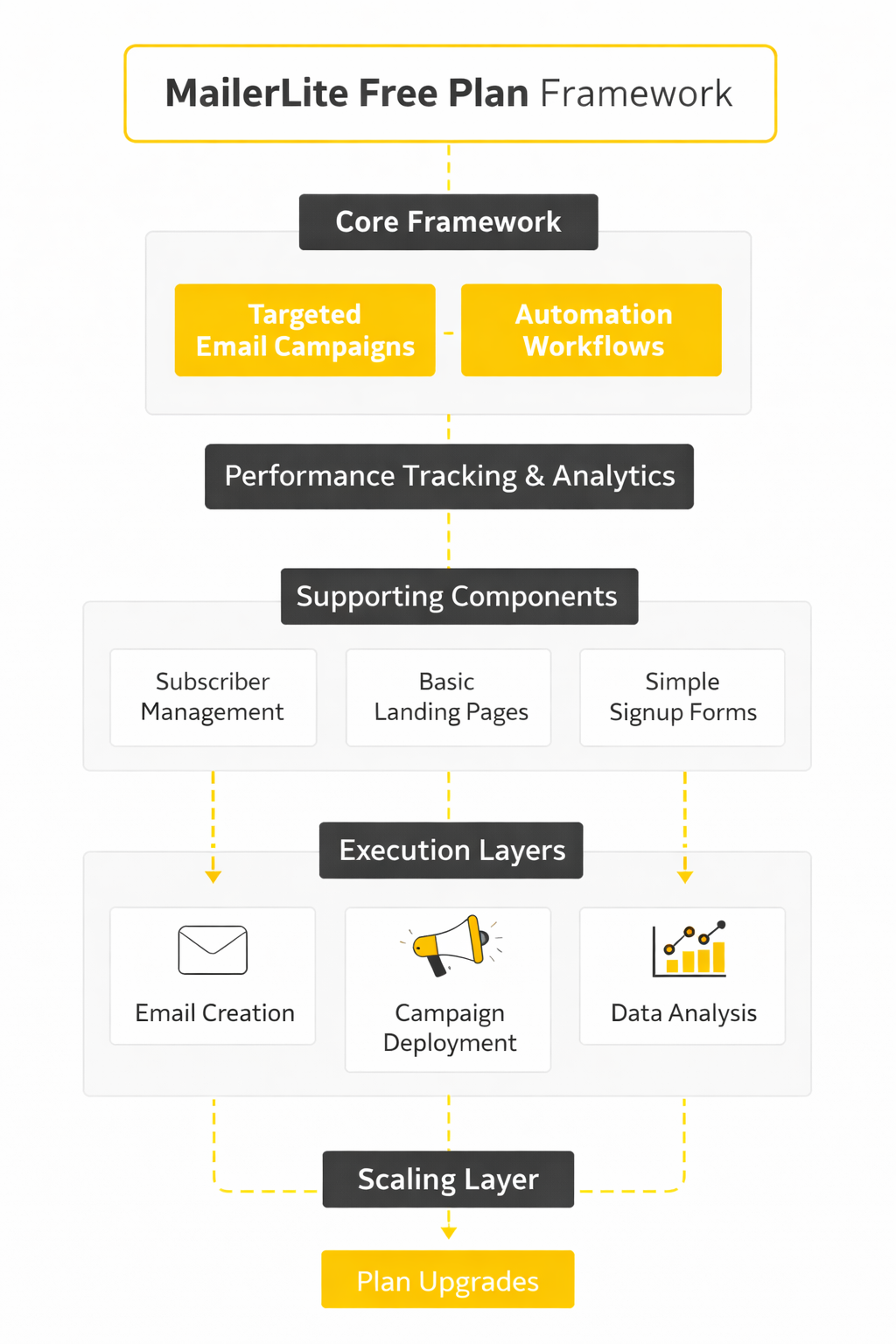
- List size and growth speed If you are comfortably below 500 subscribers and you are growing at a normal early-stage pace, the free plan can last long enough to teach you a lot. If you already have a warm audience, a migration list, or a fast-moving lead source, the limit becomes a near-term obstacle instead of a helpful starting point. Since MailerLite reduced the cap in late 2025, this part matters more than most older reviews admit. MailerLite+1
- Send frequency and automation load The send cap matters less than people think when the strategy is disciplined. At the top end, 12,000 monthly emails gives you room for roughly 24 touches per subscriber, which usually covers a weekly newsletter and a lean onboarding flow without stress. It becomes tight when you start mixing frequent broadcasts, promo pushes, and multiple automations at the same time. mailerlite.com+1
- Funnel asset needs MailerLite’s free plan is stronger than expected on lead capture assets because it includes one website, 10 landing pages, and unlimited forms and pop-ups. That is plenty for one homepage, a lead magnet page, a booking page, a webinar page, and a few campaign-specific pages. It is not enough if your marketing model depends on spinning up lots of separate landing pages every month. mailerlite.com+1
- Brand and deliverability requirements This is where beginners make the most expensive “free” mistake. MailerLite keeps its logo on free-plan newsletters, and MailerLite also warns that sending from public domains like Gmail or Outlook hurts deliverability because those addresses cannot be authenticated properly. Add Google and Yahoo’s sender rules around authentication and unsubscribe standards, and the takeaway is simple: the free plan works much better when you pair it with a real custom domain from the start. mailerlite.com+3
Put those four checks together and the answer gets clear fast. The MailerLite free plan is a strong fit for small, focused email programs that need one simple system to capture leads and send useful campaigns. It is a weaker fit for brands that need polish, page volume, heavy support, or more breathing room before the first upgrade. mailerlite.com+2
What You Actually Get on the Free Plan
Once you run the framework from the previous section, the next step is simple: look at the actual package without the marketing haze. MailerLite’s current pricing page still gives free users a real starter stack, not just a stripped-down demo. The core free offer is built around email sending, basic automation, list growth tools, and lightweight site-building, which is exactly why the plan is still relevant for small operators.
Here is the permanent free-plan baseline MailerLite is publicly advertising right now:
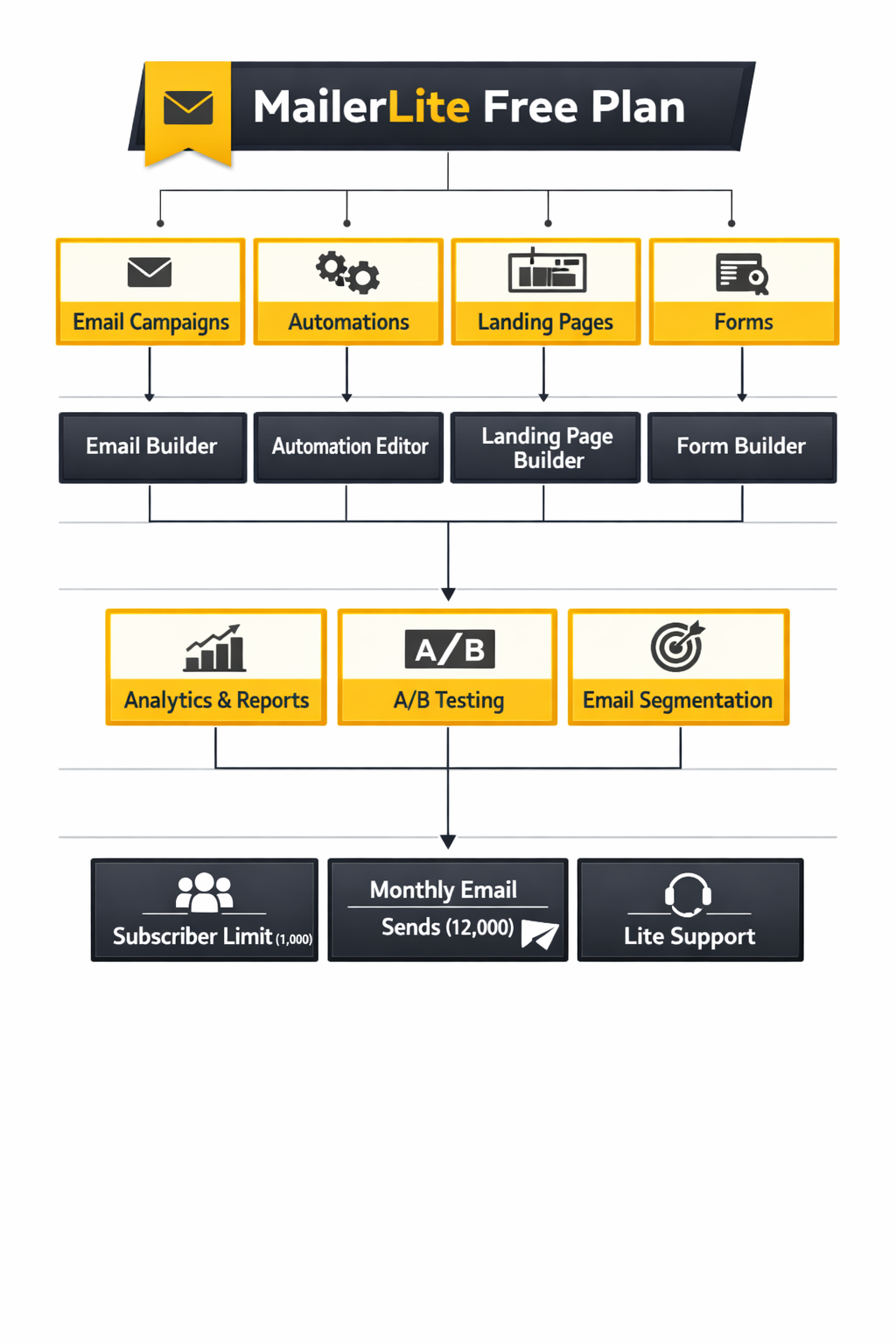
- Up to 500 subscribers
- Up to 12,000 monthly emails
- 1 website
- 10 landing pages
- Signup forms and pop-ups
- Email automation builder
- 1 user seat
- 1 digital product or booking
That mix is stronger than many people expect. You are not just getting a newsletter sender. You are getting enough infrastructure to collect leads, send follow-up emails, publish a basic web presence, and test whether your offer has traction before you start paying for a heavier stack.
The page-building side is especially useful for beginners. MailerLite’s landing page builder says free users get 10 landing pages, 1 website, free hosting, and unlimited traffic and storage, which is enough for a homepage, lead magnet page, booking page, thank-you page, and a handful of campaign-specific pages. That matters because it lets you avoid buying separate landing page software before you even know whether your funnel converts.
The email side is practical rather than flashy. MailerLite includes its drag-and-drop newsletter editor, a rich-text editor, mobile-friendly emails, and the basic automation builder inside the free tier. So yes, you can launch a welcome sequence, collect subscribers through forms, and send a weekly newsletter without hitting a paywall on day one.
There is one major nuance almost every casual review blurs together: a new account starts with a 14-day premium trial. During that opening window, MailerLite lets you test features like pre-built newsletter templates, RSS campaigns, auto-resend, A/B split testing, click heatmaps, promotion pop-ups, blogs, password-protected websites, and multiple automation triggers. That is helpful, but it also creates confusion, because people often mistake temporary trial access for what the free plan includes forever.
MailerLite also gives new users a short runway before domain authentication is fully required. Its premium-trial documentation says new accounts using a custom domain can send first campaigns before completing authentication, but that shortcut is limited to the first 14 days and capped at 5,000 emails total during that period. That is useful for setup, but it should be treated as a temporary onboarding convenience, not a long-term operating model.
The Limits That Change the Math
The biggest limit is still the subscriber cap. MailerLite’s free plan update FAQ confirms the free tier was reduced from 1,000 to 500 subscribers in September 2025, and that one change makes the plan feel much smaller for anyone with an existing audience. If you are building from zero, it is manageable; if you already have momentum, it can turn into an upgrade trigger faster than older reviews suggest.
The 12,000-email monthly cap sounds roomy until you do the math. At full capacity, 500 subscribers gives you space for about 24 emails per subscriber per month, which is enough for a weekly newsletter and a lean welcome sequence, but not enough for sloppy sending habits. The free plan works best when your email strategy is focused, because wasted sends become expensive in a hurry once you combine broadcasts, automations, and resends.
The second big limit is feature rollback after the trial ends. MailerLite’s own trial guide makes clear that pre-built newsletter templates, auto-resend, RSS campaigns, A/B split testing, unlimited landing page templates, click heatmaps, promotion pop-ups, and multiple-trigger automations are not part of the forever-free baseline. When the trial expires, the account reverts to free, multi-trigger automations stop working, and templates created during the trial can no longer be freely created or edited the same way.
There are also quiet professional limits that matter more than beginners expect. MailerLite’s pricing comparison shows that removing the MailerLite logo, unlocking unlimited templates, adding extra seats, and expanding site volume all sit on paid plans, while its support page makes it clear that email and live chat support on free accounts are really part of the first 14 days, not an always-on benefit. That means the free plan is fine for a solo operator learning the platform, but less comfortable for client work, team workflows, or brand-sensitive campaigns.
Deliverability is another place where “free” can get expensive if you set things up casually. Google’s sender guidelines require authentication standards for Gmail delivery, and MailerLite explicitly says using public sender domains like Gmail is not recommended because it can hurt inbox placement. MailerLite also warns that free-domain sender addresses carry a high risk of landing in spam or junk, which is why the plan works much better when you treat a custom domain as a basic requirement, not an optional upgrade.
That is the real dividing line with the MailerLite free plan. It is strong when you use it like a lean launch system for one focused offer, one small list, and one clear conversion path. It gets frustrating when you expect it to behave like a full marketing operating system, which is the moment it makes sense to compare an email-first option like Brevo or a broader CRM-and-automation platform like GoHighLevel before your setup turns messy.
How to Use the Free Plan Professionally
The best way to use the MailerLite free plan is to treat it like a focused operating system for one clear offer, not a playground for endless experiments. You have enough room to build a proper lead capture path, a welcome sequence, and a lightweight website, but not enough room to be sloppy. That is actually a good thing, because tight limits force better decisions earlier.
Most people waste the free plan in two ways. They either skip the boring setup work, which hurts deliverability later, or they build too many pages, groups, and automations before they have a single path converting. A professional setup does the opposite: one domain, one main audience path, one welcome sequence, and clean list hygiene from day one.
Start with your sending setup, not your first newsletter
Before you write a single campaign, set up a real sending identity. MailerLite lets you add a sending domain from the Domains area and authenticate it there, and it can even help automate setup for supported DNS providers through its domain authentication flow and automatic domain authentication option. That matters because Google’s current sender guidance recommends authentication for all senders and SPF, DKIM, and DMARC for bulk senders, with unauthenticated mail more likely to be filtered or rejected under Google’s sender requirements.
You should also stop thinking about Gmail as a professional sender address. MailerLite’s own Google and Yahoo policy checklist says to remove Gmail and other public domains from your “from” address, because a custom-domain sender improves compliance and deliverability. If you want a cleaner setup, MailerLite also supports adding a separate site or landing-page domain under the sites domain setup flow, and it recommends using a dedicated subdomain like the one described in its domain alignment guide.
Build a simple list structure before you build pages
This is where a lot of free accounts get messy fast. In MailerLite, groups are the manual buckets you use like tags or audiences, while segments are rule-based lists generated automatically from conditions. If you use both for the same job, the account becomes confusing for no good reason.
The cleaner move is to use groups for entry points and segments for behavior. So your form or landing page might feed a group called “Newsletter,” “Lead Magnet,” or “Consultation,” and then your segments can split people later based on clicks, signup source, or engagement. That approach lines up with how MailerLite asks you to choose a target group when you create forms, landing pages, websites, and campaigns, and it keeps the account understandable when you come back to it a month later.
You also do not need a giant form to start. MailerLite lets you add custom fields to forms, but the smartest move on the free tier is to ask only for what you will actually use. Name and email are usually enough, and one extra field is plenty if it genuinely improves personalization or routing.
Build one clean conversion path
This is the part where the free plan becomes real. Instead of trying to publish five pages and three different offers, build one straight path from opt-in to delivery to next step. MailerLite gives you the tools to do that without leaving the platform, and the setup is simpler than most people think.
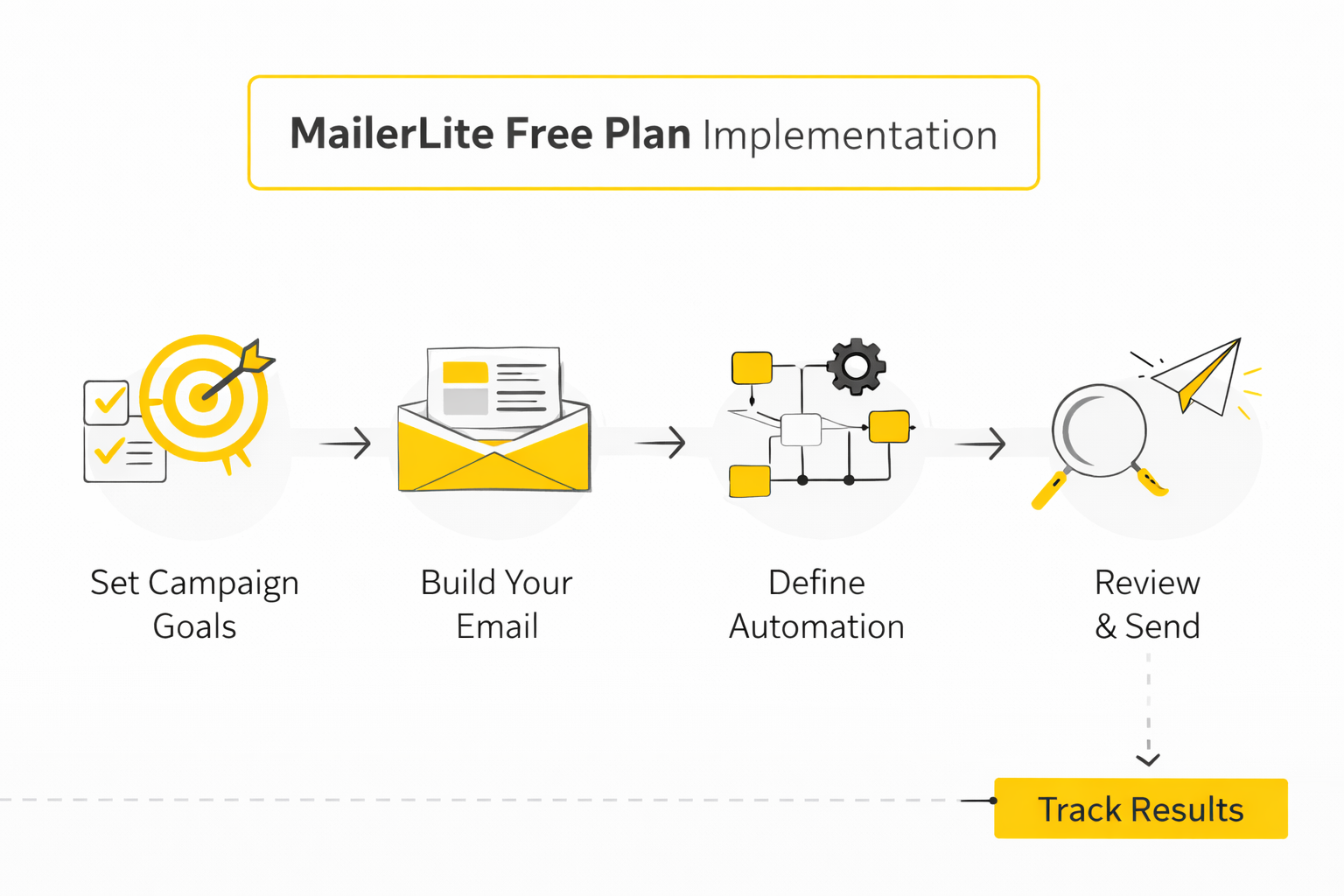
- Create one core group first. MailerLite treats groups as the destination for your incoming subscribers, so start with a single group that matches the offer people are joining for, such as “Weekly Newsletter” or “Free Guide.” That follows the platform’s own structure for groups.
- Build either an embedded form or one landing page. If you already have a website, use an embedded form. If you do not, publish one of the 10 landing pages allowed on the free plan and connect it to your domain or subdomain using MailerLite’s custom-domain setup steps.
- Assign the form to a group immediately. This part is easy to miss, but it is critical. MailerLite’s own troubleshooting guide says a form must have at least one assigned group or it will not add subscribers to your list.
- Leave double opt-in on unless you have a very strong reason not to. MailerLite says double opt-in is enabled by default and recommends keeping it on because it reduces spam addresses, protects sender reputation, and improves engagement quality. On a 500-subscriber cap, bad leads are more expensive than usual, so this is one of the easiest professional wins you can take.
- Edit the success message and confirmation experience. MailerLite lets you customize the success message after signup, and that is the right place to tell people what happens next. A vague “thanks for subscribing” wastes momentum, while a specific confirmation step sets expectations and reduces support headaches.
That is your first working funnel. It is simple, but simple is exactly what the free tier rewards.
Build one welcome automation, not five
Once the form is connected, the next job is automation. MailerLite’s automation workflow builder starts with a trigger, and one of the most useful starting points is Joins a group, because it lets your form feed directly into a welcome sequence. From there, you can add send email, delay, and condition steps to create a clean subscriber journey.
The professional version of this is a short sequence, not a maze. Your first email should deliver the thing you promised or welcome the subscriber clearly. Your second email should help them understand what you do and what kind of messages they will get, and your third should move them toward the next action that matters, whether that is reading, replying, booking, or buying.
That kind of sequence is perfect for the MailerLite free plan because it respects the email cap while still doing real work. You do not need an elaborate nurture machine at this stage. You need a sequence that starts on time, says the right thing, and does not break.
Watch activity and clean the list before the free plan feels tight
A free account feels small much faster when your list quality drops. MailerLite gives you an automation activity view where you can see subscribers who are Queued, Completed, Canceled, or Failed, and it also lets you re-add failed or canceled people back into the sequence when appropriate. That is useful because automations do not fail in dramatic ways most of the time; they fail quietly.
Subscriber hygiene matters even more on the free tier because dead weight takes up precious space. MailerLite’s inactive subscriber cleanup tool defaults to people inactive for the last 6 months who have received more than 10 emails, and the platform explicitly notes that removing them can improve engagement metrics and free space in your plan. On a 500-subscriber ceiling, cleaning the list is not optional admin work. It is capacity management.
The smart way to review the account is weekly. Check whether subscribers are entering the right group, whether confirmation emails are arriving, whether the welcome sequence is firing, and whether your unsubscribes or inactive contacts are telling you something important. A free plan can look “maxed out” long before it is actually maxed out if you never clean the system.
Keep the stack lean until the free plan proves itself
This is where discipline pays off. MailerLite already gives you forms, landing pages, emails, automations, and a lightweight site builder, so the default move should be to use what is already there before adding more software. Extra tools only make sense when they solve a specific bottleneck you can name.
If your opt-in process later needs deeper logic, multi-step qualification, or richer intake than a basic form can handle, Fillout is a sensible add-on. If distribution is the problem rather than capture, promoting your newsletter and lead page consistently through Buffer usually matters more than redesigning the funnel again. And if your conversion goal is a call instead of a download, pairing MailerLite with Cal.com can be cleaner than forcing everything through email alone.
That is the professional way to use the MailerLite free plan. Make it earn the next layer of complexity. Until the free account is clearly limiting a working system, the right move is almost always to simplify, not expand.
What the Numbers Actually Mean
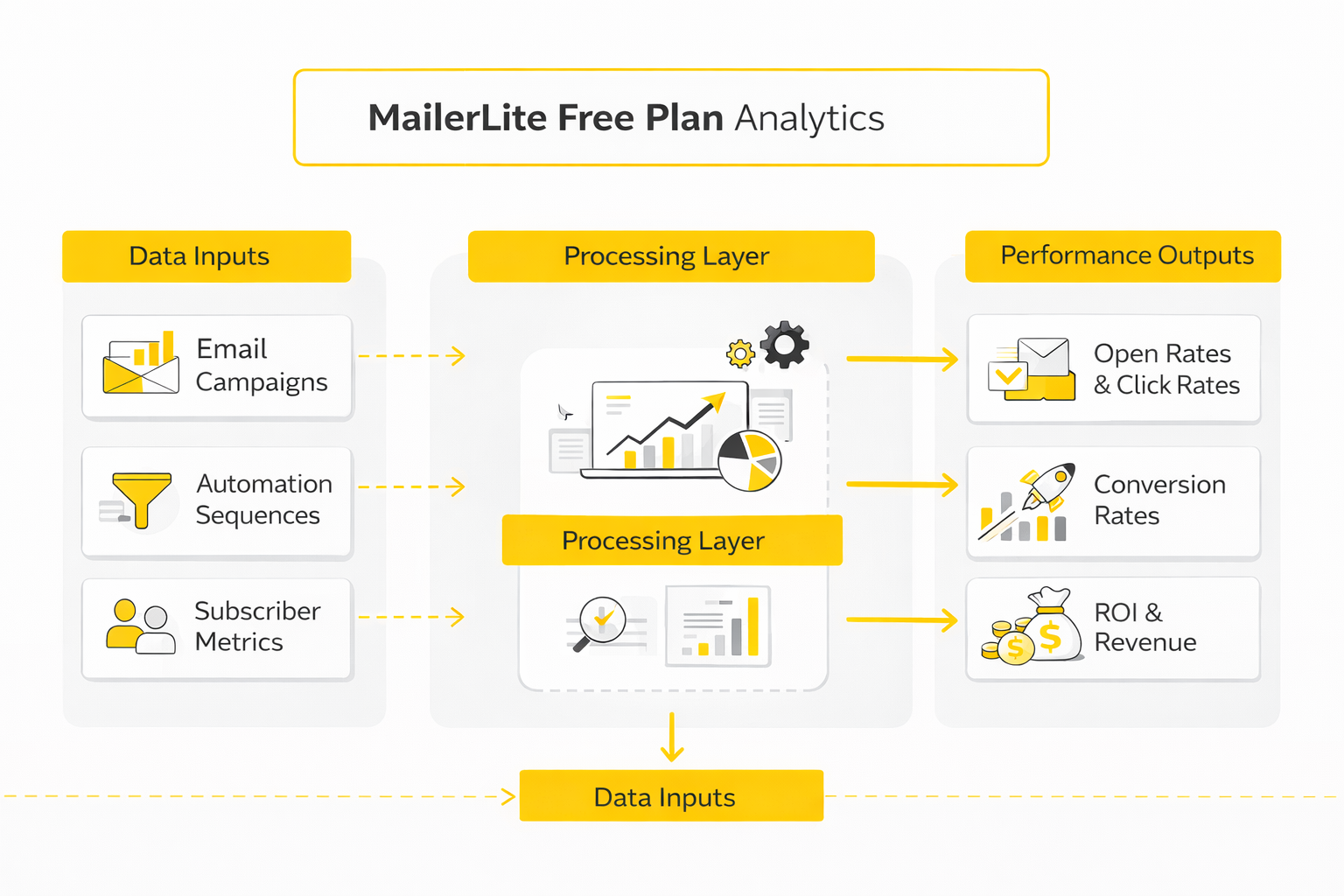
The right way to measure the MailerLite free plan is not to stare at one open-rate number and panic. MailerLite’s own reporting system gives you a much better picture than that, because the dashboard shows subscribes versus unsubscribes, opens versus clicks, CTOR, and monthly unsubscribe and spam-complaint rates, while individual campaign and automation reports break performance down into overview, subscriber activity, link activity, and location data. You can also export dashboard data as CSV, which matters because trends across multiple sends tell you more than any single campaign ever will. mailerlite.com+1
Start with the reporting system you already have
Inside MailerLite, the dashboard is the right place to begin because it shows whether the list is growing, whether people are opening and clicking, and whether unsubscribes or spam complaints are quietly rising in the background. The campaign report then tells you which email did the damage or created the lift, and the automation report shows whether your welcome sequence is actually doing its job instead of just existing. On a free plan with only 500 subscribers, that visibility matters more than it would on a giant list, because one weak campaign can distort your numbers much faster when the audience is small. mailerlite.com+1
The practical move is to measure in layers. First, check the account-level trend on the dashboard every week. Then review each sent campaign, and after that, review the individual emails inside your automation workflow so you can tell whether the weakness is in your list growth, your subject line, your email body, or the sequence itself. mailerlite.com+1
Use benchmarks as guardrails, not as a scoreboard
A benchmark is useful when it helps you ask better questions, not when it tricks you into copying someone else’s numbers. In MailerLite’s 2025 benchmark dataset, the average open rate was 43.46%, the average click rate was 2.09%, click-to-open rate was 6.81%, and the average unsubscribe rate was 0.22%. In Mailchimp’s benchmark data, all-user averages came in at 35.63% opens, 2.62% clicks, and 0.22% unsubscribes, which is different enough to prove that platform datasets, audiences, and methodology change the headline number. mailerlite.com+1
The better reading is this: for many normal lists, a rough reference band of 30% to 40%+ opens and about 2% to 3% clicks is directionally healthy, but industry and audience quality still decide what “good” really means. MailerLite’s industry breakdown shows huge variation between sectors, with consulting benchmarked at 45.96% opens and 2.41% clicks, while software and web apps sat at 39.31% opens and 1.15% clicks. That is why your own trailing trend across the last five to ten sends is usually a better operating benchmark than a single internet average. mailerlite.com+1
Do not let open rates fool you
Open rate is still useful, but it is no longer clean enough to treat as the final verdict. Apple’s Mail Privacy Protection downloads remote content in the background and prevents senders from reliably learning when someone truly opened a message, and MailerLite says that this inflates the opens shown in dashboards and lowers the apparent click-to-open rate. So if your open rate looks amazing but your clicks stay flat, do not congratulate yourself too quickly. Apple+2
That is why CTOR is one of the most useful signals in this whole article. MailerLite defines CTOR as unique clicks divided by unique opens, and its current benchmark puts the average at 6.81%, which makes it a good reality check on whether the content inside the email matched the promise of the subject line. When opens hold up but CTOR slips, the problem is usually not awareness but message-to-offer fit. mailerlite.com+1
Watch these numbers in this order
The first number to protect is spam complaint rate. Google says senders should keep spam complaints below 0.1% and prevent them from reaching 0.3% or higher, and MailerLite says it may investigate accounts once spam complaints go over 0.2%. That means complaints are not just a reputation signal. They are a direct operational risk. Google Podpora+1
The second number is bounce rate. If bounces start creeping up, the usual cause is poor list quality, bad imports, stale addresses, or a form source that is attracting junk signups. MailerLite’s anti-spam policy flags bounce rates above 5%, so you should treat anything moving sharply upward as a list-quality problem before it becomes a compliance problem. mailerlite.com
The third number is unsubscribe rate, and this is where most people finally learn whether their emails are relevant. Both MailerLite and Mailchimp show an overall unsubscribe average of 0.22%, while MailerLite says it may investigate when unsubscribes go above 1%. So if you are hovering near the general benchmark, you are probably fine, but if you are climbing toward 1%, your promise, frequency, or audience targeting is off. mailerlite.com+2
The fourth number is click rate, because clicks are harder to fake than opens and closer to business intent. If your opens are decent but clicks are weak, your subject line may be doing its job while the email body, CTA, or offer is not. If clicks rise while opens stay flat, the message inside the email is stronger than the packaging around it, which usually means the next test should be on subject line and preview text rather than the content itself. mailerlite.com+2
The fifth number is list movement, not just list size. MailerLite’s dashboard tracks new subscribers and unsubscribes over time, and that simple comparison tells you whether your email program is actually compounding or just churning in place. On the free plan, that matters because 500 subscribers sounds small until you realize a stagnant list can make the account feel “full” without producing any real business momentum. mailerlite.com
Turn the data into decisions
The point of measurement is action. If open rate drops first while clicks among openers stay steady, test subject lines, send times, and segmentation before rewriting the whole email. If opens stay healthy but click rate and CTOR fall, fix the email body, tighten the offer, reduce distractions, or make the CTA clearer. mailerlite.com+2
If unsubscribes and spam complaints rise together, stop optimizing copy and start questioning list source, expectation setting, and frequency. Google’s spam thresholds are tight, and MailerLite’s internal thresholds are even less forgiving than many beginners realize, so this is the moment to slow down, clean the list, and send only to people who clearly asked for what you are sending. The free plan works best when you use measurement as a filter for discipline, not as a vanity dashboard. Google Podpora+1
A good weekly review on the MailerLite free plan is simple. Check list growth, open trend, click trend, CTOR, unsubscribes, complaints, and the one email in your sequence that is underperforming most. Then change one meaningful thing at a time, because on a small list, clean interpretation beats noisy experimentation almost every time. mailerlite.com+2
Best Alternatives and Upgrade Triggers
At this stage, the question is no longer whether the MailerLite free plan works. The question is whether it is still the right shape for the business you are building. That distinction matters, because a free plan can be technically usable while still becoming strategically expensive through branding limits, workflow workarounds, page caps, or migration debt. mailerlite.com+1
Upgrade inside MailerLite when the problem is polish
If your main frustration is that the free account feels a little too bare, upgrading inside MailerLite is usually the cleanest move. The Growing Business plan starts at $10 per month and adds the things most people feel first: RSS campaigns, AutoResend, newsletter and landing page templates, removal of the MailerLite logo, and unlimited websites and landing pages. That is a strong upgrade when your funnel already works and you simply want more room and a more professional finish without rebuilding your stack somewhere else. mailerlite.com+1
This is the right call for a newsletter that is gaining traction, a consultant who wants cleaner lead capture pages, or a small brand that has outgrown visible platform branding. It is also the cheapest way to avoid the weird middle ground where you are still on the free plan but already spending time compensating for its limits. Once time starts leaking out of your workflow, a low-cost upgrade is often cheaper than “staying free.” mailerlite.com
Upgrade inside MailerLite when the problem is workflow depth
The Advanced plan is the better move when your problem is not polish but operational control. MailerLite says this tier starts at $20 per month and adds unlimited users, the Custom HTML editor, an unsubscribe page builder, and advanced website features like password protection and custom code injections. Those are not vanity upgrades. They are the kinds of features that matter when you have a team, custom designs, client approval loops, or a website setup that needs tighter control. mailerlite.com+1
That is also the point where you should stop pretending the free plan is still the right environment. If you are trying to manage more than one operator, use hand-coded emails, or create more tailored subscriber journeys, the real bottleneck is not subscriber count anymore. It is system flexibility, and MailerLite has already made clear which features sit behind the paid tiers. mailerlite.com+1
Switch when your business model has changed
Sometimes upgrading is the wrong answer because the issue is not capacity. The issue is that you need a different type of platform. If you need bigger contact storage, transactional email, or a multi-channel setup, Brevo is a more natural fit than trying to stretch MailerLite, because Brevo’s free plan includes 300 daily email sends, 100,000 contacts storage, email and SMS campaigns, and transactional email support. help.brevo.com+1
If you are a creator-first business, the comparison shifts again. Kit’s official help center says its Newsletter Plan is free for up to 10,000 subscribers, includes unlimited email sends, unlimited forms and landing pages, and 1 basic visual automation with 1 email sequence, but it keeps one Kit-managed Recommendation slot on the plan. That makes Kit more attractive when monetization, paid newsletters, or audience growth mechanics are the center of the business rather than just newsletter delivery. help.kit.com
If your setup is more funnel-first than email-first, Systeme.io belongs in the conversation. Its official site positions it as an all-in-one platform built around sales funnels, email marketing, website building, affiliate management, and marketing automation, and its pricing page emphasizes unlimited emailing across plans. That makes it a better fit for digital products, lean funnels, and simple back-end selling than MailerLite’s lighter website-and-newsletter approach. systeme.io+1
And if you are really running a lead-gen machine, a service business, or client accounts, then GoHighLevel is operating in a different category. HighLevel’s pricing starts with a 14-day free trial, its Starter plan begins at $97 per month, and the official pricing page highlights 3 sub-accounts, unlimited contacts, unlimited users, and core CRM and automation features. That is not a MailerLite replacement for beginners. It is a step into a much heavier business operating system when email is only one piece of the stack. gohighlevel.com+1
Do not wait until migration becomes a rescue operation
One of the easiest mistakes to make with the MailerLite free plan is staying too long because the monthly bill is zero. The real cost shows up later, when you have to move subscribers, fields, groups, templates, forms, automations, and integrations all at once. MailerLite’s own migration checklist recommends exporting subscribers with their groups, tags, and fields intact, rebuilding groups in the new system, reinstalling integrations, recreating templates, rebuilding automations, and even keeping the old account open for at least the first month or two during the transition. mailerlite.com
That is why the smartest time to switch is usually before the system becomes messy, not after. If you can already see that your business is drifting toward creator monetization, transactional email, client CRM, or funnel-heavy selling, it is better to move while the account is still clean. Free software is only truly cheap when it is helping you move faster, and the moment it starts creating structural hesitation, it has stopped being free in any useful sense. mailerlite.com+3
Where the Free Plan Fits in a Lean Marketing Stack
By the end of this guide, the real picture is pretty clear. The MailerLite free plan works best as a lean front-end system for one audience, one main offer, and one clean follow-up path, because the platform gives you 500 active subscribers, 12,000 monthly emails, one website, 10 landing pages, forms, pop-ups, automation, and even one digital product or booking without an upfront bill. That is enough to launch something real, validate demand, and decide whether email is becoming an asset or just another tab you keep open. mailerlite.com+2
The smart move is not to ask the free plan to do everything. It is to let MailerLite handle audience capture and email delivery while you add tools around it only when the business actually needs them, whether that means richer intake with Fillout, easier scheduling with Cal.com, social distribution with Buffer, or a heavier CRM layer through GoHighLevel. That kind of ecosystem thinking keeps your stack clean, your costs low, and your upgrade decisions tied to real bottlenecks instead of shiny features. mailerlite.com+2
FAQ for the Complete Guide
This is the part most people actually need before they sign up, migrate, or upgrade. The right FAQ is not just a pile of quick answers, because each answer should help you make a better decision about whether the free tier still fits your business. So here are the questions that matter most when you are evaluating the MailerLite free plan seriously. mailerlite.com+1
Is MailerLite free forever, or is it only a short trial?
MailerLite runs a real free plan, not just a time-limited demo. New accounts also get a 14-day premium trial on top of that, but when the trial ends, the account simply falls back to the free tier rather than shutting down or forcing a paid subscription. That means the plan can remain free as long as you stay within the free-plan rules. mailerlite.com+2
What exactly do you get on the MailerLite free plan right now?
MailerLite’s current pricing page shows the free plan includes up to 500 subscribers, 12,000 monthly emails, one user seat, websites, 10 landing pages, signup forms and pop-ups, the email automation builder, comparative reporting, and one digital product or booking. That is a meaningful starter package, not just a sample account with one or two teaser features. For a lean newsletter or lead-gen setup, it is enough to build a working funnel before you spend money. mailerlite.com+1
Does the free plan include automations, or do you need to upgrade first?
Yes, automation is part of the free plan. MailerLite highlights the email automation builder on the free tier, and its free-plan page also positions automation as one of the core tools you can use without paying. The nuance is that some more advanced automation features sit inside the 14-day trial or paid plans, so “automation included” is true, but “every automation feature included” is not. mailerlite.com+2
What counts toward the 500-subscriber limit?
MailerLite counts each unique, active email address toward the free-plan limit. It does not count the same subscriber multiple times just because that person appears in several groups or segments, and it also does not count unsubscribed or bounced contacts toward that cap. That is good news because a clean list structure will not punish you with duplicate counting. mailerlite.com
What happens when you go over 500 subscribers?
MailerLite says that once a free account is over 500 subscribers, sending campaigns, running automations, and manually adding subscribers stop working until you either upgrade or reduce your active count. The platform even shows an in-app warning when your account reaches 400 subscribers so you can deal with the limit before it becomes a hard stop. In other words, 500 is not a soft suggestion. It is the line where normal sending breaks. mailerlite.com+1
Does the free plan include templates?
This is where a lot of people get confused because the 14-day trial blurs the answer. MailerLite’s template documentation says pre-designed campaign and website templates are available on paid plans and during the 14-day premium trial, while signup form templates remain available on the free plan. So if you open a brand-new account and see more template options at first, do not assume all of them stay forever. mailerlite.com+2
Can you remove the MailerLite logo on the free plan?
No. MailerLite’s help center says the logo appears by default at the end of newsletters, landing pages, and websites, and removing it requires a paid plan. That makes the free tier completely fine for testing and early growth, but it also means branding-sensitive businesses usually feel the need to upgrade sooner. mailerlite.com+1
Does the free plan include customer support?
Yes, but only in a limited way after the trial period. MailerLite’s support documentation says free accounts get 24/7 email and live chat support for the first 14 days after signup, and after that the practical support path becomes the knowledge base, self-service resources, and community. That is enough for self-starters, but it is not the same as permanent hands-on support. mailerlite.com+2
Should you use a Gmail address as your sender on the free plan?
You really should not. MailerLite’s own guidance says using a free-domain sender like Gmail carries a high risk of poor deliverability, and its signup guide explicitly points new users to those limitations when they create an account. A real custom-domain sender is one of the highest-leverage upgrades you can make even before you upgrade the software plan itself. mailerlite.com+2
Is double opt-in enabled by default?
Yes, MailerLite says double opt-in is already enabled by default when you create a form. The platform also recommends keeping it on because it reduces spam signups, protects sender reputation, and generally leads to better engagement quality. On a free plan with a hard subscriber cap, that matters even more because low-quality subscribers waste limited space. mailerlite.com+1
Can you sell a product or take bookings on the free plan?
Yes, but the free tier is intentionally narrow here. MailerLite’s pricing shows the free plan includes one digital product or booking, which makes it usable for a simple paid download, mini-offer, or lightweight booking flow. That is helpful for testing monetization, but it is not designed to be a full storefront. mailerlite.com+1
Does the free plan include quizzes and surveys?
Yes. MailerLite’s free-plan and feature pages both say the free tier includes surveys, and its quiz-maker FAQ says users can create quizzes for free and send newsletter quizzes to up to 500 subscribers or publish landing page quizzes on a MailerLite domain. That makes the plan more useful for lead magnets, feedback loops, and audience qualification than many beginners realize. mailerlite.com+2
Is the MailerLite free plan actually enough for a real business?
For the right kind of business, yes. If you are running one clear newsletter, one service funnel, one lead magnet, or one simple paid offer, the free plan gives you enough infrastructure to prove the model before paying for scale. It becomes the wrong fit when you need deeper automation, more pages, multiple users, permanent support access, or a fully white-labeled customer experience. mailerlite.com+2
Work With Professionals
A lot of marketers spend too much time chasing clients, competing on crowded platforms, and losing a percentage of every project to middlemen. MarkeWork is positioned as a cleaner route for marketers who want direct access to opportunities instead of platform friction. If you want better clients, stronger positioning, and more control over what you earn, it is worth taking a serious look at MarkeWork.com.
Explore 10K+ Remote Marketing Contracts on MarkeWork.com
Most marketers spend too much time chasing clients, competing on crowded platforms, and losing a percentage of every project to middlemen. MarkeWork gives you a better way. Browse thousands of remote marketing contracts and connect directly with companies desperate to hire skilled marketers like you, without platform commissions and without unnecessary gatekeepers. If you're serious about finding better opportunities and keeping 100% of what you earn, explore available contracts and create a profile for free at MarkeWork.com.
Work With Professionals
A lot of marketers spend too much time chasing clients, competing on crowded platforms, and losing a percentage of every project to middlemen. MarkeWork is positioned as a cleaner route for marketers who want direct access to opportunities instead of platform friction. If you want better clients, stronger positioning, and more control over what you earn, it is worth taking a serious look at MarkeWork.com.
Explore 10K+ Remote Marketing Contracts on MarkeWork.com
Most marketers spend too much time chasing clients, competing on crowded platforms, and losing a percentage of every project to middlemen. MarkeWork gives you a better way. Browse thousands of remote marketing contracts and connect directly with companies desperate to hire skilled marketers like you, without platform commissions and without unnecessary gatekeepers. If you're serious about finding better opportunities and keeping 100% of what you earn, explore available contracts and create a profile for free at MarkeWork.com.
I’m turning Part 4 into a literal three-layer analytics system: dashboard and report inputs at the top, interpretation logic in the middle, and metric-driven decisions at the bottom.
I’m turning Part 4 into a literal three-layer analytics system: dashboard and report inputs at the top, interpretation logic in the middle, and metric-driven decisions at the bottom.