

Omnisend sits in an interesting spot in the ecommerce stack. It is not trying to be your storefront, your CRM, your ad platform, and your analytics warehouse all at once. It is trying to do one job very well: help online stores turn customer data into better-timed email, SMS, and push campaigns that actually drive revenue. Omnisend+2
That focus is why the platform keeps showing up in conversations around Shopify, WooCommerce, and fast-growing direct-to-consumer brands. Omnisend says it is trusted by more than 150,000 brands, offers 160+ integrations, and centers its product around campaigns, automations, segmentation, forms, reporting, and AI-assisted workflows rather than generic email blasting. Omnisend+1
What makes Omnisend worth a closer look is not just that it can send messages. Plenty of tools can do that. What matters is that ecommerce retention has become more expensive to ignore, while paid acquisition keeps getting harder to scale profitably, so platforms that can recover carts, convert new subscribers, and increase repeat purchases now matter much earlier in a brand’s growth curve. Omnisend’s own reporting says merchants on paid plans generated an average of $79 for every $1 spent, and its recent ecommerce research keeps pointing to automation as the real performance engine rather than one-off newsletters. Omnisend+2
Article Outline
This article is built as one continuous guide, but it is structured in six parts so each stage of the decision is easier to follow. The section names below are the exact sections the rest of the article will continue using. If you are evaluating Omnisend seriously, this structure will help you move from platform overview to practical implementation without jumping around.
- Why Omnisend Matters for Ecommerce Brands
- Omnisend Framework Overview
- Core Omnisend Features and Channels
- Automation and Segmentation That Drive Revenue
- Pricing, Integrations, and Best-Fit Use Cases
- Professional Implementation, Mistakes to Avoid, and FAQ
Why Omnisend Matters for Ecommerce Brands
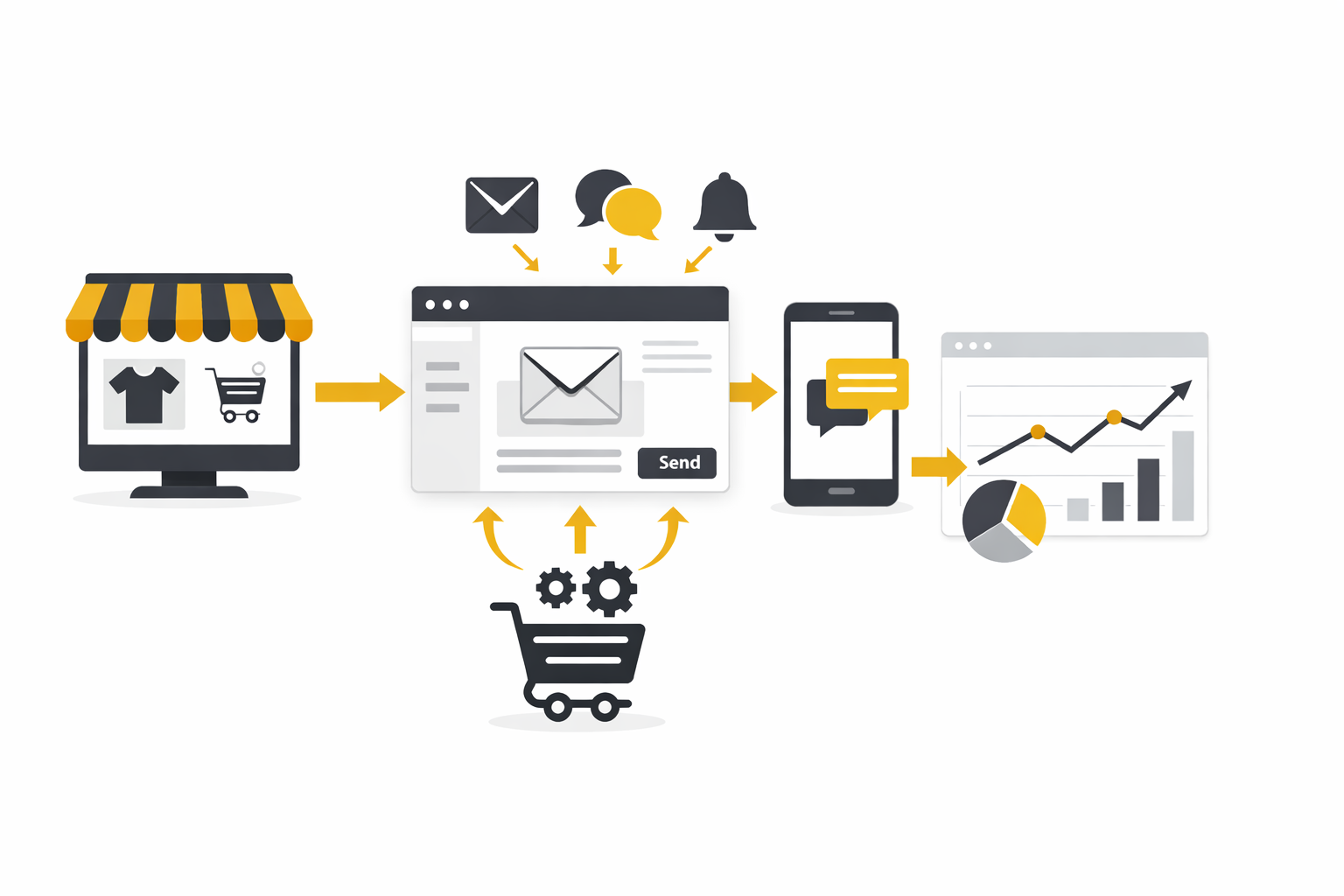
Omnisend matters because ecommerce marketing has changed from “send a campaign when there is a sale” to “build a system that reacts to what shoppers actually do.” The platform is designed around that shift. Instead of treating email as a standalone broadcast channel, it combines email, SMS, web push, signup forms, reporting, and behavioral automation inside one ecommerce-first workflow. Omnisend+2
That matters even more when you look at where ecommerce revenue actually comes from. Recent Omnisend research found that abandoned cart, welcome, and browse abandonment messages accounted for 87% of all automated orders, which tells you something important: the big wins usually do not come from sending more campaigns, but from getting the core triggered journeys right. The same research also highlights that automated emails consistently outperform scheduled sends on opens, clicks, and conversions, which is exactly why platforms like Omnisend have become central to retention strategy rather than a side tool for newsletters. Omnisend+1
There is also a practical reason brands keep looking at Omnisend before they move to heavier enterprise tools. The platform offers a free plan with access to all features, then scales into paid plans starting at $16 per month for smaller contact volumes, which lowers the risk for brands that want to build proper automations before committing to a more expensive stack. That pricing position, combined with strong user sentiment around usability on G2 and the Shopify App Store, is a big reason Omnisend keeps getting treated as a serious growth platform rather than just another beginner email tool. Omnisend+2
Omnisend Framework Overview
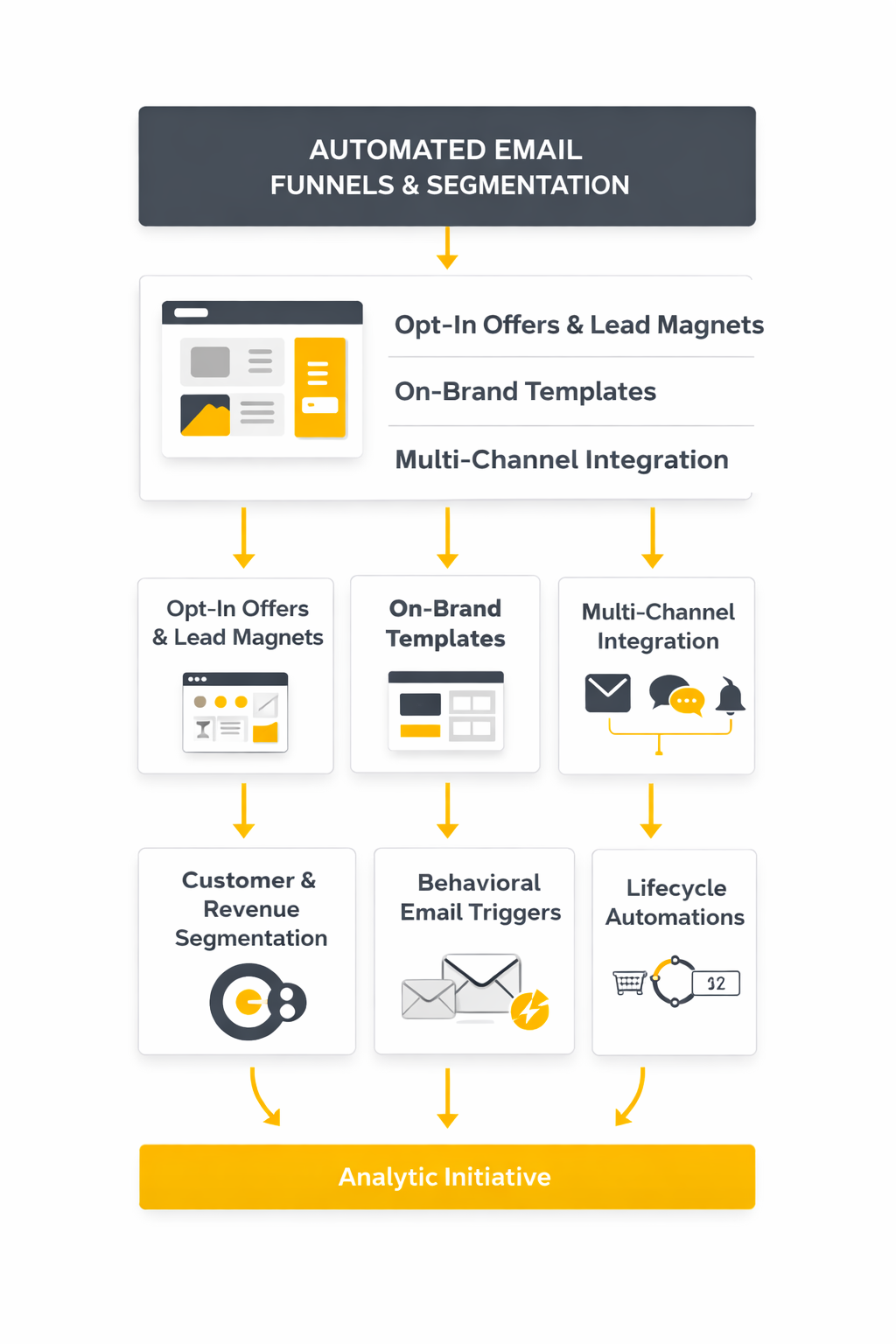
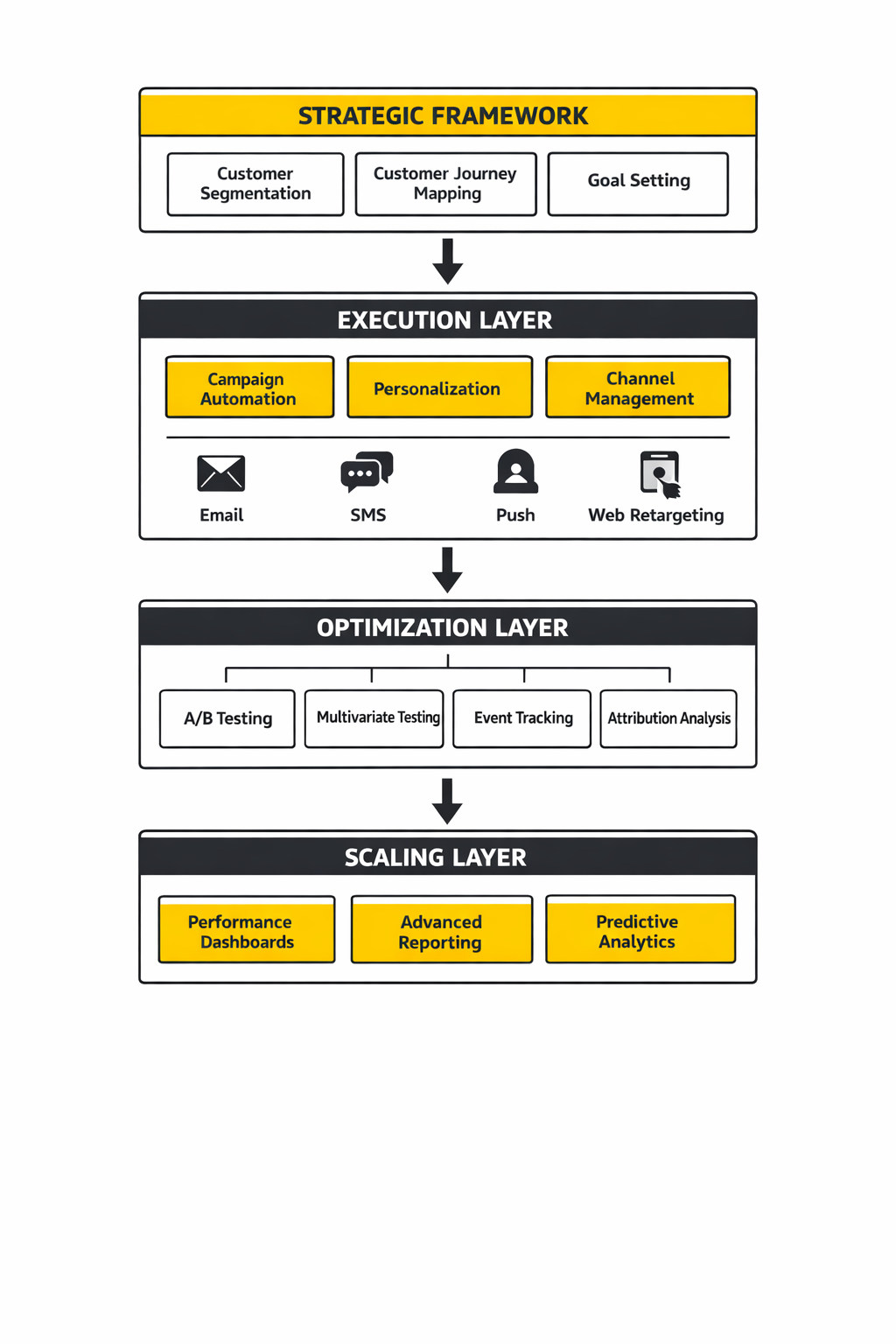
The easiest way to understand Omnisend is to think of it as a four-layer ecommerce messaging system. First, it captures attention and contact data through forms and popups. Second, it organizes that data through segmentation and customer behavior. Third, it activates the right channel, whether that is email, SMS, or push. Fourth, it closes the loop with reporting so the next campaign or automation gets smarter instead of louder. Omnisend+1
That framework is why Omnisend feels different from broader email platforms that were adapted for ecommerce later. Its product architecture is built around store behavior, purchase history, engagement signals, and common ecommerce events like signup, browse abandonment, cart abandonment, post-purchase follow-up, and win-back sequences. Even its automation interface and segmentation tools are framed around helping merchants act on buyer intent, not just maintain a contact database. Omnisend+1
It also explains where Omnisend is strongest. If you run an online store and need one system to collect subscribers, trigger lifecycle messaging, personalize content, and measure revenue impact without stitching together too many tools, the platform makes immediate sense. If you need a broader all-purpose marketing hub with deep CRM process management or sales pipeline complexity, Omnisend is usually better seen as the retention and lifecycle layer of the stack rather than the whole operating system. Omnisend+2
The rest of this guide will build on that framework. Next, we move into the specific features and channels that make Omnisend work in practice, because the platform only becomes valuable when its moving parts connect into one clean customer journey.
Core Omnisend Features and Channels
Once the framework is clear, the next question is simple: what does Omnisend actually give you to work with day to day? This is where the platform starts to make sense for ecommerce teams, because its feature set is not a random pile of marketing tools. It is built around the channels and actions that matter most when you are trying to grow a store without turning your retention stack into a mess.
The core Omnisend setup combines campaigns, automations, segmentation, forms, reporting, and AI support in one interface, with email, SMS, and web push managed as connected channels rather than isolated tools. On the official features overview, Omnisend positions that setup around list growth, automated workflows, branded campaigns, performance reporting, and cross-channel messaging, which is exactly how most ecommerce operators already think about lifecycle marketing when they are working well. Omnisend’s feature set and the main product overview on its homepage both show the same pattern: capture, segment, automate, send, and measure.
Email Campaigns Built for Stores, Not Generic Newsletters
Email is still the backbone of Omnisend, but the point is not just sending newsletters faster. The platform’s drag-and-drop builder is designed around ecommerce content blocks, product inserts, brand assets, and mobile-ready layouts, which makes it easier to create promotional sends that actually look like they belong to a store instead of a generic email template. On the product pages, Omnisend puts heavy emphasis on polished emails without coding and on campaigns that can be built once brand assets are uploaded into the account. The email builder details reflect that ecommerce-first approach clearly.
That matters because ecommerce teams usually do not fail on the “can we send an email?” question. They fail on speed, consistency, and relevance. When a platform makes it easier to drop in products, keep design on-brand, and tie sends directly to store behavior, the campaign process gets materially more useful for a lean team.
There is also a quality-of-execution angle here. Omnisend continues to update its builder, and recent product notes mention improvements to Universal Layouts that make reusable design blocks easier to manage and safer to edit, which is the kind of boring operational detail that saves time when campaigns are going out every week. The February 2026 product update is a good reminder that the platform is not static.
SMS Adds Speed and Urgency
SMS is where Omnisend gets more interesting than a standard email platform. The company positions text messaging as a native part of both campaigns and automations, with transparent usage-based pricing, global delivery, and reporting that ties clicks and sales back to specific sends. On the official features page, Omnisend highlights that merchants can build workflows that combine email, SMS, and push in a single automation view instead of patching channels together manually. The SMS section of Omnisend’s feature overview makes that integration explicit.
For ecommerce brands, that matters most in moments where urgency beats elegance. Flash sales, back-in-stock alerts, shipping updates, and cart reminders often perform better when the message lands fast and close to the customer. SMS is not the channel you want to overuse, but it is extremely effective when you reserve it for high-intent actions and time-sensitive offers.
This is also where Omnisend’s ecommerce positioning shows up again. The platform is not pitching SMS as a separate product that lives off to the side. It treats it as one more lever inside the same revenue workflow, which is usually how experienced marketers want to use it anyway.
Web Push Gives Omnisend a Useful Third Channel
A lot of brands talk about omnichannel when they really mean “email plus maybe SMS.” Omnisend goes one step further by supporting browser-based push notifications for subscriber collection, campaigns, and automation flows. The official help documentation explains that merchants can set up push notifications, collect push subscribers, send campaigns, and add push messages inside workflows, while the feature pages frame push as a fast way to re-engage shoppers with flash sales, low-stock messages, and timely reminders. The push notification setup guide and Omnisend’s push automation page both show how central this channel has become to the platform.
This channel is not as universal as email, and it is not as immediate on a personal device as SMS. But it fills a useful middle ground. It can bring shoppers back without relying on inbox placement, and it works especially well for short promotional nudges when someone has already shown interest in the store.
That is an underrated advantage inside Omnisend. When one platform lets you test email, SMS, and push in coordinated ways, you stop making guesses about channel mix and start seeing how different message types perform at different points in the customer journey.
Forms and Popups Are More Important Than They Look
A lot of ecommerce brands obsess over campaigns and automations while ignoring the very first step: list growth. Omnisend puts signup forms, popups, flyouts, and other capture tools directly into the same system, which means subscriber acquisition is not disconnected from what happens after someone opts in. On the official forms pages, the platform highlights brand customization, timing rules, audience targeting, exit-intent triggers, scroll-based triggers, and no-code setup. The forms feature page, the popup feature page, and the current support guide for creating popup signup forms make it clear that Omnisend sees forms as part of the revenue engine, not just a utility.
That is the right way to think about it. A signup form is not just a box asking for an email address. It is the entry point into the welcome flow, the first data collection moment, and often the difference between anonymous traffic and a subscriber you can recover later.
Omnisend also supports more advanced trigger behavior, including custom triggers for popup and flyout forms, which matters for stores that want tighter control over when forms appear rather than relying on the same blunt popup logic every visitor sees. The custom trigger documentation is especially useful here because it shows the platform is designed for more than basic lead capture.
Reporting and AI Make the Stack More Practical
A platform like Omnisend only becomes valuable if the team can see what is working and adjust quickly. Reporting is built into the platform across campaigns, automations, forms, and product performance, with official documentation covering metrics such as opens, clicks, orders, sales attribution, form interaction rates, and product-level reporting. The reporting guide, forms reporting details, product reporting, and the sales attribution explainer show that Omnisend is trying to answer the question every operator eventually asks: which messages are actually producing revenue?
That revenue view is important because vanity metrics can make a weak lifecycle program look healthy. Opens and clicks are useful, but ecommerce teams eventually need to know which channel, flow, or campaign is moving sales, which products are responding, and what part of the customer journey is underperforming. Omnisend’s reporting structure is clearly built around those decisions.
AI is the final layer that makes the platform more usable, not magically smarter than the marketer. Omnisend says its AI tools can help with copy suggestions, subject lines, send-time decisions, product recommendations, and AI-generated segments, while recent updates added an AI Segment Builder that turns plain-language prompts into audience rules. The Omnisend AI page and the June 2025 update on AI segmentation show the direction clearly. The real value here is speed. Good operators still need judgment, but faster execution matters when campaigns, segments, and automations are being updated every week.
Taken together, these features explain why Omnisend feels cohesive when it is used the right way. Email handles the deeper relationship, SMS handles urgency, push handles lightweight re-engagement, forms feed the system, reporting tells you what is paying off, and AI trims the setup time around the edges. That is a strong feature mix for an ecommerce brand that wants one retention platform to do the core work well before it starts layering on more tools.
Automation and Segmentation That Drive Revenue
At this point, the mechanics of Omnisend start to come together. The platform is not powerful because it has email, SMS, and push. It becomes powerful when those channels are triggered by behavior, shaped by segmentation, and optimized over time. This is where most ecommerce brands either build a real retention system or stay stuck sending campaigns that never compound.
Omnisend is built around pre-configured automation workflows tied to ecommerce events like signup, cart abandonment, browse abandonment, order confirmation, and reactivation. On the automation feature pages, the platform emphasizes ready-made workflows that can be launched quickly and then customized based on store behavior, product type, and customer lifecycle. The automation overview shows that these flows are not optional extras—they are the core engine behind performance.
The reason this matters is simple. Lifecycle automation consistently drives the majority of email-driven revenue for ecommerce brands. Omnisend’s own research shows that automated messages generate a disproportionately high share of orders compared to one-off campaigns, especially in flows tied directly to buyer intent. The automation statistics breakdown reinforces that point across multiple campaign types.
The Five Automations Every Store Should Build First
If you strip Omnisend down to what actually moves the needle early, five workflows matter more than everything else combined. These are not theoretical. They show up across almost every high-performing ecommerce retention setup.
- Welcome Series This is where new subscribers are converted into first-time customers. Omnisend supports multi-step welcome flows that can include email, SMS, and even push, allowing brands to introduce the product, build trust, and present an initial offer. This flow often delivers some of the highest conversion rates in the entire system because it targets users at peak interest.
- Abandoned Cart Recovery Cart abandonment remains one of the biggest revenue leaks in ecommerce. Industry data continues to show that a large percentage of carts are left incomplete, with estimates often cited around 70%+ abandonment rates. Omnisend’s cart recovery workflows use timed reminders, incentives, and multi-channel messaging to bring customers back before intent fades.
- Browse Abandonment This flow captures a different type of intent. These are users who looked at products but never added them to cart. Omnisend allows brands to trigger messages based on product views, which creates a softer re-engagement path that feels more like a reminder than a pushy sale.
- Post-Purchase Follow-Up Most brands focus heavily on acquisition and forget what happens after the sale. Omnisend’s post-purchase flows allow you to confirm orders, recommend related products, request reviews, and introduce loyalty incentives. This is where repeat purchase behavior starts getting built.
- Win-Back Campaigns Every list decays. Omnisend’s reactivation workflows target customers who have not purchased or engaged in a defined period. These flows typically combine segmentation, incentives, and urgency to bring back customers who are still reachable but drifting away.
These five flows are not optional if you want Omnisend to perform. They are the foundation. Everything else builds on top of them.
How Segmentation Turns Messages Into Revenue
Automation without segmentation is just slightly smarter blasting. What makes Omnisend effective is the way it lets you slice your audience based on behavior, value, and engagement, then feed those segments directly into campaigns and workflows.
The platform supports segmentation based on purchase history, average order value, browsing behavior, campaign engagement, geographic data, and more. Its recent AI segment builder goes a step further by letting users describe an audience in plain language and automatically generating the rules behind it, which reduces friction when building more complex targeting logic. The AI segmentation update shows how this is evolving.
In practice, segmentation changes how every message performs. Instead of sending the same campaign to your entire list, you start targeting:
- High-value customers with exclusive offers
- First-time buyers with onboarding content
- Repeat buyers with cross-sell recommendations
- Inactive subscribers with reactivation incentives
- Browsers with product-specific reminders
This is not about being clever. It is about matching message timing and content to actual behavior, which is where most of the revenue lift comes from.
Step-by-Step: Building a Working Omnisend System
This is where the platform stops being theoretical and becomes operational. If you are setting up Omnisend properly, the process is not complicated, but it has to be done in the right order.
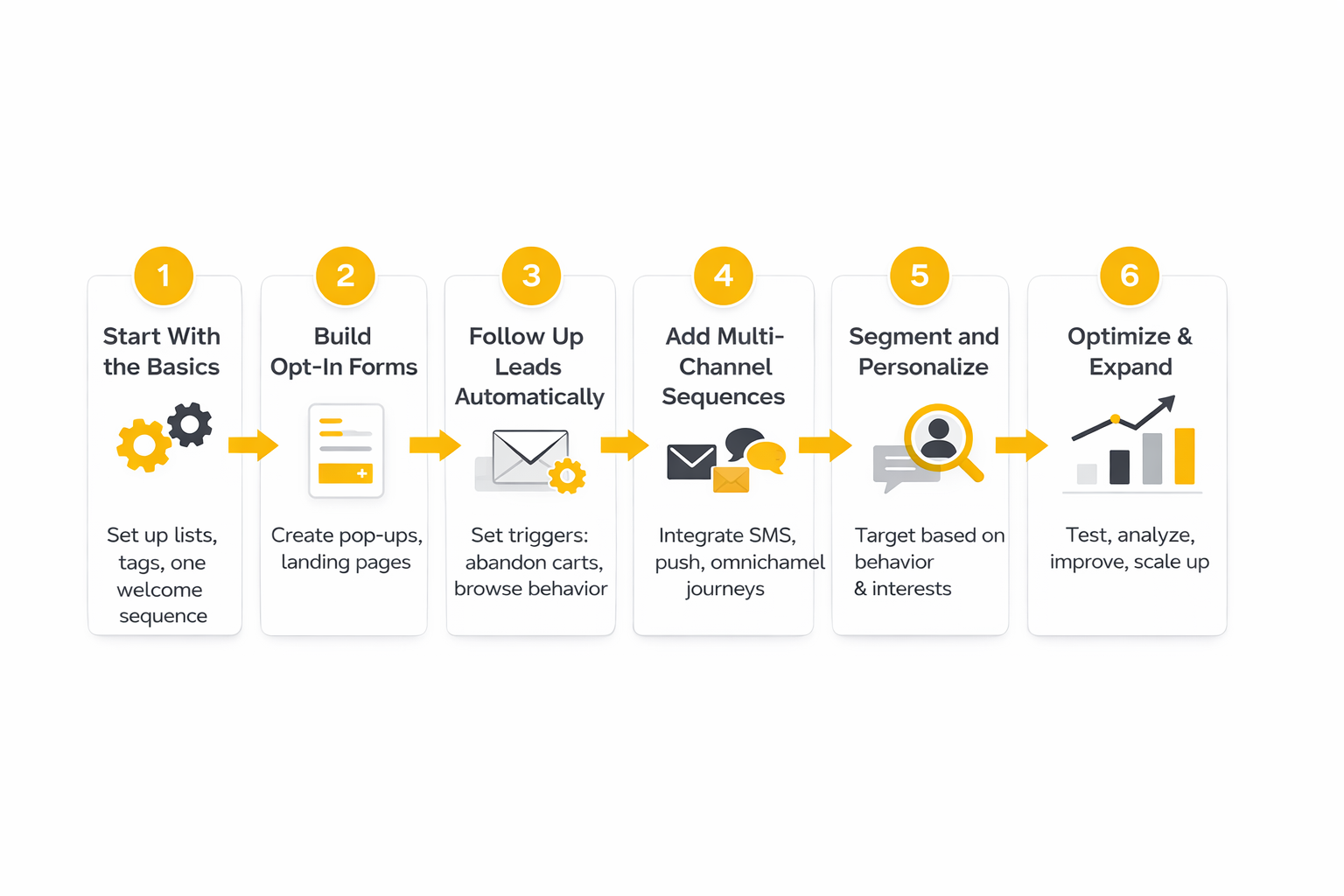
- Connect Your Store and Sync Data Start by integrating Omnisend with your ecommerce platform. Shopify, WooCommerce, and other major platforms are supported natively, which means customer data, product catalogs, and order history start syncing automatically. This data layer is what powers segmentation and automation later.
- Set Up Core Signup Forms Build your primary popup or embedded forms. Focus on timing, targeting, and a clear value exchange for the subscriber. This is where your list growth starts, and it feeds directly into your welcome automation.
- Launch the Welcome Flow First Before sending any campaigns, make sure new subscribers are entering a structured welcome sequence. This flow should introduce your brand, highlight key products, and guide the first purchase.
- Implement Cart and Browse Recovery Activate abandoned cart and browse abandonment workflows. These are usually pre-built in Omnisend and can be customized with delays, incentives, and multi-channel messaging. This is where immediate revenue recovery starts.
- Build Post-Purchase Logic Add follow-up emails that confirm orders, recommend products, and encourage repeat purchases. This is where retention starts compounding.
- Create Basic Segments Define your first key segments: new subscribers, repeat customers, high-value buyers, and inactive users. Use these segments for both campaigns and automation branches.
- Start Sending Targeted Campaigns Once automations are running, layer in campaigns that align with promotions, launches, or seasonal events. The difference now is that campaigns are sent into a system that already understands your customers.
- Review Reports and Iterate Weekly Use Omnisend’s reporting to track which flows and campaigns are driving revenue. Adjust timing, content, and segmentation regularly. This is where performance improves over time instead of staying flat.
This process is not complicated, but it is disciplined. Brands that follow it tend to see Omnisend quickly turn into a meaningful revenue channel. Brands that skip steps or rely only on campaigns usually end up underutilizing the platform.
Where Tools Like Omnisend Fit in a Bigger Stack
Omnisend handles retention and lifecycle messaging well, but it often sits alongside other tools in a broader growth stack. For example, brands building full funnel systems might pair it with funnel builders like ClickFunnels or all-in-one platforms like Systeme.io to manage acquisition and conversion flows outside the store.
That combination can work well when each tool stays in its lane. Omnisend handles subscriber capture, lifecycle messaging, and retention. Funnel tools handle landing pages, offers, and front-end conversion paths. When those systems are connected cleanly, the entire customer journey—from first click to repeat purchase—becomes much easier to control and optimize.
The key is not stacking tools for the sake of it. It is making sure each layer of your system has a clear job and actually contributes to revenue.
Performance Data That Actually Matters
Once Omnisend is live, the next challenge is not sending more messages. It is reading the numbers correctly. This is where a lot of teams get fooled, because dashboards can make weak performance look healthy if you focus on the wrong signals.
The smart way to evaluate Omnisend is to separate activity metrics from business metrics. Activity metrics tell you whether people noticed the message. Business metrics tell you whether the message changed revenue, retention, or customer behavior. Both matter, but they do not matter equally.
Start With Revenue, Not Vanity Metrics
Open rates, click rates, and unsubscribe rates are useful, but they are not the scoreboard. The real question is whether Omnisend is producing more orders, more repeat purchases, and more revenue from traffic you already paid to acquire. That is why the most valuable reports inside the platform are the ones tied to sales attribution, automation revenue, and product-level results, not just campaign engagement.
Omnisend’s own reporting system is built around that logic. In the official guide to how Omnisend attributes sales, the platform explains that messages receive credit for purchases within a defined attribution window, and in store settings merchants can adjust that window to match the way their store actually sells. That matters because a low-consideration impulse product and a higher-ticket product do not behave the same way, so your reporting should not pretend they do.
If you only watch opens and clicks, you can end up optimizing for curiosity instead of conversion. A flashy subject line may win the inbox and still produce weak sales. A slightly less exciting campaign can drive far more revenue if it reaches the right segment with the right offer.
Understand Attribution Before You Judge Results
This part matters more than most teams realize. In Omnisend, attribution is not just a reporting detail. It changes how you interpret the performance of campaigns, automations, and even individual products.
The platform’s support documentation for Omnisend reports and product reporting shows an important distinction: campaign and automation reports continue to attribute performance by message sent date, while sales reports can be viewed using a customizable attribution date. That means the same period can look different depending on whether you are analyzing messaging activity or actual order timing.
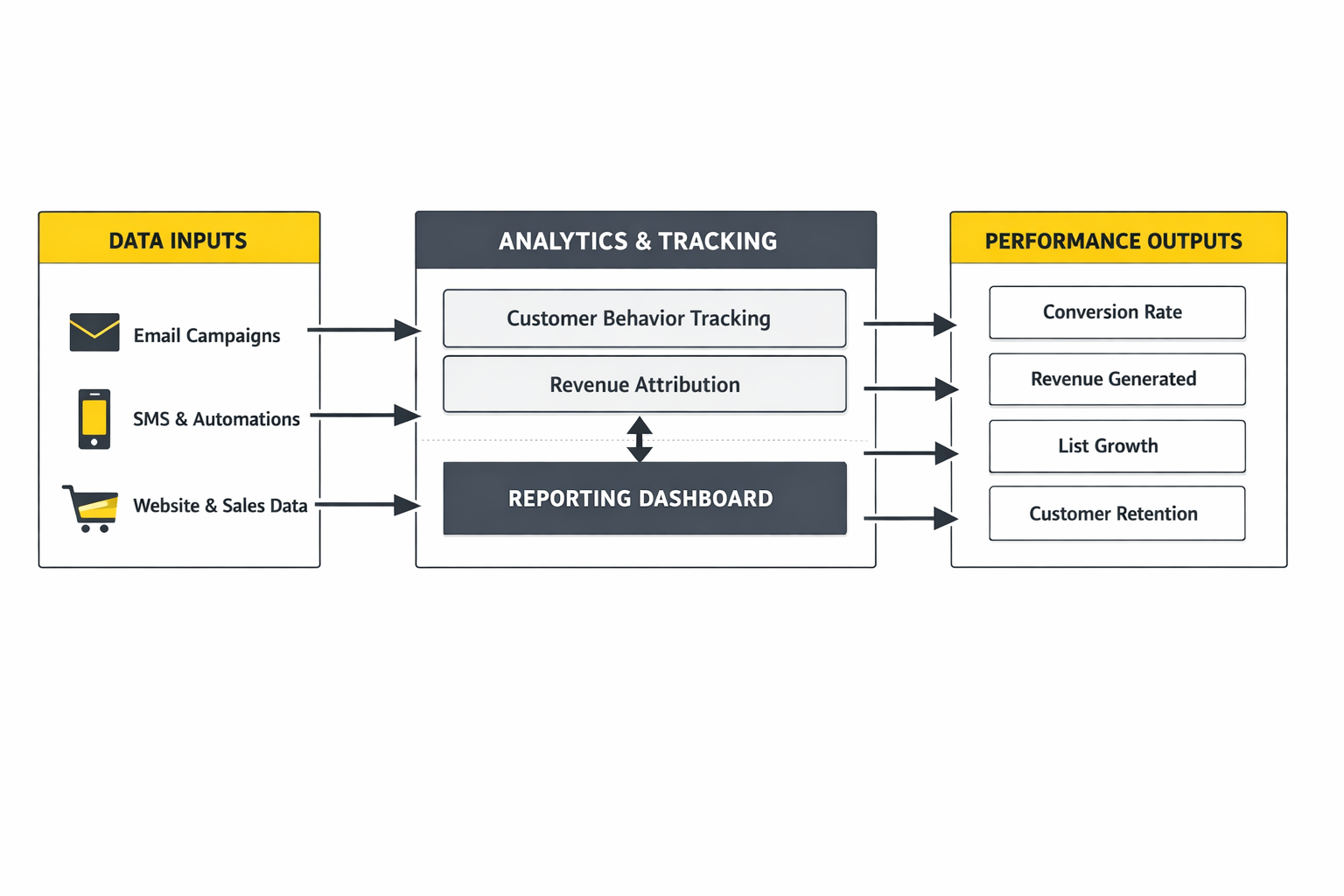
This is not a small technicality. It changes the action you take. If sales appear a day or two after a send, the campaign may still be working even if the same-day result looks soft. If your attribution window is too generous, the platform may over-credit messages that had only a minor role in the purchase. If it is too narrow, you may undervalue automations that influence buyers over several days.
The practical takeaway is simple: set attribution rules deliberately, then keep them consistent long enough to compare performance honestly. Otherwise you are not benchmarking your marketing. You are benchmarking your settings.
The Benchmarks Worth Paying Attention To
Benchmarks are useful when they create better decisions, not when they become trivia. Omnisend’s latest research in its 2025 ecommerce marketing report and broader digital marketing statistics roundup keeps reinforcing the same pattern: automation outperforms batch sending because it is tied to intent, timing, and context. That should not push you to obsess over every average. It should push you to prioritize the flows that intercept buying behavior at the right moment.
The same idea shows up outside Omnisend too. Klaviyo’s current ecommerce benchmarks frame strong performance around segmentation and automation rather than broad list blasting, which lines up with what experienced ecommerce operators already see inside their own accounts. When two major ecommerce messaging platforms keep pointing to the same operational truth, it is worth taking seriously.
Some benchmark numbers are especially useful because they point directly to an action. Baymard’s long-running checkout research shows global cart abandonment still sits around 70.19%, which means abandoned cart recovery is not a “nice to have” flow. It is a direct response to one of the biggest structural leaks in ecommerce. Omnisend’s own popup data from 1.24 billion displays found an average email popup conversion rate of 2.1%, with sub-1.5% performance considered underwhelming and 5%+ considered excellent. That turns signup forms from a design choice into a measurable acquisition lever.
These numbers matter because they are directional. They tell you where to look. They do not tell you to copy another store blindly.
How to Read Campaign Metrics Properly
Campaign metrics are useful, but only when you read them in the right order. Start with revenue and orders. Then check click rate. Then look at open rate, unsubscribe rate, and spam complaints. That sequence keeps you focused on business outcomes first, messaging relevance second, and deliverability risk third.
A campaign with a strong open rate but weak click rate usually signals one of two things: the subject line worked better than the offer, or the audience was too broad. A campaign with decent clicks but weak revenue usually points to a landing page, product-market mismatch, or price friction. A campaign with solid revenue but rising unsubscribes may still be profitable in the short term, but it is quietly damaging the list for future sends.
This is why campaign analysis inside Omnisend should never stop at the email itself. You need to connect send timing, segment quality, offer strength, and downstream store behavior. The message is only one part of the result.
Why Automation Metrics Deserve More Respect
If campaigns tell you how good you are at creating demand on command, automations tell you how good your system is when no one is touching it. In most ecommerce businesses, that second category is more important because it compounds quietly every day.
Omnisend keeps emphasizing this in its own reporting and benchmark material because automations are usually tied to higher intent. Welcome series, abandoned cart flows, browse abandonment, and post-purchase messaging catch customers at moments when they are already moving. That usually produces better conversion economics than sending a generic campaign to an entire list.
The right way to evaluate an automation is not just by open rate or total revenue. Look at revenue per contact entering the flow, completion rates across each step, time delay performance, and whether one message is carrying too much of the sequence. If one email in a cart flow does all the work and the rest barely contribute, that is a sign to simplify, not add more noise.
What Popup and List Growth Data Should Tell You
List growth metrics are easy to ignore because they feel less exciting than sales reports. That is a mistake. If your forms are weak, everything downstream gets harder and more expensive.
Omnisend’s recent popup research gives you a practical benchmark here. If your signup forms are converting below the 1.5% underperformance threshold and well under the 2.1% average, the issue is probably not just traffic quality. It is likely the offer, timing, targeting, or friction in the form itself. If you are consistently above 5%, you are doing something very right and should protect that advantage.
The action this should drive is straightforward. Test one lever at a time: offer, trigger timing, mobile layout, copy clarity, or form length. Do not redesign everything at once. The goal is not prettier forms. The goal is cheaper subscriber acquisition that feeds stronger automation revenue later.
The Difference Between Healthy Numbers and Useful Numbers
This is the part many brands miss. A healthy number is one that looks good in a dashboard. A useful number is one that changes what you do next.
For example, knowing that cart abandonment is still stubbornly high across ecommerce should push you to tighten checkout friction and strengthen recovery flows. Knowing that segmentation and automation consistently outperform broad sends should push you to reduce list-wide campaigns and build more behavior-based logic. Knowing that popup conversion rates have a visible benchmark range should push you to treat list growth as a measurable performance channel, not just a branding asset.
That is how Omnisend data becomes operational. You use it to decide what to fix, what to scale, and what to stop pretending is good enough.
A Simple Scorecard for Omnisend Performance
If you want one clean way to evaluate whether Omnisend is working, use a practical scorecard built around five questions:
- Is subscriber growth improving at an acceptable acquisition cost?
- Are welcome, cart, browse, and post-purchase automations producing revenue consistently?
- Are segmented campaigns outperforming broad sends?
- Is attributed revenue rising without a matching spike in unsubscribes or complaints?
- Are reporting settings stable enough that month-to-month comparisons mean something?
That kind of scorecard keeps your attention where it belongs. Not on random dashboard movement. On whether Omnisend is becoming a stronger profit system over time.
From here, the conversation gets even more practical. The next step is to look at pricing, integrations, and the kinds of businesses that are most likely to get real value from Omnisend versus the ones that should choose something else.
Pricing, Integrations, and Best-Fit Use Cases
By the time you get to pricing, the real question is not whether Omnisend is cheap. The question is whether it gives you enough ecommerce-specific leverage to justify becoming part of your operating stack. That is a different standard, and it is the right one, because a platform that saves a little money upfront can still cost you more if it slows execution, weakens segmentation, or forces awkward workarounds six months later.
Omnisend keeps its pricing structure fairly straightforward compared with more layered marketing platforms. The current public pricing shows a Standard plan starting at $16 per month and a Pro plan starting at $59 per month, while the help center also makes clear that SMS is billed separately unless included through plan credits. On the billing side, Omnisend notes that SMS subscriptions can start at $10 per month, and the Pro tier includes monthly SMS credits equivalent to the subscription price through its current SMS subscription structure detailed in the SMS credits guide.
That setup tells you something important about how Omnisend wants to compete. It is trying to stay accessible for smaller ecommerce brands while still giving scaling stores enough multichannel capability to justify moving past a free plan. The free entry point matters, but the more important point is that the platform gives access to core ecommerce functionality early, instead of locking the useful parts behind a giant enterprise paywall.
What the Pricing Really Means in Practice
The headline price is only part of the story. What matters in practice is how fast a store can extract value from the subscription. If Omnisend helps you recover abandoned carts, convert new subscribers, and lift repeat purchase revenue quickly, the effective cost drops fast. If you leave the account half-configured and use it like a bulk newsletter tool, even a low monthly fee becomes expensive.
This is why the Standard versus Pro decision should be treated as an operational question, not just a budget question. Standard makes sense when your store is still building its lifecycle foundation and does not yet need aggressive multichannel volume. Pro starts making more sense when SMS becomes a meaningful part of your retention mix, when your contact base is growing, and when you want more room to scale without watching email limits too closely. Omnisend’s public pricing page and support material are actually pretty clear on that split, which is refreshing.
There is also a strategic advantage in how predictable the structure feels. The fewer pricing traps a platform creates, the easier it is to forecast your stack and make calm decisions about growth. That matters more than people think, especially when acquisition costs are already volatile.
Integrations Are a Bigger Deal Than They Sound
A platform like Omnisend only performs as well as the data flowing into it. That is why integrations are not a side feature. They are part of the product’s core value. Omnisend currently promotes more than 160 integrations, with especially strong emphasis on Shopify, WooCommerce, BigCommerce, and Wix in its recent product comparisons and ecommerce marketing pages. That tells you exactly where the company sees its home turf.
For a real ecommerce operator, this matters because integrations decide whether your data is useful or stale. Product catalog sync, order history, browsing behavior, loyalty information, and review signals all shape what Omnisend can do with segmentation and automation. If that data comes through cleanly and in real time, your messages become sharper. If the integration layer is weak, even a great interface will not save the results.
Recent Omnisend updates also show the platform continuing to expand in practical directions. The January 2026 product update introduced a new YoYo Loyalty integration, which adds loyalty data like credit balance and tier information as contact properties. That is exactly the kind of integration that makes segmentation more valuable at scale, because it turns customer value and reward status into something you can actually act on inside campaigns and flows.
Where Omnisend Fits Best
Omnisend fits best when ecommerce is not a side project. If you are running a real online store and want one platform to handle subscriber capture, lifecycle automation, campaigns, and multichannel retention without stitching together a mess of disconnected tools, Omnisend makes a lot of sense.
It is especially strong for brands in a few situations:
- Shopify-first or WooCommerce-first stores that want native ecommerce behavior inside their marketing platform
- Small to midsize ecommerce brands that need fast setup without giving up serious automation
- Teams that want email and SMS in one retention workflow instead of separate systems
- Operators who care more about revenue attribution and lifecycle performance than about broad enterprise CRM complexity
The reason this fit is so strong is that Omnisend is opinionated. It is not trying to be everything. It is trying to help stores turn customer behavior into revenue through channels they can control. For many brands, that focus is a strength, not a limitation.
Where Omnisend Is Less Ideal
This is where it helps to be blunt. Omnisend is not the perfect choice for every business model. If your company needs a deeply customizable CRM, long B2B sales-cycle management, advanced account-based marketing, or heavy non-ecommerce workflow orchestration, you are likely pushing outside the platform’s natural territory.
The same applies if your entire funnel depends more on custom landing-page ecosystems and lead-nurture sequences than on storefront behavior. In those cases, you may still use Omnisend for retention, but you probably need other layers around it. A funnel builder such as ClickFunnels or an all-in-one system like Systeme.io can make more sense for acquisition-first businesses that need tighter control over lead funnels before the ecommerce retention engine takes over.
That does not weaken the case for Omnisend. It sharpens it. A tool is more useful when you know exactly where it wins and where it does not.
Strategic Tradeoffs as You Scale
As stores grow, the tradeoffs become clearer. Early on, Omnisend’s simplicity is an advantage because it lets a small team move quickly. Later, the same simplicity can force more deliberate decisions about process, governance, and experimentation.
One tradeoff is channel discipline. When email, SMS, and push all sit in one place, it becomes easier to over-message customers unless your segmentation logic is strong. Another is operational maturity. The more automations you add, the more important naming conventions, reporting consistency, and ownership become. Without that structure, you can end up with a busy account that looks sophisticated but is actually hard to optimize.
There is also the common scaling trap of mistaking more for better. More segments are not always better. More flows are not always better. More channels are definitely not always better. Omnisend scales best when the team keeps asking one question: does this workflow make the customer journey clearer and more profitable, or are we adding complexity because the feature exists?
That question is everything.
Risks That Can Quietly Undermine Results
The biggest risk with Omnisend is not the software. It is misuse. Most underperformance comes from weak segmentation, shallow form strategy, inconsistent attribution settings, or campaign habits that never evolve beyond list-wide blasts.
Another risk is poor integration hygiene. If your product data is messy, your customer properties are unreliable, or your store events are not syncing properly, Omnisend will still send messages. They just will not be as intelligent or as profitable as they should be. That is why implementation quality matters so much more than the brand comparison posts people spend hours reading.
There is also a subtler risk around false confidence. Strong reviews on Shopify’s App Store and G2 suggest merchants generally find the tool effective and easy to use, which is a good sign. But ease of use can tempt teams into thinking the strategic work is done once the flows are switched on. It is not. Omnisend makes execution easier. It does not replace judgment.
Expert-Level Guidance for Getting More Out of Omnisend
If you want Omnisend to perform beyond the basics, start acting like the account is a system, not a channel. That means building rules for audience suppression, testing timing inside automations, reviewing product-level revenue patterns, and making sure campaigns complement flows instead of colliding with them.
It also means being selective about where outside tools belong. If you want stronger onsite data capture, a form-specific tool like Fillout can support more advanced lead collection workflows. If your broader stack needs customer relationship visibility beyond messaging, something like Copper can make sense in the right business context. The point is not to bolt on tools randomly. It is to keep Omnisend strong at what it does best while letting adjacent tools solve genuinely different problems.
The strongest Omnisend setups usually share three traits. They keep the account clean. They let behavior drive messaging. And they treat retention as a profit system, not a campaign calendar.
That is the right place to be before the final step of this guide. Next comes the close: how to implement Omnisend professionally, what mistakes to avoid, and the FAQ that clears up the questions serious buyers usually still have at the end.
Professional Implementation and Mistakes to Avoid
A professional Omnisend setup is less about turning on every feature and more about sequencing the work properly. The platform can handle forms, automations, campaigns, segmentation, SMS, push, and reporting, but those pieces only work well together when the store data is clean and the sending foundation is stable. That means connecting the store first, authenticating the sending domain, importing contacts with consent records intact, and only then layering campaigns and advanced flows on top of the account.
The deliverability side matters immediately. Omnisend’s official documentation for setting up your email domain, SPF, DKIM, and DMARC, and getting started with deliverability makes it clear that domain authentication is not an advanced extra. It is the baseline requirement if you want inbox providers to trust what you send and if you want Omnisend performance data to mean anything.
Another place professional setups separate themselves is migration discipline. Omnisend provides official paths for Mailchimp migration, Mailchimp contact import, Klaviyo migration, and Klaviyo data import. That is useful because it helps preserve subscriber status, custom properties, and consent records instead of forcing a messy manual rebuild. The mistake is assuming that switching platforms automatically transfers historical reporting and fully recreates your old logic. Omnisend’s migration guides are clear that some data moves cleanly and some reporting history does not, so expectations need to be managed before the cutover.
Compliance is the other non-negotiable. Omnisend’s support articles on SMS compliance best practices, TCPA requirements for SMS in the US and Canada, SMS opt-in methods, and GDPR compliance for email marketing all point to the same reality: if consent is weak, the entire channel is fragile. A serious brand does not treat compliance as legal decoration. It treats it as operational infrastructure.
The common mistakes are predictable. Teams skip domain authentication, import old contacts without cleaning them, over-message the same subscribers across email and SMS, and keep changing attribution settings so performance comparisons become unreliable. Others build too many automations too early, which creates a workflow map that looks impressive but is difficult to maintain, hard to diagnose, and even harder to optimize.
The strongest Omnisend accounts stay boring in the best way. They use a clear naming system, protect deliverability, suppress disengaged audiences intelligently, and review flows on a regular cadence instead of only when revenue dips. That discipline is what turns Omnisend from “another marketing tool” into a durable retention system.
FAQ - Built for Complete Guide
Is Omnisend actually good for ecommerce, or is it just another email tool?
Omnisend is clearly built for ecommerce rather than general-purpose email marketing. Its public product positioning emphasizes Shopify, WooCommerce, multichannel automation, product-aware campaigns, and revenue tracking instead of broader CRM complexity, which is exactly why it keeps fitting online stores better than many generic platforms. You can see that focus directly on the main product site and in the broader integrations ecosystem.
Can you use Omnisend for free?
Yes, and this is one reason the platform gets considered early by smaller brands. Omnisend’s public pricing says the free plan includes all features with limits on monthly email volume, which lets a store build forms, automations, and segments before moving into a paid tier. The current pricing details are published on the official pricing page.
What does Omnisend cost once a store starts scaling?
The short answer is that Omnisend stays relatively accessible, but the exact cost rises with contacts and channel usage. The official 2026 pricing plan breakdown lists Standard starting at $16 per month and explains how email credits scale by contact count, while the billing guide and SMS credits documentation explain the separate economics of SMS. The right way to evaluate the cost is against recovered revenue and retention lift, not against the subscription line item alone.
Is Omnisend better than Mailchimp for online stores?
For a true ecommerce business, Omnisend usually has a stronger native fit because the product is centered on store behavior, product data, automation, and revenue reporting. Even Omnisend’s own comparison content and migration support lean into that difference, and the official Mailchimp migration guide exists for a reason. If your business is primarily content or newsletter driven, the gap may matter less, but for stores selling products, Omnisend’s structure is generally more aligned.
Can you migrate from Klaviyo or Mailchimp without losing everything?
You can migrate a lot, but not everything, and that distinction matters. Omnisend provides official workflows for migrating from Klaviyo, importing Klaviyo contacts, migrating from Mailchimp, and importing Mailchimp contacts. Those guides show that contacts, custom fields, and consent details can transfer, but historical reports do not always come across in the same way. So yes, migration is practical, but it still needs a controlled cutover plan.
Does Omnisend support SMS properly, or is it just bolted on?
SMS is one of the platform’s more meaningful strengths because it sits inside the same automation and reporting environment as email. Omnisend’s feature pages and compliance documents show that SMS is not an afterthought, but it also comes with clear requirements around opt-in, consent records, and regional rules, which you can review in the official guides for SMS opt-in methods, SMS compliance best practices, and TCPA requirements. In other words, the channel is powerful, but only when it is implemented responsibly.
Do push notifications in Omnisend work on every device and browser?
No, and this is one of those details teams should understand before building a push-heavy strategy. Omnisend’s official push notification getting-started guide explains that push requires HTTPS and currently works on Chrome, Firefox, Opera, and Edge, while mobile support is limited to Android and excludes Safari. That does not make push useless. It just means the channel should be treated as complementary, not universal.
What are the first automations a new Omnisend account should launch?
The first wave should be the flows tied to the clearest commercial intent: welcome, abandoned cart, browse abandonment, post-purchase, and reactivation. That priority is consistent with Omnisend’s automation positioning and with its broader benchmark content, because those workflows are closest to actual customer motion rather than generic broadcasting. If you want a recent overview of how Omnisend frames this in practice, the 2026 Shopify marketing automation guide is a useful reference point.
How important is domain authentication in Omnisend?
It is essential, not optional. Omnisend’s documentation on email domain setup, SPF, DKIM, and DMARC, and deliverability onboarding all say the same thing in different ways: authenticated sending helps mailbox providers verify legitimacy, improves trust, and supports better inbox placement. Any store skipping this step is making every later optimization less reliable.
How many integrations does Omnisend have, and does that really matter?
Omnisend currently promotes more than 160 integrations, and yes, that matters because integrations decide how much useful customer and store data the platform can actually act on. The official integrations directory and related data-driven marketing guide both frame this as a unification advantage rather than a marketplace vanity number. The value is not in having a huge app list on paper. The value is in syncing loyalty, reviews, support, tracking, and store events into one targeting layer.
Is Omnisend enough on its own, or do brands still need other tools?
That depends on where the business is in its growth stack. Omnisend can absolutely cover the retention and lifecycle side well enough for many ecommerce brands, but some companies still pair it with landing-page or funnel tools when acquisition needs are more complex. For example, brands building separate front-end offer systems may use ClickFunnels or Systeme.io upstream while keeping Omnisend focused on subscriber capture, segmentation, and retention.
What is the biggest mistake brands make with Omnisend?
The biggest mistake is underestimating the operational work behind the software. Brands often assume that once automations are switched on, the account will somehow optimize itself, but Omnisend still depends on clean data, disciplined segmentation, consent hygiene, stable attribution settings, and regular review. The tool can make execution much faster, but it does not remove the need for judgment.
Work With Professionals
Explore 10K+ Remote Marketing Contracts on MarkeWork.com
Most marketers spend too much time chasing clients, competing on crowded platforms, and losing a percentage of every project to middlemen. MarkeWork gives you a better way. Browse thousands of remote marketing contracts and connect directly with companies desperate to hire skilled marketers like you, without platform commissions and without unnecessary gatekeepers.
If you're serious about finding better opportunities and keeping 100% of what you earn, explore available contracts and create a profile for free at MarkeWork.com.