

Outbound email marketing has changed. It is no longer enough to buy a list, write a clever subject line, and blast thousands of people until a few reply. That style creates spam complaints, burns domains, damages brand trust, and usually produces weak pipeline because the right people never receive the right message at the right time.
The better version is more disciplined. Modern outbound email marketing is a structured revenue motion built around audience fit, useful messaging, clean data, deliverability, follow-up timing, and clear conversion paths. It still gives teams a direct way to reach buyers, but it only works when the campaign feels relevant from the recipient’s side.
That matters because buyers are harder to reach and easier to lose. B2B buying groups are now larger and more complex, with Forrester reporting that the average business purchase involves 13 people and two or more departments in most deals. Gartner also found that buying groups can range from five to 16 people across as many as four functions, which means one generic email rarely moves the entire account forward.
Article Outline
This article is split into six parts so each section can build on the last without jumping around. Part 1 sets the direction, defines the structure, and explains why outbound email marketing needs a full operating system rather than a few isolated tactics. The rest of the article will move from strategy to execution, then into measurement, optimization, and scaling.
- Part 1: Why Outbound Email Marketing Still Matters
- Part 2: The Outbound Email Marketing Framework
- Part 3: Audience, Offers, and Message Strategy
- Part 4: Deliverability, Compliance, and Sending Infrastructure
- Part 5: Campaign Execution, Follow-Up, and Conversion Paths
- Part 6: Measurement, Optimization, Scaling, and FAQ
Why Outbound Email Marketing Still Matters
Outbound email marketing still matters because it gives businesses a direct line to specific people and accounts instead of waiting for demand to appear. Search, social, paid ads, and content are useful, but they often depend on timing, algorithms, or existing intent. Email lets a team create a relevant conversation with a defined audience when the market is not actively searching yet.
The channel is also still economically attractive when it is run properly. Litmus reports that 35% of companies see email ROI of 36:1 or more, which explains why email remains a core part of modern revenue teams even as inboxes become more competitive. The catch is that those returns do not come from volume alone; they come from better targeting, stronger offers, cleaner execution, and consistent optimization.
There is also a trust layer that cannot be ignored. Google’s sender guidance tells bulk senders to keep user-reported spam rates below 0.1% and avoid reaching 0.3% or higher, which means poor outbound behavior has a direct technical cost. If your emails are irrelevant, too frequent, or hard to unsubscribe from, the inbox will punish you before the market ever gets a chance to respond.
The Framework This Article Will Use
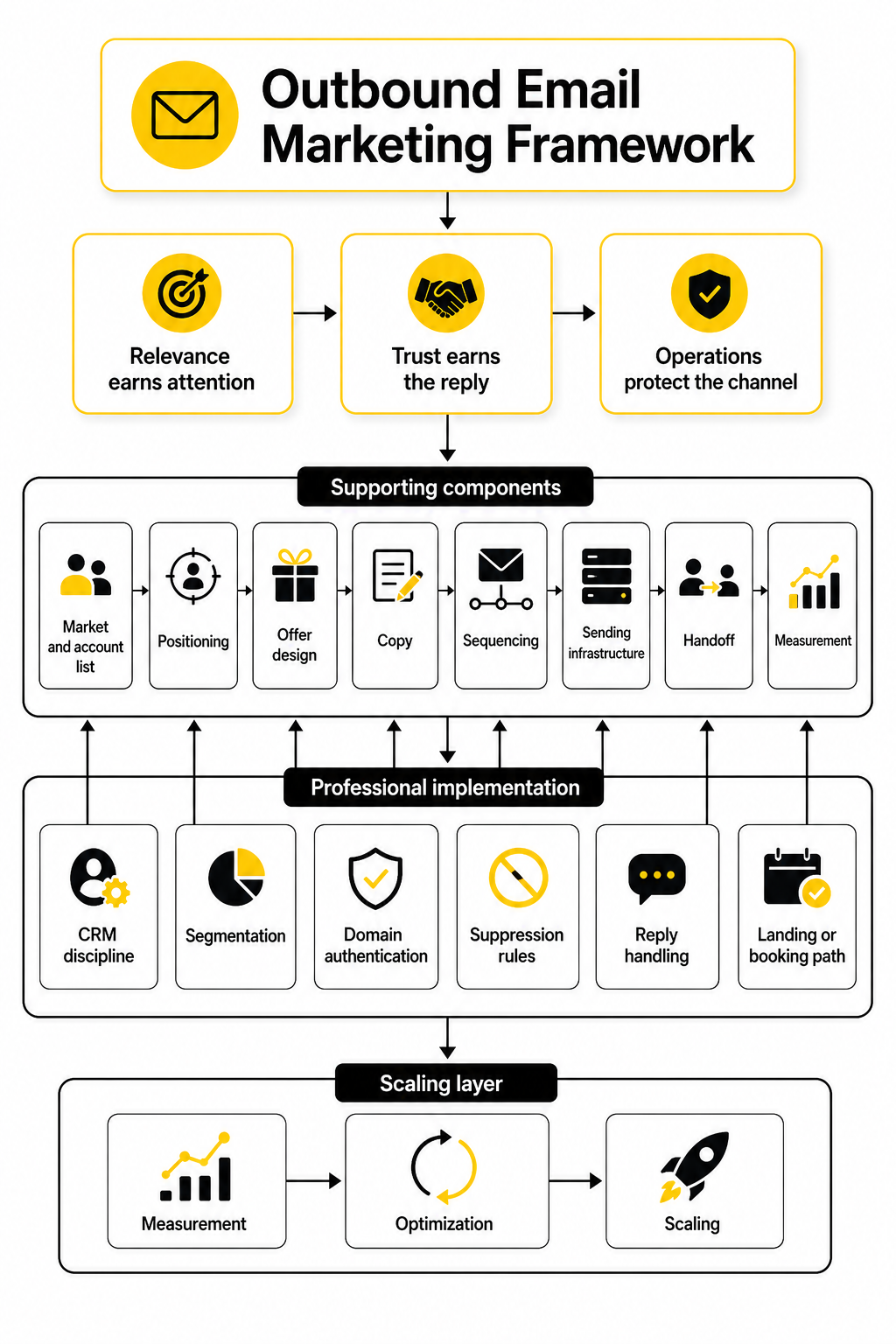
The framework in this article treats outbound email marketing as a sequence of connected decisions. You start with the market and the account list, then move into positioning, offer design, copy, sequencing, sending infrastructure, handoff, and measurement. Each part affects the next, so weak targeting makes strong copy less useful, and strong copy still fails if deliverability is broken.
This is also why professional implementation matters. A serious outbound program needs CRM discipline, segmentation, domain authentication, suppression rules, reply handling, and a landing or booking path that matches the promise in the email. Tools can help with this, especially platforms built for funnels, CRM, and automation, such as GoHighLevel, Brevo, or Moosend, but the tool is never the strategy.
The simplest way to think about the framework is this: relevance earns attention, trust earns the reply, and operations protect the channel. That is the thread the rest of the article will follow. We will not treat outbound email marketing as a trick; we will treat it as a system that can be built, measured, and improved.
The Outbound Email Marketing Framework
The strongest outbound email marketing programs are built like systems, not one-off campaigns. A system gives you repeatable inputs, clear quality checks, and measurable outcomes, which is exactly what you need when inbox rules, buyer expectations, and sales handoffs all affect performance. Without a framework, teams usually end up blaming the copy when the real issue is weak targeting, poor data, unclear positioning, or broken follow-up.
The framework below has four layers: strategy, message, infrastructure, and conversion. Strategy defines who should hear from you and why now. Message turns that strategy into a relevant email sequence. Infrastructure protects delivery and compliance. Conversion makes sure every positive reply, click, or booked call moves somewhere useful.
This matters because outbound is not only competing with other cold emails. It is competing with internal priorities, vendor fatigue, budget pressure, and buying committees that often involve multiple stakeholders. Forrester’s research shows that the average B2B purchase now involves 13 people, with 89% of purchases involving two or more departments, so your campaign has to be clear enough for one person to understand and credible enough to travel inside the account.
Layer 1: Strategy Before Sending
Strategy starts with the market, not the mailbox. Before writing a single subject line, you need to know which companies are worth pursuing, which roles feel the pain most clearly, and what event or condition makes your message timely. The goal is not to contact everyone who could technically buy from you; the goal is to focus on the slice of the market where your offer feels obviously relevant.
A good strategy answers three questions. Who is the campaign for, what business problem are they likely dealing with, and why is this the right moment to reach out? When those answers are vague, outbound email marketing becomes guesswork. When those answers are sharp, the email can be shorter, more specific, and less dependent on hype.
This is where many teams overcomplicate things. They build giant lists because big volume feels productive, then wonder why reply quality is weak. A smaller list with stronger account logic usually beats a huge list that only matches surface-level filters like industry, headcount, or job title.
Define the Account Fit
Account fit is the first filter because it protects everything downstream. If the account is wrong, personalization will not save the campaign. You may get opens, clicks, or even polite replies, but the sales conversation will stall because the business case was never strong enough.
A practical account-fit model should include firmographics, operational signals, buying triggers, and disqualifiers. Firmographics tell you whether the company looks like a plausible customer. Operational signals tell you whether the problem is likely active. Buying triggers give the email a reason to exist now. Disqualifiers keep your team from wasting time on accounts that look attractive but are unlikely to convert.
This does not need to become a bloated scoring model on day one. Start with a simple rule set your team can explain in plain English. For example, “We are targeting B2B service companies with a clear lead capture motion, visible paid acquisition, and signs that their follow-up process is fragmented.” That is already much stronger than “marketing managers at growing companies.”
Choose the Right Buyer Role
Once the account is right, the next decision is the buyer role. Outbound email marketing usually fails when teams confuse the person who feels the pain with the person who owns the budget. Sometimes they are the same person, but often they are not, especially in B2B deals with multiple departments involved.
The best campaign usually maps roles into three groups: the pain owner, the economic buyer, and the operational influencer. The pain owner understands the daily problem. The economic buyer cares about the financial impact. The operational influencer cares whether the solution will create more work, risk, or complexity.
You do not need to email every stakeholder at once. You do need to understand who you are writing to and what they would naturally care about. A founder, revenue leader, marketing manager, and operations lead may all care about growth, but they will not respond to the same angle.
Layer 2: Message and Offer Fit
After strategy comes the message. This is where many teams jump too quickly into copywriting tricks, but the deeper question is offer fit. A clean email with a weak offer still feels like noise, while a useful offer can work even when the writing is simple.
In outbound email marketing, the offer is not always the product. It might be an audit, a short benchmark, a useful teardown, a comparison, a workshop, or a specific recommendation tied to the recipient’s current situation. The offer should lower the effort required to respond while increasing the perceived value of the conversation.
The message should also match the buyer’s stage of awareness. If the buyer already knows the problem, your email can focus on cost, urgency, or a better path forward. If the buyer may not have named the problem yet, the email has to make the issue visible without sounding dramatic or insulting.
Make the First Email Do One Job
The first email should not explain your entire company. It should create enough relevance for the recipient to either reply, click, or agree that the problem is worth discussing. That is it. Trying to educate, pitch, prove, qualify, and close in one email usually makes the message too heavy.
A strong first email normally includes a specific reason for reaching out, a clear problem hypothesis, a short credibility signal, and one low-friction next step. The credibility signal does not have to be a huge brand logo or a dramatic result. It can be a practical observation, a focused point of view, or a clear explanation of why your team understands this situation.
The next step matters more than most people think. “Want to chat?” is easy to write but weak because it asks the reader to do mental work. A sharper ask, such as offering to send a quick teardown or asking whether improving a specific process is a priority this quarter, gives the recipient a clearer way to respond.
Build Sequences Around Context
A sequence is not just a pile of follow-ups. It should move the conversation forward from different angles without repeating the same pitch. Each touch should add context, reduce uncertainty, or make the decision easier.
One email might focus on the business problem. Another might show a common mistake. Another might offer a quick diagnostic. Another might ask whether the topic belongs to someone else. The point is to stay useful without pretending the recipient owes you attention.
This is also where automation needs restraint. Platforms can help you manage timing, routing, and follow-up, but they should not turn your campaign into a robotic drip sequence. If you are building funnels and follow-up workflows around the campaign, tools like GoHighLevel, ClickFunnels, or systeme.io can support the conversion path, but the sequence still needs human judgment behind it.
Layer 3: Sending Infrastructure and Trust
Infrastructure is the part of outbound email marketing that people often ignore until performance drops. It includes authentication, sending domains, inbox placement, unsubscribe handling, bounce control, list hygiene, and sender reputation. These are not technical side quests; they decide whether your message even gets a fair chance.
Major inbox providers have become more explicit about sender requirements. Google tells senders to keep spam rates below 0.1% and avoid reaching 0.3% or higher, while Microsoft announced stricter SPF, DKIM, and DMARC requirements for domains sending more than 5,000 emails per day. Yahoo also emphasizes complaint reduction and easy unsubscribe handling through its sender guidance.
This is why “just send more” is a dangerous mindset. If your data is poor, your message is irrelevant, or your unsubscribe process is clunky, higher volume can damage the channel faster. The professional move is to treat deliverability as an operating constraint from the beginning, not a cleanup project after the domain is already burned.
Authenticate the Domain Properly
Authentication proves that your sending domain is allowed to send the email it is sending. At minimum, your setup should include SPF, DKIM, and DMARC. These records help mailbox providers evaluate whether a message is legitimate and whether it aligns with the domain shown to the recipient.
This does not guarantee inbox placement by itself. Authentication is the floor, not the ceiling. A fully authenticated domain can still perform badly if recipients ignore, delete, report, or bounce the messages.
Still, skipping authentication is not an option. It creates unnecessary risk and makes every other part of the campaign harder to judge. Before scaling any outbound email marketing campaign, domain setup should be checked, monitored, and documented so the team knows exactly what is being used and why.
Protect Sender Reputation
Sender reputation is shaped by behavior over time. Bounces, spam complaints, low engagement, sudden volume spikes, and poor list quality can all work against you. The inbox is watching the pattern, not just one campaign.
The practical answer is to scale gradually, segment carefully, and remove bad data fast. Suppression lists should be respected across tools, bounced addresses should not be retried endlessly, and people who unsubscribe should be removed without friction. That is not only a compliance habit; it is a trust habit.
You also need to separate testing from scaling. A new offer, new audience, or new domain should not be pushed to maximum volume immediately. Test with enough data to learn, then expand only when replies, bounce rates, complaint signals, and meeting quality support the move.
Layer 4: Conversion Path and Sales Handoff
The conversion path is what happens after someone shows interest. This is where a lot of outbound programs quietly lose money. The email gets a reply, but the response is slow, the handoff is messy, the calendar link is confusing, or the follow-up does not match the original promise.
A clean conversion path should define what happens after each meaningful action. Positive replies need fast handling. Questions need clear ownership. Clicks may need retargeting or a softer follow-up. Booked calls need context passed into the CRM so the salesperson is not starting from zero.
This is why outbound email marketing should connect tightly with CRM and pipeline operations. A tool like Copper can help teams keep relationship context organized, while a scheduling tool like Cal.com can reduce friction when the campaign goal is a booked meeting. The important thing is not the specific stack; it is that the stack supports the buyer’s next step instead of slowing it down.
Match the Landing Page to the Email
If the email sends people to a page, the page has to continue the same conversation. A common mistake is sending a highly specific outbound email to a generic homepage. That breaks momentum because the reader has to search for the thing the email promised.
A good outbound landing page should repeat the core problem, show the relevant offer, and make the next action obvious. It should not bury the CTA under broad brand messaging. If the campaign is targeting one segment, the page should feel like it was built for that segment.
This is where funnel builders and landing page tools can be useful. Replo can fit teams building focused ecommerce or landing-page experiences, while ClickFunnels and systeme.io can support simple funnel paths when the campaign needs a structured opt-in, booking, or offer flow.
Keep the Handoff Human
Automation can route the lead, enrich the record, trigger reminders, and send follow-ups. It should not make a warm response feel like it landed in a machine. When someone replies with interest, the next message should reflect what they actually said.
This is especially important when the campaign creates consultative demand. If the offer is an audit, teardown, workshop, or strategic conversation, the handoff has to preserve that context. Otherwise, the buyer feels the gap between the personal email they answered and the generic sales process they entered.
The best handoffs are simple and specific. The CRM note should include the original campaign, the pain hypothesis, the recipient’s reply, the promised next step, and any relevant account context. That gives the next person enough information to continue the conversation without making the buyer repeat themselves.
Audience, Offers, and Message Strategy
The implementation phase starts where the framework becomes specific. This is where outbound email marketing stops being a theory and turns into a list, a promise, a sequence, and a workflow your team can actually run. If Part 2 was the operating model, this part is the build process.
The order matters. You do not start with copy, because copy is only useful when the audience and offer are already clear. You start by defining the segment, checking whether the pain is real, shaping the offer, writing the sequence, and then connecting every response to a next step.
The biggest mistake is treating outbound like a writing exercise. It is really a matching exercise. You are matching the right account, the right person, the right problem, the right timing, and the right ask.
Start With a Narrow Campaign Segment
A campaign segment should be narrow enough that every person on the list has a believable reason to care. “SaaS companies” is too broad. “B2B SaaS companies hiring sales development reps while increasing paid acquisition” is much more useful because it suggests a specific growth motion and a likely operational problem.
This is important because most buyers are not sitting around waiting for a vendor pitch. Gartner’s buying journey research notes that B2B purchases are often driven by organizational change and internal challenges, which means your message needs to connect with something already happening inside the company. If you cannot name the situation that makes your outreach relevant, the campaign is probably too broad.
A tight segment also makes the writing easier. You can use sharper language, more specific pain points, and a clearer call to action. The email feels less like a cold interruption because it is built around a real business context instead of a generic persona.
Build the Segment From Signals
The best outbound segments are built from signals, not assumptions. A signal is something observable that suggests the company may have a need, a constraint, or a buying window. Hiring activity, new funding, tool changes, expansion into a new market, a fresh product launch, or visible funnel friction can all become useful signals.
You do not need dozens of signals to launch. You need a few that make the campaign logic stronger. For example, a company hiring outbound sales roles while running paid ads may care about lead routing, CRM cleanliness, follow-up speed, or booking conversion.
The goal is not to spy on people or make the email creepy. The goal is to avoid lazy relevance. A good signal helps you write with context while still keeping the message respectful and concise.
Separate Primary Buyers From Secondary Influencers
A strong list should separate primary buyers from secondary influencers before the sequence is written. The primary buyer owns the outcome or budget. The secondary influencer may feel the pain, evaluate tools, or recommend a solution internally.
This distinction changes the angle. A founder may care about speed to pipeline, a revenue leader may care about conversion and sales capacity, and an operations person may care about process quality. They can all belong to the same account, but they should not receive the same email.
This is especially important because buying committees are larger than most outbound campaigns assume. Forrester’s research found that the average B2B purchase involves 13 people and two or more departments in most deals. A practical outbound email marketing campaign should therefore be written with internal sharing in mind, not just a single reply.
Shape the Offer Before Writing the Email
The offer is the bridge between attention and action. It tells the recipient what they get if they engage. In outbound email marketing, a weak offer usually creates vague replies, while a strong offer makes the next step feel obvious.
A good outbound offer is specific, low-friction, and useful even before the sale. It might be a quick audit, a teardown, a benchmark, a short strategy call, a calculator, a checklist, or a sample workflow. The point is to give the recipient a reason to respond that is smaller and more realistic than “buy our product.”
The offer should also match the maturity of the audience. If the audience already knows the problem, you can offer a direct solution path. If the audience may not recognize the problem yet, a diagnostic or teardown usually works better because it helps them see the gap without feeling pressured.
Make the Offer Concrete
A concrete offer is easier to say yes to because the recipient understands what happens next. “We help companies improve lead conversion” is not an offer. “I can send over a quick teardown of where leads may be leaking between form submission and booked call” is much clearer.
Concrete does not mean complicated. In fact, the best offers are usually simple. They promise one useful outcome, require minimal commitment, and create a natural reason for a follow-up conversation.
This is where many teams accidentally weaken their own campaigns. They try to sound impressive instead of useful. The reader does not need your whole capability list in the first message; they need one relevant reason to continue.
Align the Offer With the Conversion Path
The offer should match what happens after the click or reply. If the email offers a teardown, the next step should not be a generic demo page. If the email offers a workshop, the booking page should explain the workshop clearly and set expectations.
This is where implementation becomes practical. A scheduling link through Cal.com, a simple form through Fillout, or a focused funnel in GoHighLevel can support the campaign when the next step is clear. The tool should remove friction, not add another layer of confusion.
This alignment also protects trust. If the email makes one promise and the landing page pushes something else, the recipient feels baited. That may still generate clicks, but it usually damages reply quality and sales momentum.
Turn the Strategy Into a Campaign Brief
Before writing the sequence, create a short campaign brief. This does not need to be a massive document. It just needs to capture the decisions that keep the campaign focused.
The brief should include the target segment, buyer roles, pain hypothesis, offer, proof points, exclusions, call to action, and follow-up logic. It should also define what counts as a positive reply, a neutral reply, a referral, an objection, and an unsubscribe. These categories make it easier to handle replies consistently once the campaign starts.
A brief also keeps the team honest. If you cannot explain the campaign in one page, you probably have not made enough decisions yet. Good outbound email marketing is usually simple on the surface because the hard thinking happened before the first email was sent.
Use This Step-by-Step Build Process
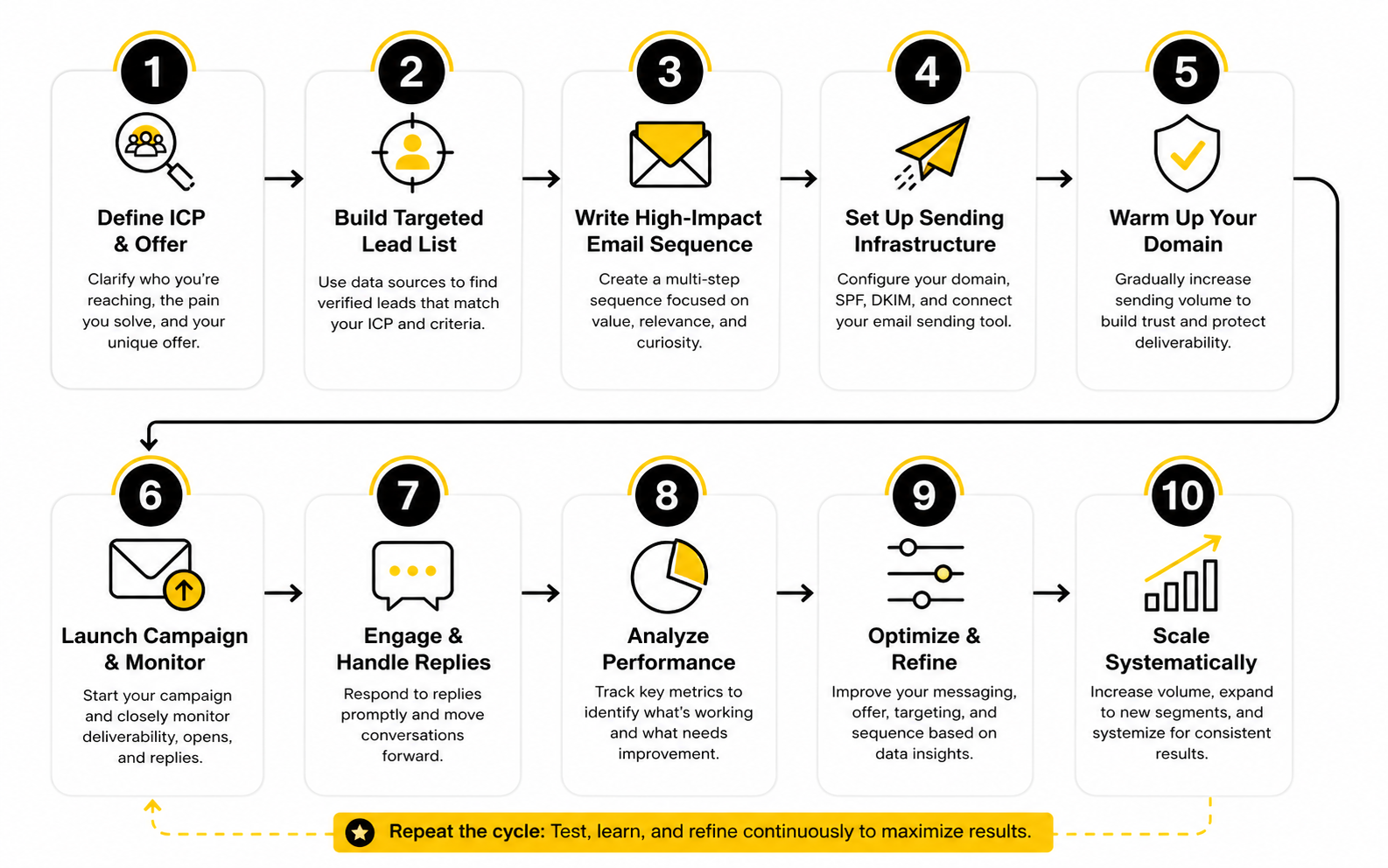
The cleanest way to implement a campaign is to move in order. Each step should make the next step easier. If a step feels unclear, do not skip it, because the confusion will show up later in the inbox.
- Define the campaign segment using observable account signals.
- Choose the primary buyer role and any secondary influencer roles.
- Write the pain hypothesis in plain language.
- Shape one clear offer that fits the buyer’s likely situation.
- Decide the next step after a reply, click, or booking.
- Draft the first email around relevance, problem, proof, and ask.
- Build follow-ups that add context instead of repeating the pitch.
- Review the sequence for compliance, clarity, and tone.
- Test with a small batch before increasing volume.
- Track replies by quality, not just quantity.
This process gives your team a real implementation path. It also prevents the classic mistake of fixing the wrong problem. If replies are weak, you can inspect the segment, offer, message, or follow-up logic instead of guessing.
Write the First Email Around Relevance
The first email has one job: make the recipient feel that the message was meant for someone in their situation. It does not need to be long. It does not need to be clever. It needs to be relevant enough to earn the next few seconds.
A practical first email usually has four parts. Open with context, name the likely problem, make the offer, and ask a simple question. That structure keeps the email focused without making it feel like a script.
The language should sound like a person wrote it. Avoid inflated claims, fake urgency, and generic compliments. People can smell mass personalization instantly, and once they do, the rest of the message loses weight.
Keep Personalization Useful
Personalization should help the reader understand why you reached out. Mentioning a random blog post, podcast, or LinkedIn update only works if it connects directly to the reason for the email. Otherwise, it feels like decoration.
Useful personalization ties back to the campaign signal. If the account is hiring sales reps, the email might reference scaling outbound capacity. If the company recently launched a new offer, the email might reference conversion flow or follow-up speed. The point is not to prove you did research; the point is to make the message more relevant.
This is where AI can help, but only with guardrails. AI can summarize account signals, draft variations, and help with research workflows, but it should not invent claims or create fake familiarity. For teams using automation around CRM and follow-up, GoHighLevel AI can support parts of the workflow, but human review still matters.
Make the Ask Easy to Answer
The call to action should be easy to answer from a phone. That is a good test. If the recipient has to think too hard, compare calendars, read a long page, or decode what you mean, the ask is too heavy.
A simple question often works better than a big commitment. “Worth sending over?” is lighter than “Can we book 30 minutes this week?” when the recipient has not shown interest yet. Once they engage, the next step can become more direct.
The ask should also match the offer. If you are offering a teardown, ask whether they want it. If you are offering a benchmark, ask whether that would be useful. Do not jump straight to a sales meeting unless the email has earned that level of commitment.
Build Follow-Ups That Add Something New
Follow-ups should not be reminders that you exist. The recipient already knows the email is in their inbox. A good follow-up adds a new angle, clarifies the value, handles a likely objection, or makes it easier to redirect you to the right person.
A useful sequence might move from problem to example pattern, then to a quick diagnostic, then to a referral ask. Each email should feel connected, but not repetitive. If all your follow-ups say the same thing with different wording, the sequence is too thin.
Timing matters, but content matters more. Sending five weak emails does not make the campaign stronger. A shorter sequence with better context will usually protect the brand and create cleaner conversations.
Write for Reply Quality
Reply quality is more important than raw reply count. A campaign that gets many “not interested” replies is not winning just because the response rate looks active. You want replies that reveal interest, timing, objections, referrals, or useful market feedback.
This is why the sequence should invite clear responses. Ask questions that help qualify the account without making the buyer feel interrogated. Give them a simple way to say yes, no, later, or talk to this person instead.
You should also tag replies carefully. Over time, patterns in objections, referrals, and timing will show you whether the segment is right, whether the offer is strong, and whether the message is landing. That feedback loop is one of the most valuable parts of outbound email marketing.
Avoid the Breakup Email Trap
Breakup emails can work when they are respectful, but they often become passive-aggressive. Lines like “I guess this is not a priority” or “I will close your file” can make the sender look more annoyed than helpful. That is not the tone you want attached to your brand.
A better final follow-up gives the recipient an easy exit or redirect. You can ask whether the topic is not relevant, whether someone else owns it, or whether it is better to reconnect later. That keeps the door open without pretending there is a relationship that does not exist yet.
The goal is to leave a clean impression. Even if the person does not respond today, they may remember the message later when the problem becomes more urgent. Outbound is not only about immediate conversion; it is also about creating a respectful first touch with the market.
Prepare the Assets Around the Sequence
A campaign is not just emails. It usually needs supporting assets: a landing page, calendar page, reply templates, objection responses, CRM fields, tracking links, suppression lists, and handoff notes. These assets make the process smoother once people start engaging.
The landing page or booking flow should match the offer exactly. If the email promises a quick audit, the page should explain that audit. If the email promises a workflow review, the page should not turn into a broad company pitch.
For teams that want a lightweight campaign path, a focused landing page in Replo, a funnel in ClickFunnels, or an all-in-one setup in GoHighLevel can work well when the campaign needs a clear path from email to action. The asset does not need to be fancy. It needs to be specific, fast, and aligned with the promise.
Create Reply Templates Without Sounding Scripted
Reply templates help your team respond faster, but they should not sound robotic. The first sentence should acknowledge what the person actually said. Then the response can move into the next step.
You need templates for common situations. Positive interest, wrong person, bad timing, pricing questions, “send info,” objections, and unsubscribe requests should all have clear handling. This prevents slow or inconsistent replies from killing momentum.
The trick is to make templates modular. Give the team approved building blocks, not rigid scripts. That way, the reply stays human while still protecting quality and consistency.
Connect the Campaign to the CRM
Every outbound campaign should have clean CRM tracking from the start. You should know which segment the contact came from, which sequence they received, what offer they saw, how they responded, and what happened next. Without that structure, campaign learning gets lost in inboxes and spreadsheets.
CRM fields should be simple enough that people actually use them. Campaign name, segment, buyer role, reply status, next step, objection, and opportunity stage are usually enough to start. If the team needs relationship-focused pipeline tracking, Copper can support a cleaner handoff between outreach and sales conversations.
This is not admin work for the sake of admin work. It is how you find out what is working. If one segment produces better replies but worse meetings, or one offer creates more meetings but weaker opportunities, the CRM should make that visible.
Statistics and Data
Measurement is where outbound email marketing becomes honest. A campaign can feel busy, generate activity, and still fail to create real pipeline. The point of analytics is not to collect more numbers; it is to understand what the market is telling you and decide what to change next.
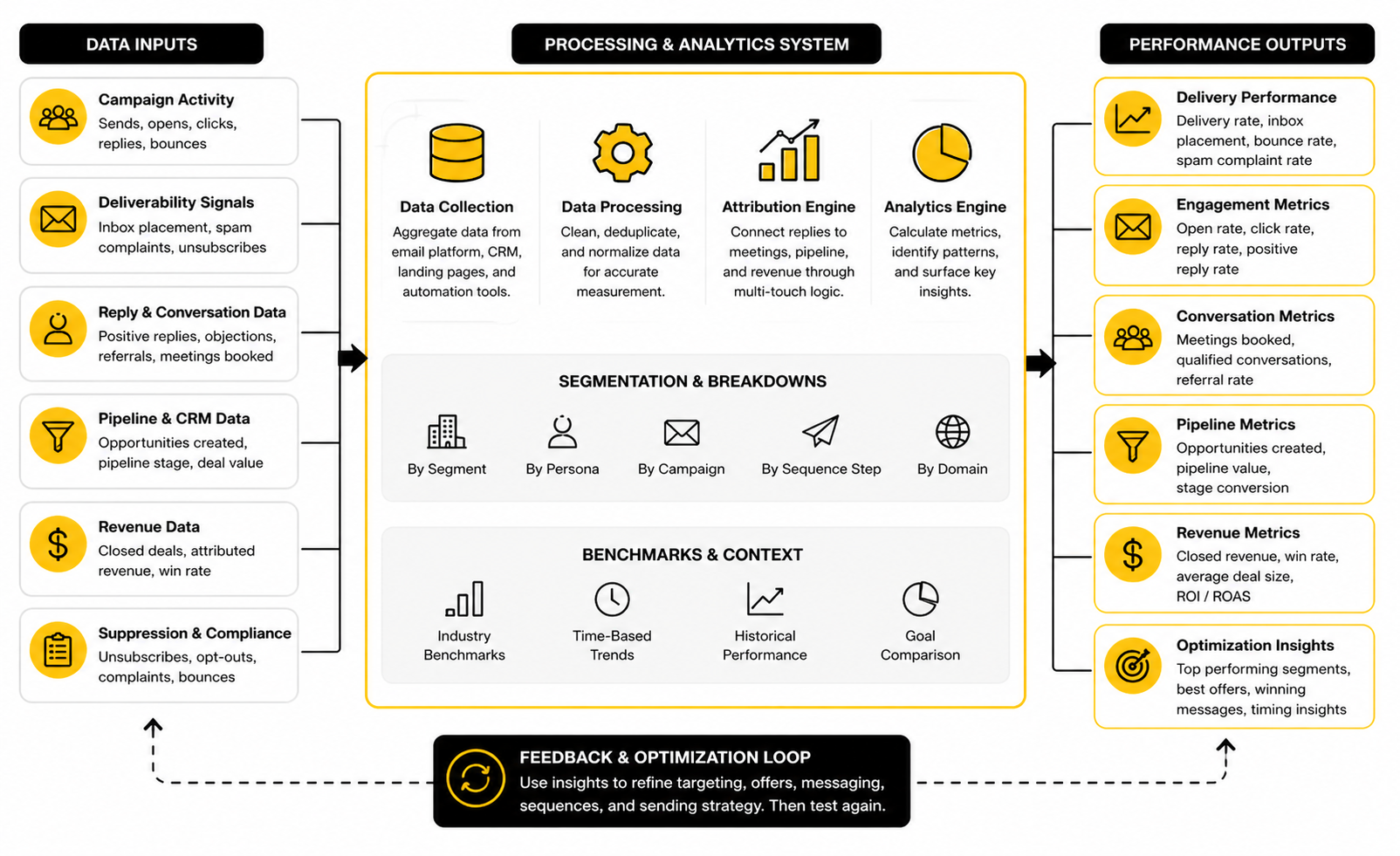
The best way to read the data is in layers. First, check whether the email reached the inbox. Then check whether the message created engagement. Then check whether the engagement became a meaningful conversation. Finally, check whether those conversations turned into qualified opportunities and revenue.
This layered view matters because one metric can easily lie on its own. A high open rate may only mean the subject line worked. A high reply rate may include negative replies. A strong meeting count may still produce weak pipeline if the audience was poorly qualified.
Measure the Full Funnel, Not Just the Email
Outbound email marketing should be measured from send to revenue. If you only track email activity, you will optimize for superficial wins. If you only track closed deals, you will miss the early signals that explain why the campaign is working or failing.
A practical measurement system should follow the campaign through five stages: delivery, engagement, reply, conversion, and pipeline. Delivery shows whether technical and data quality are healthy. Engagement shows whether the message created enough interest to earn attention. Replies show whether the offer created a conversation. Conversion shows whether the next step was clear. Pipeline shows whether the campaign reached the right market.
This is why email metrics should connect to the CRM. If the campaign lives in an email tool but the outcomes live somewhere else, your team ends up guessing. A CRM like Copper can help keep campaign source, reply quality, meeting status, and opportunity movement in one place, which makes the data easier to trust.
Track the Metrics in the Right Order
Start with the technical metrics because they tell you whether the campaign has a fair chance. Bounce rate, delivery rate, spam complaints, unsubscribe rate, and domain reputation come before copy analysis. If these signals are unhealthy, better writing will not fix the real issue.
Then move to attention metrics. Opens can be useful, but they should be treated carefully because privacy features and image-loading behavior can distort them. Clicks are usually stronger than opens, but they only matter when the link points to a relevant next step.
After that, focus on conversation metrics. Positive reply rate, referral rate, objection rate, and booked-meeting rate are more useful than total reply rate. A campaign that creates fewer replies but more qualified conversations is usually healthier than one that creates lots of low-quality noise.
Separate Leading and Lagging Indicators
Leading indicators help you diagnose performance early. These include bounce rate, complaint rate, unsubscribe rate, reply sentiment, and meeting-booking rate. They do not prove revenue yet, but they show whether the campaign is moving in the right direction.
Lagging indicators tell you whether the campaign created business value. These include sales accepted opportunities, pipeline value, win rate, sales cycle length, and revenue. They take longer to appear, but they are the numbers that decide whether the campaign deserves more investment.
You need both. If you only watch leading indicators, you may scale a campaign that looks active but never closes. If you only watch lagging indicators, you may wait too long to fix a broken list, offer, or sequence.
Benchmarks Are Context, Not Targets
Benchmarks are useful, but they are not commandments. They help you spot whether a number is wildly out of range, but they cannot tell you whether your specific campaign is successful. A niche enterprise campaign, a local service campaign, and a software trial campaign should not be judged by the same standard.
Email benchmark reports also tend to mix different types of email. Newsletters, lifecycle emails, ecommerce promotions, and outbound campaigns behave differently because the relationship with the recipient is different. MailerLite’s 2025 benchmark data is based on over 3.6 million campaigns from 181,000 approved accounts, which is useful context, but it should not be copied blindly into outbound goals.
Brevo’s benchmark research also shows that performance varies heavily by industry and channel mix, with some sectors earning stronger engagement because the content has higher perceived importance or better timing. That is the lesson to take from benchmarks: performance depends on relevance, audience expectation, and context, not just the email format.
Use Benchmarks to Find Outliers
The best use of benchmarks is to identify outliers. If your bounce rate is high, your list quality needs attention. If unsubscribes spike, your targeting or offer may be misaligned. If replies are low but opens are healthy, the message probably earned curiosity but failed to create enough reason to respond.
Benchmarks should lead to questions, not ego. A high open rate is not a victory if the replies are poor. A low click rate is not always a failure if the campaign is designed for replies instead of clicks.
This is especially true in outbound email marketing because the best action is often a reply, not a page visit. If your sequence asks people to respond directly, click-through rate may be secondary. If your sequence drives to a teardown form, booking page, or calculator, then click and completion rates matter much more.
Build Your Own Internal Baseline
Your internal baseline will become more valuable than any public benchmark. It tells you how your market responds to your offers, your positioning, your domain setup, and your sales process. Once you have that baseline, optimization becomes much easier.
Start by comparing campaigns by segment, not only by date. A campaign to founder-led agencies should not be averaged together with a campaign to enterprise operations leaders. Different audiences have different buying cycles, risk tolerance, and response habits.
Over time, track the same core metrics across campaigns. You want to know which segments produce the best positive reply rate, which offers convert into meetings, which objections appear most often, and which campaigns turn into qualified pipeline. That is where outbound measurement starts becoming strategic.
Deliverability Metrics Protect the Channel
Deliverability data is not just technical reporting. It tells you whether the market and the inbox are accepting your behavior. Ignore it, and you may not realize there is a problem until replies collapse.
Spam complaint rate is one of the most serious signals. Google’s sender guidance says bulk senders should keep user-reported spam rates below 0.1% and avoid reaching 0.3% or higher. That threshold is not a marketing suggestion; it is a warning that recipient complaints can directly affect your ability to reach the inbox.
Authentication also belongs in the measurement system. Microsoft’s newer high-volume sender requirements include SPF, DKIM, and DMARC expectations for domains sending more than 5,000 messages per day. Even if your volume is lower, the direction is clear: inbox providers are pushing senders toward more accountable behavior.
Watch Bounce Rate Closely
Bounce rate is one of the fastest ways to spot data problems. A few bounces are normal, but a pattern of hard bounces means the list is stale, poorly sourced, or not verified well enough. That creates both performance and reputation risk.
Hard bounces should be removed immediately. Repeatedly sending to invalid addresses tells mailbox providers that your data quality is weak. It also wastes volume that could have gone to better-fit contacts.
Soft bounces need a little more judgment. Temporary mailbox issues, throttling, or server problems can happen, but repeated soft bounces should be treated carefully. The rule is simple: do not let bad data keep touching your sending infrastructure.
Treat Unsubscribes as Feedback
Unsubscribes are not automatically bad. In a healthy program, some people will opt out because the timing, topic, or fit is not right. That is normal, and it is much better than a spam complaint.
The problem is when unsubscribes cluster around a specific segment, message, or offer. That usually means the campaign feels irrelevant or too aggressive. If one audience unsubscribes at a much higher rate than another, the issue is probably targeting or positioning, not the unsubscribe link.
Make the opt-out process clear and respectful. Yahoo’s sender guidance emphasizes easy unsubscribe handling as part of responsible sending, and that aligns with the bigger principle: people should not have to fight to leave your list. A clean unsubscribe process protects trust and keeps frustration from turning into complaints.
Engagement Metrics Show Attention, Not Intent
Engagement metrics are useful, but they need interpretation. Opens show possible attention. Clicks show stronger curiosity. Time-based engagement can suggest interest, but it still does not prove buying intent.
This is why engagement data should never be treated as the final score. A recipient can open an email because the subject line was interesting and still have no need for the offer. Another recipient might never click but still reply because the question was direct and relevant.
For outbound email marketing, engagement metrics are best used to diagnose message-market fit. If the campaign gets attention but not replies, the email may be interesting but not compelling. If the campaign gets clicks but no conversions, the landing page or offer may be creating friction.
Read Opens With Caution
Open rates have become less reliable because inbox privacy features can inflate or obscure tracking. Apple’s Mail Privacy Protection changed how opens are recorded by preloading email content in ways that can make open tracking less precise. That does not make opens useless, but it does mean they should not be treated as hard truth.
Use opens directionally. If open rates collapse across a campaign, subject lines, sender reputation, or inbox placement may need review. If opens are stable but replies fall, the issue is probably deeper in the message or offer.
Do not over-optimize subject lines at the expense of trust. A misleading subject line may increase opens once, but it can damage replies, unsubscribes, and complaints. The subject line should create curiosity without breaking the promise of the email.
Make Clicks Mean Something
Clicks are only useful when the link represents a meaningful next step. A click to a generic homepage tells you very little. A click to a relevant teardown form, booking page, calculator, or campaign-specific landing page tells you much more.
This is why campaign assets matter. A focused page built in Replo, ClickFunnels, or systeme.io can make click data more useful because the destination is tied to the campaign offer. The cleaner the destination, the easier it is to interpret the behavior.
Track click-to-conversion, not just click-through rate. If many people click but few complete the next step, the issue may be page clarity, offer mismatch, load speed, form friction, or calendar friction. The click is the start of the diagnosis, not the end.
Reply Metrics Reveal Message Quality
Replies are where outbound gets real. They show whether the message was strong enough to create a human response. But again, total reply rate is too blunt to guide decisions by itself.
You need to separate replies by type. Positive interest, referral, objection, bad timing, not a fit, unsubscribe, and angry reply should not be counted as the same outcome. They each say something different about the campaign.
A positive reply suggests the offer and audience may be aligned. A referral suggests the account is relevant but the recipient was not the right person. A common objection may reveal a positioning issue. A wave of negative replies means the campaign needs attention fast.
Score Replies by Business Value
Reply scoring keeps the team from celebrating vanity performance. A campaign with a high response rate but mostly negative replies is not a winner. A campaign with a lower response rate but strong fit, clear pain, and qualified next steps may be much more valuable.
A simple reply score can work well. Mark each reply as positive, referral, neutral, objection, bad timing, negative, or unsubscribe. Then review patterns by segment and offer.
This makes optimization practical. If referrals are high, adjust role targeting. If objections are repetitive, sharpen the message. If positive replies are strong but meetings are low, fix the handoff or CTA.
Measure Speed to Response
Speed matters after someone replies. A warm reply has momentum, and that momentum fades when the response sits too long. The campaign did the hard work of creating interest; the sales process should not waste it.
Track the time from positive reply to human response. Also track time from positive reply to booked meeting. These numbers show whether your operations are supporting the campaign or quietly weakening it.
Automation can help here when used carefully. A platform like GoHighLevel can route replies, trigger internal tasks, and support follow-up workflows, but the response still needs to feel personal. Fast and robotic is not the goal. Fast and relevant is.
Pipeline Metrics Decide What to Scale
Pipeline metrics are the final filter. They tell you whether outbound email marketing is creating business value, not just activity. This is where campaign decisions become easier because the data connects to actual sales outcomes.
Track meetings booked, meetings attended, qualified opportunities, opportunity value, win rate, sales cycle length, and revenue. Also track disqualified meetings, because they show where targeting or qualification needs work. A campaign that books many meetings but creates few opportunities may be attracting curiosity instead of real demand.
Email remains valuable because the upside can be strong when measurement is disciplined. Litmus reports that 35% of companies see email ROI of 36:1 or more, but that kind of return is only useful if your team can actually trace email activity to revenue. Without attribution, ROI becomes a slogan instead of a management tool.
Track Cost per Qualified Conversation
Cost per qualified conversation is more useful than cost per send. Sends are cheap, but bad sends are expensive in hidden ways. They consume data budget, tool costs, domain reputation, sales attention, and brand trust.
A qualified conversation should have a clear definition. It might mean the account fits the target segment, the recipient has authority or influence, the problem is relevant, and there is a realistic next step. Define it before the campaign launches so the team does not move the goalposts later.
This metric helps compare campaigns fairly. One campaign may be more expensive to research but produce better conversations. Another may be cheaper to run but produce weak pipeline. The better investment is the one that creates more qualified movement, not the one that sends the most emails.
Know When to Scale, Pause, or Rebuild
The data should lead to decisions. Scale when deliverability is healthy, reply quality is strong, meetings convert, and pipeline is real. Pause when complaint risk rises, bounce rate worsens, or negative replies cluster around the same issue.
Rebuild when the core campaign logic is wrong. If the segment does not care, the buyer role is off, or the offer is not compelling, small copy edits will not save it. That is when you go back to the campaign brief and fix the foundation.
This is the discipline that separates serious outbound email marketing from random prospecting. You are not looking for one magic benchmark. You are building a feedback system that tells you what to improve, what to protect, and what deserves more volume.
Advanced Strategy, Risks, and Scaling
Once the campaign has a working list, message, infrastructure, and measurement system, the next challenge is scale. This is where outbound email marketing gets more dangerous. A campaign that works at low volume can break when the team increases sends, adds new segments, or lets automation make decisions without enough human review.
Scaling is not just sending more. Scaling means increasing output while protecting reply quality, sender reputation, compliance, brand trust, and sales capacity. If one of those pieces cannot handle the increase, the campaign may create more activity while producing worse business results.
The best teams scale with constraints. They do not ask, “How many emails can we send?” They ask, “How much relevant outreach can we send without hurting the channel or overwhelming the sales process?” That question leads to better decisions.
Scale Segments Before You Scale Volume
The safest way to scale outbound email marketing is to expand through adjacent segments before pushing raw volume. If one segment works, look for another segment with similar pain, similar buying triggers, and a clear reason the same offer would still make sense. That keeps the campaign logic intact while giving you more market coverage.
Raw volume is tempting because it feels simple. More contacts, more sends, more replies. But if the additional contacts are weaker-fit accounts, volume can dilute performance and make the campaign harder to interpret.
A better scaling path is controlled expansion. Keep the first segment running, launch a second segment with its own assumptions, compare the data, and only increase volume when reply quality and pipeline quality hold up. That approach is slower than blasting, but it protects the asset that matters most: trust.
Expand From Strong Signals
Strong signals should guide expansion. If your first campaign worked for companies hiring sales development reps, the next segment might be companies adding demand generation roles or launching a new sales motion. The connection should be logical, not random.
The goal is to preserve relevance as the campaign grows. Every new segment should have its own pain hypothesis, offer angle, and buyer-role map. Do not simply copy the same emails into a new list and hope the numbers stay the same.
This is where the earlier measurement work pays off. If your CRM shows that one trigger produced better qualified conversations than another, scale around the stronger trigger. If one buyer role created more referrals than direct opportunities, adjust the targeting before increasing sends.
Avoid Averaging Different Markets Together
Averages hide problems. If one segment is performing well and another is hurting reputation or creating poor replies, a blended report can make the campaign look fine. That is how teams miss warning signs until the damage is already visible.
Keep reporting separated by segment, role, offer, domain, and conversion path. This makes the tradeoffs easier to see. One audience may need a softer diagnostic offer, while another may be ready for a direct booking ask.
This matters because outbound email marketing is not one channel with one universal benchmark. It is a collection of market conversations. Treating every segment the same makes the data less useful and the campaign less human.
Manage Compliance as an Operating System
Compliance should not be treated as a legal footnote at the end of the campaign. It affects list sourcing, data storage, message content, opt-out handling, tracking, and follow-up. If the campaign crosses regions, the rules can change quickly.
In the United States, the FTC’s CAN-SPAM guidance requires commercial email senders to avoid deceptive headers and subject lines, include a valid physical postal address, provide a clear opt-out method, and honor opt-out requests within 10 business days. That is the minimum, not the full standard for a good outbound program.
In the UK, the ICO explains that some B2B email rules differ for corporate subscribers, but UK GDPR can still apply when personal data is processed for direct marketing. The ICO also says businesses need a lawful basis when processing business contact data and must respect objections to marketing, which is why every serious outbound program needs documented data logic and suppression rules, not just a legal disclaimer.
Document the Legal Basis
If you are contacting people in markets where GDPR or similar privacy laws apply, document your legal basis before sending. Legitimate interest may be relevant in some B2B contexts, but it is not a magic phrase that makes everything acceptable. The European Data Protection Board’s 2024 guidance says legitimate interest requires a valid interest, necessity, and a balancing test where the person’s rights do not override the organization’s interest.
That means your team should be able to explain why the outreach is relevant, why the data is needed, and why the recipient would not be unfairly surprised by the message. This is practical, not academic. If you cannot explain those points clearly, the campaign probably needs tighter targeting.
Documentation also makes scaling safer. When new people join the campaign, they can follow the same rules instead of improvising. That reduces risk and keeps your outbound email marketing process consistent across segments and regions.
Make Suppression Non-Negotiable
Suppression is where compliance and respect meet. If someone unsubscribes, objects, bounces, or asks not to be contacted, that signal should travel across the system. It should not depend on one person remembering to update a spreadsheet.
A suppression process should cover individual contacts, company-level exclusions, competitor domains, current customers, open opportunities, partners, and people who have explicitly asked not to be contacted. This prevents awkward outreach and protects relationships that already exist elsewhere in the business.
The rule is simple: never let growth pressure override suppression. One extra send is not worth a complaint, a damaged relationship, or a trust issue inside an active account. This is one of those small operational habits that separates professional outbound from spam.
Balance Automation With Human Judgment
Automation can make outbound email marketing faster, cleaner, and easier to manage. It can enrich records, trigger tasks, route replies, update fields, send reminders, and help sales teams respond faster. But automation becomes risky when it replaces judgment instead of supporting it.
The danger is not automation itself. The danger is automating unclear strategy. If the segment is weak, the offer is vague, or the data is messy, automation only spreads the problem faster.
Use automation for structure, not fake intimacy. Let the system handle timing, routing, tagging, and workflow consistency. Let humans handle relevance, sensitive replies, objections, and decisions that affect trust.
Use AI Carefully
AI can help with research summaries, account notes, message variations, reply classification, and quality checks. That can save time, especially when the team has clear rules and strong human review. The problem starts when AI invents context or creates personalization that sounds specific but is not true.
Do not let AI make unsupported claims about a recipient, their company, or their priorities. A wrong detail can destroy credibility instantly. It is better to write a simpler email that is true than a highly personalized email that is half hallucinated.
If your team uses AI inside CRM, funnel, or follow-up workflows, keep the scope clear. Tools such as GoHighLevel AI can support operational speed, but the campaign still needs human-owned strategy, review, and quality control. AI should make the team sharper, not lazier.
Keep the Voice Consistent
As more people or tools touch the campaign, voice can drift. One email sounds helpful, another sounds pushy, and another sounds like a generic automation template. That inconsistency makes the brand feel less trustworthy.
Create simple voice rules for the campaign. Define what the team should say, what it should avoid, how direct the ask should be, and how objections should be handled. These rules do not need to be complicated, but they should be visible.
Consistency does not mean every message sounds identical. It means every message feels like it came from the same company with the same standards. That matters when multiple stakeholders inside one account may see different parts of your outreach.
Protect the Brand While Chasing Pipeline
Outbound creates visible contact with the market. Every email says something about your company before the recipient ever visits a page or books a call. That is why brand risk belongs in the scaling conversation.
A bad campaign can reach the wrong people, irritate future buyers, create internal screenshots, or make your company look careless. A good campaign can create awareness, start useful conversations, and position the brand as relevant even when the recipient is not ready yet.
The difference is discipline. Strong targeting, honest copy, clear opt-outs, and respectful follow-up protect the brand while still giving the campaign a chance to perform. Weak targeting and aggressive follow-up do the opposite.
Do Not Over-Personalize
Over-personalization can feel worse than no personalization. If the email references tiny details from someone’s online activity, the message may feel invasive instead of relevant. The recipient should feel understood, not watched.
Keep personalization tied to business context. Company growth, hiring, product launches, public positioning, and visible operational signals are safer and more useful than personal details. The email should make sense in a professional setting.
This also makes the campaign easier to scale. Business-context personalization can be researched, reviewed, and reused across segments. Creepy personalization creates risk and rarely improves the quality of the conversation enough to justify it.
Avoid False Urgency
False urgency is one of the quickest ways to make outbound feel cheap. Buyers know when a deadline is fake. They know when “last chance” is just a tactic.
Use real timing instead. A hiring push, funding event, platform change, seasonal demand window, compliance deadline, or campaign launch can all create legitimate urgency. If there is no real timing reason, do not manufacture one.
A direct message with honest timing will usually age better than a dramatic message built on pressure. Outbound email marketing should create interest, not corner the reader. That distinction matters.
Build a Multi-Channel Support System
Email can carry the campaign, but it should not always work alone. The strongest outbound systems often use supporting channels to create familiarity, reinforce the message, or give the buyer another way to engage. This does not mean spamming the same person everywhere.
A multi-channel system might include LinkedIn profile views, thoughtful connection requests, retargeting, useful content, direct mail for high-value accounts, or follow-up after webinar attendance. The point is to create context around the email, not to chase the buyer across every platform.
This is especially useful for larger accounts where one email rarely creates enough trust by itself. Gartner’s research says buying groups can include five to 16 people across as many as four functions, so supporting channels can help the message travel beyond one inbox.
Use Social as Context, Not Noise
Social content can make outbound warmer when it supports the same point of view. If a recipient checks your profile or company page after reading an email, they should see content that reinforces the campaign’s promise. That makes the outreach feel more credible.
This does not require posting all day. A few strong posts, useful resources, and clear positioning can be enough. Tools like Buffer can help keep social publishing organized when the team wants consistent support around a campaign.
The key is alignment. If the email talks about lead follow-up speed but your public content is unrelated, the buyer gets no reinforcement. If the email, profile, and landing page all point to the same problem, the campaign feels more intentional.
Add Conversational Paths After the Click
Some prospects do not want to book a call immediately. They may want to ask a question, compare options, or understand whether the offer applies to them. A conversational path can help those people engage without forcing them into a sales call too early.
This can be a simple form, a chatbot, a short survey, or a guided qualification flow. Fillout can work well for structured intake, while Chatbase can support a site experience where visitors need quick answers before taking action.
The path should match the campaign intent. If the email offers an audit, the form should collect what is needed for the audit. If the email offers a strategic conversation, the page should make that conversation feel specific and worth booking.
Know the Tradeoffs Before Scaling
Every scaling decision has a tradeoff. More volume may increase opportunities, but it can also increase complaints. More personalization may improve relevance, but it can slow production. More automation may speed up execution, but it can reduce judgment.
The right answer depends on the business model, deal size, market size, sales capacity, and risk tolerance. A company selling a high-ticket B2B service should usually choose quality and precision over volume. A lower-ticket offer with a large market may have more room for automation, but it still needs deliverability discipline.
The point is not to make outbound email marketing perfect. The point is to make the tradeoffs consciously. When the team knows what it is optimizing for, decisions become cleaner.
Quality Versus Volume
Quality and volume are not enemies, but they are in tension. The more volume you add, the harder it becomes to preserve research depth, message relevance, and reply handling. The more quality you require, the slower the campaign may move.
A practical approach is to set a quality floor. Every contact must meet the segment rules. Every email must match the offer. Every reply must be handled properly. Once that floor is protected, volume can increase in controlled steps.
Do not scale below the quality floor just to hit a send target. That is how teams create short-term activity and long-term damage. The inbox remembers patterns, and so does the market.
Personalization Versus Speed
Personalization helps when it clarifies relevance. It hurts when it slows the team down without improving response quality. The question is not “Should we personalize?” The question is “Which personalization actually changes the recipient’s decision to respond?”
Use deep personalization for high-value accounts, strategic deals, and narrow executive campaigns. Use structured personalization for broader segments where the same signal applies to many accounts. Use minimal personalization when the offer is already highly relevant and the list quality is strong.
This gives you a more flexible operating model. Not every campaign needs the same research depth. The level of personalization should match the value of the opportunity and the difficulty of earning attention.
Automation Versus Control
Automation gives you consistency, but too much automation can create blind spots. If a workflow keeps sending after a reply, misses an unsubscribe, or routes a high-value lead incorrectly, the system becomes a liability. That is why control points matter.
Set review gates before launch, after the first batch, and before each volume increase. Review reply sentiment, complaint signals, bounce patterns, meeting quality, and sales feedback. These checkpoints keep the campaign from drifting while still allowing speed.
A platform like GoHighLevel can centralize many of these workflows, especially when the team wants email, CRM, funnels, automation, and follow-up in one operating system. But the platform should enforce the strategy. It should not replace it.
When Outbound Email Marketing Is the Wrong Move
Outbound email marketing is powerful, but it is not always the right channel. If the offer is unclear, the audience is poorly defined, or the company cannot handle replies properly, launching a campaign may create more problems than pipeline. Sometimes the best move is to fix positioning, the website, the sales process, or the offer before sending.
Outbound is also a bad fit when the market requires trust that cannot be created through email alone. Highly sensitive services, complex enterprise deals, and heavily regulated categories may need stronger warm-up channels, partner introductions, events, or thought leadership before direct outreach can work well. Email can still support those motions, but it should not carry the whole burden.
The honest test is simple. Can you name who you are contacting, why they should care now, what useful next step you are offering, and how you will handle the response? If not, do not scale yet. Fix the system first.
Do Not Use Email to Force Weak Positioning
Weak positioning becomes obvious in outbound. If the message needs too many words to explain why the offer matters, the market will feel that confusion immediately. Buyers do not work hard to understand a cold email.
Before scaling, simplify the promise. Make the problem clear, make the audience specific, and make the outcome easy to understand. If the offer still feels vague, the issue is not the email.
This is why outbound can be useful even before it creates revenue. It forces the company to confront whether the market understands the offer. That feedback is valuable, but only if the team is willing to listen.
Do Not Scale Before Sales Is Ready
Outbound creates demand that must be handled. If sales cannot respond quickly, qualify properly, and continue the conversation with context, the campaign will leak value. This is especially painful because the team may blame the campaign when the real issue is follow-through.
Before increasing volume, check sales capacity. Make sure positive replies are owned, meetings are prepared, CRM notes are complete, and follow-up after calls is consistent. The buyer should feel a smooth handoff from the first email to the next conversation.
This is where operational discipline compounds. A clean campaign plus a weak sales process creates frustration. A clean campaign plus a strong sales process creates pipeline that can actually be trusted.
Optimization, Tool Stack, and Final System Design
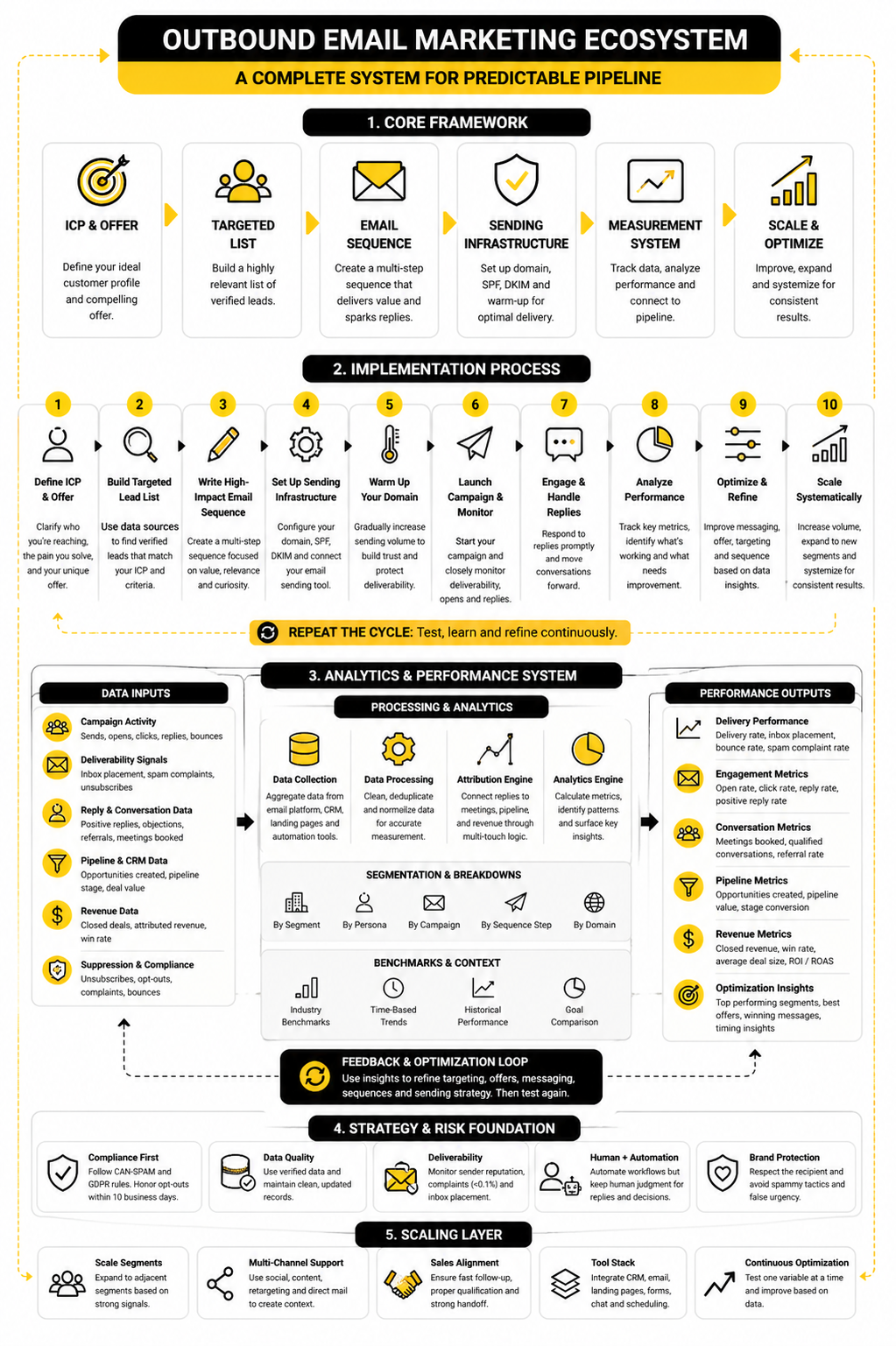
At this point, outbound email marketing should no longer feel like a pile of disconnected tactics. The campaign has a defined audience, a practical offer, clean execution steps, measurement logic, scaling rules, and risk controls. The final job is to turn all of that into a system your team can keep improving without rebuilding from scratch every time.
The system should be simple enough to operate and structured enough to diagnose. If replies drop, you should know whether to inspect targeting, offer, deliverability, copy, timing, or sales follow-up. If pipeline improves, you should know which segment, message, and conversion path produced the lift.
This is where the tool stack matters, but only after the strategy is clear. Tools should help your team send responsibly, track accurately, respond quickly, and convert interest into pipeline. They should not create a false sense of progress by making it easier to send more weak outreach.
Build a Stack Around the Workflow
A practical outbound stack usually needs five functions: data management, email sending, CRM tracking, conversion pages, and follow-up automation. Some teams use separate tools for each function. Others prefer an all-in-one system, especially when they want CRM, funnels, messaging, and automation connected in one place.
For example, GoHighLevel can make sense when the campaign needs CRM, workflows, landing pages, and follow-up under one roof. Brevo and Moosend can support email marketing workflows where list management and campaign communication are central. Copper can fit teams that want relationship-focused CRM visibility.
The right stack is the one your team can actually maintain. A complex stack that nobody updates will create bad reporting and missed follow-ups. A simpler stack with clean ownership usually beats a sophisticated setup that hides the truth.
Keep the System Auditable
Every outbound email marketing system should be auditable. That means someone should be able to look at a campaign and understand who was contacted, why they were selected, what they received, how they responded, and what happened next. If that trail does not exist, the campaign will become harder to improve as it grows.
Auditability also protects the business. The FTC’s CAN-SPAM guidance requires commercial senders to honor opt-out requests within 10 business days, so suppression and unsubscribe handling cannot be vague. Google’s sender guidance also tells senders to keep spam complaint rates below 0.1% and avoid reaching 0.3%, which makes monitoring a real operating requirement.
The cleanest approach is to review campaigns on a regular cadence. Look at deliverability, reply quality, objections, meeting quality, pipeline, and suppression issues together. This keeps optimization grounded in reality instead of opinions.
Improve One Variable at a Time
Optimization gets messy when teams change everything at once. If you change the audience, offer, subject line, first sentence, call to action, landing page, and follow-up timing together, you may improve performance without knowing why. That makes the next campaign harder to plan.
Change one major variable at a time whenever possible. Test a new offer against the same segment. Test a new segment with the same offer. Test a new conversion path after the email logic is already working.
This is not about being slow. It is about learning cleanly. A system that learns cleanly gets better over time, while a system that changes randomly stays dependent on luck.
FAQ - Built for Complete Guide
What is outbound email marketing?
Outbound email marketing is the process of reaching out to targeted prospects by email before they have directly requested contact. It is different from newsletter marketing because the relationship often starts with a cold or lightly warmed first touch. The goal is not to blast a list; the goal is to start relevant conversations with people or companies that fit a clear business case.
Is outbound email marketing the same as cold email?
Cold email is one form of outbound email marketing, but the two are not always identical. Outbound email marketing can include cold outreach, reactivation campaigns, partner outreach, account-based sequences, event follow-up, and targeted sales development campaigns. The shared idea is that the sender initiates the conversation with a defined audience.
Does outbound email marketing still work?
Yes, but it works best when it is targeted, compliant, and connected to a strong offer. Email remains a high-value channel, with Litmus reporting that 35% of companies see email ROI of 36:1 or more. That does not mean every outbound campaign works; it means the channel can perform when the strategy, data, deliverability, and follow-up are strong.
What makes an outbound email campaign successful?
A successful campaign reaches the right audience, gives them a relevant reason to respond, and moves interested prospects into a clear next step. The campaign also needs healthy deliverability, clean data, fast reply handling, and accurate CRM tracking. If one of those pieces is weak, the campaign may still create activity but fail to create useful pipeline.
How many emails should be in an outbound sequence?
Most outbound sequences work best when they are long enough to create multiple touchpoints but short enough to stay respectful. A common range is three to six emails, depending on the audience, offer, and sales cycle. The real test is whether each follow-up adds something useful instead of repeating the same pitch.
What metrics matter most in outbound email marketing?
The most useful metrics are bounce rate, spam complaints, unsubscribe rate, positive reply rate, referral rate, booked-meeting rate, qualified opportunity rate, and revenue. Opens and clicks can help diagnose attention, but they should not be treated as the final score. A campaign should ultimately be judged by qualified conversations and pipeline quality.
What is a good reply rate for outbound email marketing?
There is no universal reply-rate target because audiences, offers, deal sizes, and markets vary too much. A narrow campaign to a strong-fit segment can produce fewer total replies but better business value than a broad campaign with a higher generic response rate. Positive reply quality matters more than total reply count.
How do you avoid spam problems with outbound email?
Start with clean data, proper authentication, relevant targeting, clear opt-outs, and controlled sending volume. Google’s sender guidance says spam complaint rates should stay below 0.1% and never reach 0.3% or higher, so complaints need to be monitored closely. If complaints rise, reduce volume and inspect the audience, offer, and message before sending more.
What should the first outbound email say?
The first email should explain why you are reaching out, name a relevant problem, make a simple offer, and ask an easy question. It should not try to explain the entire company or force a meeting immediately. The best first emails feel specific, useful, and easy to answer.
Should outbound emails link to a landing page?
A landing page can help when the offer needs more context, a booking flow, a form, or a specific conversion path. It should match the exact promise in the email instead of sending people to a generic homepage. Tools like Replo, ClickFunnels, and systeme.io can support this when the campaign needs a focused page or funnel.
How much personalization is enough?
Personalization is enough when it helps the recipient understand why the message is relevant. It does not need to reference obscure personal details or pretend there is a relationship that does not exist. Business-context personalization usually works best because it connects the email to the company’s situation, role, or visible trigger.
Can AI help with outbound email marketing?
AI can help with research summaries, message drafts, reply classification, workflow ideas, and quality checks. It should not invent details, fake familiarity, or make unsupported claims about a prospect. Used properly, AI can speed up execution while humans still own the strategy and final judgment.
What is the biggest mistake in outbound email marketing?
The biggest mistake is scaling before the campaign is ready. Teams often increase volume when they should be fixing targeting, offer clarity, deliverability, or sales follow-up. More sends will not solve a weak campaign; they will only expose the weakness faster.
When should a campaign be paused?
Pause a campaign when bounce rates rise, complaints increase, unsubscribes spike, replies turn negative, or sales feedback shows poor fit. Pausing is not failure. It is how a serious team protects the channel while diagnosing the problem.
What is the best tool for outbound email marketing?
There is no single best tool for every team. The best choice depends on whether you need email automation, CRM, funnels, landing pages, scheduling, forms, chat, or reporting. A practical stack might include GoHighLevel for CRM and automation, Cal.com for scheduling, Fillout for intake forms, and Chatbase for guided site conversations.
Work With Professionals
Explore 10K+ Remote Marketing Contracts on MarkeWork.com
Most marketers spend too much time chasing clients, competing on crowded platforms, and losing a percentage of every project to middlemen.
MarkeWork gives you a better way. Browse thousands of remote marketing contracts and connect directly with companies desperate to hire skilled marketers like you, without platform commissions and without unnecessary gatekeepers.
If you're serious about finding better opportunities and keeping 100% of what you earn, explore available contracts and create a profile for free at MarkeWork.com.