

A personalized email is not just an email with a first name tag in the subject line. It is a message shaped by context: what someone looked at, what they bought, what they ignored, what stage of the journey they are in, and what they have explicitly said they want. That shift matters because inboxes are crowded, attention is thin, and generic campaigns now feel like background noise more than marketing.
The pressure is coming from both sides. Customers increasingly expect brands to tailor interactions to them, while marketing teams are still struggling to connect data, automation, and creative into something that feels genuinely relevant instead of creepy or clumsy. That gap is exactly where personalized email either becomes a growth engine or turns into another overhyped tactic.
The good news is that most brands do not need futuristic AI to get this right. They need a clear framework, better inputs, and a disciplined approach to timing, segmentation, and message design. This article is built to show that in a practical way, starting with why personalized email matters and the structure that makes it work at scale.
Article Outline
- Why Personalized Email Matters
- The Personalized Email Framework
- The Data That Makes Personalization Work
- Writing and Design Patterns That Increase Relevance
- Automation, Testing, and Measurement
- Professional Implementation Without Losing Trust
Why Personalized Email Matters
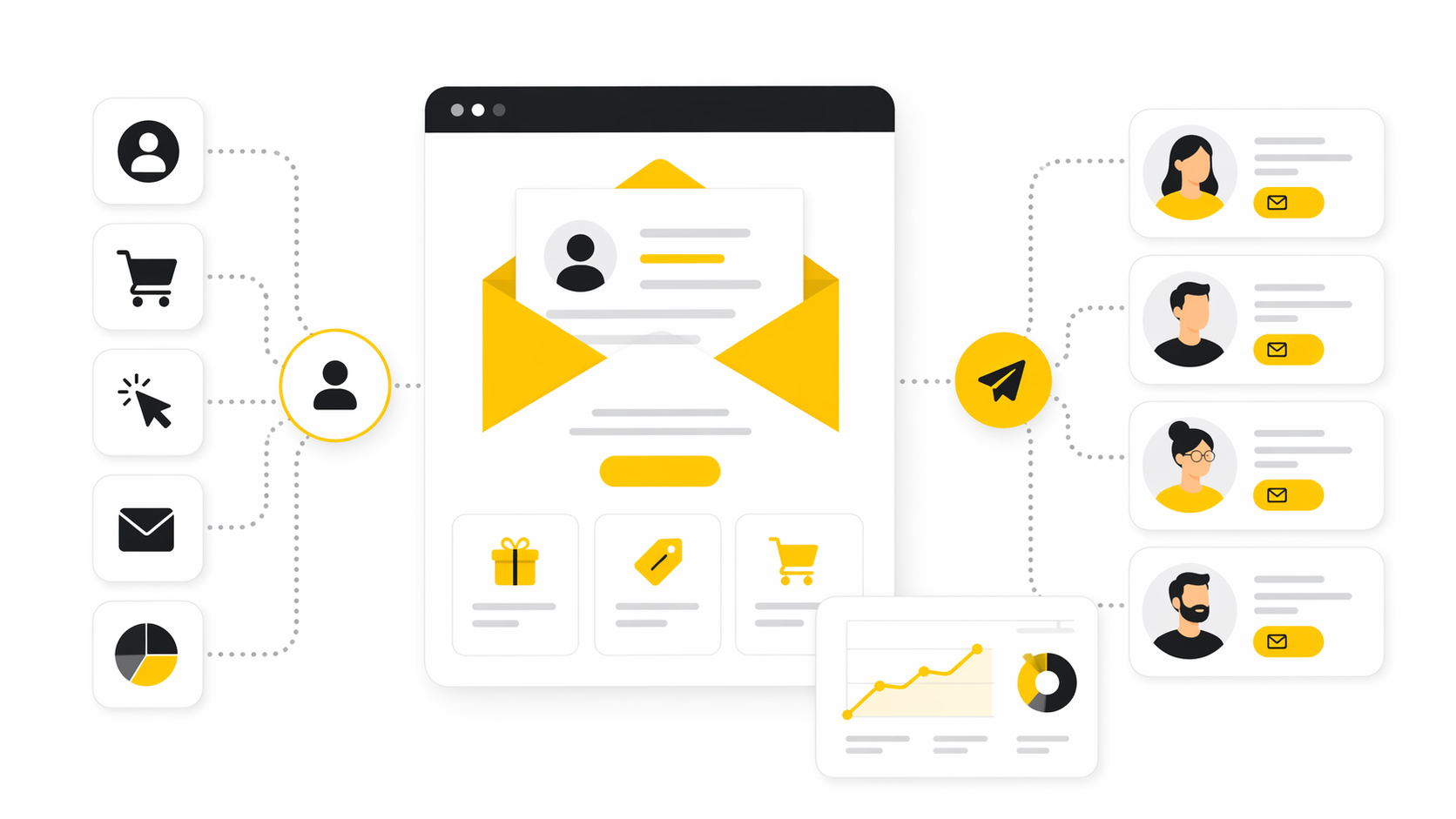
Personalized email matters because relevance compounds. When a message reflects real intent, such as a recent browse session, a product category preference, a lifecycle milestone, or a clear behavior signal, it feels useful instead of interruptive. That improves not only opens and clicks, but also trust, retention, and the odds that the next message will be welcomed rather than ignored.
The market data keeps pointing in the same direction. Consumers expect more tailored experiences, marketers know they need more personalized two-way communication, and yet execution still lags because data is fragmented and workflows are messy. Even broad benchmark data shows email remains strong as a channel, which raises the standard for every campaign: if email already performs, the advantage comes from making each send more specific, more timely, and more clearly connected to what the reader actually cares about.
There is also a strategic reason this matters now. Privacy changes and the decline of easy third-party targeting have pushed more brands toward first-party and zero-party data, which makes owned channels more valuable. Personalized email sits right in the middle of that shift because it lets you turn consented data into better customer experience instead of just better targeting.
If you want a sense of the operating environment, recent email benchmark data from Brevo and recent benchmark reporting from Moosend show a channel that is still highly competitive, which is exactly why generic blasts are losing ground to smarter, behavior-aware messaging.
The Personalized Email Framework
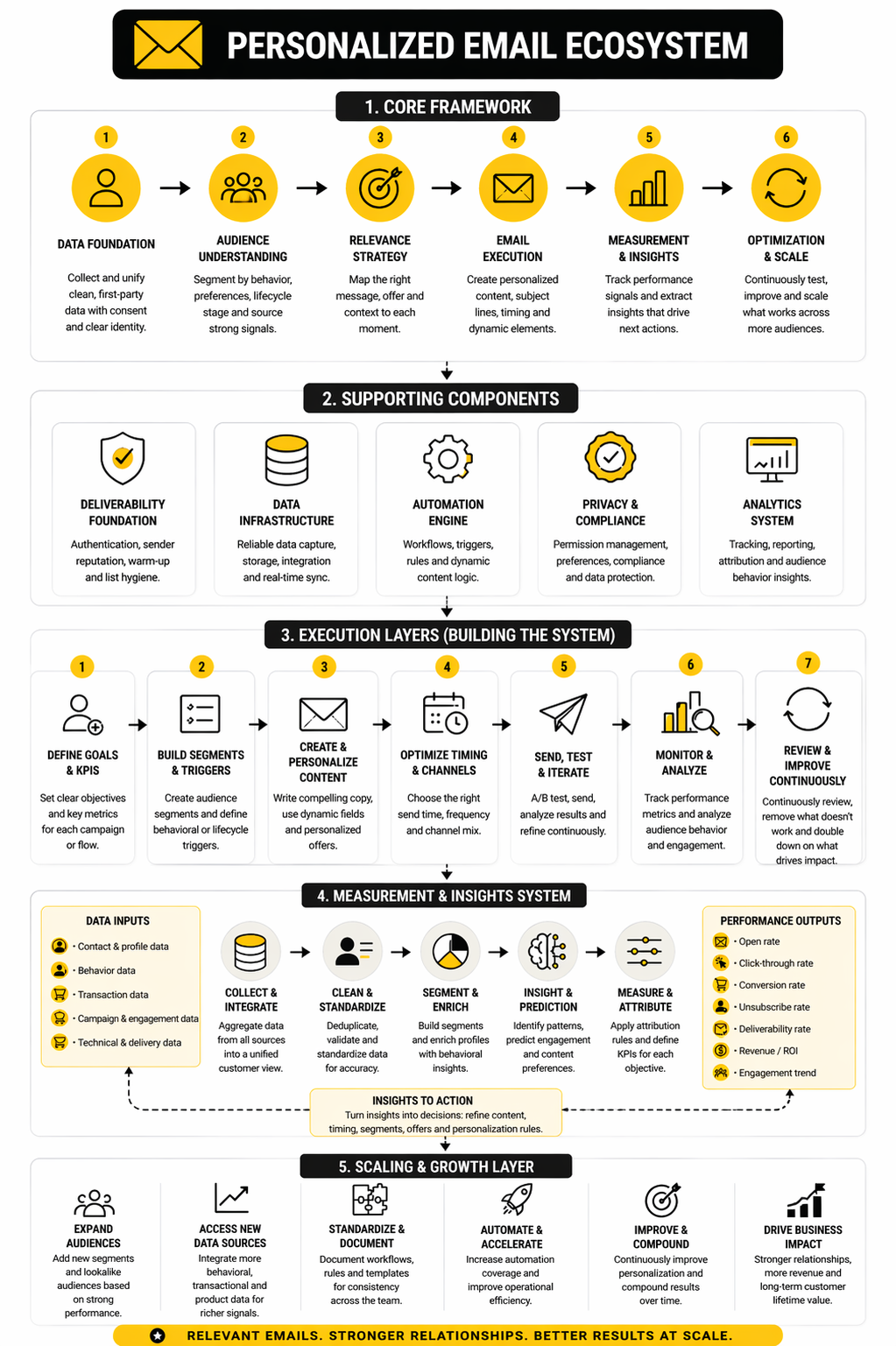
The simplest way to think about personalized email is this: the right message, to the right person, at the right moment, in the right format. Most underperforming programs fail because they overfocus on only one piece, usually the message itself, while ignoring timing, audience logic, or data quality. Strong programs treat personalization as a system, not a gimmick.
A practical framework has four layers. First, you need identity: who the subscriber is, what permissions you have, and what reliable signals you can use. Second, you need intent: what the subscriber is trying to do right now based on behavior, lifecycle stage, or declared preference. Third, you need orchestration: the trigger, cadence, channel coordination, and suppression rules that decide when the email should fire. Fourth, you need creative relevance: the copy, offer, layout, recommendation block, and call to action that make the email feel like it belongs in that exact moment.
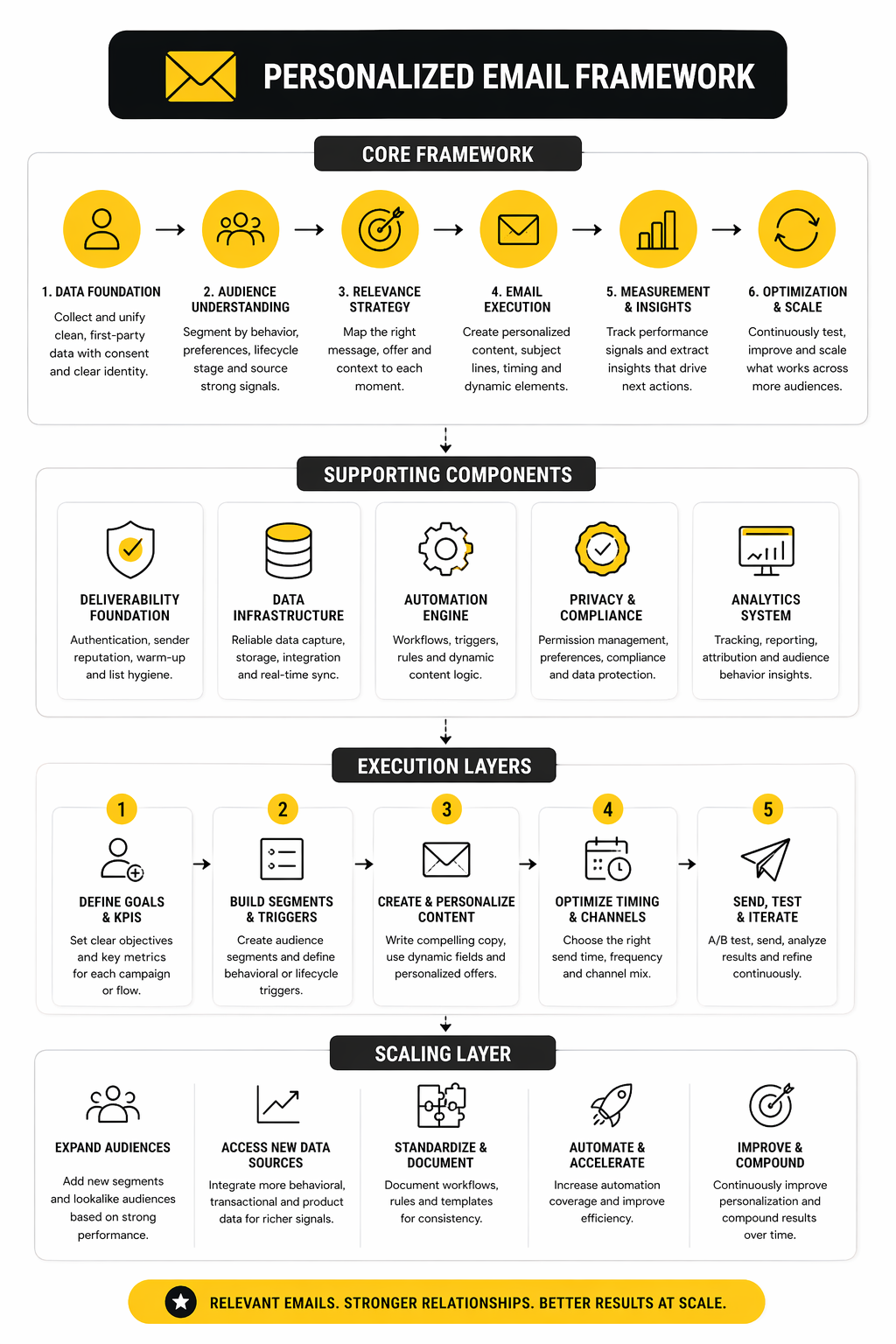
In practice, that framework usually looks like this:
- Collect consented customer data you can actually trust.
- Turn that data into segments, preferences, and behavior signals.
- Match each signal to a useful email moment.
- Build dynamic content that changes by audience or behavior.
- Measure response, learn, and tighten the rules over time.
The reason this framework works is that it keeps personalized email grounded in customer usefulness. You stop asking, “How do we personalize more?” and start asking, “What would make this email more relevant for this person right now?” That is a much better question, and it sets up the rest of this article: the data foundation, the messaging patterns, the automation logic, and the professional implementation standards that separate real personalization from shallow mail merge tactics.
The Data That Makes Personalization Work
A personalized email is only as good as the data behind it. If the underlying signals are weak, outdated, or stitched together badly, the message might still look polished, but it will miss the moment. That is why strong personalization starts less with copywriting and more with deciding which customer inputs are actually trustworthy enough to use.
The useful data is usually simpler than people think. You do not need a giant profile packed with every possible attribute. You need a clean set of signals that answer a few practical questions: who this person is, what they have done, what they seem to want now, and what you are allowed to send them. Recent guidance from Brevo’s email personalization overview, Brevo’s segmentation guide, and Moosend’s trigger email guide all point in the same direction: relevance comes from timely signals, not from collecting everything just because you can.
Start With First-Party and Zero-Party Data
The strongest foundation for personalized email is data that comes directly from the customer relationship. First-party data comes from behavior people generate on your site, in your app, or inside your emails. Zero-party data comes from what people intentionally tell you, such as preferences, interests, goals, or content choices they select themselves.
This matters because direct data is usually both more useful and easier to defend. You are not guessing through rented audiences or vague third-party assumptions. You are working with signals that came from actual interactions, which makes the resulting email more relevant and usually more respectful too. Brevo’s recent reporting on email trends puts first-party and zero-party data at the center of modern email strategy, especially as marketers lean harder on owned channels and trust-based targeting.
A good rule here is simple: collect less, but make it actionable. If a preference center tells you someone wants weekly product updates, beginner-level tutorials, or offers only in a certain category, that is far more valuable than a bloated profile field nobody uses. The point of personalized email is not to look data-rich. It is to send something that feels obviously relevant.
Behavioral Signals Usually Beat Static Profile Fields
Static fields have their place. Knowing industry, company size, location, or customer type can help shape broad segmentation. But behavior tends to be more predictive because it shows current intent, and current intent is often what separates a helpful email from a forgettable one.
That is why triggered flows keep outperforming broad one-size-fits-all sends in real programs. Browse activity, cart actions, category views, onboarding milestones, repeat purchases, demo requests, and inactivity windows all create moments where personalization can be tied to an immediate need. Moosend’s trigger email playbook and HighLevel’s guide to personalized sequences both frame behavior-based automation as the real engine behind sending the right message at the right time.
This is where a lot of teams go wrong. They build segments around who the customer was when they first signed up, then keep talking to them as if nothing changed. A personalized email program gets stronger when it reacts to what people are doing now, not just to what they looked like in the CRM six months ago.
Preference Data Makes Personalization Feel Less Creepy
There is a big difference between a message that feels relevant and one that feels invasive. Preference data helps you stay on the right side of that line because it gives the customer more control over the kind of communication they receive. When someone chooses content topics, product interests, send frequency, or communication goals, your personalized email becomes easier to tailor without relying on guesswork.
That kind of explicit input is also practical. It helps reduce unsubscribes caused by bad fit rather than bad timing. It also gives your team cleaner logic for segmentation and content decisions, which means fewer awkward automations and fewer emails that feel like they were assembled by a machine with no common sense.
Platforms keep leaning into this because it works. Moosend’s audience management pages focus heavily on segmentation and audience-centered personalization, while Brevo’s segmentation updates show how timing-based rules are becoming more dynamic and practical.
Clean Data Beats More Data
This part is not glamorous, but it is the difference between personalization that scales and personalization that breaks. If names are malformed, events are duplicated, opt-in states are inconsistent, or customer records are fragmented across tools, even a smart strategy falls apart. You end up sending duplicate offers, irrelevant reminders, or timing-sensitive emails after the moment has already passed.
A working personalized email program needs data hygiene rules before it needs more clever templates. That means standardizing fields, defining event names clearly, syncing systems properly, and setting rules for suppression, recency, and exclusions. When someone buys, the nurture flow should know. When someone unsubscribes from one category, the segmentation logic should respect that. When someone becomes a customer, the lead-gen sequence should stop.
This is one reason all-in-one or tightly integrated stacks appeal to growing teams. When customer data, automation logic, and messaging tools live closer together, it becomes easier to keep the experience coherent. HighLevel’s email marketing overview and HighLevel’s ecommerce email page both position personalization and automation as a coordination problem, not just a copy problem.
The Minimum Viable Data Stack for Personalized Email
Most companies do not need a massive customer data operation to get results. They need a minimum viable setup that captures identity, consent, behavior, and key commercial events. That usually means an email platform, a source of customer and order data, a way to track meaningful actions, and a basic system for segmentation and triggering.
In practical terms, that stack should let you do five things well:
- identify the contact reliably
- track core behaviors and lifecycle changes
- store preferences and consent status
- trigger emails from real events
- update or suppress flows when customer state changes
If your current setup cannot do those five things cleanly, more personalization will not fix it. It will just make the chaos more specific. That is why the next step is not to obsess over clever dynamic tokens. It is to understand exactly which data points deserve to drive the message, and which ones should stay out of the decision entirely.
Writing and Design Patterns That Increase Relevance
Once the data foundation is solid, personalized email stops being a backend project and becomes something the reader can actually feel. This is where the strategy either becomes useful or falls apart in execution. The difference usually comes down to whether the message reflects real context through copy, structure, and timing, or whether it just drops a few tokens into a generic template and calls that personalization. Litmus’s breakdown of segmentation and personalization and Mailchimp’s guide to dynamic email content both make the same point in different ways: real relevance changes the whole message, not just one field.
Write to the Moment, Not to the List
The easiest way to make a personalized email feel generic is to write it for a segment instead of a moment. A segment tells you who the reader broadly is. A moment tells you why this email should exist right now, which is much more useful when you are trying to earn attention in the inbox.
That is why lifecycle and trigger context matter so much in the writing itself. A welcome email should reduce friction and set expectations. A browse abandonment email should help someone continue a decision they already started. A post-purchase email should reassure, educate, or guide the next best step rather than immediately pushing another sale. Klaviyo’s 2025 strategy guide and Mailchimp’s browse abandonment guide both frame email strategy around journey stage and immediate intent, not just audience buckets.
When you write from the moment, your copy gets sharper fast. You stop saying broad things like “We thought you might like this” and start saying what actually matters: what the person looked at, what problem they are likely trying to solve, what changed since the last interaction, and what the cleanest next action should be. That is the version of personalized email that feels helpful instead of performative.
Dynamic Content Should Change Meaning, Not Just Decoration
Dynamic content is powerful, but only when it changes substance. Swapping a hero image by geography or inserting a name can be fine, but those tweaks do not carry much weight if the core value proposition, CTA, and body copy still say the same thing to everyone. Stronger personalization changes what the email is fundamentally about for each reader.
That can mean different product blocks for different browsing patterns, different onboarding steps based on account state, different offers for first-time buyers versus repeat customers, or different educational angles depending on product familiarity. Mailchimp’s dynamic content documentation and its feature overview both show how one campaign can adapt blocks, offers, and messaging based on subscriber conditions rather than forcing marketers to clone endless versions of the same email.
There is also a practical upside here. When dynamic content is used well, you reduce production bloat without sacrificing relevance. One smart build can cover multiple contexts cleanly, which is far better than maintaining a messy pile of near-duplicate campaigns that drift out of sync over time.
Good Personalized Email Still Needs Strong Design Discipline
Relevance does not excuse bad structure. Even the most intelligently targeted email will underperform if the reader cannot scan it, trust it, or act on it quickly. That means personalized email still needs clean hierarchy, clear visual emphasis, descriptive links, and a layout that makes the next step obvious.
This matters even more on mobile, where most people are processing quickly and deciding in seconds whether to keep reading. Litmus’s recent accessibility guidance emphasizes plain language, specificity, shorter sentences, and descriptive link text because those choices improve clarity for everyone, not only for users relying on assistive tech. The Litmus accessibility checklist and Litmus’s 2026 accessibility guide both reinforce something marketers sometimes forget: a more accessible email is usually a more effective email.
That is why the design side of personalization should stay disciplined. Keep one main goal per email. Make the primary CTA unmistakable. Use modules that can adapt by audience or trigger, but do not let the layout turn into a cluttered dashboard of every possible recommendation just because the system can generate it.
A Simple Process for Building Personalized Emails That Actually Work
This is the point where execution becomes tangible. If a team wants a repeatable process for personalized email, it helps to move in the same order every time instead of improvising from template to template.
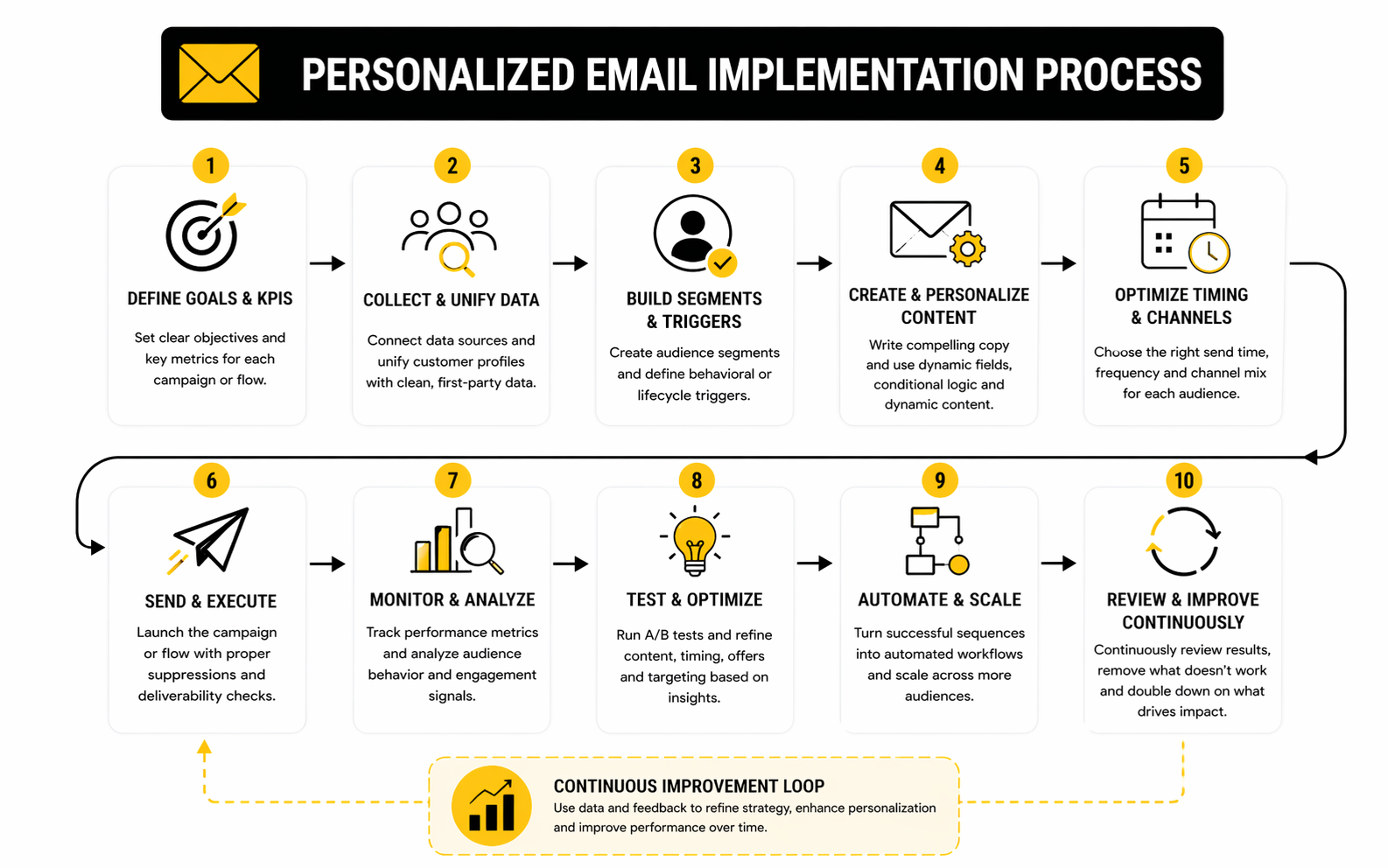
A reliable workflow usually looks like this:
- Define the moment.
- Identify the signal that proves the moment is real.
- Decide what the reader most likely needs next.
- Write the core message around that need.
- Add dynamic blocks only where they sharpen relevance.
- Set suppression rules so the email does not clash with other sends.
- Preview, test, and check deliverability before launch.
That order matters because it keeps the message customer-first. Klaviyo’s strategy framework starts with audience and journey logic before creative production, while Litmus’s deliverability guide makes clear that sending quality, testing carefully, and protecting engagement are inseparable from performance. The build process should not start with a template. It should start with a reason.
Personalization Works Best When the CTA Matches the Context
A lot of personalized email gets the body mostly right and then ruins the ending. The CTA is where the message either stays aligned with the user’s state or suddenly becomes too aggressive. Someone in early discovery might respond to “See how it works,” while someone with strong purchase intent may be ready for “Complete your order” or “Book your demo.”
That alignment is one of the simplest ways to make personalized email feel more natural. The offer, framing, and CTA should reflect the reader’s readiness, not just the business goal of the week. Mailchimp’s email strategy guide highlights testing subject lines, content angles, and calls to action as part of steady performance improvement, while Klaviyo’s marketing examples for 2025 show how different campaign types succeed by matching the ask to the situation.
The practical takeaway is blunt: not every reader should get the same call to action. If the context changes, the ask should change too. That is not overengineering. That is just respecting where the customer is in the journey.
The Best Personalized Emails Feel Calm, Clear, and Specific
There is a temptation to make personalization louder than it needs to be. Marketers sometimes overplay what they know in an attempt to prove relevance, which can make the email feel invasive or just awkward. Usually, the better move is subtle specificity.
Calm personalization sounds like a message that clearly belongs to the reader’s situation without announcing how much the system knows about them. It references the right product category, the right stage, the right friction point, or the right next step, then gets out of the way. Salesforce’s 2026 marketing report coverage makes this especially relevant now because marketers are under pressure to make interactions feel more conversational and responsive while still dealing with fragmented data and operational gaps.
That is the real standard. A personalized email should not feel clever. It should feel obvious. When the writing, design, and CTA all line up with the reader’s actual moment, the email feels less like marketing and more like momentum.
What the Numbers Actually Tell You
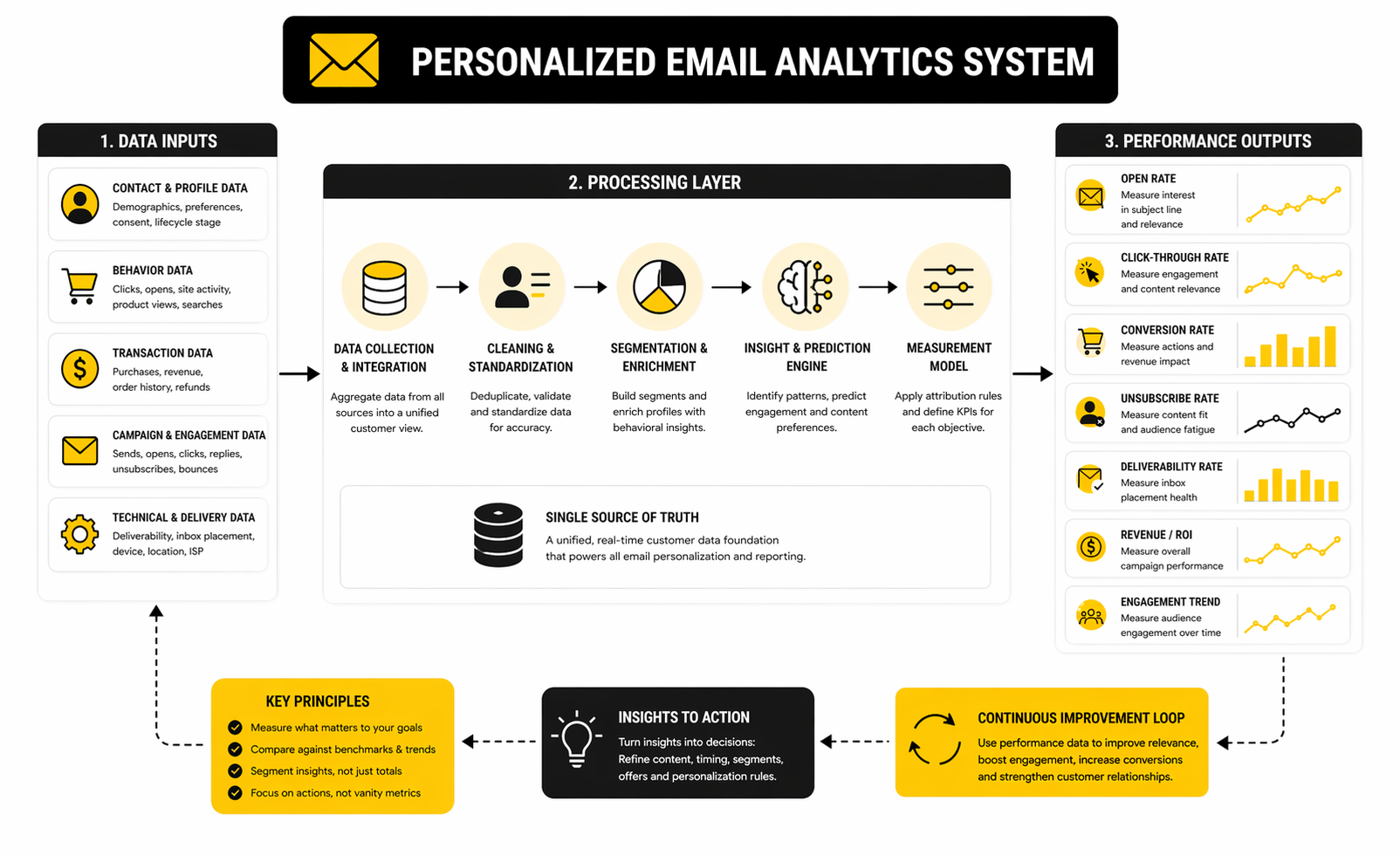
Measurement is where personalized email either becomes a disciplined growth channel or stays a vague creative exercise. You do not need fifty dashboards, but you do need a small set of metrics that tell you whether relevance is improving, whether inbox placement is holding up, and whether your audience is getting more engaged or more fatigued. That is why benchmark data matters less as a scoreboard and more as a calibration tool.
The first thing to understand is that benchmarks are directional, not universal truth. Brevo’s 2025 benchmark, based on more than 44 billion emails, shows an overall open rate of 31.22%, a click-through rate of 3.64%, and an unsubscribe rate of 0.4%, while Mailchimp’s benchmark page shows all-users averages of 35.63% open, 2.62% click, and 0.22% unsubscribe. Those numbers are close enough to give you a realistic range, but different enough to prove that list quality, industry mix, methodology, and platform definitions all shape the final benchmark.
That is exactly why a personalized email program should not obsess over hitting one magic open rate. The smarter question is whether your numbers are moving in the right direction for your audience and use case. If clicks rise while unsubscribes stay stable, that usually means your targeting and message fit are improving. If opens stay flat but conversions improve, that can still be a clear win because attention is not the goal on its own.
Open Rate Is Useful, but It Is No Longer Enough
Open rate still tells you something important. It reflects initial attention, which usually comes from the combination of sender trust, subject line quality, preview text, and timing. But it has become a weaker standalone signal because privacy protections and automated activity can distort what looks like human engagement.
Brevo now explicitly notes that its open-rate reporting includes Apple Mail Privacy Protection activity and, since July 8, 2025, bot activity unless filtered out. That matters because a campaign can appear healthier than it really is if you stop at opens. In a personalized email program, open rate is still worth watching, but it should lead you to deeper metrics rather than end the analysis.
The practical move is simple. Use opens to spot subject-line and timing issues, then confirm real relevance with clicks, click-to-open behavior, conversions, and unsubscribe trends. If your open rate is fine but your click rate is weak, the problem is probably not curiosity. It is message fit.
Click-Through Rate Is the Stronger Signal for Relevance
If you want one performance metric that most directly reflects whether personalized email is actually doing its job, click-through rate is the better starting point. Brevo’s benchmark page defines CTR as the percentage of delivered emails that received at least one click and calls it a truer indicator of intent and content relevance. That makes sense because clicks require a recipient to do something active, not just trigger an image load in the background.
This is why personalized email should usually be judged more heavily on click quality than on open volume. A campaign with average opens but strong clicks often means the content matched the moment well. A campaign with inflated opens and weak clicks usually means the targeting, offer, or CTA did not hold up once the email was actually seen.
For teams that want cleaner reporting and easier campaign comparison, tools with built-in analytics matter because they reduce the friction between send, report, and next action. Brevo’s reporting stack and Mailchimp’s analytics view both center reporting around campaign-level decisions, which is exactly where most personalization gains are found.
Unsubscribes and Bounces Are Early Warning Signals
A lot of teams stare at engagement and ignore the health signals that tell them trouble is building. That is a mistake. Brevo’s benchmark framework treats unsubscribe rate as a fatigue signal and positions it as an early warning sign of over-communication and inbox burnout.
That framing is useful because it changes what unsubscribe data means. A rising unsubscribe rate does not always mean your copy got worse. Sometimes it means your send frequency drifted too high, your segments got too broad, or your personalization started feeling repetitive rather than relevant. In other words, unsubscribes are often a sign that the program is losing alignment with audience expectations, not just losing creative quality.
Bounce rates tell a different story. They are less about message quality and more about infrastructure, list hygiene, and database discipline. Brevo’s 2025 benchmark shows an overall soft bounce rate of 3.6% and a hard bounce rate of 0.19%, which gives you a useful reality check: if your bounce profile is materially worse, the first fix is probably not better copy. It is cleaner data and better sending practices.
Inbox Placement Changes How You Should Read Every Other Metric
One reason email analytics can mislead people is that the visible numbers are only part of the story. If too many messages land in spam or disappear into the “missing” category, performance drops before the subscriber ever gets a fair chance to engage. That is why inbox placement should sit behind every serious reading of personalized email performance.
Brevo’s 2025 benchmark includes mailbox-provider placement data showing meaningful variation by provider, with Gmail at 88.1% inbox placement, Microsoft at 82.5%, Yahoo at 87.4%, and Apple markedly lower at 66.3%, alongside a 22.9% spam rate in that Apple row. You should not treat those as universal outcomes for every sender, but they are a strong reminder that performance differences can be technical and provider-specific, not purely creative.
This is also why warm-up, authentication, volume pacing, and list hygiene belong inside the measurement conversation. HighLevel’s 2026 email sending guide is blunt about it: ignore best practices and you risk going to spam. So when a personalized email underperforms, do not jump straight to rewriting subject lines. First check whether the audience actually received the message in a healthy inbox environment.
Benchmarks Matter Most When They Drive a Specific Action
The useful way to read benchmarks is to connect each metric to a next step. Low opens point to sender reputation, subject lines, timing, or audience fit. Low clicks point to weak message relevance, poor CTA alignment, or a disconnect between trigger and offer. High unsubscribes point to fatigue, sloppy segmentation, or an experience that feels too generic or too frequent. High bounces point to bad data and sending issues.
This is where personalized email becomes operational instead of theoretical. You are no longer asking whether the campaign did “well.” You are asking which layer broke: attention, relevance, trust, or deliverability. That question leads to much better decisions than celebrating a nice open rate while the rest of the funnel quietly weakens.
A practical analytics rhythm helps here. Review campaign metrics after each send, compare performance by segment and trigger type, and then look at trendlines over time rather than reacting to one campaign in isolation. Brevo’s benchmark resources and HighLevel’s email-sending playbook are useful references for building that cadence into the system instead of treating reporting as an afterthought.
The Real Goal Is Not Better Metrics, but Better Decisions
This is the part too many marketers miss. The goal of measurement is not to collect more numbers. It is to make smarter decisions about what to send, to whom, and how often. Personalized email wins when reporting helps you narrow the gap between what your audience needs and what your system is currently sending them.
So yes, track the benchmarks. Know what healthy ranges look like. But use the data to ask sharper questions: which segments are losing interest, which triggers produce the strongest intent, which campaigns create fatigue, and which sends are damaging deliverability. Once you do that consistently, the analytics stop being decorative and start becoming the operating system for continuous improvement.
Professional Implementation Without Losing Trust
The hardest part of personalized email is not getting it to work once. It is getting it to work repeatedly, across more segments, more triggers, more products, more teammates, and more customer states without slowly turning the whole program into a mess. That is where advanced teams separate themselves from everyone else. They stop treating personalization as a campaign tactic and start treating it as an operating discipline.
This is also the point where trust becomes the real constraint. The more precise your targeting gets, the more careful you need to be about data quality, message tone, and frequency. Salesforce’s recent personalization guidance highlights the same friction points most teams run into once they scale: data quality issues, segmentation complexity, privacy compliance, and the operational challenge of making personalization work consistently across the business. (Brevo’s guidance on the metrics that reveal those issues)
Scaling Personalization Usually Fails in Operations, Not in Strategy
Most teams do not struggle because they lack ideas. They struggle because every new personalized email adds one more layer of logic to manage. A welcome flow becomes five welcome paths. A promotional campaign gets split by behavior, lifecycle stage, and product interest. A retention program starts pulling in product usage data, support events, and account milestones. Very quickly, the system gets harder to understand than it is to imagine.
That is why operational simplicity matters so much. Litmus reported in 2025 that major personalization challenges included developing personalized content efficiently, collecting and analyzing the right data, and measuring the impact on performance. Those are not creative problems. They are coordination problems. (Brevo’s segmentation tools overview)
The fix is boring, but effective. Standardize event names. Document your trigger logic. Keep a single source of truth for suppression rules. Build modular blocks that can be reused instead of rebuilding every email from scratch. A personalized email program becomes scalable when the rules are clearer, not when the automation gets flashier.
More Personalization Is Not Always Better Personalization
This matters more than people want to admit. There is a point where adding more variables does not make the email more useful. It just makes the system more fragile and the message more likely to feel overly engineered. A personalized email should feel relevant, not hyperaware.
Litmus’s 2026 guidance on evaluating AI in email marketing makes this especially clear. It points out that hyper-personalization becomes powerful only when it is built on solid first-party data and clear segments, while poor data or over-targeting can quickly make the experience feel intrusive. That is the tradeoff advanced teams have to manage: precision creates upside, but it also raises the risk of crossing the line from helpful to uncomfortable. (Brevo’s personalization tips)
A good working rule is this: personalize only where it sharpens the decision. If a piece of data does not help you improve timing, offer fit, education, or next-step clarity, it probably does not belong in the message logic. That kind of restraint protects both trust and performance.
AI Can Help Scale Personalized Email, but It Can Also Flatten It
AI is now woven into modern email workflows, and ignoring that would be unrealistic. Teams are using it for draft generation, subject line ideation, dynamic recommendations, segmentation support, send-time optimization, and workflow acceleration. McKinsey’s 2025 work on the next frontier of personalization and Salesforce’s 2026 marketing research both reflect the same broader shift: marketers are trying to scale relevance through better automation and AI-supported decision-making. (GoHighLevel’s AI-focused marketing tools)
But speed creates its own problems. Litmus warned in early 2026 that AI can help with hyper-personalization and production speed, yet poor inputs and generic outputs can damage relevance and make messages feel less human. It also noted a growing need to edit AI output so the final email still sounds like the brand, not like a polished average of the internet. (Brevo’s campaign creation guidance)
That is the expert-level tradeoff. Use AI to accelerate structure, analysis, and iteration. Do not outsource judgment. The more personalized the email is meant to feel, the more dangerous it becomes to let generic automation flatten tone, context, and empathy.
Deliverability Gets Harder as Personalization Expands
Here is the uncomfortable truth: a sophisticated personalized email program can still fail if mailbox providers stop trusting you. Advanced segmentation and trigger logic do not protect you from inbox placement problems. In some cases they make the problem harder to diagnose because poor performance can look like a creative issue when it is really a sending issue.
Litmus’s 2025 deliverability guidance and HighLevel’s email-sending best practices both push the same core idea: authentication, warm-up, cadence control, and list hygiene are not technical side quests. They are part of the performance system. The more automated and personalized your sending becomes, the more disciplined your infrastructure needs to be. (HighLevel’s email sending guide)
This is why mature teams separate engagement problems from placement problems before they change strategy. If clicks are falling only on certain mailbox providers, or if a flow suddenly weakens after a volume increase, rewriting the copy may be the wrong move. Sometimes the real fix is slowing down, cleaning the audience, or tightening the sending environment.
Governance Is What Keeps Personalized Email From Turning Into Chaos
Once more teams get involved, governance stops sounding corporate and starts sounding necessary. Someone needs to define which fields can drive personalization. Someone needs to decide how often triggers can overlap. Someone needs to own exclusions, frequency caps, QA, approvals, and fail-safes. Without that, the program becomes unpredictable fast.
This is where a platform decision can matter. If your team is spread across disconnected tools, governance becomes much harder because personalization logic lives in too many places. If the stack is more centralized, it becomes easier to manage audience rules, suppression logic, workflow visibility, and reporting in one system. GoHighLevel’s broader platform view and its email marketing setup are relevant here because they are built around keeping communication, automation, and segmentation closer together.
Governance does not make a personalized email program less agile. It makes it safer to scale. That is a big difference. Without it, every new automation increases risk. With it, every new automation has a better chance of fitting into the system cleanly.
The Smartest Teams Optimize for Relevance Per Send, Not Maximum Automation
It is easy to admire complexity in email marketing. Huge branching flows, dozens of conditions, endless personalization rules. But the best teams usually do something more disciplined. They optimize for relevance per send. They ask what earns attention in this exact moment, then build only as much logic as that moment needs.
That mindset changes the economics of the whole program. You stop overbuilding flows nobody can maintain. You stop collecting data nobody can use responsibly. You stop layering personalization for the sake of optics. Instead, you create a personalized email system that is easier to test, easier to trust, and easier to improve over time. (Brevo’s benchmark and reporting resources)
That is really the advanced lesson. Personalization at scale is not about proving how much your stack can do. It is about proving that your brand can stay useful, clear, and trusted even as the system gets more sophisticated. And that is exactly what the final part needs to address: how to bring all of this together into a practical closing framework, plus the common questions that come up when teams try to implement personalized email the right way.
FAQ - Built for Complete Guide
What is a personalized email, really?
A personalized email is a message shaped by customer context, not just a template with a first name token dropped into the headline. It uses signals like behavior, preferences, lifecycle stage, purchase history, or product usage to make the message more relevant to that person’s actual situation. The reason this matters is simple: when the email matches the moment, it feels useful instead of generic.
Is personalized email the same as segmentation?
Not quite. Segmentation groups people based on shared traits or behaviors, while personalized email adapts the message for the individual or for a very specific context inside that group. In practice, the best programs use both together because segmentation creates the audience logic and personalization sharpens the message. Litmus’s explanation of segmentation and personalization working together is useful here because it frames them as complementary, not competing.
How much data do you actually need to get started?
Less than most teams think. You do not need a giant customer data platform before you can send a better personalized email. You need a clean identity layer, permission status, a few meaningful behavior signals, and a clear sense of what each trigger or campaign is supposed to do.
What kinds of personalization usually work best first?
The strongest early wins usually come from lifecycle and behavior-based moments, not from cosmetic tweaks. Welcome flows, abandoned cart reminders, browse abandonment, onboarding nudges, replenishment reminders, and post-purchase education tend to be more useful than shallow personalization in broad newsletters. That is because they are tied to intent, and intent is what makes relevance obvious.
Can personalized email become too personal?
Yes, absolutely. There is a line where relevance turns into discomfort, especially when the email appears to know too much or says the quiet part out loud. The smarter move is usually subtle specificity: use the right context, the right offer, and the right next step without overexplaining how the system arrived there.
Does AI make personalized email better?
AI can make personalized email faster, more scalable, and easier to test, but it does not automatically make it better. It helps with drafting, idea generation, dynamic content support, and workflow efficiency, yet human judgment is still what protects tone, clarity, and trust. Litmus’s 2026 guide to AI in email marketing is a good reminder that the audience still has to feel like a human wrote for them, even when AI helped behind the scenes.
What metrics matter most for personalized email?
The most useful metrics are the ones that show whether relevance is improving and whether the inbox experience is healthy. Click-through rate, conversion rate, unsubscribe rate, bounce behavior, and trendlines by segment or trigger usually tell you more than raw opens on their own. Litmus’s 2026 piece on the metrics that matter reinforces that the right metric depends on the business goal, which is exactly how personalized email should be measured.
Should every email be personalized?
No, and trying to personalize everything often creates unnecessary complexity. Some messages only need strong segmentation, clear writing, and consistent brand voice to perform well. The goal is not maximum personalization. The goal is useful personalization where it materially improves the reader’s decision, experience, or timing.
How do you keep personalized email from becoming impossible to manage?
You keep the system tighter than your ambition. That means naming events clearly, documenting logic, setting suppression rules, limiting unnecessary branching, and reusing modular blocks instead of reinventing every flow. Personalization scales when the operating system is clean, not when the workflow map looks impressive.
What role does consent play in personalized email?
Consent is not a legal footnote. It is one of the foundations of trust. As platforms and brands lean harder on first-party and zero-party data, the quality of your personalization depends partly on whether the customer understands the relationship and has intentionally chosen to be part of it. Klaviyo’s 2026 automation trends write-up highlights privacy and consent as central forces shaping modern personalization, and that is exactly the right lens.
Can small businesses use personalized email effectively, or is this only for large brands?
Small businesses can often move faster because they have fewer layers, fewer tools, and fewer approval bottlenecks. A lean stack with clear flows and decent data hygiene can outperform a bloated enterprise setup that is buried in disconnected systems. Personalized email is not reserved for huge brands. It rewards clarity and discipline more than company size.
What tools are worth considering for building a personalized email system?
That depends on how complex your needs are, but the core requirement is always the same: you need a platform that can handle contact data, segmentation, automation, reporting, and message execution without forcing your team into chaos. For some teams, that may mean an email-first platform like Brevo, Moosend, or Mailchimp, while other teams may prefer a broader operating stack like GoHighLevel. The best choice is usually the one that keeps data, automation, and execution close enough together that your personalized email program stays coherent as it grows.
Bringing It All Together
At this point, the pattern should be clear. A strong personalized email program is not built by adding more tricks to a campaign template. It is built by combining clean data, useful timing, disciplined writing, healthy analytics, and operational control into one system that keeps earning trust over time.
That is why the best personalized email does not feel flashy. It feels right. It arrives when it should, says what matters, respects the relationship, and makes the next step easier for the reader. When a team gets that right consistently, personalization stops being a tactic and becomes part of how the brand communicates.
Explore 10K+ Remote Marketing Contracts on MarkeWork.com
Most marketers spend too much time chasing clients, competing on crowded platforms, and losing a percentage of every project to middlemen.
MarkeWork gives you a better way. Browse thousands of remote marketing contracts and connect directly with companies desperate to hire skilled marketers like you, without platform commissions and without unnecessary gatekeepers.
If you're serious about finding better opportunities and keeping 100% of what you earn, explore available contracts and create a profile for free at MarkeWork.com.