

HubSpot pricing looks simple at first. Then you start comparing hubs, seats, contact tiers, onboarding, AI credits, reporting needs, and automation limits, and the real decision becomes less obvious.
That matters because HubSpot is no longer just a CRM line item. It is a customer platform used by more than 288,000 customers globally, with pricing shaped by the way your team sells, markets, supports customers, manages data, and scales operations.
This guide breaks down pricing HubSpot in a practical way: not just what the plans cost, but what actually drives the bill. The goal is to help you avoid buying too little, buying too much, or discovering too late that the feature you needed lives one tier higher.
Article Outline
- Part 1: Pricing HubSpot: What You Need To Know First
- Part 2: HubSpot Pricing Plans And What Each Tier Really Includes
- Part 3: Seats, Users, Contacts, And Add-Ons
- Part 4: The Real Cost Drivers Behind HubSpot
- Part 5: HubSpot Alternatives And When They Make Sense
- Part 6: Final Buying Framework, FAQs, And Next Steps
Pricing HubSpot: What You Need To Know First
HubSpot pricing is built around a few moving parts: hubs, tiers, seats, contacts, and add-ons. The hubs cover different business functions, such as Marketing, Sales, Service, Content, Operations, Commerce, and the broader Customer Platform. The tiers usually move from Free or Starter into Professional and Enterprise, with each jump unlocking deeper automation, governance, reporting, and scale.
The important shift is that HubSpot moved toward a seats-based pricing model across subscription tiers, introducing seat types such as Core Seats and View-Only Seats in 2024. That change matters because the cost is not only about which product you buy, but also who needs edit access, who only needs visibility, and which teams require paid feature access. HubSpot’s own update on seat-based pricing is one of the key things to understand before comparing plans.
Pricing HubSpot correctly starts with usage, not the pricing page. A small team that needs clean contact management and basic pipeline visibility may be fine on Free or Starter. A team that needs workflow automation, attribution, advanced reporting, lead scoring, custom objects, or complex permissions will usually hit Professional or Enterprise decisions much faster.
Why HubSpot Pricing Matters
The wrong HubSpot plan can create two expensive problems. The first is overbuying, where a company pays for Enterprise-level capability before the team has the process maturity to use it. The second is underbuying, where a team chooses a cheaper plan and then has to rebuild workflows, reporting, and permissions later.
This is especially important because HubSpot sits close to revenue operations. If your CRM, marketing automation, sales pipeline, customer support, and website data all live in one system, pricing is not just a software expense. It becomes a decision about how your go-to-market team will work every day.
HubSpot’s scale also makes the pricing conversation more serious. The company reported full-year 2025 revenue of $3.1 billion, which shows how widely the platform has moved beyond early-stage CRM use. A platform this central deserves a buying framework, not a rushed subscription choice.
Framework Overview
The cleanest way to evaluate HubSpot pricing is to separate the decision into four layers. First, decide which hub or bundle matches your business model. Second, decide which tier gives you the minimum feature depth you need. Third, map seats to real user roles instead of giving everyone the same access. Fourth, estimate scaling costs such as marketing contacts, onboarding, integrations, AI usage, and reporting complexity.
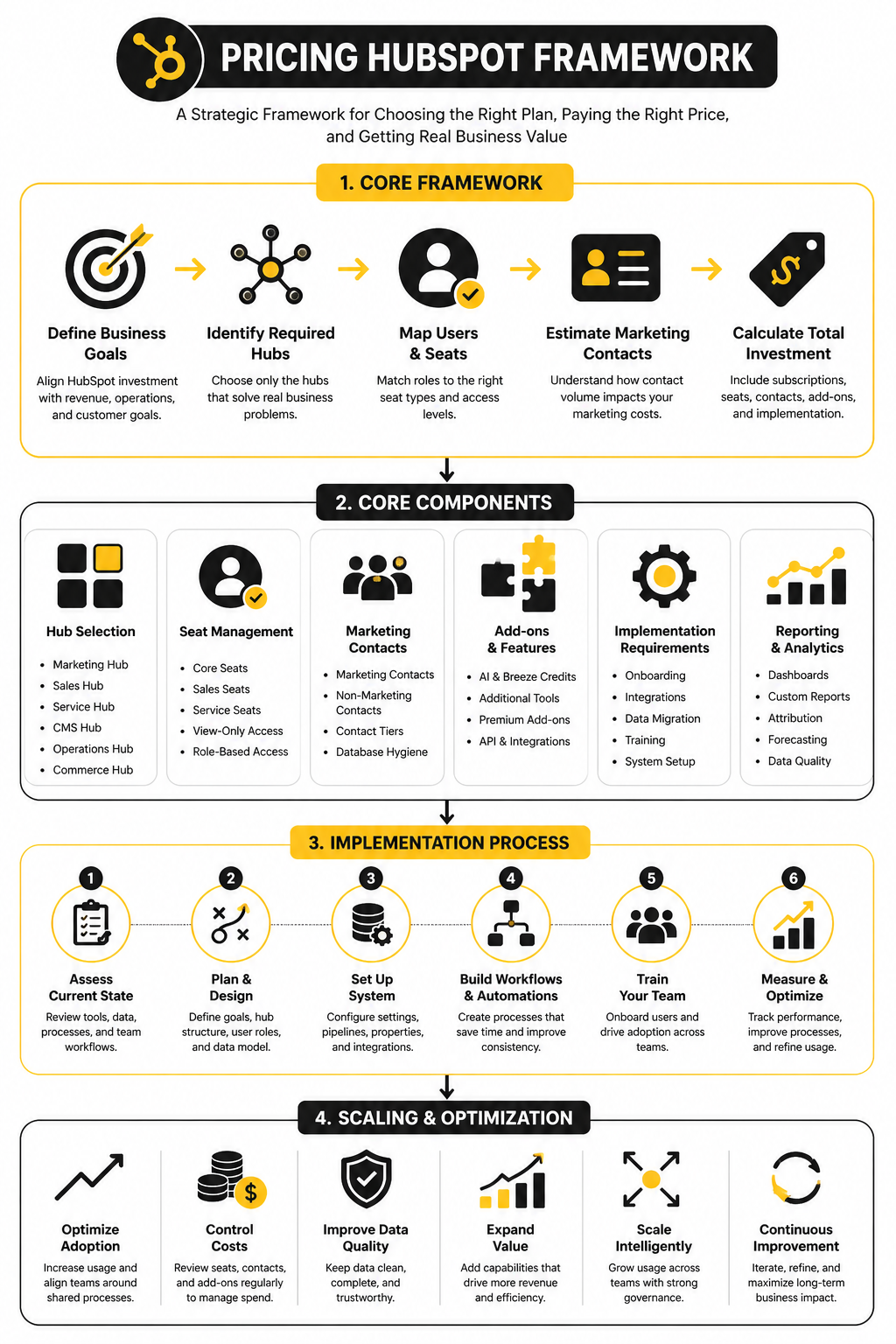
This framework keeps the conversation grounded. Instead of asking, “Is HubSpot expensive?” you ask, “Which parts of HubSpot will actually drive revenue, save time, or reduce operational mess?” That is a much better question.
It also helps you compare HubSpot against alternatives fairly. For example, a company that mainly needs funnels and checkout pages may compare HubSpot with ClickFunnels, while an agency or local-service operator may compare it with GoHighLevel. Those tools are not identical to HubSpot, but they can be more practical depending on the job.
Core Components Of HubSpot Pricing
The first component is the hub. Marketing Hub, Sales Hub, Service Hub, Content Hub, Operations Hub, and Commerce Hub solve different problems, and bundling them changes the economics. A business using HubSpot only for pipeline management will think about pricing very differently from a company using it for CRM, email marketing, landing pages, reporting, customer support, and payments.
The second component is the tier. Starter is usually about getting core functionality without heavy complexity. Professional is where automation, reporting, and more serious operating systems start to matter. Enterprise is for companies that need stronger governance, scale, permissions, and advanced control.
The third component is access. HubSpot’s seat model means you should define who edits, who sells, who services customers, who manages systems, and who only views dashboards. HubSpot’s help documentation on assigning and managing seats makes this clear: seat planning is now part of cost planning.
Professional Implementation Starts Before Purchase
A professional HubSpot implementation starts before anyone signs the contract. You need to map your funnel, lifecycle stages, lead sources, sales process, customer handoff, reporting requirements, and ownership rules. Without that work, the pricing conversation becomes guesswork.
This is where many teams get trapped. They compare plan names, pick the one that feels safe, and only later discover that their real requirements were hidden in workflows, permissions, custom reporting, marketing contacts, or integration limits. That is not a HubSpot problem as much as it is a planning problem.
Before choosing a plan, write down what HubSpot must do in the first 90 days. Then separate “must have now” from “nice later.” Pricing HubSpot becomes much easier when the buying decision is tied to actual operating needs instead of vague growth plans.
HubSpot Pricing Plans And What Each Tier Really Includes
HubSpot pricing is easiest to understand when you stop thinking in one flat price. The platform is split into hubs, and each hub has its own Free, Starter, Professional, and Enterprise path. That means the right question is not “How much does HubSpot cost?” but “Which hub, which tier, and which seats does this team actually need?”
The common pattern is simple. Free gives you a usable CRM foundation, Starter removes some early friction, Professional unlocks serious automation and reporting, and Enterprise adds deeper control for larger teams. Recent pricing breakdowns from Forbes Advisor and TechRadar both point to the same practical reality: HubSpot can start affordably, but the bill rises quickly once you move into advanced hubs, paid seats, and larger databases.
Free Tools
HubSpot’s free tools are useful when you need a basic CRM without committing budget immediately. You can manage contacts, companies, deals, tasks, forms, email tracking, live chat, and simple pipeline activity. For a solo operator or a small team still proving a sales process, that can be enough to get organized.
The catch is that free does not mean unlimited operational depth. You will run into limits around automation, reporting, branding, permissions, and more advanced sales or marketing features. That is why the free tier is best treated as a starting point, not as a long-term system for a growing revenue team.
Use Free when your main goal is visibility. If your team simply needs one shared place to store contacts and track basic deals, it makes sense. If you already need nurture sequences, lead scoring, advanced dashboards, or structured handoffs between marketing and sales, you are probably past this tier.
Starter
Starter is the first paid step and usually fits small businesses that want HubSpot to feel cleaner and more practical. It adds more usable sales, marketing, service, and content features without jumping straight into the complexity of Professional. For many teams, this is where HubSpot starts to feel like a real operating system instead of just a free CRM.
The main value of Starter is removing obvious limitations. You get a more polished setup, better customer-facing tools, and access that works better for a real team. HubSpot’s seat-based model also makes this tier easier to scale carefully because not every user needs the same level of paid access.
Starter is not the right tier if your process depends on advanced automation. That point matters. A team can waste a lot of time trying to force Starter to behave like Professional, when the missing piece is not effort but plan capability.
Professional
Professional is where pricing HubSpot becomes a more strategic decision. This is the tier most teams look at when they need automation, stronger reporting, campaign management, forecasting, sales sequences, service workflows, or more serious content operations. It is also where the jump in cost becomes noticeable enough that you should have a clear implementation plan before buying.
Professional usually makes sense when HubSpot is connected to revenue execution, not just contact storage. If marketing needs to trigger workflows from form behavior, sales needs structured sequences, and leadership needs cleaner reporting, this tier can justify itself. The value comes from process leverage, not from having a bigger software plan.
This is also where onboarding and setup quality matter much more. A messy Professional portal can become expensive clutter. A well-planned Professional portal can reduce manual work, improve follow-up, and make reporting far more reliable.
Enterprise
Enterprise is for companies that need stronger control, governance, customization, and scale. It is not simply “Professional with more features.” It is better understood as the tier for teams that need advanced permissions, complex reporting, deeper administration, higher limits, and stronger operational structure.
This tier tends to fit larger sales teams, multi-brand organizations, companies with stricter data needs, or businesses that have outgrown simpler CRM architecture. If multiple departments rely on HubSpot every day, Enterprise can make sense because control becomes part of the value. Without that need, it can easily be overkill.
The biggest mistake is buying Enterprise because it feels safer. Safety comes from clear requirements, not from the highest plan. If your team cannot name the Enterprise features it will use in the first 90 days, pause before upgrading.
The Main HubSpot Hubs
HubSpot’s hubs are where the pricing conversation gets more specific. Each hub solves a different business problem, and the final cost depends on which combination you choose. A company using one hub lightly will have a very different bill from a company running its entire go-to-market system inside HubSpot.
Marketing Hub
Marketing Hub is usually the hub that needs the most careful budgeting. It supports email marketing, landing pages, forms, campaigns, automation, segmentation, reporting, and lead management. The cost can also scale with marketing contacts, which makes list hygiene a real financial issue.
This hub is strongest when your marketing team needs CRM-connected campaigns. That means campaigns are not just sending emails, but responding to lifecycle stage, deal activity, form submissions, page behavior, and sales outcomes. If you only need lightweight newsletters, a dedicated email platform like Brevo or Moosend may be more practical.
Marketing Hub becomes powerful when the CRM data is clean. If your lifecycle stages, source tracking, and contact properties are messy, higher-tier marketing automation will only amplify the mess. Fix the data model before you judge the plan.
Sales Hub
Sales Hub is built around pipeline management, prospecting, email tracking, meetings, sequences, quotes, forecasting, and sales automation. Starter can work for a small team that needs basic selling tools. Professional and Enterprise become more relevant when sales leadership needs forecasting, coaching, automation, and tighter process control.
This is where seat planning matters a lot. A sales rep who lives in sequences, tasks, deals, and forecasting needs more than view-only access. A founder or finance lead who only checks dashboards may not need the same type of paid seat.
Sales Hub pricing should be evaluated against rep productivity. If the plan helps reps follow up faster, standardize pipeline movement, and reduce admin work, it can be worth it. If the team has no defined sales process yet, software alone will not create one.
Service Hub
Service Hub is for support teams that need tickets, inboxes, knowledge base tools, customer portals, SLAs, feedback surveys, and service reporting. It becomes more valuable when customer support and revenue data need to live together. That connection is useful because service interactions often reveal expansion risk, churn risk, and product issues.
Starter can work for simple support needs. Professional becomes more relevant when you need automation, help desk structure, customer feedback loops, and better reporting. Enterprise fits teams that need stronger permissions, scale, and advanced service operations.
The biggest reason to consider Service Hub is continuity. If sales closes the deal in HubSpot but support works somewhere else, customer context gets split. Service Hub can reduce that gap when the team is ready to centralize the customer journey.
Content Hub
Content Hub is HubSpot’s website and content management layer. It is useful for teams that want landing pages, website content, personalization, forms, analytics, and CRM data in one system. The value is not just publishing pages; it is connecting content performance to contacts, campaigns, and revenue activity.
This hub makes sense when your site is part of your acquisition engine. If your website is mostly static, you may not need a full HubSpot content setup. If your pages, forms, campaigns, and CRM workflows need to work together, Content Hub becomes much more compelling.
Teams comparing content and funnel tools should be honest about what they are building. If the priority is fast funnel launches, checkout flows, and conversion pages, ClickFunnels may fit better. If the priority is CRM-connected content and lifecycle reporting, HubSpot is usually the more integrated choice.
Operations Hub
Operations Hub is for data quality, integrations, automation, and operational cleanup. It helps teams sync systems, standardize data, automate internal processes, and reduce the chaos that appears when multiple tools do not agree with each other. This is not always the first hub people buy, but it can become one of the most important.
Operations Hub matters when your CRM has become the source of truth. If data enters from forms, imports, sales activity, support tickets, billing tools, and third-party apps, consistency becomes hard. Operations Hub helps keep that system cleaner and more reliable.
This is also where implementation discipline pays off. Bad data sync rules can create duplicate records, broken reporting, and confused teams. Clean operations architecture can make every other HubSpot hub perform better.
Commerce Hub
Commerce Hub supports payments, invoices, subscriptions, payment links, and commerce-related CRM activity. It is most relevant for teams that want revenue collection and customer records closer together. For some businesses, that reduces the need to stitch together separate quoting, billing, and payment workflows.
This hub is not always the centerpiece of a HubSpot purchase. It becomes more interesting when your sales motion involves quotes, recurring revenue, or payment workflows that should connect directly to CRM records. The practical question is whether commerce data should live near your sales and customer data.
For simple checkout-heavy funnels, a dedicated funnel platform may still be easier. For CRM-connected revenue operations, Commerce Hub deserves attention. The better choice depends on how much of your customer journey you want inside HubSpot.
Seats, Users, Contacts, And Add-Ons
This is where pricing HubSpot becomes real. Plans and hubs tell you what the platform can do, but seats, contacts, onboarding, AI credits, and add-ons determine what you actually pay. Most budget surprises do not come from the headline tier; they come from growth in access, usage, and operational complexity.
The clean way to manage this is to separate people from database size and feature usage. A user is a person with access. A seat defines what that person can do. A contact may or may not be billable depending on whether you actively market to them.
HubSpot Seat Types
HubSpot’s seat model is designed to avoid charging every user the same way. HubSpot’s own documentation on managing seats explains that paid subscriptions can include Core, Sales, Service, Commerce, and View-Only access depending on the product and pricing model. That means a sales rep, support lead, marketing manager, finance user, and executive viewer should not automatically receive the same paid access.
This matters because seat creep is one of the easiest ways to inflate a HubSpot bill. Teams often add users during onboarding, forget to remove access when roles change, and slowly build a license structure that no longer matches reality. That is not dramatic, but it is expensive.
Start by mapping users into practical groups:
- People who create, edit, and manage CRM records
- People who actively sell using sequences, tasks, calls, quotes, or forecasting
- People who work tickets, inboxes, customer conversations, or service reporting
- People who manage systems, data, automation, integrations, or permissions
- People who only need dashboards, visibility, or occasional review access
The goal is not to restrict useful access. The goal is to stop paying for access people do not need.
Core Seats
Core Seats are for users who need broad editing access across HubSpot’s core platform. These are usually operators, marketers, RevOps people, founders, managers, or team members who need to work inside shared CRM records, dashboards, lists, workflows, or content tools. If someone is actively building or managing the system, they probably need more than view-only access.
Core Seats become important when HubSpot is not just a sales tool. A marketing manager building campaigns, a RevOps lead cleaning properties, and a customer success manager reviewing account activity may all need meaningful access. Treating them as passive viewers can slow the team down.
The practical buying question is simple: does this person need to change the system or just see information from it? If they need to create, edit, configure, or manage important work, budget for proper access. If they only need to read dashboards, do not pay for more than necessary.
Sales And Service Seats
Sales Seats and Service Seats are more specialized. They are usually for users who need the deeper paid features inside Sales Hub or Service Hub, not just general CRM access. That includes reps using sales sequences, forecasting, prospecting tools, playbooks, ticketing workflows, help desk features, or customer support capabilities.
This is where teams should be careful. Not every employee who touches a deal needs the highest sales access. Not every person who reads a support thread needs a Service Seat.
A cleaner approach is to assign paid functional seats only to people who live in those workflows every day. If a sales manager reviews forecasts weekly, the right access may be different from a rep running outreach daily. If a customer success lead reviews tickets but does not manage support operations, the seat decision should reflect that.
View-Only Seats
View-Only Seats are useful when leadership, finance, advisors, or occasional collaborators need visibility without operational control. This is especially helpful in companies where many people want to see pipeline, campaign, or customer data, but only a smaller group needs to work inside the system. Used properly, view-only access can keep the portal transparent without bloating the subscription.
The mistake is treating view-only users as second-class users. They are not. They are people whose role is to understand what is happening, not to change records, launch workflows, or run sales activity.
This distinction matters for governance too. Fewer editing users usually means fewer accidental changes, cleaner data, and simpler permissions. In a serious HubSpot setup, access control is not just a pricing tactic; it is part of keeping the system trustworthy.
Marketing Contacts
Marketing contacts are one of the biggest cost drivers in HubSpot. The basic idea is that you can store contacts in the CRM, but the contacts you actively market to can affect your Marketing Hub cost. That distinction is important because a large database does not automatically need to become a large marketing bill.
This is where pricing HubSpot gets very practical. A business with 100,000 total contacts but only 12,000 active marketing contacts should not think about its database the same way as a business emailing every contact every month. The cost depends on how the database is used.
Marketing contact planning should happen before migration. If you import every old lead, customer, supplier, partner, test record, and event attendee as marketable, you can create unnecessary cost from day one. Clean the list first.
Active Marketing Contacts
Active marketing contacts are the people you plan to email, target, nurture, or include in marketing automation. These are the records that actually belong in your active marketing audience. Everyone else should be reviewed carefully before being marked as billable marketing volume.
This is not just a pricing issue. It is also a performance issue. Emailing stale, unqualified, or poorly sourced contacts can hurt engagement and make campaign reporting harder to trust.
A strong process usually includes:
- Identify contacts with clear consent or legitimate marketing purpose.
- Separate customers, open opportunities, subscribers, partners, and cold legacy data.
- Suppress bounced, unsubscribed, duplicate, irrelevant, and outdated records.
- Import only the right groups as marketing contacts.
- Review marketing status regularly as the database grows.
That process makes the implementation tangible. It also prevents one of the most common mistakes: treating every CRM record like a marketing audience.
Non-Marketing Contacts
Non-marketing contacts are one of the best ways to keep HubSpot pricing under control. These are records you may need for sales, support, operations, reporting, or historical context, but you do not actively market to them. Used correctly, this lets you keep useful CRM data without paying to market to every record.
This is especially useful for companies with long sales cycles or broad databases. You may need to store old opportunities, referral partners, vendors, support contacts, event records, and operational contacts. That does not mean all of them belong in active campaigns.
Build a simple rule: every contact should have a reason to be marketable. If the reason is unclear, default to non-marketing until the team decides otherwise. That small discipline can protect your budget as the database expands.
Onboarding And Implementation Costs
HubSpot pricing is not only subscription cost. Professional and Enterprise setups often involve onboarding, migration, consulting, training, workflow buildout, reporting, and integration work. Some of that may be handled through HubSpot onboarding, some through a solutions partner, and some through your internal team.
This is the part buyers underestimate. A subscription gives you access to the platform. It does not automatically give you a clean CRM, usable lifecycle stages, reliable attribution, trained users, mapped pipelines, or working automation.
Implementation cost depends on complexity. A simple sales CRM rollout may be relatively light. A multi-hub implementation with marketing automation, service workflows, custom reporting, integrations, and data cleanup is a real project.
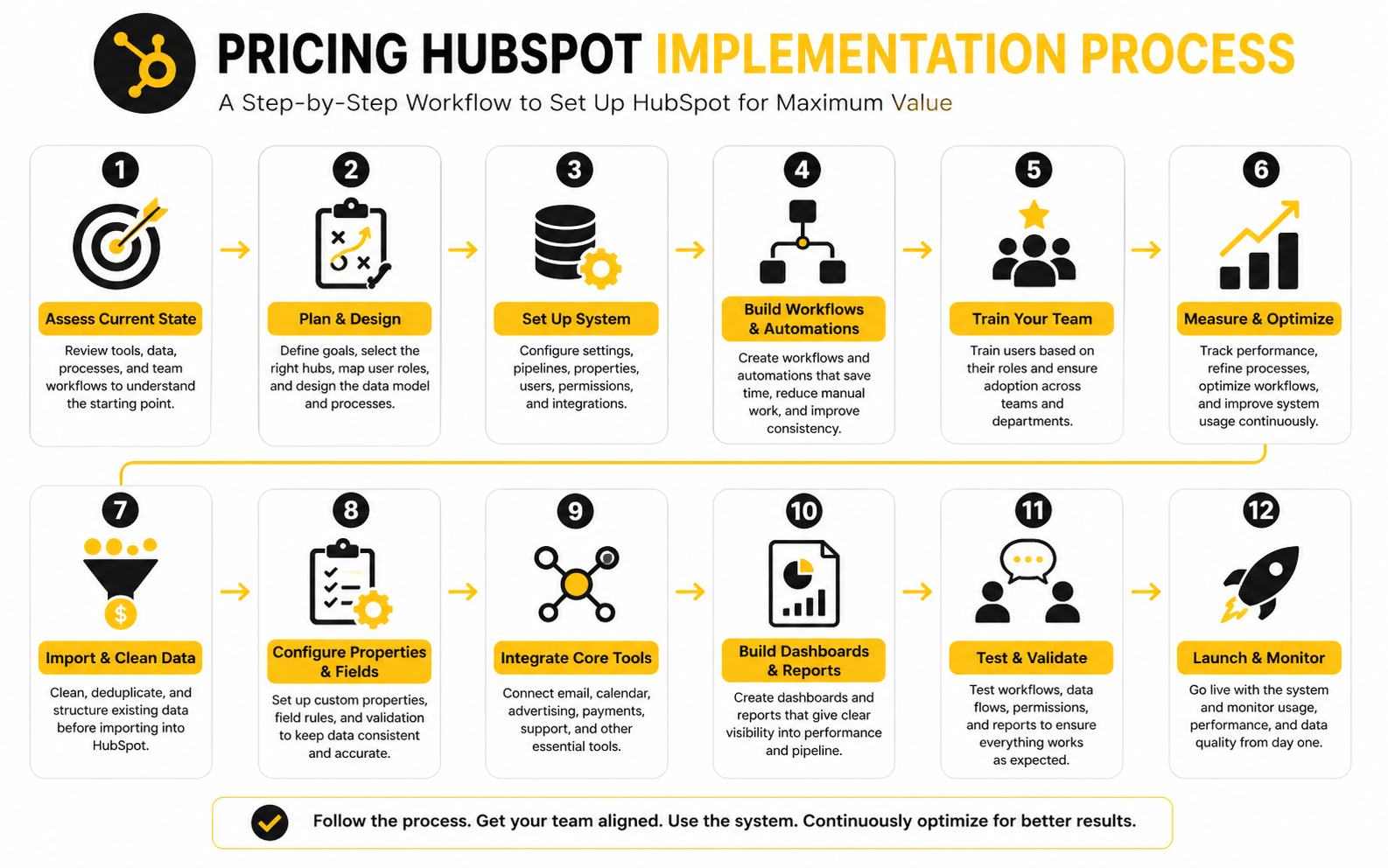
The Implementation Checklist
Before you buy or upgrade, define the implementation scope in plain language. This avoids the classic problem where everyone agrees HubSpot is powerful, but nobody agrees what the first version should actually do. The first build should be specific enough to launch, but not so bloated that it takes months to finish.
A practical implementation plan should cover:
- CRM objects and properties
- Lifecycle stages and lead statuses
- Pipeline stages and deal rules
- Contact import and cleanup
- Marketing contact strategy
- Forms, lists, and segmentation
- Email templates and automation
- Sales sequences and task workflows
- Ticket pipelines and service processes
- Dashboards and reporting requirements
- Integrations and data sync rules
- User permissions and seat assignments
- Training and internal documentation
This is where HubSpot becomes either a clean operating system or a messy software subscription. The difference is rarely the tool itself. The difference is the quality of the setup.
Internal Time
Internal time is the hidden cost nobody puts in the first budget. Someone has to make decisions about stages, properties, permissions, naming conventions, routing, reports, data imports, integrations, and handoff rules. If nobody owns those decisions, the project slows down.
A founder-led company might handle this through the founder, one marketer, and one sales lead. A larger company may need RevOps, marketing operations, sales leadership, customer success, IT, and finance involved. The more teams HubSpot touches, the more alignment matters.
Do not treat internal time as free. It may not show up as a software invoice, but it affects launch speed, data quality, and user adoption. If your team cannot dedicate time to implementation, pay for better external support or reduce the project scope.
Add-Ons, Credits, And Usage-Based Costs
HubSpot has also moved further into usage-based pricing through credits and AI-powered features. HubSpot announced that Breeze Customer Agent would be available to Professional and Enterprise customers through HubSpot Credits, which shows how AI usage is becoming part of the pricing conversation. That does not make HubSpot bad; it just means buyers need to understand what is included and what scales with usage.
Add-ons can be useful when they solve a specific problem. The danger is stacking them before the core system is working. If the CRM setup is messy, adding more features usually creates more noise.
Treat every add-on as a business case. What does it replace? What manual work does it remove? What revenue process does it improve? If the answer is vague, wait.
Reporting Add-Ons
Reporting needs can push teams into higher tiers or additional capabilities faster than expected. Basic dashboards are useful, but leadership often wants deeper views: source attribution, funnel conversion, forecast accuracy, campaign influence, ticket performance, and customer lifecycle movement. Those requirements should be defined early.
Good reporting depends on clean inputs. If sales reps skip stages, marketers use inconsistent UTM rules, or support tickets are poorly categorized, no plan tier will magically fix the output. Reporting is only as reliable as the process behind it.
Before upgrading for better reporting, audit what you already track. Then decide whether the limitation is software, data quality, or team behavior. Those are three very different problems.
Integration Costs
Integrations can also affect the real cost of HubSpot. Some connections are simple native integrations. Others require middleware, custom API work, data mapping, error monitoring, and ongoing maintenance. The more systems you connect, the more important ownership becomes.
This is especially true when HubSpot needs to sync with ecommerce, billing, product usage, webinar, ad, support, or data warehouse tools. A bad integration can create duplicates, overwrite important fields, or break reporting. A good integration can make HubSpot far more valuable.
If your business depends on multiple connected tools, budget for integration planning. Do not leave it as a technical afterthought. It is part of pricing HubSpot accurately because broken data eventually costs more than clean setup.
The Real Cost Drivers Behind HubSpot
By this point, the pricing HubSpot conversation should feel less like a pricing-table comparison and more like a business model question. The subscription matters, but the real cost drivers are usage, adoption, data quality, automation depth, reporting expectations, and how many teams depend on the platform. If those pieces are not measured, the company is basically guessing.
The most useful way to look at HubSpot is through performance signals. A cheaper plan that forces manual work, weak reporting, and poor follow-up can be expensive in practice. A higher plan that improves conversion, shortens handoffs, and gives leadership better visibility can be the smarter buy.
Statistics And Data
HubSpot reported more than 258,000 customers across over 135 countries in early 2025, which tells you something important about the category. CRM and customer platforms are no longer niche tools for enterprise teams. They are now standard infrastructure for companies that want cleaner sales, marketing, service, and revenue operations.
But adoption does not automatically mean ROI. A CRM only becomes valuable when people use it consistently and the data is reliable enough to guide decisions. That is why pricing HubSpot should always be tied to measurable business outcomes, not just feature access.
The useful data is not “how many features do we get?” The useful data is “what changed after we implemented the system?” If the platform does not improve speed, visibility, conversion, retention, or operating discipline, the plan is probably too expensive no matter what it costs.
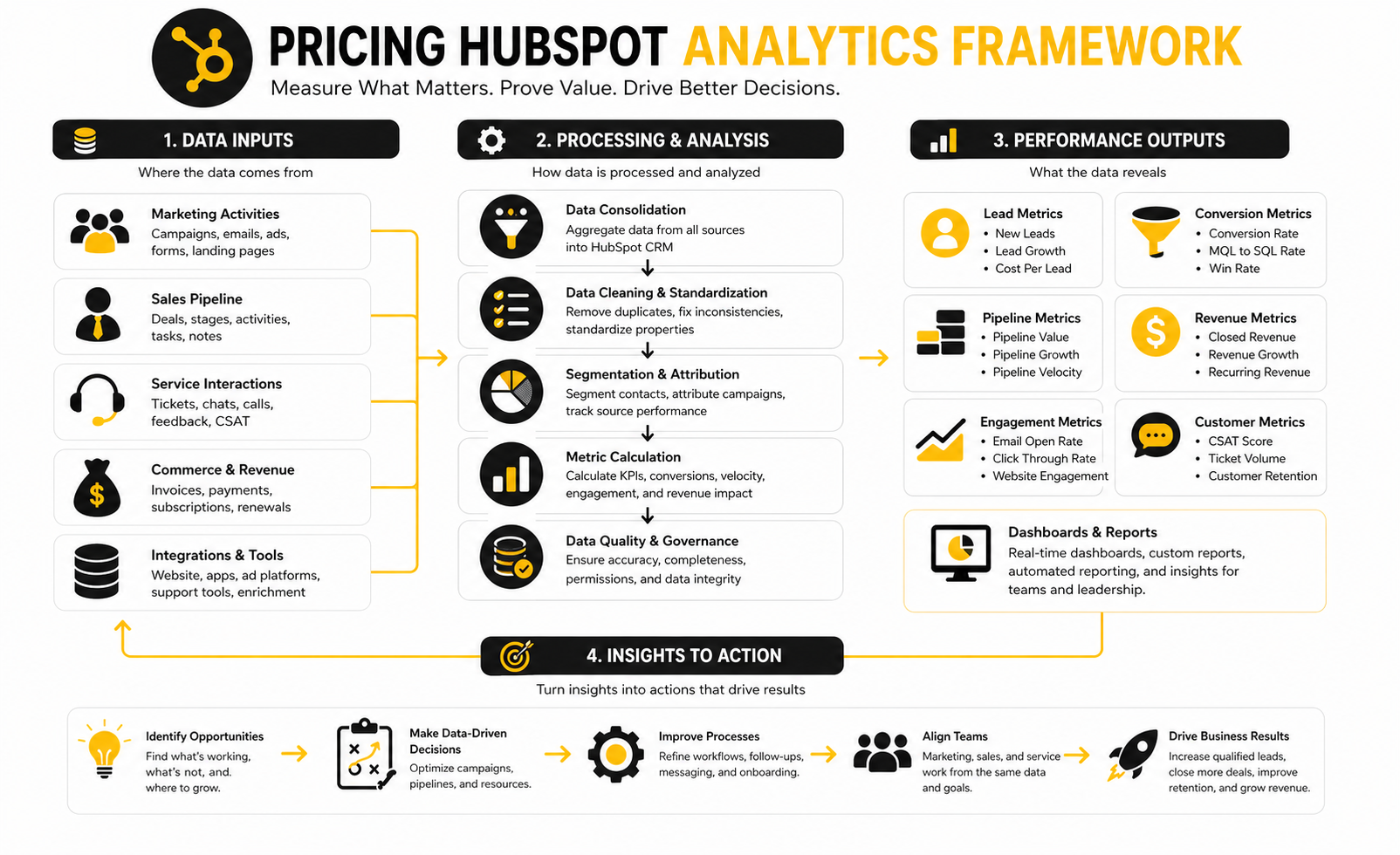
The Metrics That Actually Matter
The first metric is adoption. If users are not logging activity, updating deals, managing tasks, or using the agreed workflow, the data will not be trustworthy. Low adoption makes even strong HubSpot reporting look weak because the reports are built on incomplete behavior.
The second metric is conversion. HubSpot should help you see where leads become opportunities, where opportunities stall, and which channels create real revenue instead of vanity volume. This matters because marketing activity without conversion clarity is just noise with a dashboard.
The third metric is cycle time. If HubSpot helps sales respond faster, move deals cleanly, automate follow-ups, and reduce admin work, the platform is doing something useful. If deals still sit untouched and handoffs still happen in Slack chaos, the pricing tier is not the core problem.
Track these signals before and after implementation:
- Lead response time
- Contact-to-opportunity conversion rate
- Opportunity-to-customer conversion rate
- Average sales cycle length
- Deal stage aging
- Forecast accuracy
- Email engagement by segment
- Workflow completion rate
- Ticket resolution time
- Customer handoff time
- Marketing contact growth
- Paid seat utilization
- Dashboard usage by leadership
How To Interpret HubSpot Benchmarks
Benchmarks are helpful, but only when you use them carefully. A B2B SaaS company, local agency, ecommerce brand, and professional services firm will not have the same sales cycle, conversion rate, or database structure. Comparing raw numbers across different business models can lead to bad decisions.
The right move is to build internal benchmarks first. Measure your current lead response time, conversion rates, sales cycle length, and reporting accuracy before changing plans or adding hubs. Then compare the next 30, 60, and 90 days against your own baseline.
External CRM statistics can support the business case, but they should not replace your own numbers. For example, widely cited CRM research often links CRM usage with gains in sales productivity, forecasting, and revenue performance, but those benefits depend heavily on adoption and process quality. In plain English: the software can help, but it will not rescue a messy operating model by itself.
Seat Utilization
Seat utilization is one of the simplest measurements, and most teams still ignore it. If you are paying for users who barely log in, do not use paid features, or only need visibility, you may be wasting budget. This is especially important after hiring changes, role changes, and team restructures.
Review seat usage monthly during the first quarter after implementation. Look at who is active, who is using paid functionality, and who can be moved to a lighter access level. This is not about micromanaging people; it is about matching cost to actual work.
A practical rule: every paid seat should have a job. Sales seats should support selling activity. Service seats should support customer work. Core seats should support real operational participation. If the job is unclear, the seat probably needs review.
Marketing Contact Efficiency
Marketing contact efficiency tells you whether your database growth is useful or just expensive. A growing list looks good until you realize only a small percentage of contacts are engaged, qualified, or relevant. If every old lead becomes a marketing contact, the bill can rise while performance stays flat.
Measure the percentage of marketing contacts who are engaged, recently active, qualified, or connected to revenue. Then compare that against email performance, lifecycle movement, and opportunity creation. This shows whether your marketing contact tier is supporting growth or carrying dead weight.
The action is simple. Keep useful contacts marketable, suppress contacts that should not receive campaigns, and move irrelevant records into non-marketing status where appropriate. Database hygiene is not glamorous, but it is one of the most direct ways to control HubSpot cost.
Automation Performance
Automation is where HubSpot can create serious leverage, but it can also create invisible waste. A workflow that sends the wrong email, routes leads poorly, updates fields incorrectly, or creates unnecessary tasks can quietly damage the whole system. More automation is not automatically better.
Measure automation by business outcome, not by workflow count. A good workflow should reduce manual effort, improve response speed, keep records cleaner, or move people through the funnel more effectively. If nobody can explain what a workflow improves, it should be paused or rebuilt.
This is where Professional and Enterprise plans need accountability. If a team upgrades mainly for automation, then automation should have measurable impact. Track workflow enrollment, completion, error rates, conversion impact, and time saved.
Reporting Accuracy
Reporting accuracy is the ultimate test of whether your HubSpot setup is working. If leadership does not trust the dashboard, people will rebuild reports in spreadsheets, argue about numbers, and make slower decisions. That defeats one of the main reasons to invest in HubSpot in the first place.
The problem is usually not the dashboard design. It is missing fields, inconsistent lifecycle stages, skipped deal updates, unclear source tracking, or broken integrations. A beautiful report built on messy data is still a messy report.
Audit reporting at the field level. Ask which numbers leadership uses to make decisions, then check whether the underlying data is complete and consistent. If a dashboard does not drive a decision, simplify it.
What The Data Should Make You Do
Data should change behavior. If pricing HubSpot produces more dashboards but no better decisions, the measurement system is too passive. The point is to know what to upgrade, what to clean, what to remove, and where to focus the team.
Strong measurement usually leads to one of five actions. You either reduce unused seats, clean the database, improve adoption, rebuild workflows, or upgrade because the business case is now obvious. That is how HubSpot pricing becomes controlled instead of reactive.
Do not wait for renewal month to do this work. Review the system every month while the implementation is fresh, then quarterly once the team is stable. Small corrections made early are much cheaper than a painful rebuild later.
When The Data Says To Stay On Your Current Plan
Staying on the current plan is the right move when your bottleneck is process, not features. If reps are not updating deals, marketers are not segmenting contacts well, or dashboards are not trusted because the data is incomplete, upgrading will not fix the root cause. You will just pay more for the same messy behavior.
This is especially common with teams that want advanced reporting before they have basic data discipline. They buy more capability, but the inputs are still inconsistent. The better move is to fix lifecycle stages, properties, ownership, source tracking, and user habits first.
Stay on your current plan when the missing value is operational maturity. Once the team is actually using the system well, the next upgrade decision becomes much clearer.
When The Data Says To Upgrade
Upgrade when the team is consistently hitting real platform limits. That might mean manual tasks are slowing revenue work, reporting needs are outgrowing the current tier, permissions are too basic, automation is clearly needed, or multiple teams need stronger governance. In those cases, the higher plan is not a vanity purchase; it removes friction.
The strongest upgrade case includes numbers. Show the manual hours being spent, the missed handoffs, the reporting gaps, the conversion leakage, or the support delays. Then compare the cost of the upgrade against the operational gain.
This is the cleanest way to justify pricing HubSpot internally. You are not arguing that the tool is “better.” You are showing that the current system is now limiting the business.
When The Data Says To Simplify
Sometimes the data says the opposite of what people expect. Instead of upgrading, the right move is to simplify. Too many workflows, too many fields, too many dashboards, too many lists, and too many user permissions can make HubSpot harder to use.
Simplification can improve adoption fast. Remove stale workflows, archive unused dashboards, merge duplicate properties, clean lists, and reduce permissions where they create risk. A cleaner portal often performs better than a bigger one.
This is also where alternatives can make sense for specific teams. If the data shows that the business mainly needs landing pages, checkout flows, and funnel speed, ClickFunnels may be easier. If the business is an agency or local-service operation that needs CRM, automation, pipelines, and client management in one place, GoHighLevel may be worth comparing before expanding HubSpot further.
HubSpot Alternatives And When They Make Sense
HubSpot is strong when you want CRM, marketing, sales, service, content, operations, and reporting connected in one customer platform. That integration is the whole point. But it does not mean HubSpot is automatically the best choice for every business, every team, or every stage.
The smarter move is to compare tools by job, not by brand reputation. A company building a full revenue operations system needs something different from a creator selling one offer, an agency managing local clients, or an ecommerce team testing landing pages. Pricing HubSpot only makes sense when you compare it against the actual work the platform is expected to do.
When HubSpot Is The Right Strategic Choice
HubSpot makes the most sense when your customer journey crosses multiple teams. If marketing generates the lead, sales works the opportunity, service supports the account, and leadership needs one clear view of the funnel, HubSpot’s value becomes much easier to justify. The platform is built for connected customer data, not isolated point solutions.
It also fits companies that care about long-term operating discipline. HubSpot reported 288,706 customers in more than 135 countries, which shows how widely the platform is used across growing businesses. That scale matters because it supports a large partner ecosystem, deep documentation, strong integrations, and a hiring market where many operators already know the tool.
Choose HubSpot when the business needs a durable system. If your team wants better lifecycle tracking, cleaner handoffs, stronger reporting, and a single customer record across departments, HubSpot is often worth the cost. If you only need one narrow function, the math gets less obvious.
When HubSpot May Be Too Much
HubSpot can be too much when the business problem is simple. If you only need a landing page, checkout flow, email newsletter, booking page, or lightweight CRM, a full customer platform may add complexity before it adds value. That is where companies start paying for potential instead of current needs.
This is especially common with early-stage teams. They buy a big system because they want to “set things up properly,” but they have not yet proven their offer, funnel, sales motion, or customer lifecycle. In that situation, HubSpot can become a very polished place to store unfinished strategy.
A useful test is simple: can your team name the workflows, reports, automations, and user roles it needs right now? If not, stay lighter. You can always graduate into HubSpot once the operating model is clearer.
Strategic Tradeoffs To Consider
Every platform choice has tradeoffs. HubSpot gives you integration, usability, and strong go-to-market structure. In exchange, you need to manage seat costs, contact tiers, data quality, and feature boundaries carefully.
A cheaper tool may look better on the invoice, but still cost more in manual work. A more expensive tool may look heavy, but save time if it replaces several disconnected systems. The right answer depends on what your team will actually use.
All-In-One Platform Vs Specialist Tools
The biggest strategic tradeoff is all-in-one versus specialist. HubSpot’s advantage is that CRM, marketing, sales, service, content, and reporting can live close together. That can reduce tool sprawl and make customer data easier to trust.
Specialist tools can be faster for narrow jobs. For example, ClickFunnels can make sense when the main job is building funnels, selling offers, and launching conversion paths quickly. Systeme.io can fit operators who want a simpler all-in-one business platform without a full CRM-style implementation.
The tradeoff is depth versus cohesion. Specialist tools may help one team move faster, but they can also create disconnected data later. HubSpot may take more planning upfront, but it can become cleaner as the business adds teams and reporting needs.
CRM Platform Vs Agency Operating System
Agencies and local-service marketers should be especially careful when evaluating pricing HubSpot. HubSpot can work for agencies, but it is not always the most practical default if the business needs client subaccounts, local lead workflows, reputation tools, messaging, and white-label style delivery. That is a different operating model from a standard internal CRM.
In that case, GoHighLevel may deserve a serious look. It is commonly positioned around agencies, local businesses, funnels, pipelines, messaging, automation, and client management in one environment. If your revenue comes from managing marketing systems for many small clients, that structure may fit better than building everything inside HubSpot.
HubSpot is usually stronger when the agency wants a serious internal revenue platform or serves clients that already use HubSpot. GoHighLevel can be more practical when the agency itself needs the delivery system. Do not compare them as if they solve the exact same problem.
Simplicity Vs Future Scale
Another tradeoff is whether to optimize for today’s simplicity or tomorrow’s scale. A lightweight tool can help you move quickly now. A more robust platform can reduce migration pain later.
The risk is overcorrecting in either direction. Going too simple can create a painful rebuild when the business grows. Going too advanced can slow the team down before the process deserves it.
The practical answer is to buy for the next 12 months, not for an imaginary version of the company. If you know your team will need multi-hub reporting, automation, and cross-functional workflows soon, HubSpot may be the right early investment. If growth is still unproven, keep the stack lean and revisit the decision once the signals are stronger.
Scaling Issues That Change The Math
HubSpot usually feels affordable when the setup is small and focused. The economics change as more teams, more contacts, more workflows, more reports, and more integrations depend on it. That is not a reason to avoid HubSpot; it is a reason to forecast usage honestly.
The most dangerous scaling issue is silent expansion. One extra paid seat here, one larger marketing contact tier there, one new add-on, one messy integration, and suddenly the platform costs more than expected. Nothing feels dramatic in isolation, but the total bill changes.
Multi-Hub Complexity
Using one HubSpot hub is relatively straightforward. Using several hubs together is where strategy matters more. Marketing Hub, Sales Hub, Service Hub, Content Hub, Operations Hub, and Commerce Hub can create a strong connected system, but only when ownership is clear.
Multi-hub setups need rules. Who owns lifecycle stages? Who owns contact properties? Who approves workflows? Who manages integrations? Who decides whether a field is required?
Without ownership, teams start customizing around each other. Marketing creates one naming system, sales creates another, service adds ticket fields without alignment, and reporting gets messy. The more hubs you use, the more important RevOps discipline becomes.
Data Governance
Data governance sounds boring until the dashboard is wrong. Then everyone cares. In HubSpot, governance means deciding how records are created, named, updated, merged, segmented, permissioned, and reported.
This matters even more as AI becomes part of the platform. HubSpot has been expanding Breeze and credit-based AI capabilities, and AI features depend heavily on clean customer data to be useful. If the CRM is full of duplicates, stale fields, inconsistent lifecycle stages, and messy notes, AI will not magically turn that into strategy.
Good governance does not need to be complicated. Start with clear property definitions, required fields, naming conventions, user permissions, duplicate management, and quarterly cleanup. Those basics protect the value of the whole platform.
Renewal Risk
Renewal is where weak planning becomes visible. If the team cannot prove adoption, usage, and business impact, the renewal conversation becomes emotional. People argue about whether HubSpot is “worth it” because nobody tracked the right signals along the way.
Avoid that by building a renewal file from day one. Track paid seats, active users, marketing contact volume, workflow performance, pipeline reporting, support metrics, and manual work removed. Then renewal becomes a business review, not a panic meeting.
This also helps with negotiation and right-sizing. If you know exactly what is used and what is not, you can adjust the plan intelligently. If you do not know, you are negotiating blind.
Expert Guidance For Buying HubSpot
The best HubSpot buying decisions are specific. They define the business problem, the team structure, the first 90-day implementation, the reporting needs, and the renewal success criteria. Vague buying creates vague results.
Do not buy HubSpot because it is popular. Buy it because the platform matches your operating model and the team is ready to use it properly. That is the difference between a useful system and an expensive subscription.
Build A 90-Day Value Plan
Before committing to a higher tier, write a 90-day value plan. This should not be a giant strategy document. It should be a practical list of what must be live, used, and measured by the end of the first quarter.
A strong 90-day plan includes:
- The first hub or bundle being implemented
- The exact teams using HubSpot
- The required paid seats
- The first workflows to launch
- The core dashboards leadership will review
- The records and properties that must be clean
- The integrations needed for version one
- The adoption metrics that prove usage
- The business outcomes that justify the plan
This plan makes pricing HubSpot easier because it turns the conversation from “Can we afford this?” into “What value must this produce?” That is a much better buying conversation.
Do Not Buy Around A Broken Process
HubSpot will not fix a broken sales process, unclear offer, weak follow-up culture, or confused customer handoff by itself. It can make a strong process faster and more visible. It can also make a messy process more obvious.
If your sales stages are unclear, fix those before building dashboards. If lifecycle stages mean different things to different teams, define them before launching automation. If nobody owns data quality, assign ownership before importing thousands of records.
This is the uncomfortable truth: software amplifies operations. Good operations get stronger. Bad operations get louder.
Choose The Smallest Plan That Removes The Real Constraint
The best plan is not always the cheapest plan. It is also not always the most advanced plan. The best plan is the smallest plan that removes the real constraint blocking the business.
If the constraint is basic organization, Free or Starter may be enough. If the constraint is automation and reporting, Professional may be justified. If the constraint is governance, scale, and advanced control, Enterprise may be necessary.
This mindset keeps the decision clean. You are not buying status. You are buying capability that solves a specific operational problem.
Final Buying Framework
The best way to finish a pricing HubSpot decision is to turn everything into a simple buying framework. By now, you should know which hubs matter, which seats are necessary, how marketing contacts affect cost, what implementation will require, and which performance signals should prove the investment. That is the difference between buying software and building a system.
Start with the business constraint. If the constraint is basic organization, do not overbuy. If the constraint is automation, reporting, governance, or multi-team alignment, do not underbuy either. The right plan is the one that removes the constraint without adding unnecessary complexity.
The HubSpot Pricing Decision Checklist
A good HubSpot decision should survive a practical checklist. If you cannot answer these questions clearly, the buying conversation is not finished yet. This is not bureaucracy; it is how you avoid paying for vague expectations.
Use this checklist before buying, upgrading, or renewing:
- Which hub or bundle solves the current business problem?
- Which tier removes the real operational constraint?
- Which users need paid editing access?
- Which users only need visibility?
- How many contacts should actually be marketing contacts?
- What onboarding or implementation work is required?
- Which integrations are essential for version one?
- Which dashboards will leadership actually review?
- What manual work should be reduced in the first 90 days?
- What adoption metrics will prove the team is using the system?
- What business outcome will justify renewal?
The answer should feel specific. “We need better automation” is not specific enough. “We need to route qualified demo requests to the right rep, trigger follow-up tasks, and report response time by source” is specific enough.
The Final System View
A mature HubSpot setup is not just a CRM with extra features. It is an ecosystem of data, people, workflows, content, reporting, and customer interactions. The subscription is only one part of that ecosystem.
When the system is working, marketing knows which campaigns create real pipeline. Sales knows which opportunities need attention. Service knows customer context without asking five people. Leadership sees the business clearly enough to make decisions.
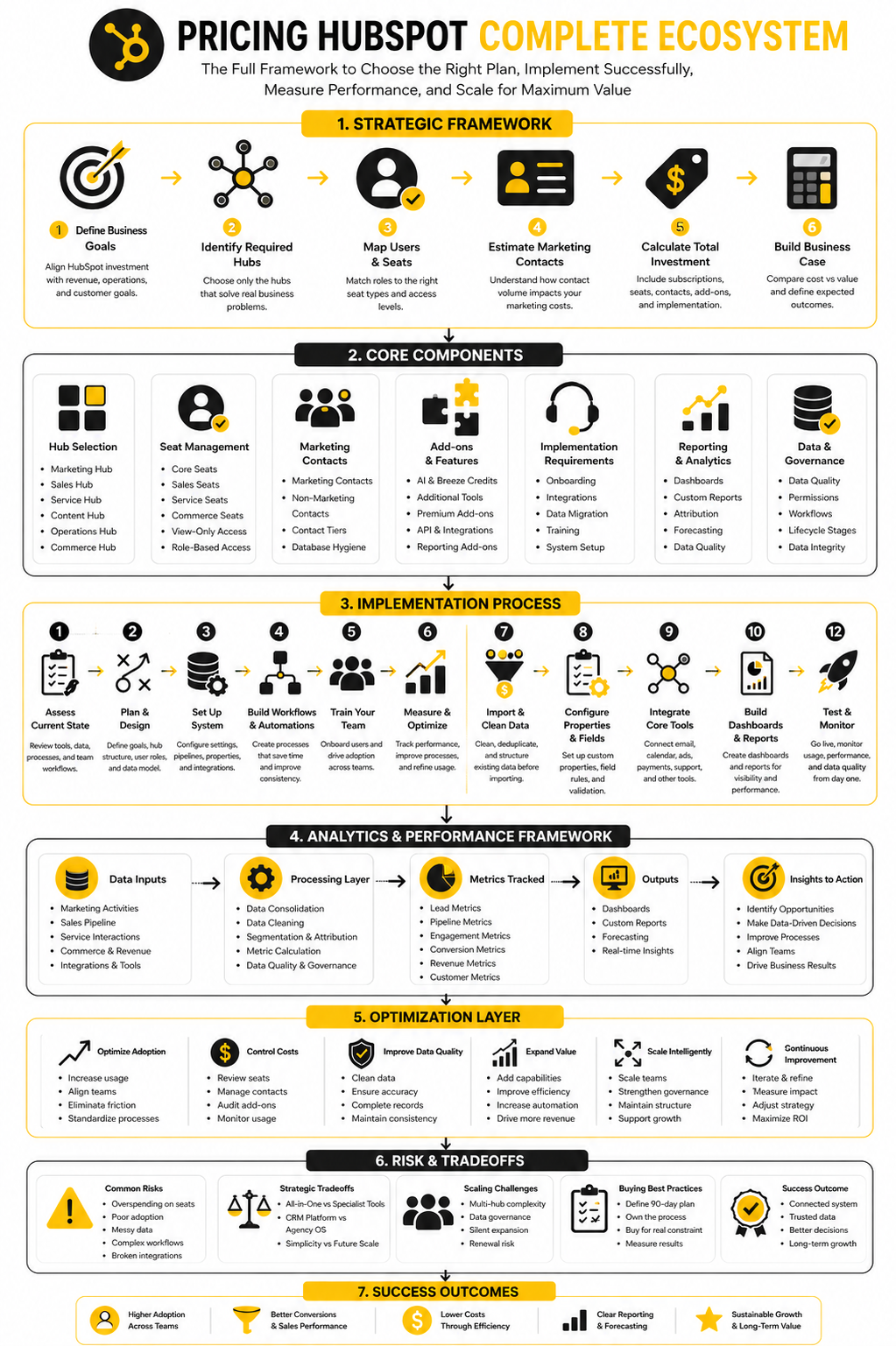
That is the standard to aim for. If HubSpot helps create that system, the cost can make sense. If the platform becomes a pile of unused tools, disconnected workflows, and unclear ownership, pricing HubSpot will always feel expensive.
FAQ - Built For Complete Guide
How much does HubSpot cost?
HubSpot can start with free tools, but paid costs depend on the hubs, tiers, seats, contacts, and add-ons you choose. The official HubSpot pricing pages are the best place to check current plan details because pricing can change. The practical answer is that HubSpot can be inexpensive for basic CRM use and significantly more expensive for multi-hub Professional or Enterprise setups.
Is HubSpot free?
HubSpot offers free CRM and business tools that can work well for simple contact, company, deal, and task management. Free is useful when you need structure but are not ready for advanced automation or reporting. It becomes limiting once your team needs deeper workflows, permissions, campaign tools, forecasting, or service operations.
Why does HubSpot pricing get expensive?
HubSpot pricing gets expensive when more teams, seats, marketing contacts, hubs, and advanced features are added. That is not automatically bad, but it needs to match real business value. The problem is not paying more; the problem is paying more without adoption, clean data, or measurable operational improvement.
What are HubSpot seats?
Seats define what users can access and do inside HubSpot. HubSpot’s documentation on managing seats explains that seat assignment affects access and can affect subscription billing. This is why every user should be mapped to a real role before buying.
What is the difference between a user and a seat?
A user is the person inside the account. A seat is the access level or paid capability assigned to that person. Someone may only need view access, while another person may need sales, service, commerce, or core platform functionality.
What are marketing contacts in HubSpot?
Marketing contacts are contacts you actively market to through HubSpot. They matter because Marketing Hub pricing can scale based on marketing contact volume. This is why list cleanup, suppression, and non-marketing contact strategy should happen before migration.
Should every contact be a marketing contact?
No. Every contact should have a clear reason to be marketable. Old leads, vendors, inactive records, operational contacts, and irrelevant imports should usually be reviewed before being marked as marketing contacts.
Which HubSpot tier is best for small businesses?
Free or Starter can be enough for small businesses that need basic CRM, pipeline, forms, and simple customer management. Professional becomes more relevant when automation, reporting, segmentation, and structured workflows become necessary. Enterprise usually makes sense only when governance, scale, permissions, and advanced control are real requirements.
Is HubSpot better than ClickFunnels?
HubSpot and ClickFunnels solve different problems. HubSpot is stronger when you need CRM-connected marketing, sales, service, reporting, and customer data. ClickFunnels can be better when the main job is building funnels, selling offers, and moving quickly with conversion pages.
Is HubSpot better than GoHighLevel?
HubSpot is usually better for companies building a structured internal revenue platform across marketing, sales, service, content, and operations. GoHighLevel can make more sense for agencies, local-service marketers, and teams that need pipelines, automation, messaging, and client management in one agency-oriented system. The better option depends on the operating model.
What is the biggest hidden cost in HubSpot?
The biggest hidden cost is usually implementation time. A HubSpot subscription does not automatically create clean lifecycle stages, reliable reporting, trained users, useful workflows, or good data. Those things require planning, ownership, and setup.
When should a company upgrade HubSpot?
Upgrade when the current plan is clearly blocking work that matters. That might be automation, reporting, governance, permissions, scale, or cross-team process control. Do not upgrade because the next tier looks impressive; upgrade because the missing capability has a measurable business case.
When should a company not upgrade HubSpot?
Do not upgrade when the real problem is poor adoption, messy data, unclear process, or weak ownership. More features will not fix those issues. Clean the system first, then decide whether the next tier is actually needed.
How should a team control HubSpot costs?
Control costs by reviewing seats, cleaning marketing contacts, simplifying workflows, auditing dashboards, and checking usage before renewal. HubSpot reported Average Subscription Revenue Per Customer of $11,683 in Q4 2025, which is a useful reminder that customer platform spend can grow meaningfully as usage expands. The goal is not to spend as little as possible; it is to make every dollar match real usage and value.
What is the simplest way to choose the right HubSpot plan?
Choose the smallest plan that removes the real constraint. If the constraint is organization, stay simple. If the constraint is automation, reporting, or multi-team alignment, consider Professional. If the constraint is governance, permissions, and scale, Enterprise may be justified.
Work With Professionals
Explore 10K+ Remote Marketing Contracts on MarkeWork.com
Most marketers spend too much time chasing clients, competing on crowded platforms, and losing a percentage of every project to middlemen.
MarkeWork gives you a better way. Browse thousands of remote marketing contracts and connect directly with companies desperate to hire skilled marketers like you, without platform commissions and without unnecessary gatekeepers.
If you're serious about finding better opportunities and keeping 100% of what you earn, explore available contracts and create a profile for free at MarkeWork.com.