

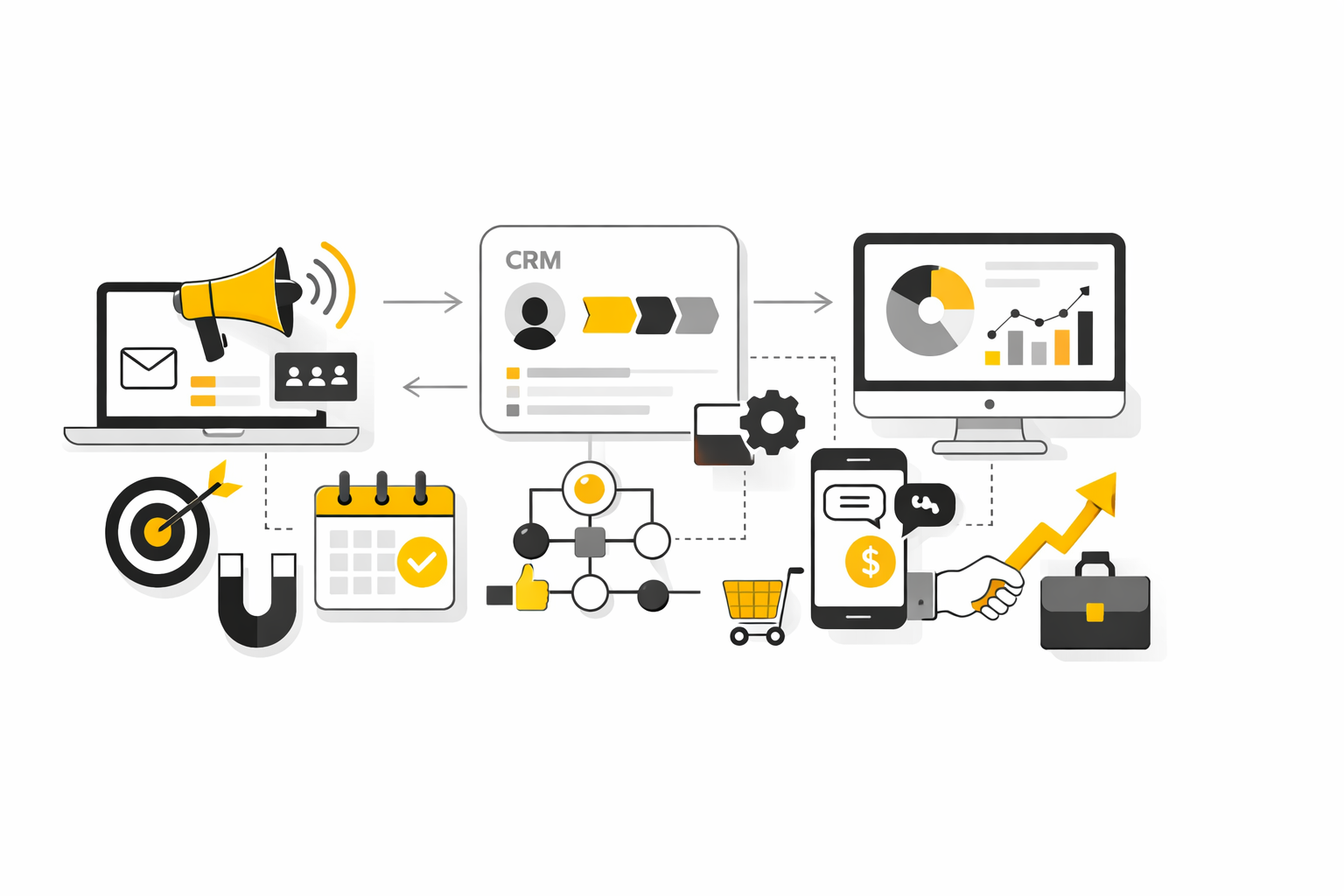
The cleanest way to implement HubSpot Marketing Hub is to treat it like a phased operating system rollout, not a grand launch. That approach matters because most companies do not fail from lack of features. They fail because they turn on too much before the team has agreed on data rules, funnel logic, and ownership.
A phased rollout also matches what the market is telling us. Martech utilization is still only 49% in Gartner’s 2025 survey, which is a polite way of saying a lot of companies are paying for capability they never operationalize. So the goal is not to activate everything. The goal is to make HubSpot Marketing Hub genuinely usable.
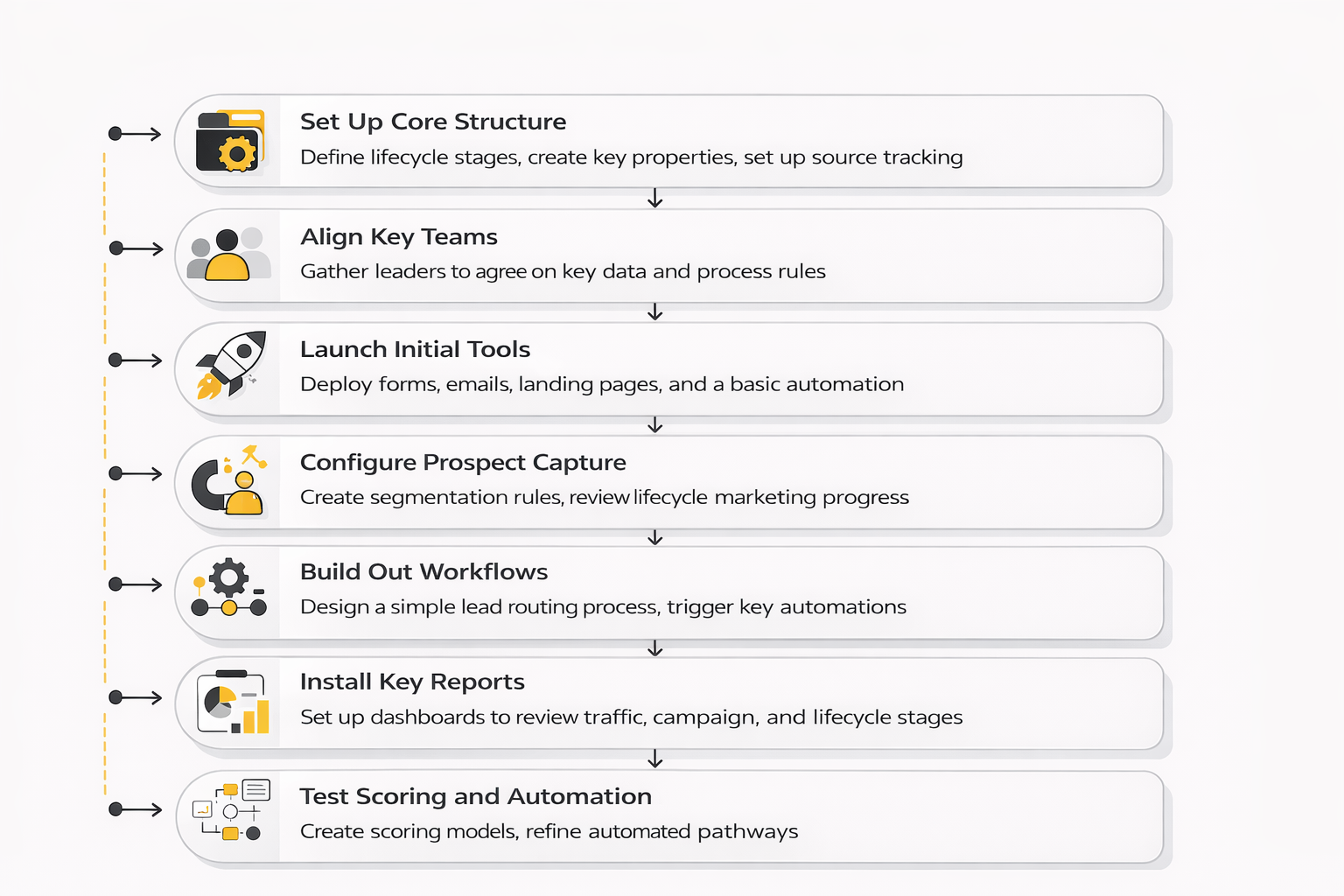
A practical rollout usually looks like this:
- Define lifecycle stages, lead definitions, and handoff rules
- Clean and standardize the CRM structure
- Build core conversion assets and routing workflows
- Launch a small number of priority nurture paths
- Create dashboards tied to pipeline, not vanity metrics
- Expand only after the first system is stable
That sequence works because each step reduces ambiguity for the next one. If you skip straight to campaigns, the platform starts reflecting confusion that already existed in the business. If you build in order, HubSpot Marketing Hub starts reinforcing clarity instead.
Map the Buyer Journey Before You Build Anything
Most implementation pain comes from one basic mistake: teams configure software before they map the real journey a buyer takes. That creates forms with no downstream logic, lifecycle stages no one agrees on, and automations that feel active without being useful. HubSpot Marketing Hub works far better when the journey is drawn first and the tooling is built second.
The mapping does not need to be theatrical. It needs to be honest. You need to know what counts as awareness, evaluation, intent, handoff, pipeline creation, and customer conversion in your business, and you need to know what evidence moves someone from one stage to the next.
This is also where alignment with sales matters more than most marketers expect. Salesforce’s latest data shows 54% of business leaders are not fully confident the data they need is accessible, and that kind of mistrust does not stay inside the data team. It shows up in lead follow-up, qualification debates, and reporting skepticism. If sales and marketing do not trust the same journey map, HubSpot Marketing Hub becomes the place where that disagreement gets documented in public.
Set Governance Early or Pay for It Later
Governance sounds boring right until the platform gets messy. Then it becomes the difference between a system people trust and one they quietly work around. In HubSpot Marketing Hub, governance means naming conventions, required properties, lifecycle stage rules, campaign structure, list logic, permission levels, and clear ownership over changes.
This is not red tape. It is protection against entropy. The moment multiple people can create properties, launch workflows, import contacts, and edit scoring models without guardrails, the platform starts drifting away from reality.
That is especially dangerous now because AI and automation amplify weak systems faster than old manual processes did. Gartner’s 2025 martech research notes that leaders are trying to balance AI adoption with better use of existing technology, and that only works when governance is strong enough to keep data, workflows, and reporting coherent inside the current martech utilization findings. HubSpot Marketing Hub gets more powerful as you scale, but only if the rules scale with it.
Connect the Right Systems, Not Every System
One of the easiest ways to overcomplicate HubSpot Marketing Hub is to integrate everything just because you can. A better rule is to connect only the systems that improve customer context, handoffs, or measurement in a meaningful way. That usually means your website, CRM, sales workflow, meeting flow, ad platforms, and a few critical operational tools.
This selective approach matters because every integration introduces new fields, sync rules, edge cases, and failure points. If the connected system does not improve decision-making or execution, it is just another place where data can get out of sync. Clean architecture almost always beats ambitious architecture.
That is also why some teams keep a focused stack around HubSpot instead of trying to make one tool do absolutely everything. For example, if a brand needs more advanced conversational capture, ManyChat can complement front-end engagement. If the main bottleneck is landing page speed and ecommerce page flexibility, Replo may deserve a place in the stack. The point is not to add tools casually. The point is to add them only when they solve a real constraint better than forcing HubSpot Marketing Hub into a role it does not need to own.
Train for Usage, Not Just Access
A quiet implementation killer is assuming that training means showing people where the buttons are. Real adoption is different. People need to understand why the system is structured the way it is, what they are responsible for, and how their choices affect reporting, routing, and customer experience.
That is where a lot of rollouts stall. The software is live, but the team is improvising. One marketer clones old campaigns with outdated logic. Someone in sales edits records inconsistently. Operations ends up cleaning the same fields every Friday. Technically the platform is implemented, but operationally it is unstable.
The smarter move is role-based training. Marketers need to know campaign structure, property hygiene, and workflow triggers. Sales needs to know what lifecycle stages mean, how lead intelligence is surfaced, and what actions break attribution. Admins need to know what should never be changed casually. HubSpot Marketing Hub becomes much easier to trust when each group knows not just what to do, but what not to do.
Build Reporting Around Decisions
A reporting setup is only useful when it helps someone decide what to change next. That sounds obvious, but too many HubSpot Marketing Hub dashboards are built to impress stakeholders rather than improve execution. They show activity, open rates, and traffic spikes while hiding the questions that actually matter.
A decision-focused reporting model starts with a smaller set of metrics. Which sources create qualified pipeline. Which campaigns convert into meetings or opportunities. Which nurture paths accelerate movement. Which segments stall after first conversion. Those are operating questions, not presentation questions, and they make the platform more valuable immediately.
This is also where implementation discipline pays off. Validity’s 2025 CRM data research found that 37% of CRM users reported losing revenue as a direct consequence of poor data quality, and that should make every reporting conversation more sober. If the data model is weak, no dashboard fixes it. HubSpot Marketing Hub can give you strong visibility, but only when the underlying definitions and inputs are reliable.
Audit the System Before Expanding It
Once the first rollout is live, resist the urge to expand immediately. The better move is to audit what is actually happening inside HubSpot Marketing Hub after a few weeks of real use. That means checking property usage, workflow errors, lead routing, form quality, reporting trust, handoff speed, and whether people are bypassing the intended process.
This is the moment where professional teams separate themselves from enthusiastic teams. Enthusiastic teams add more. Professional teams inspect what already exists and improve the weak points before layering on new complexity. That is how a platform stays clean enough to scale.
A good audit usually reveals a pattern. A few parts of the system are driving clear value, a few are underused, and a few were overbuilt too early. That is not failure. That is exactly what a healthy implementation should reveal. HubSpot Marketing Hub becomes stronger when the business treats early rollout as a learning period, not as a final architecture.
What Good Implementation Actually Looks Like
A strong implementation of HubSpot Marketing Hub does not look flashy from the outside. It looks calm. Leads are routed correctly. Lifecycle stages mean something. Dashboards are trusted. Nurture feels relevant. Sales is not fighting the data. Marketing can launch without breaking reporting every time.
That kind of calm is harder to build than people think. It usually comes from restraint, sequencing, and operational honesty rather than from feature enthusiasm. The companies that get the most from HubSpot Marketing Hub are not always the ones using the most tools. They are the ones using the right tools in the right order with clean rules underneath.
That leads directly to the next question, which is the one most buyers care about before they commit: which plan makes sense, what it actually costs once your needs are real, and how to judge whether the platform is worth the investment.
What the Numbers Actually Tell You
A measurement section about HubSpot Marketing Hub is only useful if it helps you make better decisions. Random benchmark dumping does not do that. What matters is understanding which numbers reveal platform health, which ones reveal campaign health, and which ones only create false confidence.
The first signal is adoption efficiency, because software ROI collapses when teams buy more than they operationalize. Gartner’s latest martech research shows average utilization is still just 49%, which should immediately change how you interpret underperformance inside HubSpot Marketing Hub. If a company is not getting results, the issue may not be that the platform lacks features. The issue may be that half the capability already paid for is sitting idle.
That one number should drive a very practical action. Before adding more tools, more workflows, or more dashboards, audit what your team is actually using and what nobody trusts. In a lot of cases, the fastest performance gain in HubSpot Marketing Hub comes from simplifying the system, cleaning ownership, and getting the existing reporting layer tied to real decisions.
Start With the Right Measurement Hierarchy
The cleanest way to measure HubSpot Marketing Hub is to think in layers. The first layer is data health. The second is funnel movement. The third is campaign efficiency. The fourth is revenue impact. If you mix those together too early, the dashboard looks busy while the diagnosis stays weak.
That hierarchy matters because bad data can make every downstream chart look cleaner than reality. Salesforce found that 54% of business leaders are not fully confident the data they need is accessible, while Validity reported that 37% of CRM users said poor data quality directly caused revenue loss. In plain English, if your CRM structure is sloppy, your attribution confidence is fantasy.
That is why the first dashboard in HubSpot Marketing Hub should not be glamorous. It should tell you whether lifecycle stages are populated correctly, whether source fields are reliable, whether routing is firing properly, and whether the sales team is updating records consistently. If those basics are broken, campaign analytics become performance theater.
The Metrics That Actually Matter
HubSpot Marketing Hub gives you plenty of data, but not every metric deserves equal attention. Traffic matters, but only when it is segmented by source quality and conversion intent. Email engagement matters, but only when it is connected to audience quality, downstream behavior, and actual movement through the funnel.
A practical scorecard usually includes a compact set of operating metrics:
- visitor-to-lead conversion rate
- lead-to-meeting or lead-to-opportunity conversion rate
- pipeline created by source and campaign
- time to first follow-up
- lifecycle progression rate
- influenced and sourced revenue by segment
- email click performance and unsubscribe trend
- form completion rate on priority offers
That list works because each metric leads to a different action. If visitor-to-lead is weak, fix the page, form, offer, or traffic quality. If lead-to-opportunity is weak, revisit qualification logic, routing, or the promise made in the campaign. If pipeline by source is weak, stop celebrating low-cost leads that never become real demand.
How to Read Email Benchmarks Without Fooling Yourself
Email remains one of the most useful channels inside HubSpot Marketing Hub, but it is also one of the easiest places to misread performance. Industry benchmark data from MailerLite shows a 2025 average email open rate of 43.46%, click rate of 2.09%, and click-to-open rate of 6.81%. Those numbers are directionally useful, but they should not become the goal by themselves.
Open rate is less trustworthy than it used to be because privacy protections and mailbox behavior can inflate it. That is why click rate, click-to-open rate, unsubscribe trend, and downstream conversion are better indicators of whether HubSpot Marketing Hub email programs are actually working. A campaign with average opens but strong clicks and qualified responses is healthier than one with inflated opens and no commercial movement.
The action here is simple. Use email metrics to diagnose relevance, not to chase applause. If clicks are weak, the message or offer is off. If unsubscribes rise, segmentation or frequency probably needs work. If clicks look fine but meetings or opportunities do not move, the problem is likely the landing experience, qualification threshold, or handoff after the click.
Measuring Conversion Performance Inside the System
Conversion measurement is where HubSpot Marketing Hub starts separating signal from noise. A page view is not a result. A form fill is not a result either unless the person is relevant, the follow-up works, and the next stage actually happens. That is why a serious measurement setup focuses on progression, not just on first-touch activity.
Broader landing page benchmarks help create context here. Unbounce’s current conversion benchmark research, based on 41,000 landing pages, 464 million pageviews, and 57 million conversions, found a median conversion rate of 6.6% across industries. That number is useful only when you compare like with like, because intent, traffic source, and offer type change the story fast.
For B2B teams using HubSpot Marketing Hub, the more important move is to benchmark by funnel step rather than obsess over one page average. A page can convert well and still create weak pipeline if the offer attracts the wrong audience. A lower-converting page can outperform commercially if it filters for stronger intent. The right action is to compare conversion rate alongside qualification rate and downstream opportunity creation, not in isolation.
Build an Analytics System That Reflects the Funnel
This is where the analytics setup becomes tangible. In HubSpot Marketing Hub, measurement works best when each stage has a clear owner, a clean definition, and a limited set of trusted fields. Once that structure is in place, reporting stops being a collection of charts and starts acting like an operating system.
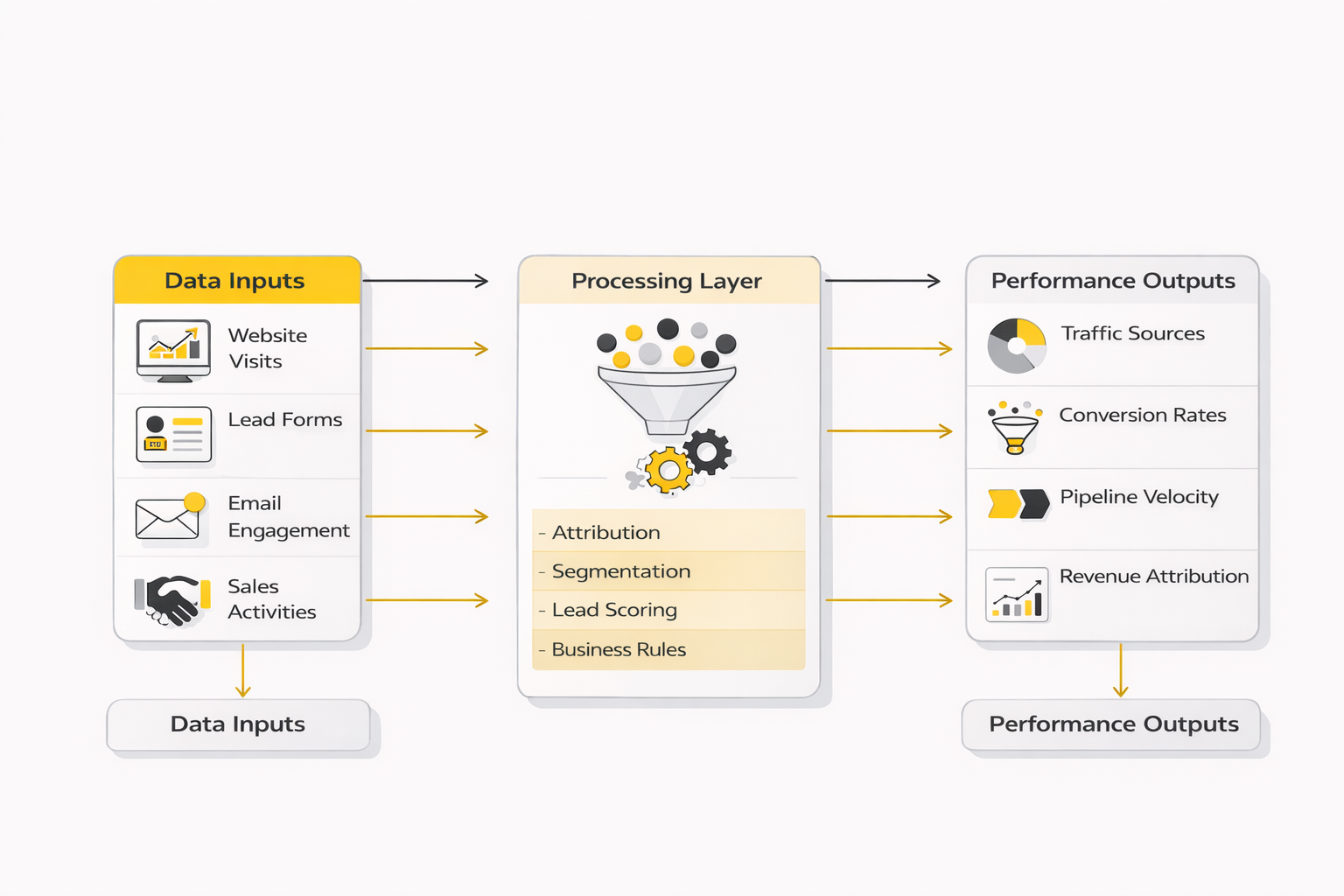
A strong analytics system inside HubSpot Marketing Hub usually answers five questions:
- Which sources create qualified demand, not just traffic
- Which campaigns move contacts to the next lifecycle stage
- Where leads stall or leak after first conversion
- How long handoffs and follow-up take
- Which segments generate the most pipeline and revenue
That framework matters because it connects reporting to action. If paid social drives cheap leads but weak progression, budget allocation should change. If organic search produces fewer leads but stronger opportunity rates, the content and SEO motion may deserve more support. If leads stall between qualification and first sales touch, the issue is not campaign creativity. It is process discipline.
What Data Quality Numbers Mean for HubSpot Marketing Hub
Data quality stats are easy to read and easy to ignore. That is a mistake. Validity’s 2025 research found that 76% of respondents said less than half of their organization’s CRM data is accurate and complete, which should be a major warning sign for any company expecting clean attribution from HubSpot Marketing Hub.
The meaning is straightforward. Incomplete fields distort segmentation. Bad source data ruins campaign reporting. Duplicates pollute scoring, routing, and nurture logic. That means measurement problems are often operational problems wearing an analytics costume.
The action this should drive is not endless dashboard rebuilding. It should drive recurring data audits, tighter field governance, cleaner import rules, and stricter ownership of lifecycle stages and campaign naming. In most cases, the fastest way to improve reporting inside HubSpot Marketing Hub is to improve the system feeding the report.
Why AI Metrics Need More Skepticism, Not Less
AI is now part of the measurement conversation whether teams like it or not. HubSpot’s latest marketing data says 94% of marketers plan to use AI in content creation processes in 2026, and the direction of travel is obvious across the market. But higher AI usage does not automatically mean stronger performance.
That is where interpretation matters. AI can increase content velocity, shorten production time, and help marketers test more ideas. It can also flood HubSpot Marketing Hub with mediocre assets, weak personalization, and noisy automation if the team mistakes volume for leverage. The number to watch is not how much AI content you shipped. It is whether that content improved qualified conversion, speed to insight, or pipeline efficiency.
This is exactly why governance and measurement need to stay close together. If AI-assisted campaigns are entering the system faster, review loops, naming structure, experiment design, and attribution discipline matter more, not less. Otherwise you end up with more dashboards, more content, and less clarity.
Benchmarking HubSpot Marketing Hub the Right Way
Benchmarks are useful when they set questions, not when they become excuses. If your open rate is below a market average, that is not automatically a crisis. If your landing page converts above a broad benchmark, that is not automatically a win. Context decides everything.
A better way to benchmark HubSpot Marketing Hub is to compare three levels at once. First, compare against broad market ranges so you know whether you are wildly off. Second, compare against your own historical trend so you can see whether the system is improving. Third, compare by source, segment, offer type, and lifecycle stage so you can see where the real leverage sits.
That approach keeps the platform honest. It stops the team from hiding behind industry averages and forces attention back to the internal bottlenecks that actually shape growth. Good benchmarks create sharper questions. Great measurement turns those questions into operational decisions.
The Performance Signals Worth Acting On Fast
Some numbers deserve immediate action because they usually point to structural issues rather than minor optimization opportunities. One is a widening gap between lead volume and qualified pipeline. Another is a healthy top-of-funnel channel that suddenly weakens after handoff. Another is email engagement holding steady while meetings and opportunities decline.
Those patterns tell you something important about HubSpot Marketing Hub. The platform may be doing exactly what it was configured to do, while the business no longer likes the outcome. That means the answer is not always more activity. Sometimes it is a rewrite of lead definitions, scoring rules, routing logic, or content-to-offer alignment.
This is the mindset shift that matters. The best analytics setup in HubSpot Marketing Hub is not the one with the most charts. It is the one that makes weak links impossible to ignore. Once that is in place, the final question becomes much easier to answer: what plan level is actually worth paying for, and how do you judge the return without kidding yourself.