

Salesforce Marketing Cloud email sounds like a single tool, but in practice it is a system. Most teams are really talking about Email Studio, Content Builder, data extensions, and Journey Builder working together inside Marketing Cloud Engagement. Salesforce positions that stack for personalized promotional, transactional, and triggered messaging, which is a very different job from simply sending newsletters. Salesforce+3
That matters because email is still one of the hardest channels to replace when it is run well. Litmus found in 2025 that many marketing leaders still report email returns in the 10:1 to 50:1 range, while the DMA’s 2025 benchmarking report put average delivery at 98% and unique click rate at 2.3%. In other words, the upside is still real, but it only shows up when strategy, data, and inbox placement are all working together. Litmus+1
The pressure is higher now because mailbox providers have stopped treating sender quality as optional. Google’s sender guidelines require authentication for all Gmail senders, apply stricter rules to anyone sending more than 5,000 messages a day, and tell bulk senders to keep spam rates below 0.3%, while Yahoo’s sender requirements and RFC 8058 have turned one-click unsubscribe into a practical baseline for marketing mail. That is why Salesforce Marketing Cloud email is not just a creative channel anymore. It is part production engine, part data layer, and part deliverability discipline. Google Nápověda+2

- Why Salesforce Marketing Cloud Email Matters
- The Salesforce Marketing Cloud Email Framework
- Core Components Behind the Channel
- Personalization, Segmentation, and Journey Design
- Professional Implementation Priorities
- Measurement, Deliverability, and Ongoing Optimization
Why Salesforce Marketing Cloud Email Matters
Salesforce Marketing Cloud email matters when email has moved beyond campaign scheduling and become operational infrastructure. Large teams need multiple brands, approval paths, reusable governance, and audience rules that do not fall apart every time a new region or product line comes online. Salesforce built for that reality with features such as business units, roles and permissions, and reusable send classifications. Salesforce+2
The control layer is a big part of the value. Salesforce describes send classifications as a central way to define email job parameters, and its send logging capability stores send-time data beyond standard tracking. That combination is not glamorous, but it becomes extremely important when a compliance team asks what was sent, who it went to, which profile was used, and what data was rendered at the moment of send. Salesforce+2
This is also where the platform starts to separate itself from lighter tools. If your team mainly needs faster deployment, simpler lifecycle email, or agency-style client management, Brevo, HighLevel, or a chat-first acquisition layer like Manychat may be easier to operationalize. But once cross-brand governance, complex segmentation, and enterprise approval logic become non-negotiable, Salesforce Marketing Cloud email starts to justify its weight because the operating model is built for scale, not convenience. Salesforce+2
The Salesforce Marketing Cloud Email Framework
The cleanest way to understand the platform is to stop thinking in screens and start thinking in layers. At a high level, Salesforce Marketing Cloud email runs on a foundation layer for sender trust and governance, a data layer for audiences, a content layer for assets and personalization, an orchestration layer for automated sends, and a measurement layer for testing and reporting. Once you see those layers, the product feels much less like a maze and much more like a system with a clear job for each part. Salesforce+5
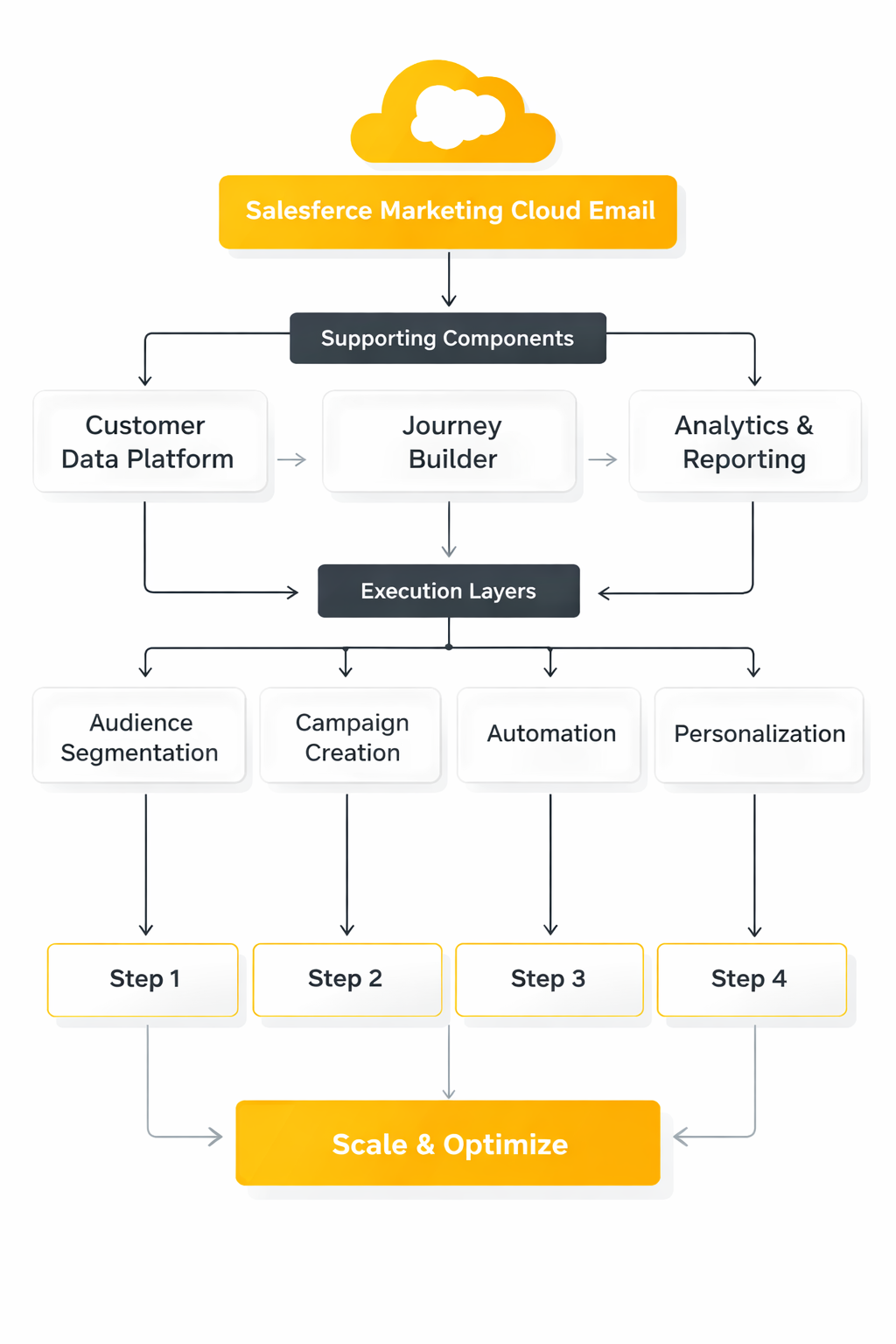
The foundation layer is where most implementation mistakes become expensive. Salesforce’s Sender Authentication Package is built around authentication standards such as SPF and DKIM, and current mailbox rules from Google, Yahoo, and Microsoft all point in the same direction: authenticated mail, visible unsubscribe paths, low complaint rates, and disciplined list hygiene are now the price of entry. This is why strong email teams treat technical setup as part of marketing performance, not as a one-time admin task. Salesforce+3
The data and content layers sit in the middle of the framework. Salesforce defines data extensions as account-level data objects, and sendable data extensions are the engine that turns raw customer records into usable email audiences. On top of that, Content Builder acts as a cross-channel asset repository, while AMPscript variables and personalization strings let teams render content against subscriber, sender, and message context at send time. Developer+2
The orchestration and measurement layers are what turn all of that structure into an actual email program. Journey Builder handles event-driven and responsive campaign flows, A/B testing lets teams compare variants against test audiences, and Einstein Engagement Scoring predicts how likely contacts are to open, click, stay subscribed, or convert. Then the reporting layer closes the loop through tools such as Intelligence Reports for Engagement and the Marketing Performance Dashboard. Salesforce+4
That framework is the key idea for the rest of this article. When Salesforce Marketing Cloud email feels overwhelming, it is usually because teams are looking at features one by one instead of seeing how trust, data, content, orchestration, and measurement depend on each other. The next section moves underneath the interface and breaks down the core components that actually make the channel work.
Core Components Behind the Channel
With the framework in place, the next step is to look at the parts that actually make Salesforce Marketing Cloud email work day to day. This is where a lot of teams either gain leverage or create long-term mess. The platform rewards clean structure, and it punishes improvisation faster than simpler email tools do.
The data layer is the real engine
The first core component is the contact and data model, because every send, split, exclusion, and personalization rule depends on it. In Salesforce, Data Designer in Contact Builder is the place where teams define and relate contact information, while sendable data extensions are the tables that turn that structure into usable audiences. That sounds technical, but the business consequence is simple: if your keys, relationships, and attribute logic are wrong, the email program will stay fragile no matter how polished the templates look.
This is also why experienced teams spend less time arguing about folder structure and more time deciding what a contact actually is. Salesforce’s own guidance around managing data extensions and subscriber identification points back to the same issue: you need a reliable identifier and a model that can survive imports, updates, and triggered sends without creating duplicate logic. In practice, that usually means building the email program around business rules first, not around the last CSV someone happened to upload.
Once that foundation exists, segmentation becomes far more flexible. Salesforce supports audience preparation through SQL Query Activities, which is one of the reasons enterprise teams stay with the platform even when the learning curve is steeper. You are not just pulling a list for one send. You are building a repeatable system that can combine profile data, behavioral data, and suppression logic without manually rebuilding the audience every week.
Content Builder is where scale becomes practical
The second core component is content production. Salesforce describes Content Builder as a cross-channel content management tool, and that wording matters because good teams do not rebuild the same header, footer, legal block, or product module for every campaign. They create reusable pieces once, then govern how those pieces are used across brands, regions, and journeys.
That is where reusable content blocks start saving real time instead of just sounding efficient in a demo. If the same promotional framework appears in multiple sends, it should live as a managed block, not as copy pasted HTML scattered across business units. Salesforce even exposes functions such as ContentBlockByName, which tells you a lot about how the platform expects mature teams to work: modularly, consistently, and with fewer hard-coded one-offs.
A lot of marketers discover here that the quality of the email program depends on upstream assets just as much as it depends on the email editor. If your signup experience, lead capture, or landing pages are slow to update, the downstream email system inherits that drag. That is why some teams pair Marketing Cloud with tools like Fillout for cleaner data capture or Replo for faster landing-page iteration, while keeping Salesforce Marketing Cloud email focused on orchestration and personalization rather than forcing it to solve every content problem by itself.
Journey Builder turns campaigns into behavior
The third core component is orchestration, and this is where Salesforce Marketing Cloud email stops behaving like a batch-send platform. In Journey Builder, every journey starts with an entry source, which means the system is always asking the same practical question: what event, audience, or rule causes someone to enter this flow in the first place? That design pushes teams toward behavioral thinking instead of calendar thinking.
The distinction is important. A weekly campaign calendar can still exist, but real lifecycle email depends on how contacts move through the journey after entry, not just on when the team presses send. Salesforce’s guidance on wait activities and engagement splits makes this very clear, even down to the practical recommendation to leave at least an hour between a message activity and an engagement split so the system has time to register engagement properly.
This is one of the biggest mindset shifts in the whole platform. The strongest Salesforce Marketing Cloud email programs are not built around “send newsletter, then send follow-up.” They are built around “enter on this condition, wait for this signal, split on this behavior, then send the next best message.” That is a very different operating model, and it is why the platform can feel heavy at first but powerful once the logic is clean.
Personalization, Segmentation, and Journey Design
Once the components are in place, the real work begins. This is the part most teams talk about first, but in Salesforce it only works well when the earlier layers are stable. Personalization is not a decoration here. It is the output of a data model, a content model, and a journey model all working together.
Segmentation has to start with usable data
A lot of weak email strategy hides behind the word personalization when the real problem is segmentation. If the source data is messy, incomplete, or contradictory, the team ends up building broad sends with thin variations and calling that sophisticated. Salesforce gives marketers enough control through Contact Builder and SQL Query Activities to do better than that, but only if the segmentation logic is tied to actual business decisions.
That usually means building audiences around lifecycle stage, product ownership, engagement status, geography, consent state, and operational exclusions before getting fancy with creative variations. The teams that do this well are not creating twenty tiny segments because the platform allows it. They are creating the minimum number of segments needed to change the message, the offer, the timing, or the journey path in a meaningful way.
This is also where restraint matters. The Litmus discussion of segmentation and personalization in 2025 highlights that teams still struggle with personalization efficiency, data collection, and measurement, which is exactly why overcomplicated segmentation backfires. If the audience logic becomes impossible to maintain, the program slows down and trust in the data erodes.
Personalization should change the message, not just the greeting
Salesforce supports simple merge fields through personalization strings, and those still matter. Getting the right name, sender details, or subscriber attribute into an email is useful, but it is not where the real lift usually comes from. The bigger win comes when personalization changes what content appears, what offer is shown, or what path the reader enters next.
That is why dynamic logic matters so much in Salesforce Marketing Cloud email. Salesforce supports dynamic content rules, and its AMPscript documentation around conditional logic shows how far teams can go when they stop treating email as a fixed layout. In practical terms, one email can render different product blocks, loyalty messages, regional content, or account-state messaging without forcing the team to duplicate the whole asset.
That approach is more sustainable than building separate emails for every variation. It keeps creative production tighter, reduces version sprawl, and makes testing cleaner later on. It also matches how people actually experience brand communication now: they expect the message to feel relevant, not merely addressed to them by first name.
Journey design should react to signals, not schedules
Good journey design in Salesforce is less about drawing a long canvas and more about deciding which signals matter enough to change the next step. Entry sources, wait activities, and engagement splits are all built around that principle. The platform keeps asking the same useful question: what should happen if this person opens, clicks, ignores, exits, or qualifies for a different path?
That becomes even more powerful when predictive signals enter the system. Salesforce’s Einstein Engagement Scoring is designed to predict likely engagement behavior, which gives teams another layer for prioritization and decisioning. Used well, that does not replace strategy. It sharpens it by helping marketers decide who should get more aggressive follow-up, who should get lighter cadence, and who should probably be suppressed before fatigue turns into complaints.
The key is to design journeys around decisions that the business can defend. If someone clicks a pricing email, that should lead somewhere specific. If someone stops engaging for a meaningful period, the program should respond intentionally instead of continuing to fire the same sends on autopilot. That is the point where Salesforce Marketing Cloud email stops being a sending tool and starts acting like a customer communication system.
Professional Implementation Priorities
A strong Salesforce Marketing Cloud email setup does not begin with the first campaign brief. It begins with the operating model, the sending identity, the subscription rules, and the data flow that will support every campaign after that. Salesforce’s own Email Studio getting started checklist points teams toward setup, authentication, content, preview, and testing before real volume goes out, and that order is worth respecting.
Start with the operating model before campaign production
This is the part teams want to skip, usually because it feels administrative. That is a mistake, because Salesforce separates sender profiles, delivery profiles, and send classifications for a reason. The platform expects you to decide who the message is from, how it is delivered, and what kind of send it is before you start pushing out content at scale.
In practice, that means deciding early which teams can create content, which teams can approve it, which brands need separate rules, and which send types count as commercial versus transactional. When those decisions are made late, the same account turns into a patchwork of one-off exceptions that nobody trusts. When they are made early, Salesforce Marketing Cloud email becomes much easier to scale because the rules live in the system instead of in someone’s memory.
Lock down sender trust and subscription rules early
The technical setup is not a side task anymore. Salesforce’s Sender Authentication Package is designed to support authenticated sending and branded links, while Google’s current email sender guidelines require authentication for all senders and stricter controls for bulk senders, including DMARC for high-volume traffic. Yahoo’s sender best practices and the internet standard in RFC 8058 also reinforce the same operational reality: promotional email needs clear, functioning one-click unsubscribe behavior.
Subscription design matters just as much as domain setup. Salesforce states that publication lists are required to allow subscribers to opt out of sends to data extensions, and it distinguishes those from suppression lists, which keep certain records out of sends entirely. If you get this wrong, you do not just create a messy preference center. You create a deliverability problem, a compliance problem, and eventually a reporting problem because the audience itself is no longer trustworthy.
Build the data pipeline before the first big send
A mature implementation treats audience movement as a process, not as a recurring emergency. Salesforce’s Automation Studio activities include imports, extracts, file transfers, and queries because the platform assumes data will arrive, be transformed, and then be prepared for activation in a controlled sequence. The official guidance for import activities and file transfer activities makes that process explicit.
That sequence matters more than people think. If contacts are loaded inconsistently, keys are mismatched, or consent fields arrive late, the downstream journey logic looks broken even when the real issue is upstream data handling. Good teams validate the data path before they validate the creative path, because the wrong audience with the right email is still a failure.
This is also where it helps to be honest about what Salesforce should and should not own. If you need faster front-end execution for forms or landing pages, tools like Fillout, Replo, or HighLevel can speed up capture and page iteration. The important rule is that whatever happens at the edge, Salesforce Marketing Cloud email should still be the place where final audience logic, send eligibility, and consent-aware segmentation are resolved.
Use a rollout process that keeps the system stable
The best implementations are boring in the right places. They do not rely on heroic late-night fixes, and they do not treat launch day as the first real test of the system. They move through a clear execution sequence so that each layer is proven before the next one depends on it.
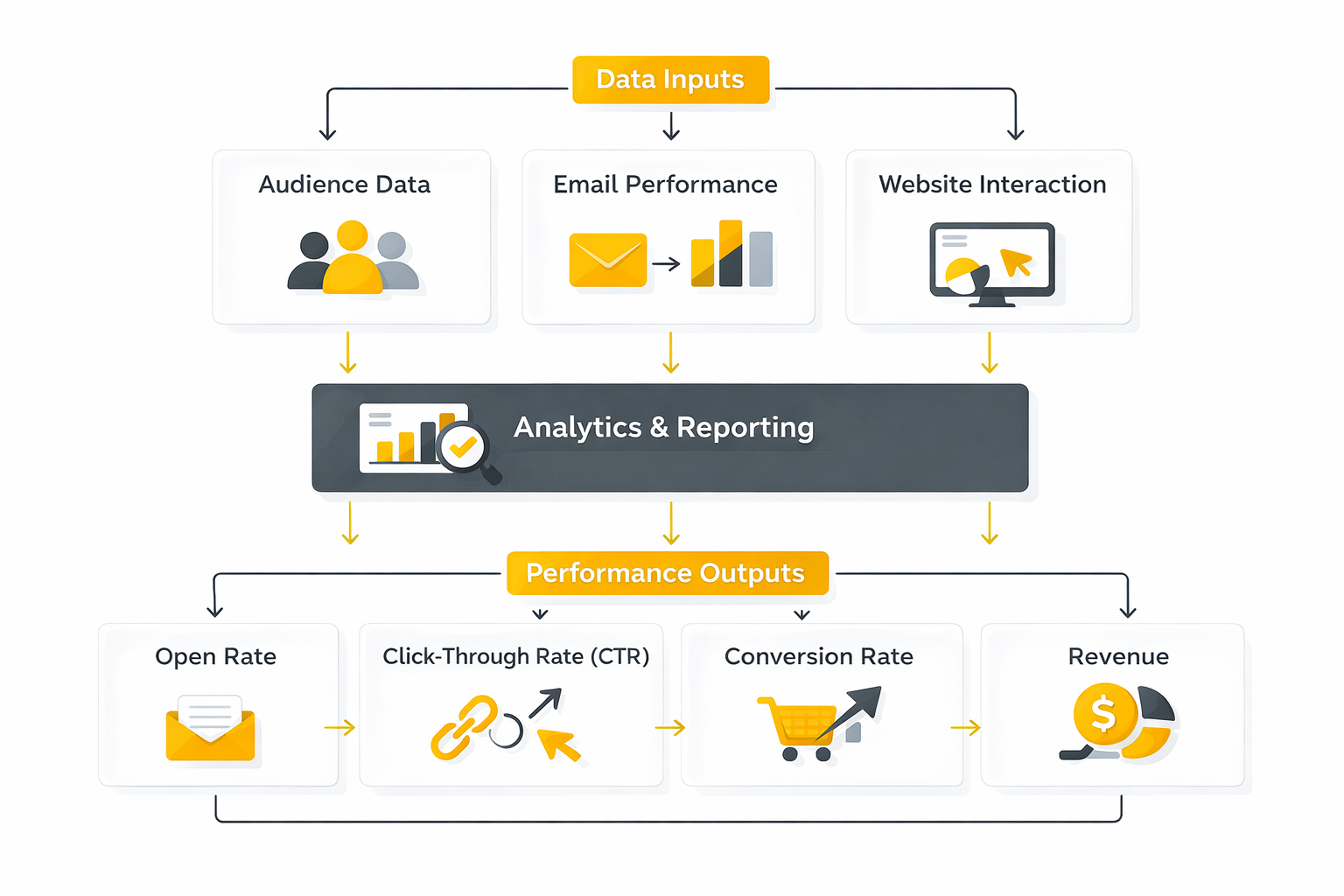
- Set the sending foundation first. Configure authenticated sending, then create the sender profiles, delivery profiles, and send classifications that will govern future sends.
- Define the subscription model before loading production audiences. Map commercial categories to publication lists, decide what belongs in suppression lists, and make sure the unsubscribe path reflects the kind of messages you are actually sending.
- Stand up the data flow next. Use Automation Studio to establish imports, queries, and file handling before the team starts scheduling real sends. That gives you a repeatable way to populate data extensions instead of rebuilding the audience manually each time.
- Build modular content, not isolated emails. Salesforce’s Content Builder approvals exist because enterprise email needs reviewable assets and controlled handoffs. Reusable blocks, approved templates, and clear naming conventions save far more time than they cost.
- Test like the send is real. Use subscriber preview and test send, run Content Detective, and check render behavior with Litmus Email Previews in Content Builder. Previewing content without validating the audience and links is not enough.
- Launch with controlled logic, then version forward. Salesforce recommends in its Journey Builder configuration guidance that you allow at least one hour between a message activity and an engagement split, and it supports journey versions so teams can update journeys without disrupting contacts already in motion. That is the right mindset for launch: stabilize first, then iterate with discipline.
That sequence is not bureaucracy. It is how you keep Salesforce Marketing Cloud email from becoming a beautiful interface sitting on top of unstable rules. When each layer is proven in order, the first production sends are no longer acting as a systems test.
Test, approve, and launch like deliverability can break
A lot of teams still test email as if the only question is whether the design looks right. Salesforce’s testing stack says otherwise. Between preview and test send, Content Detective, and structured content approvals, the platform is clearly built for teams that need to validate data, rendering, and review state before launch.
Journey design needs the same discipline. Salesforce’s Journey Builder configuration recommendations warn against rushing engagement evaluation, and its journey versioning model makes it possible to improve live programs without rewriting history for contacts already inside them. That sounds procedural, but it protects both the customer experience and the internal team from making risky edits under pressure.
Governance should still make sense three months later
The real test of an implementation is not whether it launches. It is whether another marketer, admin, or agency partner can understand it later without reverse-engineering the whole account. Salesforce gives teams enough structure through approvals, send classifications, publication lists, and journey versions to make that possible, but the team still has to use those controls consistently.
That is why professional implementation is less about clever hacks and more about clean habits. Naming standards, role clarity, documented audience logic, reusable assets, and controlled change management do not make the work exciting, but they make it durable. Once that foundation is live, the next question is no longer how to launch Salesforce Marketing Cloud email safely, but how to measure what it is really doing in the inbox and improve it without fooling yourself.
Performance Data That Actually Matters
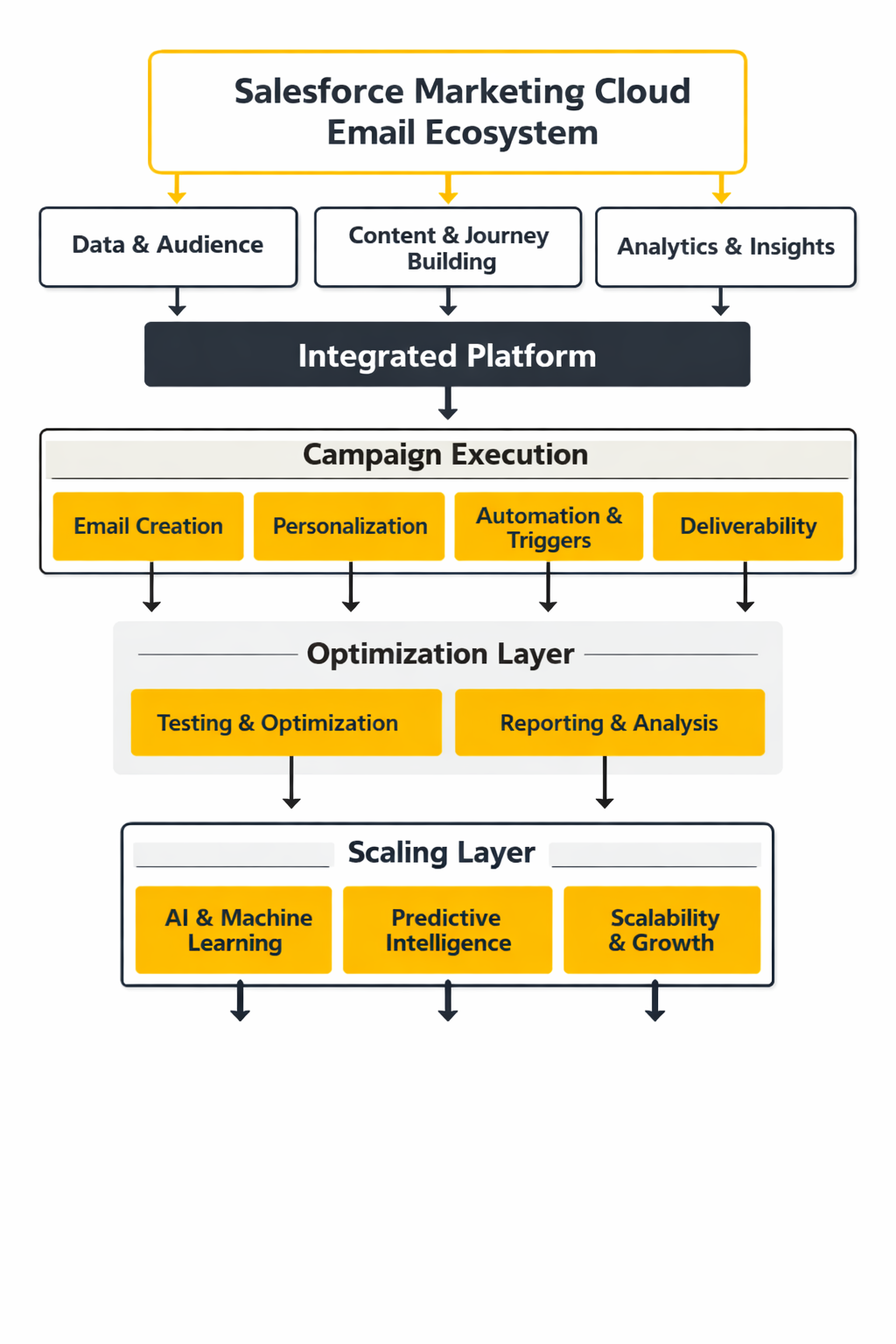
Once Salesforce Marketing Cloud email is live, reporting has to answer three different questions at the same time. First, did the message actually reach a real inbox. Second, did anyone do something meaningful with it. Third, did that engagement move a business result that the team actually cares about. Salesforce already gives you multiple layers for this: Email Studio tracking for send activity, Journey Builder email activity tracking for contact-level opens, clicks, bounces, and unsubscribes, Intelligence Reports for Engagement for campaign-level analysis, and Data Views for raw operational data in Automation Studio. The important part is not having more dashboards. It is knowing which layer should answer which question, and not expecting one screen to do all of it. Salesforce+3
A practical way to read Salesforce Marketing Cloud email performance is to stack the numbers in order. Start with delivery and reputation metrics, then move to engagement metrics, then finish with conversion and revenue metrics. If you reverse that order, you can end up optimizing a campaign that looked weak only because it never reached the inbox consistently in the first place. mailgun.com+1
Delivery metrics tell you whether the program is healthy
This is the layer many teams still misread. A message can show as delivered and still underperform badly at the inbox level, which is why Mailgun found in its 2025 deliverability research that 50.9% of respondents confuse delivery with deliverability. That confusion is expensive, because Salesforce Marketing Cloud email can look operationally fine while inbox placement is already slipping. mailgun.com+1
Google makes the stakes clear. Its current sender rules say bulk senders should keep spam rates below 0.3% in Postmaster Tools, and its FAQ explains that senders above that threshold can lose mitigation eligibility until they remain below 0.3% for seven consecutive days. That means complaint rate is not a soft warning anymore. It is one of the numbers that can determine whether the next campaign gets normal inbox treatment or a much rougher ride. Google Nápověda+1
This is also why bounce metrics deserve more respect than they usually get. In Brevo’s 2025 benchmark dataset of more than 44 billion emails, the overall hard bounce rate was 0.19% and the overall unsubscribe rate was 0.4%, while inbox placement varied sharply by provider, including 88.1% inbox placement at Gmail and 82.5% at Microsoft. That kind of spread matters because a campaign can look acceptable in aggregate while hiding a real domain-specific weakness in the mailbox provider mix that matters most to your audience. brevo.com
Engagement metrics still matter, but some of them are now noisy
Open rate used to be the headline number. It is still useful as a directional signal, but it is no longer reliable enough to stand alone. Apple says Mail Privacy Protection prevents senders from seeing whether a recipient opened an email, and Apple’s own privacy explanation adds that remote content can be downloaded in the background by default, regardless of whether the user engages. Postmark describes the result bluntly: Apple Mail can create false-positive opens by preloading and caching tracking pixels through Apple-hosted proxies. Apple Podpora+2
That does not make opens useless. It changes how you read them. When Mailchimp shows an all-user average open rate of 35.63% and an average click rate of 2.62%, and Brevo shows an overall open rate of 31.22% with a 3.64% click-through rate in an MPP-adjusted benchmark, those numbers are better treated as rough context than as proof that your program is winning or failing. Salesforce itself takes a more grounded view by describing a good CTR as typically falling in the 2% to 5% range, with many promotional emails landing lower than that. Mailchimp+2
The action here is straightforward. If opens look strong but clicks stay weak, the subject line probably did its job and the body did not. If click-through is healthy but conversion is weak, the problem is often the landing experience, the offer, or the audience fit rather than the email itself. If unsubscribes rise toward or beyond the broad benchmark range you see in large datasets, the message is usually too frequent, too broad, or simply too easy for the wrong people to receive. brevo.com+2
Conversion data is where email stops being a vanity channel
This is the point where a lot of Salesforce teams leave value on the table. Opens, clicks, and unsubscribes are diagnostic metrics. They tell you what happened inside the message. They do not, on their own, tell you whether Salesforce Marketing Cloud email created a sale, a booked demo, a product activation, a reorder, or a retention event that mattered to the business.
That is why the best reporting setups treat campaign engagement as the middle of the measurement chain, not the end of it. Intelligence Reports for Engagement is built for campaign-level analysis across email, push, and journeys, but the real win comes when teams connect those campaign signals to downstream business events instead of stopping at click totals. In other words, the email report should not just tell you which campaign got attention. It should tell you which campaign changed behavior. Salesforce+1
This is also where segmentation quality becomes visible. If one audience clicks less but converts more, that segment may actually be healthier than the one with flashy opens and weak intent. That is why serious teams compare performance by journey stage, message type, domain mix, and audience definition rather than asking whether one headline metric went up.
Benchmarks are useful only when they trigger the right action
Benchmarks are supposed to create better questions, not false confidence. A click-through rate in the acceptable range does not automatically mean the email was strong, because a weakly targeted audience can still produce an average-looking result. A higher-than-average open rate does not automatically mean the creative landed, because privacy protections and mailbox behavior can distort the top of the funnel before a human ever acts on the message. postmarkapp.com+2
The practical way to use benchmarks is to tie each signal to a decision. If complaint rate rises, fix targeting, cadence, and consent handling before touching design. If hard bounces climb, clean the source data and check acquisition paths before sending more volume. If clicks are fine but revenue lags, inspect the post-click experience and the commercial logic of the offer rather than rewriting the subject line for the fifth time. Google Nápověda+2
The strongest Salesforce Marketing Cloud email teams do one more thing well: they compare trend lines, not isolated sends. One campaign can be noisy. A month of complaint drift, softening clicks, or weakening domain-level inbox placement is a pattern. And patterns are what tell you whether the system is compounding strength or quietly getting worse. mailgun.com+1
What the numbers should drive next
So the measurement system is not there to make reporting prettier. It is there to tell you where to act. Delivery metrics tell you whether the sending operation is safe, engagement metrics tell you whether the message is relevant, and conversion metrics tell you whether the program is commercially useful.
That distinction matters because each problem has a different fix. Bad inbox placement is a sender-reputation and list-quality issue. Weak clicks are usually a relevance, structure, or offer issue. Weak downstream conversion after a healthy click pattern usually means the friction lives after the email, not inside it. The next part of the article turns that logic into ongoing optimization, so Salesforce Marketing Cloud email improves through testing, deliverability discipline, and repeatable operational habits instead of random campaign tweaks.
Advanced Tradeoffs, Risks, and Scaling Decisions
The hard part of Salesforce Marketing Cloud email is not getting the first journeys live. The hard part is keeping the system clean when more brands, regions, teams, and use cases start piling on. At that stage, the platform stops rewarding raw activity and starts rewarding discipline, because every new journey, audience rule, and exception can quietly become permanent technical debt.
Complexity is not the same as sophistication
One of the most common enterprise mistakes is confusing more logic with better marketing. Salesforce gives teams a lot of flexibility through reusable send classifications, multiple journey paths, and re-entry settings, but that flexibility can create duplicated logic fast when nobody is protecting the architecture. Salesforce’s own Journey Builder training makes the re-entry tradeoff explicit: teams can choose no re-entry, re-entry only after exit, or re-entry anytime, and each option changes how often a single contact can move through the same experience. Salesforce+1
That matters because many performance problems that look like creative issues are really architecture issues. If a contact can qualify for overlapping journeys, receive similar messages from separate business units, or hit multiple sends built from slightly different audience logic, the program gets noisy long before the dashboard makes that obvious. Mature Salesforce Marketing Cloud email teams usually improve results by simplifying entry logic, standardizing shared rules, and removing duplicate paths rather than by adding yet another split activity. Trailhead+1
Frequency control is now a deliverability decision
Cadence used to be treated like a campaign planning question. It is now just as much a sender-reputation question, because mailbox providers are watching spam complaints closely enough that frequency mistakes can become inbox-placement problems very quickly. Google says bulk senders should keep spam rates below 0.3% and aim to stay below 0.1%, while Yahoo requires a functioning list-unsubscribe header and clear unsubscribe handling for marketing mail. Google Nápověda+2
This is exactly why Salesforce keeps investing in timing and frequency intelligence. Salesforce training for Marketing Cloud Engagement says Einstein Send Time Optimization uses historical engagement data to predict the best send time, and it also describes Einstein Engagement Frequency Split as a way to segment contacts based on optimal send frequency. On top of that, Salesforce supports send throttling to control delivery pace when large bursts could create operational or traffic problems. The real lesson is simple: when complaint risk rises, the answer is usually better frequency control, tighter eligibility, and better suppression discipline before it is a new subject line. Salesforce+2
Business units solve governance and create new problems
Business units are one of the reasons Salesforce Marketing Cloud email works for larger organizations in the first place. Salesforce describes business units as a hierarchical way to control access and sharing, which is exactly what multi-brand or multi-region teams need when one account has to support different teams without turning into a free-for-all. Centralized send classifications reinforce that structure by letting teams reuse critical email-job parameters instead of rebuilding them every time. Salesforce+1
But the tradeoff is real. Business units can protect brand boundaries while also fragmenting naming standards, asset reuse, reporting logic, and suppression governance if the parent team does not enforce shared rules. The platform will let you separate access cleanly; it will not automatically save you from creating five versions of the same operating model in five different places. That is why scaling well usually means centralizing taxonomy, approval rules, audience definitions, and reporting conventions even while execution stays distributed. Salesforce+1
Data retention and contact growth can become hidden costs
A lot of teams discover too late that Salesforce Marketing Cloud email does not keep every operational detail available forever in the same place. Salesforce says Data Views retain up to six months of subscriber and journey information, and Intelligence Reports surfaces up to 90 days of historical data when it is first activated. That is useful, but it is not the same thing as a long-term audit trail. Salesforce+1
That is where send logging best practices become more important than they look at first glance. If your team needs durable analysis by audience, asset version, journey state, or compliance context, send logging is part of the professional setup, not an optional extra. The same goes for automation health: Salesforce exposes automation-instance data views so teams can review automation performance, which matters once the account depends on scheduled queries, imports, and nightly refreshes instead of one-off manual work. Salesforce+1
Contact sprawl is another quiet risk. Salesforce defines a contact broadly in Contact Builder, and its current FAQ points teams to the Contacts Counts report for the official billable count, while its deletion guidance makes clear that stopping a sync does not automatically remove a contact from Contacts. If the account keeps absorbing stale or duplicate records without a contact deletion process, the problem is not just hygiene. It can become a cost, privacy, and reporting problem all at once. Salesforce+3
Keep Salesforce heavy where governance matters and light where speed matters
There is a strategic mistake that shows up in a lot of implementations: once a company buys a powerful platform, it tries to force that platform to own every piece of marketing execution. That sounds efficient until the email team is suddenly carrying form ops, microsites, conversational capture, and edge-case workflow requests that have very little to do with governed email delivery. Salesforce’s latest State of Marketing report still points back to the same big themes: unified data strategy, personalization at scale, and smarter use of AI. None of that requires one application to do every job. Salesforce
The better pattern is to let Salesforce Marketing Cloud email own the controlled middle of the system: consent-aware audiences, governed content, orchestrated journeys, shared reporting logic, and durable send operations. Then keep faster edge work lighter where that helps the team move. That is why some operators pair the platform with tools like Fillout for cleaner form workflows, Manychat for chat-led capture, HighLevel for simpler funnel operations, or ScaledMail when the sending operation itself needs extra focus. The point is not to build a bigger stack for the sake of it. The point is to protect Salesforce from being overloaded with jobs that slow down the core email system.
Know when the platform is the right fit
Salesforce Marketing Cloud email is the right fit when the organization needs governed scale more than it needs lightweight simplicity. If you have multiple brands, strict approval requirements, shared data rules, complex journeys, and teams that need boundaries without losing central control, the platform’s structure starts to make sense very quickly. The same is true when email is tied to long-lived lifecycle programs rather than occasional campaigns, because the value compounds when the data model, journey model, and measurement model all stay stable over time. Salesforce+2
It is not always the right fit for lean teams that mainly need fast launches, simpler newsletters, or a lighter operating burden. That is not a criticism of the platform. It is a reminder that enterprise capability comes with enterprise process, and the teams that win with Salesforce Marketing Cloud email are usually the ones that accept that tradeoff early instead of fighting it later. When the fit is right, the system becomes a durable communication engine. When the fit is wrong, it can feel like too much machinery wrapped around work that never needed that much machinery in the first place.
Where Salesforce Marketing Cloud Email Fits in the Wider System
By the time a team reaches maturity with Salesforce Marketing Cloud email, the platform is no longer acting like a stand-alone newsletter tool. It becomes a governed communication layer that sits between customer data, content operations, trigger events, consent rules, and downstream reporting. Salesforce itself positions Marketing Cloud Engagement around connected journeys across marketing, commerce, service, and other touchpoints, and Journey Builder is explicitly designed to react to behavior across multiple channels rather than email alone.
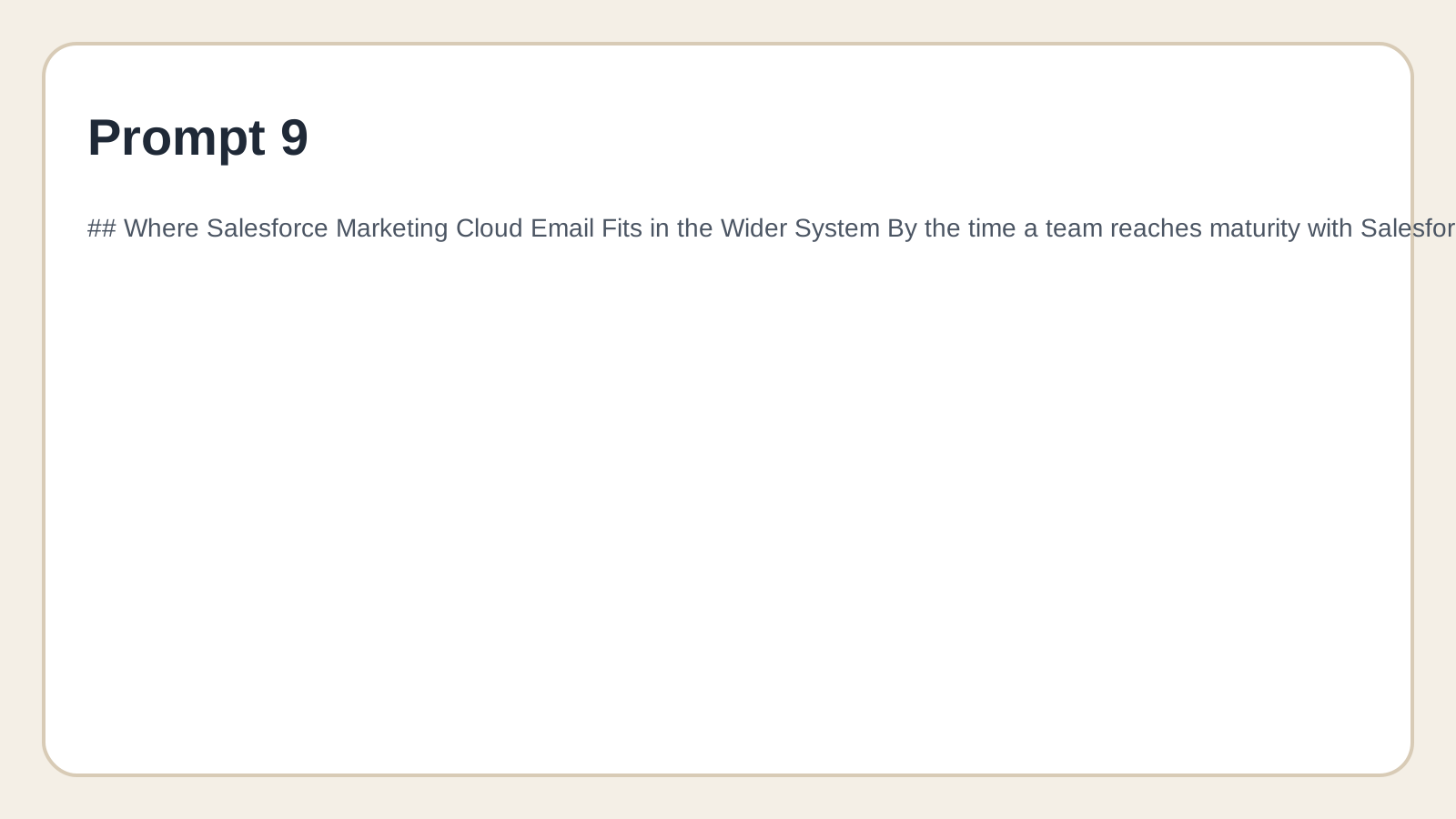
That is the right mental model to finish with. The strongest email programs use Salesforce Marketing Cloud email as the controlled center of the system, not as the place where every single marketing task has to live. Forms, chat capture, sales handoff, scheduling, and lightweight funnel pages may move faster in adjacent tools such as Fillout, Chatbase, Copper, or Cal.com, while Salesforce owns the higher-stakes layer where audience rules, message eligibility, journey logic, and reporting discipline actually need governance.
That final distinction is what makes the platform worth the effort when the fit is right. Salesforce Marketing Cloud email is rarely the lightest option, but it can be one of the most durable when the business needs structure, cross-team control, and customer communication that survives beyond one campaign calendar. Once you see it as part of a larger operating system instead of a template editor with extra features, the platform becomes much easier to evaluate honestly.
FAQ
What does Salesforce Marketing Cloud email actually refer to?
Most teams use the phrase as shorthand for the email capabilities inside Marketing Cloud Engagement, especially Email Studio, Content Builder, Contact Builder, and Journey Builder. In practice, that means the platform is handling far more than a single send screen. It is managing audience data, asset rendering, orchestration logic, and tracking around the email channel.
Is Salesforce Marketing Cloud email the same thing as Salesforce CRM?
No, and that distinction matters more than a lot of new teams expect. Salesforce CRM and related products manage sales, service, and core customer records, while Marketing Cloud Engagement is built to create and deliver personalized journeys across channels. The two can work closely together, but buying one does not magically replace the job of the other.
Is it the same as Account Engagement or other Salesforce marketing products?
No, Salesforce’s marketing stack includes different products for different operating models. Marketing Cloud Engagement is built for multi-channel journey orchestration at scale, while other Salesforce products are aimed at different use cases, teams, and data patterns. That is why teams need to choose based on process complexity and channel needs, not just on the fact that every product carries the Salesforce name.
Can Salesforce Marketing Cloud email handle both promotional and transactional sends?
Yes, but the setup should reflect the difference between those message types. Salesforce supports triggered email interactions in Email Studio, and it also supports transactional sending through the Transactional Messaging API. The important point is that promotional and transactional traffic should be governed intentionally through send classifications, not blended casually just because the platform can technically send both.
Do you really need Sender Authentication Package?
If the program matters, the practical answer is yes. Salesforce says the Sender Authentication Package is used to customize links and image links to match the authenticated domain, and mailbox-provider rules from Google and Yahoo now make authenticated sending a baseline expectation rather than a nice extra. A team can sometimes send without doing this properly, but it is not a serious long-term strategy.
Should every email be built inside Journey Builder?
No, and forcing everything into a journey usually creates more complexity than value. Journey Builder is strongest when the path should react to behavior, timing, or events, not when a simple one-time campaign would do the job just fine. The better question is not “can this be a journey,” but “does this message need branching logic, waiting logic, or event-driven control.”
How much SQL and AMPscript do you really need?
You do not need advanced scripting to get the platform running, but you usually need more of it as the program matures. Salesforce supports SQL Query Activities for audience preparation and AMPscript for personalization and conditional rendering, which means the platform rewards teams that can move beyond surface-level setup. In plain English, a small program can survive with templates and basic segmentation, but a scaled program usually needs technical marketing skills somewhere in the team.
Are open rates still useful in Salesforce Marketing Cloud email?
They are still useful, but they are no longer trustworthy enough to carry the whole story. Apple explains that Mail Privacy Protection can obscure whether a recipient actually opened a message, which means open data is now better treated as directional context than as hard proof of human engagement. Clicks, conversions, complaints, unsubscribes, and domain-level deliverability signals are usually more actionable.
What is the difference between publication lists, suppression lists, and unsubscribes?
These are related controls, but they are not interchangeable. Salesforce explains that subscribers opt out at the publication-list level, while suppression lists are designed to prevent records from receiving sends entirely under defined rules. If a team does not understand that split clearly, it usually ends up with a messy consent model that creates both compliance risk and reporting confusion.
How long does Salesforce Marketing Cloud email keep data available?
The answer depends on which layer of data you mean, and that nuance matters. Salesforce says Data Views can be queried for up to six months of subscriber and journey information, while triggered-send data extensions in triggered email setups can use configurable data retention and default to six months. That is why serious teams usually plan exports, send logging, or downstream warehousing if they need long-term analysis instead of assuming the application UI will preserve everything forever.
Is Salesforce Marketing Cloud email a good fit for small teams?
Sometimes, but not automatically. A small team with high complexity, multiple audiences, strict governance, or serious lifecycle automation can still be a strong fit, especially if email operations are already central to revenue. A small team that mainly needs fast newsletters, lighter automation, or simpler campaign execution may move faster in a lighter platform such as Brevo and grow into Salesforce later.
What is the most common implementation mistake?
The most common mistake is starting with campaigns instead of with operating rules. Teams rush into templates and journeys before settling sender identity, publication strategy, data structure, naming conventions, and approval flow, even though Salesforce’s own Email Studio getting-started guidance pushes setup and validation first. When that sequence is skipped, the account can look productive early and become difficult to trust only a few months later.
What does a healthy long-term setup look like?
A healthy setup is boring in the best way. It uses authenticated sending, clear send classifications, stable audience logic, reusable content blocks, documented automations, and reporting that ties email engagement to real business outcomes instead of vanity metrics alone. The system should still make sense to a new marketer, admin, or agency partner three months later without requiring detective work.
Work With Professionals
Explore 10K+ Remote Marketing Contracts on MarkeWork.com
Most marketers spend too much time chasing clients, competing on crowded platforms, and losing a percentage of every project to middlemen. MarkeWork gives you a better way. Browse thousands of remote marketing contracts and connect directly with companies desperate to hire skilled marketers like you, without platform commissions and without unnecessary gatekeepers.
If you're serious about finding better opportunities and keeping 100% of what you earn, explore available contracts and create a profile for free at MarkeWork.com.